
Anthropic is making Claude easier to talk with.
- Anthropic has started rolling out multilingual support for Claude Voice Mode, with users spotting new language options.
- A new Push-to-talk mode is also appearing for some users, offering an alternative to the existing hands-free conversational experience.
- Anthropic may be working on something bigger for voice interactions, as a mysterious phone-call-style icon has surfaced in the latest iOS build.
We recently reported that Anthropic was preparing a significant upgrade for Claude’s Voice Mode, including support for multiple languages and a new Push-to-talk option. At the time, the evidence pointed to these features still being developed behind the scenes. Now, it looks like at least some of those changes are beginning to reach users.

An X user going by Evinstein recently shared a screenshot of an updated Claude Voice Mode interface and didn’t hold back on praise, claiming the experience is “100 times better than ChatGPT.” That’s obviously a subjective take, but the screenshots do offer one of the clearest looks yet at the incoming changes.
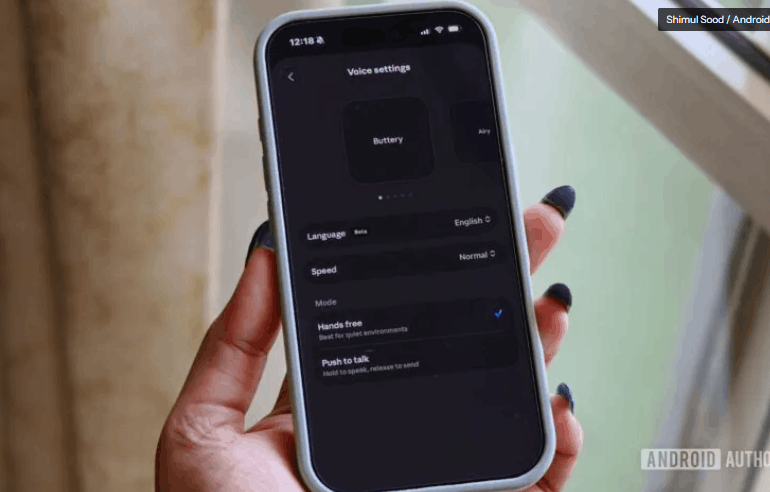
The updated Voice settings show support for additional languages, with Spanish (Latin America) enabled in the example shared online. Users can also switch between two different ways of interacting with Claude. The first is a traditional hands-free mode that allows for a more natural back-and-forth conversation. The second is Push-to-talk, where you press and hold a button while speaking, then release it to send your message.

Evinstein’s post was later quote-tweeted by TestingCatalog, which previously uncovered references to these upgrades before they surfaced publicly. According to TestingCatalog’s post, the multilingual rollout appears to have started on Claude’s mobile apps, though availability remains inconsistent. That means some users may already have access while others are still waiting.
Interestingly, TestingCatalog also spotted a new voice-related icon in a recent iOS build that resembles a phone call button. Anthropic hasn’t explained what this icon does, but it raises questions about whether the company is preparing a more phone-like conversational experience in the future. For now, that’s purely speculation.
The new Voice settings are already live on my iPhone’s Claude app, including the option to choose between Hands-free and Push-to-talk modes. I also found support for a much broader language selection, including German, Portuguese, Chinese, Japanese, Russian, and Ukrainian, among others.
That said, the mysterious phone-call-style option hasn’t appeared on my device yet. Based on what we’re seeing so far, Anthropic might be rolling out these additions gradually rather than flipping the switch for everyone at once.
If you’re curious whether you’ve received the update, open the Claude app, tap your profile picture, then tap settings, and open the Voice section. If the rollout has reached your account, the new options should be waiting there.