
Tag

website builders

Browsing

BY NATASHA ETZEL

If you need a website but you don’t know where to start, read this guide.

Every small business needs a website, but many owners don’t know where to start. Website builders offer an approachable way to create one even for people without the strongest technical skills.

Many platforms also include e-commerce tools, allowing you to sell physical products, services, and digital downloads online.

A polished website instantly builds credibility with potential customers. To help you get there, we’ve narrowed down the best stress-free website builders for small businesses to help you find the right fit.

Our Top Picks

  1. Squarespace
  2. Hostinger
  3. Shopify
  4. Wix
  5. Format

Comparing the Best Small Business Website Builders

Not all website builders are created equal, but many share core features. We’ve outlined the top capabilities of each, so you can find the best fit for your business.

To evaluate each option first-hand, we contacted each company to request a free trial, then explored each platform’s capabilities.

Here’s how the best business website builders compare:

Best Overall: Squarespace

Squarespace is a drag-and-drop website builder with 200 professional website templates. The platform itself is grid-based, so page elements snap into place within a set structure. The visual drag-and-drop editor makes customization easy.

You can build from a template or use the Blueprint AI Builder. With the latter, you’ll be asked to choose a brand personality to shape your site’s tone and voice, pick which pages to include, and select font pairings and a colour palette. From there, you can keep building by following the provided checklist or by prompting Squarespace’s Beacon AI chatbox.
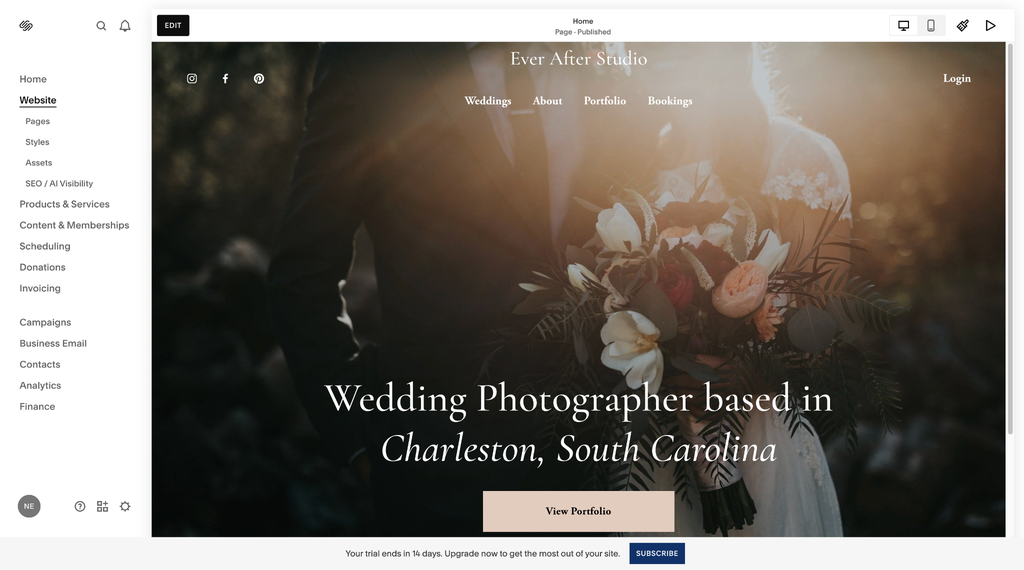
Photo: Created with Squarespace

We found that customizing the look, feel, and functionality of a website was straightforward. All Squarespace websites are responsive, automatically adjusting to screen size. You can fine-tune desktop and mobile views separately by toggling between them. Built-in SEO tools are included.

Squarespace is a solid choice for solopreneurs and service-based businesses needing built-in e-commerce capabilities. You can use its platform to sell products, services, online courses, memberships, and subscriptions. You can also invoice clients and manage proposals within the platform.

Plans range from $19 to $99 per month, billed annually. A 14-day free trial is available.

All plans provide access to Squarespace’s AI Visibility feature to help monitor and improve how your site appears in AI search. However, that requires AI credits; each Squarespace plan includes a set number of AI credits.

Best for E-Commerce Businesses: Shopify

Shopify is ideal for businesses that primarily sell products and services online. The platform is built for e-commerce, making it easy to create and manage an online store. To begin, select from over 1,200 free and paid themes, or prompt Sidekick, Shopify’s AI-powered assistant, to create a custom AI-generated theme.

You can customize elements, including text, images, and menu styles. You can add and manage website pages, process and fulfil customer orders, and manage inventory, all within the platform. Sidekick can help you customize your storefront, create content, generate analytics, and manage orders and inventory.

In our testing, Shopify had a steeper learning curve than other website builders, due to its extensive e-commerce capabilities and settings, though it gets easier to use with time.

Shopify stores are mobile responsive by default. You can use built-in SEO tools to optimize your online store for search engines. It supports thousands of third-party integrations. You can connect email and SMS marketing tools, loyalty program apps, invoicing software, and more.

It’s easy to accept payments with Shopify’s built-in payment gateway, Shopify Payments. Payment processing fees apply and vary by plan. You can also accept payments through a third-party payment provider, though in addition to payment processing fees charged by the provider, Shopify charges an additional transaction fee.

Checkout customization is limited on standard plans. Adding custom fields, upsells, or advanced shipping rules is reserved for Shopify Plus. On a standard plan, you can customize your checkout using paid apps, though that’s an additional cost.

Businesses with brick-and-mortar locations can add Shopify’s advanced point-of-sale (POS) features for a unified online and in-store setup. Shopify offers a 3-day free trial, and you can extend it for $1 per month for up to 3 months if you need extra time to build your store.

Plans range from $29 to $299 per month, billed annually. Shopify also offers an enterprise-tier plan, Shopify Plus, for high-volume sellers starting at $2,300 per month. All plans include unlimited hosting and a free SSL certificate.

Best for Affordability: Hostinger

Hostinger’s drag-and-drop Website Builder is a solid choice for small-business owners seeking an affordable, user-friendly platform. The no-code editor combines visual drag-and-drop capabilities with built-in AI tools. You can start from a pre-made mobile-responsive template, an AI-generated template, or by chatting with Kodee, Hostinger’s AI assistant.

However you begin, customizing your site is straightforward. You can adjust text styles, fonts, colours, images, buttons, contact forms, and more. Hostinger provides AI tools, including a content generator, an image background remover, and a heat map tool that predicts where visitors will look and click on your pages.

Business plan subscribers can add an online store to sell products or services. Payment processing fees vary depending on the payment gateway chosen. All plans include built-in SEO tools, and Business plans add an AI SEO assistant that helps optimize content for AI Search and Generative Engine Optimization (GEO).

Website Builder plans cost $3.99 to $4.99 per month, with a 12-month commitment and upfront payment. A 14-day free trial is available. Hostinger is cheaper than most competitors, but its affordability comes with some drawbacks. The built-in blog tool lacks a native comment system, so to add comment capabilities, you’ll need to embed an external widget. Third-party integrations are also limited. Hostinger natively supports a small selection of integrations, while competitors like Wix have app marketplaces with hundreds of app options.

Hostinger Horizons is another website-building solution. The vibe-coding platform uses AI-generated code to build functional web applications from prompts. Plans range from $6.99 to $39.99 a month with a 12-month commitment billed upfront. AI prompts are credit-based, with credit limitations that vary by plan.

Best for Beginners: Wix

Wix is another popular choice for website builders for small businesses. The Wix Editor drag-and-drop website builder features over 2,000 fully customizable templates. The platform makes it easy to adjust text, images, buttons, menus, forms, and more.

Some website builders with a grid system have structured blocks that elements must snap into. But the Wix Editor is unstructured, so you can drag and drop elements anywhere on the page for greater design flexibility. The platform is intuitive, making it a great fit for beginners.

Wix automatically creates a mobile-friendly version of your site and integrates with popular third-party apps, including email marketing tools, social platforms, and invoicing software. Built-in SEO and GEO tools can help you optimize for search engines and generative engines.
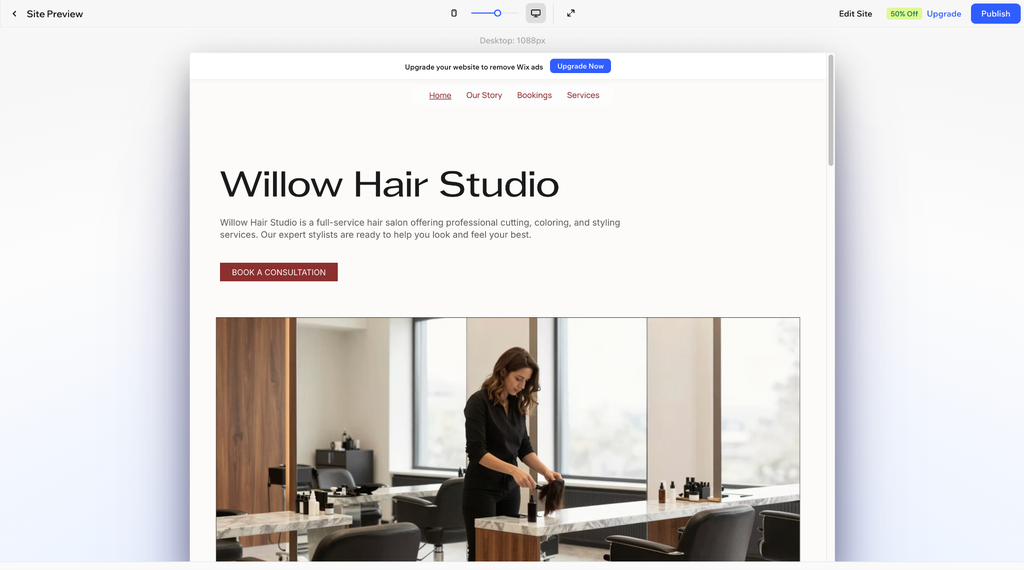
Photo: Created with Wix

Some AI features require credits, including Wix’s AI Marketing Agent for SEO and its AI Custom Agent, a business management tool that automatically creates and runs tasks. Credit limits vary by plan.

Plans range from $17 to $159 per month, billed annually. You can start building a Wix website for free.

For small-business owners who prefer an AI-driven builder, Wix also offers Wix Harmony, an AI-powered website-building tool. The tool generates a website based on the prompts. The more detailed your prompts, the better the results. Wix Harmony is available at no extra cost with all plans.

Best for Portfolio Websites: Format

Format is a portfolio website builder made for creatives. It’s ideal for designers, photographers, and visual artists who want to launch a professional portfolio-based website quickly. All websites created with Format are mobile responsive.

The platform is easy to use—it only takes a few minutes to create a polished website. Format offers nearly 100 customizable themes with drag-and-drop editing, so you can adjust typography, colours, and branding without needing technical skills. ​

When adding pages, you can start with a blank canvas or choose from over 60 customizable page templates. You can also add a blog. SEO tools are built into the platform.​

Pro and Pro Plus plans include hosted video and photo storage, plus the ability to add a commission-free online store. You can sell physical products, services, and digital downloads. To accept payments, you’ll need a PayPal Business or Stripe Business account. Payment transaction fees apply.

All plans include Workflow, Format’s client management suite. It can be used to manage contacts, share password-protected client galleries for proofing, send contracts, and deliver files. Format integrates with Adobe Lightroom, making it easy to publish and update portfolios and client galleries directly from Lightroom. ​Plans cost $14 to $36 per month, or $10 to $26 per month billed annually. All plans include hosting, and Pro and Pro Plus come with a free custom domain for one year. Format offers a 14-day free trial.

Key Features to Look for

When choosing a website builder, look for a platform that offers customizable templates, an easy-to-use drag-and-drop editor, and mobile-responsive designs.

If you plan to sell products or services, prioritize a builder with e-commerce features that fit your company’s needs. Look for a platform that offers built-in payment solutions or integrates with third-party payment processors.

Built-in SEO tools are essential if you want your content to be discovered by search engines. AI-powered tools can speed up the site-building process, while third-party integrations let you connect the marketing, invoicing, and productivity tools you already use.

Compare costs and choose a platform that aligns with your budget. If you get a deal for the first year, make sure you understand what you’ll pay after that.

The Bottom Line

Website builders make it easier for small business owners to create professional sites without coding. No single solution is ideal for every business, so as you compare options, focus on the features and tools that fit how your business actually operates. Also consider that some AI features require credits, so check how many are included in your plan before relying on them.

Why You Can Trust Us

To prepare this guide, we spent hours evaluating each website builder through real-world testing, including creating mock websites on every platform. We assessed capabilities like drag-and-drop editing, template variety, customization, e-commerce features, AI-powered tools, mobile responsiveness, and more.

FAQs

Is it worth making a website for my small business?

Yes. Many customers look for information online before deciding to work with a company, so a polished, professional website can help them feel more comfortable hiring your business.

Do I need coding skills to use a website builder?

No. Many of the best website builders for small businesses feature no-code drag-and-drop editors, user-friendly interfaces, and customization tools, so you can put together a professional-looking site without any technical experience.

What’s included with a website builder?

Most popular website builders offer customizable templates, drag-and-drop editors, AI-powered tools, built-in SEO features, and mobile-responsive designs. Many also include a free custom domain for the first year, or you can connect an existing domain purchased elsewhere. Website builders typically include hosting, so you won’t need to invest in a separate service.

Feature image credit: Adobe Stock

BY NATASHA ETZEL

Sourced from Inc.

Create a website quickly and easily with the best free website builders.

Welcome to our guide to the best free website builders. Creating a website doesn’t always have to mean spending a ton of precious time and money. In this guide, we look at website builders that allow creative professionals to build websites quickly, and without parting with cash.

Of course, there are strings attached with even the best free website builders. They don’t offer the same range of features or as much support as paid services. Website builders also tend to restrict the storage and bandwidth in their free plans to encourage people to upgrade. Free website builders also tend not to come with a top-level domain name. That means you often have to make do with a subdomain, such as yourwebsite.weebly.com, which can look a little unprofessional.

If you are serious about building your own website to further your career in the creative world or to promote your own creative business, we highly recommend opting for one of the paid-for best website builders, at least in the long run. But if you want to test the waters before you make that kind of commitment, this list of free website builders is a good place to start.

The best free website builders today

Why you can trust Creative Bloq

Our expert reviewers spend hours testing and comparing products and services so you can choose the best for you. Find out more about how we test.

A screenshot from Wix, one of the best free website builders

(Image credit: Wix)
The best free website builder overall

Specifications

Storage: 500MB
Bandwidth: 1GB
Subdomain: .wix.com
Advertisements: Yes

Reasons to buy

+Drag-and-drop site builder
+800+ pre-defined templates
+Built-in artificial intelligence 

Reasons to avoid

–Limited storage with free plan
–Displays banner ads

Wix (opens in new tab) offers website development services to individuals and businesses of all sizes. The primary appeal of its website builder is the versatility of the platform, which allows you to pick from a vast collection of pre-built templates and customise the look and feel of your website to find something that suits, whether you’re a construction company or a graphic designer.

Wix uses a drag-and-drop website builder, and it’s one of the most intuitive that we’ve tried. It comes with a collection of over 800 templates to choose from, and all templates can be further customised using the simple drag-and-drop UI.

For those looking for an even simpler option, Wix’s built-in artificial intelligence allows you to create a website by answering a series of questions. While this approach lacks customisation, it’s great if you want to get started super quickly. Wix also has its own free blogging platform, but ecommerce features require a paid subscription.

Sadly the free plan does have some substantial limitations. You’re restricted to using a subdomain, such as yourwebsite.wix.com, you have no more than 500MB storage and 1GB bandwidth. Finally, a free Wix site displays a banner ad on every page.

See our full Wix review for more details.

A screenshot from Weebly, one of the best free website builders

(Image credit: Weebly)

02. Weebly

The best free website builder with ecommerce features

Specifications

Storage: 500MB
Bandwidth: Unmetered
Subdomain: .weebly.com
Advertisements: Yes

Reasons to buy

+Simple drag-and-drop interface
+Non-intrusive advertisements
+Free ecommerce support

Reasons to avoid

–Lacks creative freedom
–Small template library
–Transaction fee on online purchases

As of writing, there are 30 million websites hosted on Weebly (opens in new tab), which is owned by Square, Inc. The drag-and-drop website editor is just as intuitive as Wix’s and can be used to further customise one of the many pre-defined templates. However, it’s somewhat barebones.

The template library is not as extensive as Wix’s, and the editor doesn’t offer the same amount of creative freedom. On the plus side, the simplified interface makes it a great option for beginners. But the biggest advantage of Weebly in our eyes is the free ecommerce features. Users to sell items on their websites even on the free plan.

If that sounds too good to be true, we should stress that there are some limitations. A transaction fee of 3% is applied to every ecommerce purchase made on a free website. Again there’s no top-level domain, although the subdomain name can be customised to your liking. Weebly’s ads are also less intrusive than Wix’s banner, but it does have drawbacks too, the biggest being the lack of creative freedom with the site builder and a missing undo button.

Best free website builders

Strikingly is a simple website builder that requires zero coding knowledge (Image credit: Strikingly)

03. Strikingly

The best free website builder for personal one-pagers

Specifications

Storage: Unmetered (up to 5 pages)
Bandwidth: 5GB
Subdomain: .strikingly.com
Advertisements: Yes

Reasons to buy

+Very simple
+Best 24/7 support on a free plan
+Mobile-first websites

Reasons to avoid

–Lacks creative control
–Best for personal use

Launched in 2012, Strikingly (opens in new tab) is a  simple website builder best used for building single-page websites, such as personal portfolios. Like all the other website builders on this list, Strikingly doesn’t require any knowledge of coding or web design. In fact, it’s probably the easiest website builder currently available.

Strikingly’s approach is mobile-first. As a result, it focuses on delivering responsive websites that load fast and require low resources. Customisation is pretty restricted, although you can change your website template whenever you want, even after making the site live.

The lack of creative control is evident here – if you think that Wix lacks design freedom, strikingly probably won’t be to your taste. The upside of this is that there is practically no learning curve. Other advantages include 5GB monthly bandwidth and 24/7 customer support, even on the free plan.

Your free website can have up to five pages and a simple store with one product, but we don’t recommend using Strikingly to build creative business websites. It’s more suited to building small portfolios and personal websites.

A screenshot from WordPress, one of the Best free website builders

(Image credit: WordPress)
The best free website builder for bloggers

Specifications

Storage: 3GB
Bandwidth: Unmetered
Subdomain: .wordpress.com
Advertisements: Yes

Reasons to buy

+Great for bloggers
+Lots of templates
+Free analytics and SEO

Reasons to avoid

–Not meant for static websites
–Steep learning curve

WordPress.com (opens in new tab) is a self-publishing platform owned by Matt Mullenweg’s Automattic, Inc., run on a modified version of the WordPress CMS. It’s one of the most popular blogging platforms in the world, and rate it highly for hosting a creative portfolio or personal journal.

It offers a slew of blogging-related features, including in-depth analytics, a comment system, social media integration, and SEO. There’s also a good collection of free and paid templates to choose from. The free plan comes with 3GB storage, which is plenty for static websites, but not necessarily enough for media-heavy blogs.

WordPress.com’s site builder isn’t the easiest to use, however. There is a steep learning curve for beginners, although starting a new blog and publishing your first post should be simple enough for most people, and there are lots of resources and helpful posts available online providing advice.

The free plan comes with a .wordpress.com subdomain and a small banner ad distributed on every page of the website. Paid plans offer more storage and a top-level domain, starting at $4/month.

A screenshot from Webnode, one of the best free website builders

(Image credit: Webnode)

05. Webnode

The best free website builder for creative events

Specifications

Storage: 100MB
Bandwidth: Unmetered
Subdomain: .webnode.es
Advertisements: Yes

Reasons to buy

+Simple but colourful
+Non-intrusive ads
+No credit card required

Reasons to avoid

–Quite a basic site builder
–Lacks ecommerce features
–Only 100MB free storage

Webnode (opens in new tab) is a cloud-based website builder from Westcom, a company based in the Czech Republic. It used to be somewhat clunky, but the site editor has been updated and now features a more modern, if basic, interface.

Webnode’s site builder may not be the most creative, but it has responsive templates and allows you to knock up a website quickly. It’s easy to use, and the predefined templates are minimal but bright and colourful, making them good for event websites.

Webnode’s blogging features are quite basic and ecommerce support isn’t available. There’s also little to no integration with third-party apps and services, and no app store. This may enhance simplicity but it ends up seriously restricting one’s creative freedom.

Webnode’s free plan, called Limited, restricts you to a .webnode.com subdomain. There is a storage limit of 100MB on the free plan, which is also ad-supported. The advertisement itself, though, is fairly non-intrusive, with a simple grey banner in the footer of your website. No credit card information is required during sign-up.

A screenshot from Jimdo, one of the best free website builders

(Image credit: Jimdo)

06. Jimdo

Another free website builder to consider with ecommerce support

Specifications

Storage: Unmetered
Bandwidth: Unmetered
Subdomain: .jimdofree.com
Advertisements: Yes

Reasons to buy

+Easy to use
+No ecommerce transaction fee
+Multilingual site builder

Reasons to avoid

–Not too powerful, yet not too easy
–Unprofessional-sounding subdomain
–Maximum five products on free plan

Jimdo (opens in new tab) is a free ecommerce website builder that allows you to create web pages in up to nine languages. Its services suit business websites with a storefront and creative stores looking to establish themselves online.

This website builder walks the path of simplicity, not elegance. It’s easy to use but while the template designs are modern enough they lack any kind of creative freedom. There’s also a limited number of templates, but then that can sometimes be an advantage since it means you’re not overwhelmed with options.

There are plenty of site builders that are both simple and more powerful, but where Jimdo shines is that there’s no transaction fee on ecommerce. You can only sell up to five products at a time with the free plan, but at least you don’t pay commission on that, which makes it an option if you’re testing the waters or only have a limited offer.

The footer ad is non-intrusive, showing up as a small logo and a link instead of an attention-hogging banner. Again, have to use a subdomain with your free plan, and sadly ‘.jimdofree.com’ doesn’t have a very professional-sounding ring to it.

A screenshot from Site123, one of the best free website builders

(Image credit: Site123)

07. Site123

A free website builder with great support

Specifications

Storage: 500MB
Bandwidth: Unmetered
Subdomain: .site123.me
Advertisements: Yes

Reasons to buy

+Excellent support
+Minimum intervention required
+Non-intrusive ads

Reasons to avoid

–Dated template designs
–Lacks creative control 

Founded in 2015, Site123 (opens in new tab) is another website builder that helps designers and developers create websites with little to no fuss, but it lacks the flexibility offered by mainstream options like Wix and Weebly. It doesn’t have any pre-designed templates to choose from. Instead, you must rely on its design assistant, which offers you a choice of 16 industries.

It then asks you to pick a name. Once that’s done, Site123’s own algorithm takes care of the rest. It’s a quick and easy process but the resulting designs are somewhat bland and outdated, with limited customisation options. If you’d like to build a personal website in a rush, Site123’s free plan might be a good idea. For small creative businesses and serious professionals, however, the options here are fairly limited.

The free plan doesn’t come with a top-level domain, so a free website will have to use the subdomain of site123.me. There is no option to connect your free website to a domain that you already own either. The free plan has 500MB of storage, and a non-intrusive banner ad appears at the bottom of every site page. The best aspect of the service is the chat support team, which we’ve found to be quick to respond.

A screenshot from webflow, one of the best free website builders

(Image credit: Webflow)

08. Webflow

A free website builder for designers

Specifications

Storage: Unmetered
Bandwidth: Unmetered
Subdomain: .webflow.io
Advertisements: Yes

Reasons to buy

+Full design control
+Excellent CMS
+Plenty of help material

Reasons to avoid

–Requires advanced knowledge
–Can’t export on free plan

Webflow (opens in new tab) is web builder aimed at developers and designers. While most of the website builders on this list are meant for beginners, Webflow is much more advanced, with ample customisation options but also less hand-holding.

It doesn’t require knowledge of HTML and CSS, but it’s still good to know a bit of coding, as that opens you up to completely new possibilities. There are many interesting features, like drag-and-drop widgets for your website, ways to insert maps and videos, and more.

While the site editor has a steeper learning curve, Webflow also has a huge amount of help material available in its knowledge base, and you also get premium analytics tools. Automatic updates mean that you will never have to worry about maintenance, unlike on a content management system such as WordPress, and Webflow is built on Amazon Web Services, which offers great scalability.

Technically, you can use the website builder free of charge and then export your website to the platform of your liking. However, Webflow also offers content management and hosting services for those who need them. The free plan doesn’t require a credit card, but you do need a paid plan in order to take your website live via the Webflow platform. Otherwise, you can publish your site to webflow.io for free, though it does put a small logo ad at the bottom of your site.

A screenshot from Mozello, one of the best free website builders

(Image credit: Mozello)

09. Mozello

A simple, multilingual website builder

Specifications

Storage: 500 MB
Bandwidth: Unmetered
Subdomain: .mozello.com
Advertisements: Yes

Reasons to buy

+Multilingual websites
+48 templates to choose from

Reasons to avoid

–Not that customisable
–No more than five items per store

Mozello (opens in new tab) is a relatively small website builder with little in the way of creative control. However, its multilingual features set it apart and make it an interesting option for companies spanning different regions of the world.

Most websites that provide multilingual services don’t do so for free, but Mozello is a welcome exception to the rule. You can select from a range of languages and then create separate versions of your website in those languages to serve regional requirements.

There are 48 templates to choose from. However, we found they allow for little to no customisation. The drag-and-drop site editor is somewhat clunky too, and you may not always be able to achieve the perfect layout.

Free websites have to use the .mozello.com subdomain and display a small link to Mozello at the bottom of every page, and the online store can only showcase up to five items at a time. The free plan has 500MB storage, but you can always upgrade to a paid plan for more.