Tag

Apple

Browsing

By .

Apple and Google could be the biggest frenemies in tech. While they both compete like there’s no tomorrow, they also partner on some very specific deals. For instance, Google is paying a ton of money to remain the default search engine on iOS.

As CNBC first reported, according to a Bernstein analyst, Google could pay as much as $3 billion a year just to remain the default option in Safari.

Business Insider also obtained that Bernstein report and shared the thinking behind this number. Bernstein analyst Toni Sacconaghi starts from a previous court document from 2014 that stated that Google had to pay $1 billion every year to remain the default search engine on iOS back in 2014.

But mobile traffic as well as iPhone sales have been growing steadily since then. If you look at Apple’s services revenue, and in particular licensing revenue, as well as Google’s traffic acquisition costs, that number could be around $3 billion right now.

It shows that Google is still highly dependent from Apple. The vast majority of Google’s revenue comes from ads on search result pages. And Apple controls roughly 18 percent of the smartphone market.

As most users update to the latest version of iOS in just a few months, it doesn’t take long to change the default setting on hundreds of millions of iPhones. Google has no choice but to spend a ton of money to acquire this traffic

A few years ago, the iPhone shipped with a built-in YouTube app and Google Maps. When Apple realized that Google was becoming a serious competitor with Android, the company removed the YouTube app from iOS and worked on Apple Maps. Apple isn’t afraid of saying no to Google when it comes to iOS features.

Apple could probably not get as much money from Microsoft Bing, Yahoo Search or DuckDuckGo, but Apple doesn’t really need it anyway as it brings more than $45 billion in revenue per quarter now. It’s all about hurting Google’s bottom line.

As John Gruber noted, Apple is in a strong position in this negotiation. While it’s true that DuckDuckGo and Bing have gotten better over the years, it still lags behind when you’re using those search engines in non-English languages.

This incongruous situation is a great example of asynchronous competition. Apple and Google keep innovating and competing as hard as they can on the smartphone front. But they also partner on other aspects and even pay each other. Business schools will turn this situation into a great case study.

By

Sourced from TechCrunch

By 

Taking a look back at another week of news from Cupertino, this week’s Apple Loop includes an exclusive look at the leaked iPhone 8 designs, Apple’s gamble over replacing Touch ID, the importance of the iPhone 7S, how to find the best MacBook deals, the problematic bugs in iOS 10.3.3, changes in iOS 11’s latest beta, App Store blocking ad blockers, and Apple publishes research papers on machine learning.

Apple Loop is here to remind you of a few of the very many discussions that have happened around Apple over the last seven days (and you can read my weekly digest of Android news here on Forbes).

Exclusive Look At The iPhone 8

Thanks to the leaking of CAD files of the new iPhone 8, along with what we already know about the new handset, it’s possible to refine our expectations of Apple’s flagship smartphone for 2018. Forbes’ Gordon Kelly has been working with Nodus to create a new set of rendered images:

…users can expect Apple to release an iPhone 8 which almost completely eliminates the chunky bezels of previous iPhones. An elongated and enlarged 5.8-inch display will feature a cutout at the top for the front facing camera and sensors and it should mean notifications switch to a new ‘Function Area’ in iOS 11.

…In addition to this Apple will indeed replace the horizontally aligned dual rear camera of the iPhone 7 Plus with a vertically aligned shooter on the iPhone 8. This switch is to support Apple’s big drive into Augmented Reality where horizontally aligned cameras are more effective and the phone is expected to be held in a landscape orientation.

More on the new design images here.

Nodus And Gordon Kelly Ewan Spence

Apple’s new iPhone 8 will looks like this

Replacing Touch ID On The Home Button

One intriguing decision that Apple will have to make for the iPhone 8 is biometric recognition. With the physical home button being promoted sideways to a virtual button on the screen, the existing Touch ID sensor is no longer going to work. What options does Tim Cook have, and why are there issues with each of the three major choices?

I’m tempted to put money on Apple sticking with the under-glass fingerprint reader. It’s a natural next step after the moveable home button was replaced with a pressure sensitive ‘area’ on last year’s iPhone 7, it fits with user expectations, and it’s something the opposition does not have. The reports of lower yields on the part also ties in with the late arrival of the iPhone 8. Rather than a trickle of handsets and lots of individuals disappointed that ‘they did not get one’, everyone has to wait, the iPhone 8’s arrival will be another media event and it can go from ‘zero’ to ‘old everywhere’.

More on Apple’s big problem over identification here on Forbes.

Why Does Apple Want You To Buy The iPhone 7S Instead Of The iPhone 8?

What is the role of the iPhone 7S and the iPhone 7S? I’ve been thinking about this, and the answer might lie in the expected success of the ‘new’ iPhone each year. If Apple wants to use more advanced technology and break the mould then its flagship smartphone needs to be more expensive, more exclusive, and harder to obtain. If that’s the case for the iPhone 8, then the iPhone 7S will be needed to retain market share and pick up the slack.

Apple is not a company known for making dramatic changes to its product line. Rather than an iteration of the regular iPhone line, the iPhone 8 should be seen as a brand new category of iPhone. The iPhone 7S and 7S Plus are the conservative ‘next steps’, with the iPhone 8 representing a new way of thinking (an almost ‘Pro’ way of thinking).

That way is not about maximizing volume or delivering an updated package at the same price point for everyone who wants one. The iPhone 8 will be about luxury, about high price, about fashion statements and new technology. Think of the iPhone 8 should be seen as a luxury sports car, rather than a muscle car for the masses.

More thoughts on supply, technology, and pricing here on Forbes.

Apple iPhone 7 (image: Ewan Spence) Ewan Spence

Apple iPhone 7 (image: Ewan Spence)

Finding The Best MacBook Deal From Apple

With the launch of the Touch Bar enabled MacBook Pro machines, Apple has upped the baseline price of the MacBook portfolio. That does not mean there are no bargains to be found, even from Apple. The quiet attraction of the Apple Store’s refurbished section continues to be illustrated, this week by Antonio Villas-Boas, starting with features and savings:

I wanted to upgrade from my old 15-inch 2012 MacBook Pro, but I didn’t necessarily need the latest 2017 model that comes with a hefty $2,400 price tag. From my knowledge of computer parts, I knew the processor in the 2016 model would easily serve my needs for several years, and I was looking to buy the 2016 model instead of the 2017 one for a lower price tag. But Apple doesn’t sell it online or in its physical locations.

I ended up buying a refurbished 15-inch 2016 MacBook Pro with the sixth-generation Intel Core i7 2.6 GHz processor for $1,950. That’s $450 I saved from buying the equivalent $2,400 2017 model with a seventh-generation Core i7 processor.

More thoughts on the reconditioned option at Business Insider.

Disappointing Final iOS Update For The iPhone 5

Apple has released the sixth notable update to iOS 10. Version 10.3.3. updates the security and fixes a number of bugs, but it still has some bugs that are unlikely to be addressed. This is potentially the last public update to iOS 10. These bugs leave those who won’t be able to update to iOS 11 (such as iPhone 5 users) in an awkward spot, as Gordon Kelly discovers:

Bugs are to be expected in all software, every update brings its share of fixes and faults. But iOS 10.3.3 is widely expected to be the final release of iOS 10 before iOS 11 debuts soon alongside a radically redesigned iPhone 8.

…This means that for the millions of iPhone and iPad owners who won’t be eligible for iOS 11, they are likely to be left with these problems for good. Furthermore there are some isolated reports iOS 10.3.3 has introduced new bugs in Game Centre, Apple Music, Mail and app updates.

In short: the final release before any new generation of iOS needs to be as close to perfect as possible because it is always the last update millions of devices will receive.

More on the iOS 10 issues here on Forbes.

iOS 11 Beta Fixes Annoying iPad Pro Omission

Flicking apps up and away from the task switcher has a long tradition in iOS but the latest version of the operating system threatened to remove that feature on the iPad Pro, much to David Phelan’s dismay. He and countless others can rest easy again, Apple has listened to the feedback and the flick is back:

 The new software saw the departure of the way you could quit open apps on the iPad. Where previously you flicked them off screen to get rid of them, a gesture particularly satisfying when the app was misbehaving, you now had to hold your finger on the screen and then press the little X that appeared. If you’re an iPhone user, the flick still did the trick.

Well, the good news, great news if you’re me, is that Apple has fixed it in the latest, second version of the public beta of iOS 11.

More on the changes to the beta here on Forbes.

Apple's iPad Pro 9.7 (photo: Getty Images) Getty Images

Apple’s iPad Pro 9.7 (photo: Getty Images)

No More New Ad Block Apps For Apps

Apple has tightened the rules for ad blockers in the App Store by enforcing its rule that third-party apps cannot interfere with other third-party apps. That means popular ad block apps such as Adblock and Weblock that address in-app advertising will no longer be allowed to update their offerings. Rather than be happy they haven’t been pulled, perhaps its worth worrying that there’s no way for users to control ads outside of the Safari web browser? Chance Miller reports:

With this policy shift apparently now in place, the only type of adblock apps that are now officially allowed on the App Store are ones that use the Safari Content Blocker. This is a more basic implementation of adblocking that only blocks ads in Safari, as opposed to VPN-based clients that block ads across all applications.

More at 9to5Mac.

And Finally…

Apple has opened up an online space to publish papers on its Machine Learning endeavours. The first major work looks at the use of Machine Learning to improve the realism of the synthetic images used to train the code. Curiously, the examples used involve facial recognition… as if Apple is working on a key system that will use this technology:

An alternative to labelling huge amounts of data is to use synthetic images from a simulator. This is cheap as there is no labeling cost, but the synthetic images may not be realistic enough, resulting in poor generalization on real test images. To help close this performance gap, we’ve developed a method for refining synthetic images to make them look more realistic. We show that training models on these refined images leads to significant improvements in accuracy on various machine learning tasks.

More at Apple, and a hat tip to John Gruber).

Apple Loop brings you seven days worth of highlights every weekend here on Forbes. Don’t forget to follow me so you don’t miss any coverage in the future. Last week’s Apple Loop can be read here, or this week’s edition of Loop’s sister column, Android Circuit, is also available on Forbes.

Follow me on Facebook. Find more of my work at ewanspence.co.uk, on Twitter, and Linked In. You should subscribe to my weekly newsletter of ‘Trivial Posts’.

By 

Sourced from Forbes

By

It’s the end of the line for VPN-based adblockers that target ads in third-party apps (although, according to Apple, these apps were always on shaky ground).

The developer behind the popular adblock apps Adblock and Weblock is now finding that Apple is rejecting app updates because they violate the App Store Developer Guidelines.

other words, using VPN or root certificates to remove ads being displayed in apps is not using the “APIs and frameworks for their intended purposes” and are, as such, a no-no.

Apple has been quick to point out though that contrary to earlier reports, is not a change in policy, but instead just a case of Apple enforcing existing policies.

“This is not a new guideline,” Apple said in a statement. “We have never allowed apps on the App Store that are designed to interfere with the performance or capabilities of other apps. We have always supported advertising as one of the many ways that developers can make money with apps.”

That last part makes a lot of sense for Apple, since many of its developers rely on advertising to monetize apps, and app wants to maintain good relationships with developers (even if that means upsetting those in the adblocker business).

It has also been suggested that part of the reason for Apple suddenly removing these VPN-based adblockers is that they interfere with the ads that Apple itself is displaying in iOS 11’s Apple News app.

Apple went on to say that it would be removing any similar apps it comes across that “may have snuck on to the App Store.”

This means that the only adblocking feature available to developers is the Safari Content Blocker, which can only block web ads being displayed in the Safari browser.

It’s unclear where this leaves apps such as Adblock and Weblock.

By

Sourced from ZDNet

B

Is this the beginning of the end of autoplay?

You know those pesky, annoying videos that automatically start playing when you open up a new web page, causing you to mute your computer and search feverishly for the pause button, or just close the browser altogether?

Or, even worse, those intrusive pop-up ads that block the page and force you to wait for 10 or 15 interminable seconds before you actually get to see the web page at all?

Those may soon be a thing of the past.

Apple on Monday announced a new feature to block autoplay videos on its next iteration of the Safari web browser. The upcoming version will also disable trackers that allow advertisers to monitor user activity for targeted ads. Apple announced the changes four days after Google, the dominant player in Internet advertising, reportedly told publishers about plans to roll out an ad blocker for its Chrome web browser.

“It’s far too common that people encounter annoying, intrusive ads on the web,” Sridhar Ramaswamy, Google’s senior vice president for ads and commerce, wrote in a Google blog post on Thursday.

These moves are as likely to delight consumers as they are to terrify publishers.

From the consumer perspective, autoplay videos and pop-up ads are the bane of the Internet user experience. They interrupt the flow of news consumption and create a nuisance for the reader.

For publishers, including CNN, autoplay videos can be a huge revenue generator. By having videos start automatically, publishers boost their overall video audience numbers by including users who may not actually watch the videos. They then take these jacked-up numbers to advertisers and sell ad space for more money.

Similarly, some advertisers are willing to pay more for pop-up ads because they know they’re advertisements will get it front of the consumer.

With the introduction of autoplay blocking on Safari and ad-blocking on Chrome, publishers could find themselves in a bind. Google alone accounts for more than 40% of the digital advertising market in the United States, according to digital marketing research firm eMarketer.

B

Sourced from CNN Media

By

The brutal logic of online advertising

The internet is an ad-tracking machine. It’s been true for long enough that we rarely talk about it anymore, but it bears repeating. For all the free speech and free information, nearly any site you visit will come with a dozen different tracking cookies, enabling uniquely tailored ads to follow you from site to site. Targeted advertising is still the best way to make money on the internet, so those cookies are everywhere. (The Verge is no exception; that VR room isn’t cheap.) Sites try not to be creepy about it, some harder than others, but the overarching logic is hard to escape. It’s a multibillion-dollar business, and it pays for nearly everything you see online.

Yesterday at WWDC, Apple threw a wrench into that system. Alongside new autoplay blockers, the latest versions of Safari (currently in beta) will have a new tool for blocking third-party ad trackers, aggressively identifying and blocking any cookies used to track users across the web. As Craig Federighi said onstage, “It’s not about blocking ads, but your privacy is protected.”

It’s an important move, particularly for the mobile web, where Safari manages just under 30 percent of browsing sessions. When Safari added the option for ad-blocking with iOS 9, it was a day of reckoning for many web companies — raising hard questions about the future of mobile browsing. This week’s announcement is primed to make a similar splash.

According to Marc Al-Hames, who works on the privacy-focused browser Cliqz, companies are already scrambling to figure out the best way around the new restrictions. “This is a cat-and-mouse game, and it always has been,” Al-Hames says. “Users try out different things to protect themselves, and there’s a multibillion-dollar ad tech industry thinking of ways to circumvent it.”

Surprisingly, Google and Facebook are poised to come out of that game ahead. But to understand why, we need to dig into how the new policy works. Safari has had some version of cookie-blocking for years, but the previous default was to allow cookies “from websites I visit.” The new policy goes further, using machine learning to identify tracking behavior no matter how the cookies are served. In many cases, blocking those cookies outright would break basic functionalities. Instead, Safari puts a strict time limit on how long the cookie can stick around, keeping cookies available for 24 hours after a visit and outright deleting anything older than 30 days.

The crucial distinction is between the first-party sites you’re purposefully visiting and the third-party trackers that come along for the ride. As long as a cookie is associated with a website you’ve visited in the last 24 hours, Safari won’t change much — which gives popular sites like Facebook and the various Google services an easy way around the new restrictions. The systems hit hardest by Safari’s new policy will be third-party systems like Criteo or Adroll, which silently coordinate cookies in the background of thousands of sites. Not coincidentally, Criteo’s stock plummeted in the wake of the announcement.

That’s much less of a problem for Google and Facebook, which already dominate online ads. Most people visit Facebook or a Google service every day, and those users will never be too far outside the 24-hour window. Both services also work as a kind of permanent login, used to access sites like Twitter or WordPress without a separate password. As a result, most users stay logged in to Google and Facebook as long as they’re online. Combine that with omnipresent Like buttons, and you’ve got an easy way to see what people are doing on the web. And as long as you’re visiting Facebook once a day, Safari won’t get in the way of that tracking.

Google and Facebook’s biggest challengers in ad-targeting are telecom companies like Verizon and Comcast, which were given a huge boost by recent shifts in US telecom policy. But those companies should fare just as well. Both Verizon and Comcast invested heavily in web media alongside advertising tech, which means they can take advantage of the same first-party exception as Google and Facebook. (Disclosure: One of Comcast’s media investments is a minority stake in Vox Media, parent company of The Verge.) As long as you’re visiting AOL or Huffington Post sites once a day, Verizon will have no problem targeting ads, and cookie-serving deals may extend that reach even further.

At the same time, ad networks that aren’t attached to popular websites will take a serious hit. It won’t be a total blackout, since most modern networks supplement cookies with more advanced fingerprinting techniques that profile visitors without transmitting any data. They can also try to make cookie-serving agreements with websites, collecting data at the same time that they serve the ads themselves. But the new Safari policy will still put those ad companies at a permanent disadvantage to more powerful players like Google and Facebook. Those companies were already outmatched — with Google and Facebook capturing 90 cents of every new dollar spent on online ads — and the new browser moves will make it even harder for them to survive. The result will tip the balance even farther toward the handful of giant companies that already dominate the web.

Apple isn’t the only force pushing the web in that direction. The European Commission’s recent anti-tracking proposals would establish a similar distinction between first and third parties. Only last week, Google announced an ad-blocker for Chrome that’s likely to edge out small players even further. It’s still hard to say what that will mean for smaller websites and everyday users, but Google and Facebook will only become more central to the business of the web.

Underneath it all is the basic logic of consolidation. These players — Google, Facebook, Verizon, and Comcast — control huge portions of how we connect to the web, from the servers to the fiber to the device, ending with the browser itself. Now, they’re using that control to play for advantage in ad-tracking, with users stuck in the middle. iOS and Safari are incredibly powerful tools in that fight, and by all appearances, Apple is using them to try to craft a less invasive web experience for its users. But after more than a decade of ad tech, untangling that knot may be harder than the company realizes.

By

Sourced from THE VERGE

By Mariella Moon

A security firm has managed to recover deleted notes as old as a couple of years.

The iCloud Notes you delete are supposed to be permanently wiped within 30 days. Gone forever, never to be seen again. Russian security firm ElcomSoft has discovered, however, that Apple has been keeping deleted notes in the cloud for far longer. Its security researchers were able to retrieve notes that should’ve vanished weeks and months ago. In some cases, they were even able to recover notes from way back in 2015.

It’s worth noting that ElcomSoft used special tools and software, so nobody will accidentally stumble upon a note you deleted last year. For your old files to resurface, somebody has to be actively targeting you. Still, it’s definitely a security issue that Apple should fix ASAP, and we’ve reached out to Cupertino to ask if it has plans to patch it up in the near future. ElcomSoft seems to be confident that Apple will, since the tech titan quickly fixed the similar Safari and iCloud Photo Library security lapses it found in the past. Since it’s the third time the firm discovered that Apple retains info that’s supposed to be gone, though, it posed some interesting questions that might never get answered:

“Once we made a discovery about deleted photos being kept in iCloud Photo Library for years, Apple was prompt to making those images disappear. Once we discovered that Safari browsing history records are never deleted from the cloud, Apple patched that as well. There is no doubt Apple will fix the current issue. The question is: what other data you don’t want Apple to keep is still retained by the company? And does Apple actually destroy deleted records or simply hides them or moves to a different server? These questions still have no answer.”

By Mariella Moon

Sourced from engadget

Only 40% Have a Social Media Presence.

By MediaStreet staff writers.

Engagement with social media remains flat, despite influx of new group of leaders among Fortune 500.

Domo and CEO.com released their fifth annual study on the social media habits of Fortune 500 CEOs.

After studying statistics from 2016, the Social CEO Report showed that while the social media habits of Fortune 500 CEOs have moderately improved over the past five years, they are still sputtering.

The report shows that despite 75 chief executive changes occurring in this group in 2016, these new Fortune 500 leaders had no significant impact on the group’s total social media report card.

One of the winners: Apple’s Tim Cook has the most Twitter followers – surpassing that of Warren Buffett and Marc Benioff.

This new report found that only 40 percent of Fortune 500 CEOs on the list were active on at least one of six major social networks in 2016 (Twitter, Facebook, Google+, Instagram, LinkedIn and YouTube), a slight increase from 2015. Of the Fortune 500 CEOs that use social media, 69 are active on more than one channel, and just 15 are active on more than two.

Only 40 Fortune 500 CEOs (8 percent) have a Facebook page, down from 57 in 2015. Of those, 32 were inactive for the last quarter of 2016. LinkedIn, which was acquired for $26.2 billion by Microsoft in 2016, remained the preferred social media “onramp” channel for Fortune 500 CEOs and LinkedIn’s Influencer program features some of the most active leaders on social media. In 2016, 35 percent of Fortune 500 CEOs were using the platform, a three percent increase from 2015.

Just 36 Fortune 500 CEOs have Twitter accounts, but it remains one of the most actively used channels – with 70 percent of that group regularly using the platform in 2016, compared to 62 percent last year. Both Instagram and Google+ had modest gains in Fortune 500 CEOs with accounts since 2015, despite very little use of these channels.

New channels for video emerged in 2016. Facebook Live, LinkedIn Influencer videos and Twitter’s Periscope joined YouTube as social video platforms. Meanwhile Vine, also owned by Twitter, shuttered in 2016. These accounts are typically owned by corporate marketing and have featured their top brass, but Fortune 500 CEOs typically do not have their own accounts.

Other notable findings from the study include:

  • Expedia’s Dara Khosrowshahi is the only Fortune 500 CEO to use five social networks.
  • Apple’s Tim Cook has the most Twitter followers – surpassing that of Warren Buffett and Marc Benioff.
  • More than 40 percent of Fortune 500 CEOs are featured on their company’s YouTube channel.
  • Executives from the technology, retail, media and entertainment sectors were most active on social channels in 2016.

To view the full 2016 Social CEO Report, visit: https://www.domo.com/learn/2016-social-ceo-report


By Mike Peterson.

At one point or another, we’ll all have to travel to someplace unknown with the help of GPS.

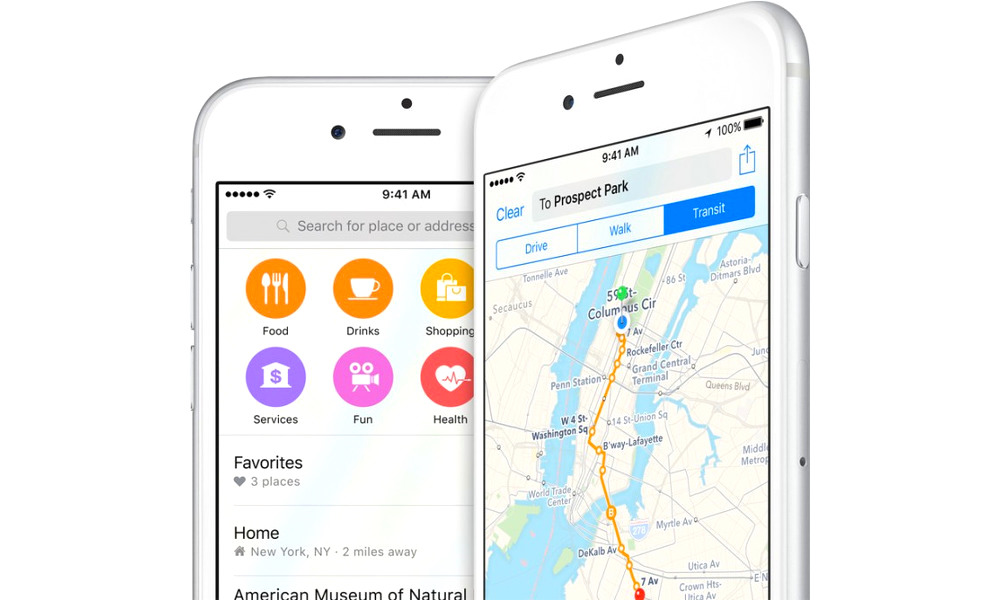
Thankfully, Apple’s own Maps application makes traveling much easier with its suite of navigation and location features. To ensure that your commute, dinner plans, road trip or family outing goes smoothly, here’s a list of the most essential and useful features in Maps.

10. View Nearby Traffic

Maps has a useful feature that lets you easily view the traffic situation on nearby roads and highways — letting you plan accordingly.

To toggle the feature on or off, just tap the Info icon in the upper-right, and ensure that Traffic is toggled On. Nearby roads will be highlighted in yellow, orange or red — depending on how bad traffic currently is.

9. Compass Mode

Most of us know that the iPhone has a Compass app, but fewer people know that Maps has a built-in compass. This is especially useful for navigating streets in a city you’re not familiar with, or while hiking, running or cycling.

If you need a sense of direction while navigating, simply tap on the arrow-like Location icon. Once Maps pinpoints your location, the app will automatically go into Compass mode.

8. Avoid Tolls & Highways

If you’d like to avoid toll roads, or you would just rather take surface streets to a particular location, Maps lets you toggle each of these options off when setting new routes.

To do so, just input directions to a location, swipe up and tap on Driving Options, and toggle either Tolls or Highways off.

7. Adjust Navigation Volume

If you’re navigating to a new location, but you’re tired of hearing Siri interrupt your music or podcast, you can adjust the navigation volume so you can listen in peace.

To do so, simply go to..

  1. Settings.
  2. Maps.
  3. Driving and Navigation.
  4. Then choose from the various options underneath Navigation Voice Volume.

6. Easily Share Your Location

This isn’t strictly a Maps feature, but it ties into iOS’ navigation suite. iOS lets you easily send your location to your friend or friends, so they can get directions directly to you.

To send your location..

  1. Open Messages and find the message thread in question.
  2. Tap on the Info icon in the upper-right, and select either Send Current Location or Share My Location.
  3. ‘Send Current Location’ will send a pin to where you currently are, ‘Share My Location’ will track your location while you move.

5. Add To and View Favorites

Maps has a Favorites list that lets you add frequented locations, which are then viewable later. To add location to your favorites..

  1. Tap or search for any location to bring up its information card.
  2. Scroll to the bottom, and tap Add to Favorites.
  3. To view your Favorites list, in Maps, simply tap on the search field (or swipe-up from the search bar), scroll all the way down, and tap on the Favorites option.

4. Browse Locations by Category

If you’d like to see local locations and restaurants by category, rather than searching for a specific one, just tap on the Search bar. You can even narrow down your search even further with specific options.

Under Food, for example, tap on Restaurants. At the very bottom of the app, you’ll see filters for specific categories of restaurants, such as Mexican, Pizza, Breakfast & Brunch, Italian, etc.

3. View Landmarks in 3D

While not necessarily a navigation feature, Maps lets you “fly over” certain cities or landmarks, letting you view the area in question in 3D from the air.

To use the Flyover, just type a particular landmark, city or location, and tap the Flyover Tour button on the information card that pops up. Note that not all cities feature Flyover tours.

2. Clear Maps Location History

If, at any point, you don’t want Maps to keep track of the locations you visit or search for, you can easily clear this information from the app. Go to..

  1. Settings.
  2. Privacy.
  3. Location Services.
  4. Scroll all the way down and tap on System Services.
  5. From here, just go to Frequent Locations and tap on Clear History.

1. Find a Parked Car

In iOS 10, Apple has added an extremely handy feature — the ability to never lose your car again. Maps will do this automatically, albeit only if phone is connected to your car via CarPlay or Bluetooth.

To ensure that this feature is set up, just go to..

  1. Settings.
  2. Maps.
  3. Your Car .
  4. Then toggle Show Parked Location to On.

There’s even an option to snap a picture to go with your parked location, or jot down details in a notes field.

By

Sourced from iDROPNEWS

By Josh Levenson.

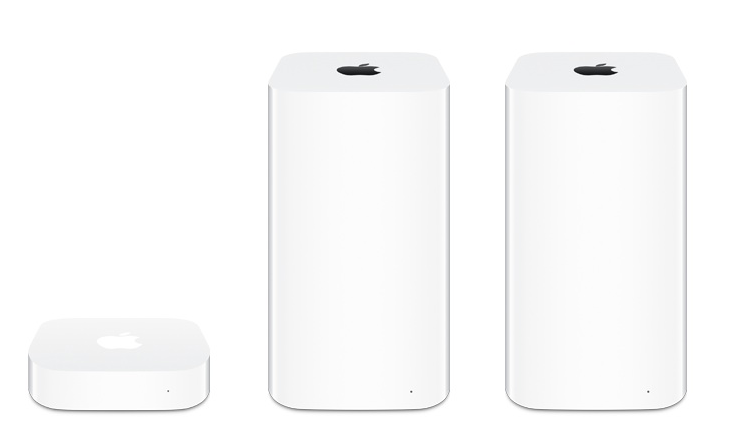
Just as Google’s preparing to start shipping its Wi-Fi router, Apple has reportedly reassigned the engineers tasked with developing its AirPort wireless routers to other product teams, reveals Bloomberg.

It’s believed that the company has been slowly shutting down the division over the course of the past year to “sharpen [its] focus on consumer products that generate the bulk of its revenue.”

Wi-Fi routers — which fit into the “other products” category of Apple’s annual financial results — accounted for around 5 percent ($11.1 billion) of the firm’s total sales in fiscal 2016.

Apple’s hoping to use the extra manpower to develop more innovative next-generation products that make up the majority of its revenue, like the Apple TV, iPad and iPhone.

It’s currently unclear whether the Cupertino company is planning to stop manufacturing its AirPort routers, but for the time being, all three models are still available to purchase from both its online and brick-and-mortar stores.

However, seeing as the AirPort range — the AirPort Express, AirPort Extreme, and AirPort Time Capsule — hasn’t been refreshed since 2013, we expect it to be phased out pretty soon.

By Josh Levenson

Sourced from TNW

By Timothy B. Lee.

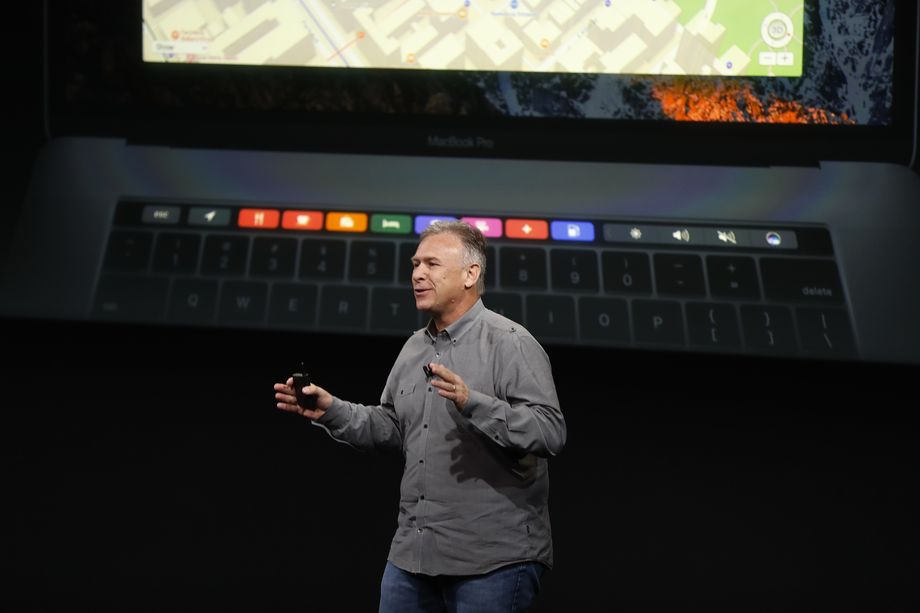
I was skeptical of the Touch Bar when I first read rumors about it earlier this week. Those rumors turned out to be true: The newest MacBook Pro has a small touchscreen above the keyboard, where there used to be a row of physical “function” keys.

But now that I’ve seen the Touch Bar in action in Apple’s presentation, I think it has the potential to be the biggest change in the way people use their Macs since Apple introduced multi-touch gestures on trackpads more than 10 years ago.

What’s more, the creation of the Touch Bar illustrates what’s so powerful about Apple’s distinctive model of innovation.

New Money logo
This article is part of New Money, a new section on economics, technology, and business.

Most technology companies have focused on one part of the technology “stack” and left the rest to others. In the Windows PC world, Intel made chips, Dell made computers, Microsoft made the Windows operating system, and Adobe made software like Photoshop. Companies took a similar approach in the world of Android smartphones, with Google making the software and a variety of companies making competing handsets. That approach has helped Windows and Android dominate their respective markets.

In contrast, Apple controls the entire “stack” for its products. It manufactures the hardware, writes a lot of the software, and even makes some of its own chips. This makes it hard to achieve a large market share, since it’s difficult for one company to serve a lot of different kinds of customers. But the example of the Touch Bar shows that the Apple approach still has some distinct advantages.

It’s hard to imagine anyone other than Apple successfully pulling off an ambitious innovation like the Touch Bar because it requires simultaneous investments on both the hardware and software sides of the business.

Apple’s ability to make dramatic changes to its platforms has been an important source of strength for the company. And it’s a big reason that two of Apple’s chief competitors — Google and Microsoft — have increasingly aped Apple’s business model in recent years.

Why it’s hard to bring features like the Touch Bar to Windows laptops

The idea of a Windows Touch Bar isn’t entirely hypothetical. Lenovo, one of the biggest players in the PC laptop business, tried to introduce a similar feature in 2014, called the Adaptive Keyboard. But the “execution was poor,” Tech Radar writes. “It was hard to tell which icons did what and difficult to customize the various modes.”

The feature never really took off. And on one level, this was a result of poor execution on Lenovo’s part. But there were deeper factors that made that result almost inevitable.

A feature like Touch Bar or Adaptive Keyboard is only going to succeed if it becomes a platform-wide standard. And on a decentralized platform like Windows, that creates a chicken-and-egg problem: Applications developers are only going to put in the effort to support it if it’s available on a lot of laptops. But laptop makers are only going to offer it if there’s a lot of application support.

This is a particularly severe problem in the Windows PC world precisely because the PC market is so competitive. The hardware for the Touch Bar is apparently expensive — Apple is charging $300 extra for the cheapest MacBook Pro with a Touch Bar compared with the entry-level MacBook Pro without it.

So if a PC maker added a Touch Bar to its laptops, it would be taking a big risk of getting undercut by competitors that skipped the Touch Bar and charged significantly less. This is probably one reason Lenovo’s adaptive keyboard was so much less impressive than the Touch Bar — the Chinese company couldn’t spend a lot on the feature and risk being priced out of the market.

Why Apple’s model can be good for innovation

Apple Announces Launch Of New Tablet ComputerFormer Apple CEO Steve Jobs. Photo by Justin Sullivan/Getty Images

Apple is in a better position, not just because people are already willing to pay a significant premium for Apple products but also because Apple’s ownership of the entire Mac platform allows the company to recoup more of the benefits from bets that work.

Apple has one final advantage: Because it controls 100 percent of Mac sales, it can give software makers confidence that a new feature is going to be widely adopted across the platform. Apple initially introduced the Touch Bar only on high-end MacBook Pros. But presumably over the next few years the company will add it to other laptops, as the company has done with other new features like the iSight camera and multi-touch trackpad.

Knowing this, software companies like Adobe (makers of Photoshop) are going to be more willing to make their own investments in supporting the technology, knowing that they’ll be able to recoup those benefits for years to come.

And Touch Bar is just one example. You can tell a similar story about Apple Pay, Apple’s electronic payment system. Getting it off the ground required buy-in from both stores and software developers. And that buy-in was easier to get when Apple could promise that tens of millions of iPhones would have the necessary hardware — including the TouchID fingerprint sensor — over the next couple of years. Now Apple is adding the technology to the MacBook as well.

Google and Microsoft are shifting toward Apple’s model

Until a few years ago, the model Microsoft pioneered — provide the software and let others build the hardware — looked like a winner. The strategy allowed Microsoft to dominate the PC business and capture a large share of the value from the Windows ecosystem. Google pursued a similar strategy with Android, and today the platform dominates the smartphone market.

But both Microsoft and Google have found that this model has a big downside: With so many players involved, it can be hard to deliver a consistent user experience or introduce major new innovations.

For Microsoft, the big problem has been the rise of tablets. Microsoft has been anticipating the rise of tablets for more than a decade, and it has tried several times over the years to introduce more tablet-friendly versions of Windows.

But Microsoft relied on third parties both to produce the tablets and to write much of the software these tablets ran on. That often produced chaos, with different features being supported on different platforms and few common standards that software developers could rely on. So the tablet computing experience was often subpar, and users often just fell back to using an old-fashioned keyboard and trackpad.

Google has had a similar challenge with Android. Not only does Android run on a wide variety of different smartphones with different sizes, features, and processor speeds, but many smartphone makers also customize the Android software itself. This kind of “fragmentation” makes developing software for the Android platform a more frustrating experience. And it inherently makes it harder for Google to move the Android platform in bold new directions, since it has to wrangle a bunch of different Android hardware makers to go along.

This explains why both Microsoft and Google have become increasingly aggressive about building their own hardware instead of relying on third parties to do it.

“We’re not just building hardware for hardware’s sake,” Microsoft’s Satya Nadella said in 2015. “We plan to invent new personal computers and new personal computing.”

For the past few years, Microsoft has been building its own Surface tablets. That has made it easier for the company to engage in Apple-like innovations like the Surface Studio, a desktop computer Microsoft introduced this week with a giant touchscreen display.

For its part, Google adopted the Apple model in earnest only this month with the introduction of the Pixel, the first fully Google-made smartphone.

Microsoft and Google are both hoping that adopting Apple’s business model will allow them to duplicate Apple’s record of innovation and, ultimately, Apple’s profits. But doing that won’t be easy. Apple has had 30 years to develop its expertise at the wide variety of functions — hardware design, software design, chip design, supply chain management, marketing, retail, and so forth — that go into bringing a MacBook or an iPhone to market. Google and Microsoft have a lot of catching up to do.

By Timothy B. Lee

Sourced from VOX