Tag

apps

Browsing
Ready to increase awareness and sales for your business, no matter the size? Then give these specific social media tactics a try.

Chances are, if you’re reading this article and you’re a small business owner, startup founder, or other kind of entrepreneur, you read a lot of helpful content. For this week’s column, I wanted to give actionable strategies on how to increase your awareness and sales using specific social media tactics.

Here they are.

Host a Snapchat Geofilter Contest

Geofilters aren’t just super fun to use, they’re also powerful promotional tools. In addition, they only cost around $5 per 20,000 square feet per hour.

To get the most out of Geofilters, try hosting a Snapchat Geofilter contest.

To do this, for your next event, create a Snapchat Geofilter (if you don’t know how, check out this helpful guide). Encourage your attendees to use the filter, screenshot the Snap they used it in, then post the screenshot to their Instagram and tag your business in the post. Reward the most creative post with a prize.

This way, your customers can engage with your business in a fun way that will also let all their friends know about your business not once, but twice. Once in their Snapchat Story and again with their Instagram post. Increasing brand awareness is a surefire way to increase sales.

Start a Facebook Group in Your Niche

Building a community of people that trusts you is one of the most effective ways to boost sales for your business, and Facebook Groups are a terrific venue for doing this.

Just be sure to not oversell. Instead, give your group members value, more value, and then even more value. After you do, then you’re free to pitch.

Do you own a cafe in Portland? Start a Facebook Group called Coffee Lovers of Portland, where you talk about the best roasts around town.

If you’d like to take it a step further, use your Facebook Group to connect with others and begin a meetup with those same members. The meetup could even take place at your own business.

For more on how to successfully build a Facebook Group, check out this blog post by Neil Patel.

Facebook & Instagram Advertisements

If you haven’t yet tried Facebook or Instagram Ads, you should do it tomorrow. Or later today. Or right after you read this article.

Why? They’re easy to implement and their targeting capabilities are unparalleled.

You’re able to target geographically, which enables even remote businesses (local bars, restaurants, etc.) to benefit from the ads.

You’re able to target by interest, which will ensure no irrelevant prospects see your ad.

They’re also cheap. For as little as $5 per day, you’re able to run your ad.

For even more on Facebook Ads, read this article I wrote.

Publish an Article on Medium

If you aren’t yet using Medium, you could be missing out an immense amount of leads for your business. Here’s how to get started:

1. Create a helpful article that’s relevant to your industry.

If you own a pizza shop, write an article on what’s wrong with the pizza industry, then include a step-by-step recipe on how you cook your best pizza from scratch.

2. Construct a strong call-to-action.

At the end of your article, write a 1-2 sentence call-to-action that includes a link to a page where users can sign up for your email newsletter. This will ensure you don’t miss out on your most engaged readers, and that you’ll have the option to stay in touch with those people.

3. Get on a publication.

This is almost non-negotiable. If you want success on Medium, you have to get on a publication. To do this, search for relevant and established publications either directly on the app or by using Toppub.xyz. Then, search for the publication’s submission guidelines, or dig up the editor’s personal Twitter handle and send them a link to your story that way.

For more tips on how to succeed on Medium, give check out this podcast I was on.

Give Instagram Influencers a Try

Instagram influencers are a terrific way to reach your target audience without you having to create content directly.

Don’t think you have the budget for influencers? No worries. In some cases (not all, but some) you can use the resources you have at your disposal as compensation.

In cases like these, I always recommend giving away a freebie in exchange for the influencer posting about your business.

If you’re a bar, your freebie could be a free beer. If you’re a cafe, your freebie could be a free bagel and coffee. If you’re an apparel company, your freebie could be a hoodie and beanie.

To find influencers, use tools like Klear or search popular hashtags in your industry.

One last step: Don’t forget to have the influencers tag your business as their location on their post. To do this, you’ll need to be set up with Facebook Business Manager.

Feature Image: CREDIT: Getty Images
Dakota Shane is a social media consultant and the co-founder of Arctiphi, a social media agency based in Los Angeles. In 2016, he was the No. 3 writer on Medium.com for social media, alongside… Full bio
Sourced from Inc.

By Dave Smith.

Apple preloads every iPhone with a slew of its own first-party apps — but thankfully, the App Store is overflowing with alternative apps, many of which are better than Apple’s.

Whether you’re looking to organize your photos, get some work done, or get around town, we’ve scoured the App Store for the best apps that are better than the default ones on your iPhone.

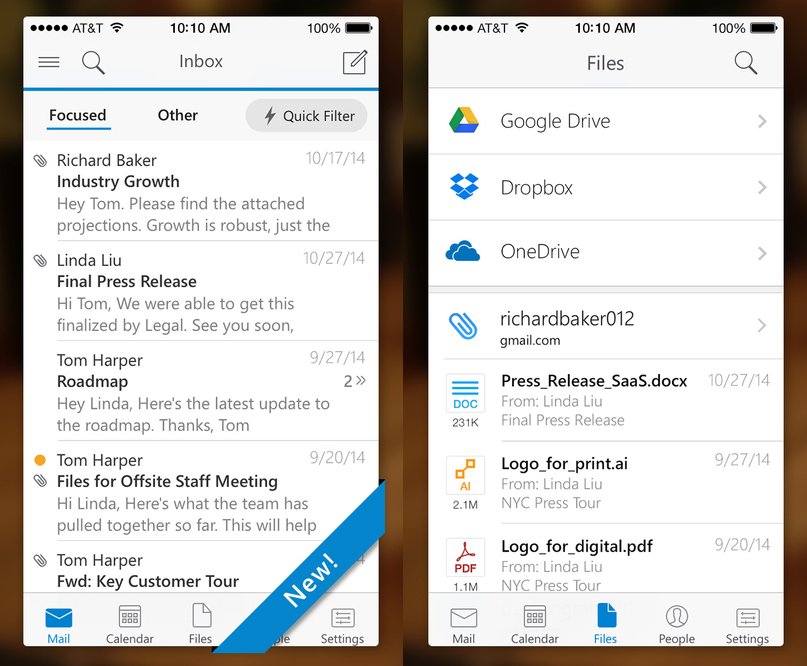
Instead of Mail, use Microsoft Outlook.

In December 2014, Microsoft bought one of my favorite email apps, Acompli. Outlook is essentially that app with a new skin on it. Still, this is the most robust and most refined email app out there — you can create quick filters for your flagged and unread emails and check out all the attachments and files that have been emailed to you in one dedicated folder. It also gives you tabs for your calendar and contacts, which are nice additions that improve productivity.

(Microsoft Outlook, free)

Also: Instead of Mail, use Email (from EasilyDo).

Also: Instead of Mail, use Email (from EasilyDo).

EasilyDoMail.com

I try new email apps all the time, but after using Outlook for a while, I’ve fallen in love with another app, Email from EasilyDo.

It’s incredibly fast, highly customizable, and, most importantly, it’s both smarter and more proactive than any other email app I’ve used. It automatically scans your emails for purchases, receipts, attachments, calendar dates, and more, and it’ll automatically put those emails into separate, appropriately labeled folders that appear on your sidebar. It’s super nifty — you can read my review of it here.

(Email from EasilyDo, free)

Instead of Calendar, use Google Calendar.

Instead of Calendar, use Google Calendar.

Digital Trends

I’ve used Google’s calendar app on the desktop for years — but even if you haven’t, you’ll feel right at home on Google Calendar, which is beautiful to look at and easy to use.

Like Apple’s Calendar, it can pull in data from Google, Facebook, and iCloud, but it presents all the information in a much more useful way than Apple’s default app does. The top half of the screen shows you the whole month, and the lower half of the screen shows you what’s up next. You can scroll down to see what’s coming up, and you can tap the top right corner of the screen to jump back to the present day. It’s all incredibly intuitive.

(Google Calendar, free)

Instead of Notes, use Evernote.

Apple’s Notes for iOS has gotten better in recent years, but Evernote is still the best way to create different types of notes and keep them organized across all your devices.

With Evernote, you can create notes out from photos or text, flag notes to revisit later, set reminders for yourself, and tag your notes in various ways to stay organized. Better yet, if you take pictures of documents and upload them to Evernote, its powerful search function can even scan those PDFs and other documents. And, of course, Evernote syncs across all devices — phones, tablets, laptops, and desktops.

(Evernote, free)

Instead of Maps, use Google Maps.

Instead of Maps, use Google Maps.

Google

Apple’s mapping and navigation app has gotten much better recently, but Google Maps is still the most reliable, most detailed, easiest-to-use mapping and navigation app for travel, whether you’re walking, driving, biking, taking a bus, taking a train, or hailing a car.

Google says its Maps data is crowdsourced from “oodles of Android phones moving through the world” and processed by machine learning algorithms that study traffic patterns to give you the quickest route every time.

(Google Maps, free)

Instead of Voice Memos, use Recordium.

Apple’s Voice Memos app is nice, but it doesn’t give you a great way to organize or annotate all your recordings. Enter Recordium, which lets you edit your clips right in the app and annotate any part of the recording. It will even sync with your favorite cloud storage service like Google Drive or Dropbox.

(Recordium Pro, $9.99)

Instead of Apple Music, use Spotify.

Instead of Apple Music, use Spotify.

Spotify

Apple Music is Apple’s built-in music streaming service — you can still load it up with music from your iTunes library for free, but if you pay $10 a month, you’ll get access to Apple’s entire music catalog. Spotify, however, is still the most polished music app out there, and in my opinion the best experience that’s actually worth your money.

Spotify Premium costs about the same per month as Apple Music, but Spotify organizes music into clever ways that Apple does not. Aside from browsing by genre or what’s topping the charts, Spotify also puts together a unique “Discover Weekly” playlist for you every Monday based on your listening habits and a “Release Radar” playlist every Friday of new music you might like. It’s not easy to find new music, but through smart curation and design, Spotify does music discoverability better than anyone else in the game.

(Spotify, free)

Instead of Weather, use Dark Sky.

Instead of Weather, use Dark Sky.

Google Play

Apple’s Weather works fine most of the time — it’s taking the same information as The Weather Channel, specifically its Weather Underground service — but the most detailed and accurate weather app I’ve used is Dark Sky. You can get minute-to-minute predictions for the next hour, and hour-by-hour forecasts for the next day and week.

Since Dark Sky tracks your location via GPS, you can get notifications for when it’s about to start raining or snowing in your area — it’s eerily good at this — and you can even watch radar animations to see how storms are moving.

(Dark Sky, $3.99)

Instead of Safari, use Mercury.

Instead of Safari, use Mercury.

Dave Smith/Business Insider

You may not have heard of it, but the Mercury web browser for iPhone is a great Safari or Chrome alternative on mobile.

It’s excellent where it matters: It’s extremely fast and has a ton of useful features that you’d normally find only on a desktop computer. You can sync all your Chrome or Firefox bookmarks and reading lists, save files from the web and manage them, choose a background theme, use real tabs (up to 10 can be open at once), browse webpages in full-screen mode, screenshot and doodle on any website, browse privately — and there’s even more. Perhaps best of all, Mercury supports a variety of plug-ins and extensions like LastPass, Google Translate, and AdBlock.

(Mercury, free)

Instead of Pages, use Word.

Instead of Pages, use Word.

Dave Smith/Business Insider

Apple’s Pages has plenty of useful tools, but it’s not always easy to read or format on the smaller iPhone screen. In bringing Word to the iPhone, Microsoft made sure it had built-in modes for easy reading versus the real document layout, and it’s very easy to write and format your documents with text, photos, and equations — and have it all look good on other devices — seamlessly.

(Microsoft Word, free)

Instead of Health, use MyFitnessPal.

Instead of Health, use MyFitnessPal.

Dave Smith/Business Insider

Apple’s Health more or less collects data from other apps, but it assumes you use a ton of other fitness-tracking devices that can count steps and stairs by themselves. MyFitnessPal, on the other hand, offers much more in the way of tracking your own fitness. It’s easy to track your diet using its immense database of foods — you can even scan barcodes — and it also works with over 60 fitness-tracking devices and apps to give you a picture of your overall health. You can see your progress at a glance and add notes to your “diary” for future reference.

In general, it’s just a much more complete app — you can even share your progress to your favorite social network in case you need cheering on.

(MyFitnessPal, free)

Instead of iMovie, use Videoshop.

Instead of iMovie, use Videoshop.

Dave Smith/Business Insider

Videoshop makes it exceedingly simple to cut and combine your iPhone videos into one movie — you can also add filters, music, and animated titles, and even apply slo-mo or fast-motion to your videos to get the desired effect. Once you’re done, sharing to your favorite social network is as easy as a button tap.

(Videoshop, $1.99)

Instead of Keynote, use PowerPoint.

Instead of Keynote, use PowerPoint.

Dave Smith/Business Insider

Keynote offers a basic slideshow creator and editor with plenty of transition animations and formatting options, but it doesn’t hold a candle to PowerPoint. Microsoft’s app lets you create slideshows that sync across all devices, but it also lets you view your notes as your presentation is beamed to a bigger screen. You can even draw all over your presentation right from your iPhone in real time.

(Microsoft PowerPoint, free)

Instead of iTunes U, download Khan Academy.

Instead of iTunes U, download Khan Academy.

Dave Smith/Business Insider

Apple’s iTunes U is great for students or interested learners who want to view full courses from leading universities in things like history, science, even foreign languages. It also offers plenty of resources for teachers, too, but with so many options, it’s not always easy to know where to start.

Khan Academy offers many of the same features as iTunes U, but it’s all brought together in an extremely intuitive interface that lets you first choose what you want to learn and then hone in on certain subjects, courses, and videos. It even has a ton of resources for test preparation, whether you’re getting ready to take the SAT or MCAT.

(Khan Academy, free)

Instead of Stocks, use Stocks Tracker.

Instead of Stocks, use Stocks Tracker.

Dave Smith/Business Insider

Plenty of people will say they never asked for Apple’s Stocks app. But Stocks is child’s play compared with Stocks Tracker, which tracks indexes, currencies, futures, and even bitcoin — all in real time. (Apple’s Stocks app updates every few seconds, but not nearly as quickly as Stocks Tracker.) It also has a useful currency converter, and you can set up alerts and check on bullish or bearish signals for any given market, at home or abroad.

(Stocks Tracker, free)

Instead of Numbers, use Microsoft Excel.

Instead of Numbers, use Microsoft Excel.

Dave Smith/Business Insider

Apple’s Numbers is helpful for creating charts, but Excel is still the best spreadsheet application out there — and it will sync across all your devices. The iPhone app even has a special formula keyboard that lets you compute more quickly and is much easier than working with a standard keyboard.

(Microsoft Excel, free)

By

Sourced from Business Insider UK