By Timothy B. Lee.
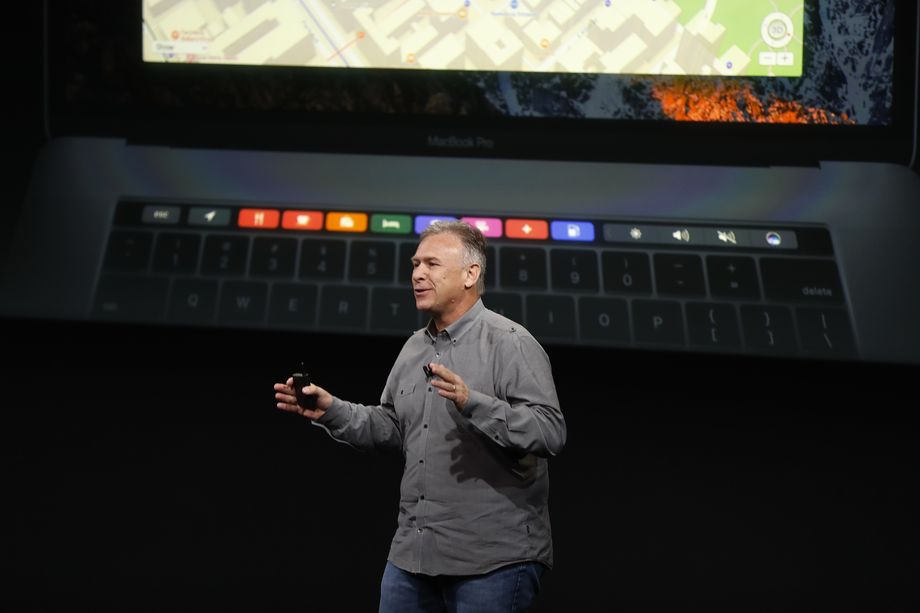
I was skeptical of the Touch Bar when I first read rumors about it earlier this week. Those rumors turned out to be true: The newest MacBook Pro has a small touchscreen above the keyboard, where there used to be a row of physical “function” keys.
But now that I’ve seen the Touch Bar in action in Apple’s presentation, I think it has the potential to be the biggest change in the way people use their Macs since Apple introduced multi-touch gestures on trackpads more than 10 years ago.
What’s more, the creation of the Touch Bar illustrates what’s so powerful about Apple’s distinctive model of innovation.
This article is part of
New Money, a new section on economics, technology, and business.
Most technology companies have focused on one part of the technology “stack” and left the rest to others. In the Windows PC world, Intel made chips, Dell made computers, Microsoft made the Windows operating system, and Adobe made software like Photoshop. Companies took a similar approach in the world of Android smartphones, with Google making the software and a variety of companies making competing handsets. That approach has helped Windows and Android dominate their respective markets.
In contrast, Apple controls the entire “stack” for its products. It manufactures the hardware, writes a lot of the software, and even makes some of its own chips. This makes it hard to achieve a large market share, since it’s difficult for one company to serve a lot of different kinds of customers. But the example of the Touch Bar shows that the Apple approach still has some distinct advantages.
It’s hard to imagine anyone other than Apple successfully pulling off an ambitious innovation like the Touch Bar because it requires simultaneous investments on both the hardware and software sides of the business.
Apple’s ability to make dramatic changes to its platforms has been an important source of strength for the company. And it’s a big reason that two of Apple’s chief competitors — Google and Microsoft — have increasingly aped Apple’s business model in recent years.
Why it’s hard to bring features like the Touch Bar to Windows laptops
The idea of a Windows Touch Bar isn’t entirely hypothetical. Lenovo, one of the biggest players in the PC laptop business, tried to introduce a similar feature in 2014, called the Adaptive Keyboard. But the “execution was poor,” Tech Radar writes. “It was hard to tell which icons did what and difficult to customize the various modes.”
The feature never really took off. And on one level, this was a result of poor execution on Lenovo’s part. But there were deeper factors that made that result almost inevitable.
A feature like Touch Bar or Adaptive Keyboard is only going to succeed if it becomes a platform-wide standard. And on a decentralized platform like Windows, that creates a chicken-and-egg problem: Applications developers are only going to put in the effort to support it if it’s available on a lot of laptops. But laptop makers are only going to offer it if there’s a lot of application support.
This is a particularly severe problem in the Windows PC world precisely because the PC market is so competitive. The hardware for the Touch Bar is apparently expensive — Apple is charging $300 extra for the cheapest MacBook Pro with a Touch Bar compared with the entry-level MacBook Pro without it.
So if a PC maker added a Touch Bar to its laptops, it would be taking a big risk of getting undercut by competitors that skipped the Touch Bar and charged significantly less. This is probably one reason Lenovo’s adaptive keyboard was so much less impressive than the Touch Bar — the Chinese company couldn’t spend a lot on the feature and risk being priced out of the market.
Why Apple’s model can be good for innovation
/cdn0.vox-cdn.com/uploads/chorus_asset/file/7361029/96211512.jpg) Former Apple CEO Steve Jobs. Photo by Justin Sullivan/Getty Images
Former Apple CEO Steve Jobs. Photo by Justin Sullivan/Getty Images
Apple is in a better position, not just because people are already willing to pay a significant premium for Apple products but also because Apple’s ownership of the entire Mac platform allows the company to recoup more of the benefits from bets that work.
Apple has one final advantage: Because it controls 100 percent of Mac sales, it can give software makers confidence that a new feature is going to be widely adopted across the platform. Apple initially introduced the Touch Bar only on high-end MacBook Pros. But presumably over the next few years the company will add it to other laptops, as the company has done with other new features like the iSight camera and multi-touch trackpad.
Knowing this, software companies like Adobe (makers of Photoshop) are going to be more willing to make their own investments in supporting the technology, knowing that they’ll be able to recoup those benefits for years to come.
And Touch Bar is just one example. You can tell a similar story about Apple Pay, Apple’s electronic payment system. Getting it off the ground required buy-in from both stores and software developers. And that buy-in was easier to get when Apple could promise that tens of millions of iPhones would have the necessary hardware — including the TouchID fingerprint sensor — over the next couple of years. Now Apple is adding the technology to the MacBook as well.
Google and Microsoft are shifting toward Apple’s model
Until a few years ago, the model Microsoft pioneered — provide the software and let others build the hardware — looked like a winner. The strategy allowed Microsoft to dominate the PC business and capture a large share of the value from the Windows ecosystem. Google pursued a similar strategy with Android, and today the platform dominates the smartphone market.
But both Microsoft and Google have found that this model has a big downside: With so many players involved, it can be hard to deliver a consistent user experience or introduce major new innovations.
For Microsoft, the big problem has been the rise of tablets. Microsoft has been anticipating the rise of tablets for more than a decade, and it has tried several times over the years to introduce more tablet-friendly versions of Windows.
But Microsoft relied on third parties both to produce the tablets and to write much of the software these tablets ran on. That often produced chaos, with different features being supported on different platforms and few common standards that software developers could rely on. So the tablet computing experience was often subpar, and users often just fell back to using an old-fashioned keyboard and trackpad.
Google has had a similar challenge with Android. Not only does Android run on a wide variety of different smartphones with different sizes, features, and processor speeds, but many smartphone makers also customize the Android software itself. This kind of “fragmentation” makes developing software for the Android platform a more frustrating experience. And it inherently makes it harder for Google to move the Android platform in bold new directions, since it has to wrangle a bunch of different Android hardware makers to go along.
This explains why both Microsoft and Google have become increasingly aggressive about building their own hardware instead of relying on third parties to do it.
“We’re not just building hardware for hardware’s sake,” Microsoft’s Satya Nadella said in 2015. “We plan to invent new personal computers and new personal computing.”
For the past few years, Microsoft has been building its own Surface tablets. That has made it easier for the company to engage in Apple-like innovations like the Surface Studio, a desktop computer Microsoft introduced this week with a giant touchscreen display.
For its part, Google adopted the Apple model in earnest only this month with the introduction of the Pixel, the first fully Google-made smartphone.
Microsoft and Google are both hoping that adopting Apple’s business model will allow them to duplicate Apple’s record of innovation and, ultimately, Apple’s profits. But doing that won’t be easy. Apple has had 30 years to develop its expertise at the wide variety of functions — hardware design, software design, chip design, supply chain management, marketing, retail, and so forth — that go into bringing a MacBook or an iPhone to market. Google and Microsoft have a lot of catching up to do.
Sourced from VOX









/cdn0.vox-cdn.com/uploads/chorus_asset/file/7208823/NewMoney_Tag.png)