Tag

Google

Browsing

By .

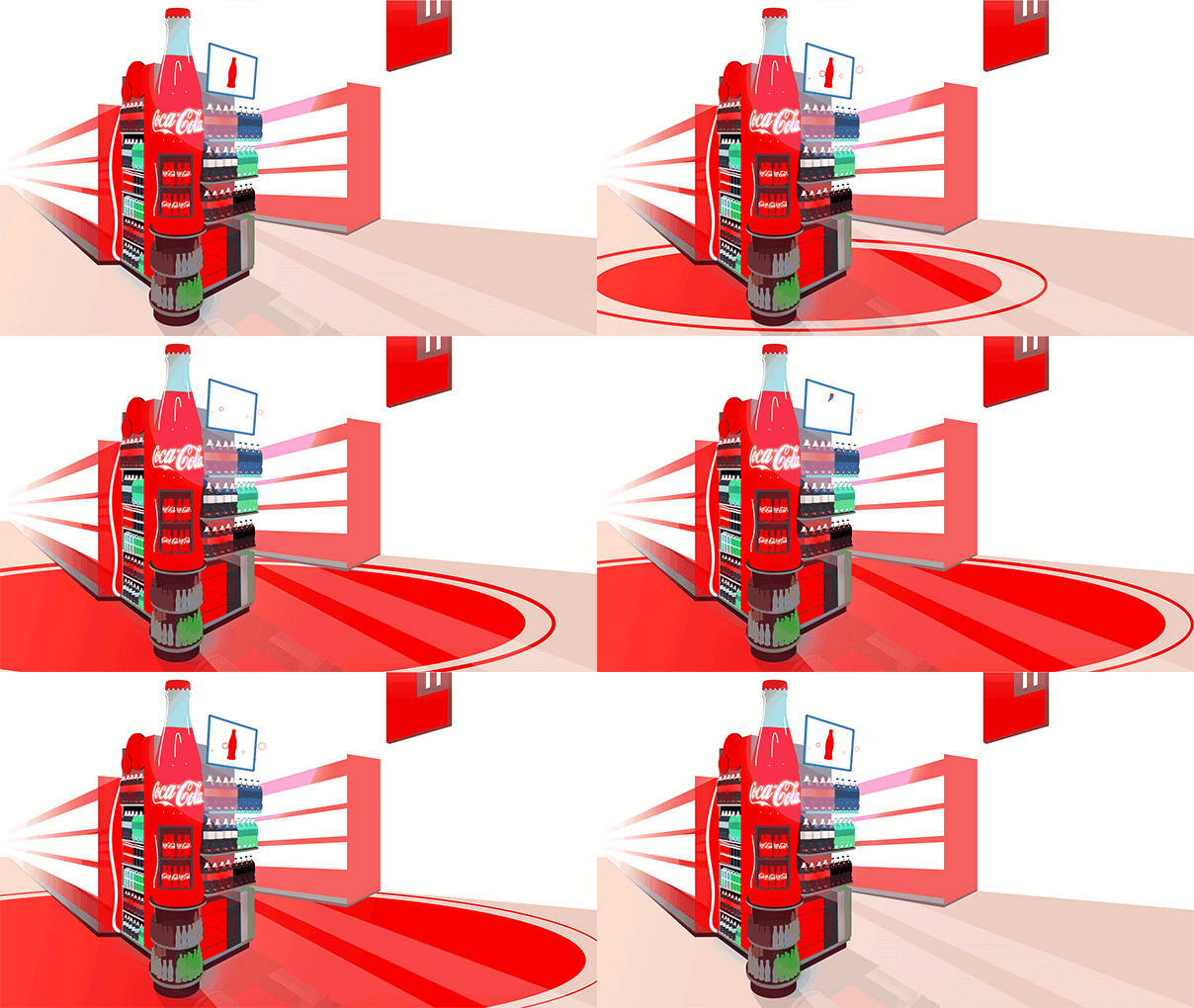
Google and Coca-Cola’s partnership effort for in-store advertising displays looks to be bearing fruit. The advertising system uses DoubleClick’s preference and tracking data combined with Google’s Beacon Platform to serve up targeted ads by pulling data from passing smartphones. With that info, displays are able to select content based on your preferences in the form of advertisements specifically targeted to passersby. In a recent grocery store pilot program the Minority Report-style ads performed quite very well.

This isn’t actually that new. It was discussed at a few places in the last couple months since the details were revealed at Google’s conference. But, it seems to have quite effectively flown under the radar for that time, considering how cool it is. Coca-Cola made a detailed post about it on one of their social promotion sites in April as well, in which they talked about the potential environments for these tracking signage systems, like movie theaters and other Retail venues than just grocery stores.

coke dispay

Google’s partnership with Coca-Cola for this system has been discussed off-and-on for a few years. Back at the National Automatic Merchandising Association’s OneShow in 2016 Google talked about the potential as applied to vending machines, and said that Google and Coca-Cola were working together on Bluetooth beacons for vending, but this is the first time I’ve actually gotten to see what it looks like and how it performs. Coca-Cola’s Greg Chambers, at Google’s recent Cloud Next Conference, said that it has been experimenting with small tests into proximity marketing since at least 2015 when they first started working with Google on a prototype.

The two companies tested things with a pilot for the system in 250 Albertson’s grocery stores, in which Coca-Cola saw some incredible results. There was a one year ROI on Coca-Cola products displayed by the system, and a spillover effect from so-called “category-lift,” in the form of a total one-month ROI for all nearby soda products — i.e., this system sells a lot of soda for Coca-Cola and all other brands near it. There’s no word yet on when or how Coca-Cola might roll this out to other stores, but given how positive the results were for the pilot tests, it is likely you’ll see one someday at the end of the soda aisle in your local grocery.

cokegif

On a more technical note, I’m not sure exactly what sort of data is being sent to the displays by nearby phones or how it is taken. Allegedly the system uses Google’s Eddystone beacons, which exchange information with nearby phones using Bluetooth low energy. This is the first time I’ve heard of Google’s Beacon Platform actually being used, combined with DoubleClick’s targeting advertising systems, to target people in the physical world. The privacy-conscious might express some concern at the potential of having your phone communicate your preferences to an in-store display, but I would hope and assume that any identifying information is stripped out. Either way, we’re one step closer to this.

By

Sourced from Android Police

By Robert Elder.

Google’s recent claim that YouTube is the coolest brand in the eyes of teens and millennials looks shady in light of new survey data from BI Intelligence, which indicates that older age groups consistently perceive YouTube more positively than their younger peers do.

This is important because, for all the attention that millennials receive, baby boomers are still an attractive target market. They’re easily the wealthiest demographic in the US, representing about 50% of the country’s net household wealth, and will continue to be so until at least 2030, per Deloitte. Numbering close to 75 million people, they’re also the second-largest generation in the US, just slightly behind millennials, according to US Census Bureau estimates. For brands, the way this wealthy and populous demographic perceives YouTube can provide insight into how the platform can be better leveraged — and who they should be targeting.

Boomers are more inclined to believe that YouTube won’t serve them deceptive videos, while millennials are less sure about avoiding such content on the site. This means brands can reach older age groups on YouTube with more confidence that their campaigns will be viewed as upright and honest, so they needn’t worry as much about brand safety — or the risk they’ll be associated with content that detracts from their image. And considering baby boomers find YouTube ads less annoying than millennials do, these campaigns should be especially well received.

bii digital trust millennials are more likely to expect fake news on youtube vs boomersBI Intelligence

Older age groups are also more willing to share content on YouTube than younger folks. This indicates that, on YouTube, brands are more likely to reach an older audience that’s engaged and open to sharing content, creating an opening for uploaded videos to spread organically. There are countless examples of such successful commercials on YouTube — including Volvo’s “Epic Split” featuring Jean-Claude Van Damme, viewed more than 86 million times; Dove’s “Real Beauty Sketches,” with nearly 68 million views; and the legendary Dollar Shave Club commercial, which introduced the brand to millions worldwide, and eventually led to the company’s $1 billion sale to Unilever.

bii digital trust boomers are two times more likely to share on youtube vs millennialsBI Intelligence

Although YouTube ranked dead last for consumer safety in BI Intelligence’s Digital Trust survey, boomers haven’t abandoned the video site. In fact, the affinity older age groups have for YouTube makes them far more likely than younger generations to actively participate and engage with content on the platform. By targeting this mature demographic on YouTube, companies may elicit more responses to their videos and campaigns, generating conversations around their brands.

bii digital trust boomers feel safer participating on youtube than millennials doBI Intelligence

BI Intelligence’s Digital Trust survey examines consumers’ perception of major social platforms. It rates Facebook, YouTube, Instagram, Twitter, Snapchat, and LinkedIn on security, community, user experience, and content authenticity and shareability to help brands and marketers make informed decisions about what platforms to spend their marketing and branding dollars on. The full report will be available through BI Intelligence in May.

By Robert Elder

Sourced from Business Insider UK

By  Shona Ghosh

Google had to do some serious damage control with agencies and advertisers after its YouTube hate speech debacle.

According to CEO Sundar Pichai, senior sales executives made “literally thousands” of calls to explain why advertisers’ content was appearing next to hate speech videos on YouTube.

He told analysts on Google’s first quarter earnings call: “I think [chief business officer] Philipp Schindler’s team has probably made literally thousands and thousands of calls, in-person conversations, and I think that deep relationship is what allowed us to respond thoughtfully.

“And I think the feedback from our partners were very positive and constructive, and I think we are evolving overall to a better place.”

Pichai’s comments came the same day that Martin Sorrell, CEO of the world’s biggest ad company WPP, said during an earnings call that he still had “some concerns” over ads appearing next to hateful content.

Hundreds of brands in the US and UK boycotted YouTube after an investigation by The Times in February found ads from the UK government, Mercedes-Benz, and other major brands reportedly appearing next to extremist YouTube videos. According to The Times, the videos had been produced by white supremacist groups and Islamic extremists.

UK brands and agencies rapidly pulled their spend from YouTube and US brands began to boycott the platform too. In March, Schindler outlined safeguards for advertisers in a blog post, though he didn’t promise they would work 100% of the time.

Pichai said it was unlikely Google would see any long-term impact from the problem and that the company’s engineers were working “thoughtfully” with advertisers and agencies.

“Look, these types of issues are not new for us,” he said. “Over the past many, many years, as we’ve built services … constantly things evolve. We adapt to it, be it from spam in email or how we do search ranking, and all the efforts we put into it. These are the classes of problems our engineers are really, really good at working.”

There doesn’t seem to have been any short-term financial impact from the boycott. Google’s parent company Alphabet saw revenues rise 22% year on year to $24.75 billion (£19 billion) in its first quarter. CFO Ruth Porat said YouTube’s revenues were growing “at a significant rate.”

Image: Google CEO Sundar Pichai. Justin Sullivan/Getty Images

By  Shona Ghosh

Sourced from Business Insider UK


By Joan Selby.

On-page SEO is one of the things that is on the mind of every website owner out there, and there is a good reason for that. It is one of the key factors based on which Google will rank your website, along with other factors, such as backlinks, or the quality of your content.

On-page SEO is one of the things that is on the mind of every website owner out there, and there is a good reason for that. It is one of the key factors based on which Google will rank your website, along with other factors, such as backlinks, or the quality of your content. However, off-page SEO practices deserve equal attention, because if applied right, they can significantly improve your website’s ranking. The prefered off-page SEO practice, and one which yields best results is building backlinks on authority and popular websites in your industry.

Since that is a very lengthy process, we have compiled a list of 5 off-page tricks which you can implement quickly and boost your website’s ranking on Google. Keep on reading.

1. Build Broken Links Instead of New Ones

Let’s take Wikipedia as an example. There are tons of articles on Wikipedia which feature broken links, which is just what you are looking for. How so? Some users will need to do deeper research, which means they will start combing through links which are inside the article. This is your opportunity to build a quality backlink. Just locate the missing link, but instead of linking to a reputable source directly, link to an article on your page which contains the link to that source.

And it’s not just you who benefits from this: admins will not have to rebuild those links, and users will have an opportunity to deepen their search. How can you find broken links on Wikipedia? It’s easy. There is a complete list of them right here. You can also search for them through Google by typing: site: wikipedia.org [keyword] + “dead link”. After you have clicked on one of the links, search for the phrase “dead link” and take it from there. You can do the same for every other website.<>

2. Try Guest Posting

Guest posting was and still is one of the best ways to boost your website’s position in Google search queries. However, this strategy is challenging, according to Tim Paxton, who is a content manager for BidForWriting

Not only does your content have to be top-notch, because authority places need to please their readers and maintain their reputation in the industry, but they also have to worry about their ranking on Google, which now prioritizes high-quality content.”

Aside from contacting places of authority inside your niche, you can also look for guest posts by googling phrases like “write for us”, “guest posters wanted”, and so on.

3. Create Infographics

Infographics have taken the world of internet by storm, and it doesn’t look like that’s going to change in the near future. The reason why they are so effective is not just because they are great for presenting a torrent of information in a way that is both visually pleasing and easy to read, but also because they are great for viewing on mobile devices, which have surpassed both laptops and desktops as the primary devices for content consumption. Because of that, they are great for building backlinks, and you will have no problem finding websites which will be willing to let you create an infographic for them. Plus, there are plenty of great tools out there, such as Piktochart, which can help you create stunning infographics, even if you don’t have any design experience.

4. Ask Influencers to Contribute with a Quote

Nothing will boost your authority like becoming an authority inside your niche, but that can take time. One of the faster ways would be to contact an influencers inside your niche and ask them to contribute to your article or post with a quote. If they agree to help you out, you can look forward to your content being exposed in front a larger audience, if your post is really good and the influencer decides to share it. Also, you will experience a boost in traffic. All these things won’t go unnoticed by Google, which will rank your website higher.

5. Build Authority on Q&A Websites

Despite so much information out there, it’s getting harder and harder to sift through all the noise. Fortunately, if you are looking for specific answers on any question, websites like Quora Reddit  are a true goldmine of information. Apart from reading answers written by experts from all over the world, you can also contribute and write answers, and link back to your website. If your content is useful, you can rest assured that readers will definitely want to check it out.

Conclusion

Ranking higher on Google takes time and hard work, and with these 5 off-page SEO methods, you will be able to make that process just a little bit easier. Focus on implementing them, create content that will help people, and they will respond accordingly. Good luck!

By Joan Selby

Sourced from Digital Doughnut

Google has reduced the price of its OnHub routers at the Google Store. The ASUS branded OnHub now costs $129, $70 off the regular price, and the TP-Link OnHub comes in at $145, $54 off the normal asking price.

The routers’ chief purpose is to deliver faster and more consistent Wi-Fi throughput, in a more intuitive package. They offer speeds up to 1900 mbps, come with 13 powerful antennas to reduce the number of dead zones in a household/office, and support more than 100 simultaneous connected devices. What’s more, they work with the Google Wi-Fi App for Android and iOS so you can control your network with your phone.

Of the pair of wireless routers, the ASUS version is the more modern, it arrived a number of months after the original TP-Link unit and offers some additional “wave control” gestures. Both have been superseded by the Google Wi-Fi router from last year, but they’re still capable products and work with the Google Wi-Fi mesh network if you want to use one as an additional access point.

If you’re interested in these, check out the ASUS OnHub at the Google Store here, and the TP-Link OnHub here. Google hasn’t mentioned a time-frame for the price cuts, so it’s possible that these have been dropped indefinitely to clear stock.

Sourced from Android Authority

By Annelieke van den Berg

Is it purely a visitor that hits the back button or is there more to it? And what can you tell by looking at the bounce rate of a webpage? In this post, I want to show you what it is, what it means and how you can improve your bounce rate.

What’s bounce rate?

Bounce rate is a metric that measures the percentage of people who land on your website, and do completely nothing on the page they entered. So they don’t click on a menu item, a ‘read more’ link, or any other internal links on the page. This means that the Google Analytics server doesn’t receive a trigger from the visitor. A user bounces when there has been no engagement with the landing page and the visit ends with a single-page visit. You can use bounce rate as a metric that indicates the quality of a webpage and/or the “quality” of your audience. By quality of your audience I mean whether the audience fits the purpose of your site.

How does Google Analytics calculate bounce rate?

According to Google bounce rate is calculated in the following way:

Bounce rate is single-page sessions divided by all sessions, or the percentage of all sessions on your site in which users viewed only a single page and triggered only a single request to the Analytics server.

In other words, it collects all sessions where a visitor only visited one page and divides it by all sessions.

Having a high bounce rate can mean three things:
1. The quality of the page is low. There’s nothing inviting to engage with.
2. Your audience doesn’t match the purpose of the page, as they won’t engage with your page.
3. Visitors have found the information that they were looking for.

I’ll get back to the meaning of bounce rate further below.

Bounce rate and SEO

In this post, I’m talking about bounce rate in Google Analytics. There’s been a lot of discussion about whether bounce rate is an SEO ranking factor. In my opinion, I can hardly imagine that Google takes Google Analytics’ data as a ranking factor, because if Google Analytics isn’t implemented correctly, then the data isn’t reliable. Moreover, you can easily manipulate the bounce rate.

Luckily, several Googlers say the same thing: Google doesn’t use Google Analytics’ data in their search algorithm. But, of course, you need to make sure that when people come from a search engine to your site, they don’t bounce back to the search results, since that kind of bouncing probably is a ranking factor. It might be measured in a different way though, than the bounce rate we see in Google Analytics.

From a holistic SEO perspective, you need to optimize every aspect of your site. So looking closely at your bounce rate, can help you optimize your website even further, which contributes to your SEO.

How to interpret bounce rates?

The height of your bounce rate and whether that’s a good or a bad thing, really depends on the purpose of the page. If the purpose of the page is to purely inform, then a high bounce rate isn’t a bad thing per se. Of course you’d like people to read more articles on your website, subscribe to your newsletter and so on. But when they’ve only visited a page to, for instance, read a post or find an address, then it isn’t surprising that they close the tab after they’re done reading. Mind you, also in this case, there’s no trigger sent to the Google Analytics server, thus it’s a bounce.

A clever thing to do, when you own a blog, is creating a segment that only contains ‘New visitors’. If the bounce rate amongst new visitors is high, think about how you could improve their engagement with your site. Because you do want new visitors to engage with your site.

If the purpose of a page is to actively engage with your site, then a high bounce rate is a bad thing. Let’s say you have a page that has one goal: get visitors to subscribe to your newsletter. If that page has a high bounce rate, then you might need to optimize the page itself. By adding a clear call-to-action, a ‘Subscribe to our newsletter’ button, for instance, you could lower that bounce rate.

But there can be other causes for a high bounce rate on a newsletter subscription page. In case you’ve lured visitors in under false pretenses, you shouldn’t be surprised when these visitors don’t engage with your page. They probably expected something else when landing on your subscription page. On the other hand, if you’ve been very clear from the start with what visitors could expect on the subscription page, a low bounce rate could say something about the quality of the visitors – they could be very motivated to get the newsletter – and not per se about the quality of the page.

Bounce rate and conversion

If you look at bounce rate from a conversion perspective, then bounce rate can be used as a metric to measure success. For instance, let’s say you’ve changed the design of your page hoping that it will convert better, then make sure to keep an eye on the bounce rate of that page. If you’re seeing an increase in bounces, the change in design you’ve made might have been the wrong change and it could explain the low conversion rate you have.

You could also check the bounce rate of your most popular pages. Which pages have a low and which pages have a high bounce rate? Compare the two, then learn from the pages with low bounce rates.

Another way of looking at your bounce rate, is from a traffic sources perspective. Which traffic sources lead to a high or a low bounce rate? Your newsletter for instance? Or a referral website that sends a lot of traffic? Can you figure out what causes this bounce rate? And if you’re running an AdWords campaign, you should keep an eye on the bounce rate of that traffic source as well.

Be careful with drawing conclusions though…

We’ve seen loads of clients with a bounce rate that was unnaturally low. All alarm bells should go off, especially if you don’t expect it, as that probably means that Google Analytics isn’t implemented correctly. There are several things that influence bounce rate, because they send a trigger to the Google Analytics server and Google Analytics falsely recognizes it as an engagement. Usually, an unnaturally low bounce rate is caused by an event that triggers the Google Analytics server. Think of pop-ups, auto-play of videos or an event you’ve implemented that fires after 1 second.

Of course, if you’ve created an event that tracks scrolling counts, then having a low bounce rate is a good thing. It shows that people actually scroll down the page and read your content.

How to lower high bounce rates?

The only way of lowering your bounce rate is by amping up the engagement on your page. In my opinion, there are two ways of looking at bounce rate. From a traffic perspective and from a page perspective.

If certain traffic sources have high bounce rates, then you need to look at the expectations of those visitors coming to your site. Let’s say you’re running an ad on another website, and most people coming to your site via that ad bounce, then you’re not making their wish come true. You’re not living up to their expectations. Review the ad you’re running and see if it matches the page you’re showing. If not, make sure the page is a logical follow-up of the ad or vice versa.

If your page lives up to the expectations of your visitors, and the page still has a high bounce rate, then you have to look at the page itself. How’s the usability of the page? Is there a call-to-action above the fold on the page? Do you have internal links that point to related pages or posts? Do you have a menu that’s easy to use? Does the page invite people to look further on your site? These are all things you need to consider when optimizing your page.

What about exit rate?

The bounce rate is frequently mistaken for the exit rate. Literally, the exit rate is the percentage of pageviews that were last in the session. It says something about users deciding to end their session on your website on that particular page. Google’s support page gives some clear examples of the exit rates and bounce rates which makes the difference very clear. This comes directly from their page:

Monday: Page B > Page A > Page C > Exit
Tuesday: Page B > Exit
Wednesday: Page A > Page C > Page B > Exit
Thursday: Page C > Exit
Friday: Page B > Page C > Page A > Exit

The % Exit and Bounce Rate calculations are:

Exit Rate:
Page A: 33% (3 sessions included Page A, 1 session exited from Page A)
Page B: 50% (4 sessions included Page B, 2 sessions exited from Page B)
Page C: 50% (4 sessions included Page C, 2 sessions exited from Page C)

Bounce Rate:
Page A: 0% (one session began with Page A, but that was not a single-page session, so it has no Bounce Rate)
Page B: 33% (Bounce Rate is less than Exit Rate, because 3 sessions started with Page B, with one leading to a bounce)
Page C: 100% (one session started with Page C, and it lead to a bounce)

Conclusion

Bounce rate is a metric you can use to analyze your marketing efforts. You can use it to measure if you’re living up to your visitors’ expectations. And you can use the bounce rate to decide which pages need more attention. Meeting your visitors’ expectations and making your pages more inviting for visitors all leads to creating an awesome website. And we all know that awesome websites rank better!

By Annelieke van den Berg

Annelieke van den Berg manages the Content, SEO and Brand department at Yoast. She has her Master’s degree in Sociology and focuses on all things related to marketing. Read all about Annelieke »
View her other posts or find her on Linkedin

Sourced from yoast

By Deepak Gupta.

Google is working on a new a global-scale communication system that includes a large number of satellites (over 1000 satellites) and ground stations.

The communication system aims to increase the satellite signal coverage of the populated world, reduce satellite collision between satellites as they orbit the earth, and provide overlapping coverage to maintain satellite coverage of a portion of the earth when one of the satellites covering the same portion is experiencing a malfunction.

PatentYogi’s expert patent search team discovered a recent patent application from Google that discloses details of this global-scale communication system The patent application is embedded in the post below.

According to the patent application, a first group of satellites is launched at a higher altitude, which allows the global-scale communication system to have fewer satellites at the higher altitude since the higher a satellite is, the larger coverage area the satellite covers. Thereafter, a second group of satellites is launched that includes a larger number of satellites, providing a bigger system bandwidth and supporting an increase number of users using the global scale communication system. The first group of satellites and the second group of satellites are arranged to provide at least 75% coverage of the earth at any given time.

Structure of the Satellite Constellation

Multiple satellites in the first group and the second group work in concert form a satellite constellation. The satellites within the satellite constellation are coordinated to operate together and overlap in ground coverage to avoid communication downtime when a satellite is experiencing problems (e.g., mechanical, electrical, or communication). The satellite constellation includes satellites having enough inter-satellite links to make the constellation fully-connected, where each satellite is equipped with communication equipment and additional antennas to track the location of other satellites in the same plane or in other adjacent planes in order to communicate with the other satellites.

The ubiquitous double coverage of the earth caused by the satellites of the first group and the satellites of the second group allows for outages of satellites (individual spacecraft failures), power sharing throughout the constellation of satellites, and multiple LOS opportunities for every ground-space link, offering an ability to de-conflict from “keep away” lines of sight (e.g., to Geosynchronous Satellites). The double coverage of satellites also allows maximum utilization of the individual spacecraft’s’ footprints, with enhanced (more) overlap over populous areas, synchrony throughout the constellation, for predictable and safe conjunction miss distances at the orbit intersections, and low spacecraft count without recourse to polar inclinations that unnecessarily provide coverage of unpopulated arctic regions.

The satellites have a trajectory with an inclination angle of less than 90 degrees and greater than zero degrees with respect to the equator of the earth. The satellites have a hexagonal coverage footprint of the earth, which allows for the fewest number of satellites.

The satellite constellation may serve different purposes, such as military or civilian observation satellites, communication satellites, navigations satellites, weather satellites, and research satellites.

Google has been working on multiple projects to provide Internet connectivity across the world. This includes Google Loon project.

Patent Number – US 20170005719

By Deepak Gupta

Sourced from TNW

By Mary Jo Foley.

Google is looking to attract Microsoft enterprise customers with new beta versions of images for SQL Server Enterprise and Windows Server Core for Google Compute Engine.

Google is expanding support of Windows Server and SQL Server on the Google Cloud Platform with the goal of making its cloud “the best enterprise cloud environment.”

On February 1, Google made available beta versions of pre-configured images for Microsoft SQL Server Enterprise and Windows Server Core on its Google Compute Engine. Google also announced support for SQL Server AlwaysOn Availability Groups to shore up its enterprise high-availability and disaster-recovery story. And the company said all of its Windows Server images are now enabled with Windows Remote Management Support, including its Windows Server Core 2016 and 2012 R2 images.

Google Cloud Platform has lagged behind AWS and Microsoft Azure since its start. But, will key customers and new tools help turn the tide?

As of yesterday, Google Cloud customers can launch Compute Engine virtual machines with SQL Server Enterprise Edition pre-installed and pay by the minute for SQL Server and Windows Server licenses or bring their own licences. Beta versions of pre-configured images are available for SQL Server Enterprise 2012, 2014, and 2016.

This isn’t Google’s first foray into providing better support for Windows enterprise customers and developers on the Google Cloud. Last year, Google added ASP.NET, Visual Studio, and PowerShell support, as well as support for Windows Server 2016 on the Google Compute Engine.

Amazon already provides a full suite of images for Microsoft’s various enterprise products, including Windows Server 2016, Windows Server containers, and SQL Server 2016 for AWS cloud users, but this Microsoft-enterprise push is much newer for Google.

By

Sourced from ZDNet

By Ayaz Nanji.

Ranking among the top Google search results is increasingly driven by dynamic factors, such as content relevance and user intent, rather than static factors, such as the number of keywords and links on a webpage, according to recent research from Searchmetrics.

The annual Searchmetrics ranking factors report was based on an analysis conducted in 2016 of Google search results for 10,000 keywords. The researchers examined which webpages were presented in the top 10 mobile and desktop results for each keyword and then determined which factors correlated to high rankings.

The presence of a few technical requirements, such as H1 tags and HTTPS encryption, help pages rank well across almost all keywords, the analysis found.

However, many of the other factors that influence high search rank, such as time spent on site and click-through rate (CTR), are dependent on individual searchers and pieces of content.

The fact that top search results for keywords are now driven less and less by universal factors led Searchmetrics to conclude that marketers should increasingly focus on topic-specific SEO/content tactics rather than broad approaches.

As the researchers put it in the report: “Except for important technical standards, there are no longer any specific factors or benchmark values that are universally valid for all online marketers and SEOs. Instead, there are different ranking factors for every single industry, or even every single search query. And these now change continuously.”

About the research: The annual Searchmetrics ranking factors report was based on an analysis conducted in 2016 of Google search results for 10,000 keywords. The researchers examined which webpages were presented in the top 10 mobile and desktop results for each keyword and then determined which factors correlated to high rankings.

By Ayaz Nanji

Sourced from MarketingProfs

By Gavin O’Malley.

Hoping to get consumers’ attention? Good luck. More or less, that’s the conclusion of some fresh findings from Google.

Among other challenges, consumers are increasingly splitting their focus between multiple screens.

In fact, about half of users now rely on more than one type of gadget in an average day, while a fifth report using another device while concurrently using a computer.

“Fluid movement between devices changes our approach to marketing,” according to the search giant’s new report. “Consumers now interact with your brand concurrently on more than one type of device, making it critical to provide the same great experience across screens.”

Of those who browse the Web in an average day, almost half do so on multiple devices, while more than seven in 10 users browse the Web on their phones or computers.

In addition, marketers can no longer count on consumers to make room in their busy lives for large screens.

Indeed, in an average day, more than a quarter of all users only use a smartphone, which is nearly two times as many as those who only use a computer.

What’s more, among those who search, nearly 4 in 10 search only on a smartphone in an average day.

As a result of this broader shift to mobile, Google is now seeing more searches happening on smartphones than on computers.

Among those categories experiencing the most growth in mobile searches, home and garden has seen increase of 45% year-over-year, while apparel and consumer electronics each experienced a 40% bounce.

The data in Google’s new report is based on findings from a behavioral measurement of a convenience sample of nearly 12,000 opt-in Google users. The data was then calibrated to reflect a U.S. demographic of 18- to 49-year-old cross-device users.

By

Sourced from MediaPost