Tag

LinkedIn

Browsing

.

Let me get straight to the point as I always do:

In today’s post I’m going to give you some LinkedIn Expert Training on how to UP the visibility and credibility of your LinkedIn Profile. In more detail, today I’m going to show you one of my favorite LinkedIn strategies for our LinkedIn profiles: how to enhance your LinkedIn profile with video!

But first, we need to appreciate why to use video in our LinkedIn Profiles?

Why do you fly thousands of miles for a sales meeting or presentation? We now have the technology to send the data/information within seconds. And you can save the airfare and hours of travel.

Ok, here’s why:

Because the “human connection” is still vital to our business transactions.

Because a picture (or a video) is worth a thousand words. And now that I mentioned picture, i remembered something: make sure you Rock your LinkedIn Profile Picture!

Because you get so much priceless information about a person from seeing them walk, talk, move, present, sell.

Now what if you could transmit that “human factor” about yourself without having to fly across continents?

One important way to do this, is to present a video of yourself, as an integral part of your LinkedIn Profile. This is your living, breathing, talking expression of yourself.  It’s a powerful way to establish yourself as a brand, to stand out from the pack, to distinguish yourself as an important player in your field. This is your “human factor”, up close and personal.

First, the very fact that you’ve taken the time and invested the money to make a polished, professional video sets you apart. This should go without saying, but I’ll say it anyway. If you do add a video to your LinkedIn profile, make sure it puts your best foot forward, and shows you at your most professional. To accomplish that, it’s best to hire a videographer, someone who knows what he/she is doing, so we don’t have strange camera angles, lower quality sounds (good) or jumpy shots. I know technology has evolved very much and we can literally create a video studio in the comfort of our homes, but I believe that a professional videographer can help elevate our videos to another level, a level that would be very difficult to reach on our own. After all I am a firm believer of the saying: “jack of all trades is master of none”. Everybody has his/her own field of expertise, and we cannot be experts at everything. This is why we need to leave some things for the experts to handle. Especially if we are looking for above average outcomes.

Also, no one wants to see you in your sweats and a t-shirt, in your basement office, with your dogs or kids running in and out. While that might be charming for another kind of video, it doesn’t work for establishing yourself as an expert (or “the” expert) in your field!

Moreover, make sure the video is current; that means nothing older than 3-4 years (its age will show, I guarantee you – the clothes or other background items will give it away). One way you can recycle old videos is to have them made into audios, so here’s your solution to this.

What is great about a video and how it adds to your personal branding is that it gives you something to mention on other social media: Facebook, Twitter, YouTube, Instagram, Pinterest, Google + etc. Ideally, it should be current, and can be accompanied by a post on your website, LinkedIn Publisher, or elsewhere, in order to complement your words or story. Imagine how much more credibility and authority you will project by, instead of just talking about a successful presentation you just made, you also show a 5-minute video of you doing it. This is exponentially more impactful and most certainly enhances something of crucial importance, your Social Media Image.

Video Links you can use:

As of this writing, LinkedIn doesn’t currently support “native” video uploads, meaning you have to:

First upload your video to a third party site like Vimeo or YouTube and then use it on your LinkedIn Profile in the form of a video link. The types of video links you can use are:

  1. – YouTube Video Link.
  2. – Vimeo Video Link.
  3. – Upstream Video Link.
  4. – Brightcove Video Link.
  5. – Facebook Video Link.
  6. – Embed Video by adding the SlideShare application or Google Presentation App to your profile and using a YouTube video as the first slide of the presentation.


When someone clicks on a video in any of your LinkedIn profile sections, it pops out and takes over the whole screen.

You’re probably wondering:

What types of videos can I use in my LinkedIn Profile?

Well, let me give you some examples:

– Video testimonials from happy customers.

– Product demos.

– How-to videos.

– Company news and updates.

– Videos of you giving a speech, industry talk or presentation.


– Media clips & interviews.

– Company intro videos, about us & company explainer videos.


– Marketing videos.

– Book trailers.

– A benefits driven elevator speech.

– Advice or information or tips videos that would be valuable to your target audience.

– Behind the scenes & team related videos.

– Other content related to your field that would be helpful to LinkedIn users in their professional careers.

In which sections of your LinkedIn Profile can you include video?

Currently, there are 3 sections in our LinkedIn Profiles that we can include video. These are:

– The Summary Section

– The Experience Section

– The Education Section

Now, you might be wondering:

How do I add video to these sections of my LinkedIn Profile?

It is very simple and straightforward:

All you have to do is click the pencil icon next to your Summary Section, A job role in your Experience Section or your Education Section and go to the Media section. Select “Link to Media”. Then in the text box that appears, paste the link to the video and click Add to add it to your profile. Make sure to include a call to action for your LinkedIn Profile visitors, enticing them to watch the video.


In conclusion, adding a high-quality video to your profile can be the most powerful aspect of your LinkedIn Profile. As a LinkedIn expert, it’s one of the most important

things I recommend to my clients (and i am pretty confident that other LinkedIn Experts, LinkedIn Trainers & LinkedIn Consultants will agree with me on this). The successful ones, the long-term vision ones, the ambitious ones, see this immediately!

Of course, the video has to be relevant to your clients, your industry, your prospects, not just a “brag”. It also needs to be aligned with your professional goals! So make sure it has significant content, as well as high-production value; you want people to watch it with interest through the end, once they’ve clicked on “play”. This is more important than ever, when you consider that LinkedIn has approximately 500 million members and is growing by leaps and bounds every day.

Here’s the deal:

In the crowded social media atmosphere, it is becoming more and more difficult for any one person, no matter how accomplished, to stand out. Adding video is a powerful way to establish yourself as an authority, and a person (employer, collaborator or potential client) viewing your video, if it’s done well, gets to feel like he/she knows you already. And remember, people do business with those they know, like and trust! How great is that?!! So what are you waiting for?

Are you looking for LinkedIn Expert Profile Strength? If yes, then support your LinkedIn Expert Status by including video to your LinkedIn Profile!

If the goal of using LinkedIn effectively is to get people to know, like and trust you, (and of course, ultimately hire you, collaborate with you, refer you to others) a well-produced video is one important rung on your ladder to Success! The ladder to becoming a LinkedIn All Star with a Profile that is of LinkedIn Expert Level!

What are your thoughts? Are you currently showcasing videos on your LinkedIn Profile? Can you think of any other ways to use video on your LinkedIn Profile? Would love to hear about it, in the comments section below!!


TO FIND OUT MORE ABOUT US AND HOW WE CAN BECOME YOUR “SECRET SUPERPOWER” ON LINKEDIN, CLICK HERE

YOU ARE ALWAYS FREE TO CONTACT US VIA:

EMAIL – [email protected]

Sourced from LINKEDSUPERPOWERS

By Martin Jones

LinkedIn is great for networking, but it can also be an amazing resource for prospecting and lead generation.

Let’s look at some facts about its users, courtesy of HubSpot:

  • LinkedIn is patronized by 25% of adult users.

  • 46% of online adults with a college degree are on the platform, and 32% of employed online adults.

  • Content consumption on LinkedIn has increased 21% in the past two years.

In other words, the leads on LinkedIn have more buying power, higher earnings potential, and are increasingly looking for content to consume.

Turning these users into leads is what marketing on LinkedIn is all about, and recently the platform created a new tool to help you out: Lead Gen Forms. Let’s dig into this new feature to see how it can work for you.

The Problem with Gated Content

If you’re pursuing a content marketing strategy, then you also need to have a plan for what to do when someone actually engages with your content – you have to find a way to convert those blog visits into something more actionable.

One of the most common techniques is to gate your content with a strong call to action that offers your audience something of value (an article, an eBook, a whitepaper, etc.) in exchange for a bit of information about them, which can hopefully help you warm them up as a lead.

The problem is that if you’re a user who doesn’t have a lot invested in a brand and you just want to read a specific piece of content, it’s pretty annoying to have to fill out a form. For one thing, you might not trust them to act responsibly with your information. This is something that content is supposed to do over time – build trust. The more details the form requires, the more likely a visitor is to bolt without giving a brand a shot.

The other challenge has to do with where most traffic is coming from in 2017. LinkedIn is a great place for sponsored content, especially for B2B where it is the source of around 80% of leads. However, according to LinkedIn’s own marketing metrics, 57% of all traffic to the site comes from mobile devices. Inputting long strings of text simply takes longer when you’re doing it on mobile, and people run out of patience fairly quickly.

Lead Gen Forms Remove Friction

Solving these problems is where LinkedIn’s Lead Gen Forms can be a real lifesaver. Lead Gen Forms remove the friction around users providing you with information about themselves.

Instead of having to place a call to action on your site, Lead Gen Forms bring up an auto-populated form on LinkedIn whenever a user clicks on your sponsored content. The form is filled out with details from their profile, so they can see every piece of information they’re giving you – but the only thing they have to do is click “submit.” You get the data you need, and they get the content they’re looking for.

Furthermore, because all this occurs on LinkedIn, you get the added credibility from the platform. The forms fit into LinkedIn’s UI, and the familiar branding makes users much more likely to trust you with their information.

If you’re a business that’s trying to grow, collecting this information is vital. You need to rely on a personal touch, and you can only pull that off if you can get in touch with the people who are interested in you. Whether it’s a special offer to convert someone on the fence, or an in-store event to focus on upping your hyper-local marketing game, a solid mailing list is the key to offering a personal and unique experience.

Other Advantages of Working with LinkedIn

At the same time, working with LinkedIn has other advantages beyond increasing your success rate at getting the info you need.

For one thing, because it’s a professional network, LinkedIn users tend to keep their profiles very up-to-date. This means that you can be sure that the information you get is accurate and actionable.

Another great feature that LinkedIn gives you is analytics which enable you take a closer look at how all of your sponsored content is performing. You can split this data out into metrics, which helps you adjust what you’re doing to take advantage of what actually works, and fix what doesn’t.

According to LinkedIn’s guide, here are some measurables you should take into account:

  • Leads – The total number of leads that your campaign has collected in the specified time period.

  • Lead Form Opens – The number of clicks to open your form, including clicks on the CTA, intro text, ad title, and image.

  • Lead Form Completion Rate – The percentage of open forms that were submitted to you.

  • Cost per Lead – The amount you’ve spent per lead collected.

The cost per lead metric is especially helpful for small businesses looking for the most bang for their buck because it gives you a concrete, transparent view of what your ROI looks like.

Finally, all of this data can plug directly into your CRM or marketing automation platform, enabling you to integrate these new leads into what you’re already doing.

What You Can Do Right Now

LinkedIn is the perfect platform for content marketing because its users are exactly the type of audience you want to target, and they’re often on the site specifically looking for useful content. However, things get tricky when you try to get a user to give you information in exchange for what you have to offer. There’s too much friction, especially if they’re on mobile.

If you streamline the process by presenting the user with a pre-filled form, you can increase your success rate, build your mailing list, and turn your content marketing into conversions.

The post How Your Business Can Take Advantage of LinkedIn’s New Lead Gen Forms appeared first on Cox Blue.

By Martin Jones

Sourced from Social Media Today

By

The rise of social media has thrust personal branding into the mainstream. And while many celebrities have been born on consumer platforms like Instagram or  YouTube, and others, like, say, President Trump, thrive on Twitter, in the advertising business, the place to shout “I’m a thought leader” is LinkedIn.

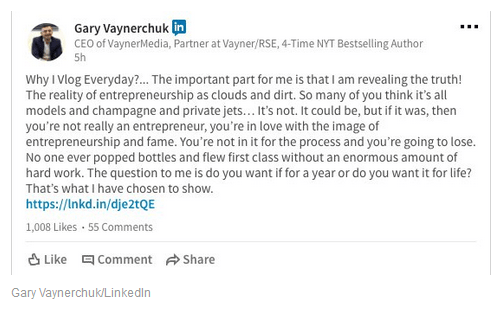
Once a place to professionally network, LinkedIn has evolved into a vehicle for marketing execs to weigh in on the hottest industry topics du jour in blog posts, self-promote and even dish out advice on entrepreneurship in their status updates.

“LinkedIn has become far more cluttered with these marketing gurus recently than it used to be,” said Eric Schiffer, CEO of reputation management firm Reputation Management Consultants. “The presupposition is that it makes you appear more credible in business.”

The gold rush for personal fame on LinkedIn can, in part, be attributed to LinkedIn’s own evolution as a platform. A key feature of this is its influencer program, an official invite-only program comprised of around 500 of the world’s top business leaders who regularly share news and insights on the platform. The program has helped propel advertising heavyweights like VaynerX and VaynerMedia CEO Gary Vaynerchuk and Y&R CEO David Sable to even greater heights, giving them access to wider audiences and a chance to further their influence beyond advertising.

“One of the reasons I like LinkedIn is because it is a broader audience, I’m interested in business in general, not necessarily just advertising,” Sable told Business Insider. “I’m always learning from people’s responses–it’s interesting to read comments and see what people respond to.”

Executives from the advertising industry make up less than 5% of executives in the influencer program. Still, that success, combined with the self-aggrandizing nature of social media, means that now seemingly everyone in the industry can–and aspires to build–his or her personal brand on LinkedIn, said Tom Goodwin, head of innovation at Zenith.

“We are an industry that relies on reputation, where it is important to be known,” Goodwin, who is a LinkedIn influencer himself, said. “I have had people from the industry starting to regularly ask me to like or comment on what they share and ask me what my secret sauce is. They roll their eyes when I tell them to talk about what they actually are passionate about.”

‘Ridiculous and pathetic epithets’

Take, for example, Adam Kleinberg. The CEO at agency Traction is unabashed in his use of LinkedIn as a personal branding tool. He shares posts and thoughts on LinkedIn at least twice a month and said that it has been extremely valuable for building business connections.

“There is generally a high degree of engagement, and I keep a close eye on who is liking or commenting on my LinkedIn posts,” he said. “I’m constantly hearing from people that they ‘see Traction everywhere in the news,’ but the place they see us everywhere is LinkedIn.”

Screen Shot 2017 06 14 at 4.34.35 PM


Adam Kleinberg/LinkedIn

The influx of advertising execs keen to boost their personal brands has turned some, including Sean Cummins, global CEO of Cummins & Partners, off from the platform. Cummins, who hasn’t  hesitated to call people (including Vaynerchuk and Ogilvy & Mather copy chief George Tannenbaum) out in what many may term as trolling, said that LinkedIn had become full of “ridiculous and pathetic epithets.”

“You could fill up a whole room with all the ridiculous stuff that hits my LinkedIn,” he said. “It’s just a lot of self-aggrandizement and innutritious wisdom.”

Not everyone, however, buys into the argument that LinkedIn has become a personal branding tool and a way for the ad industry to puff each other up. Certainly not Vaynerchuk himself.

“I think that’s silly. LinkedIn is a massive recruitment and data tool, and content is a nice to have and far from its core,” he said. “People will always be cynical to other people’s quest to disseminate content and that’s that.”

By

Sourced from Business Insider UK

By Jimmy Rohampton.

Whether you are a freelancer, the head of a startup, or a recent college graduate trying to make your professional mark, personal branding is important.

Don’t make the mistake of ignoring the opportunities that LinkedIn provides you in this area. If someone takes an interest in you, they will eventually find your LinkedIn profile. That’s just inevitable. Fortunately, the following five hacks will let you create the ideal personal brand.

1. Put a lot of thought into your summary

When it comes to making the right connections and moving your personal branding in a positive direction, your LinkedIn summary is key. Don’t simply throw together some biographical information. Take some time to write a thoughtful, attention getting, and interesting summary that truly represents you. Tim Ferriss of the 4-Hour Workweek did an amazing job on his LinkedIn profile.

Start your summary by composing a powerful headline. Many people actually skip this step, which is a bit baffling. Then, continue telling your unique story. Keep in mind that you have 2000 characters with which you can wow people. It may help to take pen to paper first and list your qualifications, values, and accomplishments. You can then use this as a source of inspiration as you write your summary.

2. Use visuals to really make an impact

LinkedIn is a highly visual platform. Unfortunately, if you look at many of the profiles and much of the content therein, you wouldn’t know this. LinkedIn provides users with the capabilities to add pictures, videos, slide presentations, even audio to their profiles. This means that you aren’t limited to text in order to tell your stories.

So, create a video that introduces you to new followers and shares your story. Accent your content with amazing pictures and photographs. Upload that amazing SlideShare presentation that’s created plenty of engagement on other social media sites.

Finally, if you haven’t done so already, upload a professional looking profile photo. This goes a long way towards ensuring that people remember you, and feel connected to you. A good example of this is Darryl Stevens of digiTech Web Design.

4. Optimize your profile header

If you check out someone’s LinkedIn profile, chances are the first thing you are going to notice is their profile header. What many people don’t realize is that they can customize their profile header so that it matches their branding. All that you need to do to get started is click on the Edit Background button in your profile.

If you want to get something up quickly, LinkedIn provides some decent stock images. However, while these are better than nothing, they aren’t ideal. You’ll get better results by creating something customized. This way it truly represents who you are. See the profile header of Gary Vaynerchuk, CEO of VaynerMedia.

If you have funds to spare, getting a graphics pro to put together your profile header for you is a worthwhile investment. If not, you’ll have to brush up on your photoshop skills or use a tool like Canva.

5. Get clients and people you respect to endorse you

What you say about yourself on LinkedIn is important. What other people say about you is 100x times more important. Reach out to your contacts, and ask for recommendations. Of course, you’ll want to be generous as well and reciprocate with sincere endorsements of your own. When you successfully complete a project, don’t be shy. Ask satisfied clients to connect with you on LinkedIn if they have not already, and give you their stamp of approval. Vikas Bajaj, attorney at the Law Office of Vikas Bajaj, APC and Injury Trial Lawyers, APC is a good example to check.

When it comes to building influence, there are fewer things on LinkedIn that are more important than getting recommendations from the right people. Remember that by being sincere and generous with your endorsements, you are more likely to be able to earn some of your own.

6. Be an active user

It might help to think of LinkedIn as you would any other dynamic social media platform such Facebook or Twitter, because it is. Don’t simply create your profile and leave it at that, participate! You can start by using LinkedIn publishing to write and share great content with your target audience. This is a great way to ensure continued interest, and to establish thought leadership. You should also share daily updates.

One great built in feature that LinkedIn has is that it will automatically inform your followers and contacts when you have posted new content. This is almost like having your own promotion tool.

LinkedIn is a powerful platform for building your personal brand. Try out a few of the hacks listed above, and you can get the most out of your LinkedIn presence.

By Jimmy Rohampton

Sourced from Forbes

By Roland Oliphant.

Russia is set to block the website of the LinkedIn social network after a Moscow court found it had failed to comply with a controversial law requiring it to move servers into Russia.

The Moscow city court on upheld an earlier finding by Roskomnadzor, Russia’s media and telecoms regulator, that LinkedIn had failed to keep information about Russian citizens inside Russia.

LinkedIn can appeal the ruling, a court spokesman said.

The US-based company said the finding would hurt its users and requested a meeting with the agency responsible.

“‘LinkedIn’s vision is to create economic opportunity for the entire global workforce,” the company said in a statement.

“The Russian court’s decision has the potential to deny access to LinkedIn for the millions of members we have in Russia and the companies that use LinkedIn to grow their businesses. We remain interested in a meeting with Roskomnadzor to discuss their data localization request,” it said.

The professional networking website was still accessible on Moscow internet connections as of Thursday afternoon.

However, Vadim Ampelons, a Roskomnadzor representative, told the Interfax news agency that LinkedIn would be blocked as soon as the agency received the full text of the court’s ruling, likely next week.

LinkedIn is the first major internet firm to fall foul of  controversial 2015 legislation that demands companies store data about Russian citizens on Russian territory.

Critics have described the data localization law as an attempt to make it easier for the Russian security services to access citizens’ personal information.

Some foreign firms, including Apple, have agreed to comply with the law. Russian authorities have so far postponed a potential show down with holdouts including Facebook and Twitter.

Roskomnadzor has so far audited 1500 companies for compliance with the new law.

By Roland Oliphant

Sourced from The Telegraph


By Julie Bort.

In the shadow of its acquisition by Microsoft, LinkedIn has quietly begun talking about an internal project that has the potential to shake up the roughly $175 billion data-center hardware market.

LinkedIn’s plan is somewhat similar to what Facebook is doing with its Open Compute Project. OCP is creating brand-new “open source” data-center hardware, in which the engineers from different companies work together and everyone freely shares the designs.

In its five years, OCP has upended the data-center market and generated a cultlike following so big that when Apple forbade its networking team to join OCP, the whole team up and quit.

Likewise, LinkedIn is designing and building nearly all the pieces and parts of software and hardware that it needs for its data centers, poaching key people from Facebook and Juniper to do it.

“We are not building servers and switches and all these things because we want to be good at it. We are doing it because we believe it gives us an advantage to control our own destiny,” Zaid Ali Kahn, senior director of infrastructure architecture and operations at LinkedIn, told Business Insider.

This is a terrifying trend for vendors like Cisco and Juniper. In the past, only the biggest internet companies like Amazon, Google, and Facebook have gone this route: designing their own IT infrastructure from scratch.

LinkedIn isn’t as big as those guys. It has a handful of data centers in California, Texas, and Virginia — most of them using leased space at a hosting provider — and only recently started designing and building its own in Singapore and Oregon. The one in Portland, Oregon, is its crown jewel, and the other data centers will eventually be upgraded with the new technology.

Internally, this is known as Project Altair, and the plan to build its own network software to run on dirt-cheap commodity network hardware is known as Project Falco.

A superfast network for $1

The story begins with a Facebook network hardware engineer named Yuval Bachar. He was part of a Facebook team in 2013 that had a big goal: reducing the price of building a super-high-speed computer networks tenfold. Facebook had stolen him from Cisco, and he did a stint at Juniper, too.

LinkedIn Yuval Bachar

Yuval Bachar. YouTube/@Scale

He wanted to pay $1 per gigabyte, or $100 for each piece of network equipment that normally costs $2,500 — and he publicly announced the goal at an industry conference.

He then went on to help Facebook build its industry-changing, l0w-cost, open source Wedge switch that put market leader Cisco on notice. Earlier this month, Facebook announced the second generation of that switch.

About the time Bachar announced his goal, the LinkedIn networking team was struggling with its own network, which wasn’t handling the company’s user growth very well.

“The Production Engineering Operations (PEO) team found it very difficult to meet the demands of our applications when network routers and switches are beholden to commercial vendors, who are in control of features and fixing bugs,” Kahn wrote in a blog post.

In early 2015, the team began to build its own switch, called Pigeon. In the fall, it hired Kahn to help do it. It began testing the switch early this year.

LinkedIn's Pigeon switch

LinkedIn’s Pigeon switch. LinkedIn

Deja vu

In the meantime, having been a part of OCP, Bachar came up with a similar plan for LinkedIn. OCP started by creating a rack that holds stacks of computers, storage drives, and network switches.

Open19 rack

The Open 19 rack. Open19.org

As a company grows, it simply adds more switches, servers, and disk drives to the rack. But the racks themselves can be expensive, including all sorts of bells and whistles that LinkedIn didn’t need.

Facebook had the same problem, so it built a stripped-down 21-inch rack, then designed its own servers and storage to put in it.

But hardly anyone else uses a 21-inch rack. “Probably 99.5% [of companies] are using a 19-inch rack,” Kahn told us.

That means for LinkedIn (or anyone else) to use Facebook’s rack, it had to renegotiate supply deals with its vendors to get gear in different sizes.

It was deja vu. Bachar led an initiative called Open 19 to create an open standard for a low-cost 19-inch rack. This rack can be stuffed with 96 servers for $50,000 total, saving $25 million across a 500-rack data center, the organization says.

Having seen the impact of OCP, vendors jumped on board, including some of the Chinese contract manufacturers that have made a killing supporting OCP. Hewlett-Packard Enterprise, which was late to OCP, is also a member.

Full-steam ahead, no turning back

Microsoft, which expects its $26.2 billion acquisition of LinkedIn to close by the end of this year, is a member of OCP and has standardized its 21-inch racks and other OCP technology.

Kahn wouldn’t comment on the impact of the acquisition, but Microsoft has promised to let LinkedIn operate independently. A person with knowledge of the situation told us projects Altair, Falco, and Open 19 are still full-steam ahead.

This person points to the fact that in September, three months after the merger was announced, the company hired Doug Hanks from Juniper Networks.

LinkedIn Doug HanksDoug Hanks. LinkedIn/Doug Hanks

Hanks was Juniper’s director of product management and strategy, and has written a number of books on Juniper’s tech. He’s now LinkedIn’s director of engineering.

“Doug Hanks reports to me,” Kahn said. “He recently joined and we’re delighted to have him.”

“His focus is to build the network engineering team and take it to the next level and help execute a number of initiatives, understanding the blend between software and networking,” he said.

Our source said that with Hanks on board, LinkedIn plans to be almost fully reliant on its own home-grown network gear in 18 to 24 months, and then “it’s no turning back at that point.”

Kahn insists that LinkedIn’s goal differs from Facebook’s. He’s not looking to pick a public fight with the network industry led by Cisco.

In fact, he’s still buying network gear from a number of commercial vendors — as long as they allow him to ditch their software so he can install his own, he said.

“A lot of vendors are open to that, to meet the needs of a web scale company,” he said.

LinkedIn also hasn’t fully committed to giving away all of its home-grown infrastructure software, the designs of its switch, or other hardware, as OCP has. But Kahn hasn’t ruled out openly sharing its technology either.

“LinkedIn’s culture is open source, so when the time is right we will be open to that,” Kahn said.

In fact, LinkedIn was a founding member in Hewlett-Packard Enterprise’s open source project, called OpenSwitch, to build a Linux-based switch. OpenSwitch is now run by the Linux Foundation (and word is that the initiative is floundering and LinkedIn is looking for alternatives).

Meanwhile, LinkedIn has also been sharing technical articles about its network software.

Big money at stake

Internet companies using commercial network gear often spend $40 million to $140 million a year on it with vendors like Cisco, Arista, and others, one person who ran a large internet network recently told Business Insider.

Seeing a company LinkedIn’s size roll its own, they could be encouraged to try that themselves.

One person not associated with LinkedIn who built a huge data center for one of the world’s largest tech companies said that after his company starting building its own network equipment, it drove the costs down by a factor of 10: from $40,000 per Cisco switch to $4,000 per cheaper “commodity” switch capable of running home-grown software.

“Arista, Cisco, Juniper, they are all s—ing themselves about this trend,” said someone familiar with LinkedIn’s project. “The big guys, Google, Amazon, Facebook, are all doing this for economies of scale. For them, it’s all about money. It’s cheaper to build their own. At LinkedIn, cost is not the No. 1 priority at all. They want to have complete control over the user experience, to own everything in the stack. Then they can standardize it.”

By

Sourced from Business Insider UK