Tag

Social Media

Browsing

By Nicola Bartlett.

Young adults who use social media feel more lonely, say psychologists.

The more time young adults spend on Facebook , Twitter , and Pinterest, the more likely they are to feel cut off from the rest of society, a study has found.

More than two hours of social media use a day doubled the chances of a person experiencing social isolation .

Higher numbers of visits to social media sites have a negative effect as well as the amount of time spent online, the US research shows.

Study participants who visited various sites 58 or more times per week were three times more at risk of isolation than those visiting less than nine times per week.

But scientists involved in the study, which was published in the American Journal of Preventive Medicine, said they couldn’t be sure whether people were already lonely and drawn to social media or if the online platforms were making them isolated.

But they did conclude that social media did not make people feel more connected.

Co-author Elizabeth Miller, professor of paediatrics at the University of Pittsburgh, said: “It’s possible that young adults who initially felt socially isolated turned to social media. Or it could be that their increased use of social media somehow led to feeling isolated from the real world.

Certain aspects of social media may encourage feelings of exclusion

“It also could be a combination of both. But even if the social isolation came first, it did not seem to be alleviated by spending time online, even in purportedly social situations.”

Lead scientist Professor Brian Primack, from the University of Pittsburgh School of Medicine, said it was an important study because mental health problems and social isolation are at ‘epidemic levels’ among young adults.

“While it may seem that social media presents opportunities to fill that social void, I think this study suggests that it may not be the solution people were hoping for,” he said.

The link with isolation was found even after taking account of social and demographic factors that might have influenced the results.

The scientists have several theories to explain the findings including the idea that the more time a person spends online, the less time is left for real-world interactions.

The team questioned 1,787 adults aged 19 to 32 about their use of the 11 most popular social media platforms (Photo: Getty)

In addition, they believe that certain aspects of social media may encourage feelings of exclusion, such as seeing photos of friends enjoying an event to which you have not been invited.

Also, exposure to idealised representations of other people’s lives may elicit feelings of envy and promote the belief that your life is disappointing and dull in comparison, the researchers believe.

The team questioned 1,787 adults aged 19 to 32 about their use of the 11 most popular social media platforms at the time the research was conducted in 2014: Facebook, YouTube, Twitter, Google Plus, Instagram, Snapchat, Reddit, Tumblr, Pintrest, Vine and LinkedIn.

Each person was assessed for self-perceived social isolation using a standard technique called the Patient-Reported Outcomes Measurement Information System (Promis) that provides scores for a wide range of measurements.

By

Sourced from Mirror

By Alfred Lua.

A decade ago, the role of a social media manager might not have even existed. Today, however, almost every company is involved in social media one way or another.

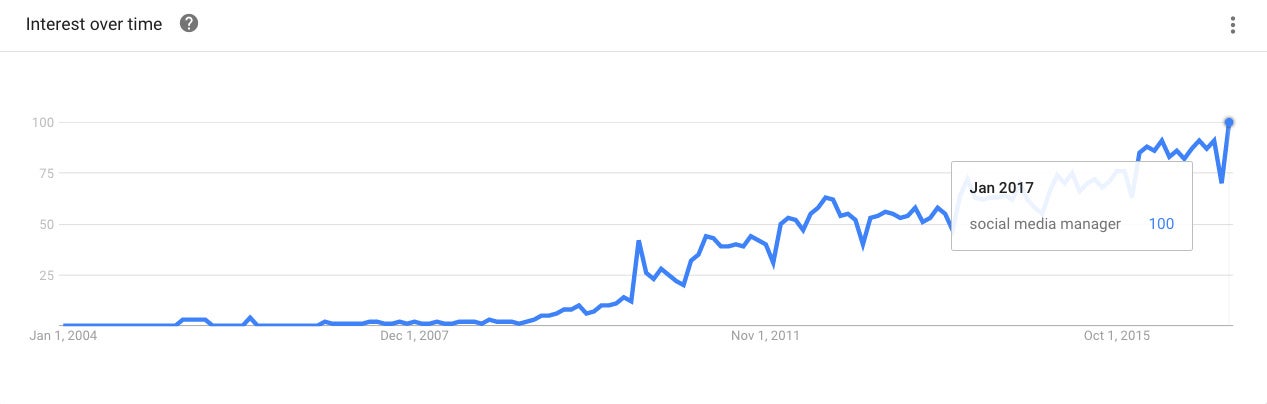
A quick look at Google Trends shows the rise in interest in the term “social media manager” over the years, and it seems that people have never been as interested in the term as they are today.

What does it take to be a great social media manager? What are the skills to master and traits to have? How can you work on those areas?

In this post, we’ll try our best to answer all those questions. We’ll share 10 skills and traits that are crucial to being a great social media manager and relevant resources to help you improve in those areas.

Skills vs. traits

Throughout this post, we’ll discuss the various skills and traits we feel are most important for social media managers. But before we dive in, I quickly wanted to share some of my learnings about the difference between skills and traits.

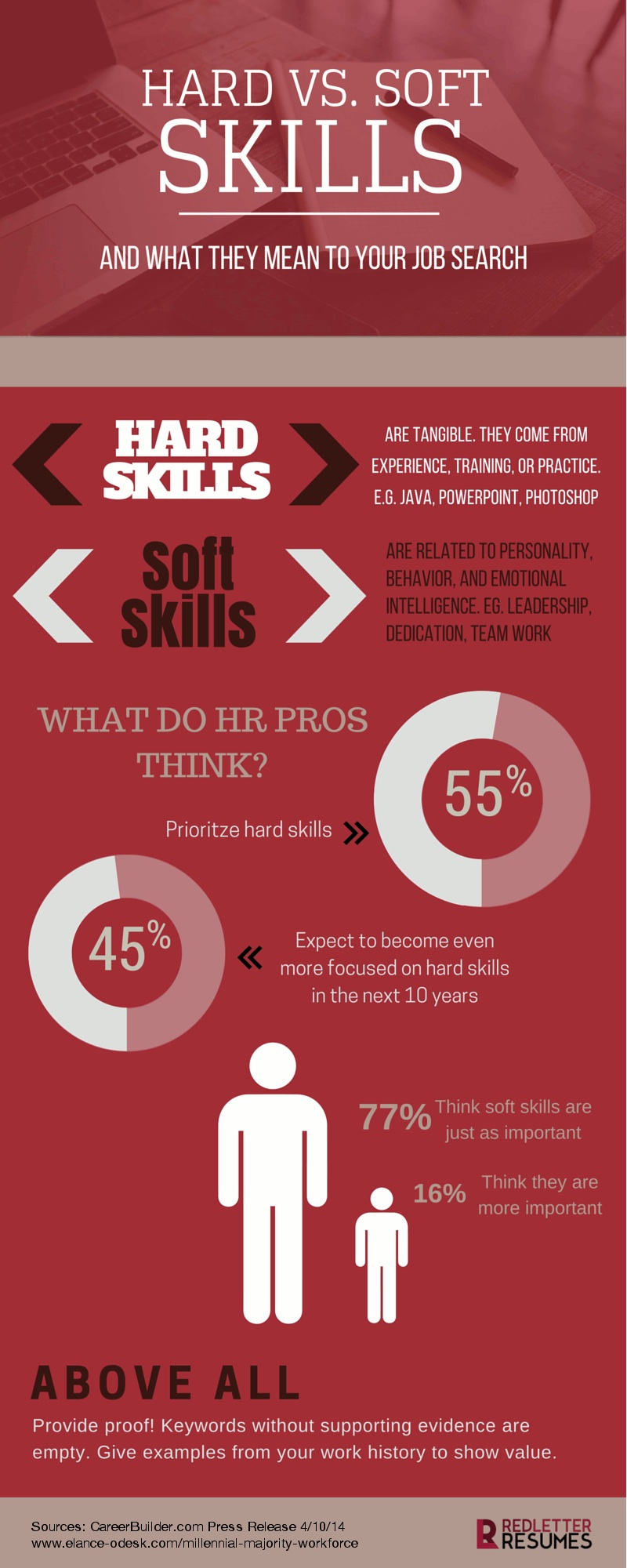
Here’s a great explanation of skills vs traits from Red Letter Resumes:

Image credit: The Huffington Post

When it comes to finding your ideal social media manager, I feel you may be looking for the right mix of tangible skills (things like copywriting and analytics) and traits (such as curiosity).

7 skills top social media managers share

1. Copywriting

Copywriting is a fundamental skill for social media marketing (and probably all areas of marketing). Writing good copy is required in many areas of a social media manager’s role, from filling up your social media profile description to crafting tweets and Facebook posts.

To drive engagement and clicks, you have to fit a captivating story into your social media post and without great copywriting skills that can be difficult.

To enhance your copywriting skills, I’d highly recommend studying a few copywriting formulas to help you craft inspiring copy. Finding a copywriting formula (or two) that works for you can be a great productivity boost and also improve the quality of the social media content you publish.

One of our favorite copywriting techniques here at Buffer is the ‘Before – After – Bridge’ – you may recognize it from a few of our blog posts and social posts. Here’s how it works:

Before – After – Bridge

Before – Here’s your world …

After – Imagine what it’d be like, having Problem A solved …

Bridge – Here’s how to get there.

Example:

Resources

2. Design (graphics and videos)

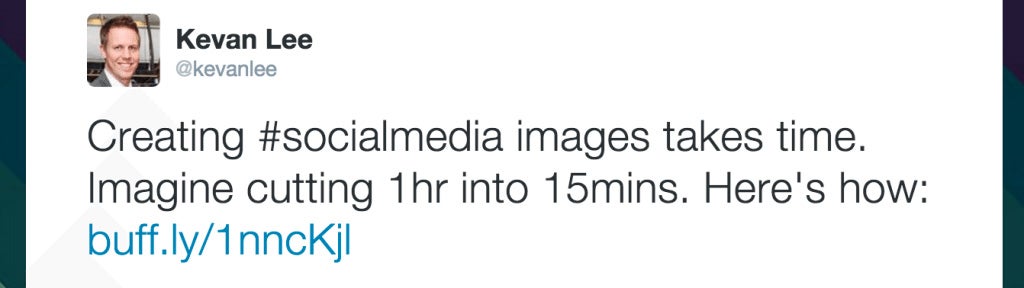
Research has found that social media posts with images receive more engagement and 43 percent of consumers want to see more videos content in the future.

Social media evolved a great deal over recent years, and we have moved away from mostly plain text based updates towards visual content such as images and videos. Designing and creating visual content is becoming an essential skill for social media managers.

Resources

3. Public speaking (confidence in front of an audience)

With features and apps like Facebook Live, Instagram Live and Periscope, live videos are becoming more and more important on social platforms. And marketers have noted this change, with 42 percent of marketers saying they want to create more live videos.

Why are marketers excited about live video? I believe the answer is two-fold: reach and engagement. Facebook Live videos are more likely to appear higher in the News Feed when those videos are live than after they are no longer live. From an engagement perspective, live content also provides opportunity for high-engagement and 1:1 interactions with audiences.

To tap into the live video trend, social media managers have to be confident enough to go live on social media to connect with their audience. Having public speaking skills will help you to present your ideas, interview guests, answer impromptu questions and chat with your followers in real-time.

If you want to see our awesome social media manager, Brian Peters, in action, you can find his live videos here. And below is a short clip of Brian discussing viral content:

Resources

4. Customer service/community engagement

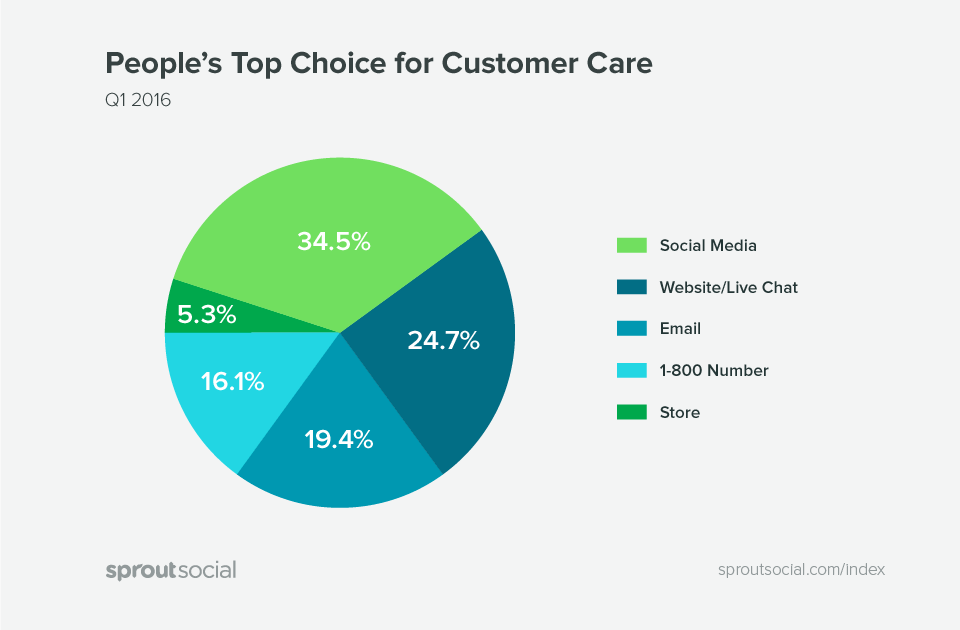
Social media is the top channel people go to for customer care, but only 21 percent of businesses use social media for customer support. This means there’s a huge opportunity here to provide remarkable customer service experiences.

As the face of your company on social media and the person who is likely to be responding to at least some of the messages your brand receives on platforms like Twitter and Facebook, it’s important for social media managers to have conversational skills and empathy to help you customers on social media.

Community engagement is quite similar in many ways. A great social media community manager is able to ask the right questions to facilitate engagement and answer questions about the product, company or industry.

Resources

5. Behavioral Psychology

With data and analytics, you know what type of social media posts do well. Behavioral psychology tells you the why – for example, why are people attracted to certain posts? Why do people share certain posts?

Knowing the what allows you to spot trends and try to repeat past successes; knowing the why enables you to understand the underlying causes for those trends in order to try and create future successes.

For example, your data might tell you that your tweets with images are doing better than tweets with only text. Based on just that information, you might create more tweets with images. However, it could be that your followers prefer visual content. Without knowing the psychology behind trends, you might miss out on opportunities to create other types of visual content such as videos and GIFs.

You certainly don’t need a degree or high level of expertise in psychology to be a social media manager, but a keenness to learn and understand psychology at some level is an important skill.

Resources

6. Analytics

The term, ‘Analytics,’ is used quite broadly here, referring to both social media metrics (e.g. likes, comments, shares etc.) and business metrics (e.g. traffic, leads, conversions, revenue etc.). A great social media manager is able to understand both types of metrics and tie them together to give an overall view of the company’s social media performance against business goals.

A social media manager should be the guiding light in your business when it comes to measuring your performance across various social channels. As such, learning the ins and outs of social media metrics and judging which ones are meaningful for your business is essential for a social media manager.

For example, if your goal is to drive traffic from social media channels to your website and drive sales, being able to attribute traffic and conversions back to channels and even certain posts will help your team to understand what content is helping you to achieve your goals.

Knowing how to read and interpret data is now an important skill for social media managers.

Resources

7. Budgeting

As a social media manager, you might be allocated a budget to work with. Apart from paid advertising, you might have to pay for things like a social media management tool, designs, images or courses to improve yourself. Having some basic financial and budgeting knowledge can make you better on the job.

While you might not need to be an Excel expert, understanding Excel and knowing what you can do with it can be very valuable.

Image credit: Hubspot

Resources

3 personality traits great social media managers exhibit

8. Curiosity

A curious social media manager would immerse herself in the social media world, staying up-to-date with the latest development and experimenting with new social media marketing strategies.

Brian Peters is an epitome of this quality. When we discovered that videos, especially live videos, are becoming popular on social media, Brian immediately started making more videos on Facebook and Twitter. When Snap Inc. launched Spectacle, Brian got it as soon as he could to try it out and figure out how marketers can use it in their social media strategy.

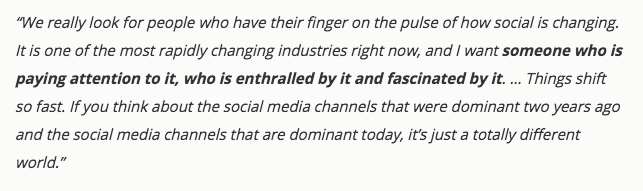
HubSpot VP of Marketing Meghan Keaney Anderson said this really well when she described her ideal social media hire:

Resources

9. Adaptability

Adaptability complements curiosity. When you discover something new or spot a trend, being able to quickly adapt to it can keep you ahead of the curve.

For example, the most engaging type of social media content has shifted from texts to images to videos. In a Fast Company article, Mark Zuckerberg was reported to have said:

A great social media manager is able to keep up with such changes and pick up the necessary skills (e.g. graphic design, video making etc.). (Imagine when virtual reality becomes the most popular type of content!)

Resources

10. Business Savviness

Being able to generate likes and shares is great; knowing how social media fits in with the entire business strategy is even better! A business-savvy social media manager sees the bigger picture and understands the role of social media in the company.

They understand which metrics are most relevant and crucial to the business and how social media can help to push them higher. For example, a B2B social media manager might focus on generating leads for her sales team while a B2C social media manager might focus on increasing customer purchases directly. This way, her impact goes beyond just social media but to the entire company.

Resources

Skills and traits others think are important

To give you an unbiased view on this topic, I’d love to share the skills and traits that other companies and individuals think are important:

What the Best Social Media Community Managers Actually Do in Their Jobs by HubSpot

  • Content creation
  • Marketing analytics
  • News junkie
  • Customer service
  • Community management
  • Funnel marketing
  • Project management

Lindsay Kolowich of HubSpot also mentioned the necessary skills for each of these areas in this article.

10 Essential Skills a Social Media Manager Needs To Have on Their Resume by Jeff Bullas

  • Strategy planning
  • Tactics and execution
  • Community management
  • Understand how content works on a social web
  • Optimizing content and technology
  • Creative mindset
  • Writing skills
  • Be on top of the latest digital marketing trends
  • Analytical skills
  • Leadership and communication skills

How to Build A Social Media Strategy Dream Team by HubSpot and Sprout Social

  • Patience
  • Technical aptitude
  • Proactive
  • Daring
  • Passion
  • Level of Experience
  • Customer-first mentality

By 

Sourced from Entrepreneur

By Steve O’Hear.

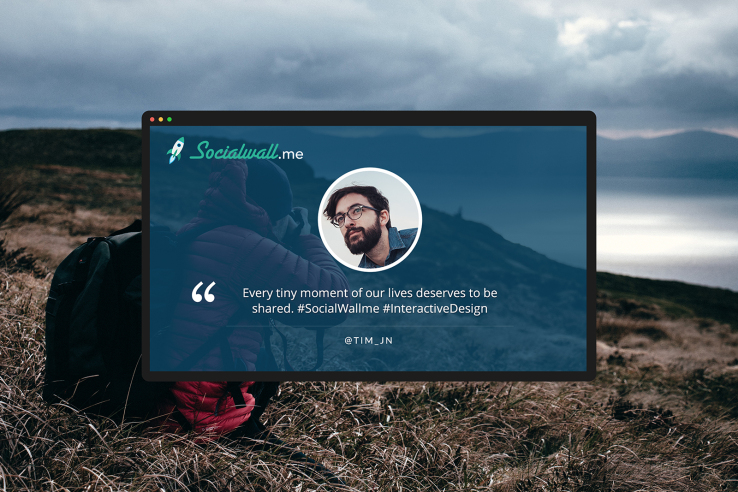
Born out of technology designed to help price a musician or band’s live performance, based on their social media presence, SocialWall aims to be a smarter way for brands to display social media mentions at events or in venues.

Like so many social media management products, the promise is less noise and more signal.

The scenario is a familiar one: an emcee gets up on stage and announces the hashtag for the event. Something like #ohear2017, before commanding that the audience, either in person or via the live stream, gets tweeting. Or Instagramming. Or Thefacebooking. Or whatever it is the cool kids are using these days.

The problem is, of course, that without employing a team of social media managers to edit what goes on display, a brand risks losing control of the conversation. And that must never be allowed to happen. Ever.

Supporting Twitter, Facebook, Instagram, and even Slack, SocialWall’s algorithm claims to be able to bubble up the best or most brand appropriate content, by taking into account things like who posted the content, how influential they are, how much engagement the post is already getting (likes, retweets, comments etc.), sentiment, and even image quality if an image is included.

It’s this scoring technology, which gives each social media mention, author and image a score of 1-10, that the founder of My Band Market, the French startup behind SocialWall, reckons sets its social wall solution apart from other products on the market.

“Companies today struggle in engaging their target audience. Whilst they understand that employing their user generated content is one of the most effective forms of advertising, they don’t have the tools to amplify their online visibility in complete security,” says My Band Market founder and CEO Quentin Lechemia.

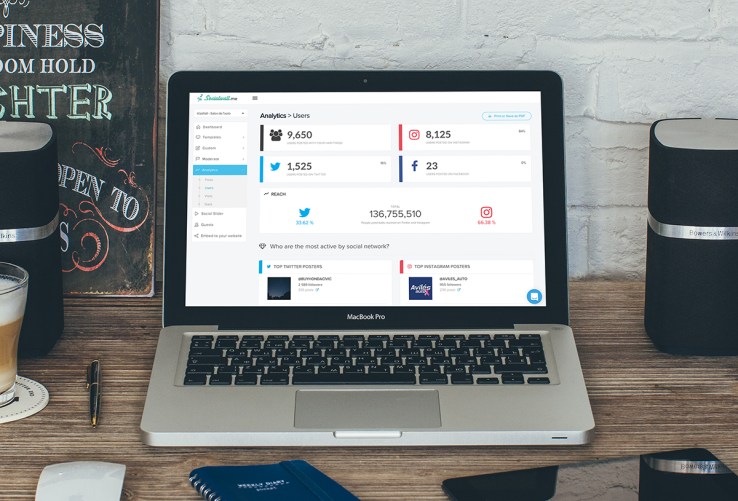
socialwall-analytics

“SocialWall.me offers a complete package to companies looking to interact with their community. Our customizable templates – available for any screen – boost engagement by encouraging viewers to become online brand ambassadors. Our AI and scoring algorithms, moderation interface and analytics reports are the backbones of a product that lends our customers ultimate online power”.

“Ultimate online power” is probably overstating it a bit. Okay, overstating it a lot. But, along with a smart algorithm to help ensure the best content goes on display, SocialWall lets you manually filter out posts based on keyword, language, and user.

As you’d expect, analytics are included, too, and there’s a neat feature that lets you effectively embed a ‘social wall’ on your brand’s website, in addition to having it populate a screen on display in-venue.

“We offer [companies the] ability to boost reach, control the messages around their brand and most importantly, measure return on investment,” adds Lechemia. “SocialWall.me’s expertise resides in AI, Big Data, Deep Learning and interactive design. We are the first intelligent social media wall that knows what content to publish when”.

By

Sourced from TechCrunch

By Sig Ueland.

Social media platforms and tools change quickly. Here is a list of new social media tools to try in 2017.

There are tools to generate and curate content, launch and measure campaigns, and connect with experts and customers. Most of the tools are free or have free plans.

Snaplytics

Snaplytics.

If you are interested in developing your brand on Snapchat, consider Snaplytics. The mission of Snaplytics is to shed light on what marketing efforts are working on Snapchat. The platform has features for brand analytics, publishing and managing stories on Snapchat, and competitor analysis. Compare multiple accounts on Snapchat, schedule stories ahead of time, and get actionable metrics and insights. Price: Free for 1 Snapchat account. Premium plans start at $29 per month.

Adobe Spark

Adobe Spark.

Create social graphics, web stories, and animated videos with features from Adobe Spark. With Spark Post, pick a photo, add text, and apply design filters to easily create compelling visual content. With Spark Page, turn words and images into magazine-style web stories. With Spark Video, simply record your voice, add photos or icons, select soundtracks and motion to create in minutes. Price: Free.

Yala

Yala.

Yala is a free chatbot that tells you the best time to post to multiple social networks. Increase your engagement on the items you’re sharing. Yala is currently for Slack, but request to be notified when it’s available for SMS, Facebook Messenger, and others. Price: Free.

PostReach

PostReach.

PostReach is a content analytics tool for content marketers and bloggers. Measure the performance of your content from the moment it’s published. See key traffic stats and sources for every post. PostReach will continually monitor your content and show you how many shares you’re getting on Twitter, Facebook, LinkedIn, and Pinterest. PostReach tells you who has shared your content (and your competitor’s) on Twitter and makes it easy to reach out to them. Price: Plans start at $10 per month.

Quuu

Quuu.

Quuu is a source for hand-curated content suggestions for social media. Select from over 300 interest categories to receive suggestions that matter to you and your audience. Choose how many suggestions you’d like to send to your social profiles via your Buffer or HubSpot account. Let Quuu handle everything, or you can manually approve suggestions. Price: Free up to 5 interest categories. Pro plans start at $10 per month.

Falcon.io

Falcon.io.

Falcon.io is a social media and customer-experience-management platform. Sync your social and online and offline content-marketing activities in one calendar. Create your own campaign pages. Discover, attract, and engage customers, and connect social data to what you already know across departments and channels. Price: Contact on pricing.

Intellifluence

Intellifluence.

Intellifluence is a platform to find the best influencers to represent your brand. Communicate directly with influencers, and manage interactions in one spot. Price: Plans start at $19 per month.

Zest

Zest.

Zest is a Chrome tab feed of content suggested by marketers, all manually moderated. Zest is used by companies such as Buffer, SEMrush, and Ahrefs. Personalize your feed and content. Choose the marketing tags that are relevant for you, and customize Zest’s theme and layout to fit your preferences. Price: Free.

Refind

Refind.

Refind is a tool for social search and content curation. Follow people and interests to discover links that matter to you. Or search the web as you always do and Refind highlights links you or your friends saved when you search on Google. Use Refind to generate a newsletter and email a digest of your favorite links to your fans. Price: Free.

Rocketium

Rocketium.

Rocketium is a tool to easily and quickly create compelling videos with added text. Simply upload images and type text, then add motion. Save time using custom themes to clone content. Use different themes and video formats for different channels. Publish directly to Facebook, Twitter, and YouTube. Price: Free plan offers watermark videos. Paid plans start at $40 per month.

Mailshake

Mailshake.

Mailshake is a tool to promote content, build relationships, and generate leads through cold emails. Answer a few questions to generate a personalized email for your campaign. Once your campaign is ready, drop in new contacts and your message sequence will begin sending. Tweak your messages for the next round of contacts as you learn what works best. Price: $9 per month.

Crate

Crate.

Crate is a platform that helps you find and share great content online. Set up an account and add user names, keywords, and domains into a Crate collection. Then collect a feed of articles, infographics, blog posts, and more. Share this content immediately, schedule it to be shared at a later time or use Buffer integration to add the content to your Buffer queue. Price: Free.

Ghost Browser

Ghost Browser.

For social media managers, Ghost Browser can be a handy productivity tool as well as a browser. Log into one website with many accounts simultaneously. Save a group of sessions to a project. Ghost Browser allows you to install any Chrome extension directly from the Chrome store, so you don’t have to give up on your favorite productivity tools. Price: Free. Pro version is $15 per month.

By

Sourced from PracticalEcommerce

By Ilya Pestov.

Back in October, I wrote a piece on Medium that covered the numbers behind some of today’s top social media networks.

From usage numbers to engagement statistics, it was incredible to see just how impactful networks such as Facebook, Twitter, and Instagram have become. For example, not only is Facebook home to 1.23 billion daily active users on average, but those users come from all over the world — with 85.2% residing outside of the U.S. and Canada. That’s a crazy level of connectivity.

As I put together the post, it became obvious just how fast these networks were growing — and I thought a lot about how hard is it to keep up with all of these changes, especially for marketers. To make things a little easier to wrap your head around, I put together a simplified list of some standout statistics for Facebook, Twitter, LinkedIn, Instragram, and Pinterest. Check them out below if you’re looking for some guidance for your social media strategy this year.

34 Stats to Help You Plan Your Social Media Strategy on Facebook, Twitter, Instagram & More

Facebook

Twitter

  • Tweets with images receive 18% more clickthroughs, 89% more Likes, and 150% more retweets.
  • 60% of consumers expect brands to respond to their query within the hour, but the average is 1 hour 24 minutes.
  • Ideal tweet length: 100 characters.
  • Clickthrough rate is highest on Wednesdays.
  • Tweet that doesn’t include a # or @ mention will generate 23% more clicks. When the tweet is focused on driving an app install, for going a # or @ mention increases clicks by 11%. But according to Quicksprout, tweets with hashtags get 2X more engagement — clicks, retweets, favorites, and replies.

LinkedIn

Instagram

  • On average, people miss 70% of their feeds.
  • 1.1% average engagement rate of all posts (4.2% in 2014; 2.2% in 2015).
  • Images with a single dominant color generate 17% more Likes than images with multiple dominant colors. Images with a high amount of negative space generate 29% more Likes than those with minimal negative space. Images featuring blue as the dominant color generate 24% more Likes than images that are predominantly red.
  • Photos showing faces get 38% more Likes than photos not showing faces.
  • Photos see more engagement than videos on Instagram.
  • The red heart is the most frequently shared emoji on Instagram, which is shared 79% more than the next most popular symbol, a smiling face with heart eyes.
  • 50% of captions and comments on Instagram contain at least one emoji.
  • The most common posting frequency for brands on Instagram is 11–20 times per month.
  • Instagram audiences are more engaged on Mondays and Thursdays at 2 a.m., 8–9 a.m., and 5 p.m.

Pinterest

By Ilya Pestov

Sourced from HubSpot


By Tobi Elkin.

A new report by ad-tech provider Blue Venn finds that 72% of marketers consider data analysis more important than social media skills.

The report, “Customer Data: The Monster Under the Bed?,” incorporates research from 200 U.S. and U.K. marketers, with the goal of identifying the attributes most needed to compete in the data-centric marketing landscape.

Key findings include:

–Data management is now considered more vital than social media (65%), Web development (31%), graphic design (23%), and search engine optimization (13%).

–However, 27% of marketers are still handing over the process of data analysis to IT departments.

–The focus on understanding and synthesizing customer data is especially strong at large enterprises, where four out of five marketers consider data analysis to be a “vital” skill.

–Data segmentation and modeling are also considered highly sought-after marketing skills, ranking higher than both Web development and graphic design within the enterprise space.

“In the age of big data, marketers have a better opportunity than ever before to truly understand their customers’ decision-making processes. Unfortunately, as it stands, most marketers simply don’t have the time, the knowledge or the tools necessary to undertake this task in a practical and effective way,” stated Anthony Botibol, marketing director at BlueVenn.

By

Sourced from MediaPost

By Pankaj Narang.

Social media takes time, and finding the head space to consistently do it well over and over again is challenging.

Social media takes time, and finding the head space to consistently do it well over and over again is challenging.

That’s why social media automation is so important.

The thing to remember with any type of social media automation is that you will still have to spend some time on social media.

Whether you are replying to a customer or commenting on another person’s post, the human factor still has to be there.

With the social media world going mobile, interaction is always important.

But for those things you can automate, let’s have a look at some of the best social media automation tools available. These tools will help save you time and can do a few other things to make your life easier too.

1. Hootsuite

hootsuitenew

Hootsuite is a dream for all of us social media lovers. There are so many actions that Hootsuite can help with that if you have not learned the full scope of this social media automation tool, then I recommend you start looking it over. If you are serious about social media… then Hootsuite it is.

Hootsuite gives you the ability to keep track of many social media channels at once. This is perfect for those who work in the social media world, because it truly does make life a lot easier. Not only does it allow you to have multiple channels, it also lets you know if your brand has been mentioned.

Knowing when your brand is mentioned allows you to know what consumers are saying in real time. If it is great news that is being mentioned, the information can be used to let your company know what is working for the consumer. If the news is not so great, the problem can be addressed swiftly.

Hootsuite works across many different platforms and allows scheduled posts. It will also help to determine the best times to be posting in order to garner the most attention.

Using Hootsuite Advanced Search

Another wonderful thing about Hootsuite is the fact that it allows you to search for many different things.

One of the little used tools in the advanced tools is searching by sentiment. People can find out what is being said about a company and brand, by clicking the Advanced Search and ticking the box that will show both positive and negative mentions.

Sure, we all like to read the good stuff, but the negative can also be a good thing. If there is a negative Tweet it gives the company time to address it quickly. Knowing what your customers are looking for and dislike can be a great advantage.

2. Buffer

buffer-for-best-social-media-automation-tools

Buffer makes posting to social media a whizz. All you have to do is add your post to the queue and it will be posted for you. No need to even schedule a time that the post will be posted because Buffer will take care of that too.

Buffer is also known for providing great analytics. If you want to know what is working and not working, these analytics will let you know. Buffer is always adding more to the analytics so keep an eye on this application.

Want to keep track of acampaign link? Buffer now makes this available by making sure that each and every link is unique to each update or post. Be sure to use the web app and click on the settings, then go to “Campaign Tracking”. Yes, this makes all of us social media mavens happy because we are able to see the analytics and study them.

3. Crowdfire

crowdfire-for-best-social-media-automation-tools

Crowdfire works with both Twitter and Instagram. Want to know who unfollowed you? Crowdfire is the source to go to have your questions answered.

In both business and personal life, we want to know about those who are following us and those who have decided they do not like the posts we are putting put up. Crowdfire also allows you to find those Twitter users who are inactive and delete them if you want to.

This platform helps the user find others that are relevant with the “Copy Followers” feature. Checking the relationship between any two Instagram or Twitter accounts is possible with the Crowdfire platform.

With Instagram, Crowdfire has the ability to schedule posts, use viral hashtags and even suggest images. The clean, engage and grow technique cuts out a lot of the time that would be used to get the tasks completed without this application. A great way to keep Twitter and Instagram accounts under control and up-to-date.

4. CoSchedule

coschedulenew

CoSchedule is a writer’s dream. This management tool allows for articles to be scheduled, blog post management, scheduling for marketing projects and social media management.

CoSchedule allows for the organization that many writers and social media marketers yearn for. If you have given up on complex spreadsheets like some of us have, CoSchedule is a gift of organization.

CoSchedule allows for the scheduling of posts and will suggest the best time to send out your posts. Over 60 messages can be scheduled at a time. This number of post allowance frees up time in order to answer customers or to interact with others. You can also collaborate with your team.

5. SociAlert

socialertnew

Socialert automates your hashtag search and allows a user to analyze what is happening on Twitter for your twitter campaigns in realtime.

From digital marketers to established brands and media agencies, everyone can make the most out of their twitter campaigns with this hashtag tracking tool.

You can also use socialert to track event hashtags and monitor your brand as well.

If you are really interested in how your twitter marketing works for you than this is the application to be using.

6. BuzzSumo

buzzsumo2

BuzzSumo allows for many different tasks to be accomplished.

Here is a short list of just a few of the things that BuzzSumo helps with:

  • BuzzSumo has an influencers search that cannot be beaten. It allows for searches being conducted by location, topic and area.
  • You can also analyse influencers with the filter you can go by authority, reach, engagement and influence.
  • It also has the ability to build lists and communicate with key influencers.
  • Follow those influencers you choose to and add them to your Twitter lists.

Finding great quality content along with all of the statistics will allow you to be able to know what is working with the consumer and what is not.

Searching for viral content and the analytics to go with it has never been easier. Reaching out to a list of authors and establishing relationships with them is also worthwhile while using BuzzSumo.

Remember, influencers already have a following built up, so if you are able to gather information and share it with their audience it will amplify its reach. Building relationships with influencers always pays off in the end.

7. Scoop.it

scoopit

Scoop.it allows for content publishing in less time than any other social media automation application.

With Scoop.it content can be curated from other sources and shared with your opinion or angle. It also allows posts to be shared across social media platforms with the push of a button. Searching for content is easy with the use of the search bar for a particular topic.

Scoop.it is great for when you want to share something on a certain niche or topic. It also allows for freedom from writing all of your own content.

Looking for ideas on topics and what is getting traffic? Head over to Scoop.it and I bet you will be mildly surprised.

8. Post Planner

post-planner-blog-writing-tool

Post Planner is a helper when it comes to finding, planning and posting content that helps to increase followers and visibility on Twitter and Facebook. Finding content that works and will draw customers to your website is what post planner does best.

With Post Planner the user can actively choose photos, articles and even statuses to share.

Having issues with content creation? Post Planner will certainly fill the void when needed. Hit that writing block or just need something intelligent to share? Try Post Planner!

9. SocialPilot

socialpilotnew

SocialPilot is a marketing tool with social media scheduling for marketers and social media management teams. SocialPilot allows you to collaborate with your team by sharing their social media calendar.

Over 500 posts can be shared to 200 social media accounts. Bulk scheduling of posts and updates is easy with SocialPilot. To use bulk scheduling all the user has to do is upload a file in CSV format or text. The bulk text will then go out as scheduled.

Looking for article topics to write about? SocialPilot takes care of that too so that you do not have to wrack your brain trying to think of something when in a pinch. Separate account groups and calendars for each of your clients keeps things organized and helps with team communication.

10. Sprout Social

sprout-social-for-best-social-media-automation-tools

Sprout Social has some great analytic tools for those interested in growing their following on Twitter, Facebook, Instagram and more. That being stated, here are a few other things that Sprout Social will help with.

  • Engagement – Sprout Social gives the user insights on monitoring and user engagement. With the ability to monitor these things, your engagement can rise, thus allowing for more followers and interaction with influencers.
  • Article and blog publishing can be accomplished using Sprout Social. From planning to scheduling and posting, Sprout Social cuts the time down on having to get these tasks accomplished.
  • Social listening tools allow for tracking of hashtags, mentions, and keyword usage. This is also a great way to keep track of competitors. It is a super handy tool if your competitors are sneaking up on you for certain keywords in search engine rankings.

Sprout Social has many valuable tools that can both increase business revenue and help social media managers remain organized and save time.

11. Zapier

zapier-for-best-social-media-automation-tools

Zapier allows you to link your web apps together to streamline your information and make things a whole lot easier.

Once the apps are connected it is then possible to pass the information between them creating workflows which are named zaps. Zapier will automatically finish routine tasks so that you are able to complete other tasks that need your attention. Having the ability to plan and build workflows results in more work being completed and staying organized.

Zapier is great for those who want to integrate process and automation into a business. The next wonderful gift is that building process and automation does not include having to know how to code because this application will handle it for you. Can’t put out a bit of code? Do not get discouraged because Zapier will keep things stress free.

Data entry getting to be too much? This is another task that Zapier handles like a pro. Data entry can be so time consuming and who wants to spend a few hours with data entry? Most users would agree that cutting down on the time it takes to do data entry is something to be happy about.

Wrap

The above social media automation tools are designed to be helpful and save you time.

Whether you are a small business owner or a social media manager in a large corporation, these tools will prove to be more than helpful.

Learning what each automation tool can accomplish will surprise even the most social media savvy folks around.

By

Guest Author: Along with social media marketing Pankaj Narang is determined to shape his ideas into perfect products. CoFounder of Socialert, he believes in coming up with engaging tools to redefine the face of social media marketing. You can check his blog here.


Sourced from jeffbullas.com

By Joe Griffin.

Although 95% of marketers say they know how vital multi-channel marketing is for targeting potential customers, only 14% say they run coordinated marketing campaigns across all channels, according to CMO.com.

That disconnect wastes marketers’ two most valuable resources: time and money.

How do you unify efforts with different team members, initiatives, and strategies for your blog, email, and social media marketing? You need to come up with a content marketing strategy that accounts for each channel.

The following five steps will lead to the creation of a cohesive cross-functional marketing plan.

Step 1: Define your goals

Successful content marketers document their content marketing strategy; yet, only 32% of B2B marketers do so, according to the 2016 Content Marketing Benchmarks, Budgets, and Trends report from MarketingProfs and Content Marketing Institute.

First, define your goals at the top level and then down to individual channels as part of your overall content marketing strategy. Among those high-level goals might be the following:

  • To generate leads
  • To build brand awareness
  • To increase engagement
  • To boost followers

Both defining and documenting goals are crucial for enterprise organizations, where distributing projects among several teams often ends with the creation of silos. A documented bird’s-eye view keeps everyone’s eye on the bigger picture.

When defining the goals for your blog content, email marketing, and social media marketing, take into consideration how each channel will support, promote and work with the others. Define how the team will promote your social campaigns via email, for example, and how you’ll use your social channels to distribute a new blog post.

Step 2: Set brand and editorial guidelines

Establish the guidelines and processes that will enable your team to produce consistent content. All your messaging should look and sound as if it’s from the same brand—because it is—regardless of which channel it’s pushed through or which marketing specialist wrote it.

Though tone, mood, and topic may somewhat vary for each channel (for example, social media might be more lighthearted than other marketing channels, and email might be more sales-oriented than your blog), your brand voice should stay consistent. After all, it’s been carefully crafted to appeal to your customers and evoke certain feelings.

Develop guidelines for brand content and establish editorial standards. Guidelines should dictate things like tone, style, and format, so anyone at your organization can create on-brand content. Include do’s and don’ts and examples of on-brand writing.

Brand and editorial guidelines help your brand voice to become recognizable to your audience and ensure consistency across campaigns and channels.

Step 3: Tailor distribution for individual channels

The days of individual start-and-stop campaigns are long gone. An integrated, holistic approach requires that your campaigns work in harmony.

Let’s say you create an e-book. Document how each channel will distribute and promote that asset:

  • Blog. Carve up your e-book and post each chapter as a blog post. Include a CTA that asks readers to perform the desired action: You could ask readers to sign up for an email list or to download the full e-book, for example.
  • Social. Promote those chapters/blog posts on your social pages. You likely have a presence on Facebook, LinkedIn, Twitter, and YouTube, which are the top four social media platforms used by marketers, according to the 2016 Content Marketing Benchmarks, Budgets, and Trends report. Create campaigns tailored to those channels, as well as any other social networks your brand deems beneficial. If, for example, your goal is to build community on Facebook, plan a Facebook contest around the e-book.
  • Email. Again using content from various chapters, send out teasers for your e-book via a drip campaign to nurture potential customers through your sales cycle. Make sure you’re segmenting your list, because not every potential or existing customer will want every email you send, depending on what their needs are at the time. Include a CTA to the desired action—for example, “get a demo” or “hear from a salesperson.”

Plot all your campaigns and marketing channels on the same calendar, and look for ways they can support each other. Having everything in one place makes it easier to ensure timelines sync up and every team is providing consistent information.

Step 4: Have the team(s) sync regularly

When you’ve integrated the plans for all your marketing channels, you also need to make sure your team is just as unified. Doing so is vital if you want to avoid the silo effect.

Marketing messages are fragmented across channels and therefore out of context when they reach the consumer, a study commissioned by Responsys and conducted by Forrester found. To overcome this problem, marketers should embrace “marketing orchestration,” defined by the report as “an approach to marketing that focuses not on delivering standalone campaigns but instead on optimizing a set of related cross-channel interactions, that when added together make up an individualized customer experience.”

Having your teams sync regularly creates opportunities to update each other, share insights, and bounce ideas off one another. Stakeholders get a full view of the campaigns and goals they’re contributing to, and how they can support each other and not duplicate efforts.

Involve everyone in initial content planning and creation as well, as each specialist can bring insight regarding the channels they know best. Moreover, different channels might have standalone projects in the works that need to be factored into campaign planning.

Step 5: Measure

The final step: Have your marketing team look at specific metrics and KPIs, such as…

  • Unique visitors
  • Newsletter subscribers
  • Conversation rate
  • Bounce rate
  • Time spent on page
  • Leads
  • Customers
  • Average order value

To keep each channel focused on the same business results, each specialized goal or key metric should work toward or support overall initiatives.

To make it easier to see how different channels’ results contribute to overall marketing goals, take advantage of marketing tools and data that bring everything together. Boost your Google Analytics configuration, for example, to customize how Google Analytics classifies your traffic, such as organic search, social, email, etc. Attributing results to specific channels, once again, helps with the overall strategy. Look at both long-term and short-term progress toward your goals on both a high level and channel-specific basis, and work with your team to adjust the tactics as needed.

By Joe Griffin

Joe Griffin is the CEO and a co-founder of ClearVoice, a content marketing technology company for high-quality blogs and other content destinations.

Twitter: @joegriffin

LinkedIn: Joe Griffin

Sourced from Marketing Profs