Author

editor

Browsing

By Venesa Coger

In a digital age where creators are constantly pushing their creative bounds and striving to produce engaging content for their audience, the ultimate goal is for their work to be of high quality.

Adobe Creative Cloud has played an instrumental role for many as the software includes a variety of comprehensive tools to choose from, like Lightroom, Premiere Pro, and Adobe Express. Content creators are able to transform their ideas into reality over time and elevate the quality of their work. This past week, I attended the Adobe Max conference in Los Angeles, and I was able to personally experience how Adobe Creative Cloud empowers creators to refine their skills, enhance their content, and simplify the distribution of their work.
In previous years when virtually attending the Adobe Max event, I prioritized sessions that spoke to the needs of my former role as a social media strategist. One thought that always crossed my mind was the ability to streamline and house the content I produced within Photoshop and Premiere. Adobe Express, formerly known as Adobe Spark, brings together all the capabilities in Adobe to service not only creators but social marketers and everyday people who use Adobe Creative Cloud in some capacity. During his keynote, Adobe’s Chief Strategy Officer of Emerging Products Scott Belsky said, “Express is great for creatives to be able to collaborate with others on their team while keeping up with the demand of their work.” During his demo, attendees were able to see how artists established their brand style and how those styles were passed along through collaboration and distribution for marketing purposes.
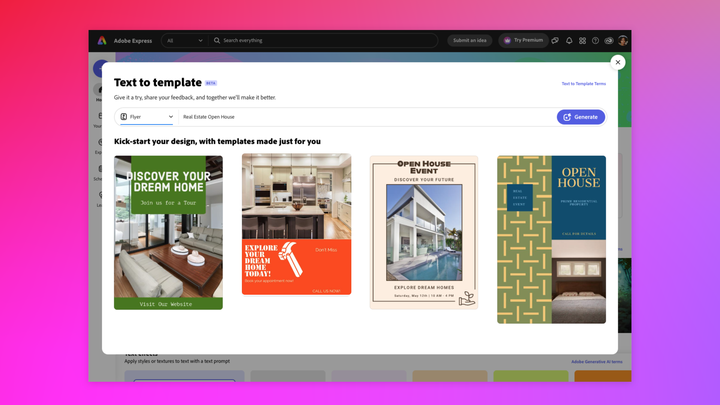
Adobe Express Template
Photo: Kevin Fu/ Adobe
Courtney Quinn, a fashion content creator, has found Adobe Creative Cloud particularly useful in her editing process. “Sometimes when I shoot my content, it may be in unforgiving settings, so I rely on Lightroom to bring my content up to my standard – it must be colourful, crisp, and clear,” Quinn shared in a conversation with Refinery29 Unbothered. “Adobe Express is so easy to use that everyone can use it, and it has been helpful for creating Instagram stories and branded content. I’m able to stay consistent with my content and workflow.”
It’s exciting that once your creations are done in Express, you’re able to schedule them to post automatically across numerous social media platforms such as Instagram, Youtube, Linkedin, and, newly, TikTok. This is truly a game changer as it minimizes the need for multiple subscriptions to various editing and content management apps. Express users will be able to create custom templates to maintain consistent branding and enhance their credibility in brand imaging. They can also access templates created for presentations and designs and plug in their already existing designs from Photoshop and Illustrator. It’s accessible for any experience level, too; if you’re just starting out, Adobe Express offers user-friendly editing tools for simpler video productions.
While at the conference also uncovered the secret to how creators get their images to look so crisp and high quality: Adobe Lightroom. Many creators use Lightroom when editing and are able to create a unique aesthetic for their imagery on their respective social platforms. Some of the new features that Lightroom offers made me sit up in my seat — namely the newly launched AI masking software, which allows users to remove and add objects, clothing, backgrounds, people, and more. To be honest, AI isn’t featured in many of the Adobe products, and I didn’t have a lot of knowledge on its many capabilities, so prior to attending the conference, I wasn’t too sure about AI.  However, during the sessions and keynote speeches, I was able to learn more about how the use of AI is mainly to help us create more — not take away from the creative process. I got to have a 1:1 session with an Adobe Photoshop expert who walked me through the AI-generating tool before giving me the opportunity to play around with the tool on my own. I was able to extend my background and swap out objects as I saw fit. Though I am more of a video creator, it was still pretty cool to learn about these tools, because they inspired me to try something new for my own personal content.
Adobe Creative Cloud remains an important software for creators to harness their capabilities and transform their visions into reality. All these tools are useful no matter what stage you are in your creator journey. For the next piece of content and art you make, give these tools a try — your work will thank you.
Feature Image Credit: Venesa Coger

By Venesa Coger

Sourced from REFINERY29

Sourced from Forbes

Having a well-designed landing page is crucial for businesses to achieve their key performance indicators (KPIs) and boost their bottom line. An effective landing page can captivate visitors, convert them into leads or customers and ultimately drive revenue. However, creating an effective landing page is not merely about aesthetics; it requires a strategic approach.

Below, 18 Forbes Business Development Council members explore proven strategies to create landing pages that not only meet KPIs but also maximize conversions and contribute to the overall growth of your business.

1. Focus On Your CTA

A single, clear call-to-action (CTA) is a vital strategy for an effective landing page. This simple, direct proposition guides visitors towards conversion, improving KPIs and the bottom line. Ensure your CTA is compelling and distinct, making the next step unambiguous for maximum impact. – Tomer Warschauer Nuni, Pink Moon Studio Ltd

2. Be Consistent

Consistency is key. A landing page must have a clear call to action that aligns with the primary goal of the landing page. The “hook” has to be relevant to the goal and call to action. – Mark Clark, Modern Optical International

3. Demonstrate The Benefits To Customers

To effectively meet KPIs and increase the bottom line, your landing page needs to gain a prospect’s attention and lead them to action. Catch their attention with interactive graphics and video, but also deliver a “what’s-in-it-for-them” message—highlighting ROI, customer successes and testimonials. – Julie Thomas, ValueSelling Associates

4. Be Strategic When Choosing Your URL

An effective landing page starts with an effective, easy-to-remember URL. Think about vanity phone numbers—this would be a vanity landing page URL. Then, leverage the key pain points needed on that page so that people fill out the form or do your CTA. An easily-remembered URL, along with addressing pain points, is a win-win for all. – David Strausser, SEIDOR USA

5. Conduct A/B Testing

Create one to two landing page templates with content tailored to the audience. It’s critical to establish consistent layouts to properly A/B test which specific elements perform the best for each audience. Create messaging and value proposition “hooks” around keywords your audience searches for at each phase: education, consideration and decision. – Janet Waring, ArtForm Business Solutions, Inc.

6. Tailor Your Landing Page Strategically

We customize our landing page for some of our most strategic accounts. This means that when an individual from a strategic account visits our website, the content that they see is personalized for their company and industry. Web personalization helps create customized and unique experiences for customers and prospects rather than providing a single broad experience, helping to increase conversion. – Rakhi Voria, Procore Technologies

7. Optimize The Page For Conversions

Leveraging social proof helps alleviate visitors’ doubts or hesitations and increases the likelihood of conversion. Place these elements strategically, close to the CTA, or near critical benefits. – Lomit Patel, Tynker

8. Create Unique Pages For Adverts

Many businesses use the same landing page for all adverts. A landing page must be unique to the advert. The advert is the hook, the landing page must instantly reinforce the consumer’s decision to click on the hook by displaying the product, price and delivery, and then clearly outlining the CTA. The effectiveness of the landing page’s success hinges on its ability to match the advert. – Peter Schravemade, REACH ASEA

9. Use A ‘How To’ Headline

We lose more than half of the people who visit a landing page. The most effective way to keep them is to offer a benefit. The headline is going to be crucial. It doesn’t have to cost money, although a “get 10% off” headline works well. The “how to” headline works just as well because you are teaching customers how to solve an issue. Of course, pair the headline with a good CTA. – Bryce Welker, Crush The LSAT

10. Address Audience Pain Points

Create a single, clear and compelling CTA that is aligned with the audience and marketing messages that drive the traffic to the page. We showcase relevant and persuasive content offers that resonate with our target audience and build trust by telling their story, using their words in the copy and describing their pain point and desired outcomes as accurately as possible. – David Mattson, Sandler

11. Offer A Seamless Experience Across Devices

Combining clarity, simplicity and a seamless experience is the formula for an impactful landing page. Drive visitors to one desired action through a straightforward yet compelling page optimized for every device. But never stop testing, improving and refining to maximize results. Success comes from constant optimization through experimentation. – Abdulaziz Alnaghmoosh, Manga Productions

12. Keep It Simple

Adhere to the “keep it simple, stupid” principle, as effective landing pages should employ a good storytelling approach that includes real examples relevant to your target audience. Additionally, a clear CTA is crucial. Provide something valuable to your visitors without immediately requesting customer data, and aim to pique their curiosity enough to encourage them to take the next step. – Gregory Lipich, InfoSec Global

13. Improve The Guest Experience

In the hospitality space, a property’s website is often the first place consumers look for information. To drive bookings, meet KPIs and boost ROI, it’s important to centre your webpage design around improving the guest experience. Mobile-friendliness, simple navigation, prominent CTAs and user-generated content are all important components to consider. – Frederic Dominioni, Solonis

14. Add Interactive Storytelling

Instead of presenting your site pages as usual, you can add things like animations, interactive graphics, videos and even mini-games. By doing interactive storytelling, you stand out and become memorable to your visitors. In the process, you drive higher engagement and conversions. However, always keep it simple. Don’t add clutter. – Wayne Elsey, The Funds2Orgs Group

15. Highlight Customer Testimonials

By incorporating compelling testimonials and positive reviews on your landing page, you can leverage the power of social proof to establish trust and credibility with your audience. This trust increases the likelihood of conversions and helps you meet your KPIs, ultimately driving the desired bottom-line results. – Kane Carpenter, Daggerfinn

16. Be Clear

A successful strategy for designing an effective landing page is to focus on clarity and simplicity. The headline should immediately communicate the value proposition, and the design should guide visitors toward a single, clear CTA. Engaging visuals, concise copy and social proof can build trust. This keeps users engaged, leads to higher conversion rates and increases the bottom line. – James Mull, htmull

17. Demonstrate Your Value

A key strategy is to spotlight how your solution tackles the visitor’s challenges. Back this with testimonials and case studies. Clearly articulate your value proposition and how it solves their problem. A precise CTA invites engagement with the solution, drives conversions and boosts the bottom line. – Michael Fritsch, UST Xpanxion

18. Intrigue Your Audience

Effective landing pages really are an art. It takes constant testing and changes even if they are ever so slight and based on engagement. It should begin with best practices such as ensuring it is a simple read that intrigues the reader and incorporates multiple CTAs that allow for conversion. If you use visuals, make sure they are pertinent to the offer and don’t overwhelm the reader. – Richard Lindhorn, VivoAquatics Inc.

Feature Image Credit: Getty

Sourced from Forbes

By Candice Georgiadis

One of the best strategies for reaching and interacting with your target audience in the digital world nowadays is influencer marketing. It’s been estimated that the global influencer market is currently worth $21.1 billion.

Through influencer marketing, you can take advantage of the credibility and trust that influencers have established with their audiences to help sell your services or products. Influencers help you accomplish a number of goals, including:

• Increasing brand exposure, visibility and traffic.

• Generating leads and sales.

• Creating user-generated content and social proof.

• Increasing audience trust and loyalty.

But how can you locate the ideal influencers for your company? How do you get in touch with them and work together to build profitable alliances?

Here’s my advice based on my experience running a digital influencer agency.

Finding The Right Influencers For Your Business

There are countless numbers of influencers, each with their own unique style, personality, niche and audience. How can you whittle down your choices and pick the ones who are best for your brand?

• Define your target audience: You must have a firm grasp of who your target audience is before you start hunting for influencers. What are their aims, pain spots, hobbies and psychographics? What kind of media do they watch? By identifying your target market, you can find influencers who appeal to them and have traits in common with them.

• Set your campaign goals and budget: Next, decide what you want to accomplish with your influencer marketing strategy and how much money you are willing to invest. What are your key performance indicators? How will you assess the campaign’s success? How much money can you afford to pay influencers? Setting your campaign goals and budget allows you to locate influencers who can help you achieve your goals while staying within your budget.

• Use influencer marketing tools: One of the easiest ways to find influencers is to use influencer marketing tools. These tools can help you filter, analyse and contact possible partners for your brands. They make use of data analytics to easily identify influencers with large followings, high engagements and strong connections.

• Look for authenticity and alignment: Authenticity is one of the most crucial aspects to take into account when selecting an influencer. Many consumers can recognize a sponsored post that doesn’t feel sincere right away. Find influencers whose material reflects your brand’s ideals and who genuinely care about your niche. Avoid influencers who advocate for an excessive number of irrelevant or incompatible goods or services.

Connecting With The Right Influencers

After you have a list of influencers who fit your criteria, get in touch with them and build a relationship. Here are some ways to do that:

• Do your homework: Check out an influencer’s profile, content, audience and prior partnerships before reaching out to them. This will enable you to more effectively target your message and demonstrate your sincere interest in working with them.

• Be both personable and professional when communicating with influencers through email or direct message. Use their names and make explicit references to their material or industry. Don’t send messages that may seem generic or like mass outreach or spam. Be kind, considerate and nice, but also explicit and succinct about your goals and expectations.

• Don’t merely ask an influencer for a favour or promotion; instead, offer value. Offer something worthwhile that will also be helpful to them. You could provide a commission or fee, a shout out or promotion on your site, access to exclusive material or events, a free product or service, etc.

• Follow up: Don’t count on an influencer to respond right away. They can receive hundreds of messages each day and may not have the time to respond to each one. Give them some time to consider your idea, and then get in touch with them again if you don’t hear anything back after a few days. Avoid being aggressive, but convey your enthusiasm about the prospect of working with them.

Effectively Collaborating With Influencers

Here are a few pointers when it comes to collaborating with your chosen influencer:

• Agree on the campaign goals, budget, timeline, deliverables, guidelines and metrics. Document them in a contract.

• Let the influencers create authentic and engaging content that fits their voice and style. Don’t micromanage them.

• Support them by engaging with their content.

• Pay them fairly and promptly. Respect their professionalism and influence.

Measuring Your Progress

Partnering with an influencer can help you grow your brand and get ahead of competitors. However, to measure your campaign’s progress effectively, here are some things to do:

• First, keep track of KPIs through Google Analytics, social media platform analytics and influencer marketing platforms.

• Second, examine how your business has progressed toward meeting the initial goals you set, while taking note of why things went well or not.

• Third, try to learn from both your wins and losses throughout the process. This will help foster a culture of continuous improvement.

Final Thoughts

Finding, connecting and collaborating with the right influencers are the keys to successful influencer marketing. Once you’ve done these things, be sure to measure your progress and adjust your campaigns as needed.

Feature Image Credit: Getty.

By Candice Georgiadis

Founder, Digital Day. Read Candice Georgiadis’ full executive profile here.

Sourced from Forbes

By Kelsey Kloss

Strengthen your PR efforts — and optimize your marketing budget — by learning what reporters are looking for.

Enter any editorial office, broadcast station or PR agency, and you may hear chagrins from both sides of the newsroom table: “Why won’t this journalist just get back to me?” or “Why does this PR contact keep pitching me stories we would never cover?”

There are vast misunderstandings between these two industries. Knowing what they are will help you get media coverage for your company — and enjoy the incredible benefits of PR.

Whether your company is managing its own PR efforts or working with a firm, here are five things journalists wish you knew about getting press coverage.

1. Usually, we’re looking for expert sources (not products and services to feature)

The top concern for PR pros is getting journalists to respond, according to The State of PR 2023 from Muck Rack.

It’s frustrating when your company’s carefully crafted pitches go ignored, but keep this in mind: A journalist’s job is to cater to their audience, not companies. Usually, that means educating their audience with valuable information. Pitch yourself as an industry expert first and foremost, not your products or services.

Although many articles benefit readers by showcasing certain products or services, these are often selected from a list of affiliate companies so the media company earns a slice of the sales.

Plus, journalists’ inboxes are flooded with pitches around products and services. It’s much more challenging for them to find credible experts before their deadline.

If you’re quoted as an industry expert, your company will be highlighted in the article and you’ll have the bonus of immediately establishing trust with a new audience. After a few of these inclusions, features focused entirely on your company will be easier to secure.

2. Your credentials matter more than your social media following

Sure, journalists may take a quick glance at your social accounts to see what type of content you’re posting. And yes, it might be a bonus if you have a large, engaged following.

However, there’s a misconception that social media following is the most important part of securing media coverage. The truth is, journalists care more about your credentials than how many followers you have. While social media might help journalists discover you, they’re looking for someone who can truly educate their audience.

Carefully consider how you establish credibility when introducing yourself as an expert source to the media. You can do this with:

  • Qualifications (Ph.D., MD, CCWS, etc.)
  • Associations (professor at a university, a rheumatologist at a hospital, etc.)
  • Titles you’ve been given (owner of an award-winning salon, 40 under 40 recipient, etc.)
  • Achievements (serial entrepreneur who’s sold several successful businesses, etc.)
  • Press experience (trusted by The New York Times, Washington Post and beyond, etc.)

3. We probably won’t cover the same topic twice in a short period of time

Newsrooms and broadcast stations always look for a fresh story to keep their audience engaged. Still, a sample of a common pitch editors and producers receive: “I saw you recently covered the best glassware for dinner parties. Would you like to consider my company for upcoming coverage on glassware for dinner parties?”

Instead, pitch a fresh take on the topic: “I saw your story on glassware for dinner parties — it was a great read! If you ever need quick turnaround quotes on how to clean glassware after parties, the best glassware pairings for a soirée or any other related topics, I’d be happy to help. Our company specializes in elevating parties with beautiful dinnerware.”

On that note, if you’re monitoring journalist queries through a service like HelpAReporter.com (where journalists submit queries for expert sources), but you find you missed the deadline for a given story, it may still be worth simply reaching out to that journalist separately.

Let them know that you’re an expert in the beat they cover, provide your credentials and share that you’re available for future stories.

4. Short, succinct quotes make you our hero

You may think more is better when it comes to providing context on a particular topic, but journalists are looking for sources who can get to the bullet points of a subject immediately. Long, winding narratives mean more time transcribing and pinpointing which quotes to feature.

Prepare ahead of your interview so you come to it with the main points already. Think about what will make punchy, memorable quotes — then speak to the journalist slowly and clearly (this is helpful, whether they’re recording your conversation or transcribing in real-time).

These strategies will increase your chances of being contacted again for future stories.

5. If you’re not selected as a source, don’t take it personally

In addition to credentials their editor may specifically request, journalists consider these factors when selecting a source.

  • Niche: We recently saw a journalist query for an auto insurance expert familiar with GAP insurance in California. With the need to constantly pitch fresh new stories and target particular keywords, editorial content is getting increasingly specific.
  • Other sources: Journalists will consider how you contribute to the mix of sources. They’ll look for a variety of expertise to approach the story from different angles.
  • Number of sources: Most pieces of content only need about two to three sources.

The best thing your company or PR team can do is build genuine relationships with journalists, in which you offer your support to them through expertise. This will help them finish their story on time and increase your chances of being a regularly featured expert source.

When you secure this media coverage, the benefits are vast. PR is a long-term strategy that can create a halo effect for your company, establishing you and your brand as an expert. This creates new opportunities for brand awareness, partnerships and increased revenue.

By Kelsey Kloss

CEO of Kloss Creatives

Kelsey Kloss is the CEO of Kloss Creatives, a PR and marketing firm rooted in the principles of journalism. Previously, she was an editor for brands such as Good Housekeeping, ELLE Decor, Reader’s Digest, and more. She has also shaped marketing strategy for Scholastic and AT&T.

Sourced from Entrepreneur

By Ali Luke of Aliventures.

Are your blog posts working well, or leaving readers unsatisfied?

Is your About page enticing, or confusing? Does your Hire Me page do a great job of selling your services, or is it too bland?

Often, the only feedback that you have comes in the form of numbers. Maybe readers aren’t spending long on your blog. Maybe you rarely get comments. Maybe no one’s ever hired you.

The problem is, it’s hard to tell why. Without any feedback from readers, you don’t know what you’re doing wrong.

Honest, constructive feedback isn’t the same as a comment saying “great post!” Good feedback:

  • tells you exactly what’s working, and what isn’t
  • offers suggestions on how to fix any problems
  • encourages you to make the most of your strengths.

Perhaps you’re reading this and thinking no one will give me any feedback. I don’t have any readers yet. Or maybe your blog isn’t even online—you’re struggling away with your posts and pages, trying to get your core content together before you launch.

Don’t give up. I’m going to give you six easy ways to get feedback.

Six ways to get feedback

1. Look at your current comments

If you’ve received any comments on your blog, look at the following.

  • Which posts have the most comments? These will, in some way, have struck a chord with the reader.
  • Are there any suggestions that you can use for future posts? Sometimes, commenters will tell you exactly what they’d like to read. Other times, they’ll mention what they’re struggling with—and you can use that as the basis for a post.
  • Did any posts get negative or confused comments? If a reader leaves a comment to say that they didn’t understand, you might want to take another look at that post and make sure it’s clear.

2. Ask around on Twitter or Facebook

If your blog is new, you might well have a bigger following on Twitter, Facebook, or other social networks. Try asking there for feedback: post a link to a particular post or page and explain that you’d welcome any constructive criticism.

You’ll be surprised at how generous your friends—and even complete strangers!—can be. Don’t discount the opinions of non-bloggers, either; they might not “get” the technology, but they’re likely to be representative of your general audience.

3. Find a blogging partner

Some bloggers like to swap posts with one another. If you’ve got any blogging friends, ask around and see if anyone would be interested. A blogging partner can do a lot more than just read your posts, too—check out Find a Blog Buddy [Day 15 – 31DBBB].

If you don’t know a single blogger yet, try looking in the comments sections of relevant blogs (ProBlogger might be a good place to start). Find someone who seems to be at a similar stage to you, and drop them an email.

4. Post a message in a forum

When I’ve been looking for feedback, often on sales pages, I’ve posted in the Third Tribe forum. I’ve always had great responses from other members, with plenty of insightful feedback. When you put out a request like this, it’s often helpful to specify what particular areas you want feedback on. You might ask questions like these:

  • Was my About page clear?
  • Did it encourage you to read on?
  • Is there anything you think I should add?

If you’re not currently a member of any blogging or business-related forums, you might want to take a look at ProBlogger’s own Facebook Community Group. ProBlogger Community even offers a “blog review swap” thread.

5. Join a blogging-related course

Many ecourses will include some element of interaction—that might be live calls with the tutors, or forums where you can easily interact with other members. There’ll often be a chance to ask questions and get specific feedback.

Even if it’s a big course without any individual instruction from tutors, you’ll find that other members are very willing to help out. People taking an e-course are often more engaged (and at a slightly further stage) than your general audience on Twitter or Facebook.

Checkout ProBlogger’s Courses, where they have both free and paid courses, including several on creating content.

6. Hire a writing coach

For really in-depth, expert feedback, look for a writing or blogging coach. They’ll work with you to help you shape and polish up your content, and a good coach will be careful to preserve your own voice and style.

Coaching is definitely an investment, but many bloggers find it a very worthwhile one. That applies even if you have a strong writing background. One of my own coaching clients, Prime Sarmiento, is an experienced journalist. She wrote about the benefits of getting coaching in a guest post for Men with Pens: Why Hiring a Writing Coach Can Help You Build Your Business.

The review

So, you’ve found someone willing to give you feedback. What should you ask them to look at?

I think there are several key areas where you’ll want to make sure your writing (and formatting of posts) is as good as it can be.

Your cornerstone content

If you’re creating a series of posts as cornerstone or pillar content—posts that readers will go back to again and again—then you want them to be as good as possible.

It’s worth asking someone to read through the whole series, so that they can help you both with the small details (like typos and clunky sentences) and the big picture (making sure that all the posts fit together well).

Your About page

Did you know that your About page is probably the most-read page on your blog after your home page? (Check your Google Analytics if you’re not convinced!) It make sense—new readers will often read a blog post or two, then click on “About” to find out who you are and what the blog’s purpose is.

A great About page can turn a casual visitor into a subscriber. A poor About page might lose you that visitor completely. About pages are really tough to write, so it’s definitely worth getting feedback and even some help with the drafting.

Your Services or Hire Me page

If you’ve got any services (or products) for sale, you want to make sure that your sales page does a great job of drawing potential customers in. That means, at a minimum, being totally clear about what you do and who you work with.

I’ve read lots of incoherent and confusing sales pages—and even decent sales pages often don’t sell the blogger as well as they should. You should always get feedback on a sales page, to make sure that your offer is totally clear.

Your next steps

Pick one page or post on your blog, and find someone who can give you feedback on it. That might be a friend, a forum member, a coach … the important thing is that you get a second opinion. Ideally, it should be someone who understands your audience (even if they’re not part of that audience themselves).

Feature Image Credit: Canva

By Ali Luke of Aliventures.

Ali Luke is a writer and writing coach, and author of The Blogger’s Guides series of ebooks. She has a weekly newsletter for writers and bloggers, and has just released a mini-ebook How to Find Time for Your Writing –click here and sign up for her newsletter to get your free copy.

Sourced from PROBLOGGER

By Lucija

When the world wide web first began to pick up steam, which seems like ages ago but was in fact around just 20 years ago, blogs were popping out all over the place. It was such a novelty for everyone to share their thoughts with the world. WordPress to this day has the “Hello world” default post when you start up the dashboard for the first time.

As with everything else, over time, the whole concept evolved dramatically. Nowadays, content creation, with very few successful exceptions, is a collaborative effort that might have one person at the forefront serving as the recognizable face of the business, but a whole team of people behind the scenes is cooking up the content that’s published.

The number of people within a content creation team can vary widely, depending on the scope of both the content and the company/person behind it. If we’re focusing on written content these teams will most certainly include writers, lecturers, designers (for image editing), and marketing experts, at the very least, with probably some niche positions like technical consultants in specific situations. The point is – there are a lot of people working together to get things done.

Every time you have multiple people working together, especially remotely, you need a very good system in place that brings it all together. Continuing with our example of publishing written content, through WordPress, you’ll need something that gives everyone access to the dashboard and posts, while simultaneously securing easy communication channels for all members.

Usually, you’d just combine WordPress with Google Docs and call it a day, but we’ve found that combining WordPress with Multicollab brings in much better results.

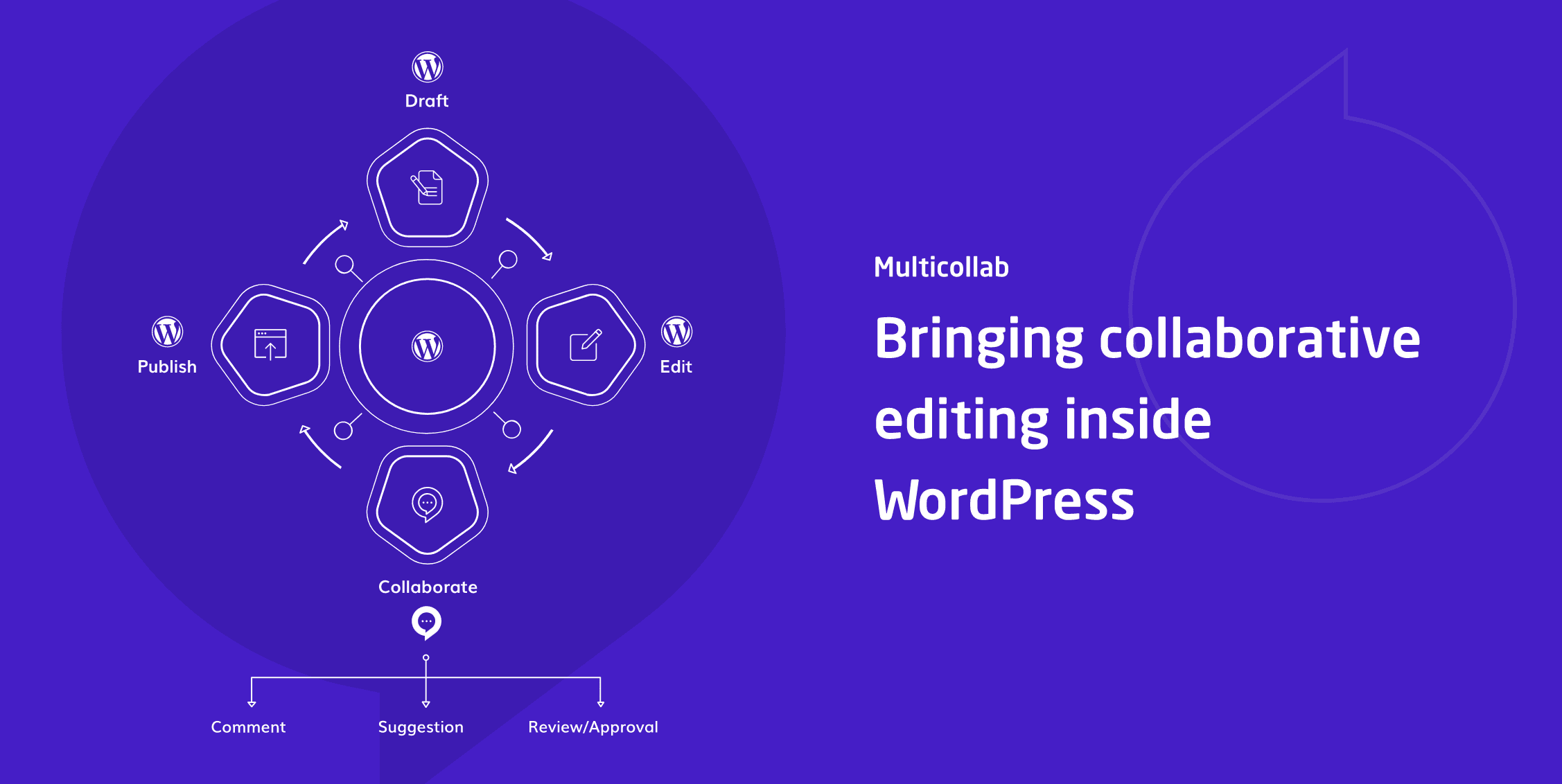
Multicollab is a Google Docs-Style collaborative editing tool designed to streamline the process of creating, editing, and publishing content, especially for teams working within WordPress. It offers features akin to Google Docs but is integrated directly into the WordPress dashboard, eliminating the need for constant tab switching. Already interested? Check out the Multicollab Website now for more!

What is Multicollab?

Multicollab is an editing tool, very similar to Google Docs making it familiar enough so everyone can quickly hit the ground running, but also features advanced functions that aren’t available with Google Docs. To put it even more simply, it will bring Google Docs features to your WordPress and in doing so remove the most annoying thing about using it with WordPress – the constant tab switching and refreshing. With Multicollab you’ll be doing all your work within WordPress, the changes, comments, suggestions, attachments, etc. will all be added in real-time for everyone to see.

A test was conducted to see how the Multicollab-WordPress combo fares against the Google Docs-WordPress combo. The same text was used with the same changes made. When the clocks stopped ticking Multicollab proved to be over 40% faster. Just imagine what that could do for your overall efficiency. If it takes less time to publish content, and you’re working a fixed number of hours you’ll be able to significantly increase your output. This in turn means more content, more advertising opportunities, and more chances to attract visitors.

Multicollab in WordPress

Because WordPress uses the block-based Gutenberg editor as the default solution for creating posts it comes as no surprise that Multicollab is fully functional with said editor. Everything you’re doing is through the same interface with just the added features.

We’ll get into more detail about the post features, but first, we want to mention everything you’ll get to use before you start writing your posts.

As this is a team collaboration tool, probably the first thing you’ll want to do is assign custom permissions to all your members. We’ve already stated that a content team consists of many individuals, each doing their own thing to get the job done and as such, not everyone needs to have access to everything.

The process is extremely straightforward where you’ll just have to tick and untick the corresponding boxes on the various activities you want to enable or disable for a team member.

Now that everyone has a role assigned to them, it’s a good idea to set up Slack notifications so you and everyone else will always know when an “event” has taken place. This can range from added new added comments, to mentions and everything else in between. The process is the same as with permissions – simply check and uncheck the appropriate box for each notification.

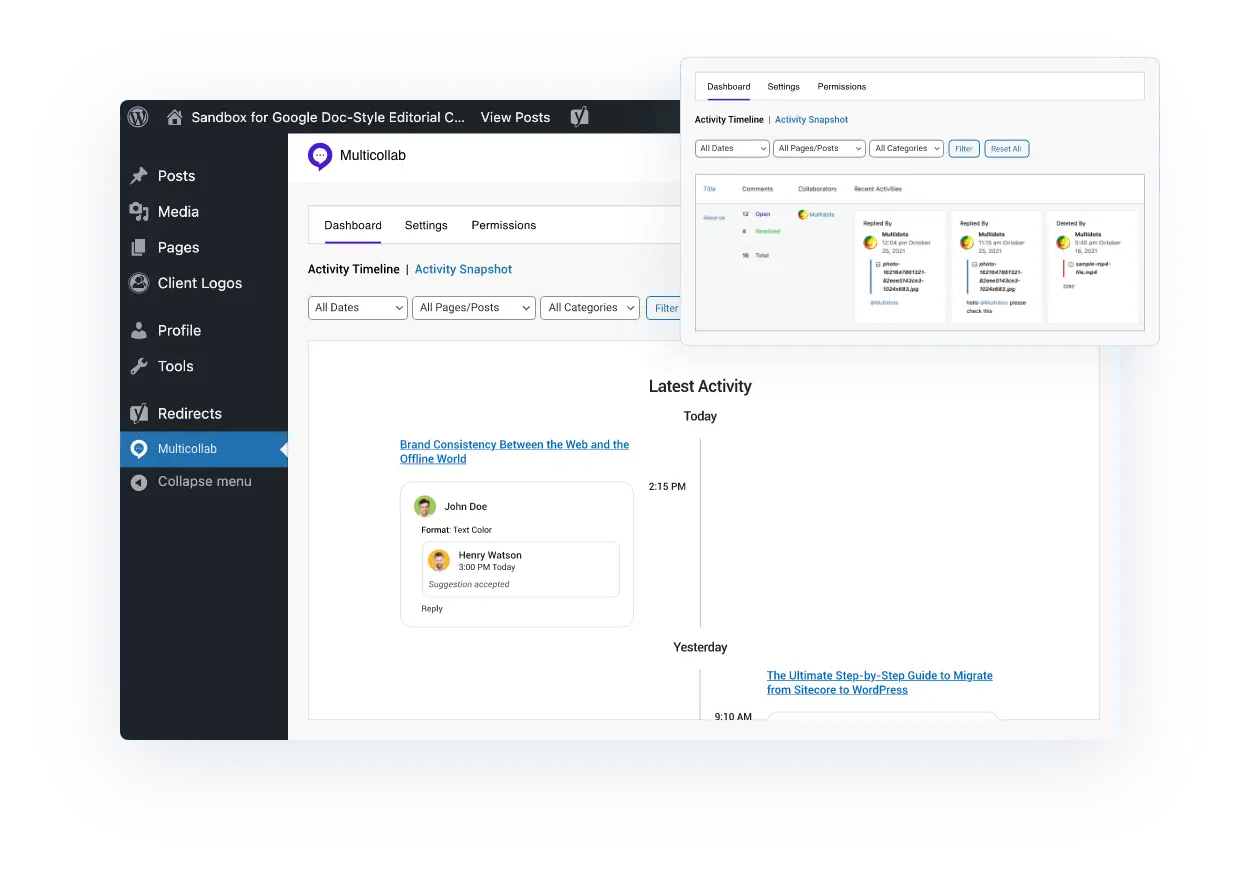
Finally, we come to the reports and activity section which enables you to follow up on everyone’s comments, tasks, suggestions, etc. in one place. It’s site-wide, so the initial data might be too incomprehensive, but there are a couple of filters that will enable you to narrow it down to what you really need. Although probably not equally important to each member, an overview like this is essential for team leaders who need to keep everything running smoothly.

Main Features & Pricing

  1. Inline Comment: Allows users to add inline comments to any text or media in their blog post for review by others.
  2. Real-Time Collaboration (Beta Version): Real-Time Co-editing in WordPress is possible now. It is still in the early beta stage. So, for now, you can only test it on our server. Click here to experience Real-Time Collaboration in WordPress.
  3. Team Collaboration: Offers reply, resolve, and mention commenting options for collaborative work during the publishing process.
  4. Email Notifications: Sends instant notifications when edits are made or comments assigned, facilitating team collaboration.
  5. Suggestion Mode: Tracks the content creation process and highlights modifications in posts or pages.
  6. Guest Collaboration: Enables inviting guest collaborators without creating WordPress user accounts.
  7. Slack Notifications: Integrates with Slack to provide real-time updates on mentions, replies, and other comment activities.
  8. Attach a Document to a Comment: Users can attach images or documents to their comments and replies.
  9. Reports and Activity: Advanced Dashboard functionality provides insights into editorial workflow and tracks progress across all pages and posts.
  10. Custom Permissions: Allows for management of who has access to add a comment, resolve comments, disable comments, or accept/reject suggestions.
  11. Multilingual: Offers support in six languages – German, Chinese, Hindi, Spanish, French, and Bengali.
  12. Premium Support: Email support is available anytime, with a promise of assistance within 24 hours for premium edition users.

Check out the Multicollab Pricing Page for more info now!

This also includes a 14-Day free trial offer with a 100% money-back guarantee. Multicollab is a product by Multidots, a full-service WordPress Agency and WordPress VIP Gold Agency Partner. They also offer Real-Time Feature Demo. Check it out and try this tool by yourself, it will surely fit your needs.

Multicollab

Creating a post

The real essence of Multicollab is seen when you start writing a new post. As we’ve mentioned, it’s completely Gutenberg-ready, so if you’ve used the interface already, you’ll feel right at home. So, once you start writing you’ll notice the main body in the centre is your default editor. Within that editor, however, you’ll now have added options that enable team members to communicate.

Inline comments

Inline comment

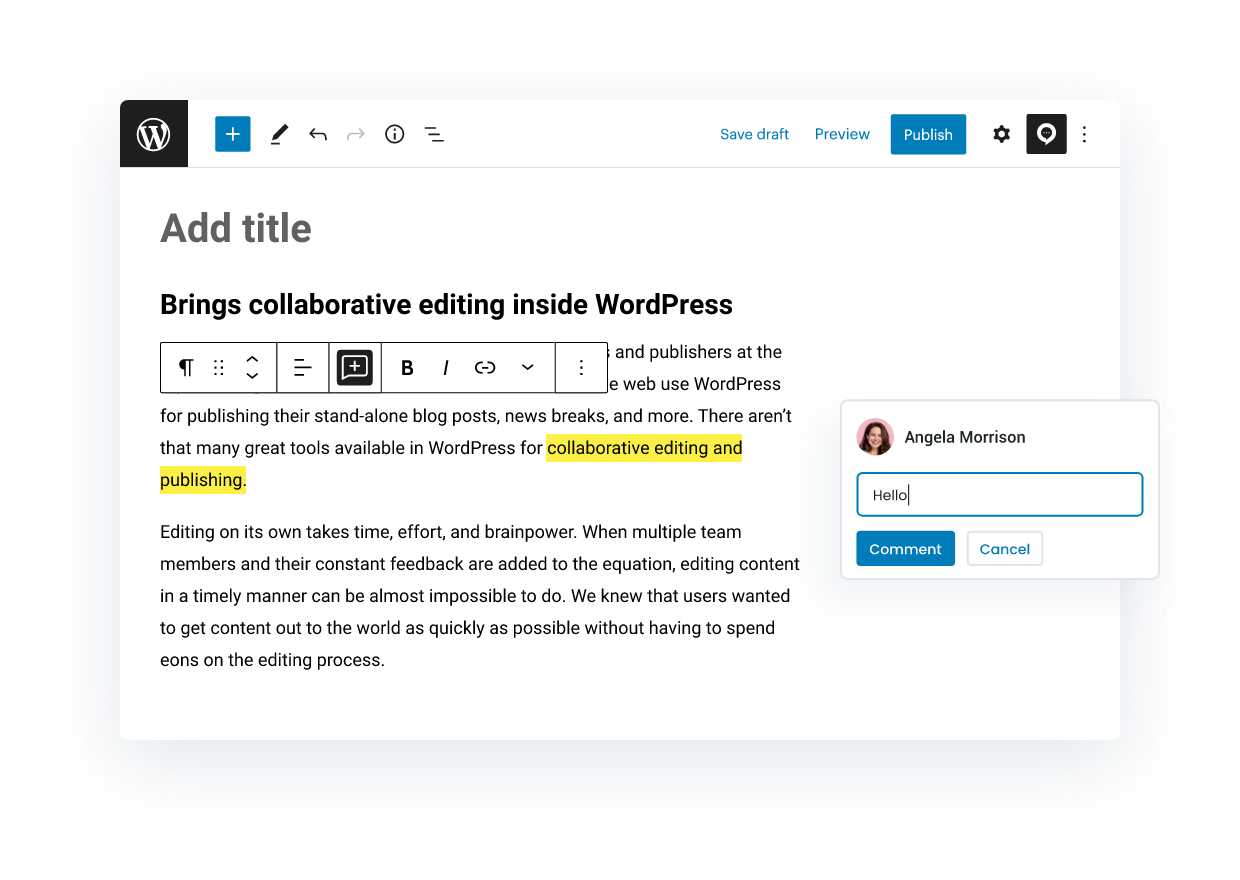
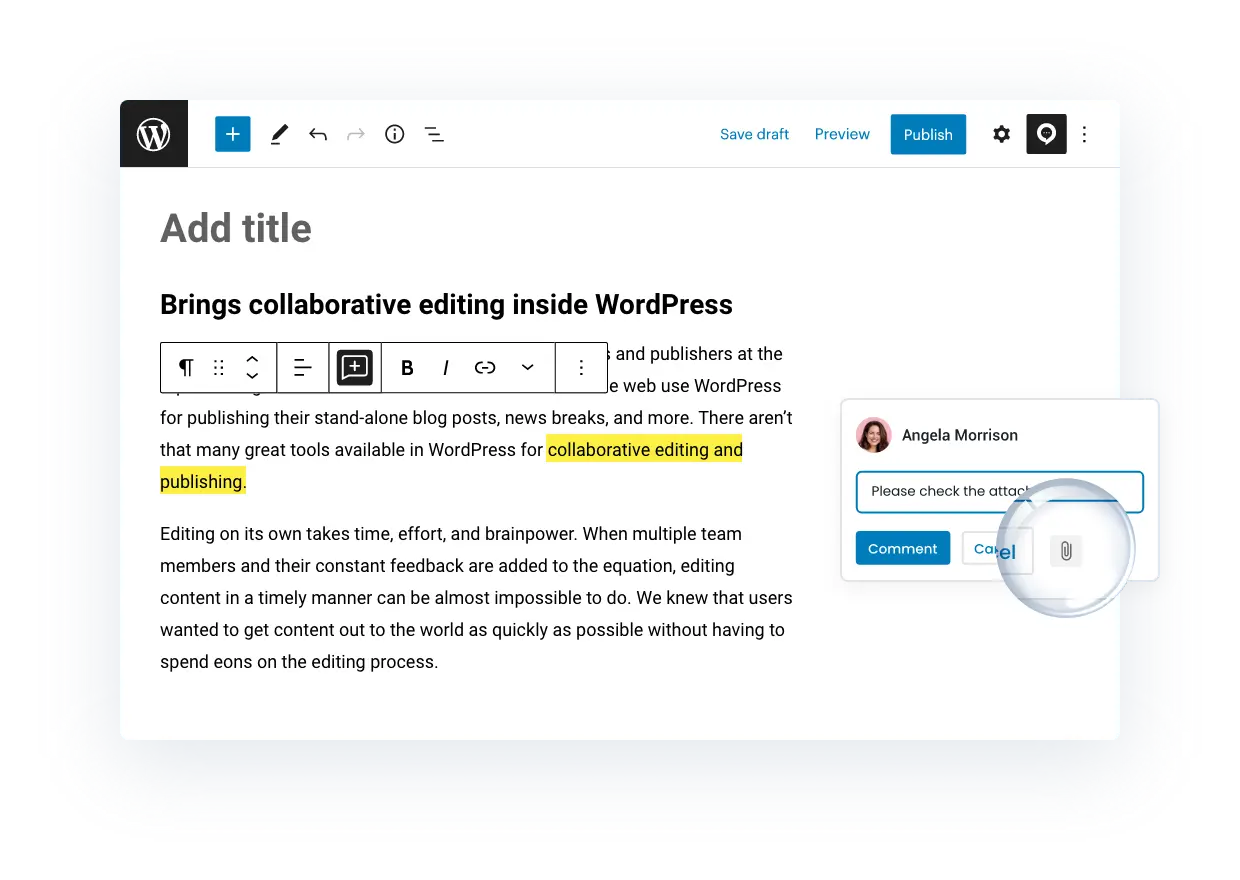
When you have multiple people working on the same text each of them needs to be able to leave comments. Once the initial text draft is complete everyone can chime in with their thoughts. Simply highlight the part of the text you wish to comment on and write your comment. It is then visible to everybody on the right-hand side. All members can comment on comments to the point when a full-blown discussion appears. We recommend that you keep it short, however, so it doesn’t get too cluttered.

If you’re looking to single out a member, for whatever reason, you can tag them. A notification is then sent to that member that ensures the action keeps going. Notifications can be Slack notifications, which we’ve already mentioned, as well as email notifications, depending on your preferences.

Suggestions

Suggestion mode

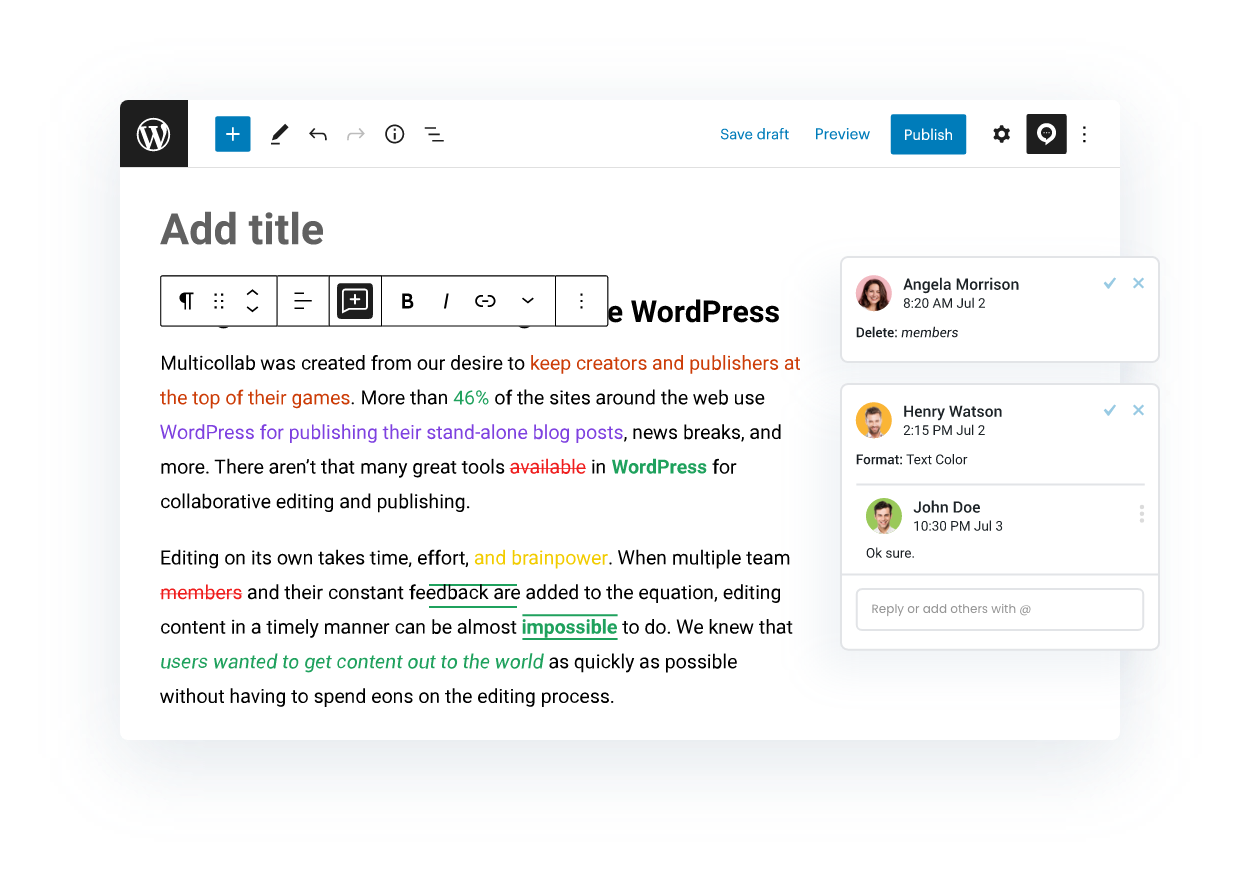
Leaving comments is all well and good, but sometimes you’ll really need to emphasize a comment which is where suggestions come in. They’re essentially comments themselves, only highlighted. You’ll get to see the differences in the way they format the text. Suggestions color the text in various ways, so even with a glance, you can see what to focus on.

As you would guess, suggestions, unlike comments, almost always require some sort of reply and/or feedback. Suggestions aren’t just added in a void, they’re directed toward someone to make the appropriate changes to the text. Once the changes are done, you’ll want to leave a reply that will potentially progress the suggestion conversation further.

Guest collaboration

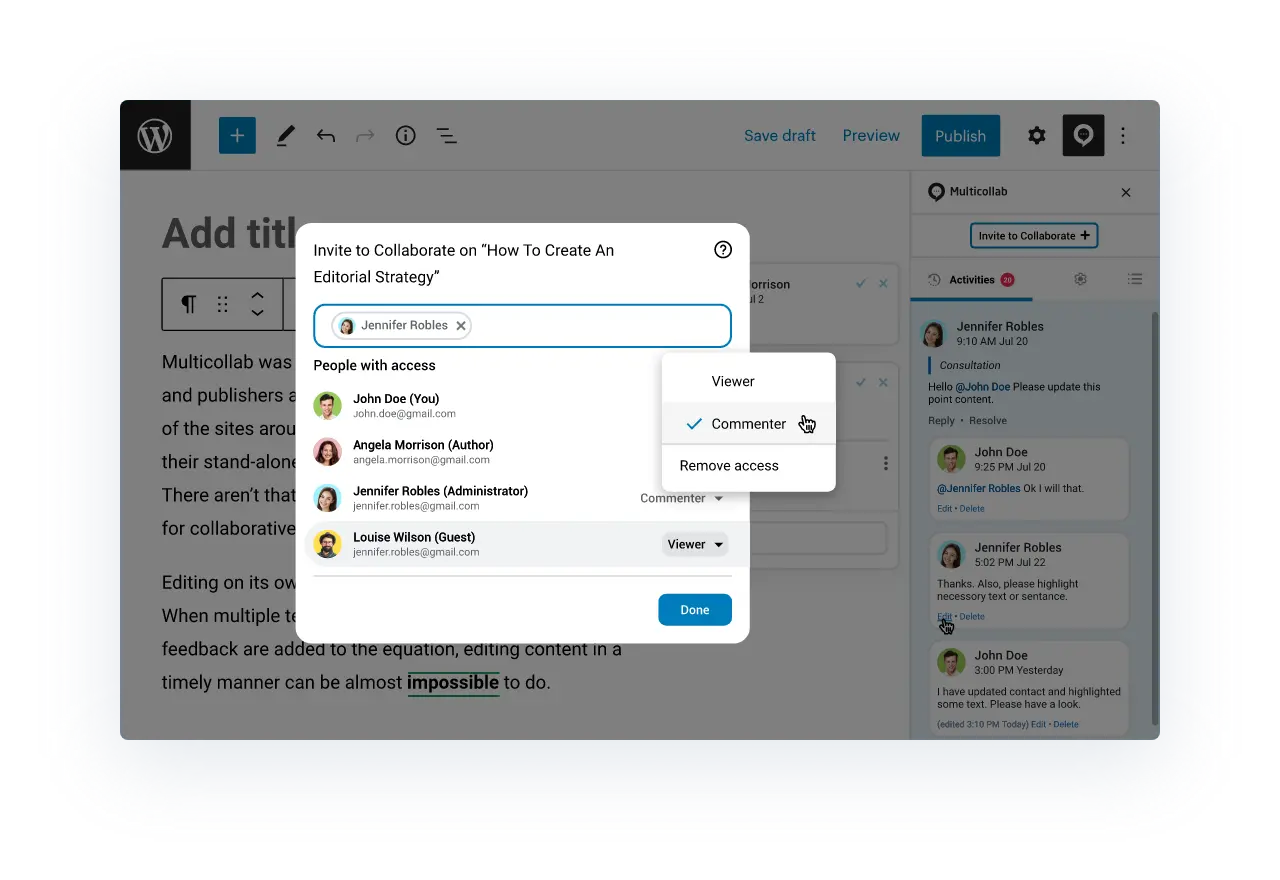
Guest CollaboratorMore and more blogs/sites are working regularly with guest authors nowadays. It’s therefore important to know that even guests, i.e. people not on your members list that have assigned permissions can work on posts. You’ll need to create a guest profile and invite them to work on the post.

These quests don’t necessarily need to be writers, you can bring in outside lecturers, SEO specialists, marketing experts, etc. all with the common goal of boosting and upgrading the content you’re putting out. Guests can be assigned two roles – viewer and commenter, both of which are self-explanatory.

Custom Permissions

For those who need custom permissions, administrators have the opportunity to manage custom user permissions of both individual collaborators & groups of collaborators within the Multicollab Settings Menu.

Those include adding, resolving, and disabling comments, as well as adding, accepting, or rejecting, and disabling suggestions.

Attaching documents

attach document

When a comment and/or suggestion aren’t enough you can attach a document that will help relate better. Things like an already published article as a reference or an image that needs to be edited and added to the post are done with a simple click. If an attachment is added to the comment, the familiar paperclip icon will be visible, making it instantly recognizable to everyone.

Reports

reports

We’ve already touched on the overall reports and activity section – one that encompasses the entire site. Well, you can access the same information, minimized to the post you currently have opened. Go through the summary which shows all the stats, or follow up on the activities list in detail, going through it one by one. You’ll never feel out of place because there’s a handy counter that numbers all the new activities since you last checked, if there are any, of course.

Settings

It seems rather counterintuitive, but there is also the settings tab that lets you hide both comments and suggestions. You’ll still be able to write your own, but all others will be invisible. We assume this is the author’s “don’t disturb” sign, where he can exercise the creative freedom, he’s been given.

Conclusion

It’s essential to let go of the one-man show routine once your content gets too big for you alone to handle. Yes, you’ll have a little less freedom than you had when it was just you, but collaboration with other people can only benefit your content. Whether it’s just in service to your writing (lecturing, marketing, etc.), or if you’re ready to work with other authors on your posts, it’s important to keep evolving and always striving to get bigger and better. Multicollab is the perfect tool that will let you achieve just that – a steady workflow in an already familiar environment.

Take out: Key benefits of Multicollab include:

  1. Real-time Collaboration: It enables team members to make changes, leave comments, or add attachments in real time, ensuring everyone is on the same page.
  2. Customizable Permissions: You can assign different roles and permissions to each team member, providing control and security over who can access and edit the content.
  3. Integrated Communication: With in-built features for comments, suggestions, and notifications, Multicollab keeps all your team’s communication within the same platform.
  4. Efficiency: In tests, Multicollab has proven to be over 40% faster than using Google Docs in conjunction with WordPress, boosting productivity.
  5. Guest Collaboration: Multicollab even allows guest authors or consultants to participate in the editing process, expanding the range of potential contributors.
  6. Reporting: It offers comprehensive reporting tools for tracking comments, tasks, and suggestions, making it easy to manage and monitor progress.

In short, Multicollab enhances team collaboration, increases efficiency, and provides a seamless and integrated platform for managing content within WordPress.

Don’t wait any longer – start collaborating with your team today! Give it a Try from here (14 Days – 100% No-Risk Money Back Guarantee!).

The article was originally written by Lucija

Sourced from wp archives

By Chloe Castleberry

A lot goes into designing a website, especially if you’re a small business. You have to think about layout, of course, but also user experience and how customers can easily and conveniently make online purchases. It can be stressful to choose which design platform may work best for your needs, but if you’re on the hunt for the right website building and hosting company, then you should highly consider Squarespace.

Squarespace is one of the premier website designing sites, mainly for its affordability and variety, but more recently, the platform has launched a guided design system guaranteed to make the design experience more seamless. The best part: Anyone starting a website, regardless of if they have used Squarespace before, can utilize it. With Squarespace Blueprint, you can choose from professionally-curated layout and styling options to build a unique online presence from the ground up. With 1.4+ billion design combinations, you get everything you need in one spot. Read below to learn more about all that Squarespace Blueprint has to offer.

What is Squarespace Blueprint?

Squarespace Blueprint is an interactive, five-step design guide that uses your selections to build the foundation of a personalized website. You can choose from Squarespace’s strongest layout, font, and colour options to start and then keep customizing in the platform until your website is exactly how you want it. By answering a few simple questions, Blueprint will create a website specifically tailored to your business/brand needs, and you can continue to tweak from there to get it just right!

What are the features?

Features include (but are not limited to) expert guidance, which is exactly how it sounds. Throughout each step, Squarespace will provide clear design direction in addition to handpicked layout and styling options (sourced from both online trends and consumer data), live preview and progress bar, and an interactive design experience that allows you to make real-time design decisions for your custom website.

What are the benefits?

You’re in control of your business, so why should your business’ website be any different? Squarespace Blueprint allows you to keep that same autonomy while receiving clear and concise design guidance when you need it. Plus, if there’s ever a design element you don’t like or want to change, Squarespace allows you to easily add or edit content whenever you like.

Give it a try, and if you have questions or need help along the way, Squarespace Blueprint is there to help.

All products and services featured are independently chosen by editors. However, Blogging Tips & Events for Content Creators Everywhere | Blogher may receive a commission on orders placed through its retail links, and the retailer may receive certain auditable data for accounting purposes.

By Chloe Castleberry

Sourced from BLOGHER

By Buster Benson

Changes are coming in August to the way we pay writers for great stories and which countries we support. Here’s what’s happening, why, and what it means for you.

Medium is committed to remaining an open platform where anyone and everyone can read and write stories in a beautiful, ad-free interface. Since 2017, we’ve had a revenue share in place — the Medium Partner Program — that allows writers to earn money for their stories. Now, we’re making changes to our Partner Program to take a stronger stance on distributing and rewarding the stories we feel most proud of bringing to our members.

Over the last few years, our members have told us in no uncertain terms that they are tired of clickbait and content mills, want ‘get rich quick’ siloed into a constrained area, don’t want stories that are generated by AI, and, in particular, want to read human stories that deliver actual human wisdom. The rest of the Internet is filled with cheap, attention grabbing content. We are most proud Medium can deliver our members something different. One of the keys to doing that is how we incentivize and reward the authors here.

We’ve also heard from many authors that they don’t like how the Internet incentivizes quantity over quality. They are tired of the creator treadmill. The changes to our incentives below are big, and we hope that they give authors an alternative to the opportunities they get on the rest of the Internet. Tell your story rather than churn out content. Take the time to go deeper, research longer, edit more. We will always be shifting our payment and distribution incentives for this type of writing.

This post is long, so it needs a table of contents

  • Why are we making changes to the Partner Program?
  • What are the changes? When will they happen?
  • Why all this talk about quality?
  • How exactly will my story earnings change?
  • Why are we sunsetting referral bonuses?
  • Takeaways

Why are we making changes to the Partner Program?

Let’s start by clarifying the purpose of the Partner Program:

  • We want to incentivize more original, high-quality personal stories, hidden life wisdom, and deep knowledge that’s locked up in our collective lives. This is ultimately what members tell us they have come to Medium to read about.
  • We don’t want to incentivize attention-grabbing clickbait, formulaic derivative or AI-generated writing, misinformation, hate, and other forms of polarizing negativity.

We want the incentives of the Partner Program to encourage writers to take that extra bit of time to weave more meaning into their stories, to tune those words, to land that ending, to ultimately make the story better for readers.

Here’s the main message: writing fewer stories with more heart and soul poured into them will perform significantly better than the strategy that tends to work on more attention-grabbing platforms (writing lots of stories that are cranked out based on formulas). Great writing is meant to do a lot more than merely grab attention.

What are the changes? When will they happen?

The following changes will roll out August 1, 2023, and the first pay-out reflecting the new changes will be at the beginning of September.

  • We’re opening up the Partner Program to 9 more countries, with more to come. We want to be as open as possible because everyone has a story to tell. Expanding to more countries has been, by far, the biggest requested change to the Partner Program and we’re very excited to finally be doing this. As of today, we currently support applicants in 33 countries. On August 1st, we are hoping expand the Partner Program to accept applications for these additional 9 countries: Bulgaria, Croatia, Cyprus, Gibraltar, Hungary, Liechtenstein, Malaysia, Malta, and the United Arab Emirates. In the coming months, we plan to open up to another 50 or so. (Oct 5 update: Support for additional countries has been delayed. Details here.)
  • We’re removing the 100 follower requirement. We initially instituted the 100 follower requirement as part of an effort to ensure member-only stories were written by writers that had some track record of writing to engaged audiences. We feel the changes we’re making today will do a much better job of that, without creating an artificial barrier that writers have to cross first.
  • Medium membership will now be a prerequisite for joining the Medium Partner Program. We believe it’s in everyone’s best interest when our writers participate in the member community they’re contributing stories to. The best way to get a feel for the kinds of stories that resonate with members is by being a member. In addition, this requirement creates a barrier for spam and AI-generated activities. Note: existing Partner Program writers will not be required to become members at this time, but if we do add this requirement at some future date, we’ll announce this intention with a generous grace period beforehand.
  • Earnings will be based on more meaningful metrics. We’re keeping member read/listening time in the calculation for earnings (which is the primary signal used in the Partner Program today) AND we’re now going to start including more engagement signals as well: claps, highlights, replies, and follows. For the purposes of earnings, only the first clap/highlight/reply/follow will be counted, and subsequent engagements by the same person won’t increase earnings. Our goal here is to get closer to identifying story quality by looking beyond its ability to grab attention. Sparking a discussion or inspiring highlights and claps are signs that it resonated with the reader in a deeper way. In the other direction, bouncing from a story before reading it for 30 seconds will prevent earnings from accruing from that member. We will also be taking measures to proactively identify and prevent fraud and attempts at gaming this system.
  • Getting Boosted results in both a distribution and earnings bonus. We are committed to incentivizing meaningful, original, constructive stories based on personal experience. Any story is eligible for Boost, regardless of number of followers, name recognition, topic category, or any other heuristic. You don’t have to be a Medium member or be enrolled in the Partner Program to get Boosted. However, when you are in the Partner Program, members-only stories that get Boosted will earn at a higher rate, in addition to receiving the usual distribution bonus. Read more about our Boost criteria here.
  • We’re discouraging clickbait by adjusting earnings based on read ratio. We use read ratio as a measure of how well a story delivers on the expectations of the reader. Going forward, reads and read ratio will be calculated differently than they have in the past. From now on, we will define it as people who read your story for 30 seconds or more divided by total views. You will most likely see your stories have higher read ratios after this update. High read ratios imply that the story’s title and preview accurately represented the content of the story. Low read ratios imply that the title and preview were perhaps a bit clickbaity. A story that gets 100 reads in a day with a 80% read ratio will earn more than a story that has 100 reads and a 20% read ratio, even though they had the same number of reads. We’ve tested the impact of this change on short-form writing (poems, comics, etc) to see if this 30-second constraint would negatively impact them, and the answer is that it doesn’t. If anything, the collective impact of these changes will increase earnings for short-form writing. The best way to maximize earnings here is to use titles, subtitles, and preview images that spark reader interest in a way that the story is able to fully deliver on.
  • Reads and engagements from followers will earn more. We believe that when authors feel connected to their readers, and vice versa, authors weave more nuance and care into a story, which sparks better discussions in the replies, and that all of this ultimately leads to deeper understanding and expression. To that end, we’re giving stories that are read by existing followers an extra bonus in earnings. We recently also added a distribution boost to stories from people you follow, to increase the chances that your stories will be seen by people who follow you.
  • We’re sunsetting the referral bonus program. The follower bonus described above will be replacing the referral bonus program. Over the last couple years we found that this program ended up degrading the reading experience and ultimately didn’t provide enough benefit to authors. More details on this change below.

Why all this talk about quality?

With the Boost Nomination Pilot, an increasingly diverse network of humans is nominating stories in their areas of expertise based on simple, and evolving, distribution guidelines oriented around quality. This Partner Program update builds on top of that by making each engagement on boosted stories earn more as well.

While it may seem like common sense to incentivize the good stuff — well-crafted, original, memorable, nuanced, deep storytelling, and knowledge-sharing — in this intentional way, in practice it’s not as simple as it seems. Many content platforms these days are incentivized to grab as many clicks, eyeballs, and moments of attention as they can. But grabbed attention is not a proxy for “the good stuff.”

Valuing grabbed attention makes sense when you’re in the business of selling as much attention as you can to advertisers. It’s not uncommon to hear this justified as: “It’s what the people want! Just look at the data!” However, we believe that’s a naïve and short-sighted perspective. Content platforms make thousands of decisions about what the algorithms are maximized for. But blaming an algorithm doesn’t absolve platforms from the consequences that this approach has had on the quality of our attention and, honestly, on our collective mental health over time. Our members have told us this in many ways: by email, in comments, in surveys, and in the way they vote with their dollars.

When we decided to double down on prioritizing quality above all else it became obvious to us that we need to supplement our algorithm with the discernment and nuance of human curation. Quality is subjective and context-dependent, and requires a deep reading of each specific story. At the same time, we’re also aware that curators often have very narrow, and highly personal, definitions of quality. Scaling curation comes with constraints and costs, and it’s easy to end up relying on a small number of taste-makers and gate-keepers to be the sole arbiters of what counts as “good”. This also isn’t ideal… because bias. To incentivize quality curation at scale the way we’d like to, we need a diverse representation of curators with different kinds of relevant experience.

For all these reasons, our Boost Nomination Pilot is made entirely of people in the Medium community, and is designed to reward topical specialization. We can’t get around bias in any one curator, but by having a wide variety and diversity of curators in every different topic area, we can get closer to representing a broad swath of different perspectives. This approach to curation and recommendations is unique on the Internet. Even in its earliest incarnation, it’s clear that our new approach is successfully delivering stories to our members in a way that they are appreciating, and is generating new opportunities for authors.

How exactly will my story earnings change?

There are four factors that go into earnings in the new system:

  1. Engagement points: This is calculated based on read/listening time, the number of people who clapped, highlighted, and replied to your story, as well as the number of people who followed you for the first time after reading your story.
  2. Follower bonus: A multiplier on top of the engagement points when the member reading your story currently follows you or the publication this story is published in.
  3. Boost bonus: A multiplier of engagement points when the story is Boosted.
  4. Read ratio adjustment: The % of people who read your story for 30 seconds or more on the given day will adjust the value of all the points earned either up or down.

Here’s the logic for calculating daily story earnings:

(Engagement points + Follower bonus + Boost bonus) x Read-through rate adjustment

In order to help illustrate exactly how earnings are calculated for each of those factors, we’ve published a new page in the Help Centre that will walk through, step-by-step, how earnings accrue. Read all about it here.

We’ve modelled this new approach to payment calculation across past months. Looking at earnings in June across all authors, the distribution of earnings across authors will not be changing significantly, even though the kinds of stories that earn the most will change significantly. If we look at all authors earning $10 or more, about 65% earned between $10 and $100, 29% earned between $100-$1000, and 6% earned over $1000. When the new Partner Program logic goes into effect, these breakdowns will remain pretty stable, moving only a percent or so in any given bucket.

Applying the new Partner Program logic to the month of June, some of the top earning stories would have been:

Of course, these three examples don’t paint the entire picture of how the new incentives work. But hopefully these examples give you concrete stories to think about.

The average read ratio for stories (using the new read ratio logic described above) is around 70%. Anything at or above 75% is exceptional — this is the average read ratio for the top 100 earnings stories. As a rule of thumb, stories with a read ratio below 65% might want to consider a new title, subtitle, or primary image in order to improve earnings.

We’ve been speaking with a set of writers about these changes over the last few months and showing them how their earnings would change under this new model. One of those writers,

Zulie Rane, had this to share, which encapsulates many of the ways we hope this new model encourages writers to do their best and most fulfilling work:

“I’m excited to be monetarily incentivized to write the kinds of stories that I want to write, that are interesting and fun for my existing audience. It looks like that means that my more crowd-pleasing, ‘viral’ ones will earn less, but those were never my favourite stories to write.”

Another writer,

Christopher Robin, had this to say:

“It’s encouraging that the new program emphasizes meaningful, quality stories many of us enjoy reading and writing. Embracing the humanity of writing and our unique perspectives can keep us connected in a world that seems more fractured all the time. Boosted stories will earn more, but so will non-Boosted stories that garner plenty of meaningful engagement.”

Why are we sunsetting referral bonuses?

We’re ending the referral bonus program and replacing it (in spirit) with the new follower bonus, outlined above. The primary reason for this change is simple: it didn’t work the way we’d anticipated (as a way of drawing new readers to Medium), and it made writing and reading on Medium harder, not easier. At the end of the day, very few people actually became members through these links. So we are repurposing that budget to incentivize authors to write for their followers.

All member referrals made up until September 1st, 2023 will continue to be honoured indefinitely. We will keep your custom referral pages up so that they don’t break your links in stories, but we will stop generating new referrals for members who sign up after September 1st.

Now that all story pages have the Author bio right after the story’s content, we recommend that you put any calls to action in there (links to your off-Medium properties, social profiles, etc), and that you remove the referral links from your stories sometime after September 1st.

Takeaways

We’re committed to being more transparent about the thinking that goes into designing the Partner Program, and listening to you about where we can continue to improve. Here are the main takeaways:

  • Stories that get Boosted based on these distribution standards — being original, constructive, memorable stories based on personal experience — will earn significantly more. The best way to guarantee that your earnings are strong is to spend more time on each story, even if it means posting less often.
  • Earnings will be higher for stories that are Boosted, read by your readers that follow you, and that have an above average read ratio. All stories will also earn more based on more explicit signals like claps, highlights, and replies.
  • The new application flow and eligibility criteria will launch on August 1st. If you’re already in the program, you won’t have to do anything new to stay in the program. If you are eligible and would like to apply to the Partner Program today, you can begin that process from here.
  • The new pay-out logic will also launch on August 1st, along with an updated Story Stats page that will help you break down your earnings on stories.
  • The first pay-out that uses the new logic will be at the beginning of September.
  • Referral bonuses will be honoured for all members referred prior to September 1st. No new referrals will be counted after that.

All of these changes will go into effect on August 1, 2023. They’re in service of encouraging more people to write around the world, and making Medium the best place for high-quality writing that deepens people’s understanding of the world. We will continue to iterate on this based on your feedback. Please share your thoughts and questions in the replies!

By Buster Benson

Sourced from Medium

Growing an audience on a social media platform is essential for bloggers. So should you get started on Instagram? Or is Pinterest the better option?

When you begin blogging, you’ll likely need to wait months or years before search engines begin to rank your website properly. However, you don’t need to sit around twiddling your thumbs until that happens. Social media allows anyone with engaging content to expand their audience.
Instagram and Pinterest are two platforms that many beginner bloggers turn to when trying to grow their online presence. Both have benefits and drawbacks, and choosing the right one will allow you to dedicate more energy to attracting website traffic. So let’s compare them.

Monthly Active Users

Person liking a photo on Instagram


When looking at monthly active users, Instagram is much bigger than Pinterest. According to Statista, Instagram has around 1.35 billion people using the platform each month. And by 2025, that figure is expected to reach 1.44 billion.

Meanwhile, Pinterest had—according to Statista—463 million monthly active users in the first quarter of 2023. This is down from its peak in Q1 2021 when the platform had 478 million. However, it’s still not a bad audience base, and you could argue that finding your target audience will be less competitive.

Learning Curve

photo of pinterest page on a laptop

When choosing a social media network as a blogger, you need to think about whether you can continue using it as your audience grows, or if it’ll reach a peak saturation point. You must also consider what the learning curve is like.

The benefit of a bigger learning curve is that you’ll grow more over the long run. But on the flip side, you might become discouraged if it’s too steep in the beginning. In terms of app usability, Instagram is arguably easier to understand than Pinterest.

Instagram is quite an intuitive app. With Pinterest, you’ll need to learn a few extra things—such as how to design engaging pins and create boards. If you’ve decided that you want to use Pinterest, consider learning how to design a Pinterest Pin in Canva.

Growing Your Account

Man holding phone with Instagram on it

Social media can benefit businesses in many ways, and if you’re planning to monetize your blog later down the line, using social media is worthwhile. It’s hard to grow on most platforms, but some are easier than others. So how do Instagram and Pinterest compare in this respect?

Pinterest

Pinterest operates more like a search engine. Users look for topics that interest them, and they can do so using the search bar or checking their home feeds. If you publish consistently on the app, you can increase your monthly viewership—which may lead to more outbound clicks.

Gaining followers on Pinterest is sometimes challenging, but your follower count doesn’t really matter. Statistics such as saved pins and outbound clicks are more important for bloggers.

Instagram

Getting noticed on Instagram is quite challenging, especially as a beginner. Although you’ll see a lot of advice about how often you should post and the types of content you should publish, you’re better off being authentic and posting when you need to. In that respect, you might want to build your blog audience first and let them naturally find your Instagram page later.

Content Diversification Options

Before picking your preferred social media platform as a blogger, understanding what types of content you can share is a good idea. Not only will you be able to determine what you should prepare in advance, but you can also pick a platform with a form of media that you like.

Instagram


Instagram has evolved from being a simple photo-sharing app. Of course, you can share still images—and you have the choice to include up to 10 in a carousel post. However, since the introduction of Reels in 2020, video content has become more popular. If you want to stand out on Instagram, consider trying a selection of Reels ideas.

On Instagram, you can also share Stories in the form of both photos and videos. You can add stickers, along with encouraging your audience to ask questions and much more.

Pinterest

A Person's Pinterest Page With Photos


Pinterest also allows you to share videos with your audience, but these aren’t as much of a core experience as they’ve become on Instagram. You can also share carousel-style posts, but you’re limited to a maximum of five images.

If you like still images more than video content, you might want to think about using Pinterest over Instagram. At a later point, you can expand onto Instagram if you feel like you want to explore video content more.

Character Limits

Instagram post on iPhone


Even if you don’t start a blog on Instagram, knowing how to write engaging content both there and on Pinterest can help you build the audience you’re looking for. But prior to doing this, you should understand what the character limits are on each network.

When sharing a Pinterest board, you can only write a maximum of 500 characters. With that in mind, your descriptions should be brief and give users an idea of what to expect when they click on your link.

Instagram, on the other hand, lets you type up to 2,200 characters. But while you have more room to share your captions, you should still try to keep your writing as succinct as possible.

Image of a Pinterest Post With Link

The main goal of using social media as a blogger is to drive traffic to your website, and ideally, to also increase your newsletter sign-ups. Removing as much friction as possible can help in that respect.

Instagram lets you add links to specific posts, but you can’t use hyperlinks. As such, someone would have to copy and paste the link into their web browser. However, you can add links to your Stories and bio.

On Pinterest, you can add outbound links in each pin. Moreover, you have the option to include a link in your bio and claim your website.

Will You Choose Instagram or Pinterest?

Both Instagram and Pinterest offer several benefits to beginner bloggers, and you can scale with both of them as more people discover your work. Pinterest is an excellent tool for helping others find your content, especially if your site still doesn’t rank highly in search engines.

Instagram is arguably a better choice for more established bloggers, and it’s worth letting your audience find your account from your site—rather than the other way around. But you can build a close connection with your audience on Instagram, and you may find that it’s an ideal option for encouraging newsletter sign-ups.

By Danny Maiorca

Danny enjoys exploring different creative disciplines, especially photography. He has a degree in Sports Journalism and has been writing professionally since 2016.

Sourced from MUO

By Deanna Ritchie

How does it feel to be your own boss rather than working for someone else? Maybe you’ve always fancied owning a business and celebrating flexibility at work. Well, if it’s…

How does it feel to be your own boss rather than working for someone else?

Maybe you’ve always fancied owning a business and celebrating flexibility at work. Well, if it’s the lack of capital that has been holding you from delving into business, we’ll sort it out today! Rather than bothering yourself with upfront expenses and logistics costs, choose a business where you can start quickly.

To give you a few numbers, the US has 33.2 million small businesses, 34.6% of which have already thrived over a decade. Moreover, small businesses account for almost 99.9% of all businesses in the country.

It’s all about strategizing your plan and carving out a niche market for yourself! Whether you are tired of working for your company or want to start a zero-capital business as a side hustle, you have tons of opportunities.

Explore ten amazing business ideas in this article that you can start virtually for free.

Pros of starting a small business with zero capital

Microsoft reveals that starting a small business requires $30,000 as the minimum capital. However, as we are looking beyond traditional business concepts, we will explore zero-capital business ideas. Here’s why low-budget or no-capital business ideas appeal to entrepreneurs.

  • No capital means no financial obligations and 100% financial control over your venture. As a business owner, you won’t have any loans or liabilities. Neither would you be accountable to shareholders, lenders, friends, or your family.
  • While you enjoy a massive success potential if the business shines, a failure would involve little risk. You won’t lose anything; save your energy and time.
  • Regardless of your current financial stature, you can reach your business dreams.
  • With zero business expenses involved, you can start long-term financial planning sooner and accumulate your savings.

Top 10 business ideas with zero capital

Once you identify your aptitude and round on a business idea, develop a strategic plan for researching the market. With these zero-capital business ideas, you can quickly get started and promote your business.

Freelance writing and blogging

Service-oriented business ideas prove to be the best when you think of no-investment startups. If you have a creative spirit or love nurturing the wordsmith in yourself, convert your passion to a progressive business. Blogging and freelance writing have long been side hustles, but now it’s time to think big!

Get started with online platforms such as Fiver or Upwork, build your portfolio, and loop in a few experienced SEO specialists. This way, you can spearhead digital marketing campaigns for small businesses worldwide.

Creating online content isn’t restricted to blogging. You can develop informational content for company brochures, landing page content for high-end marketing campaigns, email newsletters, social media advertisement copies, and so much more.

You can stream recurring income through affiliate blogs even without marketing your business. Doesn’t it make sense to create a permanent source of income? Once you grow your affiliate network as a blogger, you’d enjoy passive income throughout your life!

Start a consultancy

What could be better than using your skills and starting a consultancy in the respective domain? Think of disciplines like medicine, accounting, law, digital marketing, and advertising! Consultants are dominating the market with handsome fees, and you could be one of them.

First, you must excel in the profession where you want to offer consultancy services. Having an academic degree or professional experience in the same field would be a bonus.

You don’t need massive capital to launch your consultancy. What you need is a refined skillset and knowledge. It’s all about laying out a strategic plan or procedure for your clients and customizing solutions to bail them out of situations.

Consider offering your services online to explore diverse markets. You can even offer your consultancy service overseas!

Create digital assets and sell

How about fostering your creative self and transforming unique ideas into a business? Create eBooks, courses, digital art, and even music to sell online. Since these products are intangible, you need not worry about shipping costs. The best thing is you can start generating revenue instantly and stack up a portion of your return as a part of your long-term financial planning.

The trick lies in identifying where you excel. If you are a photographer, try selling stock images. If you are a musician or lyricist, put up your creations for auctions. Even poetry books, comics, cookbooks, and coffee table books sell digitally. It’s all about how you commercialize your creativity.

Build websites for businesses

With the world going digital, have you wondered about the tremendous potential in the website designing business? Just like digital marketing and blogging, this is a purely skill-oriented venture. Freelancers are already making a fortune by designing compelling websites for businesses.

Why not think a step further and get your business registered? Although a trade license isn’t mandatory in this field, it simply adds to your authenticity. If you are confident enough with your skillset, go ahead and launch your startup. Building killer websites can fetch you impressive returns.

Establish a lawn care business

While we all appreciate the beauty of green carpets around our homes, not everyone has the skills to maintain the greenery. If you can master the skills, go for a lawn care business. This can be a profitable business idea if the market around you highly demands landscaping professionals.

You might be considering purchasing equipment such as lawnmowers and paying your employees. Get a small personal loan or use your business credit card to purchase the basic tools. With your business scaling up fast, you can repay the loan in the next few months.

Sell online courses

Do you possess transferable skills that you can teach others? Selling online courses can be a serious venture where you can cater to a global audience.

Look beyond academic courses when you design these courses. For instance, if you are a skilled professional working in the US, why not design a continuous learning program?

Professionals from different industry verticals are looking for online programs to upskill themselves. Whether it’s a career change they want or a salary hike, your course can bail them out! Choose a course where you can demonstrate your expertise and commit yourself to the development of your peers! Selling your courses online can generate passive income in the long term.

Dropshipping

How about being a part of the booming global eCommerce industry where you need not manage inventory or invest capital? Dropshipping is the business model to go for. As a business owner, you will have a third-party ready to store inventory and ship goods on your behalf. You only need to generate sales through your website and pass the orders to the third-party supplier. This is a novel business concept involving zero capital.

To further streamline your business, collaborate with multiple suppliers, where you curate products from different sources on your online store. Choose an emerging niche, such as pet supplies or trekking accessories.

Once you sell a product through your website, the order passes to the supplier. So, you need not handle inventory or bother yourself with product delivery. Simply channel your marketing skills to sell goods digitally as you grow your Dropshipping business. Consider pairing up with both local and overseas suppliers to scale your network.

Party planner

Putting on the shoes of a party planner would be an inexpensive way to start your venture. If you can bring your planning and management skills to the table, there’s no looking back.

You simply need a website and a computer to create your branding materials. If you possess sound organizational skills, it’s time to think commercially.

As an event planner, start with weekend parties or children’s parties. The average party-goer shells out around $500 in the US. Considering that you will have children coming over the subsequent generation, you already have an established client base.

Parents habitually look out for innovative ideas to celebrate those special days. You’d love creating experiences and memories for parents as a kid’s party planner. Then there’s the excitement of choosing exhilarating venues and arranging appetizing meals.

Podcasting business

How about becoming a podcaster and reaching out to your audience? Starting a podcasting business requires limited resources. You’d need just audio editing software, a microphone, and impressive voice modulation.

Start creating podcasts on subjects appealing to your passion and cultivating your strengths. Besides, you can share stories of your academic success, profession, sports, or any walk of life that may inspire others.

Podcasting is a connection-oriented business where the quality of your content defines your success. From time to time, include interviews with influencers to broaden your reach. Popular podcasts generate revenue through several channels. Common among these are:

Subscriptions: Listeners need to subscribe for a fee to listen to your episodes on the podcast.

Donations: If you deliver palatable content, humbly request your audience for donations so that you can run the show. Make sure to offer premium rewards to the donors. Also, integrate a payment gateway through which loyal subscribers can donate.

Sponsorships: Once you grow your subscriber base, vouch for sponsorships from local brands. Advertising their businesses on your podcast can generate handsome revenue.

Affiliate marketing: Now that you have a sizable audience, work as affiliate partners with other companies and promote their products on your platform. When your subscribers purchase these products, you will earn a commission.

Sell online products: Use your podcast to sell your eBooks, courses, or handicrafts for an additional income.

Provide self-improvement coaching

There are hundreds of people with diverse ambitions and skills. They are simply unaware of how to make the best use of their innate potential. This sheer lack of guidance often prompts them to hire life coaches. They love fulfilling their dreams with professional guidance. So, if you are comfortable mentoring people to bring out the best in them, why not try this service-oriented business model?

Common niches for self-improvement coaching include healthcare, finance, productivity, career, and relationships. Obtain the necessary certification and channel your knowledge to inspire people and make them do wonders.

Include live sessions and digital courses for different age groups. Also, offer one-on-one classes for self-improvement while charging a consultation fee.

Endnote

So, which business model suits you the best?

As you explore zero-investment business ideas, you will stumble across plenty of these. Isn’t it overwhelming to find how quickly you fit into one of these profiles?

After you draw up your business strategy, you must work on the pricing. Make sure to keep the pricing affordable for your audience at the outset. Once you get going and your revenue starts pouring consistently, go for more profit-oriented pricing.

Also, stay up-to-date with the latest tax norms as you grow your venture. That’s how successful entrepreneurs fulfill legalities to remain on track.

FAQ

What is the most profitable business to start if I don’t have capital?

For entrepreneurs with no capital, consultancy or service-oriented business models work out the best. Try freelancing, blogging, taking online classes, affiliate marketing, or being a virtual assistant. You can even start a digital marketing company with no capital if you have SEO skills.

How good is crowdfunding to start my business?

If you develop a problem-solving product and sell it as a part of your business, crowdfunding can generate substantial capital. However, developing most of these products involves upfront expenses since you need to build a prototype. Besides, you need additional funds to market your product and spread the word to attract investments.

How to choose the type of company when I launch a new business?

When you launch your business, take care to lay out a firm legal framework. While you can be a sole proprietor for most freelancing and service-oriented jobs, businesses specializing in lawn care or party planning can be LLCs. These business structures are more complex but come with greater tax advantages.

What type of bank account should I open for my small business?

As long as you are freelancing, a savings account would serve your banking needs. However, when you think commercially and register your business, open a current account. A savings account offers more interest but comes with restrictions on the transaction volume. Also, when you scale your business, you will need a current account.

If I run an online business, do I need to register it?

Regardless of the type of business you engage in, make sure to get it registered. This ensures that you remain compliant with the legalities. Besides, you can grow your clientele with authenticity when you work as a business. Even if registering your online business isn’t mandatory in certain cases, you should register the same for your credibility.

Featured Image Credit: Brett Jordan, Pexels

This story originally appeared on Due

By Deanna Ritchie

Sourced from Entrepreneur