Author

editor

Browsing

By Martin Kihn

Standards for measuring the impact of influencer content are not created equal, writes Salesforce’s Martin Kihn.

We’re all under the influence.

Influencer marketing is the fastest-growing paid channel this year, after connected television (CTV), resilient even in the face of recession. As companies plateau their use of social media, 75% of US marketers plan to invest in influencers this year – up from 66% in 2020, according to eMarketer.

And it’s not about products-for-posts anymore – it’s big business. Global marketers spent about $14bn on influencers last year, including media. B-listers such as Joanna Gaines and Addison Rae enjoy multi-figure deals, while real-life stars including footballer Cristiano Ronaldo get an estimated $500,000 per post. And there are thousands of creators in niches from travel to beauty to – of course – cats who are paid an average of $100 per 10,000 followers per meow.

In a world where 50 million people call themselves ‘creators,’ there are a lot of options for brands to partner their way into feeds, tweets and videos. Influencers can provide creative content, access to elusive audiences, higher engagement and compelling social proof.

But there’s a problem. Brands using influencers, surveyed by the Association of National Advertisers (ANA) in 2020, admitted their top challenge was measurement. The situation is no better now. How do you know if you’re getting a worthwhile return-on-influencer (ROIn)?

Channels are not created equal

Measuring the impact of an influencer program is notoriously sketchy. It’s an emerging channel without industry standards. Although the Media Rating Council (MRC) has established guidelines for paid social measurement, most of the value of influencers comes from organic engagement – all those likes, shares and comments from followers and friends of friends that turn a snippet of video into cultural cachet.

Challenges with measuring ROIn include:

  1. Data collection: Brands without API access to influencer accounts rely on methods such as emailed screenshots for metrics
  2. Reach: It is difficult (read: impossible) to deduplicate audiences across platforms
  3. Engagement: Different platforms present different options (where TikTok garners likes, Pinterest culls clicks) and define ‘engagement’ in different ways
  4. Consistency: Agency partners often use proprietary roll-up metrics that can be opaque

Earlier this summer, the ANA released the first ‘Influencer Marketing Measurement Guidelines,’ taking a step toward standardizing organic measurement. Developed by the Influencer Marketing Advisory Board – formed in 2020 with reps from brands such as Puma and Target – it was based on meetings with 25 agencies and the eight major platforms (Facebook, Instagram, LinkedIn, Pinterest, Snapchat, TikTok, Twitter and YouTube).

Brands that have been there will tell you that working with influencers is special – more like hiring an improv troupe than deploying a bot. Companies like control, but creativity is part of influencers‘ charm. So it makes sense to start by asking them how they measure success. A beauty star such as Huda Kattan might value video engagement, while a photo influencer such as Murad Osmann might care more about shares.

Most brands measure ROIn based on ‘engagement,’ a blunt sum of actions divided by exposures, aggregated across all the platforms in the campaign. But this method assumes every creator aims for the same responses, and it ignores the platforms‘ real inconsistencies.

Many roads to the rainbow

Using basic discipline, the hard-working marketer with an influencer program wants some combination of three KPIs:

  1. Awareness: This is driven by reach and frequency, generally available for each platform in isolation, but not across platforms; video views are usually counted here
  2. Engagements: These are measured interactions with the influencers‘ content, including likes and shares – often expressed as an ‘engagement rate’ (ER) or engagements per reach
  3. Conversions: Often the ultimate goal, this is likely undercounted and based on direct clicks through to the brand’s commerce site or other destination

Now, the ANA performs a public service in teasing out the vagaries of the platforms‘ self-reported metrics. Anyone who’s spent time parsing reports from social networks will appreciate this effort. Key differences among the platforms‘ influencer reporting include:

  1. Facebook and Instagram: For Meta-owned platforms, ER is total engagements divided by impressions, not including video views
  2. TikTok: ER is total engagements divided by video views, excluding replays
  3. YouTube: ER is the same as TikTok; however, TikTok counts any video that’s started as a view, while YouTube only counts a view after 30 seconds or 100% for its short-form ‘Shorts‘
  4. Twitter: Twitter is similar to Meta, but quote-tweet counts aren’t available via the API
  5. LinkedIn: ER does not include video views, which are counted after two seconds with 50% viewable
  6. Snapchat: Interestingly, Snap doesn‘t yet provide organic influencer reporting

Understanding the components of the platforms‘ reports unlocks comparisons. Obviously, an autoplay video view on Twitter isn‘t as meaningful as a video view on YouTube, and a retweet on Twitter is not exactly equivalent to a pin on Pinterest.

For awareness and conversion measurement, reach by platform and direct attribution are useful. They aren‘t perfect, since the former misses duplicates and the latter indirect attribution (ie people saw the content and converted later, or offline). But they‘re reasonable baselines.

The problem comes with the most important influencer metric: engagement rate. How can it be improved?

Worth the weight

The answer is by weighting the different components of engagement. Intuitively, we know that a like isn‘t the same as a share or a comment. It‘s easy to like a post – you just tap the heart, right? But sharing to your network is a kind of endorsement, and a comment – with the right sentiment – indicates more visceral involvement.

A principle I used when measuring the impact of social media for brands was one I took from the self-help guru John Bradshaw: “We give time to those things that we love.” Simple enough. Extending it to social platforms, I‘d argue that actions that take more time and effort should count more toward ROIn.

For example, the marketer can create a consistent weighting factor for different actions based on the time they take to complete. Say it takes a second to commit to and tap a like. Even a short, positive comment takes at least five seconds. And a share with a comment might take longer. Typical viewer patterns should be considered, and they will vary considerably based on the influencer and type of campaign.

The ultimate ROIn plan might include breakouts for awareness and conversion, and an approach to ER that considers weighting actions by their level of effort. (The ANA guidelines don‘t address weighting.) Of course, a detailed formula requires access to the platforms‘ API and permission from the influencer. Art, science and some social engineering are required.

But that’s what puts the ‘sure’ in measurement.

Feature Image Credit: Andre Sebastian

By Martin Kihn

Senior vice-president of strategy, marketing cloud

Sourced from The Drum

By Brian Park

Why tech has an age-bias problem, and what we can do to fix it.

I’m building a business in senior tech. And yes, I’m aware that—for many of you—that will sound like an oxymoron: “Tech for seniors? My [insert family member here] can barely use their phone!” But prepare to be surprised: Here’s what I’ve learned about how wrong we all are.

By now, we’re all familiar with some version of the statistic that consumers ages 55 and over are growing in number and control 70% of our country’s wealth. That’s correct, a clear fact. We’re also all familiar with—and perhaps adherent to—a blanket assumption that older generations neither want nor understand technology. By contrast, that is a gross misconception; one that we in the tech industry are far overdue in addressing.

Before becoming a founder in the senior tech space, I spent over a decade working on “regular” tech products—most of which were geared toward twenty- and thirtysomethings. In fact, it was that front row seat to the age bias in tech that eventually led to my passion for developing tech innovation to serve adults 55 and over. As someone not in the demographic that my company targets, I’ve had to learn about our consumer the old-fashioned way—with user research, lots of conversations, and more than a few missteps. Now, nearly two years into building product for an older demographic, here are a few key things I’ve learned along the way about designing for our aging population:

Put the people—not the aging—first.

Too often, we tech folk have shorthanded usability for older adults by simply increasing font size and designing for iPad legibility.

I learned early that one of the best (meaning: worst) ways to belittle our user was to go into design thinking, “this is for someone over 55.”

One: Even if the U.S. Census and media brackets do still batch everyone over 55 or 65 into one single age range, in reality it’s about as far from a homogeneous group as you can get.

Two—and perhaps more importantly—that thinking, and its resulting designs, aren’t reflective of how that demographic sees themselves. No one wakes up in the morning and thinks, “It’s Saturday, I’m 60, what should I do today?” (Arguably, no one of any age does that—so why do we treat “senior” as a defining characteristic?)

As designers and product managers, we have to design for how our users define themselves—which, for this demographic, is almost never in an age-first way. This same idea applies to branding and communication elements like headlines and imagery: For example, we never use the word “senior” because it’s a mismatch with how our users describe themselves—instead, based on what we’ve heard from our consumers and our team members, we say “older adults.”

We also take special care with imagery—stock photos of this age group are full of these hazy, backlit, “golden years” kind of shots of people with gray hair walking in the park. This drives our team members, who are actually in this demo, crazy—it’s just so far off of how they actually live their lives and spend their time—doing activities, having coffee, visiting friends . . . all in normal lighting.

Which brings me to the fact that the so-called tech illiteracy of older generations is a fallacy.

Just think about it: People 50 and over were actually the first generations to adopt tech—they bought the first cell phones, mastered Pong, played the first Ataris, and Nintendos. The fact that these generations didn’t grow up as digital natives doesn’t mean they’re digitally inept or uninterested.

Instead, what the tech industry writes off as “tech incompetency” is more often than not a question of habit and training.

Take what’s commonly known as the “hamburger menu” as an example. Twentysomethings who grew up with phones in their hands have been trained—for years—to know that those three lines on a mobile website are an expandable menu. But older users, who may be newer to using mobile for browsing, don’t necessarily know that same design language—not because they’re dense, but because they don’t have those same years of training.

Instead of writing that off as incompetence, why not think about it as a design and training problem? How might we create designs and educational tools so that we’re bringing older demographics along with our design signals? How can we actually design products that this demographic tells us they want, instead of retrofitting designs for twentysomethings for an entirely different target market?

Finally: Think equally hard about the design of your team.

As a product manager at places like Zynga and ClassPass, a rule of thumb was to “design for ourselves.” That’s common in many tech environments, in which the average age of workers (35) more or less matches that of the user target.

But now that I’m building for someone whose age doesn’t match my own, that guideline no longer applies: I’m no longer personally a user of the product I’m designing, which means I can rely less on intuition and gut. Targeting a demographic different from my own has pushed me and my team to lean harder on design and marketing best practices—we do usability testing, talk to our consumers, prioritize elegant and simple design. When I was first thinking about the Hank concept, for example, I didn’t start to build anything right away, like I might have at other companies. Instead, I booked myself on a seven-day cruise to the Bahamas and spent the trip pitching the concept to cruise participants within the Hank demo. In exchange for their feedback, I would hand out dozens of Amazon gift cards. In some ways, I’ve found that being outside of our target demo makes the product easier to “get right”—because we, by necessity, have to remove our personal biases and assumptions from what we’re building.

What that also means is that I’ve hired a more senior team than most other tech organizations I’ve seen in the past. That’s not necessarily an effort to get us closer to our target demo’s age; it’s more a reflection of needing people who have the training to understand and implement those best practices rather than using our gut to get us halfway there.

In hiring folks that understand our user’s mindset, needs, and position, tech teams can better step out of an echo chamber of developing products for 20- to 30-year-olds. The 55 and over populations have been overlooked and misunderstood for too long by the tech industry, and they deserve some truly dashing product.

Feature Image Credit: Getty

By Brian Park

Brian Park is cofounder and CEO of Hank, a digital platform connecting adults 55 and over with like-minded people and activities in their community.

Sourced from Fast Company

By Brian Wallace
Today, influencer and content creator are two of the most sought after jobs. Not everyone can go viral, but everyone can make an impact.

In today’s world, western countries, and the world at large, are not just influenced — but socially dominated — by social media. Platforms like Facebook have risen to have nearly 3 billion users, and others like YouTube and Instagram are not far behind. For younger demographics between the ages of 18 and 29, 90% have used at least one form of social media.

The interesting thing about social media, though, is the power rests in the hands of individuals. The top accounts and creators are individual people who tend to have extremely loyal and influenceable bases. This is why brands and companies are willing to spend so much on social media advertising; there are few other means to reach a consumer in such an effective manner.

Now Hiring: Influencers and Content Creators

Today, influencer and content creator are two of the most sought after jobs. For children the dream has moved from astronaut to YouTuber, and by definition, most content creators are destined to not be mega-stars. Still, anyone can find a perfect audience using social media, and it’s certainly not all up to luck.

Building a Loyal Audience

The way to build a reliable and loyal audience consists primarily of three major phases:

Phase 1

Phase 1 is the first two to three months and is all about the foundation. First a creator must understand their context, what platform they are on, what kind of content they would want to create, what would make them successful.

The next step is creating some wide-reaching content and seeing what sticks, using data to analyze their audience and specify. And the final step is an awareness of the base audience, what are the demographics, who is watching, is that changing depending on changes in the content? Through these steps a solid small viewer base can be built.

Phase 2

From here phase 2 begins. This phase is all about gaining control over the details of one’s content. The first step in this is securing one’s tone. Any content one puts out there is going to have a tone and natural reaction from the audience. More consciously turning that into a way to communicate a message is essential to growing an audience, moving beyond simply making content and starting to send a message.

Also vital to this second phase is timing. This consists of understanding both the timing of when to release content and what effects that has on the base one is growing. Releasing content at certain times may garner a different audience than others, and longer form content will certainly produce a different audience than shorter form. Working on this will help one’s content take on a deeper level of quality and depth.

Phase 3

Finally phase 3 is likely the most simple; it consists of emotions. Once a creator does start to build an audience, criticism and praise are going to be daily occurrences. This can be great, learning from the audience. Repeated comments can move a creator toward better content; although responding to every comment and set of criticisms is a sure fire way towards failure.

Instead, through phase 1 and 2, the creator should have confidence in their content. While there is always room for improvement, the strong base one builds should give them the mental strength to avoid any rash decisions based on criticism. The best creators are both reactive but not too reactive. Finding the balance between these two is phase 3.

Conclusion: You Can Make an Impact on Social

And once all of this is accomplished, with some creativity and a lot of hard work, one can expect to have a solid and loyal audience. This is not to say that everyone is destined for greatness, but that everyone can have an impact. Carving out an individual niche and going about it the right way is plausible for anyone interested.

By Brian Wallace

Brian Wallace is the Founder and President of NowSourcing, an industry leading infographic design agency based in Louisville, KY and Cincinnati, OH which works with companies that range from startups to Fortune 500s. Brian also runs #LinkedInLocal events nationwide, hosts the Next Action Podcast, and has been named a Google Small Business Advisor for 2016-2018.

Sourced from CMSWIRE

In exchange for anonymity, communications specialists spill the tea on what it was really like being on the front line navigating brands through this historic moment.

For 48 hours following the death of The Queen, comms teams and PR professionals were the first port of call for companies unsure how they should respond.

Uncertainty had been brewing since the Thursday morning, with one PR telling The Drum how he had been spending the morning with the media, facilitating filming for a charity campaign due to launch the next day, when the journalists around him began to receive alerts.

The Palace had issued a landmark statement saying that doctors were concerned for The Queen’s health and that she was being kept comfortable. “The journalists warned us this was going to take over the news. They knew what was coming.”

Sure enough, by the time he got back to the office the decision had been taken to pause the campaign. The press launch was axed and social media influencers were told to hold off on promotions. “They shut it down.”

Across town, another PR exec within an ad agency had just hit ‘send’ on a press release announcing the launch of a client’s major new TV ad campaign. “We had literally got the release signed off that morning and issued it that lunchtime,” she explains. “Then came the news that The Queen was ill.“

She says that the agency’s account director then spent the next few hours going back and forward between the client, the media agency and the media owners, debating whether to go ahead with the launch that night.

‘It was the CEOs, CMOs and CFOs ringing me personally’

As the world’s media hastily set up on the periphery of Buckingham Palace, clients began making frantic calls asking what they should do if the worst happens, explains the owner of an agency that specializes in crisis comms. “The phones were ringing off the hook from about 3pm onwards and didn’t stop for two days.”

What surprised him, he says, was that brands’ internal communications departments were being shut out. “I usually deal with those teams on crisis comms, but this time it was the CEOs, CMOs and CFOs ringing me personally. I found myself saying ‘trust your team’, but they wanted an agency opinion.”

Many of those calls from the C-suite were to ask what other big brands had planned. “I was taken aback at the size of some of the companies that had clearly put no thought into this. There were global brands that had nothing in place, no plans for these situations.”

A PR agency owner with almost three decades of experience running her own business, handling multiple clients across different sectors, tells us how she moved early to hit the brakes on planned activity for the remainder of that week. “It was obvious the direction things were moving.“

With a couple of big campaigns due to break, she says: “We started telling clients ’have a think about what you want to do before the morning’. We were trying to be front-of-foot. Some heard us, but others chose to ignore and were steadfastly plodding on.”

‘Most got it, but some were tone deaf’

Of course, the decision on what action to take came much sooner. By 6.30pm that day, Buckingham Palace confirmed The Queen’s death. Unlike brands, most broadcasters, publishers, media owners and platforms had processes in place for the passing of the nation’s longest-serving monarch. They went into mourning mode and immediately paused all advertising on commercial stations, out-of-home and online media for two days.

At media agencies that had been primed to release big new campaigns, retractions were swiftly being issued. An exec at one tells how his client felt it would be more appropriate to pause its new spot until later in the month. “But then they came up against a problem with media owners in that some were unwilling to pull the ads for any longer than their 48-hour blackout unless they were in direct conflict with the royal family.”

The brand CMO and the media agency are still in negotiations with certain media owners about what happens to the significant ad budget they’ve invested, but not all clients have been so attuned to the situation.

The PR agency owner that we spoke to tells us how, “once the penny dropped on the enormity of this moment and the tsunami of reaction across the world on social media” her agency started advising all clients to stop all activity until at least September 20, the day after the funeral. “Most got it, but some were tone deaf and have continued, regardless of how crass, naff or disrespectful it is. Some turned it into an opportunity.“

She reveals that one client – despite all her emails and calls beseeching it not to – went ahead with a big comms push that will “at best have no response, but at worse will have negative impact on the brand“. “It has been very revealing about the kind of organization we’ve been working with and how they see the world,“ she says. “There has been a big misread.“

Now, she is diligently recording every interaction with said client in anticipation that, three months from now, she’ll be faced with complaints about why the activity didn’t achieve the KPIs they’d agreed. “I’m keeping it all in writing and recording everything. Response rates will not be anything like what it wants. Unfortunately, apart from covering ourselves in that way and putting every bit of advice in bold and underlined, there’s little we can do.”

‘Consumers don’t give a crap about an FMCG brand commenting on societal affairs’

As we saw in the hours following the Palace’s announcement, too many brands – from Playmobil to Pizza Express and The British Kebab Awards – were too quick to share their ill-judged messages of condolence. So what guidance would these trusted PRs and crisis comms specialists offer corporate giants on paying their respects on social media?

Without fail, all of the experts we spoke to say that, unless your brand is one of the 800 or so with a royal warrant or well-recognized connection to The Queen, it is strongly advised to simply stay silent. They stand by that advice for comms on the day of her funeral.

“If you have a royal warrant then it’s fine to put something out there, but otherwise just shut the fuck up,” stresses our crisis comms specialist. “Brands were worried that by not saying something they’d be seen to be disrespectful. Consumers don’t give a crap about an FMCG brand commenting on societal affairs. And no brand that hasn’t put out a statement has had feedback from customers saying they really should have.”

At the downright bizarre end of the spectrum, one ad agency tells The Drum they had a brand (not UK-based, it is important to note) brief them to create a tactical stunt. “We told them to fuck off.“

Aside from talking brands down from ridiculous ideas of how to insert themselves into this seminal moment, most PRs are expecting the next seven days to be quiet. Clients are actively avoiding PR opportunities, they say, declining interviews that are likely to run before the funeral and continuing to put major news releases on hold. “We need to wait until the mood changes,“ they all agree.

By Jennifer Faull

Sourced from The Drum

By Brooke Osmundson

Programmatic advertising has been a buzzword in the marketing industry for quite some time. But what does programmatic actually do? And how does it differ from traditional display marketing?

Read on to learn everything you need to know to be successful at programmatic advertising.

What Is Programmatic Advertising?

Programmatic advertising uses automated technology and algorithmic tools for media buying. The term programmatic relates to the process of how ads are bought and sold in the advertising space.

Programmatic advertising differs from more traditional media buying methods in its use of automation.

It analyses many user signals to ensure that ads serve the right person, in the right place, at the right time.

Think of programmatic as the umbrella in this category, where different types of programmatic buying are categorized beneath it.

What’s The Difference Between Programmatic And Display Ads?

It’s easy to confuse display and programmatic ads, especially with the strides that Google has made in its automated and real-time bidding capabilities.

The largest difference between programmatic and display is:

  • Programmatic refers to how ads are bought.
  • Display refers to the format of how ads appear.

The second biggest difference between display and programmatic is the ability to buy ads across platforms.

Display ads are more commonly referred to when placing ads within one specific ad network, such as the Google Display Network.

Programmatic advertising, on the other hand, takes display media to the next level.

Multiple platforms exist for programmatic, such as sell-side platforms (SSPs) and demand-side platforms (DSPs), allowing advertisers to buy ad inventory across an open network of platforms.

With both programmatic and display, advertisers typically have control over the following:

  • Audience.
  • Bidding strategy.
  • Budget.
  • Creative and assets.
  • Placements.

Click HERE to read the remainder of the article.

By Brooke Osmundson

Leader of Digital Marketing at Smith Micro Software

Sourced from Search Engine Journal

By Danica Lo

TikTok announced today the launch of video shopping ads, catalogue listing ads, and live shopping ads—a trio of moves that show the platform is doubling down on its personalized, algorithm-driven commerce offerings.

The ad-driven experience expands on TikTok’s debut last year of a suite of commerce tools and solutions to help brands and creators deploy shoppable content and experiences in their feeds. Now, TikTok will also feature:

  • Video shopping ads: Deploying globally, this tool gives brands the power to place shoppable videos on TikTok users’ For You Pages.
  • Catalogue listing ads: A new ad content type available to both U.S. users and advertisers targeting U.S. consumers, these catalogue (product) placements aren’t required to be in video format.
  • Live shopping ads: Debuting first in the U.K., Indonesia, Malaysia, the Philippines, Singapore, Thailand, Vietnam, and with select partners and accounts in the United States, these shoppable livestreams surface in users’ For You Pages.

TikTok’s announcement cites the versatility of these new ad formats, which create an easier click-to-buy customer journey, and optimize discovery through the hyper-personalized TikTok algorithm. The social media platform’s own marketing data show that 70% of users surveyed say it seems easy to make purchases through its shopping-related ads, 56% of respondents say TikTok ads have helped them discover new products and brands, and 48% of users expressed interest in making a purchase via TikTok in the next quarter.

TikTok has partnered with Smartly.io as its first-to-market ads-and-campaigns partner for campaign management, bulk optimizations, reporting, and creative automation.

Feature Image Credit: Rawpixel

By Danica Lo

Danica Lo is a Fast Company contributing editor covering marketing, branding, and communications. More

Sourced from FastCompany

By Nicholas Sonnenberg

If you hate email, you’re probably not using it right.

As far as famous people go, Mark Cuban is a very easy person to reach. He has several public email addresses where he invites entrepreneurs to send him pitches and ask for advice — and as you can imagine, there are a lot of people who take him up on that.

Cuban says he gets around 750 to 1,000 emails from entrepreneurs every day. And he works through all of them, in addition to all the other emails he receives from his team and everyone else. Most people seem to be interested in how to craft an email that will get his attention, but as an efficiency nerd and self-proclaimed email expert, I was more curious about his process for dealing with so many emails.

Here’s what I found, with some sage advice of my own peppered in.

Step 1: Delete

On an episode of the Raising the Bar podcast, Cuban explained that his primary method for dealing with all these emails is to “Delete, delete, delete.” He said it takes him about two seconds to decide whether to respond to an email or delete it.

I think this is great advice, except for one glaring issue. There’s really no need to delete an email in this day and age. Instead, you should be archiving your emails. When an email is deleted, it’s gone forever — but archiving means it’s still accessible in your email’s archive.

Any time an email isn’t relevant to you or doesn’t warrant a response, you should archive it to get it out of your inbox without truly deleting it. That way, you can keep your inbox clean without letting anything get lost. This is a crucial step in achieving Inbox Zero, an email management technique I highly recommend implementing.

Step 2: Delegate

If Cuban sees something that piques his interest, he’ll send a quick reply peppering them with questions. If the person provides sufficient answers, he knows there’s some potential.

At that point, he hands the email over to his team. Essentially, he delegates the conversation to someone else. He says, “I have different people with different types of expertise and I’ll ask them to dig in and cover the bases that I’m not fully versed on,” which is something I often find myself doing.

As a business founder, I’ve spent years building up a team of experts. So if I find myself in an email conversation that would be better suited to someone more specialized than myself, I’ll just cc the relevant person on my team and ask them to take over the conversation. I trust that they’ll make a better decision than I would since it’s their area of expertise, and it’s now one less thing I have to think about.

Step 3: Filter

The first two steps are essentially how Cuban handles the 1,000 emails he receives from entrepreneurs every day. But there’s one final strategy he implements to cut down on the number of emails he receives in the first place.

For anyone looking to get Cuban’s attention, he says “the absolute worst thing” you can do is email him repeatedly. His solution to this is simple — he creates a filter within Gmail that auto-deletes any emails from the specified address.

This specific technique probably isn’t relevant for most people, but it’s worth considering how you might implement a similar technique in your daily life. I often say “the best way to get to Inbox Zero is to get to Email Zero,” meaning the best way to cut down on email is to limit the amount of emails that make it to your inbox in the first place.

Most email tools have automatic filtering features that will sort your email into different categories, like “social,” “promotions,” “updates,” and more. These are great features that use machine learning to improve the way they sort emails over time. If you haven’t already, try turning them on. That way, you can focus on your most important emails right away and get to the other stuff later.

You can even take it a step further by creating custom filters to remove emails with certain keywords from your inbox. If you really don’t want any marketing emails, for example, you could create a filter to move any email containing the word “unsubscribe” to a different folder. Then you can quickly review the folder once a week or so to make sure nothing slipped through the cracks. (Or, if you’re really daring, you could set the rule to archive them all.)

I have a lot of thoughts on how to use email properly, but I have to say, Mark has the right idea here. Whether you’re at Inbox Zero or not, give these steps a shot. You might be surprised how an efficient inbox can impact the rest of your day.

Feature Image Credit: Mark Cuban. Getty; Inc.

By Nicholas Sonnenberg

Sourced from Inc.

By Bernard Marr

Social media is the archetypal web2 application – the enabler of the “user-generated web”. But that doesn’t mean it will die out with the onset of the metaverse and web3. In the metaverse, features and functionalities we’ve all become accustomed to – “liking,” “sharing,” and the “for you” page – are no longer confined to social applications. They are there when we are gaming, working, learning, or whatever other activities we are getting up to within connected, virtual worlds.

And just as social media is one of the foundations the metaverse will be built on, the metaverse, in return, will impact the way we think about and use social media. If you’ve tried Meta’s Horizons, you will appreciate that many of the core features and functionalities of its 2D, blue-and-white predecessor are still very much a part of the platform. Profiles, “like” and “share” buttons, for example, are all still there, only they’ve been given a new, more immersive, experiential lick of paint.

So how can we expect social media to evolve over the next five to ten years as the metaverse begins to coalesce and take hold of our lives? Will the term become redundant – not because we stop using the web to be social, but because everything on the web will become social, connected, and without borders? Or will a backlash against the increasingly ubiquitous liking, sharing, and showing-off lead to more insular internet experiences where we exert more caution and discretion over what we share and who we share it with?

Immersive Social Media

One way to think about the metaverse is as an amalgamation of gaming, productivity tools, e-commerce, and extended reality (XR) – which includes both virtual reality (VR) and augmented reality (AR AR -3.8%) and, of course, social media.

Gaming, productivity tools, and e-commerce provide us with activities to keep us busy in the metaverse – working, playing, and shopping. XR features ensure it is immersive and provides us with a heightened sense of “being there.” And elements of social media ensure that the experiences are connected to the real world – because we will be sharing them with real people.

So social media platforms in the era of the metaverse may be more geared towards providing immersive, interactive experiences that stimulate as many of our senses as possible – rather than just connecting us to our friends over 2D web pages.

This means that when we connect for a catch-up, we will meet up in any environment that can be imagined. Virtual reality can already provide us with lifelike sights and sounds, and it’s increasingly able to simulate other senses, too, such as touch and smell. So while texting or a video chat might seem like a nice way to keep in touch with a loved one while we are separated today, in the near future, we may be able to walk hand-in-hand with them across a beautiful meadow, breathing in the scent of flowers as you go.

Augmented Reality

Unlike VR, which involves stepping inside a virtual world, augmented reality overlays computer graphics on the real world we see around us – either via a phone or glasses.

Xone is an example of a web3 social media service – with functionality built around blockchain and NFTs – that leverages AR to allow users to create and share virtual worlds.

Users create and interact in two different types of zones – called xones. Personal Xones fill the function of the profile pages we are used to seeing in “traditional” social media, whereas Community Xones can be used to host events, gatherings, launches, or any other type of immersive social group activities.

I recently spoke to CEO and co-founder James Shannon, who told me that the idea is for every user to create their own immersive, 3D space that they can share with visitors. While hanging out and enjoying the environments available, users can listen to music together and take part in games and entertainment. Many of the features will immediately look familiar to anyone who has grown up with web2-style social media. However, Shannon tells me, “When you first open the Xone app, the first thing you think is that this looks a lot like the apps I’m familiar with. You have a home feed and the ability to Like, Comment … the core difference we introduce is that rather than clicking someone’s profile and seeing a two-dimensional grid of pictures, clicking their profile enters you into an immersive three-dimensional world that you can explore in AR … the content you can explore and visit and share is not 2D content but 3D, immersive worlds you’re sharing through the network.”

Advertising and Branding

Perhaps above all, the metaverse will be seen by businesses as an extension of their ability to advertise and promote their products and services in our lives. Just as new forms of advertising have emerged through web2 social media – think of the influencer explosion that has redefined the marketing industry – web3 will bring new ways for building hype and excitement around brands.

Brands including Nike NKE -0.8%, Gucci, and McDonald’s MCD +0.8% have already begun creating virtual versions of their products that can be sold as NFTs within digital worlds. These can be used to decorate avatars and virtual spaces. Clearly, they are hoping this will lead to the emergence of “influencer avatars” who will lead the buying decisions that the rest of us make as we shop in the metaverse. Creative brands will also lead the way in using metaverse functionality – VR, virtual worlds, augmented reality, for example – to create new and more immersive customer experiences that build brand awareness and identity with the ultra switched-on and connected younger generations.

Will social media be safer in the metaverse?

An important issue that will have to be addressed is the potential for harm that may be caused by social media that’s more immersive, engaging, and quite possibly more addictive than anything we have seen before.

For all the positive benefits it brings to society, such as making it easier to connect with friends and family, traditional social media has also been accused of enabling harmful behaviour such as cyber-bullying, harassment, and the spreading of conspiracy theories and fake news.

A new, more immersive social media – one that’s harder to walk away from simply because it’s so much more engrossing and entertaining – clearly has the potential to magnify these threats. This could make the web3 version of social media a dangerous place. Anyone wanting to explore there and make their mark will need to take care that they understand these hazards and are familiar with the tools that platform providers put in place to limit the danger. Meta, for example, was prompted to add a “safe zone” feature that allows users to instantly create a barrier around themselves when early adopters complained of “virtual groping” and other unpleasant behaviour.

A Whole New World

In many ways, the future of social media is intrinsically linked with the future of the metaverse. One way of thinking about it is that the metaverse simply is the next evolution of social media – just as it is the next evolution of online gaming, remote working, and e-commerce. Platforms like Facebook and Instagram are already pulling these different facets of our digital lives together under one roof. The metaverse simply allows us to step inside and experience it all together, immersively, rather than being limited to scrolling through it on a flat screen. Everything we love about social media – as well as everything we hate – will be magnified and intensified because of this, but at the same time it will open us up to a new world of experiences to share with our nearest and dearest. Personally, I can’t wait to see what is in store!

You can check out my webinar with James Shannon, CEO and co-founder of Xone, here, where we deep dive into aspects of how the metaverse will change social media.

The metaverse is definitely an exciting and fast-moving area. To stay on top of the latest on the metaverse and wider business and tech trends, make sure to subscribe to my newsletter and have a look at my book Extended Reality in Practice, which just won the Business Book of the Year 2022 in the Specialist Book category.

Feature Image Credit: Adobe

By Bernard Marr

Bernard Marr is an internationally best-selling author, popular keynote speaker, futurist, and a strategic business & technology advisor to governments and companies. He helps organisations improve their business performance, use data more intelligently, and understand the implications of new technologies such as artificial intelligence, big data, blockchains, and the Internet of Things. Why don’t you connect with Bernard on Twitter (@bernardmarr), LinkedIn (https://uk.linkedin.com/in/bernardmarr) or instagram (bernard.marr)?

Sourced from Forbes 

By Mythili Devarakonda

Accounts with verified badges are treated like nothing less than royalty on social media. According to Instagram, a verified badge is “a tool to help people find the real accounts of public figures and brands, and it means (Instagram) verified this is a notable and authentic Instagram account.”

However, Instagram says the blue check mark shouldn’t be considered “a symbol to show importance, authority, or subject matter expertise.”

According to Hootsuite, a social media management firm, only accounts with a high likelihood of being impersonated are likely to get verified on Instagram.

Want a blue check next to your name?: Here’s how to get verified on TikTok.

Forgot your Instagram password?: Here is how to reset it.

How to get verified on Instagram

To get verified on Instagram, there are vague criteria one must meet before applying. Keep in mind that requesting a verification doesn’t guarantee one.

Here’s how you can request a verification, according to Instagram:

  1. Open Instagram on your phone and log in to the account you’re requesting a verified badge for.
  2. Go to your profile by tapping on your profile picture at the bottom right.
  3. Tap the three-lined hamburger icon in the top right and tap on Settings.
  4. Tap Account, scroll down and tap Request verification.
  5. Enter your credentials and provide necessary documents such as proof of identification. Instagram cites a “government-issued photo ID or official business documents” as examples.
  6. Follow the on-screen instructions and submit your request.

Before applying, there are things to keep in mind even if your account ticks all the boxes. Instagram says once your account is verified, the username for the account cannot be changed or transferred to another account.

Multiple verification requests do not guarantee a quicker verification process or a verification at all, according to Instagram. It might even lead to cancellation of your application.

Need to contact Instagram?: Follow these steps to get support.

How to go live on TikTok: A step-by-step guide to using the TikTok LIVE feature.

How many followers do you need to get verified on Instagram?

Instagram takes various factors into account while considering a verified-badge request. Surprisingly, none of these explicitly mention a follower count. While many might assume a high number of followers will get you verified on Instagram, the photo and video-sharing platform has other criteria.

According to Instagram, in addition to following Instagram’s Community Guidelines and Terms of Use, the account must be:

  • Authentic: Represent a real person, registered business or entity.
  • Unique: Represent the unique presence of the person or business. Only one account per person or business may be verified, with exceptions for language-specific accounts. This doesn’t include “general interest accounts” such as a memes account or a fan page.
  • Complete: Your account must have a completed profile such as be public, have a bio, a profile photo and be active when you apply.
  • Notable: Your account must represent a well-known, highly searched-for person, brand or entity. Instagram takes into consideration if the person or business is featured in multiple news sources excluding paid or sponsored media content as sources for review.

Need a soundtrack?: How to add music to your Instagram story

Just curious?: Here are some answers to your everyday questions

Can a normal person get verified on Instagram?

As long as the Instagram account possesses all the qualities mentioned by Instagram, there might be a good chance for verification. But the criteria does say the account must represent a person or a business who’s “notable” and “well-known,” so whether a “normal” person qualifies depends on the person and the account they’re trying to get verified.

It’s important to note that if you receive a verified badge using false or misleading information during the verification process, Instagram will remove your verified badge and may take additional action to disable your account.

Feature Image Credit: Carl Court, Getty Images

By Mythili Devarakonda

Sourced from USA Today


Sourced from wpbeginner

Do you want to curate content in WordPress automatically?

Content curation allows you to share content from third-party sources on your WordPress website.

In this article, we’ll show you how to curate content in WordPress automatically.

What Is Content Curation and How Can You Do It Correctly?

Content curation simply means collecting and sharing select content from different sources.

This lets users see the best content on a specific topic in one location.

For instance, if you run a membership website, then you can curate a section where users see industry news from third-party sources.

Or perhaps you just want to show the top sports highlights from various social media accounts on your site.

Another scenario could be a WordPress multisite where you want to curate content from all the different sites on the network.

A lot of websites are made specifically for content curation using auto-blogging tools.

Curating Content While Avoiding Copyright Infringements and SEO Penalties

Content curation is done with the intent of sharing content. It does so by giving credit to the original source and not stealing the entire copy of their work.

Basically, you can share an article with a small excerpt and an image. It should link to the original source where users can read the full article.

On the other hand, if you decide to publish an entire article with no attribution to original source, then that would be considered stealing content.

Search engines may decide not to rank your website or consider it low quality due to a lack of original content.

Sources you copy from may file a copyright infringement complaint and get those articles removed from search engines.

It may also lead to serious legal troubles, which may cost you financially.

The Internet is full of spam blogs that use content curation tools to set up auto-blogs and make money through ads. That’s not a great idea considering the potential financial and legal costs, and how unsustainable it is in the long run.

That being said, let’s take a look at how to properly set up automatic content curation in WordPress while avoiding copyright and SEO issues.

Properly Setting up Automatic Content Curation in WordPress

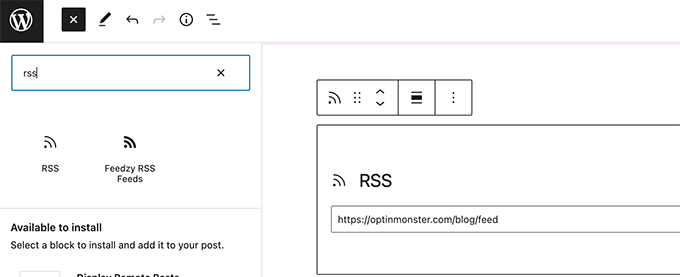
The easiest way to curate content on your WordPress website is to simply use the RSS feeds block.

To use this method, start by editing a post or page where you want to display curated content and adding the RSS block to your content area.

Add RSS feed

In the block settings, you need to enter the RSS feed URL of the content source that you want to display.

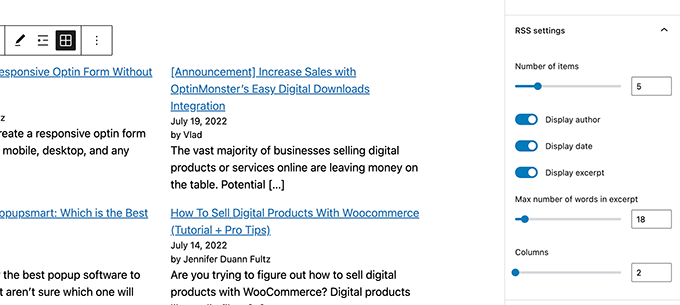
WordPress will then fetch that feed and display it on screen. You can use block settings to change its style, display excerpt, author, and date information.

RSS block settings

The downside of this method is that you’ll have to add RSS feed for each source separately.

It will be time-consuming and doesn’t look very pretty to the users.

What if you could automate the whole process, combine different sources, and even categorize / sort them?

Let’s take a look at how to properly automate the whole content curation process.

Using RSS Feeds to Automatically Curate Content in WordPress

First, you need to install and activate the Feedzy plugin. For more details, see our step by step guide on how to install a WordPress plugin.

There’s also a premium version of Feedzy with more features, but for the sake of this tutorial, we will use the free version.

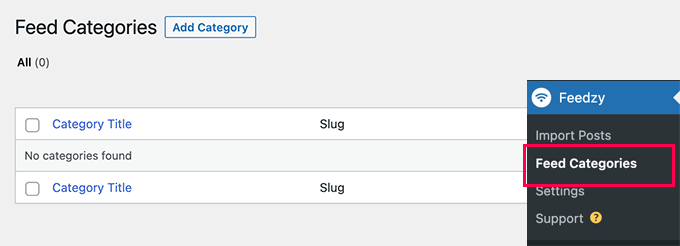
Once the plugin is activated, you need to visit Feedzy » Feed Categories page and click on the Add Feed Category button at the top.

Add feed category

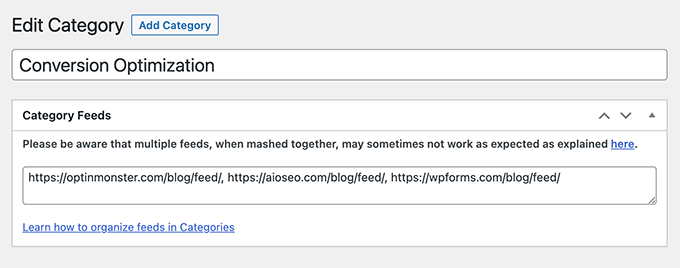
One the next screen, you need to provide a title for this category.

Below that, add the URLs of RSS feeds that you want to include. Use commas between each URL to separate them.

Add feed URLs

After that, click on the Publish button to store your feed category.

Repeat the process if you need to create more categories.

Import Curated Content From Feeds to Your WordPress Website

Feedzy can import blog posts from the feeds to your WordPress blog posts.

This way they will be stored in your WordPress database like regular posts and give you flexibility to do different things with the curated content.

However, if you don’t want to import them to your WordPress website, then you can skip this step.

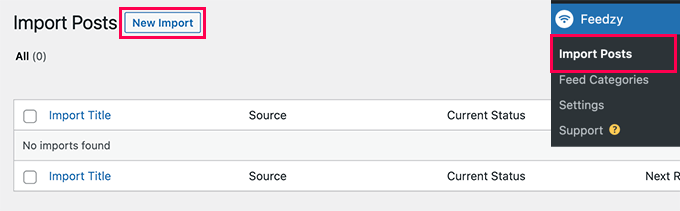
To import blog posts, simply visit the Feedzy » Import Posts page and click on the New Import button at the top.

Importing posts

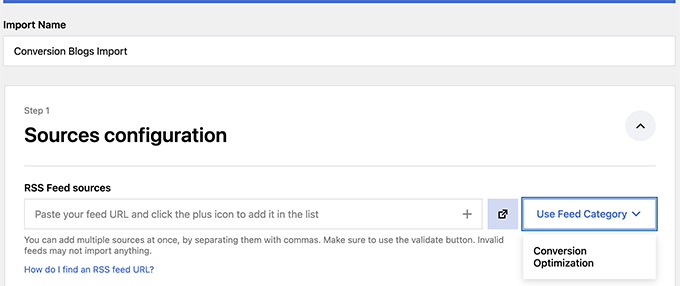
First, you need to provide a name for this import. This could be anything that helps you identify this import.

Below that, you can add individual RSS Feeds, or choose one of the feed categories you created earlier.

Prepare to import feeds

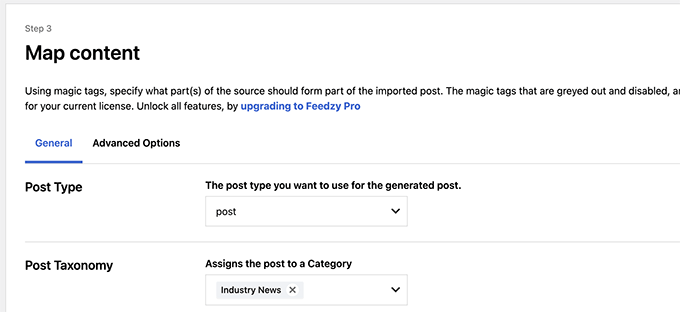
Next, scroll down a little to the ‘Map Content’ section.

From here, you can map RSS feed items to WordPress blog post settings.

Map content

For instance, you can choose which category to assign for all imported posts.

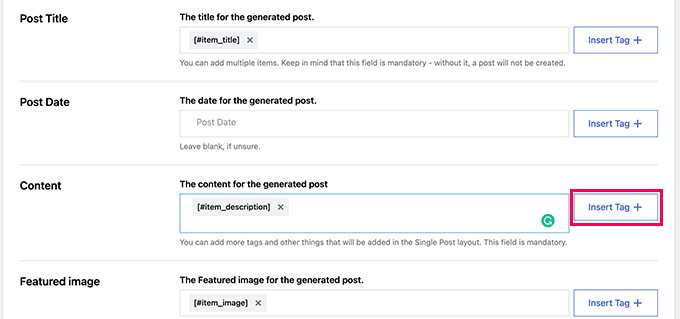
You can click on the Insert Tag button to map a Feed element to post element. For instance, you can set Item Description to be used as Post content.

Use item tags to map post settings

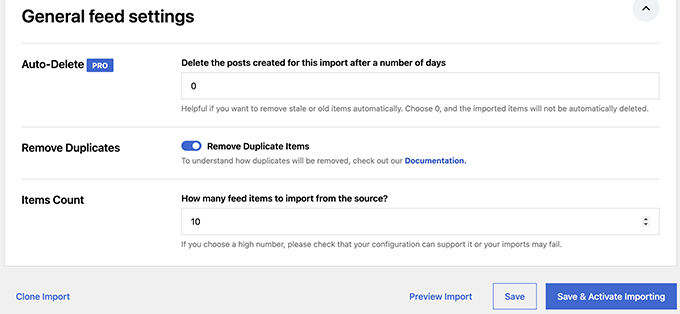
Next, scroll down to the General Settings section.

From here, you can choose how many posts you want to import.

General import settings

Finally, click on the Save & Activate Importing button to save your changes.

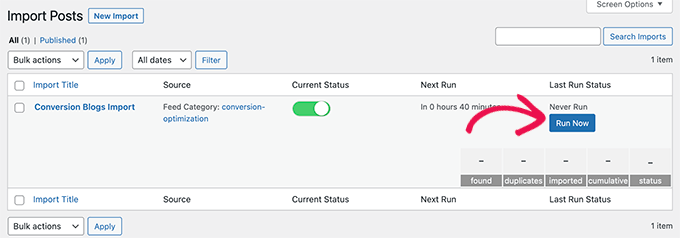
You will now be redirected to the imports page where you will see the import you just created. Simply click on the Run Now button to start importing posts.

Run import

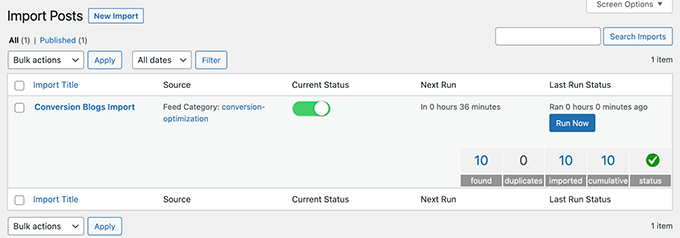
The plugin will now fetch and import posts and add them to your WordPress website in the background.

Once finished, you’ll need to refresh the page to see the import stats.

Import Finished

Feedzy will now automatically fetch new posts from your content sources and import them to your WordPress website.

Displaying Curated Content in WordPress

Now that you have set up and automated import mechanism for the content you want to curate, the next step is to display it on your website.

There are different ways to display curated content in WordPress via Feedzy feeds.

Method 1. Fetch Content via Feedzy RSS Feeds Block

This method is recommended if you decided not to import content to your WordPress website.

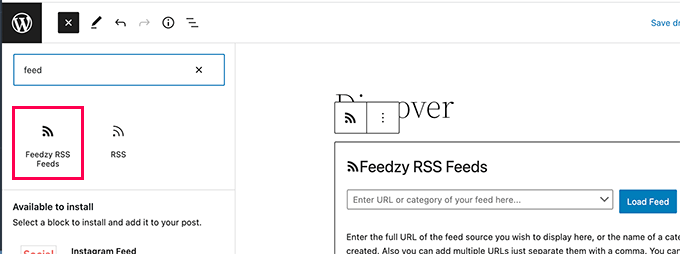
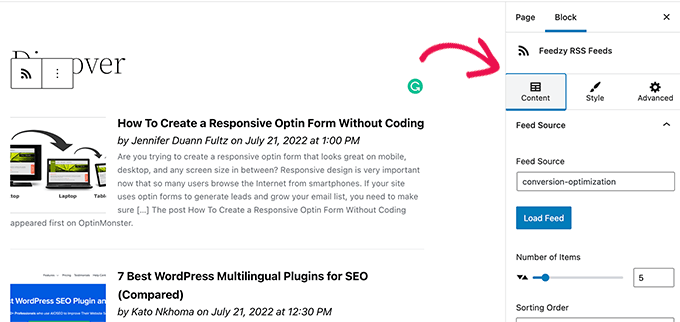
Simply edit the post or page where you want to display the curated content and add the Feedzy RSS Feeds block to your content area.

Display Feedzy RSS Feeds

You can then enter a feed URL that you want to display or choose one of the feed categories you created earlier.

You can then use the block settings panel to choose the number of items, style, and other settings for the feed.

Feedzy feeds block settings

Once you are finished, don’t forget to Save or Publish the post and page.

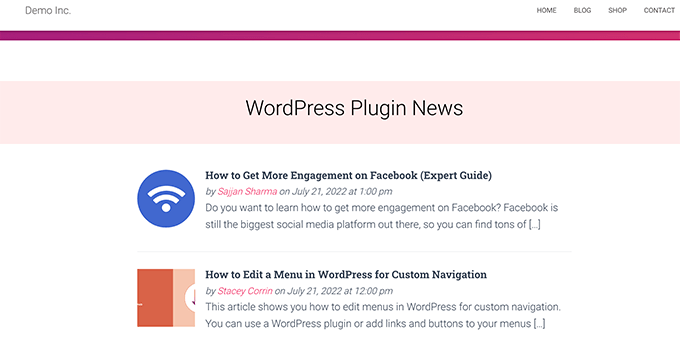
You can now preview it to see your curated content in action.

Feedzy Feeds block preview

Method 2. Display Imported Content in WordPress

This method is more flexible but would only work if you decided to import content directly into your WordPress website.

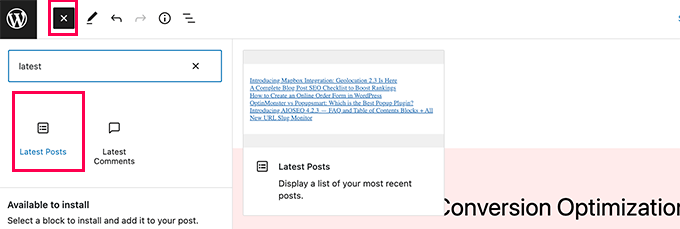
Simply edit the post or page where you want to display the curated content. On the post edit screen, add the Latest Posts block to your content area.

Add latest posts block

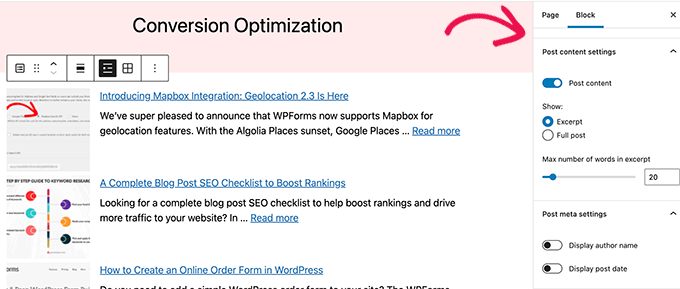
By default, the block will display your most recent articles in a plain list. You can change that under block settings.

From here, you can choose to show excerpt, featured image, number of items, and more.

Latest Posts block settings

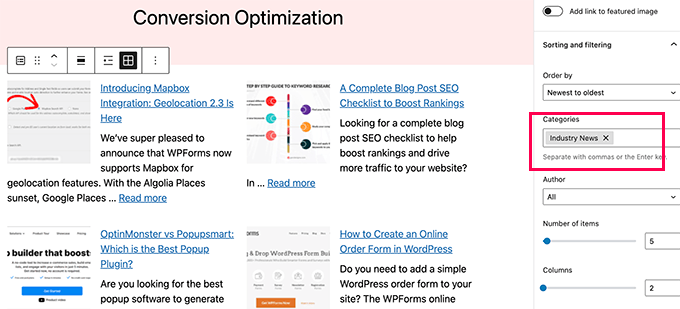
You can also switch from list to gallery view, choose number of columns, or only display posts from a specific category.

For instance, let’s say you mapped all imported content to be added to ‘Industry News’ category. Now you can just display that particular category as your curated content.

Style and sort curated content

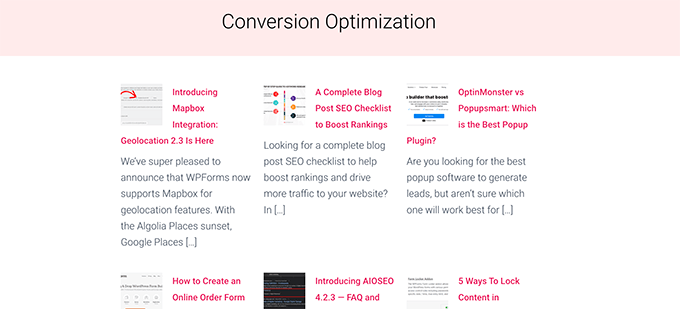
Once you are finished, you can Save or Publish your post/page and preview it in a new browser tab.

Here is how it looked on our demo website.

Curated content in gallery view

Using either of these methods will automatically display latest posts from your content sources.

Social Media Content Curation in WordPress

What if you wanted to curate content from social media platforms like YouTube, Twitter, Instagram, and Facebook?

The easiest way to curate social media content in WordPress is by using Smash Balloon.

Smash Balloon is the best social media plugin for WordPress. It allows you to display social media feeds on your WordPress website beautifully.

First, you need to install and activate the Smash Balloon plugin. For more details, see our step by step guide on how to install a WordPress plugin.

Smash Balloon comes with separate plugins for different social media feeds.

You can also buy the ‘All Access Bundle’, which includes all their plugins + social wall plugin that can combine different social feeds into one.

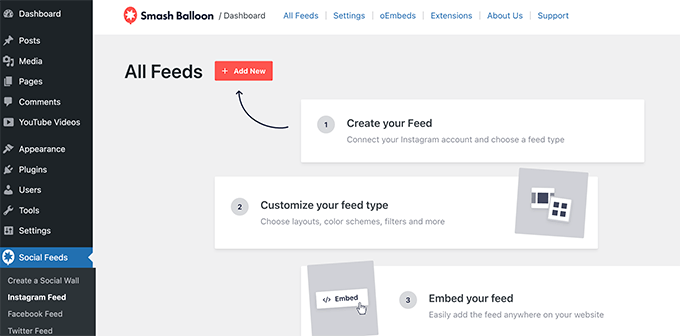
Upon activation, you can go ahead and start connecting your social media accounts and setting up feeds you would like to display.

Adding social feeds

Follow the on-screen instructions to set up each feed.

You can connect to your social media profiles, third-party sources, search terms, hashtags, playlists, and more.

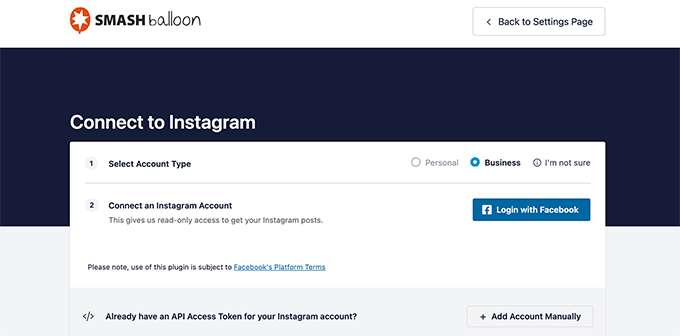
Depending on what you are trying to fetch, you may be asked to connect to your social media account and give Smash Balloon permission to access your data.

Connect social media profile

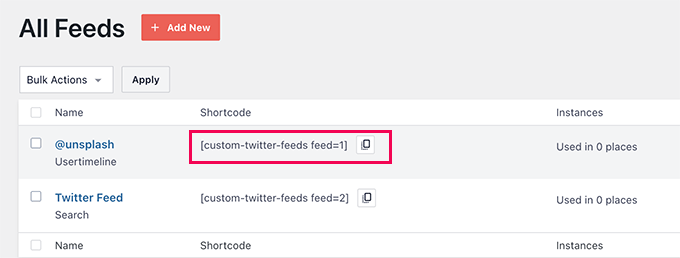
Once you have set up your social media feed, you can copy the shortcode from the feeds page.

Copy shortcode

Next, you need to add the shortcode to a post, page, or sidebar widget.

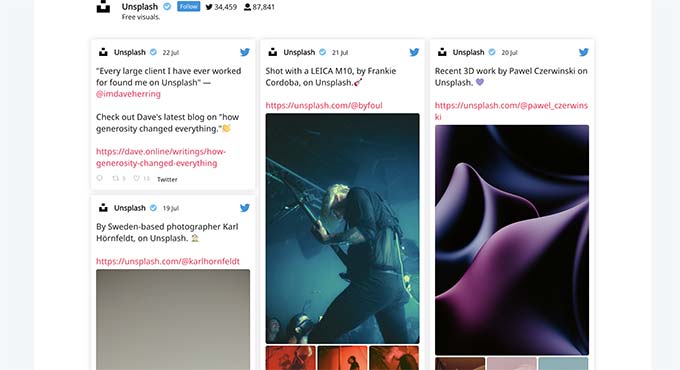
You can now visit your website to see your social feed in action.

Single feed displayed

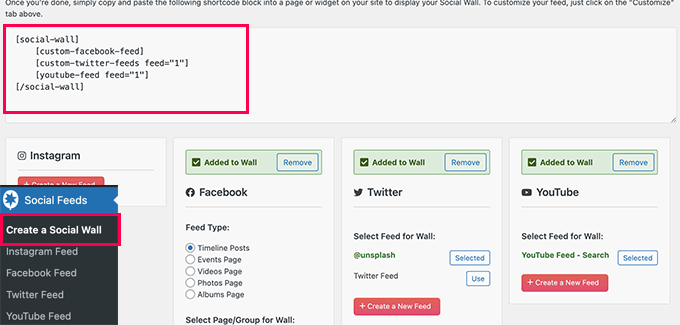
You can also create a social wall to combine different feeds and display them as one.

Simply go to the Smash Balloon » Create a Social Wall page and copy the shortcode shown on screen.

Copy the social wall shortcode

You can now add this shortcode to any WordPress post, page, or sidebar widget where you want to display your curated social feed.

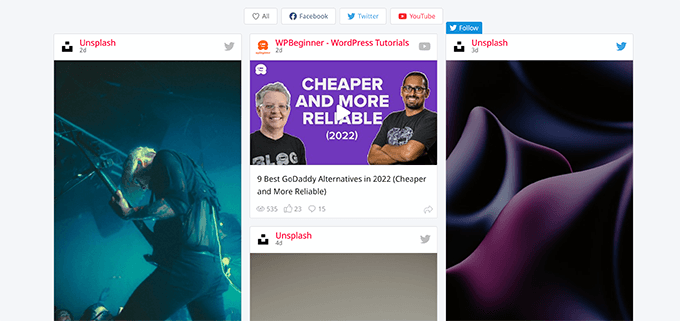
Here is how it looked on our test website.

Combined social wall preview

For more details, see our tutorial on how to add social media feeds in WordPress.

We hope this article helped you learn how to curate content in WordPress. You may also want to see our guide on ways to make money online from your curated content blog or see our WordPress SEO guide to optimize your website.

If you liked this article, then please subscribe to our YouTube Channel for WordPress video tutorials. You can also find us on Twitter and Facebook.

Sourced from wpbeginner