A cookie-less world is coming. Tech giant Apple has already phased out third-party cookies, and Google is set to follow. While third-party cookies and behavioural targeting make advertisers’ worlds go round, cookies that track users from site to site have long been a privacy grey area. Plenty of users employ cookie blockers, and cookie consent is annoying for everyone. Cookies are also becoming less reliable than they used to be, as the data gained from them is patchy and inconsistent.
But with no cookies, how will brands collect audience data? The answer is native e-commerce.
The Tracking Cookies Are Crumbling
When brands can’t follow users with cookies, recognizing customers and their digital journeys will fall to single platforms. Consider Amazon, which can track a customer through a single login across services like Prime Video, Kindle and Alexa. Google can do the same through Google Search, YouTube and Gmail, and Meta through Facebook, Instagram and WhatsApp. This strategy is what we call native e-commerce—retail being integrated into a website or platform, allowing the customer to shop where they are.
The 4 Biggest Trends In Native E-Commerce
In a world without third-party cookies, native e-commerce is the retail landscape of the future. Today, this strategy is shaping the digital landscape in several areas.
1. Sister Sites
Generally, data created by native e-commerce platforms can be more limited than what third-party cookies offer because it doesn’t follow customers to other websites. However, that’s why these platforms work best with companies that can create or buy other websites as sister products.
Amazon is a great case study for this. Look at its huge media offering, including Prime Video, Amazon Music, Kindle and Alexa. The company recognized the enormous power of combining media and shopping, and it’s adding to these services all the time. Amazon has recently bolstered its Prime offering with live sports and is now courting influencers with Amazon Live. The data it gleans from customers using all these products is endless.
2.Social Commerce
Social media can be a great resource for sales generation. For example, Instagram and Facebook already have in-app shopping features. Sponsored shopping posts on both platforms have a more compelling look and feel compared to normal posts or ads. Instagram, normally hostile to external URLs, has shoppable adverts that feature a “Shop now” button that takes users to an in-app version of a company’s website. We expect to see these features continue to improve.
3. Augmented Reality
Though TikTok and Snapchat aren’t as utilized as the big platforms, their social commerce features are fascinating. They include the likes of Brand Takeover ads and sponsored hashtags. Most notably, both platforms use augmented reality (AR) to allow users to add effects to their selfies and videos, and advertisers can create their own AR ads.
AR has more direct applications too. We’ve seen cosmetics brands used in a similar way, for example, so customers can see how different lipstick shades might look on them. It’s clear that we’re only seeing the beginning of AR’s impact on native e-commerce and retail at large.
4. Contextualized Video
Brands engage in contextualized video marketing when they advertise products or services alongside highly relevant content. Most often, this takes the form of a visual playing before video content, but it could also be a visual ad appearing on a relevant blog page. The technology that supports this strategy is even sophisticated enough that if viewers skip to a relevant part of the video, brands can advertise at that point.
The native e-commerce sphere is huge and exciting, and we mostly see positives—more efficient, targeted advertising; better conversion rates; and a better customer experience. As it continues to rise, we’ll likely see companies like Google and Meta making their more-targeted audience data available to marketers. (Amazon is already making headway through its recently announced Marketing Cloud, and Apple is rumored to be building its own demand-side platform.) By keeping an eye on the trends of native e-commerce, businesses can stay relevant and successful.
Feature Image Credit: Getty
By Jérôme de Guigné
Jérôme de Guigné, Founder & CEO, e-Comas. Read Jérôme de Guigné’s full executive profile here.
Meta CEO Mark Zuckerberg is claiming that the company’s WhatsApp messaging platform is “far more private and secure” than Apple’s iMessage platform. Zuckerberg’s claim came in a new Instagram post. Considering Meta’s entire business model is based on tracking and advertising, Zuckerberg’s claims can be considered somewhat iffy.
WhatsApp is far more private and secure than iMessage, with end-to-end encryption that works across both iPhones and Android, including group chats. With WhatsApp you can also set all new chats to disappear with the tap of a button. And last year we introduced end-to-end encrypted backups too. All of which iMessage still doesn’t have.
The post shares a Meta billboard in New York City that promotes WhatsApp over SMS or iMessage. Apple’s Tim Cook and Zuckerberg have long been in an ongoing battle of words.
During 2021, Facebook continued its public battle with Apple over changes in iOS and iPadOS that made it harder for companies to track users across other websites and apps. Facebook claimed Apple’s “App Tracking Transparency” hurts small businesses that rely on advertising to attract new customers. Zuckerberg went so far as to claim that Facebook’s lackluster growth in the last quarter of the year was partly to blame on Apple’s App Tracking Transparency.
In case you’ve forgotten, Meta, otherwise known as Facebook, was named the worst company of the year for 2021, according to a survey conducted by Yahoo Finance. The “honour” followed a bad year for the company, as it faced 12 months of public backlash, criticism from all quarters, and even a rebranding of the social media company.
A recent Gartner survey of 304 infrastructure and operations (I&O) leaders and their teams found that 85% of I&O leaders that do not currently have any full automation expect to become more automated in the next two to three years.
Given rising interest in I&O automation, Gartner predicts that by 2025, 70% of organizations will implement structured automation to deliver flexibility and efficiency. This is an increase from 20% of organizations who had implemented structured automation in 2021.
The survey found I&O is most often using automation within deployment domains, a natural focus point of automation activities as organizations work to reduce friction found at the intersection of I&O and its technology-producing consumers. Most respondents report their efforts in automating application deployment, security compliance and server deployment to be impactful and valuable.
Infrastructure and operations leaders are most often using automation within deployment domains, such as application deployment, I&O workload automation and end-user device deployment. Image source: Gartner.
However, the rise of devops, Agile and site reliability engineering (SRE) has led to more automation within operational domains, like monitoring and analytics and incident problem resolution. The survey found that with just 43% of I&O teams currently automating monitoring and analytics, 83% find such automation efforts to be valuable. Similarly, only 36% of I&O teams are automating incident and problem resolution, but it’s considered valuable by more than three-quarters of those respondents.
The survey also found that only 21% of I&O leaders report high levels of success in their automation endeavours. To successfully manage I&O automation and increase success, Gartner experts recommend that I&O teams automate deployment but ensure they do not neglect automating valuable operational opportunities such as change management, vulnerability remediation, and backup and disaster recovery.
Lay foundations for success by determining automation’s potential value, improving processes before automating and equipping the workforce with critical automation skills.
Methodology
Gartner’s 2022 Adaptive Automation in Infrastructure & Operations Survey was conducted April through May 2022 among 304 respondents from North America, EMEA and APAC, across industries and companies with $1 billion or more annual revenue. Qualified respondents were senior IT I&O leaders, their peers or direct reports with IT automation initiatives within their scope of responsibilities.
Read the full report [subscription required] from Gartner.
In predictive modelling, future events are predicted based on statistical analysis. Read this guide to understand how predictive modelling works and how it can benefit your business.
The rapid adoption of digital products and services has created vaster volumes of data than we’ve ever seen before. As a result, an increasing number of organizations are using big data analytics and strategies to derive value from available data.
This data is often too complex and extensive for humans to analyse manually, especially for organizations that want to derive future insights from existing data sets. Organizations are instead relying on predictive modelling tools to connect data points and identify patterns in data. With the right predictive modelling tools and strategies, companies are able to make predictions about future events, customer behaviours and market trends.
Predictive modelling, a component of predictive analysis, is a statistical process used to predict future outcomes or events using historical or real-time data. Businesses often use predictive modelling to forecast sales, understand customer behaviour and mitigate market risks. It is also used to determine what historical events are likely to occur again in the future.
Predictive modelling solutions frequently use data mining technologies to analyse large sets of data. Common steps in the predictive modelling process include gathering data, performing statistical analysis, making predictions, and validating or revising the model. These processes are repeated if additional input data becomes available.
Benefits of predictive modelling
Organizations use predictive modelling to reduce the time, effort and resources that are needed to forecast business outcomes. Here are the top benefits of using predictive modelling:
Minimizing risk: Predictive modelling can predict an organization’s potential for cyberattacks, fraudulent transactions and other types of risks.
Optimizing marketing campaigns: Using predictive modelling, organizations can uncover customer insights to tailor and recalibrate their marketing campaigns.
Maximizing profit margins: Predictive modelling can be used to predict sales revenue, forecast inventory and create pricing strategies.
Prioritizing resources: There are several ways predictive modelling can help prioritize resources for an organization. For example, sales teams can receive lists of expected leads to convert, allowing them to allocate more time and effort to these high-priority leads.
One of the challenges or limitations of predictive modelling is that the results are only as good as the data used to construct the model. To ensure predictive modelling is as effective as it can be, organizations should implement data quality tools to keep data accurate, safe and reliable. They should also prepare the data for business use by cleansing and formatting it for predictive modelling needs.
How to build a predictive model
There are various predictive modelling techniques. The two most prevalent techniques involve using neural networks and regression, respectively. In statistics, regression refers to establishing a relationship between input and output variables. The predictive model could be linear or nonlinear, depending on the variables.
In neural networks, predictive modelling tools use interconnected nodes in hierarchical levels, a model inspired by the human brain. These nodes create patterns and relationships between variables to establish future trends. Beyond these two most popular predictive modelling techniques, businesses also use clustering, outliers and classification models.
Traditionally, predictive modelling was handled manually by a data analytics team. But as the process has become more complex and data quality efforts have increased exponentially, using computer software for predictive modelling has become increasingly popular. As a result, most organizations use predictive modelling tools such as Oracle Crystal Ball, RapidMiner Studio and SAP Predictive Analytics.
Predictive model examples
Many industries rely on predictive modelling to help with key business decisions. These are some common use cases for predictive modelling:
Finance and banking
Predictive modelling is used in banking to identify fraud and illegal activities. For example, the amount and frequency of transactions are analysed to recognize patterns or trends in money laundering.
Supply chain management
In supply chain management, predictive modelling is used to forecast the impact of multiple variables on the inventory. Different risk factors can be plugged into the calculations to check their effect on the efficiency and reliability of the supply chain.
Digital marketing
In digital marketing, predictive modelling can help market research analysts improve their understanding of customer behaviour, which can reduce customer acquisition costs and improve sales conversion rates. This is done by modelling customer buying trends and online engagement based on historical data.
Ali is a professional writer with diverse experience in content writing, technical writing, social media posts, SEO/SEM website optimization, and other types of projects. Ali has a background in engineering, allowing him to use his analytical skills and attention to detail for his writing projects.
When you ask a business owner or leader that question, you’ll often get responses like “I am who I am, and people have to accept that.”
The problem with that statement is it shuts down the idea of growth–and completely discounts the people you’re dealing with. In psychology terms, it promotes “demandingness,” the belief that the world must be a certain way.
Yes, authenticity demands saying what you mean, meaning what you say, and sticking to your values and principles. But there is a respectful way to do that, which leads to refreshing authenticity, rather than toxic authenticity.
Sometimes, our personalities, and one personality trait in particular, can get in the way of refreshing authenticity. Here is where emotional intelligence, the ability to understand and manage emotions, can help.
This leads to what I like to call:
Emotionally intelligent authenticity.
What is emotionally intelligent authenticity? And how can it help you make sure you’re staying true to yourself–while bringing your message across in the best way possible?
Let’s break it down. (If you find value in this lesson, you might be interested in my free seven-day course, which delivers a rule to your inbox each day to teach you how to build emotional intelligence in yourself and your team.)
Personality, Agreeableness, and Emotionally Intelligent Authenticity
Many psychologists agree that there are five basic traits that make up our personality, often referred to as the “Big 5”: openness, conscientiousness, extraversion, agreeableness, and neuroticism.
For this topic, let’s focus on agreeableness.
Highly agreeable people are natural peacemakers and have a high degree of empathy, qualities that can be very helpful in building relationships.
But that also comes with a weakness: If you’re highly agreeable, your willingness to keep the peace can tempt you to hide your “disagreeable” feelings or say things you don’t really mean. You may avoid difficult–but necessary–conversations, like when it comes to giving constructive criticism to your direct reports.
This can be toxic to both you and your team. Believe me, I can speak from experience.
As someone who naturally leans far on the “agreeable” spectrum, I had to learn how to speak up when needed. I needed to figure out how to force myself to be disagreeable at the right time–to say things that people may not want to hear, but that they needed to hear. Either for their good or mine.
In contrast, let’s say you rank low on the agreeableness spectrum.
You likely have no problem “keeping it real.” You don’t mind presenting contrarian opinions or pushing people out of their comfort zone, and that, too, is a valuable skill.
But if you’re highly disagreeable, you’re in danger of allowing your authenticity to get in the way of your message. That’s because, if you develop a reputation for always questioning or being critical of others, people will stop listening to what you have to say.
To combat that, be proactive. Identify the strengths of others, and tell them what you appreciate. Seek out opportunities to commend and praise–sincerely and specifically. When you do so, they’ll feel respected–and will be more willing to hear you out when you have something disagreeable to say.
Whether your personality leans toward agreeable or disagreeable, you must work hard to leverage your strengths and mitigate your weaknesses. If you do, people will value what you have to say–not only because it’s authentic, but because it’s emotionally intelligent, too.
Entrepreneurs have long been quick to adopt new marketing trends, and personal branding is no exception.
Personal branding has finally become something that most entrepreneurs have accepted as a must-do. Thanks to Elon Musk, Gary Vaynerchuk, and other public-facing founders, more business owners are hopping on the personal branding train and making an effort to put a face to their companies.
The problem is most entrepreneurs are throwing spaghetti at the wall to see what sticks. If you want to build a personal brand that helps your business’s bottom line, you need to be intentional with how you show up.
And no, that doesn’t mean picking out the perfect filter for your Instagram grid or paying for thousands of fake followers to “look” important.
After helping entrepreneurs in all industries step into the spotlight and grow a personal brand people buy from, there are three non-negotiable questions you must ask yourself before getting started. (If you’ve already been trying to grow your personal brand for some time — don’t worry. Take a moment now, ask yourself these questions, and notice the gaps in your strategy that might be stalling your growth).
1. What kind of impression do you want to leave?
Modern-day personal branding is like going to an event, meeting someone new for the first time, and finding yourself talking about them a month later because something about them got etched so deeply in your brain.
When you leave the room at a party (i.e., when you finish having an interaction with an ideal client):
What do you want them to take away?
What do you hope they remember?
What do you want your target market to associate you with?
How do you want to be remembered?
These questions all fall under the same roof: defining what kind of impression you want to make on your target audience. By answering these questions, you create (or recreate) the foundation of your personal brand. Without the proper foundation, the house can’t be built.
2. How do you want to make people feel?
Continuing from question one, we’re taking it one step further. While most entrepreneurs on social media spend their time making sure their personal brand “looks” a certain way, they forget that’s not ultimately what makes someone buy.
People buy from you because of how you make them feel.
All humans make their buying decisions based on emotion. We buy with emotion and justify with logic. To grow your personal brand, you must clarify how you want to make people feel at the core. Think about your target audience and how you want them to feel after they come in contact with your personal brand.
Do you want them to feel:
Empowered?
Brave?
Confident?
Relaxed?
Energized?
Calm?
After you answer this question, you will have the creative clarity to craft a content strategy that shares one common goal: to make people feel a certain way.
Gary Vaynerchuk is a shining example of this. His personal brand’s biggest objective is to help people feel empowered and in control. Every single piece of content he puts out aims to help his target audience feel capable of creating a life they truly love.
3. Am I willing to let my audience in?
Here’s the hard truth: today’s biggest, most widely known personal brands are the ones who take their audiences behind the scens. In other words, if you are serious about growing a personal brand that people not only love — but buy from — you need to be willing to connect with your audience on a human level consistently.
While this can be done in various ways, the easiest way is to tell your story. Instead of the company’s story — tell your story. Show your audience who you were before you were a leader. Show your audience what you overcame to build your company and bring your vision to reality. Show your audience that you’re so much more than your title, and show them that you’re a human just like them.
This doesn’t mean you need to tell all of your deepest darkest secrets. It means you need to decide what things you’re comfortable sharing with your audience from your personal life.
For example, some CEOs share everything from their quirky hobbies outside of work to their family, their kids and numerous other hats they wear. In contrast, others prefer to share only one or two different components of what makes them.
The most important thing to remember is that what works for someone else doesn’t have to be the way you do it. You get to let your audience in whichever way feels most authentic and aligned for you.
As long as you aren’t hiding behind your title, accomplishments and computer, you’re one step closer to building a personal brand that grows your business’ impact and income.
Logomania shows no signs of slowing down, despite the wishes of some designers.
“Logomania is over,” declared Teo Van den Broeke, British GQ’s style and grooming director, in the Financial Times earlier last month. He was referring to the unfortunate fashion world trend of plastering every square inch of articles of clothing with designer logos and suggesting that it was no longer compatible with the reality of these uncertain economic times.
But what of logomania in the larger business world? Over many decades, the logo has taken on an outsize prominence as the most obvious and ubiquitous visual representation of the brand. And while branding practitioners may insist, correctly, until they are blue in the face that the logo is only the tip of the brand iceberg, it remains the case that, as designer Sir John Sorrell pointed out, “Iceberg tips are actually rather important because they’re the things you can see.”
As more and more corners of our world became branded, various factoids, some perhaps apocryphal, popped up to quantify and illustrate the extent of the logo’s takeover. “The average person sees as many as 600 trademarks in a single day,” wrote Samuel G. Michini in an Industrial Marketing article in 1959. By 2007, the number of logos in our lives had exploded. Design critic Alice Rawsthorn noted in the International Herald Tribune that “the average Western consumer is said to be exposed to more than 3,000 corporate symbols a day.”
Amid this firehose of trademarks blasting across society, there have been plenty of predictions that consumers would tire of logos, often from designers themselves. All the way back in 1994, Richard Ford, creative director of Landor Associates—now known as Landor & Fitch and recognized for its work on behalf of FedEx, Pepsi, and Verizon—speculated in the design publication Eye that the transition to designing for screens would allow for the use of more sophisticated graphic elements that could become “widespread to the point of undermining the hegemony of the logo.” In 2007, corporate image consultant Naseem Javed, writing in the Asia Times in wake of the hideous London Olympics logo unveiling, put it bluntly: “Let’s face it, in this hyper-accelerated society, logos are almost dead. Fifty years ago, customers remembered the logos of IBM or Chevrolet…Not today. Pick 10 companies and try to remember their logos, and ask yourself if they really have an impact.”
Most strikingly, designer Simon Manchipp, founder of UK design practice SomeOne, wrote in Design Week in 2010 that “Logos are a hangover from another time. They need to be shaken off, moved away from, de-focused.” Later, he doubled down, calling logos “pointless,” “rubbish,” and “dead.” And yet, in the past 10 years, over one million new logos were filed for registration with the United States Patent and Trademark Office, 65% more than had been submitted in the decade prior. These marks now coat the physical and digital surfaces of our society in increasingly wider swaths, leaving virtually no space unbranded, from mobile apps to the bottom-right corner of your TV screen to rooftop solar arrays to human bodies.
Designers rightfully would like to be acknowledged by the public for their many skills beyond logo design. At times, they must feel like Sir Mix-a-Lot taking the stage eager to perform a wide range of his hits, only to hear the crowd immediately cry out for “Baby Got Back.” Likewise, branding agencies are certainly keen to charge their clients for much more than just the creation of a new logo. And it may be that, in the visual cacophony of today’s brandscape, logos don’t pack the same punch they did in the less-cluttered decades of the past. But as U.S. companies continue to crank out symbols numbering in the six figures every year, it’s clear that the logomania gripping the world of branding won’t be abating anytime soon.
Feature Image Credit: [Illustration: FC]
By James I. Bowie
James I. Bowie is a sociologist at Northern Arizona University who studies trends in logo design and branding. He reports on his research at his website, Emblemetric.com.
For years marketers have obsessed about finding and exploring a singular narrative that galvanizes all brand communication efforts and delivers a unified story. This quest for a singular idea is the reason every brand communication sequence is expected to start with a Big Idea. However, ideas are fleeting so brands need something more.
What is the Big Idea?
According to Smart Insights, “Any new campaign will need a hook or theme that you’ll want people to recall, share and act upon. A campaign’s big idea is the overarching message that underpins all elements of a campaign in order to resonate with the target audience. The big idea will need to be rooted in a piercing insight and linked to the campaign’s objectives to ensure it has maximum impact and relevance.”
A Big Idea is a core concept or proposition based on research and informed by insight that serves as the focal point or springboard for tactical engagement. Big Ideas are anchors that give a strong sense of direction for brand communications and actions.
However, Big Ideas are limited in their longevity of application. Since the Big Idea is expected to anchor a brand’s specific action or communication sequence, it means at the start of every new sequence, a new Big Idea must be identified and adopted. This impacts cumulative brand equity over time and requires extra upkeep to achieve a singular, abridged, and long-lasting narrative that will drive the business forward.
This is where brand platforms have the advantage. They are the springboard as well as the anchor for the brand’s ideas. Creative ideas can be continually weaved out of a strong Brand Platform.
What is a Brand Platform?
According to SendPulse, A Brand Platform is a marketing idea created to describe the distinctive features of a brand both ideologically and visually. It is essential to form the holistic image of the business and provide a unique offering for the target audience. The Brand Platform is often regarded as being timeless because it takes its form from the brand’s identity, and serves as the constant foundation for the brand. While the Big Idea for brand communication can change as competitive context and target audiences change, the Brand Platform doesn’t change.
Coherent brand communication is often based on a clear and compelling Brand Platform. With Brand Platforms we can synthesize all the elements of the brand identity including the history, vision, values, positioning, promise, visual identity, tone, and more.
A Big Idea is timely as it strives to connect a brand’s identity to culture whereas a Brand Platform is timeless because it is a foundational philosophy inherent to the brand’s identity.
Think of a Brand Platform as ground zero for brand communication. It is the epicenter for all brand expressions and the core philosophical center for the brand’s activities.
– Gidyon Thompson, strategist @ eikon grae
Distilled from a brand’s purpose, a platform defines a brand’s personality and is enriched by a brand’s cohesive communication. It can start as a brand’s slogan, or as a campaign tagline like Nike’s “Just do it”, but it must reflect a fundamental human truth that isn’t necessarily only focused on the sales of a product, but on a philosophy.
Big Ideas change and are retired after a campaign, while a Brand Platform evolves and adapts to innovations and market trends.
Progress with every walk: Johnnie Walker
In 1999, Johnnie Walker launched the Keep Walking campaign. It was strongly influenced by The Striding Man, which cartoonist Tom Browne first sketched on a napkin over lunch. Previously, Johnnie Walker was promoted through seven separate advertising campaigns, that means seven different Big Ideas with seven disconnected creative executions. The seven ideas didn’t support each other or build a singular narrative. However, on 8 June 1999, it was time to bring the whole thing under one roof and give Johnnie Walker the coordinated strategy it deserved. The brand moved beyond introducing new ideas to articulating a singular framework that guides all of the brand’s expressions.
The “Keep Walking” Brand Platform core message was to “inspire men to progress” (a fundamental human truth that isn’t necessarily focused on sales of a product but of a philosophy). Johnnie Walker describes it as a rallying cry for progress, encouragement in adversity, a joyful expression of optimism, and as the best piece of advice you’re ever likely to hear.
While a Big Idea would’ve only been relevant within the lifetime of a campaign, this Brand Platform guides the overall brand communications and brand experiences, before, during, and after a campaign – and even the future of the brand.
Working with actor Harvey Keitel, Johnnie Walker released a TVC to launch the campaign. They have since created brand films to embolden and enrich the narrative by showcasing people and their journeys of progress. The brand only focuses on showing many different ways to talk about progress.
More recently, the brand invested about £185m into an experiential dimension of the Brand Platform by creating Johnnie Walker Princes Street, an eight-floor visitor attraction located in Edinburgh that features shops, a whisky cellar and two rooftop bars. This is not a temporary installation designed to just sell products. It is a physical location designed to help customers experience the brand’s message. It is where “Keep Walking” comes to life.
Since they created a clearly defined Brand Platform, they were able to evolve to launch the facility and invest in the physical structure that is now an integral part of the overall brand experience. According to Edinburgh News, despite the pandemic the facility welcomed more than 300,000 visitors from 97 different countries around the world in 2021. Through consistency of messaging and the utilization of their Brand Platform, the location has become a pilgrimage for whisky lovers globally.
Johnnie Walker broke into the top 10 of Kantar BrandZ’s Most Valuable UK Brands 2021 ranking, coming in ninth with an estimated value of $8.3bn. The whisky brand is in good company, in a list topped by Vodafone ($30.9bn), HSBC ($15.6bn) and Shell ($15.4bn), and is worth more than Unilever’s Dove ($7.3bn) in tenth position.
Why building a brand platform is important
Brand clarity Brand Platforms are a singular idea that serves as the single running manifesto of the brand. It is the “one thing” the brand is about. For years, Coca-Cola drove their entire brand vehicle on the premise of “Happiness For All.” Customers know Coca-Cola as the happiness brand. Whether in the development and execution of campaigns under multiple slogans like “Open Happiness” and “Choose Happiness,” or in product immersive experiences like the Coca-Cola Happiness Machine, the manifesto and message is always clear to consumers. A Brand Platform helps your audience make sense of what your brand is really about.
Brand propositional cohesion One struggle for marketing communication professionals are narratives. Across the business engagement journey, multiple propositions are introduced and maintained like the advertising idea, the brand positioning statement, the PR policy, etc. New thinking is constantly introduced to all aspects of the business. However, when a brand evolves a Brand Platform, clear synthesization of all brand propositions becomes possible because the brand is saying just one thing across the board. Brand Platforms can easily evolve without losing the thread of the brand.
Faster and richer brand salience Brand salience refers specifically to whether people are aware enough of your brand to immediately think of you when it’s time to make a purchase. For example, if people feel like buying shoes to live an active life, they think of Nike first. They think Nike because the “Just Do It” Brand Platform has effectively positioned the brand as the brand for action. With a well-developed Brand Platform your brand will build faster salience.
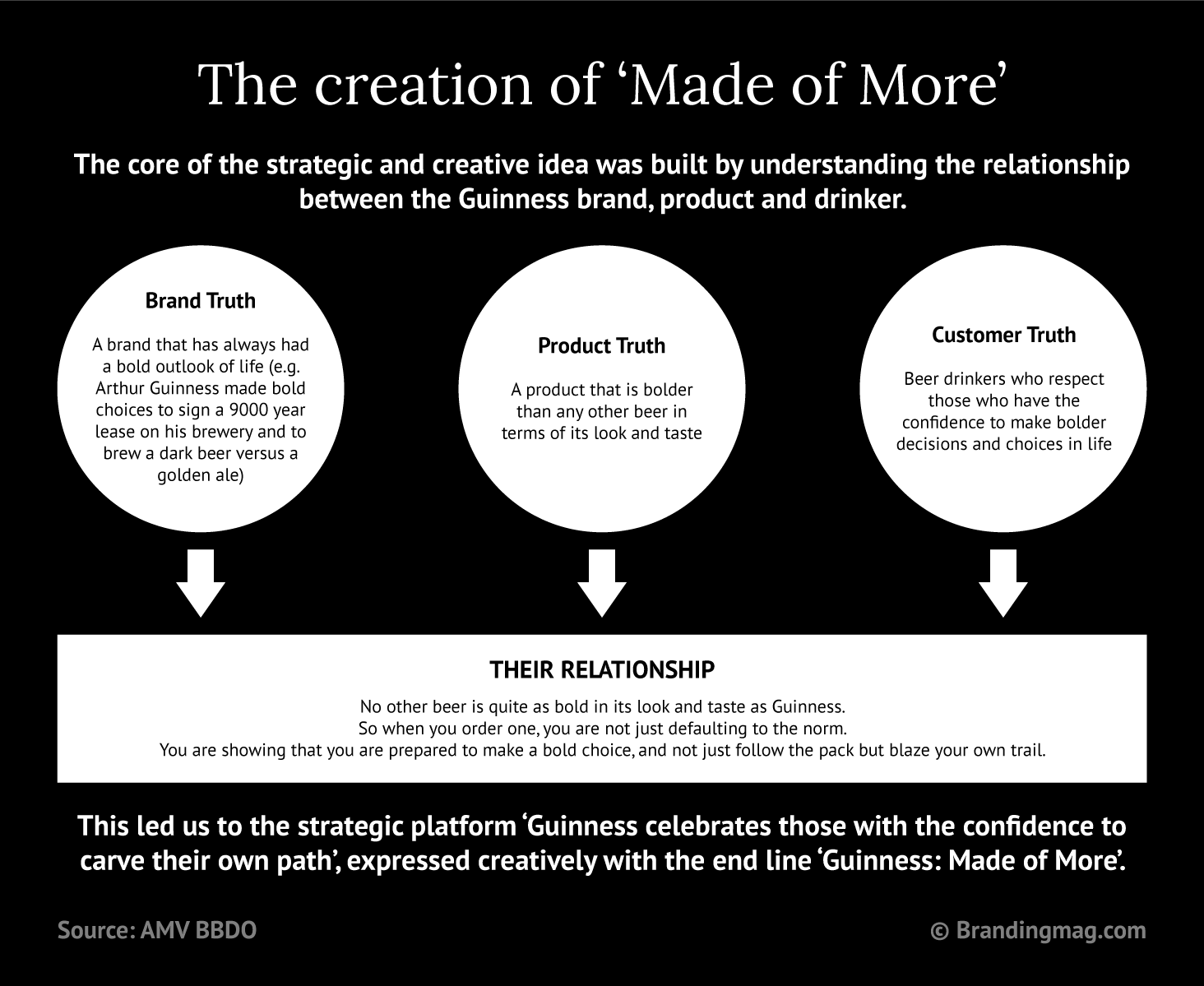
Positive brand association Brand platforms are philosophical propositions about an ideal world that the brand promotes. This means they offer a beautiful perspective on how the world could be better. Guinness’ brand platform “Made of Black” speaks to originality, authenticity and self-awareness. Coca-Cola’s “Real Magic” is based on connectivity. Coca-Cola believes, “Real magic happens when people get together and when what we share in common is greater than what sets us apart.” These propositions quickly build positive associations for the brand. Through these platforms, the brand is seen as an active participant in building a great world.
Increase in brand loyalty With resonance comes a deep desire to pay more attention, engage with and even follow the brand. You want your customers to go beyond buying your product to feeling like they are part of the vision you are building. You want customers to feel like they are part of a movement.
How to build brand platforms
Articulate a brand truth Brand Platforms are not just nice catch-phrases. It goes beyond that, it’s a fundamental human truth that the brand can champion because of its relationship to the reality the truth describes. To build a strong platform you need to ask, what is true about your brand? You could focus on the truth about the product formulation like Guinness does, or a brand journey like Johnnie Walker, or generally how consumers perceive or see the brand. Then, tie that to how consumers see themselves or want to see themselves. At this level, you are simply looking for a fundamental human truth that your brand is better suited to defend, promote and grow with. The intersection of brand truth and consumer truth is a good place to start drawing inspiration for your Brand Platform. No matter what the proposition is, never forget that the consumer should care enough about it. They should see how it impacts their everyday life, with or without your product.
Click image to view case study
Spread the Word A platform can be introduced as a tagline or campaign slogan, but the ultimate goal is to give it enough visibility that it will slowly begin to catch the eyes and ears of people and start to make sense. As you embark on spreading your new brand gospel, remember people will not line up behind a manifesto they don’t understand. Be creative with your brand education to demonstrate the density of the proposition and work it till it becomes a brand asset. Go beyond visibility and engage them through storytelling that enriches the perspective of the proposition so that your audience clearly understands the “what” and “why” of your proposition. All Brand Platforms are brand assets but not all brand assets are Brand Platforms. I’ve seen many brand managers and brand owners try to force a campaign tagline into a Brand Platform. For a proposition to become a Brand Platform it must represent a core human truth that resonates with the realities of the consumers, seen and understood. Then, it must be malleable enough to guide the thinking of the brand across all dimensions. It should be the guiding philosophy for integrated marketing communication, but not necessarily tied to a brand sales agenda.
Bring it to the center When you are sure that you’ve found the truth, and it’s gaining resonance, you can make your entire brand engagement process ride on the thinking.
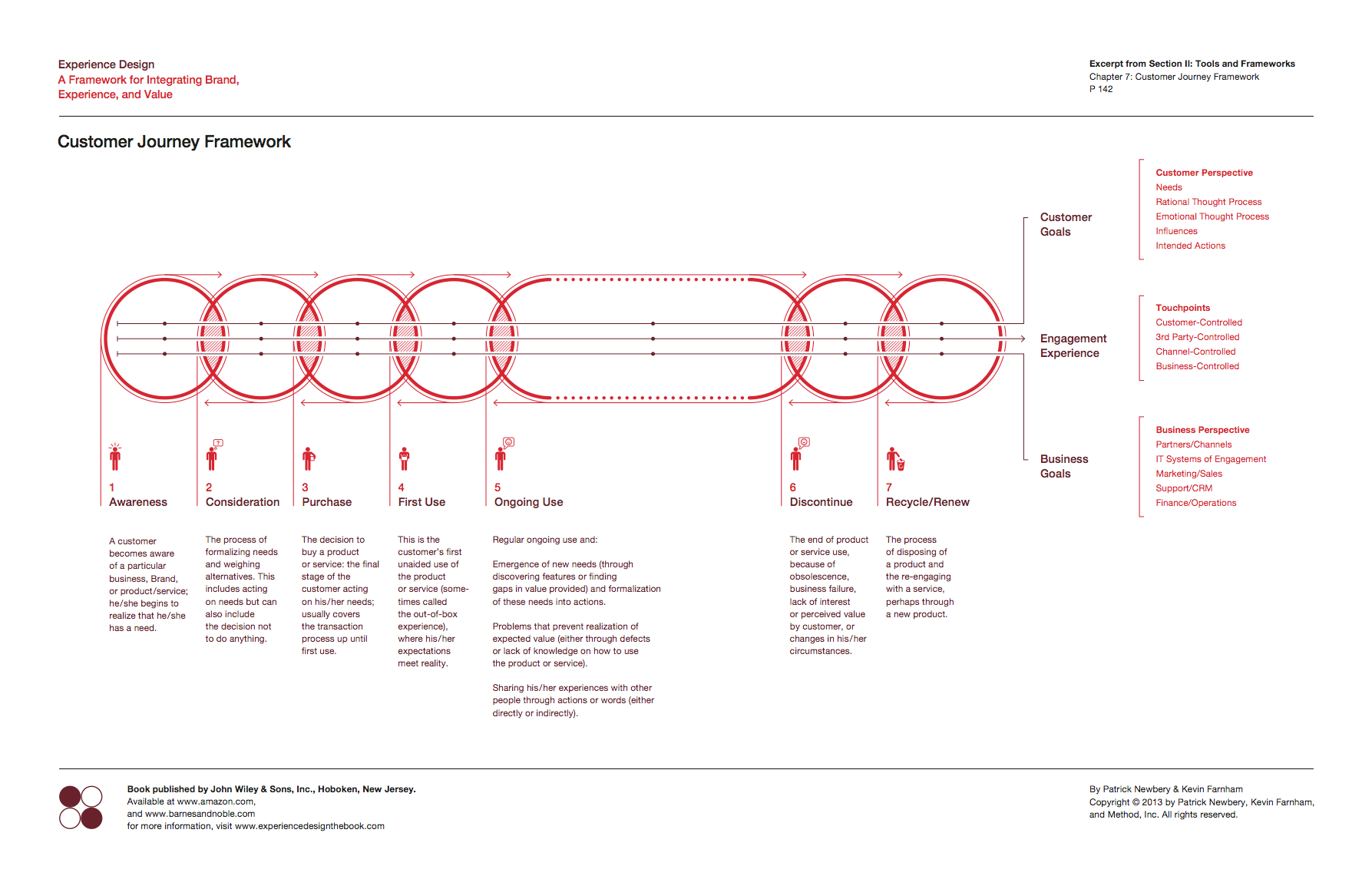
Click image to enlarge – Customer Journey Framework by Method
Using the Patrick Newberry, Kevin Farnham and Method brand engagement framework, the Brand Platform will be the running line sandwiched between the customer goals and business goals. It will be the thinking that the engagement experience is built around. At every touchpoint, the philosophy of the Brand Platform will have to be seen, heard, felt, and understood. It must permeate every realm of business communication and engagement. “Keep Walking” isn’t just a spot or print ad, it’s locked into a physical location, packaging policy, influencer engagement, global campaign, etc. It is the Johnnie Walker brand’s thinking.
Every touchpoint that defines the brand must be an outlet to sharing the brand’s thinking. The thinking must connect with consumers where they are in a very authentic and human way. This is why it is called a platform, because every brand engagement activity across the customer engagement journey map will have to take its life from and be enriched by the thinking.
It takes time, effort, and budget to build a solid Brand Platform. However, that investment is justified in the stability, structure, and focus that Brand Platforms deliver. Don’t just think about the Big Idea for your next campaign, take it a step further and build a platform that will sustain your brand experience into the future.
A great way to improve your brand is by creating a community of customers, fans, or followers who are passionate about what you do.
Your brand is your business’s most valuable asset, as it sets you apart from your competitors and determines how customers perceive and interact with your company. That’s why investing time and resources is essential to develop and maintain a positive brand identity. Thankfully, there are several different strategies you can use to improve your brand.
Foster a Community Around Your Brand
A great way to improve your brand is by creating a community of customers, fans, or followers who are passionate about what you do. You can provide helpful content, e-books, blog posts, host events or webinars, or offer exclusive discounts or deals for community members. Not only does this help build loyalty among current customers, but it also attracts new customers and helps you become known as an industry leader.
Rethink Your Brand Voice
Ensure your message is clear, consistent, and aligned with your core values. If unsure where to start, conduct a brand audit to evaluate how well your current branding aligns with your desired image. Your goal should be to create a brand voice that accurately reflects who you are as a company and resonates with your target audience. In a world of faceless brands, being personal and human can make all the difference. Ensure your brand voice is friendly and relatable. Avoid jargon and technical language that can alienate consumers.
Evaluate Your Visuals
In today’s highly visual world, ensuring your visuals positively reflect your brand identity is more important than ever. You need to consider everything from the colors you use on your website and in marketing materials to the logo on your products and packaging to create a consistent, professional image for customers. That is where grand format printing services come in. Grand format printers specialize in large-scale printing, and they can produce high-quality visuals that will make a lasting impression on potential customers. In addition, grand format printing is relatively inexpensive, making it a great option for businesses on a tight budget.
Foster Positive Customer Relationships
There are many ways to foster positive customer relationships, but one of the most effective is simply providing outstanding customer service at every opportunity. Whether you’re handling an inquiry over email or resolving a problem over the phone, always go above and beyond to ensure that the customer feels valued and satisfied with their experience.
Partner With Other Businesses
Collaborating with other businesses can be an effective way to reach new audiences and improve your overall visibility both online and offline. When selecting business partners, look for companies that complement rather than compete with yours so that you can cross-promote each other’s products or services without cannibalizing sales from within your own customer base. For example, if you sell natural pet food, consider teaming up with a local pet store or dog groomer for cross-promotional opportunities like joint social media giveaways or in-store events featuring samples of your products.
Improving your brand doesn’t happen overnight. It takes time, effort, and dedication. However, by taking things one step at a time and utilizing unique strategies like those outlined above, you can gradually build a strong, positive brand identity that will serve as the foundation for long-term success.
Is low-performing content draining the life from your website? Nathan Dale of Impression explains how to identify it and bring it back to life, in light of Google’s most recent algorithm updates.
In August and September 2022, Google rolled out two major updates to its core search algorithms. First, there was the Helpful Content Update, which was completed on September 9, followed by the routine September Core Update.
It can be a spine-chilling moment when Google introduces an update outside of the routine, causing ghoulish screams amongst digital marketers (OK, maybe not quite that bad) who are concerned about what might happen to the performance of their websites.
But really, these updates aren’t so scary at all. Google’s update is intended to reward the good content you’ve been producing.
Trick, or treat?
There were two important lines from the Helpful Content Update documentation: ‘The update generates a site-wide signal. For this reason, removing unhelpful content could help the rankings of your other content.’
It has long been the view of SEO professionals that the overall quality of a website was considered by Google when it ranks individual pieces of content. You could write a great article with detailed information, examples, a how-to guide and a video thrown in for good measure. However, if the rest of your site’s content is low-res, it’s likely your article won’t perform well in search engine result pages (SERPs).
Is there zombie content lurking on your site?
Web pages with no SERP impressions, clicks or traffic are often referred to as ‘dead content’ since they seemingly have no life in them, although a more accurate term might be ‘zombie content,’ because the page is technically still alive, and search engines could therefore bump into it during a (presumably late-night) crawl.
If Google finds this content and classifies it as ‘unhelpful,’ it will take this into account when ranking your other high-quality, helpful content too. The more unhelpful content you have, the more likely Google will think that your website is providing lower overall value to its search results and users.
Taking steps to identify and remove poor-quality, unhelpful content is no longer an ‘as and when’ task to be done during a period of downtime. The Helpful Content Update means this task should now be high on your list of priorities.
There are very few (if any) websites that have 100% perfect content on every single one of their pages. While Google understands that this is an impossible standard, it would prefer to invest less time and money crawling and evaluating content only to realize that it’s as much use as a rotten pumpkin on November 1.
This is likely why it’s explicitly asking content managers to remove low-quality, unhelpful content, and rewarding sites that action this with potential overall ranking improvements.
Lack of continuity in the ownership of web content is usually the hidden monster that results in unhelpful content. As web content is inherited by new starters, passed around departments or simply left unattended, chances are you’ll find some skeletons in the closet.
How to identify unhelpful content
Identifying low-performing content is straightforward. One approach is to use Screaming Frog SEO Spider, which can either crawl your entire website, a specific directory or a list of URLs.
In Screaming Frog’s configuration menu, select API access and add your Google Analytics account. Set the segment to Organic Traffic and the date range to the last 12 months, then your traffic data will be added to the crawl. We advise looking at this over a 12-month time period to give a truer picture (eg seasonal content might not get any clicks in June, but lots in December).
Once the crawl is finished, you’ll have a list of content with the session data shown in the Analyticstab. Simply sort by lowest to highest and you’ll find the zombie content that’s haunting your website.
Exorcise dead content (or bring it back to life)
Once you’ve identified the content with the lowest session data, you essentially have three choices. One: if it has the potential to be made helpful, you can update it with new and improved content. Two: consolidate any content that is useful into another page on the same topic, then remove and redirect the page. Three: remove the page entirely.
Side note: if you are considering totally removing a piece of content, you should check the ‘all users’ and ‘page views’ in Google Analytics as it is possible the page is being found in other ways.