Author

editor

Browsing

By Jeff Steen

Despite the proliferation of real-time messaging, email continues to be critical to business comms. Make sure yours has the biggest possible impact by using the SVAN formula.

Feature Image Credit: Getty Images

By Jeff Steen

Content marketer and author@in_the_write

Sourced from Inc.

Sourced from Association of Advertisers in Ireland

We are delighted to welcome Orlaith Carmody to take part in our next Toolkit session on February 22nd at 10am.

Date: 22nd February
Time: 10am
Location: Online
Registration: Here

There are approximately 1m people living in Ireland today over the age of 60. That number will have doubled by 2051.
Age Friendly Ireland believes that this group controls up to 50% of all consumer spending, but attracts only 10% of marketing spend. What do advertisers propose to do about this gap and obvious opportunity?
The workshop will help advertisers to understand the scale of the worldwide ageing demographic, the impact on society, and why they should be targeting more of their spend at an increasingly active and affluent consumer base.

Orlaith Carmody is a Communications Consultant and Business Advisor to Age Friendly Ireland. She has delivered coaching, training and workshops for many years, nationally and internationally.

She is the author of Perform As A Leader, which shares her coaching and teaching over 20 years, and offers a complete toolkit to anyone looking to develop their front line communication skills – pitching, presenting, chairing, negotiating, performing on the media or coaching and leading teams.

Following an early career as a broadcast journalist with RTÉ, Orlaith became a director of a number of SMEs in media and recruitment, and served on the board of RTÉ from 2010 to 2015. She currently serves on the Compliance Committee of the Broadcasting Authority of Ireland, and is voluntary Chair of the Shona Project.

REGISTER NOW

Sourced from Association of Advertisers in Ireland

Sourced from Association of Advertisers in Ireland

On Tuesday 25th of January, Jim Power and Chris Johns joined us to host “The new normal is already here. Get used to it. The era of predictable unpredictability is not going away”

The global economic and political environment has rarely looked so uncertain and unpredictable. Covid-19 is still exerting an inordinate impact on our lives; central bankers are caught in an unenviable dilemma in the shape of rapidly escalating inflation and Covid-related uncertainty – something will have to give, probably interest rates; Brexit continues to rumble on; and the global geopolitical landscape has rarely looked as threatening, with the US in particular looking particularly perilous.

2022 promises to be an incredibly uncertain year and Irish business would be advised to expect and prepare for the unexpected.

Chris and Jim will look at all of these issues and others in the context of the Irish economy, and Irish society.

Jim Power is owner manager of Jim Power Economics Limited, an economic and financial consultancy, which he set up in 2009. He is a board member of Love Irish Food and was Chairman of Three Rock Capital Management, an investment company, until it was purchased by Julius Baer in January 2020. He is a member of the Institute of Directors in Ireland and is an economic consultant to Aviva Ireland.

He is a graduate of UCD and holds a BA and a Master of Economic Science Degree. He lectures part-time on the MSc Management and the MBA at Smurfit School of Business, UCD. He is a native of Waterford.

Chris has worked in financial services, mostly asset management and investment banking. He was CEO and CIO (Chief Investment Officer) at Bank of Ireland Asset Management. He also worked as an economist in the UK Treasury, the National Institute of Economic & Social Research and UBS Philips & Drew in London, whilst also teaching economics in London and Cambridge Universities.

He is currently Chairman (non executive) of Smith & Williamson Investment Management Europe and a member of the Acuvest Investment Committee.
They are both also responsible for the very successful podcast, “The Other Hand”.

Sourced from Association of Advertisers in Ireland

By Maxwell Timothy

Are you getting a lot of employers visiting your LinkedIn profile, but you don’t hear from them? Avoid these LinkedIn mistakes when looking for a job.

LinkedIn is one of the largest career-focused sites on the internet. It provides a platform for job seekers to showcase their skills and get within arm’s length of recruiters in their industry.

The platform can serve as the first line of scrutiny for employers of labor to assess an individual’s suitability for a role. What recruiters see or fail to see on your LinkedIn profile can tip the odds against you if your profile isn’t in order.

Nobody wants to be in such a situation. Below are five common LinkedIn mistakes to avoid when job hunting.

1. Avoid Boring and Cliché Headlines

LinkedIn profile

Your LinkedIn headline is the first thing that gets noticed once someone visits your profile. It is also what comes up on Google and LinkedIn on-site searches. It’s like an article headline; it decides whether or not someone clicks through to read your profile.

Unfortunately, some people let LinkedIn fill up their headlines with their job titles. This is not the way to go. Your headline is a unique opportunity to sell yourself, and a job title might not do that well enough.

Instead, you have to be as descriptive in as few words as possible. Avoid clichés and boring stuff millions of other accounts are probably using.

When optimizing your LinkedIn profile, your headline should ideally:

  • Describe your primary skills.
  • Entice visitors to want to connect with you.
  • Portray you as a valuable member of society.
  • Serve as a call to action.

There’s a huge difference between a LinkedIn headline that reads “Translator at ABCD company” and another that says “Translator with Marketing expertise for Korean Market.” The first is a job title, while the second is a brilliant pitch.

Image Gallery (3 Images)

To make a headline that sells:

  1. Use clear and compelling language.
  2. Use a combination of keywords that visitors would likely be looking for, e.g., “translator” and “Korean.”
  3. Be precise. No one simply wants a translator; they’ll need a translator for a specific language, e.g., a Korean translator.
  4. Offer unique value. There are probably thousands of Korean translators, but fewer with marketing skills.
  5. Be action-oriented. Use words that show you’ve put your skills to use, e.g., “translated” 30,000 pages for the UN, “created” a translation blueprint for a Fortune 500 company, etc.

2. Avoid Getting Too Personal

Surprised woman starring at her phone

It can be a bit tricky to draw a clear-cut line between your personal and professional life on social media. Even when you try to do so, the lines can be blurry. As a result, it’s hard to say with certainty what qualifies as personal content and what meets the threshold of professional content.

Always remember, before anything else, LinkedIn is a professional network. So try as much as possible to stick to professional and career-centric content. It’s easy to be roped into sharing a bit of our personal journey masqueraded as a relevant career conversation.

Sure, some recruiters might like to read a bit about how your personal journey influenced your career path. However, writing about how you took a break from work to look after your ailing grandparents starts to cross the line. Irrespective of how you want to package it, if your post highlights more about your personal struggles and less about your career, it probably shouldn’t be on LinkedIn.

However, there are a few exceptions. Recruiters might appreciate reading content about your non-work interests if it can provide them with relevant insights into your persona. For example, talking about your participation in local marathons might help your case if you’re being vetted for a job role that requires fitness. Similarly, sharing content about volunteering to lead a local charity might help exaggerate your leadership skills.

Personal content you share should ideally add a professional value that’s immediately clear to a recruiter. If you have any doubts about whether a post item meets the requirements of professional content, don’t post it.

3. Avoid Indiscriminate Connections

Linkedin networking

Having a lot of connections can help grow your LinkedIn profile and professional reputation. However, that will only happen if your connections are relevant and valuable. If you’re sending out invites solely for the numbers, you’re doing it wrong. Indiscriminately connecting with strangers on LinkedIn can hurt you in many ways.

Your LinkedIn timeline mirrors the kind of connections you have. When a recruiter lands on your profile, they’ll likely take a look at the kind of posts you interact with. This is what gives them a sense of your interests and what matters to you. If you’re connected to too many people that aren’t relevant to your industry, you’ll most likely be interacting with content that doesn’t add both face and intrinsic value to your timeline.

Also, limiting your connection to the most valuable, like-minded people within your industry can significantly increase your chances of being seen by recruiters. How?

When potential employers search for talents to hire, people within their network are prioritized on the search result pages. This includes 1st, 2nd, and 3rd-degree connections in that order. This means, if you are within the network of professionals who are connected to recruiters, there’s a good chance that you’ll come up in searches whenever those recruiters search for talents.

If in doubt about the kind of people you should connect with, here’s a checklist to guide you.

  • Professionals you already know. Maybe, people you’ve worked with or are currently working with.
  • Professionals you would love to learn from. These include thought leaders or established talents within your industry.
  • People with a lot of key LinkedIn connections within your industry.
  • Prospects or people with potential within your industry.
  • Close friends or relatives with a professional value.

4. Avoid Showboating

LinkedIn user

LinkedIn is one of the best professional platforms for promoting your skills. It is the perfect place to sell yourself and lay the foundations for important career moves.

Unfortunately, a lot of users tend to tilt more towards showboating rather than showcasing their abilities. Sure, it’s sometimes tricky to differentiate between the two. However, how a potential employer sees your attempt at self-promotion hinges on a few key presentation details.

Stay modest and treat every post like an interview when promoting yourself on LinkedIn. This means:

  • Your choice of words is very important. Avoid words that overly focus on positive labels or qualifiers that overemphasize your status or achievements.
  • Acknowledge team members in team achievements; a link to their profiles in your post is a good idea.
  • Focus on the hard work involved. “I didn’t break a sweat to do that. It was very easy,” might sound arrogant. “My team worked hard to see that through” sounds more appealing.
  • Don’t belittle other people to emphasize your achievements. “Nobody in company XYZ is as good as I am at documentation” won’t elevate you; instead, your post will be seen as mean and dismissive. Avoid comparison in your LinkedIn write-ups.
  • When talking about your achievements, try to keep them within a relevant context. Always subtly present the audience with a reason for bringing up your achievement.
  • Always focus on what your audience can take away from your skills and achievement. It could be industry insights, best practices, or valuable tips. This will demonstrate your subject matter expertise and your willingness to share knowledge rather than just showing off.
  • When showcasing a successful project, try to back it up with evidence. Back up any claim you make with appropriate statistics and proof.

If a recruiter sense that you’re showing off, even with a legitimate achievement, you could be inadvertently demarketing yourself. Nonetheless, don’t let the fear of appearing as a braggart make you undervalue yourself. Instead, own your successes and be as professional as possible.

5. Avoid Highlighting Your Experience Wrongly

How you highlight your experience on LinkedIn can either diminish or emphasize your career progress. Don’t undersell yourself; pay attention to how you highlight your work experience. Here are key points to consider:

  • Your work experience isn’t limited to 9-5 jobs. Your experience at volunteer jobs, freelance gigs, and one-off contracts can add enormous value to your profile.
  • If you’ve held multiple positions at the same company, it’s good practice to list them all, especially if it highlights your career progression.
  • Always give an overview of what your job entails when listing your work experience. However, avoid words like “I was responsible for,” “my job included,” or other variations that seem like a boring list of responsibilities. Instead, use power words like grew, managed, led, piloted, or reduced. These action-oriented words better emphasize the actions you took and the value you created at your previous jobs.

Make LinkedIn Work for You

Making LinkedIn work for you boils down to a few salient details. Get it right, and LinkedIn could be a launching pad for your career success.

Do things the wrong way, and you could be hurting your career progress.

By Maxwell Timothy

Sourced from MUO


By Carrie Weaver

It’s all about framing yourself, and your answers, as the solution to their problem.

Amelia Earhart said that preparation “is rightly two-thirds of any venture.” Your amount of interview preparation determines how well you perform in your interview, and your interview performance is the determining factor in whether or not you receive a job offer.

Just like an audition for an actor or musician, your interview is a type of test. The good news is that a test can be aced. In order to ace any test, you first need to understand what’s going to be on the test. Think about the open position you are interviewing for as a “problem,” and you, the candidate, will be the solution to that problem.

Let’s say you’re a marketing professional. Take a step back and think about why marketing exists in the first place. It’s to inform and engage potential customers about a product or service. The next question to ask yourself is, “What’s hard about that?” You want to come up with two to three high-level reasons.

For example, first, you have to capture people’s attention in a crowded space. And then once you have their attention, you have to communicate your value so it appears better than a competitor. Now that you’ve identified the problem, ask yourself, “What are the skills that would be most helpful in solving that problem?” In our marketing example, creativity and bold communication would be incredibly useful. Now imagine your interviewer asks you, “What strengths do you possess that would make you successful in this position?”

You might answer with something like, “I’m a thoughtful and compassionate leader who listens deeply and helps level up the skills of every person on my team.” While that’s a good response, and most organizations can benefit from good leadership, that response is not as valuable as this one: “I’m a strategic and inspiring communicator who finds joy in delighting future customers with bold, value-based communication.”

The first response regarding elevating others would work well if the position problem was about levelling up a team of marketing professionals with differing levels of competency. The second response, however, is addressing the language of the problem. If you’re not presenting yourself as the solution to the problem, someone else is. Here’s a three-step process to better understand the problem of your interview so you can ace the test.

1. Conduct a high-level analysis of the industry or company pain points.

2. Gain insider intelligence from the recruiter or hiring manager.

3. Undertake a detailed analysis of the job description.

First, start with your own high-level knowledge of the industry and your role, just like the marketing example we discussed. Second, use insider intelligence. You’ll gain this through your conversations with folks who work there who can give you the inside scoop on the problem. This may be a recruiter or a colleague. Ask anyone you can this question, “What would you say is the biggest challenge this position is trying to tackle?” They’ll often tell you directly.

Lastly, use the job description. Really review it and read between the lines. How are they describing the problem? A detailed examination of the job description uses a company’s own language to give you a sense of what’s most problematic or most important.

I recommend running the job description through a word cloud generator. When using a word cloud generator, copy and paste only the descriptive portion of the job posting that describes the relevant portion of the job. Don’t copy the requirements section that says, for example, “three years of managerial experience, and five years of marketing experience.” You’ll just see the word “experience” returned. Focus on copying only the portions of the job description that truly describe the job.

For illustrative purposes, I reviewed an email marketing manager position at Amazon Fashion. Using a word cloud generator, the largest or most common words returned included, “Amazon, experience, and fashion,” which makes sense given the position. Instead, look at the next-largest or medium-sized words, as the relative size of the word indicates a greater frequency in the word use, and you can hypothesize that these words are most important to the position.

For the Amazon Fashion job description, I saw the words “high, fast-paced, helping, quality, and growing.” In rereading the position requirements, I determined that the goal of the position is to help drive sales and the word “high” appeared frequently in terms such as “high-quality,” “high-growth,” and “high-aesthetics.”

During your interview, use this information to shape all of your responses. For example, by stating that your email marketing has “high aesthetics and is reviewed with the highest quality standards in mind,” you can show how you are able to drive sales. By using the language of the problem, you will be able to position yourself as the solution. It’s that simple.

Use this three-step process to make quick work of identifying what’s going to be “on the test” during your job interview. It’s all about framing yourself, and your answers, as the solution to their problem. Be the solution.

By Carrie Weaver

Sourced from Fast Company

By

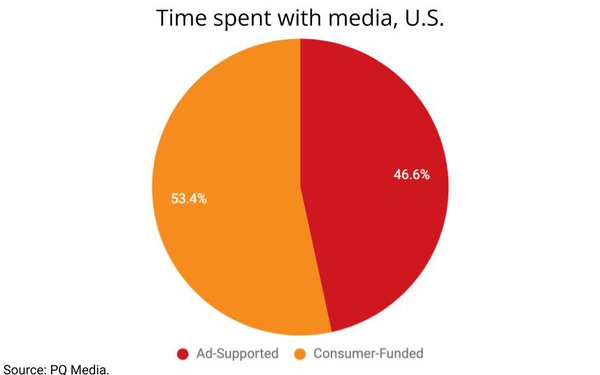
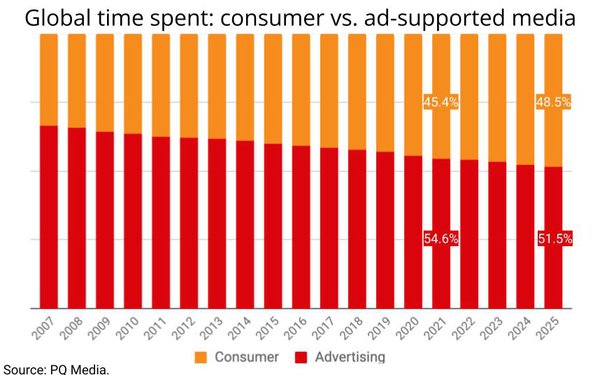
Ad-supported media’s share of total consumer time spent with media fell to its lowest point ever in 2021, and is projected to continue falling over the next several years, even as spending by advertisers continues to rise.

That paradox, which is based on a MediaPost analysis of data from PQ Media’s just-released consumer media usage forecast, implies a pronounced rise in ad cost inflation through 2025.

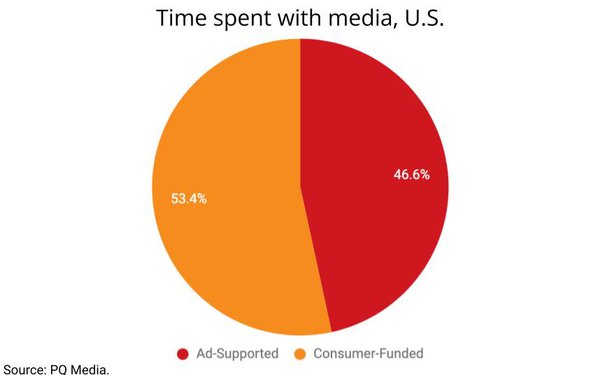
The new report — part of a regular series of annual tracking studies produced by PQ — estimates ad-supported media’s share of consumer time fell to 46.6% in the U.S. in 2021, and to 54.6% worldwide.

Thanks to a rise in total time spent with media due to the COVID-19 pandemic in both 2020 and 2021, total time with ad-supported media actually grew, even as its share dipped — but the effect has been relatively moderate and not nearly enough to impact the potential inflation of more ad dollars chasing fewer available minutes of advertising exposure.

In the U.S., for example, consumer time spent with ad-supported media rose just 0.01% in 2021, while total advertising and marketing spending jumped 8.7%, according to PQ’s estimates.

Worldwide, consumer time spent with ad-supported media rose 0.04% in 2021, but total advertising and marketing spending rose 7.2%.

“Historically, there has always been a disconnect between advertising and marketing spending vs. consumer media usage during recession and recovery periods,” PQ CEO Patrick Quinn explains, noting: “When a recession first hits, advertising and marketing growth will typically decelerate, while media usage increases, because consumers tend to use media as a catharsis during difficult economic periods.

“Conversely, when an economic recovering begins, advertising and marketing spending will outperform GDP, while media usage tends to decelerate, because consumers have less idle time as they go back o work and such.”

Quinn added that between 2020 and 2021 “the media usage gain was stronger than usual” due to stay-at-home protocols during the pandemic, while advertising and marketing declines were “steeper than usual.”

The result, he said, was a corresponding deceleration of consumer time spent with media and an acceleration of ad spending.

While total consumer time spent with media is projected to continue to expand in both the U.S. and worldwide through 2025, ad-supported media’s share will continue to erode due to secular, not cyclical shifts in consumer usage of media — something other analysts and economists have been pointing out, including the Big 3 agency — GroupM’s, IPG Mediabrands’, and Zenith’s — top forecasters during their year-end outlooks last month.

More recently, GroupM Global President of Business Intelligence Brian Wieser shared new consumer research with MediaPost indicating there also is increasing intolerance for consumers to accept advertising as a means of defraying the costs of premium subscription streaming services, which GroupM also projects will increasingly account for a greater share of total time spent watching video, while traditional ad-supported TV is expected to decline.


By

@mp_joemandese,

Sourced from MediaPost

By

Behind the pay-as-you-go pricing model, the public cloud is teeming with the latest and greatest development, devops, and AI tools for building better and smarter applications faster.

When we think of the public cloud, often the first consideration that comes to mind is financial: Moving workloads from near-capacity data centres to the cloud reduces capital expenditures (CapEx) but increases operating expenditures (OpEx). That may or may not be attractive to the CFO, but it isn’t exactly catnip for developers, operations, or those who combine the two as devops.

For these people, cloud computing offers many opportunities that simply aren’t available when new software services require the purchase of new server hardware or enterprise software suites. What takes six months to deploy on-premises can sometimes take 10 minutes in the cloud. What requires signatures from three levels of management to create on-prem can be charged to a credit card in the cloud.

It’s not just a matter of time and convenience. The cloud also enables higher velocity for software development, which often leads to lower time to market. The cloud can also allow for more experimentation, which often leads to higher software quality.

In addition, there are real innovations in the cloud that can provide immediate benefits and solve long-standing problems with on-premises computing. Here we present 16 compelling cloud capabilities.

Compute instances on demand

Need a new database on its own on-premises server? Get in line, and prepare to wait for months if not years. If you can tolerate having an on-prem virtual machine (VM) instead of a physical server and your company uses VMware or similar technologies, your wait might only take weeks. But if you want to create a server instance on a public cloud, you can have it provisioned and running in about 15 minutes – and you’ll be able to size it to your needs, and turn it off when you’re not using it.

Pre-built virtual machine images

Being able to bring up a VM with the operating system of your choice is convenient, but then you still need to install and license the applications you need. Being able to bring up a VM with the operating system and applications of your choice all ready to run is priceless.

Serverless services

“Serverless” means that a service or piece of code will run on demand for a short time, usually in response to an event, without needing a dedicated VM on which to run. If a service is serverless, then you typically don’t need to worry about the underlying server at all; resources are allocated out of a pool maintained by the cloud provider.

Serverless services, currently available on every major public cloud, typically feature automatic scaling, built-in high availability, and a pay-for-value billing model. If you want a serverless app without being locked into any specific public cloud, you could use a vendor-neutral serverless framework such as Kubeless, which only requires a Kubernetes cluster (which is available as a cloud service; see below).

Containers on demand

A container is a lightweight executable unit of software, much lighter than a VM. A container packages application code and its dependencies, such as libraries. Containers share the host machine’s operating system kernel. Containers can run on Docker Engine or on a Kubernetes service. Running containers on demand has all the advantages of running VMs on demand, with the additional advantages of requiring fewer resources and costing less.

Pre-built container images

A Docker container is an executable instance of a Docker image, which is specified by a Dockerfile. A Dockerfile contains the instructions for building an image, and is often based on another image. For example, an image containing Apache HTTP Server might be based on an Ubuntu image. You can find pre-defined Dockerfiles in the Docker registry, and you can also build your own. You can run Docker images in your local installation of Docker, or in any cloud with container support. As with pre-built virtual machine images, a Dockerfile can bring up a full application quickly, but unlike VM images Dockerfiles are vendor-agnostic.

Kubernetes container orchestration

Kubernetes (K8s) is an open source system for automating deployment, scaling, and management of containerized applications. K8s was based on Google’s internal “Borg” technology. K8s clusters consist of a set of worker machines, called nodes, that run containerized applications. Worker nodes host pods, which contain applications; a control plane manages the worker nodes and pods. K8s runs anywhere and scales without bounds. All major public clouds have K8s services; you can also run K8s on your own development machine.

Auto-scaling servers

You don’t have to containerize your applications and run them under Kubernetes to automatically scale them in the cloud. Most public clouds allow you to automatically scale virtual machines and services up (or down) as driven by usage, either by adding (or subtracting) instances or increasing (or decreasing) the instance size.

Planetary databases

The major public clouds and several database vendors have implemented planet-scale distributed databases with underpinnings such as data fabrics, redundant interconnects, and distributed consensus algorithms that enable them to work efficiently and with up to five 9’s reliability (99.999% uptime). Cloud-specific examples include Google Cloud Spanner (relational), Azure Cosmos DB (multi-model), Amazon DynamoDB (key-value and document), and Amazon Aurora (relational). Vendor examples include CockroachDB (relational), PlanetScale (relational), Fauna (relational/serverless), Neo4j (graph), MongoDB Atlas (document), DataStax Astra (wide-column), and Couchbase Cloud (document).

Hybrid services

Companies with large investments in data centres often want to extend their existing applications and services into the cloud rather than replace them with cloud services. All the major cloud vendors now offer ways to accomplish that, both by using specific hybrid services (for example, databases that can span data centres and clouds) and on-premises servers and edge cloud resources that connect to the public cloud, often called hybrid clouds.

Scalable machine learning training and prediction

Machine learning training, especially deep learning, often requires substantial compute resources for hours to weeks. Machine learning prediction, on the other hand, needs its compute resources for seconds per prediction, unless you’re doing batch predictions. Using cloud resources is often the most convenient way to accomplish model training and predictions.

Cloud GPUs, TPUs, and FPGAs

Deep learning with large models and the very large datasets needed for accurate training can often take much more than a week on clusters of CPUs. GPUs, TPUs, and FPGAs can all cut training time down significantly, and having them available in the cloud makes it easy to use them when needed.

Pre-trained AI services

Many AI services can be performed well by pre-trained models, for example language translation, text to speech, and image identification. All the major cloud services offer pre-trained AI services based on robust models.

Customizable AI services

Sometimes pre-trained AI services don’t do exactly what you need. Transfer learning, which trains only a few neural network layers on top of an existing model, can give you a customized service relatively quickly compared to training a model from scratch. Again, all the major cloud service providers offer transfer learning, although they don’t all call it by the same name.

Monitoring services

All clouds support at least one monitoring service and make it easy for you to configure your cloud services for monitoring. The monitoring services often show you a graphical dashboard, and can be configured to notify you of exceptions and unusual performance indicators.

Distributed services

Databases aren’t the only services that can benefit from running in a distributed fashion. The issue is latency. If compute resources are far from the data or from the processes under management, it takes too long to send and receive instructions and information. If latency is too high in a feedback loop, the loop can easily go out of control. If latency is too high between machine learning and the data, the time it takes to perform the training can blow up. To solve this problem, cloud service providers offer connected appliances that can extend their services to a customer’s data centres (hybrid cloud) or near a customer’s factory floors (edge computing).

Edge computing

The need to bring analysis and machine learning geographically close to machinery and other real-world objects (the Internet of Things, or IoT) has led to specialized devices, such as miniature compute devices with GPUs and sensors, and architectures to support them, such as edge servers, automation platforms, and content delivery networks. Ultimately, these all connect back to the cloud, but the ability to perform analysis at the edge can greatly decrease the volume of data sent to the cloud as well as reducing the latency.

The next time you hear grief about your cloud spending, perhaps you can point to one of these 16 benefits – or to one of the cloud features that have helped you or your team. Any one of the cloud innovations we’ve discussed can justify its use. Taken together, the benefits really are irresistible.

Feature Image Credit: Deyan Georgiev / Shutterstock

By

Sourced from InfoWorld

By

A digital marketing agency can help you market your business online to attract new customers, increase sales and boost your brand’s reputation

Digital marketing is an essential component of any small business’ marketing strategy. If you’re doing it alone, or if you’re stuck doing it with a team that doesn’t know how to do it properly, then you run the risk of being left behind in today’s competitive market.

If your goal is to increase sales and traffic, it’s critical to hire a professional digital marketing company.

A digital marketing agency can help you market your business online to attract new customers, increase sales and boost your brand’s reputation. To do this, they need to know a lot about you, your business, and your competitors. They will also have specialist knowledge of search engine optimization (SEO), pay-per-click advertising (PPC), website design and other digital marketing techniques.

Choosing a digital marketing agency

Digital marketing is a process and requires a solid foundation to achieve the desired results consistently. Many companies claim instant success and solutions for businesses, but that’s not realistic. There’s no shortcut to building authority, trust and brand visibility.

First, let’s look at the smaller agencies. They are generally more in touch with the digital landscape. They have a smaller team, are more flexible and can be much more agile.

These aren’t necessarily bad things, but they mean that an agency like this will be much more invested in your project than a larger company. This means that they will take your success more personally, and you will receive more attention from them.

The flip side of this is that if things go wrong and you need to fire them, you won’t have to deal with huge amounts of red tape.

Larger agencies are the opposite in some ways. They often have pre-existing relationships with huge companies and brands. This means they can offer better rates than other agencies because someone else is paying for it (the larger company). This can mean that clients get better service from larger companies, particularly if several employees pitch in on one project or deal with one client.

Feature Image Credit: Rawpixel.com

By

Sourced from Entrepreneur Europe

By Lisa Cupido

It’s easy to assume your phone’s operating system has your best interests at heart. But there are instances where some of your phone’s features can actually pose security risks, while simultaneously causing unwanted battery drainage. What to do? According to Tech Expert Danka Delic at ProPrivacy, privacy breaches are no longer exceptions or rare occurrences but the harsh reality of nearly everyone who owns a piece of technology — and changing a few iOs features can help. “In the era when our smartphones became like an extension of our brains – memorizing our search history, correspondence, images, and other important files – it became mandatory to secure them as much as possible,” Delic says. “Luckily, there are some easy yet very effective protective measures you can take to mitigate the risk of exposure and protect your sensitive data from all sorts of prying eyes. If you are an iPhone user, simply disable these three iOS features and you’ll already be making a lot of difference in your privacy settings – and as a great bonus, you’ll extend your battery life.” You need to disable these iOs features right now, according to tech experts.

Ad tracking

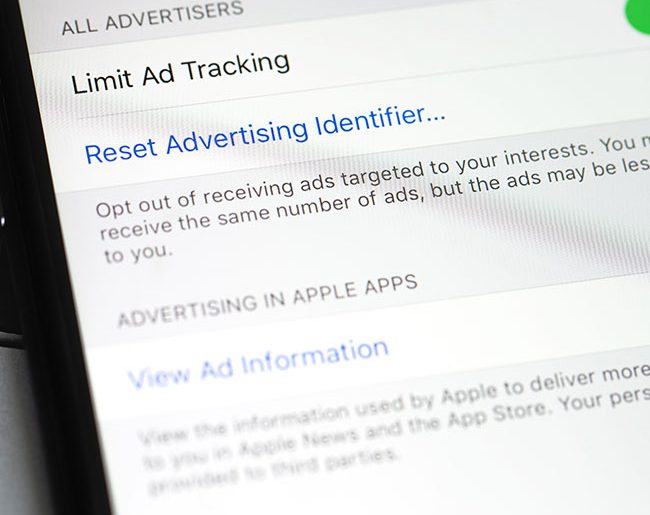
Ad tracking is a common practice that companies conduct with the excuse of providing you with personalized ads, according to Delic — but that tailored advertising service often comes at a cost of jeopardizing your privacy and is regularly off-putting. “Both your iPhone and its individual apps gather loads of data about you daily, and frequently they sell the gathered information without you even realizing it,” Delic says. “This sounds scary only because it is. So here’s how to prevent it: Scroll to your iPhone Settings bottom and then choose > Privacy > Apple Advertising, and finally switch Personalized Ads off. Additionally, you can disable Share iPhone Analytics if you want to prevent Apple from checking your iCloud issues, Siri recordings, or crash reports which can contain a lot of information about you. You can do this by going to Settings > Privacy > Analytics & Improvements, and toggling Share iPhone Analytics off.”

iphone iOs features

Mail tracking 

“Your emails are a particularly sensitive category since they come with a lot of personal information that is not protected enough,” Delic says. “Besides, some newsletters or marketing emails include tracking technology that can reveal to the sender whether you’ve opened their email (and therefore showed interest in their product) and your approximate location.”

Here’s how Delic advises preventing that from happening: Go to Settings > Mail > Privacy Protection and switch on Protect Mail Activity. Once you do this, the sender can no longer see your IP address or see whether you’ve opened the email. “Keep in mind, though, that the sender could still track you if you tap on any embedded link in the email,” Delic says.”

iCloud backup (for apps that don’t need it) 

Although Apple does a great job encrypting your backups, Delic says the truth is: it still holds the key to unlock anything you store on iCloud. In other words, if required by law, the company can unlock those encryptions. “To be on the safe side: You can manually select what’s being stored in iCloud, simply by opening Settings > Your name > iCloud,” Delic says. “Go through the list and uncheck anything you don’t want to be backed up online.”

Feature Image Credit: Shutterstock

By Lisa Cupido

Lisa Fogarty is a lifestyle writer and reporter based in New York who covers health, wellness, relationships, sex, beauty, and parenting.

Sourced from SHE FINDS

By Peter Roesler

I have designed, published, and tested thousands of landing pages through my years in marketing. All this time, work, and effort resulted in discovering the main reasons why you should have landing pages for your business’s site. If you aren’t using landing pages, now is a good time to change that. Here’s why:

Increase Conversions

Quality landing pages result in more conversions. Whether it is newsletter subscriptions, sign-ups, downloads, lead generation, or something else, when you use landing pages, you experience higher conversion rates than sites that don’t.

Remember, having a landing page doesn’t guarantee a higher conversion rate. Instead, landing pages provide you with the tools to improve conversion rates as time passes.

Reduced Cost Per Acquisition

Cost per acquisition (CPA) is the total cost of acquiring a new customer. While there’s no universal set number to acquiring a customer, I’ve found that it’s much less when you have landing pages in place.

Landing pages increase conversions and help produce a higher return on investment (ROI). I’ve also found that landing pages also increase your Google pay-per-click (PPC) Quality Scores. This results in a lower cost per click, which reduces the cost per conversion and eventually a lower CPA.

Showcase and Optimize Your Offers

Every offer needs a home and landing pages provide this home. Depending on your marketing strategy, you may have several offers to showcase, including referral programs, promotions, white papers, resource guides, on-demand webinars, and more.

The information you collect and share on the landing page varies based on the type of offer you’re looking to highlight the most. Because of this, you need flexibility for changing form fields, editing layouts, and optimizing the design and copy– a standard, set template doesn’t work. Your offers also need an easy, shareable link that are easily found on your landing page.

Scale Your Marketing

With landing pages, you scale your marketing without scaling your resources, money, or time. In the past, building landing pages took a lot of time and money. However, this isn’t the case today. It’s easy, fast, and affordable to create and publish new offers and pages on your website. This makes it possible to increase your marketing efforts without spending too much time or effort.

Test and Validate New Ideas

You have the option to spend resources, money, and time to build an entire website for something new you offer and then wait and see if anyone likes it. Another smarter option is to use a landing page to validate the audience’s response and collect feedback on an idea to see if spending more money on it is a smart idea.

When it comes to creating a marketing strategy today, implementing landing pages is a must. These offer you a chance to increase conversions, reach more customers, and quickly add new offers to your site.

Feature Image Credit: Getty Images

By Peter Roesler

Sourced from Inc.