Author

editor

Browsing

By

How leaders are recognizing this opportunity to open an entirely new trajectory in business.

Starting March 11, 2020, when the was declared by the (WHO) as a global pandemic, we quickly experienced a flurry of events thereafter, witnessing drastic changes not only take place on a worldwide scale but also in our own personal lives at home and in business as we had to adapt quickly to the “new normal”.

As we conformed to the new rules and retreated to the safety of our homes, it gave entrepreneurs a chance to sit with their own stark reality of what they’d created up until that point – what was working, what wasn’t working, what our strengths are. Suddenly unable to escape the truth with nowhere to run, for some, this was a confronting yet powerful opportunity in opening up an entirely new trajectory in business and impact, in a much more future-focused way.

1. Greater levels of clarity and purpose

There are people who choose to react to situations around them, and those who seek to observe and understand. Those who chose to observe and understand in recent circumstances have found that they have unlocked greater levels of clarity, wisdom, and purpose. It is not uncommon to see business owners this year going through a complete rebrand and restructure as their belief and value systems go through a complete upgrade to realign with the new world.

It is also becoming increasingly clear as to what is no longer functioning in the world in ways that are beneficial to humanity. It has become clear which industries need to be reshaped and rewritten in a way that is going to serve humanity in this next shift. It has become clear how we can individually do our part in making the world and internet a more humane place with what we know. Our unique gifts have stood out more than ever, with many finding and tapping into their zone of genius. This happens when we remove ourselves from all the external noise that had us dazed and confused for so long.

2. Being future-focused with technological advancements in mind

It’s now important for us to pay attention to how we can fit within the advancements of so we can thrive instead of simply survive.

There are certain things in the world we can resist and fight with all of our will, but technology is not one of them, especially considering how much we have fuelled and used these advancements over the past decade. As long as we have a deep of who we are on an inner-being level, we can integrate technology with business and our personal lives in a way that doesn’t jeopardize our mental and emotional well-being.

According to the , we are now in our fourth industrial revolution. Technologies such as , electric cars, and the scope of the internet is merging with the physical bodies and lives of humanity. We have seen this take place over the last decade, with fingerprint sensors, face recognition, and voice-activated assistants, all of which is data used to bring about the next phase of advancements and upgrades.

3. Business owners are adopting fresh new tactics

Many business owners are now deciding to build their own platforms to hold their communities and for educational purposes. With text-messaging platforms on the rise, we’re now seeing a rise in and closer one-to-one connections and customer relationships rather than a one-to-many connection like we’ve seen with over the past decade and a half.

With many people in recent times taking extended breaks from social platforms, we can expect to see new advancements in ways that will support the needs of both the consumers changing needs, as well as entrepreneurs.

Given that the most important part in creating success in business is tapping further and further into your zone of genius, this period has been a huge chance for many entrepreneurs to awaken to their gifts and talents, in ways they had never been aware of before. What we are now witnessing is all of the pieces of the puzzle come into play, with different entrepreneurs doing their individual part in creating a more stable, healthier and robust world, in ways that are all different to each other, but together cohesively as part of the bigger picture.

Feature Image Credit: Image credit: da-kuk | Getty Images 

By

Sourced from Entrepreneur Europe

By

With the launch of so-called iPhone 12 models inching closer, mobile carriers are in the process of preparing marketing materials for the devices, as evidenced by a placeholder email shared by reputable leaker Evan Blass today.

As widely rumoured, the email indicates that iPhone 12 models will support faster 5G cellular networks. The email also suggests that pre-orders will end on Tuesday, October 20, and while it does look like iPhone 12 models won’t be announced until next month, carriers are unlikely to be privy to any specific dates this far in advance.

Apple is expected to introduce four new smartphones, including the iPhone 12 in 5.4-inch and 6.1-inch sizes and the iPhone 12 Pro in 6.1-inch and 6.7-inch sizes. Rumors suggest that all of the devices will feature OLED displays, 5G support, and a new flat-edged design, while the Pro models are said to feature a LiDAR Scanner and a new dark blue colour option.

In the meantime, Apple has announced that it will be holding a virtual event on Tuesday, September 15 at 10 a.m. Pacific Time that will reportedly be focused on new Apple Watch models and perhaps the rumoured iPad Air 4 with slimmer bezels.

By

Sourced from MacRumors

By JC Torres

The US government is preparing to make its case in courts over Google’s alleged anti-competitive practices, particularly on the Internet. While it may already have its arguments prepared, the Justice Department may still be considering what steps it will require Google to take, presuming it wins its case. One of those may be to split up the company, which is already just a subsidiary of the bigger Alphabet, which includes selling off the most-used web browser in the market, Chrome.

The DOJ’s upcoming antitrust lawsuit against Google really revolves more around its alleged monopoly and unfair advantage in digital advertising, a position recently echoed by the House Judiciary Committee. As part of its preparations, it has asked feedback from rivals and third-parties on what fixes have to be made to curb Google’s immense power. One such step would be to split it up and Chrome’s name came up as one of those properties outside of advertising that needed to go.

While not directly involved in Google’s advertising business, it’s hard to deny that Chrome contributes immensely to Google’s position and influence on the Web. As the most-used browser today, websites have to pretty much play by the rules Google imposes through Chrome features as well as through “industry-wide” campaigns and coalitions. This, in turn, helps Google push its own advertising platform forward as the reference implementation of how ads should behave.

That said, the DOJ’s case, which is expected to be formally filed within the next few weeks, won’t be an easy one, especially if state attorneys general feel the government is still unprepared for a legal battle with the tech giant. The court of popular opinion, at least among regulators and lawmakers, does seem to at least side with the general view of how Big Tech may have overstepped their boundaries.

Google will also face an uphill battle, especially if the proposal to sell off Chrome comes up. It could, however, argue how disrupting this part of its operations could prove destructive to the Web, considering how many businesses, apps, and services have been tied not just to the Chrome web browser but to Chrome OS as well as its open source Chromium base.

By JC Torres

Sourced from SlashGear

By 

Advertising is an expression of consumer capitalism. Yet to succeed in today’s marketplace, brands need to become more anti-capitalist, believes Innocean’s global head of innovation and partnerships, Mordecai.

Consumers want a better deal, and they deserve it, too. Not just better products and better services, but better advertising. To deliver on this, brands must break free from established tropes that define how they do business. Or to put it another way, they need to start thinking anti-capitalist to be more pro-consumer.

This might sound contradictory, but as a long-standing anti-capitalist and activist who works in advertising – the communications of capitalism – let me explain. By anti-capitalism I mean not believing you must participate in the capitalist structure in which you were raised. Instead, it about is believing there is an alternative.

I fell into advertising rather than entering by a conventional route. I was already a storyteller, though back then I was working in digital TV production. But the budgets were small, so I went to brands to get funding. Then those brands asked me to start telling their stories too, and things grew from there.

As a storyteller, people have always been my focus. To be pro-consumer is to be in support of consumers getting a better deal. And in advertising, that can only happen when humans are at the centre of what we do – especially storytelling.

Yet how many brands today communicate in a human-centric way? How often can you see people at their heart of their strategies. How many demonstrate they believe in their consumers as nuanced individuals capable of making their own choices? Far too few, in my opinion.

To be more anti-capitalist, a brand must think and act differently, and it can start to do so by challenging business and marketing’s pervasive tropes – of which let me give you three examples.

The first is the winner-takes-all approach to doing business that leads many companies to let competition shape their strategies. I’m not saying a brand owner’s rivals’ competing strategies should not be analysed and unpicked, far from it. My point is, brands’ competition should not be used as a template for what they do, how they do business or their point of view.

You can look to Away, a luggage brand that set out to turn a relatively boring necessity into an enviable statement at an affordable price without structuring itself around a mission to compete with Samsonite.

Or the brands that rewrote the purchase and delivery rule book, such as subscription toothbrush Quip. Meat alternatives are also leading the way, like the once-scrappy start-ups Beyond Meat and Impossible. Crypto-currencies are also not out to compete with cash, but provide an alternative to it.

The next trope to challenge is established systems that all too often act against inclusivity. One powerful example is Anomaly, which put its own money into the business ventures of clients, such as beauty line Eos.

AdQuick’s advances in the out-of-home market disrupted a narrowly controlled sector and broke the system by offering more opportunity for smaller brands to engage in a system that was previously only for big hitters.

We’re also seeing this with storied industries disrupted by the influx of VCs and collective ownership, with, for example, the likes of Serena Williams, Jessica Chastain and Eva Longoria investing in the US National Women’s Soccer League LA team.

The third trope concerns received wisdom and established practices around building affinity through targeting. This is about celebrating not just one aspect of a person as identified by traditional segmentation, but the whole individual.

We see calls to this through the increased encouragement to honour intersectionality with, for example, the added option of non-binary as distinction and removal of such self-disclosure boxes on job applications altogether. The generational push for acknowledgment of trans women at the forefront of the Black Lives Matter movement is another illustration of this.

This is about a brand recognising it can’t reach every audience, nor can it appeal to all – not least while audiences are fragmenting at pace and growing increasingly diverse.

And it’s about brands re-thinking how best to build affinity. On-screen inclusivity is essential and should be a given, but more is needed. I’m talking about creative concepts and projects that don’t so much build affinity through direct identification but that are open and welcoming everyone to the table.

Think MediaCom’s ‘Inclusive Planning’ initiative, a self-declared departure from the status quo where diverse audiences are only considered for specialist briefs.

Or Vice Media’s challenge to advertisers over blocklists – in particular, around blocking Black Lives Matter, Muslim, queer and related key lists which Vice has removed from brand blocklists.

To truly build affinity with their brands, the time has come for senior marketers to shift their focus from the more exclusive brand safe to the more inclusive brand suitable.

These are just some of the spaces in which brand owners can act more anti-capitalist.

In today’s world, if brands are to engage more effectively with the people they serve as individuals, the only way to behave is pro-consumer.

Feature Image Credit: The only way to behave is pro-consumer, says Mordecai, and brands like Impossible Foods and Beyond Meat are leading the way

By 

Sourced from The Drum

By Adam Levy

Everybody’s doing more online shopping these days, and that hasn’t gone unnoticed by tech leaders. Facebook (NASDAQ:FB) and Alphabet (NASDAQ:GOOG) (NASDAQ:GOOGL) have expanded their shopping features over the last few months to capitalize on the trend.

After Facebook’s early successes with social commerce, Google sees an opportunity to create similar features in YouTube. The push to get YouTube’s two billion monthly active users to shop directly from the video sharing app could present a significant change to its business, accelerating revenue growth.

Shopping tags on YouTube

Instagram introduced shopping tags way back in 2016. The feature gives creators a way to link to pages where their audience can learn more about products featured in their photos and videos. It’s since become a key piece of the FAANG stock‘s commerce strategy.

YouTube is testing a similar feature, asking some creators to use its software to tag and track products featured in their videos, according to a report from Bloomberg. YouTube can rely on the backbone established by its parent company though Google Shopping in order to funnel shoppers to product pages for checkout. That should enable the company to move quickly in building out a broad set of products creators can tag and monetize, catching up with Facebook.

Facebook has accelerated shopping efforts on Instagram as well as its flagship app. The introduction of Facebook Shops earlier this year opened the door for the company to take greater control over commerce on the platform, taking the user from discovery to purchase without leaving the app.

Likewise, Google started offering merchants free listings on Google Shopping and removed the fees for its “Buy on Google” checkout service. The move was designed to increase listings on the platform. YouTube’s shopping tags will integrate with those listings.

A shift in business

Shopping tags may present a new way for YouTube video creators to monetize their content. They could take a commission or sell their own goods by utilizing the feature. YouTube has historically drawn creators to the platform through the promise of ad revenue sharing.

Other social media platforms don’t offer much in the way of revenue sharing. Facebook is experimenting with the business model in IGTV, its YouTube competitor. TikTok offers a creator fund for top content producers. The ability to sell items on those platforms — a reason Walmart wants a piece of TikTok — offers one of the best paths forward for them to attract talent and monetize content.

But the opportunity appears big enough that YouTube thinks it can be a differentiator in terms of content and monetization. And broad adoption of forthcoming shopping features certainly could have a big impact on the business.

Currently, most YouTube ads are aimed at the top of the sales funnel — they’re all about introducing products and establishing brands. But facilitating the online shopping process all the way to the checkout page can be a lot more valuable for advertisers, who will likely pay more per ad impression if it leads to higher purchase rates, and those purchases are more easily linked to the YouTube ads.

Ultimately, shifting more ads to higher value placements lower in the sales funnel could accelerate revenue growth for YouTube. The service’s sales have grown in the mid-30% range over the last couple years before running into secular headwinds this year.

If it had more e-commerce focused ads, perhaps YouTube’s ad revenue would’ve increased more than the 5.8% it grew last quarter. Facebook’s revenue, for example, increased 10.2% last quarter. Management cited strength in e-commerce as what propped up its ad revenue while most advertisers pulled back on spending across all platforms.

It’s a big opportunity for Google to reinvigorate one of the biggest factors driving its revenue growth over the last few years. And with Facebook and other social media companies also pursuing this opportunity, it has a greater chance of working as people become more accustomed to social commerce.

Feature Image Credit: GETTY IMAGES.

By Adam Levy

Sourced from The Motley Fool

By Alex Shephard

The group is thinking about becoming a media company. But can it succeed without its muse?

The Lincoln Project is betting that anti-Trumpism can outlast Donald Trump’s presidency. Axios reported that the group of ad-making former Republicans “is weighing offers from different television studios, podcast networks, and book publishers.” Everything, it seems, is on the table: The group is currently producing a documentary about the election while studios want the Lincoln Project’s help in developing “a House of Cards–like fiction series,” definitive proof that the Golden Age of Television is behind us.

Given its status as a viral ad hitmaker, it’s not surprising that eyeball-obsessed media executives are eyeing the Lincoln Project as a partner. “As a media business, we’re putting a pretty big bet on the idea that they know how to get audiences,” United Talent Agency’s Ra Kumar told Axios. Studios, networks, and publishers need big audiences like never before, and since it was founded last December, the Lincoln Project has shown it can deliver them in the millions.

In less than a week, however, it may lose its muse. Some of the groups that have sprung up in the last four years—Run for Something, Indivisible, the Sunrise Movement, Swing Left—should have little trouble adjusting to a post-Trump future: Left-leaning politicians will still be running for office, swing districts will need targeting, climate change will remain an existential threat. But the same may not be true of the Lincoln Project. There are still giant questions about what, exactly, this group of former Republican operatives believes. What’s the point of an anti-Trump group when Donald Trump is gone?

Earlier this month, 60 Minutes’ Lesley Stahl asked the founders of the Lincoln Project to respond to criticisms that, for all the online attention their attack ads had received, they weren’t accomplishing much of anything. “I think we have hurt him, we have cut him, we have defined him, we have provoked him,” Steve Schmidt, who managed John McCain’s unsuccessful 2008 presidential campaign, responded. “There was not a glove proverbially laid on him for a really long time. I think we’re amongst the first groups to effectively do that.”

The one thing you can say for certain is that the Lincoln Project is good at provoking Donald Trump and many of those close to him. He has tweeted about the group several times and ranted about it at rallies, calling its founders “real garbage” and “not smart people.” His daughter Ivanka and son-in-law Jared Kushner have threatened to sue them over a Times Square billboard blaming them for the Trump administration’s disastrous Covid-19 response.

As for hurting, cutting, defining—that is much less clear. “Every time Donald Trump loses his mind and throws things at the wall because a Lincoln Project ad is up, that takes the whole campaign off track,” said Rick Wilson, who once made an ad tying disabled veteran (and Democrat) Max Cleland to Osama bin Laden. “There’s one thing you never get back in a campaign. That’s a lost day.” But the idea that the Lincoln Project is throwing sand in the gears of a well-oiled machine simply doesn’t track. The Lincoln Project clearly makes Trump very mad, but so does everything else. It’s not evident that the group is moving voters, and particularly Republican voters—“independent-leaning men, those college-educated Republicans, the suburban Republican women,” as Wilson put it on 60 Minutes—into the anti-Trump camp, which has been the group’s stated purpose.

Making Trump mad has become a financial juggernaut. The Lincoln Project makes a simple promise to donors: Give us your money, and we will use it to make the president angry. Much of its spending—advertising on Fox News in Washington, D.C., (so the president can see it while he binge-watches), buying Times Square billboards in the famous battleground state of New York—is advertising for itself. These displays only bring in more money. (Representatives from the Lincoln Project did not respond to a request for comment.)

The Lincoln Project fills a void for liberals who are concerned that the Biden campaign too often goes high when Trump goes low and believe that it should more closely mimic Trump’s own tactics. The Lincoln Project’s founders argue that they get in the mud so Biden doesn’t have to, allowing him to run a positive campaign. It now sells merch and builds its audience by stealing memes from Twitter and Instagram users—an unethical practice made famous by the Instagram account FuckJerry of Fyre Festival fame.

There are few clues about what a post-Trump Lincoln Project would look like. The group excels at depicting the president as a deranged loser, but anti-Trumpism is not an ideology. The policies that the founders of the Lincoln Project have spent decades fighting for—traditional Republican stuff about small government and low taxes—are not particularly popular anywhere, but that’s especially the case among the group’s new base in the hashtag-resistance.

The comparison to Crooked Media is being made a lot, but it doesn’t make sense. That organization was also formed by former political flaks in opposition to Trump, sure. But Crooked Media positioned itself as a voice for those pining for the Obama years, and its founders were aligned with a large faction of Democrats. Crooked’s podcasts and articles and books and television show could tackle a wide range of topics: the president’s awfulness, yes, but also issues that liberal voters care about. The Lincoln Project has none of that built-in advantage. Its founders not only lack connections with the Democratic base, they have a wildly different set of beliefs from the vast majority of Democratic voters. If they did follow Crooked Media down the path of nostalgia, it would be for the presidency of George W. Bush.

The best-case scenario is that the Lincoln Project doesn’t try to square the circle. It has targeted a number of Republicans for their fealty to the president. It has decried the racist and authoritarian bent of the current GOP, while downplaying the role its founders played in the party’s transformation. It’s possible to imagine a Lincoln Project that keeps its place in liberals’ hearts by focusing on the rot at the core of the Republican Party.

It’s more likely, however, that the Lincoln Project will stake out a position as a fighting institution for the status quo, beating back the liberal left with one fist and right-wingers with the other. If the Biden administration drifts too far left—with a Green New Deal, say, or just loads of spending—we might see the Lincoln Project fighting it the way it fought Trump.

All of this is predicated on Trump losing, of course. The actual best-case scenario for the Lincoln Project, despite its own mission of defeating Trump, is for him to win.

Feature Image Credit: Spencer Platt/Getty Images

By Alex Shephard

Sourced from TNR

Sourced from REUTERS

(Reuters) – EBay Inc’s EBAY.O quarterly profit topped Wall Street expectations on Wednesday and the e-commerce company forecast fourth-quarter sales above estimates, as people staying at home due to the COVID-19 pandemic took to online shopping.

EBay said it expects fourth-quarter revenue in the range of $2.64 billion to $2.71 billion, while analysts estimate $2.54 billion, according to IBES data from Refinitiv.

E-commerce firms and retailers with a strong online presence have witnessed a spike in demand as the COVID-19 pandemic has led more people to shop online.

The company raised its full-year sales outlook to between $10.04 billion and $10.11 billion. The forecast excludes the classifieds business, which eBay in July agreed to sell to Norway’s Adevinta ADEV.OL in a $9.2 billion deal.

EBay, which has made its platform simpler to use through grouped listings and personal recommendations, said active buyers grew 5% to 183 million in the third quarter.

Net income from continuing operations rose to $621 million, or 88 cents per share, for the third quarter ended Sept. 30, from $210 million, or 25 cents per share, a year earlier.

Excluding items, eBay earned 85 cents per share, above estimates of 77 cents per share.

Revenue rose about 25% to $2.61 billion, beating analysts’ average estimate of $2.48 billion. However, the company missed its prior revenue forecast of $2.64 billion to $2.71 billion.

Shares of the company fell nearly 2% at $52.24 in extended trade.

Reporting by Akanksha Rana in Bengaluru; Editing by Vinay Dwivedi

Feature Image Credit: FILE PHOTO: The eBay logo is pictured on a screen in this photo illustration in New York, U.S., July 23, 2019. REUTERS/Brendan McDermid/Illustration/File Photo

Sourced from REUTERS

By

If you’re using social media for business in 2020, specifically Instagram or TikTok, you need to have a bio link.

Social media is no longer just about gaining lots of followers and posting the most trendy photos. While both of those things are still good to do, you need to have a plan to get people off of your social media platform and onto your website.

You can’t control social media. We could wake up tomorrow and all of our followers could be gone. (Hopefully, that won’t happen!) So, what’s your plan for bringing your followers to your website, your email list, your online shop, or even your other social platforms? If you don’t have one, here’s the secret: it’s a bio link.

Social platforms like Instagram and TikTok don’t allow you to have active links in your posts. (Although, Instagram might be changing that eventually… but you’ll likely have to pay for clickable caption links.)

Instead, you can have one clickable link in your bio. How many posts do you see that end with “link in bio for more information” or something to that effect? Probably a lot.

That’s the only place you can consistently direct your followers to access content from Instagram – and the same goes for TikTok.

The benefits of having a bio link

There are a few key benefits to taking advantage of the link in your bio.

Drive Traffic

You can use your bio link to drive traffic to the pages you want to promote. Maybe this is your online shop, or maybe it’s your latest freebie. No matter where you direct them, though, your bio link can help you bring your followers off of social media and onto the pages you control. This gives you the chance to capture their contact information so you can better connect and follow up with them in the future.

You can promote any page you want with your bio link. If you’re trying to grow your followers on another platform, you could promote that account. You could also link to your blog, podcast, or YouTube channel if you want to talk about the content you created recently.

Or, link to your product page, online shop, or services page to make sales directly. Finally, add a link to the contact page of your website, or any resources you’ve found recently is helpful for your audience, too.

For example, here @asboldasbritt uses a direct link to promote her newest freebie.

Benefits-of-Having-a-Biolink

Convert Followers to Customers

Social media is a marketing tool. All good marketing tools should have a strategy and way to convert those who see it into customers.

In this case, you want to use your social posts as a way to warm up your followers and then encourage them to make a purchase.

While there are ways to sell directly within Instagram, you might not meet the necessary criteria. Instead, bringing people off the app and straight to your shop or services page is a much better way to sell.

You can talk about your product or service in an Instagram post and then end with “click the link in my bio to learn more” or “head to the link in my bio to grab yours now.”

You can also talk about whatever you’re selling in your Stories or Live videos and always direct your audience back to the link in your bio to purchase.

Here, @_thetaylorlee has the link in her bio pointing to her private coaching landing page, where interested people fill out an application for coaching.

Convert-Followers-to-Customers

Track Traffic

Analytics and tracking are critical in marketing and sales processes. After all, you want to make sure you’re putting your time, energy and money into the right platforms.

You want to be able to see what kind of traffic you’re getting from Instagram and other social platforms. Unfortunately, tracking your traffic can get a little tricky.

There’s one way you can make it much easier: use a bio link tool and sync it with your Google Analytics. You’ll be able to see how much traffic came from social media and what they did once they landed on your targeted pages.

Optimizing your bio link

Now, there are a couple of different ways you can use this link. You can link it directly to the page you’re promoting. If you do that, though, you’ll need to remember to come back and change the link whenever you change your promotion or whenever you mention a different link in your most recent post. And, because of the algorithm, someone might not see a post until a few days later. If you’ve already changed your link to match your newest post, they’ll be out of luck.

I briefly mentioned your other option earlier: use a bio link tool.

Implementing a tool like this can help you in a few different ways. First, as I said earlier, you can link it to Google Analytics to track your traffic. Beyond that, you can use a bio link tool to include multiple links in your bio.

No more deciding which blog to include, and you don’t have to worry about what people who see your post in the future will have to do. You can include your most popular links in your tool so you can easily refer to your blog, services page, contact page, YouTube channel, podcast, or anything else you want to promote, and your followers will know right where to go!

Optimizing-your-Biolink

The 12 best bio link tools

Now that you’re ready to choose a bio link tool, let’s take a look at the best tools you can choose from.

1. url.bio

Free and unlimited links? With url.bio, it’s not too good to be true.

You can add as many links as you’d like, so there’s no shortage of promotions. Url.bio is also highly customizable, so your landing page can look like it fits your brand’s voice.

You can also track your analytics directly within your dashboard so you know which content is performing best.

Best-Bio-Link-Tools-URL-Bio

2. Lnk.bio

Promote your best links, and even temporarily pause certain links, with Lnk.bio. Get started in under a minute, and choose from over 50 icons to make your link look unique.

You can link to your social platforms easily, and it’s all web-based, so you won’t need to download anything.

Begin with a free plan, or upgrade to $0.99/month for a custom URL, tracking, and external analytics.

Want to only pay once? For $9.99, you can get those upgrades permanently. If you’re looking for more, the most advanced plan is $24.99 and offers the removal of the Lnk.bio logo, the ability to change colors, and add a background image.

Best-Bio-Link-Tools-Link-Bio

3. Bio.fm

If you’re looking for a more robust bio link tool, consider bio.fm. You can add multiple types of content to your page, including links, information about you, your social media feeds and more.

With a drag-and-drop software, you can move your email collection form to the top, or choose to highlight your Facebook Group instead.

Use bio.fm for free and get four content blocks, or upgrade for $10/month for a premium account to add unlimited blocks and types of content to your profile, remove their logo and create a custom URL.

Best-Bio-Link-Tools-Bio-FM

4. Linktree

Another bio link option is Linktree. Drag-and-drop your links to create your ideal layout. Make sure your favorite or most important link is on top and easy to see.

Join for free to get unlimited links and a QR code. Or, upgrade to the PRO account for $6/month and add priority links, link scheduling, video links, thumbnails, social icons, and more.

The PRO account also gives you more detailed analytics, while the free plan shows you your total views and link clicks.

Best-Bio-Link-Tools-Linktree

5. Sked Social

Sked Social is more than just a bio link tool. It’s also an Instagram scheduling platform that offers full analytics, Story scheduling, and more.

Its link in bio tool, only available for Instagram, lets you add buttons to your layout so you can easily capture your viewer’s attention. You can even add a shopping link to make sales sooner.

Add your branding and view your analytics so you’re in complete control. Because they offer so much more than just the link, Sked Social’s Fundamentals plan is $25/month, Essentials is $75/month and Professional is $135. You can get started with a 7-day free trial.

Best-Bio-Link-Tools-Getskedsocial

6. Link in Bio by Later

Another multi-use platform is Later, which allows you to schedule your posts, plan hashtags, and view analytics. Along with it, though, you can turn on the bio link tool to take advantage of those benefits. You can even link specific Instagram posts to particular articles or web pages, so your audience will know right where to click.

Create a shoppable Instagram feed within your link, and monitor your analytics so you know what’s working. Begin for free at linkin.bio to get one link per post, or upgrade for $12.50/month to the Growth Plan or $25/month for Advanced to add multiple links, remove the Later banner and add a Shopify integration.

Both of the paid options offer additional features in the scheduling portion of the platform.

Best-Bio-Link-Tools-Link-in-bio-by-Later

7. Link in Profile

Set up your Link in Profile in seconds, add to your existing workflow, and watch your ROI grow. It works with your Etsy, Shopify, Amazon, WordPress, or other existing accounts.

Begin with a free trial, and then after 30 days continue with a $9.99/month personal plan. You’ll get a dedicated, branded landing page, easy management, and integrated commerce links.

Best-Bio-Link-Tools-Link-in-Profile

8. Campsite.bio

Create a simple, beautiful landing page with Campsite.bio. Add it to your social media accounts or even your email signature.

Control how your branding looks so your followers know they’re in the right place. Upgrade to Campsite Pro for use on other social media sites by adding images, removing the branding, and adding your own domain.

Its basic plan is free forever, and Campsite Pro is $7/month.

Best-Bio-Link-Tools-Campsite-Bio

9. Contact in Bio

Here’s your one-stop-shop for a micro-landing page. With Contact in Bio, you can add multiple links, enjoy the rich features offered, collect leads, and send followers to your social media accounts.

Give your followers access to payment links, music services, and contact forms, as well as messenger options.

Choose from the free starter plan, the $7/month business plan with added benefits like video uploading, shoppable feeds, and more, or choose the $28/month agency plan to manage up to five accounts.

Best-Bio-link-Tools-Contact-in-Bio

10. Tap Bio

Create your own Tap Bio easily and choose your cards. Add a profile card, easily link to many different sites and show your followers exactly what they want to see.

The basic plan with one card is free or upgrade to the Silver plan for $5/month or $36/year to get three cards or unlimited cards with the Gold plan for $12/month or $96/year. Silver and Gold plans also offer stats.

Best-Bio-link-Tools-Tap-Bio

11. Milkshake

Milkshake lets you create a mini website for your Instagram account quickly and easily. Share more and use your Insta Site to jumpstart your business.

Pick a card, add your content, and customize your look. Then publish your link and monitor your analytics and insights. Your followers can swipe through the cards of your site like Instagram Stories. Milkshake is a free app available on iOS and Android.

Best-Bio-link-Tools-Milkshake

12. Shorby

Finally, Shorby is designed to supercharge your YouTube and Instagram. Automatically feed your most recent posts, videos, and blogs into your Shorby page. Add messengers, a title, blocks, and social links to create your custom look. You can even add a countdown to create a feeling of excitement.

Pricing for Shorby begins at $12/month for the Rocket plan, $24/month for Pro, and $82/month for Agency. Pro and Agency both have more pages, 5 dynamic feeds per page, Google Analytics, and a custom domain. Agency also allows more projects and teams.

Best-Bio-link-Tools-Shorby

Convert your followers to customers with bio links

Now you’ve seen the 12 best bio link tools that are currently available. Each one is a little different, but one of them is sure to offer just what you’re looking for in your business.

Adding a clickable link to your bio, and especially using a tool to expand the number of links you can have, is a great way to grow your business and convert your followers to customers.

By

Rafaella Aguiar is the Marketing Manager at Kicksta.  She specializes in content and social media marketing.  You can find more daily marketing tips from her at @kicksta.co.

Sourced from Jeff Bullas

By Paulina Karpis

Should I take an online business course or enrol in an MBA program? Great question — I’ve thought about this one a lot.

In 2020, the only result a brand name, full-time MBA program can guarantee is a six-figure debit in your bank account.

Full-time tuition at top schools is north of $200k. And that number doesn’t include the opportunity cost of leaving the workforce for two years, nor does it factor in the interest on any loans you take out.

Pre-COVID, the core benefits of MBA programs were the on-campus career fairs and on-site employer visits. But with the current state of the world, these events aren’t happening anymore. Traditional recruiters of business school grads are nowhere to be found.

While I don’t think an MBA is worth it anymore, investing in building your business skills has never been more important. And with a computer, Internet connection, and the right online business course, you can replicate (and even exceed) the knowledge and network an MBA program promises — at a fraction of the cost.

So, let’s get you started! We put together a list of the best online business courses you should consider taking this year.

Best Online Business Courses

1. Branding – Brand Identity and Strategy

A strong brand identity is key to a company’s success. Just look at timeless brands like Coca-Cola, Apple, and Disney, and newer companies like Allbirds, Warby Parker, and Glossier.

A solid brand tells a company’s story in a way that connects with customers, draws them in, and keeps them coming back for a long time. Learn all the branding tips and tricks you need.

2. Design  Graphic Design Bootcamp: Photoshop, Illustrator, InDesign

Whether you want to create a logo, event announcements, or beautiful backgrounds for your website, basic graphic design skills are incredibly useful to have.

In this boot camp, learn how to work with three of the best design tools — Photoshop, Illustrator, and InDesign — plus how to leverage them for both print and digital projects. Take your branding and marketing assets to the next level all on your own.

3. Finance – Fundamentals of Finance and Accounting for Non-Financial Managers

Basic finance skills are important for everyone. It’s crucial to understand how the bottom line works and how you and your team play into it. You don’t need to be an accounting pro, but knowing the fundamentals is key.

In this course, dive into: uncovering profitability drains, justifying purchases, interpreting financial reports, and adequately demonstrating your value and ROI to your boss — something every single employee should be able to do.

4. Marketing – Become a Digital Marketer

Digital marketing skills are in high demand. And though many of us are quite technologically savvy, digital marketing is not nearly as easy as it seems. Rather, it’s quite complex and involves several different strategies and moving parts.

Get up to speed on omni-channel marketing, marketing analytics, social media strategy, customer retention, and more. By the end, you’ll be able to overcome the “digital skills gap” many traditional marketers face today.

5. Negotiation – Introduction to Negotiation: A Strategic Playbook for Becoming a Principled and Persuasive Negotiator

From term sheets, to your salary, to getting the best possible discount on your new car — good negotiating skills will help you get exactly what you want (and deserve), both professionally and personally.

Learn how to craft strategic arguments that yield optimal results. Plus, you’ll have plenty of opportunities to practice and receive invaluable feedback.

6. Productivity — Work Smarter, Not Harder: Time Management for Personal & Professional Productivity

Don’t let all of your business skills go to waste due to a lack of time management and productivity prowess. Get better at setting goals, prioritizing tasks, managing your schedule, and delegating strategically.

Everyone has their own time management barriers, and this course will help you overcome each one by introducing you to several productivity tricks and tools.

7. Project Management — PMP Certification Training Course

This is the perfect way to prepare for the Project Management Professional (PMP) exam, the gold standard in the field. But it’s still incredibly valuable even if a certification isn’t in your future.

Learn the ins and outs of the core competencies project managers need, including successfully managing people across teams, so you can seamlessly take projects from zero to completion.

8. Public Speaking — Essential Public Speaking

Good public speaking skills are essential for everyone. They’ll help you gain the confidence to present a deck to a client, share company transitions with your team, and speak up in any meeting. Decrease your speech anxiety and improve your communication skills once and for all.

And the best part about this course? There’s a huge virtual reality component in which you can practice speaking in a variety of virtual scenarios, like in an auditorium and a board room.

9. Sales and Business Development — Sales Training: Building Your Sales Career

Do you think you know what it takes to be successful in a sales career? You might be surprised at what the real answer is.

No matter where you’re at in your sales career, this course will teach you more about: active and passive buyers, getting buyers’ attention and building relationships, and the critical importance of being able to understand the buyer’s context and perspective.

Start closing more deals today.

Bonus: General Business — 2-Month Business Intensive

Do you want to build a comprehensive business skill set? Is networking and career support really important to you? Good news: The brunchwork Business Intensive teaches eight core business skills while also building your network.

In this two-month course, you’ll complete hands-on projects, including: refining and testing a business concept, creating a McKinsey-caliber presentation, analyzing financial reports, developing a business strategy, crafting a marketing and sales plan, conducting user interviews, building a no code website, and more.

There are also weekly guest speakers such as former Presidential Candidate Andrew Yang, PayPal Founding COO David Sacks, Ellevest Cofounder and CEO Sallie Krawcheck, and Peloton Cofounder Graham Stanton.

100% active learning, the Business Intensive is a great way to transition from a passive consumer of business knowledge to an active business leader with a well-rounded skill set and network.

Feature Image Credit: TIMA MIROSHNICHENKO FROM PEXELS

By Paulina Karpis

Paulina Karpis is the co-founder and CEO of brunchworka co-learning company that delivers modern business education. brunchwork teaches thousands of millennial professionals annually via a online business class, membership, and a popular newsletter.

Sourced from Forbes 

By Moss Clement

Are you looking for the best SaaS growth strategies that will help you increase product sales? Wondering what marketing strategies you can apply to improve your SaaS business growth? This blog article will show you seven proven growth strategy processes that will transform your sales.

Getting people to try out new products is not easy. Why? Because they are thriving and relaxed with what they already have. So, you will have to do more to convince consumers to switch to your product or service.

Sometimes it takes several months before users can decide to try it out. But in most cases, consumers prefer to stay in their comfort zone. That is, to stick with the product they are using already. As a result, businesses fail because start-ups find it challenging to convince consumers to use their products.

In view of this, I have put together some practical SaaS growth strategies that will help you grow your SaaS business quickly. However, before I answer the questions above and provide the marketing tips that will guide your business growth, let us consider what SaaS products are and what accounts for a fantastic SaaS product.

What are SaaS Products?

SaaS products are software materials that a central provider accommodates and provides to consumers via cyberspace. These apps are accessible from a web or mobile browser without the need for a download.

To increase product sales, you have to walk potential customers through the funnel from the first touchpoint to conversions’ final journey. In that way, you help buyers understand your product values and essential features that make it stand out.

This approach enables you to reduce customer Churn and boost sales. Thus, as a start-up business owner, if you can walk users through the funnel from the awareness stage to the ultimate goal of conversion, you have the right product.

What Makes a Good SaaS Product?

An effective SaaS product is a commodity that breeds more leads and establishes a sustainable stand-alone enterprise after a year or two of inception. Such products help to solve consumer needs and produce exceptional customer experience (CX).

Also, the right SaaS product enhances the average customer lifetime value (CLV) by providing excellent customer satisfaction. Thus, some characteristics of the right SaaS product include:

  • Effective workflow system
  • Applicable to multiple markets and industries
  • A high customer retention rate
  • More engagement, and
  • Consistent return on invests (ROIs)

When consumers use your products or services and find it useful, they become brand advocates by referring others to try it out. Such can take different growth marketing strategies, including social media shares and word-of-mouth marketing.

As a result, you increase your customer base and product sales. Therefore, developing remarkable products is essential since it provides additional business growth opportunities.

7 Useful Growth Marketing Strategies to Improve SaaS Product Sales

While several growth marketing strategies can help scale your SaaS business, I have put together proven marketing tips or SaaS growth strategies that generate results. Implementing these marketing growth hacks will persuade users to do business with your brand, thereby increasing product sales.

1. Reinforce User Onboarding Experience (UOX)

An insightful SaaS growth strategy for business involves improving consumer onboarding experience. This approach highlights the need for an intelligent user interface that optimizes user experience (UX).

Take into account that an intelligent user interface is a component of remarkable application software design. So, to increase product sales for your SaaS business, you should improve user onboarding experience to help you attract more buyers and retain existing customers.

For this, user onboarding is critical to the customer journey since it lets first-timers experience your software product’s values and essence. But if you’re new to this business module, you may be wondering, what is user onboarding? Let us look at that a little, shall we?

What is User Onboarding?

User onboarding marketing strategy is the method of enhancing consumers’ experience with your product or services. It enables users to have success or the best experience using your product.

You can manually improve the user onboarding experience or automate the process using the right automation tools. This growth strategy marketing is useful because it speaks directly to customers and guides them towards achieving their product or service objectives.

As stated earlier, an improved user onboarding mechanism enables you to draw in new users and boost customer retention. For example, a SaaSFest Preso report on client retention shows how upgrading user onboarding experience can dramatically grow your customer base week-over-week.

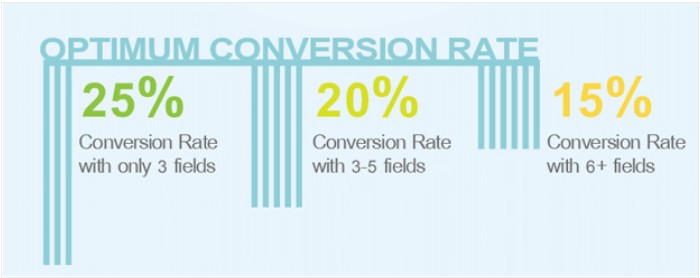
The graphic indicates how user onboarding (an adaptation of consumers into your business processes) increased customer retention to 75% in just one week. And if you move readily to week 10, marketers who implemented this growth strategy in business held a 25% retention rate against 15% retention held earlier.

Therefore, boost user onboarding experience for your SaaS product by adding new features and other relevant elements. These would enhance the user interface (UI), compel new customers to patronize your business, and improve sales. You can find user onboarding best practices here.

2. Upgrade Your SaaS Product to Increase Sales

Enhancing user onboarding is essential, but you agree that in some instances, the reason for low sales is not with user onboarding, but the product or service. That is why enhancing your product is crucial to making more sales.

Product improvement is one of SaaS marketers’ best SaaS growth strategies since it lets you drive more traffic and boost sales. So, your product might be malfunctioning due to outdated features or other functionality issues.

As a result, consumers will stop using it and move on to your competitors. So the best way to tackle this problem is to regularly evaluate your product to see areas of improvement. No matter how insignificant the issue, work to improve it.

Also, look at your design interface; how attractive is it? Is it outdated? Does it scare users away? Examine your product well enough and make it better for consumers. Use the latest product design trends to encourage people to try it out and make purchases.

However, after examining your merchandise, you may not see any loopholes. At this point, it is vital to speak to existing clients and your target market. Ask them through surveys and polls what you must do to make the product or service better. Engage them on social media, forums,

and emails. You will gather valuable information that helps you improve your product and sales online.

3. Use App Store Optimization to improve SaaS Growth Strategy

Having your SaaS creation on Google Play store is an ideal business growth strategy because it helps you get more eyeballs on your product. The same applies to put it on other app stores.

However, you shouldn’t wait for people to find it, but you should take the initiative and make it easy for consumers to find your goods. How? By implementing app store optimization (ASO). This step means optimizing your product page for more exposure.

When you optimize your page, it increases product visibility and reaches. As a result of this growth marketing strategy, you will drive more traffic and improve product sales. Research reveals that more than 60% of app users discovered new apps by searching app stores.

Besides, analysis by Think with Google confirmed that over 50% of smartphone app users learned about new SaaS products while browsing app stores.

Consequently, app store optimization (ASO) is one of the best growth marketing tactics that will facilitate app sales. It enables you to bring in more app users and convert them to leads and customers.

According to AppFigures, software developers are leveraging ASO strategy to boost app download and sales. It is a fantastic 2020 app marketing trend that drives results―with a 10% increase from 50% at the start of the year to 60%.

Also, application software developers release over 3,700 products on average per day in Google Play Store. That number may be insignificant; however, the noteworthy thing is that experts predict daily app downloads at 250 million by the end of 2020.

More on App Store Optimization Growth Strategy

Considering this trend, what can you do to make your software application more visible to users? How can you make your product appear on app store search results? That is where ASO comes in as a useful marketing tool.

Given this, use these tips to optimize your app store page:

  • Know your competitors’ approach
  • Make your page compelling.
  • Develop persuasive product description
  • Create appealing icons
  • Use screenshots to demonstrate valuable selling points.

These app store optimization strategies help improve user experience, drive more traffic, and increase product sales.

4. Provide Helpful Blog Articles

The best way to get a buyer’s attention and make him buy from you is to create helpful blog articles that focus on him. That is essential from the beginning of the buyer’s journey. It means that you should develop your website and content materials with your ideal customer in mind.

In this way, you will consistently provide helpful blog articles that connect with your target audience and eventual customers. Moreover, you will also be creating content for SEO to help your brand appear on Google search.

But how can you make your blog posts helpful to the reader? By figuring out their most pressing problems. What is their worry? What makes them restless? Providing answers to these questions will make your blog article helpful to the reader.

So, when users search for the problems you addressed in your blog post, Google will show them your article. The more you appear on searches, the more organic traffic your drive back to your website and product page. Thus, since many people will find your blog articles helpful, you will increase product adoption and sales.

5. Quote Your Software App In Blog Articles

Blogging is a remarkable way to create brand awareness. As a growth strategy, it lets you develop and publish useful content that regularly connects with your readers. Other benefits of blogging for business include:

  • Blogging is low-cost
  • Drives organic web traffic and increase SEO search rankings
  • Generate leads
  • Increase direct sales
  • Build a community of loyal audience and attract eventual clients
  • Encourage quality inbound links
  • Build your brand authority
  • Blogging is top among other content types for in-depth materials

When you consider the following blogging statistics, you will understand why citing your application software in blog posts should be a priority.

Consider the following blogging statistics to impact your SaaS growth strategy

  • 80% of online consumers interact with blog content.
  • Blogging is the most valuable digital marketing strategy for 59% of marketers.
  • Blogging accounts for over 430% increase in indexed pages.
  • Blogs are accountable for a 97% increase in indexed links.
  • Organizations that blog generate an average monthly lead of 67%, more than those that don’t blog.
  • 90% of all established organizations say they’re using content to market their products

With blogging, you attract new readers and retain existing audiences. Therefore, write blog posts on topics that relate to your SaaS product. Make your content convincing enough and cite your app in the material. When mentioning your product in blog posts, help readers see how it can help address pressing issues.

You can mention your product in blogs in three different ways:

  1. Create product reviews for your commodity
  2. Publish a step-by-step guide on how to use your product effectively.
  3. Mention your app software as a tool in relevant content.

However, use blogging best practices for optimal ROI. Therefore, ensure that your heading is captivating and then apply the dos and don’ts of a compelling introduction. These elements will help the reader stick on the page to learn more about your products or services.

6. Incorporate Influencer Marketing to Boost Sales

One of the best SaaS marketing growth strategies of all time is influencer marketing. Why is that so? Because influencers can drive targeted traffic to your website or product page, improve leads and sales.

Influencer marketing is so effective because it is a modern word-of-mouth marketing. Consumers trust recommendations from credible people. In other words, buyers trust influencers. But why do consumers trust influencers? Good question!

Influencers have a better understanding of customer needs and offer helpful information that addresses those issues. Also, they create time to interact with your audience on different marketing channels. They are always available to provide insights about your product when needed.

In consequence, influencers build long-term relationships with consumers and gain their trust. That is why the search for influencer marketing has skyrocketed since 2015. The search has grown from a monthly search of 3,900 on Google to over 70,000 in 2019. That is a 1,500% increase in just three years.

Did you know? Research points out that every dollar you invest in influencer marketing will earn you a $6.50 ROI─an increase of 650% in revenue. Nonetheless, you might not know how to find the right influence for your project. You can use digital marketing tools for influencers to improve your SaaS marketing campaign.

So, invest in influencer marketing. Use this growth strategy as a marketing tool for scaling your SaaS business.

7. Offer Free Trials as an Effective Growth Strategy

Humans are sensitive to acquiring free stuff. It’s not new to us, and that’s why smart marketers are using this marketing strategy to grow their business. Research has shown that millennials have enormous buying power, making up a large consumer ratio in recent times.

The study estimates that by 2020, millennials will spend about $1.4 trillion. Moreover, since over half (54%) of millennials shop online, offering free items or services is a remarkable way to draw them to your product or services.

So they are online all the time, browsing for ideas on what to buy. Thus, a free trial is a growth marketing strategy that works well in this case. That is because millennials love the self-service approach. Therefore, using this growth strategy will do more than increase product sales.

Wrapping Up How to Use SaaS Growth Strategy to Make More Sales

I believe you have learned valuable pointers that will aid you in growing your small business quickly. However, since the SaaS industry is increasing, the competition for growth is fierce. In view of this, ensure that your application software is of high-quality.

Make sure all the features are functioning perfectly well. If necessary, give it an extraordinary design to redesign your product logo or icon to make it more appealing to users. Also, offer more value to compensate for the cost so that consumers will be more willing to try it out.

In this way, current customers will try the new features and continue loyal to your brand while also attracting new consumers. Please, take into consideration the main pointers as I wrap up this article:

  1. Improve User Onboarding Experience
  2. Enhance Your SaaS Product to Increase Sales
  3. Optimize Product Page to Boost Your SaaS Growth Strategy
  4. Provide Helpful Blog Articles
  5. Cite Your App Software In Blog Posts
  6. Take Advantage of Influencer Marketing to Increase Product Sales
  7. Offer Free Trials

By Moss Clement

Moss Clement is an expert business writer─providing article & blog post writing, ghost-writing, content marketing, proofreading, and editing services for B2B marketers. He is the founder of Moss Media, and content manager at Writers Per Hour. Moss works closely with B2B marketers, helping small & medium-size businesses build their online presence and brand reputation by delivering quality content that converts. Connect with him on TwitterLinkedInFacebook, andInstagram.

Sourced from readwrite