Audible is leaning into social media and communities like #BookTok to get people to read and connect with fans.
Rosina Shiliwala, global head of social media at Audible, outlined the brand’s social media strategy at ADWEEK’s Social Media Week.
Building brand affinity—or something that stirs up positive emotions associated with Audible—is core to the company’s presence on platforms like TikTok and Instagram.
“We’re not just in the business of audiobooks, we’re in the business of immersive audio storytelling,” Shiliwala said. That requires connecting with book lovers through authenticity, humour, and irreverence.
Part of that focus comes from how long people spend with Audible’s content. Audible listeners spend more than a hour at a time listening to its content, according to Shiliwala. All told, Audible’s content was listened to for 5.4 billion hours in 2024.
Nearly three-quarters (74%) of Gen Z finds content—including their next audiobook—through social media, according to eMarketer.
Finding book fans
#BookTok is a natural place for Audible to find book lovers, which requires the brand’s team to dig through Reddit threads and TikTok videos.
“We study where fans congregate, what excites them, and how they engage,” Shiliwala said.
For example, Audible created social content around creators Oliver Mills, Yuval Ben-Hayun, and Ayamé Ponder. When the creators started posting content about each other while shooting content for Audible, fans theorized that the three were in a love triangle.
“It was authentic, it was unplanned, and it was driven by real fan engagement,” Shiliwala said. Moreover, the creators’ followers amplified the content, leading to press coverage by publications including Time.
Audible also likes to step into the comments of creators’ videos. When comedian and creator Jake Cornell posted a video about someone drinking a bottle of cold brew concentrate, Audible chimed in with a comment about listening to audiobooks at a fast pace.
“Comments like these are not just throwaway jokes for us—they’re really like tiny love letters to our community,” Shiliwala said.
In another example, Audible built a campaign around Yung Gravy narrating an audiobook after fans asked for audio content from the rapper.
“This wasn’t a meticulously planned campaign months and months in advance—this was pure social-first storytelling,” Shiliwala explained.
Lauren Johnson is Adweek’s deputy editor of retail media and commerce, where she runs Adweek’s retail and influencer marketing coverage. Before joining Adweek in 2024, she was an advertising reporter at Business Insider for six years and previously covered technology for Adweek.
More followers on Pinterest could mean a boost in subscribers, sign-ups, sales, brand awareness, and more. Here are 20 practical tips you can start using today.
It might not be the most obvious social media platform choice when it comes to building your brand as a creator or business.
But, when used right, Pinterest could become the most effective platform in your social media toolbox.
A bold statement, but I stand by it. That’s because Pinterest has what many other social media sites don’t — the ability to include links in every single post.
Of course, there’s more to Pinterest than just clickable posts. Unlike other social platforms, where content tends to disappear quickly, Pinterest acts more like a visual search engine — meaning the pins you post today can continue driving traffic weeks, months, or even years from now.
With all that in mind, getting more followers on Pinterest isn’t just about vanity metrics. A bigger, engaged audience means more people discovering and saving your content — which translates into more subscribers, sign-ups, sales, and brand awareness over time. Pretty neat, right?
But… how do you get more followers on Pinterest, exactly?
Let’s break it down. Here are 20 practical tips to help you get more Pinterest followers and move the needle right away.
Optimize your profile
Your profile is the first impression. Here’s what you need to do and how to do it to optimize your Pinterest profile.
1. Convert your Pinterest profile to a business account
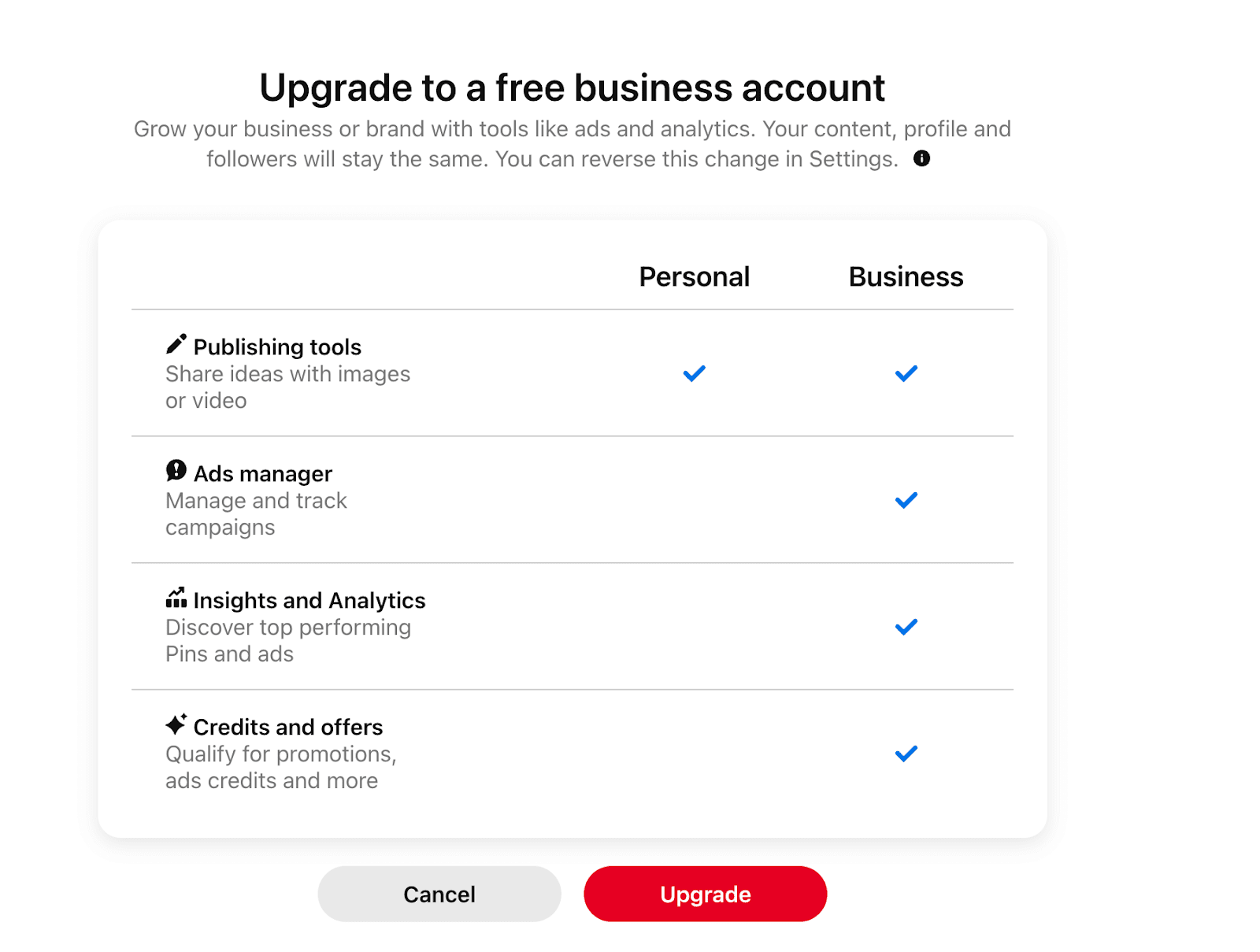
Pinterest has two kinds of accounts: personal and business. If you have a Pinterest Personal account, I’d recommend switching to a Pinterest Business account. Why? Because business accounts have access to:
Analytics for how your pins are performing
Advertising features to create various types of ads
Pinterest itself recommends converting to a business account to access helpful growth features. Here’s how you can convert your Pinterest Personal account to a business profile:
1. Log in to your Pinterest account
2. Click the arrow next to your profile icon
3. Click on the ‘Convert to Business’ option and then the ‘Upgrade’ button (don’t worry, it won’t cost you anything)
2. Brand your Pinterest profile to make it recognizable
Optimizing your profile is a must for growing on Pinterest. Imagine someone clicking on your pin, going to your Pinterest profile to learn more, and having no clue who you are or what you do. They won’t hit that follow button.
Here’s how to give some personality to your Pinterest profile page:
1. Add your name and profile name to your profile. If you have a brand name or username that you’re already using on your website and other social media accounts, use the same one here.
⚡ Pro-tip:Pinterest also recommends adding searchable keywords along with your name to make it easy for people to discover you. You can use the search option to find relevant keywords and add the relevant ones to your name.
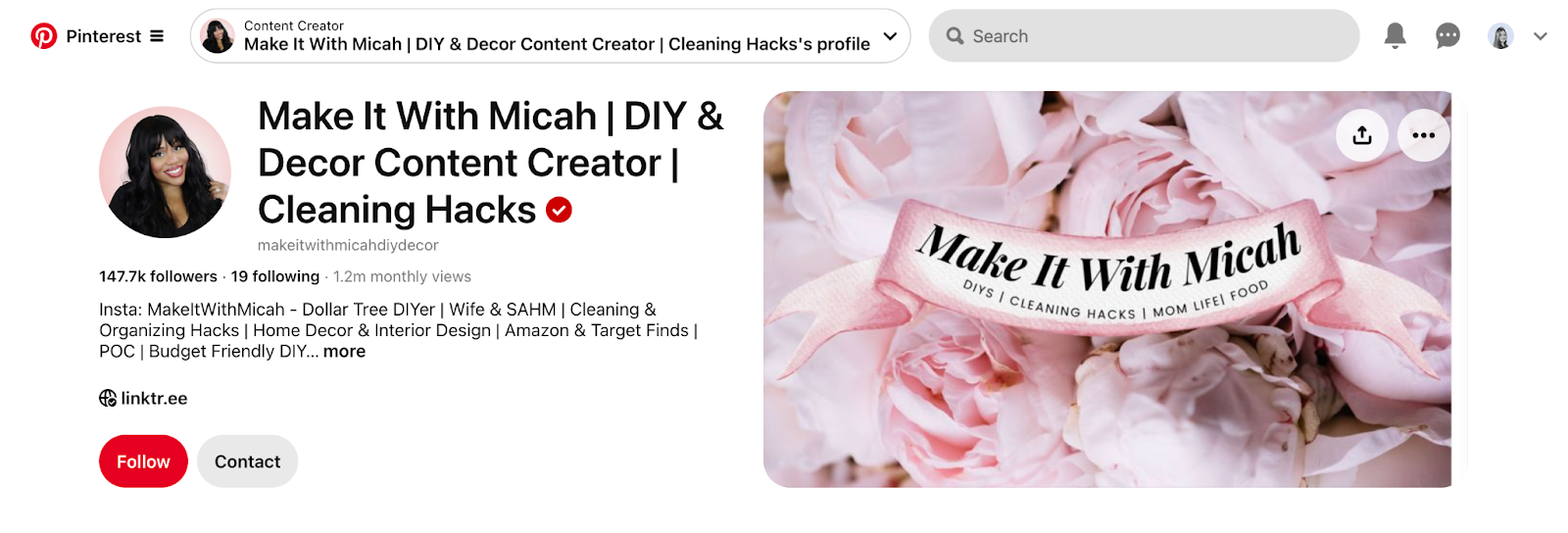
For example, Micah has used keywords like ‘DIY’, ‘décor,’ and ‘content creator’ to make her profile more discoverable. This helps her appear in searches when users look for DIY inspiration, home décor ideas, or content creators in her niche.
2. Add a clear profile photo so people can put a face to your name. If you’re a brand, put your logo in the profile photo.
3. Use your ‘About’ section to describe what you post on Pinterest and how it can benefit your audience. Keep it short and sweet.
4. Add a cover photo telling people what you do or what you represent. This isn’t necessary, but it’s a good addition!
Shreya Dalela, creator ofThe Creatives Hour, is the perfect example of how you can brand your account and make it easy for people to click follow.
And remember: Branding isn’t just for your profile. Pinterest actively encourages its users to put a logo on every pin they share:
“Put a logo on every pin that you make, but keep it subtle. Avoid the lower-right corner, since that spot gets covered up by our product icons.”
3. Verify your website
Pinterest lets youclaim your website, linking it directly to your profile. This ensures your profile picture appears on every pin saved from your site, making it easy for people to find and follow you.
Claiming your website also gives you insights into how often your content is shared. You’ll get advanced analytics and a direct link on every saved pin, helping users discover more from you.
Whenever someone saves an image from your site:
Your profile picture appears on the pin.
The pin links to your Pinterest profile.
Viewers see an option to follow you.
Claiming your website also unlocksrich pins. Rich pins are a type of pin that automatically sync information from your website and display extra details like titles and descriptions.
It’s fairly simple to do, if you know the ins and outs of your website. This step-by-step video shows you how.
Create content that engages your audience
Just like other social media platforms, Pinterest’s growth thrives on content. Here’s how you can make yours more Pin-teresting. 😉
4. Create fresh pins consistently
All social networks want you to post consistently on their platform. Theminimum frequency for Pinterest is at least one pin a week, though posting more often is generally a good idea.
“While you can determine the best schedule for you, posting on a weekly basis is a good rule of thumb,” Catie Marques Teles, a Product Marketing Manager at Pinterest says. “Because content is evergreen, your hard work works harder, and people will keep seeing your ideas over time.”
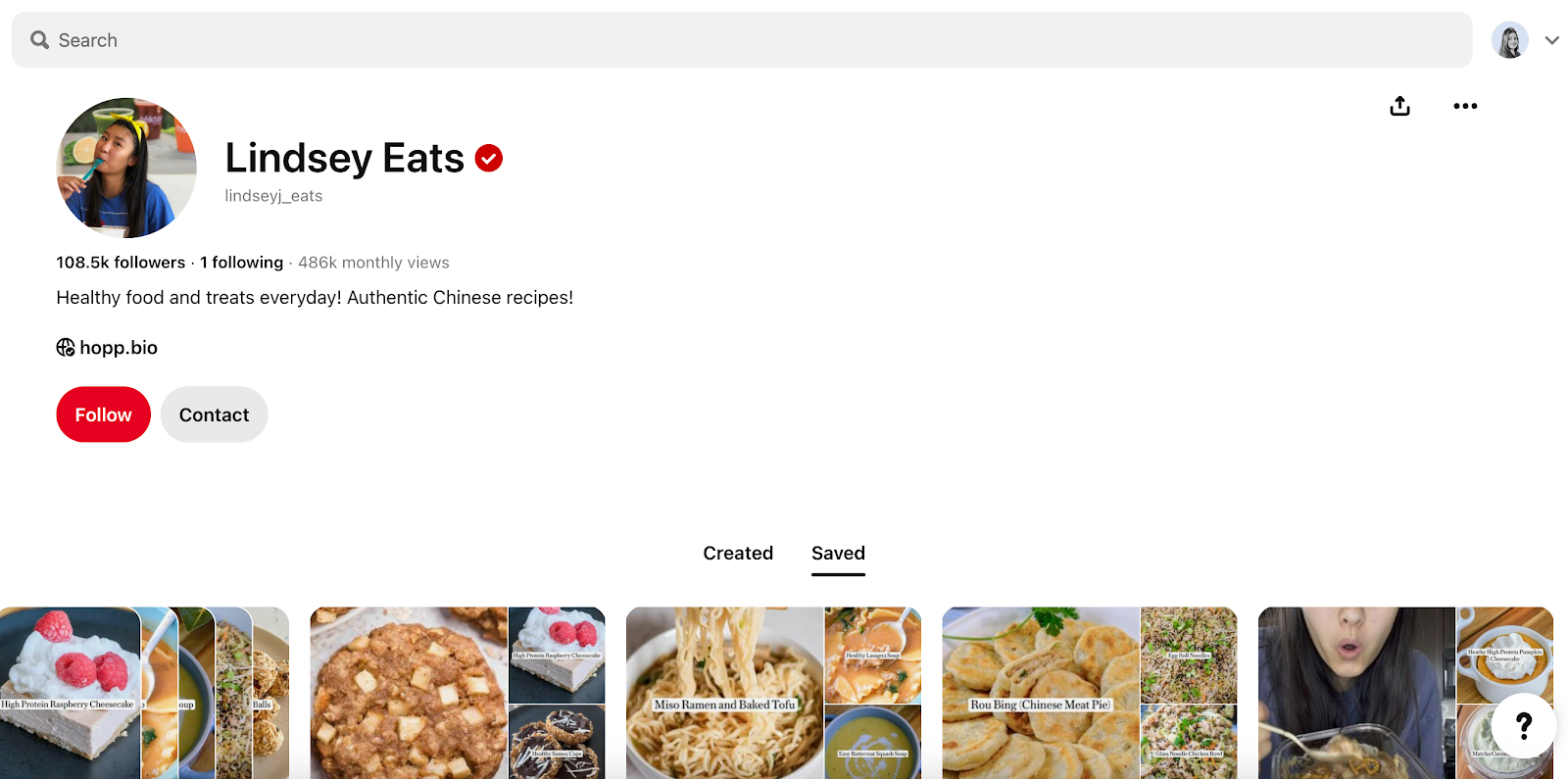
.If even one post a week feels a little intimidating, it might help to draw inspiration from the various content types
Pro tip: You’re not limited to static images! Pinterest allows short-form video content, too, which is a great way to present tutorials and how-to content.
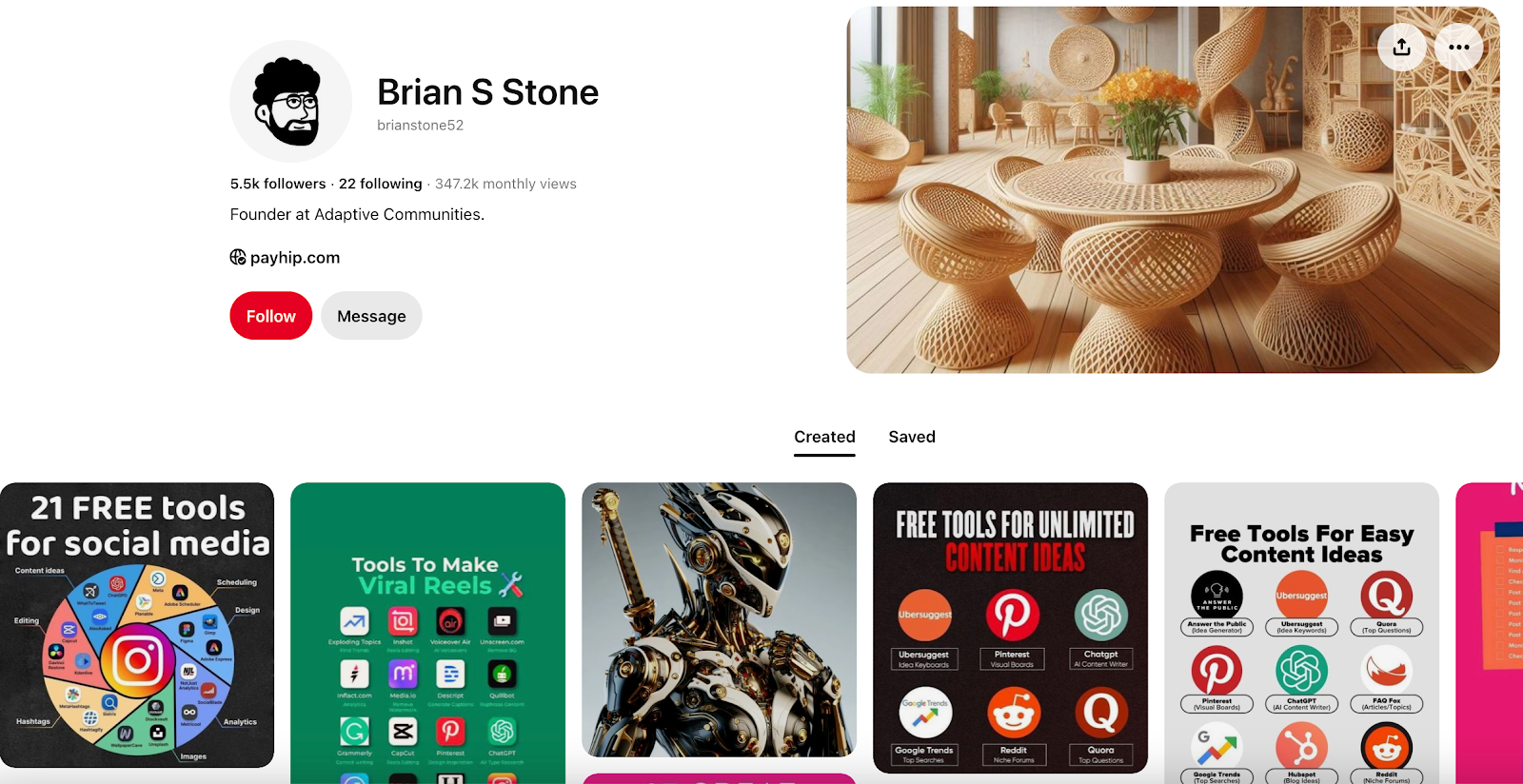
On the other hand, Brian S. Stone, founder of Adaptive Communities, creates marketing-focused Pinterest content, such as infographics and tool stacks with a clear goal: driving Pinterest users to his page, where he sells Notion templates.
⚠️ Note: Don’t compromise on the quality of your Pinterest pins to meet a certain number. Pinterest content has a longer shelf life — meaning the pins you create today can generate traffic for weeks.
Invest time in creating thoughtful, quality content that is actually relevant to your target audience.
Now, creating and posting multiple pins weekly, especially if you’re a part-time creator or small business owner, might sound exhausting. Who has the time to write the title, the description, and edit posts every single day?
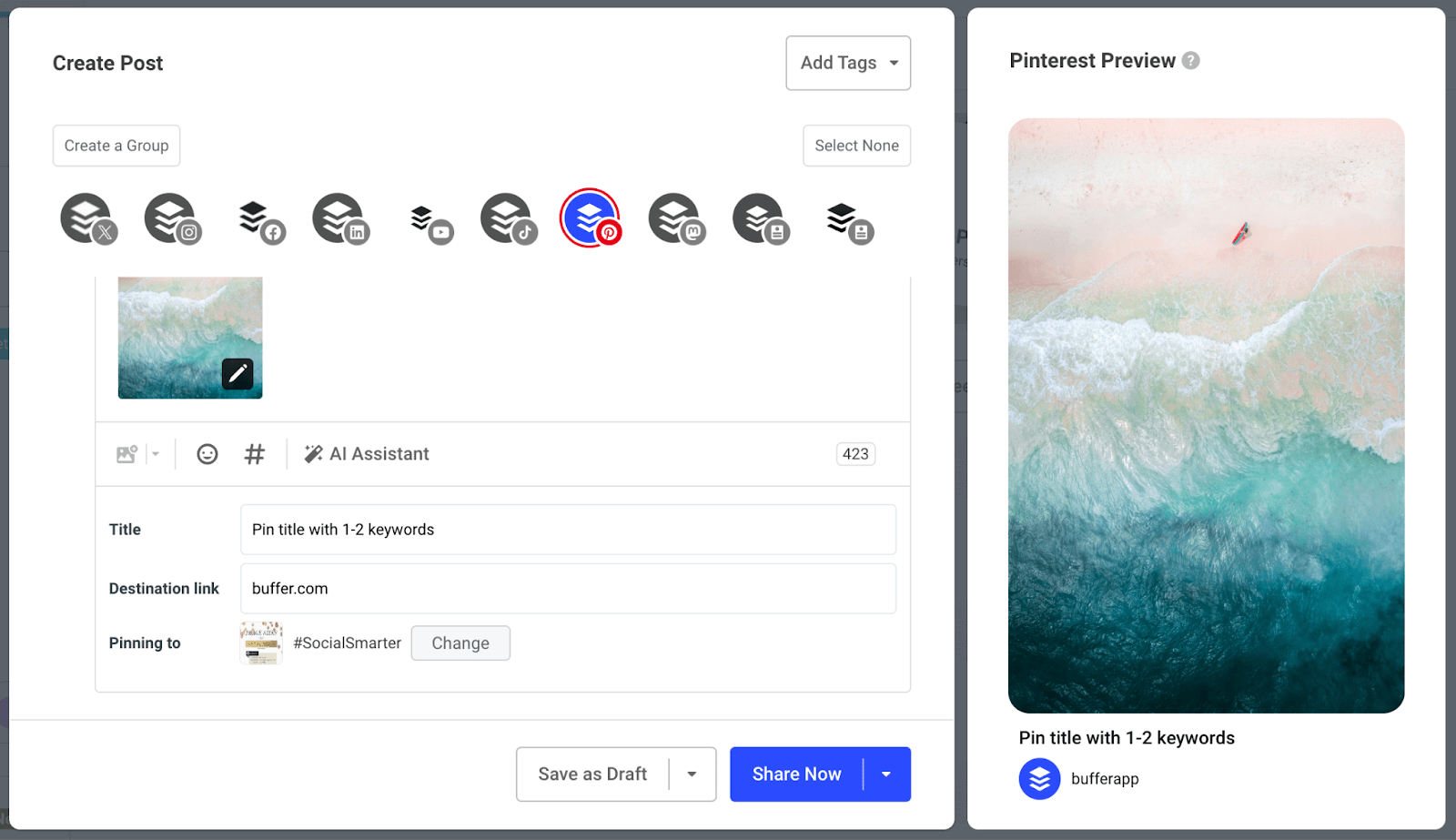
Which is why it’s a great idea to work smarter, not harder. You might want to try batch-creating content and scheduling pins usingBuffer. You can create pins in advance and queue them into relevant boards.
The best part? If you add a destination link, Buffer will automatically pull through the available images on your website. So, if you’re adding Pinterest-worthy photos on your website already, you don’t even need to upload the image if you use Buffer.
5. Publish high-quality vertical images and videos
Pinterest is a visual platform. Quality matters on Pinterest — whether it’s for infographics or videos. The ideal image size is 1000 x 1500 pixels in a 2:3 aspect ratio.
Pinterest says other ratios can negatively impact your performance because the image’s text is half-visible. The ratio is also ideal because most Pinterest users use the app on their mobile.
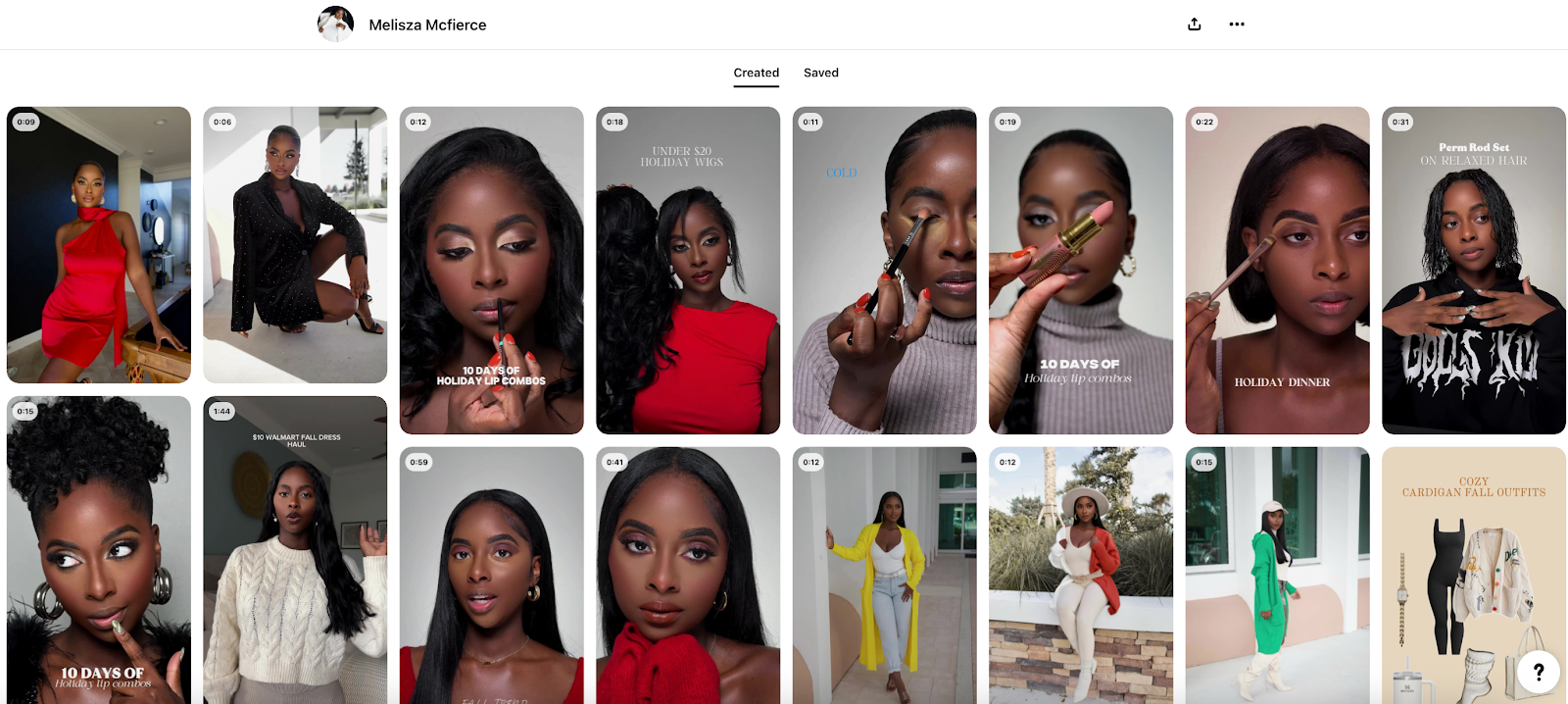
A great example is Melisza Mcfierce‘s Pinterest profile. Each and every pin she posts is of extremely high-quality and stands out as clean, clear, and crisp on the home feed.
6. Select a strong, relevant image for your pins
It probably goes without saying that Pinterest is first and foremost, a visual platform. When Pinterest users search for something, they’re more likely to click on the pin with the most relevant, visually appealing image.
According to Pinterest Creators, being strategic with your pin’s image and text can significantly improve engagement. For example, if you’re sharing a lasagne recipe, a pin featuring a delicious, well-cooked lasagne is far more likely to attract clicks than one showing just the raw ingredients.
Pinterest users engage visually first — your pin should instantly communicate the value of your content. Using high-quality images, clear text overlays, and an engaging design will make your content more likely to stand out in a sea of aesthetic visuals users will find on their feeds.
But image relevance is just as important as the quality.
For one thing, the Pinterest algorithm scans your images to understand whether or not they match your pin description and overall profile niche. So, your Pinterest cover images should contextualize what you’re discussing in the pin.
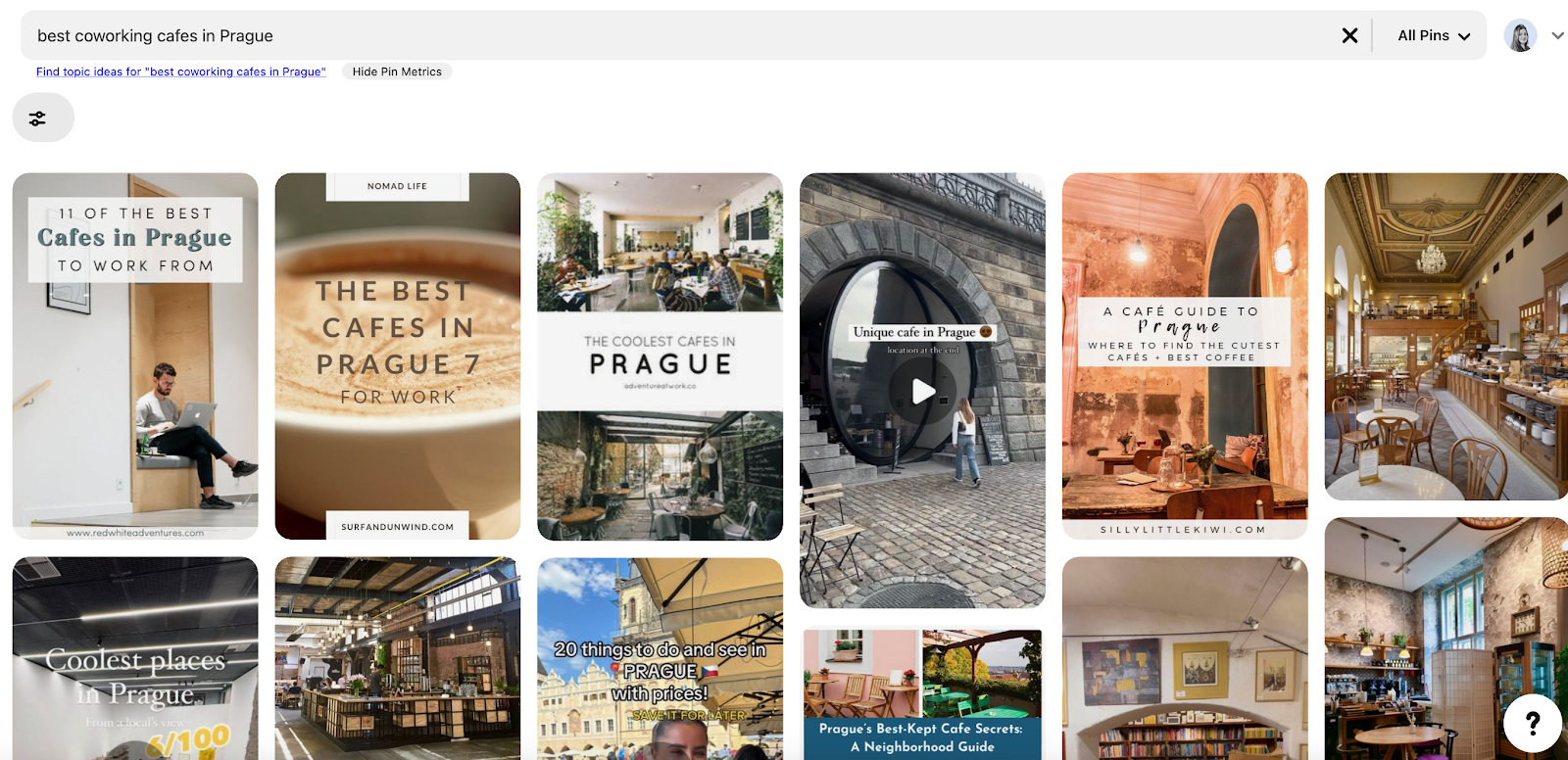
Let’s say you’re a travel creator and are creating a pin on the best coworking cafes in Prague. Don’t use a generic picture of a latte as the cover image for this pin — use a photo of the relevant café instead.
When I type “best coworking cafes in Prague” into the Pinterest search bar, it displays various relevant café images with overlay text. However, the ones that catch my attention aren’t just snaps of coffee or food, no matter how aesthetic — they’re high-quality photos of the cafes, showcasing the ambiance, workspace setup, and overall vibe.
7. Level up your content using music, duration settings, stickers, and more
Pinterest has developed a ton of native editing features — like editing music, syncing text to video, adding stickers, and more. Use all of these features to create more engaging content.
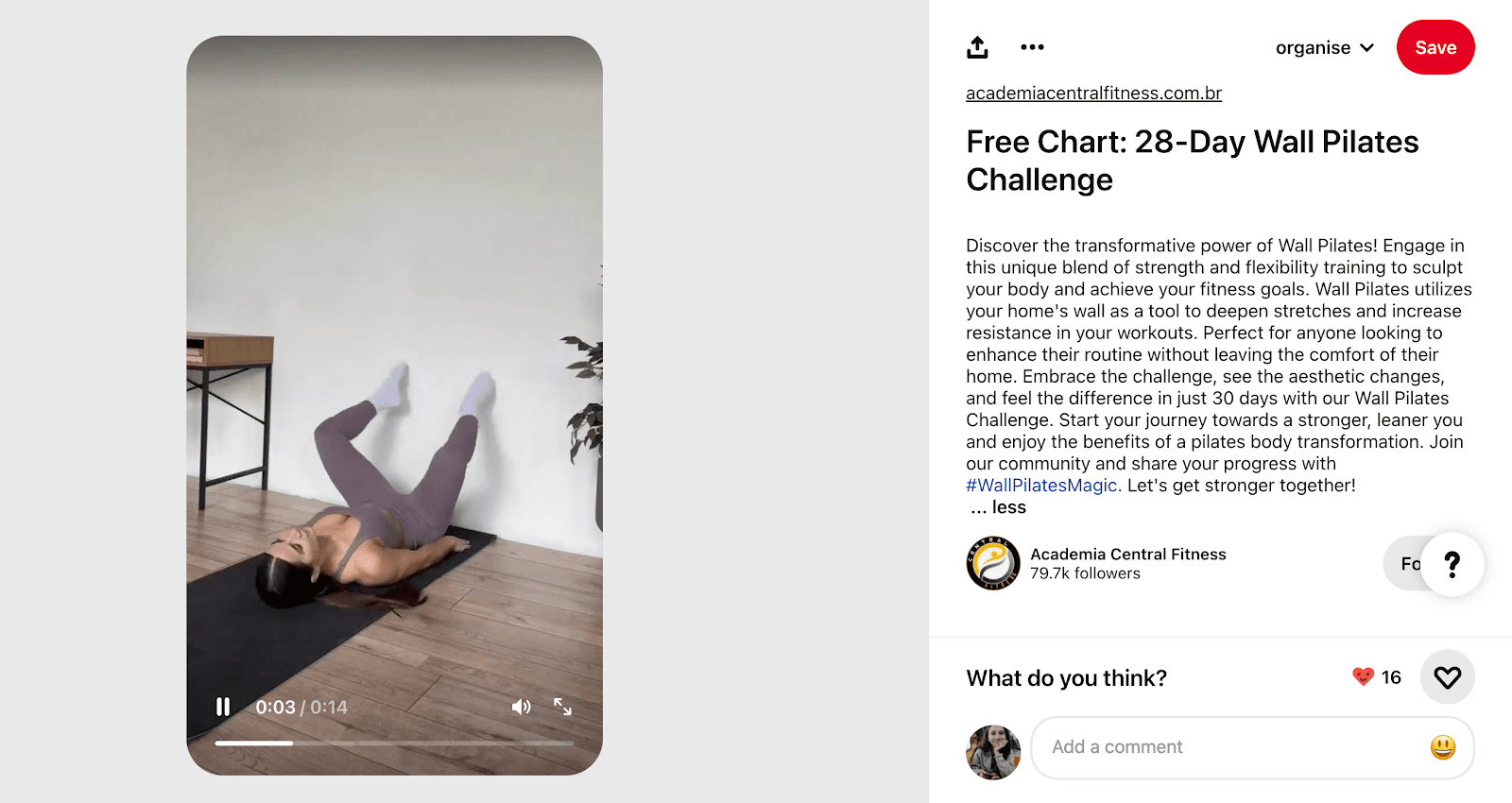
Academia Central Fitness is an excellent example of how to use Pinterest’s various features to create scroll-stopping pins. They align the text to the videos they share, use Pinterest’s native font, and add stickers and music to all their pins.
“Because we know pinners are planners, it’s important to focus on your board strategy.”
Pinterest also suggests keeping your board names straightforward rather than overly clever to make them search engine optimized (SEO-friendly). This means using clear, keyword-rich titles that describe exactly what the board is about.
For example, if you’re creating a board about makeup recommendations, name your board something simple and direct, such as “Makeup products recommendations,” instead of using an informal term such as “makeup products that slap.”
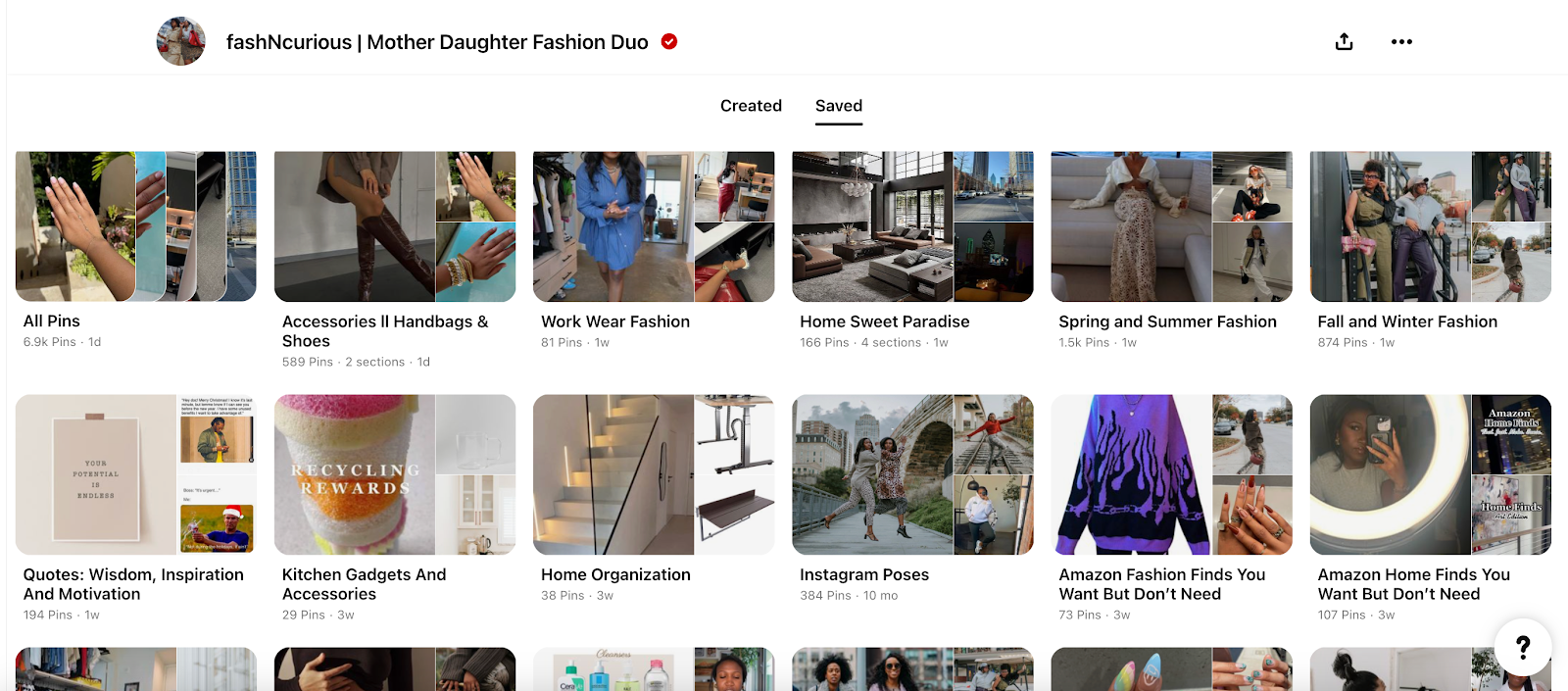
The fashNcurious Pinterest profile is an A+ example. The mother-daughter duo creates fashion content on Pinterest and organizes it in boards such as “nail content” and “fashion inspiration for all occasions.”
Categorizing your content into boards also helps new followers navigate your profile and get similar content in one window. Here’s how to create a board:
1. Go to your Pinterest profile
2. Click on ‘Saved’
3. Click on the ‘➕’ plus icon on the right-hand side
4. Choose ‘Board’
5. Name your board and start adding pins to it
If you want to take it up a notch, you can alsocreate sections within your boards. For example, if one of your Pinterest boards is about “winter recipes,” you can break it down further into sections like “winter beverages” or “winter desserts.”
9. Add a call-to-action (CTA) to every pin
What should your target audience do after they come across a pin from you?
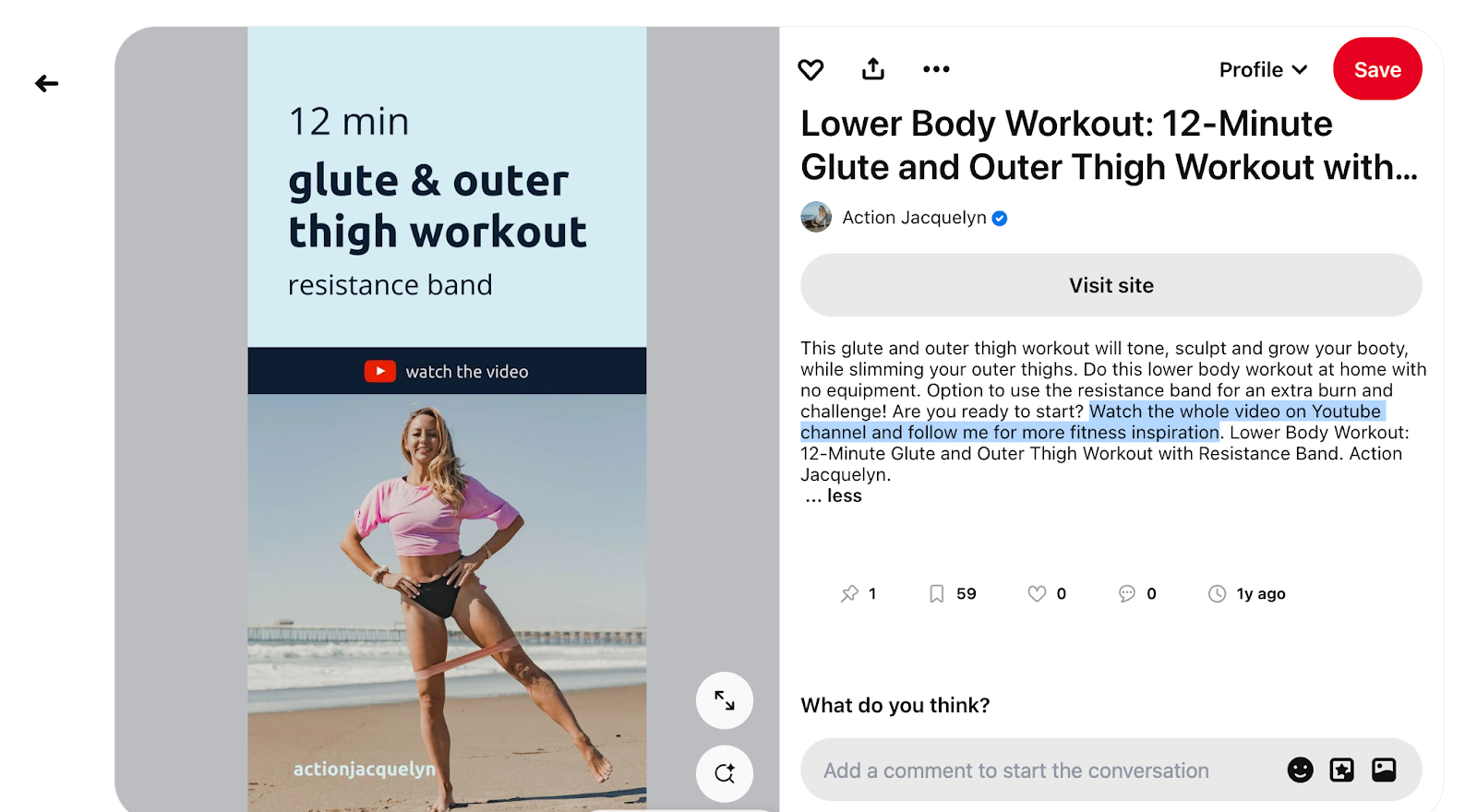
Adding a call-to-action to every pin you create ensures your audience takes that next step of following you or visiting your website. For example, in this pin, fitness creator Jacquelyn has a clear CTA to watch her YouTube video.
Some other call-to-action phrases you can use:
Read the full blog on my website
Follow me for more [your niche] content
Save this for later
What do you think of [topic of your pin]?
Comment your favourite [something relevant to your pin] below.
You can also add a voiceover for your CTA if you share a video on Pinterest.
10. Tailor your repurposed content to the Pinterest platform
Since the Pinterest algorithm scans your image content for contextual cues, it’s a great idea to edit your content within the platform.
So, for example, if you’re repurposing a TikTok video for Pinterest, remove the accompanying text and add text within the Pinterest app instead. TikTok, Instagram, and Shorts watermarks are a no-go, too, so be sure to save a ‘clean’ version of your content.
With that, you can use the platform’s native editing abilities as much as possible to publish more Pinterest-friendly content — and boost your follower count by extension.
11. Craft multiple pins for the same post
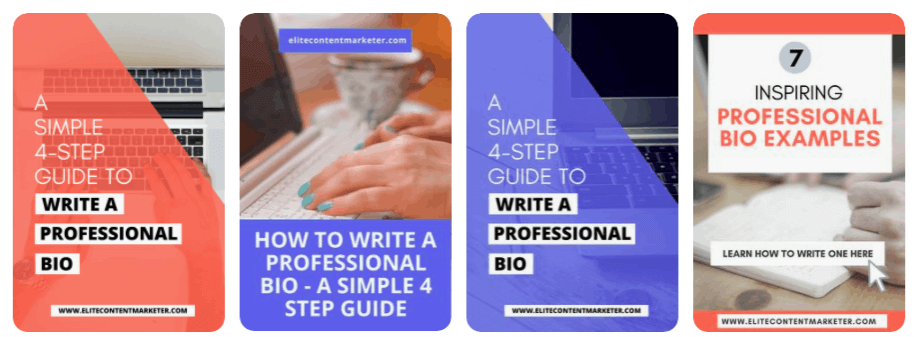
Shreya Dalela used Pinterest to grow the website Elite Content Marketer’s traffic by a whopping 829% (!) in just three months. One of her top tips is creating multiple pin designs for the same topic.
For example, she suggested varying the designs for the same header or splitting one long-form post into mini infographics.
This is an excellent way to get the most out of every piece of content you create and also an A+ Pinterest strategy to pin more without burning yourself out. But it comes with two caveats:
Shreya suggests avoiding pinning multiple posts with the same URL in one day, as this might come across as spam. Instead, spread it out over a few days or weeks.
Shreya also recommends testing the performance of five pins on one topic, first. If it performs well, create more pins for it. If not, don’t design more pins for it.
12. Create content your audience would want to save
The Pinterest algorithm prioritizes content that users save.
“If there’s a pin with a lot of saves, the system will recommend it across the platform’s main pages over other less inspiring, less engaging content,” Pinterest says.
A save signals to Pinterest that your post has meaningful engagement and that your idea resonates with people. Ask yourself: “What kind of content would my target audience want to bookmark?” and create more and more of it.
Creating saveable content should be your top Pinterest marketing strategy. People often return to their saved content, increasing your engagement and website traffic even further.
Make your pins discoverable
There’s no point in creating perfect pins if your ideal followers can’t find them. Below are the best tips for improving the visibility and reach of your pins.
13. Optimize your images, pin descriptions, and text overlays for SEO
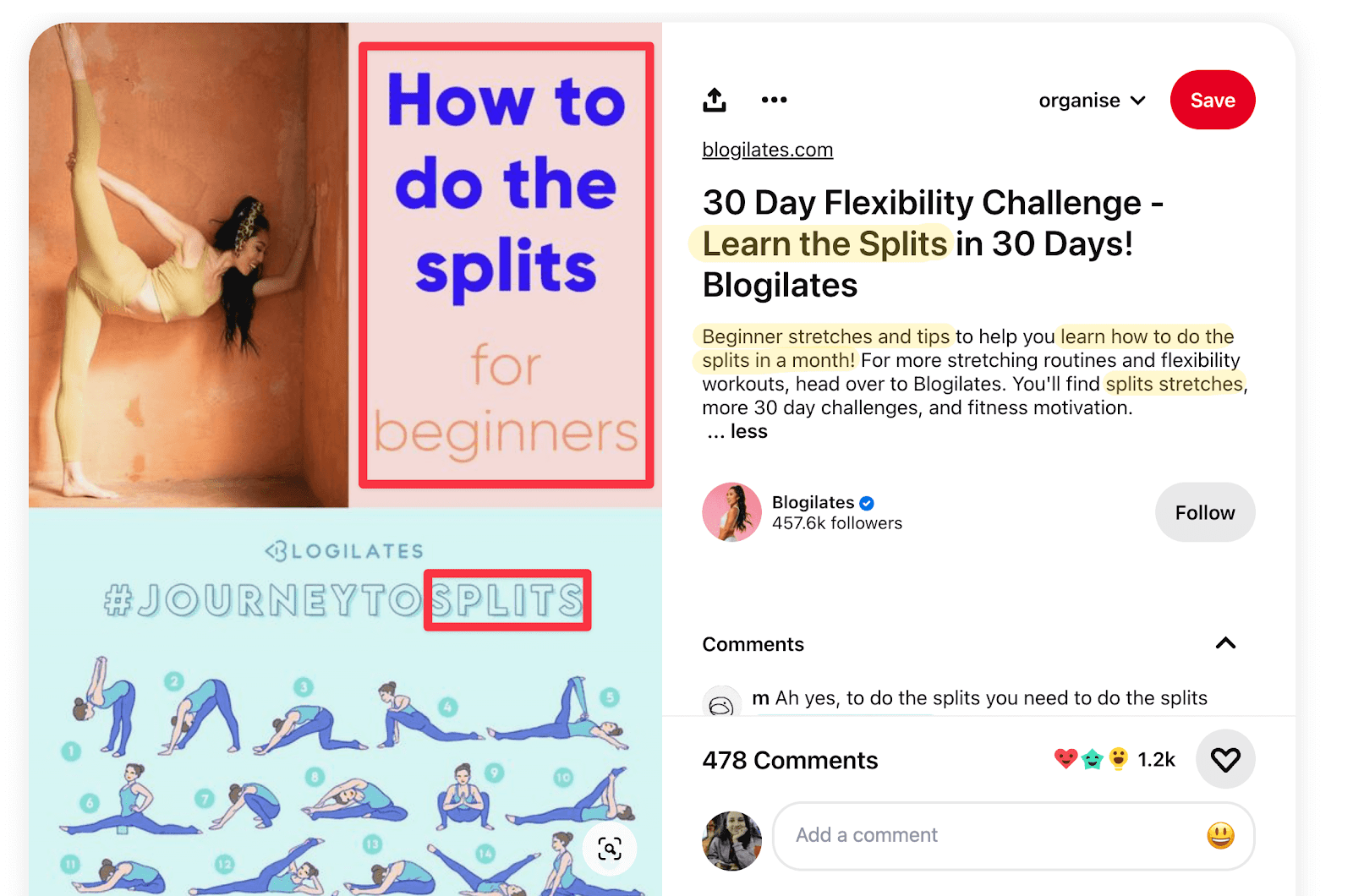
If you pick the right keywords on Pinterest, you’ll improve your discoverability and increase your number of followers.Pinterest also highlights that using the right keywords for SEO positively affects the distribution of your content.
Use keywords in three spaces on Pinterest:
Text overlays
Title
Pin description
⚠️ Note: In text overlays, ensure your image is as easy to read as possible. Remember people are scrolling on their phones. Small fonts are easy to miss. Use header fonts to show what your image is about.
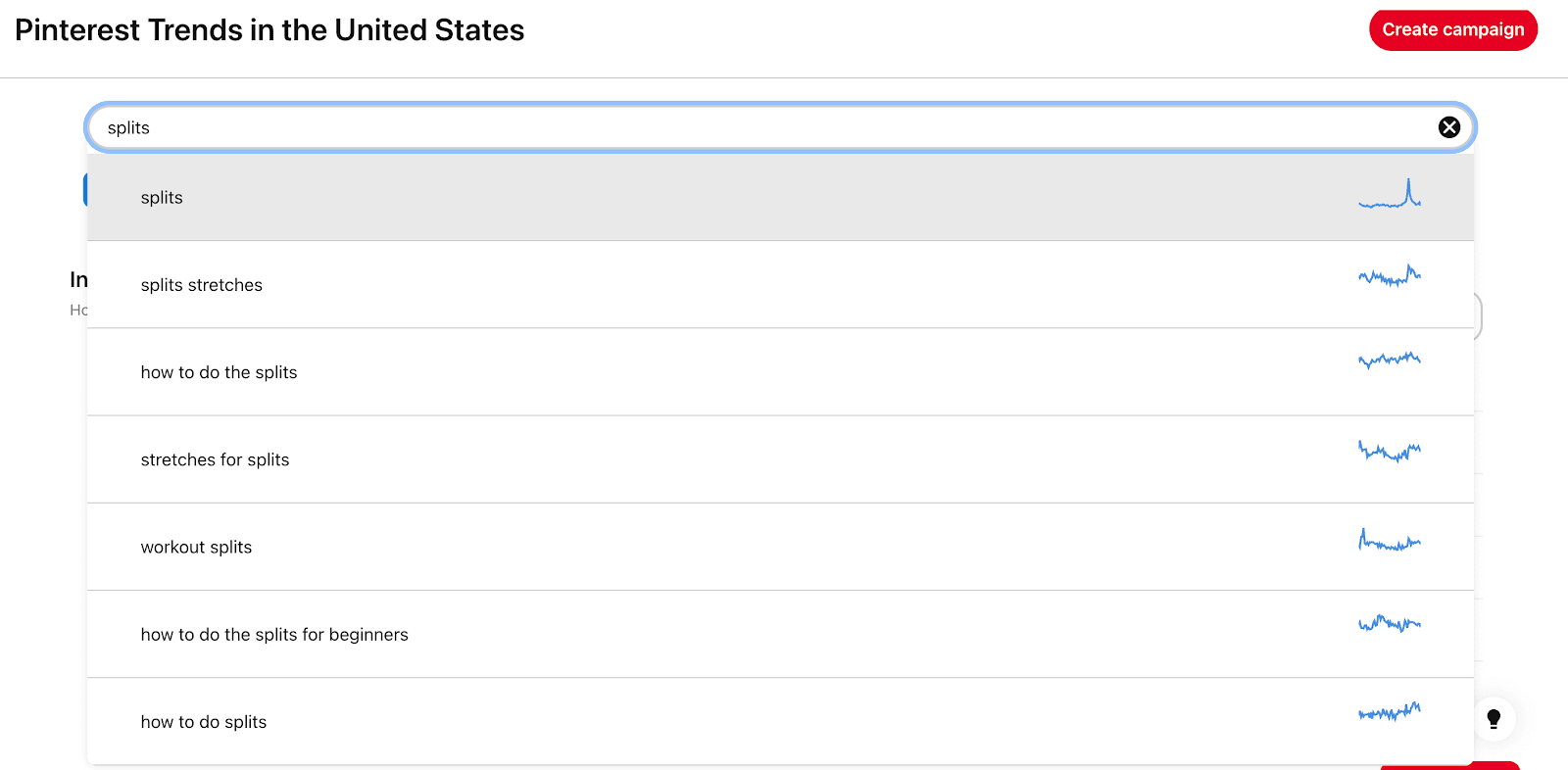
How do you find relevant keywords related to your pin? You can search for your topic on Pinterest, see the suggested keywords that pop up, and monitor what your competitors are using.
You can also use the Pinterest trends tool to search for your topic and find what your audience is searching for.
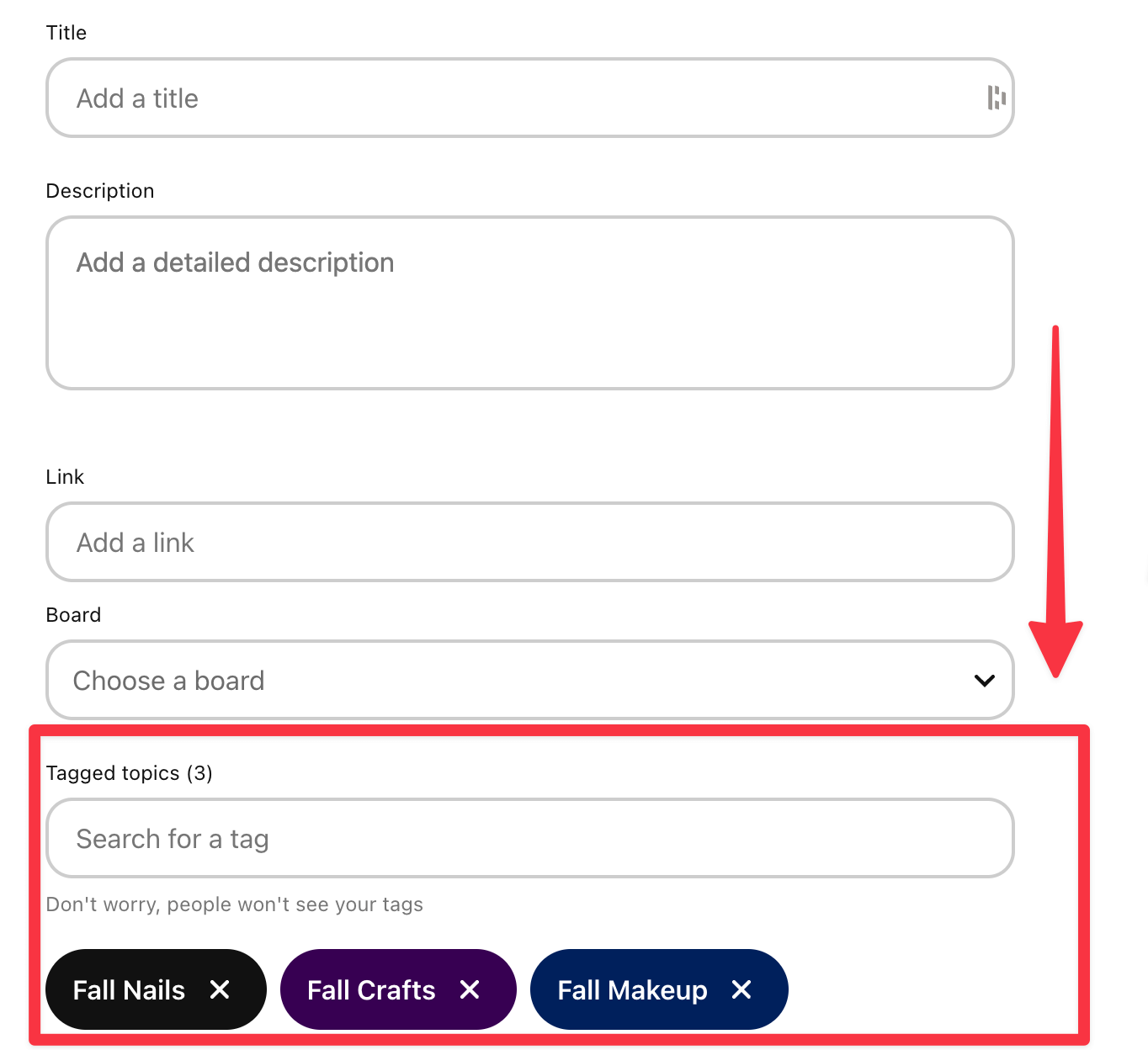
14. Use topic tags instead of hashtags
Topic tags are the new hashtags on Pinterest. Although you might still see many creators using hashtags, Pinterest says they rely on topic tags to categorize your content.
You can add up to 10 topic tags for each pin you post. Pinterest gives you the option to “tag related topics” while you’re posting your pin.
Pinterest users can’t see your tagged topics — which is another benefit since it doesn’t appear spammy like hashtags.
15. Engage with others
If I had a penny for every time I saw a creator posting and ghosting on Pinterest, I’d be swimming in cash. Social media marketing is a two-way street.
This is especially true for Pinterest. It encourages active users to respond to comments, pin frequently, and share ideas with each other.
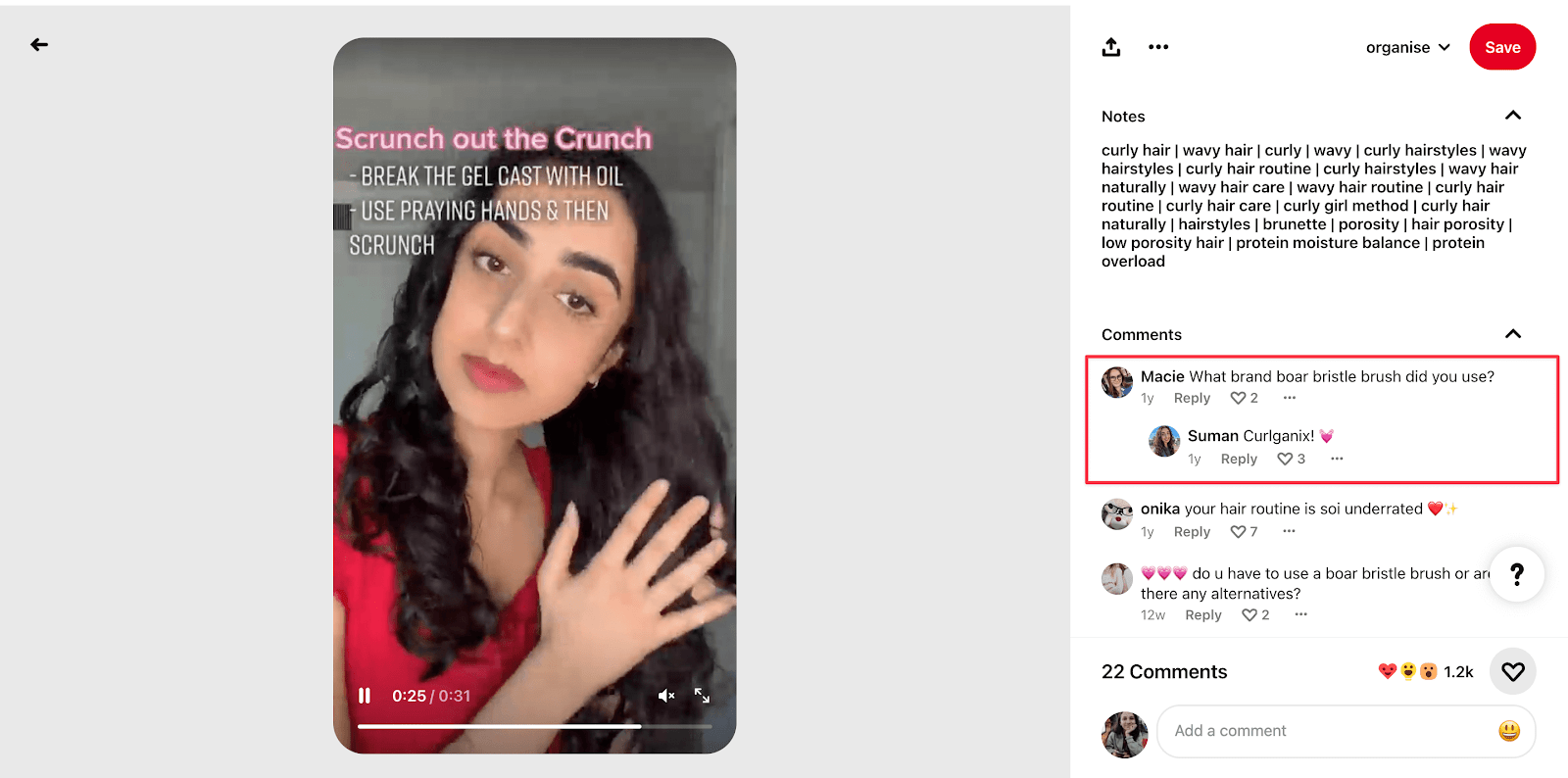
If you want to grow on Pinterest, you have to build a community. This means following others in your niche, commenting on other people’s content, and responding to comments and direct messages (DMs) you receive. For example, Suman replies to questions and comments on her Pinterest videos to help her audience.
Engaging on Pinterest doesn’t have to be complicated. Take 10–20 minutes every day to respond to any notifications you receive. When you reply to someone, you increase engagement and also prompt them to check your pin again.
Also, scroll Pinterest for the kind of content you like. If you find another creator in a relevant niche with useful content, follow them and engage with their profile. They might follow you back or start saving your pins on their boards.
16. Join relevant group boards
Group boards are Pinterest boards with multiple collaborators. You can create your own group board by inviting collaborators and giving them various levels of permissions.
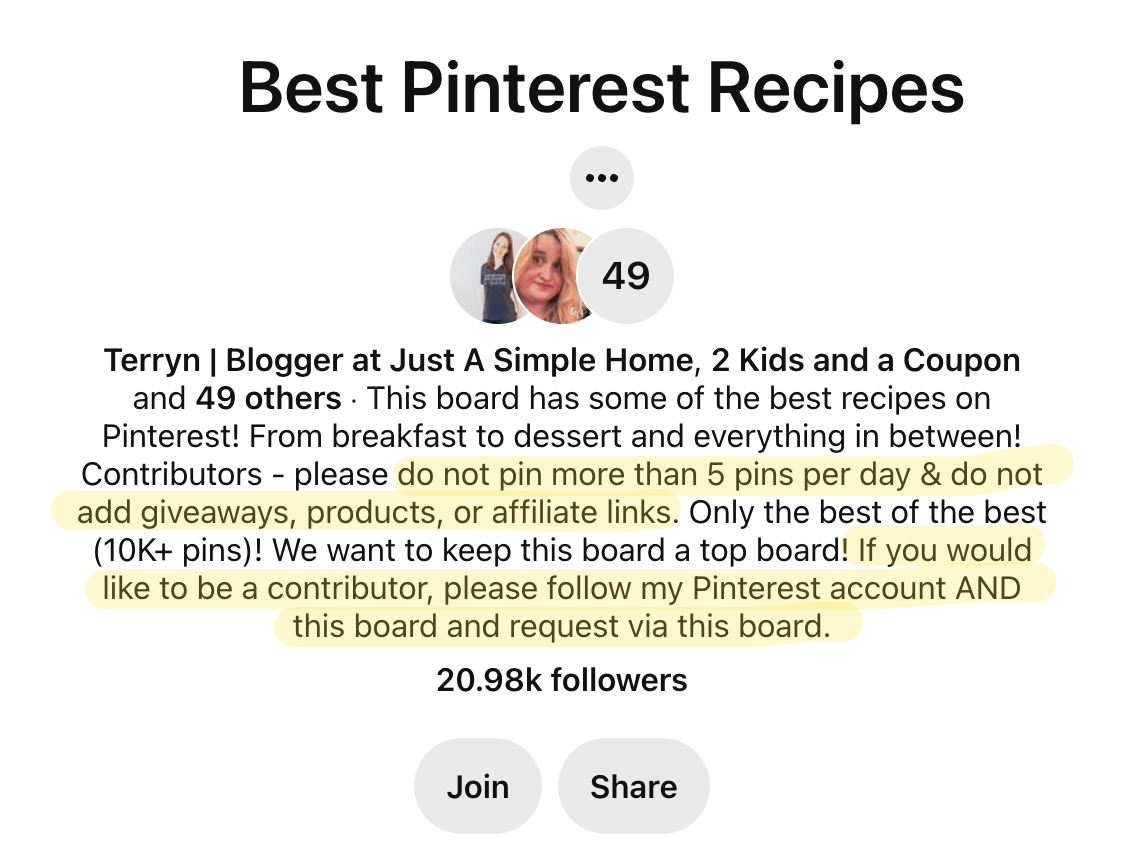
There are popular group boards in every niche that aid in providing an additional reach to your Pinterest content. You can request to join these boards and participate in pinning content consistently.
Use pingroupie to search for popular group boards in your niche. Most group boards will also use the description to share guidelines on joining the board and set up some ground rules.
17. Hop on trending content
Pinterest users love seasonal content more than any other social media platform. And Pinterest capitalizes on it by giving you tons of resources to find the latest trends on the social network:
4. A theme to organize your content for the whole year and inspire your content calendar
Use these resources to create trending content in advance (as much as possible). Some trends — like the holidays — allow you to prepare pins early because you already know that spike is coming.
Cross-promote your pins
Any marketing strategy is incomplete without a promotion strategy. To get the most out of your Pinterest content, you need to actively share and distribute your pins for greater visibility.
Here are some effective ways to promote your pins:
18. Advertise your pins
While we’re fans of organic growth here at Buffer, giving your pins a little nudge (if you can afford to) hurt no one.
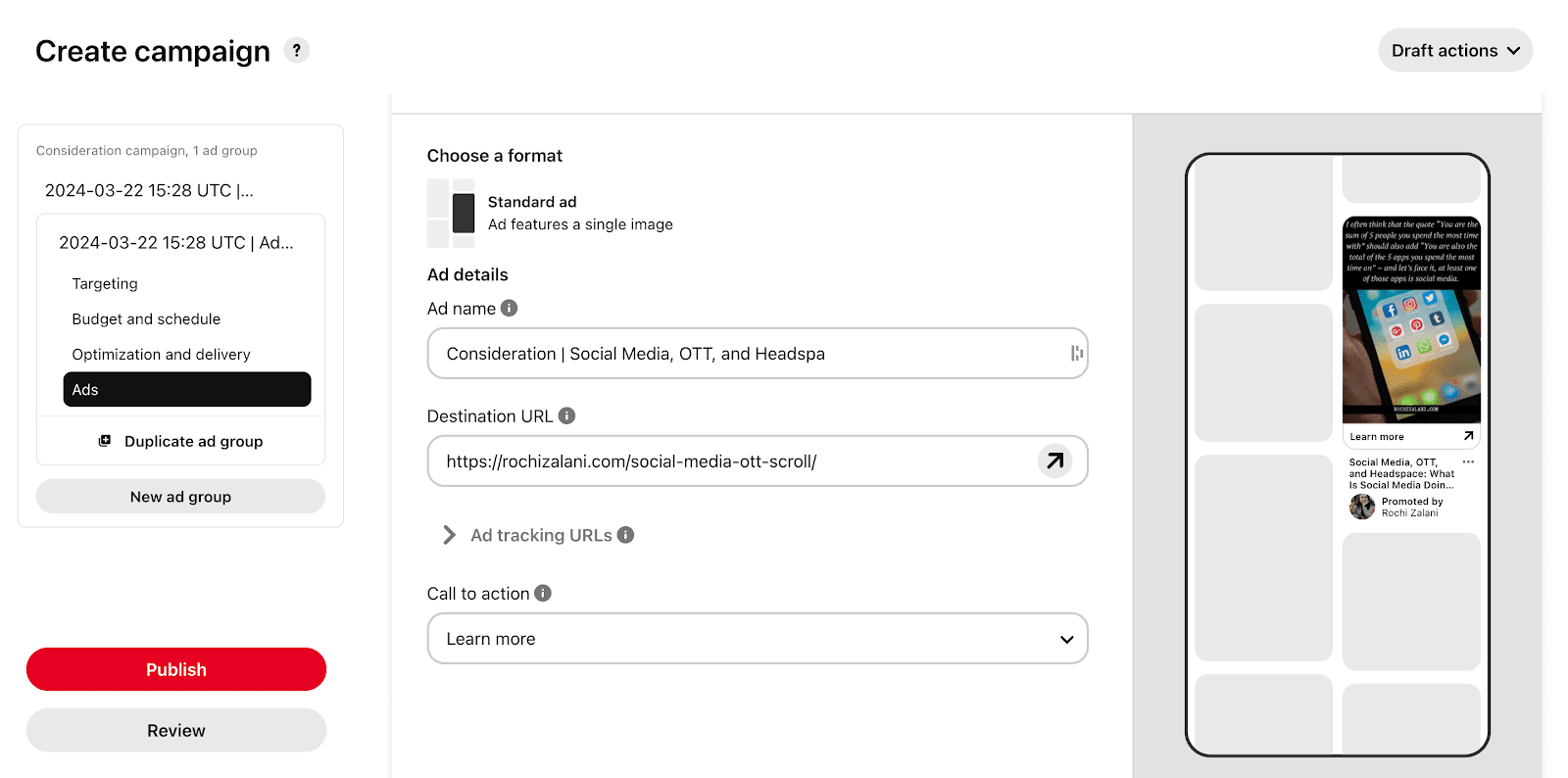
If you have some budget for Pinterest Ads, consider promoting your Pinterest pins to reach potential followers. How do youcreate a Pinterest ad? It might seem a little complicated, but the platform will guide you through the process, step-by-step. Here’s an overview:
Click on the three horizontal lines at the top left corner of your Pinterest profile and select ‘Create Campaign’ under the Ads section.
Choose a campaign objective (e.g. brand awareness, traffic, conversions, or catalogue sales).
Set a daily or lifetime budget and define the campaign duration.
Select the target audience based on demographics, interests, keywords, and behaviours.
Choose an existing pin from your boards or upload a new one with a strong, relevant title, description, and destination URL.
Set a bid strategy (manual or automatic bidding) and select ad placements (search results, home feed, or related pins).
Review all settings and click ‘Launch’ to start your promoted pin campaign.
Monitor ad performance through Pinterest Analytics and optimize based on engagement, clicks, and conversions.
And you’re done!
Try Pinterest ads for yourself and see if promoted pins give you enough return on investment (ROI) to become a regular part of your Pinterest marketing strategy.
19. Add a Pinterest follow button to your website, newsletter, and other social media
Encourage the followers, fans, and email subscribers you already have to follow you on Pinterest.
For example, in your email newsletter or Instagram Stories, you can share a regular “What we’re pinning” update to remind your existing followers to check you out on Pinterest, too.
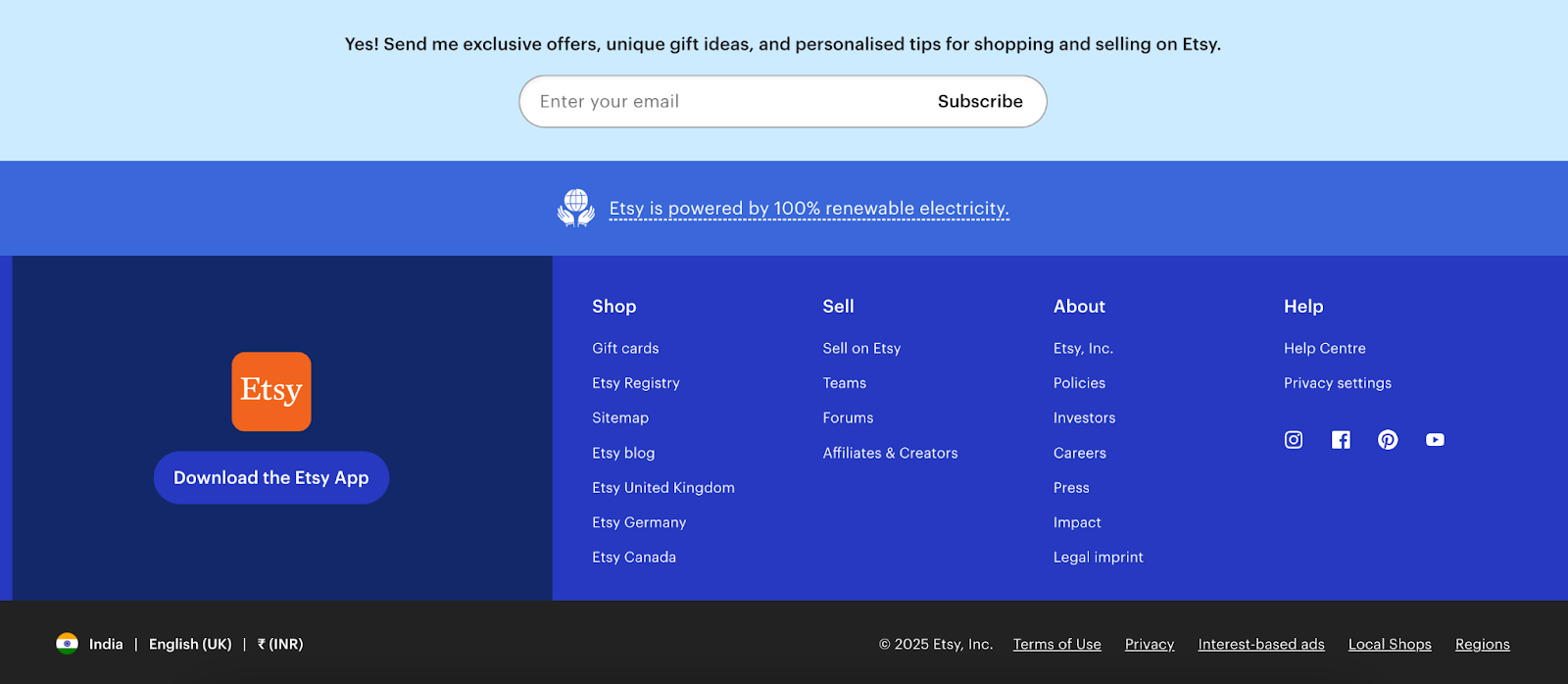
Etsy links its Pinterest profile in the footer of its website — along with other social accounts.
But remember: Your target audience needs a reason to follow you on Pinterest. Perhaps you create exclusive content, or maybe organize all your existing content neatly into boards and sections your audience can refer back to easily.
Whatever it is, craft a compelling offer that will entice people to click the follow button.
Measure your success
Here’s a social media strategy step often missed by creators and brands alike: analysing their content performance.
20. Use Pinterest Analytics to guide your content strategy
Once you switch to a business account, you get in-depth insights into how your content is performing. You get details like saves, outbound clicks, pin clicks, profile visits, and more.
The metrics you should focus on will depend on your goals. For example, if you want to grow website traffic via Pinterest, the outbound click rate is the most important.
Spend some time each week or month identifying your best-performing pins. Maybe you noticed how-to video content gets the highest number of saves and click-through rates, so you can double down on it when you start creating new pins.
There’s more to Pinterest than Pinterest followers
Pinterest is known as the social network to drive more traffic to your website. It encourages its users to leave the platform — an anomaly in the social media marketing world.
So, while Pinterest followers are a good metric to look at toevaluate your growth on Pinterest, remember it’s not the only one. If you’re getting decent traffic, enough saves, and impressions, and engaged comments, you’re doing Pinterest right!
Don’t focus on gaining new Pinterest followers in a silo — look at the big picture and focus on building a community on the platform.
People can find, compare, and click shoppable links on ChatGPT
OpenAI is taking aim at ecommerce.
The company is rolling out a new, AI-powered shopping experience within ChatGPT that lets people find, compare, and buy products. The feature shows visual details, pricing, and reviews of products with shoppable links to retailers like Walmart.
The updates are rolling out to ChatGPT’s Plus, Pro, and Free users.
According to OpenAI, product results are chosen independently and are not ads.
A spokesperson for OpenAI did not immediately respond to a request for more detail about the commerce feature.
The move comes as search has become one of ChatGPT’s fastest-growing features, generating more than one billion web searches in the past week, according to OpenAI.
OpenAI enters a competitive commerce world
OpenAI’s move pits it against rival Perplexity, which introduced a similar shopping experience last year. ChatGPT’s shopping feature also competes against ecommerce giants like Amazon and Google.
OpenAI, which is reportedly valued at $300 billion, has signalled an interest in advertising revenue as it moves towards a for-profit structure. For example, OpenAI has hired top ad talent, including former Coinbase CMO Kate Rouch.
OpenAI’s move closely mirrors Google and Meta’s moves into advertising, said Debra Aho Williamson, founder and chief analyst at Sonata Insights.
“We’ve seen this playbook before, including with Google and Facebook, where brands first made their organic presence and then the platforms turned towards advertising,” she said.
If you want to sell more products on Amazon, consider starting a store that will give your brand more visibility. Here’s what you need to do to launch your store.
In the world of online retailing, few companies can compete with the size and reach of Amazon. In Q4 2024 alone, the company generated nearly $188 billion in net sales, thanks to the millions of retailers and individuals using the platform to sell products across the U.S. and globally.
Thanks to Amazon’s massive customer base and seller success tools, businesses that open an Amazon storefront have the opportunity to establish a more robust and immersive brand experience and reach a much wider audience than on their company website alone.
Here’s a quick step-by-step guide on how to open a store on Amazon.
Open an Amazon Seller account
The first step to getting your products on Amazon is signing up for an Amazon seller account. You will be prompted to enter the following information:
Name.
Business location and entity type.
Address.
Billing information.
Proof of identity.
Amazon offers two pricing plans for U.S. seller accounts: an Individual plan that costs $0.99 per item sold or a Professional plan that runs $39.99 per month. If you’re planning to make your Amazon store a primary revenue stream for your business, you’ll want to choose the Professional plan, which gives you access to brand-building tools like enhanced product pages and a digital storefront, the ability to create promotions and coupons, business reporting tools, and more.
Register your brand on Amazon
Following your seller account setup, you’ll need to enrol in Amazon Brand Registry, which helps you protect your brand and provides access to free tools and reports. To participate, you’ll need an active seller account and a registered trademark in the country where you want to enrol (or a pending trademark application filed through Amazon IP Accelerator). Amazon also requires that your brand name or logo be prominently displayed on your products and packaging.
If you meet the eligibility criteria, you can begin the enrolment process. Choose which country’s marketplace you want to enrol your brand in, log into your seller account and fill in the rest of the required information. Then you’ll submit your enrolment for review.
Even if you don’t plan to sell a large number of items in your store, it’s still a good idea to register your brand and claim that piece of real estate on Amazon’s site.
“Having a store allows you to control your brand’s integrity online, and being part of Amazon can also help you appear higher up in Google search results,” said Theo Prodromitis, Co-founder of Ever New, a professional auto detailing accessory company, and CEO of Spa Destinations, which sells natural beauty products, sponges, and loofahs; and Co-founder of Ever New, a professional auto detailing accessory company.
Decide which products you’ll sell
A big part of your success on Amazon will come down to the profitability of the products you sell. To identify profitable products, it can help to see what is already selling well on Amazon.
“You’ll need to search different products to determine how much of an opportunity there is, and compare against the competition to determine if you can compete in the category,” said BJ Wright, Chief Strategy Officer for Empowered Cooks, Fabulessly Frugal, and Pine and Pepper. “We use tools such as DataDive, Jungle Scout, and Helium10 to assist in our research.”
Beyond market opportunity, it’s helpful to choose products that are lightweight and easy to ship and have at least a 50% profit margin. You should also avoid selling trademarked items or items from Amazon’s restricted product list.
Add products to your store with rich details
Once you’ve decided which products you’re going to sell, you can begin adding them to your digital shelves. Inside the Seller Central hub, you can either add products one at a time with the “Add a Product” button or you can add multiple products at once with a Microsoft Excel-based spreadsheet.
Every product in your inventory must have a unique SKU number. You will also need to input how many of the item you have in stock, its price, what condition it is in, what type of classification it should have, and other information.
For those with professional accounts, you can add Amazon A+ Content for each product. A+ Content effectively lets you add more photos, videos, artwork, charts, and more in order to make your product more enticing. You can start adding A+ Content to your product listings by logging into Seller Central, clicking Advertising in the navigation menu, and clicking Enhanced Brand Content. From there, enter the SKU of the item listing you want to improve, select a template to work from, and then fill in the template with photos and more.
As you build out your product listings, Nicole Pomije, Founder and CEO of The Cookie Cups, advised researching your audience, competition, and Amazon’s rules and creative guidelines for stores.
“Your product listings need high-quality images because Amazon’s algorithm favours them, and customers rely on them to make buying decisions,” she told CO—. “A strong title, keyword-rich description, and competitive pricing also matter. [Ignoring these] can make your product invisible.”
Reviews impact rankings, so always engage with customers, address concerns, and deliver a great experience to keep them happy and coming back.Nicole Pomije, Founder and CEO of The Cookie Cups
Design and launch your store page
Once your seller account is active, your brand is registered and you have inventory uploaded, it’s time to finally launch your store page. Follow these steps to get your store page up and running:
Log in to Seller Central.
Click Stores in the navigation menu, then click Manage Stores, and then click Create Store.
Select a template that makes the most sense for your store, with options including a simple product grid and a marquee to highlight curated items.
Open the Store Builder to start building the store.
Select the Page Manager option and then tap Add a Page so you can create subpages for your store. (Subpages can feature different product types, for example.)
Use the Tile Manager option to help you add or rearrange text, photos, and videos on your pages.
Once you’ve selected the top products you want highlighted in the store, then use the Preview Window feature so you can see what your store will look like on most desktop and mobile browsers.
After you are done designing your store, click the Submit for Publishing button. The page may take a few days to receive approval.
When your store is live, you can then click on Store Builder and then Insights to see your general performance with page views, visitors, and sales.
One of the most important elements on your store page is the banner at the top of your page. This banner should include a hero image—a large and prominent image that appears at the top of every page in your store and helps to differentiate your store’s navigation and content. Choose an image that represents your brand and captures people’s attention.
In addition to static images, consider adding a video to your Amazon store to tell your brand’s story.
“This is your chance to create a feeling and capture brand loyalty,” said Prodromitis.
If you decide to include a video, keep in mind that Amazon does not permit videos to be longer than five minutes.
Set up your shipping plan
The final step to getting started as an Amazon seller is to set up your shipping plan. When it comes to shipping, you have two options:
Do it yourself: If you choose to handle shipping yourself (known as Fulfilled by Merchant, or FBM), you’ll store and ship the products directly to your customers through the shipping method of your choice (e.g. USPS, FedEx, UPS, etc.). This is best for very small sellers that fulfil a low volume of orders every month.
Let Amazon ship for you: Fulfilment by Amazon (FBA) is a much more convenient shipping option for high-volume sellers and promises shipping costs that are 70% less per unit compared to other U.S. fulfilment services.
Amazon has more than 175 fulfilment centers worldwide, and sellers who use FBA receive access to that storage space. If you choose to go this route, you’ll ship the items to Amazon. Then every time a sale goes through, Amazon will ship those products directly to the customer. Keep in mind that there are additional fees associated with using this service, but it may be worth it for sellers who want access to all the resources and convenience FBA has to offer.
Set up systems for customer service and enterprise resource planning (ERP)
Good customer service is a critical part of keeping your Amazon store in good standing. Joe Napoli, CEO of BuyBackStore.com, noted that Amazon expects sellers to answer all customer inquiries within 24 hours, including weekends and holidays. Failing to respond in time can result in Amazon crediting the buyer directly, often at the seller’s expense.
Napoli recommends making sure all follow-up happens through Seller Central, as Amazon rarely sides with vendors when issues arise. Setting up a clear, consistent process — and having someone available to monitor and respond promptly — can protect your reputation and bottom line.
Equally important is setting up an enterprise resource planning (ERP) system that integrates with your Amazon store. ERP software helps manage orders, track inventory, monitor returns and replacements, and analyse profitability.
“You will need your ERP to … be able to facilitate order import and profitability analysis,” Napoli explained. “It’s better to have Amazon talk directly to your ERP for order imports, updates, and settlement reports so you can track true profitability.”
As your business grows and you expand to other marketplaces like Walmart, Etsy, or eBay, your ERP becomes even more essential. A solid system can help you avoid overselling and stay on top of inventory across all channels, said Napoli.
Track your store’s performance and customer reviews
Amazon provides performance metrics about visits, traffic sources, and sales for your store. You can also access reports about your audience, including age, gender, income, education, and marital status. Be sure to study this information to help you optimize your brand’s success.
“Keep an eye on your data, tweak your pricing, and use Amazon ads to stay competitive,” Pomije advised.
Another important element of success on Amazon is customer reviews. Potential buyers take these reviews seriously, so having a lot of positive reviews will add credibility to your business.
“Reviews impact rankings, so always engage with customers, address concerns, and deliver a great experience to keep them happy and coming back,” said Pomije.
Use Amazon’s free resources
Although creating an Amazon store might seem daunting, Prodromitis assured it’s not as difficult as it may sound: “Even if you have no prior website experience, the Amazon store uses very simple templates and is really user-friendly.”
Still, it can be a good idea to take advantage of Amazon’s free resources to help you learn the process of selling on the site. For instance, Amazon offers a step-by-step guide for opening an Amazon store on their website. The site also offers free advice through its Seller University. With a series of helpful videos on YouTube, Seller University walks new sellers through selling features, best practices, case studies and more.
Kristin Collella, Sean Ludwig, and Jamie Johnson contributed to this article. Some source interviews were conducted for a previous version of this piece.
CO— aims to bring you inspiration from leading respected experts. However, before making any business decision, you should consult a professional who can advise you based on your individual situation.
CO—is committed to helping you start, run and grow your small business. Learn more about the benefits of small business membership in the U.S. Chamber of Commerce, here.
There’s something off about the concept to me as a creative.
I would assume that in 2025, most creatives should already have some kind of professional online presence established by now, whether it’s a basic LinkedIn profile, branded social media accounts, or a digital portfolio website.
But website builders are getting much craftier lately, and Wix has just announced an advanced new AI-powered adaptive content feature, which is intended to personalise the web experience for any visitors coming across your site. Is anyone else a bit freaked out by that concept?
If you’ve ever made or designed your own website using one of the best website builders, you’ll know that it can take a lot of work (and sometimes even coding) to perfectly tailor every asset, page, link, blog post, and media for your site to look and perform as you want it to.
Wix’s new feature, however, has the power toadapt your website in real-time to offer unique messaging and content that has been tailored to each individual site visitor based on their characteristics – which I think is both incredibly cool and a little creepy.
Wix says that its new AI-powered adaptive content application can be used to ensure a seamless visitor experience, without performance issues like increased load times getting in the way. I guess in this case it does make sense to optimise a website for whoever is looking at it, but something about having this kind of AI in the driver’s seat just seems off to me. It’s not necessarily the AI I have an issue with, but more the thought of every individual coming to a website seeing something different.
As a photographer, I use my Squarespace portfolio site (one of the best website builders for photographers) to share my work, get my name out there, and offer a way for anyone to contact me about potential opportunities. I know that if I were looking to hire a photographer or graphic designer to help me with a project, then I’d be hoping for a website with a lot of authenticity and not one showing me exactly what I want to see or trying to sell me something based on AI-gathered data.
(Image credit: Wix)
According to Muly Gelman, Senior Product Manager at Wix Personalise “Website personalisation is now essential for delivering the relevant, engaging experiences today’s consumers expect. This application highlights how we can move beyond using AI to generate website content but leverage AI to dynamically adapt and personalise the live website experience for each visitor in real-time, empowering businesses to connect more effectively with their customers.”
Maybe it’s because I’m thinking of this application more from the perspective of a creative individual as opposed to a larger corporation or business, but either way, I’m not quite sold on this feature. Perhaps it could be great for creative agencies, for example, if it showed people the most relevant work to their location or displayed the correct currency for their region.
Wix seems to be expanding more with AI-infused assets, including Astro, its latest all-in-one site and business management tool. For current Wix users, you can access this new adaptive content feature right now through Wix Editor and Wix Studio, or by searching for “adaptive” in the App Market.
Beth is Creative Bloq’s Ecommerce Writer and has the fun job of finding you the very best prices and deals on creative tech. Beth kicked off her journalistic career writing for Digital Camera World, and has since earned bylines on TechRadar too. With a Masters degree in Photography, Beth loves getting to tinker with new cameras, especially camera phones, as the resident Samsung fan on the team. Her background working as a tester for CeX let her play around with all kinds of weird and wonderful products, including robots, and she’s recently gotten into 3D printing too. Outside of CB, you’ll find her gaming on her PS5, photographing local shows under the alias Bethshootsbands, and making TikToks of her dog, Tilly. 21
Social media platforms once thrived on their ability to connect people, allow users to follow friends, family and creators, and nurture real-time conversations.
However, in recent years, the shift to algorithm-based feeds has drastically changed how users interact with content online. Platforms such as Instagram and TikTok now prioritize promoting popular or sponsored content over posts from the people users intentionally chose to follow, altering the “social” essence of these networks.
This strategic pivot, driven by the quest for engagement and advertising dollars, has started to backfire. With curated feeds limiting organic exposure and authentic interactions, users increasingly feel disconnected. Social Insider analysed 125 million social media posts from 2023 to 2024 to understand the future of social media and audience interactions, and found engagement rates by post were down YOY on TikTok from 2.65% to 2.5% and on Instagram from 0.70% to 0.50%.
A recent national consumer study conducted by our company, where we surveyed nearly 2,000 U.S. consumers, found that a significant 74% of adults believe social media is no longer “social.” Similarly, half of Gen Z and Millennials, two of the most active demographics on these platforms, are now turning to alternative online spaces to foster genuine connections.
Advertisers, once eager to tap into social media’s expansive reach, are also feeling the pinch. Returns on social ads have declined, partly due to algorithmic content posing challenges in directly targeting and engaging the right audiences. In February 2025, Admetrics reported that Meta properties had a 47.86% share of online ad spend, despite an increase of 3.38% in CPM and a decrease in conversion rates of 4.92%, indicating marketers were overly relying on the platform.
The overemphasis on short-form, trend-driven and sponsored posts has led to diminishing authenticity, which brands and users alike thrive on.
Amid this upheaval, platforms such as Discord, Quora, Reddit and others are carving out a unique position in the digital space. By eschewing traditional social media algorithms, these platforms emphasize niche communities, personalized content and creator-driven engagement. (Our own creator platform also falls into this bucket.)
Discord exemplifies this shift toward more intimate, community-driven digital interaction. In its early days, the platform gained popularity with gamers, but it has since evolved into a space for diverse interest groups, ranging from education and productivity to hobbies and fandoms. The platform prioritizes meaningful engagement among members of a shared interest in a movement toward more personal and organic digital interactions that encourage loyalty and deeper connections.
Quora addresses social community by fostering a platform dedicated to knowledge sharing, allowing users to ask questions and receive answers from experts, enthusiasts or individuals with first-hand experience on a wide variety of topics. This structure helps build a sense of community around shared interests and curiosity.
Reddit communities, known as subreddits, are dedicated to specific topics, hobbies or interests, enabling users to connect with like-minded individuals on an array of subjects. With an upvote and downvote system, Reddit prioritizes content deemed valuable or relevant by its community, fostering active participation and discussions.
Duolingo, a language learning platform that uses a gamified approach to help users learn and practice a language, offers a variety of courses and creates community by sharing progress and team challenges with people the users know.
Next-doorconnects over 200,000 neighborhoods, sharing local updates, buying and selling items, and finding services local to its weekly active users. The platform’s user base is comprised of a mix of age groups, and the app includes advertising and sponsorship opportunities, allowing advertisers to target down to specific communities.
Our app, LTK, is a creator-recommended community where consumers can follow and discover creators and friends near them and around the world, putting the users back in control of their feed.
The migration by consumers to more intentional, community-focused platforms signals a deeper shift in how users value their time online and their desire for platforms to prioritize authentic interactions over scrolling strangers.
Social media’s transformation may have distanced some of the largest social properties from their foundational promise, but emerging alternatives are reshaping the digital landscape, offering more meaningful online community experiences.
Marketers, like the consumers disillusioned with the diminishing social aspects of traditional social media, can connect with consumers in social communities like the ones mentioned in this article.
By supporting these communities, brands can not only increase awareness with coveted audiences but also support and build highly engaged communities during an important transformational moment for consumers. This should go a long way in building loyalty you won’t find in a typical social media paid sponsorship.
Rodney Mason is Head of Marketing Brand Partnerships at LTK with extensive creator, marketing and research experience for leading brands. Read Rodney Mason’s full executive profile here.
Dearbhla Boyle, strategy director and company director at Big&Bold, explores how the ad world can thrive with machine-led collaboration, and whether it’s time to retire the Don Draper model of advertising.
at can I help with? That default prompt of AI assistants is reassuring to many… but perhaps not for those working in advertising.
For decades, the archetypal ad man (typified by Don Draper in the TV series Mad Men) embodied creativity through instinct, cultural insight and human persuasion. Today, though, that image is evolving—or rather, dissolving—as creative processes become increasingly dictated by data-led, decision making algorithms.
Canadian philosopher Marshall McLuhan (1911-1980), often called the “father of media”, once suggested that the way we communicate fundamentally shapes our human experience more than the content itself. The shift from print to TV, from analogue to digital, not only changed what we consumed but it rewired how we think, act and show up in the world. AI is now the next great medium in this lineage.
If we apply McLuhan’s logic to AI specifically, his comment that “we shape tools and thereafter, our tools shape us” is unsettling. In this light, AI is not just another creative instrument, but is restructuring the entire architecture of advertising itself.
In other words, it’s not just automating processes, it’s dictating them. It’s not just generating ads, it’s deciding what’s worth advertising. It’s not assisting human creativity, it’s redirecting it.
This shift marks a radical departure from the Mad Men era, where human intuition, gut instinct and storytelling drove brand identity. Now algorithms are determining what’s relevant, prioritising efficiency and data, whilst completely absent of any emotional resonance.
This raises fundamental questions about the future of creativity. If AI dictates it, does creativity and originality simply become reduced to an equation?
Is it really goodbye, Don?
An emerging narrative in our profession seems to suggest it’s okay to side-line creativity, storytelling and human insight in favour of data-driven logic. Creative seems a non-essential, an afterthought or an optional ‘add on’ in the world of data.
Sounds dramatic right? Perhaps a little, and history tells us otherwise. This fear that AI will take over advertising is strikingly similar to every past technological revolution.
Remember when we waved goodbye to print because digital was born? Yet advertising didn’t die, it just evolved. And AI is no different, if used correctly. What it will afford us is time; time that allows creatives to do what we are actually good at. Creating.
Even the assumption that advertising in itself is simply an assembly line of automation and optimisation is flawed. The industry thrives at the intersection of psychology, culture and storytelling. Can AI do the same? Can it build a brand people love? Think about some of the most iconic campaigns:
Volkswagen’s ‘Think Small’, 1959: Created by humans, it broke every advertising rule at the time
Nike’s ‘Just Do It’*, 1980: Created by humans, this campaign wasn’t data-led and is still recognised today as a cultural movement
Always #LikeAGirl, 2014: Created by humans and helping to reshape gender norms
Sure, AI is capable of optimising these campaigns after the fact. But it could never have created them. To think that AI could replace human ingenuity, strategic depth and cultural intuition—everything that defines great branding—is wrong.
Yes, AI can process how humans react, feel, behave. But it’s us who fundamentally experience it.
AI as an accelerant
The real power of advertising cannot be automated. The real power is that spark of human creativity, the soul that will always belong to use, and something AI cannot replicate. AI isn’t the enemy. However, it is an accelerant and whilst Don Draper will arguably keep his job, AI is going to force us to evolve. If our role involves optimisation, AI can (and will) do it better.
As a BCorp, we at Big+Bold believe the technology we use should serve others. We reject the idea that AI should be adopted as a knee-jerk reaction to what is happening at pace, in our wider industry. In fact, the best agencies won’t be those who integrate AI passively, but instead, view AI as a collaborator and apply it deliberately with intent, not indulgence, inertia or impulse.
For us, this means:
Intentional application: Employing AI deliberately to support our human insight, rather than using it as a shortcut or lazy option for creative processes.
Balanced collaboration: Combining the analytical powers of AI with our own strategic and cultural insights.
Preserving the core: Keeping our focus on storytelling and emotional connection to ensure that data and automation serve to elevate our work, not erode.
Conclusion
It’s safe to say Don Draper has weathered many a challenge. However, AI won’t be one of them. In the end, AI is not the end of the creative soul. It is an opportunity for the ad industry to free up its creative to create.
At the start of this article, I questioned whether AI was coming for us. Now my question is whether we are prepared to shape how AI fits into our creative world? I believe the key lies in ensuring that technology serves us, not the other way around.
As we navigate our AI-enhanced world, we must recognise that while the medium may evolve, the message, and the human ingenuity behind it, will endure.
Customer experience isn’t just about feedback — it’s your biggest growth lever in 2025. Discover how turning customers into advocates can double revenue growth, boost conversions and maximize customer lifetime value.
Key Takeaways
A mere 12% increase in customer advocacy can potentially double a company’s revenue growth, showcasing its immense impact.
Real-world cases confirm that businesses prioritizing customer experience and advocacy see higher sales growth, NPS and customer loyalty.
The future of customer experience hinges on proactive engagement, with a focus on personalization, predictive analytics and aligning customer and employee experiences.
Customer advocacy is emerging as one of the most powerful and underutilized growth drivers for businesses today. So what is “customer advocacy” and why does it matter? A simple definition is when customers actively promote your brand, product or service to others. It’s where you build a relationship with loyal customers and encourage them to share positive experiences. It matters because it builds trust, increases loyalty and repeat business, improves your reputation, gives you insights on how to keep improving and powers growth.
Traditional marketing is becoming less effective and customer expectations keep rising so companies that harness the power of advocacyare seeinghigher conversion rates, increased loyalty and exponential revenue growth.
Why advocacy is the new competitive advantage
Recent research underscores the profound impact on business performance:
When a friend or family member makes a recommendation, it is 50 times more likely to trigger a purchase.
But statistics alone don’t tell the full story. The real power of advocacy is revealed through real-world business results.
Real-world impact: Turning advocacy into growth
At Feedback ASAP, we work with brands across industries to help them unlock the true power of advocacy. Each of the case studies that follow — from auto service, fashion retail and telco retail — is from current national clients operating in highly competitive markets. We survey their customers daily, and these case studies are based on results over the last 12 months. Each survey response averages around 40 words, so the volume of actionable feedback and verbatim comments is substantial.
Here are some real-world examples of how CX-driven advocacy is transforming businesses:
Australian car servicing client case study:
The top 20% of stores generated 78% of their new customers from advocacy — referrals and reviews — compared to just 32% in the bottom 20% of stores.
As a result, the top-performing stores achieved a 24% year-on-year higher sales growth.
The difference? Stores that actively measured and improved customer experience saw a direct impact on their revenue growth.
Australian fashion retailer client case study:
When all customer experience standards were met, NPS was at an impressive 99, meaning nearly every customer became an advocate.
However, when just two CX standards were missed, NPS dropped 20% and Average Transaction Value (ATV) plummeted by 16%.
This proves that consistency in customer experience is critical to driving advocacy and sales.
New Zealand telecommunications client case study:
A leading telco brand leveraged CX advocacy strategies and achieved 18% growth in NPS in 12 months and 31% increase in add-on rates, demonstrating that advocacy isn’t just about reputation — it directly impacts revenue.
In short, businesses that focus on advocacy can achieve more growth with less effort by leveraging customers as active promoters rather than relying solely on traditional paid acquisition.
From passive feedback to proactive advocacy
Too many businesses treat customer experience (CX) as a measurement exercise rather than a growth strategy. Simply collecting NPS scores or customer feedback is no longer enough — companies must turn passive customers into vocal brand advocates by embedding advocacy into every touchpoint of the customer journey.
The brands that are excelling at advocacy today are those that:
Identify and track their best advocates. Successful businesses proactively measure and engage with customers who are already promoting their brand.
Leverage customer feedback to drive action. Feedback should lead to real, front-line improvements that inspire advocacy rather than just sitting in a report.
Empower teams to deliver exceptional experiences. Employees who feel accountable for CX improvement create stronger customer relationships, which fuels advocacy.
Integrate advocacy across departments. Advocacy isn’t just a marketing function — it should be a company-wide initiative spanning operations, customer service and HR.
Winning on action: The future of CX is proactive
Fred Reichheld, creator of NPS, highlights in Winning on Purpose that the companies achieving the fastest growth aren’t those collecting the most feedback but those taking deliberate, strategic action based on customer-led improvements.
With over 25 years of experience in 74 countries, leading CX programs for Apple and McDonald’s, we’ve seen first-hand that the future of CX is about more than just measuring loyalty — it’s about engineering advocacy into the DNA of a business.
The new formula for CX growth
Winning brands are moving beyond traditional CX metrics to an end-to-end improvement system that integrates:
Customer centricity and advocacy: Prioritizing customer success to create loyalty advocates.
Accountability and motivation: Ensuring teams take ownership of CX-driven growth.
Action practices and skill development: Empowering teams with real-world behaviours that drive engagement and revenue.
Embedding best practices and consistency: Aligning operations, marketing and HR to eliminate guesswork and enable continuous improvement.
The evolution of CX: What’s next?
Several key trends are shaping the future of CX:
Hyper-personalization in CX: Brands are moving away from generic interactions and leveraging AI-driven insights to personalize customer interactions at scale.
Predictive CX analytics: Companies are using advanced analytics to anticipate customer needs before issues arise, shifting from reactive service to proactive engagement.
Seamless omnichannel experiences: Customers expect consistent, high-quality interactions across in-store, online and mobile platforms.
The integration of CX and employee experience (EX): Companies that invest in employee engagement see higher customer satisfaction, reinforcing that happy employees create happy customers.
The rise of CX-driven revenue models: More businesses are tying CX improvements directly to financial metrics, proving that advocacy and loyalty are key revenue drivers.
Final thoughts
CX is no longer about simply measuring satisfaction — it’s about building advocacy as a strategic asset. Companies that understand this shift and invest in advocacy-driven CX will see higher-value customers, more referrals and organic growth that outpaces competitors. The key to success? Acting on feedback, embedding advocacy into business operations and ensuring every team member is accountable for delivering remarkable customer experiences.
As companies shift their mindset from customer measurement to customer action, those who lead the charge in advocacy will set the new standard for growth in the experience economy.
Entrepreneur Leadership Network® Contributor. CEO of Feedback ASAP.
Phil Prosser has over 25 years of global success in over 74 countries in customer experience-management and net-promoter score, turning feedback into action to boost results. He works with leading brands such as McDonald’s, YUM, Shell, AT&T, Apple, UPS, RadioShack and Starbucks.
A new future is coming, and many workers won’t like it.
Ever since the launch of ChatGPT in November 2022 kicked off the current artificial intelligence (AI) revolution, many people have considered one question: how afraid should we be of this technology?
For decades, the hypothetical dangers of AI have served as a trope for science fiction literature and film, which often depicted a robot uprising. But recent advances in the technology have led to speculation that this dystopian future may not actually be so far away.
When people discuss fears regarding AI, though, it is commonly within the context of chatbots replacing human workers, a trend that continues to spread throughout certain industries. When companies lay off workers, it is often with plans to streamline production by further implementing AI tools.
For some, though, these AI fears may be about to get extremely real. Microsoft (MSFT) has announced something that threatens to usher in a future many people have been dreading.
Microsoft has made a chilling announcement regarding its AI plans
As AI has evolved in recent years, many experts have speculated as to how it will shape the modern workplace. With the jobs previously done by humans being automated away and AI tools changing the way other tasks are conducted, most industries are changing rapidly.
However, Microsoft is eyeing a future in which AI does more than tasks such as data organization and customer service. The tech leader recently released a report in which it lays out a detailed vision for how it sees AI shaping the future of work, specifically within its own ranks.
In the three-part report based on surveys from 31,000 workers across more than 30 countries, Microsoft predicts what it describes as “the rise of the agent boss,” something that office workers have likely joked about for years. Essentially, this refers to a future in which many jobs have been replaced by AI and humans manage teams of these bots.
Microsoft makes it clear throughout the report that it believes AI agents — software systems designed to closely mimic human behaviour and assist humans with daily tasks — will usher in a fundamental shift in how the modern office is constructed and how companies deliver services.
“To maximize the impact of these human-agent teams, organizations need a new metric: the human-agent ratio,” the report states. “Leaders must ask two critical questions: How many agents are needed for which roles and tasks? And how many humans are needed to guide them?”
Citing a study from Harvard University, it notes that an individual worker using AI typically outperforms a colleague working without it by a significant margin. The study found something that may be even more alarming to the modern worker, though: a team with all AI workers tends to produce the highest-quality work.
These results likely aren’t surprising to experts who are following the evolution of agentic AI and watching its progress as a supplement to modern offices. But for workers in many industries, they may seem like the beginning of the end, as they are forced to either pivot to managing AI agents or be phased out of their field.
The future of work is shifting quickly, but some mysteries remain
The fact that Microsoft, a company that has opted for multiple rounds of layoffs in recent years, is publishing a report like this suggests that other tech companies have similar visions for their futures. If that happens, these changes could overtake entire industries in a relatively short period.
Microsoft indeed claims that embracing the human-agent ratio will create some new jobs while eliminating others. It is unclear if the number of new positions created will outweigh the number eliminated, likely a question on the minds of many who read the report.
“The vision reflects a larger bet by the company — and other tech giants — on the emerging world of AI agents,” reports GeekWire. “Unlike basic chatbots, AI agents can reason, plan, and act with a degree of autonomy, completing tasks with limited human input.”
The ultimate takeaway is that Microsoft is fully committed to helping usher in the rise of AI agents, creating a world in which they are no longer simply a tool. What remains unknown is how long it will take for companies to start fully trusting AI with important tasks that have previously only been done by human workers.
We take a closer look at how AppsFlyer is implemented
VPNs are a vital tool for protecting our privacy online. They encrypt our data, protect it from dangerous third-parties, and often come with a host of additional cybersecurity features.
But recently there has been some concern surrounding the best VPNs and the implementation of the marketing analytics software, AppsFlyer.
AppsFlyer is a mobile marketing analytics and attribution platform, describing itself as a “global leader in marketing measurement, analytics, and engagement.”
NordVPN and Surfshark both actively use AppsFlyer, and ExpressVPN has just trialled it – although it is now in the process of removing it.
These VPN providers are some of the very best on the market and all have proven no-logs policies – so potential third-party data sharing raises eyebrows.
Tom’s Guide wanted to investigate the use of AppsFlyer to determine how it is used, what this means for users, and whether there’s any risk to your data.
Tom’s Guide searched the privacy policies of 12 leading VPN providers for mentions of AppsFlyer and found it mentioned in four of them – NordVPN, Surfshark, ExpressVPN, and CyberGhost.
VPN providers with no mention of AppsFlyer in their privacy policies
Hide.me
IPVanish
Mullvad
PrivadoVPN
Private Internet Access
Proton VPN
PureVPN
Windscribe
The latter only appeared to use AppsFlyer on its website. However, the other three utilised AppsFlyer within their mobile apps.
CyberGhost claims it is “used to track and measure usage of the Site so that we can continue to provide engaging content.” But it added that only “non-personal data” was collected.
Within most VPN app settings, you can opt-out of sharing anonymous data. This includes marketing performance as well as crash reports or feature usage data.
ExpressVPN
ExpressVPN had the most information on AppsFlyer. It says in its privacy policy that “we use AppsFlyer in our mobile apps to optimize our marketing.”
ExpressVPN states AppsFlyer collects device information, including device model and OS, installation and in-app purchase data, and device identifiers.
The policy details that the data collected is not used to personally identify users, although AppsFlyer can see a user’s IP address. ExpressVPN’s policy follows this up by saying this information is “accessed only once” and “cannot be connected to any particular person” due to being irreversibly stored as an anonymized hash.
(Image credit: Future)
ExpressVPN’s privacy policy says that neither it nor AppsFlyer stores a user’s original IP address, and it cannot be released to anyone.
You have the opportunity to opt-out of data collection by AppsFlyer and can do so by adjusting your device settings or following AppsFlyer’s opt-out instructions.
NordVPN & Surfshark
NordVPN and Surfshark are owned by Nord Security and both make little mention of AppsFlyer in their privacy policies.
Under the “Sharing Your Personal Data” section of its privacy policy, NordVPN says: “In some cases, we may need to share personal data with certain third parties, such as trusted service providers, partners, and other Nord group companies.”
NordVPN’s privacy policy states it uses third-party service providers to help with “various operations” and “as a result, some providers may process personal data.”
NordVPN lists AppsFlyer as a “main long-term service provider” for “marketing, application analytics, and diagnostics.”
(Image credit: Future)
Surfshark’s mention of AppsFlyer in its privacy policy is also limited. It lists AppsFlyer as an “information recipient” for marketing services. Alongside other services, it states AppsFlyer is used to manage contacts and automate marketing.
Neither NordVPN or Surfshark explicitly state what type of data AppsFlyer is collecting and this formed a large part of our questioning when we contacted the providers.
(Image credit: Future)
The VPNs’ response
We contacted all three providers for comment on their use of AppsFlyer.
Questions included how AppsFlyer was implemented into VPN services, what information AppsFlyer collected, what data protections were put in place, and whether AppsFlyer was hosted server-side or in-app.
ExpressVPN
ExpressVPN shared that AppsFlyer was only introduced on a trial basis and there are no plans to reintroduce the software.
ExpressVPN said: “We used AppsFlyer in a limited way to assess purchase attribution – this helped us better understand conversion rates for free trial redemptions and in-app purchases. As you have observed, we’ve explicitly outlined this in our privacy policy to ensure transparency.”
“AppsFlyer operates in the same way as most other analytics platforms, and is a standard tool for attribution.”
“ExpressVPN used AppsFlyer with our iOS app on a trial basis. Specifically, only iOS makes any use of AppsFlyer in the app itself.”
“This trial has now ended, and we are in the process of removing this attribution tool from the iOS app. This will be finalized as part of our next scheduled release.”
(Image credit: Future)
“Our Privacy Policy states that ‘We do not collect logs of your online activity while you are connected to our Services, including no logging of browsing history, traffic destination, data content, or DNS queries. We also never store connection logs, meaning no logs of your IP address, your outgoing VPN IP address, connection timestamp, or session duration.'”
“Our use of AppsFlyer is fully compliant with our privacy policy. We are absolutely committed to the privacy of our users and have considered the core principles of our privacy commitment at every step.”
“We have no plans to re-add the AppsFlyer integration we referred to below, nor any other similar tool.”
“As to whether the trial was a success or not – our core aim was to more accurately validate purchase conversions; we did not see a meaningful difference.”
NordVPN
(Image credit: NordVPN)
NordVPN said that AppsFlyer’s data collection is limited to technical information and no identifiable data is collected. It confirmed that AppsFlyer’s Software Development Kit (SDK) was built in-app, users could turn off analytics, and it had Data Protection Agreements in place.
NordVPN said: “We use AppsFlyer strictly for analytical purposes related to the effectiveness of marketing campaigns and conversion attribution. The information collected through AppsFlyer is limited to technical data, such as device model, operating system, app installation information, anonymized performance metrics and similar.”
“AppsFlyer does not collect any information that directly identifies an individual, such as names, usernames, addresses, or any other type of sensitive personal information, including browsing activities, VPN usage data, passwords, or financial details.”
“Additionally, we have Data Protection Agreements in place to ensure that the data remains confidential, is safeguarded with appropriate technical and organisational security measures, is used solely for purposes related to the services provided, and is not disclosed to any third parties without our authorisation.”
“AppsFlyer SDK is in-built in Nord’s apps. Customers can also turn off analytics from the app settings menu or by rejecting a consent prompt upon install.”
Surfshark
(Image credit: Future)
Surfshark also confirmed the collection of limited technical information and the presence of Data Protection Agreements. It stated that AppsFlyer’s SDK was in-built into the Surfshark app but integration also took place server-side.
Surfshark said: “Surfshark uses the AppsFlyer tool for mobile channel sales monitoring; for example, it allows us to see sales split between organic traffic and Apple search ads.”
“AppsFlyer collects limited information (e.g. ad engagement information, technical and device information, app installation information) used for our mobile channel sales monitoring and attributing app installations and in-app purchases to advertising sources.”
“This data is only used for purposes related to the AppsFlyer services provided to Surfshark. To guarantee that the data stays confidential, we have Data Protection Agreements in place, and this data is protected with suitable technical and organizational security measures. Users also have a possibility to manage the use of analytic data in-app.”
“There is AppsFlyer SDK in-built in Surfshark’s app and integration is also implemented on server-side.”
Is your data at risk?
All three VPNs stated that AppsFlyer’s integration complies with their privacy policies and no personally identifiable information on users is collected or stored.
As mentioned earlier, all the providers have undergone independent security and no-logs audits. We have no reason to believe there is foul play occurring, and they’re still some of the best VPNs available.
When comparing the three privacy policies, ExpressVPN is the most transparent, and we would like to see NordVPN and Surfshark share more details about AppsFlyer’s use. Despite this, no provider hides its presence.
Despite no immediate risk, it is disappointing to see these providers allowing third-party access to data of any kind and we would challenge its necessity.
If you’re using one of these providers as a streaming VPN or simply value the extra cybersecurity features, then you may not be concerned.
However, if you’re more privacy conscious and want a VPN that collects as little information as possible, you may want to explore alternatives. Proton VPN and Mullvad are two of the most private VPNs out there.
Disclaimer
We test and review VPN services in the context of legal recreational uses. For example: 1. Accessing a service from another country (subject to the terms and conditions of that service). 2. Protecting your online security and strengthening your online privacy when abroad. We do not support or condone the illegal or malicious use of VPN services. Consuming pirated content that is paid-for is neither endorsed nor approved by Future Publishing.
George is a Staff Writer at Tom’s Guide, covering VPN, privacy, and cybersecurity news. He is especially interested in digital rights and censorship, and its interplay with politics. Outside of work, George is passionate about music, Star Wars, and Karate.