Stop Guessing, Start Growing: The Branding Strategies That Actually Deliver
Do you feel like your brand is just… drifting? Like a ship without a sail, tossed around by the winds of the market? You pour time, money, and energy into your business, but something’s missing. Visibility, recognition, and a loyal following seem just out of reach. Sound familiar? The truth is, in today’s crowded marketplace, a great product or service isn’t enough. You need a strong brand. You need branding strategies that connect with your audience. And frankly, not all branding strategies are created equal.
This article isn’t about fluffy theories or outdated tactics. It’s about actionable, proven branding strategies that can transform your business. We’re going to cut through the noise and focus on what actually works. Think of this as your guide to building a brand that resonates, attracts, and thrives.
So, are you ready to take control of your brand’s destiny? Let’s get started!
Why Do Branding Strategies Even Matter Anyway?
Before we jump into the specific branding strategies, let’s quickly address the elephant in the room: why bother? Isn’t branding just for big corporations with massive marketing budgets? Absolutely not! Branding is essential for businesses of all sizes. It’s the essence of your business and the way you create trust with your customers. Here’s why:
Differentiation: In a world of endless choices, branding helps you stand out. It communicates what makes you unique.
Trust and Loyalty: A strong brand builds trust. Customers are more likely to choose and stick with a brand they know and trust.
Price Premium: People are willing to pay more for brands they perceive as valuable.
Marketing Effectiveness: A well-defined brand makes your marketing efforts more focused and effective.
Basically, branding is the foundation upon which a successful business is built. It’s not an optional extra; it’s a core component of long-term growth.
Understanding Your Brand Identity
Okay, but how do you actually build a strong brand? It all starts with understanding your brand identity. This is your brand’s DNA – the core values, personality, and promise that define who you are.
Think about these questions:
What are your company’s core values? What do you truly believe in?
What’s your brand’s personality? Is it playful, sophisticated, reliable, or something else entirely?
What promise are you making to your customers? What can they expect from you?
Who are your target audience? What are their needs, desires, and pain points?
Answering these questions is crucial for any of the branding strategies you will be using. Once you have a clear picture of your brand identity, you can start to communicate it consistently across all your touchpoints.
Consistent Visuals: A Key Branding Element
One of the most important elements of your brand is your visual identity. This includes your logo, colour palette, typography, and imagery.
Consistency is key here. Use the same visual elements across your website, social media, marketing materials, and even your physical location (if you have one). This helps to create a cohesive and recognizable brand image.
Don’t underestimate the power of good design. A professionally designed logo and visual identity can make a huge difference in how your brand is perceived. Think of it as your brand’s first impression – you want to make it count.
Crafting Your Brand Story: Connect on a Deeper Level
People connect with stories. They remember stories. They share stories. That’s why crafting a compelling brand story is one of the most effective branding strategies you can use.
Your brand story is more than just the history of your company. It’s the narrative that explains why you exist, what you’re passionate about, and how you’re making a difference in the world.
Think about the origin stories of brands you admire. They’re often inspiring, relatable, and emotionally engaging. Aim to create a brand story that resonates with your audience on a deeper level.
Content Marketing: Share Your Expertise
Content marketing is a powerful way to build brand awareness, establish authority, and attract new customers. By creating valuable and informative content, you can position your brand as a thought leader in your industry.
This content can take many forms, including blog posts, articles, videos, infographics, podcasts, and more. The key is to create content that is relevant to your target audience and provides them with real value.
Furthermore, make sure the content is aligned with your brand’s tone and voice. For example, a financial planning company that is trying to establish itself as an industry leader should use professional language and tone. A company that sells children’s toys should have a playful and energetic approach to content marketing.
Social Media Mastery: Engage and Connect
Social media is an essential tool for building brand awareness and engaging with your audience. Choose the platforms that are most relevant to your target audience and create content that is tailored to each platform.
Don’t just broadcast your message; engage in conversations, respond to comments, and participate in relevant communities. Social media is all about building relationships.
Customer Experience: Deliver on Your Promise
Your brand isn’t just what you say it is; it’s what your customers experience. Every interaction a customer has with your brand – from visiting your website to contacting customer support – shapes their perception of your brand.
Focus on delivering an exceptional customer experience at every touchpoint. This includes providing excellent products or services, offering outstanding customer support, and creating a seamless and enjoyable customer journey.
Positive customer experiences lead to repeat business, positive reviews, and word-of-mouth marketing.
Building a Strong Employer Brand
Your employer brand is how your company is perceived as an employer. Building a positive employer brand can help you attract and retain top talent. When your employees are happy, they become brand advocates and are more likely to provide excellent service to your customers.
To build a strong employer brand, invest in your company culture, offer competitive compensation and benefits, and create a positive and supportive work environment.
Measuring Your Success
You should have a way of knowing if you’re being successful with your branding strategies, therefore you should measure your branding efforts and track your progress. This will help you identify what’s working and what’s not, so you can make adjustments as needed.
Some key metrics to track include:
Brand awareness (website traffic, social media followers, mentions)
Brand sentiment (social media mentions, reviews, surveys)
Customer satisfaction (surveys, feedback)
Sales and revenue
By regularly monitoring these metrics, you can gain valuable insights into the effectiveness of your branding strategies.
Staying Consistent: A Marathon, Not a Sprint
Building a strong brand takes time and effort. It’s not a one-time project; it’s an ongoing process. Be patient, stay consistent, and focus on building a brand that resonates with your audience.
The most successful brands are those that are authentic, transparent, and committed to delivering value to their customers. By focusing on these principles, you can build a brand that stands the test of time. Good luck!
Asking someone for feedback typically goes one of two ways, says Wharton organizational psychologist Adam Grant.
You could get some helpful takeaways, or the other person may tread too carefully to tell you anything useful, scared of bruising your ego. The latter is more common than most people think, says Grant. The bestselling author’s simple workaround, which highly successful people tend to use, he says: “The best way to get people to coach you is, instead of asking for feedback, you seek advice.”
Asking for advice instead of feedback gives you a better chance of getting some helpful suggestions, says Grant. In 2019, Harvard University researchers asked 200 people to offer input on a job application letter for a tutoring position, written by one of their peers. Some participants were asked to provide this input in the form of feedback, resulting in “vague, generally praising comment,” the researchers wrote in a Harvard Business Review article that year.
“However, when asked to give advice on the same application letter, people offered more critical and actionable input,” the researchers wrote. “In fact, compared to those asked to give feedback, those asked to provide advice suggested 34% more areas of improvement and 56% more ways to improve.”
Asking for feedback tends to have two potential results, Grant adds: People go into cheerleader mode, “raising the best version of you, which is very motivating but doesn’t always teach you something new,” or critic mode to “attack the worst version of you, which is educational but potentially demoralizing.”
Seeking advice instead could be especially helpful for the people who tend to get the least helpful feedback at work — high-performing employees and women, according to a 2024 analysis of more than 23,000 performance reviews across 250 U.S. workplaces, conducted by HR communications platform Textio.
Specifically, high-performing employees are more likely than other workers to only receive surface-level feedback, and women are more likely than men to be given feedback based more on personality than job performance, the analysis reported.
Asking for advice allows you to “keep learning, developing, growing and getting greater opportunities,” Textio co-founder Kieran Snyder told CNBC Make It last year. Make your request well in advance, giving your boss ample time to come up with some substantive critique, she added.
Say something like, “Next week in our one-on-one, I’d like to have a conversation where we can talk about some of the specific examples of work I’ve done and, if I were performing at the next level, what I might be doing a little differently,” said Snyder.
Feature Image Credit: Adam Grant, Photo by Jim Bennett
Your Apple Watch might be losing power quickly in the latest watchOS 11, but some small tweaks can easily fix it.
I love my Apple Watch. It’s with me wherever I go, whether that’s to the gym for my (almost) daily workout or to the office so I can check my notifications at a glance. I like switching between the different watch faces, trying to find the right band to fit my style, and replying to messages with the surprisingly accurate QWERTY keyboard on my wrist. Occasionally, I’ll even crack open an app to manage my to-do list or check the tides at Lakes Bay in Atlantic City.
I can do all these things on a computer strapped to my wrist, which I still find wildly impressive each time I put on the Apple Watch. But the one thing that’s driven me crazy for months is the thing that keeps it all running: battery life.
Each time I upgrade to a new version of WatchOS, my battery life seems to go from lasting as long as two days on a single charge to barely making it through one. Why? I have no clue. Maybe it’s the higher demand on the processor or perhaps Apple didn’t optimize it properly.
Experiencing these Apple Watch battery woes only tempts me to ditch it and buy an Apple Watch Ultra 2 or one of those heavy-duty Garmin smartwatches that last for weeks on end.
Even with a healthy battery life in my device, I’m unsure when the problem originated and how it can be resolved. However, in my search to diagnose my own device, I found a ton of settings that can help boost your Apple Watch battery life, even if it’s currently suffering under a new WatchOS version.
1. Turn off the always-on display
This is the most effective way to preserve your Apple Watch’s battery life. While ditching the always-on display can be inconvenient, it can make the difference between your Apple Watch lasting all day and dying before dinner time. I turned mine off for a weekend and was surprised to find that it greatly enhanced endurance.
How to: On your Apple Watch, head to Settings > Display & Brightness > Always On, then toggle the feature off.
2. Use Low Power Mode when you can
Max Buondonno/ZDNET
I don’t recommend using Low Power Mode all day since it limits the functionality of your Apple Watch, but in a pinch, it can squeeze out a lot more juice than you think. If you drop down to 40 percent by 2 p.m., your watch will last the remainder of the day without issue by using the feature.
How to: Lift your Apple Watch and press the side button to bring up the quick settings menu. Tap your battery percentage, then hit the “Low Power Mode” button. From there, scroll down through the list of features that Apple says the feature will disable. Then, tap the yellow “Turn On” button. You can also schedule it to turn off after a while if you want.
3. Disable cellular connectivity
If you have an Apple Watch with cellular connectivity, it’s best not to use your cell connection all the time. At times, depending on your location, your watch can go searching for an active LTE signal, only to spend too much time doing so and never grabbing onto one that’s strong enough to preserve your battery. If, for example, you’re traveling long distances or chilling at home, it’s best to flick it off until you need it.
How to: Open Settings > Cellular on your watch and toggle off “Cellular.” Then, when you want to turn it back on, flip the switch again. It’s worth noting that airplane mode will essentially do the same thing, but it also turns off Wi-Fi which you need for certain things, so manually disabling cellular data will save some steps.
4. Turn off background app refresh
Kerry Wan/ZDNET
If you have many apps on your watch, chances are they’re fetching data in the background so that they remain up to date. This, as you would imagine, requires power from the battery. If you’re only using said apps sporadically throughout the day, there’s no sense in having them locked and loaded 24/7 — just refresh their data when you open them.
In my experience, turning the feature off hasn’t made a huge difference in battery life, but it’s enough to slightly improve endurance without affecting functionality all that much.
How to: On your Apple Watch, go to Settings > General > Background App Refresh and toggle the feature off.
5. Turn off irregular heart rate notifications
Apple includes a feature on some of the newest Apple Watch models that can alert you when your heart rate is beating in irregular intervals and when it may be atrial fibrillation. While that’s nice for tracking your health over time, it means the optical heart sensor is constantly collecting your heart rate, which isn’t good for battery life.
How to: Visit Settings > Heart > Irregular Rhythm Notifications and flick the feature off.
6. Reduce the amount of notifications you get
When a notification arrives, it not only plays a “ding!” to alert you, but it also vibrates your Apple Watch and lights up the screen. While your notifications won’t drain your battery in excess, if you get enough of them throughout the day, you’ll definitely notice a difference in endurance.
How to: On your iPhone, open the Apple Watch app and navigate to “Notifications.” From there, you’ll be presented with a list of the apps on your phone that are sending notifications to your watch. Go through the list and turn off the ones you don’t want to receive any longer. You also have the option to group notifications together if a particular app sends you a lot during the day, but you want to keep them on.
7. Turn off Siri
Jason Hiner/ZDNET
Ah, Siri. Many people swear by the voice assistant and use it on their iPhones to do things like check the weather, start a timer (or two), play some music, or start a workout. But if you’re like me (and, presumably, many others), you don’t touch Siri at all on your Apple Watch, and it’s just sitting there wasting your battery, constantly listening to hear that magical phrase “Hey, Siri.” In other words, you should turn it off.
How to: On your Apple Watch, head to Settings > Siri, and under “Ask Siri,” choose “Listen For.” From that list, tap the “Off” button. This will disable the mics and only let you trigger Siri by long-pressing the Digital Crown.
8. Factory reset your Apple Watch (a.k.a. the last resort)
I’ve heard from many folks who have faced issues with battery life on the Apple Watch that it’s best to do a complete factory reset. Full disclosure: it’s not going to work for everyone, but if you’ve exhausted every option on your Apple Watch to extend battery life, the battery is still healthy, and you don’t want to upgrade, your best bet is to reset it and start from scratch. That way, you can set up your watch and, along the way, spot the app or service that drains your battery the most. It may also help clean up some of the system bloat in watchOS 10 that’s led to poor efficiency on your watch.
How to: Go to Settings > General > Reset on your Apple Watch, then choose “Erase All Content and Settings.” You won’t have to disable Find My or get rid of your cellular plan since you’ll be setting it up with your iPhone again, but if you want to get rid of absolutely everything, make sure you disable Find My and dump your cellular plan during the process.
How we test smartwatches
All of the smartwatches included in our reporting were chosen based on how they performed when tested in the real world by the ZDNET team. When we test smartwatches, we typically follow the same routine for each one to see which performs best. We test for:
Daily wear: We wear the smartwatch as our primary watch, with communications, applications, and other elements being tested as if it were our only smartwatch.
Application selection and performance: One aspect that makes smartwatches different from standard watches is their support for applications. We load up the watch with apps and then test their performance and functionality. Google’s Play Store continues to increase the number and quality of applications so it can serve as a faithful companion to your smartphone.
Workouts: Smartwatch makers have embraced health and fitness, so we take our smartwatches out for running with GPS, biking on trails, and walking with the family. GPS and heart rate data are tracked, and then we evaluate the accuracy against proven GPS sports watches.
Sleep and activity tracking: Sleep tracking has improved with smartwatches over time and we evaluate them as compared to smart rings and other watches.
On The Vergecast: Testing Operator and Deep Research, and catching up on all things DOGE.
Over the last few weeks, OpenAI has done the previously unthinkable: it has consistently shipped interesting new user-facing products. First there was Tasks, a way to engage ChatGPT in helping you get things done. Then there was Operator, a way for the chatbot to actually do things for you. And finally there was “deep research,” an extremely imperfect but still very interesting tool for generating deep dives.
For now, Operator and deep research are both gated behind ChatGPT’s most expensive subscription, the $200-a-month Pro tier. (Tasks is available on the $20 Plus plan.) So on this episode of The Vergecast, we paid up and got to testing. The Verge’s Kylie Robison joins the show to talk about her experience with the shiniest things about ChatGPT – the good, the bad, the ugly, and the really, really, impossibly slow.
After that, The Verge’s Liz Lopatto joins us for an update on Elon Musk and the DOGE takeover of the US government. Liz explains where things stand now, why this is all such a big deal, and where this crisis is really headed. Musk has long assumed, often correctly, that the rules simply don’t apply to him. He’s testing that theory more aggressively than ever, and the consequences will be dire no matter where it ends.
Finally, we answer a question on the Vergecast Hotline (call 866-VERGE11, or email [email protected]!) about Super Bowl streaming. Nilay joins with some thoughts about the new scorebug, Tubi’s 4K streaming performance, and what we hope gets better before Super Bowl LX.
If you want to know more about everything we discuss in this episode, here are some links to get you started:
David Pierceis editor-at-large and Vergecast co-host with over a decade of experience covering consumer tech. Previously, at Protocol, The Wall Street Journal, and Wired.
The head of marketing tells Tim Healey why setting the news brand apart requires an approach “that speaks to head and heart.”
Over nine years at The Guardian, you’ve worked your way from marketing manager to senior marketing manager, head of global brand marketing to now head of marketing. Please walk us through your career path to your role today.
I landed on marketing relatively quickly. I’m fascinated by people and love storytelling, so it really felt like a path that I would find interesting. The first role that I had was a mix of PR, marketing and events, all in a B2B context. I knew that if I wanted my career to accelerate, I needed to be doing marketing activities within a brand that I really cared about – one where I could justify committing to long hours and really get my teeth stuck in.
I had a list, and it wasn’t that long. The Guardian featured very much towards the top as there was a shared worldview and frankly I found it amazing (still do really) to see a truly independent news source available to all. A role became available here that was slightly more junior than I was doing before, but it felt like the right thing for me to take the leap, learn what I could and progress.
Looking back on the last decade, I’m really proud to be part of a legacy of change-making campaigns. From a reimagined, data-driven print marketing strategy to a global digital rebrand. Then focusing on product marketing to help people make sense of a world that had unexpectedly shut down and reduced to the size of their living rooms in the pandemic. And more recently helping to pioneer a new way for news media to remain open, independent and reader-funded through marketing that speaks to head and heart. It’s flown.
Nowadays it’s less about delivering campaigns and more about creating the conditions for our talented marketing department and agencies to get brilliant work into the world. We’ve put a lot of effort this year into refining our operating model and it’s been great to see this come to fruition in campaigns like our DMA-winning Feast recipe app launch.
The Guardian and The Observer newspapers, photographed inside the newspaper offices. King’s Place, King’s Cross, London. Photograph: David Levene
On your watch, the marketing at the 200-year-old newspaper has undergone considerable changes. What are the main shifts and how did you go about implementing these new approaches?
I am slightly obsessed with the competition for attention and just how challenging it is for brands to cut through and mean something to people. It’s especially important for a news brand like The Guardian where our diverse output can place us in multiple categories in a person’s day: news, podcasts, magazines, tickets for live events and more. So we have to be really focused about where we spend our time.
We are clearer than ever about our audience, how they differ across our product portfolio and what that means for the products themselves and the way we market them. This sense of clarity has enabled our internal teams and our agencies to hit their stride with some big wins. There’s been lots of lessons learned this year across social, brand and performance marketing. Change is always a tough sell and it’s been really important to make sure everyone is clear of the rationale and that they’re comfortable with the pace. The latter point is also important for my own sanity.
The Guardian’s new Europe edition online. Photograph: Graeme Robertson/The Guardian.
With so much data at the modern-day marketer’s disposal – and especially as The Guardian is a media company that provides a digital, as well as physical newspaper – which metrics have you found most helpful in optimizing return on marketing spend?
Our north star is to grow the number of readers around the world supporting The Guardian. In pursuit of this, the role of marketing is to complement our journalism by shaping perceptions and driving product uptake. In practice, this means sharing our unique brand story as well as promoting app downloads, ticket sales and digital and print subscriptions. That inevitably leaves us with a fairly broad array of performance metrics to monitor.
Across the piece, we are looking to draw the thread between reach and acquisitions. Firstly as a mass reach platform we look at this organically, ie the correlation between site visits and conversions, which is driven heavily by the news agenda. Then we layer our marketing analysis on top of this, assessing how many journeys we are driving directly into our product checkouts and how this changes in campaign moments. The engine is optimized with every quarter of new learnings – and news events.
How do you ensure clarity around market orientation?
We have tons of interactions with our audience and need to be selective about how we make sense of the data. We have developed an increasingly robust understanding of what it is about the Guardian that motivates people to seek us out, to come back to us and support us. Coupling that with a view on the industry landscape keeps us well informed on what makes us unique and where our opportunities and challenges lie.
The Guardian is a purpose-led brand, how have you managed to stay true to purpose and bring others (colleagues, agencies, audiences) with you in your role?
We often revisit the old school definition of marketing “to meet consumer needs in a profitable way” – it still rings true and it’s a great starting point to make that statement relevant to your organizational mission. For The Guardian, the consumer need we serve is both individual (bring clarity to our readers and feed their imagination) and societal (ensure that quality, rigorous reporting and analysis is available for all). This brings an intrinsic sense of purpose that we then seek to make relevant through culture – for example using the Premier League launch weekend as an opportunity to remind audiences about our decision to reject gambling advertising.
We have quite a broad range of products and messages, from serious to light, so one challenge for us is to make sure there is a strong sense of consistency across everything we do. It all comes back to understanding the audience and how we meet their needs at the moment they see our marketing. That helps anchor decisions in an objective space, which is really important when you are responding to emotive news events.
The Guardian’s ‘Not For Sale’ Campaign. Photograph: David Levene.
What question would you like to ask the next senior marketer I speak to?
What do you think is currently missing from the media mix?
Your question from a senior marketer: what would you be doing if you were not in marketing?
Emergency career switch ideas have included hairdresser, Lisbon tram driver, estate agent and lubricant manufacturer (the fun kind). So, in short, I have no idea and think I should stick at it for a bit longer.
Consistency with the The Guardian’s ‘Not For Sale’ Campaign allowed for abstract applications in London. Photograph: David Levene.
Please expand on the impressive ‘Not for sale’ campaign: the insight/thinking behind it and the different ways that it has manifested.
We know that for The Guardian, independence and open access are a very powerful pair of motivating factors driving people to support us financially. We don’t forget that we are driving a fairly unusual behaviour: well over 1 million readers pay for something they can access for free. So we wanted to shout proudly about the reasons behind that to our global audience to drive more of them to support.
We knew we’d need to take some risks in order to cut through so we went for a bold tone and I think quite a brave approach in celebrating the good and bad reactions you get when you open yourself up to the world: loved, hated, respected, feared – but never told what to write. That really resonated with audiences. The message has been a winner across our performance marketing efforts since launch.
The offices of The Guardian, King’s Place, King’s Cross, London. Photograph: David Levene.
Creative bravery: what advice do you have for fellow marketers who may hesitate before taking creative risks with their campaigns?
Firstly, don’t go bravely for the sake of it and without thinking it through… we’ve all seen what happens. It’s really important that you take the time to fully understand your brand, what you stand for (which doesn’t need to be a confected purpose) and the personality.
Spend time with internal teams, make especially good friends in research and have conversations with stakeholders and agencies to get everyone comfortable with how you need to stand out in your competitor set (or increasingly now, competitor sets). Ask your colleagues whether there are brave decisions that need to be made outside of marketing, as this provides important reasons for all your audiences (internal and external) to believe.
Gone are the days when bravery meant sending an ad van around Westminster! We all need to think ever more creatively about how we show up and matter to people.
Imagine you could go back in time and you’re able to give your younger self advice at the start of their career. What might you encourage a young Joel to do more of and what might you suggest that he avoids?
Don’t be afraid of debate. It will get you somewhere better – both in terms of the work and the working relationship. You probably won’t look stupid – or sometimes you might a bit, but it won’t matter. So my advice would be: bite the bullet and have those difficult conversations.
Tim Healey is founder and curator of Little Grey Cells Club, the UK’s premier Senior Marketer community. Join our exclusive, hand-picked gatherings of the UK’s most senior and experienced marketers and you’ll leave inspired, ready to implement new ideas and having made new and useful connections with your industry peers.
Ever wondered what people are searching for on your website or how they’re even finding your content in the first place? 🤔
Digging into search analytics data opens up a world of opportunities! It helps you understand your audience, create content they’ll love, and grow your traffic and sales.
Then, you can adjust your site for a better visitor experience. Whether users are looking for specific products or answers to pressing questions, search analytics can help you out.
In this guide, we’ll show you 2 different methods that we use for viewing search analytics in WordPress and gaining valuable insights.
What Is Search Analytics in WordPress?
Search analytics can help you understand how visitors find and interact with your WordPress website. This data is all about gathering insights that can guide you in creating better content and improving the user experience.
In this guide, we’ll cover the 2 main types of search analytics to focus on: Internal Search Analytics and External Search Analytics.
In simple terms, internal search analytics show you what people search for while they are already on your website. On the other hand, external search analytics shows you how visitors find your site through search engines.
Here are some examples of internal search analytics:
Search Terms: See exactly what users are typing in the search bar. Are they looking for specific products, blog posts, or answers to common questions?
Search Frequency: Track how often specific search terms are entered to identify the most popular keywords among your audience.
Search Refined Rate: Track how many times visitors refine their search queries. High refinement might indicate that the search results aren’t meeting their needs.
You may also want to learn external search analytics, such as:
Top Performing Pages: Identify which pages are getting the most organic traffic. Are your product pages or blog posts getting the attention you expect?
Organic Search Keywords: See which keywords are bringing visitors to your site from search engines. Are users finding your blog posts, product pages, or landing pages?
Ranking Position: Track how your keywords are ranking in search engines. Are your target keywords improving in rankings over time?
These insights are crucial because they help you understand what people are searching for outside your site. As a result, you can optimize your content to rank better in the search results.
🚨 Important: If you’re looking for insights into overall website performance, then we recommend using Google Analytics through the MonsterInsights plugin. It shows all your analytics data in WordPress as beginner-friendly reports. Just check out our guide on How to Install Google Analytics in WordPress for more information!
Why Do I Need to Track My Search Analytics?
Tracking your search analytics gives you a clear view of how visitors interact with your WordPress blog or website and how they find you.
The most obvious reason is to improve the user experience. Knowing common search terms on your site allows you to improve navigation and make your content easier to find.
Other reasons to track your search analytics include:
Understand user intent. By tracking what people are searching for on your site, you can understand their needs and what they’re looking for. This helps you provide the right content or products that match their expectations.
Optimize Content Strategy: You can identify gaps in your content or find topics to write about. This helps you focus your efforts on what truly resonates with your audience.
Boost SEO: Understanding which keywords bring visitors from search engines lets you fine-tune your SEO strategy. You can optimize for those keywords and attract even more traffic.
Increase Engagement: By meeting your visitors’ needs with relevant content and a smooth search experience, they are more likely to stay longer, explore more pages, and return in the future.
Overall, continuously tracking search trends helps you measure the impact of your content updates and WordPress SEO efforts. This way, you can adjust strategies as needed.
How to See Search Analytics in WordPress
Now, combining internal and external search analytics gives you a full picture of what visitors are looking for and how they found your site. With these insights, you can make smarter decisions to serve your audience better.
In the following sections, we’ll share how to see internal and external search analytics in WordPress.
Method 1: How to See Internal Search Analytics in WordPress
If you want to gain valuable insights into what your visitors search for while they are on your site, then this method using SearchWP will help you do just that.
Plus, we use SearchWP across some of our partner brands, and we’ve seen a big improvement in the search functionality. Our users can now find what they’re looking for faster, leading to a smoother experience and improved engagement.
Want to learn more? Just check out our complete SearchWP review.
Step 1: Install and Activate SearchWP
First things first, let’s install and activate SearchWP. Simply click on the ‘Get SearchWP Now’ button on the website.
Note:SearchWP is a premium plugin. To see your site’s internal search analytics, you’ll need the Metrics extension, which is included with the Pro plan and higher.
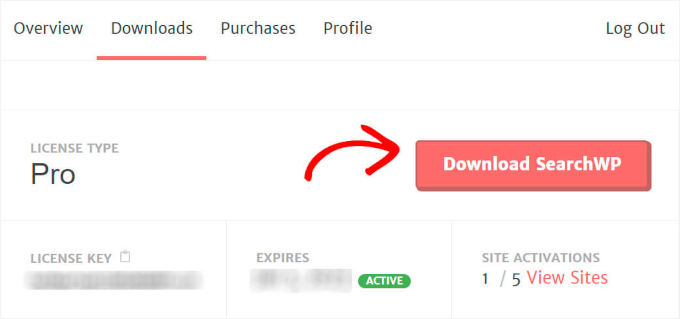
Once that’s done, head over to the ‘Downloads’ tab in your SearchWP account.
Afterward, you can click the ‘Download SearchWP’ button to save the plugin file to your computer.
Now that the plugin is downloading, don’t forget to copy your license key. You’ll need it shortly to activate the plugin.
Next, you can hop over to your WordPress admin area and upload the SearchWP plugin zip file.
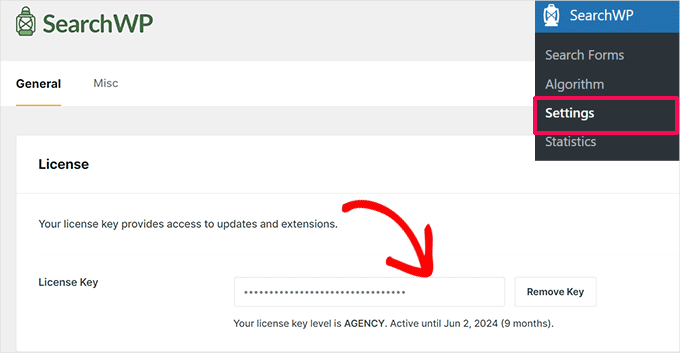
Once SearchWP is installed and activated, it’s time to enter your license key.
To do this, you’ll head to SearchWP » Settings and locate the ‘License Key’ field.
Then, simply paste your SearchWP Pro license key into the field and hit the button to activate it.
With SearchWP now up and running, you’re all set to move on to the next step.
Step 2: Install and Activate the Metrics Extension
While SearchWP collects search data by default, the Metrics extension takes things to the next level by giving you advanced insights into your visitors’ search behaviour.
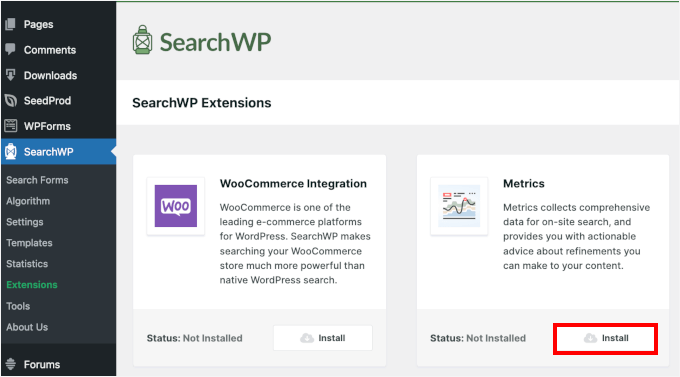
To get started, you can head to the SearchWP » Extensions from your WordPress admin area. Then click the ‘Install’ button beneath the Metrics extension.
This will start the installation and activation process for the Metrics extension.
Step 3: Check Out Your Site Search Terms Data
Once the Metrics extension is activated, let’s take a look at the search analytics data.
First, you need to head to SearchWP » Metrics.
Here, you’ll see all the search data collected from your site visitors. At first, there won’t be any data since you just installed the plugin. But from now on, every search on your site will appear here.
You can try performing a search on your live site to see how it works.
After that, you can head back to the ‘Metrics’ tab and check if your search query appears in real time.
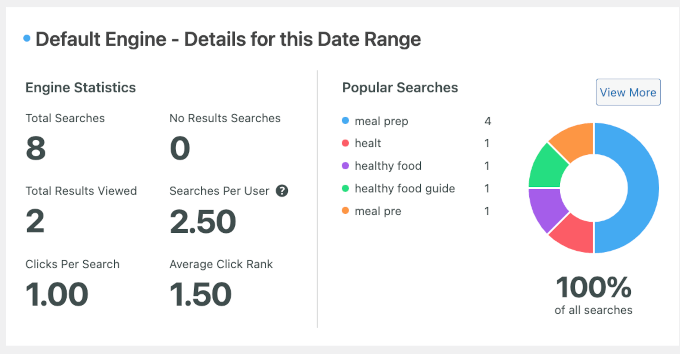
That’s it! You should now see the search term you used displayed like this:
On the right-hand side, you’ll see your site’s popular searches.
Meanwhile, the left-hand panel is where you can see the detailed reports of your site’s search analytics. They include the following metrics:
Total searches: This shows how many times people have used the search bar on your site.
Total results viewed: This tells you how many search results people clicked on.
Clicks per search: This shows the average number of results people click on when they search.
No results search: This shows how often people searched but didn’t find anything.
Searches per user: This tells you how many searches each user makes on your site on average.
Average click rank: This shows how high up the search results people are clicking, helping you understand which results are most popular.
By now, you’re all set to start tracking and analysing the search activity on your website.
Method 2: How to See External Search Analytics in WordPress
The Search Statistics dashboard in All in One SEO (AIOSEO) gives you a bird’s-eye view of your website’s performance on Google.
From tracking impressions and clicks to analysing keyword and content performance, it gives you all the insights you need to improve your site’s visibility.
At WPBeginner, we use AIOSEO for various SEO tasks, such as optimizing meta descriptions, title tags, OpenGraph settings for Facebook and X (formerly Twitter), and more. So, we know first hand why it’s the best SEO plugin on the market. For a deeper dive, don’t miss our complete AIOSEO review!
First, you will need to sign up on the All in One SEO website. Just click on the ‘Get All in One SEO for WordPress’ button on the homepage.
Keep in mind that you will need the Elite plan to access the Search Statistics feature. However, you can also check out the free version of AIOSEO on WordPress.org and see if you like the tool.
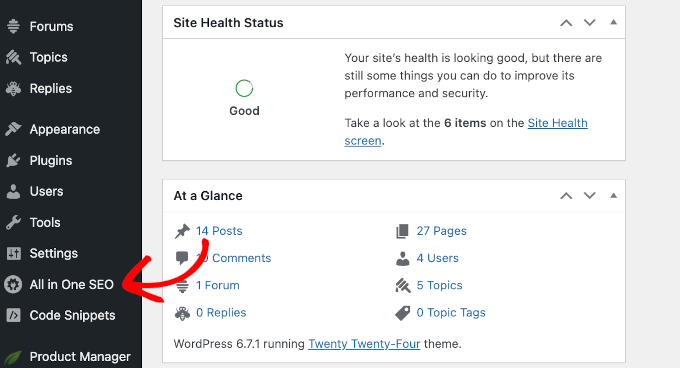
Once you’re all signed up, you’ll need to head to your WordPress dashboard to install and activate the All in One SEO (AIOSEO) plugin for WordPress. If you need help, check out our step-by-step guide on how to install WordPress plugins.
Upon activation, the plugin will run a setup wizard.
To set it up, click the ‘Let’s Get Started’ button and follow the on-screen instructions.
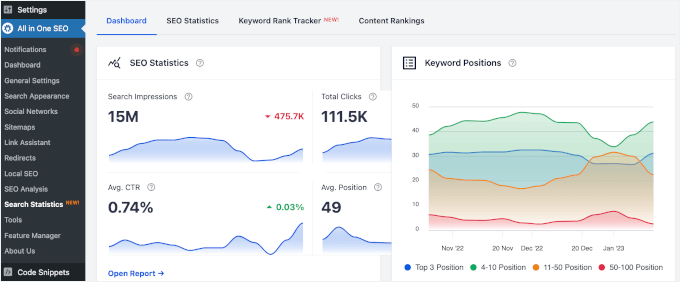
On the other hand, the Keyword Positions diagram shows your content rankings across the search engine results pages (SERPs), whether it’s in the top 3, positions 4-10, 11-50, or 50-100.
If you scroll down this tab, you’ll find additional overviews in widget format. Each widget provides a quick overview, and you can click on them to access the full reports.
Now that you’re familiar with the dashboard, let’s dive into the analytics in each tab: ‘SEO Statistics,’ ‘Keyword Rank Tracker,’ and ‘Content Rankings.’
Step 3: Explore the SEO Statistics Reports
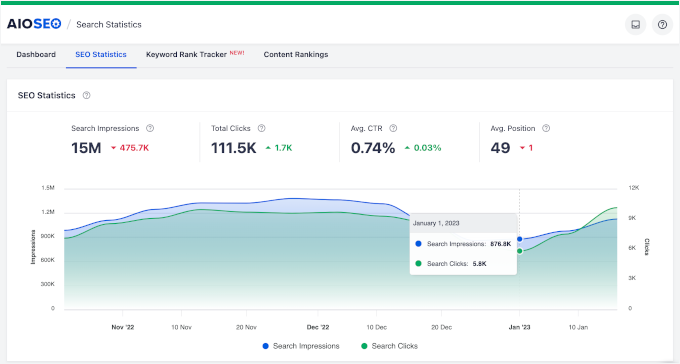
In the ‘SEO Statistics’ tab, you can explore key metrics like search impressions, total clicks, average CTR, and average search position.
Here’s what each one means:
Search Impressions: How often does your site appear in the search results?
Total Clicks: The number of times users clicked on your site from the search results.
Average CTR (Click-Through Rate): The percentage of impressions that resulted in clicks.
Average Search Position: The average rank of your site in the search results.
Below the quick count, you can see a diagram comparing search impressions and clicks. Comparing these 2 metrics helps you understand how effective your content is at attracting visitors.
Here’s why:
Impressions show how often your site shows up in search results, but they don’t guarantee that people will click.
Clicks indicate how many people actually clicked on your site after seeing it in the search results.
By comparing these 2, you can see how well your titles and meta descriptions are convincing people to visit your site. A low click-through rate (CTR) means you might need to update your content’s appeal or relevance.
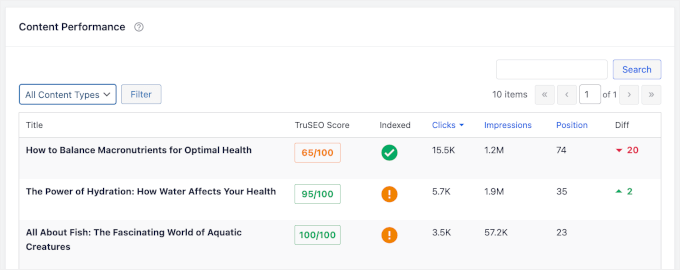
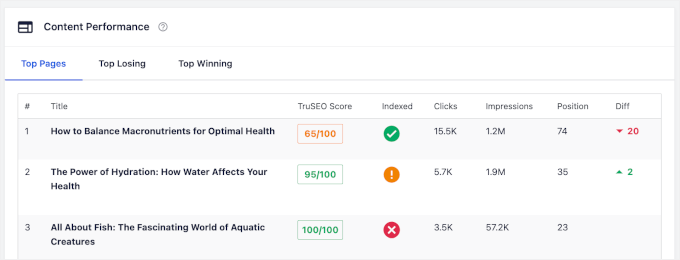
At the bottom of the tab, you’ll find the ‘Content Performance’ section.
Here, you’ll see a more detailed report on how each of your posts or pages is performing.
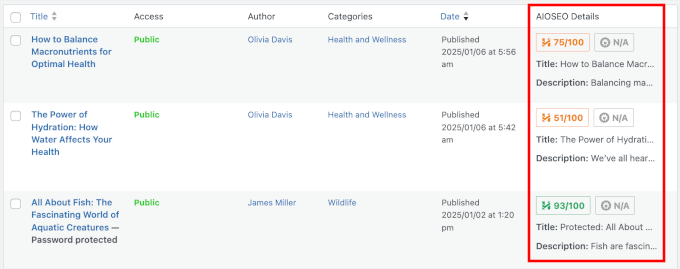
There are also dedicated columns that let you know how your content is doing in terms of AIOSEO’s TruSEO scores and if Google has indexed it.
Additionally, the ‘Diff’ column shows whether your content has moved up or down in search rankings. This data helps you spot changes and make improvements.
Step 4: Dive Into Keyword Insights
Tracking keyword performance lets you monitor their rankings, identify trends, and optimize for better results for your content.
To dive deeper into how your keywords are performing, you can start with the Search Statistics dashboard.
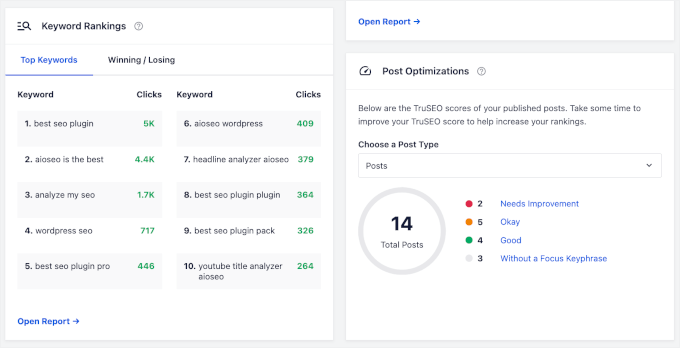
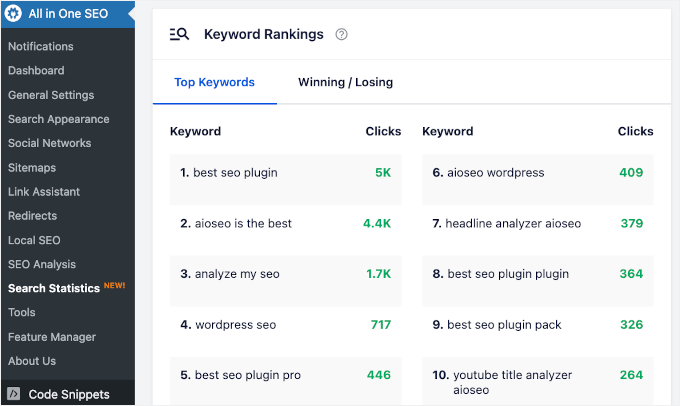
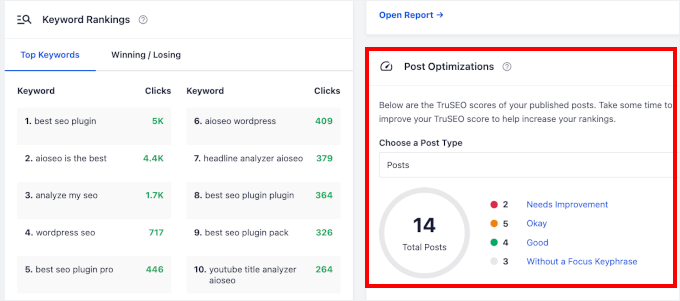
Besides the ‘Keyword Positions’ widget, which shows your keyword ranking distribution, there’s another widget you’ll find helpful: the ‘Keyword Rankings’ widget.
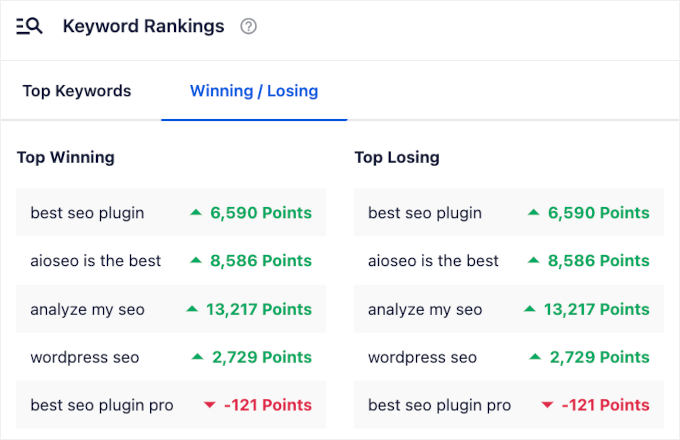
This widget gives you two quick insights: Top Keywords and Winning / Losing keywords.
The ‘Top Keywords’ tab gives you valuable information about which keywords are driving the most clicks to your website.
Then, there’s the ‘Winning / Losing’ tab.
Winning keywords are those that are performing well – these are your golden opportunities for further content optimization.
Losing keywords, on the other hand, might need a little more attention, whether that means optimizing them further or considering replacements.
This gives you a quick view of where to focus your efforts!
Now, you can switch to the ‘Keyword Rank Tracker’ tab, where you can find more tabs.
Let’s start by heading over to Rank Tracker » Keywords.
From here, you can see the total number of keywords that are tracked on your site. You can also find the total number of search impressions, clicks, and average CTR.
At the bottom of the ‘Keywords’ tab, you’ll find a table.
It shows you all the keywords tracked on your site and their performance in terms of clicks, CTR, impressions, positions in the SERPs, and position history.
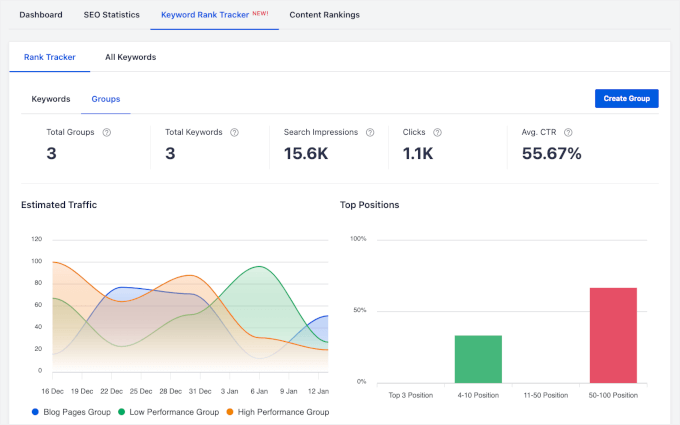
Then, let’s check out what the ‘Groups’ tab has to offer.
In addition to keywords, impressions, clicks, and CTR, you can view the total number of keyword groups tracked on your site.
In the 2 graphs below, you’ll find the estimated traffic and top position for all your keyword groups.
For more details, you can see the information in the table at the bottom of the tab.
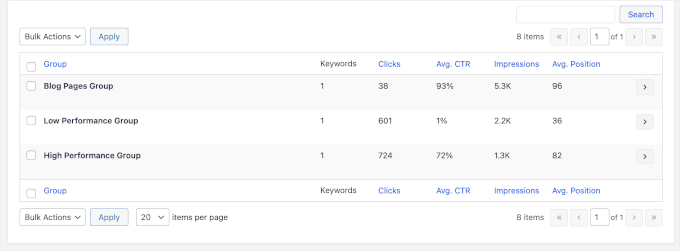
For example, we have 3 keyword groups: ‘Blog Pages Group,’ ‘Low Performance Group,’ and ‘High Performance Group.’
Then, you have the data on their clicks, CTR, impressions, and average positions.
Now, you’ll want to move to the ‘All Keywords’ tab.
In this tab, you’ll find 2 sections: ‘Keyword Positions’ and ‘Keyword Performance.’
The ‘Keyword Positions’ section tells you the total number of keywords that your site ranks for in the search results. You can also see the search impressions and average positions.
Plus, you’ll notice small details like green up arrows and red down arrows, showing whether numbers are increasing or decreasing over time.
To view a detailed breakdown, scroll down to the ‘Keyword Performance’ section.
Here, you can track each keyword’s clicks, average CTR, impressions, and positions.
Step 5: Take a Closer Look Into Content Performance
In the Search Statistics dashboard, you’ll find the ‘Content Rankings’ section at the very bottom of the page.
This area lets you see your ‘Top Pages,’ ‘Top Winning,’ and ‘Top Losing’ content. Key metrics you’ll see include:
Clicks: The number of times your content was clicked from the search results.
Impressions: How many times has your content appeared in the search results?
Position: The content ranking in the SERPs.
Ranking Differences: Changes in your content’s ranking over time.
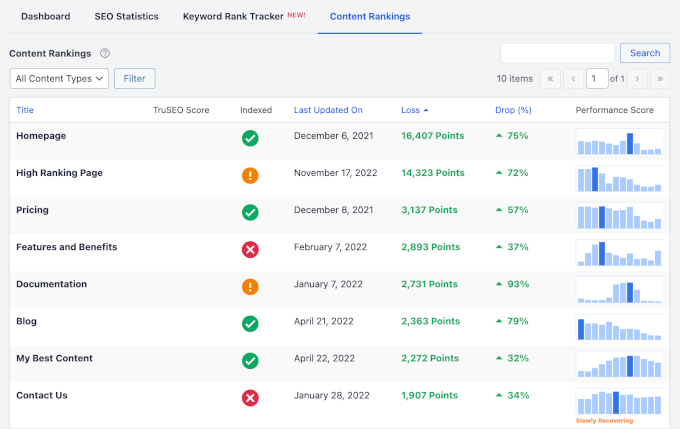
In the ‘Content Rankings’ tab, you’ll also find several important data points:
TruSEO Score: This is a score reflecting how well your content is optimized for SEO.
Last Updated On: The most recent date when the content was updated.
Loss Drop (%): The percentage decrease in rankings or performance.
Performance Score: This score indicates the overall performance of your content based on its ranking and engagement.
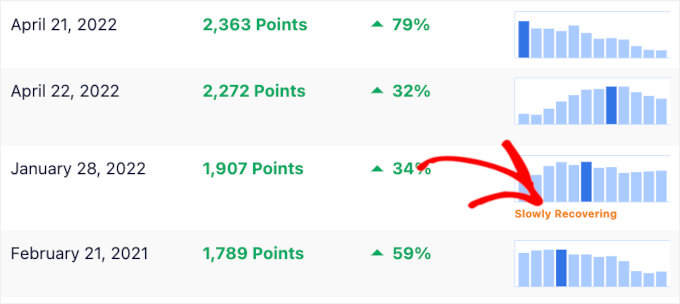
Sometimes, you may notice a little snippet in the ‘Performance Score’ column, such as ‘Slowly Recovering.’
This indicates that while the page isn’t yet back to its previous performance, it is gradually improving in rankings, and you might see positive results soon.
Step 6: Take Action on Post Optimizations
Finally, there’s the ‘Post Optimization’ widget in the ‘Dashboard’ tab.
This section offers insights and suggestions to improve your posts’ TrueSEO scores.
Here, you’ll find 4 post categories: Needs Improvement, Okay, Good, and Without a Focus Keyphrase.
If you click on any of these categories, you’ll be taken to the ‘Posts’ section, where the blog posts are filtered according to the selected category.
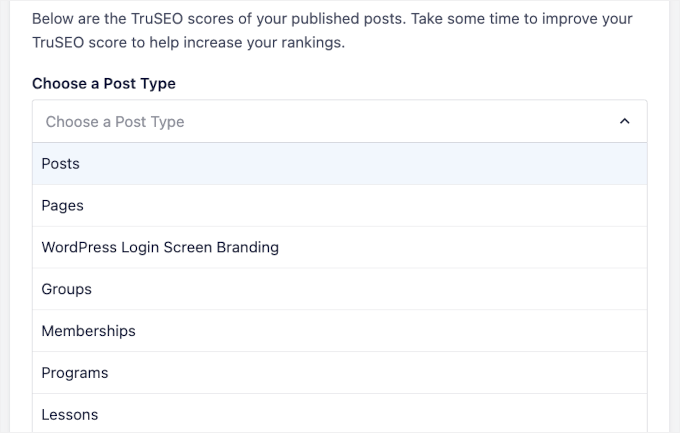
If you want to see how your other content types perform, then you can use the dropdown menu to select a content type.
AIOSEO works with various content types, including pages, memberships, courses, and more!
Once you’ve looked at all this data, you may be wondering how to improve your content and rankings. The articles below can help you out:
ℹ️ Struggling with WordPress SEO? Let our experts set up a solid SEO foundation for your site. From technical audits to keyword research and local SEO, our team can handle everything to boost your rankings and traffic.
Apple hints at governments breaking into locked iPhones
Apple releases update for iOS and iPadOS devices with security patch
It claims the update fixes a bug disabling USB Restricted Mode
The bug was being abused in the wild, Apple says
Apple has released a new patch for iOS and iPadOS devices to fix a recently discovered flaw – which normally would be nothing extraordinary, had Apple not described the patched vulnerability quite as dramatically as it did.
In a security advisory, the company said it was releasing iOS 18.3.1 and iPadOS 18.3.1 to address CVE-2025-24200, a flaw plaguing many of its iPhones and iPads which could allow a malicious actor to run a “physical attack” that disables USB Restricted Mode on a locked device.
USB Restricted Mode is a security feature that prevents data transfer through the Lightning (or USB-C) port when the device has been locked for more than one hour. This helps protect against hacking tools that try to bypass passcodes or extract data via USB connections.
Breaking into locked iPhones
Apple said it fixed the issue with improved state management, but added: “Apple is aware of a report that this issue may have been exploited in an extremely sophisticated attack against specific targeted individuals.”
The wording here, although not specific, suggests the vulnerability might have been used by law enforcement and other state-sponsored agencies to unlock iPhones from individuals of high interest.
Apple has a long history of conflict with the US government. While the latter demanded, on a few occasions, that Apple hand over access to iPhones seized from alleged terrorists and other criminals, Apple vehemently declined, arguing that such a move would undermine the privacy of all users and thus ruin the brand itself.
As a result, the US government hired third-party cybersecurity agencies that claimed they had working methods of breaking into locked iPhones. As TechCrunch reported recently, Amnesty International documented a series of attacks by Serbian authorities where they used Cellebrite, an Israeli digital intelligence company known for its phone forensic tools allegedly used to extract data from locked and encrypted smartphones, to unlock the phones of activists and journalists in the country, and then install malware on them.
Researchers find that the more people use AI at their job, the less critical thinking they use.
A new paper from researchers at Microsoft and Carnegie Mellon University finds that as humans increasingly rely on generative AI in their work, they use less critical thinking, which can “result in the deterioration of cognitive faculties that ought to be preserved.”
“[A] key irony of automation is that by mechanising routine tasks and leaving exception-handling to the human user, you deprive the user of the routine opportunities to practice their judgement and strengthen their cognitive musculature, leaving them atrophied and unprepared when the exceptions do arise,” the researchers wrote.
The researchers recruited 319 knowledge workers for the study, who self reported 936 first-hand examples of using generative AI in their job, and asked them to complete a survey about how they use generative AI (including what tools and prompts), how confident they are the generative AI tools’ ability to do the specific work task, how confident they are in evaluating the AI’s output, and how confident they are in their out abilities in completing the same work task without the AI tool. Some tasks cited in the paper include a teacher using the AI image generator DALL-E to create images for a presentation about hand washing at school, a commodities trader using ChatGPT to “generate recommendations for new resources and strategies to explore to hone my trading skills,” and a nurse who “verified a ChatGPT-generated educational pamphlet for newly diagnosed diabetic patients.”
This segment is a paid ad. If you’re interested in advertising, let’s talk.
Data brokers and hackers have access to increasingly automated tools to find and take advantage of your personal data, putting you at risk. DeleteMe is here to help. Use DeleteMe to protect yourself from having your address, phone number, and other sensitive personal information leak on the internet. We’re offering 404 Media readers 20% off all consumer plans.
Overall, these workers self-reported that the more confidence they had in AI doing the task, the more they observed “their perceived enaction of critical thinking.” When users had less confidence in the AI’s output, they used more critical thinking and had more confidence in their ability to evaluate and improve the quality of the AI’s output and mitigate the consequences of AI responses.
“The data shows a shift in cognitive effort as knowledge workers increasingly move from task execution to oversight when using GenAI,” the researchers wrote. “Surprisingly, while AI can improve efficiency, it may also reduce critical engagement, particularly in routine or lower-stakes tasks in which users simply rely on AI, raising concerns about long-term reliance and diminished independent problem-solving.”
The researchers also found that “users with access to GenAI tools produce a less diverse set of outcomes for the same task, compared to those without. This tendency for convergence reflects a lack of personal, contextualised, critical and reflective judgement of AI output and thus can be interpreted as a deterioration of critical thinking.”
The researchers also noted some unsurprising conditions that make workers use more or less critical thinking and pay attention to the quality of the AI outputs. For example, workers who felt crunched for time used less critical thinking, while workers in “high-stakes scenarios and workplaces” who were worried about harm caused by faulty outputs used more critical thinking.
So, does this mean AI is making us dumb, is inherently bad, and should be abolished to save humanity’s collective intelligence from being atrophied? That’s an understandable response to evidence suggesting that AI tools are reducing critical thinking among nurses, teachers, and commodity traders, but the researchers’ perspective is not that simple. As they correctly point out, humanity has a long history of “offloading” cognitive tasks to new technologies as they emerge and that people are always worried these technologies will destroy human intelligence.
“Generative AI tools […] are the latest in a long line of technologies that raise questions about their impact on the quality of human thought, a line that includes writing (objected to by Socrates), printing (objected to by Trithemius), calculators (objected to by teachers of arithmetic), and the Internet,” the researcher wrote. “Such consternation is not unfounded. Used improperly, technologies can and do result in the deterioration of cognitive faculties that ought to be preserved.”
I, for example, am old enough to remember a time when I memorized the phone numbers of many friends and family members. The only number I remember now that all those contacts are saved on my phone is my own. I also remember when I first moved to San Francisco for college I bought a little pocket map and eventually learned to navigate the city and which Muni busses to take where. There are very few places I can get to today without Google Maps.
I don’t feel particularly dumb for outsourcing my brain’s phonebook to a digital contacts list, but the same kind of outsourcing could be dangerous in a critical job where someone is overlying on AI tools, stops using critical thinking, and incorporates bad outputs into their work. As one of the biggest tech companies in the world, and the biggest investor in OpenAI, Microsoft is pot committed to the rapid development of generative AI tools, so unsurprisingly the researchers here have some thoughts about how to develop AI tools without making us all incredibly dumb. To avoid that situation, the researchers suggest developing AI tools with this problem in mind and design them so they motivate users to use critical thinking.
“GenAI tools could incorporate features that facilitate user learning, such as providing explanations of AI reasoning, suggesting areas for user refinement, or offering guided critiques,” the researchers wrote. “The tool could help develop specific critical thinking skills, such as analysing arguments, or cross-referencing facts against authoritative sources. This would align with the motivation enhancing approach of positioning AI as a partner in skill development.”
Emanuel Maiberg is interested in little known communities and processes that shape technology, troublemakers, and petty beefs. Email him at [email protected]More from Emanuel Maiberg
A comprehensive guide to every social media content type, along with several ideas for each to fill your content calendar.
Remember when social media content was limited to Facebook statuses and, er, “pokes?” Even a few years later, cutting-edge content was limited to a blurry photo with an oversaturated filter on Instagram.
It seems bizarre now, given how much you can do with social media today. With the ever-growing list of platforms releasing new features daily, it’s an exciting time to build a following online — but it’s not an easy one.
With the plethora of social media content options available every time you open your favourite app, it can be difficult to know what type of content your audience most wants to see. Short-form video? A carousel? A good old-fashioned selfie?
Well, that all depends on you and your audience. The right mix of content will be the sweet spot between what your audience most wants to see and what is easiest for you to create consistently.
Text-only posts have survived from the early days of social media, and with good reason — they’re still the bread and butter of many a social media marketing strategy.
Not convinced yet? Even Instagram allows for text-based posts (in the form of Instagram Notes and ‘Create-mode’ Instagram Stories), and TikTok introduced its own text-based post style in 2024.
In summary: text posts aren’t going anywhere.
Perhaps the best thing about this social media content type is how easy it is to create — as opposed to, say, video. This is a crucial consideration if you’re looking to get more followers on LinkedIn, X, Threads, and other platforms that allow for text-based posts.
Consistent activity on the platform is far more important than busting your gut to create high-effort videos. If all you have time for is, say, a quick tweet or Threads post, do that, rather than sit on your hands.
Buffer CEO Joel Gascoigne recently summarized this in a (text-based) post across platforms:
Text-based post ideas
1. Chop up long-form content into threads
Written a great blog post or newsletter? Platform character limits don’t mean lengthier posts like this are off the table. In fact, thread functionality on platforms like X, Threads, and Bluesky (if you post with Buffer) really lends itself to summaries of long-form content.
Here’s a thread example from Buffer guest post contributor Gaetano DiNardi, which surprised him by going viral on X — his explainer shows that repurposed social media content can surprise you when you give it life on a new platform.
2. Share industry news
A round-up of all the latest goings-on in your industry can be incredibly helpful for your followers and positions you as a first-in-the-know thought leader.
Speaking of thought leadership: building yourself up as a thought leader on platforms like LinkedIn, X, Threads, and beyond is an excellent way to future-proof your career.
Sharing your unique insights, experiences, and expertise can help establish your credibility and attract others in your area (and prospective clients or hiring managers).
Consider discussing industry trends, offering career advice, or sharing lessons learned from your own journey. These posts can spark meaningful conversations and might even open the door to your next big opportunity.
Buffer’s Director of Growth Marketing, Simon Heaton, regularly shares posts that detail how the Buffer marketing team works, like this one:
4. Ask engaging questions
Engaging your target audience with thought-provoking questions is a clever, lightweight way to boost engagement and gather useful information for your content, work, or life.
You could share your thoughts on current events and ask others to weigh in. You could also go the more personal route and gather advice from other folks in similar industries or situations. The latter is a particularly great strategy on Threads, where niche communities are often ready to lend a hand.
Here’s a great example from Buffer’s Head of Content and Communications, Hailley Griffis:
These types of posts can also spark social media content ideas. In fact, leveraging YouTube Community Posts to gather new video ideas or feedback is a successful YouTuber staple.
Ali Abdaal uses this tactic often, using responses to spark a whole new video series. Here’s an example:
5. Share behind-the-scenes stories
Audiences love to connect with brands (business or personal) on a deeper level. Sharing a relatable story that will make a viewer think, “Hey, I totally get that,” or, “They’re just like me,” can be an excellent way to strengthen their support of your work.
The more authentic, the better.
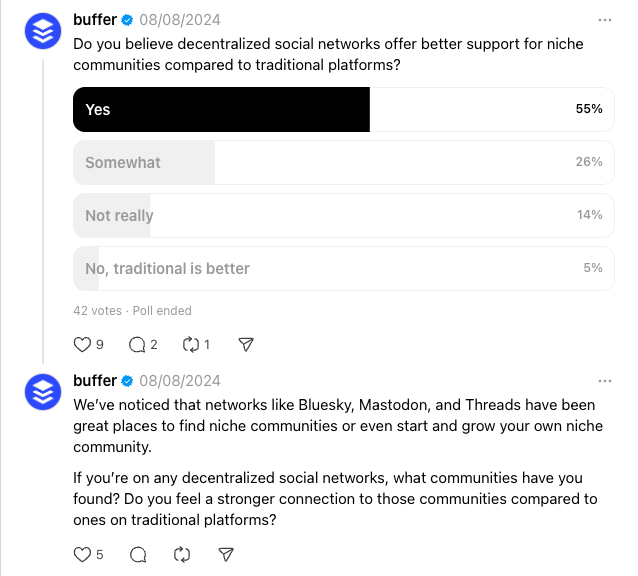
6. Create polls to spark discussion
Polls are a staple feature on most social platforms. Almost all of them have some sort of ‘poll’ post type that you can use to gather feedback and prompt discussion.
They’re a great way to generate engagement and even spark ideas for new content you can share.
If your preferred social media platform doesn’t have a poll functionality, you could ask folks to react or comment with a certain emoji to choose a specific option. The easier it is for them to engage, the more likely they are to do so.
Pro tip: Offer your target audience a way to share an answer not in your poll by creating an ‘Other’ option and asking them to comment with more context.
Short-form videos
Short-form video is known by many names across platforms — ’Shorts’ on YouTube, ‘Reels’ on Instagram and Facebook Reels, and ‘TikToks’ on well, TikTok. Videos can also be shared on LinkedIn, Threads, Twitter/X, Mastodon, and more.
Whatever your platform preference, short-form video — usually clips that are 90 seconds or under — is one of the most powerful types of social media content you can invest in.
According to Buffer data, videos are the content format most likely to get engagement across most major social platforms. It makes sense — short-form videos are tailored to mobile devices, where you’ll find most social media users consuming content these days.
So if you have the resources to create short-form videos, they’re well worth investing in.
Short-form video ideas
7. Chop up long-form video content
Waste not, want not. When it comes to creating enough content to maintain a strong social media presence on any platform, repurposing is your best friend. Cutting key moments out of longer YouTube videos is the best example here (resized for that all-important 9:16 ratio, of course), but don’t sleep on other videos, either.
If you’re hosting a webinar or speaking at professional events, be sure to get the recording — even a 30-minute session can yield several different one-minute clips for your social media platform of choice.
Here’s a highlight snippet from a podcast recording I did with Simon, which I chopped up into shorter clips for Instagram and TikTok:
8. Tap into trending audio
Trending audio and music tend to rear their heads on TikTok first, then pop up on Instagram and Facebook Reels — so you’ll be ahead of the curve if you keep an eye on TikTok.
Tiffany Morris, Owner of Luxe Gather, does a great job of keeping on top of these trending sounds and applying them to Instagram Reels to promote her business. (Here’s her clever system for creating these videos).
9. Record ‘stock footage’
My Buffer teammate Mitra Mehvar put me on to this, and it’s genius — she keeps an album of ‘stock footage’ she can use for short-form videos with a simple text overlay.
This could be anything: working at your desk, going about your day, putting the finishing touches on a new product, or even some beautiful scenery you happen to pass by. Here’s a guide to creating social media stock footage of your own.
10. Add text to videos
Wondering how you can convert your clever text posts into content for video-focused social media channels? Put your message in the medium.
This idea is particularly well-paired with idea no. 9 above — rather than saving your text for a caption, you could add some thoughts as text over your stock footage with a simple video editing tool CapCut.
Whether you’re a creator, a business owner, or a marketer, this versatile trend can work. These videos, which give your target audience a fly-on-the-wall view of a day in your life, are actually relatively easy to make.
They simply involve grabbing some clips of a couple of key moments in your day and stringing them together in your editing app of choice. You can choose to add a voiceover contextualizing things, add a trending song, or just use the ambient noise from the clips (hello, #asmr).
The key here is to approach your day from an interesting angle — what about your life might be interesting or relatable? So rather than ‘Spend a day with me,’ opt for ‘Spend a day with me as a business owner in Toronto,’ or ‘Spend day 5 of my 4-day workweek with me,’ as I did below.
Creating the video for your business? Be sure to tie it back to the brand in some way: ‘Spend a day with me as host a founder event’, or ‘Spend a product launch day with me,’ could offer a behind-the-scenes look and humanize the brand for your customers.
12. Crosspost Instagram Reels and TikToks
It’s nearly impossible to predict what social media content will perform best where — so don’t shy away from sharing the videos you create on other platforms.
As creators or social media managers, we often fall into the trap of thinking everyone in our audience has seen everything, but in reality, only a small fraction of our audience will follow us on multiple social media channels.
X, Threads, and LinkedIn all support video. LinkedIn, in particular, is doubling down on short-form video content with an in-feed ‘Videos for You’ segment that has seen video reach on the platform skyrocketing.
That ‘spend a day with me,’ video I shared above? It was one I created with TikTok in mind as part of my 30-day TikTok experiment, and I shared it on LinkedIn on a whim.
On TikTok, the video had a solid 6.8K views. On LinkedIn, it had well over 50K.
If you’re a business, partnering with other video creators and users in your audience on UGC (user-generated content) who align with your brand can help you boost credibility, reward brand ambassadors, and reach audiences beyond your own.
Creators who use your product or services (and talk about it) are like social media gold dust, but don’t underestimate the power of social media content created by regular users, either.
Use Instagram’s Remix or TikTok’s Duet or Stitch features to put your own spin on their social posts — but I’d recommend asking for permission first. If they’re excited about your brand, there’s no doubt they’ll be happy to be featured on your feed.
Photo posts
Classic social media photo posts can still garner a healthy reach on platforms — and aren’t exclusively for Instagram.
X (formerly Twitter) and LinkedIn both support image posts, and even Facebook still sees engagement with visual content.
Photo post ideas
14. Don’t shy away from the selfie
Putting a face to a post — preferably yours — can make or break it. This is something I can personally attest to. Some of my top-performing posts as a creator on LinkedIn have all featured my face.
15. Share a product sneak peek
If you’re preparing to launch a new physical product, a sharing simple sneak peek image — either a blurred-out photo, or only a small piece of the item —is a great way to whet your customer’s appetites and drum up excitement for the launch.
You could even turn the post into some sort of guessing game and giveaway in the comments, and offer the first user to get it right a prize.
16. Create a collage
Social media tools like Canva and Instagram’s Layout make editing together a selection of images a breeze. Tell a visual story by juxtaposing several elements in one image, the way Buffer content writer Tami Oladipo did in this clever Threads post.
Photo carousels
Take all of what I mentioned above and multiply that by 10 (or 35 and 20, in the case of TikTok and Instagram, respectively.)
Carousels are a fun way to offer a window into your world or share behind-the-scenes content both as a brand or creator. The best part about photo carousels (if an aesthetic feed is important to you) is that they don’t all need to be picture-perfect.
Edit the first image to stay on brand, and the rest can be a little more raw and authentic. In fact, a level of authenticity is par for the course in this post style (thanks, Gen Z).
17. Try a weekly ‘photo dump’
Out: Perfectly polished feeds on Instagram. In: Messy, authentic, candid snaps. This trend lends itself perfectly to carousel-style posts, where all you need are some recent snaps from your camera roll.
Fitness creator Meggan Grubb shares ‘photo dumps’ like this every week, and her followers can’t get enough of them:
18. Add text to your images
Another option could be to include short sentences on each photo in a carousel for more context.
This carousel style became popular on TikTok, but now Instagram has added the ability to add text into your images natively, too. On other platforms, apps like InShot, Canva, or CapCut will get the job done even better.
The trick is to keep your text simple to make it easy to digest — no more than a line or two per image.
Graphic carousels
Not to be confused with their simpler sibling, photo carousels, graphic carousels are images or PDFs (on LinkedIn) that your audience can swipe or click through like a slide show.
Created in tools like Canva or Visme, they’re usually visually appealing and feature short, snappy, helpful information. They work particularly well on LinkedIn, Instagram, and Threads — and they’re also great for engagement.
We have a guide to creating LinkedIn carousels and a comprehensive list of LinkedIn Carousel ideas here (which can be adapted for Instagram and other platforms). Here’s a few of the latter.
Graphic carousel ideas
19. Give step-by-step instructions and advice
Carousels are a great way to share step-by-step instructions or guides. This can be useful for sharing how-to content, tutorials, or tips. For example, you could create a carousel that walks users through setting up a specific software or tool.
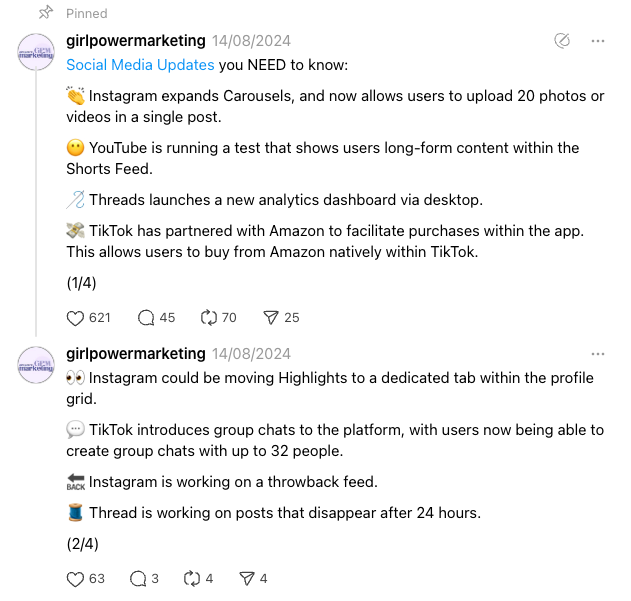
20. Round up new features or industry trends
Carousels offer a way to share bite-size snippets with your users, customers, or followers that they will actually digest. The Instagram @Creator account is a brilliant example of this.
They regularly share new platform updates in a simple carousel format like the example below:
They also use this format to showcase social media trends that creators can tap into, as in this post:
21. Spotlight your customers or followers
With their permission, a feature on your feed will go a long way to show how much you value your biggest supporters.
Here’s a recent example of how Buffer shined the spotlight on one of our users on Instagram:
Long-form videos
Long-form video content remains a powerful tool for engaging audiences across various platforms.
Longer videos allow for in-depth storytelling, detailed explanations, and comprehensive tutorials. Platforms like YouTube, Facebook, and now even TikTok are great for this format.
On platforms that function as social search engines like YouTube and TikTok, these videos also tend to have more longevity than their short-form counterparts. On YouTube especially, a solid YouTube SEO strategy could mean your videos continue to get views for years after posting.
But in the world of short-form video focus, keeping your audience engaged for anything longer than 30 seconds can be tough.
There are plenty of ways to do this (as we unpack in our guide to growing your subscribers on YouTube), but in broad strokes:
make sure your video is high-value and delivers on its promise
use creative stock footage or subtle animations and sound effects
segment longer videos into titled chapters to help your viewers find what they’re looking for.
Long-form video ideas
22. How-tos or tutorials
These types of videos are perfect for demonstrating complex processes or techniques — and building report with your viewers while you do it.
For example, a makeup artist could create a detailed tutorial on achieving a specific look, or a software company could produce a comprehensive guide on using their product.
Here’s a great example from Todoist:
23. Behind-the-scenes content
Give your audience a peek into your world. This could be a day-in-the-life video, a tour of your workspace, or a look at how your products are made.
24. Video podcast
The age of the podcast has evolved to the age of the ‘vodcast’ — that is, a podcast recorded with video as well as audio. This podcast style has become a staple for both podcasters and YouTubers, with many of them even setting up beautiful studios in which to sit down with their guests.
Here are some great examples from marketing podcast Nudge and YouTubers Colin and Samir:
Of course, you absolutely don’t need a high-tech set-up to tap into this format. Even a high-quality video call recording, if you host your podcast virtually, will do the trick.
Bonus: You’ll be spoilt for choice when it comes to video content to use on other platforms.
25. Interviews with experts
Another great way to spotlight leaders in your industry or expert customers is to invite them into your studio (virtual or otherwise) for a chat. There are plenty of benefits to creating social media content in this way:
it provides valuable, expert-led content for your audience
allows you to tap into the audience of your guests (if they have one)
it’s another way to spotlight and build relationships with expert customers or thought leaders.
The best part? As I touched on above, you really don’t need any fancy equipment to make this happen. A video call and a decent set of headphones is a great starting point.
26. Repurpose webinars and events
I’ll say it again: waste not, want not. If you’re hosting events as a brand or business, do hit that record button. Value-led sessions like these are an easy win for long-form video content and, if structured well, require little to no editing.
Here’s a recent example from a webinar the Buffer team hosted with Threads:
Please accept the cookie consent
URLs or link posts
This is an interesting social media content type in that social media posts that contain links often don’t perform as well. While most social media platforms don’t advertise the fact, it’s widely believed that link-only posts are not looked kindly upon by the algorithms.
The idea is that the platforms want the experience to be immersive for users, and don’t necessary want them clicking or tapping off to another destination.
That said, there is a time and place (and platform) for link-only posts.
Link post ideas
27. Stick to Pinterest
There’s no platform quite like Pinterest for sharing links, particularly if you or your brand fit into lifestyle niches.
Pinterest was built for external links. The idea of the platform is to save these external destinations so that users can visit them again later — think recipes, design ideas, workouts, and the like.
If your brand doesn’t quite fit into the most Pinterest-y niches, don’t discount the platform just yet. See our Pinterest how-to guide for a step-by-step explainer and ideas.
28. Use the first comment or last thread to share a link
If you’re sharing a link on platforms like LinkedIn, consider placing it in the first comment or as the last item in a thread.
This approach allows you to share helpful external content without potentially triggering algorithm penalties for link-heavy posts. You can use link-shortening services (like Buffer!) to create cleaner, more visually appealing URLs.
When sharing links, always provide context and explain why the content is valuable to your audience.
29. Try Facebook to drive clicks
According to Buffer data, of all the major platforms that support link-only posts (Facebook, LinkedIn, and X/Twitter), Facebook links tend to get five times more clicks than those posted on LinkedIn and four times more than those posted on X.
30. Leverage a link-in-bio tool
While this is not strictly a social media post idea, it’s worth noting here that it’s poor social media practice to include links in posts on TikTok and Instagram. The links won’t be clickable, and your viewers won’t be able to copy and paste them into a browser.
If you’re looking to direct folks elsewhere on these platforms (or any really) it’s a great idea to add the CTA (call to action) ‘Find the link in my bio’ or ‘Tap the link in bio to read more’. This will send viewers over to your profile where it will be easy for them to click on a link.
Of course, if the site you want to send them to is not front and centre, you’ll need a link-in-bio tool you can easily curate to show the most important information first. Buffer’s Start Page is a great (free!) alternative.
I use it to curate a list of my top home office products, something I get asked for often as a creator. Rather than including links to 15 different items in each post (honestly, who has the time?), I simply direct people to my Start Page link.
Experiment to figure out what social media content works best for your audience
Not all of the social media content ideas on this list will be a roaring success for you, and that’s OK. While a solid social media marketing strategy will help you theorize what might be the best fit, there’s no substitute for throwing the proverbial spaghetti to see what sticks.
And if you do find something that sends your follower count and audience engagement skyrocketing, great! But don’t be tempted to post one single social media content type until the end of time. Your audience will quickly tire of seeing the same social media posts over and over, so it’s worth coming up with several content types to mix and match in your social media calendar.
Your social media marketing should be an iterative, flexible plan that you refine and tweak as your social media accounts grow.
What happens when you add a transactional layer to experiential marketing? Adriano Lombardi of Momentum Worldwide explores some of the best examples of experiential commerce – a new frontier for marketing.
As businesses evolve and consumers’ needs and behaviours shift due to new technologies, certain disciplines have started to merge. A prime example is retail media, a space in which adtech and commerce increasingly unite to boost retailer revenue, paving the way to a post-cookie future.
Leading brands like Coca-Cola are leveraging technologies like augmented reality, AI-driven personalization, and interactive digital displays to create consumer journeys that merge the convenience of e-commerce with the tactile satisfaction of the physical-store experience. This approach not only enhances customer engagement, it also empowers businesses to collect valuable data on consumer behaviour across platforms.
While retail media has reshaped how brands advertise at the point of sale, experiential commerce now presents a complementary transformation.
As the name suggests, the idea comes from experiential marketing, which focuses on bringing consumers closer to brands. Whether for a minute or an hour, the goal is to create meaningful experiences to allow people to truly live the brand and connect with its purpose. On the other hand, commerce has always been about driving transactions.
By combining the two, you get experiential commerce: a dynamic medium that bridges the gap between living the brand and trying or buying its products. The perfect mix of brand experience and consumer action that unlocks new opportunities to build deeper consumer relationships and drive measurable results.
Point of sale
We often talk about frictionless experiences, both digitally and in-store. Enter French postal service La Poste and the bright yellow changing rooms (designed to look like their post boxes) that they installed in post offices. While not intended primarily to drive sales, by seamlessly combining convenience with transaction-driven engagement, this move exemplifies experiential commerce.
La Poste has removed a key friction point in online shopping – saving customers the hassle of trying and returning items at home. This consumer-centric solution transforms postal offices into spaces that enhance the shopping experience, making returns effortless and driving sales by prioritizing convenience and efficiency. A small footprint created a big impact – and presumably helped to drive sales.
An idea from the Philippines, This is an Ikea Store, involved placing showrooms with their furniture in public spaces like coffee shops, gyms, and even on beaches. These activations allowed people to experience their own “Ikea moment” in everyday settings. Price tags with QR codes attached to products enabled on-the-spot online purchases. The campaign effectively brought the in-store experience to familiar places and turned everyday moments into potential points of sale.
What might initially seem like a media or product placement idea from Peru, the ‘Rent Your Sunset’ campaign by Corona is, in fact, a brilliant example of experiential commerce. Businesses, hotels, and Airbnb owners can submit photographs of the sunset views from their windows. If chosen, Corona brands the window with a painted frame and supplies the owner with a number of free beers.
This initiative combines a memorable branded experience – transforming sunset views into vibrant brand hotspots – with a clear transactional layer through sampling opportunities. This exchange captures the essence of experiential commerce: integrating a path to trial or purchase with an immersive, shareable consumer moment.
And for the pet lovers? Designed for those who can’t leave home without their best friends, the Purina Club is a permanent dog-friendly section in soccer stadiums – where pets are normally banned. Bringing dogs to the game unlocks rewards and sampling opportunities – driving engagement and, ultimately, sales. That’s how to turn an experience into a transactional opportunity.
Bridging the gap
These examples each embody the emerging practice of experiential commerce. Each execution combines the tactile satisfaction of a physical store with the convenience of e-commerce. By combining the two, the brands involved successfully bridge the gap between experience and conversion. This not only enhances the user experience but allows companies to learn more about their target audience. Brands can then forge more meaningful relationships with their customers – driving measurable results.
Experiential commerce will change how we shop. Alongside retail media, it looks set to usher in a new era of customer-centric commerce. Get your brand ready.