The age of the Internet has given rise to the kind of workers the world never thought would gain so much traction: freelancers. These are people who use their varied skills to earn enough income without being bound by a contract tying them to only one company. They can collaborate with clients without the long-term commitment. It’s the ultimate freedom — or is it?
Like any job, freelancing has its fair share of challenges. Freelancers are not exempt from dealing with clients, conflicts in schedule, competition, and all those things nine-to-five employees face. If you’re a freelancer, you know this to be true.
Among the many hardships that freelancers face is one that can make or break their career: attracting and keeping clients. Both online and offline freelancers are faced with tough competition. To address this problem, you must stay one step ahead of your competitors. But how?
If you have access to the Internet, which I am sure you do, try using paid online advertising to get the ball rolling. The age of cold-calling is over, and thankfully, we have a new option: pay-per-click advertisements. Pay-per-click (PPC) marketing is one of the most common marketing schemes for small businesses. It works like a billboard ad in the sense that you pay for your space, but it gives you a much wider audience. This is especially beneficial to freelance online writers since we generally can’t employ the same marketing strategies as big businesses and brands.
What are the benefits of PPC marketing?
Unlike print advertising, PPC can instantly get your freelance writing services onto the radar of a large number of potential leads. It will give you the power to target your ads to a specific audience.
Because it is customizable, you can set it up to show your ad to specific areas and at certain times of the day. Best of all, you will only pay for the service each time a viewer clicks on your ad. This way, you’re only paying for those who are more likely to convert to actual clients. You even have the freedom to adjust your budget or redefine your target audience at any time, and the ad will reflect the changes almost instantly. It’s a great way to put yourself out there with maximum return on your investment.
Where do I set up my PPC marketing plan?
There are different types of PPC available on the Internet. You can go for search engine PPC advertising or social media PPC advertising — it depends on your industry and niche. For example, freelance writers may want to opt for search engine PPC marketing, as clients are more likely to turn to Google or Bing to look up writing services.
Search engine advertising provides targeted traffic and is keyword-driven. Leads are generated by people typing certain search words. Meanwhile, social media marketing is more interest-driven and appeals to people who share the same interests.
Whichever the case and whatever PPC you think will suit you best, here are the best PPC marketing channels that every freelancer can take advantage of to find more clients.
Google AdWords
Nowadays, more than 80% of online searches are done through Google. It has dominated the search engine market and is undeniably the most popular search engine.
Google AdWords is the PPC marketing system that Google offers businesses. Ads occupy the first four spots on the search results page and are shown again after ten organic search results. If a user clicks on your ad, they are redirected to your site or page, and Google AdWords charges you the corresponding fee. Advertisers bid for the top spots on the results page. The higher you are on the list, the better exposure you have.
As a freelance writer, you may not have a budget as large as big brands to bid for the top position, but setting up a PPC campaign can help you get the word out there without poking a hole in your wallet. You have the opportunity to attract more clients and only pay for those who are interested enough to click on your ad.
Source: Pixabay
Facebook Ads
Most people who have access to the Internet have a Facebook account. We talk to friends and family, we share photos, we share memes, we organize events, we sell products — almost everything and everyone can be found on Facebook. So can your next client. It’s only a matter of getting the word out about your freelance writing services.
Facebook Ads are cheaper than almost all other online advertising options, and their reach is almost limitless. You can target your ad by behavior, interest, demographics, connections, you name it. You can even tailor it according to age range and location. This is a great way to show up in a potential client’s newsfeed and get noticed.
Be sure to identify who your target audience is and be as specific as you can. What do you specialize in as a freelance writer? Copywriting? SEO? Any specific niche you are best at? You have to know your target audience’s age group, interests, and location in order to reach them with your ads.
Next, do your research. Find out what days and the specific time your target audience is likely to be online. Create your ad based on their online activity. What are their problems and needs? What questions do they ask in relation to the service that you provide? What images do they like to see? Or maybe they would be more attracted to videos? Do they like memes? Would they respond to Facebook quizzes? People go on Facebook to be distracted, so be sure to provide them with the best distraction.
It is important to tailor your ads carefully to make it more effective. While this is true for all marketing campaigns, it applies especially to Facebook ads.
LinkedIn Ads
LinkedIn is the professional older brother of Facebook. You will find even the most high-ranking executives on LinkedIn. Ads posted there will allow you to reach the key professionals in your industry. You can target your ad according to company names, company industry, company size, job functions, job titles, membership levels, and the like. If you are targeting professionals of a specific age or gender, you also have the option to target your ad to that demographic. On LinkedIn, you will see industry front-runners in the niche where you want to establish yourself as a writer.
LinkedIn’s PPC runs much higher compared to Facebook, at $5 per click. To get your money’s worth, be as specific as you can so your ad will generate higher quality leads. It is a good idea to segment your ads according to how you’ll be posting. You can also use sponsored updates, which appear in users’ newsfeeds, giving you premium placement.
Twitter Ads
Twitter offers the following advertising schemes:
promoted tweets
promoted accounts
promoted trends
The cost will largely depend on the type of ad you choose.
To promote a tweet, you will have to pay every time a user clicks the Favorite button, retweets your post, or replies to it. You will not have to pay per impression, which is the number of feeds your posts will show up on. A promoted tweet costs around $1.35 per engagement.
Promoting an account is essentially identifying a target audience to which Twitter will promote your account. This will work when you want to gain more followers that may be interested in your business. You pay per confirmed follower a fee of $2.50–$4.00.
Promoted trends, used typically by bigger companies, appear in the Trends section of Twitter and cost up to $200,000 per day.
While this may not be the most cost-effective PPC option for freelance writers, Twitter allows you to interact up close and personal with potential clients. This is still worth looking into if you’re willing to spend a little more on engagement.
How do I write my ad copy?
That being said, all ad copy is not created equal. The PPC campaign may grab a potential client’s attention, but your copy still holds the power of keeping them interested until they convert. Here are a few quick and easy tips to write better copy for your ads:
Hint at your services’ benefits. What will your client get if they hire you as a freelance writer? How will you help their business? Are you an SEO expert? Do you have other skills? Capitalize on that and highlight it in your ad. Remember to answer this question that most clients will ask: “What’s in it for me?”
Hint at your competitors’ weaknesses and gaps. This doesn’t have to be blunt and outright, but you must mention why they should choose you instead of other freelance writers.
Get to know your audience. Target a specific group or industry and focus your message on them by using “you” instead of “we.” It is also important to understand your medium — that is, which PPC platform are you putting your ad in?
Don’t forget a call-to-action. After you’ve laid out all your strengths and your competition’s weaknesses, make it count. Don’t leave your audience hanging and confused as to what you want them to do. Include a clear call-to-action that catches the eye.
Lastly, proofread. Proofreading will save you a lot of trouble, and it always pays to double-check your work before you release it on the Internet where it is much harder to take back.
Final thoughts
Any marketing plan will only initially get the client’s attention, then it’s up to you to keep the client. Remember to be true to what you promised in your ad and keep your integrity as a freelancer. After all, a good reputation goes a long way.
Have you tried ProWritingAid’s editing tool yet? It will help you edit faster, strengthen your writing, and get your ideas across.
Callum Mundine is part of the marketing team at One Egg. He is an Amazon marketplace & white hat link building specialist, and has launched multiple successful brands on Amazon.com. Callum like his eggs boiled.
Every Marketing Tool You Need to Know About in 2018
This mega list of marketing tools is categorized.
Check out tools for automation, email, ads, SEO, SMM, research, analysis and a ton more.
Most of these tools are either free or affordable.
Each tool alone has the power to energize your marketing successes. Together, these tools could add up to your winning formula for making marketing unicorns.
1. Site Audience Comparison
SimilarWeb
Alexa
Google Analytics
Experian
2. Digital Analytics Tools
Google Analytics
Google Analytics Premium
Adobe Analytics
Kissmetrics
3. SEO Keyword Analysis
Google AdWords Keyword Planner
Google Trends
SEMRush
Bing Ads
Übersuggest
4. SEO Rank Checking
Google Search Console
SEMRush
Searchmetrics
Moz
Ryte
5. SEO Site Crawling
Google Search Console
Ryte
Screaming Frog
6. SEO Backlink Analysis
Google Search Console
SEMRush
Ahrefs
Majestic
LinkResearchTools
7. AdWords Paid Search Analysis
WordStream
SEMRush
SpyFu
Optmyzr
8. Influencer Outreach and Management
Buzzsumo
BuzzStream
Traackr
Onalytica
Lithium
9. Data Management Platforms and Audience Targeting
Cxense
Criteo
Krux
Neustar
Oracle
Adobe Audience Manager
10. Page Engagement Tools
Clicktale
Crazy Egg
Tealeaf
11. Content Management Systems
Sitecore
Adobe Experience Manager
Acquia
Oracle WebCenter
12. Blogging Tools
WordPress
HubSpot
Movable Type
ExpressionEngine
Drupal
13. Content Curation and Authoring Tools
Evernote
IFTTT
Feedly
Scoop.it
Cronycle
14. Landing Page Creation and Testing Tools
Unbounce
LeadPages
Instapage
Optimizely
15. Digital Asset Management
Adobe Experience Manager
Wistia
Vimeo
Uberflip
Placeit
16. On-site Push Notifications
Hello Bar
BrightInfo
Sumo
Evergage
Bounce Exchange
SaleCycle
17. Personalization for Ecommerce
Evergage
Barilliance
Marketizator
SaleCycle
Monetate
18. Ecommerce Cart Recovery
Cloud.IQ
SaleCycle
Optilead
Fresh Relevance
Pure360
19. A/B and Multivariate Testing Tools
Convert
Visual Website Optimizer
Optimizely
Oracle Maxymiser
SiteSpect
20. Ecommerce Management
Magento
Woo Themes
Shopify
PrestaShop
Actinic
21. Product and Customer Review Tools
Trustpilot
Feefo
Yotpo
Bazaarvoice
Reevoo
22. Call Tracking
Infinity
Convirza
ResponseTap
CallTrackingMetrics
CallRail
Nextiva
23. Social Media Publishing Focus
HootSuite
Buffer
SproutSocial
Viralheat
FalconSocial
24. Social Media Listening Focus
SocialMention
Talkwalker Alerts
BuzzSumo
Social Crawlytics
Sysomos
25. Social Media Campaign Tools
Shortstack
Spredfast
Woobox
Pagemodo
Tabfoundry
26. Online Customer Service Tools
MobileMonkey
Zendesk
Help Scout
Get Satisfaction
Freshdesk
Groove
27. Marketing Cloud, CRM and Campaign Management Tools
HubSpot
Marketo
Hatchbuck
SalesForce
Oracle Marketing Cloud
Adobe Marketing Cloud
28. Email Service Providers and Marketing Automation Services
Aweber
iContact
MailChimp
Constant Contact
Get Response
Infusionsoft
Act-On
29. Facebook Messenger and Chatbot Tools
MobileMonkey
30. Email Marketing Optimization Tools
SurveyMonkey
Polldaddy
Typeform
Take your marketing strategies to the next level using the tools above.
Email is the top tool for driving leads into the pipeline — it is now being used by 67% of B2B marketers, according to Tapping Multi-Channel Marketing & Data As Key Engines For Growth, a study by DemandGen. Websites are used by 60%,and search by 50%. But search grew by almost 10% from last year.
Email is also the most effective channel — 59% say it works well for driving early-stage engagement. Search is second, and is cited by 56%. But email has no real competition in producing conversions later in the funnel — 81% say it’s effective, compared to 50%, who cite web sites and
No wonder the report calls email “the go-to channel.”
Overall, the study paints an optimistic picture — 70% of B2B marketers plan to increase their demand-gen budgets this year. Moreover, 22% expect hikes of over 20% and 12% anticipate 30% rises. Another 36% are allocating 1-10%.
In addition, 63% project revenue growth of more than 20%, and 25% foresee 30% increases. Also, 28% now have specific revenue-based quotas, a 5% over 2017. An 30% say pipeline influence is their main metric, for a 3% rise year-over-year. The study suggests that these are positive developments. Only 11% say accounts engaged is their primary measurement tool.
What are B2B marketers trying to do? Their main goals are focusing on lead quality over lead quantity (73%) and improving conversion rates and campaign results (72%).
Other objectives include increased lead volume (62%) and improving their ability to measure and analyze marketing impact (61%). Another 60% hope to improve their sales-marketing alignment, and 48% to improve their database accuracy.
Drilling down, case studies are best at converting and accelerating leads at the middle and late stages of the funnel (73%). Lead-nurturing campaigns are second (63%). But events are most useful in generating qualified leads at the top of the funnel.
B2B marketers are also seeking new MarTech tools, with 49% picking account-based technology (a slight decline from last year). Also, they plan to test multichannel lead nurturing (41%), content planning (37%), syndication, retargeting (37%) marketing automation (33%) and predictive lead scoring (29%).
That said, many may be hampered by the challenge of attributing and measuring campaign influence. Their databases are hardly complete, judging by this list of priorities:
We are actively reviewing our database to ensure we have full and complete contacts — 38%
Our database has good coverage, but many contacts are incomplete or inaccurate — 31%
Our contact database is inaccurate/is not adequate in covering our target markets — 18%
Our database is current and provides complete coverage of key segments — 10%
Not sure — 3%
As the study infers, all of this should lead to more accurate email marketing.
DemandGen surveyed 160 marketing executives. The study is sponsored by Content Demand, Integrate and Selling Simplified.
If you’re working in content marketing and have never heard of nor seen the sales or purchase funnel, stop what you’re doing right now and go talk to your sales team. This funnel—where you aim to raise awareness of your goods, help your customers make the decision to buy, and then take the action to buy—is Sales and Marketing 101. It’s a tried-and-true model illustrating how you draw a consumer from the outside to the inside.
It’s also closely aligned with your content marketing funnel, your content strategy, your target audience, and your audience development.
Far too often, sales teams—and many content strategies—stop at that action or conversion moment, the point where a prospect becomes a customer. For many, it’s almost like that’s the final chapter, the end of the story. However, according to Content Standard contributor and and digital marketing expert Christine Warner, retaining customers is just as important as acquiring new ones, if not more so. Bain & Company reports that when customer retention rates increase by just five percent, profits increase between 25 and 95 percent.
Herein lies the crux of this story: The content marketing funnel never actually ends. While you’re focusing all that attention on top-of-funnel awareness content, or creating white papers and e-books for middle-funnel decision aids, all those leads you’ve already generated are languishing in Forgotten Customer Land. Yes, new customers are important—but so are your existing ones. What can you do to make sure they stay with you and continue to buy more from your brand?
Make Audience Development a Priority
In 2017, the Content Marketing Institute reported that 90 percent of those who consider their content marketing successful cite building an audience as their main focus—a notable increase from 60 percent in 2016, according to author Robert Rose.
“What these businesses are discovering is that looking at content only as a campaign or as a replacement for other marketing assets is a flawed approach,” writes Rose. “When content is only seen as a means of feeding direct marketing campaigns, there is only one directly attributable value—a replacement for advertisements, brochures, or other creative marketing assets. And, guess what? Content is often more expensive than those other options. It’s harder. And, it takes longer. So, it’s frustrating. The successful businesses have discovered that content marketing must provide more than one type of value to be worth the investment. It must provide integrated value across multiple areas in the business.”
And the best way to provide integrated value across multiple business areas? Return to the funnel, but approach it from a new angle. Rose actually advocates turning the funnel on its head, saying it’s the audience and not the content that provides the value.
Publishers get it. The Economist launched an app last month to drive subscriber retention because they found that “it’s cheaper to keep readers than to acquire new ones.” They want to demonstrate “that you don’t need to read from cover-to-cover to get value,” which is a good objective to aim for. Not everyone will engage with every piece of content you create, so how can you keep them in your ecosystem for longer, whether it’s pre-sale or post-sale?
Top Rank writer Evan Prokop stresses the value for marketers to stay memorable in your audience’s mind through frequent, consistent communication:
“While our primary focus so far has been to attract new eyes to our content, it’s important to keep the attention of those eyes as well. The internet is awash in content these days, and people have short attention spans, so it’s important to keep people coming back or they might forget you. The key to staying memorable with your audience is to maintain consistent regular touch points by converting them into subscribers. While it may not be the trendiest tactic in digital marketing, email lists are the gold standard when it comes to building a subscriber base.”
Prokop advocates making your email list “dead simple to join” through having prominent links on your main site, blog content, and on your social channels. He also tips a hat to the controversial option of pop-up subscribe boxes. They may be annoying, but they have been shown to get results through increased subscriptions.
Optimize Content Conversions and Beyond
But let’s not get too far ahead of ourselves. Back to that funnel: The strategists among you may have heard of PRISM, a framework designed to optimize content conversions. This system works just as well for existing customers as it does for capturing new leads.
Let’s first break down the PRISM process into steps as defined by Razor Social writer Ian Cleary :
“P” for People: First you need an audience. If people aren’t aware of you, everything else is irrelevant. No one will consume your content, subscribe, or purchase your product.
“R” for Relationships: We buy from those we trust. A great way to initiate a relationship is to offer your audience value in the form of free, engaging content.
“I” for Inbound Traffic: If there’s value, people will come for it. If you share valuable content on social media, people will visit your website where the action takes place.
“S” for Subscribers and Social Re-targeting: Most people won’t purchase the moment they land at your website, but don’t lose them. Capture their details and stay in touch with email and social media.
“M” for Monetization: Once you have subscribers in your funnel you can work to monetize them.
“Two things happen from this framework,” Cleary says. “First, if you offer value to someone, at some point they’ll want to pay you back. They’ll purchase your product, or at least share your content. Second, as trust grows, they’re more likely to purchase. There’s no reason not to believe your product will be of high value to them if they’ve already gained so much.”
Now, let’s look at this through the lens of the existing customer. They’re already part of your audience, because they’ve already gone through the content marketing funnel. You have a relationship with them because they’ve purchased from you, which means, in this GDPR world, you have legitimate business interest to contact them.
When someone has already reached the end of your funnel, they’ll still be part of your inbound traffic. They’ve clearly found your content valuable, and given they’ve already established a trusting relationship with you, they’re more likely to share your content with others. This is the key to keeping the funnel going: When existing customers share your content, they become brand advocates, that most compelling of all testimonials.
As a final thought, let’s look at that initial awareness/consideration/conversion funnel—and I mean, really look at it. The funnel is leaky; it has a hole at the bottom. Once the consumer hits conversion, they fall right out. Your content marketing and audience development is the best way to plug that hole.
By keeping that customer in your content ecosystem—by making them a subscriber, by engaging them on social media, by entertaining and informing them about the world in which your products or services exist—you are on your way to plugging the hole. You’re creating a community around your brand and building an audience that’s ready and willing to hear your message. And the next step on from loyalty is advocacy. A brand advocate is more likely to buy again, or buy more. Consider that 92 percent of consumers trust brand advocates, or that customers who are referred to a brand have a 37 percent higher retention rate.
Your content marketing funnel is in fact not a funnel at all. It’s more like a funnel connected to a pipe, and what matters is where you aim that pipe. Will you aim it out into the ether and hope that your customers stay with you? Or will you aim it back to the top of that funnel, continue to engage with your audience, and create a well-rounded ecosystem of brand advocates?
Lauren is a storyteller. A journalist by trade, she has worked in agencies, in-house and in the media over her 20-year career. She’s worked as an editorial strategist and content creator for some of the world’s biggest brands, setting up processes and guidelines, advising on planning, auditing content, building loyal audiences, leading social campaigns, writing blogs and flyers and presentations – pretty much handling the stuff with words. She was born in Australia, has resided in London for the last decade, and writes fiction on the side. You’ll often find her grinning like a fool at a rock concert.
Jobbio is continuing to grow which means we need people to help drive our story forward. We are looking for ambitious, target driven Senior Account Executives to join our incredible team. We have 50 people in Dublin (and growing!) and with expanding offices in London and New York and clients worldwide, we’re at a really exciting point in our story!
You are experienced at building senior level client relationships and capable of leading the sales process with businesses using a highly-consultative approach. You have an excellent knowledge of how technology can change how businesses scale today and use this knowledge to provide a valued, consultative service for our clients.
As a Senior Account Executive, you are focused on leading large client engagements, prospecting and growing our Sales team.
?We’re looking for people with:
3+ years’ sales experience essential
Comfortable building relationships quickly through cold calling and networking
Proven ability to exceed sales targets consistently
Excellent negotiation and closing skills
Represent Jobbio at events, careers fairs, trade fairs etc.
Third level education in business or marketing preferred
Keen interest in technology
Knowledge of the staffing industry is beneficial
Team player
Strong attention to detail
Salesforce CRM experience is also beneficial
What can we offer you?
We’re an easy bunch to get on with. We are very much team orientated and can turn to each other for advice any time. This is an opportunity to join a story which we believe will be revolutionary on a global scale and one with countless opportunities for progression as we scale. No pressure!
Why work with us?
At Jobbio we believe people should do what they love. It’s better for you and it’s better for the companies you work for. We pride ourselves on helping companies hire great people and we walk the talk! At Jobbio you’ll be working with a team of smart, driven and creative innovators who genuinely love our product.
We’re out-of-the-box thinkers who are excited to break boundaries and make a lasting contribution to the world of work. We value entrepreneurial spirit, a can-do attitude and a bit of fun. We’re an international company with kick ass teams in New York, London, Dublin and who knows where next!
Skills: Sales, Technology, Business Development, Software Sales
Jobbio’s mission is simple. We get people hired! Thousands of companies use us to find the best talent, and hundreds of thousands of candidates use us to find the best job. We need a data driven jobs marketing fanatic to make sure our communities opportunities get in front of the right people, at the right time, in the right place! (No pressure!)
We’re looking for someone who can own channels for jobs marketing within Jobbio, and use data to improve our campaigns over time. You should be fascinated by ad platforms, targeting mechanisms, and execution testing.
You’ll be responsible for the business’s day-to-day technical and strategic jobs marketing operations and also support sales and marketing analytics in order to drive performance improvements.
How You’ll Spend Your Day:
Working on In-house Job Marketing PPC campaigns
Contributing to strategy and implementing campaigns to drive online conversions
Analyzing marketing performance of PPC aggregators to reduce excess spend per client & maximize growth of return
Managing PPC campaigns, from set up, optimisation to analysis and reporting
Online targeting, ensuring efficient use of budget and achievement of KPIs
Analyse data across job campaign performance and data interpretation to identify trends and growth opportunities
Suggest new structures and systems to improve reporting and analysis
Who You Are:
Experienced in PPC campaign setup & management
Experience in quantitative analysis with excellent numeracy skills using Google Analytics or other analytic tools.
Deep understanding of the metrics and data from campaigns and how to react and improve campaigns
Excellent at working to a tight schedule and delivering to deadlines
Process Driven, with an ability to deliver actionable analysis reports
Ability to work in a team and along with cross functional teams
As our Salesforce Administrator, you will join our growing Sales Operations team to assist in maintaining the enterprise-wide CRM implementation to ensure continued delivery of innovative, high-quality solutions.
You will report to and work closely with the Sales Operations and Enablement Manager by carrying out analysis, effectively and efficiently gathering project requirements, and research of process needs and available solutions.
You will ensure effective data usage, drive automation to increase productivity, and manage process integration across departments and business units as well as external systems in order to streamline the organisation’s analytics and reporting capability.
A DAY IN THE LIFE OF A SALESFORCE ADMINISTRATOR AT JOBBIO:
You’ll be reporting directly to the Sales Operations and Enablement Manager and be responsible for a wide range of tasks, including and not exclusively:
Application design including creation of custom fields, views, reports, and dashboards
Set-up and maintenance of User Roles
Manage the Role Hierarchy, Field Level Security, and Profiles to allow for desired visibility
Maintain Lead Assignment Rules and ensure that they are updated promptly upon change of territories and teams
Building of custom workflows in an effort to automate various elements of the sales process
Responsible for proactively maintaining overall data integrity of the system including ongoing duplicate consolidation
Communicate with end users to analyze issues and assess needs to optimize business solutions
Act as liaison to other internal teams to facilitate CRM integration with other systems
Manage any upgrade releases and ensure product functionality is not impacted and continues to serve user needs
You have:
Bachelor’s Degree (or higher) with 4+ years professional work experience
3+ years experience working with Salesforce.com, ideally with Salesforce Admin Certification
Proven attention to detail, analytical thinking and problem solving skills
You are comfortable with visual workflows and process builder.
You are extremely organized and meticulous in Salesforce and understand best practices.
Exceptional written, verbal and interpersonal skills
Self-motivated with ability to work independently or in a team
High level of integrity and professional values
Computer savvy: solid command of MS Word, Excel and PowerPoint; Google Docs, Calendar, and Gmail on Mac and ability to learn new systems quickly
Jobbio is looking for an experienced back-end engineer who will show technical leadership in a small and growing development team. The ideal candidate can solve complex technical problems to deliver new product features. If you are a highly motivated person who is eager to exceed expectations and join our expanding team, then apply for this role today!
Your responsibilities as a Back End Developer will include,
Be part of a team working with other engineers, both front end and back end
Responsible for the design, development and deployment
Participate in defining technical architecture that can scale as the organisation continues to grow
Write code that ships to production weekly
Establish coding patterns and best practices and ensure other developers and squads are adhering to them
Liaise with other members of the engineering team to communicate code design and development requirements as well as issues
Follow an agile development process with continuous delivery
Help to define and drive strict development methodologies including code reuse, maintainability, testing and all documentation
Actively participate in code reviews and code refactoring
Perks and Benefits
Enjoy summer get-togethers
Unlimited coffee and great banter
Uber cool office space
Enjoy working in a fast paced environment with a vibrant team
Great location with some select eateries nearby
This is an exciting role for someone who is eager to make a big step in their career
61% of marketers say that generating quality business leads is their biggest challenge. This shows that all businesses need to spend a lot of energy to attract prospects. To make things a bit easier, it’s important to be clear about some simple but proven marketing tactics — these 12 techniques are essential if you want to know how to attract customers more effectively.
This blog looks at ways to attract a group of prospects or customers potentially interested in your product or service. It is important to properly qualify your business leads good correspondence to your business, the potential for transformation into prospects or, in other words, the serious leads that are worthwhile to provide sales efforts.
Let’s dive into the techniques that will turn your business into a lead generation machine:
Direct Marketing: personally, contact your potential client
The Direct Marketing is a technique used to communicate directly with prospects, e.g. IM, during a call or e-mail, or in person. A direct marketing message almost always involves a specific call to action, intended to trigger a direct response from your target. These responses can range from clicking a link to subscribe to calling a phone number or visiting a website. A strong call for action might even prompt the target to buy a product directly. A direct marketing message can be the first point of contact that prospects have with your brand
A) Know that some people feel this form of marketing as intrusive and painful. As you often contact your prospects without having an appointment, adapt your communication and highlight what are the benefits for them.
A well-targeted direct marketing campaign always has great benefits, as it allows you to:
B) Ability to contact targets that are difficult to reach otherwise
Example: Older generations are not very engaged in digital, but they might be interested in your offer if you call them.
C) Test the attractiveness of your product or service because potential customers must respond immediately
Example: You have designed a new product, but you are not sure how people will react. Why not call a test audience and see how they react, before going ahead and throwing it out?
D) Achieve clear and measurable results
Example: You can very easily evaluate the impact of your direct marketing campaign. If you sent a direct email to 100 prospects inviting them to download your catalog for free, and 20 of them did, it gives you a 20% positive response rate. You can then qualify them and feed them to sign the deal later … knowing exactly how many leads have become customers. Very handy for easily measuring success and calculating the cost of acquiring new customers that results from this campaign.
1. Cold Solicitation: to convince your prospects in real-time conversations
Skip unsolicited calls to potential customers, or “ cold calling”, was one of the favorite techniques before, but its popularity declined. This is understandable because calling people can be tiring and tedious if they have never heard of your company before — and they might not be super interested.
This does not mean that this form of telemarketing is always a bad idea. Having real-time conversations with potential customers can play an important role in convincing them. And if you target your efforts on decision makers, you greatly increase your chances of convincing them.
Focus on clear, targeted audiences with a well-prepared script, and compare statistics about your business (number and duration of your calls), quality (how many decision makers did you reach, how many leads do you have) qualified?) and the conversion rate (how many demos or purchases have followed the call?) to find out if this is a technique in which you should invest. You can buy call lists for this, or build them yourself, for example via events or online searches.
2. Direct Mailing: Make sure your target audience sees your messages
Direct mailing, whether sent by e-mail or mail, can also be a valuable technique if you want to target a specific audience effectively. Make people aware of your brand or catch their attention with creative and interesting messages. For example, top executives may be important prospects for your business, but they do not have much time to browse the web for information. Make sure they do not miss out on your content and send them a direct email with information that you have compiled specifically for them.
Direct marketing: advantages and disadvantages
The reasons why direct marketing is a popular marketing tactic are clear: it allows for personal contact, helps you reach an audience that might be hard to reach otherwise, and provides you with exact figures about who you’ve called or contacted via your mailing.
However, calling or sending a mailing to all these prospects in a personalized way takes a lot of time. And sometimes your efforts are not even appreciated, because not everybody likes to be contacted unexpectedly, or finds that your messages are a little too urgent.
Do not worry: direct marketing is always a valuable tactic, especially when combined with other marketing techniques. And best of all, you can easily do it yourself without any outside help.
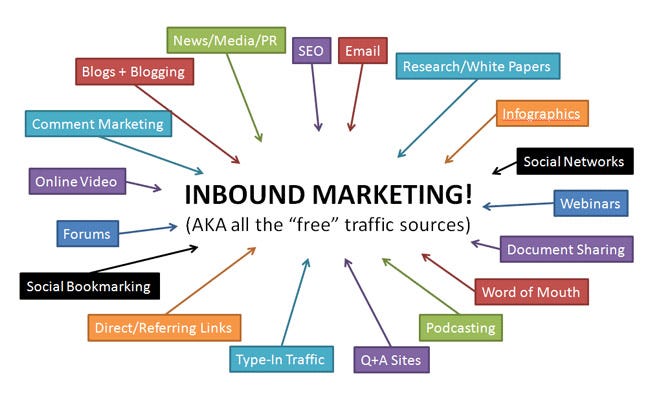
Inbound Marketing: distribute interesting content to attract the attention of your customers
We have already indicated that if you contact prospects through direct marketing, you should share valuable content with them … But the content is what, exactly?
The content is presenting information to an audience that can be shared in different formats. There are many possibilities: in addition to e-mails you can write blogs, ebooks or product catalogs, create videos and more.
Content plays a key role in inbound marketing. By broadcasting informative, educational or entertaining content, you create a real relationship with your audience. Providing content to your potential customers helps them find what they need and shows that your business is trustworthy. Without speaking to them directly, you help your prospects assess their situation, find a solution and make a decision.
With inbound marketing, you give potential customers the exact information they are looking for. Perfect for buyers who like to find out carefully before (or even without) a face-to-face conversation.
3. Content: the basic component of all your marketing actions
According to Forrester, for each content sent by a marketer or a salesperson, buyers read three others elsewhere. The buyers’ self-information is real, and our environment exposes us to a lot of content. It’s your job to be heard despite the noise, to find new ways for prospects to find you and to provide them with the information they are looking for.
Keep in mind that content is the core component of all your marketing campaigns, from e-mail to social networks. High-quality content can help you break into information overload on the Internet, and help you earn the trust of your prospects.
You already know that you can create content in a wide variety of formats … But where to post it once you’ve created it? Well, your website is one of the most important places to publish exclusive content. This might seem a bit controversial, but you should even do it for free.
Your content is the first step to attract visitors. Now it’s time to think about turning them into prospects. Your content may be free, but that does not mean you should not get something out of it: what if you asked them for their contact information?
Using web forms to upload your content offering is a great way to gather information about prospects. Why not offer them to subscribe to your blog? A blog can bring a lot of value to your website because it keeps your readers interested and, hopefully, will make them come back for more. Moreover, quality written content also plays an important role in improving your natural search engine ranking …
4. SEO: Attract prospects by sleeping
SEO (“SEO” for Search Engine Optimization) is the set of actions that improve your ranking on search engines. Suppose you sell office supplies — it would be great if people found your website by typing “buy office supplies” as search.
People use search engines all the time, especially Google. With SEO, you make sure that the content you create matches what people are looking for.
The more your website is optimized, the higher it will be ranked high on the search engine results page or “SERPs” (Search Engine Page Ranks). And that’s what you want because it will greatly increase the chances of finding you and clicking on a link pointing to your site.
If you’re looking to optimize your website, try to increase its relevance and authority, because Google values informative content and benefits web pages that use the same vocabulary as your target customers and answer any questions they may have.
->To put it simply, relevance refers to the ability to answer your audience’s question. For example, the associated search terms at the bottom of a page might give you an indication of what your customers are looking for. Google will give your website a higher score if you can provide clear answers to searches.
->Authority is measured by the number and quality of links from other web pages — what you can do first by creating relevant content, or secondly by having guest experts contribute to your blog (“guest blogging “).
Imagine that you sell a wide range of pools. When people are considering this type of purchase, they may be looking for different alternatives. A blog about the differences between concrete, vinyl-clad and fiberglass pools could answer some of their questions and therefore increase your relevance.
Some of your suppliers also find your blog very useful, so they put a link to your website. When a landscaper notices it, he suggests that you work together. You write content that they will post on their website, which will put their visitors in touch with your business. These links to your website will increase your authority and help you reach a new audience.
Choose to invest in SEO if you want:
->Obtain consistent results. It takes a while to appear on the first page of the search engine, but once you are there, you will enjoy a significant increase in traffic.
->Create an authoritative website. This is a well-established resource or website to which one turns for a particular niche. An authoritative website will drive traffic to your page in a sustainable way, and help your business build its reputation until you’re popular enough to dominate the market — which is only possible with smart content and good SEO planning.
Increase the value of your website and get more search traffic because you appear higher in the search engine.
Inbound Marketing: Pros and Cons
The SEO efforts you provide have a long-term impact and they cost you almost nothing — as long as you do not account for the resources you spend to optimize and create your content. All of this might sound a little awesome at first, so it’s a good idea to contact an expert to guide you through the basic steps. Many external agencies and freelancers can optimize your website or create effective SEO content.
You cannot ignore the fact that everyone is online, so you have to be too. People are also actively looking for information, so you should provide it to them. Through inbound marketing and SEO, your business becomes a respected thought leader and source of information. It also makes your website easier to find. If your prospects are aware of your existence, they are no longer surprised when you contact them, so it’s a great idea to attract prospects online and then follow-up by contacting them personally.
Paid online advertising: to reach a more targeted audience faster
Online ads are a great way to reach more of your target audience and find leads. Let’s take a look at some of the most common techniques.
5. Online Advertising & Retargeting: Focus on Your Target Market
Online advertisements are ads on websites. They look like classic magazine ads, but with one important difference: you are fully aware of the results. It is possible to follow the ads online: who clicked on it? What were the demographic characteristics of those interested? The more you know about your target, the better you can customize your ads.
Online advertising is useful for targeting audiences with different demographics or behavioral characteristics. For example, if your business is active in different cities across the country, it might be interesting to target only people who live in these locations. You can also choose where you want to make your ads visible: choose an online publishing space where your prospects spend time. Imagine selling cars: you would like your banner to appear on a website that compares the price of cars.
If you do not know which websites visit the prospects you are targeting, or if you want to distribute your paid shares, taking advantage of retargeting ads can be a good idea. These ads follow visitors to your website via a cookie and then reappear on other sites they visit. These reminders about your business help bring prospects to your website once they are ready to make a decision.
6. Search Engine Advertising (“SEA”): pay per click to get high quality leads right away
You may have already noticed that when you have something, the first hits on Google are ads. Pay-Per-Click advertising (PPC) is a form of Search Engine Advertising (SEA) that shows ads in the search engine. Advertisers bid on keyword their keyword list. For example, if you were a plumber, you’d try to use keywords like ‘plumbing’, ‘boiler repair’ or ‘repining’. The advertiser only country when someone clicks on the displayed ad.
Paid Online Advertising: Pros and Cons
Use the PPC technique to attract prospects if you want to:
->Get immediate results and speed up traffic in a short period of time, such as product launches or seasonal promotions.
->Generate highly targeted traffic. The PPC also allows you to reduce the number of your prospects based on their demographic characteristics. This means that you define which prospects have an interest in seeing your ads, which leads to high-quality leads.
->Try new things. Spend the field with new products or new offers and learn more about how people respond by spending a reduced budget. If you notice that your idea works, go further and create a campaign on your different marketing channels.
When we talk about search engine advertising, everything revolves around Google. Use their video tutorials to set up a campaign yourself, or consult an expert. If paid advertising is one of the main marketing tactics you use, it can cost you a lot. Instead, it’s best to use it for small-scale testing, or as a complement to your other marketing tactics.
Social Networks: combine community animation and lead generation
66% of marketers notice a positive evolution of their lead generation by spending only 6 hours a week on social networks. It’s time to create an account, be visible and active by regularly posting content, and respond to questions and expressions of interest. Even putting a “like” on someone’s post or commenting on their photos helps users remember your brand.
7. LinkedIn: Do you make new relationships to sell more
Finding a prospect through LinkedIn can be very simple, but also take time. Examine the connection suggestions made to you and evaluate whether they match your offer. LinkedIn also offers a large number of groups. Join a group of professionals who might be interested in your business and send them a login request.
Talk to them once they have accepted the connection and use the right sales techniques to close a deal. It’s easy — if you take the time to follow up and keep track of your connection requests and messages.
If you are willing to pay to get some new prospects, you could also use LinkedIn ads. The optional Lead Collection feature redirects members who click on your ads to your landing page, where they can fill out a contact request. It’s very easy for the user, and it helps you build a list of prospects very quickly.
8. Facebook: reach people close to your target audience
Facebook also helps you to generate more leads on social networks. For example, use the ability to get a direct link to your website. The platform also allows you to subscribe to a newsletter directly on the network, so you can quickly get contact details of visitors interested in your newsletter.
When it comes to advertising, Facebook offers simple ways to reach your target audiences.
->Custom Audiences: The first method is to download a list of emails and match the emails to users. You have now created a custom audience for your ads. Custom audiences are made up of people who have taken an action that you have specified, such as going to your website or downloading your app. They are often used to track current users
->Similar audiences: You can also create a similar audience from a list of customer emails, which creates an audience of people similar to your current customer database. There are many ways you can build your database, like hiring someone for B2B data service, having opt-in forms, collect data from sales department. In other words, you use the demographics of your customers to reach a wider group of people who might be interested in your services. A similar audience is useful if you want to size your ads and find a lot of new leads.
Social networks: advantages and disadvantages
The wider your reach on social media, the more prospects you will attract without spending anything. Rome was not built in a day, nor your LinkedIn and Facebook account. Be active and post attractive content to collect more likes and comments. This will increase your chances that new audiences will see your content in their newsfeed.
When it comes to attracting a large number of potential customers, paid options such as “LinkedIn Lead Collection” or “Facebook Ads” will generate more leads. It is wise to use them as a tactic that complements your other marketing actions. Of course, you should be present on social networks, because they are not only valuable to attract or convince a prospect, but also to please your customers and keep them informed.
Email Marketing: so, your potential customers keep your brand in mind
E-mail should be one of your main forms of communication because it helps you stay in touch with your audience. Create targeted messages to send relevant content to your potential customers and keep them in mind. And why not segment your different types of audiences and send them custom content?
An automated and generic e-mail is another easy way to find out who’s interested in your business or who does not, simply by asking your prospects. Give them the opportunity to respond easily to your message (for example by clicking on a call-to-action button or subscription form) and use this opportunity to compile a list of prospects you should call a day. To know more see this article– how to build a targeted email list
Want to know more about email marketing? We have listed a whole set of techniques to turn your prospects into customers — check them out here.
Marketing by e-mail: advantages and disadvantages
Email marketing is inexpensive. You do not need expensive software or hardware and you do not have to waste time sending emails to all your customers separately. Instead, you can standardize your communication for segmented groups of prospects.
It is also very easy to follow the results. With minimal tracking, you know which emails have been received, which people have unsubscribed, the open rate (people who opened your email) and the clickthrough rate (people who opened your email and click on the link that is included).
Remember that people see a lot of content every day. If your prospects receive a lot of emails, how are you going to stand out? Think about what you want to send and who you will send it to. Using original object titles could already help increase your open rate. Adapt each campaign to a specific target audience and send people content that interests them if you want e-mail marketing to work for you.
Affiliate Marketing: Let Other Businesses Help You Sell
In affiliate marketing, someone recommends your product. Whenever a purchase is made on the basis of this recommendation, the ambassador receives a reward. In its most traditional forms, affiliate marketing is established through partnerships. Every time your partner sends you a new client, he receives a commission. The most modern affiliate marketing is placing banners and URLs on partner sites.
By using a tracking URL, you can keep a perfect overview of all the traffic and sales you generate through different promotional techniques. Affiliate marketing is similar to Google’s online advertising (Display Network), but the difference is that you build the partnerships yourself, instead of having to choose from Google’s criteria.
Affiliate Marketing: Pros and Cons
It takes time and energy to establish reliable affiliate partnerships with third parties, especially if you take into account the discussions to agree on the commission amounts and set-up fees. In addition, the commissions come naturally nibble a piece of your profit margin.
But if you do it right, affiliate marketing increases the visibility of your products and services and is a good way to get additional sources of income.
11. Referral Programs: Use Word of Mouth to Acquire New Clients
Testimonials and shared experiences from satisfied customers are a great way to attract potential customers in a cost-effective way. People like to have social proof and concrete results. Word of mouth is also inexpensive: satisfied customers are often more than willing to promote your business for free.
Consider who you are targeting and what similar customers you have. Approach these clients and ask them directly for a recommendation or think of incentives that would encourage them to do so. Ask them for a recommendation when they have just had a really positive experience with your customer support or give a high score to your business … or simply approach your most loyal customers. Make it easy for them to give you a recommendation: do not make them write long letters but a short and pleasant message that they can share.
Referral marketing is a bit similar to affiliate marketing, where partner sites and magazines look after your ads and promote your business. The important difference is that a referral program invests in ambassadors who can recommend your brand to friends and family — Word of mouth may be the oldest marketing channel in the world, but it is still valuable.
Recommendation programs: advantages and disadvantages
Recommendation marketing helps you reduce the length of your sales cycle. People you contact through a referral program will rarely be interested, as cold prospects might be, and calling hot leads helps you save money.
But do not be too urgent. Let people decide if they want to recommend your business. Even a satisfied customer might not want to, because recommending a brand is a big problem for some people because it affects their reputation.
Just set up a referral program, and let people come to you. Do not try to make as many transactions as possible, but appreciate the recommendations you receive.
12. Event Marketing: to convince your potential customers face to face
Since there is no better form of advertising than sharing the experience of a satisfied customer, why not try to please them at an event? This is the perfect opportunity to promote what your brand represents, to show some of the solutions you provide and to build personal relationships with participants. With personal contact, it’s easier to turn potential customers into serious prospects, while conveying the key ideas of your business and increasing brand awareness.
Event marketing: advantages and disadvantages
Events require a lot of time and energy. They are hard work and often come back to sacrifice evenings and weekends. You need to make a lot of effort, but it can pay: have the opportunity to have serious conversations, to meet people who otherwise might never have heard of your company … The good one’s Events are worth it as you invest time — to get out!
Are you ready to attract your potential customers?
None of these techniques represent a guaranteed entry card to an infinite flow of prospects but, if you combine them, they can significantly improve the number of your prospects. Try to find a balance between online and offline actions, personal contact and digital messaging, optimization and creation. Test different things, integrate and apply marketing techniques that will help you attract many quality prospects.