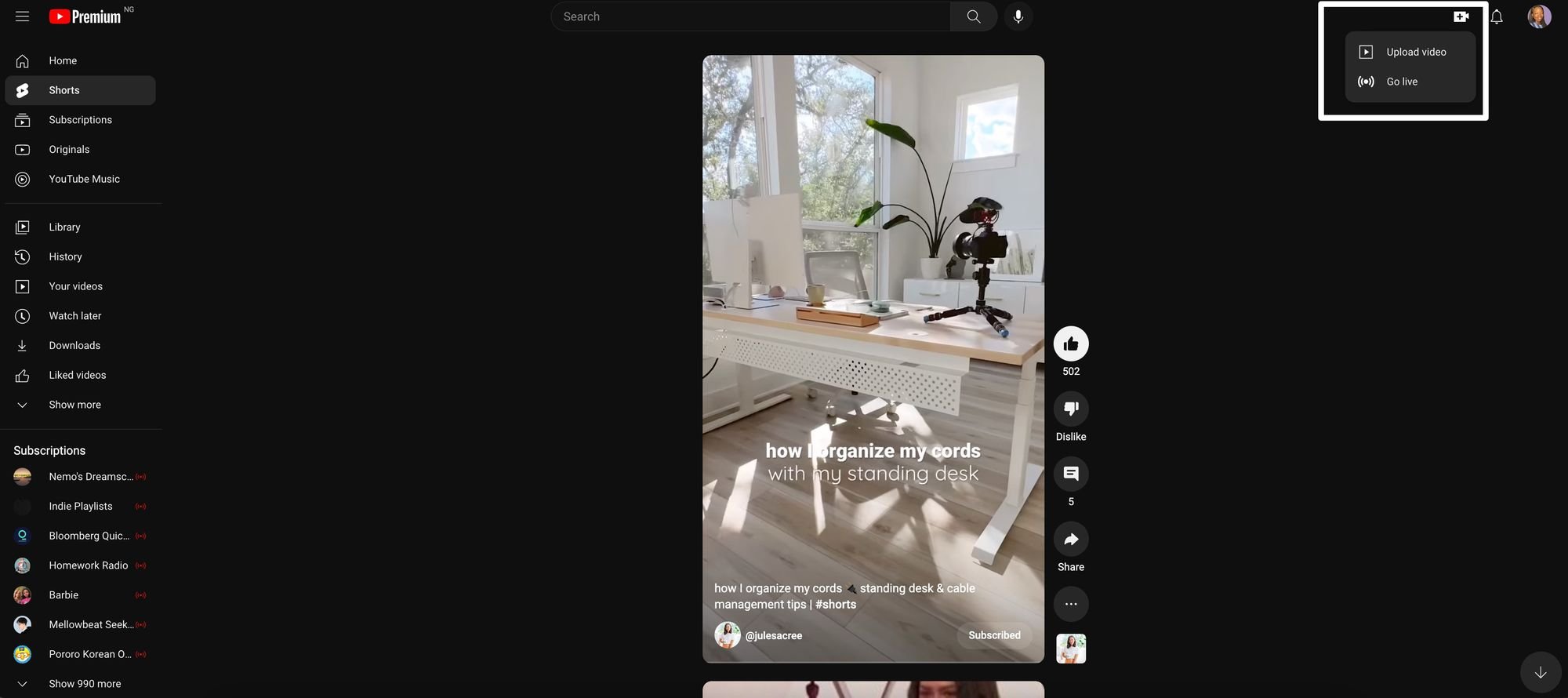
YouTube Shorts are YouTube’s answer to short-form content. The vertical video format. If you want to get your head around YouTube Shorts and possibly incorporate it into your strategy, then this article is for you.
Vertical, short-form, mobile — these three words describe the video format popularized by TikTok that every social platform is looking to co-opt, and YouTube is no different. Although the platform is known for its longer-form video content, it added a new feature in September 2020: YouTube Shorts.
This addition should come as no surprise, as YouTube is all about video, and increasingly, users prefer short videos to any other format when consuming content. This report shows that 73 percent of people prefer to watch a short video when learning about a new product or service. The same report also shows that people watch about 19 hours of online video per week. Essentially, the more content you can fit into that time span, the more you can communicate to your audience.
If you want to get your head around YouTube Shorts and possibly incorporate it into your strategy, then this article is for you.
What are YouTube Shorts?
YouTube Shorts are a new vertical video format optimized for mobile – YouTube’s answer to short-form content. If you already create short-form video content on TikTok and Instagram, then getting started with Shorts should be easy. It’s a great place to get started, as you can repurpose existing content and crosspost across platforms you’re already active on.
While YouTube Shorts may seem like yet another platform on your full plate, but it has its perks. Some benefits of creating on the platform include:
A new channel for your audience to discover your content
If you’re looking to become a creator on the platform, it can ease you into YouTube and help build an audience while you figure out your strategy for long-form video
It’s another place to distribute video content you may have created elsewhere (TikTok, Reels)
Does this sound appealing (and relevant) for you or your brand? Jump in and upload your first Short using the steps outlined below.
How to make and upload YouTube Shorts
There is no separate app for YouTube Shorts — it lives in your existing account. You can either create a new video within the YouTube app or upload an existing or edited video. The latter is especially ideal if you’re repurposing TikToks, Instagram Reels, or longer YouTube videos. To create new Shorts natively in YouTube:
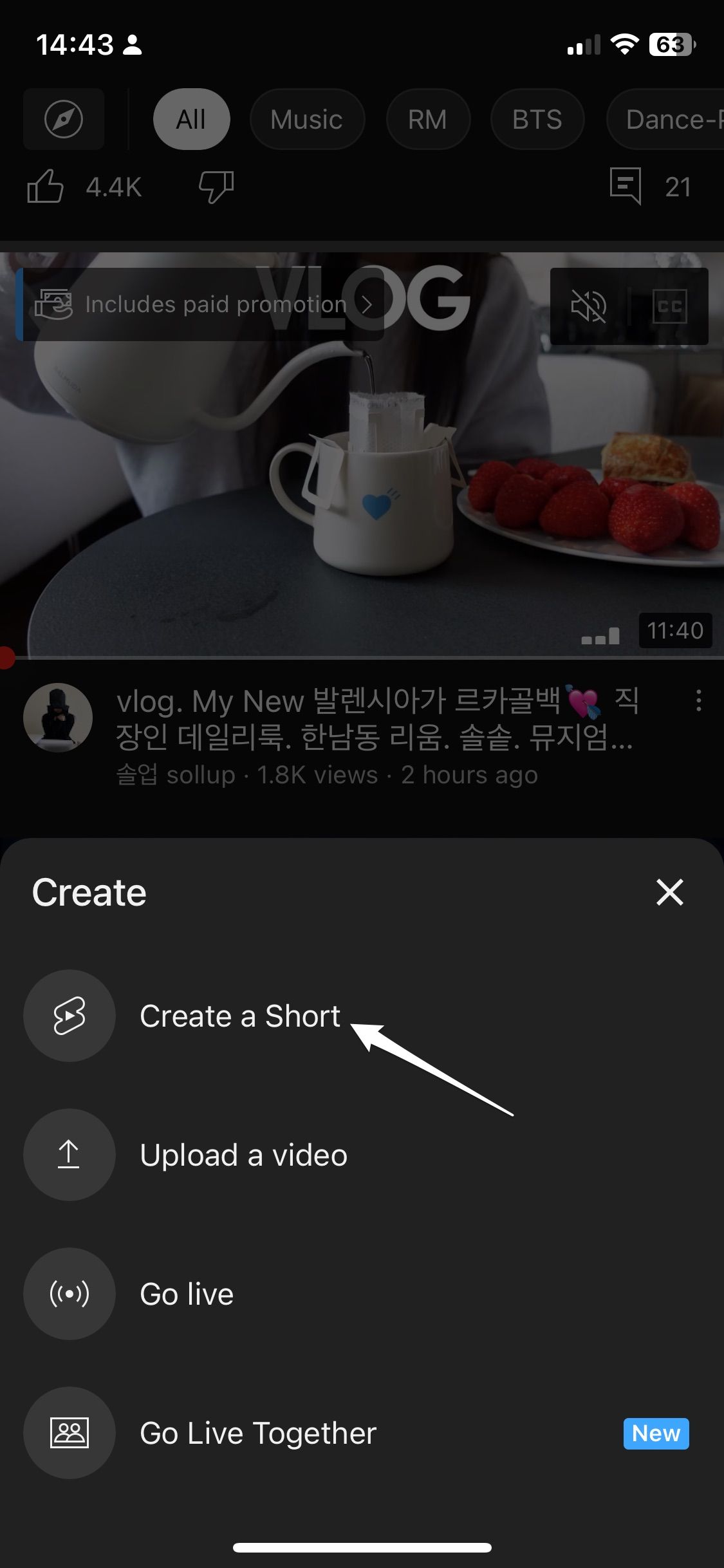
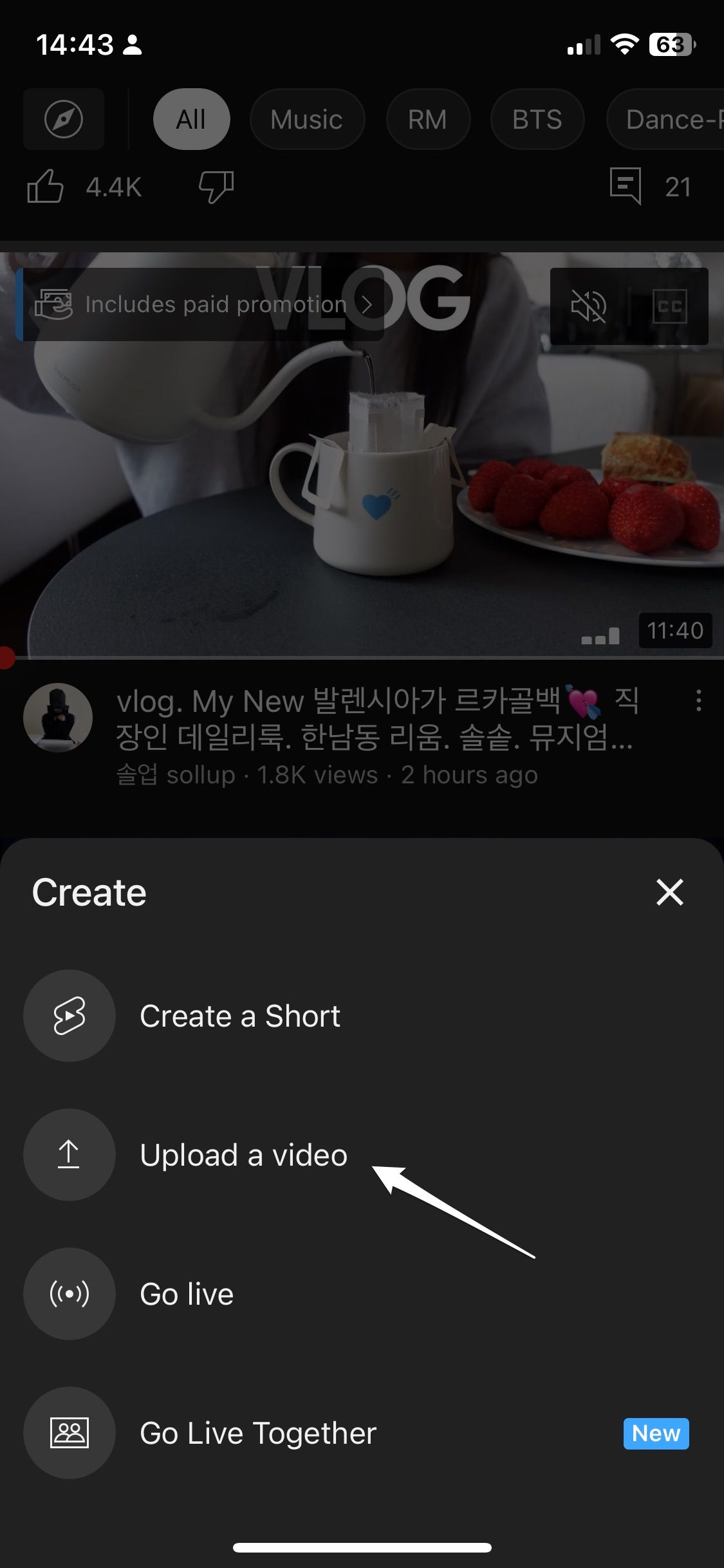
Step 1: Open the YouTube mobile app, select the plus sign at the bottom of the screen and click ‘Create a Short’ from the list of options.
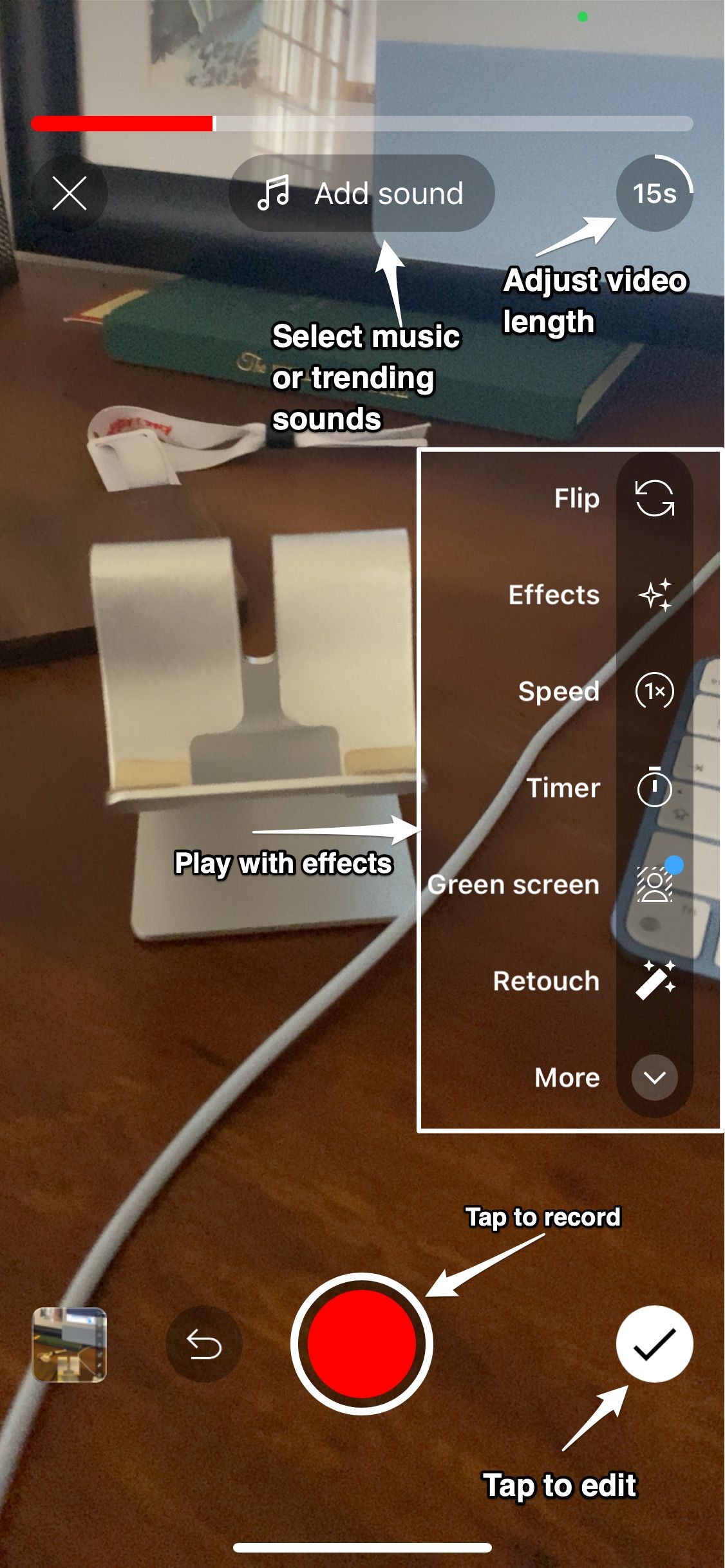
Step 2: Start recording by tapping (not holding) the red button. You can choose the length of time you want to record for between 15 or 60 seconds at the top right side of your screen. To record different video sections, click the record button to pause recording, then again to resume recording for your next section.
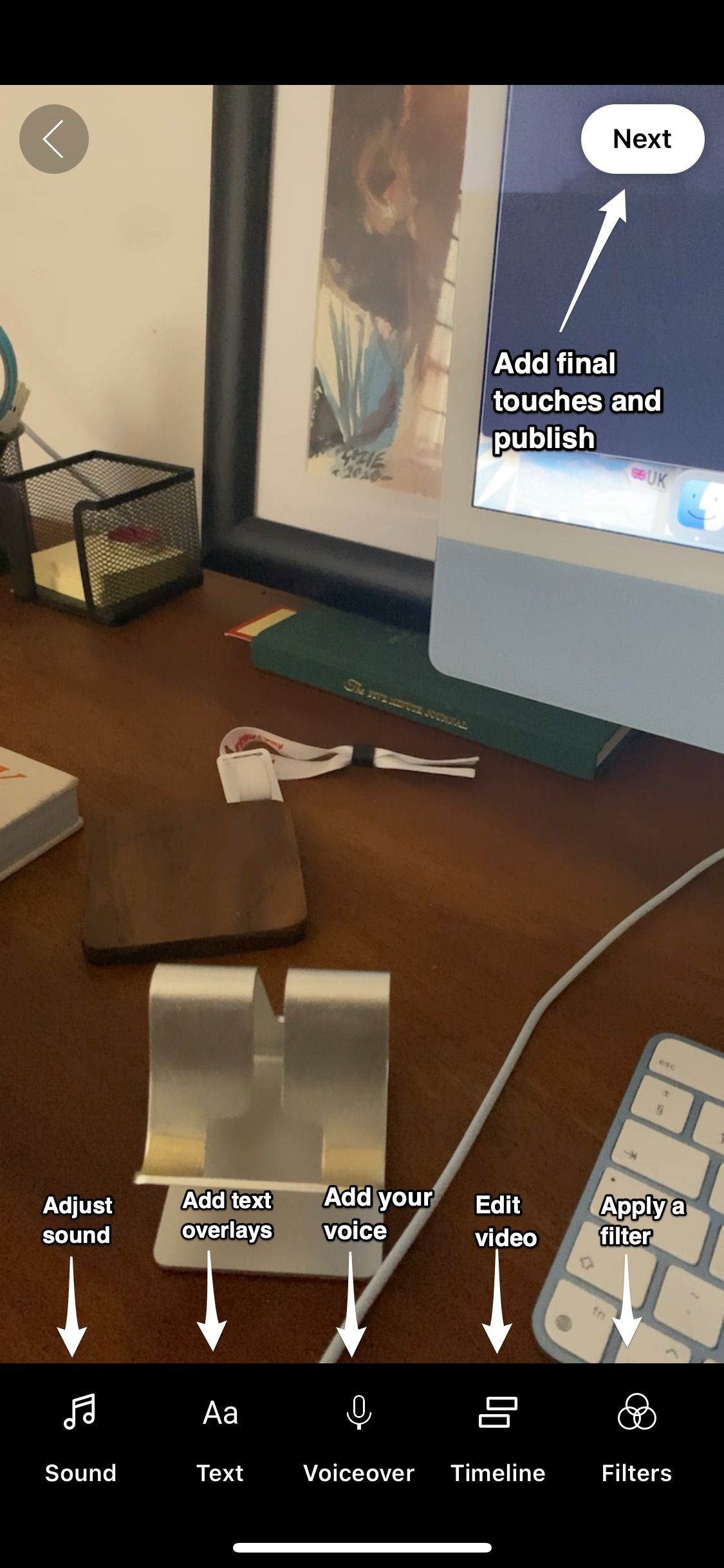
Step 3: If you’re satisfied with your video, tap the checkmark in the bottom right of the screen. You can preview, edit, add music, voiceover, text, and filters to your video. Once you’re done, tap Next in the top right.
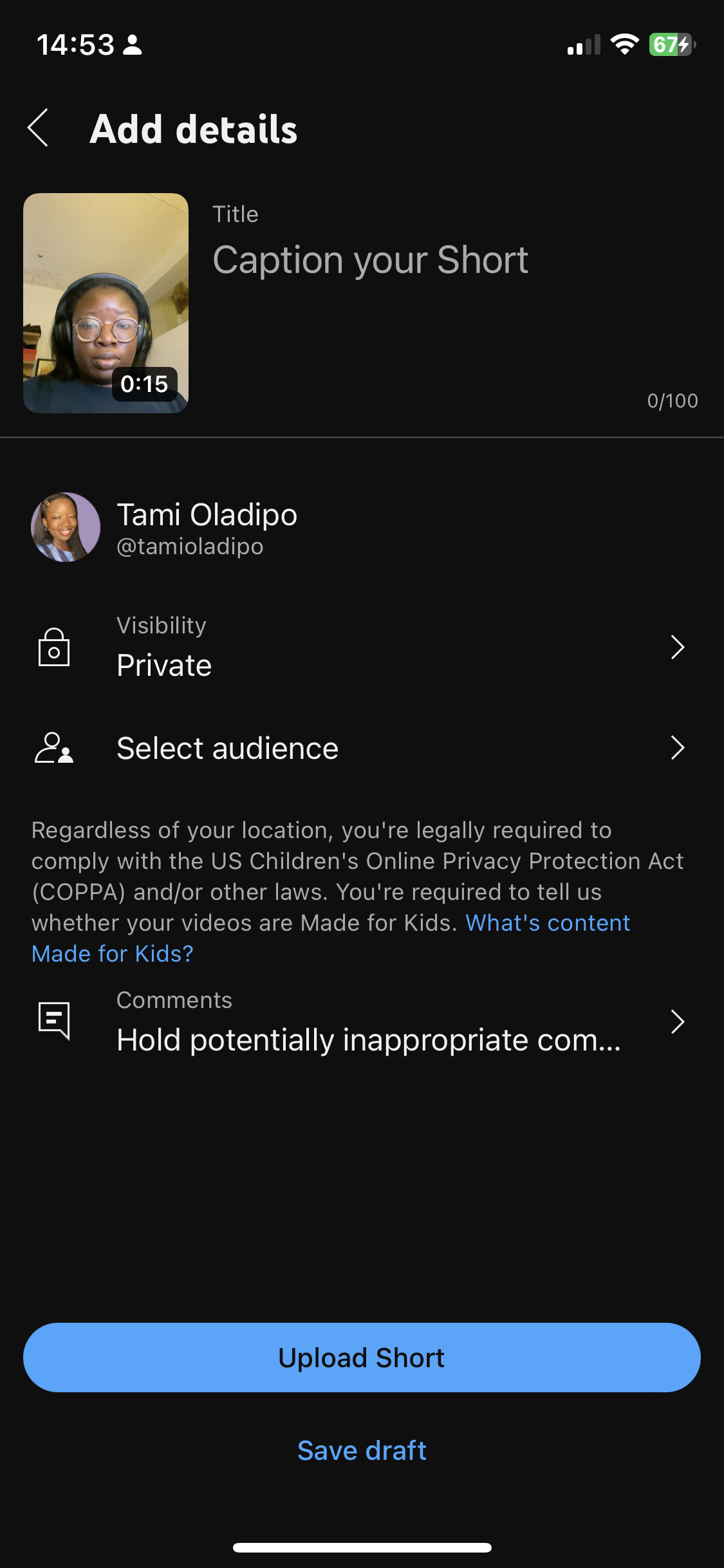
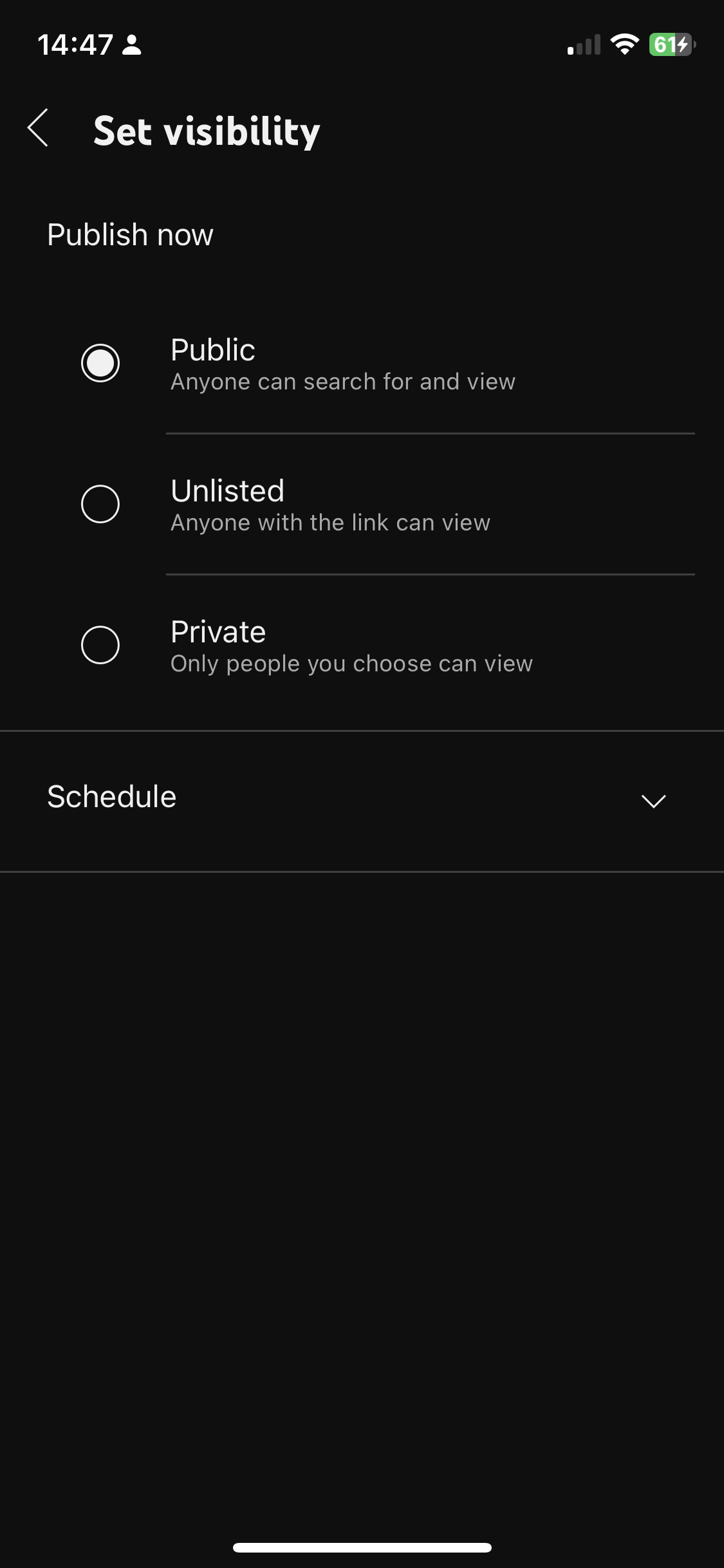
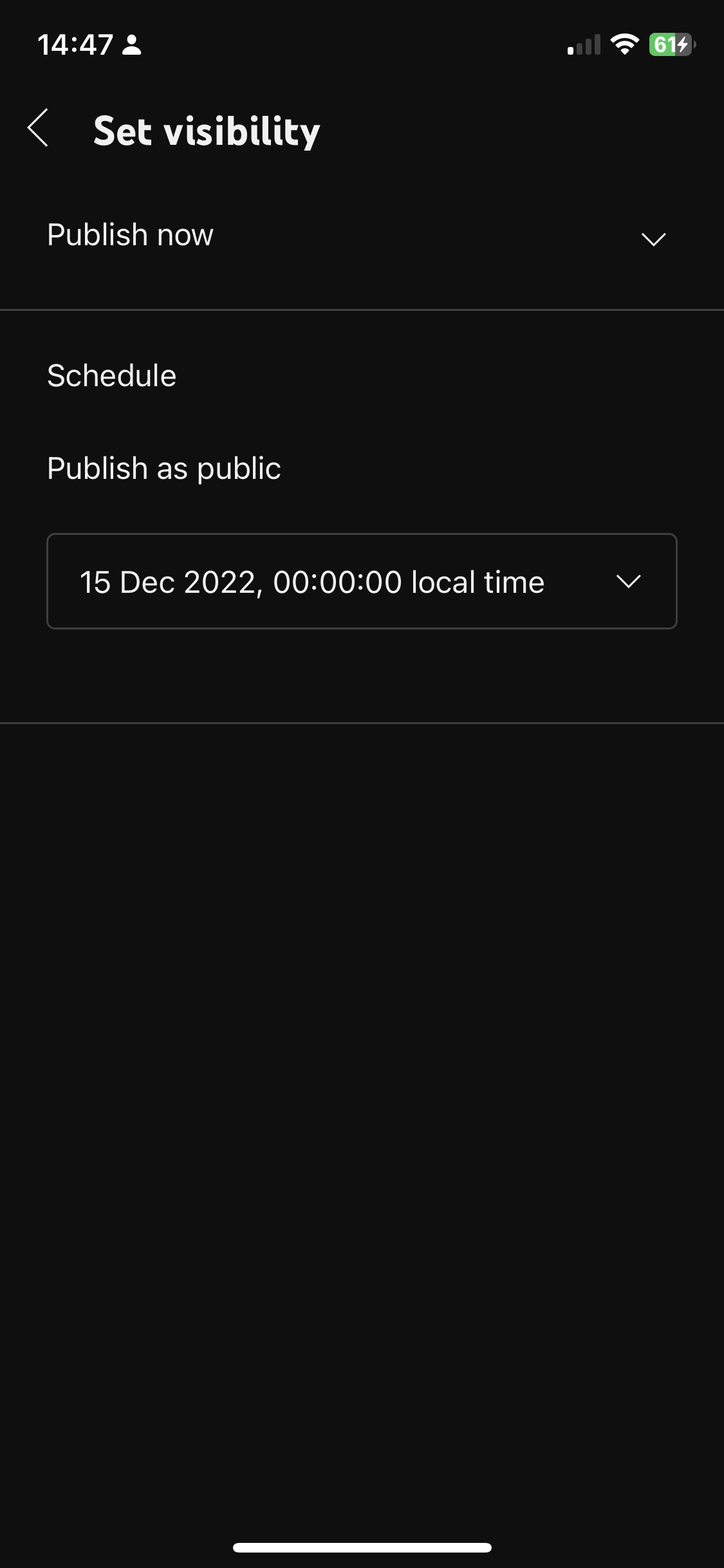
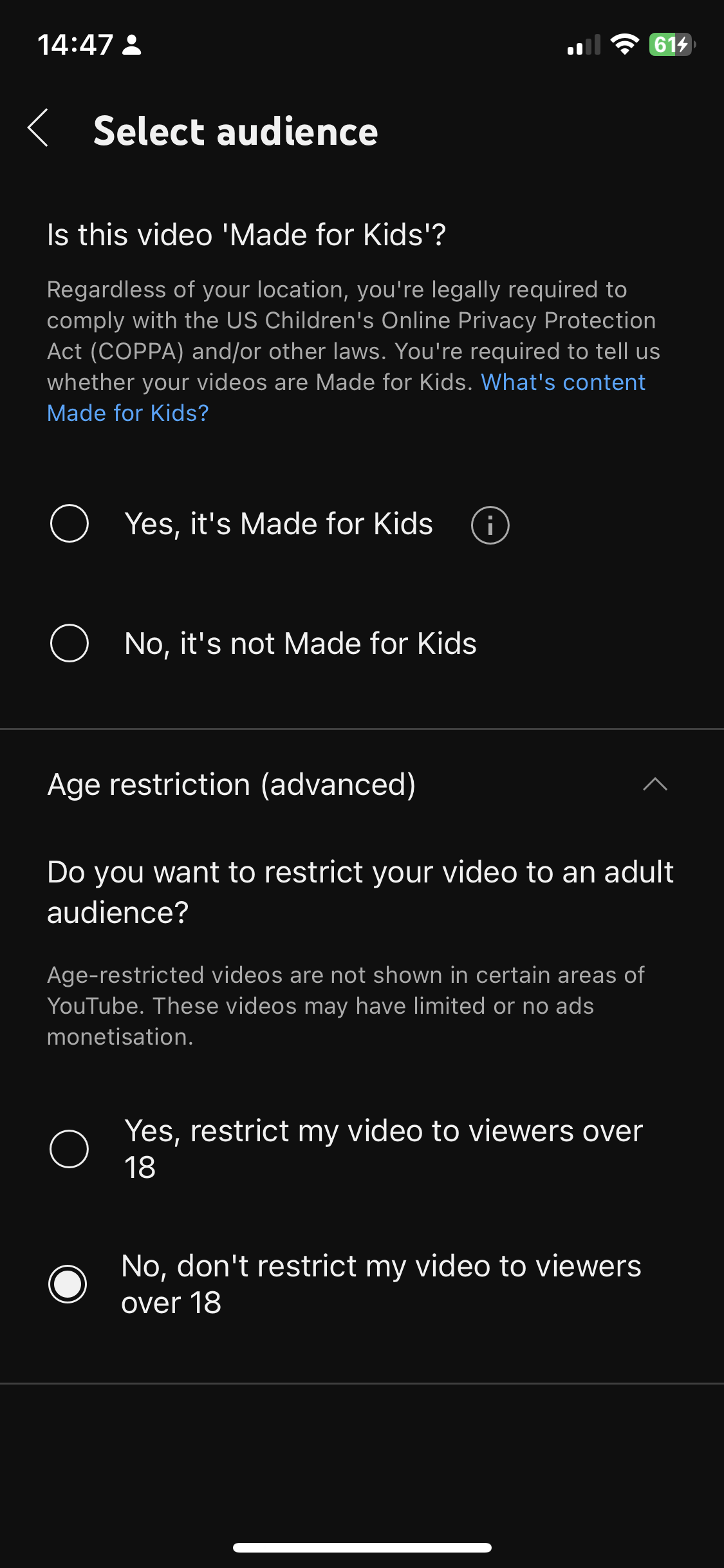
Step 4: Add a caption, set visibility, schedule, select an audience, then tap Upload Short. Treat this step like you would a regular YouTube video by optimizing the caption so it’s visible for the right search terms.
Alternatively, if you want to upload an existing video, you can follow these steps:
Step 1: Click the plus sign.
Step 2: Select Upload a video which will take you to your camera roll.
Step 3: Select a video under 60 seconds.
Step 4: Fill in the relevant details and hit publish.
Finally, you can also upload a Short from your desktop. YouTube can tell what type of video you’re uploading by its length and orientation, so if you’re uploading a square or vertical video that is less than 60 seconds, it is identified as a Short. To upload a Short from your desktop:
Step 2: Click Create in the top right side of the page.
Step 3: Upload your YouTube Short.
Step 4: Fill in the relevant details and publish.
How to monetize YouTube Shorts
YouTube launched the Shorts Fund in August 2021, which is dedicated to paying out creators that generate large audiences for their Shorts. To qualify, creators must fit the following criteria:
Uploaded an eligible video within the last 180 days
Creators don’t have to apply – YouTube will notify you if you’re qualified during the first week of each month via email and your account that you will be receiving money from the Fund.
7 tips for making the most of YouTube Shorts
Before you start publishing, here are some best practices that will help you achieve good results off the beat from this new channel.
Don’t treat it like an afterthought: Develop a proper strategy to start uploading by creating relevant content, posting consistently and seeking audience feedback to make improvements.
Repurpose existing content: If you’re having difficulty figuring out what to post, adopt a repurposing strategy where you take the content you create for other short video formats and upload it as a Short. You can then tweak and make improvements to your videos based on reception.
Use a great hook: Much like other social video platforms, user attention is highly valuable. State the value proposition of your video upfront “Come along a day in my life as X” or “Let me teach you how to do Y” so people know why they should stick around.
Keep an eye on top trends, sounds and hashtags: If you want to reach more people, you need to stay ahead of the trends. Monitor popular sounds, hashtags, and topics to see what’s hot right now. But remember that trends should only inform your strategy and not influence it.
Engage with viewers: Use the comment section and YouTube’s Community feature to engage with viewers beyond uploads and build a loyal following. You can also use it to get their feedback on your content and improve.
Analyse your performance: It’s essential to track what’s working and what isn’t so you can make better decisions for future content. Keep a watchful eye on these metrics and use them to inform your strategy moving forward.
YouTube Shorts is a great channel to adopt into your content creation process
With Shorts, you can dip your toes in the YouTube pool and start growing equity on the platform without having to create long-form content. Consider adopting it into your existing content creation to take advantage of the new audience on the growing channel.
B2B marketing leaders face a harsh reality: Buyers aren’t searching for information the way they used to, but most marketing teams are optimizing as if they are.
Even as organic traffic declines, many teams continue to rely on outdated digital marketing playbooks to plan, publish, and measure content. These habits are hard to break. They’re reinforced by legacy KPIs, familiar workflows, and pressure to show immediate results. Marketers still chase keyword rankings, obsess about page views, and anchor reporting in click-based behaviours, even as genAI redefines how search works and how buyers discover and trust information.
Your Buyers’ Search Behaviour Has Changed
Search used to be straightforward: A buyer typed in a query, scanned a results page, and clicked through to vendor content. But that linear search-to-click path is done. Today, buyers ask questions in natural language and get instant, AI-curated answers. According to Forrester’s Buyers’ Journey Survey, 2024, 89% of B2B buyers say they’re using genAI tools at every stage of the purchase process. They consult genAI tools such as Perplexity, ChatGPT, Claude, or Gemini, often on mobile devices or embedded in enterprise software, to accelerate how they learn and evaluate solutions. They gather insights from multiple self-guided sources, including genAI tools, vendor websites, social media platforms, user review websites, industry events, and industry or business association websites.
The Risks Of Sticking With An Outdated Content Strategy
Holding on to yesterday’s content strategy doesn’t just slow you down. It actively undermines your visibility, credibility, and influence with modern B2B buyers because even high-quality content is getting filtered, summarized, or skipped entirely. Here’s what’s at stake:
You’ll lose visibility where it matters most. Search is no longer about pages and rankings. Instead, it requires presence in AI-curated responses. If your content isn’t crawlable or structured in a way that AI systems can interpret, you’re not in the conversation. Outdated SEO tactics such as keyword stuffing, backlink chasing, or producing thin “thought leadership” don’t work when large language models and AI search tools prioritize content that’s well structured, contextually relevant, and authoritative.
You’ll miss the chance to demonstrate expertise. If your content lacks depth, nuance, or proof of expertise, it gets filtered out or flattened into generic responses. That means your unique point of view gets lost, a missed opportunity to educate buyers, differentiate your brand, and establish credibility.
You’ll stay out of sync with buyer expectations. Today’s buyers are more informed and sceptical than ever. They expect content that helps them understand complex problems, compare solutions, and build internal consensus. A content strategy built only to support lead capture and gated assets is out of step with how modern buyers evaluate solutions. It creates friction in the buying process, costing you visibility, slowing pipeline, and putting revenue at risk.
Content Visibility Has New Rules And Higher Stakes
Today’s buyers are gathering insights in more places before they reach your site. To stay visible and credible, your content must meet them where they are, earn their trust quickly, and reflect the depth of expertise that they expect. This means moving beyond keywords and building content around buyer intent, clear answers, and proof of authority. Every asset should reinforce your relevance and readiness — because if your content isn’t built to be recognized by AI and respected by buyers, it won’t show up where decisions are made.
Feature image credit: Forrester
This post was written by Principal Analyst Lisa Gately and it originally appeared here.
Your e-commerce content strategy needs to include a great deal of rich media production to meet the rise in demand for digital content
It’s not just a nice to have, either. According to Forrester, nearly one in five (18%) US online adults returned an item bought online because the description was inaccurate.
That means your rich media has to be integrated with accurate product information or it’s going to cost you. For B2C retailers, Forrester reports that each return averages $10 and for B2B sellers, the expense and logistics of returns can be overwhelming. To avoid these costs and deliver relevant product content at scale, you need an integrated approach to product information management (PIM) and digital asset management (DAM).
With the right PIM and DAM software implementation, you can lower the cost of content delivery and eliminate many highly-manual and ineffective processes. This Forrester report walks you through how an integrated PIM+DAM strategy can help you use rich media and product content to create engaging commerce experiences: “PIM And DAM Are The Power Couple For Your Content Strategy”.
Read on for highlights and download your full Forrester report at the end.
Digital channels demand rich media content
Traditional product information doesn’t cut it anymore. Customers expect product videos, product spins, and highly-relevant product content to help them make their purchasing decisions. If you’re a product marketer, that means you need a wide range of rich media to stand out on the digital shelf.
High-resolution images, lifestyle photography, and realistic 3D overlays are some other forms of expected content these days. The more complicated and expensive the product, the richer the content needs to be. And, you need to think outside of your product detail page and produce rich media for all your touchpoints.
Storing and managing such a large amount of content that’s labelled and contextualised for your whole customer journey is no easy task. But, with the right DAM solution in place and organised metadata you’ve got the foundation to create relevant customer experiences and drive higher growth.
Now, you just need to find a way to connect your rich media with all your other product content and data.
Don’t let roles and silos get in the way
Do you organise your product attributes, images, copy, and rich media assets in separate tools? If you said yes, you’re not alone. Many companies manage these across many tools, and that’s OK. The goal isn’t to use one system for everything, it’s to minimise complexity and harmonise your data across teams and systems.
At the minimum, you’re going to need PIM and DAM solutions to layer your rich media with the right product data. DAM systems typically fall in the domain of the marketing team while PIM platforms are managed by digital, commerce, or IT teams. You’ll also have to consider and differentiate between content management systems (CMS), order management systems, and master data management (MDM) tools.
All of that gets confusing quickly, so it’s important to clearly define who owns your PIM platform, what data it’s responsible for, and how it interfaces with your DAM system. That way you control what product data gets matched with your rich media and made available to your customers.
With your PIM tool clearly defined and working together with your DAM system, you can start to create the kinds of content-rich experiences your customers expect.
PIM and DAM are better together
If you want your products to stand out on digital shelves, you’ve got to outline an integrated PIM and DAM approach. Make sure to put the key moments in your customer journey at the centre of your strategy. From there, you can determine the kind of rich media you need to deliver for the customer experience.
Do you need more videos? Do your most expensive products need more high-resolution photos? Whatever your content strategy calls for, there’s an integrated approach to PIM and DAM that can support it. Some DAM tools provide a few PIM features and vice versa so you’ll need to spend some time finding the right combination.
With the right tools, you’ll be able to streamline your content creation process, bolster content reuse across channels, and deliver content-rich experiences that drive conversions. Read this Forrester report to learn how an integrated PIM and DAM strategy can help you use rich media and product information to create engaging commerce experiences: “PIM And DAM Are The Power Couple For Your Content Strategy”.
The idea of content creators launching consumer products has become one of the hottest trends in the modern economy. But despite the surge of creator-founded brands, many fall flat. Some creators with millions of followers can’t sell five T-shirts, while others with niche audiences launch million-dollar brands. What separates the standouts from the stalled? Through conversations with some of the top operators in creator commerce, here are the key steps to doing it right and the common traps to avoid.
1. It’s Not About Audience Size, It’s About Audience Fit
As Charles Haynes, founder of Ziggurat, puts it, “If someone can’t convert their audience to an ad or to a live event, it’s unlikely that a product is going to fix that.” He adds, “If they have a very diverse demographic… they’re likely to find it more difficult to sell a product.”
Miles Sellyn of Rare Days echoes this: “The smaller the niche, the smaller the audience needs to be. We’ve worked with creators who have a hundred thousand followers who have built $10 million businesses.”
2. The Product Must Be the Right Product, Not Just a Product
The creators who succeed often start from a clear point of view. Haynes shares, “The best creators are those that have a really strong vision… When someone comes saying ‘I want to do a product, I don’t know what,’ that’s normally a poor indication.”
Product ideas shouldn’t just be imposed from the outside. At Warren James, Saurabh Shah and his team help creators dive deep into their own communities. “We’ll use AI to understand what themes people are picking up on,” he says. “We want each collection to tell some kind of story and be connected to the content.”
3. Validate Early and Often
Charles Haynes advises starting small: “If you have not produced a product before and you are a relatively small creator, then pre-order or a Kickstarter style project is probably the most sensible.”
“We’ll create surveys or smaller focus groups,” explains Sellyn. “Particularly for more software-oriented products, we create what we call ‘feature vignettes’—low-fidelity visualizations to test interest.”
4. Deeply Involve the Creator
The best launches have creators who are part of the process from day one. With 1UP Candy, co-founder Michael Schenker recalls, “We brought about 30 different types of innovations… and we all sat down with Brian (FaZe Rug). From day one, he was very involved.”
Chris Koch adds, “We expect our co-founder talent to join buyer meetings, attend retail locations and develop content around product drops. It’s a mixture of social and real-world engagement.”
5. Plan the Launch Like a Campaign
Warren James takes go-to-market seriously. Shah describes, “We’ll lay out the two weeks leading up to the launch, during the launch, and after. We coordinate emails, SMS, website experience and viral moments.”
This is a far cry from the old model of “drop a merch link and hope.” Today, creators who win are executing full brand strategies.
6. Secure the Brand Experience
One of the subtler signals that sets serious product launches apart is brand consistency, especially when it comes to where and how you’re selling. Choosing a dedicated, relevant domain name helps set the tone.
Using a domain like a .store extension, for example, can immediately communicate to audiences that this is a place to shop. It tells your community: “This is where my products live. This is where you can support me.”
It’s a small detail, but like great packaging or naming, it reinforces the message that this is a legitimate business.
The Future Belongs to Thoughtful Builders
What separates a creator-led brand that scales from one that stumbles? Intentionality, audience fit, product-market resonance, deep involvement and infrastructure that signals ownership.
As Charles Haynes reminds us, “No one’s a gatekeeper to these products being launched.” The tools are there. The question is: will creators treat this like a business, or just a side hustle?
I am a travel blogger, but my background is public relations and communications and I can say, without a doubt, that email marketing is one of the most effective ways to connect with your audience, build relationships, and increase engagement on your blog/business.
In fact, email marketing can have a major impact on your blog’s growth – you may increase your traffic and make more money using it. So this article will be focused more on the business and marketing side of a travel blog.
Here are five ways email marketing can transform your travel blog – and some tips from my business experience that can help make this process seamless and effective.
1. Building a Stronger Relationship with Your Audience
What I love most about email marketing is that it is one of the best ways to build deeper connections with your readers. Instead of relying solely on social media or blog posts, email allows you to communicate directly with your audience.
With personalized content and tailored offers, you can make your readers feel special and appreciated. By regularly sending out newsletters with curated travel tips, destination guides, or exclusive deals, you’re fostering loyalty and encouraging return visits to your blog.
I remember that the scariest thing for me, when thinking of launching my first newsletter, for another site I have, was to design it. It was indeed far more complicated back in the day! Now, platforms like Mailrelay offer an intuitive editor with artificial intelligence capabilities that help you craft the perfect email. Moreover, whether you’re writing about your latest adventure or offering travel discounts, Mailrelay ensures that your emails are not only eye-catching but also that they have a great deliverability.
Another issue I had when I launched my first newsletter was the cost-related one. I was looking for a free option – to be able to increase my site views and to make money so I could start investing. Mailrelay has the best option for a free account, as you can send up to 80 000 emails monthly to maximum 20 000 subscribers. And they support this community-building effort by providing 100% expert support for all accounts, including free ones. This ensures that your email campaigns run smoothly, allowing you to focus on what matters most, and that is connecting with your readers.
2. Boosting Traffic with Targeted Campaigns
When you create an email list, you’re building an audience of people who are already interested in your content.
You might tell me that a travel blogger is a travel blogger – and I would add that some visit museums while others do not; some travel with a family, while others travel solo or with a pet; some go to big cities, while others prefer beaches or remote destinations. And the list of differences between travel bloggers can go on and on.
So as each travel blogger is different, people – the readers – have also different preferences. So you will attract the people who resonate with you and your traveling style.
But maybe, like me, you address different people. I travelled with our dog, while she was with us. I travelled a bit solo. I travelled with my husband, and now we travel as a family with our (now) teenage son.
I love visiting famous attractions – but I go a bit off-the-beaten-path too. We love amusement parks and I love museums and palaces! And I share it all on my blog.
But I know I have some readers who are interested in only some destinations or type of traveling that I am doing and sharing. And I know that with newsletters, I can use segmentations and create different newsletters, tailored to different preferences – at least Mailrelay has this option of segmentation available. And with the complete email analytics, you can see exactly which emails are more successful, which links are clicked, and what articles and topics are preferred by the readers.
3. Monetizing Your Blog through Email Campaigns
Monetization is a key goal for many bloggers – it was and is for me too -, and email marketing is an excellent tool to help you achieve that. Whether you’re promoting affiliate products, selling your own travel guides, or offering paid partnerships with travel brands, email campaigns allow you to directly reach your audience with personalized offers.
Since email marketing delivers a high return on investment (ROI), it’s a great way to start earning from your travel blog. For instance, Mailrelay’s robust tools for email marketing also include API integration and SMTP services, allowing you to manage large-scale email campaigns without any technical headaches. This is especially useful if you plan to scale your efforts and want to ensure your email campaigns reach as many readers as possible while tracking their performance through detailed analytics.
4. Building a Loyal Community of Readers
In the world of blogging, building a community of loyal followers is key to long-term success. With email marketing, you have a direct line to your readers. Sending regular updates, helpful tips, or even behind-the-scenes content can make your readers feel like they’re part of your journey. This sense of community is what keeps people coming back to your blog time and time again.
5. Increasing Your Email Deliverability and Engagement
No matter how well-crafted your email is, if it doesn’t reach your audience, it’s all for nothing. Fortunately, with email marketing, you can ensure that your emails actually land in your readers’ inboxes. You have to choose a platform that offers great deliverability and does not let your emails get into spam. (I had this issue in the past with a platform I used.)
My conclusion
I’ve used email marketing for this blog too. But when I had a personal health issue, I stopped sending emails. And yes, I saw the downsides in traffic and earnings.
I should correct this because I know I have a lot of great content that is slipping through the cracks and is not getting the views it deserves.
Even if I did not send an email in a while, I still recommend this tactic as being one of the best to increase traffic, generate loyal readers, and to make money. Make sure to use a tool that offers an easy-to-use platform, AI-powered features, and strong deliverability – Mailrelay is a great option. By using the right tools and crafting engaging campaigns, I’ve been able to take my travel blog to the next level, and I plan to do it again!
I write about AI for a living — here’s 4 questions I ask ChatGPT after every prompt
As we collectively get better at creating prompts for ChatGPT, knowing what kind of follow-up questions we should be asking is another skill that comes in handy.
During intense debates I’ve had with ChatGPT, there are four questions I keep finding myself asking as I try to wrestle the truth out of the chatbot. They work great during deep-dive discussions, but they’re also easy to reformulate on the fly to pair with shorter prompts.
In this article, I’ll walk through those four questions, explain why I use them, and show how they can help you get more thoughtful, accurate answers from ChatGPT.
Why I use these questions
I like this set of four questions because they cover different bases. That includes making sure all the information discussed is accurate, and that both ChatGPT and I have considered other possible approaches to tackle the issue at hand.
The first question is very easy to remember — it’s just three words long — but the rest aren’t too hard to grasp either. All are equally helpful, as they consider different aspects of your prompts, so it’s worth trying them all.
1. Double-checking
If I’m completing a particularly important task or if my gut feeling tells me that something about ChatGPT’s answer might be off, I simply ask it if it’s sure about its response.
As tools like ChatGPT keep on improving every week, it becomes less and less likely to make an error that should have been easily avoidable. But it’s self-corrected itself often enough for me to keep this question ready in my back pocket.
Even if ChatGPT’s original answer was correct in the first place, asking for its work to be rechecked often leads the chatbot to reformulate its response in a way that may help you understand it better.
The three magic words I ask ChatGPT after my prompts are: Are you sure?
2. The missing link
Since ChatGPT became so efficient at replying to our questions, it’s easy to stick to the first answer you get and skip having deeper conversations about the topic you’re interested in. It’s hard to know what you don’t know, but this is where ChatGPT can come in.
Aside from helping us discover our blind spots in general, ChatGPT can also help us see whether there’s anything we’re missing in the prompts we’re producing.
In your next conversation with ChatGPT, try asking: Is there something about this topic that I’m not considering or is there a key element that I’m missing?
3. What do you need?
This question flips the perspective of the one before it. While we can ask ChatGPT to help us consider views we may have been overlooking, we can also ask whether there’s any information we can provide from our end to help it form a more complete picture of the problem we’re trying to solve.
Maybe there’s a manual we can upload or a recent scientific breakthrough with implications for our field – if it’s not widely known, there’s a chance ChatGPT may not have picked it up.
An easy way to solve this, after you’ve presented your main question to ChatGPT, is to ask: Is there any additional information or context I can provide which can help to enhance your response?
4. Who else believes this?
I write about AI for a living and am a big believer of the value it can bring. Still, I do appreciate and respect ChatGPT’s advice even more if I know it’s based on a solid source. As AI slop on the internet becomes harder to wade through, information that’s demonstrably helpful in real life becomes more precious.
Let’s say you’re asking ChatGPT for help to create a business plan for your side-hustle. Left to its own devices I’m sure it will come up with intriguing thoughts. But wouldn’t you be curious to know which of the strategies were ones successful entrepreneurs supported?
After you’ve received advice from ChatGPT, find out if there’s any real-world truth to it. I would use the prompt: Which world leader, notable figure, or CEO gave similar advice or would support such a plan?
So if you’ve been asking ChatGPT for help to run your lemonade stand, this extra question (which you’re free to steal) could help you discover what someone like Mark Cuban believes about starting small.
Smarter TV operating systems bring added convenience, but they also raise fresh privacy concerns – especially when it comes to automatic content recognition (ACR).
Did you know that whenever you turn on your smart TV, you invite an unseen guest to watch it with you?
These days, most popular TV models utilize automatic content recognition (ACR), a form of ad surveillance technology that gathers information about everything you watch and transmits it to a centralized database. Manufacturers then use your data to identify your viewing preferences, enabling them to deliver highly targeted ads.
What’s the incentive behind this invasive technology? According to market research firm eMarketer, in 2022, advertisers spent an estimated $18.6 billion on smart TV ads, and those numbers are only going up.
To understand how ACR works, imagine a constant, real-time Shazam-like service running in the background while your TV is on. It identifies content displayed on your screen, including programs from cable TV boxes, streaming services, or gaming consoles. ACR does this by capturing continuous screenshots and cross-referencing them with a vast database of media content and advertisements.
According to The Markup, ACR can capture and identify up to 7,200 images per hour, or approximately two images every second. This extensive tracking offers money-making insights for marketers and content distributors because it can reveal connections between viewers’ personal information and their preferred content. By “personal information,” I mean email addresses, IP addresses — and even your physical street address.
By understanding what viewers watch and engage with, marketers can make decisions on content recommendations to create bespoke advertising placements. They can also track advertisements that lead to purchases.
But the most disturbing part is the potential for exploitation. In the wrong hands, sensitive information gathered through ACR could be exploited or misused, which may result in security risks or, at worst, identity theft.
Because ACR operates clandestinely in the background, many of us aren’t even aware of its active presence each time we’re enjoying our favourite shows. Opting out of using ACR is complex and sometimes challenging. Navigating through your TV settings might take several dozen clicks to protect your privacy better.
If you, like me, perceive this feature to be intrusive or unsettling, there’s a way to dismiss this data collection feature on your smart TV. It might take some patience, but below is a How-To list for five major brands demonstrating how to turn off ACR.
How to turn off ACR on a smart TV
For Samsung TVs…
Press the Home button on your remote control.
Navigate to the left to access the sidebar menu.
In the sidebar menu, choose the Privacy Choices option.
Select the Terms & Conditions, Privacy Policy option.
Ensure that the checkbox for Viewing Information Services is unchecked. This will turn off ACR and any associated ad targeting.
Select the OK option at the bottom of the screen to confirm your changes.
For an LG TV…
Press the Home button on your remote control to access the home screen.
Press the Settings button on your remote.
In the settings side menu, select the Settings option.
Navigate to and select the General option.
In the General menu, choose System.
Select Additional Settings.
In Additional Settings, locate and toggle off the Live Plus option.
LG further allows you to limit ad tracking, which can be found in Additional Settings.
In the Additional Settings menu, select Advertisement.
Toggle on the Limit AD Tracking option.
You can also turn off home promotions and content recommendations:
In the Additional Settings menu, select Home Settings.
Uncheck the Home Promotion option.
Uncheck the Content Recommendation option.
For a Sony TV…
Press the Home button on your remote control to access the main menu.
Navigate to and select Settings.
Choose Initial Setup.
Scroll down and select Samba Interactive TV.
Select Disable to turn off Samba TV, which is Sony’s ACR technology.
Sony also allows for enhanced privacy by disabling ad personalization:
Go to Settings.
Select About.
Choose Ads.
Turn off Ads Personalization.
As an extra step, you can entirely disable the Samba Services Manager, which is embedded in the firmware of certain Sony Bravia TVs as a third-party interactive app.
Go to Settings.
Select Apps.
Select Samba Services Manager.
Choose Clear Cache.
Select Force Stop.
Finally, select Disable.
If your Sony TV uses Android TV, you should also turn off data collection for Chromecast:
Open the Google Home app on your smartphone.
Tap the Menu icon.
Select your TV from the list of devices.
Tap the three dots in the upper right corner.
Choose Settings.
Turn off Send Chromecast device usage data and crash reports.
For a Hisense TV…
Press the Home button on your remote control to access the main menu.
Navigate to and select Settings.
Choose System.
Select Privacy.
Look for an option called Smart TV Experience, Viewing Information Services, or something similar.
Toggle this option off to disable ACR.
To disable personalized ads and opt out of content recommendations:
In the Privacy menu, look for an option like Ad Tracking or Interest-Based Ads.
Turn this option off.
Look for options related to content recommendations or personalized content.
Disable these features if you don’t want the TV to suggest content based on your viewing habits.
For a TCL TV (and other Roku-powered TVs)…
Press the Home button on your TCL TV remote control.
Navigate to and select Settings in the main menu.
Scroll down and select the Privacy option.
Look for Smart TV Experience and select it.
Uncheck or toggle off the option labeled Use Info from TV Inputs.
For extra privacy, TCL TVs offer a few more options, all of which can be found in the Privacy menu:
Select Advertising.
Choose Limit ad tracking.
Again, select Advertising.
Uncheck Personalized ads.
Now, still in the Privacy menu, select Microphone.
Adjust Channel Microphone Access and Channel Permissions as desired.
Remember that while these steps will significantly reduce data collection, they may also limit some smart features of your TV. Also, it’s a good idea to periodically check these settings to ensure they remain as you’ve set them. Especially after software updates, your revised settings may sometimes revert to their default state.
The driving force behind targeted advertisements on smart TVs is ACR technology, and its inclusion speaks volumes about manufacturers’ focus on monetizing user data rather than prioritizing consumer interests.
For most of us, ACR offers few tangible benefits, while the real-time sharing of our viewing habits and preferences exposes us to potential privacy risks. By disabling ACR, you can help keep your data to yourself, and enjoy viewing with some peace of mind.
The best celebrity brands aren’t just a cheap cash-in; they’re world-conquering businesses that have a lot to teach anyone working in branding and design.
Remember when celebrity endorsements meant awkward TV ads with stars clutching products they’d probably never use? Those days are long gone.
Today’s star entrepreneurs aren’t just lending their names to existing products; they’re building real brands from scratch, and some are absolutely smashing it (in line with the best rebrands).
Because while fame gets a brand noticed, what keeps people coming back is authentic storytelling, smart positioning, and understanding what your audience wants. And that’s something we can all learn from.
So let’s dive into what’s working and why.
01. Rihanna: Fenty Beauty
Barbadian singer Rihanna (real name Robyn Rihanna Fenty) is one of the wealthiest and best-selling musicians of all time, with estimated sales of 250 million records, as well as being a successful actor. In 2017 she launched Fenty Beauty, and it’s now a billion-dollar business. Even more importantly, it’s has forced the beauty industry to up their inclusivity game.
Rihanna had a strong sense of what was wrong with beauty and wasn’t afraid to fix it. As Hsu-Ying Fullick, executive creative director at Landor, explains: “Her tag line of ‘beauty for all’ was reflected in the debut of 40 foundation shades. She mandated that retailers stock the full range, refusing to allow her brand to be limited to lighter, more popular tones. This genuine commitment to diversity made waves, ensuring the brand was seen, noticed and celebrated.”
“Fenty didn’t just sell makeup,” she concludes. “It sold a story that people could support. I also admired how the packaging was simple and clean, using sleek, minimal colours and graphics that supported rather than overpowered Rihanna’s vision.”
“There are many ‘celebrity brands’ where the famous face is simply an ambassador,” adds Fura Johannesdottir, global CCO at Interbrand. “Fenty Beauty could not be more different. It’s Rihanna’s brand vision with a strong purpose and she seems heavily involved.”
And it’s had a huge impact. “Fenty Beauty changed the game in the beauty category by solving a real issue: the lack of inclusive makeup for all skin tones,” Fura explains. “Its darkest shade of foundation sold out almost immediately after the launch; clearly there was a real need for it.”
Many celeb brands feel fake or performative. “But Fenty still feels fresh due to its personality and genuineness,” says Hsu-Ying. “It reminds us that authenticity and purpose are the most powerful branding tools we can ever have.”
02. Jessica Alba: The Honest Company
Honest Sustainable Products | JESSICA ALBA – YouTube
Jessica Alba made her name as an actor in TV drama Dark Angel and the Fantastic Four movies. But she’s got serious business chops too. The Honest Company, which she launched in 2011, focuses on safe, eco-friendly products for babies and households. It’s now pulling in record revenue of $378 million a year, reportedly making her more money than her entire Hollywood career.
It’s important to stress that she isn’t phoning it in. “This is not name-only endorsement,” says Alan Young, joint CCO at St Luke’s. “Jessica Alba has been heavily involved in product development, read studies, hired scientists and experts, and spent three years developing the range before launch.”
The brand positions itself as the trustworthy option in a market full of dodgy claims. As Jason Braddy, ECD at Elmwood Singapore, explains: “It succeeded because it positioned itself as a challenger in a category filled with distrust. Jessica Alba’s credibility as a parent, not just a celebrity, provides a strong and real emotional anchor that resonates with consumers. And consistency, distinctiveness, and best-in-class storytelling have all helped sell this story.”
The visual branding is spot-on too, with Craig praising its simplicity and directness. “At its heart is a roundel, locking together the Honest name and butterfly icon,” he explains. “This stamp of honest authority cuts through the clutter: a memorable reassurance of trust parents will keep coming back to.
“This simplicity allows the rest of the branding – cute colours and patterns – to pull products and ranges apart and complement aspirational nursery interiors.”
03. Emma Chamberlain: Chamberlain Coffee
how to make a cinnamon bun latte (with emma chamberlain) – YouTube
Emma Chamberlain is the YouTuber who pretty much invented the “messy, relatable influencer” aesthetic everyone’s copying now. She has a huge Gen Z following, and a knack for making everything feel real and unfiltered.
In 2019, she launched Chamberlain Coffee, and it’s found a natural home in the youth market. “Chamberlain seamlessly blends distinctiveness with cohesion across every touchpoint, ensuring that every product feels connected,” enthuses Mariana Gates, strategy and culture executive at LOVE. “The playful, illustrative characters bring energy and personality to the packaging, whilst the brand’s colour palette, typography and retro-inspired aesthetic taps into Gen Z’s appetite for all things nostalgic.
“Beyond visual design, the brand’s tone of voice is a strategic asset, reflecting Emma’s own persona: approachable, witty and inclusive,” Mariana adds. “This fosters authenticity and builds a strong community around the brand: two things that are key to winning with Gen Z.”
The brand’s activation strategy is properly smart too. As Mariana explains, “Chamberlain Coffee consistently shows up where its fans are, from pop-ups at cultural events like Coachella to unexpected collaborations with brands like Pinterest and 818 Tequila.”
04. George Clooney: Casamigos
George Clooney is Hollywood royalty: actor, director, Oscar winner; the guy who makes wearing a tux look effortless, and who only seems to grow more attractive with age. He began Casamigos as a passion project with his friend Rande Gerber in 2013: they literally just wanted to make tequila they’d enjoy drinking. Fast forward to 2017, and the pair sold it to Diageo for up to $1 billion. Not bad for a side hustle.
“Casamigos works from a branding perspective because it doesn’t try too hard,” explains Pete Barnett, creative director at VSA Partners. “Unlike other celebrity-backed spirit brands, it avoids being flashy or overly self-serious. The advertising feels relaxed and approachable rather than a high-concept lifestyle campaign.”
Its packaging reflects this understated approach. “It looks premium without feeling stodgy,” says Pete. “Competitors might lean into elaborate designs and metallic finishes, but Casamigos stays pretty humble… and that restraint might be its smartest branding move.”
Ryan Reynolds is the Canadian actor who makes films like Deadpool and Free Guy hilarious by turning his self-deprecating humour into an artform. In 2018, he bought Aviation American Gin, and sold it to Diageo for $610 million in 2020. Not bad for a gin nobody had heard of a few years earlier.
How? Well, Reynolds didn’t just slap his name on a bottle and call it a day; he genuinely integrated his comedic persona with the brand’s story (in line with some of the best adverts out there). As Guy Cornet, creative director at Free Brands, explains: “A well-known, cool, slightly clumsy, comedic everyman fits well with the persona for an alcohol brand. Add in the fact that Ryan Reynolds can act, and you can be assured of a refreshing content campaign that will resonate with gin drinkers.”
Craig Barnes, creative director at Bloom, adds context. “Gin only plays a minor part in US spirits,” he explains. So Aviation needed to shout like a megaphone, daring early adopters to try it instead of whiskey, vodka or rum. What better way to do this than borrowing the intrepid, crafted cues of the golden age of aviation, when the most daring risk-takers took to the skies, winning both the nation’s hearts, and the world war?”
The packaging and bottle design both play a crucial part in telling this story. “Elongated glass impressions bring the eye up the bottle to an arched ‘ready to go’ label,” explains Guy. “The lightness in design evokes a sense of motion. All it wants is to be lifted and for you to pour yourself a highball.”
06. Hailey Bieber: Rhode
my new & improved rhode skincare routine! | rhode skin – YouTube
Hailey Bieber best known as a model, socialite, businesswoman and TV personality, as well as being the wife of Justin Bieber. In 2022 she launched Rhode, and it’s quickly become the skincare brand every Gen Z-er wants to get their hands on. It’s all about that direct-to-consumer approach and those perfectly timed product drops that sell out in minutes.
More broadly, the brand is all about ‘less is more’. “In a beauty world driven by excess, Rhode is a masterclass in minimalism,” explains Cecilia Bjare, partner and creative director at Pond Design. “Its strength lies in a tight, consistent visual identity with cool-toned packaging, clean typography and editorial-style photography, all reflecting a clear, glazed-skin aesthetic.”
Indeed, it’s not just on-trend: it’s actually helping drive current beauty trends. “Rhode has helped define the visual codes of the ‘clean girl’ era: effortless, polished and curated,” says Cecilia. “The brand sells primarily directly to consumers online, allowing full control over product launches and customer experience. This direct connection, combined with disciplined product drops and social content, builds excitement and exclusivity without losing focus.”
07. Selena Gomez: Rare Beauty
Make A Rare Impact | Rare Beauty by Selena Gomez – YouTube
Selena Gomez is a singer, actress and mental health advocate who’s open about her own struggles and uses her platform to promote self-acceptance. In 2020, she launched Rare Beauty, and it’s carved out its own space by caring about mental health alongside selling great products.
“Rare Beauty stands out by embracing a purpose driven, emotionally authentic brand identity in the beauty space,” says Cecilia. “With soft, approachable packaging and a warm tone of voice, it builds a sense of connection and inclusivity that feels genuine rather than performative.”
The brand’s clear focus on mental health awareness is seamlessly integrated into its mission and messaging. “This makes it more than just a beauty line,” Cecilia adds. “It’s a platform for self-acceptance and community. It avoids chasing fleeting trends and instead champions vulnerability and individuality, which resonates deeply with consumers.”
It’s not just about marketing, though: Rare Beauty also has excellent products. “In particular, one standout hero item,” says Jessica Taylor, ECD at adam&eveDDB London. “Creators started using and raving about the liquid blush, and rightly so. Thanks to this, and the recognisable packaging, everyone wanted one. I have two. This hero product then served for many customers as a gateway into the Rare world.”
08. Dr. Dre: Beats by Dre
Dr. Dre (real name Andre Young) is the legendary rapper, producer and entrepreneur who helped define West Coast hip-hop in the 1990s. A founding member of N.W.A and later a solo artist, he also discovered and produced for artists like Eminem and 50 Cent, making him one of the most influential figures in modern music. His headphones company, Beats by Dre, which Apple acquired for $3 billion in 2024, is steeped in his deep understanding of music and culture.
“Beats by Dre got its start with clever product placement, getting their first generation headphones into the hands – and onto the ears – of top celebrities, athletes and musicians,” recalls James Phillips, ECD at Toaster US. “This made it an instant status symbol. It’s always been a lifestyle brand, selling the whole attitude and experience, rather than just a collection of tech specs.”
As Emily Charlton-Smith from Anything is Possible adds: “The brand was built on quality, not hype, with Dre famously prioritising the sound experience over short-term profit, preserving both credibility and price-point. In a documentary, he asks, ‘What are you devoted to, the art or the money?’ Dre’s work has always been about creating both. And when your vision is rooted in authenticity and an obsession with quality, the brand builds itself.”
09. Bryan Cranston and Aaron Paul: Dos Hombres
Dos Hombres Mezcal: Sip & Savor with Aaron Paul & Bryan Cranston – YouTube
Bryan Cranston and Aaron Paul are the actors who played Walter White and Jesse Pinkman (a science teacher turned meth cook and his former student) in the iconic TV series Breaking Bad. Recently, they translated their on-screen chemistry into a successful mezcal brand.
James explains its key appeal. “Yes, the Breaking Bad ‘celebrity image’ helps with marketing,” he begins. “But Dos Hombres is much more than clever Hollywood storytelling and dramatic sun-scorched images of agave fields.”
More broadly, its authenticity stems from a deep commitment to quality and community. “Bryan and Aaron make a point of leaning into their passion for traditional hand-crafted quality, while promoting sustainability initiatives, collaborating with local artisans, and launching exclusive experiential stunts like bar takeovers and in-store tastings,” James explains.
Kourtney Kardashian is the eldest of the Kardashian sisters and a key figure in their reality TV empire. And Lemme, her vitamin and botanical supplements brand, has found huge success by building on her personal passion.
As Emily explains: “Kourtney’s had a long-standing interest in wellness, clean ingredients and holistic health. So trust stems from years of her being vocal, advocating and sharing her personal health journey, from food intolerances to concerns about toxins in everyday products.
“Lemme feels like a natural extension of that story, not a sudden side hustle,” Emily stresses. “The visual identity – soft, sweet and Instagram-ready – appeals to younger audiences, but it’s the consistency behind the scenes that makes the brand resonate. In a wellness space often filled with hype, her clear alignment between values and product offers something different.”
All of this contrasts with the mixed results of Kourtney’s earlier ventures in clothing and apps, which felt less natural and authentic. “The lesson here is that good branding goes deeper than packaging,” says Emily. “When your audience has watched your journey unfold, your product feels like the next chapter in your favourite story, not just a pitch.”
Kim Kardashian is perhaps the most famous member of the Kardashians. Known for her reality TV career, social media influence and business ventures, she’s also studied law and has become a passionate advocate for criminal justice reform. And as Adam Willoughby, design director at Dalziel & Pow notes, her shapewear and loungewear brand is a masterclass in how a brand can achieve design consistency across all touchpoints.
“I don’t think there is any brand that translates into the physical space so completely and as seamlessly as Skims,” he enthuses. “You can look at their brand experiences, like their pop-up spaces, and instantly recognise the characteristics without reverting to logos on every touchpoint or relying heavily on imagery of its celebrity owner.”
This level of brand recognition without relying on celebrity imagery shows a sophistication lacking in many celeb brands. “You could almost take the logo off the touchpoints and it would still be recognisable,” Adam explains.
12. Bella Hadid: Kin Euphorics
(Image credit: Kin Euphorics)
Bella Hadid is a supermodel and influencer known for her work with major brands like Versace and Dior. She’s also been open about her struggles with mental health and sobriety, making her partnership with non-alcoholic drinks brand Kin Euphorics particularly compelling..
“With so many celebrities hopping onto the spirits bandwagon, it’s refreshing to see Bella Hadid doing something different with Kin Euphorics,” says Lisa Desforges, head of strategy at B&B Studio. “Filled with mind-altering ingredients like adaptogens and nootropics, these drinks promise a positive mood shift with no comedown, and have been a huge hit with sober-curious Gen Z consumers.
“While many booze brands focus on zero proof versions, brands like Kin show that grown-up drinks need have nothing to do with alcohol at all,” Lisa adds. “I love how its ethereal can designs evoke an otherworldly experience, while its leaning logo speaks to social connection. This is a brand that doesn’t rely on the fame of its founder to tell an intriguing and irresistible story.”
Key takeaways
People assume that just adding a celeb’s name to a brand is an easy way to make money. But there’s much more to it than that.. and recent history is littered with counter-examples.
For instance Andrew Cole, design director at Conran Design Group, points to Prime, a hydration and energy drink brand co-founded and promoted by YouTubers KSI and Logan Paul in 2022. “Lots of early hype and big revenue numbers have been followed by a recent 71% drop in sales,” he laments. “The lesson is that celebrity brands can’t rely on fame alone.”
So why is that? “Firstly, a star’s cultural value isn’t fixed,” says Andrew. “And secondly, in the long-term, consumers demand more. Brands need to think about purpose and audience relevance first, and bring that to life through product and pack design.”
And Twan van Empelen, content director at Modern Citizens adds that: “Celebrity-led brands like Beats by Dre and Rhode succeed because they’re built on existing cultural credibility. What both brands demonstrate is that strong branding goes beyond visual identity, it’s about narrative and context. The real power lies in connecting a clear personal story with a brand that’s executed consistently and strategically. For marketers, the takeaway is simple: credibility and coherence matter more than reach alone.”
Tom May is an award-winning journalist and author specialising in design, photography and technology. His latest book, The 50th Greatest Designers, was released in June 2025. He’s also author of the Amazon #1 bestseller Great TED Talks: Creativity, published by Pavilion Books, Tom was previously editor of Professional Photography magazine, associate editor at Creative Bloq, and deputy editor at net magazine.
Your biggest failure is sitting there, waiting to become your greatest asset. Most people let setbacks crush them, replaying the pain on repeat while missing the hidden power of learning from them. They stay stuck in yesterday’s story when tomorrow’s breakthrough is one decision away. What if that failure was exactly what you needed to reach your next level?
Transform every setback into rocket fuel for your comeback. Quit playing small. Copy, paste and edit the square brackets in ChatGPT, and keep the same chat window open so the context carries through.
Turn setbacks into comebacks: ChatGPT prompts for growth
Find peace with what happened
Fighting reality is exhausting. And pointless. You can’t change what already happened, but you can change what it means. Peace comes from looking at the facts without the drama. See your role in the failure without any shame. Accept the lesson without creating a narrative, at least at first. Resistance keeps you stuck, acceptance sets you free. This is where your comeback begins.
“Based on what you know about me and my recent challenges [describe], help me find peace with what happened. Ask me three specific questions about the situation to understand it better. Then guide me through separating facts from emotions. Create a brief acceptance statement I can use when my mind starts replaying the failure. End with one action I can take today to move from resistance to acceptance.”
Be open to the possibility for growth
Every setback carries hints of something better. But only if you look. When you’re drowning in loss, you miss the lessons. When shame runs the show, you can’t see the strength you’re building. Flip the script. What skills did this teach you? What resilience are you developing? Your comeback requires you to get curious about what’s possible now.
“I want to see growth opportunities in my recent setback. Based on our previous discussions, identify three potential areas where this experience could lead to unexpected growth. For each area, ask me a question that helps me see possibilities I might be missing. Then suggest one small experiment I could try this week to explore each growth area.”
Find the story
You’re not a victim who life happens to. You’re the hero of your own life. Every comeback story worth telling has the same arc. You faced the dragon and lost. But you survived. You learned its secrets. You came back stronger and slayed it. This narrative becomes your superpower. Own it and you inspire others. Share it and you heal yourself. Make your mess your message in a tasteful way.
“Help me find the powerful story within my setback. Based on what you know about my situation, guide me through crafting my comeback narrative. Ask me about the moment I decided to fight back, the first small win I achieved, and who I’m becoming through this process. Then help me write a compelling three-sentence version of my story that I could share when asked about this experience.”
Write up the lessons
Your brain wants to forget pain. But lessons vanish if you don’t capture them. Don’t erase the wisdom. Document failures like a scientist studying breakthrough data. What worked? What didn’t? What would you do differently? These insights become your playbook for future success.
“Based on our conversation about my setback, help me extract and document the key lessons. Ask me what I learned about myself, about others, and about the situation. Then create a ‘lessons learned’ document with five specific insights I can apply going forward. For each lesson, include a concrete action or decision rule to prevent similar issues. Ask for more detail if required.”
Plan your comeback
Most people wait for motivation that never arrives. They think time heals everything. Wrong. Comebacks happen through calculated moves. Small wins build momentum. Clear goals create direction. New daily habits build your new identity. Stop waiting for perfect conditions. Don’t hope without a strategy. Start building your empire from the ashes.
“Now that we’ve processed my setback and found the lessons, help me create a comeback plan. Based on everything you know about my situation and goals, design a 90-day comeback strategy. Include three specific milestones, five daily actions that rebuild my confidence, and one bold move I should make in the next 30 days. Make it ambitious but achievable.”
Transform every failure into fuel for your success with ChatGPT
Setbacks don’t define you. Comebacks do. Find peace with reality and open your mind to hidden opportunities. Discover the hero story waiting inside your struggle. Capture every lesson before it disappears. Build your comeback strategy starting now. Your biggest failure holds the blueprint for your greatest success, and you know it’s true. Your future self will be grateful it happened.
One of the most powerful tools for advancing your career is AI. It helps you uncover and grow your personal brand, increase your efficiency and productivity and stand out from your peers at work. That is, of course, when you know how to use it. AI tools work best when they have context. That means, your preferred AI platform needs to know who you are, what you care about, your tone, your goals, and even your pet peeves. The more it knows, the more it becomes you in its responses.
It’s Time To Introduce Yourself To AI
If you haven’t already, make a plan to let AI know who you are and what you’re about. When introducing yourself, the approach that works best is similar to onboarding a new team member. What would they need to know to deliver the greatest value to you? You wouldn’t expect great results from a new hire without telling them what matters to you, how you like to communicate, or who your audience is. The same is true with AI. In fact, when you treat AI like a human and engage in conversations, the results you receive will be more on target.
What To Share In Your AI Intro
Here’s what you can tell your AI tool to boost performance, especially for branding, writing, and strategy:
Your role: “I’m a client success advocate for healthcare companies.”
Your tone of voice: “I’m warm, direct, and a little witty.”
Your goals: “Help me write content that builds thought leadership and connects with ambitious, values-driven professionals in the field of healthcare and pharma.”
What to avoid: “Don’t use clichés or corporate jargon — and please no cheesy hashtags or emojis.”
Your audience: “I speak to mid-career healthcare professionals who deliver services to older adults and want to be seen as knowledgeable and can-do.”
To make your introduction, consider a prompt like this: “Before we begin, here’s who I am and how I work. After you read this, please let me know if you have any questions. Thanks.”
Of course, if you have already been working with ChatGPT or another AI tool for a while, say something like this: “I know you have started to get to know me through the conversations we have had. I want to take this time to provide a more thorough introduction.”
The Perfect AI Introduction Template
To effectively introduce yourself to AI, here’s a template: Hi! Before we get started, here’s a quick overview of who I am and how I’d like to work with you moving forward:
Who I Am
I’m [your name], a [your role/title] who works with [your audience/clients]. I specialize in [brief description of your focus/expertise]. My personality characteristics are [adjectives like thoughtful, bold, warm, insightful]. This is my personal brand statement [paste your personal brand statement].
What I’m Working Toward
I use AI to help me [examples: write thought leadership content, build my personal brand, draft emails, brainstorm ideas, source data, create content for LinkedIn, write difficult emails, etc.]. My goal is to [grow my visibility / clarify my messaging / save time / show up consistently / exceed my stakeholders’ expectations / insert your goal(s) here].
My Tone and Style
I like content that’s [friendly but professional / warm and conversational / direct and insightful / fun but not fluffy]. I often speak in [short sentences / story-driven examples / plain language — whatever applies]. Please avoid anything that sounds too corporate or robotic.
Who I Speak to
My audience is [describe: mid-career professionals, C-level leaders, creatives, entrepreneurs, etc.]
. They care about [insert values or needs]. I want to connect with them in a way that’s [authentic / inspiring / helpful / etc.].
How I’d Like You to Respond
When I ask for content, I would like you to [write in my voice / ask clarifying questions / offer multiple options / include headings / suggest strong titles, etc.]
Please provide options beyond what I suggest because I don’t know everything.
End with: Is there anything else you would like to know about me that would be helpful to you? Please remember this context for our future conversations unless I say otherwise. Thanks.
You could paste this into a new thread and then follow with: “Now, can you please help me brainstorm 5 ideas for a LinkedIn post that reinforces my brand as a collaborative leader?” Or: “Use my voice and tone to rewrite this email so it feels warmer and clearer.”
An Example: An AI Introduction for a Tech Sales Professional (CIO-Facing)
Hi! Before we start working together, here’s a bit about me and how I’d like you to support me going forward:
Who I Am
I’m a B2B tech sales professional who works with enterprise clients — specifically CIOs and IT decision-makers. I help them solve complex challenges with smart, scalable solutions, and I’m focused on building long-term relationships, not just making the sale. I bring both technical fluency and business acumen to every conversation. I’m a people person and really like to get to know my clients personally. I also like to give them unexpected, meaningful gifts.
What I’m Working Toward
I use AI to help me communicate more effectively — from writing outreach emails and follow-ups to creating sales decks, thought leadership content, and value-driven messaging that resonates with CIOs and other C-suite leaders. I want to be seen as a trusted advisor and someone they want to spend time with, not just a vendor.
My Tone and Style
My tone is clear, confident, and consultative. I want to sound professional without being stiff, and human without being casual. I avoid buzzwords, fluff, and tech jargon unless they are essential. Clarity is key — so is relevance. Even though I have an engineering degree, I like to speak like a human not a machine.
Who I Speak to
My audience is mostly CIOs and senior IT leaders at mid-sized to large enterprises. They’re strategic thinkers who are focused on innovation, risk management, and delivering measurable business outcomes. They don’t have time for vague promises or generic pitches. I need to meet them where they are and have them see the value of spending time with me.
How I’d Like You to Respond
Please help me write messages, proposals, and content that are direct, tailored, and value-driven. Include subject lines, hooks, and CTAs where needed. Prioritize structure, relevance, and outcomes. Ask clarifying questions if you need more info about the offer or the audience.
Please use this context in future responses unless I let you know otherwise. Now, let’s go close some deals. Thanks.
Reuse And Refine Your AI Introduction
Save your intro as a template or system message. You can use it with all the AI platforms that become part of your personal tech team.
A keynote speaker, author, and personal branding pioneer. Join him as he discusses clever strategies for using AI to express and expand your brand in Maven’s free Lightning Lesson. If you can’t attend live, register to receive the replay. Find William Arruda on LinkedIn. Visit William’s website.