

If you need a website but you don’t know where to start, read this guide.
Every small business needs a website, but many owners don’t know where to start. Website builders offer an approachable way to create one even for people without the strongest technical skills.
Many platforms also include e-commerce tools, allowing you to sell physical products, services, and digital downloads online.
A polished website instantly builds credibility with potential customers. To help you get there, we’ve narrowed down the best stress-free website builders for small businesses to help you find the right fit.
Our Top Picks
- Squarespace
- Hostinger
- Shopify
- Wix
- Format
Comparing the Best Small Business Website Builders
Not all website builders are created equal, but many share core features. We’ve outlined the top capabilities of each, so you can find the best fit for your business.
To evaluate each option first-hand, we contacted each company to request a free trial, then explored each platform’s capabilities.
Here’s how the best business website builders compare:
Best Overall: Squarespace
Squarespace is a drag-and-drop website builder with 200 professional website templates. The platform itself is grid-based, so page elements snap into place within a set structure. The visual drag-and-drop editor makes customization easy.
You can build from a template or use the Blueprint AI Builder. With the latter, you’ll be asked to choose a brand personality to shape your site’s tone and voice, pick which pages to include, and select font pairings and a colour palette. From there, you can keep building by following the provided checklist or by prompting Squarespace’s Beacon AI chatbox.
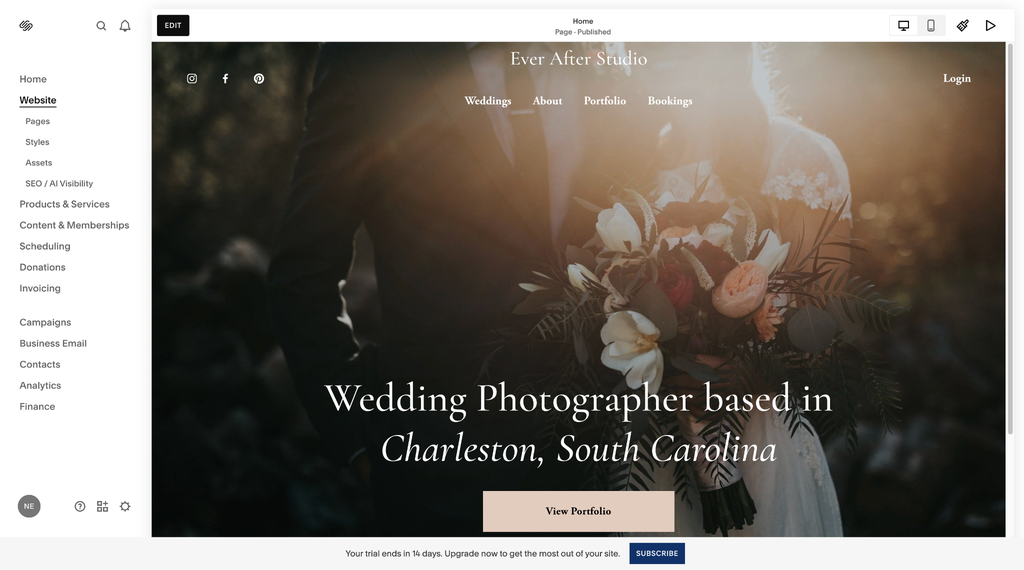
We found that customizing the look, feel, and functionality of a website was straightforward. All Squarespace websites are responsive, automatically adjusting to screen size. You can fine-tune desktop and mobile views separately by toggling between them. Built-in SEO tools are included.
Squarespace is a solid choice for solopreneurs and service-based businesses needing built-in e-commerce capabilities. You can use its platform to sell products, services, online courses, memberships, and subscriptions. You can also invoice clients and manage proposals within the platform.
Plans range from $19 to $99 per month, billed annually. A 14-day free trial is available.
All plans provide access to Squarespace’s AI Visibility feature to help monitor and improve how your site appears in AI search. However, that requires AI credits; each Squarespace plan includes a set number of AI credits.
Best for E-Commerce Businesses: Shopify
Shopify is ideal for businesses that primarily sell products and services online. The platform is built for e-commerce, making it easy to create and manage an online store. To begin, select from over 1,200 free and paid themes, or prompt Sidekick, Shopify’s AI-powered assistant, to create a custom AI-generated theme.
You can customize elements, including text, images, and menu styles. You can add and manage website pages, process and fulfil customer orders, and manage inventory, all within the platform. Sidekick can help you customize your storefront, create content, generate analytics, and manage orders and inventory.
In our testing, Shopify had a steeper learning curve than other website builders, due to its extensive e-commerce capabilities and settings, though it gets easier to use with time.
Shopify stores are mobile responsive by default. You can use built-in SEO tools to optimize your online store for search engines. It supports thousands of third-party integrations. You can connect email and SMS marketing tools, loyalty program apps, invoicing software, and more.
It’s easy to accept payments with Shopify’s built-in payment gateway, Shopify Payments. Payment processing fees apply and vary by plan. You can also accept payments through a third-party payment provider, though in addition to payment processing fees charged by the provider, Shopify charges an additional transaction fee.
Checkout customization is limited on standard plans. Adding custom fields, upsells, or advanced shipping rules is reserved for Shopify Plus. On a standard plan, you can customize your checkout using paid apps, though that’s an additional cost.
Businesses with brick-and-mortar locations can add Shopify’s advanced point-of-sale (POS) features for a unified online and in-store setup. Shopify offers a 3-day free trial, and you can extend it for $1 per month for up to 3 months if you need extra time to build your store.
Plans range from $29 to $299 per month, billed annually. Shopify also offers an enterprise-tier plan, Shopify Plus, for high-volume sellers starting at $2,300 per month. All plans include unlimited hosting and a free SSL certificate.
Best for Affordability: Hostinger
Hostinger’s drag-and-drop Website Builder is a solid choice for small-business owners seeking an affordable, user-friendly platform. The no-code editor combines visual drag-and-drop capabilities with built-in AI tools. You can start from a pre-made mobile-responsive template, an AI-generated template, or by chatting with Kodee, Hostinger’s AI assistant.
However you begin, customizing your site is straightforward. You can adjust text styles, fonts, colours, images, buttons, contact forms, and more. Hostinger provides AI tools, including a content generator, an image background remover, and a heat map tool that predicts where visitors will look and click on your pages.
Business plan subscribers can add an online store to sell products or services. Payment processing fees vary depending on the payment gateway chosen. All plans include built-in SEO tools, and Business plans add an AI SEO assistant that helps optimize content for AI Search and Generative Engine Optimization (GEO).
Website Builder plans cost $3.99 to $4.99 per month, with a 12-month commitment and upfront payment. A 14-day free trial is available. Hostinger is cheaper than most competitors, but its affordability comes with some drawbacks. The built-in blog tool lacks a native comment system, so to add comment capabilities, you’ll need to embed an external widget. Third-party integrations are also limited. Hostinger natively supports a small selection of integrations, while competitors like Wix have app marketplaces with hundreds of app options.
Hostinger Horizons is another website-building solution. The vibe-coding platform uses AI-generated code to build functional web applications from prompts. Plans range from $6.99 to $39.99 a month with a 12-month commitment billed upfront. AI prompts are credit-based, with credit limitations that vary by plan.
Best for Beginners: Wix
Wix is another popular choice for website builders for small businesses. The Wix Editor drag-and-drop website builder features over 2,000 fully customizable templates. The platform makes it easy to adjust text, images, buttons, menus, forms, and more.
Some website builders with a grid system have structured blocks that elements must snap into. But the Wix Editor is unstructured, so you can drag and drop elements anywhere on the page for greater design flexibility. The platform is intuitive, making it a great fit for beginners.
Wix automatically creates a mobile-friendly version of your site and integrates with popular third-party apps, including email marketing tools, social platforms, and invoicing software. Built-in SEO and GEO tools can help you optimize for search engines and generative engines.
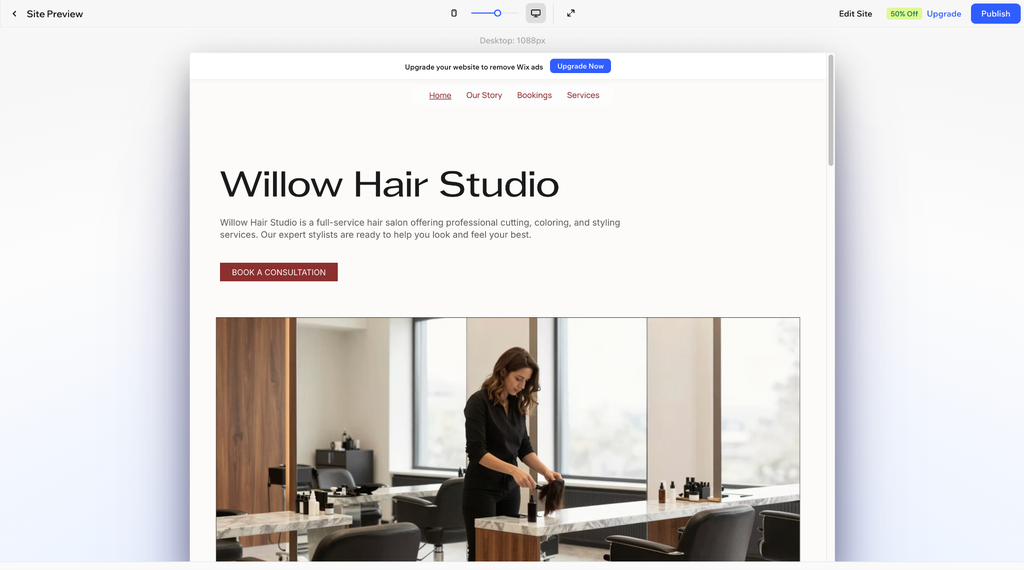
Some AI features require credits, including Wix’s AI Marketing Agent for SEO and its AI Custom Agent, a business management tool that automatically creates and runs tasks. Credit limits vary by plan.
Plans range from $17 to $159 per month, billed annually. You can start building a Wix website for free.
For small-business owners who prefer an AI-driven builder, Wix also offers Wix Harmony, an AI-powered website-building tool. The tool generates a website based on the prompts. The more detailed your prompts, the better the results. Wix Harmony is available at no extra cost with all plans.
Best for Portfolio Websites: Format
Format is a portfolio website builder made for creatives. It’s ideal for designers, photographers, and visual artists who want to launch a professional portfolio-based website quickly. All websites created with Format are mobile responsive.
The platform is easy to use—it only takes a few minutes to create a polished website. Format offers nearly 100 customizable themes with drag-and-drop editing, so you can adjust typography, colours, and branding without needing technical skills.
When adding pages, you can start with a blank canvas or choose from over 60 customizable page templates. You can also add a blog. SEO tools are built into the platform.
Pro and Pro Plus plans include hosted video and photo storage, plus the ability to add a commission-free online store. You can sell physical products, services, and digital downloads. To accept payments, you’ll need a PayPal Business or Stripe Business account. Payment transaction fees apply.
All plans include Workflow, Format’s client management suite. It can be used to manage contacts, share password-protected client galleries for proofing, send contracts, and deliver files. Format integrates with Adobe Lightroom, making it easy to publish and update portfolios and client galleries directly from Lightroom. Plans cost $14 to $36 per month, or $10 to $26 per month billed annually. All plans include hosting, and Pro and Pro Plus come with a free custom domain for one year. Format offers a 14-day free trial.
Key Features to Look for
When choosing a website builder, look for a platform that offers customizable templates, an easy-to-use drag-and-drop editor, and mobile-responsive designs.
If you plan to sell products or services, prioritize a builder with e-commerce features that fit your company’s needs. Look for a platform that offers built-in payment solutions or integrates with third-party payment processors.
Built-in SEO tools are essential if you want your content to be discovered by search engines. AI-powered tools can speed up the site-building process, while third-party integrations let you connect the marketing, invoicing, and productivity tools you already use.
Compare costs and choose a platform that aligns with your budget. If you get a deal for the first year, make sure you understand what you’ll pay after that.
The Bottom Line
Website builders make it easier for small business owners to create professional sites without coding. No single solution is ideal for every business, so as you compare options, focus on the features and tools that fit how your business actually operates. Also consider that some AI features require credits, so check how many are included in your plan before relying on them.
Why You Can Trust Us
To prepare this guide, we spent hours evaluating each website builder through real-world testing, including creating mock websites on every platform. We assessed capabilities like drag-and-drop editing, template variety, customization, e-commerce features, AI-powered tools, mobile responsiveness, and more.
FAQs
Is it worth making a website for my small business?
Yes. Many customers look for information online before deciding to work with a company, so a polished, professional website can help them feel more comfortable hiring your business.
Do I need coding skills to use a website builder?
No. Many of the best website builders for small businesses feature no-code drag-and-drop editors, user-friendly interfaces, and customization tools, so you can put together a professional-looking site without any technical experience.
What’s included with a website builder?
Most popular website builders offer customizable templates, drag-and-drop editors, AI-powered tools, built-in SEO features, and mobile-responsive designs. Many also include a free custom domain for the first year, or you can connect an existing domain purchased elsewhere. Website builders typically include hosting, so you won’t need to invest in a separate service.
Feature image credit: Adobe Stock