Tag

content marketing

Browsing

By Sammi Caramela

Every good content marketing strategy starts with a well-planned content calendar.

Here are eight steps for building an effective calendar:

1. Design your calendar. Choose a format: an actual calendar template, a spreadsheet, a PDF template or even an online project management tool. From there, decide how to map out your content (e.g., weeks or months in advance). You can start short term and expand as you come up with ideas.

2. Organize content types. Create personas of potential customers, considering any questions or concerns that you can address for them. Ask what brand voice you want to project. Do you want to be casual, professional or somewhere in between? Define your brand’s identity, and ensure your content reflects it. Identify content categories: long blog posts, short blog posts, social media updates, photos, videos, infographics and so on. This will help you vary your posts rather than exhausting one or two formats. You might color-code each type of content to help you visualize it.

3. Determine how often you want to post. Depending on your resources—business size, number of employees, free time—and what works for your business, you might post on certain platforms daily, semiweekly, weekly, biweekly or even less frequently. Regardless, it’s important to be consistent. For instance, if you publish a blog post each week, specify a day and tell your followers, so they know when to expect it. On social media, post more frequently to be considered an “active” user.

4. Look for opportunities to repurpose content. Despite the massive demand for “new” content, you don’t have to come up with original assets for every channel every day. There easy ways to slice, dice and stretch the content you create for one medium for use on another. If you write a blog post, you can take adapt a snippet for a Facebook caption. Highlight key elements for a text-based video on Instagram. You might even turn sections into an appealing infographic. You can also update older, high-performing content with new information. The more mileage you can get out of a piece of content, the easier it will be to sustain your content marketing efforts.

5. Be flexible enough to jump on trending topics. Along with a steady stream of “evergreen” content ideas, you might also post timely content covering industry developments or current events. This will help establish you as a relevant and credible expert in your field.

6. Ask your team for help. The more people you include in brainstorming, the more insights and ideas you’ll gain. Plus, you’ll have more people to delegate to, which will help you tackle more projects in less time.

7. Schedule cross-channel content. When planning content, integrate other types of marketing into your strategy. For instance, pair a blog post with a social media update, and schedule them to go live on the same day. Also, engage with other bloggers or influencers in your industry or niche, through follows, comments, “likes” and shares.

8. Measure your content performance and adapt. As you publish your content, check your stats to evaluate posts’ performance. Maybe your audience prefers short listicles to long blog posts, or maybe they want more videos and fewer photos. Whatever the results, don’t be afraid to make adjustments and experiment with new ideas.

By Sammi Caramela

Sourced from ragan

By Elise Dopson

What content types work best? Is content important for SEO? This monster collection of content marketing statistics will answer all of your questions.

There’s been a long-standing debate as to whether content marketing is as effective as it used to be.

Sure, there’s more competition… But content marketing is not only still effective as a branding and acquisition tool, due to the maturation of new channels it might be more effective than ever before.

We put together this monster collection of statistics to prove it.

Click to jump to a specific section:

…or continue scrolling to read 29 crucial content marketing statistics you’ll need to guide your strategy in 2019.

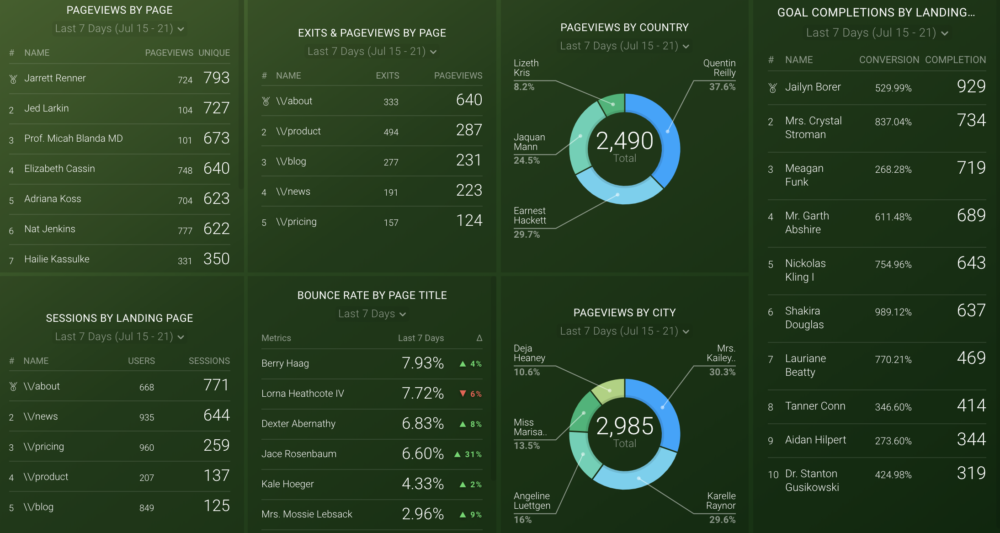
*Editor’s note: Check how well your content is performing with our Google Analytics Content Analysis dashboard. It gives a breakdown of sessions, along with how many goal completions each page is generating:

General Content Marketing Stats

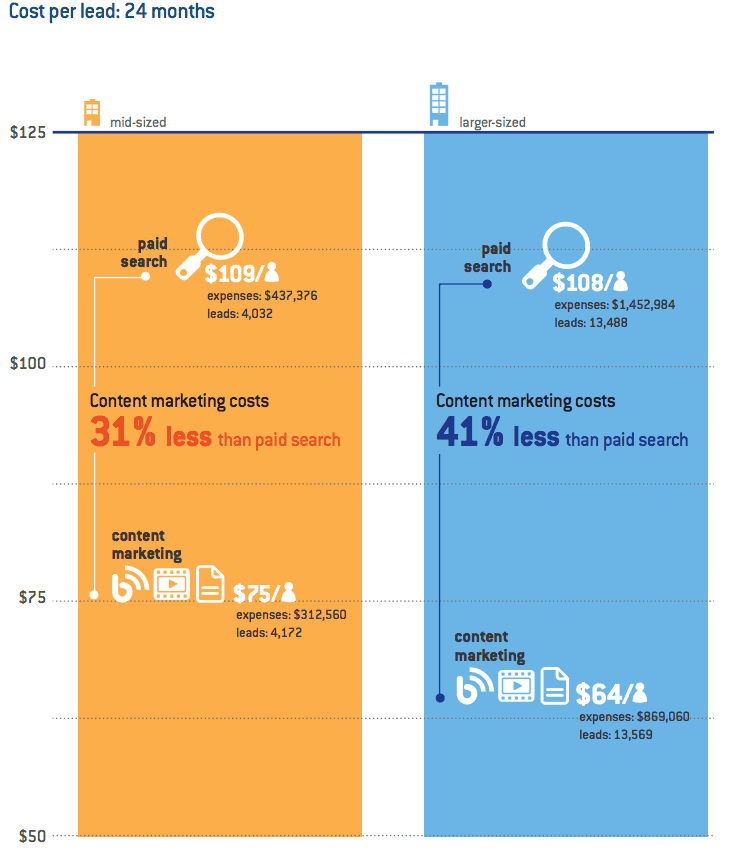
1) Content marketing costs up to 41% less per lead than paid search

First of all, let’s discuss why content marketing should be a huge part of your marketing plan.

Your marketing mix might include several channels–such as paid ads, social media marketing, and email. Why should content be a priority over those?

Here’s why: Research by Oracle found that content marketing costs up to 41% less than paid search for larger businesses, and 31% less for mid-sized companies:

2) 47% of buyers view at least 3–5 pieces of content before contacting a sales rep

So, why does content marketing get such a great ROI for the cost (compared to paid search)?

It’s because 47% of B2B buyers view at least 3-5 pieces of content before contacting a sales rep. That’s right: Before a sales demo, and long before an initial contact form submission, your target leads want to feast their eyes on content.

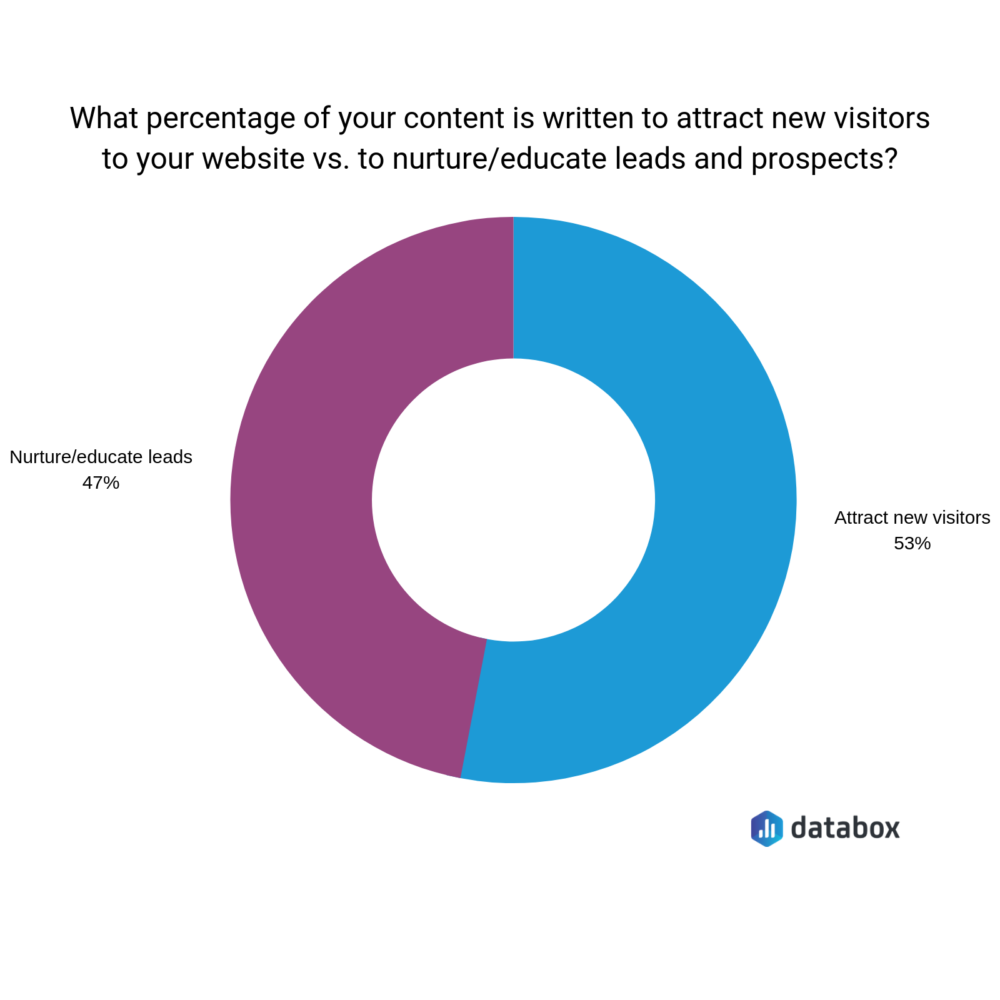
3) 53% of content marketers’ goal is to attract new visitors

With the previous content marketing statistic in mind, it’ll come as no surprise to learn that over half of the marketers we surveyed said their content is written to attract new visitors:

Just less than half (47%) of our experts said their content is designed to nurture or educate existing leads.

Both are worthwhile strategies, because B2B buyers are looking for content at all stages of the sales funnel–not just the beginning. Your content is a great way to retain the users you’ve already got.

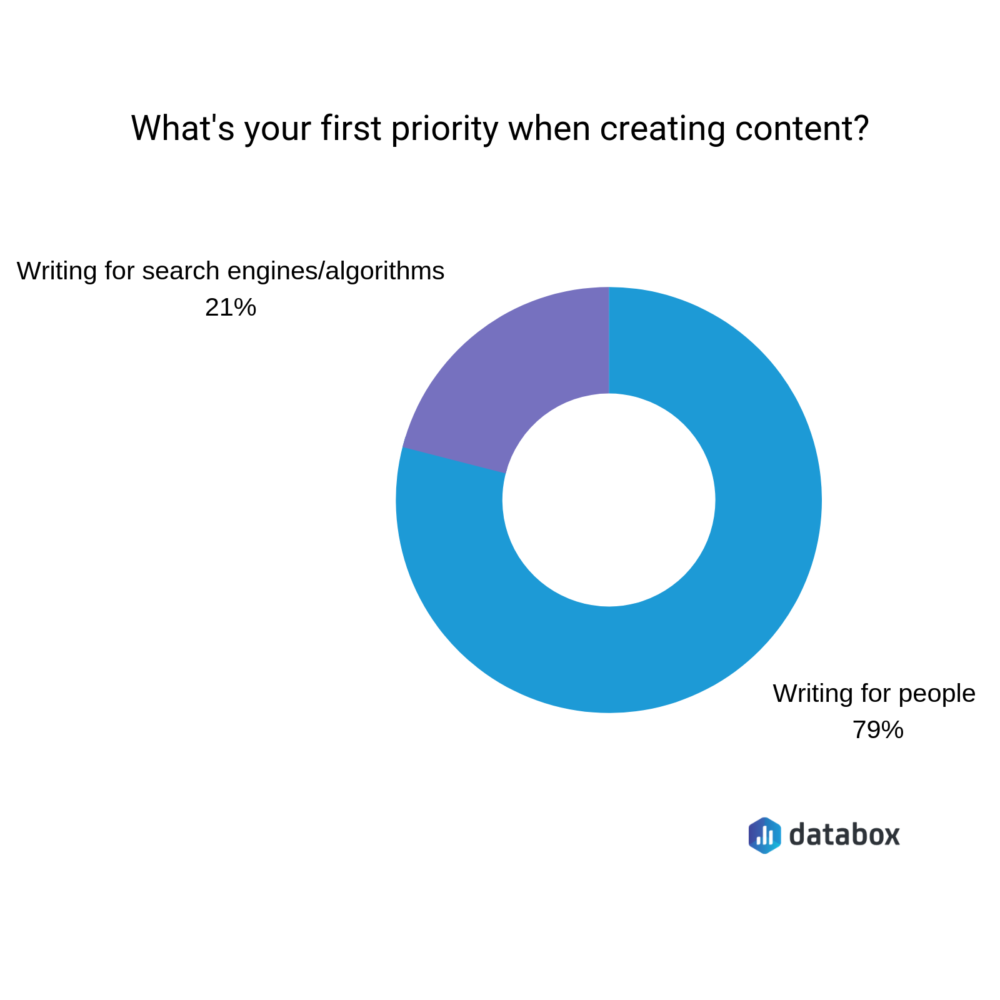
4) 79% of content marketers write their content for people (rather than search engines)

There’s no doubting that SEO is a huge part of content marketing.

We’ve previously likened it to the chicken and the egg: You can’t have great content without SEO, but your SEO won’t be successful without incredible content.

Despite Google being a huge priority for marketers, 79% of the people we surveyed said their first priority when creating new content was to write for people:

Blogging Statistics

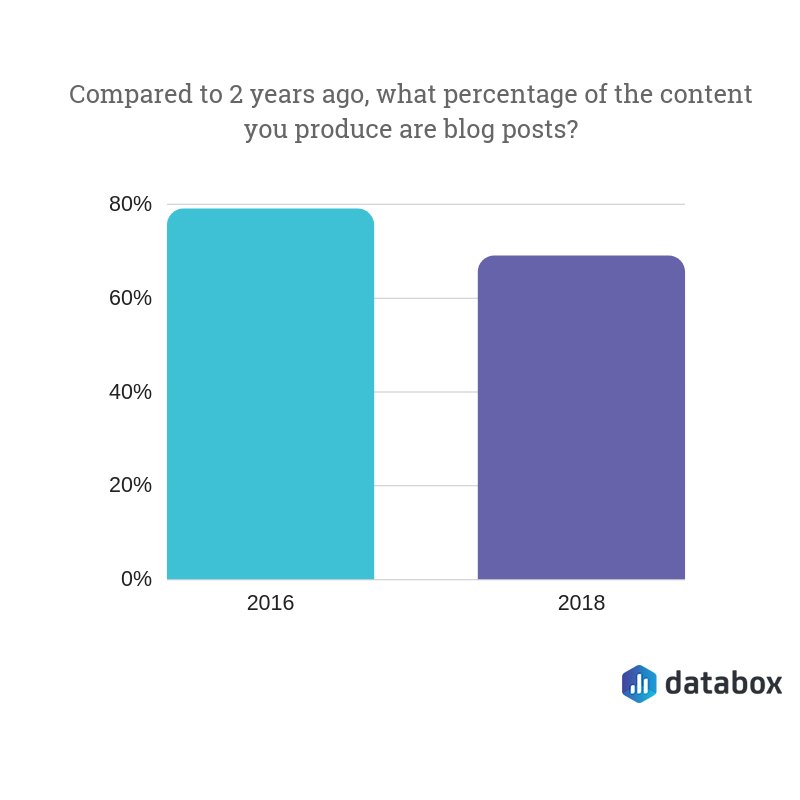
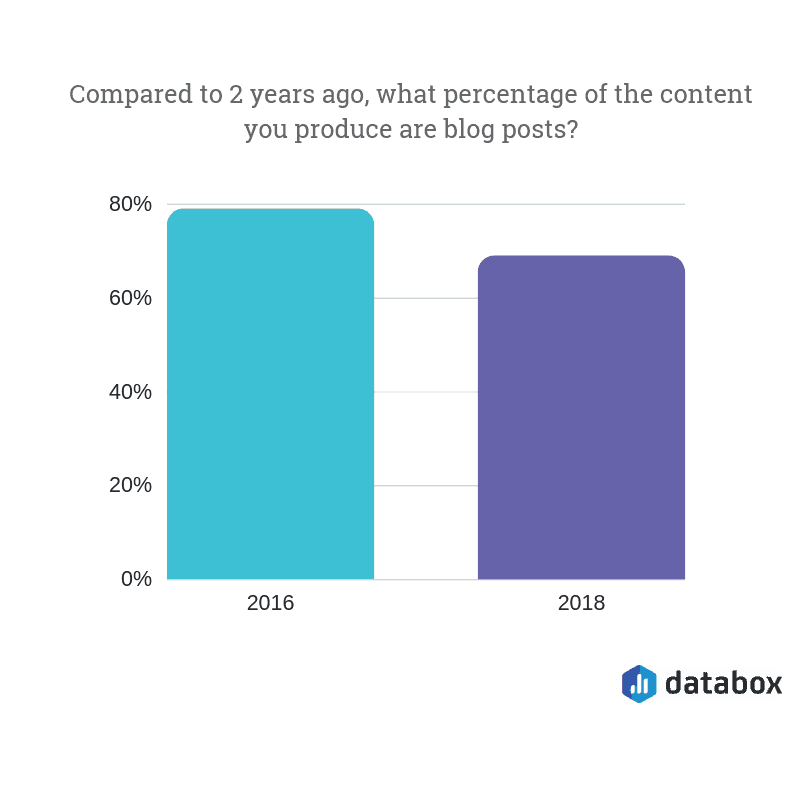
5) Blog posts account for 64% of all content being created

Our experts said blog posts account for 64% of all the content they’re creating, compared to almost 80% two years ago:

So, what other types of content are included in the other 36%? Here are some examples:

  • White papers
  • Videos
  • Podcasts
  • Case studies
  • Emails

Remember: Content doesn’t always have to be written text.

6) 61% of consumers made a purchase after reading recommendations on a blog

While written text doesn’t form 100% of the content a company creates, there’s a reason why blogging forms the majority.

It’s because 61% of consumers made a purchase after reading recommendations on a blog.

Whether you’re a SaaS, eCommerce or service-based business, your customers want to read content before they hand over their payment details–and they’ll finish their purchase, as a result.

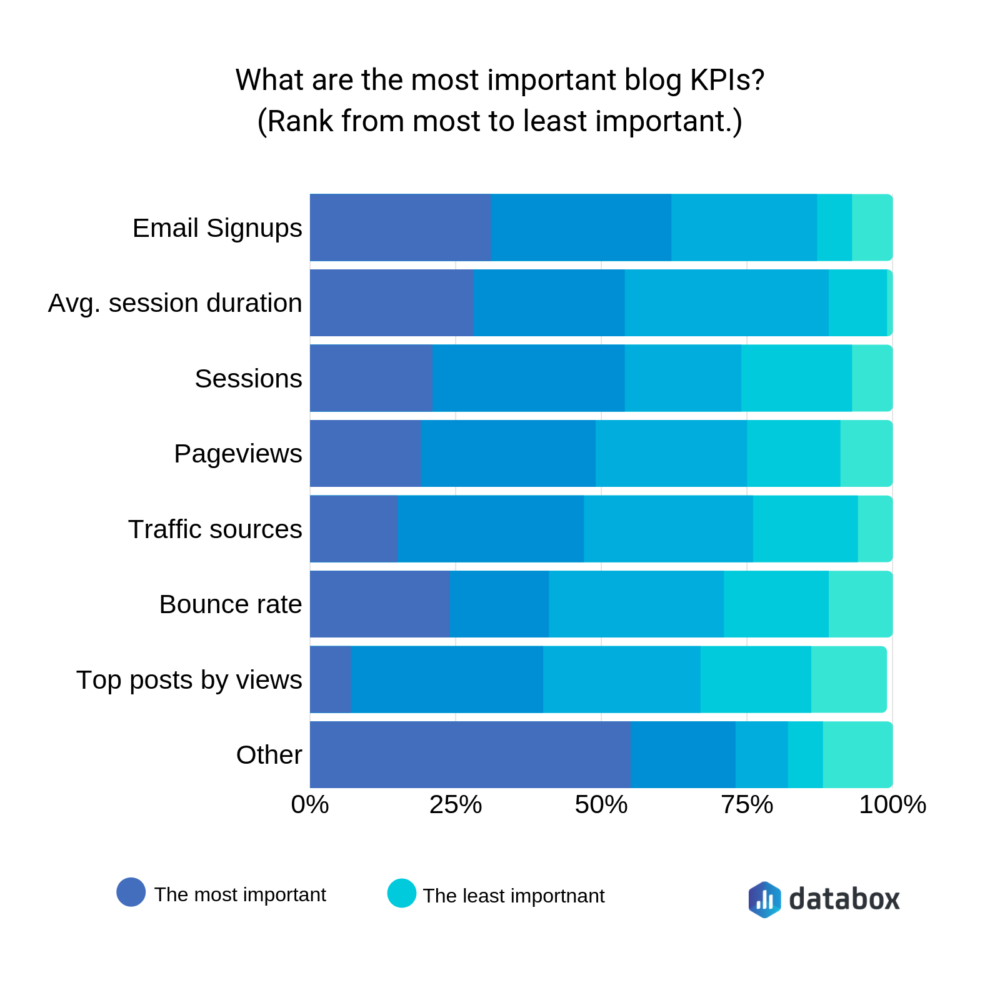
7) The most important blogging KPI is “email signups”

It’s a well-known fact that blogging takes a while to see results.

You can’t publish a blog post and expect to see hundreds of sales overnight; nor can you expect a lead to purchase after consuming a single piece of content.

Our survey indicates that businesses do see content marketing as a long-term strategy, with the majority voting “email signups” as their most important blogging KPI:

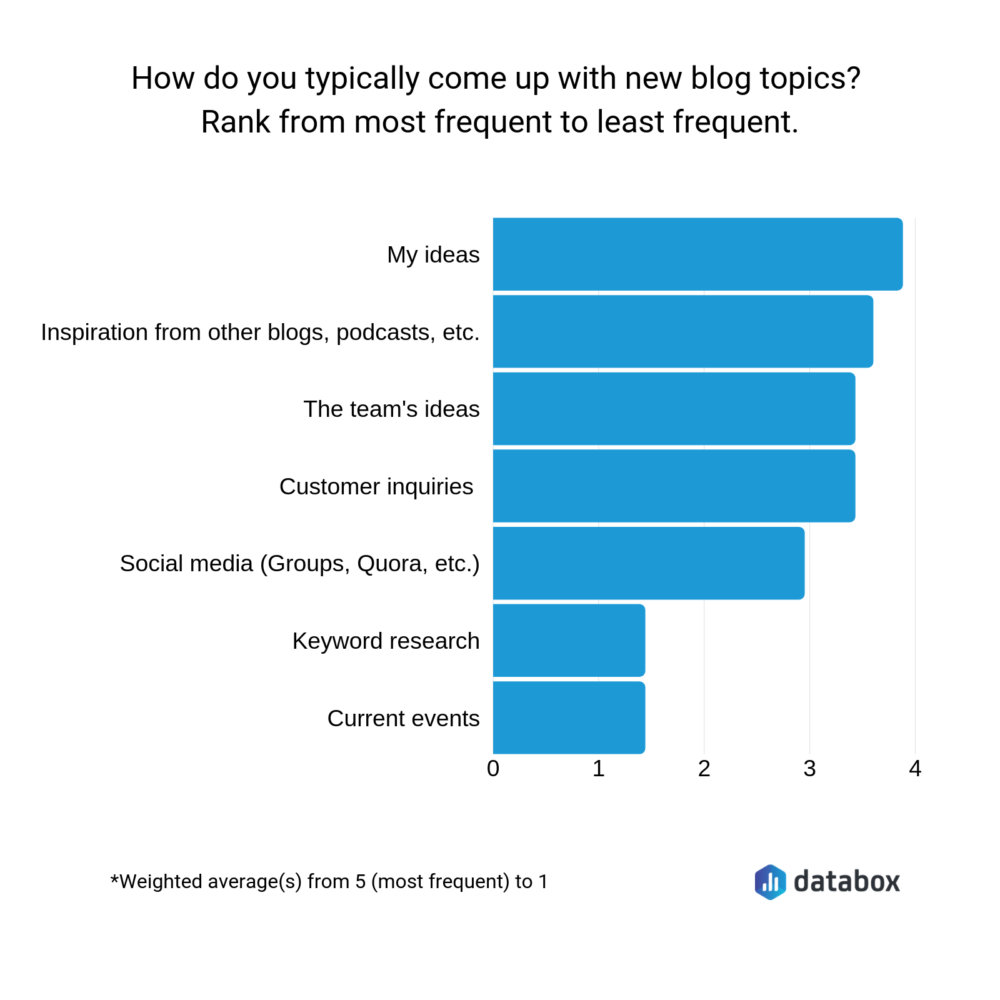
8) Content ideas from customer inquiries are the fourth most-used methods of finding content ideas

Finding new content ideas can be tough. So, we asked a handful of content marketers where they found them.

Personal ideas take the top spot; inspiration from other blogs take second; feedback from their team take third.

But arguably the most important–customer inquiries–are ranked fourth. (Despite those people being the audience you’re writing for.)

9) …but just 42% of companies are talking with customers to understand their needs

Companies are using customer inquiries as a source of content ideas.

But even more worryingly, just 42% say they’re talking with their customers to understand their needs.

Without speaking to your customers, how do you know what type of content they want to consume, or the topics they’re most interested in?

(Schedule surveys into your post-purchase emails to get this type of feedback. Or, take a look at the questions your sales team are frequently asked. It’s a great source of content ideas.)

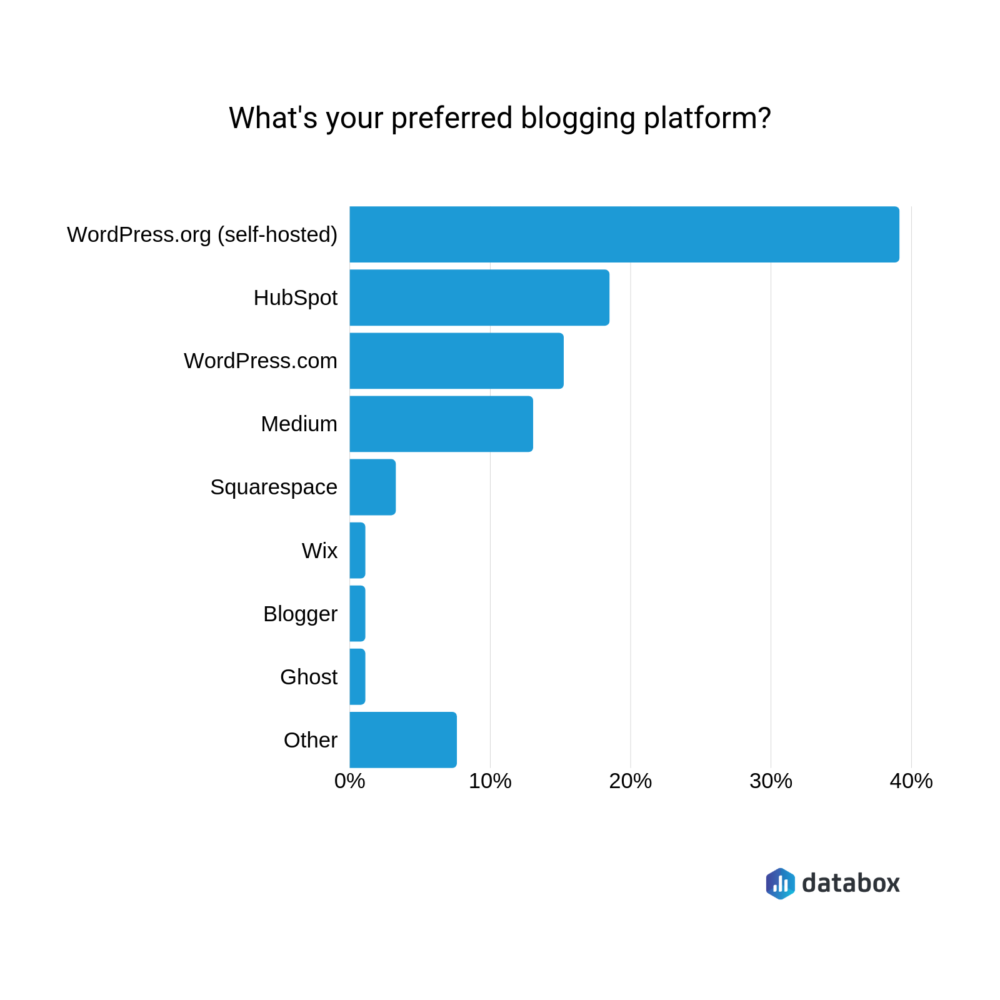
10) WordPress is the most popular blogging platform

So, are you convinced to start blogging (if you aren’t already)?

The most popular blogging platform is the self-hosted version of WordPress, shortly followed by HubSpot:

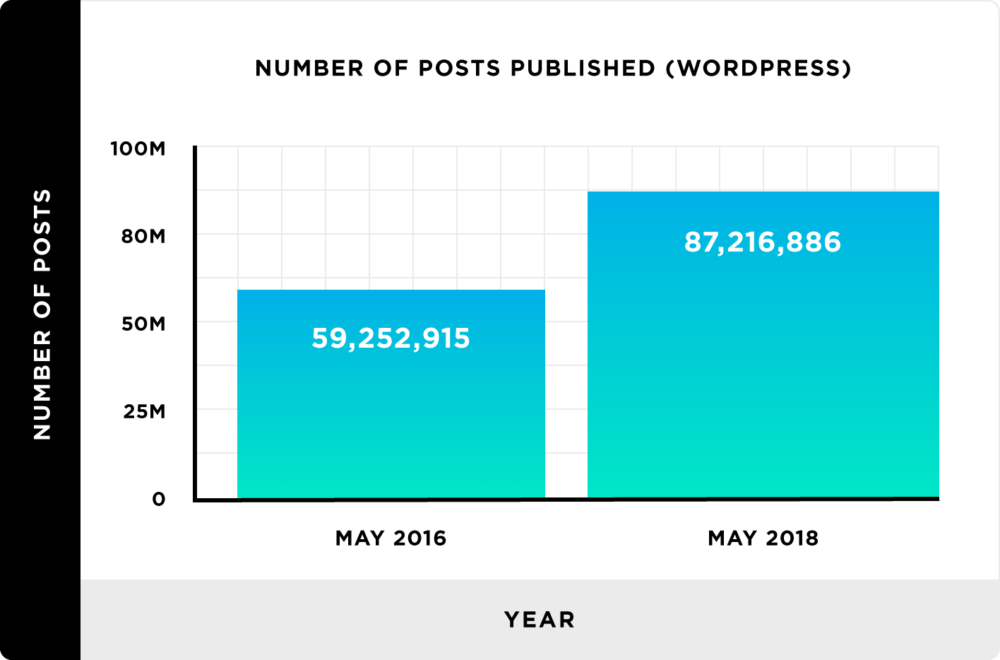
11) 87 million posts were published on WordPress in May 2018

If you’ve picked WordPress as your blogging platform of choice, you’ve got plenty of competition.

Research by Backlinko found there were over 87 million blog posts published on WordPress sites in May 2018–which is over 27 million more than two years prior:

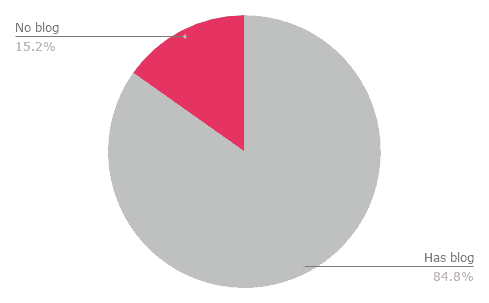
12) 15% of SaaS companies don’t have a blog

Sure, there are millions of companies you’ll be competing with when you start a blog. But not every business has a blog on their website–especially when it comes to SaaS.

In fact, Emily Byford found 15% of SaaS companies don’t have a blog:

Content Promotion

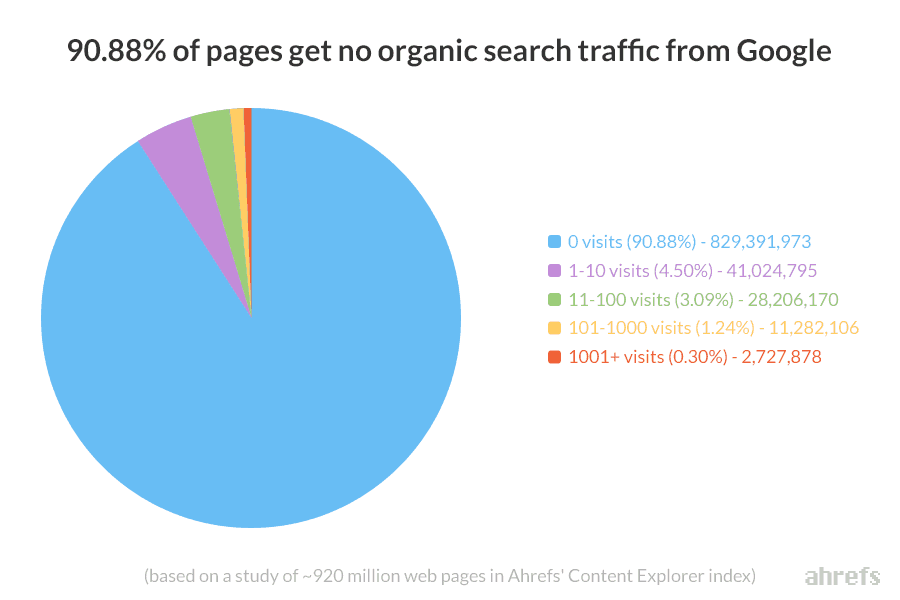
13) 91% of content gets zero organic traffic

You’ve invested time and effort into creating content, and you’re starting to see a handful of email signups as a result.

But you’re still not ranking in search.

You’re not alone. In fact, Ahrefs discovered that the vast majority (90%) of content gets no organic traffic from Google:

Solve that problem by applying these SEO fundamentals to your website, and tracking your content’s SEO performance with our Google Analytics SEO dashboard.

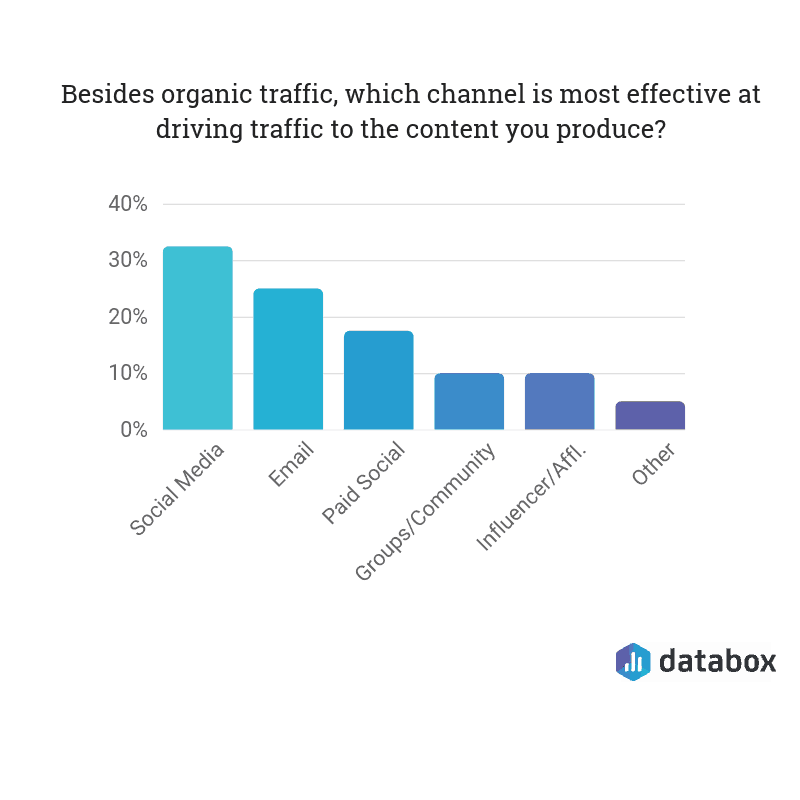
14) Over 30% of marketers think social media is the most effective way of driving traffic

If Google doesn’t drive traffic to websites, what does?

Our experts think social media is the answer, with more than 30% voting it as the most effective channel for driving traffic to the content they produce–shortly followed by email and paid social:

15) Posts with longer headlines get more social shares

If you’re sharing your content to social media, you can’t just post the link to your Facebook Page and expect people to flock to your website.

You’ll need to optimize your content for social media.

What does that optimization look like? According to this data, you’ll need to write longer headlines for your content. It’s proven to help garner more social shares:

Content Marketing ROI

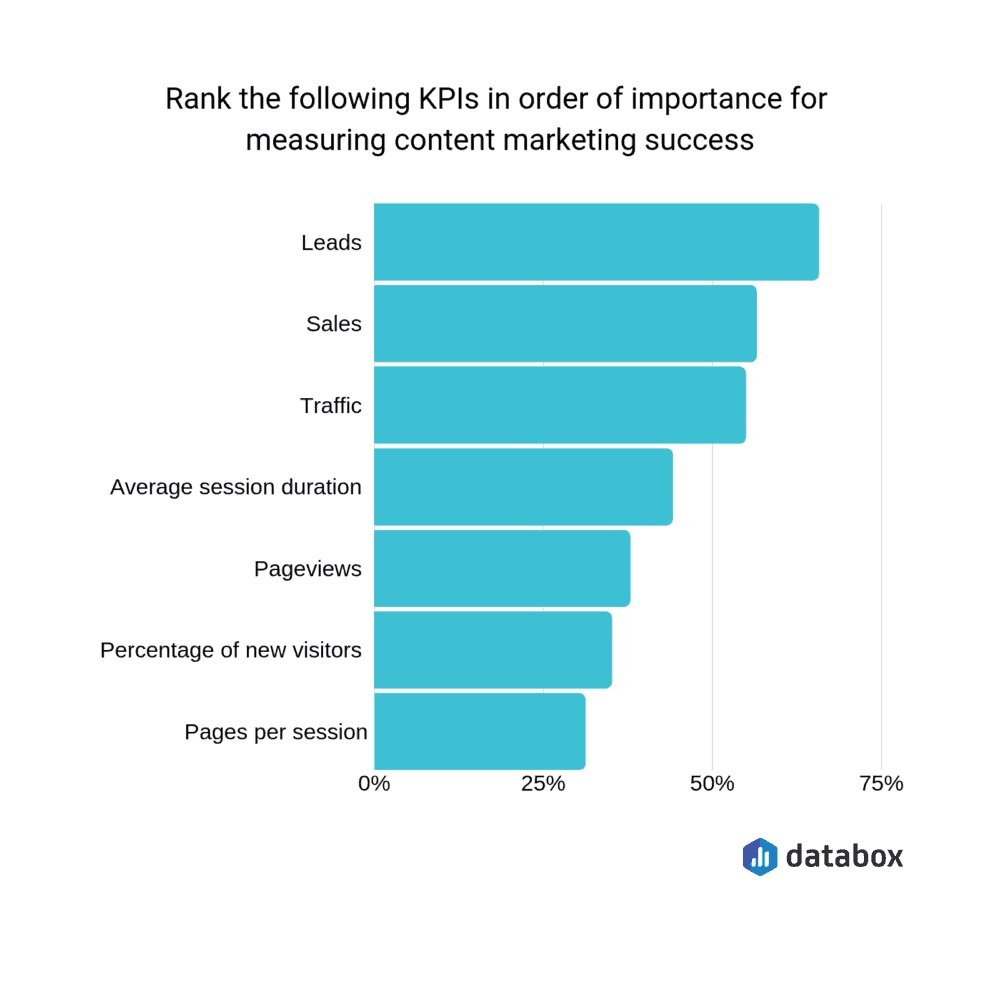
16) The most important KPI for content marketers is “leads”

Earlier, we mentioned that the main KPI for blogging is email signups.

That’s the same for content marketing, as a whole–with our experts voting “leads” as the most important metric to measure the success of their strategy:

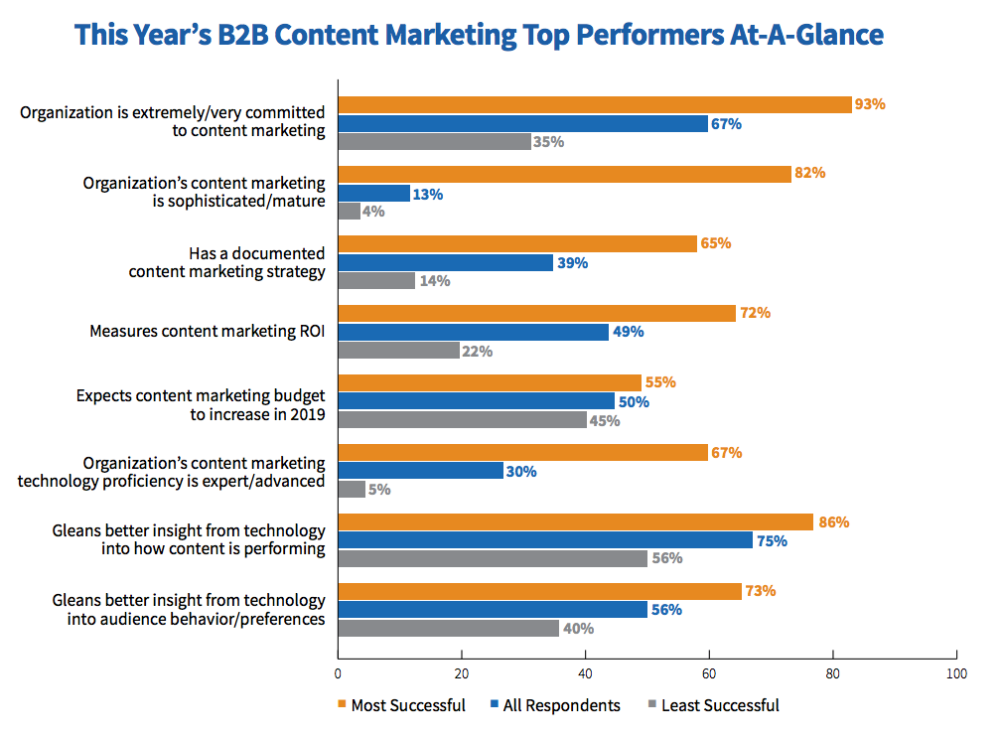
17) 72% of successful companies measure their content marketing ROI

It’s important to know whether the content you’re producing is achieving the results you’re hoping for.

Content Marketing Institute found that 72% of the most successful companies measure their content marketing ROI, compared to 22% of the least successful:

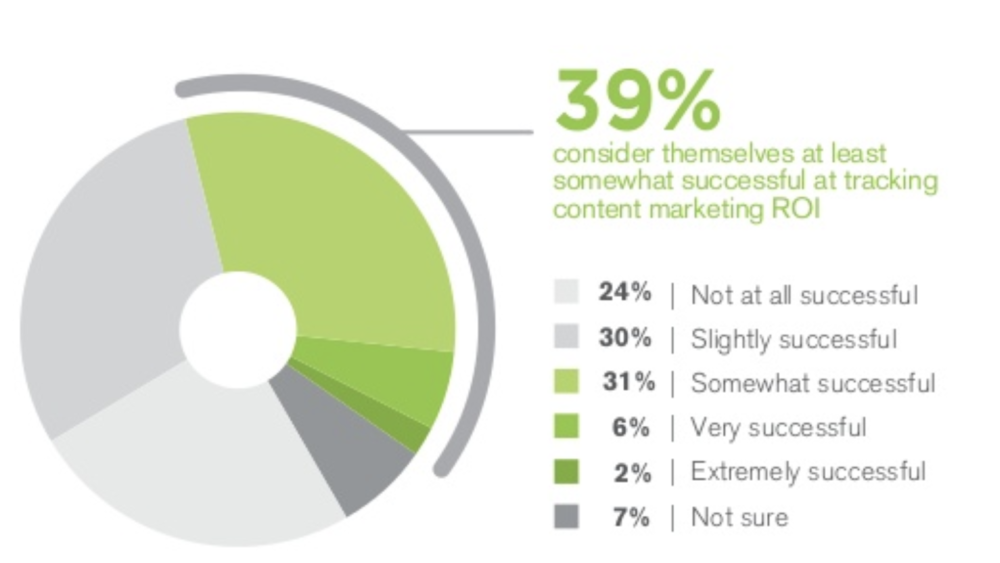
18) Only 8% of marketers consider themselves “successful” or “very successful” at measuring content ROI

Despite the most successful companies tracking their content marketing ROI, it seems like not many marketers know how to do it.

Research has found that 2% of companies consider themselves “extremely successful” at measuring content ROI, and just 6% think they’re “successful”:

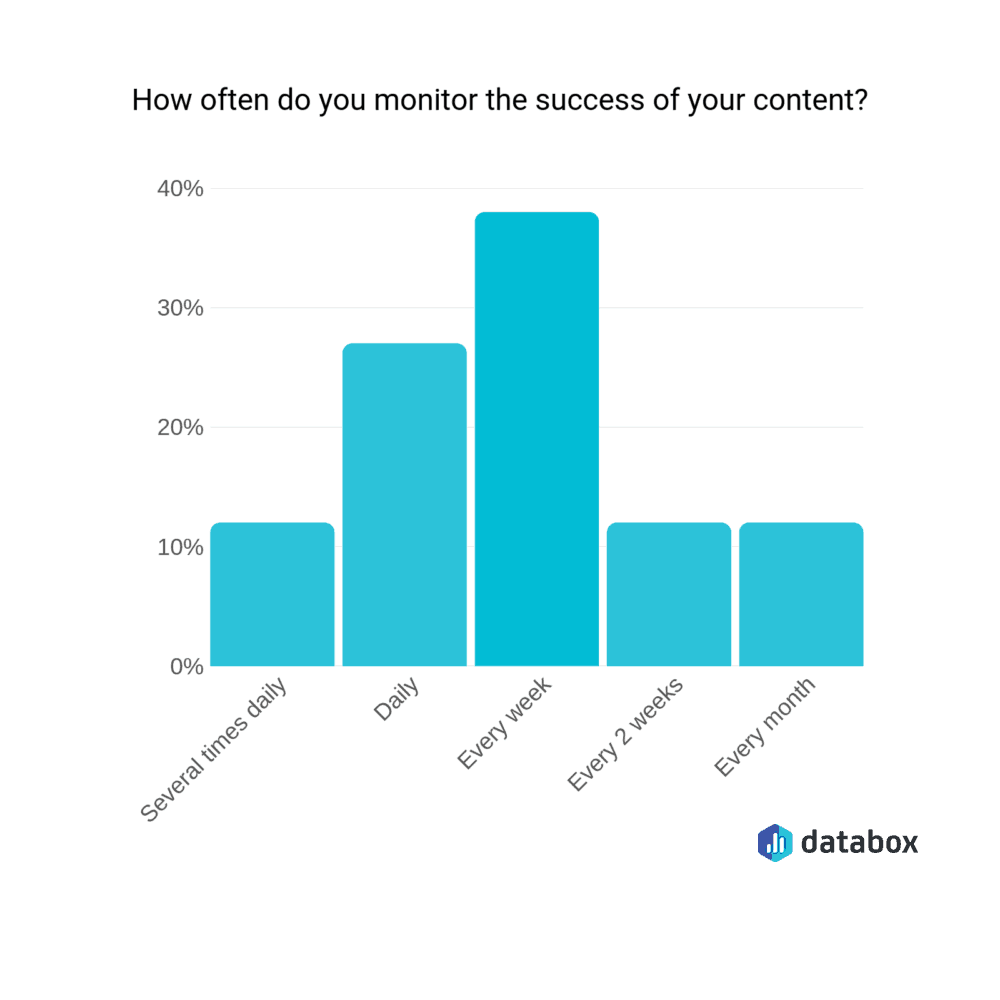
19) The majority of marketers measure their content success every week

Earlier, we touched on the fact that content marketing takes a long time to pay off. You can’t publish a piece of content and expect leads overnight.

However, we found that almost 40% of marketers measure the success of their content weekly:

Unfortunately, there is no “best practice” for how often you should measure your content marketing ROI. The more content you publish, the more frequently you could measure it–but you’ll need to give your content enough time to get the wheels turning.

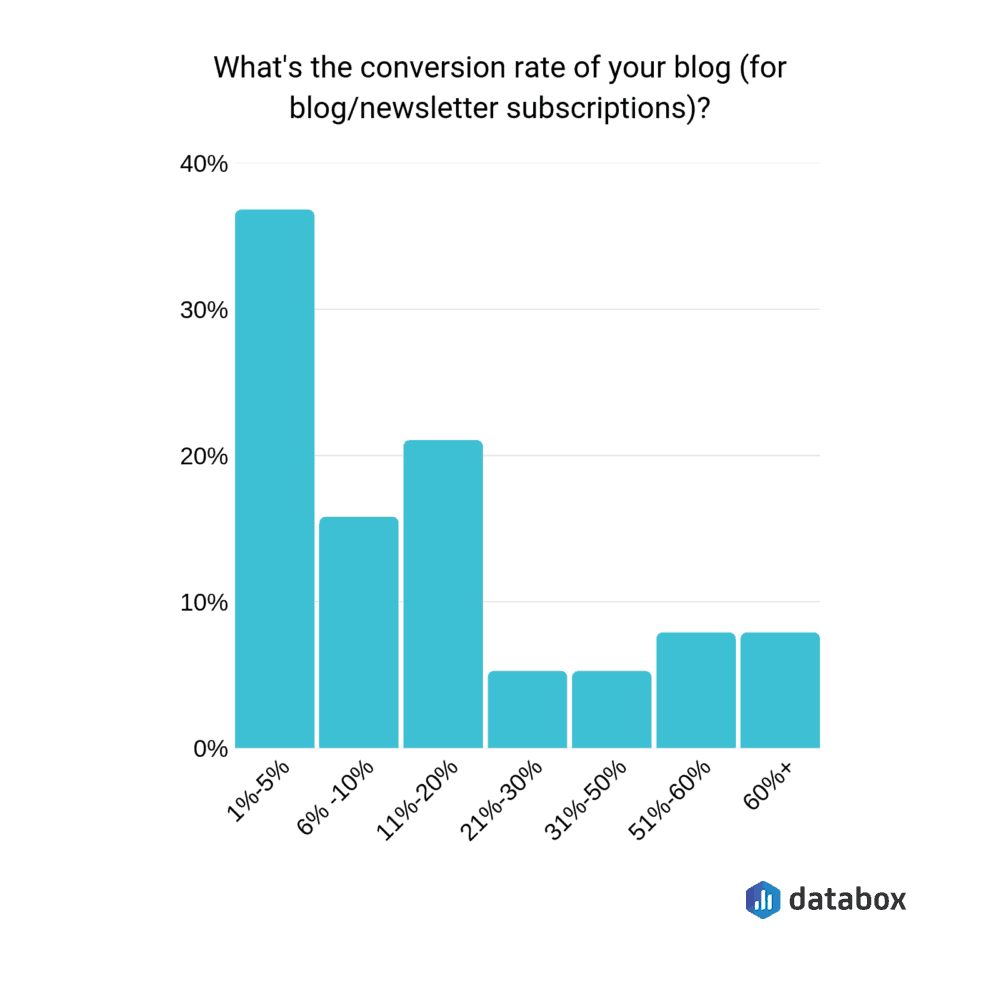
20) The average conversion rate for a blog is 19%

Email signups is the most popular content marketing KPI.

If you’ve chosen the same metric, you might be wondering what the typical blog conversion rate is so you can tell whether yours meets (or beats) it.

The majority of marketers we surveyed said 1-5% of visitors to their blog turn into a newsletter subscriber, with the average visitor-to-subscriber rate falling at 19%.

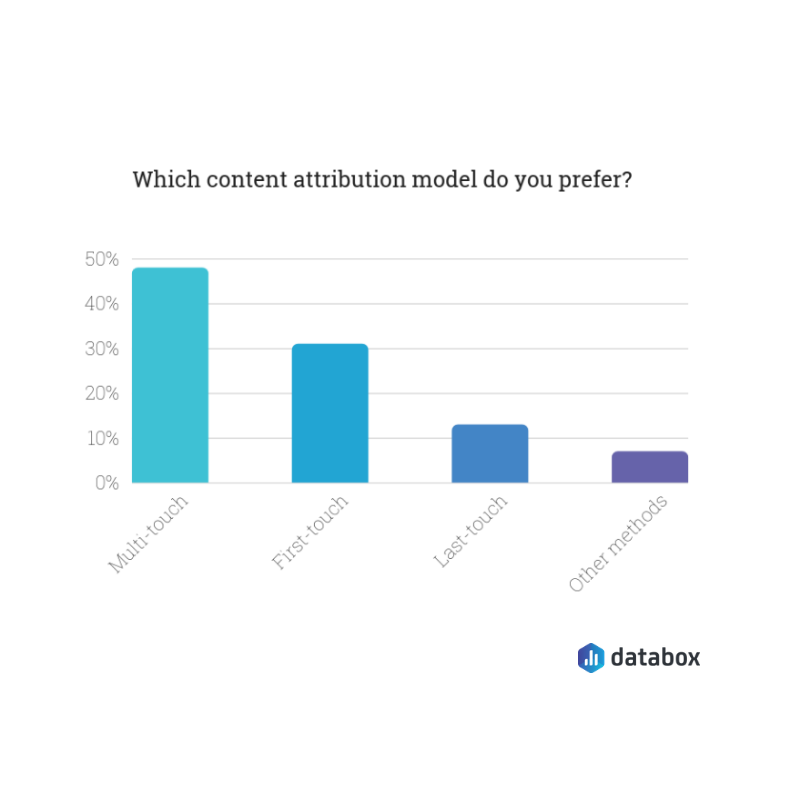
21) Almost half of marketers prefer multi-touch attribution models

When you’re measuring content marketing ROI, your figures can vary massively depending on the attribution model you’re using. It can be either:

  • First-touch: The first page they visited
  • Last-touch: The page they visited immediately before purchasing
  • Multi-touch: The several pages they visited throughout the process

Almost half of our marketers said they prefer a multi-touch attribution model, particularly because it allows you to track a customers’ full journey through your funnel:

Content Marketing Teams

22) In 55% of organizations, one person manages the editorial calendar

Content marketing isn’t a one-man-band job. As you’ll see later, content departments are teams, with several people helping to drive those subscribers.

That being said, in 55% of organizations, just one person manages the editorial calendar:

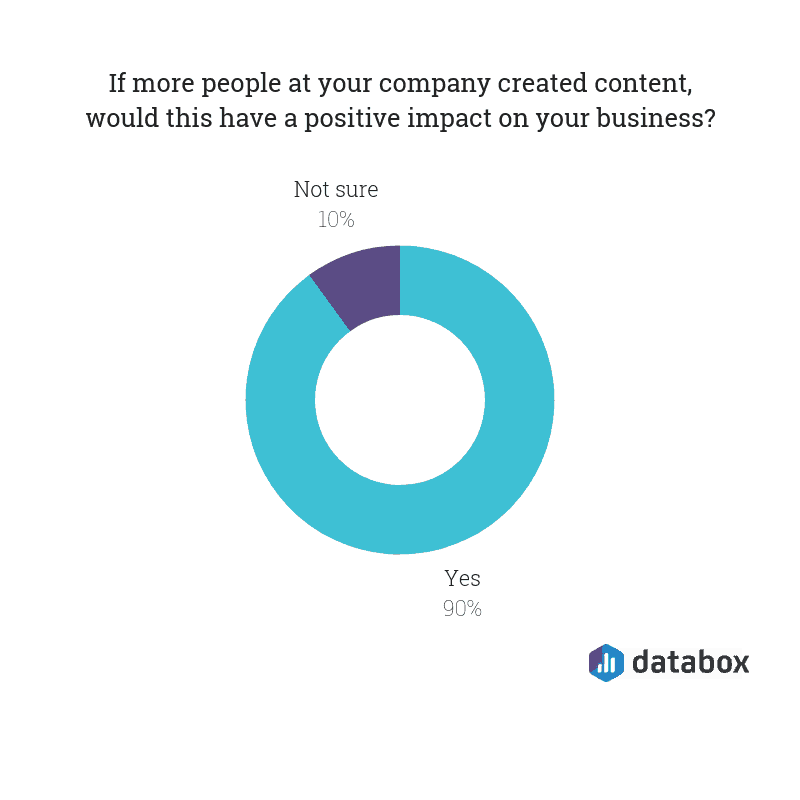
23) …but 90% believe they’d see a “positive impact” if more people in their company contributed

Over half of companies have a content calendar managed by one person.

However, a huge volume of organizations (90%) say they’d see a positive impact if more people within their company contributed:

So, how can you encourage more people within your workforce to help with content creation?

Start by explaining the value that content gives, and how it’ll help improve the day-to-day life of the people you’re trying to involve. (For example: If you’re asking a sales rep to contribute content, tell them they’ll have a detailed link to pass onto customers who ask the same thing.)

Content Marketing Budgets

24) Marketers allocate of 26% of their total marketing budget to content marketing

Ah, the fun part of marketing: Budgets.

Even though you’re not directly investing cash into a platform (like Facebook Ads, for example), content marketing still needs an investment–which usually comes from a broader marketing budget.

Izea found that on average, B2B marketers allocate 26% of their overall budget to content marketing. That comes down to 22% for B2C companies.

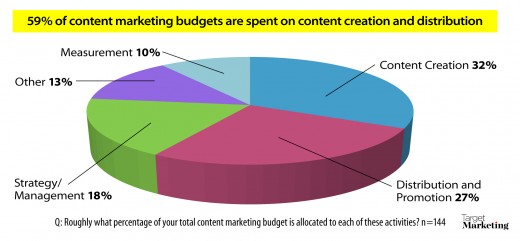
25) 32% of a content budget goes to development, and another 27% to distribution and promotion

Once you’ve got the percentage split you’ve got to assign to content-related tasks, you’ll need to decide where to spend it.

Data by Target Marketing found that on average, 32% of the budget does to content development, and 27% heads towards paid distribution and promotion.

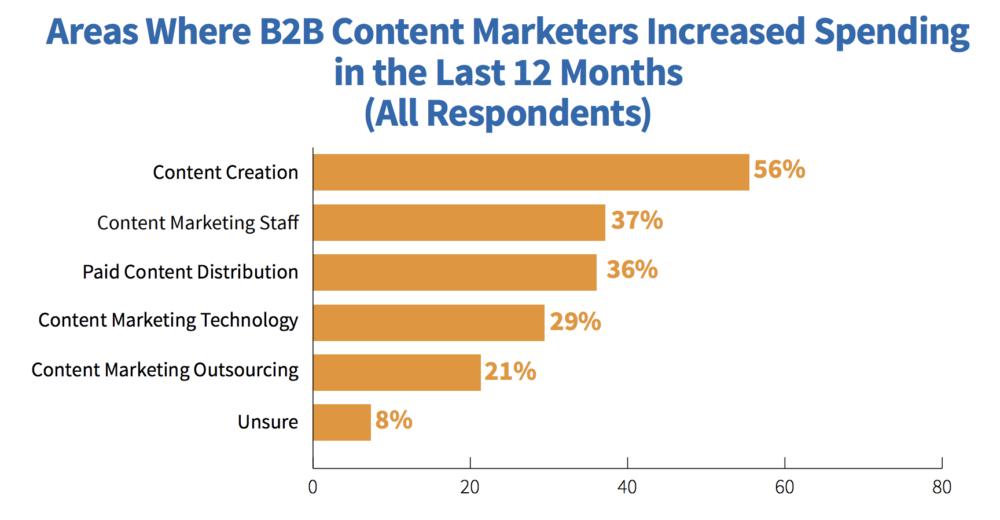
26) 56% of B2B marketers increased their spend on content creation

Just 32% of the average content marketing budget is spent on creation.

However, that seems to be on the rise. Content Marketing Institute found that 56% of B2B marketers increased their spending on content creation in the last 12 months:

https://contentmarketinginstitute.com/wp-content/uploads/2018/10/2019_B2B_Research_Final.pdf

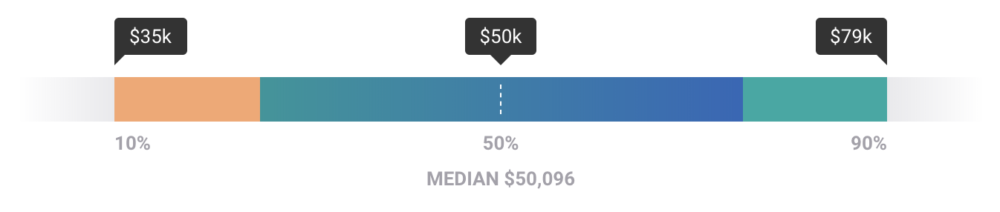
27) The average U.S. salary for a content marketer is $50,096

You can’t have a successful content marketing strategy if you don’t have a team behind it. You’ll need to factor those costs into your budget.

The average salary for a U.S.-based content marketer is $50,096:

https://www.payscale.com/research/US/Job=Content_Marketer/Salary

That increases to $57,731 per year for a content manager.

The future of content marketing

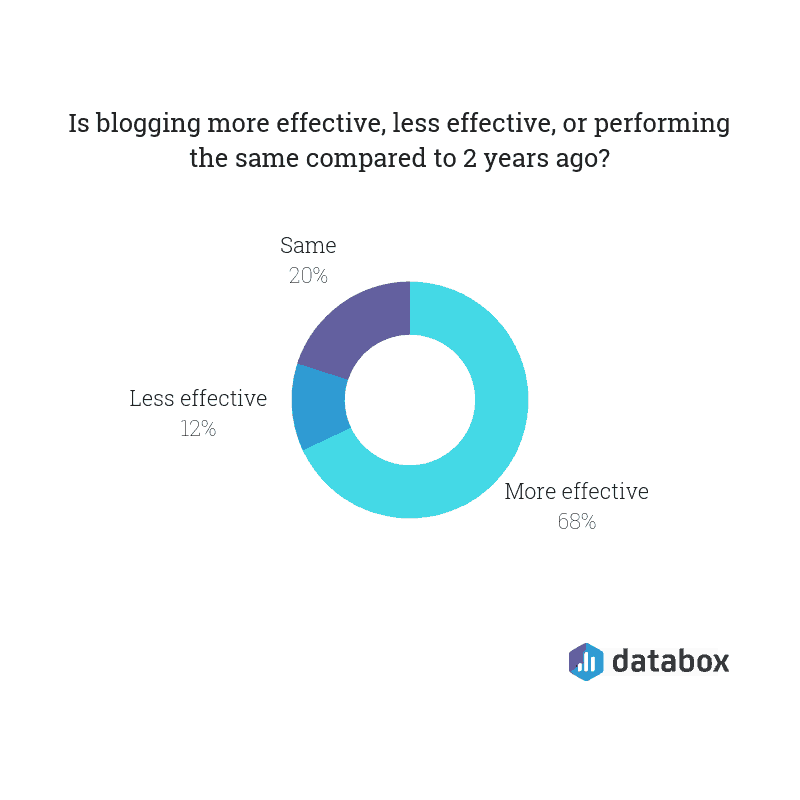
28) 68% of marketers think blogging is more effective than two years ago

With these content marketing statistics in mind, it’s interesting to think where we’ll be in a few years time. (Especially when things have changed so much within the previous two.)

We wanted to get a rough prediction on what content marketing might look like beyond 2019, so we asked whether marketers found blogging more (or less) effective than two years ago.

The majority think it’s more effective:

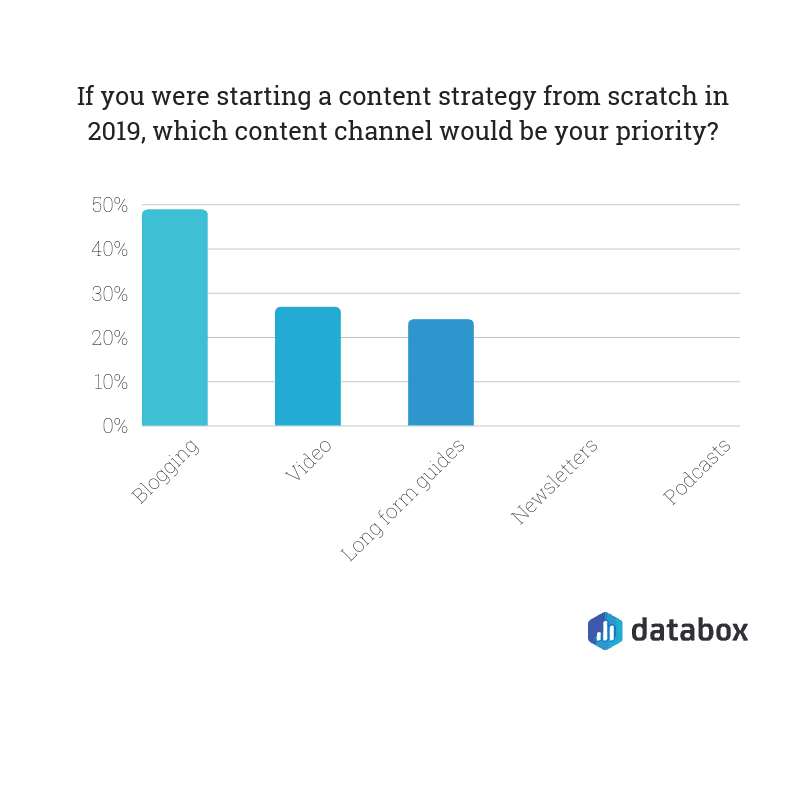
29) Almost 50% of marketers would focus on blogging if they started from scratch

Judging from that previous statistic, any form of content (particularly blogging) isn’t set to die down anytime soon.

That’s backed up with the fact that almost 50% of marketers say that if they were starting a content marketing strategy from scratch, blogging would be their main priority:

Final thoughts

Are you ready to create a content marketing strategy that results in tons of page views, organic rankings–and more importantly, customers?

Take these content marketing statistics into consideration.

Follow Google’s guidelines for SEO-friendly content, write for people, and make your content genuinely interesting to read. You won’t go far wrong.

By Elise Dopson

Elise Dopson is a freelance B2B writer for SaaS and marketing companies. With a focus on data-driven ideas that truly provide value, she helps brands to get noticed online–and drive targeted website visitors that transform into raving fans.

Sourced from databox

By

Back in 2014 — can you believe it’s been five years already? — the marketing world was having an industry-wide internal debate about inbound versus content marketing, and which practice serves the other.

HubSpot, the company that coined the term “inbound marketing,” publicly claimed content marketing serves inbound. The founder of the Content Marketing Institute (CMI) countered by saying inbound is a subset of content marketing.

Here’s what was missing from the 2014 conversation: an awareness of the pressure we marketers felt to prove content marketing ROI in our own departments by year’s end. Many of us had spent precious time, funds, and energy creating content to build awareness and generate leads, handing responsibility off then to the sales and service departments so we could get back to creating more “interest stimulating” stuff to post. Many marketers had largely missed the customer retention power of content marketing.

Today, the conversation has shifted from whether content or inbound marketing is primary to how the two separate but related disciplines can interact and complement each other to generate ROI. To that end, brands are discovering content marketing’s potential as a powerful customer retention tool. Here are just a few of their strategies.

Live and In-Person Events

In sharing his origin story with LinkedIn, Andy Crestodina, co-founder and CMO of Orbit Media, says he first “needed to learn search, and later, content marketing,” signifying a fundamental difference between the two.

That got me. In a world full of marketers who still use the two terms interchangeably, Andy had something to say about the broader capacities of content marketing. Had he too seen content retain customers as well as it had served the goals of search? If so, in what way?

I pinged him to ask.

“This might surprise you,” he began, “live events are an awesome content format for retention. If a good chunk of your customers are in your geography, try creating a live event.”

Sounded logical, of course, but did he have any examples of in-person events actually working? Turns out, yes: He was very familiar with this marketing medium.

“We’ve done a monthly event for nine years. It’s called Wine & Web, and it combines teaching and networking,” Crestodina continued. “The results for both sales and retention have been huge for us.”

Want to boost content marketing ROI? Consider the power of content to retain — not just attract — customers.

Image attribution: Kelsey Chance

Online Communities

Many content marketers praise the LEGO brand for its feature films and publications, which are indeed powerful content marketing examples. But what jazzes the kids I know is the company’s online ideas hub called, aptly, LEGO Ideas. Here, young innovators can submit their own ideas for LEGO sets and vote on the submissions of others, in the hope of someday seeing their own idea on toy-store shelves. The collaboration combined with competition makes for an emotional hook every parent can confirm.

Communities-as-content isn’t a new idea, but targeting those buyers whose hands are already all over your product is a brilliant way to increase content marketing ROI without chasing another new lead gen tactic.

Maximization Webinars and Tools

Personal finance brand YNAB (You Need a Budget) invests heavily in motivating customers to get the most out of their product. Every day, they host small, live, personal online classes that allow attendees to interact in real time with the YNAB rep and fellow budgeters.

Want to boost content marketing ROI? Consider the power of content to retain — not just attract — customers.

Image attribution: Wes Hicks

The webinars are short, so you can squeeze a class into your morning commute or workout. They’re also recorded, which means customers who get interrupted mid-class can catch up later. While the brand may be tempted to route funds to more traffic-generating content, focusing on their customers’ financial success more than pays off (pun intended).

Another prime example of a customer retention marketing strategy is the hyper-relevant information mirrored back to all drivers who use the Snapshot device from Progressive Insurance. It’s a program customers appreciate, as safe behavior tracked through this app is rewarded with sizeable discounts on insurance premiums. This technology also helps to inform marketing efforts through its key insights on customer’s driving habits.

Through Snapshot, the brand enjoys:

  • Permission to collect and analyze gobs of data
  • Potential reciprocity of having given a substantial gift ($700 million in discounts to date)
  • Motivated customers — drivers who have another reason to behave safely behind the wheel
  • A creative new revenue center. McKinsey consultants recently observed that marketing tech like this can be monetized into its own business unit to (strategically, of course) serve other insurers.

So yes, content can and does achieve the goals of inbound marketing. But content can do so much more to engage, wow, and eventually multiply the people your funnel brings in.

User-Generated Contributions

Customer loyalty programs (think birthday discounts, referral perks, and gamified spending motivators) are great. But how can content play a role in a customer retention marketing strategy? By turning buyers into co-creators, of course!

Tarte Rewards by Tarte, a cosmetics and skincare brand, incentivizes customers to earn online store credit not just by spending more, but by leveraging selfies and social engagement that feature the products they’ve purchased.

Much like how beauty brands utilize influencers, Tarte has empowered its own customers to act as advocates and provide authentic user-generated content. This content is powerful, in that it:

  • Promotes a product and builds brand awareness when users share their experiences
  • Builds brand confidence when products are shown on real consumers
  • Boosts social engagement, as consumers get competitive and creative in showing how they’re using the products
  • Provides marketing content that’s original, authentic, and visual—often even video-based—which showcases products in the most compelling way
  • Displays brand loyalty, since buyers are unlikely to invest their own time, energy, and creativity into promoting a product on social unless it’s that good

Keep in mind that the smaller, more intimate following each shopper brings can, when combined, be much more powerful than a disengaged or artificial audience.

Recommended for you
SEO Content 101: How Freelance Writers Get More Eyes on Their ArticlesRead more

Awards for Customer Retention

Competition as content? You bet. Brand-hosted annual awards are one of the most creative, effective content marketing tactics.

One of the best B2B examples of this is the Life Science Industry Awards, originally initiated by industry publication The Scientist and now hosted by BioInformatics Inc.

The sponsor and its divisions provide research and advisory services to support the life science, analytical instrument, and diagnostics industries. But the firm regularly stops to take the pulse of its voting insiders (all scientists) by polling them to celebrate the “rock stars” of life science product manufacturers and suppliers. A top determinant of ranking in the awards? Customer loyalty and satisfaction. Awards become a means of taking already-engaged customers and making them even more invested in the brand.

The Heart of Content Marketing

Content marketing has evolved far beyond a play to increase brand awareness. Today, we coordinate annual industry awards, conduct live interactive webinars, host forums, personalize mobile apps, invite clients over for wine once a month, and even leverage buyers’ selfies. These are all ways content marketing can serve customers from attraction through to loyalty, and even into advocacy.

Robert Rose of Content Marketing World says getting content to spur customer retention is about more than just focusing at the top of the funnel. It’s about meeting consumer needs—not alienating them once you’ve caught their attention.

“The basis of our content marketing strategy once was how much can we create in order to ‘get found.’ But that’s where many businesses sort of stopped. They didn’t really explore any more deeply what content marketing could provide by the way of marketing insight into those personas or into those customers once they get deeper into the funnel,” he explains. “We know a lot of companies that are amazing at inbound marketing, or the top of the funnel stuff, and they are absolutely horrible at customer retention, and they are churning through customers like nobody’s business.”

Today, many marketers still consider the terms “inbound” and “content marketing” interchangeable. But content marketing achieves dozens of business goals, and inbound traffic is only one of them.

“SEO is a subset of content marketing,” Crestodina stressed in our interview. “Organic search is one of the three big promotion channels for content. The other two are social and email.

“The content marketer does three things (to focus on) all day long: create, promote, and measure,” he says. “Not all content strategies have an SEO component, but most do. Why? Because it’s a very durable source of qualified visitors.”

Empowering your customers to support your brand on social is a home run marketing strategy. But by taking the time to meet with them, either in person or through a live web event, and listening to their needs, customer retention gets a whole lot easier because consumers are always more keen to support a brand that gets them and goes the extra mile.

For more stories like this, subscribe to the Content Standard newsletter.

By

Bethany Johnson is a multiple award-winning content marketing writer and speaker. Her work empowers marketers to ditch interrupt advertising in favor of original content that converts passive readers into active followers. Thriving brands like Tom’s of Maine, MasterCard, ADP, Fidelity and the Content Marketing Institute currently rely on Bethany’s fresh style to connect with audiences daily. As a consultant, she combines simple change management principles with her insider knowledge of freelancing to show traditional marketing teams how to flourish in today’s gig economy. For more, visit bethanyjohnson.com.

Sourced from Skyword

By Michael Brenner

As a marketer, you already know that content marketing is well worth your time and effort. What you put in is almost guaranteed to be returned to you many times over, and this attractive ROI combined with low costs and barriers to entry makes content marketing one of the most popular marketing strategies for businesses large and small.

However, it’s not always so easy to convince management and C-suite that content represents a worthy investment. Unlike traditional advertising campaigns and other types of marketing, it can be quite some time before you see the results of your content marketing campaign.

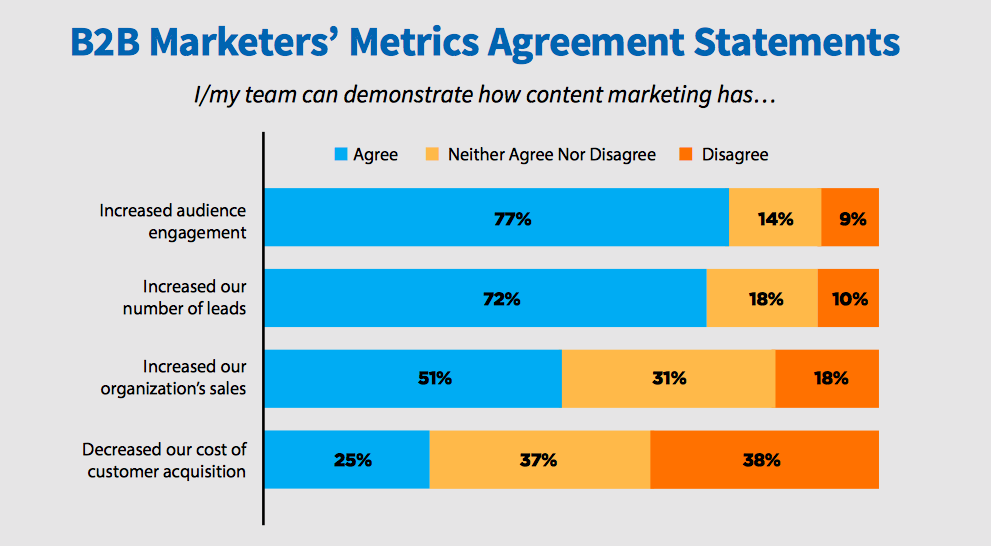
In some cases, it might take years before you build enough momentum from your content marketing activities to see real results. But only 59% of respondents surveyed by the Content Marketing Institute agreed that leadership offered enough time to demonstrate content marketing results. So how can you get executive buy-in if you’ve only got a short timeframe to prove its effectiveness?

Quick Takeaways

  • Executive buy-in is important for content marketing success, but it’s not always easy to achieve.
  • Backing up your case with facts, figures, and a well-considered marketing strategy is essential.
  • Consider running a pilot content marketing scheme to demonstrate short-term success.

Why Getting Executive Buy-In for Content Marketing Can Be Challenging

There are actually several reasons why executives don’t immediately see content marketing as the same amazing opportunity that marketers do.

Remember, the aims of your role in the company are fundamentally different. Marketers want to raise brand visibility and generate leads, while C-suite is concerned with the overall strategic running of the business and generating income. It may not be immediately obvious how content marketing fits into this.

The main challenges or sticking points include:

  • The ROI of content marketing is difficult to measure and prove.
  • Results from content marketing may not be seen until months or years later.
  • Producing enough content to be effective either means investing in more staff or outsourcing costs, or taking employees away from other activities.
  • Content marketing is a fairly new strategy compared to more traditional marketing methods and senior level employees are therefore less likely to understand it fully and be familiar with the techniques involved.

To get executive buy-in, you need to prove the worth of content marketing in facts and figures so it’s not dismissed as just being the latest trendy tactic that doesn’t necessarily produce results.

Content Marketing By the Numbers

While you may not yet have the figures to prove the effectiveness of your own content marketing strategy, thousands of other brands and marketers have done the work for you.

Use published data and research to demonstrate how content marketing has been effective for others. Show how you will replicate this success in your own content marketing strategy.

After presenting the generic figures and statistics, back up your research with case studies and examples from other companies and brands.

  • Buffer used a content marketing strategy revolving around blogging, guest blogging, and email marketing to build their brand from scratch to a user base of 400,000, and around a million followers on social media.
  • Transferwise uses a content strategy focused on creating great content, which automatically generates links and PR to generate 14 million visits a month. They published 243 articles in one year and 43% of their traffic comes from search to the high-quality content on their blog.
  • Shutterstock attracted 6 billion site visits, 5,300 shares on social media, and mentions in over 100 articles from just one infographic.
  • Demandbase launched a content marketing campaign including a whitepaper, infographic, webinar, and live presentation that generated 1,700 leads, 125 webinar attendees and $1million in new business.

Developing an Effective Marketing Strategy

After demonstrating the effectiveness of content marketing in general, and the success that others have seen, it’s time to set out your own strategy complete with measurable goals and a timeline for achieving them.

Your content marketing strategy is your business case for investment, so it’s vital to put work into it and build a compelling case.

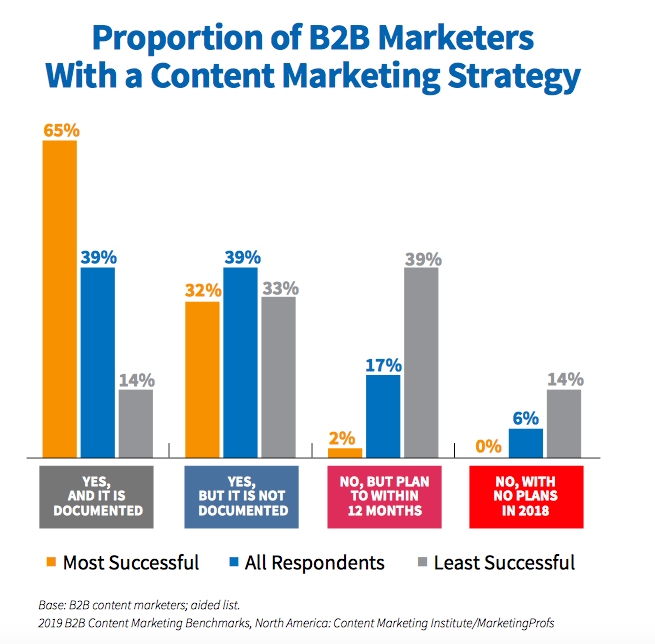
65% of the most successful B2B content marketers have a documented strategy, compared to only 14% of those who are not as successful. If you don’t have a carefully considered strategy, C-suite has little reason to invest in your plans.

Your content marketing strategy should include:

  • An analysis of your audience, their demographics, behaviors, and how they spend their time online (marketing personas are the most effective way to implement this.)
  • Your content marketing goals and how they align with the overall business goals
  • The content formats you’ll focus on such as blog posts, videos, infographics, whitepapers etc.
  • The channels you’ll use for content promotion
  • Your schedule for content creation and publication
  • How your requested budget will be split and how you plan to stretch your budget further by repurposing content and using free and low-cost marketing techniques (include estimated cost savings).

With a detailed strategy, your proposal should be difficult to refuse. However, there is one final step to achieving total executive buy-in.

Launch a Pilot Content Marketing Plan to Demonstrate Short-Term Success

The most significant benefits of content marketing may not be seen for quite some time in the future, but you can still set achievable short-term goals to give a taster of what’s to come.

Kickstart your content marketing strategy with a pilot plan over a limited time period such as six months. Agree on a budget for your pilot, set clear goals, and make sure to measure and analyze your results regularly so you can report back to senior management.

Showing short-term gains such as an increase in website traffic or more mentions on social media can help to give your management team a preview of what may be possible over a longer timescale with more resources.

By Michael Brenner

Michael Brenner is a globally-recognized keynote speaker, author of The Content Formula and the CEO of Marketing Insider Group. He has worked in leadership positions in sales and marketing for global brands like SAP and Nielsen, as well as for thriving startups. Today, Michael shares his passion on leadership and marketing strategies that deliver customer value and business impact. He is recognized by the Huffington Post as a Top Business Keynote Speaker and a top CMO influencer by Forbes. Please follow him on LinkedIn, Twitter, or Facebook and Subscribe here for regular updates.

Sourced from Marketing Insider Group

By Pam Moore,

Content marketing is the new yet not new buzzword. The truth is content marketing has been around for decades, since conversations and business has existed. Content marketing is not a new shiny object invented via social media.

Yet, content is at the core of everything brands and people do online. Without content and humans, social media and digital marketing wouldn’t exist.

The big question is… how do you actually use content marketing to grow your business. Keep reading and I’ll help you understand the exact qualities of amazing content marketing.

Is everyone really a content expert?

Every agency, marketer and consultant seems to be talking about content marketing. Unfortunately very few of them have ever done it themselves or really know how to help others produce, integrate or distribute content to drive real results.

If you are working with a digital marketing or social media marketing consultant or agency be sure to look behind the magic curtain.

Do they have a blog, podcast or video channel of their own? When is the last time they wrote or recorded really good content? Is anyone reading the content? Is the content getting shared? Is it integrated with the rest of their business or is it an add-on band-aid?

When is the last time they sent an email to the list of names they have been collecting via their blog the past year? What were the open rates? How is their content converting to real business?

Do they have an editorial calendar or any rhyme or reason to why and how they are using content marketing, if at all?

It’s similar to the concept of the Facebook page pushers of a few years ago who were bashing “strategy” telling customers all you need to do is tweet and get a Facebook page for $1k with a side of a website that tweets for another $2k.  Those same people are now often slingin’ Facebook groups or some random other shiny object telling you it is going to save your business.

It’s crazy how now overnight they are all “strategy experts” yet in checking their career profile you’ll find they have spent little time to none actually ever doing strategy for any real business, including their own.

You get what you pay for with any service or product. The best thing you can do is educate yourself the best you can and do your research. It doesn’t have to be more expensive or take more time to do it right. Chances are finding a resource with the right experience to help your business will save you money and bring a higher return than many of the fly by night social media operations.

Becoming a social business is not the same thing as doing social media or being social. Social business requires integration of processes, mindset changes and direct investment in specific goals and objectives.

What is content marketing?

Content marketing is an umbrella term encompassing all marketing formats that involve the creation and sharing of content in order to engage current and potential consumer bases. Content marketing subscribes to the notion that delivering high-quality, relevant and valuable information to prospects and customers drives profitable consumer action. Content marketing has benefits in terms of retaining reader attention and improving brand loyalty.
*Source: Wikipedia

Content marketing is a marketing technique of creating and distributing relevant and valuable content to attract, acquire, and engage a clearly defined and understood target audience – with the objective of driving profitable customer action.
*Source: Content Marketing Institute

I know what it is, now what?

I like to simplify where many want to complicate. Below are what I believe to be the top attributes for content marketing that will drive results.

If you have spent any time working in marketing then this should seem like common sense to you.

Bottom line you want to develop content that inspires and connects with your audience with a goal of bringing them closer to you and your brand. You want them to click, double click, share, and come back for more.

28 Qualities of Content Marketing that Rocks! 

1. Goal Driven – Set goals and objectives for each piece. Is the goal to inspire, educate, establish authority, generate leads? Should support higher level business and marketing goals and objectives.

2. Audience focused – Content must be focused on the reader more so than your own self promotion. Know your audience. Know what they want, need, desire. Get in their head and connect with them via content that helps them in business and/or life.

3. Findable – If your target audience can’t find it, it’s all for nothin’!

4. Shareable – Make it easy for people to share with their friends on Twitter, Facebook, LinkedIn, Pinterest, email, etc.

5. Simple – Shouldn’t require a PHD in rocket science to understand.

6. Authoritative – Author speaks and writes from knowledge, experience and authority.

7. Engages – People are inspired to click, double click, comment and become part of the community.

8. Actionable – Should be clear what action the reader should take to learn more, join community, contact you for further information, hire you, request proposal etc.

9. Real – Should have a healthy balance of transparency, authenticity and professionalism.

10. Believable – There should be no doubt that they can trust you and believe what you say. Many factors play a role with this including design & layout of site, source of content, grammar, quality of information, authority and more.

11. Validated – If facts, data, or stats are used the source is clearly provided and all can be validated as truth. This will also help establish authority and ensure content is believable.

12. Valuable – Provides reader with valuable content to help them learn, grow or be inspired.

13. Relevant – Should  be relevant to where the reader is in business or life.

14. Resonates – Should invoke a feeling of shared emotion or belief with the reader.  They should understand and be able to relate to the content, context and meaning.

15. Compelling – Grabs attention, unique enough to read, understand, persuade, change thinking and remember.

16. Integrated – Not stand alone information. You brand, expertise, experience, services offered should support the content to best establish authority, believability etc.

17. Educational – Provides value in regard to knowledge and teaching of a topic reader is interested in.

18. Passionate – Should be obvious the writer is passionate about topic and is not just writing to drive blog traffic or other objectives.

19. Positive – Who wants to read a blog that does nothing but complain? Not many people. Content should be positive and make the person feel better, know more and be inspired to do more whenever possible.

20. Forward thinking – Should not dwell in the past, old technology but should at minimum be present day and preferably forward thinking. Take people along with where you are going if you are visionary person.

21. Inspires – Inspire readers to learn more, do more, be more and become one with you and your brand.

22. Connects – Inspires the reader to connect with you and your brand. Your goal is to build and nurture a relationship with them.

23. Achieves – Helps the reader, viewer or listener achieve their goals. If you focus first on helping reader achieve their goals, you will achieve yours by default.

24. Purposeful – The content has a purpose, is not rambling, meaningless mumbo jumbo.

25. Brand loyalty – Content should help drive brand loyalty with reader. The content should be a good representation of your brand, personality and not a glossy piece of corporate collateral from the 1990’s that describes what you wish you would be when you grow up.

26. Quality – Content is of high quality. Should not be written in a hurry, have grammatical errors or read like it was written by a 5th grader.

27. Open – Author is open to other ideas, willing to enter into a healthy debate and genuinely listen to differing opinions.

28. Conclusive – It has an end. It doesn’t just ramble and ramble but it is clear when the content piece starts and ends.


Avoid the following: 

  1. Focusing too much on sales. You don’t want to sound like a used car sales person.
  2. Overly opinionated.
  3. Closed minded.
  4. Argumentative. Don’t bite the fingers off of your readers who may comment with a differing opinion. Be open to new ideas and opinions.
  5.  Egotistical.
  6. Self promotion.
  7. Random Acts of Marketing – If it’s not in the budget, not in the plan and not integrated then chances are it’s a RAM. RAMs will eat every last dollar of your ROI for lunch, breakfast & dinner. Avoid them at all cost!

Supporting Resources:

By Pam Moore

CEO / Founder Marketing Nutz, full service social media, digital marketing, experiential brand, conversion optimization agency. Ranked by Forbes as Top 10 Social Media Women and 10 Social Media Power Influencer. Keynote speaker, author, strategist, consultant, coach, & trainer. Helps businesses of all sizes integrate social media into the DNA of their business, connect with target audiences to nurture authentic customer relationships. 15+ years experience working with Fortune 500, Franchised corporations with 4000+ local franchises to entrepreneurs and startups.

By Brody Dorland  

While the practice of content marketing has been around for decades, it’s only started to come into its own as a recognized and respected form of marketing in the last decade. As the practice has proliferated globally, so has the introduction of dedicated, content-centric staff within corporate marketing organizations. Among the most common new titles we see these days is the Content Marketing Manager.

According to Google Trends, the term “content marketing manager” was rarely searched until around 2013. Interest in this new role rose steadily over the following two years and has remained steady since 2015.

But what exactly is a content marketing manager? Do you need one? To understand these questions, you first need to have a clear picture of what content marketing managers do on a day-to-day basis.

A Content Marketing Manager’s Role

A content marketing manager is ultimately responsible for managing a company’s content marketing operation, and the overall success of content marketing initiatives. They guide content marketing strategy, facilitate ongoing content planning, manage day-to-day content creation, editing and promotion, and report on the results of each content marketing initiative.

Skills & Experience

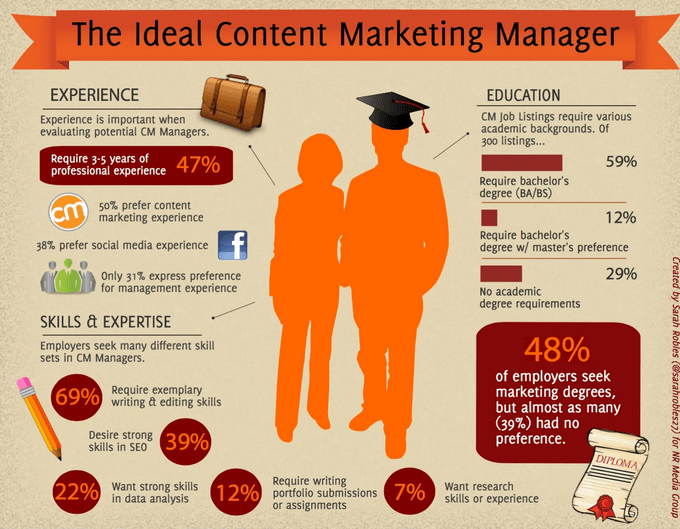
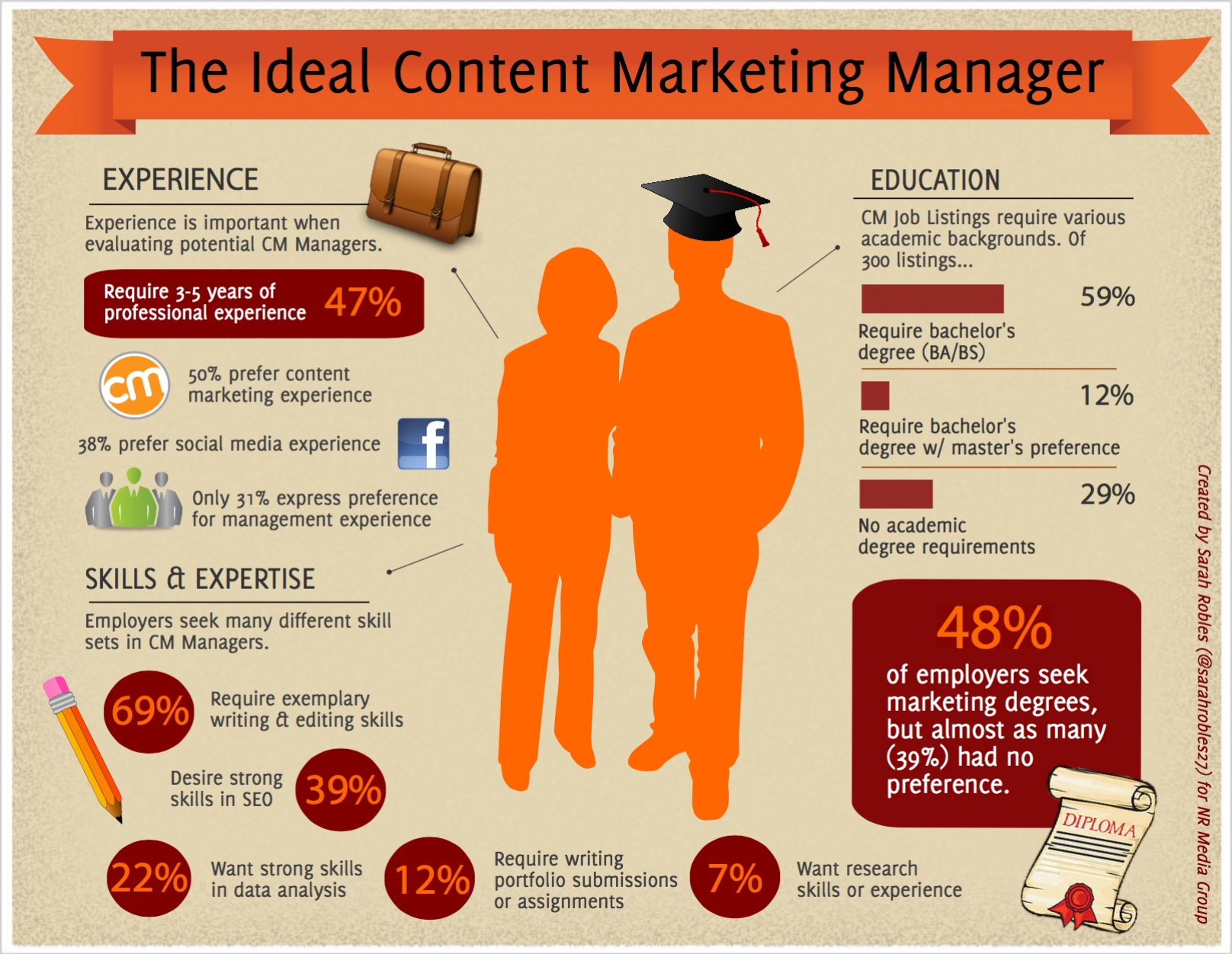
In a recent study, researchers scoured more than 300 “content marketing manager” job listings from Indeed, Glassdoor and LinkedIn to examine the qualifications requested by companies. This infographic by Sarah Robles sums up their findings nicely.

Source: https://www.nrmedia.biz/blog/ideal-content-marketing-manager

A Content Marketing Manager’s Responsibilities

Here are the eight strategic initiatives that most content marketing manager will be responsible for developing.

1. Research and Competitor Analysis

The content manager’s main aim is to successfully carry out the business’ content marketing strategy by publishing and promoting content that achieves the goals set out in the strategy. It’s impossible to create an effective content marketing strategy and plan without initial research. This research helps the content manager and creators to understand their target audience better and decide what types of content to create and which topics to cover.

This research might involve:

  • Analyzing competitors’ content, messaging and distribution tactics
  • Identifying target audiences and their key demographics, interests, and online behavior
  • Surveying current customers to understand and validate strategic and tactical decisions (template below)
  • Facilitating internal stakeholder interviews to identify business objectives and subject matter experts
  • Keyword research
  • Research to define appropriate subjects and topics
  • Looking into content tools and software that can help them to create and promote content

2. Preparing Content Marketing Plans

After an initial research phase, the content marketing manager can start working on one or several content marketing plans. Depending on the size of the company and scope of their offering, multiple content marketing plans will often be needed to define strategy and tactical execution for individual brands, business units or channels. For example:

  • A bank may have one content marketing plan for their consumer offerings, and another for their commercial offerings
  • A software company may have an external content marketing plan aimed at generating new business, and a separate content marketing plan designed to retain and up-sell existing customers.

Each content marketing plan should be informed by the overall content marketing strategy (which is usually created with the help of the wider marketing team) and should define the exact goals for each initiative and identify how the content manager will achieve these goals with content.

Content marketing plans should include (at a minimum):

  • Specific, measurable goals with a timeline in which to meet them
  • A general budget with estimates for staff, creative resources and paid promotion
  • The types of content that will be created (ex: blog posts, ebooks, white papers, infographics, etc.)
  • The topics that will be covered (and why)
  • The channels that will be used to distribute the content
  • A plan for paid promotion of the content
  • An execution plan outlining the publishing frequency, production workflow (creation, reviews and approvals) and ongoing maintenance of the content

Your content marketing manager may also create individual content marketing plans for specific campaigns, an overall plan for a set time period (such as the next quarter or year), or a combination of the two.

3. Creating an Editorial Calendar

Once a content marketing plan has been flushed out, content marketing managers can now plot deadlines for creation, publication, and promotion on a content calendar so the whole marketing team can see at a glance what content is planned for the coming weeks and months.

Having a visual editorial calendar helps your content manager align content publication and promotion with key dates that are important to your business and other marketing campaigns. It’s also important to build slack time into the schedule to allow for any delays in content production and to allow for last-minute, real-time marketing opportunities.

4. Content Creation

After the content plan has been created and approved by all relevant stakeholders, it’s time for the main responsibility of the content manager – actually creating the content.

This being said, not all content managers will physically produce and publish each piece of content. Many content marketing managers will be dictating production workflows and overseeing a team of creatives. However, it’s vital that your content manager has excellent writing and editing skills as they’ll hold the ultimate responsibility for what is finally published.

As well as researching and writing content, content marketing managers may need to source photographs and illustrations to accompany written content, format content, and add meta information.

5. SEO

It’s not enough for online content to read well and be free of spelling and grammar errors. Content marketing managers must also have search engine optimization skills to make sure that web searchers can find their content and that it appears on the first page of Google and other search engines.

If you have an entire digital marketing team at your disposal, you may have already employed an SEO specialist. Alternatively, you may be outsourcing your SEO needs to a specialist agency. Despite this, it’s still important that your content marketing manager understands at least the basics of SEO in order to carry out an effective content marketing plan.

6. Editing and Ensuring Adherence to a Style Guide

When a content marketing manager has a team of writers to manage, their editing and proofreading skills are essential. They also have to be able to give constructive feedback.

It’s vital to maintain a consistent brand voice in your content and this can be challenging when there are several writers working on your content. A style guide is essential for this reason. Your content marketing manager should create this style guide, which might include information about brand personality, writing styles, punctuation and grammar preferences, SEO best practices, and guidelines to aid in selecting images.

As well as making sure that each piece of content is proofread and edited before publication (if not personally, then by a dedicated editor), your content manager must also ensure that all content adheres to this style guide.

7. Publishing and Promoting Content

After each piece of content is produced and approved, it’s the job of the content marketing manager to ensure it gets published and promoted to the right people in the right place at the right time. They might do this manually themselves or leverage technical staff to load content into a web CMS, email marketing or social media automation tool.

Once published, a pre-defined promotional strategy should be executed, often including automated social media posts or other tactics that fire at times selected for the best engagement. This type of content automation is an effective way to speed up your content production without having to grow your team.

Your content marketing manager must also integrate your content strategy with the rest of your marketing campaigns and identify other channels for online and offline promotion.

8. Content Performance Monitoring and Analysis

Your content marketing manager’s job doesn’t end once they’ve published a piece of content. One of the most important parts of this role is continual monitoring and analysis of published content so they can see what’s working and what isn’t working. These insights will inform future marketing plans and provide intelligence for your overall marketing strategy.

Content analytics software can help to make this task a straightforward one, but it’s important that your content manager still takes the time to interpret the data, make suggestions and draw actionable conclusions based on it.

You’ll also need to monitor engagement with your content, reply to comments and questions, and note suggestions for future content. All this comes under the umbrella of the content marketing manager’s responsibilities, although they may outsource some or all of these tasks.

Do You Need a Content Marketing Manager?

Certainly, many of the tasks outlined above can be outsourced or delegated to other team members, freelancers, or agency partners, so it can be tempting to think that you don’t need to fill this role at all.

However, this line of thinking is unwise. The job of your content marketing manager is to ensure your content marketing strategy succeeds. If you don’t have a passionate, talented person in this role, it’s easy to get lost in the day-to-day grind of simply churning out content.

Content marketing managers tie together all the individual parts of your content strategy – writing, SEO, promotion, analysis, and optimization – with a clearly defined content workflow.

Hiring someone to manage your content marketing strategy might be a big investment, but you may not get a return without it.

By Brody Dorland  

Sourced from DIVVY HQ

By Amanda Pressner Kreuser

A picture may be worth 1,000 words, but in content marketing, an eye-catching visual could also be worth millions of impressions.

Every day, over 500 million users consume Instagram stories, 1 million users scroll and double-tap and 95 million images are uploaded to the app’s feed.

According to Social Media Today, we only need 1/10 of a second to understand an image, but almost 60 seconds to read 200-250 words. To make your content stand out, you have to create visuals that are engaging, easy to scan and memorable.

Of course, everyone wants gorgeous social images for their feeds, but isn’t that….expensive?

It’s doesn’t have to be. At my content marketing company Masthead Media, we often help clients with smaller marketing budgets tap a powerful set of SaaS tools to create highly engaging images for Instagram, Facebook, and other social channels. These are three of our favorites-;and they’ll cost you next to nothing.

Canva

Canva (which recently became a startup unicorn) makes it easy to create visuals in minutes with very little experience and offers content marketers hundreds of templates, icons, layouts and more.

Need to design an Instagram story to promote your latest podcast? This app has hundreds of pre-sized graphics for every social media platform.

If you’re running a team that’s working on similar visuals for your brand, you can invest in Canva Work (for $10/month). The fee is small, but the reward is huge, giving you the opportunity to save your brand colors, create moving content and resize graphics from one platform to another with ease.

Adobe Spark/Sparkpost

With Instagram and Facebook stories on the rise and video content generating 80% more engagement than other content, Adobe Spark is a tool you need to become familiar with.

An Adobe product, Adobe Spark is its own suite of products – Adobe Spark Post, Adobe Spark Video and Adobe Spark Page – which offers marketers the best of both worlds: all of the tools that Creative Cloud has to offer, with no cost and user tutorial required.

The app is available all in one on the web, or in the three different applications on mobile. Whether you’re putting together a simple Instagram post graphic, creating a custom landing page or animating a short 10-second promo video, it’s effortless to make it happen at the desk or on-the-go with Adobe Spark.

When you create a free account to use the app, you’ll receive weekly newsletters from the platform with inspirational content and tips from the pros on how to make visuals that stand out. You can rely on templates or get creative, but either way, this app will take your graphics to the next level.

Crello

Free visual tools are a major timesaver (leaving more hours for tackling all of your emails!) but they’re only as good as the features they have to offer.

Crello, a less commonly-used platform, not only offers animation, video and image templates, but has an image asset bank of over 60 million choices that marketers can use to create beautiful graphics that fit their brand.

Even without access to a stock image library like Getty or Shutterstock, Crello allows you to create unforgettable visuals to complement your content.

Since four times as many people would rather watch a video about a product than read about it, according to Animoto, using Crello will ensure you reach four times the audience and engage customers with what your brand has to offer.

It can feel like an uphill battle trying to get your customers to engage with blog posts or long-form content, but over 50% of users watch video thoroughly, making visuals an easy way to engage an audience.

With all of these tools, you can increase your engagement without increasing your budget.

Feature Image Credit: Getty Images

By Amanda Pressner Kreuser

Co-founder and managing partner, Masthead Media@mastheadmedia

Sourced from Inc.

By Lee Odden

Before starting on any new marketing initiative or trying a new tactic, B2B marketers need to answer and essential question: Why?

While most B2B marketers won’t admit it, many still practice some “spaghetti/wall marketing” wherein each year they throw new digital tactics “against the wall” to see what sticks without really knowing why a tactic would work for their audience over another.

This is not to say that you should slow down on innovating and trying new things. But it’s important for success to be strategic and test. I challenge marketers to do more research around customer insights and preferences so that any changes they make are driven by data and informed hypothesis—rather than simply trying new things just to see if they will work.

Focusing Your Data Lens

For content, we focus on three types of customer data:

  • Discovery: Where, when, and how buyers find information that helps them identify a solution.
  • Consumption: Preferences for channels, content types, topics, formats, devices, and experience.
  • Action: What triggers will motivate the desired action.

With buyer discovery, consumption, and action metrics, you’ll know how to create awareness, great customer engagement, and compelling offers that matter to your customers. And you’ll always know which approach to use to improve your marketing because it will be customer driven.

A New View of Content

What does that customer driven content look like in today’s landscape? It’s data-informed. It’s interactive. It’s influential.

For example, client Prophix provides Corporate Performance Management (CPM) software in an industry not known for exciting marketing. With an understanding that B2B buyers are also consumers, they decided to launch campaigns that would go beyond educating buyers to “info-taining” them.

To create a standout content experience for their annual report for the financial planning and accounting industry, they brought together financial industry influencers with an interactive online game. The quiz-themed game asked questions using data from the report as well as from the influencers who were represented as avatars within the game.

Prophix Crush It Interactive Quiz

The creative element to the content plus the collaboration with trusted industry experts drove performance of this program above and beyond expectations, beating the benchmark for asset views by 600%.

With a taste for what interactive content and working with industry influencers for content and promotion can do, Prophix followed up with another campaign featuring a simulated voice assistant named Penny.

An interactive microsite highlighted the intersection of finance and artificial intelligence with Penny as the guide. By interacting with Penny, users were able to access a group of influencers that provided their expertise via audio and text. The microsite had 189% more views than the benchmark and 642% more engagement.

Interactive Influencer Asset with Voice Assistant

By taking what is often called “boring-to-boring” content and packaging it as an interactive experience with trusted experts providing useful information, Prophix was able to realize their “new lens” of marketing as something that was beyond a shiny object. It was effective marketing.

An Eye to the Future of B2B Marketing

B2B brands are increasingly investing in interactive influencer marketing to engage with industry influencers and co-create content that is packaged with brand content in an experience that is engaging for influencers and buyers alike.

The sheer volume of information and media that confronts people in the business world is overwhelming and often pretty boring. Creating compelling experiences with interactive content is one way to stand out, differentiate, and optimize for effectiveness. At the same time, buyers don’t trust advertising or brand marketing messages. Co-creating content with trusted experts brings credibility and interest to the brand message.

My upcoming presentation at the 2019 Clever Content Conference in Copenhagen, Denmark will help B2B marketers understand how to “break free of boring marketing” by exploring the top interactive formats, best practices for influencer engagement and case studies featuring mid-market and large enterprise B2B brands doing interactive influencer marketing right. Learn more about my Break Free of Boring Marketing presentation here.

By Lee Odden

@LeeOdden is the CEO of TopRank Marketing and editor of Online Marketing Blog. Cited for his expertise by The Economist, Forbes and the Wall Street Journal, he’s the author of the book Optimize and presents internationally on B2B marketing topics including content, search, social media and influencer marketing. When not at conferences, consulting, or working with his talented team, he’s likely running, traveling or cooking up something new.

Sourced from Top Rank Marketing

By Mark Schmukler

All marketers do it differently. From in-house departments and big-box firms to HubSpot agencies and boutique operations, all marketers have the freedom to enact their own approach and execute their favorite tactics. New trends are constantly emerging in attempt to keep up with changing customer preferences, and as marketers, we have creative freedom to satisfy those demands in our own way.

In this inbound-obsessed era, it can seem like there’s no room for traditional “outbound” marketing. However, focusing all marketing dollars on inbound causes us to miss opportunities to make meaningful connections through traditional tactics. As a result, more marketers are employing an integrated marketing approach that combines inbound, through platforms like HubSpot, with outbound tactics.

Not sold yet? Let’s look at the advantages these tried-and-true outbound tactics bring to modern marketers, as well as how to execute them. Then, we’ll show you how these tactics integrate with inbound strategies to generate a higher return on marketing investment (ROMI).

1. Event Marketing

When it comes to event marketing, it’s a classic case of “you had to be there.” Special events and tradeshows occupy a specific marketing niche that new technologies and internet content simply can’t touch. The live demonstrations and in-person interactions of a tradeshow allow for a special kind of engagement where prospects can really get to know, and understand, what a company has to offer.

Tradeshows play an even larger role in B2B marketing, where businesses can connect with companies and establish a personal relationship with the decision-maker before a purchase. In fact, 46% of B2B marketers place tradeshows and events in their top sources of sales and marketing leads.

To be successful with event marketing, companies need:

  • design and marketing help so that their tradeshow materials (banners, business cards, leave-behinds and promotional items) look attractive, on-brand and cohesive
  • to frequently refresh their materials so they’re in-step with changes to brand appearance and contain up-to-date information
  • to develop new, engaging ways of obtaining leads, such as by having QR codes on tradeshow materials that allow prospects to use their own phones or tablets to open a lead-capture form
  • to follow up quickly with leads, ideally within 24 hours, while event momentum is still buzzing

Tradeshows are an outbound tactic that complements inbound marketing because it allows a sort of “in-person version of the inbound methodology” (attract, engage, delight):

  • prospects are attracted by a company’s booth because the materials are informative, on-brand and well-designed
  • prospects engage with the company’s representatives and find that they would like to sign up for an email list and learn more about the company
  • prospects are delighted when the company promptly reaches out and follows up with them using the contact information they exchanged at the tradeshow

2. Pay-Per-Click Advertising

Digital tactics are so thoroughly engrained in the modern marketing mindset that even the most inbound-obsessed marketers lump online display and pay-per-click (PPC) advertising in with their accepted set of tools, thinking of them as part of inbound.

In fact, because they’re paid advertisements meant to catch the attention of prospects, these ads are actually an outbound method, just with the inbound twist of being targeted towards certain prospects based upon keywords.

For success in pay-per-click and display advertising, companies need to:

  • bid on the right keywords in search engines so their PPC ads appear in relevant searches
  • use location, age and interests to target audiences
  • develop clear, concise copy for text ads so that the clicks they pay for come from interested leads who clicked with intention

Thanks to automated retargeting that finds prospects who didn’t convert to sales upon their last visit to the company’s website, targeting is easy with display ads, but display ads have a design component, which means companies need to get creative. These ads need to be compelling with a clear call-to-action and aesthetically pleasing while aligning with brand image and messaging.

PPC ads in particular tie in with inbound content marketing in a very important way. Promoting gated content through PPC search ads extends the reach of your content and brings form fills (lead conversions) that represent new opportunities to engage and delight.

3. Print Advertisements

Though print advertisements don’t generate a huge number of qualified leads, every lead has the potential to turn into a satisfied customer who then passes on the good word about your company. Print advertisements can be a great opportunity to combine important details with eye-catching design.

Print ads tend to share more detail than PPC or display ads that prospects might encounter and speak to what sets your company apart. That’s why companies need to place print advertisements in specialized publications like trade papers and industry journals. The beauty is, you can repurpose copy and creative from display ads for print advertisements and add more to make your print ads informative and detailed.

4. Outbound Emails

Email marketing tends to fall on both sides of the line between inbound and outbound. Inbound emails are those that are sent to prospects who have already indicated their interest in your company by filling out a form or chatting with a representative or chatbot on your website.

Outbound emails are those sent to contacts that didn’t fill out a form or otherwise directly submit their email address to your company; usually these contacts are obtained by purchasing a contact list.

Outbound email is important because email is the most widely-used and frequently-checked communication channel. Email has the most engagement of any communication channel, with almost all customers checking their inbox at least once per day.

So, whether inbound or outbound, companies need to create emails that:

  • are conversational and relevant
  • have compelling subject lines and preview text
  • create relationships with contacts by providing helpful, human content
  • introduce the company to the contact in a personal way
  • are as personalized as possible

Here’s an example email sent to a prospect who’s evaluating your product:

As with PPC ads, outbound emails area great way to share inbound content. They’re also a great way to promote tradeshows and events.

Wrapping Up: Take an Integrated Approach

Inbound may be at the forefront in marketing right now, but that doesn’t mean that outbound can’t play an important role. When you complement inbound content with outbound tactics, you’re leveraging the power of integrated marketing (you can find more on this in the Whitepaper: The Case for Integrated Marketing) and taking advantage of every opportunity available to build meaningful relationships, maximize brand exposure and gain marketing return on investment.

By Mark Schmukler

Mark Schmukler, CEO and Co-founder of Sagefrog Marketing Group, LLC, brings more than 30 years of global marketing and consulting experience to the agency, leveraging his B2B background to lead brand strategy and business development.Based in Doylestown, PA and Princeton, NJ, Sagefrog Marketing Group is a full-service B2B marketing agency with specialties in healthcare, technology and business services. Founded by Mark Schmukler and Suzanne Morris in 2002, Sagefrog’s mission is to accelerate client success through integrated marketing including branding, digital, public relations, social media and traditional services. Visit Sagefrog.com

Sourced from MARKETING Insider Group

Sourced from usergrowth

What is the first thing that comes to your mind when you hear about Google Analytics?

For most people it has probably something to do with Search Engine Optimisation (SEO), but did you know that next to that Google Analytics (GA) also holds tons of insights into how you can create better content for your business?

To save time and money for your company don’t you think it would be better if you could create better content, instead of more content?

Better content that could help you rank better for the search terms that you want to be found for? Instead of just trying to create as much content as possible hoping you eventually will rank?

There are, however, dozens of different ways to slice and dice all the information that is available in Google Analytics to come up with killer content ideas.

To help you get the most out of your valuable time and to help guide you to improve your content marketing, this post will help you set up your Google Analytics, teaches you the most common terminology you need to navigate through all the reports and help get the most out of your content marketing.

First, let’s figure out why you should be taking the time to learn and use Google Analytics for your Content Marketing.

Why is Google Analytics important for content marketing?

If You Can’t Measure It, You Can’t Improve It. – Peter Drucker  Click To Tweet

Management thinker Peter Drucker was right, for you to improve any parts of your business, you need to be able to measure it. And what easier way to measure using a tool that offers incredible reporting features at no cost, from a company that is already collecting vast amounts of data from your company and your customers.

By reading the numbers, Google Analytics can capture about your business and try to figure out the story they are trying to tell you is THE best way to not just make data-informed marketing decisions, but to also improve your marketing performance in general.

Let’s say for example you’ve got an idea for a piece of content. You assume that this is the kind of material your customers are waiting for after all content marketing is just solving the same problems that your product solves through media you create and promote, right?

So you do some research online, you start creating what you think is the absolute best piece of content around the subject you’ve ever seen, and you hit that publish button.

If you’re not having any forms of analytics, your story will end just there. Your piece of content is online, and you’re hoping for the best. Maybe you would see new leads coming in, but that’s it.

By using analytics (and Google Analytics is one of the best, easy and free tools available), you would not only know if that piece of content is hitting the marks, but you can also figure out the rest of the story.

What are all the individual pieces that led up to that conversion, to the people coming to your site?

It doesn’t only help you to establish your goals. It can help you to learn how to repeat the process in the most efficient ways, coming up with new content topics, maybe learning how you need to make adjustments to your content, so it does hit the mark etc.

And not only that, Google Analytics can help you answer questions like:

  • How effective are my Content Marketing efforts?
  • What are the pieces of content that are the least effective and turn visitors away?
  • Are my efforts improving over time?
  • Which types of content are most effective for converting visitors? Which types of content are most effective to build traffic?
  • What are some content topics that I’m missing out on?
  • What are some quick wins that I can implement?

You see, the better data you have the more informed decisions you can make about your content marketing strategy and how to move forward.

Implementing Google Analytics on your site

Now that you know the importance of measuring your Content Marketing efforts using Google Analytics let’s dive into the basics to help you get started.

Creating a Google Analytics account

First things first, before you can use Google Analytics you have to set up Google Analytics on your website of course.

If you don’t already have a Google Analytics account, you can quickly create one for free on the Google Analytics website!

To create a Google Analytics account:

  1. Click here to go to Google Analytics. Note: If you have a Google account, and are not signed in, click Sign in. If you do not have a Google account, click Create an account.
  2. Once you have signed in to your Google account, click Access Google Analytics.
  3. Click Sign up.
  4. Fill in your Account Name, Website Name, Website URL, and select an Industry Category and Reporting Time Zone.
  5. Under Data Sharing Options, check the boxes next to the options that you want.
  6. Click Get Tracking ID.
  7. From the Google Analytics Terms of Service Agreement that opens, click I Accept.
  8. Write down the Tracking ID for setup on your website.

Installing Google Analytics using Google Tag Manager

The next thing you have to do is set up Google Analytics on your website. If you’re running WordPress like us, there are three different ways to do this:

  1. Implement the Tracking ID manually in your WordPress theme (only if you know how to code, ask your developer otherwise)
  2. Use a plugin like Monster Insights to add the basic tracking functionality to your website quickly
  3. Take a little longer approach by using Google Tag Manager to implement the tracking ID.

Our preference goes to the last method.

Google Tag manager not only allows you to implement Google Analytics on your website, but it also gives an easy way to deploy and manage all other marketing tags (snippets of code or tracking pixel, think Facebook Pixel, Snapchat pixel, etc.) to your website without you needing a developer at all.

So head over to Google Tag Manager and signup. Next step is creating a new account by entering an account name and location. Followed by entering the name of your website as the container name and choosing web as the place to use the container.
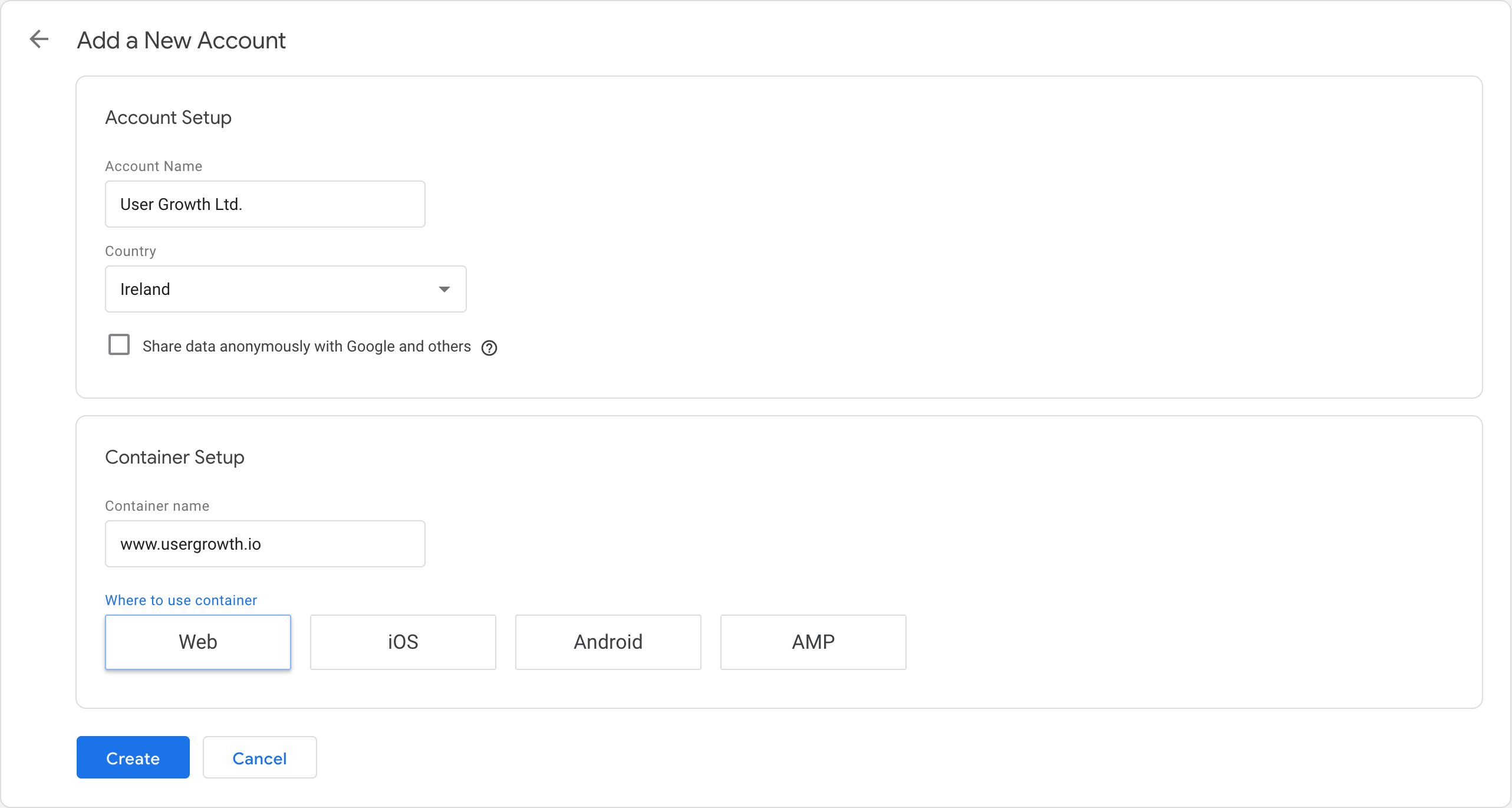
Pretty straightforward right?

Now accept the Terms of Services of Google Tag Manager, and you’re almost good to go.

Copy the tracking snippet given to you and then most importantly the Google Tag Manager ID (looks like GTM-XXXXXXX).

Using the Google Tag Manager for WordPress plugin, you don’t need to edit any code. Just install the plugin and copy paste the Google Tag Manager ID after activating the plugin and going to the settings.

Now we need to add a tag into the Google Tag Manager, do this by pressing the “New Tag” button.
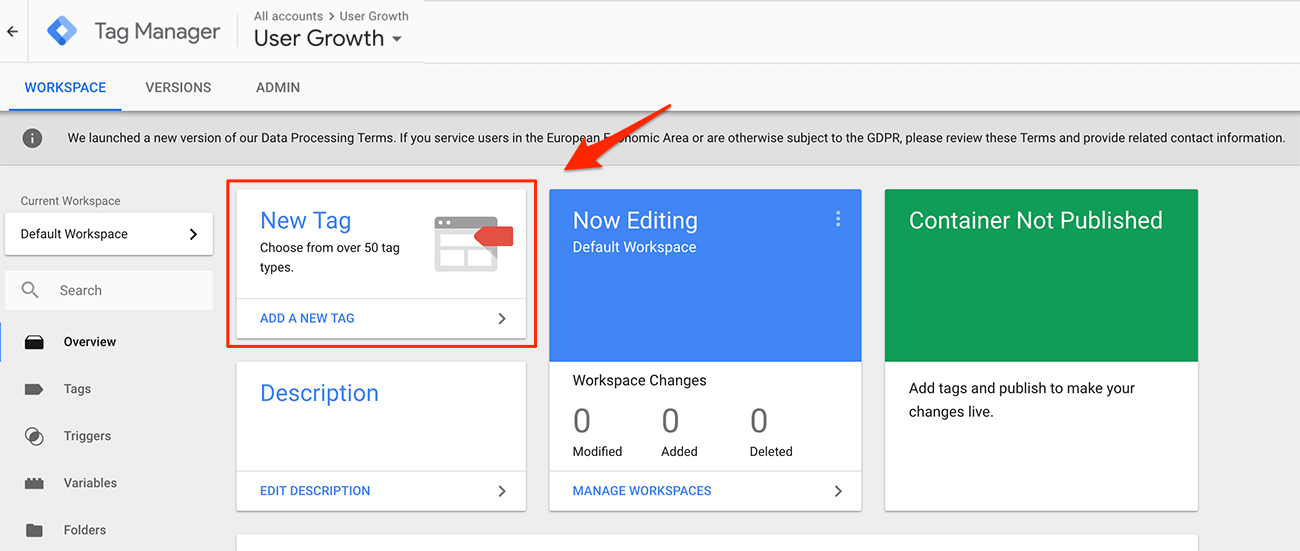
Then you need to come up with a name, so the tag is easily recognisable for future use. We suggest using “Google Analytics”, but feel free to use whatever you want.
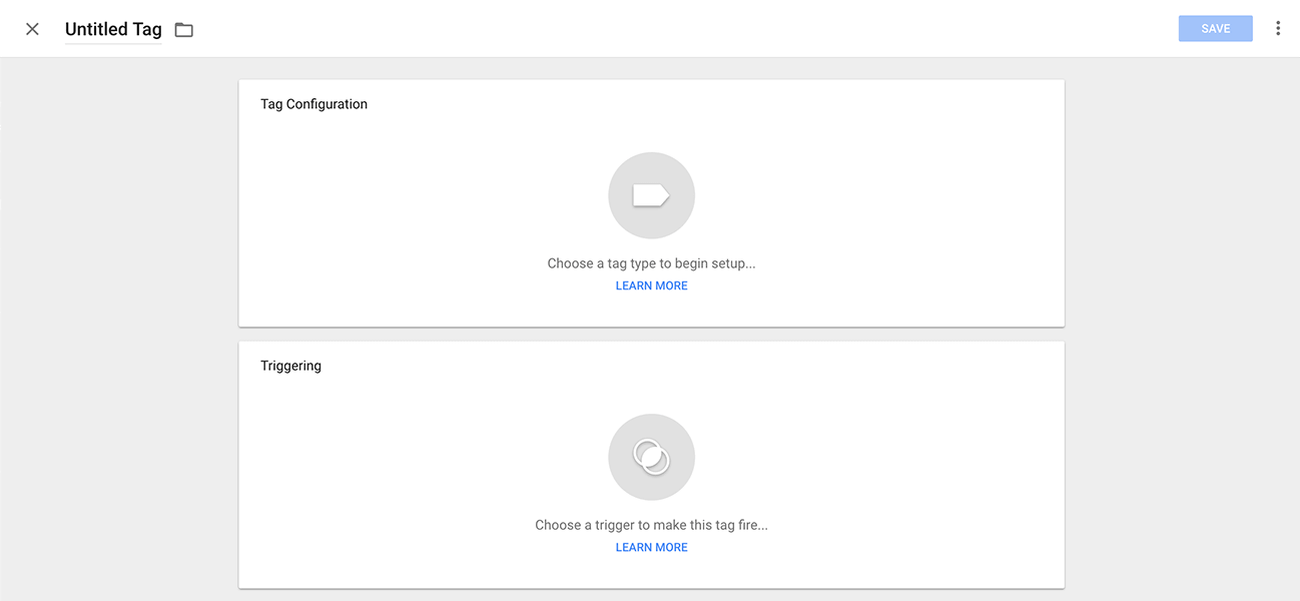
Next step, click on the big button in the “Tag Configuration” to begin the setup. There are a lot of different tags to choose from, but the first one is for “Universal Analytics”, that is the one we want.

To not go into too many details right now, you will keep the “Tracking Type” set for “Pageview”, and then you choose “New Variable…” in the Google Analytics settings.
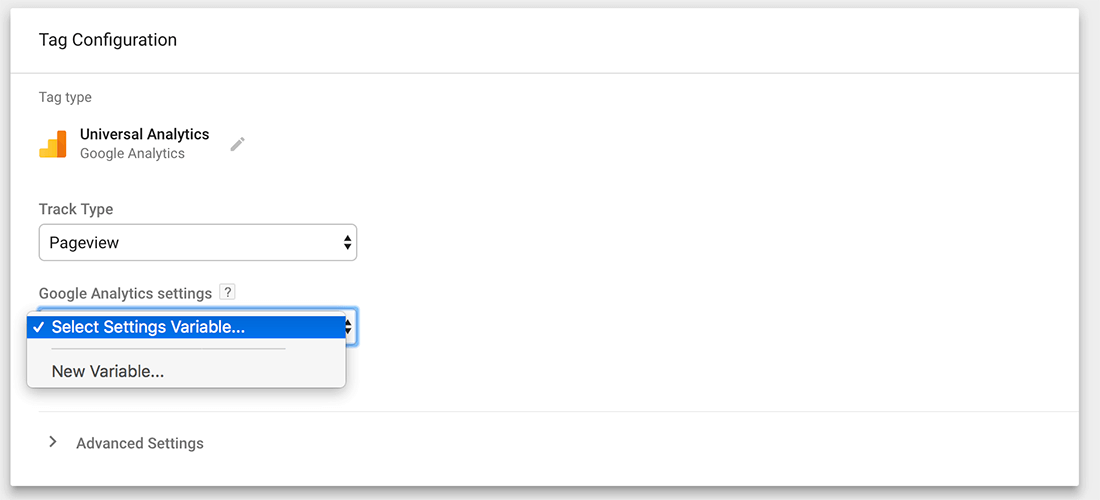
In the next screen, you can then enter your Tracking ID from the Google Analytics you set up earlier. Google Tag Manager asks you to name the variable for later use in other places, let’s keep that name as it is.

Next, you can click on the “Choose a trigger to make this tag fire…” button. For a basic Google Analytics implementation select “All Pages”.

The final step now to have Google Analytics working on your website and have it execute on every page is hitting the Submit Button (top right corner):
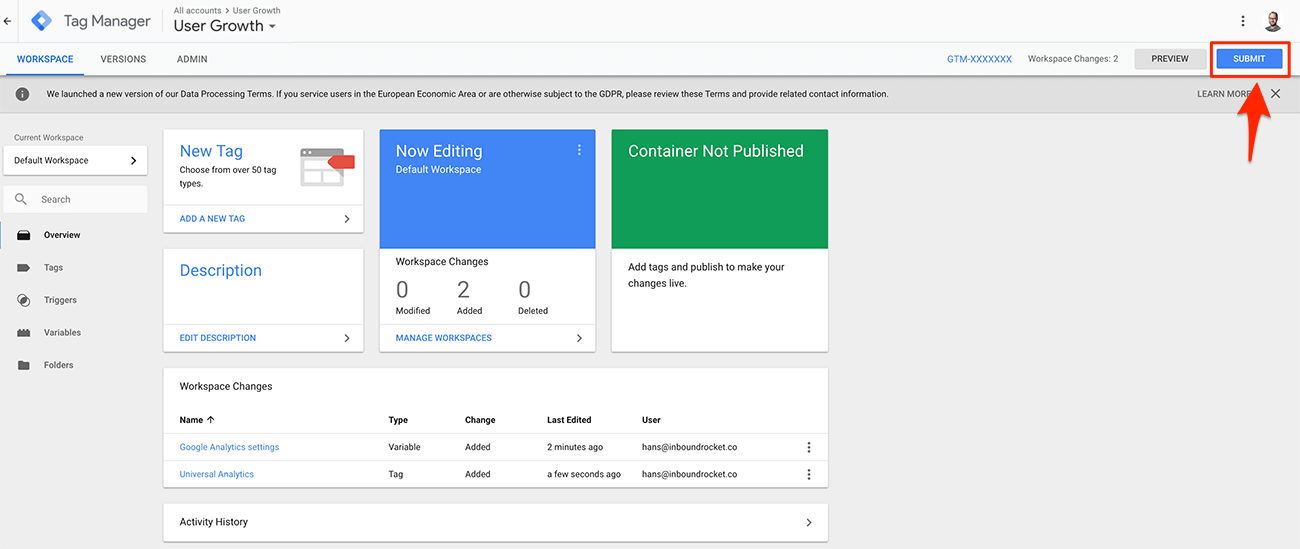
Giving your changes a version name and hit publish. When Google Tag Manager for WordPress is activated with your Google Tag Manager ID, Google Analytics will now be working on your site.

Google Analytics Terminology

Before we go any deeper, let’s first get the fundamental terminology right, this way you can better understand any reporting that Google Analytics throws at you.

What is a User within Google Analytics?

One of the first things you need to know about Google Analytics is what is considered a “user” within GA. For GA an individual that browses your website is called a user. (If you want to get real technical it is a unique browser cookie). It does not matter if a person visits your website only once, or multiple times. For example, one user can create five sessions on your site, and each session has numerous page views.

Since GA uses a unique cookie to identify this person, it means a user is stored to a browser. When someone visits your website using different browsers (on the same machine or different devices), GA will report more than one user.

If you want to identify one person over multiple devices/browsers, you need to use the User ID feature. A User ID is a way to combine sessions from a known person on your website. If you have a way to identify someone (by using an ID from your CRM system for example), you can send that ID to GA, which enables a unique set of cross-device reports. Of course, this works only accurately when you can identify a visitor’s (for example when someone is logged into your website) and won’t work for all visitors.

What are Pageviews?

A Pageview is precisely what you think it would mean, when a User views a page on your website, this will be reported as a Pageview. By default, Google Analytics orders your pages based on the most amounts of views. This helps you to identify which content of yours is viewed more than others.

What are Unique Pageviews?

The problem with Pageviews though is that if a User visits the same page multiple times within the same session, they are all counted as Pageviews. This means that when someone goes back to a previous page after consuming a particular piece of content that the original page is recorded twice as being viewed. Even if the only reason to go back was that they knew there was another link on there that they wanted to explore.

By looking at Unique Pageviews, every page is only counted once within a single session, even if it was viewed multiple times.

How are Pageviews combined into Sessions?

While Pageviews are interesting, it is always interesting to figure out how many Sessions there were on your website. When someone starts on an individual article on your blog, then moves on to the “Homepage” and afterwards to your “About Us” page to find out more information about your company, those three pages are combined into what is called a Session on your website.

So how does this compare to a User and Pageviews? When a person returns a couple of days later and visits five more pages, five more pageviews are recorded in your reporting, there is still only one User, and there are now two Sessions for that User.

What is Bounce Rate?

The Bounce Rate is another very interesting reporting that is important to know about. A Bounce Rate is the percentage of sessions that have only one single Pageview. The Bounce Rate can give you a quick overview of how your content is performing and which content or which pages deserve extra attention. After all, you want your visitors to get down the rabbit hole, consuming more and more content, so they start to see the value of your company and turn into leads.

Don’t forget to put the Bounce Rate into the context of the type of page the Bounce Rate is reporting on. For example, landing pages should have a lower Bounce Rate (because you want people to convert and move to the Thank You page), then maybe your Homepage or a Store Locator.

What is the Acquisition Report in Google Analytics

If you want to figure out how people are finding your website, you will be looking at the Acquisition reports. The Acquisition Report shows you where your visitors are coming from and gives you a report that shows the source, medium and other acquisition dimensions. You can also see traffic from social networks as well as traffic from custom campaign tags.

When you link your Google Search Console, and your Google AdWords accounts to your Google Analytics account you can also get dedicated reports around paid traffic and organic traffic.

What is a Referral in Google Analytics

A bit in the same line as the Acquisition Reports are the Referral reports. When someone arrives at your website from another third-party webpage, this will be reported as a Referral. In other words, all the sites that are sending you traffic (by domain) are listed here. If you want you can drill it down to view the “Referral Path”, which gives you an overview of all the individual pages linking to your website.

What are UTM Tags

One of the essential ways you need to start tracking all your Inbound Marketing activity (all the campaigns that you’re doing on other places on the internet that will give traffic back to your website) is by using UTM tags.

You can add extra details at the end of a link your sharing (query parameters), and these additional details will then be included in your Acquisition Reports.

UTM stands for “Urchin Tracking Module” (the company that invented them and got bought by Google, turning into Google Analytics) and they are the things you can see after a URL in your browser. These extra details are always at the end of a URL you’re sharing and include things like “utm_campaign”, “utm_source”, “utm_medium”, “utm_term”, “utm_content” and “utm_id”.

Campaign Name

The “utm_campaign” is one of the three main dimensions that make up a UTM tag (the others being utm_source and utm_medium). This helps you to identify a specific product promotion or strategic campaign. For example: utm_campaign=spring_sale

Source

“utm_source” is the second one that is important for tagging your URL’s correctly. Source helps you to analyse how people found your website, and it tells you where the campaign is coming from. It can help for example to identify if someone clicks on a link in a newsletter “utm_source=newsletter”, search engine “utm_source=google” or any other place that you’re running a campaign. Combined with the next one “medium”, you can get even more granular insights.

Medium

The last one you need is “utm_medium”. Medium can tell you how the message was communicated to the visitor. For example “utm_medium=cpc” for a cost-per-click campaign, or “utm_medium=affiliate” for an affiliate link.

Term

The “utm_term” and “utm_content” parameters are not mandatory but if used can give you a little bit more extra insights. For example, the “utm_term” parameter is used for tracking your keywords during a paid AdWords campaign. You can also use it in your display ad campaigns to identify aspects of your audience. For example “utm_term=running+shoes”

Content

“utm_content” finally is being used when you’re running A/B tests on your ads. It is a useful metric that can pass details about the version people clicked on and as a result, can help you which version is more effective than the other. For example “utm_content=logolink” or “utm_content=textlink”

Turning Google Analytics into valuable, actionable information

Being able to collect all of this data is great, but at one point it can become a bit overwhelming.

Do you know exactly what to look for when you read analytics data? Let’s have a look into how we can get the most out of the data and turn it into valuable, actionable information.

Setting up goals for important conversions on your site.

When setting up Google Analytics for the first time, it is more than just adding the tracker on your website.

If you want to get the most out of your installation, you need to start setting up goals. Goals allow you to see how many visitors are taking action, converting into leads, subscribers and customers. You can see what sources of traffic are sending visitors that are most likely to convert, and which pages are the most convincing.

So what are Goals exactly? According to Google:

Goals measure how well your site or app fulfills your target objectives. A goal represents a completed activity, called a conversion, that contributes to the success of your business. Examples of goals include making a purchase (for an ecommerce site), completing a game level (for a mobile gaming app), or submitting a contact information form (for a marketing or lead generation site).

Defining goals is a fundamental component of any digital analytics measurement plan. Having properly configured goals allows Analytics to provide you with critical information, such as the number of conversions and the conversion rate for your site or app. Without this information, it’s almost impossible to evaluate the effectiveness of your online business and marketing campaigns.

In other words, goals measure how and when people complete specific actions that you want them to complete.

There are four different types of goals you can use to track your content marketing results:
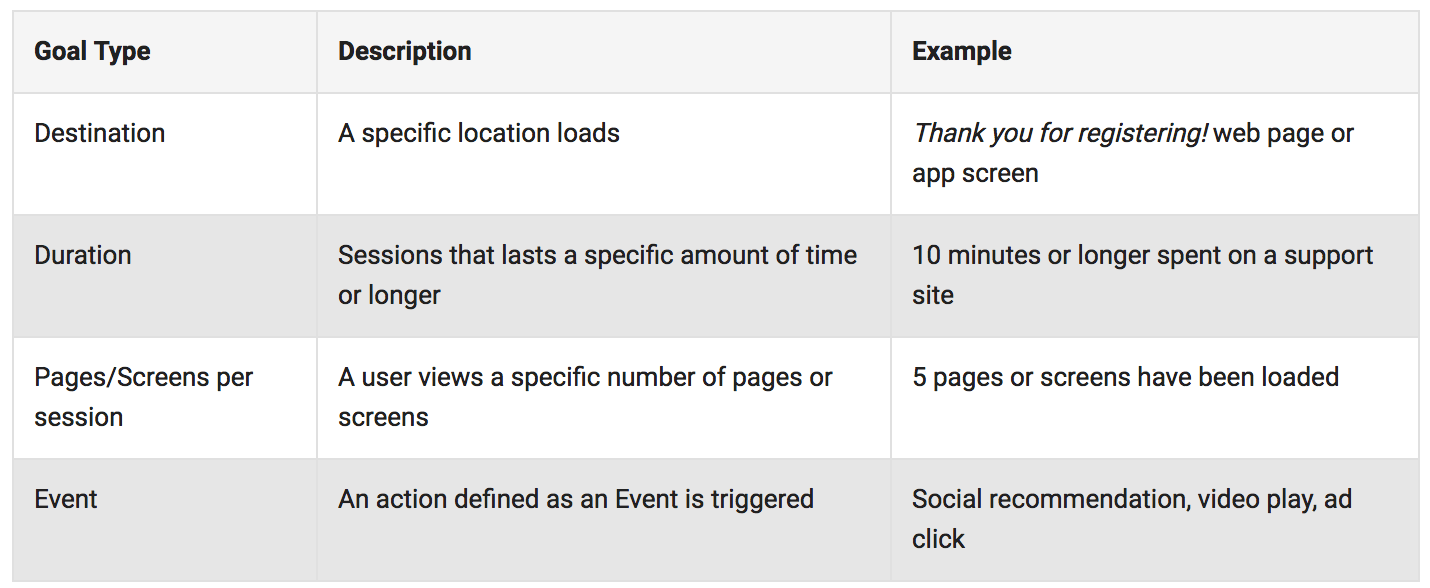
Setting up goals requires that your first figure out, what is essential for your business? What goal do you want your visitors to achieve on your site?

Here are a few ideas that might get you started:

  • Email list sign-ups
  • Webinar registrations
  • White paper downloads
  • Contact form completions
  • Views of a specific page

Don’t go too crazy though, Google only limits you to 20 per account, and that is for a good reason.

Every goal that you’re adding will add an extra column in a lot of reports. And to much data will make you lose sight of your main objectives. Start off with one or two, and slowly add more over time when you think they are needed.

To create a new goal, click on “Admin” in the left panel, then in the “View” column, click on Goals. Simply press the “+New Goal button“, and you’re off.

Most of your goals you want your visitors to end up on a specific destination, after all when someone converts they end up on a Thank You page and that is considered a conversion.

Creating redirects to pages like this can quickly be done within Inbound Rocket, by setting up the form type to post and going to a specific page after.

The slug of this page is the destination you need to enter as the Destination URL in your goal, and you’re all good to go.

If needed, you can create a monetary value to the conversion. For example, if you’re setting up the goal for tracking e-commerce transactions, you can specify the goal value to measure the revenue each transaction generates.

Aligning your goals across the Buyers Journey to what you can track

Understanding your customers, Buyers Journey is crucial if you want to develop strategic marketing tactics that are working. Thankfully Google Analytics offers many powerful functions to measure customer behaviour, allowing you to learn from this and respond accordingly.

The moment you start to understand how your customers are behaving and what they are looking for, you can develop the content to meet their needs at every stage of the journey.

So now that you know how to set up goals, let’s start aligning your goals with the different phases of the Buyers Journey, so you can track your entire conversion funnel.

Topics and reports to think about here are:

Awareness

  • Traffic by Channel/Medium
  • Traffic by Content Grouping
  • Traffic by Author, Topic, Word Count, Date Published

Engagement

  • Content Downloads
  • Watched Video
  • Newsletter Signups
  • Email marketing traffic
  • Retargeting Trafic

Conversion

  • Lead & Contact Forms
  • eCommerce Transaction
  • Average Order Value
  • App Downloads
  • Software Trials
  • Conversions by Content Type

Retention

  • Repeat Revenue
  • Content consumption by logged in Users
  • Product Reviews

By using the reports, Google Analytics has combined with custom Goals you can understand your potential customers or leads better and more effectively, steer them in the direction of a satisfied customer and keep them there.

Using Site Search

One of the easiest way to help your visitors on your site and to keep them on your site is by offering a search bar.

There can also be a time when your site is somehow not optimised enough, and they can’t find what they are looking for; a search bar can help them stay on your site. On top of that, it can also provide valuable insights for you.

Google Analytics can help you tap into this data through its on-site search terms report. By using this report, you can quickly review which keywords people are searching for on your site. It might be that you were targeting the complete wrong keywords and your visitors are using different keywords to describe their problems. By comparing what you were initially thinking to the search terms, they are using you can identify if you’re on the right track.

Or maybe there is a missed opportunity for some new pieces of content you can work on? After all, you know exactly what your customers are searching for, so it can identify additional content you can create that drives more traffic and builds more engagement.

When setting up correctly you can use the information to:

  • target the search result pages with specific campaigns (especially if they are converting well)
  • create better internal links so that the high-traffic pages allow to deliver more traffic to lesser performing pages
  • restructure your website to make specific content more accessible to find
  • identify topics and keywords you can use in content creation

Setting this up correctly is quite easy in Google Analytics. Like setting up goals, click on Admin in the left panel, click View Settings and then enable Site search Tracking:
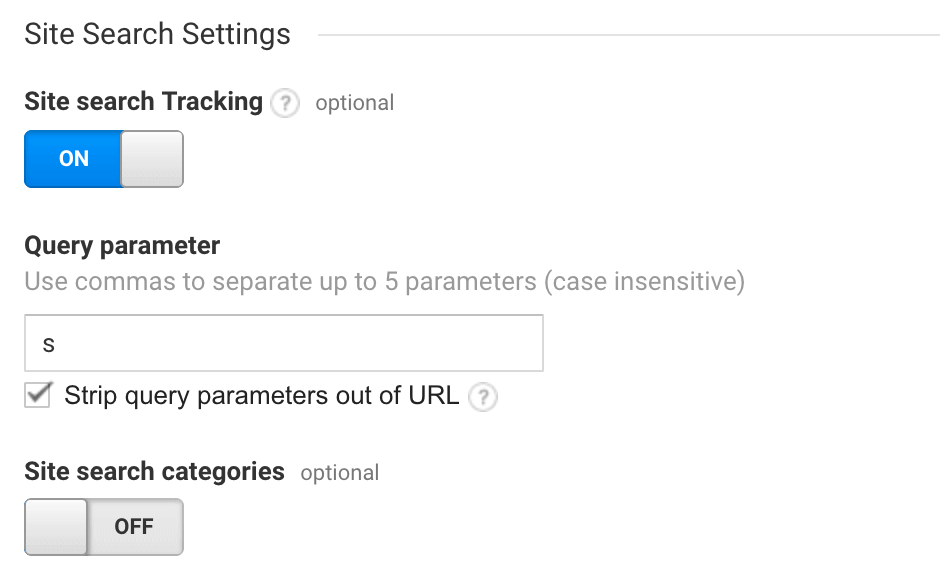
Then, just below the slider, you’ll see a field to enter a Query parameter. The “query parameter” is the letter that appears in the URL to identify a search is happening. (Like the UTM tags). If you’re running WordPress, the default value is “?s=“ so the letter s is what you need to put as the query parameter. Try testing it on your website to see how the URL looks when you search for something.

The last step to do is checking the box “Strip query parameter out of URL” If you don’t select this option than Google Analytics will start to split up the same searches from different pages. For example, you will begin to see separate listings for mycomany.com/searchresultpage?s=1 and mycompany.com/searchresultpage?s=2.

When you tell GA to “strip query parameters out of URL” it will just track all those visits together as mycompany.com/searchresultpage, while still being able to see the internal searches when viewing your site search data.

After you hit save, you can start seeing the results coming in for your site in Google Analytics under “Behaviour” > “Site Search” > “Search Terms”. If no results are produced while searching on your site, those terms will be shown as no-results: keyword.

Identifying and Filtering Internal Traffic from Google Analytics

Depending on the size of your business, employees browsing your website can cause some severe issues in your Google Analytics reporting. People at your company don’t act like a typical visitor on your site, and as a result alter the metrics that are reported most of the times, like users, sessions and Pageviews.

On top of that, they affect probably the most important metrics for your organisation, the conversion rate and attribution reporting in your goals. These can directly impact budgeting, bid strategies for ads and all sorts of other business decisions.

The best thing for you to do is create a filtered view within Google Analytics so that these internal visits are not messing up your data.

The easiest way to do this is to create an IP address filter in GA. But before you can do that, you first need to figure out what your IP address is, just head over to https://www.whatismyip.com/ or do a Google search for “what is my IP address.”

Now we go to our Google Analytics, choose Admin in the left column and then from the Account column select All Filters, Then, click +Add Filter.

You can give your Filter a name like “Internal Traffic Filter”. You can leave the Filter Type as predefined, select Exclude from the Select filter type drop-down. In Select source or destination, “select traffic from the IP addresses” and finally chose “that are equal to”.

In the input box below you can then enter the IP Address you found earlier, and then the only thing left to do is to “Apply Filter to Views” section, where you select “All Website Data” and then click the Add button. Hit save, and you’re good to go.

From now on all visitors internal within your company are complete ignored.

If you still want to be able to make sure that the original data is still saved, the best thing to do before setting up a filter is to create a new view just for this filter. This way you will have the raw data and filtered data available for you. To do that,

  1. Click “Admin“, and navigate to the account and property to which you want to add the view.
  2. In the VIEW column, click the menu, then click “Create new view“.
  3. Select either Web Site or App.
  4. Enter a Name (like filtered view). (Use a specific and descriptive name, so you can easily tell what data is in this view when you see the name in a list.)
  5. Select the Reporting Time Zone. (If your Analytics account is linked to a Google AdWords account, the time zone is automatically set to your AdWords preference, and you won’t see this option.)

See which pages hold people’s attention the longest.

Probably the report that holds the most important clues about which pieces of content your visitors love is the “Average Time on Page” report. In some ways, this is a more accurate measurement of interest than the report on which pages get the most traffic. Especially if you’re running an advertisement campaign going to a specific page, or when some of your pages are ranking well and driving in a ton of organic traffic.

To see the “Average Time on Page” and rank your pages according to the time on their page, go to “Reporting” > “Behaviour”. In the expanded menu click on “Site Content” > “All Pages”.

In the column on the right you can see the different pages people are visiting and if you click on “Average Time on Page”, the list will automatically sort for you by time on page.

Other interesting sorts you can do on this page as soon as your Goal Data is starting to flow in, is sorting by Page Value. This will give you the insights into which pieces are the most interesting for your visitors and which pieces of content are in serious need of attention for some updates.

Finding slow loading page to optimise your site speed

The last reporting we want to focus on here is the reporting to identify slow loading pages. According to Google, most of the websites out there are too slow.
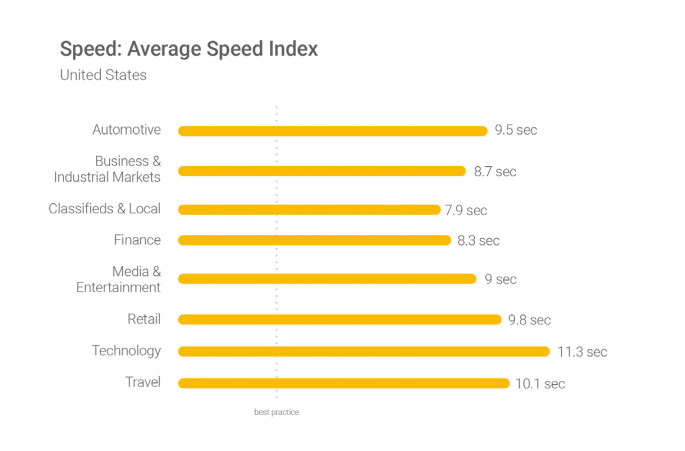
2 seconds is the threshold for e-commerce website acceptability. At Google, we aim for under a half second.” Maile Ohye – Google

In other words, when most websites are ranking above nine-seconds, your visitors are already gone before they have even seen your content.
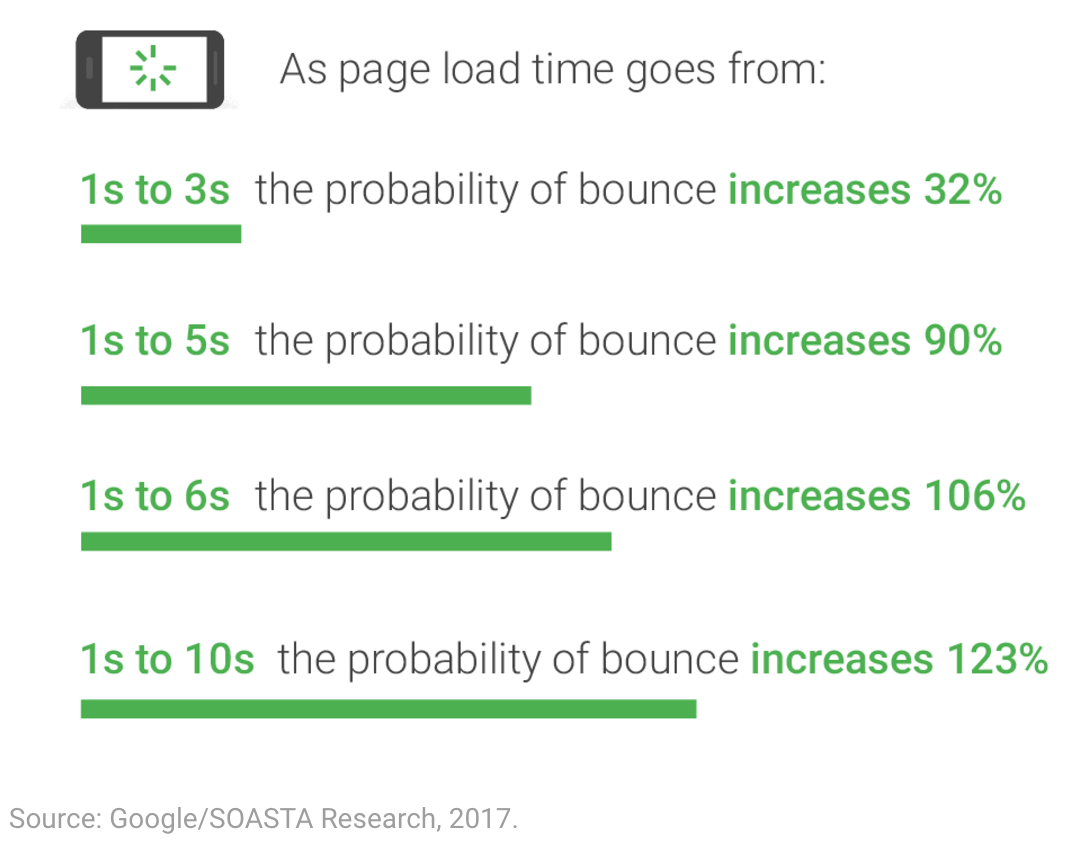
As of July 2018 page speed is a ranking factor in mobile search.

Thankfully using Google Analytics, you can figure out which specific pages on your site are loading the slowest and need some improvement. This information combined which pages are getting the most traffic should give you enough information to figure out which pages you need to start optimising first.

To see the site speed of individual pages, go to “Reporting” > “Behaviour”. In the expanded menu click on “Site Speed” > “Page Timings”.

This report quickly shows you all of your pages on-site, grouped by page load time. Want to know how you can improve them? Just under “Page Timings” in the left-hand menu, you can find “Speed Suggestions”, showing you some great tips to get started.

Advanced Google Analytics reporting

The final item we want to focus on is a little bit more advanced but can give you great insights into finding your most popular content based on the categories and the tags associated with them.

The way to do that is called Content Grouping. According to Google, Content Grouping is:

Content Grouping lets you, group, content into a logical structure that reflects how you think about your site or app, and then view and compare aggregated metrics by group name in addition to being able to drill down to the individual URL, page title, or screen name. For example, you can see the aggregated number of Pageviews for all pages in a group like Men/Shirts, and then drill in to see each URL or page title.

So how to use Content Grouping to determine your most popular content?

It all starts by navigating to Admin and then under the View column you can select “Content Grouping”. Click “+New Content Grouping” and name the first group “Post Categories”.
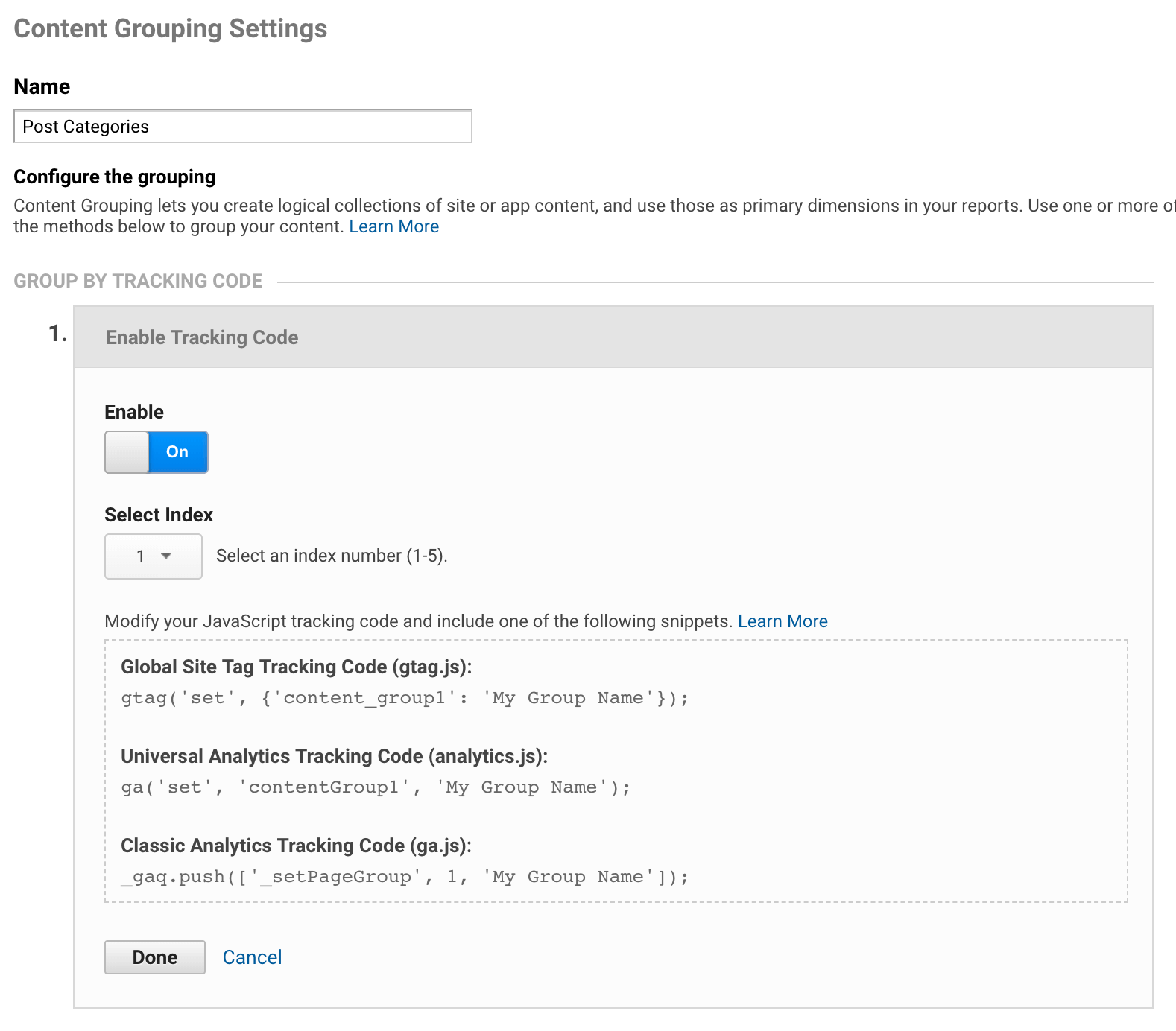
Under “Group by Tracking Code” click “Enable Tracking Code” and write down the number under “Select Index” (unless you’ve already done this before for something else, this should be “1”). Click “Done” and then “Save”.

Repeat the same step, only call it “Post Tags” and write down the index number (probably “2”).

Since we’ve already set up Google Tag Manager, in the beginning, to enable Google Analytics on our website, all we now have to do is head over to Google Tag Manager.

Choose your Account and click on your “Google Analytics Settings”.

Under the “variable configuration,” you click on “More Settings” > “Content Groups” > “+Add Content Group”.

Enter “1” as the “Index” and then click on the icon on the right of “Content Group”. Hit the plus sign in the top right corner for “New Variable”.
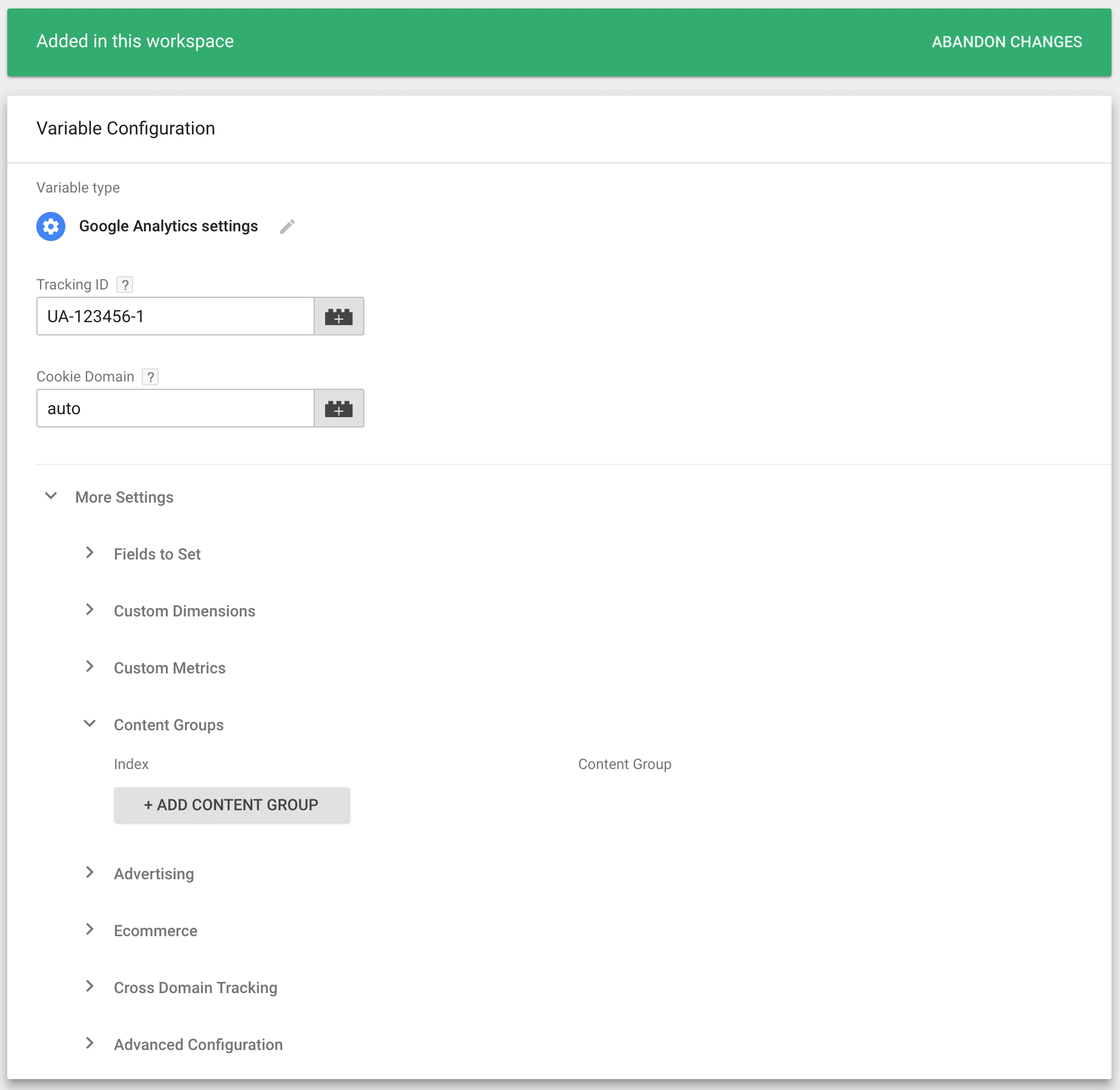
Name the variable “Post Categories” and select “Data Layer Variable” as the “Type”, enter “pageCategory” as the “Data Layer Variable Name” and click save.

Repeat these steps only this time name the variable “Post Tags” and the name for the “Data Layer Variable” is “pageAttributes”.

After that click “Continue” and select “All Pages” under “Fire On” and click “Create Tag” in case that is not selected yet.

Now we head over to your WordPress site and go to the Google Tag Manager plugin we installed earlier. Under the “Basic data” tab, make sure that both “Category list of current post/archive” and “Tags of current post” are selected.
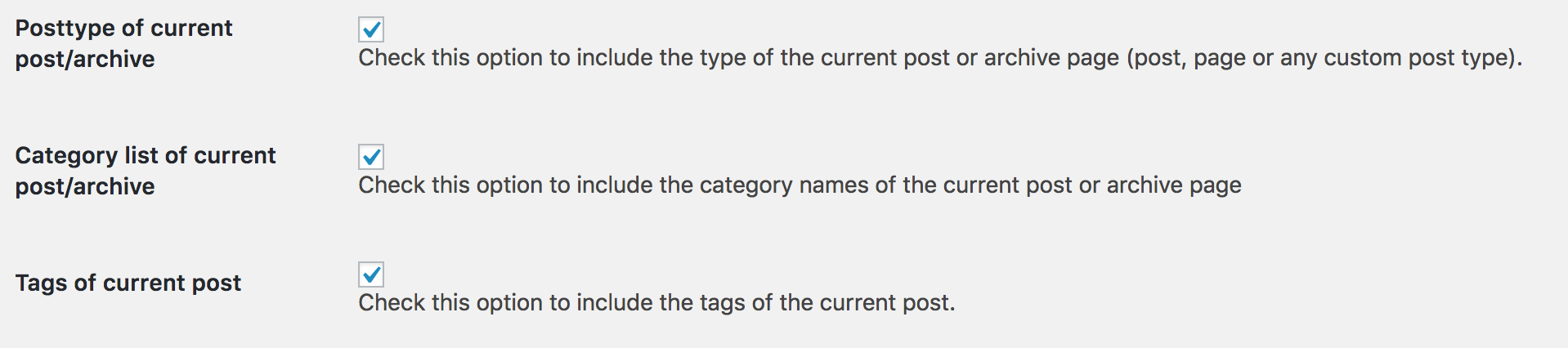
By doing this, we store extra pieces of information in a Data Layer on your blog posts. The post categories and tags can now be used within Google Tag manager for more advanced data collection and reporting.

The final step will be to publish the changes you made in Google Tag Manager.

From now un in Google Analytics, under “Behaviour” > “Site Content” > “All Pages” you will have the option to select information from your content groupings.

In other words, you can now figure out what are the most visited content categories, and tags that you’re visitors are finding most interesting. It gives you the ability to understand how certain content is performing based on the categories and tags.

Although it is a bit of a top-level view, it can be powerful to quickly understand your top performing content. And as a result, it can help you focus on those topics that your visitors seem to love most.

Google Analytics is an enormous data wonder, and it holds lots of vital data about your website and how it is performing. Best of all, it offers all this data to you for free.
 
As you can see it all starts with a correct implementation though, and from there, there are many different ways to evaluate the performance of your content marketing.
 
Just using standard reports like the amounts of pageviews is not enough if you truly want to move your business forward.
 
If you learn what kind of questions you need to ask for your business, you can start to evaluate your content marketing efforts. 
 
After all, if you don’t measure your content marketing strategy, you don’t what is and what isn’t working.
 
How do you use Google Analytics to improve your (content) marketing strategy? Drop us a reaction in the comments below; we’d love to hear from you.


Sourced from usergrowth