Tag

design

Browsing

How to Design Marketing Campaigns: The Importance of Market Segmentation

By Myk Pono.

This article shares the process involved in designing successful marketing campaigns.

The goal is to outline practical strategies and tactics that are vital in launching high ROI marketing campaigns. Its primary focus is SaaS (or enterprise) companies at any growth stage. Even experienced marketing teams should be able to find one or two ideas that are worth testing.

Why should you care? Don’t we know all about running marketing campaigns by now? While there are tons of resources written on marketing and marketing campaigns, many/most are not comprehensive and others are missing essential strategic steps in the process. And more importantly — there are still plenty of poorly designed marketing campaigns.

Tech companies often fail at marketing because they take a fundamentally flawed approach to designing marketing strategy and campaigns. Subpar marketing leads to “me-too” uninspiring content on corporate blogs with insignificant social shares and superficiality from the target audience’s viewpoint. Tech companies struggle to create strategic messaging to describe their products and use undifferentiated messages, jargon and superlatives. The end result is that marketing drains significant resources on paid acquisition campaigns that have no market segmentation or designated landing pages.

These are just a few examples; but what’s behind such failure? Part of the problem is not understanding what marketing is and what its goals are. Also, many techies (especially engineers) believe that a good product sells itself (wrong!). And many founders and executives have a negative bias against marketing and marketers (sad!).

How do you define marketing and what is its goal? I have argued in previous articles that the goal of marketing is to manage perception and change the behavior of your target audience. Period. All marketing activities and every aspect of marketing falls under the goals of managing perception, changing behavior, or both.

What is a marketing campaign? A marketing campaign is a process that includes a series of activities or steps designed to alter the perception and behavior of customers or prospects.

Part 1: What is the biggest mistake made when designing marketing campaigns?

In the last few years, I’ve spoken with over a hundred founders and marketing executives. When asked about marketing strategy, most of the time companies present some sort of excel file (or other doc) with a list of activities such as SEO, SEM, social media, content marketing, paid acquisition campaigns, PR, email marketing or the likes. Each channel might include a few generic marketing campaigns or just a laundry list of activities.

There are tons of resources and content materials that share tactics on how to optimize your landing page, your conversion rate, how to pick and test the right title, what wording to use on your call-to-action, as well as how to use color and images to improve click-through-rates and so on. Yet, many fail to mention the most important part of this process. Before building any marketing campaign, companies need to have a solid marketing foundation. This foundation should include strategic messaging, ideal customer profiles, and competitive positioning. It is only on this solid foundation that effective marketing campaigns can be built.

Lack of marketing playbook or outline

Many organizations have no marketing strategy, methodology or playbook outlining how to structure marketing activities. Unquestionably, if you are a young startup there are more pressing survival issues than thinking about marketing strategy. But even mature organizations with detailed sales playbooks often lack any outlined strategy when it comes to marketing. (If you have marketing playbook in your organization I want to hear from you — seriously!).

I’m not advocating writing a 20-page marketing strategy playbook when you have just a dozen customers. Nevertheless, an outline of just a few pages that includes your target customer profile, strategic messaging with outlined value proposition, market segments, content topics, and marketing channels can increase the clarity and effectiveness of your marketing significantly.

A simple marketing playbook will enable a company to stay focused. It will help recruit and train the right marketing hires. In the same way that a sales playbook is the first document that new sales hires should digest during the on-boarding process, a marketing playbook will help new marketing hires getting up to speed by learning from how the organization has approached marketing so far.

Focusing on channels rather than customers

The absence of a marketing playbook leads to the biggest mistakes that companies make in designing marketing campaigns — they focus on marketing channels rather than the target customer.

In some companies, even teams are structured around channels — paid acquisition, SEO, social media. Having specialized teams definitely has its advantages. However, organizing teams around channels creates a culture where no one looks at customer experiences and customer lifecycle as a whole, instead focusing on their own initiatives, which leads to fighting over budgets, messaging and inconsistent marketing strategy.

Most companies start their marketing campaigns backwards — where should we spend our money?:

Their narrative starts with “where should we spend our money, what messages should we use and only then, who should we target”.

This is how successful marketing campaigns are structured:

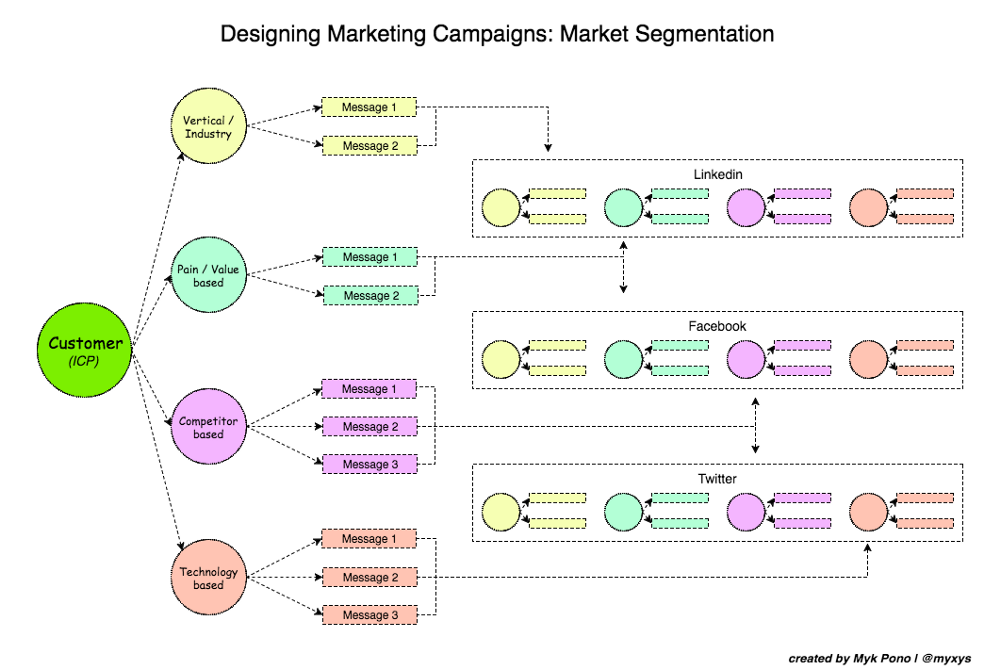
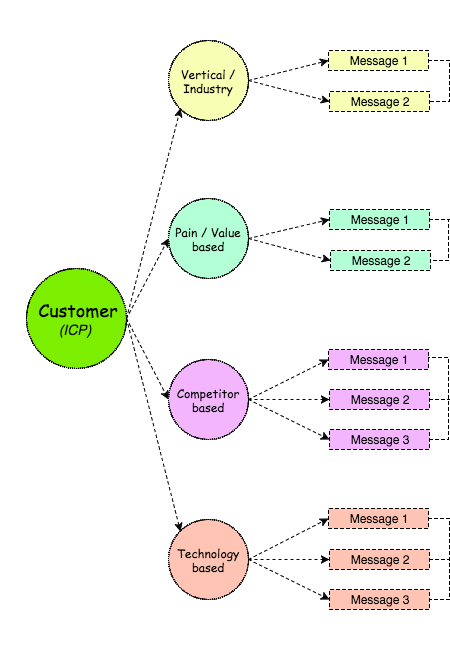
This better way starts with the target customer, market segmentation, and only then moves to messaging and channels.

Before designing your next marketing campaign, make sure you answer the following questions:

  • Who is your target customer?
  • What is the goal of your current marketing campaign?
  • Can you split your market into meaningful segments?
  • What messages do you want to use or test to influence your target customer?
  • What are the best channels for your marketing campaign to reach your target audience?
  • How do you align marketing and sales?
  • How do you track and test the success of your marketing campaigns?

Going wide instead of deep

Companies rarely look into segmentation to achieve greater ROI on their marketing spend. Even when a company understands its target customer they still get it wrong. Take a VP of Sales in an organization with over 20 sales reps; it overlooks the fact that the needs and challenges their target customers are facing might be very different depending on the vertical. For example, a sales manager in the pharmaceutical industry might have very different needs, organizational structure, or even goals, compared to a sales manager in the hardware or media industry. We will come back to the idea of market segmentation later.

Certainly, there are other reasons why marketing campaigns fail. For example, weak or nonexistent calls-to-action, lack of valuable content or failing to manage customer acquisition cost and campaign budget can all impact on the success of your marketing campaigns. However, if you aren’t clear on your target customer and you aren’t segmenting your addressable market, nothing else will bring real performance improvements.

NOTE: Before you continue reading, I highly recommend you read the guide on strategic messaging first. It will help you follow this article better and see how the concept of target customer profiling and strategic messaging intertwine with designing effective marketing campaigns.

Part 2: How to Design Marketing Campaigns.

2.1. Start with your target customer

Many teams are aware of the importance of going through the exercise of creating target customer profiles (aka Ideal Customer Profile — ICP). However, it is worth repeating that ICP is the cornerstone of every effective marketing strategy.

A target customer profile allows your company to set the right goals, design effective strategic messaging, segment your marketplace, develop value-based content marketing strategy, and pick the right channels for your marketing campaigns. In my previous article, we went over the detailed process for designing target customer profiles. Let’s now outline a few things that weren’t given enough attention earlier.

An ideal customer profile should be developed for every persona in the buying process.
Let’s not forget that not only decision makers and senior executives have a stake in a buying decision. Stakeholders with other goals and concerns can stir decisions during important buying processes. The larger the organization and the more impactful product you are selling, the more likely the buying process will include multiple stakeholders with multiple objectives and concerns.

Therefore, it’s essential to ensure that your organization understands the needs and values of everyone involved in buying your product.

Look inside and outside your organization.
The process of designing ideal customer profiles should involve interviewing your customers, prospects, and even your internal team. These interviews should be structured in such a way to help you understand the pains and needs that your target market is trying to solve.

Another good way to learn about your ideal customer profile is to dig into your CRM data and analyze what type of customers have the highest Customer Lifetime Value (CLV) and shortest sales cycle.

LEARN MORE: This article by Dave Kellogg talks about the benefits of segmenting your current customers based on renewal rate and retention rate dimensions — The Evolution of Marketing Thanks to SaaS.

For example, Metadata (full disclosure: I’m an advisor), collects all the data about your existing customers and patterns of engagement from the CRM, marketing automation, marketing analytics and even from social media accounts. Analyzing this data allows them to create a view of your current customers with the highest Customer Lifetime Value and shortest sales cycle. This data is then used to run marketing campaigns that target look-alike personas.

For early-stage startups with no, or a limited number of customers, the primary focus is finding a dream customer for your product. What company and what persona has the highest pain that your product is solving? What company has the budget and size to become your customer for 1/3/5 years? Early stage startups should narrow their focus when it comes to ICP and then slowly expand as they grow. If you try to market too broadly too early, you end up with watered down everything because you aren’t big enough to do it right.

Getting your ideal customer profile right requires looking inside and outside your organization. When a company focuses only on the profile of current customers they miss out on larger opportunities to attract customers that might be a better fit. Sometimes teams fall into a mindset of thinking that just because they have a certain segment of profitable customers that this segment is the best one to focus on. Nonetheless, it is often because companies used non-effective messaging or run specific campaigns that they ended up attracting these customers in the first place.

Basically the question is this — are you sure that your most profitable customer segment currently isn’t purely the result of wrongly positioning your product or misusing messaging in the past? This is why looking outside of your organization is as important as diving into your customer data.

2.2. Segment your market

Market segmentation is a very underestimated strategy when it comes to improvement of your marketing ROI. Essentially, market segmentation is the process of dividing an entire addressable market into clearly defined segments with similar pains and values.

NOTE: I agree with Tom Wentworth who pointed out that market segmentation is an important topic beyond marketing. Segmentation impacts go-to-market strategy, messaging, product roadmaps, and the way you structure your sales team. This process needs C-level buy-in and commitment to think of segmentation in the very function of the company. Unfortunately, many companies go through segmentation exercises as a purely marketing thing.

Let’s take a deep dive into segmentation, a secret resource of great marketing teams, with a case study.


CASE STUDY

Let me explain how market segmentation can improve ROI for marketing campaigns and how I learned about market segmentation. In 2009, I was hired to join a newly created corporate marketing team at Sophos, a global security software company with over 1200 employees worldwide. Amongst other responsibilities, my task was to create and manage paid acquisition campaigns (primarily Adwords). The Adwords campaigns that had been running previously weren’t performing well due to a number of issues.

The problem

High cost per click was a challenge. First, the cost per lead was extremely high. Words and phrases such as “antivirus”, “data protection” and “encryption” are among of the most competitive keywords in Adwords, after insurance and mortgage. Another problem we were facing was a big consumer market that could drive high cost per lead with absolutely zero value to our organization. Unlike our competitors such as Symantec, AVG or McAfee, Sophos only sells to large organizations (finance, retail, government, healthcare, non-profit). Therefore, we had to take into account high cost-per-click and consumers while designing our paid acquisition strategy. How important was this cost to our marketing budget?

Let’s look at some approximations. For keywords like “antivirus”, “data protection”, “encryption software” you can pay anywhere between $5-$10 per click:

Cost-Per-Click (CPC) of ~$5 with conversion rate 3% -> leads to $33 Cost-Per-Lead (CPL)
(100 Clicks * $5 CPC) * 3% = 15 leads
$500 (total cost) / 15 leads =
$33 Cost-Per-Lead (!)

A $33 CPL is quite high, particularly if you add a huge consumer market that’s very difficult to exclude. What this means is that you can end up paying as much at $33 for the email address of a college student. With these figures, your cost and campaign ROI can get out of hand quickly — even with a significant marketing budget.

Take for instance, a situation where 3 out of 10 leads are bogus data or coming from consumers, the effective cost per lead for the 7 “good” leads is ~$47. Our average deal size was large enough (some >$100K annually) to make it worthwhile for Sophos to pay up to $100-$120 /per lead for a high quality (VP-level or C-level from a Fortune 1000) lead. But proving marketing ROI was never easy because our sales cycle was between 6–12 months. So while we could spend $40K per month on Adwords, paying $33 per lead, we might have to wait for up to 12 months to really see revenue.

Today a case could be made that with such high CPL, the money would be better spent on outbound sales campaigns or an account-based marketing approach.

The Solution

We searched for a marketing agency to help us manage our Adwords campaigns as well as design landing pages. I talked with almost every marketing agency in the Boston area and we settled on the one that proposed deep market segmentation for our paid campaigns. Along with the agency, our marketing team segmented the market based on vertical industries and product offerings.

We started small and created targeted landing pages for companies that were looking for a specific product in a specific industry. For example, we first created landing pages for antivirus solutions in top industries, and had landing pages that focused on:

  • Antivirus for Finance companies
  • Antivirus for Government Organizations
  • Antivirus for Non-profit
  • Antivirus for Retail
  • Antivirus for Education

For each page we created a separate ad campaign with unique calls to action and ad messages, as well as focusing on narrow keywords related only to this product and industry. Also, each page had unique content targeted to the ideal customer profile for a specific vertical. This allowed us to decrease the cost-per-click because Google saw the ads as very relevant. Our conversion rate increased and our cost per lead decreased. When we saw that one industry performed well, we would segment that industry further and create another ad campaign and landing page; data protection solutions for banks for example.

In a couple of months, we had over 50 landing pages running across multiple industries and product lines. Beforehand we were directing visitors to generic landing pages and in some cases just product pages. Post campaign, we had a mini-website with ~50 pages covering very specific products and industries. It’s true that it can be very costly to develop 50 landing pages. However, remember we were often paying over $33 per lead, so if a new landing page costs $400 and you can decrease cost per lead by $10 you can break even after only 40 leads generated from such a page.

Vertical Segmentation for Paid Acquisition Campaigns

Unfortunately, I can’t share the exact numbers in terms of improvements in conversion rate, Cost-Per-Click, or Cost-Per-Lead. But I can tell you that we improved our Adwords campaigns somewhere in the range of 50–150% on a Cost-Per-Lead basis. This is a unique case study where the importance of market segmentation could be calculated and translated into dollar amount.

We learned a lot (at least I did) and based on our learning developed separate pages on the website dedicated to every top industry. It also helped us drive some organic traffic from search engines and let customers landing on our website segment themselves based on the industry they were coming from.


LEARN MORE: Brian Halligan, CEO of HubSpot discusses segmentation and targeting for scaling company in this article — HubSpot’s Playbook for Going From Startup to Scale-up.

There are multiple ways to segment your market besides simple vertical or industry segmentation that we saw in the Sophos example.

Narrow your market and go deep. Segmentation allows companies to narrow their market and go deep. What do we mean by going deep?

Hypothetically speaking, if you company is willing to pay for 1,000 touches that your prospects have with your product, ad, content or whatever, you’ll get a better ROI if you have 10 touches in 100 different companies than 1 touch in 1,000 different companies. Going narrow and deep is what constitutes the main idea of what we call account-based marketing which we will discuss later. From a segmentation perspective, going narrow and deep means looking at your ICP and your market from the prism of a smaller, well defined group of customers.

Segmentation doesn’t have to be complicated, and there are cases where it can be overkill. In general, best advice is to make sure segments strike a balance between being big enough to be economically viable and sufficiently different to justify modifying your message or changing the focus of the values presented to attract them.

For example, at Sophos creating a segment that targets data protection for non-profits, larger than 100 employees in south east Asia might be overkill. Unless, A) there are plenty such companies in this segment or 2) the order in which they perceive the value of your product is significantly different from other non-profits. So, you need to ask yourself:

  • Do you have enough companies in the segment (with the required budget) to make this segment attractive economically?
  • Are the companies in this segment differentiated enough in terms of pain and values to justify changes to your message?

Below are a few examples of how you can segment your marketing campaign.

Vertical segmentation

The Sophos case study is a perfect example of vertical or industry segmentation. If your product solves pains across multiple industries it is worth taking a look and testing industry segmentation.

Companies like Veeva and Vlocity built very successful companies just by focusing on specific verticals in otherwise very crowded industries. This is a great example of market segmentation as a core strategy.

Pain-based or value-based segmentation

Segmentation based on values and pains that target customers care about can improve your marketing campaign performance too. In the article on strategic messaging we saw that the target customer profile of the economic buyer (CMO, Chief Digital Officer (CDO) etc.) had three value categories: 1) revenue / retention / engagement; 2) customer satisfaction and 3) product roadmap decisions. It’s a good idea to design and test campaigns for each value category. In this particular example even the first value category can be broken down into three segments (revenue, retention and engagement). Your target customers may have up to 3 values that impact their buying decisions and the order of importance of these values may change depending on the segment.

Competitor-based segmentation

If your product is well positioned against competitors, you can segment your marketing campaigns based on competition. The key here is to understand your strengths and weaknesses and to play to them. You don’t necessarily have to position competitors as inferior, your goal should be to position them differently and to show for what customer pains and why your product is a better solution. Both Volvo and BMW are great cars but the former focuses on safety and the latter is more focused on performance. If done well, positioning competitors as inferior can be effective and some companies in consumer markets use this strategy often and successfully.

At Sophos we created competitor-based marketing campaigns betting on the brand keywords of the competition. We would create custom landing pages highlighting our advantages by comparing Sophos vs. McAfee or Sophos vs. AVG.

If your brand isn’t as well-known as your competitor, it’s a great idea to get your company into the consideration list for those who maybe haven’t heard of, or considered your product before. That said, it is better to avoid marketing campaigns against smaller and less well-known companies. You will only validate them and diminish your perceived brand value. So, just ignore smaller players. Instead go after industry leaders or established companies that many people dislike.

LEARN MORE: Recently, I came across a solid article on product positioning by April DunfordObviously Awesome: a product positioning exercise. Also, check out the article on the law of duality by Al Ries — The law of duality is creating havoc with many marketing programs.

Technology-based segmentation

Let’s say your product is built on top of the Salesforce platform or your product integrates with multiple CRMs or marketing automation systems. This is a perfect opportunity to segment your market based on the technology that your target customers use.

For example, PandaDoc, a document automation solution, integrates with over a dozen CRMs. They build a dedicated page for every single integration. This is a great example of how you can create marketing campaigns focusing on technology that is supported or used by your product. Marketing campaigns targeting document automation for Salesforce, Hubspot or Pipedrive reaches companies that use these technologies and allows your message to be tailored specifically to the targeted technology.

NOTE: We highlighted above just a few examples of market segmentation but in no way is this a complete list. Some companies and some markets will have unique profitable market segments to explore.

2.3. Strategic messaging

Market Segmentation Examples

Once you have segmented your target market, you need to adjust your strategic messaging to fit customers in each segment.

If vertical segmentation includes companies in the financial sector, it’s important to make sure that your value proposition reflects the challenges that these companies face.

In technology-based segments, it’s important to describe how your product is integrated with the targeted technology. Outline how your product enhances experiences or saves time.

Strategic messaging at this stage impacts the content on your landing pages, in ads and so on.

2.4. Marketing channels

There are multiple marketing channels and ways to run your marketing campaign, and we can’t cover all of them here. The main point to note is that only once you understand your customers, have segmented them, and adjusted your messaging can you move into the specifics of launching marketing campaigns whether through Linkedin, Twitter, Facebook or any other channels. As mentioned, one of the biggest mistakes marketers make is creating Facebook/Linkedin/Twitter campaigns without a clear understanding of their customer and without segmenting and adjusting their messaging to new markets.

Obviously each channel has different targeting capabilities, limits on content, and politics around calls-to-action, so some adjustment will be needed.

Designing Marketing Campaigns: Market Segmentation

2.5. Call-to-Action (CTA) / marketing assets / landing pages

Your customer acquisition model will dictate the call-to-action, marketing assets, and landing pages that you use. With broader and simpler products that use freemium or free trial models, you can drive prospects from marketing campaigns to free trials or signups. Marketing assets using this strategy become optional. Many companies with this approach move away from gated content, signup forms and marketing qualified leads (MQLs). Drift, for example, only asks prospects to provide an email to access their free 14 day trial, and the rest of their content, such as marketing assets, ebooks, etc. are given without any lead forms.

When it comes to more expensive products for which you can’t easily build a free trial or where a freemium model isn’t a viable option, gated content can still be effective. However, I personally believe that gating content has very little benefit and it may harm, more than help a company grow. Opening up your content can increase interest and social media shares. So, instead of gating content, open it up and showcase a “request a demo” CTA. By design, a “request a demo” call to action is more appealing to prospects with higher buying intent. Students and small business outside your target customer profile might give you their email to access an educational white paper but they are unlikely to sign up for demo.

The bottom line is that you have to understand your customer acquisition process and create appropriate call-to-action and landing pages. Marketing assets can help you spark interest and generate leads if your marketing team still relies on MQLs.

2.6. Align marketing, sales and product

We will discuss marketing and sales alignment more closely when we talk about account-based marketing below. However, it’s important to remember that when marketing uses segmentation and adjusts messages accordingly, sales reps need to be signed up to this unified message. The last thing you want to do is to pitch your prospect a generic value proposition if the company came from the financial sector.

Engaging your product team in the market segmentation process can provide necessary input for changing and adjusting your roadmap. It is much more effective to have product managers in the room when you develop your ICP, messaging, segmentation, and marketing campaigns than discover crucial information afterwards.

To avoid confusion, marketing and sales should develop battle cards for each market segment to use in their marketing campaigns. Battle cards include message and qualification questions specifically for each vertical. Segment-specific case studies, references, and customer reviews can also be tremendously helpful. In the early stages you can just mark in your CRM or marketing automation that a prospect came from a specific industry so your sales team can adjust their initial qualification call accordingly.

For example, Sophos took the importance of understanding vertical segmentation to the extreme. Our sales team was set up in a way to allow reps to focus on just one or two vertical markets. This setup allowed sales reps to be deeply immersed in the problems that industry faces and highly aware of competition and other market forces that impact the industry (eg. the financial sector was heavily impacted during 2008–2010 financial crisis).

2.7. Tracking and Analytics

Obviously you need to have some tracking and analytics in place. We won’t spend much time on this topic here but let’s highlight a few things that you have to be aware of. Marketing campaigns need to be tracked on following levels:

  1. Channel level (CPC, CPM, CTR, CPL)
  2. Landing page level (conversion rate)
  3. Marketing automation / CRM level (leads, demos, opportunities, CAC, CLV)

LEARN MORE: To learn more about tracking marketing campaigns and customer acquisitions, read this in-depth article on how to track customer acquisitions.

NOTE: don’t forget to track your customers over time and understand how churn and CLV are impacted by segmentation. You might find interesting insights that will help you adjust and improve your marketing going forward.

First-touch / last-touch vs. pattern analysis

If you are emphasizing first-touch / last-touch in your marketing I believe you are missing the point. Analyzing customer interaction patterns rather than focusing on first-touch / last-touch will give you a better understanding of your customer.

Let’s look at attribution using a sports analogy. What has more impact on an athlete becoming an Olympic champion; the first practice or the last? You may argue that how people get into sports is most inspiring or that you can’t win the Olympics by skipping your last warm up before the race. While these are both true, the practice patterns over a long period of time is what correlates most with successful performance.

In your marketing, do you focus on understanding the pattern of how your prospects interact with your content, your product or your marketing campaign before they become a customer? If not, you’re missing a big trick. Look for overall patterns and a correlation between free trial signups and how many times a customer visited your website, consumed your contented, or was exposed to your marketing campaign. It is not the first-touch or the last-touch that matters, it is about the number of times (the pattern) that prospects are exposed to before they sign up or buy from you that matters.

2.8. Budget / ROI

Calculating marketing ROI is often tricky. What if you don’t have a free trial or signup and only collect demo requests by providing assets in exchange for contact information? This probably means that you have a longer sales cycle. As discussed in the case study, at Sophos, free trial or product sign up wasn’t an option and the sales cycle was long. This meant that estimating customer acquisition cost vs customer lifetime value was difficult. That’s why we had an intermediate step that required the sales team to assign a potential revenue number to every opportunity. It was this opportunity revenue number that we used to calculate ROI.

For example, let’s say we generated 1,000 leads (at a $50 cost per lead) in January and by March 1st all leads had gone through the sales process. If 25 opportunities were created with a combined potential revenue of $200K (remember Sophos is selling security solutions to large organizations, so some deals could easily be over $100K), the:

Total Cost = $50 per lead * 1,000 = $50,000 (landing page design cost are not included for simplicity)
Revenue per opportunity = $200K (total revenue opportunity) / 25 opps = $8,000
Opportunity per lead = $200K (total revenue opportunity) / 1,000 leads = $200 / revenue opp per lead

2.9. Optimization and testing

Optimizing and testing your marketing campaign is important. There are plenty of resources that discuss this topic in detail.

LEARN MORE: Lars Lofgren has a good article on testing and optimization when it comes to marketing — My 7 Rules for A/B Testing That Triples Conversion Rates.

2.10. Account-based Marketing (ABM)

While account-based marketing and account-based selling might come across as relatively new ideas, the basic concept has been around for a while. The main idea is to focus your selling and marketing efforts on a list of targeted customers with the highest potential Customer Lifetime Value (CLV). But the true benefit of this approach comes when account-based strategies in sales and marketing are aligned.

So how does account-based marketing play into the process of creating the marketing campaigns that we have discussed thus far? It is all about creating more targeted and segmented marketing campaigns instead of running a generic marketing campaign. Account-based marketing allows companies to take a narrow and deep approach even further by focusing on a specific list of companies in their selected segment. So instead of just targeting the financial sector, your marketing team will select a specific list of companies in that sector and go after them.

So for example, if you are selling to VPs of sales in organizations with over 20 sales reps, you might segment and test the pharmaceutical market and software resellers. Then you pick a list of 100–200 companies in each category. Teams have to be careful when picking target companies since sales reps will be inclined to select organizations they know, or have done business with. While this is not necessarily bad, nevertheless, you want to focus on targets that have higher CLVs and shorter sales cycles which indicate a great fit. That is why you want to use a data-driven approach to analyze your current customers (see Metadata example) and select specific targets you want to reach that match your ICP.

Needless to say, when you prepare your marketing campaign for each vertical you need to design unique messages. And don’t just focus on decision makers, because other stakeholders can have a huge impact on the final buying decision too. Ensure that you are talking to them as well.

Ultimately, companies need to align marketing, sales and product so that their target customer is exposed to messages a few times per day. In the morning your sales team might send him/her an outbound email, during work hours your customer can be exposed to your ads on Linkedin and Twitter, leading to a marketing asset that provides valuable insight. At the end of the day he/she might see your ad on Facebook or while reading the news through your retargeting campaign. This unified 360 attack from your sales and marketing team will allow you to spend your money efficiently and embed your company and message into the minds of your potential buyers.

Best results come from sales and marketing agreeing on a list of companies in a particular segment and designing marketing campaigns targeted to specific individuals and companies across multiple marketing channels for the duration of their outbound sales campaigns.

2.11. Putting it all together

Create a marketing campaign checklist:

  1. Ideal Customer Profile
  2. Segment your market
  3. Strategic messaging
  4. Pick marketing channels
  5. Call-to-Action (CTA) / marketing assets / landing pages
  6. Align marketing and sales
  7. Tracking and Analytics
  8. Budget / ROI
  9. Optimization and testing

Summary

  • A Marketing playbook or outline will help you stay organized and keep track of marketing fundamentals by keeping a record of what has been working and what hasn’t.
  • Start with your target customer in mind and not with the channel.
  • Segmentation is key to running effective and efficient marketing campaigns. It’s worth exploring how your market can be segmented into an economically viable set of customers.
  • Understand your buyer journey. Journeys and the pattern of customer/prospect engagement is more insightful than first-touch /last-touch attribution analysis.
  • Account-based marketing strategy can help narrow your market even further and focus on reaching your target on many levels in organizations with different value-based messages for each stakeholder.

Additional Resources

How Silicon Valley’s bias against marketing obliterates value, time, and technical brilliance everywhere it goes by Dan Kaplan
The Evolution of Marketing Thanks to SaaS by Dave Kellogg
HubSpot’s Playbook for Going From Startup to Scale-up by Brian Halligan
Obviously Awesome: a product positioning exercise by April Dunford
The law of duality is creating havoc with many marketing programs by Al Ries
My 7 Rules for A/B Testing That Triple Conversion Rates by Lars Lofgren
The Importance Of Segmentation For Your SaaS Startup — by Tom Tunguz

By Myk Pono

Sourced from Medium

By Andrew Nunes.

36 Days of Type is a yearly challenge created by Spanish designers Nina Sans and Rafa Goicoechea, which invites people across the world to design a new font every day for 36 consecutive days.

For this year’s edition, up-and-coming visual designer Jesseca Dollano stepped up to the plate and designed an expansive typeface for the challenge, one that manages to be futuristically cybernetic, mildly retro, and strangely cohesive at the same time.

The most interesting part of Dollano’s typeface is her numerical set, which functions like a time machine of typographical history in reverse. Beginning with a ‘0’ that is splintered into geometric 3D sections as if it were a NASA architectural blueprint, the numbers slowly become more corporeal and evocative of typographical styles from the 70s and 80s by the time ‘8’ and ‘9’ roll around.

Even their color palettes reflect this pattern of polished futurism, beginning with sleek, cold, and calculated blues and purples until bubbly reds and yellow burst into the font. Dollano later created another version of the typeface in an entirely synchronized palette revolving around shades of turquoise, yellow, and green.

Despite the fact that the Hong Kong-born, New York-based designer primarily works on app interfaces, infographics, and Samsung ads, this wasn’t Dollano’s first foray into typography. Her earlier project One Rock Alphabet saw the designer create an entire typeface from photographed movements of rocks, an idea she derived from a passage in physicist Alan Lightman’s book Einstein’s Dreams.

36 Days of Type marked a departure from a more formal and composed typographical style into something energetic and less constrained. It’s the first time she engaged in a time-based, durational design project, a feat that was challenging to say the least. “Designing anything at all (even if it’s something small) for 36 days straight will be a challenge for anyone. There is just not enough time in a day, especially after work,” Dollano tells The Creators Project.

“A friend actually challenged me to do this and it ended up becoming a competition between the two of us on who gets featured the most,” she adds. “I almost didn’t have a social life, as I was so dedicated to this project. I thought I couldn’t do it at first, but in the end, I managed!”

More of Jesseca Dollano’s works can be found on her website, and more information on the 36 Days of Type challenge is available here.

By Andrew Nunes

Sourced from The Creators Project

By Nick Babich.

Buttons are a common element of interaction design. While they may seem like a very simple UI element, they are still one of the most important ones to create.

In today’s article, we’ll be covering the essential items you need to know in order to create effective controls that improve user experience. If you’d like to take a go at prototyping and wireframing your own designs a bit more differently, you can download and test Adobe XD1 for free.

Make Buttons Look Like Buttons Link

How do users understand an element is a button? The answer is simple. Visual cues help people determine clickability. It’s important to use proper visual signifiers on clickable elements to make them look like buttons.

Shape Link

A safe bet is to make buttons square or square with rounded corners, depending on the style of the site or app. Rectangular shaped buttons were introduced into the digital world a long time ago, and users are very familiar with them.

buttonbp (12)2
Windows 95 at first run: notice that every button, including famous ‘Start’ button, has a rectangular shape. Image credit: Wikipedia3. (Large preview4)

You can, of course, be more creative and use other shapes, (circles, triangles, or even custom shapes), but keep in mind unique ideas can prove to be a bit riskier. You need to ensure that people can easily identify each varying shape as a button.

Floating Action Button (FAB) which represents the primary action in Android application is shaped like a circled icon.5
Here, the Floating Action Button (FAB), which represents the primary action in an Android application, is shaped like a circled icon.

No matter what shape you choose, be sure to maintain consistency throughout your interface controls, so the user will be able to identify and recognize all UI elements as buttons.

Why is consistency so important? Well, because users remember the details, whether consciously or not. For example, users will associate a particular element’s shape as the “button.” Therefore, being consistent won’t only contribute to a great-looking design, but it’ll also provide a more familiar experience for users.

The picture below illustrates this point perfectly. Using three different shapes in one part of your app (e.g. system toolbar) is not only confusing to the user, it’s incorrect design practice.

There's nothing wrong with creativity and experimentation, but keep the design coherent.6
There’s nothing wrong with creativity and experimentation, but keep the design coherent. (Large preview7)

Shadows and Highlights Link

Shadows are valuable clues, telling users at which UI element they are looking. Drop-shadows make the element stand out against the background and make it easily identifiable as a tappable or clickable element, as objects that appear raised look like they could be pressed down, (tapped or clicked). Even with flat buttons (almost flat, to be exact), there are still places for these subtle cues.

If button casts a subtle shadow this helps users understand that the element is interactive.8
If a button casts a subtle shadow, users tend to understand that the element is interactive.

Clearly Label Buttons Link

Users avoid interface elements without a clear meaning. Thus, each button in your UI should have a proper label or icon9. It’s a good idea to base this selection on the principles of least astonishment: If a necessary button has a label or icon with a high astonishment factor, it may be necessary to change the label or icon.

Clear and Distinct Labels Link

The label on actionable interface elements, such as a button, should always tie back to what it will do for the user. Users will feel more comfortable when they understand what action a button does. Vague labels like ‘Submit,’ or abstract labels like in the example below, don’t provide enough information about the action.

Avoid designing interface elements that make people wonder what they do.10
Avoid designing interface elements that make people wonder what they do. Image credit: uxmatters11

The action button should affirm what that task is, so that users know exactly what happens when they click that button. It’s important to indicate what a button does using action verbs. For example, if a user is signing up for an account, a button that says, ‘Create Account,’ tells them what the outcome will be after pressing the button. It’s clear and specific to the task. Such explicit labels serve as just-in-time help, giving users confidence in selecting the correct action.

A button's label should say exactly what will happen when user press it.12
A button’s label should say exactly what will happen when the user presses it. Image credit: Amazon13

Put Buttons Where Users Can Find Them Link

Don’t make users hunt for buttons; put buttons where users can easily find them or expect to see them.

Location and Order Link

If you’re designing a native app, you should follow platform GUI guidelines when choosing a proper location and order for buttons. Why? Because applying consistent design that follows user expectationssaves people time.

Image credit: Apple14
Image credit: Apple15. (Large preview16)

In the case of web-based apps, you should think about which placement truly works best for your users. The right way to determine this is by testing.

If you design mobile navigation it’s worth paying attention to the best practices for buttons location. The article The Golden Rules Of Bottom Navigation Design4517 covers this topic.

Make It Easy For Users To Interact With Buttons Link

The size and visual feedback of buttons, play key roles in helping users interact with them.

Size and Padding Link

You should consider how large a button is in relation to the other elements on the page. At the same time, you need to ensure the buttons you design are large enough for people to interact with.

Smaller touch targets are harder for users to tap than larger ones.18
Smaller touch targets are harder for users to tap than larger ones. Image credit: Apple19. (Large preview20)

When a tap is used as a primary input method for your app or site, you can rely on the MIT Touch Lab21study to choose a proper size for your buttons. This study found that the average size of finger pads are between 10–14mm and fingertips are 8–10mm, making 10mm x 10mm a good minimum touch target size. When a mouse and keyboard are the primary input methods, button measurements can be slightly reduced to accommodate dense UIs.

10mm x 10mm is a good minimum touch target size.22
10mm x 10mm is a good minimum touch target size. Image credit: uxmag23

You should consider the size of button elements, as well as the padding between clickable elements, as padding helps separate the controls and gives your user interface enough breathing space.

buttonbp (5)24
Here is an example of padding between buttons. Image credit: Material Design25. (Large preview26)

Provide Visual Feedback Link

This requirement isn’t about how the button initially looks to the user; it’s about interaction experience with the UI element. Usually, a button isn’t a one-state object. It has multi-states, and providing visual feedback to users to indicate the current state should be a top priority task. This helpful illustration from Material Design27 makes it clear how to convey different button states:

Make sure you consider the hover/tap states and active states of the button.28
Make sure you consider the hover, tap, and active states of the button. Image credit: Material Design29.30
This animation shows the button’s behavior in action. Image credit: Behance31. (Large preview32)

Visually Highlight The Most Important Buttons Link

Ensure the design puts emphasis on the primary or most prominent action. Use color and contrast to keep user focus on the action, and place the button in prominent locations where users are most likely to notice it.

Call-to-Action Button Link

Important buttons, (such as CTAs,) are meant to direct users into taking the action you want them to take. To create an effective call-to-action button, one that grabs the user’s attention and entices them to click, you should use colors with a high contrast in relation to the background and place the button in the path of a user.

If we look at Gmail’s UI33, the interface is very simple and almost monochromatic, with the exception of the ‘Send’ button. As soon as users finish writing a message, they immediately notice this nice blue button.

Adding one color to a grayscale UI draws the eye simply and effectively.34
Adding one color to a grayscale UI draws the eye simply and effectively.

The same rule works for websites. If you take a look at the Behance35 example below, the first thing that will catch your attention is a “Sign Up” call-to-action button. The color and the position, in this case, is more important than the text.

The most important call-to-action button stands out against the background.36
The most important call-to-action button stands out against the background. (Large preview37)

Visual Distinctions for Primary and Secondary Buttons Link

You can find another example of grabbing the user’s attention with buttons in forms and dialogues. When choosing between primary and secondary actions, visual distinctions are a useful method for helping people make solid choices:

  • The primary positive action associated with a button needs to carry a stronger visual weight. It should be the visually dominant button.
  • Secondary actions, (e.g. options like ‘Cancel’ or ‘Go Back’,) should have the weakest visual weight, because reducing the visual prominence of secondary actions minimizes the risk for potential errors, and further directs people toward a successful outcome.

Notice how the primary action is stronger in colour and contrast.38
Notice how the primary action is stronger in color and contrast. Image credit: Apple39. (Large preview40)

Button Design Checklist Link

While every design is unique, every design also has a set of items in common. That’s where having a good design checklist comes in. To ensure your button design is right for your users, you need to ask a few questions:

  • Are users identifying your element as a button? Think about how the design communicates affordance. Make a button look like a button (use size, shape, drop-shadows and color for that purpose).
  • Does a button’s label provide a clear message as to what will happen after a click? It’s often better to name a button, explaining what it does, than to use a generic label, (like “OK”).
  • Can your user easily find the button? Where on the page you place the button is just as important as its shape, color and the label on it. Consider the user’s path through the page and put buttons where users can easily find them or expect them to be.
  • If you have two or more buttons in your view, (e.g. dialog box), does the button with the primary action have strongest visual weight? Make the distinction between two options clear, by using different visual weight for each button.

Visual distinction for 'Submit' button. This should be the visually dominant button.
When looking at the visual distinction for ‘Submit’ button, it should be visually dominant over the other button. Image credit: Lukew

Conclusion Link

Buttons are a vital element in creating a smooth user experience, so it’s worth paying attention to the best essential practices for them. A quick recap:

  • Make buttons look like buttons.
  • Label buttons with what they do for users.
  • Put buttons where users can find them or expect them to be.
  • Make it easy for the user to interact with each button.
  • Make the most important button clearly identifiable.

When you design your own buttons, start with the ones that matter most, and keep in mind that button design is always about recognition and clarity.

By

Sourced from SMASHING MAGAZINE

By Marina Yalanska.

For brands and companies, logo often becomes the sign of destiny, the instant visual connector of buyers or customers with offered products or services.

For brands and companies, logo often becomes the sign of destiny, the instant visual connector of buyers or customers with offered products or services.

The importance of a logo as the center of branding strategy is obvious and proved by practice.

Efficient logo is the result of thorough analysis and creative search, designer’s ability to not only produce attractive visual sign, but also keep in mind all the variety of factors influencing design solutions making logo work properly and support general branding strategy. Earlier we have published here the article presenting all the creative stages of logo design process in detail, and today we want to continue the theme presenting the collection of logos created by Tubik Studio designers. Here you will see the logos made for the wide variety of design tasks and target audience, some of them are already implemented in real branding strategies while others feature logo design concepts showing various styles and approaches. So, let’s get started!

Logo for the app managing tickets and passes

PassFold logo presents the combination mark: the sign and the lettering for the full brand name,  which can present the brand separately or in combination. The sign is actually the image of letter-and-ticket combination featuring legible and clear capital letter «P» as an initial letter of the brand name but at the same time it distinctly echoes with the ticket form. It works successfully in different color combinations as well as in the clean stroke version.

Passfold Logo by Tubik Studio

PassFold logo by Tubik Studio

This design case showed the importance of the tight connection between logo and the other elements of user interface as well as general concept of the product. High attention to all the details provides the result which makes pleasant-looking and efficient design.

calendar screen mobile UI

Read the full case on logo design here

Logo for a game application

snake battle logo for game app

The logo was accomplished for the game app called Snake Battle. The image is based on the concept of the initial letter S woven as a long slick snake. It seems to be quite natural as snake is the main active element of the game and also the part of the brand name. The presented combination features the logo icon with the emblem and the variant of lettering for full game title. The color palette chosen by the designer for the game logo also looks natural: snakes are often associated with different shades of green, while a little gradient and «neon» effect added to the basic color makes it trendy and catchy.

snake battle game logo

Logo for a Mac app for developers

SwiftyBeaver logo final tubikstudio

SwiftyBeaver is a native Mac application presenting the integrated logging platform for Apple’s Swift programming language. The target audience as well as the nature of the product is quite specific so among different stylistic approaches more abstract version of the logo could show more flexibility in its expressive potential. The variant with stripes was chosen because it made a logo meaningful as logs the app is based on like the logs of trees are stripes so it presented a strong visual metaphor. Moreover, this version got closer to the general visual design of user interface for the application. Different versions of curves and length of the lines were tried and discussed in search of the most harmonic variant.

swiftybeaver article logo design tubik studio

The original version of logo was colorful, but monochrome version was also accomplished and tested to provide branding solutions with high level of flexibility.

SwiftyBeaver logo mono tubik studio

Read the full case on logo design here

Logo for B2B online service

referanza logo design

The logo is designed for a startup based on the idea of enhanced marketing and business growth: Referanza helps businesses improve customer satisfaction and turn happy customers into referrals. The version with bold and massive «R» was chosen as a basis. The clients wanted to see a prominent and clear sign of communication setting the link with the startup activity and philosophy, so the designer offered an option combining the letter with a bubble speech easily associated with communication.

Read the full case on logo design here

Logo for a C2C e-commerce app

logo design

Saily is a local community app allowing neighbors to buy and sell their used stuff. Therefore, it is a kind of e-commerce app but with solid communication feature. The first part of design process included creating lettering which would be highly readable and legible as well as flexible for developing further design solutions.

Saily app logo by Tubik Studio

The second element was a mascot, a friendly ghost helping users to interact with the app. There were many iterations which ended up with a flat and rounded image of mascot that looked nice and stylish both inscribed inside the icon form and as the separate element of any environment. This solution was accepted as the most universal and flexible for different aims.

Tubik Studio logo design Saily app

Read the full case on logo design here

Logo for a horse care service

horsy logo design branding

This case is the logo for Horsy, the company delivering the highest class of horse riding activities. Main brand idea is providing luxury service with love and care of horses. The logo design expresses brand nobility with smooth shapes and soft color scheme. Added logo animation makes it more lively but still elegant when it’s used in digital products. Logo style guide presents the details about applying the logo on different surfaces and colors with branding aims.

logo style guide branding design

Logo for a social network

logo design tubik studio

Here is a logo for fOxygenic, a mobile application which represents a social network for people loving active life, open air sports and events. As you see, the mascot is combined with the shape of “O” letter. Bright warm color shades reflect not only the traditional vision of a fox coloring, but also the idea of dynamic life, joy and great mood. Moreover, the color has high visibility potential which strengthens the icon’s recognizability.

Logo for a browser

lion browser logo tubik studio

This one is a logo designed for Lion, the accountability browser applications. The logo is focused on the stylistic version of a mascot echoing with name of the product and applies pleasant calm business-like color palette based on shades of blue.

Logo for a landscape company

andre logo design by Tubik

The design task was set as redesign of a logo for a commercial and holistic landscape firm Andreoperating in landscape maintenance, tree care and design. The customers wanted a new logo to be quite classic, memorable, enduring and setting the strong association with land care. So, it was important to provide the visual sign that will instantly inform observers about the nature of the business and create positive vibes via harmonic combination of shapes and colors. The new logo also featured a mascot so a new shape grown through the set of creative iterations gave the visual concept of a bird and a leaf in one image. This logo became a basis for a broad branding strategy and was applied in many different branded items, you can see some of them in the detailed brand presentation.

andre branding design tubik

Read the full case on logo design here

Logo for the tea brand

tea brand logo design tubik

This is a logo design concept, which presents one of the iterations of the previous creative search for Andre. It wasn’t chosen by the client, still it looks nice and creative team didn’t want to leave it die in the drawer and decided to keep it for portfolio. The idea was to transform it into logo concept for a tea brand called Amber. This creative direction is supported both with color palette, the image of the leaf and the shape of letter “A” inscribed into the figure.

tea branding guide design

Logo for a mobile alarm app

Toonie Alarm mascot design

Toonie Alarm is a simple and bright alarm app rewarding users with cute stickers for waking up.  The basic brand image was set as fun, cute, bright and cheerful. Logo design keeps style of lettering associated with fun and entertainment and creating harmonic link to the fonts typical for cute cartoons.

Toonie Alarm logo

Read the full case on app design here

Logo for a design blog

Design4Users is a blog devoted to diverse design issues solving users’ problems. It’s mission is establishing a solid highly informative platform for designers, customers, managers, product creators and marketers focused on the aspects of user-friendly design trends, process, organization, collaboration, resources and tips.

design4users logo

The logo emblem transfers the basic message: the design resource is simple and easy-to-use. It is done via sophisticated combination of the basic geometric shapes – circle and square – with the letter “U” in the center reflecting users as a center of design solutions.

design4users blog by Tubik

Read the full description here

Logo for an online music platform

Logo design by Tubik

Here is the logo concept for OrBeat, the online platform for sharing digitized sound material like music, speech and specific sound sets in the Internet. In addition, the service has the functionality of a social network: users can create their unique playlists, leave comments, listen to the tracks online and share their sound collection with friends from other social networks. The logo is accomplished on the basis of rounded shapes and features the variety of shades associated with diverse content on the platform.

Logo for events arrangement app

logo design by Tubik studio

This is the logo concept for an application called Elephun which is used for arrangement and holding kids events like birthday celebrations, babyshowers and other parties around children. The logo echoes the basic idea behind the name and combines visual elements representing the image of an elephant and some details symbolizing fun,  joy, parties and bright moments of life.

Logo for an app for making choices

logo design branding tubik

This is a logo designed for Pickitout, an application which allows users to involve their friends in the process of making decisions and choosing the best options. The image of a logo reflects the tick sign symbolizing successful making the choice while the variety of colors features the nature of the app as dynamic, cool, fun and trendy.

Logo for a music app

logo design music app tubik studio

It’s a branding sign concept for a music app SwitchUp with broad functionality on generating and sharing playlists. The keywords behind its branding are “bright”, “dynamic”, “fun” and “positive”. So, the logo is accomplished in the stylistic direction aimed at creating this sort of image instantly. It features the form of play button to set the link with the nature of the application while animated version enables breathing life and rhythm into the visual sign.

All the cases prove that logo is the object of thorough creative search and analysis of various factors, both objective and subjective. Logo obviously presents the key element establishing the foundation for efficient branding and marketing. Its design, taken seriously and based on user research, analysis, talent and design laws can become a solid basis for successful communication of the brand with its buyers, customers and users, that is why it needs careful professional approach.

Today’s list is over but studio practice is full of many other interesting examples of design concepts for different purposes and needs of modern users. Don’t miss new presentations in our future posts.

By Marina Yalanska

Sourced from Tubik

By Maria Jose.

Dream big. Success. Walk the talk. Challenge yourself.

When it comes to designing a motivational poster, the slogan is key.

If you’ve spent any of your life in a dentist’s chair, you might’ve spent that time staring up at a ceiling plastered with motivational posters designed in the early ‘90s that only a dentist could find motivating.

We’re not focussed on those in this article. We’re here to inspire you, not put you to sleep. We’ve curated 20 of the best new-age motivational posters we could find. They meet two criteria: (1) They’re well designed; and, (2) They’re packed with a good dose of motivation.

Use the free Canva templates

You’ll come across motivational Canva poster templates throughout this article. Clicking on these will open the template in your own Canva account, for you to customize and pin around your room or office.

To know which ones are customizable Canva templates, look for the “Edit this design in Canva” caption on the right.


01. Engage the senses by varying the text size

image37

Make viewers look twice by creating visual illusions. You can design them from scratch or build them based off something, like an eye chart.

image39

Find the phrase above hard to read? Vary text size but do so on a single word as we’ve done above.


02. Design a Minimalist Poster

image22

I feel like every time I walk into a design studio or agency I find a minimalist motivational poster on the wall. Sophisticated, stunning and of course, black and white, they seem to always be a win.

image14

If you want to create a minimalist poster, use only what is essential. We’ve shared one of our templates above. If it’s not right for you, take a look at the Canva template library. We’ve a few more minimalist solutions up our sleeve.


03. Work with Shapes

image09

Shapes can be great design elements or building blocks for illustrations. Above, a few shapes turn into a sweet illustration for the poster we showcase.

image12

Whatever you choose to make with shapes can be abstract too. We’ve gone this route in the template we provide above, ready for you to make your own.


04. Add Stylized Illustrations

image11

No imagery to work with? No problem! Styled illustrations are lovely. I also enjoy working with them because, unlike photographs, I can make the characters in my illustrations do as I please. If a segment of the illustration doesn’t work particularly well, I can always alter it.

dark-violet-pink-creative-quotes-poster-1

What style you choose to work with is up to you. Above, we’ve chosen to work with playful graphics and colors for a fun feel.


05. Use a Color Overlay

image32

Color overlay works especially well when you’ve got an image that isn’t of the highest quality. Now, Gandhi’s image below is absolutely lovely. If, however, you’re not as lucky as the designer working with it, a color filter can quickly solve your problems.

image21

It can also work as a great design element, helping add visual interest to any poster. While the example and template we’ve shown stick to one color, I like working with a couple.


06. Brighten it up with flowers

image07

But not just any flowers. Flowers, just like colors have meanings. Brush up on floriography, or the language of flowers, and tie your choice to your message. Roses’ meaning, for example, depends on its color as well as their number.

image02

Floral elements can make dreamy backgrounds. If you’ve no time to study the language of flowers, give our template above a shot.


07. Fuse the design elements with the letterforms

poster_lemons

Creating depth within your composition isn’t complicated. Intertwining your letterforms and design elements will do the trick. It’ll also create a slick look showcased in the poster below.

image03

We’ve seen quite a few pieces out there that layer flowers, fruits, or even ballet dances to create the illusion of depth. Above you’ll find a template that steers clear of all those elements and uses bursts of color instead.


08. Give it a Vintage Feel

image06

The past always has something good to offer. This is especially true when it comes to design. In fact, we love vintage everything so much that we’ve been riding the vintage trend for quite some time now.

image30

Vintage doesn’t have to be limited to your poster’s feel—you can include vintage imagery in it as well. The template will surely put make anyone who’s ever recorded a cassette smile and reminisce.


09. Create an Illusion

image33

Your poster’s copy doesn’t have to sit idly on a background. Fully integrating it into it can make your poster feel dynamic and fun, like Doaly’s poster above.

The poster is actually part of a series of movie posters Doaly worked on. You can see them all here.

image00

Like the approach? We’ve pulled a great template from our library that does the same. Instead of bricks, however, we’ve used fresh white paint.


10. Use an Accent Color

image13

Accent colors can direct a viewer’s eye, highlight important detail or can simply be used to add a lovely detail to a composition. Tang Yau Hoong created the poster above and quite a few more. He showcases them all here.

image16

Motivational posters often revolve around a killer quote. To prioritize it and place it high up in our poster’s hierarchy, we’ve used an accent color to set it. Do the same with your poster and remember, if yellow isn’t among your brand colors, swap it out.


11. Check Out Vintage Letterforms

image36

Vintage letterheads are a great source of inspiration. Their intricate details and stacked type have given way to many stunning pieces today, all hugely similar to the poster above.

image19

Vintage inspired letterforms don’t have to be as complex though. You can leave out much of their beautiful detail and still have gorgeous shapes.


12. No space for negative space

image28

We’re huge proponents of the use of negative/white space in design. Leaving some bits of the canvas bare is crucial to good design. Once in awhile, however, we’ll stumble upon great pieces like Emil Kozak’s above that’ll use up every inch of the canvas.

image17

We’ve done our very best in the template above to leave no space for negative space. If you find the typeface a bit tough to read, try setting it in white or swapping it for a heavier weight.


13. Work with Outlines

image24

Like we’ve said before, small details can make a huge difference. Below, the folded corner of the page illustrated in outlines is slightly angled, unlike most other similar illustrations. And because it is, it seems to be pointing directly towards the motivational quote, drawing attention to it. Pretty clever.

image04

You can use your illustrations cleverly or purely as visual elements that add the perfect finishing touch. Above, we’ve balanced out our poster using a light bulb icon. It helps balance out composition but ties in beautifully with the quote we’re working with.


14. Slice ‘em Up

image29

They’re especially interesting applied to letterforms themselves. Above, they add movement and visual interest to the word “destruction.”

While the sliced up letterforms are interesting enough to stand alone, the red “o” is the perfect finishing touch.

image23

Sharp/chiseled/dynamic edges are just as engaging applied elsewhere. They’re particularly great for backgrounds. Those featuring sharp angles, like our above, are particularly popular lately.


15. Consider Playful illustrations

image34

Tell a short story with them like above or let them stand alone. Your illustrations don’t have to be complex and detailed either. You can design something great using just basic shapes.

If you’re not confident in your illustration abilities just yet, browse through our library’s graphics. Mix and match them to design something quickly.

image15

Or don’t. Use one of our finished illustrative templates, like the one above. Many of the components we use to build them can be edited individually. So, if the colors we’ve gone with don’t fit your brands, adjust them with a few clicks.


16. Bold text for a bold statement

image08

My all time favorite typeface to use when I’m going for something along the lines of the Nike poster below is Knockout. It’s not only great for loud, bold pieces, though. With 32 sans-serifs in its family, the vast collection is extremely versatile.

Back to the winning poster above. My favorite aspect isn’t the bold text. It’s the loud red element that boldly hints at the classic ribbon we see marking finish lines.

image31

Push a bold design further by pairing loud text with loud colors. Use one or two hues. What’s key is going with options that are bright and eye-catching.


17. Convey grit

image27

And bold character. The feeling pairs perfectly with motivational posters. Do so using a dark background and bright type, like Insando does above.

image01

Texture and high contrast can also help convey grit. In our template, we’ve paired an expressive typeface and textured design elements with them too. To make sure our content doesn’t get lost on the dark background, we went with a bright hue.


18. Use a Script

image20

I’m a sucker for beautiful letterforms, especially those in script faces. The movement their many curves and swashes create is mesmerizing. Because they’re so decorative, they’re often all you need to create a killer poster.

image26

Beautiful letterforms aren’t easy to create, though. It takes years and much practice to master the art. Don’t have the time? Make use of the scripts we’ve loaded into our library and templates designed around them.


19. Box it in

image35

Box it in literally. Setting your content within a medium weight frame and going heavy on your kerning will help you create a modern feel, like the one characterizing the poster above.

Making sure your elements help your composition feel balanced is key. Consider the slick example below. If we removed the stroke on its top left-hand corner, it would feel bottom heavy. If we removed the signature on the bottom right-hand corner as well, the poster would lose its charm. Small details can make a huge difference.

image25

We tend to center frames and confine them to the margins of our layouts. While the tried and true visual solution works perfectly, we broke away from it above. To create eye-catching asymmetry, we left-align our frame and let it fall of our page.


20. Say it with icons

image10

A picture is worth a thousand words. The aphorism reigns true, even when we’re working with small, graphic pictures aka icons. Icons are great because they communicate so much so easily.

Getting creative with them can also add an element of fun to your design, as show above. The little varying animal paws and hooves certainly do so.

image18

If you’re thinking about going this route with your poster, aim to create a consistent set of icons. To do so, keep styling among every icon in your set consistent. Note how we’ve done so above, by using the same colors and line weight on all our icons.

By

Maria is a professional designer and social media devotee. After a few years of working in boutique agencies in New York and Boston, she decided to trade in her morning runs for morning dives and moved down to the warm Caribbean. She is currently working on becoming a scuba instructor in order to find a way to merge her two loves: design and the ocean.

Sourced from Design School