Reporting by Paresh Dave; Editing by Richard Chang.
(Reuters) – Alphabet Inc’s (GOOGL.O) Google within two years plans to block a common way businesses track online surfers in its Chrome browser, endorsing costly changes to how the Web operates as it tries to satisfy increased privacy demands from users.
Google’s plan is to restrict advertising software companies and other organizations from connecting their browser cookies to websites they do not operate, the company said in a blog post on Tuesday. (bit.ly/2RmTYKK)
Apple made a similar move in 2017 in its Safari browser, but Chrome’s global market share is more than three times greater at about 64%, according to tracking company Statcounter.
Though the two-year goal is new, Google’s announcement had been expected within the industry for months. Financial analysts expect minimal effect on Google’s own ad business because it gathers data on users in many other ways.
But shares of some rival advertising software companies fell on Tuesday, including Criteo SA (CRTO.O) by 8% and Trade Desk Inc (TTD.O) by 1.4%.
For nearly three decades, cookies placed by relatively unknown companies on nearly every website have fueled advertising on the internet.
Cookies are a tool within browsers that allow website operators to save data about users, so that for example, they can keep a particular user logged into a website over multiple days.
But cookies also have given obscure software vendors, whose technology is used by website operators, a broad window into which webpages a user is visiting. When shared with advertisers, the data enable predictions about which ads the individual would find relevant.
Users and regulators have questioned how businesses with access to the browsing data store and share them since the advent of the cookie. But over the last three years, data breaches and new privacy laws in California and Europe have prompted major changes at internet businesses.
Google said its new restriction would not go into effect until alternatives that Google considers more privacy-preserving are viable. Any major transition in Web technology requires significant investment by website operators, and it remains unclear whether more limited data on users would depress online ad prices.
Justin Schuh, a director for Chrome engineering at Google, said initial feedback to proposals it announced in August “gives us confidence that solutions in this space can work.”
Feature Image Credit: FILE PHOTO: The Google app logo is seen on a smartphone in this picture illustration taken September 15, 2017. REUTERS/Dado Ruvic/Illustration/File Photo
Reporting by Paresh Dave; Editing by Richard Chang
Google surveyed consumers around the world to find out which factors drive people to make an online purchase.
It’s November, and the official start of the holiday season is right around the corner. In fact, some consumers began their holiday shopping back in October. However, the biggest shopping days of the season are still ahead of us, and business owners need to think about the best ways to create effective online marketing campaigns. To help business owners and marketers achieve their goals for the 2019 holiday season, Google has released some data about consumer behavior and how to create online campaigns that move people to action.
Google conducted a study in four international markets to help identify the things that matter most to consumers in that region. The data provides insight into shopper motivations in the U.S., U.K., India, and Brazil.
Contrary to what many people think, social media isn’t the grand motivator that some marketers think that it is. Social media content can increase awareness about a product. However, simply having something on Facebook or having an Instagram influencer promote the product isn’t enough to sway hearts and minds. After years of being bombarded with products and images on social media, many consumers in the U.S. are looking for more when they make online purchases.
Most Americans consider getting a good price on a high-quality item is more important than other factors. When ranking the factors that matter most to them, Google’s survey respondents noted that getting the lowest price for an item, free shipping, as well as deals and discounts are what motivate Americans the most when it comes to shopping online.
In the report, Google suggests, “When you can beat the competition, make sure you show it. And keep an eye on the market to get a sense of what specific products might be worth undercutting.” The report also notes, “Consumers in the U.S. are much more interested in fast shipping times than in-store pickup.”
The responses from the survey participants also showed how popular online shopping is with consumers in the U.S. For example, the average user bought more than four items of hard goods (i.e., not digital purchases) every month Similarly, the average person spent more than $150 on recent online shopping trips. The survey was conducted in October, so the rate purchase and the amount spent is likely to increase in months like November and December.
Marketers may be surprised by which things mattered to consumers. For example, having the ingredients listed for a product is more important than popularity on social media and even more important than recommendations from family and friends or loyalty rewards program.
For the most part, consumers in the U.K. were motivated by the same things that North American’s found enticing. However, because of the different tax systems in Europe, and the international shipping needed for many online transactions, U.K shoppers need to pay attention to other factors that could raise the price beyond what the person is willing to pay.
As Google stated in the report, “U.K. shoppers may pay more attention to customs, taxes, and shipping times in the near future, which might affect the rank and order of their values.”
Marketers should look at this recent report from Google to figure out what matters most for their target audience and for the goods they sell. The document breaks up the results for hard goods, soft goods, and everyday essentials. Using this data can help marketers create more compelling online campaigns.
As privacy concerns grow, companies like Google and Facebook that rely on data collection and advertising for revenue are increasingly in the spotlight. But is it really possible to give up Google’s vast range of services? Here are my recommended alternatives.
Over the past two years, I’ve been switching between a succession of iPhones and a series of Android devices, using each for an extended amount of time. Spending months with each mobile platform has been a tremendously useful exercise, helping me understand the strengths and weaknesses of the two dominant smartphone options.
But every time I pick up one of those Android devices, a nagging question pops up in the back of my mind. It’s the same one I hear from friends, family members, and readers every time the topic turns to smartphone platforms: “Aren’t you worried about your privacy when you run Google’s software?”
It’s a legitimate question, and there’s no easy answer.
Google, like Facebook, has a business model that’s built on surveillance. The company’s stated mission of “organizing the world’s information” also includes capturing as much as possible of your information. That information is the base layer of some undeniably useful services, which in turn fuel the advertising that makes up the overwhelming majority of Google’s revenue.
In the first six months of 2019, Google took in just over $75 billion in revenue. More than 84% of that revenue, about $63.3 billion, came directly from the advertising platform made possible by data collected from a few billion people, including you and me.
To be fair, Google provides ample privacy controls, including options to delete saved data. They also count on most people being too busy, distracted, or unconcerned to actually use those controls. And even if you meticulously delete your activity history. there’s not much you can do about the profile that Google and its subsidiary DoubleClick (and the advertising ecosystem that’s grown up around them) create based on those activities in real time.
Going through Google’s default privacy controls is an exhausting task.
Unlike the other giant of online advertising, Facebook, the option to delete your Google account isn’t very practical. It’s hard to imagine a world without Google’s outsized influence, but it is possible to rebuild your personal online environment around an alternate set of services and experiences.
There are plenty of options from smaller third parties, but for the most part the replacements for the Google services you know come from Apple and Microsoft. Those two tech giants have the requisite scale, but their business models don’t rely disproportionately on data collection and advertising. When your revenue comes mostly from high-margin hardware (in Apple’s case) and business-focused productivity services (in Microsoft’s case), it’s easier to place greater value on personal privacy, and there’s less incentive to design products and services that explicitly turn data into revenue.
So how do you reduce the role of Google in your tech life? I took a look at my own experience to see where you’ll find the most interesting alternatives. Note that some of these options require paid subscriptions, in contrast to Google’s ad- and data-supported services.
Say adios to Android
There are two and only two mobile device platforms that matter: Android and iOS. As a result, ditching Google means learning to love Apple hardware and software. Because of the way Google licenses Android, it’s almost impossible to find a device that isn’t loaded with Google services. And although you can tweak and tune privacy settings and replace default apps, you can’t easily get rid of the Google Play services and store.
Switching to an iPhone isn’t exactly painful (except perhaps for the pricetag). You get world class hardware, and you also avoid one of Android’s worst flaws: unpredictable updates.
Apple devices get fully supported updates for years, and you are not at the mercy of a carrier to get the latest version. That support lasts a long time, too. The iPhone 6S, for example, which debuted more than four years ago, runs the brand-new iOS 13 and will be supported for another year. You can’t say that about any Android phones released in 2015.
In fact, even new devices often have to wait, sometimes forever, for upgrades. I have three Android phones on my desk right now, from Motorola, Samsung, and Google. All three devices were released in 2018, but each one is running a different Android version (8, 9, and 10). I have no idea if or when those two phones running out-of-date Android versions will get the latest features.
And I have to say I trust Apple’s biometric support more than I trust the same features on Android devices. A pair of snafus involving biometric technology this week, on the latest premium devices from Samsung and Google, make me even more comfortable with switching platforms.
Choose an alternate default web browser
If your objective is to cut ties with Google, you’ll need to choose a different web browser than Google Chrome, naturally. The logical alternatives are Mozilla Firefox and Opera; on MacOS and iOS, you can also choose Safari.
Several people in the comments section have recommended the Brave browser, a relatively recent addition to the category, led by Mozilla co-founder Brendan Eich and focused relentlessly on privacy. I tried Brave when it first came out and will take another look. It’s a strong contender.
The dark horse in this field is Microsoft’s new cross-platform Edge browser, based on the open-source Chromium engine. (I do not recommend the current Edge browser, available only in Windows 10, which is deprecated and will probably be replaced within a year.)
The most relevant feature is tracking protection, which offers this simple but easy-to-understand interface in the new Edge Settings pane on the desktop.
This Edge setting blocks trackers without requiring third-party software.
How effective is it? Click that Blocked Trackers link to see a running count. On this browser, the number-one source of trackers is Google, which accounts for more than 20% of the blocks on my production PC.
Although it’s technically in a beta release, the new Edge browser has been extremely stable on Windows 10 for me; it also runs on MacOS and has versions for iOS and Android. It allows you to install extensions directly from the Chrome Web Store, and pages you visit look like they’re running in Chrome.
The Bing brand is an easy punchline for anyone trying to get some cheap tech-oriented laughs, but the underlying data is no joke. In its just-concluded 2019 fiscal year, Microsoft brought in more than $7.6 billion in revenue from search advertising. That’s a fraction (less than 10%) of what Google makes, but it’s still a very big business on its own; that revenue makes it the fifth biggest division at Microsoft, one of the only companies big enough to compete with Google on this playing field.
But you don’t have to insert yourself into Bing’s advertising ecosystem, either. The privacy-focused DuckDuckGo (“the search engine that doesn’t track you”) returns results using Microsoft’s data along with a few hundred other primary sources,
In the comments, several readers have recommended Startpage.com, a Dutch company that uses Google search results repackaged in a privacy-focused format that eliminates tracking.
Replace Google Voice
I’ve always been reluctant to use Google Voice for any serious business-related purpose, because it seemed like yet another free service that Google would eventually kill off. One plausible theory I’ve heard is that Google Voice is so widely used by Google execs that discontinuing it is not an option.
Google Voice has the twin benefits of being device-independent and supporting SMS messages. That means you can use a virtual number other than your regular mobile phone number for security-related tasks, like two-factor authentication. That makes SIM-swapping scams dramatically less effective.
Google Voice also runs on multiple devices, which is handy for someone who switches devices regularly. Not having to reconfigure 2FA when you switch to a new device is liberating.
I can’t find a free alternative to Google Voice that I can comfortably recommend, but the venerable Line2 service, at $10 per month (or $99 a year, billed annually) fills the bill. YouMail, a call-blocking and voicemail service, includes a second line with SMS support as a standard feature on its $10.99 per month YouMail Professional products. I’ve used it for several years and recommend it.
Use something other than Gmail as your default email client
I’m old enough to remember when Gmail was a closed beta and you had to have an invitation to get your own account. In retrospect, we should have gotten a clue that something was amiss when the Gmail beta launched, officially, on April Fool’s Day, 2004. (Not a joke. DuckDuckGo it.)
Back in 2017, Google stopped its controversial practice of scanning the content of free Gmail accounts for the purpose of targeting ads, and the company says any processing it does of message content (to generate reply suggestions, for example) is done by machines. And, of course, paid GSuite business accounts have always been disconnected from Google’s ad infrastructure.
The main reason I don’t use Gmail, though, has nothing to do with privacy. It’s just that I really really don’t like the browser-based interface on the desktop, where I do most of my serious email work. Alas, that’s how Google wants its customers to use Gmail on PCs, and Gmail developers don’t seem to care that their service doesn’t play well with other clients.
For business accounts, I use Office 365, and most of my personal accounts are on Outlook.com. If your employer uses Gmail, you’re not free to switch, but for personal mail it’s easy to set up a new default address, forward messages from Gmail, and hardly skip a beat.
For paid business email, there are third-party alternatives if you’d rather avoid working with Microsoft directly. I recommend Intermedia, which offers hosted Exchange and Office 365 with a much less intimidating interface. Many hosting providers offer email options to go with your custom domain; for example, you can get Office 365 subscriptions from GoDaddy, with or without a hosting package. It pays to check with your current hosting provider.
Simple steps can make the difference between losing your online accounts or maintaining what is now a precious commodity: Your privacy.
Some of Google’s stickiest services are its cloud-based storage and collaboration tools: GSuite (Docs, Sheets, Slides), Google Drive, and Google Photos.
Office 365, which includes a terabyte or more of OneDrive storage with every subscription, is the logical alternative to GSuite and Google Drive. Earlier this year, I did a comprehensive comparison of the two services, “Office 365 vs G Suite: Which productivity suite is best for your business?” Read that for a quick refresher on what makes Office 365 different from GSuite.
You can also choose from a wealth of independent cloud storage providers, including well-known services like Dropbox and Box and others that are less well known but technically superior, like Intermedia’s SecuriSync, which is available bundled with email and Office or as a standalone product.
Google Photos is a harder service to replace. For the basic task of backing up and organizing your digital photos, both Apple (iCloud) and Microsoft (OneDrive) offer options to upload photos from the default camera roll on your mobile device to their respective services. OneDrive is the clear choice if you also want those photos to be accessible on a Windows 10 PC.
But no one quite does the AI-powered magic that Google does with Photos. Just be aware that all that magic also feeds Google’s insatiable appetite for data.
Consider Apple’s Maps app
In its early days, Apple’s Maps product was clearly inferior to Google Maps. That’s no longer true, and Maps now plays the same counterweight-to-Google role on iPhone that Bing plays to Google Search. Location tracking is one of the key privacy concerns of our time, so it’s worth at least trying to make the switch.
For those who decide Apple Maps is not good enough, though, you have no credible alternatives to Google.
How do you solve a problem like YouTube?
If you’re a YouTube fan, there’s virtually no way to avoid having your activities tracked by Google, with the inevitable algorithmic recommendations not far behind.
And there’s nothing quite like YouTube on the planet. You can avoid some tracking by using your browser’s private/incognito mode, but that’s at best a partial fix.
Do you see any options I missed? Use the contact form to send me your thoughts via email, or share other alternatives in the comments section below.
Among all the Google products, Google Alerts is perhaps one of the least known, but definitely one of the most powerful. It taps into Google’s endless crawling of the web—done to power its search engine—but flags up terms as they’re indexed, not when you get around to looking for them. Think of it as Google results coming to you.
Instead of running a search every day to see if your favorite band is touring, for instance, or to see if any new rumors have been reported about the new iPhone, you can sit back while those stories get straight into your inbox.
How to set up a Google Alert
Setting up Google Alerts is easy and straightforward. From your computer or mobile device, head to the Google Alerts page, and sign in with your Google account if you haven’t already.
Type the search phrase or words you want to keep tabs on into the Create an alert about… box at the top of the screen. Note that you can use the standard search operators here, the same you would use when searching on Google—quotation marks around a phrase will match that exact phrase; a plus symbol in front makes sure your search will always include that word, and a minus symbol in front of a word tells Google to return matches that don’t include it. So, entering “dolphins -miami” would get you results about the aquatic mammal but not the football team, for example.
As you type, sample results will appear so you know if you need to further refine your search. When you’ve got an alert you’re happy with, choose Show Options. Here you can choose how often your alerts appear, and whether you want to see all the results to your query, or only the most relevant. The latter option takes into account several factors, including the site it was published on, and how many times people click on it, among others. This option is much more helpful if you’re looking for something that returns a lot of hits.
When you’re happy, select Create Alert, and the results will start arriving in your inbox as frequently as you want (as they’re found, once a day, or once a week). Once you create your alerts, you can go to the Google Alerts page to modify or remove it.
Some trial and error might be required to find the right balance between getting overwhelmed with results and not getting any at all, but you should quickly get a feel for how specific you need to make your search terms and how often you need to receive your various Google Alerts.
Searching on Google is easy, but you know what’s easier? Having Google do the searching for you.David Nield
1. Important news topics
Google Alerts are ideal for keeping in touch with news stories, especially on topics that don’t often make the headlines. Maybe you’re interested in archaeological digs in one part of the world, or a specific type of art, or in a certain fashion trend—Google Alerts can bring articles on these topics straight to you.
2. Your favorite bands, shows, and authors
With so much music to listen to these days, it can be all too easy to miss a new album or a new tour from that band you were really into a couple of years back—but Google Alerts can keep you in the loop whenever something new happens.
But this extends beyond musical artists—you can check for new seasons of your favorite show on Netflix, or new books from your favorite authors, etc. Whatever type of cultural content you’re interested in, Google Alerts can serve it up.
3. Watch out for plagiarism
If you or the company you work for are in the writing business, then Google Alerts is a fantastic way of watching out for plagiarism. You can easily make sure no one else is passing off your work as their own, or borrowing your regular turns of phrase, or trying to impersonate you—create alerts using your name, or the titles of your articles, or some text from inside them to try and catch plagiarism (or discover who is quoting your content).
4. Check for company mentions
This one is work-related, but it’s still interesting—you can use Google Alerts to monitor what other people are saying about your company on the web, good or bad. Google Alerts is also useful for keeping up with industry news, and if your firm is a big name in your chosen industry, you should get plenty of news results too.
If you don’t want to get notifications about online mentions of your company, you can key in your name instead (this is one of the alerts recommended by Google itself). It might seem a somewhat egotistical move, but at least you’ll know if other people are talking about you (and maybe you’ll come across some other people with your name, too).
Wait, you did what? Oh, no… that’s just someone else with your exact same name.Omar Medina Films via Pixabay
5. Your personal details
Has your postal address or your email address leaked out on the web? A simple Google Alert can tell you. Remember no one else can see these alerts, so your privacy is not at risk here. If you do find your email address is out there for everyone to see, you might have been the victim of a hack, or have been listed in an online directory—whatever the context, Google Alerts helps you take action quickly.
6. Keep tabs on people
Who are you interested in? Whether it’s your long-lost brother, a particular politician, a celebrity, or a sports star, Google Alerts will deliver news on this person right to your inbox. For the most popular searches you might have to reduce the frequency of your notifications and stick to the Only the best results option, but this also works well for searches that don’t return many results at all—if someone suddenly comes back into the public eye, you’ll know about it first.
7. Local news
We’ll finish as we started, with news—the area where Google Alerts can perhaps be the most useful. In some parts of the world, finding news about your hometown isn’t always easy, but a quick Google Alert can help—if something significant happens in your area, you’ll know about it. If you live somewhere that does get plenty of news coverage, you might want to be more specific with your keywords (looking for stories on transport or crime, for example).
Feature Image Credit: Cytonn Photography via Unsplash
In recent years, a lot has been made about whether or not the standard marketing funnel has changed for e-commerce retailers.
Traditionally, shoppers went through the following three stages:
• Awareness: “I have a problem.”
• Consideration: “What are my options for solving this problem?”
• Acquisition: “I’m ready to buy a product to solve this problem.”
The truth is that these three stages are still relevant to e-commerce retailers. To make the most of each stage, online retail marketers should consider taking advantage of the following three channels.
Pinterest: Absolutely Own The Awareness Stage
For years, Pinterest was a hit with users but wasn’t a go-to channel for pay-per-click (PPC) marketers. While there were some ways to take advantage of the visual-friendly website, those options weren’t as accessible as Google and Facebook.
Recently, that’s changed. Pinterest might actually represent one of the most exciting opportunities for retailers at the moment. Earlier this year, Pinterest launched a revamp of its marketing platform. Among other things, the new catalogs feature allows retailers to upload multiple images of the same product, organize their inventory by category and even turn their product images into dynamic product pins.
The reason this is such a big deal for retailers is that shoppers often visit Pinterest when they’re in the awareness stage. They may be looking for ideas for decorating their home this Christmas, planning a new outfit, picking the furniture for their living room, etc. Placing your products in front of them during this critical time can produce incredible outcomes.
Facebook: Introduce Yourself And Stay Top Of Mind
Today, if you’re an e-commerce marketer who isn’t taking advantage of Facebook, you likely have some grateful competitors. Facebook is another great platform for the top of your funnel because you can introduce yourself via Facebook ads, which can be targeted at users based on their interests.
This targeting is valuable since many users have problems related to their hobbies, activities and other interests. For example, if you’re currently in the market for new jogging shoes, it’s probably because you like jogging. You might have even mentioned this in your Facebook profile. This makes it easy for a retailer to send an ad your way, letting you know about their incredible shoes.
It’s worth noting that Instagram ads are similar in this regard. I find that they’re not as powerful at the moment, but given how popular Instagram is, it might be worth exploring how much potential Instagram ads have for targeting your prospects.
Of course, as every e-commerce retailer knows, most customers don’t purchase right from the awareness stage. They need time to consider their options — in the consideration stage — before finally reaching the acquisition stage. That’s why you have to stay top of mind, which can be done by leveraging Facebook’s dynamic product ads. When someone has signaled that they are interested in what your brand has to offer, use these ads to stay in front of them again and again until they’re finally ready to purchase.
Google: Level The Playing Field With Amazon
If you’re an e-commerce retailer and you’re not using Google Ads, you may be struggling to attain sales unless they’re coming through Amazon. In order to keep more of your revenue, you need to show up before Amazon in Google’s search results, and one of the best ways to do that is with Google Shopping.
On this platform, you can create image ads that show people your products, which appear right at the top of the Google Search page and bring users to your listing the moment they click.
In your listing, you can answer all of the relevant questions people have when they’re hoping to make a purchase. For example:
• Do they have this item in my size?
• Is my favorite color available?
• Can I just buy this product at a nearby store?
• Are they running any sales to save me money?
Two other options e-commerce retailers can take advantage of on Google include Google Merchant Promotions and Google’s local inventory ads.
Just like the name implies, with Google Merchant Promotions you can create “special offers” for any of your products listed in Google Shopping. So, whether you have a surplus of inventory or you just want to boost sales, it’s as easy as logging into your merchant account and dropping your prices.
Finally, with Google’s local inventory ads, you can show searchers that one of your nearby stores already has the item that they want. If they’re already at the acquisition stage and are ready to buy, you can show them there’s absolutely no reason to wait.
Google Shopping is a powerful tool no matter where your prospect is in your marketing funnel. Whether they’ve just become aware of their problem or they’ve decided to spend money, there’s a good chance they’re going to do some online research on this platform first. Meet them there.
Upgrade Your E-Commerce Marketing Funnel
Before you go turning your entire e-commerce marketing funnel upside down, introducing new stages or throwing it out altogether and starting anew, consider revamping your traditional strategies. Arm it with the three channels I’ve outlined above, and you’re on the right track to more visibility.
OpenAP, an advertising group owned by Fox, NBCUniversal and Viacom, is officially launching a marketplace letting advertisers buy across digital and linear TV programming.
This is a way of making inventory easier to buy, like it is from digital companies.
It’s also bringing automation to the area of TV buying.
OpenAP, an advertising company founded by a group of some of the biggest TV companies, announced on Tuesday a new platform to let advertisers buy ad campaigns on linear TV and digital video across publishers. As TV ad spend has been bruised by the rise of digital and other factors, this kind of move could grow ad dollars flowing to big TV networks by making it easier to buy and reach more specific audiences.
OpenAP came together in 2017 as a consortium including Fox, Viacom and Turner (now AT&T’s WarnerMedia) as a way to make it easier and more valuable to buy more specific, data-driven audiences than standard TV demos across multiple publishers. WarnerMedia pulled out in April 2019 after becoming part of AT&T, which has its own advanced advertising functions. NBCUniversal joined OpenAP last year.
The coming together of the networks may be a way of making TV more competitive against digital, as digital ad spending in the U.S. is poised to exceed traditional ad spending this year, according to eMarketer. The platform will let advertisers buy inventory from Fox, NBCUniversal, Viacom and Univision using automation, which “really hasn’t been something that has been the case” in the past, OpenAP CEO David Levy said.
Here’s how it works.
Let’s say an advertiser wants to reach a certain audience, such as people interested in buying a car. That advertiser can pull together one buy across TV networks and both linear and digital viewing environments. Advertisers only pay when that ad reaches that intended audience. Levy said it’s possible because in recent years, TV networks have been investing in data science platforms to help forecast which shows specific audiences are likely to watch. But until now, it was harder to execute on a one-off basis, he said.
This move should make it easier to target a big group of consumers across publishers in one fell swoop. The members together hold more than 20 cable networks and three broadcast networks. The digital video included in the inventory for now is on 30-minute or longer shows, Levy said.
This could bring more of the ease that advertisers have on digital giants Facebook and Google, which have self-service tools for advertisers. Those tools are attractive to small businesses that typically don’t have the budget to make large ad buys. It also gives Google and Facebook a massive base of advertisers compared with the more limited pool of advertisers for TV.
“Linear has always had, content-wise, a significant edge versus digital,” Levy said. “But it’s difficult to buy,” especially for smaller brands.
He said that’s because advertisers have to either have a direct relationship with the sales rep of a big network or a relationship with a big national agency, along with minimum spends, among other factors.
“Part of this approach is really to start to create an easier way for more DTC brands to buy directly and for other smaller brands to make it a lot easier and a lot more manageable, in a way they’re used to buying it,” Levy said.
Google released a major update. They typically don’t announce their updates, but you know when they do, it is going to be big.
And that’s what happened with the most recent update that they announced.
A lot of people saw their traffic drop. And of course, at the same time, people saw their traffic increase because when one site goes down in rankings another site moves up to take its spot.
Can you guess what happened to my traffic?
Well, based on the title of the post you are probably going to guess that it went up.
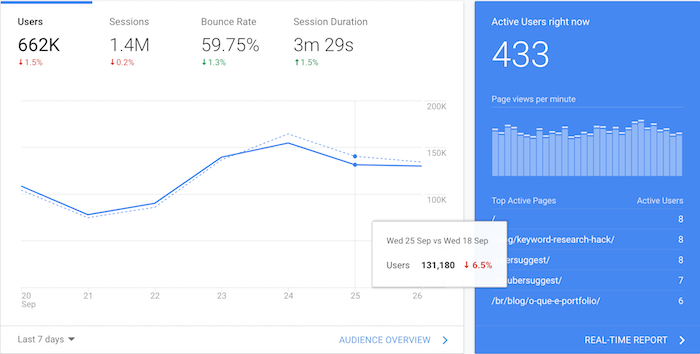
Now, let’s see what happened to my search traffic.
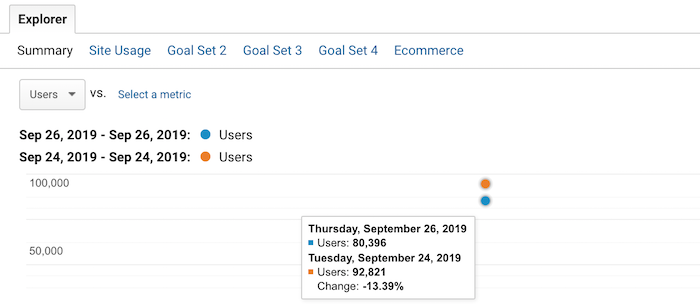
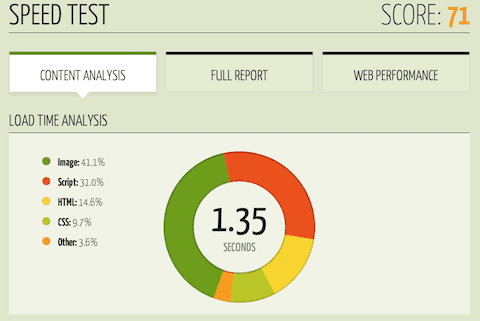
My overall traffic has already dipped by roughly 6%. When you look at my organic traffic, you can see that it has dropped by 13.39%.
I know what you are thinking… how did you beat Google’s core update when your traffic went down?
What if I told you that I saw this coming and I came up with a solution and contingency strategy in case my organic search traffic would ever drop?
But before I go into that, let me first break down how it all started and then I will get into how I beat Google’s core update.
A new trend
I’ve been doing SEO for a long time… roughly 18 years now.
When I first started, Google algorithm updates still sucked but they were much more simple. For example, you could get hit hard if you built spammy links or if your content was super thin and provided no value.
Over the years, their algorithm has gotten much more complex. Nowadays, it isn’t about if you are breaking the rules or not. Today, it is about optimizing for user experience and doing what’s best for your visitors.
But that in and of itself is never very clear. How do you know that what you are doing is better for a visitor than your competition?
Honestly, you can never be 100% sure. The only one who actually knows is Google. And it is based on whoever it is they decide to work on coding or adjusting their algorithm.
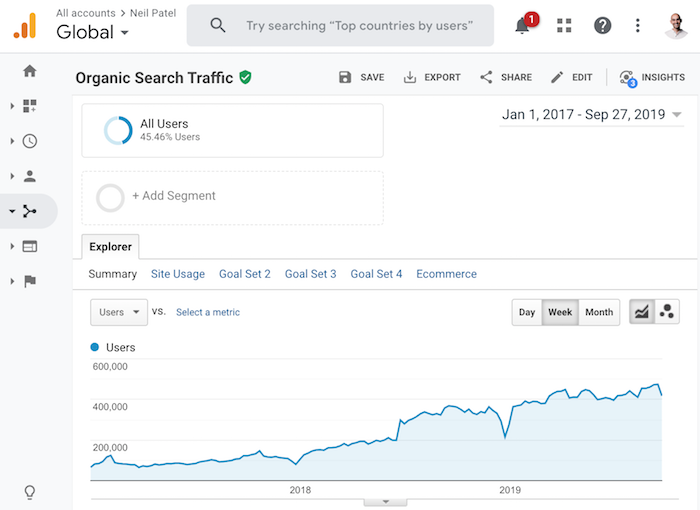
Years ago, I started to notice a new trend with my search traffic.
Look at the graph above, do you see the trend?
And no, my traffic doesn’t just climb up and to the right. There are a lot of dips in there. But, of course, my rankings eventually started to continually climb because I figured out how to adapt to algorithm updates.
On a side note, if you aren’t sure how to adapt to the latest algorithm update, read this. It will teach you how to recover your traffic… assuming you saw a dip. Or if you need extra help, check out my ad agency.
In many cases after an algorithm update, Google continues to fine-tune and tweak the algorithm. And if you saw a dip when you shouldn’t have, you’ll eventually start recovering.
But even then, there was one big issue. Compared to all of the previous years, I started to feel like I didn’t have control as an SEO anymore back in 2017. I could no longer guarantee my success, even if I did everything correctly.
Now, I am not trying to blame Google… they didn’t do anything wrong. Overall, their algorithm is great and relevant. If it wasn’t, I wouldn’t be using them.
And just like you and me, Google isn’t perfect. They continually adjust and aim to improve. That’s why they do over 3,200 algorithm updates in a year.
But still, even though I love Google, I didn’t like the feeling of being helpless. Because I knew if my traffic took a drastic dip, I would lose a ton of money.
I need that traffic, not only to drive new revenue but, more importantly, to pay my team members. The concept of not being able to pay my team on any given month is scary, especially when your business is bootstrapped.
So what did I do?
I took matters into my own hands
Although I love SEO, and I think I’m pretty decent at it based on my traffic and my track record, I knew I had to come up with another solution that could provide me with sustainable traffic that could still generate leads for my business.
In addition to that, I wanted to find something that wasn’t “paid,” as I was bootstrapping. Just like how SEO was starting to have more ups and downs compared to what I’ve seen in my 18-year career, I knew the cost at paid ads would continually rise.
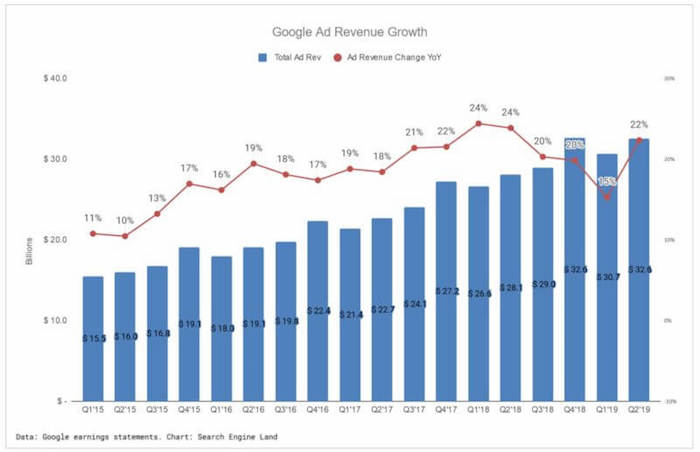
Just look at Google’s ad revenue. They have some ups and downs every quarter but the overall trend is up and to the right.
In other words, advertising will continually get more expensive over time.
I didn’t want to rely on a channel that would cost me more next year and the year after because it could get so expensive that I may not be able to profitably leverage it in the future.
So, what did I do?
I went on a hunt to figure out a way to get direct, referral, and organic traffic that didn’t rely on any algorithm updates. (I will explain what I mean by organic traffic in a bit.)
I went on my mission
With the help of my buddy, Andrew Dumont, I went searching for websites that continually received good traffic even after algorithm updates.
Here were the criteria that we were looking for:
Sites that weren’t reliant on Google traffic
Sites that didn’t need to continually produce more content to get more traffic
Sites that weren’t popular due to social media traffic (we both saw social traffic dying)
Sites that didn’t leverage paid ads in the past or present
Sites that didn’t leverage marketing
In essence, we were looking for sites that were popular because people naturally liked them. Our intentions at first weren’t to necessarily buy any of these sites. Instead, we were trying to figure out how to naturally become popular so we could replicate it.
Do you know what we figured out?
I’ll give you a hint.
Think of it this way: Google doesn’t get the majority of their traffic from SEO. And Facebook doesn’t get their traffic because they rank everywhere on Google or that people share Facebook.com on the social web.
Do you know how they are naturally popular?
It comes down to building a good product.
That was my aha! moment. Why continually crank out thousands of pieces of content, which isn’t scalable and is a pain as you eventually have to update your old content, when I could just build a product?
That’s when Andrew and I stumbled upon Ubersuggest.
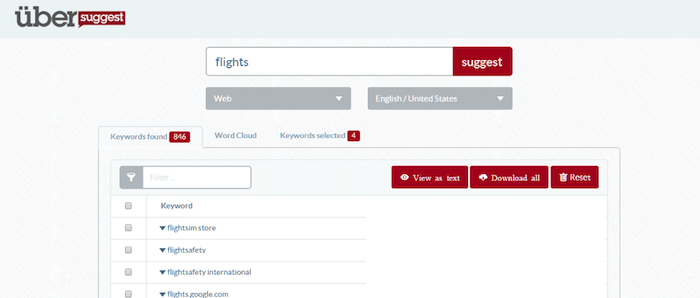
It used to be a simple tool that just showed you Google Suggest results based on any query.
Before I took it over, it was generating 117,425 unique visitors per month and had 38,700 backlinks from 8,490 referring domains.
All of this was natural. The original founder didn’t do any marketing. He just built a product and it naturally spread.
The tool did, however, have roughly 43% of its traffic coming from organic search. Now, can you guess what keyword it was?
The term was “Ubersuggest”.
In other words, its organic traffic mainly came from its own brand, which isn’t really reliant on SEO or affected by Google algorithm updates. That’s also what I meant when I talked about organic traffic that wasn’t reliant on Google.
Now since then I’ve gone a bit crazy with Ubersuggest and released loads of new features… from daily rank tracking to a domain analysis and site audit report to a content ideas report and backlinks report.
In other words, I’ve been making it a robust SEO tool that has everything you need and is easy to use.
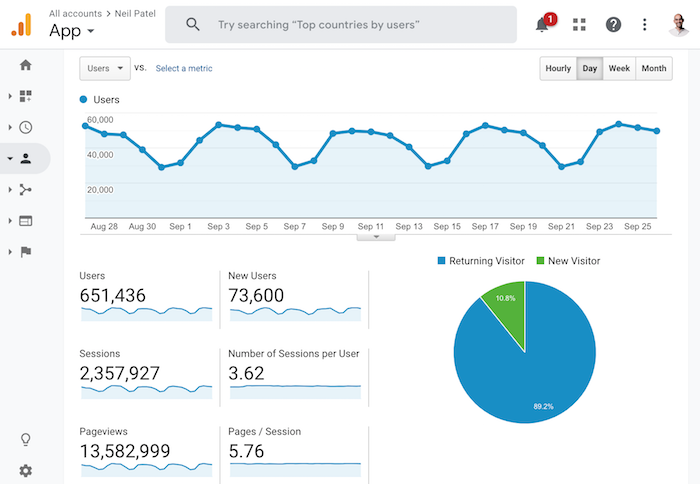
It’s been so effective that the traffic on Ubersuggest went from 117,425 unique visitors to a whopping 651,436 unique visitors that generates 2,357,927 visits and 13,582,999 pageviews per month.
Best of all, the users are sticky, meaning the average Ubersuggest user spends over 26 minutes on the application each month. This means that they are engaged and will likely to convert into customers.
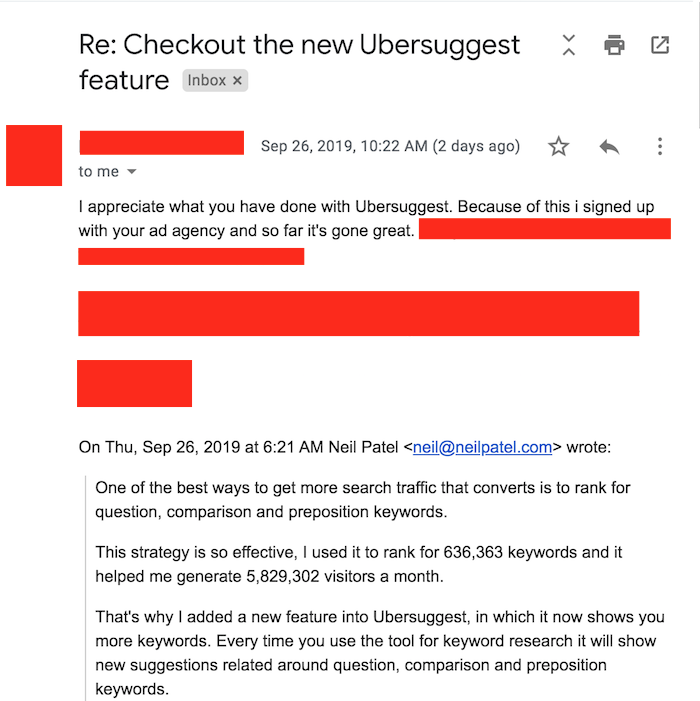
As I get more aggressive with my Ubersuggest funnel and start collecting leads from it, I expect to receive many more emails like that.
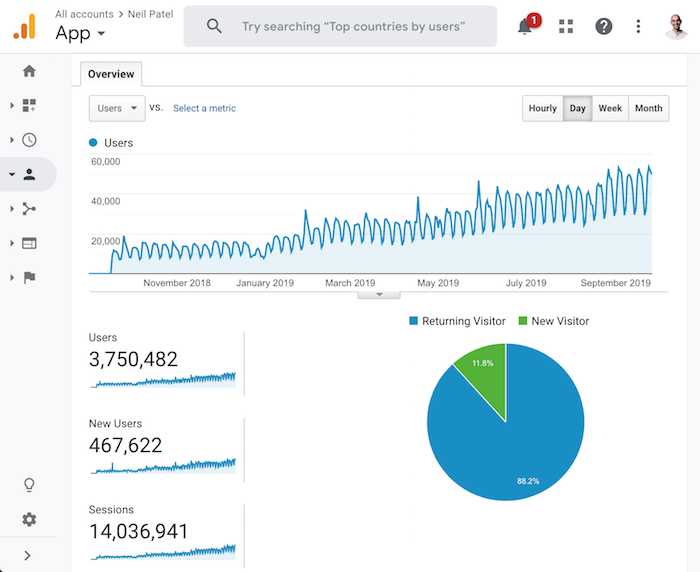
And over the years, I expect the traffic to continually grow.
Best of all, do you know what happens to the traffic on Ubersuggest when my site gets hit by a Google algorithm update or when my content stops going viral on Facebook?
It continually goes up and to the right.
Now, unless you dump a ton of money and time into replicating what I am doing with Ubersuggest, but for your industry, you won’t generate the results I am generating.
As my mom says, I’m kind of crazy…
But that doesn’t mean you can’t do well on a budget.
Back in 2013, I did a test where I released a tool on my old blog Quick Sprout. It was an SEO tool that wasn’t too great and honestly, I probably spent too much money on it.
Here were the stats for the first 4 days of releasing the tool:
Day #1: 8,462 people ran 10,766 URLs
Day #2: 5,685 people ran 7,241 URLs
Day #3: 1,758 people ran 2,264 URLs
Day #4: 1,842 people ran 2,291 URLs
Even after the launch traffic died down, still 1,000+ people per day used the tool. And, over time, it actually went up to over 2,000.
It was at that point in my career, I realized that people love tools.
I know what you are thinking though… how do you do this on a budget, right?
How to build tools without hiring developers or spending lots of money
What’s silly is, and I wish I knew this before I built my first tool on Quick Sprout back in the day, there are tools that already exist for every industry.
You don’t have to create something new or hire some expensive developers. You can just use an existing tool on the market.
And if you want to go crazy like me, you can start adding multiple tools to your site… just like how I have an A/B testing calculator.
So how do you add tools without breaking the bank?
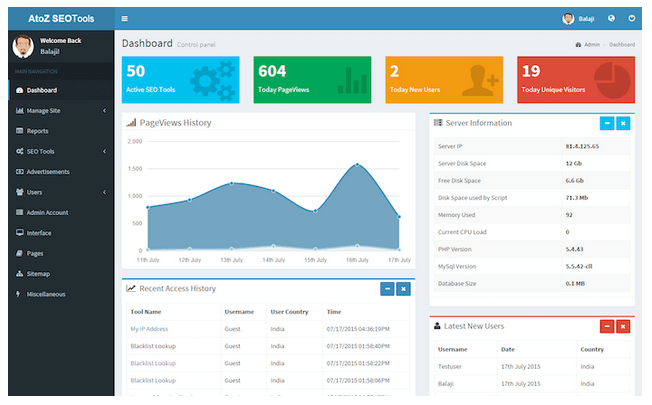
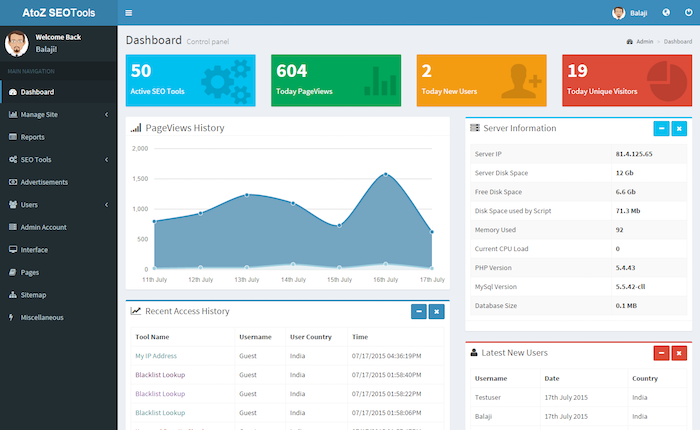
You buy them from sites like Code Canyon. From $2 to $50, you can find tools on just about anything. For example, if I wanted an SEO tool, Code Canyon has a ton to choose from. Just look at this one.
Not a bad looking tool that you can have on your website for just $40. You don’t have to pay monthly fees and you don’t need a developer… it’s easy to install and it doesn’t cost much in the grand scheme of things.
And here is the crazy thing: The $40 SEO tool has more features than the Quick Sprout one I built, has a better overall design, and it is .1% the cost.
Only if I knew that before I built it years ago. :/
Look, there are tools out there for every industry. From mortgage calculators to calorie counters to a parking spot finder and even video games that you can add to your site and make your own.
In other words, you don’t have to build something from scratch. There are tools for every industry that already exists and you can buy them for pennies on the dollar.
Conclusion
I love SEO and always will. Heck, even though many SEOs hate how Google does algorithm updates, that doesn’t bother me either… I love Google and they have built a great product.
But if you want to continually do well, you can’t rely on one marketing channel. You need to take an omnichannel approach and leverage as many as possible.
That way, when one goes down, you are still generating traffic.
Now if you want to do really well, think about most of the large companies out there. You don’t build a billion-dollar business from SEO, paid ads, or any other form of marketing. You first need to build an amazing product or service.
So, consider adding tools to your site, the data shows it is more effective than content marketing and it is more scalable.
Sure you probably won’t achieve the results I achieved with Ubersuggest, but you can achieve the results I had with Quick Sprout. And you can achieve better results than what you are currently getting from content marketing.
He is the co-founder of Neil Patel Digital. The Wall Street Journal calls him a top influencer on the web, Forbes says he is one of the top 10 marketers, and Entrepreneur Magazine says he created one of the 100 most brilliant companies. Neil is a New York Times bestselling author and was recognized as a top 100 entrepreneur under the age of 30 by President Obama and a top 100 entrepreneur under the age of 35 by the United Nations.
With iOS 13 comes a major update that might just convince you to stop using Google for this important task.
It’s one of the most fundamental things people do on their smartphone every day, and for years, even if you were using an iPhone, there’s a pretty good chance you were using Google to do it. Specifically, Google Maps.
Headed to an appointment, pull up directions in Google Maps. Going on vacation? Google Maps. Looking for a store or restaurant in town? Google Maps. Ordering lunch to be delivered? Google Maps does that, too.
Sure, you can do most of those things using Apple’s native Maps app, but for much of the first five years of its existence, you were just as likely to end up being told to turn down a road that doesn’t exist. That’s a big problem for an app whose job is to provide accurate directions from point A to point B.
That’s because Apple Maps was really bad. Apple even admitted it. Not only that, but in addition to apologizing for how bad the app was, it actually recommended using Google Maps instead. So most people did.
So, Apple started rebuilding its app the hard way. Instead of purchasing maps from third-party vendors, which caused problems with updates and data, the company started its own mapping initiative. Like Google, it sent out vehicles to take photographs for street level views of buildings and locations.
And, over time, Apple Maps got better. It still had a long way to go before people were willing to trust it for directions to an important meeting, but it was clear Apple was serious about making Apple Maps the navigation choice for iOS users.
Now that iOS 13 has been released, Apple has started rolling out major improvements it previewed at the company’s Worldwide Developer Conference this summer. That includes a range of features, but the one that users will notice right away is simple–it just looks better. Like, a lot better. Apple has updated the overall interface and added substantially more detail to a wide area of the country, including most of the Northeast and California.
That detail includes far more topographical detail along with new, higher-res images in the “Look Around” feature (think: Google Street View). It also includes greater detail of green space, as well as water features. New integrations with third-party apps like Uber make it easier to book a rideshare, though it still lacks the food ordering capability of Google Maps.
It also lags behind Google in one other important way–it only offers transit directions in 10 major cities, compared to the virtually universal offerings from Google. I’ve used it in New York City, and it works great. In fact, I found it more helpful than Google’s version. I especially liked the real-time arrival information. But in most cities, you’re on your own for now.
Of course, Apple says it’s just starting, with the rest of the U.S. to be updated by the end of the year. That fast pace shows just how seriously Apple wants you to stop using Google Maps.
Apple’s motivation is simple–besides the fact that Maps was a major embarrassment, the company is committed to reducing the ways Google monetizes iOS users. With over one billion devices running iOS, that’s no small amount of money for either company.
And with these updates, Apple Maps is now at least a worthy contender, one the company hopes will finally convince you to tell Google Maps to “get lost.”
For those who wished they could Google anything and figure out what direction to take for their business, this company provides a solution.
IT Prof. Alex Pentland and Director of the MIT Media Lab Entrepreneurship Program, named by Forbes as “one of the world’s 7 most powerful data scientists,” developed a new paradigm for Machine Learning based on AI.
Instead of building a data model for each predictive question, it uses a new social theory of human behavior that predicts future choices through behavioral commonalities. With the interplay of social and the kind of cause of effect interaction associated with physics, naturally enough, he called it Social Physics.
What his research demonstrated was that people behave in mathematically predictable ways. Just like physics determines the state of the natural universe, Social Physics governs the human universe.
But this was not just academic knowledge for Pentland.
Pentland was well-versed in real-life business dealings. He served as a founding member of the Scientific Advisory Boards at Google, AT&T, Nissan, and the UN Secretary General for cutting edge technology. On that basis of combining knowledge, skills, experience, and innovation, he created an automated engine that can answer any natural-language question.
That is the cornerstone of the business Pentland cofounded in 2014: Endor. Endor extended Social Physics using proprietary technology into a powerful engine that is able to explain and predict human behavior.
More AI-enabled prediction to arrive at a Google-like capability
Endor enables the automation and democratization of Al and data science, allowing a company to advance from paying a lot for getting the answers to just a limited number of predictive questions each year to affordable and easy access to unlimited answers.
It addresses the problem that has hampered businesses that do not have the deep pockets to fund the data science teams that had been necessary to become truly data-driven and capitalize on the power of predictive analytics. That meant that the power of predicting the future was only within reach of tech-giants who could afford to invest millions of dollars in building their data science resources.
Smaller companies that wanted to be able to direct their business strategy on the basis of predictions had to work off slow, complex, and expensive machine learning solutions. But now the are able the automated AI predictions provided by Endor, which MIT dubbed the “Google for predictive analytics.”
The same MIT article quotes the other Endor co-founder and its CEO, Dr. Yaniv Altshuler, reinforcing the Google comparison:
“It’s just like Google. You don’t have to spend time thinking, ‘Am I going to spend time asking Google this question?’ You just Google it.”
Altshuler declared, “It’s as simple as that.”
Altshuler has his own list of impressive credentials. He is a recognized expert on Machine Learning, Swarm Intelligence and Data Analysis who has authored over 60 scientific papers and filed 15 patents.
He expressed the great potential in Endor as follows:
“Imagine if you can ask any predictive business question such as ‘Who will complete a transaction tomorrow?’ or ‘Who will upgrade to Premium services in the next week?’ — this is a gamechanger for businesses and enterprises who want to act on their data in a speedy and accurate manner.”
Althshuler is featured in the video below in a conversation with Charles Hoskinson, Senior member of Endor’s Advisory Board about the future of Predictive Analytics:
What it can do for businesses
Endor delivers faster response times, as no data scientist input, including modeling, coding or data gathering, is called for. It embeds actionable insights into an organization’s workflow by allowing it BI, sales, marketing and all business teams to self-find predictions ‘do-it-yourself’ style
Now Endor makes accurate predictions scalable and accessible to businesses of all sizes (Enterprise to SMB) through proprietary Social Physics technology developed through years of research at MIT (Not through NLP). It enables business users to ask predictive questions, and get automated accurate predictions without having to hire data scientists.
It is particularly convenient for those without data scientist resources to prepare the data. Endor is agnostic about its use of big data. Even if has not been prepared through cleaning it can be analyzed.
Plus Endor has the industry-first capability to compute on encrypted data without decrypting it. That means that it meets the standards set for global privacy and data security regulations, which should be a major relief for businesses that have to deal with European entities and prove themselves to be GDPR compliant.
Since its founding in 2014, Endor has successfully grown an impressive clientele, including national banks, large Financial Services, and Fortune 500 companies, such as Coca Cola and MasterCard.
Endor is a pioneer in the merging of legacy infrastructure with innovative Blockchain services, thus supporting the transition of its large, Fortune 500 customers, enterprise customers to the Endorprotocol. The convergence of platforms will ensure a larger pool of aggregate data (new data sources), to the Endor Protocol, which in turn, will work to further increase the accuracy of its predictions.
Above is the HubCulture interview with both Pentland and Altshuler,
Beyond commercial applications
While it is primarily marketed to businesses, including wholesalers, retailers, and financial institutions, Endor’s technology can also be applied to other goals, including that of national security. MIT reported that it used its analytics for analyzing terrorist threats on the basis of Twitter data:
“Endor was given 15 million data points containing examples of 50 Twitter accounts of identified ISIS activists, based on identifiers in the metadata. From that, they asked the startup to detect 74 with identifiers extremely well hidden in the metadata.”
It only took an Endor employee 24 minutes to identify 80 “lookalike” ISIS accounts, more than half of which were in the pool of 74 well-hidden accounts named by the agency. The efficiency of the system is not just manifested in the relatively short time it took to do the analysis but also in the very low false-positive rate.
As the video above clarifies, the company’s name comes from Star Wars. Fans may recall Endor as the home of the cute and furry, pint-sized beings who help the rebels against the Empire forces that went there to build the second Death Star in Return of the Jedi.
Here’s a clip to remind you of the scene at Endor.
The thing is that the name Endor was not actually born out of George Lucas’ imagination. It actually first appears in the Bible in the 28th chapter of the Book of Samuel. That is the account of the witch of Endor whom the king calls on for divination.
In the Bible’s account, King Saul requests that she summon the now-dead prophet Samuel to instruct him on what to do. So really the name Endor is more appropriate for predictive technology because of its original context than for the more geeky-cool Star Wars connection.
Named Shoelace, the app aims to be a hyperlocal social network for people looking to connect with others (in real life) at events and nearby activities. It sounds a little bit like Nextdoor, the local social network.
“The whole premise of Shoelace is to tie people together based on their interests — like two laces on a shoe,” the team says.
For now, the Android and iOS versions are invite-only and available only in New York City.
After shutting down Google+ in April, Google is making another go at a social network.
Named Shoelace, the app aims to be a hyperlocal social network for people looking to connect with others (in real life) at events and nearby activities. On its website, the team says, “the whole premise of Shoelace is to tie people together based on their interests — like two laces on a shoe.”
These events — fittingly referred to as “loops” within the app — might include things like playing ping pong at a local bar or watching comedy at an open mic night. The idea seems somewhat like Meetup— get people together who share in common interests and maybe walk away with a new friend, or two.
In fact, on its site, the Shoelace team says the app is great for people who have recently moved to a new city or for those looking to meet people who live nearby, which also makes it seem a little bit like local social networks like Nextdoor.
Shoelace app Screenshot / Business Insider
Shoelace is a product of Google’s internal startup incubator, known as Area 120. For now, the Android and iOS versions are invite-only within “select communities” and available only in New York City.
A Google spokesperson told Business Insider on Thursday: “One of the many projects that we’re working on within Area 120 is Shoelace, an app that helps people meet others with similar interests in person through curated activities. Like other projects within Area 120, it’s an early experiment so there aren’t many details to share right now.”
The tech giant hasn’t necessarily had the strongest track record when building social networks (Orkut, Google Buzz, and Google+ are all defunct), but with Shoelace, the intentions, at least, seem promising. Getting more people to interact with one another offline has become less common in a sea of other social networks.