Tag

Google

Browsing

By Matt Southern

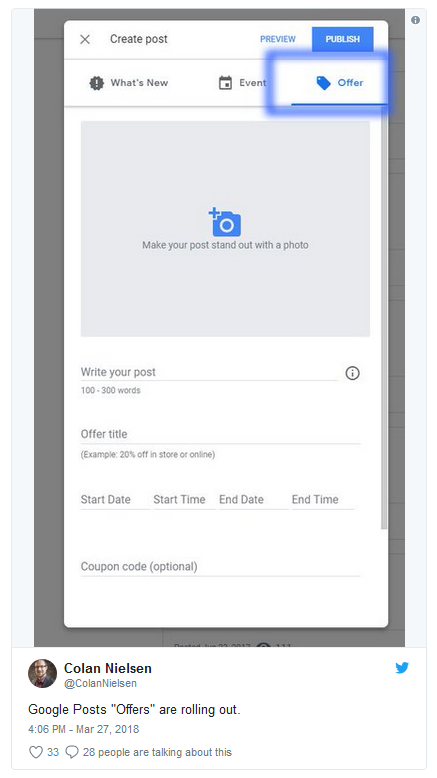
Google has been spotted testing a new feature which allows Google My Business pages to publish offers directly to search results.

This feature is built into Google Posts, which has been available to all businesses with a verified GMB profile since last summer. Google Posts lets businesses publish short messages, which appear in Maps and search results when the business name is searched for.

Until now Posts were limited to plain text, multimedia, or events. In the example below you can see Google is testing a new type of post for offers.

An offer includes the following components:

  • A photo
  • Up to 300 words of text
  • Post title
  • Start date/time and end date/time
  • Optional coupon code
  • A link to the offer

What businesses may appreciate most of all is that it doesn’t appear to cost anything to post offers. Of course, they will not be shown as widely as paid ads, but they still give businesses the opportunity to push sales in search results without having to pay Google for it.

Not everyone is able to replicate this feature, which indicates it’s still in the testing stages.

By Matt Southern

Sourced from Search Engine Journal

Take back control of your information with these easy steps.

Google, just like Facebook, collects a lot of personal data about its users. While many of us might have put that thought to the back of our minds, this week one web developer reminded us of the true extent of Google’s great data grab with this eye-opening Twitter thread.

The post went viral, unsurprisingly, given that the details it contained: Google tracks every journey you make, it logs every video you watch on YouTube, and it even knows your tastes.

It doesn’t actually send any of this data outside of its own four walls. Instead, Google hordes it all so it can learn more about you, and better target the adverts you see and the services you use.

If the thought of a single company having all that information in one place makes you uncomfortable, then not only can you stop Google from tracking your every move, but you can also delete all the previous data it has been collecting on you. (Alternatively, you could download it (although we wouldn’t recommend it).

How to see everything Google collects on you

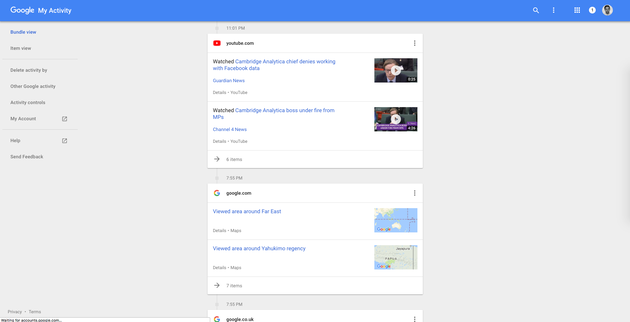
Since 2016, Google has allowed every user to see all of this information through a privacy website called My Activity. This will show you a timeline of every interaction you’ve made through one of Google’s apps – whether it’s watching a video on YouTube or asking for directions through Google Maps. Prepare yourself, it’s a bit scary.

Click here.

HuffPost UK

 Stop Google saving every search you make

Google uses a lot of the data it collects to help it work faster – that’s why when you start typing in Google Search, it seems to instinctively know what you’re looking for. This can be useful, but comes with a tradeoff: Google records and remembers every search you make through Google, Google Now or even Google Maps. It doesn’t share this with anyone, but stores it for its own services.

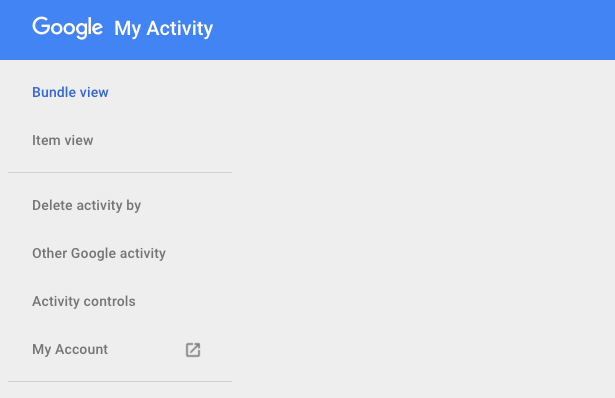
To stop Google recording every search head to My Activity by clicking here. Now click on Activity Controls on the left-hand side of the screen.

HuffPost UK

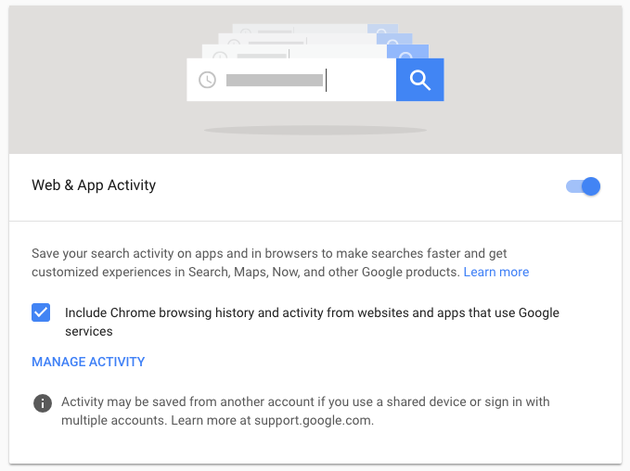
You’re now in the main settings screen. The first setting is called Web & App Activity. Turn this off and then click on the word Pause. Also untick the box below that says Include Chrome browsing history and activity from websites and apps that use Google services.

HuffPost UK

Stop Google tracking your location

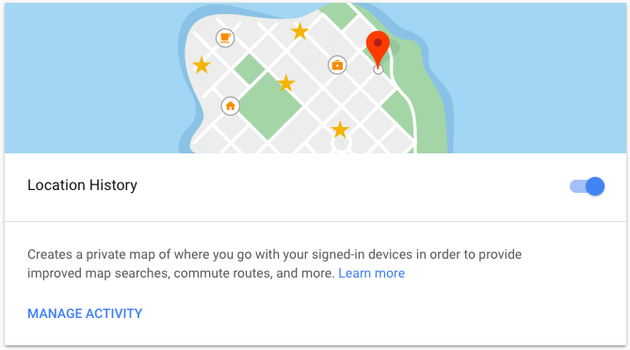
Google tracks everywhere you’ve been either from devices where you’ve signed in to Google Maps or through an Android device. Users with iPhones or Apple devices will find that Apple automatically limits this tracking considerably so you won’t have the same terrifying map of locations as Android users.

Head to My Activity by clicking here. Now click on Activity Controls on the left-hand side of the screen. Scroll down and you’ll find Location History. Turn this off and then click on the word Pause.

HuffPost UK

Stop Google tracking which smartphones you use

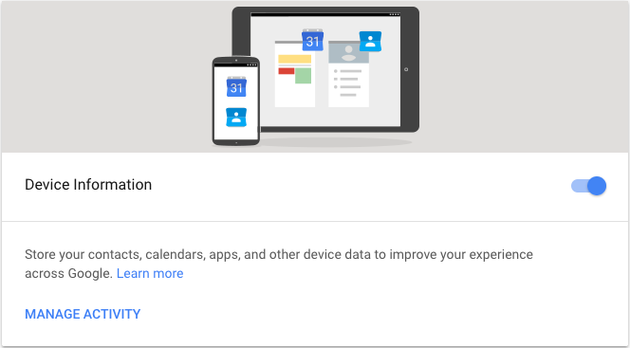
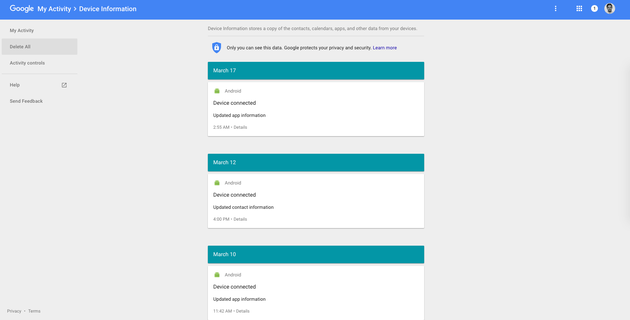
Google stores information about every Android device that you sign into, the idea being that it can better recommend apps and services the next time you have a new device.

Head to My Activity by clicking here. Now click on Activity Controls on the left-hand side of the screen. Scroll down and you’ll find Device Information. Turn this off and then click the word Pause.

HuffPost UK

Stop Google recording your voice

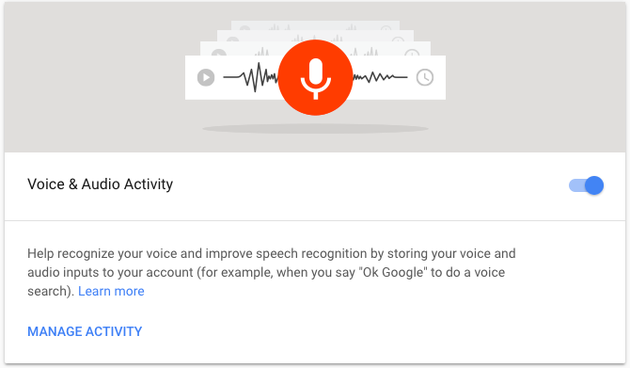
Every time you say ‘Ok Google’ to your phone or smart speaker Google saves that request so you can go back and review it or delete it. Google says that it saves these in order to improve the way your devices respond to you.

Head to My Activity by clicking here. Now click on Activity Controls on the left-hand side of the screen. Scroll down and you’ll see Voice and Audio Activity. Turn this off and click Pause.

HuffPost UK

Stop Google tracking every YouTube video you watch

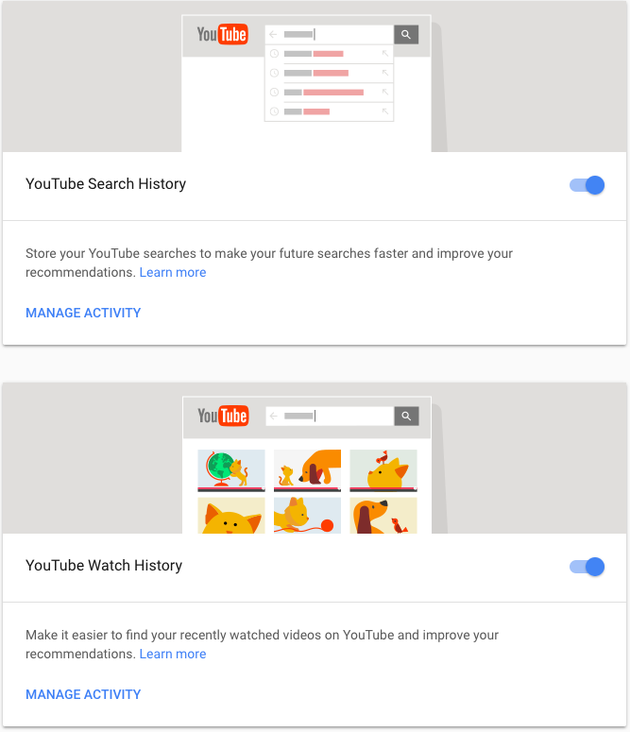
When you’re using YouTube Google is recording every search and every video that you watch. The idea being that it can better recommend videos you might enjoy watching.

Head to My Activity by clicking here. Now click on Activity Controls on the left-hand side of the screen. Scroll down and you’ll see YouTube Search History and YouTube Watch History. Untick both of these boxes and click Pause when each box appears.

HuffPost UK

Stop Google creating a profile of you for advertisers

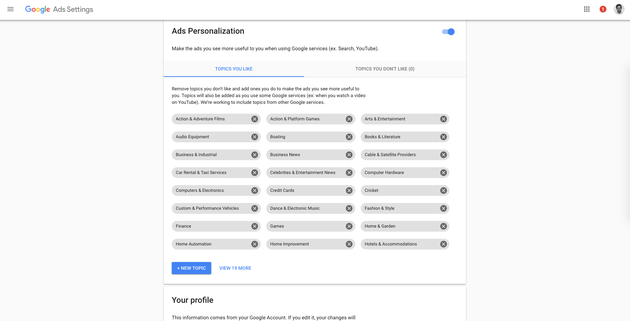
Google shares surprisingly little with advertisers in terms of your personal information. Rather it uses all of that information to create a rough anonymous profile of your interests. It is this info that is then used to target ads for products you might like. To see your advertising profile click here.

You can also turn off ad personalisation or tweak your own interests if you’re not happy with the adverts that you see. You can also scroll down and change your profile which will usually be a gender and a rough age range.

HuffPost UK

Download all your Google data

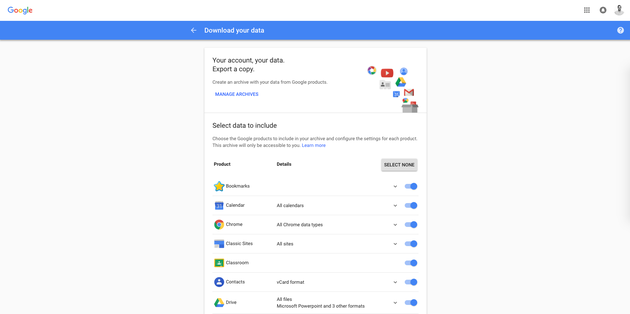
Soon to be everyone in the EU’s legal right, Google already lets you download all the data about you that it currently holds. While this might make interesting reading, once the data is on your computer it is now arguably less secure than it was before, so treat it with care.

Start by clicking here.

You can now pick and choose the type of data you want to download and in what format.

HuffPost UK

Delete all the data Google currently has on you

This is, remarkably, pretty easy.

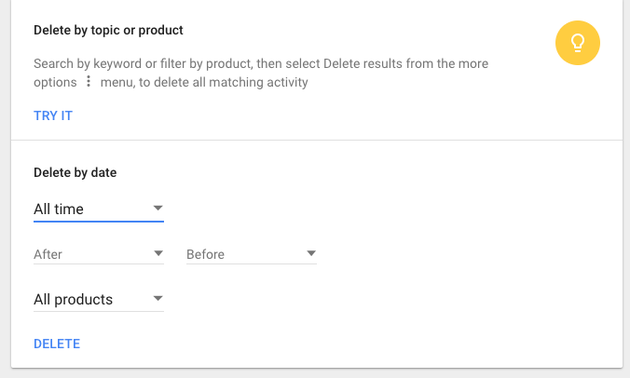
Head to My Activity by clicking here. Now head to Delete activity by. Simply click on the date range and select All time. Now click Delete.

HuffPost UK

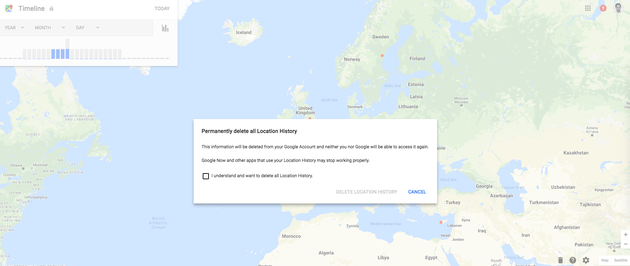
To delete all the location data Google has on you head to your Timeline by clicking here. In the bottom right-hand side you’ll find a rubbish bin, click on it and then click I understand and want to delete all location history.

HuffPost UK

To delete all the device information being collected on you click here. Now on the right-hand side click Delete All.

HuffPost UK

By Thomas Tamblyn

Sourced from HUFFPOST

Chrome is the biggest web browser. Use these extensions to get it to work for you

Chrome’s web store is full of little digital gadgets to help make your web browsing simpler, more productive, and more enjoyable. Here are our top ten extensions that tick those boxes and are all downloadable for free in a matter of moments.

Social Blade

Compatible with YouTube, Twitch, Instagram and Twitter, Social Blade feeds you knowledge about the videos you watch. A user’s followers, estimated ad earnings and views are shown in an interface next to what you are watching, letting you check how your favourite users and rivals are performing. Get the extension here.

Cite This For Me

Anyone who needs to show the source of their information, be it for an essay or a presentation, will find this button exceedingly useful. It quickly cites the webpage you are looking at in one of four citation styles, which can then be saved for later or pasted into a document. Click here to find out more and install the extension.

LastPass

LastPass means you only have to remember one password to keep all your other login details together in one place. It will also help keep your other accounts secure by generating super secure passwords that it will fill in automatically as needed. There’s space for notes for offline information that you want to be well protected too. Install it here.

Colorzilla

When you simply have to know the precise hue of something online, Colorzilla’s eyedropper can check any pixel and tell you. You can then paste that colour’s data into another programme or adjust the values and save it within the extension for future reference. It’s an invaluable extension for digital design work. Get the extension here.

TinEye

When finding the source of a picture’s proving difficult, try TinEye’s reverse image search. It focuses on the closest possible matches instead of just similarity, making it useful for finding originals, higher resolution versions, or checking for online fakes. The extension itself makes searches available in only a couple of clicks. Install TinEye’s Chrome extension from here.

Unpaywall

For those who want to read academic papers without stumping up for subscription fees. As you look for research, this extension searches for free (and completely legal) versions of the same articles, and pops into view if it finds a match. A potential saver of both time and money. Get it here.

Save to Pocket/Instapaper

Either of these extensions will let you to save web pages and articles for reading on your synced devices later, even without an internet connection. Both have premium versions too, if you want to support the developers and get extra features in return. Get Pocket and Instapaper’s extension here.

The Great Suspender

It’s all too easy to open absurd numbers of tabs in your browser. The Great Suspender helps to manage your computer’s performance by stopping abandoned tabs until you click back on them. There is a lot of room for configuration too, the extension able to keep certain sites open indefinitely, or unload others after a shorter period of time. Install it here.

Backstop

It’s happened to all of us. One bad key press and you’re on the previous webpage and all the info you were just typing into that form has disappeared. This simple extension stops your backspace key from taking you to the previous page, saving you from wasted time and frustration. Get it here.

Sourced from WIRED

Chrome is the biggest web browser. Use these extensions to get it to work for you

Chrome’s web store is full of little digital gadgets to help make your web browsing simpler, more productive, and more enjoyable. Here are our top eight extensions that tick those boxes and are all downloadable for free in a matter of moments.

LastPass

LastPass means you only have to remember one password to keep all your other login details together in one place. It will also help keep your other accounts secure by generating super secure passwords that it will fill in automatically as needed. There’s space for notes for offline information that you want to be well protected too. Install it here.

Colorzilla

When you simply have to know the precise hue of something online, Colorzilla’s eyedropper can check any pixel and tell you. You can then paste that colour’s data into another programme or adjust the values and save it within the extension for future reference. It’s an invaluable extension for digital design work. Get the extension here.

TinEye

When finding the source of a picture’s proving difficult, try TinEye’s reverse image search. It focuses on the closest possible matches instead of just similarity, making it useful for finding originals, higher resolution versions, or checking for online fakes. The extension itself makes searches available in only a couple of clicks. Install TinEye’s Chrome extension from here.

Unpaywall

For those who want to read academic papers without stumping up for subscription fees. As you look for research, this extension searches for free (and completely legal) versions of the same articles, and pops into view if it finds a match. A potential saver of both time and money. Get it here.

Save to Pocket/Instapaper

Either of these extensions will let you to save web pages and articles for reading on your synced devices later, even without an internet connection. Both have premium versions too, if you want to support the developers and get extra features in return. Get Pocket and Instapaper’s extension here.

The Great Suspender

It’s all too easy to open absurd numbers of tabs in your browser. The Great Suspender helps to manage your computer’s performance by stopping abandoned tabs until you click back on them. There is a lot of room for configuration too, the extension able to keep certain sites open indefinitely, or unload others after a shorter period of time. Install it here.

Backstop

It’s happened to all of us. One bad key press and you’re on the previous webpage and all the info you were just typing into that form has disappeared. This simple extension stops your backspace key from taking you to the previous page, saving you from wasted time and frustration. Get it here.

Feature Image Credit: WIRED / Google

Soured from WIRED

By Matt Southern  

Google has rolled out a rebuilt version of Keyword Planner, which is available now in the new AdWords experience.

Keyword Planner has been simplified, but at the same time offers new features to help advertisers glean more data from their search campaigns.

New features include the ability to add keywords in bulk and get an overview of forecasts in one place. Perhaps the biggest upgrades to Keyword Planner are the aesthetic changes, which are in line with the look and feel of the new AdWords experience.

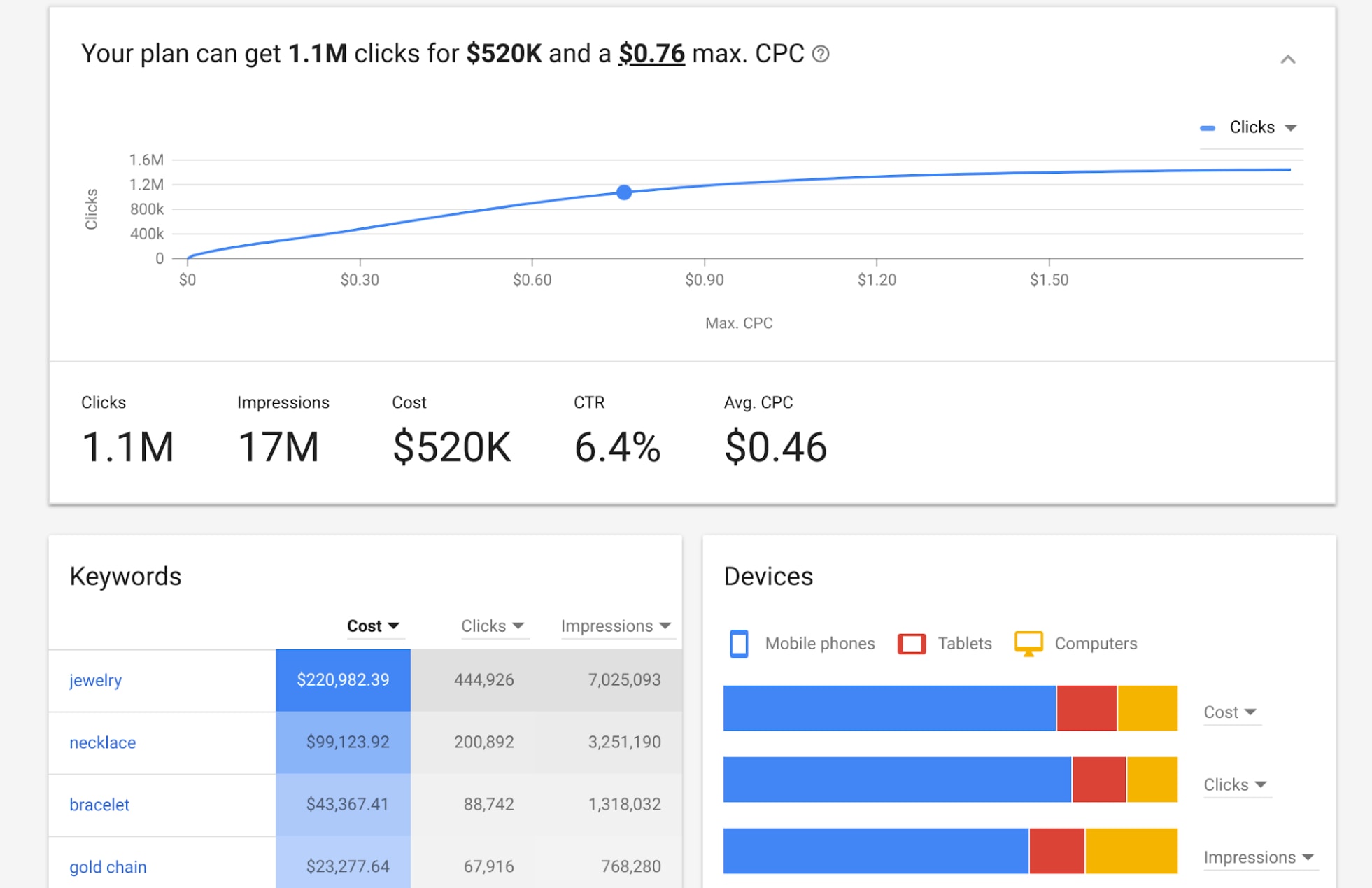
You can see the new design, including the new forecasts section, in the example below:

In this example you can see how data has been condensed in the new forecasts section. It now includes an estimate of how keywords in the plan will impact performance, including a max CPC.

In addition, device and location breakdown are now readily available without having to click through to different menu tabs.

This new version of Keyword Planner first started becoming available to a limited number of users last month. It is now available for anyone with access to the new AdWords experience.

By Matt Southern  

Sourced from Search Engine Journal

By JC Torres

What Microsoft feared nearly a decade ago has come true. The mobile market has become a two-horse race, with just some extras on the sidelines. With only Android and iOS really to choose from, who do you think has more loyal users? Apple is often cited for having fiercely loyal fans but, surprisingly enough, for the first time, Android loyalty has exceeded iOS 91% to 88%, respectively. But before either camp brings out the champagne or the pitchforks, one really has to ask: does it matter at all?

What happened?

To be clear, nothing really happened. The Consumer Intelligence Research Partners’ (CIRP) study shows that customer loyalty to either Android or iOS has been steadily on the rise. Except for a dip in iOS retention in late 2014. Perhaps if not for that temporary decline, iOS would have overtaken Android with that exact same growth rate.

And before Android users celebrate, CIRP co-founder Josh Lowitz has some insights that put that victory in a less impressive light. There are more Android users than iOS ones, that much is a fact. But to keep the iOS line growing stead, that would require an influx of more Android users switching to iOS. In contrast, Android needs less iOS refugees to keep its rate up. In other words, Android may have the higher numbers, but it may also have more people moving to iOS than the other way around.

For businesses

So what is all this Android vs iOS loyalty all about and does it even matter. For the businesses running or banking on Android or iOS, that’s a resounding yes. That means a big yes for Google, Apple, Samsung, and other Android OEMs. Brand loyalty means that people will keep using their products longer. That means, in a sense, locking them a lot longer into your services. That ultimately means making more money, or at least a steady influx of money.

Brand loyalty and customer retention are why companies work so hard to not only keep their current customers happy but to also convince those from the other side to jump ship. That last part is what sometimes causes tension, confusion, and sometimes even lawsuits, when companies fight and sometimes defame each other in order to pull their customers from other their grasp. In the Android versus iOS context, that usually involves things like saying how insecure one platform is or how closed off the other is.

For users

For users, however, brand loyalty is really nothing more than a badge, pretty much like sports team loyalty. Sometimes just as passionate, zealous, or even violent. It gives a sense of belonging or kinship to a group with similar interests and experiences. In practical terms, however, it matters very little.

iOS users are loyal to the iPhone because they don’t exactly have any other hardware to choose from. If someone else starts making iOS phones, especially better than Apple, you’ll see that iPhone loyalty wane instantly. Likewise, not all Android users are loyal to Android because of Android. Often they’re loyal to Pixels, Samsungs, LGs, Xiaomis, and the like. Often they might even be loyal to the brand of Android they only know from their OEM, not realizing how different Android might be from other OEMs.

Of course, there are those that are loyal to iOS or Android for the very platforms themselves. They agree with this or that way of doing things, of presenting things, of designing things. But then comes along a new version of iOS or Android that turns things around or yanks out those favorite features. Then you hear gnashing and weeping and the door slamming on the way out.

And then there are those who couldn’t care less about iOS or Android or Windows or Mac. It just so happens that the app they fell in love with or grew up with is only available in one particular OS. And when some of those become available in other operating systems, then the operating system becomes even less relevant. Then again, they might have become loyal to the app in the same way.

Blind loyalty

So what does brand loyalty bring? In this particular context, nothing relevant to users other than bragging rights. Indirectly, they do bring benefits, since consumer retention helps companies, which, in turn, retains or improves services that benefit users.

But not all those services are ultimately tied to those two platforms anyway. Brand loyalty, in fact, can actually become more harmful in some cases when they force users into a box of their own making. Some may never consider or use this or that app because it’s not made by this or that brand. Some won’t try out other phones because they’re too set in the ways of their old brands. Some would even go as far as admit that this or that OS is better but they’re not going to use it because it’s not iOS or Android.

Wrap-up: Breaking down barriers

We live in a world where the Internet has made the world a smaller place, where development happens at breakneck speeds, where features come and go, almost with no complete assurance they’ll be there in the next version. We live in an age that sticking to a brand just because of that brand no longer makes a lot of sense.

Of course, there will be the argument that so and so brand is synonymous with quality. As can be proven so many times, that is only true for so long. There’s no denying the fact that one brand, one platform, one app, will have better features and aspects than the others. But to equate those features to a brand and equate it for the long-term? Not exactly a sensible outlook.

Brand loyalty and customer retention are important for the companies that make these products, so hooray to the Googles, the Apples, and the Samsungs of the world. Those numbers, however, aren’t always representative of the actual quality of their products. More of then than not, it’s more representative of how good their marketing is.

By JC Torres

Sourced from SLASH GEAR

Online reputation management is very necessary all of a sudden.

By MediaStreet Staff Writers

Businesses say they plan to allocate more resources to their online reputations in response to the growing popularity of social media and online reviews.

According to a new survey from Clutch, 40% of businesses will increase their investment in online reputation management (ORM) this year.

All this is due to the growing power of social media and third-party reviews sites, which impact businesses’ control over their online reputation.

Clutch surveyed 224 digital marketers and found that more than half of businesses (54%) consider ORM “very necessary” for success. As a result, 34% said they allocated more resources to ORM in 2018, and an additional 43% said they plan to hire a professional public relations or ORM agency in 2018.

Businesses already invest a significant amount of time observing their online reputation, Clutch found. More than 40% of digital marketers (42%) monitor their companies’ brand online daily, while 21% monitor their online reputation hourly.

According to public relations experts, businesses frequently monitor how their brand is portrayed online because they know even one negative media mention can quickly damage the public’s perception of their company.

“When people search for brands online, they tend to search for stamps of credibility,” explained Simon Wadsworth, managing partner at Igniyte, an online reputation management agency in the UK. “If potential customers find anything negative, that could end up being a significant amount of leads the business won’t get from people who are put off from using the service.”

Social media also has shifted the ORM landscape because it gives consumers free-reign to share their opinions and experiences quickly and frequently: 46% of businesses look to social media most often to monitor their online reputation.

By using professional agencies that have expertise in online reputation management, businesses can minimise losing new customers who may be dissuaded from purchasing their product or service.

To read the complete report, click here.


Do you supply services to the Irish Media Industry? Have you listed your company in our Media Directory? It’s free! Everyone’s favourite price! Click here to do it now.

By 

This story was delivered to BI Intelligence “Digital Media Briefing” subscribers hours before appearing on Business Insider. To be the first to know, please click here.

Google unveiled Auto ads, a new ad unit for AdSense, its ad placement service for publishers, to help publishers streamline ad placement on their pages.

Auto ads use machine learning to determine potential ad locations, types, and number of ads, while preserving the user experience, according to Google. Auto ads include formats like in-feed, display, and full-screen mobile ads, and can be integrated into publisher pages with a single line of code.

Auto ads are attractive to publishers for two key reasons:

  • They minimize the resources publishers spend on ad placement. Publishers don’t need to devote as much staff to optimizing ad placement on their pages, as Auto ads will use machine learning and analytics to “teach” the system where to best place ads in the future, according to TechCrunch.
  • And they can help publishers better monetize their content. Auto ads may cause publishers to test ad placements in areas on their pages they might not have tested otherwise, and this can result in higher monetization. For example, some publishers participating in the beta testing of Auto ads saw average revenue increases of 5-15%, per MediaPost.

Auto ads can positively impact publishers’ bottom lines, given AdSense is already used by tens of millions of publishers. Publishers are likely looking for additional ways to monetize their content amid Facebook’s recent News Feed tweak that de-prioritizes their posts, which could hurt publishers’ ability to generate ad revenue on Facebook.

Meanwhile, the release of Auto ads helps increase Google’s influence over the digital ad environment. Although publishers can always opt out of using the tool, Google gains control over the types and number of ads publishers implement when they do use auto ads. This can help in Google’s efforts to minimize the number of annoying ad experiences publishers serve, which can ultimately encourage users to keep browsing for content on the open web and not in the walled gardens of other platforms like Facebook or Twitter.

To receive stories like this one directly to your inbox every morning, sign up for the Digital Media Briefing newsletter.Click here to learn more about how you can gain risk-free access today.

By 

Sourced from Business Insider UK


A travel company has managed to stir up a lot of viral traffic with their hashtag. Watch and learn, people.

By MediaStreet Staff Writers

What do a dream wedding in New York, an adventure through the mountains of Sri Lanka and a family’s search for their roots in Scotland all have in common? All saw a hospitality professional going out of their way to make or save someone’s trip. And a holiday booking company use this mushy sequence of events with a hashtag to fire up social media views and get a great repsonse from them.

Booking.com call themselves the global leader in connecting travellers with the widest choice of incredible places to stay. Established in 1996 in Amsterdam, Booking.com B.V. has grown from a small Dutch start-up to one of the largest travel e-commerce companies in the world. Part of The Priceline Group (NASDAQ: BKNG), Booking.com now employs more than 17,000 employees in 198 offices in 70 countries worldwide.

So, what are they doing with their social media marketing? They are riding hastags like a showjumper would a prize horse.

They have had some great success with their recent hashtag #BookingHero. They asked people to share their travel stories using the hashtag. The best story won travel prizes and big kudos online.

Following thousands of submissions via social media, Booking.com selected the three most touching and inspiring accounts of hospitality professionals going above and beyond to create unique and unforgettable travel experiences for their guests.

The customers were then flown back to say thank you to the person who saved their trips. Here are the stories.


The point isn’t the stories though. The point is that real people’s journeys made the hashtag come alive and generate traffic for booking.com. In fact, the call out for submissions via social media has been so successsful that Booking.com is now using the hashtag to extend the social media campaign with long-form video content that extends the #BookingHero message, with TV to follow.

According to recent research conducted by Booking.com across 25 markets in 2017, a personal connection is essential for many travellers with 29% saying that an accommodation feeling like home is key and 24% sharing that a welcoming host is a make or break factor during the first 24 hours of their trip.

Said Pepijn Rijvers, Chief Marketing Officer, Booking.com. “These stories beautifully demonstrate that an amazing trip is about more than simply finding the right destination or the perfect accommodation– it’s also about the people you meet along the way which truly make for an unforgettable journey. And that’s what travel is all about.”

And for the company, it is about finding the right hashtag and getting it to go viral.


Do you supply services to the Irish Media Industry? Have you listed your company in our Media Directory? It’s free! Everyone’s favourite price! Click here to do it now.


Gen Z use their phones a lot, but are relieved when they are taken away. So how do marketers reach this age group if they have a love/hate relationship with their smartphones?

By MediaStreet Staff Writers

Members of Generation Z are relieved when placed in a situation where they are unable to access their smartphones for several weeks. This is according to a new study conducted by Screen Education, a non-profit organisation that addresses smartphone addiction.

The study involved participants aged from 12 to 16, who spent 2-4 weeks at Camp Livingston during the summer of 2017.  Because Camp Livingston does not permit its campers to bring smartphones with them, they are an ideal group for conducting research about refraining from smartphone use.

According to Michael Mercier, President of Screen Education, “Many children said they have become overwhelmed by their smartphones. They no longer can keep up with all their notifications, and they are burdened by the ‘drama’ they encounter through social media via their smartphones. Consequently, they were relieved to be separated from their smartphones because it eliminated that stress.”

This relief was reflected in a survey conducted with the campers after they had returned home.  The campers were asked the extent to which they experienced feelings of gladness and frustration from being without their phones. “A large number − 92% − experienced gladness, while only 41% felt any frustration. We had expected the opposite,” said Mercier.

When asked what their experience would have been like if they had been allowed to bring their phones to camp, campers revealed just how severe smartphone addiction is among their age group. “They almost unanimously admitted they would have spent the entire time on their phones,” recounts Max Yamson, Executive Director of Camp Livingston. “They said they would not have formed deep relationships with the staff and fellow campers, would not have connected with their surroundings and nature on the same level, and would not have engaged as much in recreational activities.”

According to Yamson, “The study shows that the campers were glad to have left their phones behind so that they could experience a deeper level of engagement.”

“The research also revealed a stunning insight,” said Mercier. “Many campers discussed the experience of face-to-face communication as though it were a novel one. They exhibited a sense of discovery at learning that face-to-face communication is far superior to screen communication when it comes to building friendships and getting to know other people.”

Yamson added, “One camper said that in four short weeks she got to know her friends at camp better than she knows some of her friends at home – because she mostly communicates with her friends at home through screens.”

Other key findings include:

  • 92% said it was beneficial to have gone without their phones while at camp
  • 83% considered having gone without their phones for several weeks to be an important life experience
  • 35% were successful at curbing their smartphone use after leaving camp
  • 17% tried to influence a friend to spend less time on their phone after leaving camp

The researchers plan to follow this study up with additional research during the summer of 2018.


Marketers trying to catch the attention of this demographic may need to think carefully about how they approach mobile advertising for this generation of digital natives. It’s another day in the life of modern media.


Do you supply services to the Irish Media Industry? Have you listed your company in our Media Directory? It’s free! Everyone’s favourite price! Click here to do it now.