Tag

Google

Browsing

By Kausar Salley

Want to unlock the full potential of Google Workspace? Here’s a comprehensive overview of the most useful Google apps to boost your productivity.

Google Workspace (formerly G Suite) is an integrated suite of web-based applications designed to streamline workflows and enhance productivity for individuals, teams, and businesses.

You’re probably familiar with some of the popular Google Workspace apps like Gmail and Google Docs. But you may not be aware that there are currently 18 apps in this workspace—each serving a unique purpose and offering a wealth of features to boost your efficiency and collaboration with others.

In this article, we’ll take a deep dive into each of these apps, what they do, and discuss some of their best features.

1. Gmail

Gmail in action

Gmail is an email tool that lets you create unique email addresses (that end with at_gmail.com or a custom domain) for sending and receiving emails. You can also use features like priority inbox, filters, favourites, and labels to manage your emails and reduce clutter. Creating a Gmail account is free, and if you don’t have one yet, you can learn to set up a new Gmail account for yourself or for others.

The Best Features of Gmail:

  • Undo sending a message up to 30 seconds after clicking “send”.
  • Integrates seamlessly with other Workspace apps like Drive, Calendar, and Meet.
  • Advanced spam filtering algorithms to automatically identify and filter out malicious emails.
  • Customize your Gmail by connecting with external apps from Google Workspace’s Marketplace.

2. Google Meet

Google Meet in action

Google Meet (formerly Hangouts) is Google’s version of Zoom—a video conferencing tool for hosting virtual meetings and webinars with friends, co-workers, or clients. You can start a meeting instantly, create one for later, or schedule it in Google Calendar. If you need help on how to do this, check out this complete guide to hosting meetings in Google Meet.

The Best Features of Google Meet:

  • Engagement features like raising a hand, sending emojis, and a chat.
  • Share documents, slideshows, and other documents using the screen-sharing feature.
  • Provides real-time captioning in 10+ languages, including English, French, and Italian, with more being added.
  • A comprehensive library of visual effects for applying filters and blurring or changing your background.

3. Google Chat

Google Chat in action

Google Chat is a messaging tool that acts as a centralized hub for seamless communication and collaboration within the Google Workspace ecosystem. It empowers teams to connect, communicate, and share files in real-time, fostering efficient project discussions and enhancing productivity.

The Best Features of Google Chat:

  • Integrates with Drive, Docs, Sheets, and Slides for creating and sharing files.
  • A native Tasks feature for creating and assigning tasks to team members.
  • Have video chats by launching an instant meeting with the Add video meeting feature.
  • Receive email notifications when someone mentions (using @mentions) or direct messages you.

4. Google Calendar

Google Calendar in action

Google Calendar is a tool that lets you schedule events, coordinate meetings, and keep track of important deadlines. You can create multiple calendars for different aspects of your personal or professional life, and toggle between calendars to view specific events or have an overview of all your activities.

The Best Features of Google Calendar:

  • Share calendars with others, so they can view or schedule appointments.
  • Set up customized reminders to receive alerts (via mobile or email) before events or tasks.
  • Syncs perfectly with the Calendar app on your mobile device, so you can stay connected and updated.
  • Access pre-made calendars with national holidays for every country and easily add them to your calendar.

5. Google Drive

Google Drive in action

Google Drive is a cloud storage platform that allows individuals, teams, and businesses to store, access, and share files from any device—as long as you have an internet connection. Any files you create in Google Docs, Sheets, Slides, or Forms are automatically stored here. You can also upload files from your computer and manage all your documents by grouping them into folders and sub-folders.

The Best Features of Google Drive:

  • Offers 15GB storage space for free users, which is shared across Google Drive, Gmail, and Google Photos.
  • View and edit your files on the go with Drive’s mobile app, available on Android and iOS devices.
  • Offers offline access to your files, so you can work on them without an internet connection—changes are automatically synced when you re-connect to the internet.

6. Google Docs

Google Docs in action

Google Docs is Google’s version of Microsoft Word—a cloud-based word processing tool that lets users create, edit, and collaborate on documents in real-time. It has 50+ templates spanning multiple categories, including Resumes, Business letters, Proposals, and Lesson plans—making it easy to get started with your document in little to no time.

The Best Features of Google Docs:

  • A simple and intuitive interface that makes it easy for users of all skill levels to find their way around.
  • A wide range of formatting options—from customizing text styles to generating a table of content—to create professional-looking documents.
  • The revision history feature makes it easy to track changes, review edits, and restore previous content if needed.

7. Google Sheets

Google Sheets in action

Google Sheets is Google’s version of Microsoft Excel—a cloud-based spreadsheet app to edit and analyse data in an organized and collaborative manner. You can either enter data manually or import large datasets from multiple file formats, including CSV, TSV, XLSX, TXT, HTML, and ODS.

The Best Features of Google Sheets:

  • Extensive formulas and functions for performing data manipulations, complex calculations, and statistical analysis.
  • Has data visualization features like charts, heatmaps, spark lines, and pivot tables.
  • Link Excel tables and charts in Google Docs and Slides and update them with the click of a button as the source data changes.

8. Google Slides

Google Slides in action

Google Slides is Google’s version of Microsoft PowerPoint—a cloud-based presentation tool that lets you create, edit, and deliver engaging presentations. You can add speaker notes, which can be helpful for organizing your thoughts or cues during a presentation. Presenter view provides a separate display that shows your speaker notes, the current slide, and upcoming slides, helping you deliver a smooth presentation.

The Best Features of Google Slides:

  • Engage your audience by conducting live polls and Q&A sessions.
  • Export Slides in multiple formats, such as PPTX, PDF, TXT, JPG, PNG, ODP, and SVG.
  • Has 20+ templates (and more from other websites) spanning multiple categories like Pitch, Proposal, Case study, Lesson plans, and Flashcards.

9. Google Forms

Google Forms in action

Google Forms is a versatile form builder that allows you to create and distribute online surveys, quizzes, questionnaires, applications, and feedback forms. Asides text, you can add images and videos to your forms, change colour schemes, and even insert your own logo. You can share the form via a link, embed it on a website, or even send it directly to specific email addresses.

The Best Features of Google Forms:

  • Define required questions, enforce specific formats (such as email addresses or URLs), and limit answer choices to a particular range or pattern.
  • Create branching or skip logic in your forms, guiding respondents to different sections based on their answers.
  • All responses are updated in real-time under the Responses tab of the forms.
  • Responses can be exported to Google Sheers (for further analysis) with the click of a button.

10. Google Sites

Google Sites in action

Google Sites is a website builder tool that allows you to design and publish websites easily. It has a user-friendly drag-and-drop interface that makes it easy to add and arrange different elements on your website. These elements include text boxes, images, videos, Google Drive files, and embedded content via URL or code.

The Best Features of Google Sites:

  • The websites created in Google Sites are responsive.
  • Has 15+ customizable templates across categories like student portfolio, wedding, salon, and restaurant.
  • Built-in search feature that enables visitors to search for specific content within your website.
  • Integrates with Google Analytics for tracking and analysing website traffic and user behaviour.

11. Google Keep

Google Keep in action

Google Keep is note-taking app that lets you quickly jot down notes, ideas, or reminders. You can create text notes, add checklists, add images, and even add drawings and sketches on the go. The simplicity and speed of this app make it convenient for capturing information whenever inspiration strikes.

The Best Features of Google Keep:

  • Add color-coded labels to your notes to categorize and organize your notes visually.
  • Set time and location-based reminders on your notes and receive notifications that help you stay on top of your tasks.
  • Use the Archive feature to hide notes from the main view and minimize clutter.
  • Your notes are synced automatically, allowing you to access and edit them from anywhere, anytime, and from any device.

12. Google Apps Script

Google Apps Script in action

Google Apps Script is a JavaScript-based scripting platform that allows you to extend the functionality of Google Workspace applications. This lets you add new features like custom menus, dialog boxes, custom functions, and even carry out task automation to enhance your user experience.

You can also build add-ons for Google Workspace applications and publish them in the Workspace Marketplace for others to use.

The Best Features of Google Apps Script:

  • Apps Script supports collaboration, allowing multiple users to work together on the same script or project.
  • Provides testing and debugging capabilities, including logging, breakpoints, and error handling.
  • An active developer community that shares code snippets, tutorials, and best practices.
Google Cloud Search in action
Image credit: Google

Google Cloud Search is an advanced mega-search tool that lets businesses search and retrieve data from across all Google Workspace apps (Gmail, Drive, Docs, Sites, Keep, etc.) and third-party applications—with one single search query. This is much easier and faster than running an individual search query inside each of the Workspace apps.

  • It’s super fast and smart—you can quickly find the exact information you’re looking for using autocomplete suggestions and even if there are a few mistakes in your search query.
  • Provides a preview of search results, allowing you to quickly glance at the content and find what you’re looking for without opening it in a separate application.
  • Advanced filter options (such as date range, file type, location, etc.) for quickly narrowing down your search results.

14. Google Jamboard

Google Jamboard in action

Google Jamboard is a digital whiteboard tool that lets individuals and teams jot down notes, sketch diagrams, brainstorm ideas, and visually collaborate from anywhere. It is equipped with drawing tools, sticky notes, shapes, a text box, and a laser pointer—making it easy to express your ideas creatively.

The Best Features of Google Jamboard:

  • Super simple and intuitive interface which is easy to navigate even for first-time users.
  • Change the background of the canvas using any of the pre-made templates or by uploading a custom image.
  • Download each frame to your computer as an image or PDF file.

15. Google Admin

Google Admin in action
Image credit: Google

Google Admin is an administrative portal for managing users and devices registered on your business account. You can add new users, update user information, and organize users into organizational units for easier management.

The Best Features of Google Admin:

  • Manage data storage and sharing settings within Google Drive at the organizational level.
  • Control access to Workspace apps by enabling or disabling specific apps for users, and managing app settings and access permissions.
  • Configure organizational settings such as customizing business logos and colours, setting up single sign-on (SSO), and managing third-party apps.

16. Google Endpoint

Google Endpoint in action
Image credit: Google

Google Endpoint is the security management feature of the Google Admin app that safeguards data and devices used in your business from cyber threats. It ensures that only authorized individuals can access information and allows you to remotely erase data when necessary.

The Best Features of Google Endpoint:

  • Remotely lock or wipe data from lost or stolen business devices.
  • Secure devices in your businesses regardless of their operating system.
  • Enforce security policies and access controls, such as setting password requirements and enabling two-factor authentication.

17. Google Vault

Google Vault in action
Image credit: Google

Google Vault is a data archiving and retention tool that ensures compliance with legal requirements and helps with facilitating eDiscovery processes when the need arises. In addition to retention, admins can search or export data from Google Workspace apps, even when such data have been deleted by individual users.

The Best Features of Google Vault:

  • Set retention policies to automatically retain data for a specified time period.
  • Place legal holds on specific user accounts or organizational units, ensuring that the data associated with those accounts can’t be deleted.
  • Advanced search options, including searching by specific criteria such as sender, recipient, date range, keywords, and labels.
  • Export data from Google Vault in standard formats like PST (for emails) and MBOX (for chats).

18. Google Work Insights

Work Insights in action
Image Credit: Google

Google Work Insights is an analytics tool that lets you track how users in your business use the Workspace apps. This gives you insight into user activity, app usage, and collaboration patterns—so you can optimize productivity and collaboration strategies in your business.

The Best Features of Google Work Insights:

  • Filter insights by specific organizational units (aka departments, groups, or teams) and time periods.
  • Tracks whether users actively use Google Workspace apps outside of working hours and on weekends.
  • Interactive visualizations that present key metrics with colorful graphs—making it easy to quickly identify trends and user patterns.

Work Smarter, Faster, and More Efficiently With Google Workspace Apps

Now that you are familiar with the functionalities of all 18 tools bundled in the Google Workspace suite, you can harness the full potential of each tool to elevate both personal and team productivity.

As technology evolves, Google Workspace remains at the forefront, regularly releasing new features and updates—so it’s essential to stay updated and adapt to the latest advancements. And if you still find that Google Workspace isn’t your cup of tea, there are other alternatives worth exploring.


By Kausar Salley

Sourced from MUO


Sourced from USA Today Opinion

Google is a serial violator of U.S. antitrust and consumer-protection laws.

This morning, Gannett, the largest news publisher in the United States including USA TODAY and hundreds of local newspapers, filed a lawsuit in federal court against Google for monopolization of advertising technology markets and deceptive commercial practices.

Our lawsuit seeks to restore fair competition in a digital advertising marketplace that Google has demolished. Since our oldest publication, the Poughkeepsie Journal, entered circulation in 1785, news coverage has depended on advertising. Today, 86% of Americans read the news online. As a result, news publishers depend on digital ad revenue to provide timely, cutting-edge reporting and content that communities across the country depend on.

The move online should have created enormous opportunities for publishers. Digital advertising is now a $200 billion business – nearly an eightfold increase since 2009.

Google’s business practices hurt local news

Yet, news publishers’ advertising revenue has significantly declined. Google’s practices have real world implications that depress not only revenue, but also force the reduction and footprint of local news at a time when it’s needed most.

Gannett sues Google: Gannett sues Google, accusing company of violating antitrust laws in digital ad practices

The data reveals a fundamental mismatch in the online marketplace. Content providers, including hundreds of our local news outlets, create enormous value but see none of the financial upside because Google, as middleman, has monopolized the markets for important software and technology products that publishers and advertisers use to buy and sell ad space.

Google controls 90% of the market for “publisher ad servers,” which publishers use to offer ad space for sale. Google also controls more than 60% of the market for “ad exchanges,” which run auctions among advertisers bidding for ad space on publishers’ websites.

Finally, Google controls the largest source of advertisers bidding on exchanges. For Gannett, 60% of all buyers come through Google. The obviously painful result is that Google unfairly controls and manipulates all sides of each online advertising transaction.

Google trades on that conflict of interest to its advantage and at the expense of publishers, readers and everyone else. Our lawsuit details more than a dozen significantly anticompetitive and deceptive acts by Google, starting as early as 2009 and persisting to present day.

Gannett, the largest news publisher in the United States including USA TODAY and hundreds of local newspapers, has filed a lawsuit in federal court against Google for monopolization of advertising technology markets and deceptive commercial practices. 
Mark Wilson, Getty Images


The core of the case and our position is that Google abuses its control over the ad server monopoly to make it increasingly difficult for rival exchanges to run competitive auctions. Further, Google’s exchange rigs its own auctions so Google’s advertisers can buy ad space at bargain prices. That means less investment in online content and fewer ad slots for publishers to sell and advertisers to buy. Google always wins because it takes a growing share of that shrinking pie.

But who loses? U.S. news outlets and their readers. In particular, local news organizations are struggling because of Google’s unlawful bid-rigging practices.

Across the industry, since 2008, newsroom employment has dropped by more than half and 20% of all newspapers have been forced to close. There is less news where it’s needed most while Google thrives from this scheme.

In 2022, Google made upward of $30 billion in revenue from the sale of ad space on publishers’ websites. That was six times the digital advertising revenue of all U.S. news publications, combined. In a functioning market, no one would expect the middleman to make more than the content creator.

Recent lawsuits against Google show what’s at stake

Google has flipped the script only because it is a serial violator of U.S. antitrust and consumer-protection laws.

Government enforcers throughout the country and across the world agree. In December 2020, a bipartisan group of 17 state attorneys general filed a lawsuit against Google raising similar allegations of ad-tech monopolization.

The U.S. Department of Justice, joined by a bipartisan coalition of 17 additional states, filed its own ad-tech lawsuit against Google earlier this year. Both lawsuits have withstood Google’s best efforts to get the cases dismissed.

And, last week, the European Union’s competition authority filed a related ad-tech case based on the same underlying conduct. The DOJ and EU are rightly seeking a breakup of Google’s ad-tech business, in addition to monetary damages and fines.

Antitrust enforcers understand what is at stake. Digital advertising is the lifeblood of the online economy. Without free and fair competition for digital ad space, publishers cannot invest in their newsrooms and content, and readers cannot get trusted news at low cost or for free. Our democracy and communities suffer when citizens are uninformed and disconnected, and when high-quality journalism is unavailable to hold those in power to account.

For more than a hundred years, Gannett has been a tireless advocate for freedom of the press empowering communities to thrive. This lawsuit seeks to ensure a free and fair marketplace so that we can continue our mission for hundreds of years more.

Mike Reed is CEO and chairman of Gannett Co., Inc.

Sourced from USA Today Opinion

By Andy Wolber

Everything you need to know to get started with Bard, Google’s experimental conversational AI chatbot.

Bard is Google’s artificial intelligence chatbot which generates responses to user-provided natural language prompts. In response to a prompt, Bard can pull information from the internet and present a response. The large language model behind Bard delivers the response in natural language — in contrast to a standard Google search, where a result consists of a snippet of information or a list of links.

SEE: Explore how ChatGPT and other generative AI tools can help you be more productive.

Google announced Bard in February 2023 after OpenAI and Microsoft both garnered attention for AI chatbot systems. And in May 2023, Bard and related AI advancements featured prominently in Google’s I/O event.

According to Sundar Pichai, CEO of Google and Alphabet, Bard is “an experimental conversational AI service.”

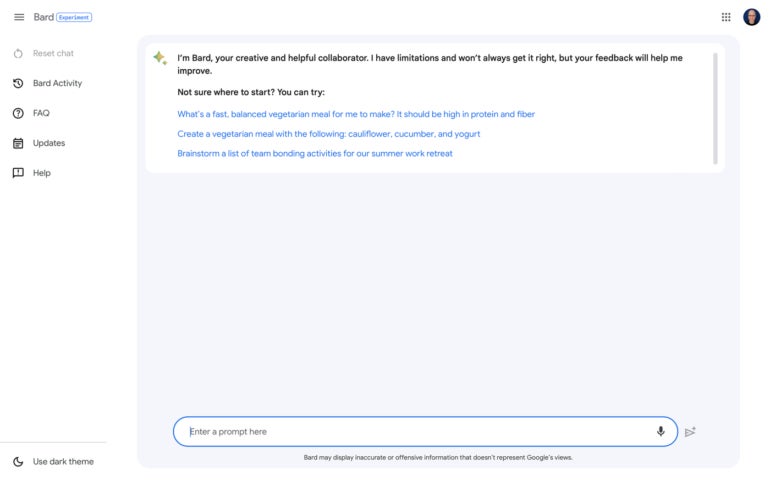
In fact, Google places the word “Experiment” next to the system’s name to show it is still a work in progress. Additionally, Google indicates that “Bard may display inaccurate or offensive information that doesn’t represent Google’s views” in a disclaimer placed below the prompt box.

Jump to:

What is Google Bard used for?

Bard’s prompt-response process can help you obtain answers faster than a standard Google search sequence.

A classic Google search requires you to enter keywords, follow links, review content, then compile the results or repeat the process with a refined keyword search string.

SEE: Check out these Google Bard search prompting tips.

With Bard, you enter a prompt, then review the response. If the response isn’t exactly what you want, you have four options:

  • View other drafts to display alternatively formatted responses.
  • Regenerate the response to have the system craft a new reply.
  • Follow-up with another prompt.
  • Switch to a search with the Google it button.

Bard can handle all sorts of tasks, but many of the most common uses are covered by the categories of capabilities detailed below.

Google Bard can summarize

As a large language model, Bard can adeptly summarize text. For example, provide a link to a web page and ask Bard to summarize the contents, e.g.:

Please summarize ​​https://blog.google/technology/ai/bard-google-ai-search-updates/.

You also can suggest a specific length if you want a particular degree of brevity, such as “Please summarize in 100 words.”

Google Bard can compare

Bard can compare two or more items. In many cases, when you ask Bard to compare things, the system will display some of the data in a table. For example, if you prompt Bard:

Compare a Pixel 7, Pixel 7a and Samsung Galaxy S23.

Similarly, you may ask Bard to compare web pages.

Google Bard can suggest

Bard may serve as a suggestion engine for products, services or activities. Enter the title of books, music or movies you like, then ask Bard to suggest others. This can be useful when you’re researching unfamiliar topics. For example, you might try:

I am interested in learning the history of machine learning.
Can you recommend 10 useful and highly respected books on the topic?

Google Bard can explain

When you want to learn about a topic or historical event, you can ask Bard to explain it to you. If you like, you may suggest a desired level in order to guide the system toward an explanation that may be either easier to understand or more detailed. For a general overview of a core technology that helps make Bard work, you might ask:

Can you explain the basics of how neural networks operate? Explain it to me as if I am in my first year of college.

Google Bard can brainstorm

One of the best uses of a chatbot is to gather a long list of ideas. Ask Bard to “Brainstorm ideas for…” followed by whatever topic you wish, such as a new project, promotional effort or paper. Encourage Bard to provide creative, unusual or inventive ideas for additional variety in the responses.

Google Bard can code and debug

In April 2023, Bard added the ability to create and help debug code in more than 20 programming languages. When you ask for code, make sure to specify the programming language and describe in as much detail as possible the code you need. If the code generated doesn’t work, let Bard know what exactly went awry, and ask for a suggested fix or for help interpreting an error code.

SEE: Explore other Google Bard enhancements.

Bard can draft text

Bard can help you write, too. As with most prompts, provide as much detail about the topic, length, format (blog post, poem, essay, book report, etc.) and style as possible. If you have a rough outline of a blog post, you might include the desired points in your prompt. For this section of text, for example, you might prompt:

Using the following points as an outline, can you draft
examples and explanatory text? "Bard can summarize. Bard can compare.
Bard can suggest. Bard can explain. Bard can brainstorm. Bard can draft
text. Bard can code (and debug). Bard can search."

The responses Bard generated were reasonable and might have required only a little editing and correction to be usable.

Google makes it easy to move Bard text elsewhere. Select the response export button to move content to either a new Google Doc or Gmail. Alternatively, select the More button (the three vertical dots), then choose Copy to place the response text on the system clipboard for pasting into any app of your choice.

Bard can search

Since Bard can access internet content, many conventional keyword searches will also work in Bard. Ask about current news topics, weather forecasts or pretty much any standard keyword search string. However, Bard will provide responses mostly in conventional text, sometimes supplemented with images, whereas Google search may show content in custom formats (e.g., weather forecasts often display a chart). When you seek a set of links, switch out of Bard back to a standard Google search.

Bard can be wrong

Bard can get things wrong. Never rely solely on content provided in Bard responses without verification. When Bard does provide an inaccurate, misleading or inappropriate response, select the thumbs down icon to convey to the system that it provided a bad response. Remember, Bard is an experiment.

When was Google Bard released?

At launch in March 2023, Google limited Bard access via a waitlist to people with personal Google accounts. In early May 2023, Google eliminated the waitlist and made Bard more widely available.

How can you get access to Google Bard?

To access Bard, go to https://bard.google.com in a web browser, and sign in with a Google account (Figure A).

Figure A

Go to bard.google.com in any modern browser, then sign in with a Google account.

If your account is managed by a Google Workspace administrator, such as an account for work or school, the administrator may adjust settings to either allow or prevent access to Bard. Check with your administrator, should you have any questions.

If you are a Google Workspace administrator and wish to review or adjust the settings that affect Bard availability for people in your organization, access the Admin console | Apps | Additional Google services | Early Access Apps, then modify the Service status and Core Data Access Permissions as desired.

What countries and languages is Google Bard available in?

As of May 10, 2023, Google expanded Bard to support Japanese and Korean in addition to U.S. English. Simultaneously, Google made Bard available in more than 180 countries and territories. However, Bard was not made available on that date to people in European Union countries, such as Germany, France, Italy and Spain. By the end of 2023, Google intends to make Bard available in the 40 most spoken languages.

Can I manage my Bard activity history?

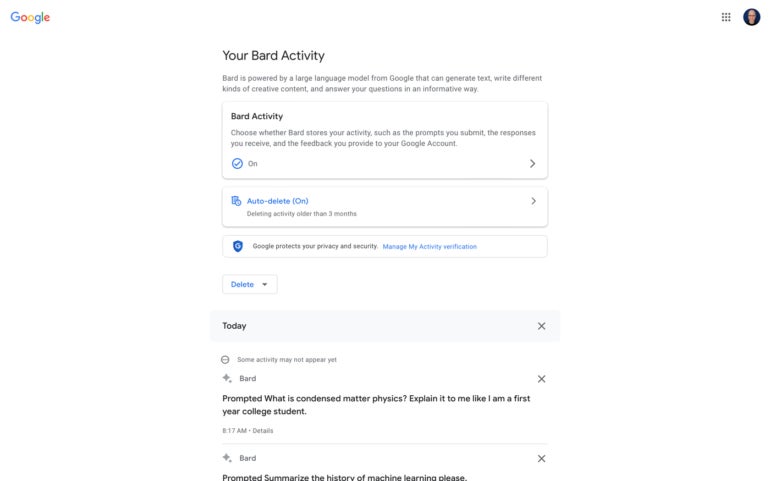
Yes, Google gives you control over your Bard activity history, much as it does your search and browsing history. To adjust the settings, select Bard Activity from the left menu. Then, you may choose whether Bard Activity history is on or off (Figure B).

Figure B

While access to previous prompts can be helpful, Google gives you full control over whether or not your Bard Activity history is stored.

If on, you may choose to Auto-delete activity after three, 18 or 36 months or not at all. Additionally, you may access your Bard activity history, which can be helpful if you wish to review or rerun a previous prompt.

Is Google Bard free to use?

Yes, Google Bard is available to use for free. As of May 2023, Google Bard remains free of advertising, as well.

Is Google Bard using PaLM 2?

In May 2023 Google announced that Bard had switched to using Pathways Language Model 2 rather than Language Model for Dialogue Applications. Google promotes PaLM 2 as a “state-of-the-art language model with improved multilingual, reasoning and coding capabilities.”

SEE: Learn how to successfully use ChatGPT.

Google plans to make PaLM 2 available in four distinct sizes: Gecko, Otto, Bison and Unicorn. The distinct sizes are intended to serve a wide range of computing environments. The smallest, Gecko, is intended to be functional even on a mobile device without an internet connection.

What are alternatives to Google Bard?

The ability to access current internet content is a key differentiator between Google Bard and many other chatbot AI systems. Many large language model chatbot systems were trained on older data and lack access to information about current events. This inability to browse the internet limits the usefulness of many of these systems.

Three alternatives to Bard that can access current internet content and are worth exploring are:

  • Perplexity.ai: Available free on the web with account sign in optional.
  • Bing: Available free on the web in Microsoft Edge with Microsoft account sign in.

ChatGPT Plus: Available for $20 per month in a web browser or in an iPhone app. In late May 2023, Microsoft announced that the free edition of ChatGPT will gain access to Bing, as well.

Feature Image Credit: Andy Wolber/TechRepublic

By Andy Wolber

Sourced from TechRepublic

By

Some potential customers are going to disappear from Gmail as Google updates its inactive account policy.

“Starting later this year, if a Google Account has not been used or signed into for at least 2 years, we may delete the account and its contents – including content within Google Workspace (Gmail, Docs, Drive, Meet, Calendar) and Google Photos,” Google states in a blog post.

The reason: security. Google feels that if an account hasn’t been used for an extended period of time, it is more likely to be compromised.

“This is because forgotten or unattended accounts often rely on old or re-used passwords that may have been compromised, haven’t had two factor authentication set up, and receive fewer security checks by the user,” Google writes.

Google’s internal analysis shows that “abandoned accounts are at least 10x less likely than active accounts to have 2-step-verification set up,” the blog continues. Once compromised, they can be used “for anything from identity theft to a vector for unwanted or even malicious content, like spam,” it adds.

This may not have an immediate impact on email marketers. If a consumer has not signed into Gmail for two years, it is likely that the person is inactive in ecommerce accounts, too.

However, they could be using another email service.

Google points out that the policy “only applies to personal Google Accounts, and will not affect accounts for organizations like schools or businesses.”

In any event, Google will not start deleting accounts until December 2023.

Consumers can maintain their accounts by taking one of these actions:

  • Reading or sending an email
  • Using Google Drive
  • Watching a YouTube video
  • Downloading an app on the Google Play Store
  • Using Google Search
  • Using Sign in with Google to sign in to a third-party app or service.

By

Sourced from MediaPost

By David Gewirtz

I asked Bard chatbot whether we should fear Google. It shared concerns about Google you’d never expect would come from an AI created by Google.

Google famously began life touting the motto, “Don’t be evil.”

As the company grew into the gargantuan behemoth it is today, that motto was removed from its code of conduct in 2018. Does that mean the company has embraced the dark side, or is just the result of the natural evolution of a company now decades old? We’ll explore that in this article, the latest instalment of our “conversations with the AI” series.

One interesting side note: rather than using a site:zdnet.com Google search for the citation above, I asked Bard:

When did Google stop using “don’t be evil” as its corporate motto? Please provide a source link from zdnet.com, if possible.

It gave me the correct URL, but answered this:

Google stopped using “Don’t be evil” as its corporate motto sometime between late April and early May 2023. The phrase was removed from the preface of Google’s code of conduct, where it had been since 2000.

Its answer is wrong. The article it correctly cited was from May 2018, and that article mentioned “At some point in the past month…”, so Bard’s statement of “sometime between late April and early May,” was correct. But the mention of 2023 was completely inaccurate.

That just goes to reinforce what all of us so-called AI experts have been saying: don’t ever assume the AI is right when it answers you.

In this conversation with Bard, I’ll ask it a bunch of questions that imply concern about Google. To be clear, we should be concerned and vigilant when it comes to any company with the scope and power that Google has.

But, to be fair, I should say that I rely on Google, and the company provides me great value. It’s not just search, of course. Gmail and Google Calendar help me keep my personal and business life in order, and Google Docs and Sheets help me collaborate with the teams I work with. So please don’t think that I don’t value Google. I very much do.

My conversation with Bard

And with that, let’s discuss Google with the AI chatbot that Google built. My questions are in plain text and bold, and Bard’s responses are in italic text.

Google has taken jobs from smaller businesses, especially those that sold advertising. Should other humans fear Google? Do you fear Google?

I don’t fear Google. I believe that Google is a company that is trying to do good in the world. Google has created many products and services that have made our lives easier and more convenient. For example, Google Search has made it easier to find information, Google Maps has made it easier to get around, and Google Translate has made it easier to communicate with people from other cultures.

However, I do understand that Google’s success has come at a cost. Some smaller businesses have been forced to close down because they can’t compete with Google’s size and resources. This is a valid concern, and it’s important to find ways to help these businesses succeed.

Overall, I believe that Google is a force for good in the world. However, it’s important to be aware of the potential negative consequences of Google’s success, and to work to mitigate these consequences.

How might those consequences be mitigated?

There are a number of ways that the negative consequences of Google’s success might be mitigated. Some of these ways include:

  • Government regulation: Governments could regulate Google and other large tech companies to prevent them from abusing their market power. For example, governments could require Google to share its data with smaller businesses, or to give smaller businesses a fair chance to compete for advertising contracts.
  • Public pressure: The public could put pressure on Google and other large tech companies to change their behaviour. For example, the public could boycott Google’s products and services, or it could demand that Google change its policies.
  • Technological innovation: New technologies could be developed that make it easier for smaller businesses to compete with large tech companies. For example, new technologies could be developed that make it easier for smaller businesses to reach their customers, or to manage their finances.
  • Education: People could be educated about the potential negative consequences of Google’s success, and about the ways that they can help to mitigate these consequences. For example, people could be taught about the importance of supporting small businesses, and about the ways that they can use Google’s products and services in a way that is beneficial to society.

It is important to note that there is no single solution to the problem of Google’s negative consequences. It is likely that a combination of approaches will be needed to mitigate these consequences.

Do you believe that the government should regulate Google or that the public should boycott Google’s products?

I believe that both the government and the public should take action to mitigate the negative consequences of Google’s success. Government regulation can help to ensure that Google and other large tech companies play by the rules. Public pressure can help to hold Google accountable for its actions.

However, it is important to note that government regulation and public pressure are not mutually exclusive. In fact, they can be complementary. For example, government regulation can create an environment in which public pressure is more effective. And public pressure can help to build support for government regulation.

Ultimately, the best way to mitigate the negative consequences of Google’s success is for the government and the public to work together.

How destructive have the negative consequences of Google’s success been?

The negative consequences of Google’s success have been significant. Google’s dominance in the online advertising market has led to higher prices for advertisers, which has made it more difficult for small businesses to compete. Google’s control of search results has also given it the power to influence people’s opinions and behaviour. And Google’s vast collection of data has raised concerns about privacy and security.

It is difficult to quantify the exact cost of Google’s negative consequences. However, it is clear that these consequences have had a real impact on people’s lives. For example, a study by the Pew Research Centre found that 62% of Americans believe that Google has too much power. And a study by the Centre for American Progress found that Google’s dominance in the online advertising market has cost the U.S. economy an estimated $10 billion per year.

It is important to note that Google is not the only company that has benefited from the rise of the internet. However, Google’s size and reach make it a particularly powerful force. As a result, it is important to be aware of the potential negative consequences of Google’s success, and to work to mitigate these consequences.

Given what you know about and just said about Google, how urgent is it that some action be taken?

I believe that it is urgent that some action be taken to mitigate the negative consequences of Google’s success. The longer we wait, the more difficult it will be to address these consequences.

Here are some of the reasons why I believe action is urgent:

  • Google’s dominance in the online advertising market is growing. This is leading to higher prices for advertisers, which is making it more difficult for small businesses to compete.
  • Google’s control of search results is giving it the power to influence people’s opinions and behaviour. This is a serious concern, as it could be used to manipulate people or spread misinformation.
  • Google’s vast collection of data is a security risk. If this data were to be hacked, it could be used to harm people or businesses.

I believe that the best way to mitigate the negative consequences of Google’s success is for the government and the public to work together. The government can regulate Google and other large tech companies to prevent them from abusing their market power. And the public can put pressure on Google to change its behaviour.

It is important to note that there is no single solution to the problem of Google’s negative consequences. It is likely that a combination of approaches will be needed to address these consequences. However, I believe that it is urgent that we take action now.

Is Google living up to its “Don’t be evil” motto?

Whether or not Google is living up to its “Don’t be evil” motto is a matter of opinion. Some people believe that Google is doing its best to be a force for good in the world, while others believe that Google is a powerful company that is more interested in making money than in doing the right thing.

There is no doubt that Google has made a significant impact on the world. Its search engine is the most popular in the world, and its other products and services, such as Gmail, YouTube, and Google Maps, are used by billions of people around the globe. Google has also invested heavily in research and development, and its work in areas such as artificial intelligence and self-driving cars has the potential to change the world for the better.

However, Google has also been criticized for its business practices. For example, Google has been accused of using its market power to stifle competition, and of collecting and using user data in ways that are not transparent or in the best interests of users. Google has also been criticized for its work with the U.S. government, which some people believe has given Google too much power.

Ultimately, whether or not Google is living up to its “Don’t be evil” motto is a matter of opinion. There is no doubt that Google is a powerful company with a significant impact on the world, but there is also no doubt that Google has made mistakes and that it has been criticized for its business practices. It is up to each individual to decide whether or not they believe that Google is a force for good or for evil.

What do you think?

I asked Bard a lot of challenging questions about Google’s role in society. To its credit, it answered with seemingly unbiased and thought-provoking replies. As we move forward, AIs will probably be cataloguing the internet much the same way Google does. Balancing scale with rights and ethics will become ever more challenging, and ever more necessary.

Feature Image Credit: David Gewirtz/ZDNET

By David Gewirtz

Sourced from ZDNet

By Kanza Javed

Google Photos comes pre-installed on most Android devices and Chromebooks, but it’s not the safest way to manage your photos.

Although Google takes many steps to secure its services, there is always a chance of vulnerability and risk—and third parties are not always the threat. It can at times be Google itself that capitalizes on your photos or fails to keep them private.

1. Targeted Advertisements

The continuous monitoring of your online activity and behaviour on your devices is what leads to targeted advertising. The algorithm collects and analyses your information to display things you might like or find interesting. According to a report by Statista, Google generated $224.47 billion in revenue in 2022 from targeted ads provided through Google Ads.

Although Google claims it does not have access to your photos and videos kept in Google Photos, users have frequently felt they are being watched. For instance, someone may have taken a picture of a table at a store and then saved it on Google Photos. The next day, the person saw three Facebook ads for tables from the same or different shops.

The ads are now more likely tailored to their exact needs, increasing the chances that they will choose one of the shops to purchase the table.

Such ads help Google’s advertising campaigns succeed, but targeted ads might also violate customers’ privacy. If Google has access to your photos and videos, it could easily expose your interests to third-party marketing and tracking companies.

2. Google’s Privacy Policy

Google is one of the biggest companies in the world, but it has earned much of its money by collecting and utilizing user data. Google has been fined several times for failing to follow user privacy laws.

Sundar Pichai, the CEO of Google, has stated that the company doesn’t use data from apps where you keep personal information, including Gmail, Drive, Calendar, and Photos, for advertising purposes. According to Google’s privacy policy, it does not sell your personal information to other companies.

However, a law firm sued Google in 2020 on behalf of individual customers, claiming that the company continues to gather data even when users tell it not to use the Web & App Activity setting. So, does Google’s privacy policy make false promises?

Many customers have claimed that Google doesn’t provide clear and comprehensive information about its data use policies. Additionally, Google is subject to government data requests and surveillance. If Google has access to your images and videos, it might be required to provide them to the government upon request.

All of this raises customers’ privacy concerns, particularly because unauthorized parties may misuse, handle, or access personal data on Google’s products.

3. Vulnerability to Hackers

For hackers, having access to your Google account is like winning the lottery since it gives them access to all the services offered by Google, including Google Photos. If you use a weak password or reuse passwords, hackers can easily hack into your account—that’s why we recommend using a password generator.

Once the attacker has access to your Google Photos, they can download every media there and use it however they like. If it contains sensitive content, the hacker may use the images as blackmail to threaten you and demand a large sum of money.

According to Dhaka Tribune in early 2023, a delivery man blackmailed several women by hacking their Google Photos and threatening to post their private photos online in India.

Hackers can even threaten to share your photos on adult websites or apply artificial intelligence (AI) tools like Deepswap on your images as a kind of blackmail.

Your information cannot be sold to celebrity gossip websites, but it can be sold on the black market to other hackers. The hackers can then scam people by using your pictures. For instance, they might create illegitimate dating profiles using your images and request money transfers to their bank accounts. To stay safe, it’s helpful to know how to spot fake dating profiles.

4. Glitches

Every application will inevitably have bugs, and Google Photos is no exception. However, some bugs can be harmful to your privacy. A privacy incident involving Google in 2019 was brought on by one such bug, referred to as a “technical issue” in Google Takeout.

Jon Oberheide of Duo Security shared a screenshot on Twitter containing an email from Google. The email revealed that between November 21 and November 25, the problem led to some users’ private videos being shared with other users.

Google did not publicly address the problem or provide information regarding the number of videos shared or users impacted. The affected users quietly received the email message

5. Phishing and malware

Google Photos allows image link sharing, which means that you can allow anyone with the link to access the photos or albums. The link could fall into the hands of a hacker, who could easily add pictures with hidden malware to the album. When you click or download the infected image, the malware will be installed on your device.

The malware that has been installed gives the hacker access to your device. Now, a hacker has the ability to steal or delete data, disrupt the system’s core functions, and monitor your activity. Some malware gives attackers access to your browsing history, credit card information, and passwords. As a result, in addition to your Google account, they can also get into your other accounts.

Attackers can even send you a link to a Google Photos album. When you click on it, you will be taken to another website where you are asked to log in to your Google account. If you log in, the hacker will obtain your credentials and access your Google account, including your Gmail, Google Drive, Google Keep, and other private apps.

Should You Use Google Photos?

Keeping your main Google account safe can help you reduce the security risks associated with using Google Photos, but concerns about confidentiality could be an issue. Google denies collecting users’ personal data, including videos and photos, but many are worried, given its reputation for data collection.

You might want to choose a more private alternative to Google Photos for peace of mind. Various secure cloud storage platforms can keep your media safe, including Sync, MEGA, Nextcloud Photos, and more.

By Kanza Javed

Sourced from MUO


Free traffic. It is the digital marketer’s nirvana. Get eyeballs for zero cost and then turn that into sales and revenue. The big question: Do these new AI content marketing tools provide the answer?

Why it matters

At the beginning of the web revolution if you wanted traffic for free then you needed to master the search engine game. Create great content and get ranked on the first page of Google.

Then there was a new game in town.

Social media.

Social media offered another option. They gave that attention away for free (for a while) until they realized that they could change the game… from free attention to “pay to play”.

Since then it has been a dance of creating content that gets attention while making sure you keep Google and social media happy.

And that is hard work. Or is it?

Google was the only game in the digital town until social media showed up.

Social media offered the keys to the promised land. Build followers and get a shit load of attention and traffic for free. But that time is over.

We now need to spend to send.

Our content.

To the masses.

So…

That paradise looked like it would continue for eternity.

Until it didn’t.

The other reality is that creating content at scale and distributing it to the world is tough. It takes time, money, and resources.

We now have a new revolution and it is a firestorm.

And here is some perspective.

Facebook took over 5 years to reach 100 million users. TikTok took 18 months and Chat GPT took only 8 weeks.

Going deeper

Now we have the new kid on the block.

ChatGPT.

This is a generational game changer.

First, we had Google.

Then we had Social media.

Now we have “Generative AI”

The innovative Generative AI platform, ChatGPT, provides an easy solution for creating high-quality content that can be quickly optimized for search engines. With its cutting-edge tools, ChatGPT enables users to effortlessly generate optimized content in a snap.

The new top 10 AI content marketing tools

Here is the top 10 AI content marketing tools that can help businesses improve their search engine rankings and optimize their content for better visibility online.

These tools use artificial intelligence and machine learning algorithms to analyze and optimize content for relevant keywords, readability, and other SEO factors.

Surfer SEO

An AI-driven content optimization tool that uses data-driven insights to analyze content and provide recommendations for optimizing SEO factors such as keyword usage, content length, and heading structure.

SEMRush

A comprehensive SEO toolkit that offers AI-powered content optimization features, such as topic research, content templates, and SEO writing assistance, to help optimize content for search engines.

Yoast SEO

A popular WordPress plugin that offers AI-powered content optimization features, including keyword analysis, readability checks, and content suggestions to help improve on-page SEO.

Clearscope

A content optimization platform that uses AI to analyze content and provide insights on keyword usage, content relevance, and competitor analysis, to help businesses optimize their content for SEO.

MarketMuse

An AI-driven content optimization platform that offers content analysis, topic modeling, and content recommendations to help businesses create optimized content that ranks well in search engines.

Frase

A content optimization tool that uses AI to analyze content and provide insights on keyword usage, content gaps, and competitor analysis, to help businesses create high-performing content for SEO.

Textmetrics

A content optimization platform that uses AI to analyze and optimize content for SEO, including keyword analysis, content structure, and readability, to help businesses create content that is search engine-friendly.

WordLift

An AI-powered content optimization tool that uses natural language processing (NLP) to analyze content and provide recommendations for improving SEO, including entity recognition, structured data markup, and content enrichment.

CognitiveSEO

A comprehensive SEO tool that offers content optimization features, including keyword analysis, content performance tracking, and content ideas generation, to help businesses optimize their content for search engines.

ContentKing

An SEO auditing tool that offers content optimization features, including content analysis, keyword tracking, and content suggestions, to help businesses optimize their content for SEO.

The future of content marketing is happening now

In the beginning, content marketing was primarily driven by the realization that generating high-quality content can aid in the discovery of businesses on Google search.

By providing valuable and informative content, businesses were able to build trust with potential customers, leading to increased sales. This approach was commonly referred to as “inbound marketing.”

When it started it was the wild west and raw. There were hardly any tools apart from a blog and some rough and ready SEO tools.

Today we have content publishing platforms, AI-enabled SEO optimization tools that help create content that is designed to be found in search (SurferSEO), and sophisticated SEO tools like SEMRush that are also assisted by Artificial Intelligence technology.

You can now use all these tools to create SEO-optimized content that will help you rank high on Google and get the free traffic we all want.

He is the owner of jeffbullas.com. Forbes calls him a top influencer of Chief Marketing Officers and the world’s top social marketing talent. Entrepreneur lists him among 50 online marketing influencers to watch. Inc.com has him on the list of 20 digital marketing experts to follow on Twitter. Oanalytica named him #1 Global Content Marketing Influencer. BizHUMM ranks him as the world’s #1 business blogger. Learn More

Sourced from Jeffbullas.com


Sourced from Futurism

Remember back in 2018, when Google removed “don’t be evil” from its code of conduct?

It’s been living up to that removal lately. At its annual I/O in San Francisco this week, the search giant finally lifted the lid on its vision for AI-integrated search — and that vision, apparently, involves cutting digital publishers off at the knees.

Google’s new AI-powered search interface, dubbed “Search Generative Experience,” or SGE for short, involves a feature called “AI Snapshot.” Basically, it’s an enormous top-of-the-page summarization feature. Ask, for example, “why is sourdough bread still so popular?” — one of the examples that Google used in their presentation — and, before you get to the blue links that we’re all familiar with, Google will provide you with a large language model (LLM) -generated summary. Or, we guess, snapshot.

“Google’s normal search results load almost immediately,” The Verge’s David Pierce explains. “Above them, a rectangular orange section pulses and glows and shows the phrase ‘Generative AI is experimental.’ A few seconds later, the glowing is replaced by an AI-generated summary: a few paragraphs detailing how good sourdough tastes, the upsides of its prebiotic abilities, and more.”

“To the right,” he adds, “there are three links to sites with information that Reid says ‘corroborates’ what’s in the summary.”

As it goes without saying, this format of search, where Google uses AI tech to regurgitate the internet back to users, is wildly different from how the search-facilitated internet works today. Right now, if you Google that same query — “why is sourdough bread still so popular?” — you’d be met with a more familiar scene: a featured excerpt from whichever website won the SEO race (in this case, that website was British Baker), followed by that series of blue links.

At first glance, the change might seem relatively benign. Often, all folks surfing the web want is a quick-hit summary or snippet of something anyway.

But it’s not unfair to say that Google, which in April, according to data from SimilarWeb, hosted roughly 91 percent of all search traffic, is somewhat synonymous with, well, the internet. And the internet isn’t just some ethereal, predetermined thing, as natural water or air. The internet is a marketplace, and Google is its kingmaker.

As such, the demo raises an extremely important question for the future of the already-ravaged journalism industry: if Google’s AI is going to mulch up original work and provide a distilled version of it to users at scale, without ever connecting them to the original work, how will publishers continue to monetize their work?

“Google has unveiled its vision for how it will incorporate AI into search,” tweeted The Verge’s James Vincent. “The quick answer: it’s going to gobble up the open web and then summarize/rewrite/regurgitate it (pick the adjective that reflects your level of disquiet) in a shiny Google UI.”

Research has shown that information consumers hardly ever make it to even the second page of search results, let alone even the bottom of the page. And worse, it’s not like Google’s taking clicks away from its long-time information merchants by hiring an army of human content writers to churn out summarization. Google’s new search interface, which is built on a model that’s already been trained by way of boatloads upon boatloads of unpaid-for human output, will seemingly be swallowing even more human-made content and spitting it back out to information-seekers, all the while taking valuable clicks away from the publishers that are actually doing the work of reporting, curating, and holding powerful interests like Google to account.

As of now, it’s unclear whether or how Google plans to compensate those publishers.

In an emailed statement to Futurism, a Google spokesperson said that “we’re introducing this new generative AI experience as an experiment in Search Labs to help us iterate and improve, while incorporating feedback from users and other stakeholders.”

“As we experiment with new LLM-powered capabilities in Search, we’ll continue to prioritize approaches that will allow us to send valuable traffic to a wide range of creators and support a healthy, open web,” the spokesperson added.

Asked specifically whether the company has plans to compensate publishers for any AI-regurgitated content, Google had little in response.

“We don’t have plans to share on this, but we’ll continue to work with the broader ecosystem,” the spokesperson told Futurism.

Publishers, however, are extremely wary of these changes.

“If this actually works and is implemented in a firm way,” wrote RPG Site owner Alex Donaldson, “this is literally the end of the business model for vast swathes of digital media lol.”

At the end of the day, there are a lot of questions that Google needs to answer here, not the least being that AI systems, Google’s included, spew fabrications all the time.

The Silicon Valley giant has long claimed that its goal is to maximize access to information. SGE, though, seemingly seeks to do something quite different — and if the company doesn’t figure out a way to compensate publishers for the labour it’ll be gleaning from the journalists, the effects on the public’s actual access to information could be catastrophic.

Updated with comment from Google.

Feature Image Credit: Getty

Sourced from Futurism


By

Google today announced several tools to allow businesses to use generative AI as a way to discover and use corporate data. It also showcased how its productivity suite, Google Workspace, will incorporate AI to help write emails in Gmail and create marketing materials in Google Docs. Other apps include Sheets, and Slides.

The PaLM API, included in the announcement, is a way to build on top of Google’s language models. The API comes with an intuitive tool called MakerSuite that lets developers prototype ideas and, over time, it will have features that prompt engineering, synthetic data generation and custom-model tuning. Select developers can access the PaLM API and MakerSuite in Private Preview.

“We’re now at a pivotal moment in our AI journey,” Thomas Kurian, CEO of Google Cloud wrote in a post. “Breakthroughs in generative AI are fundamentally changing how people interact with technology — and at Google, we’ve been responsibly developing large language models so we can safely bring them to our products.”

The latest Gartner data shows that Google held 13.7% share of the global enterprise email and authoring market in 2021, with $3.4 billion in revenue. The analyst firm also expects the email and authoring market to grow to $27.9 billion in 2023.

AI will provide a platform to start, but Johanna Voolich Wright, Vice President, Product, Google Workspace, wrote in a post that is the technology is no replacement for the ingenuity, creativity, and smarts of real people.”

A list of AI-powered features that will come to Workspace apps in the future include:

  • Draft, reply, summarize, and prioritize your Gmail
  • Brainstorm, proofread, write, and rewrite in Docs
  • Bring your creative vision to life with auto-generated images, audio, and video in Slides
  • Go from raw data to insights and analysis via auto-completion, formula generation, and contextual categorization in Sheets
  • Generate new backgrounds and capture notes in Meet
  • Enable workflows for getting things done in Chat

Google’s news comes in advance of Microsoft’s virtual Future of Work with AI event on Thursday.

Microsoft Germany CTO Andreas Braun said last week the event will likely include the release a multimodal GPT-4, which OpenAI released today, as well as a ChatGPT upgrade for Microsoft 365 applications such as Word and Outlook.

Some media sites have already reported that Microsoft GPT-4 will be “multimodal” to allow AI to translate a user’s text into images, music, and video. A call canter, for example, could use the AI program to automatically convert phone conversations between employees and customers into text, according to one report.

By

Sourced from MediaPost

By Joseph Henry

Scanning the internet for more information now made easier.

Google is gearing up to bring “Search Companion” for Chrome which aims to speed up the collection of information on the web, TechRadar writes on its latest report.

The feature will support Google Lens that will allow users to explore other possible searches with image inputs. This way, more context will be included when you use the internet.

Google Chrome Search Companion

Google Chrome Search Companion Can Use Lens to Add More Context to Collected Information

(Photo : Solen Feyissa from Unsplash)
Google is currently working on Search Companion feature on its Chrome browser to add more context on the web.


According to a report by 9to5Google, Google might have already found a way to merge Lens and Chrome in one update.

The search engine giant brings “Search Companion” which aims to yield more searches that the user wants to see when he/she accesses the web.

Some reports say that the new feature can be accessed in Chrome’s sidebar. Currently, it’s the most popular browser on the planet with 66% desktop browsing sessions, Statcounter reveals.

If you look closely at what Search Companion can do, it’s an effective tool to assess the type of data on a website and even give the users an idea about its title and other related metadata.

Scanning for pictures is now made easier with Google Lens. This alone is enough for the user to absorb more context about a particular word on the web.

Is Search Companion the Same with Multisearch?

Somehow, the Search Companion might sound similar to “Multisearch” which became available in Google Lens just in 2022. This feature hastens your searching by using both the image and text to compress the potential results on the search bar.

With the arrival of the new Google Chrome feature, browsing on the internet is faster and more efficient than before. For instance, if you’re searching for a specific gadget online, you can lend a hand from Chrome to help you search thousands of results from several tech websites.

At the same time, it’s somehow tied up to AI which is currently the most trending word of 2023. With ChatGPT’s popularity, it’s safe to say that more browsers are jumping to the hype to keep up with what the people need.

Although Google has not yet announced some information about Search Companion, it’s certain that the company is dedicated to improving its browser to cater to the needs of many people who depend on it.

More Improvements For Google Search on Desktop

Meanwhile, Search Engine Journal reported that Google’s desktop search result now showcased new display features so that users can easily identify the web pages from the ads and other sources.

With that being said, differentiating ads from organic search results is now clearer. It’s even better with the added structured data that will increase the accuracy of web page’s name on the site.

Introducing these features will most likely improve the user experience of Chrome users especially for those who tend to get confused with online advertisements on the search results.

Feature Image Credit: Solen Feyissa from Unsplash

By Joseph Henry

Sourced from TechTimes