Tag

Instagram

Browsing

By

Want to partner with influencers and brands to create content on Instagram? Wondering how to best manage and assess your influencer marketing campaigns on Instagram?

In this article, you’ll learn the difference between branded content and sponsored posts, how to manage and analyze the partnerships with brands or creators you work with, and how to tag a business partner in an Instagram post and Instagram Stories post. You’ll also discover a tool to help you find potential creators to partner with.

How to Tag and Manage Instagram Branded Content by Jenn Herman on Social Media Examiner.

To learn how to tag and manage Instagram branded content, read the article below for an easy-to-follow walkthrough or watch this video:

Subscribe to our YouTube Channel

What Is Instagram Branded Content?

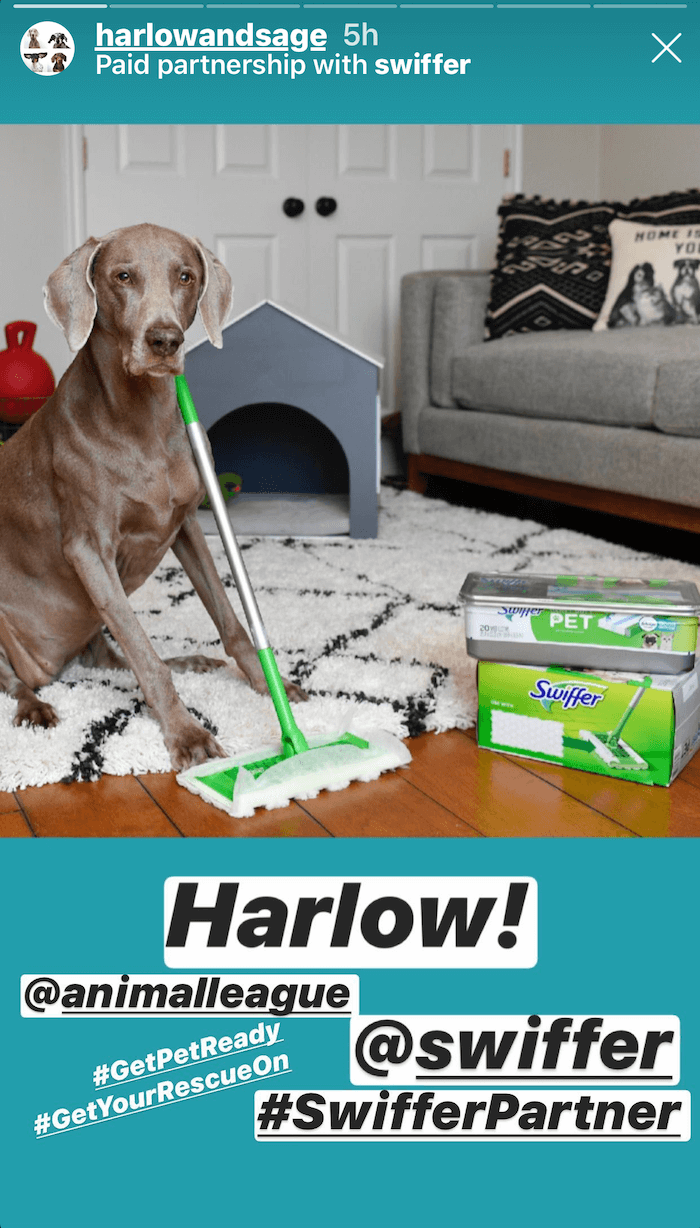
Branded content is when a creator or publisher posts content and discloses that they’ve received compensation for that post. This disclosure in branded content isn’t optional. FTC regulations require you to disclose if you’re promoting content that you’ve been compensated for in some way.

Instagram branded content isn’t an ad, though; sponsored posts are what you see when it’s ad content. Branded content or a paid partnership just means that the person creating the content received some sort of financial support.

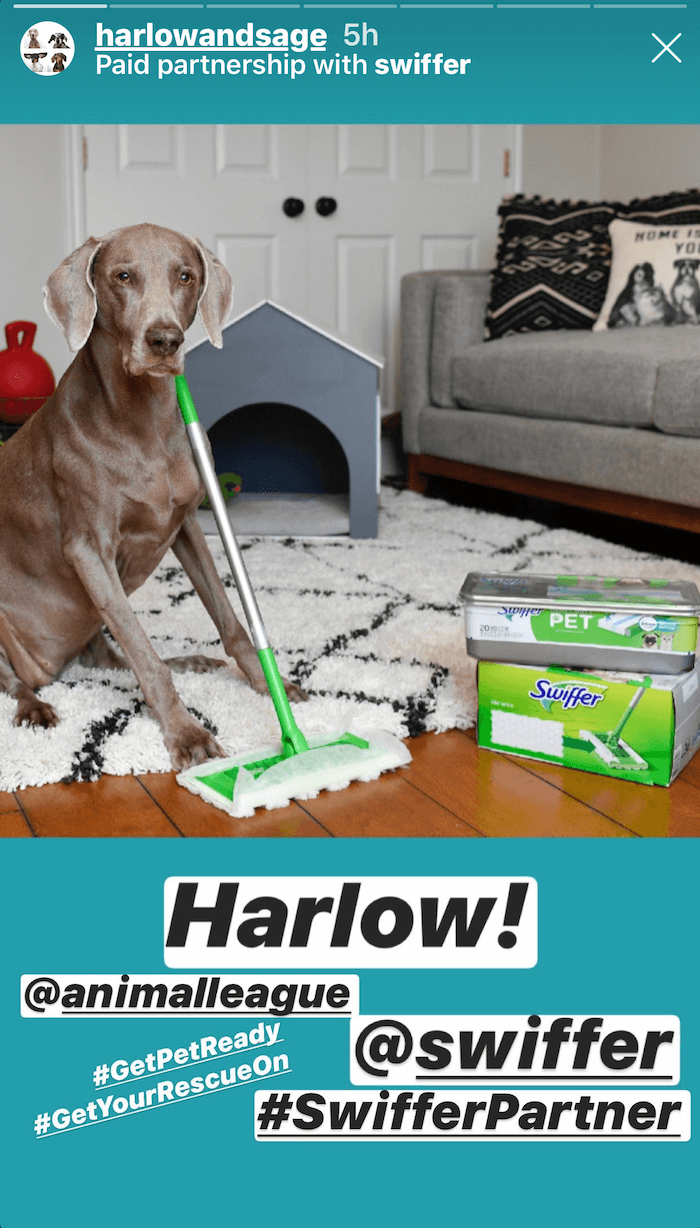
example of Instagram Stories branded content

Click HERE to read the remainder of the article.

By

Sourced from Social Media Examiner

By Erica Perry,

Instagram Shops, IGTV, and Pinned Comments are just a few recent updates to help small businesses market their products and services.

With eCommerce sales rising amid the COVID-19 lockdown, platforms are working every angle to make their interface friendly to brands and businesses looking to build a digital presence in the absence of a traditional brick-and-mortar experience. Leading in the space is Instagram and its parent company Facebook.

Specifically, Instagram has recently introduced a number of ways it’s committing to achieve this underlined by themes of discovery, monetization, and driving conversations around specific products and services.

MAKING CONTENT DISCOVERABLE VIA THE “SHOPS TAB”

Originally introduced in May as part of a larger announcement of Facebook and Instagram Shops, more users can now expect to see the new “Shop” tab within their bottom navigation bar. At a high-level, users who use the tab will be driven to the current shopping experience in the app which consists of a list of postings with Shopping Tags attached. They can filter by specific categories, including Beauty, Clothing & Accessories, Home, and Travel, much the same way they’re able to via Instagram Explore. Ultimately, additional purchase options will be added as parent company Facebook onboards more companies and introduces more selling options.

Per TechCrunch, the new tab will be indicated with a “Shop” icon that will replace the heart icon (Activity) in the app’s main navigation though the Activity feed will still be available either by toggling to an icon in the top right corner, beside the icon of a ‘Direct’ paper plane, or by going to their profile and tapping the heart icon. For more general insights into set up a Facebook shop, check out this new Blueprint education course the platform recently unveiled.

MAXIMIZING YOUR IGTV EFFORTS

Earlier this Spring Instagram shared several key changes to its IGTV app including an important cross-promotional update whereby the first 15 seconds of the video will play with the rest of the content available via a ‘swipe up’ link, as opposed to a freeze-frame from the clip. In addition to this, the platform introduced a broader overhaul of the IGTV display options within the Discover tab. The intent was primarily to highlight top creators but, more importantly, allow users to have more specific control over what they see as opposed to limiting search options solely based on content they’ve already engaged with.

In this vein of ‘control,’ more recently Instagram introduced additional options allowing creators and brands to edit the preview images and thumbnails of their IGTV videos that are displayed in the feed. The app is also unveiling capability for IGTV creators to cross-post to Facebook Watch, serving to increase the exposure of their uploads. With the roll-out of IGTV monetization including ads and Badges through which users can donate to their favorite broadcasters, this is a significant incentivizing factor for companies looking to double down on e-commerce efforts amidst the global pandemic and boost their digital presence.

Put differently, marketers want a reason to put resources against yet another digital app. With further options to generate income from IGTV, they’ll naturally find more reasons to make it a consistent focus. For context into just how much live-stream viewership has increased in recent months, Instagram reported a 70 percent uptick between February and March alone.

PINNING POST COMMENTS

Following a test in May, Instagram is announcing that users can now pin up to three comments within a comment thread. To do this, swipe to the left and tap on the icon resembling a thumbtack. Each of the three posts you designate to pin will appear underneath your photo with a “Pinned” label beneath.

Per Instagram’s VP of Product Vishal Shah, the option is designed to enable brands and users to control the tone of conversations. “By highlighting positive comments, you can better manage the tone of the conversation,” he shared on Twitter. From an e-commerce standpoint, this stands to be a useful way for those building their e-commerce presence to promote great reviews of their product and learn more about new purchasing behaviors by boosting relevant questions and feedback.

Though still up for debate, many experts in space anticipate that such trends will hold beyond the pandemic. Why? As more consumers experiment with online buying options and recognize the convenience and efficiencies of shopping from the comfort of their home, they won’t go back. This will ultimately exacerbate the current growth in e-commerce. Pivoting, in this case, is not necessarily only about a change in direction, but much more directly correlated with moving the needle of a business.

By Erica Perry

Editorial and Programming Manager, Crowdcentric

Sourced from Social Media Week

By Katie Sehl,

Like most social media trends, Instagram trends move quickly. And in 2020, change has been fast and furious, with a global pandemic, social uprising, and competitors, shaking things up.

Trends make the difference between looking out of touch or ahead of the curve. That doesn’t mean you should throw your social media content calendar out the window. It means you should stay informed and stay flexible.

There’s a lot to stay on top of at Instagram. From Instagram Story trends to Live Shopping, and Instagram Shops, we break down the biggest trends on the app.

Bonus: Download a free checklist that reveals the exact steps a lifestyle photographer used to grow from 0 to 600,000 followers on Instagram with no budget and no expensive gear.

9 of the most important Instagram trends in 2020

These are the top trends on Instagram to watch right now.

1. Brands and influencers reckon with racial inequality

On June 2, Instagram feeds were checkered with black squares in support of Blackout Tuesday. The original concept, The Show Must Be Paused, was created by music executives Brianna Agyemang and Jamila Thomas, as a day for the industry to “take a beat for an honest, reflective, and productive conversation about what actions we need to collectively take to support the Black community.”

But the black squares swiftly became symbols of performative allyship. The posts inadvertently drowned out the #BlackLivesMatter hashtag, a channel activists use to relay vital information. Many brands and influencers who participated were called out for virtue marketing or hypocrisy, spurring calls for transparency and action.

Designer Aurora James’s #15PercentPledge initiative calls on big retailers to pledge %15 of shelf space to Black-owned businesses. Brands including Sephora, Rent the Runway, Cupcakes and Cashmere have since made the pledge. UOMA Beauty founder Sharon Chuter launched #PullUpOrShutUp to challenge brands to back their marketing with employee diversity statistics.

Instagram plans to reexamine how its policies, tools, and processes impact Black and other underrepresented communities on Instagram. The company will focus on addressing harassment, account verification, content distribution, and algorithmic bias.

Black creators and professionals have also been speaking out about tokenization, pay disparities, and being sidelined. Several celebspublic figures, and influencers have responded to this disparity by sharing Black influencers and businesses or hosting account takeovers. As a result, many Black creators have seen their followings double overnight.

The social momentum behind Black Lives Matter is stronger than ever. But as initiatives like #PullUpOrShutUp demonstrate, brands need to know the difference between social trends and social movements. As eTalk CTV reporter Tyrone Rex Edwards said, “My trauma is not a trend.”

Anti-racism, inclusive marketing, equal pay and opportunity are not trends. They’re the new norm and the bare minimum of what consumers expect from brands going forward.

2. Instagram goes Live

Stay-at-home orders and event cancellations have helped propel Instagram Live viewership figures to new heights. Between February and March, the number of people tuning in for live broadcasts rose by 70%. More than 800 million people now watch live video daily across Instagram and Facebook.

Live lineups have been packed with star power. DJ D-Nice’s #ClubQuarantine sets have featured shoutouts to Rihanna, Zuckerberg, and Joe Biden as the viewership count soared above 100,000. Former U.S. President Barack Obama and Justin Bieber were among the 50,000 viewers punctuating a live convo between NBA star Stephen Curry and Dr. Anthony Fauci with emoji.

As people look for ways to replace in-person activities, brands and creators have jumped on live, too. In fact, 80% of live broadcasters have fewer than 1,000 followers.

Instagram Live sessions include everything from cocktail and comedy hours to virtual protests, yoga classes, and drawing tutorials. Desktop functionality, added in April, has made tuning in a lot more practical.

Like Instagram Stories, live videos tend to be more intimate and spontaneous than posts in the feed. Hosts can also respond to questions and comments in real-time, which is why Live videos tend to average six times more interactions on Facebook.

It’s too soon to know what staying power Instagram Live may have in a post-COVID world. For now, Instagram is rolling out enhancements, such as the option to save videos to IGTV and run fundraisers. Live Shopping and Badges allow creators to monetize livestreams.

Instagram is also testing showing two-rows of Stories in the feed, with live videos up top.

Until in-person activities resume, expect to see more memes and innovation on the Instagram Live front.

3. Creators can now make money directly on Instagram

Since its inception in 2010, Instagram creators have mostly monetized their audiences through affiliate marketing and brand partnerships. New features introduced in May now allow creators to make money directly.

Instagram is now testing Badges with a small group of creators and businesses. During a live broadcast, viewers can spend 99 cents to $4.99 for heart badges to stand out in the comment stream and unlock features. During the test phase, creators will receive 100% of revenue earned from these badges.

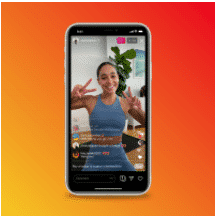
Instagram influencer doing a live video

Source: Instagram

Tests for IGTV ads are underway as well. These ads can last up to 15 seconds and appear after someone clicks to watch the full IGTV video. On par with YouTube, 55% of ad revenue is shared with the creator. In addition to ads, Live Shopping tools now let creators and brands tag products during live videos.

Influencer doing an Instagram live skincare tutorial

Source: Instagram

These changes come as competition to retain creators heats up between platforms. They also cater to a cohort of “specialized” creators who monetize their audiences by offering valuable content, rather than featuring valuable products and experiences in their content. It’s why many are shying away from the label influencer in favor of the term creator, or even ambassador.

Brand partnerships will still remain an important source of revenue, but they’ve already become a lot less transactional. Expect to see some fine-tuning in the Brand Collabs Manager from Instagram (and Facebook).

4. Instagram Shops set brands up to cash in on conversions

Instagram Shops promise to make it easier for brands to make money, too. Shops let businesses create a storefront directly in the app, so people can buy without the need to visit a website. By eliminating this friction, brands should be able to drive significantly higher conversions and sales.

In May, Instagram and Facebook launched a phased rollout to businesses globally. The plan is for the shopping experience to eventually be integrated across all of Facebook’s apps. Once complete, it will mean that when someone puts something in their cart on Facebook, they can check out later on Instagram using stored credit card info or Facebook Pay (which will likely be integrated, too).

Instagram shopping in Explore tab

Source: Facebook

To improve discoverability, Instagram will soon have a dedicated Shopping tab, like the Explore tab, which already features a shopping section. Accounts with shops have a View Shop button on their profiles, as well as a shop tab. Businesses can customize how collections appear, connect loyalty programs, and benefit from the platform’s built-in AI to create personalized experiences.

There are now more ways to spend money in Stories, too. In addition to product tags, companies can share gift card, food order and donation Stickers.

Set up Instagram Shopping so you can sell your products.

5. Shopping and advertising get AI-powered upgrades

More people shopping across Instagram and Facebook means more data. And more data brings the company closer to its vision of “making anything shoppable while personalizing to individual taste.”

To make anything shoppable, the Facebook engineers have developed an A.I called GrokNet that can automatically tag the products in a business’s catalog in seconds. The A.I., which is already used on Facebook Marketplace, can scan photos, identify attributes such as colour and style, cross-reference with catalogs, and suggest descriptions. On the flip side, this data is used to deliver better search results and targeted ads to users.

Rotating View is another A.I. project that aims to enhance social shopping. The feature, which allows people to create 3D-like images, is currently being tested on Marketplace. Maybe it will crop up on Instagram, too.

Instagram may soon introduce ads that use augmented reality to let people “try on” beauty products or preview furniture in their homes. Facebook already offers an AR ad format, and Zuckerberg recently announced more developments are on the horizon.

Bonus: Download a free checklist that reveals the exact steps a lifestyle photographer used to grow from 0 to 600,000 followers on Instagram with no budget and no expensive gear.

Get the free guide right now!

Read our complete guide on how to advertise on Instagram.

6. Instagram Guides accompany the rise of “info-social”

Brands and influencers often get asked for recommendations, from “where should we eat in Marrakech?” to “how do you talk to your kids about climate change?”. In the past, these requests have been handled by referring followers to highlights or blog posts. Now guides can be created directly on Instagram.

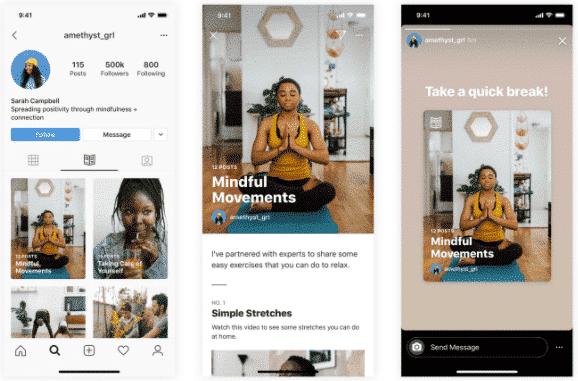
several different Instagram guides

Source: Instagram

According to Instagram head Adam Mosseri, guides were initially developed for travel, but that idea was curtailed by the coronavirus outbreak. Instead, they launched under the theme of wellbeing, with more themes coming up. Instagram recently assembled a racial justice resource guide, too.

Guides have their own devoted tab on profiles, and can be shared to Stories or appear in the Explore tab. They can include curated posts and videos with added notes and tips.

There’s a growing appetite for informative social content. On TikTok, educational videos are surging in popularity, especially in China, with a reported 14 million “knowledge-based” posts created last year. In the United States, career coaches, personal finance experts, and fitness experts are finding success on the app.

On Instagram, everything from “practice accounts” to doctor and nurse micro- and nano-influencers are popular, proving that engaged communities are much more valuable than high follower counts.

7. Values take center stage

Authenticity is a big buzzword in the influencer industry. But it’s not just an influencer trend. Consumers increasingly demand authenticity from brands, too, especially in the form of transparency.

As brands and influencers use their platforms to take a stand, promote values, and support causes, transparency will be more necessary to retain authenticity. For example, sustainable beauty brand Elate Cosmetics goes into great detail to explain the eco-attributes of its products and practices.

Influencers will share more about their decision making in general, and be more upfront about why they partner with specific brands. To maintain trust, disclaimers and clear labelling between spon-con and regular posts will be necessary, particularly in Stories.

With social advocacy on the rise, Instagram has added several fundraising tools, including live fundraisers and donation stickers. The company is also reportedly testing the option to add fundraisers to profiles. Nonprofits already have access to account Donate buttons.

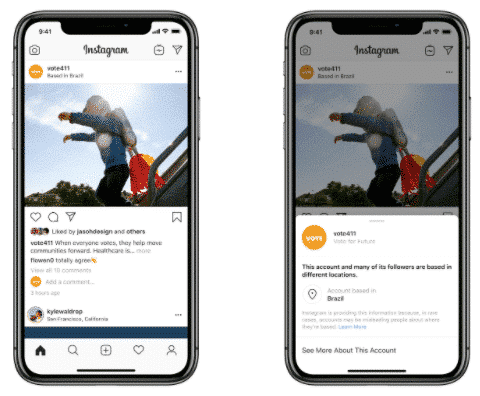
Instagram is also adding context to posts from high-reach accounts. In April, the company started piloting a feature that shows location and where followers are based on posts from these accounts.

Instagram post showing where account is based

Source: Facebook

8. TikTok, Twitter, and Giphy invade Instagram

The days when Instagram was only a place for filtered images are long gone. Instagram’s feed now features everything from memes and Twitter takes to TikTok challenges, special effects, music, and more.

To keep up with competition from TikTok and Snapchat, Instagram’s been on a feature-adding bonanza—especially in Stories. The recent acquisition of Giphy, which already sourced 25% of its traffic from Instagram, will add to a collection of interactive features that already includes stickers, filters, and other special effects.

Despite more content variety in the feed, the Instagram aesthetic still creeps in. As Arimeta Diop points on in Vanity Fair: “It’s the end of the iPhone-Notes-App-Apology Era.” Bold typefaces, templates, and hand-drawn sketches have proven more popular, thanks in part to Instagram’s strong design community. Infographics and visual storytelling have taken off, too.

Most cross-platform sharing is up to the users, except when it comes to Facebook’s family of apps. Further integration between Instagram, Facebook, WhatsApp, Messenger—on the front and back end—is looming. Beyond a fully integrated shopping experience, Facebook is developing an option for users to view and reply to Instagram Stories from Facebook.

Facebook is also planning to merge messaging across its apps by the end of this year. Once complete, Instagram users would be able to message friends on WhatsApp and Messenger, even if those friends don’t have Instagram accounts. This level of integration would make the app family comparable with the WeChat, the super app that dominates in China.

Manage your Instagram presence alongside your other social channels and save time using Hootsuite. From a single dashboard you can schedule and publish posts, engage the audience, and measure performance. Try it free today.

By Katie Sehl

Sourced from Hootsuite

By

All entrepreneurs and marketers know how valuable time is.

The more time you spend engaging in activities that don’t directly bring any return on investment (ROI), the slower your growth.

You should choose your marketing approaches taking into account efficiency and available amounts of time.

Lack of time and the need to increase efficiency are the two main reasons why you should consider automation as a part of your Instagram marketing strategy.

Managing an Instagram account and promoting your products or services on this social network is a difficult task. You should not only provide your followers with fresh high-quality content on a regular basis but also reply to comments, monitor posts where users mention your brand and deal with many other time-consuming tasks.

Instagram is the fastest-growing social media platform with more than 1 billion active monthly users. There are thousands of influencers from different niches, along with thousands of businesses that put a lot of effort into building a strong presence on Instagram. All these businesses have to compete for a greater audience and to make sure that their posts will satisfy Instagram’s algorithm.

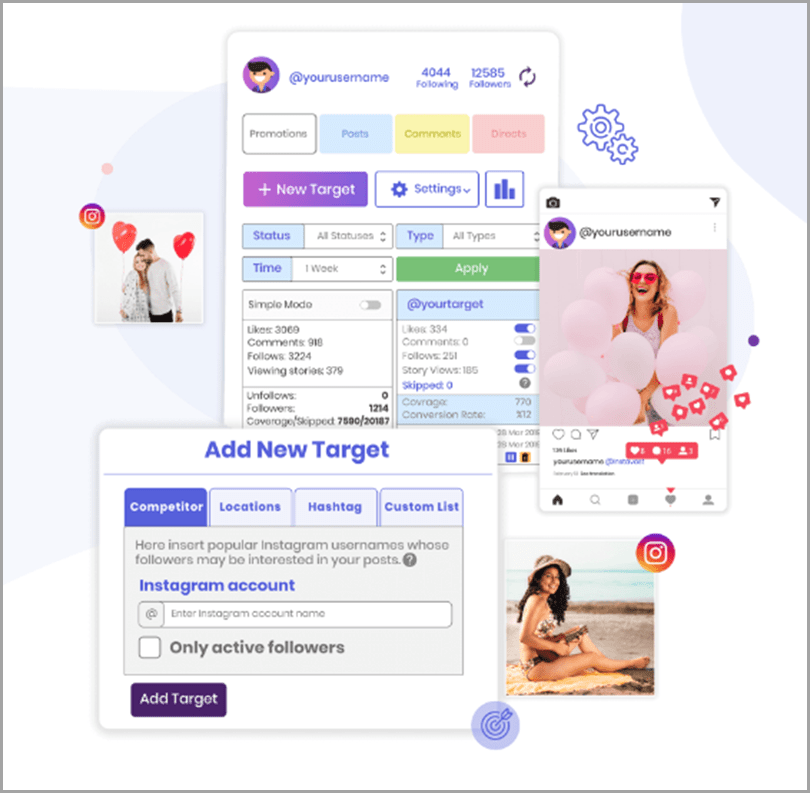
If you use the right Instagram automation tools, you’ll be able to improve the efficiency of many processes significantly. For instance, you can schedule your posts so that your target audience can always see your content when they are most active. There are also many tools that can help you analyze engagement and provide the exact content your followers are looking for.

Now let’s take a look at the best Instagram automation tools that can help you improve your Instagram presence.

1. Hashtagsforlikes

Hashtags For Likes Instagram Automation Reference Guide

Sorting hashtags is a time-consuming task. Many businesses even decide to outsource it. To use the right hashtags, you should analyze hashtags that are trending in your niche and determine which hashtags can be associated with your brand.

Even though developing an effective hashtag strategy is difficult, it’s still very important for the visibility of your posts in your followers’ feed.

Hashtagsforlikes is an organic tool that will help you use the best hashtags for your products, services, promotions, and other types of content. This is a search engine that also provides analytics on each hashtag so that you can choose the right ones.

2. Kicksta

Kicksta Organic Automation Growth Tool Reference Guide

Kicksta is one of the best organic automation growth tools that has proven to deliver great results, enabling users to get real followers.

Some solutions imitate success by using fake followers, but this is not the case with Kicksta. You can be sure that your brand gets genuine engagement and that all your followers are actual people.

Kicksta will help you promote your products or services to the right audience so that you will have more time to create authentic content.

3. Ingramer

Instagram Automation Tools Statistics General Auditory Reference Guide

One of the main advantages of Ingramer is that it combines effectiveness with simplicity.

This software comes with a variety of automation tasks, including a hashtag generator, automated likes and follows, and data analysis.

Ingramer is based on an algorithm that simulates the activity of real people and only considers information on customers or active followers. If you’ve never used such services before, you can contact the support service and get answers to any of your questions.

In addition, this solution can help you analyze the performance of your account so that you can promote it more effectively.

4. SocialCaptain

Social Captain Instagram Automation Software Reference Guide

SocialCaptain is one of the best solutions for Instagram automation. This Instagram automation software focuses on attracting real audiences and increasing engagement rates.

It comes with several tools for targeting and real-time analytics. It also includes an AI-powered module that boosts its performance.

The best thing about this solution is how fast it works. For instance, if you opt for the Turbo plan, this software will deliver the desired results 10 times faster than the majority of other automation solutions. If you need to grow your follower base quickly, you will certainly appreciate this tool.

5. Upleap

Upleap Reliable and Effective Instagram Automation Tool Reference Guide

Upleap has proven to be reliable and effective. Before you decide whether or not you want to use this solution, you can try a free 3-day trial to familiarize yourself with its main features.

Every client gets a personalized account manager so you can always ask real people about any issues and get timely help.

Another reason why Upleap is more popular than many of its competitors is that it offers good pricing options. The prices start at $39 per month, and when you choose this solution, you know what you’re paying for.

6. Instavast

InstaVast Multipurpose Instagram Automation Tool Reference Guide

Instavast is a complex solution that includes a variety of features. For example, you can use an Instagram bot that deals with comments, likes, and follows. There is also an automated direct message sending tool and a post scheduler that you can customize according to your needs.

All the tools are priced separately, and the company offers a 100% money-back guarantee.

You might also want to check out the free Instagram automation tools on Instavast’s website. For instance, there is a media downloader, a hashtag generator, and a list of banned hashtags.

7. Agorapulse

Agorapulse social media management tool

Agorapulse is a full-suite social media management software.

It allows you to pre-load Instagram posts and schedule them to go at the exact time you need. You can also schedule posts for Facebook, Twitter, LinkedIn, and Google+. It’s a huge time-saver.

Agorapulse also provides detailed reports on all of your social media activity.

Common mistakes

To achieve good results on Instagram, you should not only use automation tools but also know how to use them properly. For example, you should make sure that your comments are personalized so that your followers won’t have to read generic comments that have obviously been written by a bot.

Keep in mind that the main purpose of automation tools is to help you with repetitive tasks so that you can focus on tasks that require well-developed creative skills. Bots won’t be able to produce high-quality content.

Another common mistake is setting impossible goals so that your account will get unnatural numbers of followers too quickly. Solutions that enable you to promote your account in such an aggressive way can often create problems. Sometimes, accounts that are promoted too aggressively may even get banned. We recommend that you focus on stable growth and manage your expectations.

Wrapping up

Instagram marketing is extremely time-consuming so there’s no surprise that more and more businesses and influencers choose various automation tools that can help them automate repetitive tasks and focus on other important things.

I hope that this list of the best Instagram automation tools will help you get more followers and achieve your business goals.

By

Anna is a specialist in different types of writing. She graduated from the Interpreters Department, but creative writing became her favorite type of work. Now she improves her skills while working as a freelance writer for Pick The WriterWriting Judge to assist a lot of students all over the world and has free time for another work, as well. Always she does her best in the posts and articles.

Sourced from Jeff Bullas

By Anders Hjorth

Social media advertising allows businesses to reach users during their prime time and in pleasant, entertaining and engaging ways. Find out which platform suits your needs.

Social media has become a mass media, but a personalized one. Remember that scene from the film Minority Report where Tom Cruise walks through a shopping mall and the interactive ad displays address him as a different person, because they scanned his new eyes and took him for someone else?

Social advertising is moving in that direction: No user experience is ever identical to another on social media.

Each screen a user sees comprises numerous elements, that are all optimized by algorithms, which in turn feed on data the user has declared, and on behavior the social network has detected. Some of these elements are advertising. Personalized to the user’s profile, and designed to be a part of the experience.

Overview: What is social advertising?

Social media provides a useful and entertaining experience to its members for free. In return, social media platforms monetize user data by providing powerful digital advertising solutions to advertisers.

Advertising through social media takes the form of banners, posts or videos. Social media ads, many very creative, blend in with the context and appeal to the user.

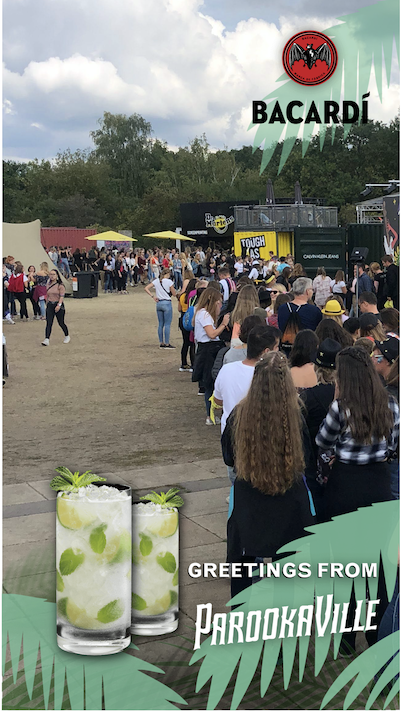
Snapchat campaign for Bacardi

In a Snapchat campaign for Bacardi, branded filters were used to enable users to send branded postcard-like snaps to their friends from the music festival they were attending. Source:

Snapchat

Benefits of advertising on social media

One of the great benefits social media provides to businesses is the establishment of a direct relationship between you and the user. Advertising through social media creates, extends and activates these relationships. Let’s look at social advertising benefits for businesses.

1. Audiences can be precisely targeted

Users enter their data into social platforms: names, photos, job titles, location, marital status, friends, and much more. Social platforms monitor behavior and interest.

This data enables advertisers to reach the right audience and create targeted ads for it. If an advertiser has a well-defined target market, they can deliver it via social media advertising. Advertisers no longer target media channels, they target audiences via media platforms.

2. Social ads address “awareness”

The “hierarchy of effects” model, often used in marketing and advertising to describe the mental stages a user moves through before purchasing a product, contains three stages:

  • Cognitive (awareness and knowledge)
  • Affective (liking and preference)
  • Conative (conviction and purchase)

Social media advertising is good at addressing the cognitive and affective stages. This makes advertising on social media complementary to direct mail, search marketing, or retail media, which have their strengths at the conative stage.

3. Everything is measurable

Every social media ad impression leaves a digital trace. Every click can be tracked. User characteristics and user behavior can be related to each instance of advertising within a social platform.

So much data exists that it becomes challenging to figure out what is significant and what isn’t. Once advertisers choose the right social media metrics, however, this data will be easy to track and optimize via the social platforms.

4. Social advertising is scalable

Social media advertising costs for a campaign can start as low as $10, and the advertiser has control over timespan, targeting and creative. It can also cost $10 million and cover the globe. Between the two, advertisers have ample room to test, learn and adjust.

Marketers, mainly using social media advertising to boost and enhance their content strategy, can monitor and manage it directly through their favorite social media management tool.

5. Social ads can trigger actions

Whereas social media advertising is often used for building awareness, it can also trigger actions. It generates likes and follows, and can also generate clicks to your website and create leads for your sales and marketing teams.

There is even a rising social commerce trend, where social media advertising feeds directly into the conative stage: users can buy products directly on social media.

The 5 best social media platforms to advertise your small business

The Facebook Ads platform is dedicated to social media advertising, and the Google Ads platform also spans other forms of digital advertising. We will focus on the social media advertising aspects of seven digital advertising platforms.

Platform 1: Facebook Ads: Facebook, Instagram, WhatsApp, Messenger

Facebook controls the most powerful advertising platform in the world, as it combines Facebook, Instagram, WhatsApp, and Messenger together on the same infrastructure.

Most advertisers, however, will consider Facebook and Instagram to be two advertising platforms, and WhatsApp and Messenger to be additional features.

Characteristics of the Facebook ads platform:

  • Massive reach
  • Very powerful targeting
  • Innovative and adaptive ad formats
  • Machine learning used to improve performance
  • Most controversial use of user data

Facebook Ads by, itself, is probably the strongest social ads platform and is now also the backbone for advertising on Instagram. Depending on your campaign objective, the platform can activate one or more of its advertising channels.

Platform 2: LinkedIn Ads

The LinkedIn advertising platform stands out for its strong business focus. It’s increasingly integrating with the Microsoft Advertising platform and has access to a powerful technological backbone in its mother company, Microsoft.

Characteristics of LinkedIn Ads:

  • Clear business focus
  • Strong targeting of professional audiences
  • Maturing platform
  • Reputation for high cost

Platform 3: Twitter Ads

The Twitter advertising platform is not as powerful as the two above platforms, but Twitter has an interesting positioning as a great add-on for other social networks. The quality of its user data is not as good as the other platforms, but it is strong on topical and thematic targeting and for events.

Characteristics of the Twitter ad platform:

  • Lower volumes
  • Strong topical targeting
  • Specific communities and events
  • Reputation for low costs
  • Complementary to business activity on Twitter

Platform 4: Google Ads: YouTube and Google My Business

Google never created its own social network despite the efforts put into Google Plus and other initiatives. However, many consider YouTube to be a social media platform and the more recent Google My Business platform also has some social media resemblance.

Characteristics of the social media dimension of Google Ads (YouTube and Google My Business):

  • Massive video reach on YouTube
  • Low cost per view on YouTube and innovative ad formats
  • Strong integration with the Google advertising technology stack
  • Effective social-local advertising on Google My Business

Emerging platforms: Pinterest, TikTok, Snapchat

The social media landscape is constantly changing. Recently the video-driven social media platform TikTok has entered the scene in a significant way. Its closest competitor, Snapchat, had experienced spectacular growth.

The emergence of new players like TikTok and Snapchat makes it hard for existing players like Pinterest or Twitter to keep growing because they are all fighting for the attention (and dollars) of the same audience.

Emerging social advertising platforms:

  • Pinterest: The creator of pin boards where users can gather images from around the web thematically and share with others, is still going strong. It’s finding itself a positioning on social commerce, as it has the power to inspire users for their purchases. If the platform can generate sales and connect to its advertising, it has strong arguments for attracting more advertisement.
  • TikTok is reaching a young audience massively and strongly influences this group. Its recent advertising offering is creative, including formats like stickers, filters, and overlays.
  • Snapchat has also seduced a large young audience which can be difficult for advertisers to reach. Its creative, innovative, and fun use of digital media shines through in its advertising formats.

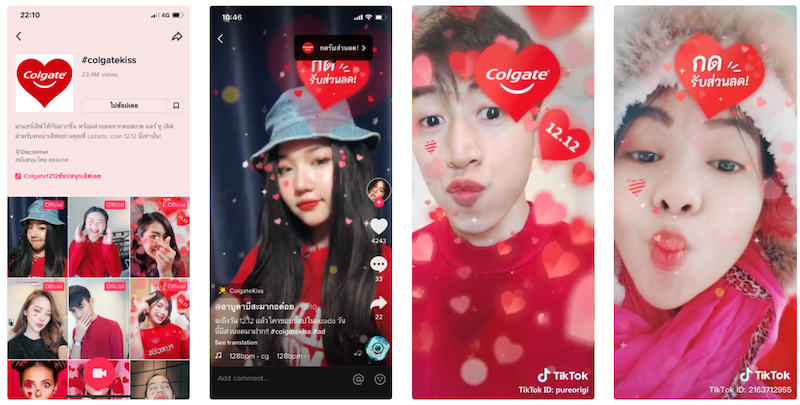
Campaign on TikTok in Thailand

In a campaign on TikTok in Thailand, Colgate used an innovative ad format. They designed a clickable “branded effect” triggering a visual effect of exploding hearts when users made a “kissy face”. Source: TikTok

Social ads are a world of opportunity

Social media advertising is a mass media that can entertain, influence and seduce its audiences. Social media platforms provide powerful targeting capabilities and innovative ad formats.

Advertisers can start small and scale infinitely, but need to be very clear about their objectives, to reap the benefits of social ads. Finding the right social network and reaching the right audience can be challenging, but the opportunity is huge and the benefits can be significant.

By Anders Hjorth

Sourced from the blueprint

By

Looking for a guide to grow your business with IGTV marketing?

Instagram TV (IGTV) can be used by brands to boost their businesses even during the outbreak of COVID-19.

Corporate sales have plunged in the world but there are still chances for your brand to survive. This is easier by using social networks’ marketing features just like IGTV.

Video-sharing platforms are on the rise and almost all social platforms have the ability to share your videos as posts and stories.

In this post, I’m going to introduce IGTV’s usefulness for brands and the ways you can use it to grow your business.

This is particularly useful for the current financial recession we’re suffering in the wake of the coronavirus.

First, it’s good to look at top social media apps/sites/features related to videos to know how different IGTV is. Here are several important video-sharing features on different social networks:

YouTube: The #1 video-sharing platform

YouTube is certainly the top social platform for sharing videos. With up to a whopping 2 billion monthly users, YouTube can provide the greatest audience reach for your video content.

Almost all queries in Google will have several results from YouTube pages. This has made YouTube a great opportunity for video marketing.

This is why many brands try to share their branded videos on YouTube. Learning and entertaining can also be easily provided using both the site and app of YouTube

YouTube video specs

  • Recommended dimensions: 426 x 240 (240p), 640 x 360 (360p), 854 x 480 (480p), 1280 x 720 (720p), 1920 x 1080 (1080p), 2560 x 1440 (1440p) and 3840 x 2160 (2160p)
  • Video length: up to 15 minutes
  • Aspect ratio: 16:9 (auto adds pillar boxing if 4:3)

It should be noted that you can request for longer video length limitation and wait for YouTube confirmation.

YouTube the number one streaming platform IGTV

TikTok: Fastest-growing video-sharing app

TikTok is a Chinese video-sharing service that has recently hit one of the highest installation rates among social networks.

TikTok has almost 800 million active users and a great majority of them are Gen Z. So it’s the best opportunity for drawing the attention of teenagers.

TikTok video specs

  • File size: up to 287.6MB for iOS users and 72MB for Android users
  • Video length: up to 15 seconds
  • Video dimensions: 1080 x 1920
  • Recommended aspect ratios: 9:16, 1:1, or 16:9

TikTok’s video-sharing feature is now accessible only using smartphones, although its web page will show some popular videos.

TikTok the fastest-growing video-sharing app IGTV

Check out this post if you’re looking for the best TikTok tools.

Facebook: The #1 social media platform

Facebook is undoubtedly the largest social media service with around 2.5 billion users from across the world.

There are different ways of sharing videos on Facebook:

  • Regular videos
  • 360 video
  • In-stream video ads
  • Carousel video ads
  • Cover video

So Facebook has provided marketers with a variety of choices. This is why around two-thirds of US businesses use Facebook’s video advertisements.

Facebook video specs

  • Aspect ratio: 9:16 or 16:9
  • File size: up to 4GB
  • Video length: up to 240 Minutes

Facebook has a whopping 1.6 billion visits each day which makes it unrivaled among all social networks.

Instagram Stories and posts: Best for sharing your moment

Before IGTV, Instagram launched other video-sharing features. Pictures or videos of your moments can easily be shared using regular posts on Instagram.

Instagram regular posts video specs

  • File size: up to 15MB
  • Video length: up to 60 seconds
  • Max video width is 1080 pixels wide

Although this is very short, you can upload several video clips and pictures in a single post.

Instagram Stories and posts best for sharing your moment IGTV

Instagram Stories is also a fantastic feature by which you can share your videos.

Instagram Stories video specs

  • Instagram story dimensions: 1080px by 1920px.
  • Aspect ratio: 9:16
  • Video length: up to 15 seconds
  • File size: up to 4GB

In Stories, you can upload several videos to be displayed as a slide show. Stories will automatically disappear after 24 hours.

quaranti[m]e instgram stories IGTV

Instagram Stories has another type of video feature that is very popular among social users. Live videos are the most authentic means of interacting with users and showing them behind the scenes.

The length of Live videos on Instagram Stories can be up to 1 hour. This feature can be accessed using the Instagram app just by clicking on Your Story.

Why IGTV marketing?

Now that we’ve introduced several famous video sharing features you might ask what differences exist between IGTV and these apps.

Adding new IGTV video

IGTV is actually a separate video sharing application which its main capabilities are accessible using Instagram apps and the web page.

IGTV was first released on the 20th of June 2018 and is now so popular that it is being used in 30 languages.

IGTV video specs

  • Video length (common users): 15 seconds to 10 minutes
  • Video length (larger accounts and verified users): 15 seconds to 60 minutes
  • File size (10-minute videos or less): 650MB
  • File size (60-minute videos): 3.6GB
  • Size of cover photo: 420px by 654px (11.55)
  • File type: .MP4
  • Video size: 9:16
  • Video thumbnail/cover image: .JPG
  • Minimum frame rate: 30 FPS
  • Minimum resolution: 720 pixels

Instagram has also provided some updates on IGTV since its initial release.

For example, from 2019, you can create one-minute previews of your videos to be shown on your profile and your followers’ feed as well.

This will greatly help you to be discovered and encourage your audience to “watch the full video on IGTV”.

Also, one of the best tools Instagram has offered is the “IGTV series feature”. Using this feature you can arrange your content like a collection to be released on a regular basis.

Considering all these features, IGTV marketing is a must in the world of digital and it would be hard to find a good alternative application for it.

IGTV in the world of digital marketing

Tips to use IGTV marketing

Video marketing is now a very competitive means of brand awareness and, therefore, you need to have a plan for it. IGTV marketing is a great option for you to generate more leads and convert them into sales.

Here are several tips which can help you grow your business using IGTV:

1. Define a video style for your brand

A lot of accounts on Instagram are constantly broadcasting content and it might be difficult to get ahead of this competition.

A unique style in content generation can significantly help you make your IGTV videos stand out.

Your tone of voice, background colors, video format, cover photos, and many other things give your IGTV videos a style. If you want to make your audience remember your brand, you need to think of a creative and unique style.

For example, Nivea has made a beautiful theme on its IGTV page just using a minimalistic background and a logo:

2. Republish your live videos using IGTV

Instagram live videos can’t be always so well-organized that your message is conveyed completely and accurately.

Also, not all your audience can watch it online so you need to republish your content to reach maximum views.

IGTV is a good choice for modifying and curating your live videos. Try to record your live videos, edit them, and share them using IGTV to repeat your message.

3. Make announcements by Instagram Stories

You can make an announcement for your IGTV videos by Instagram Stories in order to get maximum exposure.

Actually, many people won’t watch full-time videos because they’re always in a hurry. This is why you need to encourage them somehow.

Try to outline your IGTV videos’ content and share it in Stories to draw the attention of your audience.

You need to create a sense of urgency so that they feel they’ll lose an important thing if they don’t watch your full-time videos.

IGTV tip - make announcements by Instagram Stories

4. Create specific IGTV Series

One of the most important factors in digital marketing is consistency. A regular social presence is a must that will make your audience remember your brand.

This is why many brands use social media schedulers to have an automatic posting procedure. Instagram IGTV videos can also be scheduled using a Series feature.

Fortunately, you can create an IGTV Series in three different ways:

  • Instagram app
  • IGTV app
  • Web page

If you haven’t already created an IGTV Series, you can “Create Your First Series” in all these three ways.

Then, select and add your videos to a specific IGTV Series. Try to define a focused and goal-oriented series to be able to manage them well.

You can also “Post a preview” of your videos to your Instagram feed to promote your IGTV content using 60-second previews.

5. Include influencers in your IGTV plans

Nowadays, one of the most effective techniques for growing businesses on social media is influencer marketing.

Many brands try to promote their social content with the help of influencers. Your IGTV videos can also get maximum views if you collaborate with influencers.

First and foremost, you have to think of finding niche influencers and then choose those who are better content creators. This can bring authenticity and help you appear like a thought leader.

6. Take advantage of user-generated videos

Despite many beneficial aspects of video content, they’re very expensive. You need to set aside a considerable marketing budget along with a lot of time and effort.

One way of reducing expenses is by using your followers’ content. Sharing user-generated content is a good way to have authenticity in content marketing.

You can ask your followers to create videos based on your style and contribute to your page. You can then edit these videos and share them as a separate IGTV Series.

You will get higher rates of engagement and reduce your costs by sharing user-generated videos on IGTV.

7. Cross-promote your IGTV videos on other networks

Apart from promoting IGTV videos using previews and Instagram Stories, you can use cross-promotion with other social services.

First of all, you can “Make Visible on Facebook” to cross-promote your Instagram content, especially IGTV videos on Facebook.

If you want to post your IGTV videos via Facebook you need to go to “Where Your Video Will Appear” and choose IGTV and also your Facebook Page below before clicking on Post.

IGTV tip - cross-promote your IGTV videos on other networks

It’s good to have callouts to your IGTV channel from:

  • Twitter
  • Email newsletters
  • Facebook Page

You can also use “Copy Link” in your IGTV video menu and use the URL anywhere to share the video outside of Instagram.

Last but not least try not to republish YouTube videos on IGTV without editing the format of the videos, because they don’t look quite right!

Final word

I have explained the main aspects of IGTV marketing for your business. Of course, you should try to learn your competitors’ tricks and techniques too. Look out for the types of hashtags, style, video lengths, scheduling, etc. This will help you reach your audience more effectively.

By

Guest author: Tom Siani is an online marketing expert with more than 4 years of experience in the digital industry. He is also collaborating with some well-known brands in order to generate traffic, create sales funnels, and increase online sales. He has written a considerable number of articles about social media marketing, brand marketing, blogging, search visibility, etc.

Sourced from jeffbullas.com

There are some things you can do to limit Facebook’s web of surveillance, but not much

Instagram is a massive money-maker. Parent company Facebook doesn’t release figures on how much money the division makes but reports claim it generated $20 billion in advertising revenue in 2019 alone – that’s a quarter of Facebook’s entire yearly revenue. Or, to put it another way, more money than YouTube makes for parent company Alphabet.

At the heart of Instagram’s financial success is two things: advertising, the Stories feature it nabbed from Snapchat is now filled with it, and the data that powers all that advertising. There’s a lot of it.

Instagram, through its integrations with Facebook, uses your personal information to show you adverts that it believes you’ll be mostly likely to click on. This information comes from what you do within the app and Facebook, your phone and your behaviour as you move around parts of the web that Facebook doesn’t own.

First off – everything you do on Instagram is tracked. Almost every online service you use collects information about your actions. Every thumb scroll made through your feed provides it with information about your behaviour. Instagram knows that you spent 20 minutes scrolling to the depths of your high-school crush’s profile at 2am.

The data that Instagram collects isn’t just for advertising. The company uses your information – for instance, what device you use to login – to detect suspicious login attempts. Crash reports from your phone can help it identify bugs in its code and identify parts of the app that nobody uses. In 2019 it ditched the Following tab, which showed everyone the public posts you had liked.

Other than deleting the app completely there’s very little you can do to stop Instagram tracking your behaviour on its platform, but there are things you can do to limit some of the data that’s collected and the types of adverts you see online.

Delete (some) of your data

Want to see the information you’ve given Instagram? Head to the app’s settings page and tap the security option. Here there’s the choice to see the information Instagram has collected about you and download it. If you tap on ‘Access Data’ you’ll be able to see all your password changes, email addresses and phone numbers associated with the account, plus more about how you use the app.

In total there are 25 different categories of information that are collected – these range from interactions with polls that you’ve completed in people’s stories to hashtags you follow and changes to the information in your bio. Instagram’s access tool can be found here.

While it’s possible to see all of this data, there isn’t a lot you can do with it. Your search history can be deleted through the Security menu options, although when you do so you only delete it locally. Instagram and Facebook still know what – or who – you have searched for. “Keep in mind that clearing your search history is temporary, and that searches you clear may reappear in your history after you search for them again,” Instagram says.

It is also possible to delete the contacts that you may have uploaded to Instagram from your phone – this includes names and phone numbers. Uploading your contacts allows Instagram and Facebook to provide friend suggestions but also builds out its knowledge of your social activity.

This Instagram page shows whether you’ve uploaded any contacts and allows you to delete them. Deleting them will not stop new contacts being added to your phone from being uploaded. The setting can be turned on or off through the settings menu on iOS or Android.

The option to download your data includes photos, comments, profile information and more. This has to be requested through the Security menu.

Location

You probably use Instagram on your phone. By default, Instagram’s location gathering abilities are turned-off by default but you’ve probably inadvertently turned the feature on while adding your location to a post or story.

To change this – or at the very least check if you’ve given it permission – you need to visit the settings on your phone. It can’t be done through the Instagram app.

On Android, navigate to settings then tap on apps and find Instagram. Here you can see whether you’ve given it permission to access your location, microphone, device storage, contacts and more. You can turn these settings on and off, allowing Instagram access to your location all the time, only while you’re using the app or to completely deny it.

If you own an iPhone, the process is similar. Tap your way to the phone’s settings, go to privacy and then location services and find Instagram. Here you can choose whether location tracking is on all the time, when you’re using the app or off completely.

Control ads in stories

As Facebook has tried (successfully) to make more money from Instagram, it has filled it with adverts. What you see is all powered, technically, by the parent company. Facebook is the ads server for Instagram and the two are inseparable.

Instagram shows you ads based on what it and Facebook think you like. This is based on what you do while on Instagram (e.g. liking posts from particular brands) but also what you do on websites and services not owned by Facebook. Facebook’s Pixel is a tiny piece of code that’s on almost every website you visit and collects information saying you have visited it. The Pixel gathers data about your activity online and links it to an identifier and that helps decide what ads you’ll be shown.

It’s just one way data is collected that feeds into the company’s bigger advertising machine. “Advertisers, app developers and publishers can send us information through Facebook Business Tools that they use, including our social plugins (such as the Like button), Facebook Login, our APIs and SDKs, or the Facebook pixel,” Facebook’s data policy says. This includes what you buy and the websites you visit.

So what can you do about it on Instagram? The controls are limited. Within the app, though the settings tab, you can see your ad activity. This shows you the ads you have engaged with – such as commenting on posts, liking or watching the majority of. There’s also links out of the Instagram app that explain adverts on the platform within the settings tab.

If you don’t like an individual ad it is possible to hide it by tapping the three dots that appear next to the ad and tapping hide. It’s also possible to report an ad if it could break Instagram’s policies.

To really attempt to control ads on Instagram, you need to go to Facebook. Here it’s possible to change preference settings, which will apply to Instagram as well as Facebook. There are no ad preference settings for people who only have an Instagram account and not a Facebook account. The company says it is working on building controls within the Instagram app.

Facebook’s ad preferences page is a mine of information. It shows what Facebook thinks your interests are, companies that have uploaded information about you, how ads are targeted, ad settings, and ads you’ve hidden. To change the adverts you see you need to spend a short amount of time on this page working through the settings.

Some key choices that can be made are in ‘Your Information’. Here you chose not to see ads that are based on your employer, job title, relationship status and education. The businesses section allows you to stop businesses who have uploaded information about you from showing you ads. And ‘Ad Settings’ stops Facebook products showing you adverts based on information that’s collected from other websites and services you visit.

For any of this to apply to Instagram, the company says your accounts need to be connected. “To make sure your ad preferences are applied, connect your Instagram account to your Facebook account,” it says.

Delete Instagram

If you’re just fed up with Instagram in general you can delete the app. You can’t delete your Instagram account from within the app – we’re not sure why – but instead you have to visit this page. From here it’s possible to delete your account. “When you delete your account, your profile, photos, videos, comments, likes and followers will be permanently removed,” the company says. Or you can temporarily disable your account. This can be done here.

Featured Image Credit: Getty Images / WIRED

Matt Burgess is WIRED’s deputy digital editor. He tweets from @mattburgess1

Sourced from WIRED

By Mirko Scarcella

As the president of an industrial and internet marketing firm, I believe learning how to position your brand on Instagram is essential. This helps ensure you’re sharing high-quality content that is most appropriate for your specific Instagram account, based on the image you want to give yourself and the message you want to convey.

Your brand shouldn’t be posting a messy jumble of senseless shots that tackle the most disparate themes on your profile. Instead, I’ve outlined a few suggestions for how you can better position your brand on Instagram.

But first, what does ‘positioning’ mean?

Let’s begin by clarifying the definition. What do I mean by “positioning?” I’m referring to the whole process that is used to create your brand’s image within the minds of your followers. It is very important that your position is competitive, relevant to your target audience and absolutely distinctive from other profiles or competitors.

Before going to post in a niche or sector as an influencer or as an expert, you need to be clear about your position within the mind of our target or, in the case of social media, your followers.

Want an example? Think of Rolex. What comes to mind? Surely you thought of a watch, but you probably also thought of a luxurious lifestyle. This is what is meant by brand positioning: the perception people have of a brand or a product.

What if you have nothing to sell?

It is not said that you have an Instagram profile with which you promote a product or a service. But if you have a personal profile, you’re still promoting something: yourself and your image. This is called personal branding.

Brand positioning or personal branding, therefore, means being able to create in your followers’ minds a precise image of your product, service, what you do and the values you speak of.

Let’s explore in detail what you will have to do in practice to achieve brand positioning and to better set up your communication.

Brand Positioning: What It Is And How To Build It

Here, I’ll outline how to position your brand, though what I’m about to tell you is fundamental even in the case of personal branding.

Brand positioning means being able to occupy a very precise and structured position of your product or service (or you, in the case of personal branding) within the minds of your followers. Translated into practice, brand positioning means being able to sell the image of oneself or that of your brand and communicating your company’s values and belief system in order to attract an audience that shares those same values.

Something of fundamental importance when building your brand is to find distinctive and differentiating characteristics from all the other internal profiles of your sector or niche. What makes your brand distinctive? What differentiates your business from other similar companies? Why should people choose to follow you?

The answers to these questions will be the foundation for effectively building your brand and for engaging your audience.

But how do you build your personal branding on Instagram?

Seneca said, “There is no favourable wind for the sailor who does not know where to go.” This will have to become your mantra in the construction of effective communication and strong brand positioning. Now, it’s time to get started:

1. Know the image you want to portray and be authentic. Before testing any strategy, you must have in your mind a clear image of the message and values you want to convey. Remember, the keyword to build an effective brand on Instagram is authenticity. What you need to do is always stay true to your company’s vision.

Find your brand’s style, and always follow it. If your brand portrays an image on Instagram that’s very different from reality and far from your values, your followers could feel deceived and will likely stop following you.

And to maintain an image of authenticity, do not use excessive filters for your photos. (Personally, I always prefer editing programs compared to the pre-set filters of Instagram.)

2. Be consistent in your messaging. Make sure your photos have a single thematic fulcrum that’s always in line with the image you want to transmit. Inserting photos of kittens on a fitness profile, for example, will likely confuse those who follow you and weaken your brand’s positioning.

3. Humanize your brand. Consistency is an excellent method to offer a unique and genuine image of yourself, but remember that coherent does not mean trivial. Show off your best weapons, your sympathy and your self-irony. This will break the coldness of the images to show your brand’s most human and warm side.

Your photos and videos should show a “special moment” related to your company. Ensure what you share contains a small story in which the protagonist is your brand’s identity. Your images must, therefore, not be mere representations of a space; they must live and tell a story and arouse emotion.

I’ve found that sharing a behind-the-scenes look at your work is also usually much appreciated because this reveals to your audience something they might not have otherwise known. This helps earn trust from your followers. Alternate professional, backstage, and personal images and you will be able to arouse interest.

4. Respond to comments with kindness. Always reply to comments followers leave. This will show you care about your followers and will strengthen your image as an influencer.

Also, always be kind, even with those who leave constructive criticism. Never forget that humility is always appreciated and reinforces the esteem of those who follow you. Being available and grateful will consolidate your personal branding.

Remember to show your value and your skills and always help others achieve similar results. This will really help your followers see you in a positive light, so you can become a brand that’s recognized and appreciated by your audience.

Feature Image Credit: Getty

By Mirko Scarcella

President at Lion ADV, Inc, social media marketing and brand positioning. Read Mirko Scarcella’s full executive profile here.

Sourced from

By Alex McGeeney, StackCommerce

Instagram has come a long way in the past decade. No longer is it just a tool to make your sub-par iPhone pictures look better; the platform allows users to live-stream, share photos and enjoy a variety of dynamic face-recognition filters. But, perhaps more important than all this is the fact that it has become a huge advertising and money-making tool for brands and influencers.

Want to harness that power for your business? The 10 Instagram Growth Secrets From Celebrities & Influencers Course breaks down what it takes to grow a business on the social media platform, and it’ll only run you $13.99 right now.
The online boot camp is led by entrepreneur and marketing expert, Benjamin Wilson, who taps into the knowledge of big-name influencers and tastemakers on the platform.

Armed with expert advice and practical applications in hand, Wilson breaks down how to exponentially increase your following, generate profit, use hashtags to your advantage, and ultimately build an engaged audience that continues to come back to your content day after day.

So far, over 200,000 students have already taken this specific course, rating it an impressive 4.4 out of 5 stars. As one past customer notes, the step-by-step guide was “Amazing. The course is up to date and at the edge of what is happening now. I am enjoying the easy natural presentation and the logical step by step guides and procedures.”

If you’re ready to get serious about the ‘gram, consider enrolling in the 10 Instagram Growth Secrets from Celebrities and Influencers Course. Currently, the digital course is on sale for $13.99 — a total savings of over 90% off its normal retail price.

By Alex McGeeney, StackCommerce

Sourced from New York Post

By

  • Instagram is adding new features to combat online harassment.

  • The Facebook-owned app is making it easier to block multiple people at once, letting users pin comments on posts, and introducing tools to restrict who can tag users.

  • Instagram has been criticised in the past over its use as a platform for online bullying.

  • The new features were announced alongside the latest version of Facebook’s Community Standards Enforcement report.

Instagram is making it easier to block people and delete comments in a bid to crack down on harassment. The app is also adding the ability to pin comments on posts.

On Tuesday, the Facebook-owned photo-sharing app announced a bunch of feature that are, it says, collectively intended to “mark the continuation of our effort to lead the industry in the fight against online bullying.”

Instagram users will be be able to delete up to 25 unwanted comments on a post at once, instead of one-by-one. Similarly, users will be able to block multiple people at the same time. The app is adding a feature that will allow users to “pin” certain comments made on posts, which the company said in a blog post “gives people a way to set the tone for their account and engage with their community by pinning a select number of comments.”

And thirdly, Facebook is letting users set restrictions on who is able to tag and mention their account on Instagram. It can be set to everyone, only the people that the user follows, or no-one.

Instagram has largely escaped the scandals that have bedeviled its parent company Facebook over the past few years — but it has been criticized by some over its alleged impact on mental health and its role in online harassment. In 2018, an investigation by The Atlantic detailed numerous instances of harassment on Instagram, headlined bluntly: “Instagram Has A Massive Harassment Problem.”

The company has since made efforts to work on the issue, rolling out new tools to control what comments can appear on users’ posts, and using artificial intelligence to monitor for potentially bullying comments.

Tuesday’s new features were announced alongside the publication of Facebook’s twice-yearly Community Standards Enforcement report — a report on Facebook’s content moderation work, and how it policies its social networks for harassment, hate speech, and other illegal or objectionable content.

Facebook also announced on Tuesday that it has created a new dataset of more than 10,000 “hateful memes,” that it is sharing with researchers so they can develop technologies to help defend against hate speech online.

Feature Image Credit:Adam Mosseri, head of Facebook-owned Instagram. Reuters/Beck Diefenbach

By

Sourced from Business Insider