Tag

iPhone

Browsing

By Dave Smith.

Apple preloads every iPhone with a slew of its own first-party apps — but thankfully, the App Store is overflowing with alternative apps, many of which are better than Apple’s.

Whether you’re looking to organize your photos, get some work done, or get around town, we’ve scoured the App Store for the best apps that are better than the default ones on your iPhone.

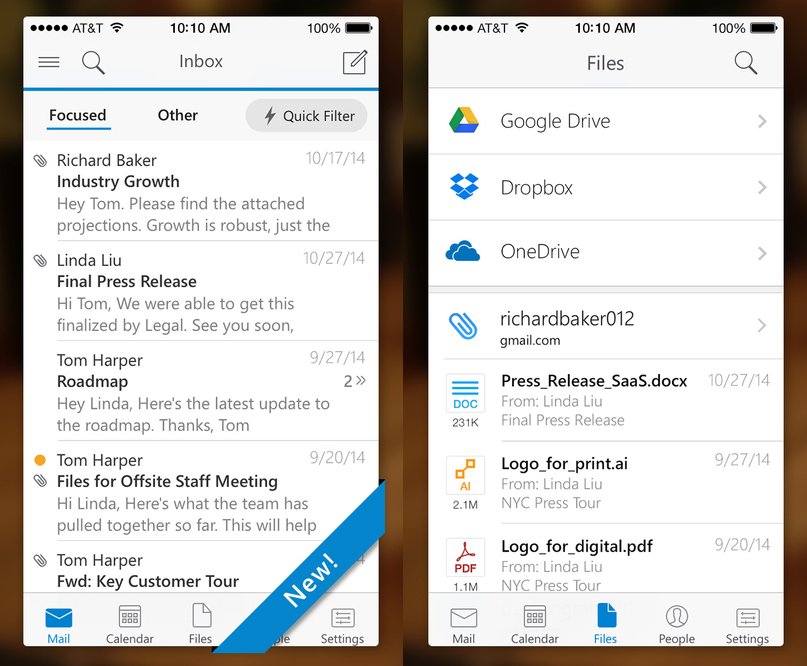
Instead of Mail, use Microsoft Outlook.

In December 2014, Microsoft bought one of my favorite email apps, Acompli. Outlook is essentially that app with a new skin on it. Still, this is the most robust and most refined email app out there — you can create quick filters for your flagged and unread emails and check out all the attachments and files that have been emailed to you in one dedicated folder. It also gives you tabs for your calendar and contacts, which are nice additions that improve productivity.

(Microsoft Outlook, free)

Also: Instead of Mail, use Email (from EasilyDo).

Also: Instead of Mail, use Email (from EasilyDo).

EasilyDoMail.com

I try new email apps all the time, but after using Outlook for a while, I’ve fallen in love with another app, Email from EasilyDo.

It’s incredibly fast, highly customizable, and, most importantly, it’s both smarter and more proactive than any other email app I’ve used. It automatically scans your emails for purchases, receipts, attachments, calendar dates, and more, and it’ll automatically put those emails into separate, appropriately labeled folders that appear on your sidebar. It’s super nifty — you can read my review of it here.

(Email from EasilyDo, free)

Instead of Calendar, use Google Calendar.

Instead of Calendar, use Google Calendar.

Digital Trends

I’ve used Google’s calendar app on the desktop for years — but even if you haven’t, you’ll feel right at home on Google Calendar, which is beautiful to look at and easy to use.

Like Apple’s Calendar, it can pull in data from Google, Facebook, and iCloud, but it presents all the information in a much more useful way than Apple’s default app does. The top half of the screen shows you the whole month, and the lower half of the screen shows you what’s up next. You can scroll down to see what’s coming up, and you can tap the top right corner of the screen to jump back to the present day. It’s all incredibly intuitive.

(Google Calendar, free)

Instead of Notes, use Evernote.

Apple’s Notes for iOS has gotten better in recent years, but Evernote is still the best way to create different types of notes and keep them organized across all your devices.

With Evernote, you can create notes out from photos or text, flag notes to revisit later, set reminders for yourself, and tag your notes in various ways to stay organized. Better yet, if you take pictures of documents and upload them to Evernote, its powerful search function can even scan those PDFs and other documents. And, of course, Evernote syncs across all devices — phones, tablets, laptops, and desktops.

(Evernote, free)

Instead of Maps, use Google Maps.

Instead of Maps, use Google Maps.

Google

Apple’s mapping and navigation app has gotten much better recently, but Google Maps is still the most reliable, most detailed, easiest-to-use mapping and navigation app for travel, whether you’re walking, driving, biking, taking a bus, taking a train, or hailing a car.

Google says its Maps data is crowdsourced from “oodles of Android phones moving through the world” and processed by machine learning algorithms that study traffic patterns to give you the quickest route every time.

(Google Maps, free)

Instead of Voice Memos, use Recordium.

Apple’s Voice Memos app is nice, but it doesn’t give you a great way to organize or annotate all your recordings. Enter Recordium, which lets you edit your clips right in the app and annotate any part of the recording. It will even sync with your favorite cloud storage service like Google Drive or Dropbox.

(Recordium Pro, $9.99)

Instead of Apple Music, use Spotify.

Instead of Apple Music, use Spotify.

Spotify

Apple Music is Apple’s built-in music streaming service — you can still load it up with music from your iTunes library for free, but if you pay $10 a month, you’ll get access to Apple’s entire music catalog. Spotify, however, is still the most polished music app out there, and in my opinion the best experience that’s actually worth your money.

Spotify Premium costs about the same per month as Apple Music, but Spotify organizes music into clever ways that Apple does not. Aside from browsing by genre or what’s topping the charts, Spotify also puts together a unique “Discover Weekly” playlist for you every Monday based on your listening habits and a “Release Radar” playlist every Friday of new music you might like. It’s not easy to find new music, but through smart curation and design, Spotify does music discoverability better than anyone else in the game.

(Spotify, free)

Instead of Weather, use Dark Sky.

Instead of Weather, use Dark Sky.

Google Play

Apple’s Weather works fine most of the time — it’s taking the same information as The Weather Channel, specifically its Weather Underground service — but the most detailed and accurate weather app I’ve used is Dark Sky. You can get minute-to-minute predictions for the next hour, and hour-by-hour forecasts for the next day and week.

Since Dark Sky tracks your location via GPS, you can get notifications for when it’s about to start raining or snowing in your area — it’s eerily good at this — and you can even watch radar animations to see how storms are moving.

(Dark Sky, $3.99)

Instead of Safari, use Mercury.

Instead of Safari, use Mercury.

Dave Smith/Business Insider

You may not have heard of it, but the Mercury web browser for iPhone is a great Safari or Chrome alternative on mobile.

It’s excellent where it matters: It’s extremely fast and has a ton of useful features that you’d normally find only on a desktop computer. You can sync all your Chrome or Firefox bookmarks and reading lists, save files from the web and manage them, choose a background theme, use real tabs (up to 10 can be open at once), browse webpages in full-screen mode, screenshot and doodle on any website, browse privately — and there’s even more. Perhaps best of all, Mercury supports a variety of plug-ins and extensions like LastPass, Google Translate, and AdBlock.

(Mercury, free)

Instead of Pages, use Word.

Instead of Pages, use Word.

Dave Smith/Business Insider

Apple’s Pages has plenty of useful tools, but it’s not always easy to read or format on the smaller iPhone screen. In bringing Word to the iPhone, Microsoft made sure it had built-in modes for easy reading versus the real document layout, and it’s very easy to write and format your documents with text, photos, and equations — and have it all look good on other devices — seamlessly.

(Microsoft Word, free)

Instead of Health, use MyFitnessPal.

Instead of Health, use MyFitnessPal.

Dave Smith/Business Insider

Apple’s Health more or less collects data from other apps, but it assumes you use a ton of other fitness-tracking devices that can count steps and stairs by themselves. MyFitnessPal, on the other hand, offers much more in the way of tracking your own fitness. It’s easy to track your diet using its immense database of foods — you can even scan barcodes — and it also works with over 60 fitness-tracking devices and apps to give you a picture of your overall health. You can see your progress at a glance and add notes to your “diary” for future reference.

In general, it’s just a much more complete app — you can even share your progress to your favorite social network in case you need cheering on.

(MyFitnessPal, free)

Instead of iMovie, use Videoshop.

Instead of iMovie, use Videoshop.

Dave Smith/Business Insider

Videoshop makes it exceedingly simple to cut and combine your iPhone videos into one movie — you can also add filters, music, and animated titles, and even apply slo-mo or fast-motion to your videos to get the desired effect. Once you’re done, sharing to your favorite social network is as easy as a button tap.

(Videoshop, $1.99)

Instead of Keynote, use PowerPoint.

Instead of Keynote, use PowerPoint.

Dave Smith/Business Insider

Keynote offers a basic slideshow creator and editor with plenty of transition animations and formatting options, but it doesn’t hold a candle to PowerPoint. Microsoft’s app lets you create slideshows that sync across all devices, but it also lets you view your notes as your presentation is beamed to a bigger screen. You can even draw all over your presentation right from your iPhone in real time.

(Microsoft PowerPoint, free)

Instead of iTunes U, download Khan Academy.

Instead of iTunes U, download Khan Academy.

Dave Smith/Business Insider

Apple’s iTunes U is great for students or interested learners who want to view full courses from leading universities in things like history, science, even foreign languages. It also offers plenty of resources for teachers, too, but with so many options, it’s not always easy to know where to start.

Khan Academy offers many of the same features as iTunes U, but it’s all brought together in an extremely intuitive interface that lets you first choose what you want to learn and then hone in on certain subjects, courses, and videos. It even has a ton of resources for test preparation, whether you’re getting ready to take the SAT or MCAT.

(Khan Academy, free)

Instead of Stocks, use Stocks Tracker.

Instead of Stocks, use Stocks Tracker.

Dave Smith/Business Insider

Plenty of people will say they never asked for Apple’s Stocks app. But Stocks is child’s play compared with Stocks Tracker, which tracks indexes, currencies, futures, and even bitcoin — all in real time. (Apple’s Stocks app updates every few seconds, but not nearly as quickly as Stocks Tracker.) It also has a useful currency converter, and you can set up alerts and check on bullish or bearish signals for any given market, at home or abroad.

(Stocks Tracker, free)

Instead of Numbers, use Microsoft Excel.

Instead of Numbers, use Microsoft Excel.

Dave Smith/Business Insider

Apple’s Numbers is helpful for creating charts, but Excel is still the best spreadsheet application out there — and it will sync across all your devices. The iPhone app even has a special formula keyboard that lets you compute more quickly and is much easier than working with a standard keyboard.

(Microsoft Excel, free)

By

Sourced from Business Insider UK

Sourced from DW

It was undoubtedly a technological breakthrough. The introduction of Apple’s iPhone 10 years ago revealed how under Steve Jobs’ leadership a simple cell phone turned into a complex, multipurpose mobile device.

True to his nature, on January 9, 2007, Steve Jobs used his eloquence to capture the attention of his audience at the Moscone Center in San Francisco. He kept talking about “three new products” which he was about to present on stage. Visitors to the Macworld conference would soon find out that he was talking about three new products rolled into one new Apple device – the iPhone.

“The iPhone was the first-ever smartphone, the editor-in-chief of the “Mac & i” publication, Stephan Ehrmann, told DW. “It was the first cell phone with a big display that you could use to surf the web and listen to music.”

What’s completely normal for today’s smartphone users was revolutionary 10 years ago. Before the iPhone hit the markets, cell phones were not really user-friendly. Those devices often only had a monochrome display, a huge keyboard and miserable internet connection parameters.

Virtual keyboard

The iPhone only has one button, and it comes with a virtual keyboard that’s only displayed when you need it. When introducing the new product a decade ago, Steve Jobs spoke about reinventing the phone. What he presented was in fact a lot more than just a phone – it was a full-fledged mobile computer that you could use everywhere.

Steve Jobs with Apple iPhone 1 (picture alliance/dpa/J. G. Mabanglo)The introduction of the iPhone 10 years ago marked the birth of the smartphone age

Meanwhile in Germany, six in 10 people own a smartphone, and almost everyone in the 14-to-29 age bracket does. Kids can handle the phones just like adults know how to drive a car.

“The iPhone was a true revolution for the business world,” said Tobias Kollmann, a professor for e-business and e-entrepreneurship at Duisburg-Essen University. With the internet basically in everyone’s pocket, actual and potential customers were suddenly a lot closer for companies. Just remember that smartphone owners seem all too willing to also buy products via online transactions.

Smartphones have also had a huge impact on the tourism sector, says Kollmann. Location-based services enable hotel operators to localize smartphone users to make tailor-made offers to them, to offer them hotel rooms in their vicinity. And even whole tours are increasingly being booked online, he adds.

Over a billion iPhones sold

Of course, the sale of iPhones is big business, although the overwhelming number of smartphones in use worldwide are not from Apple and run on the rival Android operating system from Google (80 percent). But for Apple itself, the iPhone is still the company’s big money generator, with profit margins a lot higher than those generated by its competitors. Since its introduction 10 years ago, over a billion iPhones of different generations have been sold globally.

The iPhone is Apple’s cash cow, and its most successful product by far,” says Stephan Ehrmann from “Mac & i.” “It’s washed huge profits into the company’s coffers and has made Apple the world’s most valuable company.”

Infografik Verkauf iPhone 2007-2016 ENGLISCH

Dependence becoming a problem

But there’s a snag, says Ehrmann. The latest iPhone generation has seen dwindling sales figures, prompting Apple to slow down iPhone 7 production. “They know full well that sales are declining, and they don’t want to get stuck with too many units produced,” he argues.

Products such as the iPad, Apple TV and the Apple Watch have not been able to match the success of the iPhone. So how are Steve Job’s successors going to ensure that the company continues to thrive? Ehrmann believes that the answer can be found in the Apple Car, a self-driving electric vehicle which is rumored to hit the market in the next couple of years. But until then, such a car is nothing but that – a rumor.

Sourced from DW