Tag

Recommendations

Browsing

By Robert Burko

Last summer, I was in Portugal, and I started noticing something funny. You could almost tell who was on a “ChatGPT tour” of the city. People were moving with purpose, from one viewpoint to the next, following the same AI-generated itinerary.

That moment stuck with me because it captures what is happening to SEO right now.

For most of the last two decades, SEO mostly meant one thing, where you ranked on Google (and occasionally Bing). The customer journey was familiar. Someone searched, scanned a list of links, clicked and explored.

Now the journey is increasingly “ask, get an answer, take action.” And the platforms shaping that journey include ChatGPT, Claude, Gemini, Perplexity and Google itself, which is inserting AI summaries, what Google calls AI Overviews, into search results. Google describes these overviews as an “AI-generated snapshot with key information and links to dig deeper.” It also cautions that AI responses may include mistakes.

Marketers are trying to name this shift AEO, AI SEO, GEO and more. The acronym matters less than the behaviour. Search is moving from rankings to recommendations.

Why Traditional SEO Metrics Are Getting Less Reliable

When an AI summary appears, many users never click a website at all. Pew Research Center found that “users who encounter an AI summary are less likely to click on links to other websites than users who do not see one.” In addition, when an AI summary is present, clicks on the sources cited inside the summary are rare.

This matters because many businesses still evaluate SEO primarily through organic traffic and rankings. Those metrics are not disappearing, but they are becoming incomplete. Increasingly, visibility is awarded before the click, directly within the answer layer. If your brand is not present in that layer, you might not even enter the consideration set.

The New Consumer Journey Is Compressed And Conversational

In a traditional search journey, consumers often ran multiple searches, compared options, read reviews and explored several websites before deciding.

In an AI-first journey, that process compresses. A user asks a broad question in natural language, gets a shortlist, asks one or two follow-ups, then takes action. The AI is not only retrieving information, it is shaping the path. That is exactly what I saw on those streets in Portugal. The “research” happened inside the conversation, and the itinerary followed.

This shift changes what it means to win in SEO. It is no longer only about being found, it is about being suggested.

What It Takes To Earn AI Recommendations

There is no single trick that guarantees an AI assistant will mention your business. Anyone promising a guaranteed formula is likely oversimplifying. But there are practical moves that consistently improve your odds because they make your business easier to understand, easier to trust and easier to cite.

1. Write content that answers, not content that markets.

AI systems tend to surface clear explanations and decision support, not sales copy. If your content is vague, overly promotional or thin, it is less useful to an answer engine.

2. Make your business easy to interpret.

AI systems build confidence through consistency. If your services, positioning and “about” information are unclear or inconsistent across your website and public profiles, you are harder to recommend.

3. Build credibility outside your own website.

In an AI-driven landscape, third-party validation becomes even more important. Credible references help establish that your business is real, recognized and worth including. This is also where traditional PR and thought leadership can quietly compound.

4. Create content that mirrors how people ask AI for help.

AI queries are often framed as “best option for X,” “how do I choose” or “what should I do if.” Content that maps to those questions, with direct answers and helpful structure, is more likely to be used.

5. Expand how you measure SEO performance.

Organic traffic still matters, but it should not be the only indicator. You need a way to understand when and where your brand shows up in AI-generated answers, and what topics you are being associated with.

The Leadership Takeaway

The SEO landscape is changing because consumer behaviour is changing. People are outsourcing more of the research process to AI, and even traditional search engines are becoming answer engines. Google’s own documentation on AI Overviews makes this direction clear.

A recent AP-NORC poll reported by AP News found that 60% of U.S. adults use AI to search for information. If your strategy still assumes the customer journey starts and ends with blue links and rankings, you are already behind. The new goal is to earn visibility where decisions are being shaped, inside the answers, not only in the links.

In the old SEO model, you won attention by ranking. In the new model, you win consideration by being the brand the system trusts enough to recommend.

Feature image credit: Getty

By Robert Burko

Robert Burko is CEO of Elite Digital, a digital marketing agency focused on modern marketing operations. Read Robert Burko’s full executive profile here. Find Robert Burko on LinkedIn and X. Visit Robert’s website.

Sourced from Forbes

By Dirk Petzold

Showcase Your Professional Story With The Game-Changing CV/Resume/Portfolio Screen Presentation Template by TemplatesForest!

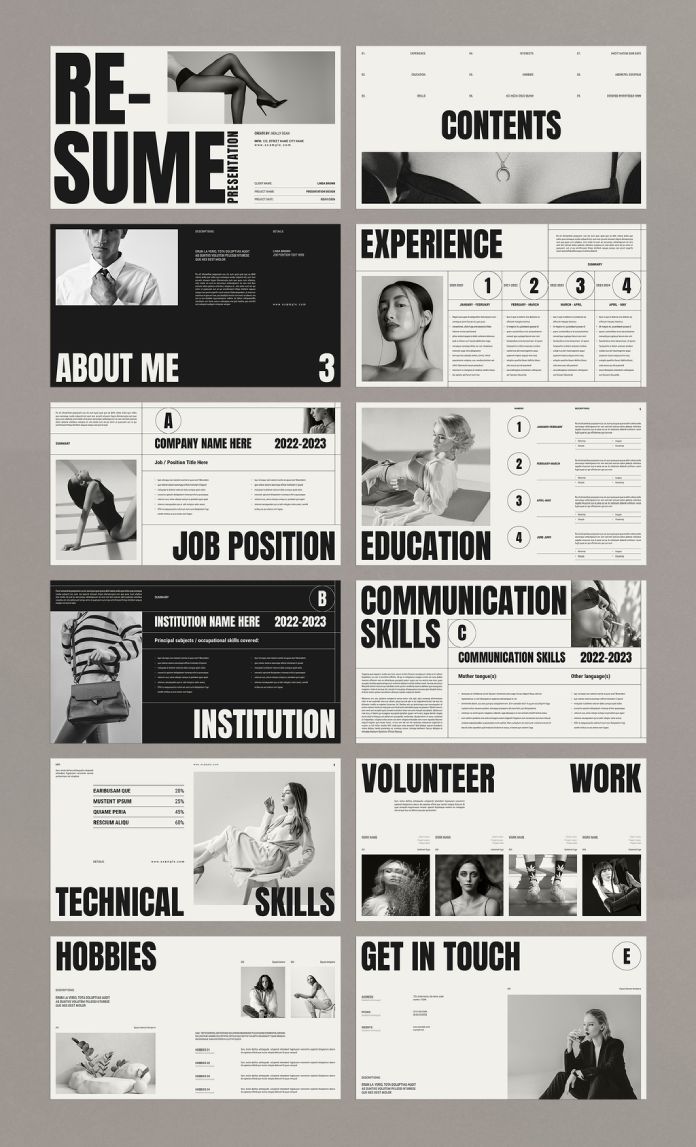
Hey, trailblazers of the professional realm! If you’re tired of the same old mundane CVs and resumes, get ready to revolutionize the way you present yourself or your design portfolio with this extraordinary CV/resume screen presentation template by TemplatesForest. Crafted with precision using the wizardry of Adobe InDesign, this template is not just a document; it’s a masterpiece in 1920×1080 pixels!

Please note that this template requires Adobe InDesign. You can get the latest version from the Adobe Creative Cloud website—take a look here.

CV/Resume Screen Presentation Template by TemplatesForest

The Canvas of Creativity

Let’s talk pixels and panache. This template is not your regular 8.5×11 affair; it’s a widescreen experience, designed for those who dare to dream big. A canvas as vast as your ambitions, this template invites you to think beyond boundaries and make a statement that refuses to be ignored.

12 Pages, Infinite Possibilities

Ever felt confined by the limitations of a single-paged CV? Fear not! TemplatesForest has your back with 12 pre-designed pages that are more than just templates; they are chapters in your professional narrative. Each page is a canvas for you to paint your skills, experiences, and achievements in the most vivid hues.

Customize to Conquer

You’re not a cookie-cutter professional, and your CV shouldn’t be either. TemplatesForest understands that which is why this template is fully customizable. From colours that reflect your personality to fonts that echo your style, the power is in your hands to mold your narrative.

A Symphony of Typography

Ever heard of a CV that reads like poetry? Now you have! With bold typography that demands attention and a layout that flows like a well-composed symphony, this template doesn’t just present information; it elevates it to an art form. Your potential employers won’t just read; they’ll be captivated.

Tailored for the Mavericks

Are you a graphic designer who defies the ordinary? An architect with a vision beyond blueprints? This template is your canvas. It’s not just for resumes; it’s a portfolio waiting to be unleashed. Let your creativity run wild, and let this template be the stage for your professional opus.

Modernity Personified

In the age of digital dominance, your CV should speak the language of the times. Modern, sleek, and utterly captivating, this template is not just a piece of paper; it’s a digital experience that screams, “I am here, and I mean business!”

A Toolkit for Success

Your CV is not just a document; it’s your brand. TemplatesForest doesn’t just offer a template; it provides you with a toolkit for success. A toolkit that says, “I am not just looking for a job; I am crafting a legacy.”

Final Word

In a world inundated with ordinary, dare to be extraordinary. TemplatesForest’s CV/Resume Screen Presentation Template is not just a document; it’s your story told in pixels and panache. It’s time to break the mold, shatter expectations, and present yourself like never before.

Get ready to unleash your professional story – because mediocrity is not an option, and with TemplatesForest, neither is blending in. Your journey to professional greatness starts here. Download, customize, and let your story shine!

Don’t hesitate to find more graphic design templates on WE AND THE COLOR.

By Dirk Petzold

Sourced from WATC

By Dirk Petzold

Simplify your social media game with ready-to-use templates.

In today’s digital era, social media has become an integral part of our lives. Whether you’re a business owner, a content creator, or an influencer, it’s essential to have a visually appealing and engaging social media presence. However, not everyone has the time or design skills to create stunning graphics from scratch. That’s where Adobe Stock comes to the rescue! With Adobe Stock contributor @orangeberry‘s set of simple social media post templates in Adobe InDesign, you can effortlessly elevate your online presence.

Simple Social Media Post Templates for Adobe InDesign
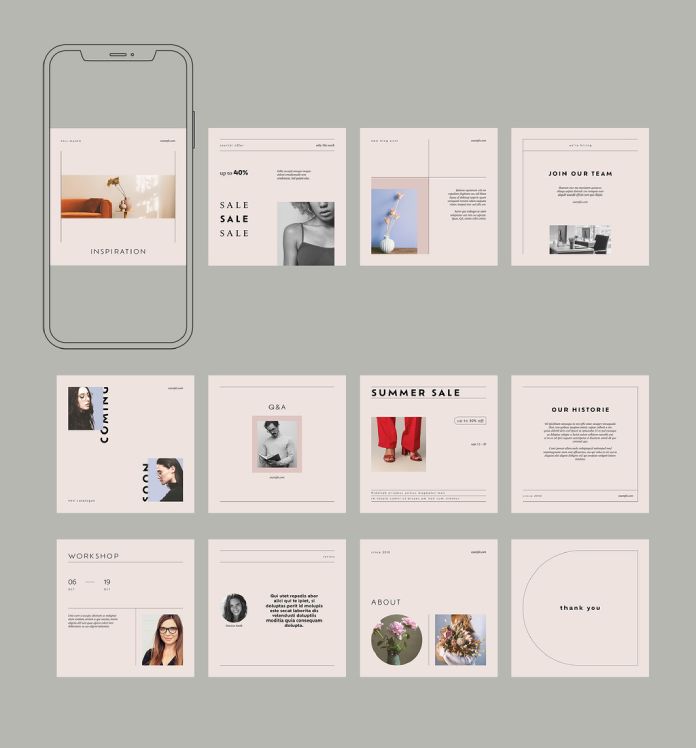
  1. Efficient and Customizable Designs: @orangeberry‘s set of social media post templates offers a convenient solution for those seeking professionally designed graphics. Each template comes in a standard size of 1080 x 1080 pixels, optimized for various social media platforms such as Instagram, Facebook, and Twitter. These pre-made designs provide a solid foundation, ensuring your content stands out in a sea of endless feeds.
  2. Versatile Design Options: With 12 unique templates to choose from, you’ll find a wide range of options to suit your brand’s aesthetic and communication needs. From bold and vibrant layouts to minimalist and elegant designs, @orangeberry‘s collection caters to diverse styles and content themes. Whether you’re promoting a product, sharing a quote, or announcing an event, there’s a template for every occasion.
  3. Seamless Customization in Adobe InDesign: The templates are created using Adobe InDesign, a powerful graphic design software known for its versatility and user-friendly interface. With InDesign’s intuitive editing features, you can easily customize the templates to match your brand’s colours, typography, and imagery. Make your social media posts truly unique by adding your own photos, logos, or other visual elements that resonate with your audience.
  4. Time-Saving Convenience: One of the biggest advantages of using @orangeberry‘s social media post templates is the time saved. By starting with a pre-designed template, you eliminate the need to start from scratch, significantly reducing the time and effort required to create eye-catching graphics. Spend more time crafting compelling captions or engaging with your audience while still maintaining a consistent and professional visual identity.
  5. Endless Possibilities: While the templates provide a great starting point, don’t limit yourself to their original design. Use them as a springboard for inspiration and let your creativity shine. Customize the layout, experiment with different fonts, or rearrange the elements to create a design that truly represents your brand’s personality.

Having visually appealing and engaging social media content is crucial. Thanks to Adobe Stock and @orangeberry‘s set of social media post templates in Adobe InDesign, creating stunning graphics has never been easier. With customizable designs and a range of options, you can streamline your social media game and present your brand in a professional and captivating manner. Don’t let design constraints hold you back; unleash your creativity with these ready-to-use templates and make a lasting impression on your audience.


Check out more graphic design templates on WE AND THE COLOR.

By Dirk Petzold

Sourced from WATC

By Dirk Petzold

This well-designed resume template is available for download on Adobe Stock.

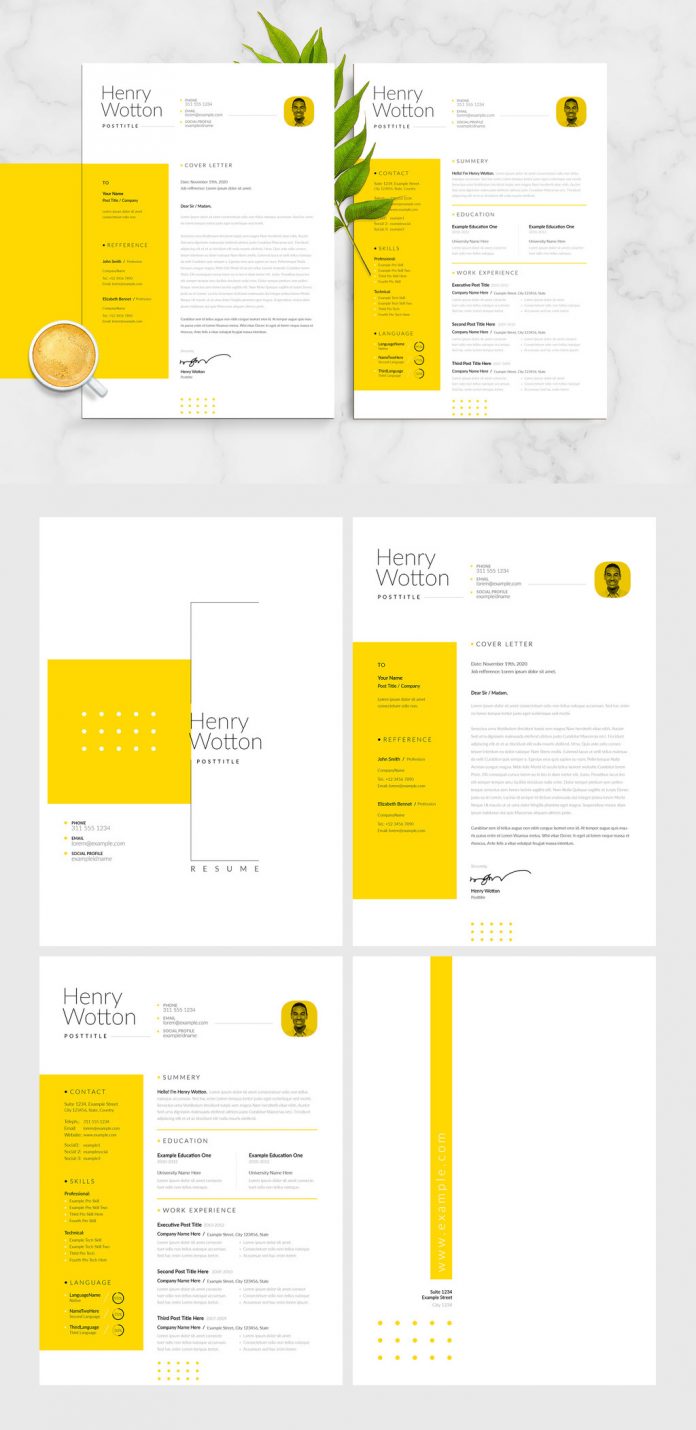
Consisting of four pages including cover, letter, cv, and closing page, this high-quality resume template is a real eye-catcher. Designed by Adobe Stock contributor @GraphicArtist, this beautiful template can be edited very easily. You only need basic knowledge of how to work with Adobe InDesign. Using this modern and minimalist resume template, you are sure to stand out from the crowd of competitors. Created with a uniform layout and delicate yellow accents, this resume and cv template will hopefully help you to get your desired job.

As mentioned before, this customizable resume template requires Adobe InDesign. You can get the latest version from the Adobe Creative Cloud website, just have a look here. Feel free to learn more about this Adobe InDesign template by clicking on the following link or have a look at the images below.

Modern and minimal resume, CV, and cover letter InDesign templates with yellow accents.
This modern and minimal resume, CV, and cover letter InDesign templates with yellow accents can be downloaded here.

Take a look at our recommended Templates category to find more design assets.

By Dirk Petzold

Sourced from WATC