The scammers allegedly posed as company reps offering advertising and related services to current and former timeshare owners.
Key Takeaways
Two men each face 10 charges for conspiracy to commit wire fraud and wire fraud related to telemarketing and email marketing campaigns aimed at the elderly.
The decade-long scam scam cost victims more than $4.5 million.
On Tuesday, a federal grand jury indicted a man from West Los Angeles for running a telemarketing scam that targeted elderly victims over the course of a decade, resulting in fraudulent gains of more than $4.5 million.
Michael Alexai Dragunov, 44, along with Christopher Michael Lang, 42, an accomplice from Kansas, each face 10 charges in total for conspiracy to commit wire fraud and wire fraud related to telemarketing and email marketing campaigns aimed at the elderly.
From August 2013 to June 2023, Dragunov and Lang allegedly posed as representatives of companies offering advertising and related services to current or former timeshare owners, according to the indictment. The defendants used aliases, Skype phone numbers, and fictitious transactions to hide their identities and make their telemarketing companies appear legitimate.
The victims were tricked into signing agreements with Dragunov and Lang’s fraudulent telemarketing companies, which claimed to help sell or rent their timeshare properties for a single advertising fee. In reality, the victims never received the promised services or money, even after paying recurring fees totalling hundreds of thousands of dollars over multiple years.
The men allegedly went to great lengths to keep up the façade of their fraudulent telemarketing agencies, including making “hundreds of phony small transactions” on the companies’ payment processing accounts.
To extract more money from victims, Dragunov and Lang allegedly employed various deceptive tactics, including falsely assuring victims that the fees would be refunded or reimbursed, asserting that victims still owed taxes on their timeshare properties, and warning that any attempts to dispute payments would result in the loss of all funds and proceeds from potential timeshare sales or rentals.
If convicted, the men could face a maximum sentence of 30 years in federal prison.
Ready to get started with YouTube marketing but don’t know where to begin?
Tons of social media competition and short attention spans make standing out on the world’s second-largest search engine seem unattainable.
But for social media mavens, content marketing gurus, and online business owners like you, mastering YouTube can be your golden ticket.
Whether you’re a seasoned marketer or a business newbie, this short, sweet, and complete guide will help you create a successful YouTube marketing campaign that gets your YouTube channel (and business) noticed.
Ready?
Let’s do this!
What is YouTube Marketing?
YouTube Marketing is the practice of using a dynamic set of tactics on your YouTube channel to boost your products, services, or brand via the power of the YouTube platform.
Far more than just making random video uploads, a YouTube marketing strategy employs research, social media insights, and data to help make decisions about every detail of a YouTube campaign.
Think on-brand channel art, SEO-savvy video descriptions, intentional partnerships with YouTube influencers, and smart YouTube ad placements.
The goal?
Grab attention, spark engagement, and lead viewers to take action — like clicking to your site or making a purchase.
It’s blending creativity with data insights to help you become a YouTube rockstar!
Do You Really Need a YouTube Channel?
Spoiler alert…
YES.
If you have a business in 2023, a social media presence is no longer an option. It’s a necessity.
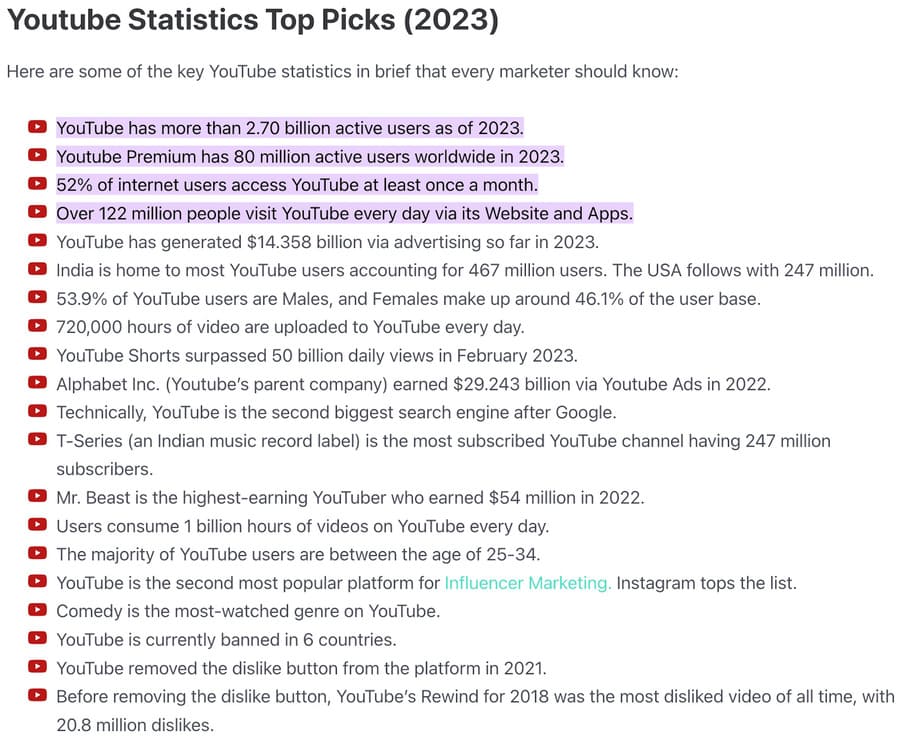
YouTube is no exception. Boasting over 2.7 billion logged-in monthly users, it’s a dynamic social media platform that spans demographics and geographies. Multitudes of YouTube viewers are out there looking for exactly whatever it is you’re selling.
And if growth and greater brand awareness are on your agenda, YouTube is where you need to be to help them find it.
Nearly every statistic underscores a truth: a thriving YouTube channel is a goldmine. If you don’t have a YouTube channel, you’re sending your customers to competitors who do.
This is How to Create a Kick-ass YouTube Marketing Strategy in 13 Steps
If you want to harness YouTube’s gargantuan potential, you won’t do it with random, inconsistent uploads to your YouTube channel.
Are they corporate mavens? Female biohackers? Social media marketers? Quirky DIY enthusiasts? Passionate plant parents?
By defining their interests, age range, habits, and pain points, you tailor your video content to resonate, making your videos feel like they were made just for them.
Because, well, they were.
By understanding who you serve, you can tailor YouTube video content that resonates, engages, and converts.
So, before you dream of social media fame and viral videos, lock in on your target audience. It’s the cornerstone of your YouTube castle!
2. Create Engaging YouTube Video Content. Consistently.
The heart of any YouTube strategy? Targeted video content.
Once you understand your target audience, identifying topics for your YouTube video is the easy part.
You’ll also need a compelling story, an intro that hooks, an on-brand background, great sound, and video quality. A catchy voiceover or soundtrack can also elevate your video’s engagement factor.
And consistency? It’s king.
Regular uploads create a rhythm, building anticipation and trust among your YouTube subscribers. Think of it as your favourite TV show — if it aired sporadically, you’d lose interest.
Just like any social media strategy, building your brand identity is a key component of an air-tight YouTube marketing plan. So it’s important to align your brand elements across your channel.
This goes far beyond your video content.
Think colours, fonts, intros, tone, vibe, background music, and anything else that conveys the personality of your channel.
Every banner, playlist, and video thumbnail on your YouTube channel should scream your brand.
Imagine throwing a themed bash at your place. Would you slap on Star Wars décor and expect folks to feel the 1920s Gatsby vibe? Heck, no!
The channel icon? That’s your front door.
And oh, that channel description? Think of it as the catchy invite getting folks hyped up for the festivities.
When brand elements align, the right visitors can’t help but resonate more deeply with your content.
And that’s when YouTube visitors become YouTube subscribers.
4. Utilize YouTube Tools
YouTube wants you to be awesome at YouTube marketing.
In fact, YouTube’s magic treasure chest of tools can vastly enhance your video content marketing.
From in-depth analytics to subtitle generators, the platform offers a myriad of easy-to-use options to amplify your content’s reach and appeal, all without the expense of a digital marketing agency.
In addition to YouTube Studio, various third-party apps can bring the power of a small Hollywood studio and mini-marketing agency to your video creation.
A cornucopia of tools exists to help you make amazing videos easily.
Learn to use them!
5. Keep YouTube SEO in Mind
YouTube SEO amplifies reach, ensuring that your meticulously crafted content doesn’t get lost in the digital abyss.
Although your content should always be audience-first, integrating SEO strategies can help you get discovered!
Suppose your channel covers Canadian hiking. You can make stunning videos of Canada’s top hikes, but without using the right keywords, your target audience won’t find you.
Pave a path to your channel with relevant keywords in video titles, descriptions, taglines, and scripts.
Learning YouTube SEO basics can help you stand out, and your future fans will thank you for helping them find you!
6. Optimize For Voice Search
When it comes to any kind of content marketing, we can’t talk about SEO without also discussing voice search.
Well, there are differences between how people search using text vs. voice.
When searching with voice, most people use natural language, which means long-tail keywords and questions.
Makes sense, right?
On the other hand, text search is short, and search engines provide more options for users to choose from.
This difference has ginormous implications for you and how you implement SEO on your YouTube channel.
So, pack in those long-tail keywords, construct your content like it’s a Q&A session, and keep your scripts sounding natural and chatty.
7. Refine Your Video Thumbnails & Descriptions
First impressions matter.
Your video thumbnails and descriptions are the storefronts of your channel, and their appeal determines whether a viewer strolls by or steps in.
When you create a YouTube thumbnail, make sure it’s vibrant, clear, and compelling.
Pair it with a video description that is catchy, informative, and packed with SEO-friendly keywords that guide search engines and viewers alike to your channel.
This isn’t mere beautification; it’s a strategic move that can dramatically boost your click-through rates, video views, subscribers, sales, income, and more.
To tap into this, craft your content as narratives. Instead of just listing features of a product, tell the story of how it solved a real problem.
Use behind-the-scenes videos to share your company’s journey, personal anecdotes to foster connection, or customer testimonials as authentic, captivating tales.
By weaving your content into stories, you’re inviting viewers to gather around your digital campfire, sparking not just video views, but engagement and trust.
Stories build connections, and sharing yours can forge deeper viewer relationships.
Use YouTube’s story feature to showcase short, engaging snippets, offering a personal touch to your brand narrative.
Even a relatable YouTube short could result in new subscribers!
9. Harness Cross-Promotion
Think of cross-promotion as the ‘you scratch my back, I’ll scratch yours’ of YouTube marketing.
In a space as vast as YouTube, your solo voyage to stardom could be a slow sail.
Why go it alone? Partner up!
Find creators or brands that align with your values and audience but aren’t direct competitors.
Share their content on your channels and let them do the same. Collaborate on a video project or share a video ad that appeals to both your viewers.
It’s a win-win; you gain exposure to their audience and vice versa.
Imagine this as trading golden tickets with fellow adventurers; together, you’re unlocking broader vistas of potential viewership.
The secret of influencer marketing is out. These social superstars come with their own eager audience, and inviting one to collaborate on your content instantly boosts brand credibility.
Partner with someone who resonates with your brand’s values and message, whose values align with yours, and who speaks to an audience that you want to connect with.
Whether it’s through a candid conversation, a shared project, or a product review, this partnership is your introduction to a new sphere of potential customers, many of whom could be the next members of your tribe.
Want eyeballs on your brand or clicks to your site? Your goal shapes your strategy.
Next, target like a pro.
YouTube lets you aim your ads at specific ages, locations, interests, and more.
Budget-wise, start small. Test, learn, then adapt. A YouTube ad is less expensive than a Google ad, and overall, a better bang for your buck.
Crafting the YouTube ad is an art in itself — make it engaging, authentic, and, crucially, valuable to the viewer.
End with a strong call to action; tell viewers exactly what you want them to do next.
And here’s the golden rule: keep an eye on YouTube analytics. The numbers will tell you what’s working and what needs a tune-up.
12. Monitor Your YouTube Channel Performance
You’ve honed your YouTube content and advertising and maybe even dipped your toe into YouTube Live.
Next is YouTube Analytics. They’re your essential tools and guides, directing your path.
Make delving into YouTube Analytics a regular part of your process; it’s a rich source of data that shows which videos excel and which ones falter.
Views, watch time, audience engagement, and click-through rates — these are your benchmarks.
If one video gained traction, analyse it. Was its success due to the video title, thumbnail, or content?
And if another video didn’t quite hit the mark, adjust your approach. Refine your YouTube video marketing strategy and shift your focus to better results.
Staying attentive to your data and using it to adapt and refine your strategy is key to achieving greater success.
13. Track Your Competition
Standing out on YouTube means knowing what your high-ranking competitors are up to.
Competitor research is an underutilized YouTube marketing tool.
So, start by identifying your key competitors — those in your niche, with similar audience size or content style.
Now, be a YouTube detective.
Check their video titles and descriptions. What keywords are they targeting? Peek at their thumbnails; are they vibrant and eye-catching?
Dive into their posting schedule; when and how often are they uploading? Engage with their content; what kind of calls-to-action are they using? Do they utilize influencer marketing?
Don’t forget the comments section; it’s a goldmine for audience sentiment.
Now, here’s another opportunity to use the magic sauce: YouTube Analytics.
While you can’t access a competitor’s private data, tools like SocialBlade or TubeBuddy offer valuable insights. Track their subscriber growth, view counts, and engagement rates.
It’s not about copying, it’s about learning and strategizing. How can you differentiate? Use that intel to improve your own strategy.
Now Go Rock Your YouTube Marketing Strategy
Ready to turn your vision into viewers? It’s time to step into the spotlight.
Your stage is set, your audience awaits, and now, you have a 13-step script in hand.
Loree Hollander is a content creator, editor, and SEO strategist who specializes in psychology, health, wellness, and the intersection of science and spirituality. When not writing, reading, or traveling, she spends time with her husband in the woods and on the water in the beautiful Pacific Northwest.
Social media marketing can be cost-effective when you pick platforms suited to your business and consistently deliver messages that engage your target audience.
Social media marketing, a type of digital marketing, uses social media platforms to deliver online content to a business’s target audiences. Content is generally designed to build brand awareness and promote products or services, but it can also help a business increase visitors to its website and gather information about followers that can be used in email marketing and other campaigns.
Social media marketing allows you to engage in a more direct way with your target audience, even in one-on-one conversations in some instances. It can be less expensive than other forms of marketing, but it’s also highly competitive due to continuous streams of social posts vying for the attention of consumers. Creating an intentional social media marketing strategy can help you maximize your efforts and improve your return on investment.
How to create a social media marketing strategy
Social media marketing works like other forms of marketing as far as defining goals, identifying a target audience and creating content. However, to keep an active social media presence, a business will need to post regularly on their platforms of choice and regularly monitor brand mentions and customer comments.
Determine your social media marketing goals
Plotting out your goals from the outset will help guide you in the other decisions you’ll need to make, such as which social media platforms to use and the type of content to post.
Here are some general goals that are common to social media marketing:
Increase brand awareness.
Gain customer insights.
Increase sales.
Develop leads.
Increase website traffic.
Respond to customer complaints.
Retarget visitors to your website who don’t make purchases.
Get followers to share your content on promotional events.
Draw attention to a charity or non-profit organization you support.
When possible, be specific when setting goals, but also keep in mind that the success of some of your efforts may be hard to document. For example, it can be more difficult to measure an increase in brand awareness, but the goal of higher website traffic can be documented through marketing tools such as Google Analytics.
Define your target audience
Knowing your customers is important to any marketing effort. Customer information, such as interests, buying behaviours, pain points and demographic details like age, gender and annual income, can help you create content that will interest your target audience.
Also, demographic details may influence your choice of social media platforms. For example, if your target audience is primarily women, you may want to market on a platform that has a higher percentage of women than men. Or, if your target audience is younger, you may want to use a platform that is popular with that age group.
However, with daily users numbering in the millions on many popular platforms, your target audience may be well represented on any platform. Pinterest, Facebook and Instagram are a few of the platforms that offer audience insights tools you can use to learn about the people using the platform. Talking directly to your customers about which platforms they frequent most can also help inform your social media strategy.
Pick your social media platforms
You may choose to target even more niche social platforms based on your type of business and customers, but here are some of the most popular and how they’re used:
Facebook: Text, image and video sharing. A Facebook business page can provide important information about your business and build community.
YouTube: Video sharing.
Twitter: This social networking platform is mostly used for text-based Tweets, but you can also incorporate images, videos and GIFs.
Instagram: Photo and video sharing.
TikTok: Video sharing. Compared to YouTube, this is best for shorter videos.
Pinterest: Image sharing.
LinkedIn: A professional networking platform, LinkedIn is primarily used to market to businesses rather than consumers, or to increase brand awareness by participating in industry-specific forums.
Snapchat. Instant messaging, image and video platform.
Reddit: Forum-style discussions.
Assess your content needs
The type of content you’ll post on social media will depend on your business, goals and which platforms you’re using. It can range from promotional to educational and should reflect the human characteristics and voice that best define your brand, or your brand personality. For example, if your business sells outdoor gear, your brand personality might be rugged and adventurous. Or, if your business sells products and services for small children, your brand personality might be playful but nurturing.
Social media content can include text, images and videos. You may also be able to link to other content you’ve created such as articles, blogs, e-books and videos. Depending on the platform, there may be limits to what can be included in posts. For example, on Twitter, a Tweet can contain up to 280 characters plus up to four images, videos and/or GIFs.
Your social media marketing efforts might also include the use of digital ads on multiple social media platforms and search engines such as Google and Bing. Each platform will have its own requirements for ads and typically offer content recommendations. For example, YouTube offers step-by-step instructions on creating video ads, with pre-made templates and other tools.
Post consistently
Posting consistently is an important factor in successfully promoting your business on social media. Each business’s posting cadence, whether it’s daily, a few times a week or weekly, will depend on its goals and audience. You’ll also want to factor in the time it takes to produce quality content — a video or high-quality photos may take longer than a text-only Tweet, for instance.
Creating a posting schedule can help your business post consistently — and marketing software can help automate the process. While you can post the same content on all your platforms, it’s better to customize the content for the audience of each individual platform. Plus, as discussed, each platform has unique requirements for postings.
Posting regularly can help a business to:
Increase brand authority, credibility and reputation.
Build followers.
Gain familiarity with the platforms and tools.
Establish its brand voice.
Improve content rankings on platform feeds.
Support paid advertising efforts.
Monitor mentions and respond quickly
It’s important to monitor the mentions of your brand and comments made on your posts. Customers frequently take to a business’s social media when they have customer service questions or complaints. In those instances, responding quickly and positively is key, but aim to resolve the issue privately, by encouraging them to direct message or email your business.
Monitoring mentions — and encouraging customers to post about your business (while tagging your account) — can also help you identify brand advocates and gather user-generated content to repost, which can ease the burden of content creation.
It may take months before you see noticeable progress toward your marketing goals, but social media management tools like Hootsuite, Zoho Social and Buffer can help you monitor your content as well as help with posting, scheduling and measuring results.
Lead Writer | Personal finance, lending, personal taxes
Lisa A. Anthony is a writer on NerdWallet’s small-business team, primarily covering payroll software and payment processing. She has over 20 years of diverse experience in finance, lending and personal taxes. Prior to becoming a writer, Lisa worked as a loan officer, business analyst and freelance marketing consultant. Over the years she has had the opportunity to interact directly with consumers to conduct product research, gather insights and evaluate user experiences. She is based in San Diego.
Salesforce has made its Service GPT, Sales GPT and the Einstein GPT Trust Layer generally available.
The new features, which take a open ecosystem approach, are designed to help organizations “tap into the productivity and efficiency benefits of AI while ensuring that enterprise-grade trust and data security remain at the centre,” says Clara Shih, CEO of Salesforce AI.
Brands can use Service GPT to auto-generate personalized replies and summarize customer interactions.
The tool is designed to help “traditional and field service teams leverage AI to work more efficiently, giving service professionals more time to focus on higher-order tasks and establish strong customer relationships through personalized interactions,” says Bill Patterson, EVP & GM, C360 Applications, Salesforce.
Sales GPT provides users with AI-generated, personalized customer emails based on contextual customer data stored in Salesforce.
Reps can send emails with CRM context from inside Sales Cloud or through Gmail and Outlook with just one click, Salesforce says.
The Einstein GPT Trust Layer prevents customer data from being stored outside Salesforce. The audit trail in this feature securely logs all prompts, outputs, interactions, and feedback data, the firm says.
The new offerings provide these capabilities:
– Encrypted Communications — This is done with TLS safeguards prompts sent to an LLM, with the responses sent back to Salesforce
– Data Access Checks — This ensures that the end user is allowed access to data when generating a tailored response
– Feedback Store to allow past success to guide future outcomes
– Audit Trail to help with compliance
One client, the Auto Club Group, has increased case resolutions by 20%, using Service GPT in its pilot deployment.
Another customer, CRS Temporary Housing, has used the email prompts in SalesGPT to “re-engage our customers quickly and easily, allowing our sales representatives to focus more on interactions with cases, and less on formulating emails,” says James Fee, CTO, CRS Temporary Housing
In addition, SumUp has deployed Service GPT to “empower our agents across 40 different countries to increase efficiency and lower operational costs,” says Bruno Fransoni, CRM and Support Channels PM of SumUp.
Fransoni adds: “Using Interaction Summarization alone, our teams have lowered their after call work by 50%, resulting in better overall customer support and shorter wait times.”
Like every new mobile software release, iOS 17 has hidden features and settings that are just as useful as the better known and popular features — and ones you might end up using every single day on your iPhone.
If you want to take a deep dive into what your iPhone has to master, read on to check out seven hidden features I discovered while using the iOS 17 public beta. For more, here’s our hands-on look at the upcoming iPhone 15 Pro and Pro Max, and my favourite new Apple Watch feature, Double Tap.
Automatically delete verification codes sent to you via text or email
Every time you sign in to an application that uses two-factor authentication, or 2FA, you’ll first need to get a text message or email verification code sent to you. You might have hundreds of these verification codes littered in your text messages or email, and though you can delete these codes one by one, there’s now an easier way to clean house, thanks to iOS 17.
In Settings > Passwords > Password Options, you can now toggle on a new Clean Up Automatically setting so that verification codes in the Messages and Mail applications are automatically deleted after being used with the autofill feature that appears at the top of your keyboard.
The text message or email with the verification will disappear shortly after you use autofill.
Screenshots by Nelson Aguilar/CNET
Lock your private tabs in Safari
Private Browsing in Safari allows you to surf the web without your details, like browsing history and cookies, being saved. However, if you have tabs open in Private Browsing, these tabs don’t automatically go away when you’re done with your private browsing sessions. Instead, they live in Safari unless you close them, which means that if anyone gets access to your phone, they could potentially see what you’ve been browsing in private.
Thanks to iOS 17 though, you can now place a lock on the Private Browsing section of Safari. In the Settings app, go to Safari, scroll down and toggle on Require Face ID to Unlock Private Browsing. Now, when you go to Safari, you must use Face ID or type in your passcode to access Private Browsing in Safari.
You can unlock Private Browsing in Safari with Face ID, Touch ID or your device passcode.
Nelson Aguilar/CNET
Use Apple Maps offline to navigate
You might be surprised to learn this, but you’ve never been able to use Apple Maps offline. Instead, you’d have to be connected to the internet, which is useless if you need to find your way back home when you’re out in the wilderness or in an area with no connection. In iOS 17, you can finally download an offline map to grab directions even when you don’t have service.
In Maps, tap your profile photo in the top right of the navigation window and go into Offline Maps. Depending on where you drive most, you may see a suggested map to download, along with the size of the map, in case you don’t have much storage. You can also just hit Download New Map, type a city, manually adjust the map if needed and download it to your iPhone.
Updates to the map are downloaded automatically.
Screenshots by Nelson Aguilar/CNET
Crop your photos using the zoom feature in Photos
Cropping a screenshot or picture in the Photos app is a relatively easy process, but Apple has made it even easier with iOS 17.
Now, when you’re viewing a photo and you zoom in on it, a new Crop button will appear in the top-right. This will automatically take you into edit mode and allow you to then adjust the crop even more, or you can simply hit Done to finish the crop. You must act quick though, as the crop button appears for only a few seconds after you zoom in to a photo.
You can further adjust the crop before hitting Done.
Screenshots by Nelson Aguilar/CNET
Use Visual Look Up to figure out laundry codes
You grab a shirt and look at the tag. It’s filled with symbols that are supposed to help you figure out how to wash this specific article of clothing — maybe it can only be washed in cold water, or it might require a dry cleaning. Unfortunately, you might not know how to read these laundry symbols. But your iPhone can.
With iOS 17, you can now use the Visual Look Up feature, which can identify words and objects in your photos, to decipher what these laundry codes say. All you have to do is take a clear photo of your laundry symbols, go into the Photos app, find the image of the laundry symbols, swipe up and tap on Look Up Laundry Care. The results will show you what each of the recognized laundry symbols mean.
Each laundry symbol has a link to a suggested website where you can learn more about what it means.
Nelson Aguilar/CNET
Use Crossfade for smoother transitions in Music app
If you’re in charge of playing music at a friend’s party or in the car, you now have the option to use a cross-fade effect between songs in Apple Music on iOS 17.
In the Settings app, go to Music and toggle on Crossfade. Once the setting is enabled, you can choose how long you want the cross-fade to be: Choose between one second and 12 seconds, in second intervals. If you choose five seconds, for example, the next song in the playlist/album will begin to slowly play in the background five seconds before the current song ends.
The default crossfade is four seconds long.
Screenshots by Nelson Aguilar/CNET
Interact with certain widgets on your home screen
The widgets that live on your home screen are no longer there just for looks. Apple has brought interactive widgets to the iPhone, allowing you to control applications from your home screen, much like you would from the control center.
For now, the number of interactive widgets is limited, but if you want to add one to your home screen, press down on an empty space on your home screen to enter edit mode, tap the plus sign in the top right, and scroll through the list of widgets. A few interactive widgets available include Podcast, Home, Notes and Music.
For example, in Music you can play or pause music, while in Home, you can turn any connected devices off and on, such as a smart light bulb or a thermostat.
In the Home widget, you can turn connected accessories on and off.
Is Elon laughing? Reports say Mark Zuckerberg’s ‘Twitter-killer’ just suffered a stunning 50% collapse in daily active users after white-hot start — but here’s why Musk should still worry
Threads seems to be unravelling — for now.
After a record-breaking launch, Mark Zuckerberg’s new app Threads has seen the numbers wane — significantly. Threads attracted over 100 million users within five days of its launch, demolishing ChatGPT’s record of fastest-growing consumer app and earning it the nickname “Twitter killer.”
However, recent data from industry sources suggest many of these users haven’t stayed active on the platform since the white-hot launch.
Engagement settles lower
Active users on the new app declined by 50% from 49 million on July 7th to 23.6 million on July 14th, according to a new report by SimilarWeb. That means only a quarter of the platform comes back to check and interact on the app every day. Even Mark Zuckerberg admitted that the number of people returning to the app is in the “tens of millions.”
This means that the so-called “Twitter killer” still has plenty of work ahead of itself. Twitter is a private company that doesn’t release these numbers publicly, but the latest figures from the company’s last earnings report suggest the daily active user base stood at roughly 238 million. According to Elon Musk, that number has surged to 259.4 million recently.
Effectively, Threads has only 10% of the daily active users of its biggest rival. However, that doesn’t necessarily mean Musk will get the last laugh.
Why Twitter should be worried
There is evidence to suggest that rivals like Threads are seeping users and engagement from the legacy social app. Web traffic to Twitter was down 5% within the first two days of Threads being launched, according to data from SimilarWeb. Although this has recovered a little since then, traffic is still 11% lower year-over-year.
The fact that a rival app captured 10% of the user base within weeks should also be a concern. Zuckerberg has a track record of successfully scaling social media platforms — Facebook, Instagram, and Whatsapp each boasts billions of daily active users.
Elon Musk recently admitted that Twitter’s revenue had dropped 50% while the company was cash flow negative due to a “heavy debt load.” Musk’s decision to scale back content moderation may have scared off advertisers, according to a Bloomberg report. Researchers have seen a significant uptick in hate speech and violent content on the site in recent months.
Billionaire entrepreneur Mark Cuban mocked Musk on Twitter by saying “Go red, no bread,” while retweeting Musk’s announcement about revenue declines.
Cuban has been a vocal critic of Musk’s policies ever since he took over the social media brand last year.
“Who he supports or denigrates is the Twitter equivalent of State intervention. He owns the platform, he can do what he chooses,” he said in a tweet earlier this year. “But it’s disingenuous to say Twitter is the home of free speech when he chooses to often put his thumb on the scale of reach.”
Cuban is an active user of both Threads and Twitter
Vishesh Raisinghani is a freelance contributor at MoneyWise. He has been writing about financial markets and economics since 2014 – having covered family offices, private equity, real estate, cryptocurrencies, and tech stocks over that period. His work has appeared in Seeking Alpha, Motley Fool Canada, Motley Fool UK, Mergers & Acquisitions, National Post, Financial Post, and Yahoo Canada.
Artificial intelligence is the hot new skill on the job market, and even those who don’t work in tech could use it to open up a new world of job opportunities.
The U.S. is leading the way in artificial intelligence and generative AI jobs, according to data from the global job search platform Adzuna. Many roles fall squarely in tech, like software engineer, product designer, deep learning architect and data scientist.
But there are plenty of non-technical roles where having the emerging skillset can give you a leg-up, says James Neave, Adzuna’s head of data science. One fast-growing role where there’s “absolutely a shortage” of qualified applicants is tax manager. Accounting and consulting firms are looking for candidates with a mix of financial and AI skills to make their business more efficient using large language models.
It can be a lucrative move, too: The average tax manager job that’ll use AI pays $100,445 a year, according to Adzuna, and the average job using the skill in general pays $146,244.
Experts say there’s also lots of opportunity for AI to be used in customer service, writing, HR, education and health-care jobs, to name a few.
As such, Neave says it would be smart for non-technical workers to consider picking up AI skills and learning how it could apply to their work: “There are brilliant opportunities for people out there who want to get their hands on these tools and get experience,” he says. “Suddenly, your employability options go through the roof.”
Neave says generalist workers can build their AI skills, and boost their employability, in three steps:
First, get to know the most popular AI tools. “Go in and get your hands on the OpenAI website, practice a few prompts and see what comes back.”
Second, seek out online resources to understand how you might apply AI to your own line of work. Neave recommends finding YouTube videos and articles that introduce how ChatGPT, the generative AI tool released in late 2022, is used in different tasks. For example, you might research more about the best way to use ChatGPT to write a blog or create automated responses to customer emails, he says. You could also look into certification and training courses online, from the University of Michigan, Coursera and other e-learning platforms.
Finally, put your new knowledge to work in some of your routine tasks. “Once you feel confident enough using it, seek out and find any way to use it in your day-to-day work,” Neave says. It’s a good idea to check with your manager about your company’s policy on using AI in your work before doing so. And get a clear understanding of what you’re allowed to input into generative AI tools and what you’re not. For example, “there’s a general proviso that workers should not enter sensitive proprietary company data into ChatGPT to get answers, as it’s a public tool,” Neave adds.
Overall, Neave says, “if a future employer is looking at your CV, it’s going to be much more powerful if you can say you’ve gotten hands-on with ChatGPT using it for a certain purpose. That’s going to be the most compelling thing for potential employers.”
But listen. There’s a big problem with glorifying KPIs — or at least relying on them too much. And too many companies today are falling into this trap.
The “right way” to see KPIs
Okay, let’s be reasonable here. KPIs can be useful — and powerful for guiding an organization’s direction. When used properly, KPIs are objective, easy to interpret and measured with specific intent. These are truly reliable data points that can be used to empower decision-making.
However, even in this hypothetical perfect scenario, it’s important for organizational leaders to use these metrics properly. You should never use a single metric to fuel your decision-making, and you shouldn’t use metrics alone to guide all of your visions for the future of the company.
You can think of KPIs as being different types of food in a well-balanced diet, or as different assets with different strengths and weaknesses as part of your overall investment portfolio. They’re incredibly useful, but they’re only a portion of your strength in organizational decision-making.
The KPI monsters we’ve created
Why have we deviated from this vision? There are a few explanations worth exploring. Personally, I think it’s mostly about disproportionate evaluation. Collectively, we’ve come to see KPIs as being more powerful and informative than they actually are. That’s not to say that they’re not powerful or not informative; this is merely an assertion that we’ve overestimated and misinterpreted them. Let’s take a look at some of the specific ways this manifests.
An exercise in vanity
Vanity metrics are a prime example of how KPIs can be misused and misinterpreted. Put simply, vanity metrics are metrics that make you feel good about a specific outcome or strategy, without really providing information on how things are running.
For example, follower count is a commonly tracked vanity metric in social media marketing. It does have some value, and it certainly feels good to see your follower count increase. But your number of followers has little to do with more measurably impactful things like follower engagement, brand awareness, conversions or revenue generated.
Ambiguous meanings
Sometimes KPIs carry ambiguous meanings. Let’s take a commonly used one in the customer service and customer experience world: net promoter score (NPS). Hypothetically, NPS helps you estimate consumer sentiment, and you measure it by asking people how likely they are to recommend your business to others. But sometimes, these answers have little to do with consumer sentiment. It’s nice to know that some of your customers would hypothetically recommend your business to others, but why would they do this? What’s driving them? And how likely are they to follow through on this?
There are tough complexities to work out with almost any KPI; attempting to boil down large, complex topics into a single measurement is an exercise in futility.
Misleading data
You can use data to support just about any argument you want. For example, let’s say we’re using data to compare the effectiveness of different marketing strategies. There is one strategy that’s very challenging to pull off, but if you use it successfully, it’s incredibly powerful. If you want to make the argument that you should use this strategy, you can cherry-pick the best case studies and prove how powerful it can be. If you want to make the argument that you should not use this strategy, you can take a measurement of the average results and show that typically, this strategy isn’t worth using.
In this way, data points can sometimes become crude tools with which we simply assert our previously formed opinions. In their best applications, KPIs should challenge us and force us to think critically.
The almighty incremental change
Embedded growth obligations (EGOs) drive countless companies forward, forcing them to grow, grow, grow. And on a smaller scale, organizations are sometimes held back by a focus on incremental change, shackled by the KPIs that guide them.
Once you identify that a KPI is important, the organization becomes incentivized to keep pushing that KPI higher. The goal is usually to see a change of at least a few percentage points after each predefined time period. Obviously, incremental growth is a net positive in most cases, but sometimes, it’s better to take a short-term KPI loss in pursuit of a more fundamental, disruptive change that leads to better long-term results.
In other words, obsession over incremental changes can limit the true potential of organizational development.
Lack of actionability
One final problem to note about KPIs is that they sometimes lack actionability, or a “so what” factor. It’s great that your organization is seeing higher CSAT, but what does that mean for the organization, how should it change your decision-making, and where do you go from here?
None of this is meant to suggest that you should stop tracking KPIs or using them as part of your approach to organizational decision-making. But we need to get real about our obsessiveness and misuse of these sometimes-trivial and sometimes misleading data points.
Companies — including Ben & Jerry’s — are interested in advertising on platforms with high value and “low tumult,” according to Emburse. And since Musk acquired the platform and loosened up content moderation, gutting the teams previously responsible for that task, the platform has been tumultuous. And, according to many users and some researchers, more hateful than ever.
Despite this, Twitter said Tuesday that hate speech has dropped significantly on the platform, adding that “99% of content users and advertisers see on Twitter is healthy.”
The reach of the hate speech that does exist on Twitter, the platform said, continues to be limited, representing an “extremely small fraction of the overall conversation.”
The Bird app partnered with Sprinklr in March in an effort to measure hate speech on the platform; in May, according to Sprinklr’s models, the average daily reach of English-language hate speech impressions was .003% between Jan. and May 2023.
“We estimate hate speech impressions are 30% lower on average vs. pre-acquisition,” Twitter said.
Twitter’s new CEO, Linda Yaccarino, went further, attempting — in a lengthy tweet — to disprove a recent Bloomberg article that highlighted the rise in hate speech on Twitter as the most significant thing keeping advertisers from returning to the platform.
Users, including U.S. Rep. Alexandria Ocasio-Cortez, have remained skeptical of Twitter’s claims, with some calling for greater transparency, specifically in terms of how Sprinklr’s AI model defines “hate speech.”
“I have never experienced more harassment on this platform than I do now,” Ocasio-Cortez tweeted. “People now pay to give their harassment more visibility.”
One user explained that his timeline used to consist of movies, news and people he followed. Now, the Twitter algorithm recommends “misogynistic, sexist, racist, homophobic and inflammatory tweets from Republicans.”
As of February, more than half of Twitter’s top 1,000 advertisers have abandoned the platform. Advertisers, according to several advertising executives that Vox spoke to at the time, are concerned with tarnishing their brand reputation by placing ads on a platform that allows hateful and offensive content.
Ian Krietzberg is a breaking/trending news writer for The Street with a focus on artificial intelligence and the markets. He covers AI companies, safety and ethics extensively. As an offshoot of his tech beat, Ian also covers Elon Musk and his many companies, namely SpaceX and Tesla.