Author

editor

Browsing

By Aisha Malik

TikTok is introducing a new way for creators to earn money on its platform. The company announced that it’s launching the “TikTok Creative Challenge,” a new monetization feature that allows creators to submit video ads to brand challenges and receive money based on video performance. TikTok Creative Challenge is currently in testing as with select brands.

To be eligible for the new feature, creators must be at least 18 years old and have a US-based account with a minimum of 50,000 followers. Once enrolled in the TikTok Creative Challenge, creators will be able to browse through a list of challenges, and view the reward pool, additional details and requirements.

“Submissions should be high-quality, well-edited, original content,” TikTok explained in a blog post. “Once submitted and approved, creators can see the status of their submissions, view performance and check monthly earnings. Rewards are influenced by many factors, including qualified video views, clicks and conversions. Creators will receive notifications for their submissions if revisions are necessary, with the option to revise or appeal.”

Videos that creators submit will not be displayed on their profiles. If their video is approved, it will run as an ad on the app’s For You Feed.

TikTok says creators who are enrolled in the program will get access to resources, including a dedicated Creator Community group and Mentor Program to connect with other creators.

The idea and premise behind the TikTok Creative Challenge is somewhat similar to that of Pearpop, an LA-based startup that facilities brand-to-creator collaboration as well as creator-to-creator collaboration. Pearpop allows creators and brands to buy collaborations with celebrities like Madonna and creators like Sommer Ray. These celebrities and influencers are able to sell the chance to collaborate with them. Or, they can run “challenges” that invite people to post using a specific prompt or sound on TikTok or Instagram for the chance to receive cash rewards determined by engagement milestones.

TikTok’s new offering follows the same sort of model by helping creators cut down on the amount of time and effort it takes to reach out to brands to try to get brand deals.

It’s worth noting that the new feature comes as TikTok opened its revamped creator fund, called the “Creativity Program Beta,” to all eligible creators in the United States last month. TikTok says the new program is designed to generate higher revenue and unlock more real-world opportunities for creators. To be eligible for the program, creators must have a U.S.-based account, be at least 18 years of age and have at least 10,000 followers and at least 100,000 views in the last 30 days.

The TikTok Creative Challenge is the latest addition to TikTok’s suite of monetization tools, which includes LIVE subscriptions, Series and TikTok Pulse. The company also has tips and gifts monetization features.

Feature Image Credit: Yui Mok/PA Images / Getty Images

By Aisha Malik

Sourced from TechCrunch

By Ben Smith

Barry Diller fired publishers’ opening shot at artificial intelligence platforms in a Semafor interview this April, suggesting they sue the companies that have trained models on their data.

Now his company, IAC, and a handful of key publishers are close to formalizing a coalition that could lead a lawsuit as well as press for legislative action, people at those companies said. The group crucially includes the two industry pillars, The New York Times and News Corp., as well as Axel Springer.

“The thing that everyone wants to talk about is whether AI is going take over the world to eliminate humans and all that stuff,” IAC CEO Joey Levin, who is playing a central role in the coalition but declined to discuss it in detail, said in an interview in his office on Manhattan’s West Side. An AI takeover of the media “could be more profound than that sort of sci-fi fear.”

Many publishers have begun to experiment with AI tools aimed at making writing more efficient. But executives also worry about threats to everything from their revenue to the very nature of online authority.

The most immediate threat they see is a possible shift at Google from sending traffic to web pages to simply answering users’ questions with a chatbot. That nightmare scenario, for Levin, would turn a Food & Wine review into a simple text recommendation of a bottle of Malbec, without attribution.

“The machine doesn’t drink any wine or swirl any wine or smell any wine,” Levin said.

“Search was designed to find the best of the internet,” he said. “These large language models, or generative AI, are designed to steal the best of the internet.”

Ben’s view

Neither publishers nor platform executives are eager to restart the bitter coastal wars of the last decade. And they’re bringing none of the utopianism of the early internet. Publishers are determined not to repeat what many see as the mistakes of the social media era, in which they gave away their content for free. And tech executives are eager to avoid new allegations that they’re destroying democracy and journalism — and the attendant congressional hearings.

And in conversations with leading figures on both sides of the argument, the outlines of a settlement in which AI companies pay for training data are becoming clear — with one large glitch.

Tech companies appear to hope that they can placate publishers with, perhaps, eight figures worth of pay-outs, as the Facebook News Initiative did when it doled out payments annually between 2019 and 2022, fees reportedly exceeding $20 million for the Times, $15 million for the Washington Post, and $10 million for the Wall Street Journal.

Publishers believe the numbers ought to be much bigger this time around. If these breakthrough language models rely on their inputs, they argue, the share of the value they collect should be commensurate — and should run into the billions of dollars across the industry.

Levin, other publishers and their counterparts at Google, Microsoft, and other tech giants declined to quote numbers, or to discuss the coalition they’re forming.

But the publishers, led by Diller himself, are also threatening to try their luck in court, where complex questions about how copyright law applies to both the inputs to AI training and the outputs of AI models remain largely untested. Publishers are watching with particular interest to a Delaware lawsuit over an artificial intelligence company’s copying of legal texts from Westlaw.

Payments on the scale the publishers expect would mark a dramatic change for companies like Google, which have built high-margin business in large part because they — unlike media companies from Netflix to Comcast — don’t pay for content.

Unless the publishers lower their expectations, or the tech companies adjust their fundamental sense of what it is to be a platform, this high stakes conflict is likely to escalate.

The View From The Platforms

Tech executives raise one major objection to publishers’ demands: They haven’t even figured out a business model for AI yet, and there are no profits to share in the crushingly expensive business of maintaining language models.

A Google spokeswoman, Jenn Crider, said it is “very early days” for large language models.

“As we develop LLM-powered features, we’ll continue to prioritize experiences that send valuable traffic to the news ecosystem. We’re also working to develop a better understanding of the business models for these products and on ways to give web publishers choice and control of their content,” she said in an email.

Notable

  • Even as some big publishers attempt to assemble a coalition, others are striking their own deals with platforms, as the Associated Press recently did with OpenAI.
  • Google has developed a tool it says will help journalists write articles. Some of the executives who have played with Genesis described it to the New York Times as “unsettling.”
  • ChatGPT wrote a novel. Slate says it’s “pretty good.”

Feature Image Credit: Michael Loccisano/Getty Images for Semafor

By Ben Smith

Sourced from SEMAFOR

By Dr Byron Cole

Networking is an essential skill for entrepreneurs to learn because it generates business.

The term networking can become over complicated. It is simply starting and nurturing relationships which is something that humans do throughout life.

It doesn’t have to be difficult. Practice, repetition and following the tips below will help you build rewarding professional relationships wherever you are, whether that’s at work, a seminar, a party or on a flight.

Define Your Objectives.

Who do you want to meet and why? How many networking events will you commit to attending? Where will you go to network? How will you measure your progress? What do I want to get help with?

Asking yourself these powerful questions is a great place to start. You can’t hit a goal without a target, so be strategic about your time and your intentions.

Be Mindful Of Your Personal Brand

First impressions really do count. Before attending a networking event, think about how you will introduce yourself. Do you have an elevator pitch of around 30 seconds? If not, write and practice one. Make sure you are dressed well and feel confident in your appearance (whatever that means to you). Your personal brand also follows you online, so be mindful of how you want to show up.

Find A Networking Partner

Networking can feel scary. Introverts should find someone to attend events with to take the edge off. This tip is also very good if you know that you need help staying accountable. Having a networking partner will mean you’re both more likely to show up.

Be Vulnerable

Is anybody surprised that 75% of entrepreneurs have reported concerns for their mental health? Running a business is hard and can be a lonely road. This is not to say that you should treat networking as a free talking therapy, but be vulnerable about the problems in your industry or that you’re facing in business. Vulnerability builds deeper connections more quickly, and you never know if the person you’re talking to has the perfect solution to the issue that’s holding you back.

Take Advantage Of The Internet

LinkedIn is not just an online resume. It’s the most suited platform for building professional relationships, so make sure to interact with content, post your own content and send direct messages. Aside from LinkedIn, you can network on every other social media platform. Attending online workshops and being active in forums are other ways to meet people who share your interests.

Always Add Value

When you make a connection ask yourself two questions.

  1. How can I help this person?
  2. Who else in my network can help this person?

Openly sharing knowledge, contacts and opportunities to help others win will create a culture of generosity within the relationship. The other person will be more likely to help and introduce you to others when the time comes.

Listen

People tend to talk more than they listen. If you can learn to truly listen, you will gather so much information about people, the industries they are in and the professional problems they face. It is said that knowledge is power.

Follow Up

Networking doesn’t start until you follow up. Aim to send a text, email or direct message within 24 hours of meeting someone. Check in with them every 3 to 6 months to further nurture the relationship.

Review Your Progress

Six months after attending a networking event, review the relationships that were built. You might start to notice trends such as which types of events are the most beneficial to your networking goals. From this exercise, you can tailor your networking strategy if needed.

Take The Pressure Off

Building relationships is a skill that you have already been practicing for years, so try not to feel intimidated by the word networking or by trying to ‘do it right’. The more you network, the more confident you will get.

Networking is about establishing connections and creating a supportive community. Even if you don’t have a specific product or service to promote, your presence can still contribute to engaging conversations, the exchange of ideas, and potential collaborations.

Feature Image Credit: getty

By Dr Byron Cole

Follow me on LinkedIn. Check out my website.

I’m a multi award-winning entrepreneur, author and business start-up expert with a diverse portfolio of over 21 businesses spanning the UK and UAE.

As a mentor, I’ve had the privilege of guiding countless individuals towards success, generating millions of pounds for my mentees.

My published works include “Self Made,” a comprehensive guide covering the entire business development process, from start-up to exit. It offers practical and implementable advice. Additionally, “The Business Survival Kit,” published by Penguin Random House, achieved Sunday Times Best Selling status in the UK. My most recent book, “Rich Forever,” published by Hachette, educates readers on financial literacy and the creation of generational wealth.

In 2022, my dedication and contributions to entrepreneurship were recognised by the University of Greenwich, where I was honoured with an honorary degree. This recognition further validates my commitment to excellence and reinforces my status as a prominent figure in the entrepreneurial realm.

Sourced from Forbes

By Elie Y. Katz

Retail stores have always faced the challenge of attracting and retaining customers. This challenge has become even more difficult in a world of increasing competition and evolving technology, making it even more important that businesses find ways to entice new customers and show existing ones they are the best choice.

In my experience within the industry, retail stores have to continuously strive to attract and retain customers. Achieving this requires investing in marketing, advertising, and customer service initiatives. With that in mind, here are six steps any retailer can use to market their independent business.

1. Establish brand recognition.

In my experience, the success of any business depends on its ability to establish a recognizable brand. Part of this process involves creating a memorable name, logo and slogan that help customers recognize and remember your brand. The logo should be easy to recognize and have an eye-catching design. Many studies have shown that the most memorable logos have a simple design.

It’s important to not overthink the logo’s design but also to ensure that it stands out and targets your audience. One way to do this is to conduct market research to understand your target audience’s preferences and design a logo that reflects your brand’s personality and values.

A slogan can also help to differentiate your brand from its competitors and create a memorable impression with customers. Aim to create a slogan that is concise, catchy, meaningful, easy to remember and embodies the business’s core values.

2. Market on social media and search engine advertising campaigns.

Once the logo and slogan are created, the next step is implementing social media campaigns to generate more awareness about the brand. You can create ads that appear when people search for certain products or services. This can help merchants get more leads and increase sales.

I recommend utilizing various social media platforms to reach a wider audience, although your messaging should resonate with your target audience the most. Consider using platforms such as Google Ads and Bing Ads, as these campaigns allow you to target specific keywords and demographics to ensure your ads reach the right people.

Other online marketing strategies include email marketing campaigns and working with influencers. Combining these strategies can help you create an even more effective online presence and increase your brand’s visibility.

3. Create promotions to attract customers.

Another effective strategy is to create promotions to attract customers to a business’s products and services. Promotions should be tailored to your target audience and designed to be engaging and attention-grabbing. Consider using BOGO, free shipping, free samples, coupons, flash sales and giveaways; I have found that these tactics can do a lot to increase customer engagement and drive sales.

Most people love savings and discounts, so offering promotions and exclusive deals can be a great way to attract and retain customers. Additionally, providing exceptional customer service and personalized experiences can also help you build strong relationships with consumers and encourage repeat business.

4. Build a loyalty program.

An effective loyalty program encourages loyalty by rewarding customers for their repeat purchases. This can also help your brand build long-term relationships with your customer base, giving them a sense of belonging.

Loyalty programs can include a variety of incentives, such as discounts, rewards points and even access to exclusive events. These programs encourage customers to continue purchasing from your brand, but they also provide valuable data on customer behaviour and preferences to help make more informed decisions about future marketing efforts. Many brands use a point-of-sale (POS) system that facilitates the creation and maintenance of loyalty program memberships by automatically tracking the customer’s purchases and issuing rewards at checkout.

5. Advertise at the point of purchase.

A point-of-purchase (POP) display can target potential customers already in the store. Placing ads at the checkout counter can quickly grab customers’ attention, leading them to consider a product they may not have thought of before.

POP advertising can take many forms, including displays, posters, signage and other digital media. Additionally, many retailers will use POP advertising to promote special offers, such as discounts or coupons. These ads can inform customers about new products, promote loyalty programs.

6. Analyse what works best for your customers.

Data analytics can be used to track customer purchases, in-store traffic and website visits. The store can use this data to determine which marketing strategies are most successful. This can include tracking the effectiveness of email campaigns, print advertising, social media and even word-of-mouth. With this data, you can focus your store’s marketing efforts on strategies that are proven to be effective, thus ensuring a better return on investment.

Additionally, you can survey customers to determine what motivated them to shop. Do your customers favour particular brands over their generic counterparts? Do they make choices based on impulsive or emotional needs, such as buying the latest trends and fashions? Pay close attention to what they say, then use this information to tailor your services and products to better meet their needs.

Overall, independent retail stores must continuously strive to attract and retain customers in today’s landscape. I encourage you to invest in marketing, advertising and customer service initiatives and stay up-to-date on the latest trends. Continuously improving and adapting to the changing market can help you ensure long-term success and growth for your business.

Feature Image Credit: getty

By Elie Y. Katz

CEO, National Retail Solutions (NRS). POS, NRS Digital Media, NRS Pay, NRS Funding, NRS Purple, and NRS Petro: Helping retailers succeed. Read Elie Y. Katz’s full executive profile here.

Sourced from Forbes

Brands have two major levers they can pull to protect themselves from the negative effects of growing use of generative AI.

The Gist

  • AI disruption. Generative AI is set to disrupt SEO significantly.
  • Content shielding. Brands need strategies to protect their content from AI.
  • Direct relationships. Building strong direct relationships is key.

Do your customers trust your brand more than ChatGPT?

The answer to that question will determine which brands truly have credibility and authority in the years ahead and which do not.

Those who are more trustworthy than generative AI engines will:

  1. Be destinations for answer-seekers, generating strong direct traffic to their websites and robust app usage.
  2. Be able to build large first-party audiences via email, SMS, push and other channels.

Both of those will be critical for any brand wanting to insulate themselves from the search engine optimization (SEO) traffic loss that will be caused by generative AI.

The Threat to SEO

Despite racking up 100 million users just two months after launching — an all-time record — ChatGPT doesn’t appear to be having a noticeable impact on the many billions of searches that happen every day yet. However, it’s not hard to imagine it and other large language models (LLMs) taking a sizable bite out of search market share as they improve and become more reliable.

And improve they will. After all, Microsoft, Google and others are investing tens of billions of dollars into generative AI engines. Long dominating the search engine market, Google in particular is keenly aware of the enormous risk to its business, which is why it declared a Code Red and marshalled all available resources into AI development.

If you accept that generative AI will improve significantly over the next few years — and probably dramatically by the end of the decade — and therefore consumers will inevitability get more answers to their questions through zero-click engagements, which are already sizable, then it begs the question:

What should brands consider doing to maintain brand visibility and authority, as well as avoid losing value on the investments they’ve made in content?

Protective Measures From Negative Generative AI Effects

Brands have two major levers they can pull to protect themselves from the negative effects of growing use of generative AI.

1. Shielding Content From Generative AI Training

Major legal battles will be fought in the years ahead to clarify what rights copyright holders have in this new age and what still constitutes Fair Use. Content and social media platforms are likely to try to redefine the copyright landscape in their favour, amending their user agreements to give themselves more rights over the content that’s shared on their platforms.

A white robot hand holds a gavel above a sound block sitting on a wooden table.
Andrey Popov on Adobe Stock Photo

You can already see the split in how companies are deciding to proceed. For example, while Getty Images’ is suing Stable Diffusion over copyright violations in training its AI, Shutterstock is instead partnering with OpenAI, having decided that it has the right to sell its contributors’ content as training material to AI engines. Although Shutterstock says it doesn’t need to compensate its contributors, it has created a contributors fund to pay those whose works are used most by AI engines. It is also giving contributors the ability to opt out of having their content used as AI training material.

Since Google was permitted to scan and share copyrighted books without compensating authors, it’s entirely reasonable to assume that generative AI will also be allowed to use copyrighted works without agreements or compensation of copyright holders. So, content providers shouldn’t expect the law to protect them.

Given all of that, brands can protect themselves by:

  • Gating more of their web content, whether that’s behind paywalls, account logins or lead generation forms. Although there are disputes, both search and AI engines shouldn’t be crawling behind paywalls.
  • Releasing some content in password-protected PDFs. While web-hosted PDFs are crawlable, password-protected ones are not. Because consumers aren’t used to frequently encountering password-protected PDFs, some education would be necessary. Moreover, this approach would be most appropriate for your highest-value content.
  • Distributing more content via subscriber-exclusive channels, including email, push and print. Inboxes are considered privacy spaces, so crawling this content is already a no-no. While print publications like books have been scanned in the past by Google and others, smaller publications would likely be safe from scanning efforts.

In addition to those, hopefully brands will gain a noindex equivalent to tell companies not to train their large language models (LLMs) and other AI tools on the content of their webpages.

Of course, while shielding their content from external generative AI engines, brands could also deploy generative AI within their own sites as a way to help visitors and customers find the information they’re looking for. For most brands, this would be a welcome augmentation to their site search functionality.

2. Building Stronger Direct Relationships

While shielding your content is the defensive play, building your first-party audiences is the offensive play. Put another way, now that you’ve kept your valuable content out of the hands of generative AI engines, you need to get it into the hands of your target audience.

You do that by building out your subscription-based channels like email and push. On your email signup forms, highlight the exclusive nature of the content you’ll be sharing. If you’re going to be personalizing the content that you send, highlight that, too.

Brands have the opportunity to both turn their emails into personalized homepages for their subscribers, as well as to turn their subscribers’ inboxes into personalized search engines.

Email Marketing Reinvents Itself Again

Brands already have urgent reasons to build out their first-party audiences. One is the sunsetting of third-party cookies and the need for more customer data. Email marketing and loyalty programs, in particular, along with SMS, are great at collecting both zero-party data through preference centers and progressive profiling, as well as first-party data through channel engagement data.

Another is the increasingly evident dangers of building on the “rented land” of social media. For example, Facebook is slowly declining, Twitter has cut 80% of its staff to avoid bankruptcy as its value plunges, and TikTok faces growing bans around the world. Some are even claiming we’re witnessing the beginning of the end of the age of social media. I wouldn’t go that far, but brands certainly have lots of reasons to focus more on those channels they have much more control over, including the web, loyalty, SMS, and, of course, email.

So, the disruption of search engine optimization by generative AI is just providing another compelling reason to invest more into email programs, or to acquire them. It’s hard not to see this as just another case of email marketing reinventing itself and making itself more relevant to brands yet again.

By Chad S. White

Chad S. White is the author of four editions of Email Marketing Rules and Head of Research for Oracle Marketing Consulting, a global full-service digital marketing agency inside of Oracle.

Sourced from CMSWIRE

chatgpt,  digital experience, search, email marketing, artificial intelligence, generative ai, artificial intelligence in marketing


Sourced from WWD

Top sites to grow real Instagram followers.

Instagram is one of the most popular social media apps in the U.S. – with over 2 billion people using the platform, according to Demand Sage. Because of how popular the platform is, anyone who wants to become an influencer has a lot of opportunities and a big chance to find their target audience. However, many would-be influencers give up after a few weeks once they see that gaining followers is very difficult.

Posting content and using the right hashtags used to be enough to get you noticed on the platform, but not anymore. Things have changed on Instagram to better accommodate a platform that sees millions of visits a day.

Now, the main focus of the platform is engagement, which is what you need to cater to if you are a novice influencer. Let’s learn a little more about the Instagram algorithm, so you can learn how to reach the top.

How does the Instagram algorithm work?

Before you can understand why buying followers is the best way to gain an organic following, you should first understand how the Instagram algorithm works. This will help you figure out a better social media marketing strategy that suits your needs as an established or upcoming influencer.

The Instagram algorithm is a set of rules that allows the platform to make informed decisions on which posts and accounts to promote. The algorithm’s goal is to make sure users spend as much time on the platform as possible. All social media apps compete with each other for attention and keeping users on their apps is how they win.

The algorithm helps Instagram by consistently showing users posts they are interested in, so they stay on the app for longer. One of the factors the algorithm uses to determine which posts to promote is engagement. Engagement is any act that a user takes on the platform, such as likes, comments, views, follows, and shares. Engagement indicates that the content is good enough to make the user act, therefore extending the time they stay on the app.

When users regularly engage with an account, they usually stay on it for a long time, either looking through the account’s history, reading other comments, or sharing and discussing the account with friends. Accounts with high engagement rates are very much preferred on Instagram, so they are promoted more by the algorithm.

An account with a low follower count isn’t going to generate enough engagement for the algorithm to notice it. The Instagram algorithm rarely helps out accounts with a small follower count, so if you don’t already have an audience, growing on Instagram will take a lot of time and energy – and even then, it is not guaranteed to work. If you had a lot of followers, however, then your algorithm rank rises considerably.

This is why buying followers is the ideal way to boost your Instagram profile. Purchased followers get the algorithm’s attention and make it notice your account. Once that happens, the algorithm will push your Instagram posts to new people, who will find your account and choose to follow you if they like what they see. This transforms a bought-following into an organic one if used correctly.

Each time you purchase IG followers, you’ll get a promotional boost on the platform, because the algorithm considers your account valuable – if only temporarily. This gives you the time needed to post more content, engage with your new followers, and make this advantage stick.

The six best sites to buy Instagram followers

So, how and where do you buy Instagram followers? There are many sites online where you can buy Instagram followers for your account, but you need to know how to choose the right one. Not all sites have the benefits you need to grow on Instagram, and there are plenty of scam sites you need to watch out for. If you’re not careful and you buy from a scam site, you could even get your account suspended on Instagram, in addition to losing the funds you spent on the disreputable site.

That’s why we’ve compiled a list of the best sites where you can buy followers that will aid your Instagram growth. Apart from being able to buy followers, our trustworthy collection of sites can help you further by selling other forms of engagement, including Instagram likes, views, and comments. The more engagement your account generates, the more the algorithm will recommend your content. If you’re serious about becoming an influencer, consider purchasing their engagement packages and boosting your account as much as possible.

Here’s a list of the top US sites where you can buy Instagram followers.

1. Buzzoid

Buzzoid is number one on our list for multiple reasons. They are the best at providing real Instagram followers that have a profound effect on the way the algorithm promotes your content.

Buzzoid offers active followers for your Instagram profile that will help you achieve organic growth. Aside from being a reliable growth service when it comes to the results you seek, you can also count on Buzzoid to keep your information safe and secure, no matter how many times you purchase followers from them.

Courtesy Image.

To buy from Buzzoid, all you need is your credit card or debit card, your email, and your Instagram username. Buzzoid will never ask for your password, nor will they ask you to store personal information on their website. They keep customer data safe using various kinds of web security measures. To top it off, they hold customer card information on a temporary server that gets deleted, so you never have to worry about your information getting stolen in the event of a rare breach.

Hesitant, first-time buyers can rest easy knowing that their data is completely safe, which is why Buzzoid is number one on this list as the best site for buying IG followers.

2. Twicsy

Twicsy only offers real Instagram accounts, not bots. Bot accounts are unreliable, which is why high-quality followers are recommended if you truly want to be in the good graces of Instagram’s algorithm. Bots get deleted by Instagram after triggering their spam detection system, so you’re always left with fewer followers than you paid for after just a few weeks.

Courtesy Image.

Real accounts have realistic usernames and profile pictures, and they are made by real people. Not only does this prevent them from getting deleted as easily as fake accounts, but they also look natural on your followers list.

Once you’ve purchased IG followers from Twicsy, you can expect quick and reliable delivery that’s completed in less than 24 hours. Unlike other sites, Twicsy doesn’t make you wait for the followers you paid for. This is another reason why buying from Twicsy works so well to promote your account on the platform. If you don’t have a lot of followers and you post a picture on Instagram, that post may only lead to one person following you. That’s not a lot of engagement.

Now, if you buy from Twicsy and post a picture as the followers roll in, the Instagram algorithm will think that your content was so valuable that it generated all that engagement. You’ll become the algorithm’s golden child in no time.

In the rare event that you don’t receive your order, Twicsy will offer free refills every 30 days to ensure that you get to keep all your followers on your account. What you pay for is what you get – indefinitely! This gives buyers peace of mind about their new follower package.

Twicsy offers many follower packages to choose from. Every time you want to give your account a boost, you can do so in a way that’s appropriate for the size of your account.

For example, if you’re just starting, you don’t want a drastic jump in follower count. You can start small, with a few hundred followers – that will be more than enough to promote your account on the platform and gain followers organically.

Once your account grows a little more, you can buy higher follower packages that give you a bigger push throughout the platform. This could be 500, 1,000 or even 15,000 followers – depending on the following your account already has.

Twicsy’s customer support team is available 24/7, so you can feel confident that they’re always there to help you answer any question you may have. To get in contact with Twicsy’s excellent customer support team, you don’t need to create an account or wait too long. Because they are always available, no matter what time of day you contact them, you can always expect them to respond quickly.

3. Rushmax

Sometimes, you need to increase your follower count quickly to impress sponsors or to take advantage of a trend. If you want an instant delivery, then Rushmax is the right site for you.

Rushmax specializes in delivering large quantities of followers in a very short amount of time. After you make your purchase, you’ll see the followers begin to roll into your account within minutes, making them one of the fastest sites when it comes to delivering followers.

4. TokMatik

TokMatik is a site where you can buy TikTok followers and engagement. If you’re more interested in Instagram marketing, you may be wondering how TokMatik can help you, but the truth is that gaining followers on another site can be incredibly helpful if you’re looking to gain followers on Instagram.

You can buy real users that will follow you on TikTok, increase your brand awareness on that platform, and then use your popularity there to promote your Instagram page. TokMatik makes it incredibly simple to generate interest for your account elsewhere and then use it for your Instagram popularity.

5. iDigic

If you want quality and reliability, iDigic is the site for you. They are so confident in their products and services that they offer a money-back guarantee. If you’re not satisfied with your purchase, simply let them know and they’ll make it right.

Best of all, when you purchase followers from their company, you’re guaranteed to see more engagement on your Instagram page. Their packages contain quality Instagram followers that are sure to increase the number of organic followers you get with every post, whether you’re an influencer focused on pictures, videos, stories and more.

Their proven track record of success means you can trust that iDigic is the right choice for anyone looking to increase their online presence and reach their target audience more effectively.

6. The Social Net

The Social Net offers affordable prices and fast delivery. Their quality services are better suited for small business accounts, but serious influencers that are looking to turn their image into a brand can use their services as well. Although their cheap Instagram followers is a plus, their customer service team is a little slow in responding, so if good communication is a must for you, you may want to use another site.

Will I need to buy followers all the time?

If you buy followers once, will you need to buy again and again for the rest of your influencer career? If you want to reach 10,000 followers, will those 10,000 followers all have to be paid?

These are questions many first-time buyers have, and they are completely valid. The truth is, depending on your social media goals, you may need to buy followers multiple times, but not just to fill out your followers list.

Buying followers doesn’t just fill up your followers list with paid accounts. It gives you a boost in the algorithm so that Instagram promotes your account to the masses. However, this boost is only temporary and the account eventually hits a plateau as the promotional period for your account ends. When this happens, if you want to see another boost, you will need to buy more Insta followers.

But again, this is all dependent on the goals you have in mind for your account. If you feel like you can gain followers on your own after buying user accounts once or twice, just keep in mind that the process of gaining followers will be much slower, and you may not see fast growth anymore.

Why trust our picks?

Over the years, SocialFlow has established a consistent reputation for providing reliable and effective social media strategies to influencer clients. Our extensive experience in the industry means that we understand the latest social media trends, tools and techniques, and know how to use them to get the fastest results. You can read the social proof provided by our lovely clients on our website and see for yourself how our advice has helped the hundreds of people that trust our expertise.

We understand Instagram like the back of our hand and have worked with clients that use the sites we recommend above, so we have seen these businesses in action many times. Like you, we are highly invested in social media platforms and how they can help brands, which is why you can trust that you’re getting the best advice from industry experts.

Sourced from WWD


By Brad Anderson

In today’s digital landscape, choosing the right platform for building and managing your online presence is crucial for success. Two popular options that often come up in discussions are Kajabi and WordPress.

While both platforms offer a range of features and tools to help you create and maintain your website, it’s important to understand their differences and capabilities to determine which one best suits your needs. In this article, we will delve deep into the Kajabi versus WordPress debate, comparing their features, pricing, ease of use, and more, ultimately guiding you in making an informed decision for your online endeavors.

So, whether you’re an entrepreneur, blogger, or business owner, join us as we explore the ins and outs of these two powerful and versatile platforms.

What is Kajabi

Kajabi is an all-in-one online platform that allows entrepreneurs and businesses to create, market, and sell courses, digital products, and memberships.

Kajabi Logo

By providing various tools for website building, marketing automation, and analytics, Kajabi streamlines the process of building and maintaining an online business. Users can easily customize the platform to suit their individual needs without any coding experience.

What is WordPress

WordPress is an open-source content management system (CMS) used for creating websites and blogs. It is known for its user-friendly interface, allowing even non-technical individuals to build and manage their websites.

Graphics & Logos – WordPress.org

With numerous themes and plugins available, WordPress enables customization and added functionality to fit various needs.

Why Use?

Kajabi and WordPress are both popular platforms with various use-cases, catering to the needs of businesses and individuals alike.

Here are some example use-cases for both platforms:

Kajabi Use-Cases:

1. Online Course Creation: Kajabi is an all-in-one platform for creating, marketing, and selling online courses. It offers tools for course creators to design and structure their content, create quizzes, and offer certifications. Instructors can use Kajabi to sell individual courses or bundle them together for a comprehensive learning experience.

Kajabi: Create and sell online courses, coaching, and memberships

2. Membership Sites: Kajabi allows users to create membership sites, allowing them to offer exclusive content and resources to their subscribers. This helps in building a community of loyal followers and generating recurring revenue.

3. Digital Products: Kajabi is suitable for entrepreneurs looking to sell digital products like e-books, webinars, or templates. The platform provides an integrated shopping cart and payment processing system, making it easy to handle transactions and deliver the digital products to customers.

4. Coaching and Consulting: Professionals like life coaches, business consultants, and fitness trainers can leverage Kajabi to host live events, workshops, and group coaching sessions, all while keeping track of attendees and interactions.

5. Email Marketing: Kajabi comes with built-in email marketing tools, enabling users to launch campaigns, create email sequences, segment their audience, and track email performance.

WordPress Use-Cases:

1. Blogging: WordPress initially started as a blogging platform and remains a popular choice for setting up personal and professional blogs. It offers an extensive range of themes, plugins, and customization options to create unique and engaging content.

2. Corporate Websites: WordPress is widely used by small to large enterprises to create their official websites, showcasing their products, services, and company information. The platform provides a library of themes and plugins that cater to various industries and niches.

3. Online Stores: With the help of plugins like WooCommerce, WordPress can be transformed into a fully functional e-commerce platform. Users can create product catalogues, manage inventory, handle payments, and process shipments.

4. Portfolio Websites: Freelancers, artists, and creative professionals can use WordPress to create beautiful portfolio websites to showcase their work and attract new clients or customers.

5. Forums and Community Websites: WordPress allows users to create forums, Q&A sites, and online communities with the help of plugins like bbPress and BuddyPress. These platforms can help in knowledge-sharing and fostering a strong sense of community among the users.

6. Event Management: By leveraging event management plugins, WordPress can be used to create, promote, and manage events. Users can sell event tickets, create event calendars, and set up registration forms.
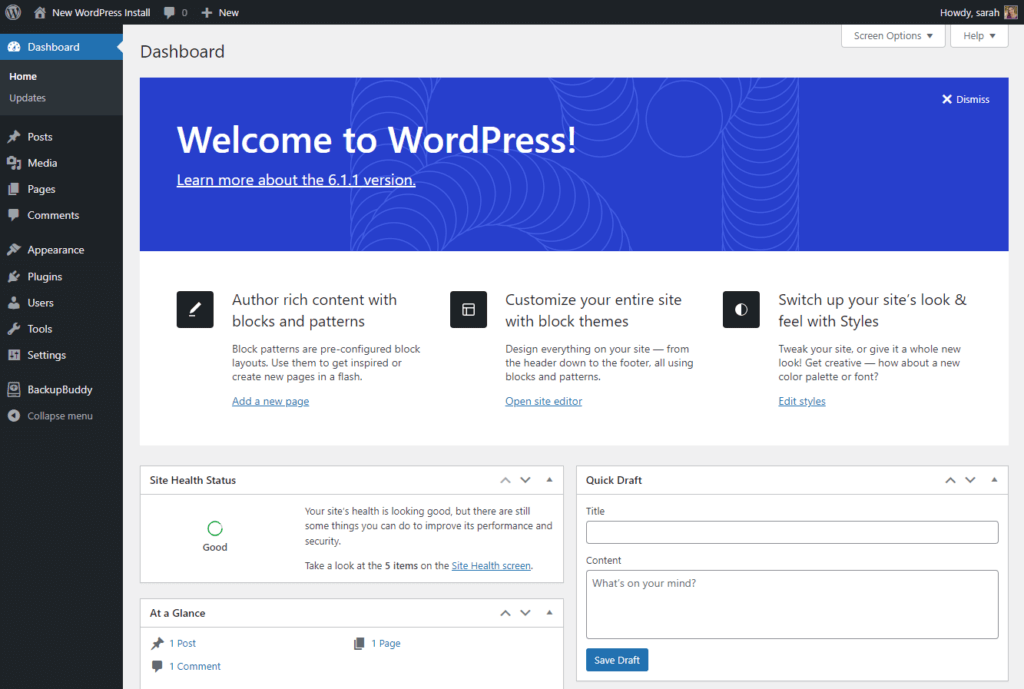
What is WordPress? | WordPress 101 Tutorials

In summary, while Kajabi is focused primarily on online courses and membership sites, WordPress is a versatile platform that can cater to a broad range of website needs, from personal blogs to corporate sites and e-commerce stores.

Features

Kajabi is an all-in-one platform designed to assist businesses, marketers, course creators, and influencers in streamlining their online presence through creating and selling online courses, coaching programs, and digital products. Kajabi’s integrative system offers a wide range of features that make it easy for users to build their websites, create marketing campaigns, and sell content to target audiences.

The main features of Kajabi include:

1. Website Builder: Kajabi provides a customizable and easy-to-use website builder, allowing users to create a professional-looking and responsive website with no coding knowledge required. This includes pre-built themes, templates, and drag-and-drop functionality to design pages that match the specific brand style.

2. Course Creation: Kajabi offers extensive tools and resources to create, manage, and sell online courses. Users can create comprehensive and engaging courses with options for various content formats, including video, text, images, quizzes, and downloadable resources. The platform makes it simple for creators to upload and organize their course content through a centralized dashboard while providing a seamless experience for learners.

3. Marketing and Sales: Kajabi offers a wide range of marketing features to promote digital products and boost sales. This includes built-in email marketing tools, effective landing pages, and sales funnels to generate leads. Additionally, the platform integrates with popular marketing services, such as Google Analytics and Facebook Pixels, to analyze performance and optimize campaigns.

4. E-commerce: Kajabi’s e-commerce capabilities enable creators to sell their digital products with ease. Users can set custom pricing, create different product packages, and integrate with payment processing services (Stripe and PayPal). The platform also offers features for creating upsells, downsells, and one-time offers to maximize revenue.

5. Membership Management: With Kajabi, users can create and manage membership sites for exclusive content access. This includes options for different membership levels, subscription plans, and access to specific courses, allowing creators to build a recurring revenue stream and nurture their community.

Kajabi hero testimonial

WordPress, on the other hand, is an open-source content management system (CMS) widely used to create websites, blogs, and digital applications. It offers flexibility, extended functionality, and a massive library of themes and plugins, making it one of the most popular and versatile platforms for website creation.

The main features of WordPress include:

1. Customizable Themes: WordPress offers a vast array of themes, both free and premium, that cater to various website styles and genres. These themes come with customizable layouts, color schemes, and typography, allowing users to create a visually appealing website that aligns with their brand identity.
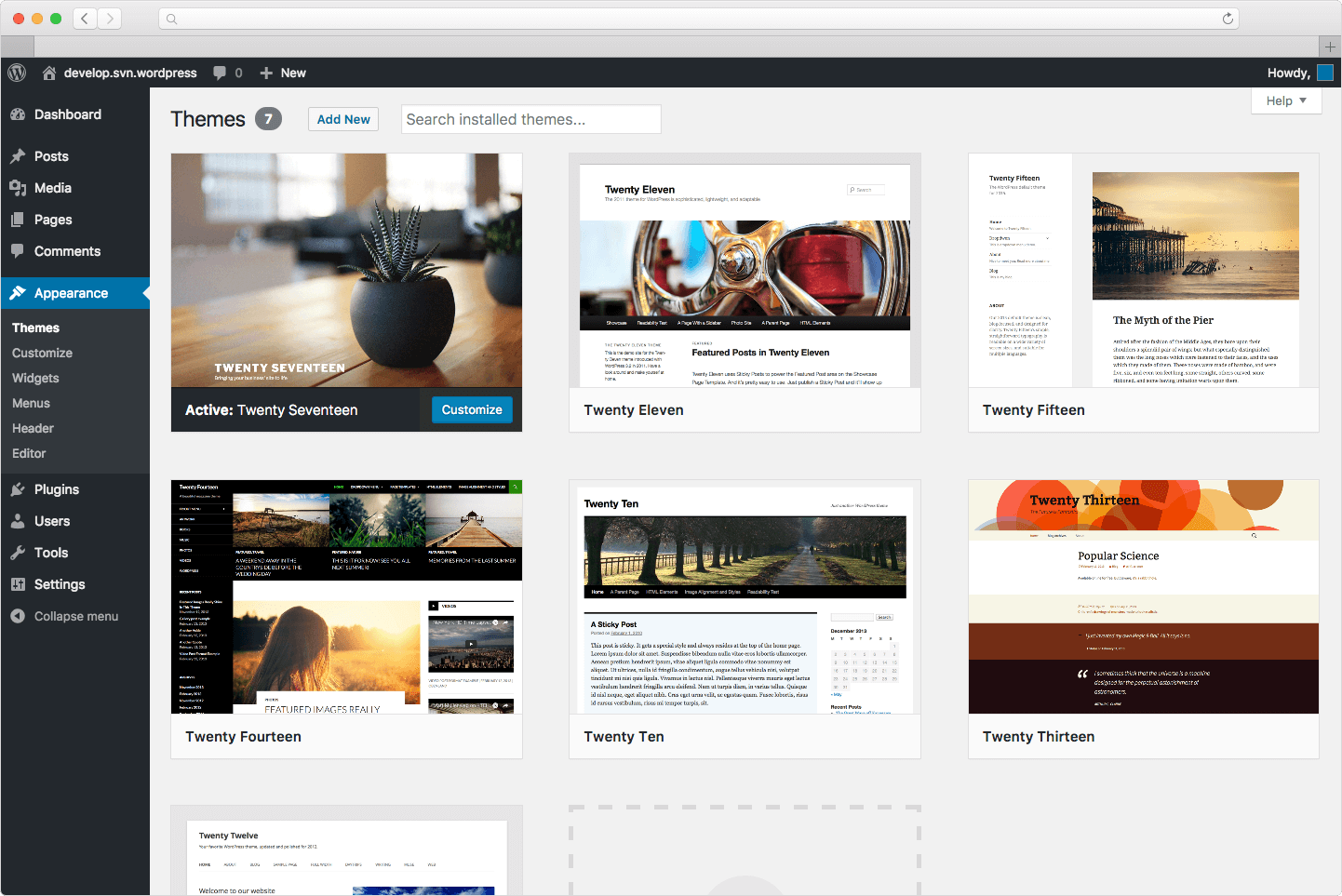
WordPress | Center for Integrated Professional Development - Illinois State

2. Plugins: WordPress features a large library of plugins designed to extend the core functionalities of the platform. These plugins facilitate additional features such as e-commerce tools, SEO optimization, social media integration, and more. This helps users to create a tailored website with added functionality, without the need for coding expertise.

3. Wide-ranging Compatibility: WordPress is compatible with various hosting providers, which allows website owners to choose a hosting service that meets their requirements and budget. WordPress also supports integrations with numerous services and tools such as MailChimp, Google Analytics, and Yoast SEO, enhancing the functionality of WordPress-based websites.

4. User Management and Multi-user Access: WordPress allows for multiple user roles and permissions, which makes it easy to manage and organize a team’s access to the website’s backend. Users can be assigned different roles such as administrator, editor, author, and contributor, ensuring streamlined workflow and content management.

5. SEO-friendly: WordPress is renowned for its SEO-friendly features that enable website creators to optimize their content for search engines. This includes features like creating clean permalinks, modifying meta titles and descriptions, optimizing images, and integrating with advanced SEO plugins, which significantly enhance a website’s chances of ranking higher in search engine results.

By understanding the key features of both Kajabi and WordPress, users can determine which platform best suits their specific needs and objectives in terms of creating, managing, and promoting their online presence.

Featured Partner


Learn More

on Kajabi’s website


  • Free Version: 14-day Free Trial

  • Starting Price: $149 / monthly

  • Integrations: Zapier, Mailchimp, ClickFunnels, Google Analytics, Stripe, PayPal

Pros n Cons

Kajabi Pros:

1. All-in-one platform:

  • Kajabi offers a complete package of tools to build, market, and sell online courses and memberships, saving you from using different platforms.

2. User-friendly:

  • It has a drag-and-drop editor for site design and course creation, requiring little technical knowledge.

3. Marketing tools:

  • It includes built-in email marketing and automation, landing pages, and sales funnels for efficient promotion and lead generation.

Kajabi: Create and sell online courses, coaching, and memberships

4. Integration:

  • Kajabi supports third-party integrations like Zapier, ClickFunnels, and MailChimp, as well as offering its own native integrations such as Kajabi Email and Kajabi Analytics.

5. Customer support:

  • The platform provides 24/7 customer support and a rich library of resources, tutorials, and webinars to help users.

Kajabi Cons:

1. Pricing:

  • Kajabi’s pricing plans are relatively high compared to competitors, making it less suitable for small businesses or individuals on a tight budget.

2. Limited free trial:

  • Its 14-day trial period is shorter than that of many competitors.

3. Content management:

  • While its content management system (CMS) is easy to use, it may be limiting for those requiring advanced customization.

4. Lack of third-party plugins:

  • Kajabi offers in-built functionalities, but there are fewer third-party plugins, potentially limiting specific requirements.

WordPress Pros:

1. Open-source and flexible:

  • WordPress provides users with access to its source code, making it highly customizable and adaptable to various needs.

2. Extensive library of themes & plugins:

  • The platform offers a vast range of themes and plugins, both free and paid, allowing users to tailor their websites.

3. Large community:

  • WordPress has a considerable user community which contributes to its growth, development, and extensive knowledge base.

4. SEO-friendly:

  • Its built-in features and SEO plugins, such as Yoast SEO, make search engine optimization easier.

5. Affordability:

  • WordPress itself is free, but users pay for domains, hosting, and premium themes/plugins – still offering scalability for different budgets.
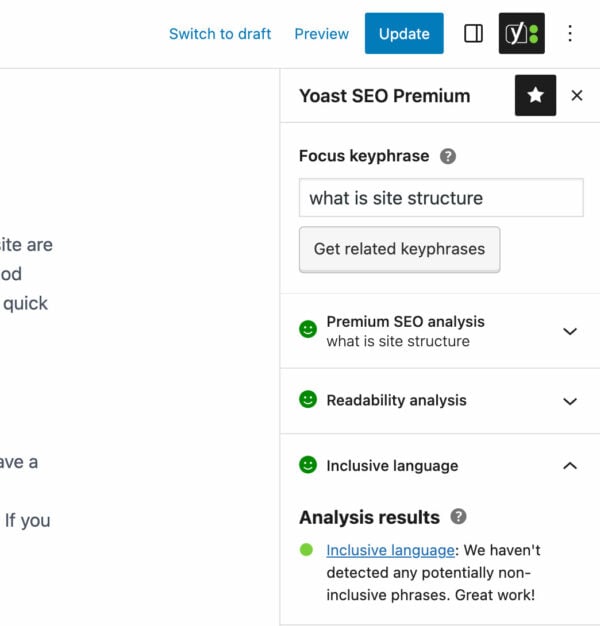
The beginner's guide to Yoast SEO • Yoast

WordPress Cons:

1. Requires technical knowledge:

  • WordPress setup and customization can be challenging for those with limited coding expertise or technical knowledge.

2. Security vulnerabilities:

  • Being open-source, it can be susceptible to hacking attacks. Regular updates and security plugins are needed to maintain safety.

3. Time-consuming and complex:

  • Compared to all-in-one platforms, you have to manage multiple aspects, such as hosting, themes, plugins, and updates.

4. Limited support:

  • Although there is community support, official support options may be limited or only available through third-party hosting providers and paid plugins/themes.

5. Need for regular updates:

  • Manual updates are often required for themes, plugins, and even the core platform, which can be time-consuming and risk breaking the site if not done correctly.
How to setup Kajabi

Step 1: Sign up for a Kajabi account

  1. Visit Kajab’s website at https://www.kajabi.com/.
  2. Click on the “Get Started” or “Start Free Trial” button.
  3. Fill out the required information, including your name, email address, and password.
  4. Click “Create your Kajabi account” to complete the registration process.

Step 2: Choose a plan

  1. Review Kajabi’s pricing options to determine which plan best suits your needs.
  2. Select a plan, which can be changed at any time, by clicking on the “Choose Plan” button below your preferred option.
  3. Fill out your payment details to activate the plan.

Step 3: Customize your site

  1. Log in to your Kajabi dashboard.
  2. Click “Website” in the left-hand menu and then “Design Your Site.”
  3. Choose a theme for your site and adjust colors, fonts, and other visual elements to match your brand.
  4. Create and customize pages (such as Home, About, Contact, etc.) by clicking “Pages” in the left-hand menu, and then “Add New Page.”

Step 4: Create online courses or products

  1. Click “Products” in the left-hand menu of your dashboard.
  2. Click “Create a new product” and choose a product template (such as mini-course, online course, or community).
  3. Provide a name and description for your product and click on “Create a Product.”
  4. Customize your product’s content by adding sections, lectures, and other materials.
  5. Configure your product’s settings, including pricing, access rules, and integrations with other tools.

Step 5: Set up payment and marketing options

  1. Click “Settings” in the left-hand menu and then “Payments” to connect Kajabi to your preferred payment gateway (e.g., Stripe, PayPal).
  2. Customize your checkout settings, such as currency, taxes, and legal agreements.
  3. Set up email marketing, if desired, by clicking “Email” in the left-hand menu and connecting Kajabi to an email service provider such as Mailchimp or ActiveCampaign.
  4. Create and customize marketing funnels, also known as pipelines, to automate your sales process by clicking “Pipelines” in the left-hand menu and then “Create New Pipeline.”

After completing the steps above, your Kajabi site will be ready to launch. Share the link to your site with your audience, promote your courses, and watch your online business grow!

How to setup WordPress

Setting up WordPress involves a few steps, starting with purchasing a domain, obtaining web hosting, and then installing and configuring WordPress itself. The steps below will guide you through the process.

1. Purchase a Domain Name:

  1. First, choose a domain name for your website, which will be your website’s address (e.g. yourwebsite.com). You can purchase a domain from domain registrars like GoDaddy, Namecheap, or Google Domains.
  2. Once you’ve chosen a domain name and registered it, remember to renew it annually to maintain ownership.

2. Choose a Web Hosting Provider:

  1. WordPress requires a web hosting service to store your website files and make your site accessible online. Some popular web hosting providers are Bluehost, SiteGround, and HostGator. Choose a hosting plan that suits your needs and budget.
  2. Sign up with your chosen provider, and you’ll receive hosting account information and credentials.

3. Install WordPress:

  1. Many web hosting providers offer a one-click WordPress installation feature using Softaculous or a similar software. Log in to your web hosting dashboard using the provided credentials, and look for the option to install WordPress.
  2. Click ‘Install’ and enter the necessary information, such as the domain name, site name, and an admin account (username and password) for your WordPress site.

4. Configure WordPress:

  1. After installation, access your WordPress admin dashboard by visiting ‘yourwebsite.com/wp-admin’ and entering your admin account credentials.
  2. You’ll be greeted with the WordPress dashboard, where you can customize your site, create pages and blog posts, and manage other settings.

5. Choose a Theme:

  1. WordPress uses themes to determine the design and layout of your website. Go to ‘Appearance > Themes’ in the dashboard and click ‘Add New’ to browse the available themes.
  2. Choose a theme that suits your needs, and then click ‘Install’ and ‘Activate’. You can further customize the theme’s appearance and settings.

6. Install Plugins:

  1. Plugins extend the functionality of your website by adding features like social sharing buttons, contact forms, or an e-commerce store. Browse the WordPress Plugin Directory to find plugins that best suit your needs.
  2. To install a plugin, go to ‘Plugins > Add New’ in the dashboard, search for the desired plugin, and click ‘Install’ and ‘Activate’.

7. Create Pages and Posts:

  1. To add content to your site, create pages (such as Home, About or Contact) and blog posts.
  2. To create a new page, go to ‘Pages > Add New’ and enter the page title and content.
  3. To create a blog post, go to ‘Posts > Add New’. You can add text, images, and media to your pages and posts using the WordPress Gutenberg editor or your theme’s page builder (if available).

8. Set up a Menu and Widgets:

  1. To create a menu, go to ‘Appearance > Menus’ and click ‘Create a New Menu’.
  2. Add pages, links, or categories to your menu, and assign the menu to a location on your site (such as the header).
  3. Widgets are small content blocks that can be placed in various areas of your website, such as the sidebar or footer.
  4. Configure them under ‘Appearance > Widgets’.

9. Optimize for Search Engines:

  1. Install an SEO plugin, such as Yoast SEO, to help your website rank higher in search engine results. Follow the plugin’s recommendations to optimize your content, metadata, and permalinks.

After completing these steps, your WordPress website is ready to go. Explore the vast array of features and settings within WordPress to further tailor your site to your specific needs, preferences, and goals. Remember to regularly update your site and its plugins, and perform backups to ensure security and stability.

Main Differences

Kajabi and WordPress are both popular platforms for building and managing websites, but they cater to different needs and target audiences.
Kajabi vs WordPress | Detailed Comparison 2023

Kajabi is an all-in-one solution specifically designed for online courses, membership sites, and digital products creation. It offers a range of built-in features tailored to meet the needs of online entrepreneurs and content creators, including course creation tools, membership site management, inbuilt payment processing, and email marketing.

On the other hand, WordPress is a powerful content management system (CMS) that powers nearly one-third of all websites and offers unmatched flexibility and scalability. Suitable for any type of website, WordPress provides its users a plethora of plugins and themes to customize and extend their site’s functionality.

Kajabi simplifies the process of designing, hosting, and selling digital products with its user-friendly interface and integration of multiple functions under one roof. It excels in providing features for content hosting, marketing automations, pipelines, and landing page templates.

Furthermore, Kajabi possesses superior user-experience management tools, enabling creators to understand their audience and improve engagement and retention rates.

WordPress, however, relies on third-party plugins to incorporate e-commerce capabilities, learning management systems, and email marketing. While this offers greater customization options, it may require more maintenance and supervision, as the integration of various plugins might not be seamless and may necessitate technical know-how.

When it comes to pricing, Kajabi follows a monthly subscription model with three tiers offering varying levels of access to its features and functionalities. Although one might consider it relatively costly, the comprehensive solutions it provides may offset the price and prove cost-effective in the long run. WordPress, on the other hand, is an open source platform that is free to use for the basic CMS.

However, users need to pay for hosting, domain names, and possible premium plugins and themes to enhance their site’s functionality.

Ultimately, making a choice between Kajabi and WordPress largely depends on the individual’s requirements, technical expertise, and available resources.

Pricing Comparison

Kajabi and WordPress are two different platforms serving different purposes, so a direct comparison of pricing might not be accurate. However, I’ll provide a brief overview of the pricing for both platforms:

Kajabi’s Pricing Plans:

  • Basic Plan:
    • $149 per month (billed annually) or $199 per month (billed monthly)
    • 3 products and 3 pipelines
    • 1,000 active members
    • 1 website and 1 admin user
    • 0% transaction fees
    • Unlimited landing pages and marketing emails
    • Webinars and events, chat support, and more
  • Growth Plan:
    • $199 per month (billed annually) or $299 per month (billed monthly)
    • 15 products and 15 pipelines
    • 10,000 active members
    • 1 website and up to 10 admin users
    • 0% transaction fees
    • Unlimited landing pages and marketing emails
    • Advanced features like 24/7 chat support, automated webinars, and more
  • Pro Plan
    • $399 per month (billed annually) or $499 per month (billed monthly)
    • 100 products and 100 pipelines
    • 20,000 active members
    • 1 website and up to 25 admin users
    • 0% transaction fees
    • Unlimited landing pages and marketing emails
    • Premium features like 24/7 phone support, affiliate program, and more
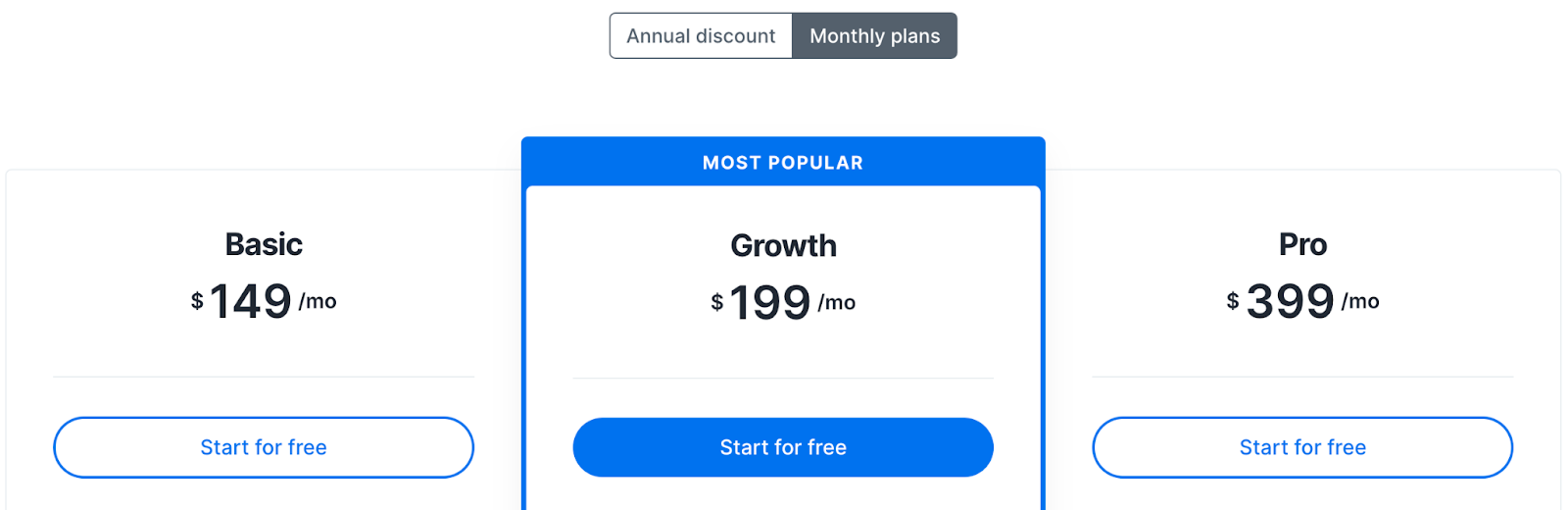
Thinkific vs Kajabi 2022: The Ultimate Guide

WordPress Pricing Plans:

WordPress is a free, open-source content management system (CMS) used to create websites and blogs. However, the costs associated with WordPress come from the additional elements needed to create a functional website:

  • Web hosting:
    • Varies depending on the hosting provider, ranging from $3 to $30 per month for shared hosting and up to $300 per month for managed WordPress hosting.
  • Domain name:
    • Approximately $10-$15 per year.
  • Themes:
    • Free basic themes are available; premium themes can range from $30 to $100 for a one-time purchase.
  • Plugins:
    • Many free plugins are available, but premium plugins may cost anywhere from $20 to $200 per year, depending on the plugin. If you wish to create an online course or membership website with WordPress, you will likely need to invest in additional plugins or themes tailored for that purpose.
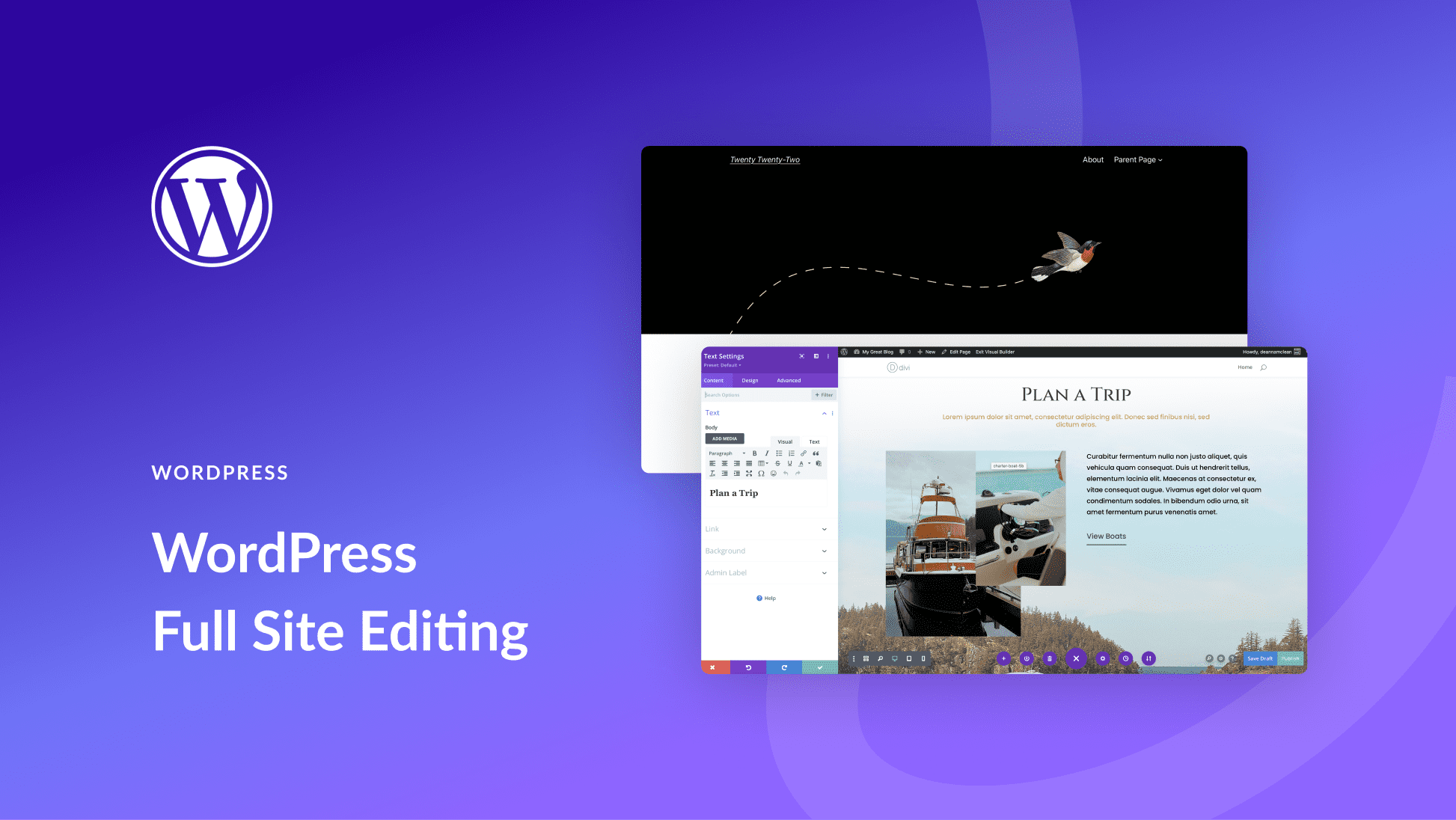
WordPress Full Site Editing: A Beginner's Guide

In summary, Kajabi offers an all-inclusive pricing structure with features specifically for online course and membership site creators, while WordPress is a highly customizable platform with varied costs based on the additional services and tools you integrate to achieve your goals.

Frequently Asked Questions

Q: What is the main difference between Kajabi and WordPress?

A: Kajabi is an all-in-one online platform designed specifically for selling and marketing digital products, online courses, and memberships. WordPress, on the other hand, is an open-source content management system that can be used for a wide range of website types, from blogs to e-commerce sites.

Q: Can I use both Kajabi and WordPress together?

A: Yes, it is possible to integrate Kajabi with your WordPress site through various plugins and tools. This combination allows you to leverage the best features of both platforms, such as Kajabi’s robust e-commerce and marketing tools with WordPress’s flexibility and vast plugin ecosystem.

Q: Is one platform easier to use than the other?

A: Kajabi is often considered more user-friendly because it involves a simple drag-and-drop interface with ready-to-use templates specifically designed for online course and product sales. WordPress can have a steeper learning curve, especially for users who are not familiar with web development or design.

Q: Which platform offers better customer support?

A: Kajabi provides dedicated customer support through email, live chat, and phone, as well as a comprehensive knowledge base. WordPress, being open-source, relies mostly on community support via forums, but premium support is available if you purchase themes or plugins from specific developers.

Q: What is the cost difference between Kajabi and WordPress?

A: Kajabi offers three pricing tiers, starting at $149/month, which includes most of the features needed for online sales and marketing. WordPress itself is free but requires additional costs for web hosting, domain, and premium themes or plugins. The cost of a WordPress site can vary greatly depending on your requirements and chosen add-ons.

Q: Which platform offers better customization options?

A: WordPress is known for its extensive customization options, thanks to countless themes and plugins available. Kajabi also offers customization, but its options are more limited compared to WordPress, focusing mainly on e-commerce and online course features.

Q: How secure are Kajabi and WordPress platforms?

A: Kajabi manages security on its platform and includes SSL certificates, secure hosting, and constant monitoring. For WordPress, security is the responsibility of the website owner. You need to ensure regular updates, use reputable plugins, and follow security best practices to keep your site secure.

Q: Which platform has better SEO capabilities?

A: WordPress is widely praised for its SEO capabilities, with numerous plugins available for optimization, like Yoast SEO. Kajabi also offers built-in SEO features, but its primary focus is online sales rather than content creation and optimization.

Q: Can I migrate my content between Kajabi and WordPress?

A: Migrating content between Kajabi and WordPress may require manual work or the use of paid plugins, as there is no official migration tool offered by either platform. You may also need to reformat your content to ensure it displays correctly on the new platform.

Conclusion

In conclusion, Kajabi and WordPress are two powerful platforms, each with their own unique sets of features and benefits for individuals and businesses seeking to establish a robust online presence. While Kajabi excels in its ability to deliver a seamless end-to-end experience for creating and managing online courses and memberships, WordPress offers unmatched flexibility and customization options for a wide variety of website types.

Ultimately, the choice between Kajabi and WordPress largely depends on your specific needs and goals. If your primary focus lies in creating and selling online courses or memberships with minimal hassle, Kajabi emerges as an excellent choice. However, if you prioritize flexibility, versatility, and long-term scalability for your website, WordPress is undoubtedly the more suitable option.

As you ponder the decision, it’s crucial to carefully consider your requirements, budget, and skillset to make an informed choice.

Taking the time to explore and understand both platforms’ distinct capabilities will enable you to harness their full potential and set the stage for your online success ─ be it in the realm of education or any other digital space.

Discover more Kajabi comparisons:

By Brad Anderson

Editor In Chief at ReadWrite

Brad is the editor overseeing contributed content at ReadWrite.com. He previously worked as an editor at PayPal and Crunchbase. You can reach him at brad at readwrite.com.

Sourced from readwrite

People just don’t get it

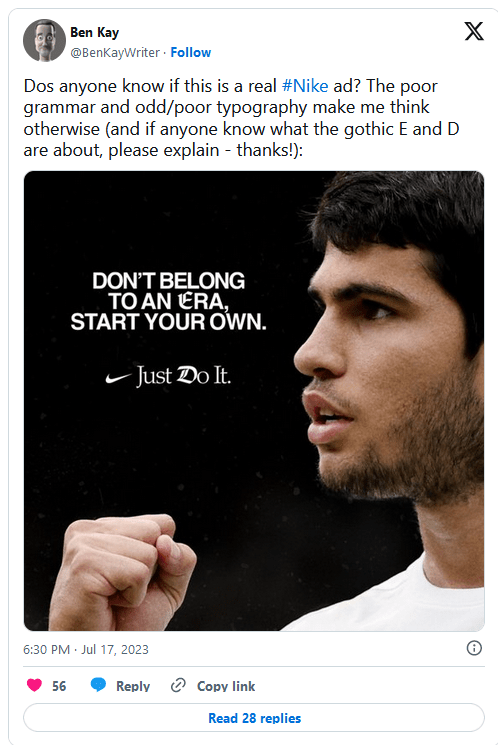
‘Just Do it’ is one of the best-known brand taglines around. It’s been serving Nike since 1988, and it’s just as recognisable as its swoosh logo, one of the most famous textless logos. Many would say it didn’t need any other intervention, which has left people perplexed as to why Nike appears to have jumped on a recent typography trend.

People have been commenting on social media to ask why the brand placed a couple of apparently random gothic Blackadder-style letters on a post featuring Spanish tennis star and current men’s singles number one Carlos Alcaraz. But it’s not the one advert. Nike has been changing up the ‘D’ in several recent adverts.

Adaptive logos are having a bit of a moment right now. It’s something that MTV logo did so well back in the 1980s, and the LA28 Olympic Games logo has resurrected the concept with a design that can take on infinite interventions, including, controversially, from the games’ sponsors.

Nike appears to be taking up this idea and running with it, not on its logo, but with the ‘D’ in its ‘Just Do it’ tagline. But people are confused (and not just because of the incorrect punctuation). “What’s with the random Blackletter E and D? Totally unnecessary and adds nothing,” Studio Koto CEO and founder James Greenfield commented on Twitter about the recent advert featuring Alcaraz. Some people even wondered if the design was a real Nike advert or an amateur proposal.

The choice of an ‘old-fashioned’ font in this particular piece is presumably intended to draw attention to the world ‘era’, the idea that Alcaraz is marking the start of a new period in tennis following the dominance of the likes of Federer for two decades. Some have even suggested that the E and D are references to Federer’s F logo and Djokovic’s D logo respectively, although the link seems tenuous.

A more likely theory is that Nike is trying to tap into Gen Z’s penchant for using messy mixes of typography and special font generators for social media: 80’s/90’s exuberance taken further. Nike’s ‘What the Football’ advert created for the FIFA Women’s World Cup (see below) features several versions of the ‘D’ in its close, and graphics for the campaign feature a clash of clean sans serif overlaid with colourful dripping graffiti and inflated fonts.

Nike Just Do it with changing D typography
Nike’s Women’s World Cup campaign features changing typography in the Just Do it tagline (Image credit: Nike)

“Perfectly aligned with online typographic trends ATM. A mish-mash of styles for absolutely no reason whatsoever,” one person commented on Twitter. The Alcaraz application feels confusing and poorly executed but the broader use of mixed fonts to reject the minimalist trend of recent years doesn’t feel entirely out of place for a brand that’s long been as much about streetwear and youth culture as it has sport. If you’re looking to mix up typography in your own work, see our pick of the best free fonts and the best font pairings.

Feature Image credit: Nike

By

Joe is a regular freelance journalist and editor at Creative Bloq. He writes news and features, updates buying guides and keeps track of the best equipment for creatives, from monitors to accessories and office supplies. A writer and translator, he also works as a project manager at London and Buenos Aires-based design and branding agency Hermana Creatives, where he manages a team of designers, photographers and video editors who specialise in producing photography, video content, graphic design and collaterals for the hospitality sector. He enjoys photography, particularly nature photography, wellness and he dances Argentine tango.

Sourced from CREATIVEBLOQ

ChatGPT can enhance your abilities 10 times, but not if you’re a 0, because 10×0 amounts to 0

‘Get richer with ChatGPT’, ‘Making money online got easier’, ‘How you can make money with ChatGPT’, ‘Access my database of 125+ ChatGPT prompts to help you make money online for $5’.

Wait, stop, calm down!

So, if you’re fed up with all these paid advertisements trying to push different courses down your throats, luring you to make ‘easy’ money using ChatGPT, welcome to the club! Search engines and social media platforms like Instagram, Twitter, Facebook and even LinkedIn are brimming with such posts. These ‘influencers’ make ChatGPT seem like an easy money-minting machine.

But have people actually been able to monetise ChatGPT and its free version? Well, a lot of individuals claim to have been leveraging its capabilities to generate income. From branding to app-creation to providing writing services, they claim it opens avenues to earn ‘free money’ whether you’re an aspiring entrepreneur, content creator, or a freelancer.

You must’ve also come across tons of articles listing numerous ways to rake in the greens. These articles usually either bank on the chatbot’s capabilities to code and hint at it being used to build apps or websites ‘without any prior knowledge’ or for affiliate marketing, content marketing, optimising video production, or becoming a prompting expert amongst many other things.

However, there are some who claim to have made money this way. Ukrainian entrepreneur Ihor Stefurak built a Chrome extension using ChatGPT despite having zero coding knowledge. He claims to have generated $1000 in revenue within just 24 hours of launching the extension.

Many such claims and tutorials are flying fast and thick on YouTube, claiming to help make $100 a day but seem to know nothing about the tool, the model it is based on or even its name. Some coolly call it ChatGTP!

Meanwhile, there has also been a notable surge in AI-written ebooks on Amazon. These are ranked as high as 50,377 on the Kindle book store and also have five-star ratings in the hundreds. According to reports, as of mid-February there were over 200 e-books in Amazon’s Kindle store, listing ChatGPT as the author or co-author. The number may not seem like a lot but the actual number may be much higher since many authors do not disclose in the Kindle store that their book was written entirely, or in part, by a computer because Amazon’s policies do not require it.

In fact, the market is so saturated that making decent money out of this is improbable. According to Reuters, Brett Schickler, who wrote a children’s book titled, ‘The Wise Little Squirrel: A Tale of Saving and Investing’, (sold at the Amazon Kindle store for $2.99 and $9.99 for a printed version) netted less than $100.

Can Only Enhance 

The reality is that ChatGPT alone cannot guarantee financial success. While ChatGPT can be an invaluable tool in reducing your workload, it is crucial to understand that it is not a magical solution that will automatically generate top-tier content for you. If you lack familiarity with a particular subject, you will struggle to differentiate between good and poor quality content.

For example, let’s consider a scenario where you follow someone’s advice on starting a successful blogging business with the assistance of ChatGPT despite having no prior experience in content creation. Even if ChatGPT generates a basic piece of content, you might perceive it as exceptional because you lack the knowledge of what constitutes top-tier content.

What you can actually do is create videos on how to make money with AI. As they say, ‘When there’s a gold rush, sell shovels and pickaxes’.

On a serious note, what you can actually do is automate parts of your workflow with ChatGPT APIs, which are free to use. One can take up email affiliate marketing, content marketing, or learn and preach better avenues like prompt engineering.

It is crucial not to be deceived by influencers who disseminate misleading content. Do not believe them when they claim that ChatGPT holds the secret to success or that it can effortlessly make you money. Instead, focus on learning and honing your skills, utilising ChatGPT as a tool to support you in accomplishing your goals.

Shyam is a tech journalist with expertise in policy and politics, and exhibits a fervent interest in scrutinising the convergence of AI and analytics in society. In his leisure time, he indulges in anime binges and mountain hikes.

Sourced from AIM

By Katie Lamb

In the past, businesses would send out a few leaflets and put an ad in the newspaper and hope customers found them. Today, online marketing has opened up a world of new opportunities and ways to get your business seen. Digital marketing apps have been created to help you do that, and there are many to choose from.

Today, we will look at the best marketing apps to help you with:

  • SEO
  • Social media marketing
  • Content creation and design
  • Data reporting
  • And project management

Some of these apps are free to use with basic features, and others require you to pay a monthly subscription. But, all are tried and tested and proven to get results and will help boost every digital marketing campaign you work on.

Digital Marketing Apps for Search Engine Optimization (SEO)

Here are the best digital marketing apps for SEO.

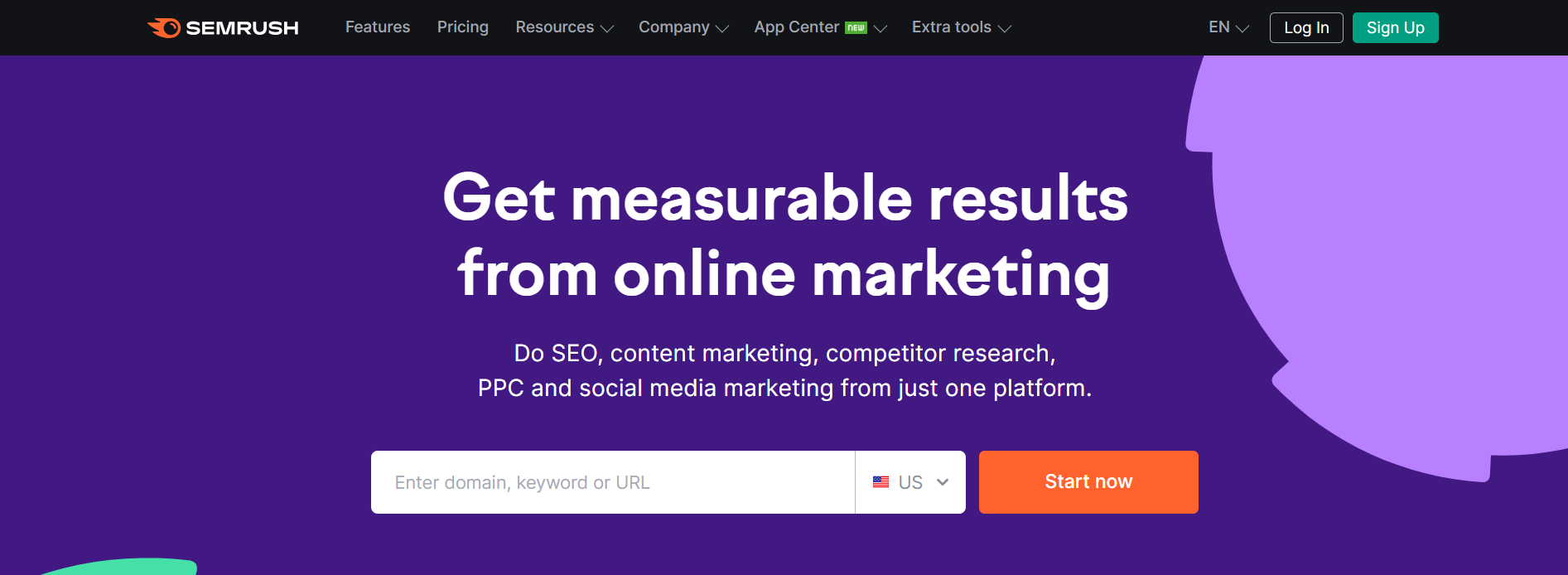
Semrush

digital marketing apps

Semrush is an all-in-one tool suite that helps marketers and business owners grow their organic traffic.

It’s trusted by some of the worlds leading brands that use it to help boost their online marketing efforts.

The main Semrush features include:

  • On page SEO
  • Keyword research
  • Competitor analysis
  • Content marketing
  • Link building
  • Social media management
  • Content optimization
  • Website monetization

But there are 50+ tools to use in total. And you can also analyze any domain’s backlink profile and track your SERP positions daily.

Having won over 21 international awards as the best SEO software suite, this is one of the best digital marketing apps to enhance your marketing campaigns.

Cost: Free trial available. Pro $129.95/m, Guru $249.95/m, Business $499.95/m.

Learn more in this detailed Semrush review and tutorial.

Or you can try it free for 14 days!

Surfer SEO

digital marketing apps

Surfer is a content intelligence platform where you can research, write and generate SEO-optimized content.

By using Surfer SEO, you can improve the rank of your articles and boost the organic traffic to your website or blog.

The main Surfer tools include:

  • Content Editor
  • Audit (to help you easily update existing content)

It also comes with a few add-on tools, such as Surfer AI, where you can generate optimized articles in one click. And Grow Flow, which integrates with Semrush and gives you weekly bite-sized tasks to grow your domain.

You can also use their free Surfer AI Outline Generator and the Surfer Keyword Extension to get search volume and keyword data in the Google SERPs.

Cost: 7-day money-back guarantee. Essential $69/m, Advanced $149/m, Max $249/m, Enterprise custom pricing.

Learn more in this Surfer SEO review.

Ahrefs

Ahrefs is another popular SEO tool suite that offers a range of features to help you analyze your niche and competitors and grow your search traffic.

Not only does it provide a range of great marketing tools, but you can also take advantage of the Ahrefs Academy, which contains video tutorials, guides, and free courses to help you improve at digital marketing.

The main Ahrefs tools include:

  • SEO toolset
  • Site explorer
  • Keyword explorer
  • Site audit
  • Rank tracker
  • Content explorer

It also has a few unique features, such as its own search engine, which helps them understand how search works and what it takes to rank #1 for various keywords.

Cost: Free with limited access to tools. Lite $79/m, Standard $159/m, Advanced $319/m, Enterprise $799/m.

Learn more in this detailed Ahrefs review.

Google Search Console

Google Search Console contains a range of tools that measures your site’s performance and search traffic, and you can use them to fix issues to better your Google ranking.

The search insights show you what terms bring users to your site, and you can use the Google URL inspection tool to understand how Google search sees your pages.

If you struggle to rank your site in Google, you can follow the Google search console training to optimize your search appearance and increase traffic.

Cost: Free.

Learn more in this article explaining what does Google Search Console do.

Digital Marketing Apps for Social Media Marketing

Here are the best apps to enhance your social media strategy.

Buffer

digital marketing apps

Buffer is an all-in-one social media management tool designed to help you manage your social accounts and grow your audience organically.

It works with all the popular social media platforms, such as:

  • Facebook
  • Instagram
  • LinkedIn
  • Pinterest
  • Google Business Profile

From inside Buffer, you can plan, write and publish social media posts and analyze your results in the analytics dashboard.

Other features include being able to read and reply to comments, build customized landing pages, and use the AI assistant to write posts that get noticed.

Cost: Free for up to 3 social channels and limited features. Essentials $6/m, Team $12/m.

Facebook Ads Manager

Facebook ads manager allows you to set up and monitor ad campaigns on Facebook and Instagram for your target audience.

With detailed analytics, you can track your ads’ performance and tweak your campaigns where necessary.

You can also set your ad budgets so you never go over what you’re willing to spend and choose advertising objectives to fit your business goals.

The Facebook ads manager app is worth using as part of your digital marketing strategy. It is available on iOS and Android, so you can watch your digital marketing campaigns wherever you are.

Cost: Free.

Sprout Social

Sprout Social is one of the best social media management tools for helping digital marketers and business owners enhance their social media presence.

It includes smart listening features to understand your audience and uncover trends. Plus, you can effortlessly publish and schedule social media posts and track your efforts in the analytics dashboard.

Use Sprout Social with all the major social media platforms, such as:

  • Instagram
  • Facebook
  • Twitter
  • Tik Tok
  • LinkedIn
  • Pinterest
  • YouTube
  • Whatsapp
  • Facebook Messenger

Cost: Free 30-day trial. Standard $249/m, Professional $399/m, Advanced $499/m, Enterprise custom pricing.

Ripl

digital marketing apps

Ripl is a social video and content app that allows publishers to create professional-looking Instagram videos, YouTube intros, and social media posts.

One of the top digital marketing apps, Ripl includes thousands of ready-made templates, stock media, and customizable brand settings so you can create social content that stands out.

Use the advanced scheduling and sharing features to engage customers, promote your business and announce new products at any time of the day.

Cost: 7-day free trial. Base Plan $8.33/m, Premium Plan $13.75/m.

Digital Marketing Apps for Content Creation and Design

Here are the best apps to help you create scroll-stopping content and visual media.

Canva

Canva is an online design tool where you can create visual content for your social media marketing posts, website, and marketing campaigns with zero technical knowledge.

It includes a range of features such as a drag-and-drop editor, incredible graphics templates, stock photos, fonts, and more.

Download your creations or share them on social media thanks to Canvas’s integrated social share functionality.

Cost: Free with limited options. Canva Pro $10.99/m, Canva for Teams $12.99/m.

Grammarly

Grammarly is a writing assistant tool that helps users create error-free, clear, and compelling content.

It works across various desktop applications such as emails and messages, documents and projects, and social media.

The Grammarly main tools include:

  • Grammar checker
  • Plagiarism checker
  • Citation generator
  • Essay checker
  • AI writing assistant

If you want to write content that search engines and people love to read, Grammarly is a great tool that’s well worth using.

Cost: Free version available. Premium and Business plans with added functionality. Email for pricing.

Digital Marketing Apps for Data Insights and Reporting

Here are the best digital marketing apps for website analytics and insights.

Feedly

Feedly

Feedly is a handy tool that allows users to track audience insights across the web without spending time scrolling and reading everything.

All you have to do is type relevant keywords into Feedly AI that are important to you, and it’ll flag insights from various places such as blogs, newsletters, and news sights.

This information can be extremely useful for a digital marketer. It can help shape your online marketing campaigns, knowing what people are talking about and want to know about in their industry.

Cost: Free plan available. Pro $6/m, Pro+ $8.25/m, Enterprise custom pricing.

HotJar

HotJar is a website heatmap and behaviour analytic tool that allows you to see what customers do on your website and why.

Using HotJar, you get access to:

  • Heatmaps
  • Recordings
  • Surveys
  • Feedback
  • Interviews

The heatmaps are particularly useful, showing where users move, click and scroll on a page. This information shows you which buttons get missed, which are working and which areas may frustrate people.

Recordings even allow you to see what your customers see as they move through their journey on your site.

Cost: Free/up to 35 sessions, Plus $32/m up to 100 sessions, Business $80/m up to 500 sessions.

Google Analytics

The Google Analytics app is a place where you can track the performance of your website, including how many visitors use your site, what pages they click on, where they come from, and more.

This information lets you see where you need to improve and who to target for your marketing campaigns.

The new GA4 version even includes a data visualization tool to see your visitors by country via an interactive map.

Whether you’re a new or seasoned website owner, Google Analytics is an essential tool to help with your market research and digital marketing efforts.

Cost: Free.

Learn more in this article detailing Google Analytics for blogs (focused on GA4).

Digital Marketing Apps for Project Management

As you scale your efforts, you must check out one of these great project management tools!

ProofHub

Proof Hub

ProofHub is a project management and team collaboration software that includes everything you need to manage projects and teams in one location.

The main ProofHub features include:

  • Task management
  • Gantt chart
  • Board view
  • Table view
  • Calendar
  • Collaborations
  • Discussions
  • Forms
  • Project templates

It can be integrated with a range of tools you already use and is one of the best ways to organize your digital marketing campaigns.

Cost: Free trial available. Essential $45/m, Ultimate Control $89/m.

Trello

Trello is a popular project management tool where you can set up boards to keep track of tasks that are assigned to different team members.

The platform is easy to navigate, and you can create, organize and prioritize the actions you want to get done.

Team members can add cards, comments, links, files, and images and tag different team members into their cards for collaboration.

Trello integrates with many other apps and can be used on iOS and Android devices so you can keep an eye on digital marketing campaigns on the go.

Cost: Free plan available. Standard $5/m, Premium $10/m, Enterprise $17.50/m.

The Best Digital Marketing Apps In Closing

Those are the best digital marketing apps to help you succeed with your marketing plan.

But, alongside using these apps, try out different digital marketing techniques such as attraction marketing and using the best referral software.

The more ways you use to promote your business, the better chance you have to outrank the competition and keep a steady flow of customers coming to your site.

Sourced from Niche Pursuits