Your next breakout creator might already be on payroll. Here’s how to spot them before your competitors do.
In June, Starbucks said it would turn its baristas into paid TikTok creators. Through a program it calls Green Apron Creators, the company is now the first brand piloting a custom Creator Network inside TikTok, sharing content briefs and ad revenue with staff who post. Starbucks says its employees already post on social media at three times the rate of workers at similar chains.
This isn’t a one-off stunt. Employee-generated content, or EGC, is becoming a real strategy at companies of every size, and it’s the cheapest creator talent you will ever find. If you run a startup, the person who can grow your audience might already sit three desks away.
Look at the companies already doing this
Starbucks isn’t alone. Dell runs an internal ambassador program built on a certification it calls Social Media University, with roughly 1,200 trained “champions” posting across 84 countries.
Sprout Social built one too. It grew from six employees to about 100, and in 2025 those staff creators drove nearly 30 percent of the company’s video impressions while making up less than 8 percent of its content.
Look at how these companies are leveraging their employees. What type of content are they making and where? I’m the brand face for the creator vertical at the company I work for, so I appear in social content, as a host in our webinars, a coach in our programs, etc. Leverage faces as recognizable assets that bring you brand equity.
In the US alone, eMarketer expects sponsored social content spending to pass $10 billion. And more of it goes to smaller creators every year. eMarketer expects micro and nano creators to claim 45.5 percent of influencer marketing spending in 2026.
Your employees are the ultimate nano creators: credible, niche, cheap and already on payroll.
Bet on trust, because that’s what’s winning
Polished ads keep losing ground. People believe other people now. Sprout Social found 40 percent of consumers discover products through employee content, and that climbs to 61 percent for Gen Z.
Audiences are also tiring of the influencer machine. In a June 2025 Clutch survey, nearly half of consumers said they hadn’t bought a single product an influencer recommended in the past year.
When your employees talk about why they like working for your company, shopping at that company, showing their own dollars being invested back into the company, that builds a level of confidence a random influencer can’t.
Find the employees who already act like creators
Start with the people who want it. Look for who already posts about work on LinkedIn or TikTok, who co-workers go to for ideas, and who shows up for culture initiatives. Don’t draft anyone. Forced content reads as forced, and that kills the entire point.
Your best sign is someone who can take a rough script, make it sound like themselves, and hand back a finished video without much hand-holding. That person is ready to scale.
Treat them like talent, then cover yourself
Give your creators real support. That means a mic, a tripod, coaching and actual pay. Paying them matters more than founders think. Sprout Social found 61% of consumers believe brands should compensate employees who promote them, so set a model before someone goes viral and feels used.
Then handle the legal side. The FTC requires employees to disclose that they work for you, clearly and inside the post itself, not buried in a bio, and each violation can cost up to $53,088.
One last guardrail: employees can leave and take their followers with them. Keep your brand account resharing their work so the audience belongs to the company too, not just the person.
You don’t need a Super Bowl budget to win attention anymore. You need a few employees who love what they do and a phone. The brands pulling ahead right now already figured that out.
Anthropic has started rolling out multilingual support for Claude Voice Mode, with users spotting new language options.
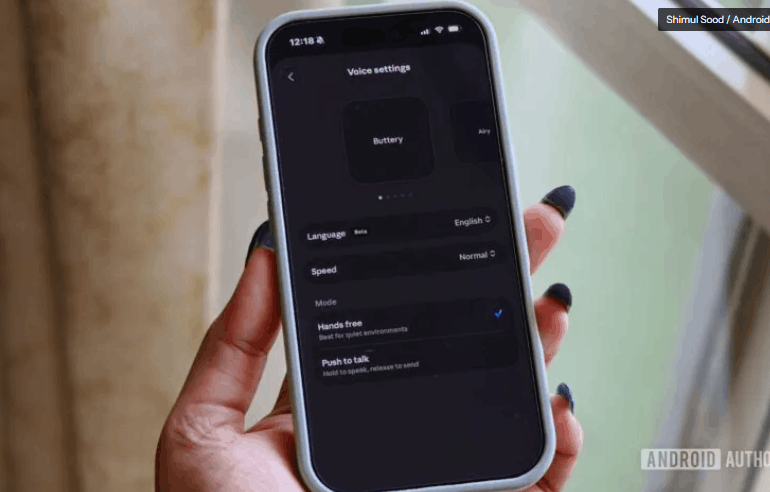
A new Push-to-talk mode is also appearing for some users, offering an alternative to the existing hands-free conversational experience.
Anthropic may be working on something bigger for voice interactions, as a mysterious phone-call-style icon has surfaced in the latest iOS build.
We recently reported that Anthropic was preparing a significant upgrade for Claude’s Voice Mode, including support for multiple languages and a new Push-to-talk option. At the time, the evidence pointed to these features still being developed behind the scenes. Now, it looks like at least some of those changes are beginning to reach users.
An X user going by Evinstein recently shared a screenshot of an updated Claude Voice Mode interface and didn’t hold back on praise, claiming the experience is “100 times better than ChatGPT.” That’s obviously a subjective take, but the screenshots do offer one of the clearest looks yet at the incoming changes.
The updated Voice settings show support for additional languages, with Spanish (Latin America) enabled in the example shared online. Users can also switch between two different ways of interacting with Claude. The first is a traditional hands-free mode that allows for a more natural back-and-forth conversation. The second is Push-to-talk, where you press and hold a button while speaking, then release it to send your message.
Evinstein’s post was later quote-tweeted by TestingCatalog, which previously uncovered references to these upgrades before they surfaced publicly. According to TestingCatalog’s post, the multilingual rollout appears to have started on Claude’s mobile apps, though availability remains inconsistent. That means some users may already have access while others are still waiting.
Interestingly, TestingCatalog also spotted a new voice-related icon in a recent iOS build that resembles a phone call button. Anthropic hasn’t explained what this icon does, but it raises questions about whether the company is preparing a more phone-like conversational experience in the future. For now, that’s purely speculation.
The new Voice settings are already live on my iPhone’s Claude app, including the option to choose between Hands-free and Push-to-talk modes. I also found support for a much broader language selection, including German, Portuguese, Chinese, Japanese, Russian, and Ukrainian, among others.
That said, the mysterious phone-call-style option hasn’t appeared on my device yet. Based on what we’re seeing so far, Anthropic might be rolling out these additions gradually rather than flipping the switch for everyone at once.
If you’re curious whether you’ve received the update, open the Claude app, tap your profile picture, then tap settings, and open the Voice section. If the rollout has reached your account, the new options should be waiting there.
Sometime this spring, AI stopped being a passive tool you pick up and started becoming an active system that runs in the background.
For about two years, most of the AI I saw at conferences and in companies I work with fell into a category I’d call “cool demo, now what?” (I’ve written before about the non-obvious ways tools like GPT change the game.) Someone shows you a dazzling thing the technology can do, everyone applauds, and then Monday arrives and nothing about how the work actually gets done has changed.
That era is ending, and I don’t think enough people have noticed.
Sometime this spring, AI quietly crossed a line. It stopped being a passive tool you pick up and started becoming an active system that runs in the background. Recent reports describe autonomous agents that can manage and execute multi-step tasks without a human babysitting each step. One phrase from the research stuck with me: AI is moving “from demo culture into the operating system” of small companies. Not the flashy part. The plumbing.
That shift changes the question I think every leader should be asking. For two years, the question was, “What can this tool do?” The better question—the one that actually predicts whether you’ll get value—is: “What have we built around it?”
Run the co-worker test.
For each AI tool in your company, ask: is this something a person occasionally picks up, or a system that runs whether or not anyone’s watching? If everything is still in the “occasionally picks up” category, you’re stuck in demo culture and leaving the real value on the table.
Build the guardrails before you build the autonomy.
The big enterprise vendors are racing to turn safety, permissions, and audit trails into product features—because an unsupervised agent with the wrong permissions is a disaster waiting to happen. Before you let an agent act on its own, decide exactly what it can touch, what it must escalate, and how you’ll review what it did. Write it down on a single page. It may be the most valuable document you create all year.
Pick the handoff, not the takeover.
The mistake is trying to automate an entire job. The win is automating the handoff—the agent does the first 80 percent, then hands a human the 20 percent that needs judgment, taste, or care. The goal isn’t to replace your people; it’s to hand them the hard, human work with the easy stuff already cleared away. That’s not a smaller job. It’s a better one.
The goal was never to remove the humans. It was to remove the parts of work that were beneath the humans. We spent a century asking people to do robotic work because we didn’t have robots. Now we do. The opportunity isn’t to do the same work faster—it’s to finally let people do the work only people can do: the caring, the creating, the connecting—and let the quiet co-workers handle the rest.
The demo era is over. The operating-system era has begun. The only question that matters now isn’t how smart your tools are. It’s what you’ve had the discipline to build around them. Ask yourself the co-worker test today. The companies that answer it honestly—and then build the boring infrastructure—are going to look unrecognizable, in the best way, a year from now.
“Over the last 12 months, we’ve seen a flurry of [media advertising] activity from outside the retail sector,” EMARKETER analyst Sarah Marzano said on a recent episode of “Behind the Numbers.” But it’s not just advertising that’s shifting, younger consumers are actively seeking ways to disconnect from their devices and engage in physical experiences, prompting brands to rethink how they reach audiences.
This surge reflects a broader cultural shift as Gen Z and Gen Alpha trade digital feeds for real-world connections.
Quitting social media
Over half (52%) of Gen Zers tried quitting or cutting back on social media in 2025, placing it above fast food, sugar, and alcohol, according to November 2025 Check My Insurance data.
The desire to disconnect is clear, but execution remains challenging. Nearly 60% of Gen Z say social media has had a negative impact on their generation, according to 2024 Harris Poll data. Just 17% of Gen Z have never taken any steps to limit their usage, with the majority attempting to reduce screen time through unfollowing accounts, deleting apps, or disabling notifications.
The addiction is real, but so is the awareness.
“It’s an addiction, but it’s also inescapable because that’s the way in which we function with the rest of the world now,” said our analyst Paola Flores-Marquez. For Gen Z, social media serves as entertainment, discovery, communication, and work—all in one device that lives in their pocket.
The challenge of actually logging off
Despite widespread desire to disconnect, true digital detox remains elusive. Between smartwatches, Oura Rings, and other wearable technology, “there’s really no such thing as logging off anymore,” said our analyst Suzy Davidkhanian.
Logging off increasingly means supplementing digital habits with analogue activities rather than complete disconnection.
“I think Gen Z-ers are, well, again, Gen Z-ers are a majority adults, and so I think now they have the means to seek out and invest more in physical hobbies now,” Flores-Marquez said, citing pottery classes and in-person events as examples.
Retailers and consumer brands are responding to digital fatigue with physical activations and community-building initiatives:
• Levi’s operates tailoring and customization studios where customers can learn DIY techniques and personalize their clothing
• L.L.Bean launched its fifth annual “Off the Grid” campaign for Mental Health Month, featuring limited-edition analogue totes and customizable outdoor gear
• Ulta Beauty hosted a concert for loyal members at a major stadium
“Stores are 80% of sales,” Davidkhanian said. “Absolutely retailers and brands have to find different ways of getting people off their couches and into stores.”
These activations offer brands direct consumer insights in real time.
“There’s the added benefit of actually understanding your audience in real time, you know, getting all those insights, being able to connect at that level without having to wait,” Sevilla said.
Tech platforms and the problem
Even digital platforms are encouraging users to spend less time scrolling. Pinterest is positioning itself as a place to find inspiration online so people can live offline, while dating app Bumble is ditching its swipe feature in favour of AI-driven matchmaking to combat Gen Z dating app fatigue.
“The faster that they jump on acknowledging that and sort of encouraging more responsible usage, the faster that they either retain or regain consumer trust,” Flores-Marquez said. “Because right now everyone’s feeling like it’s kind of predatory.”
YouTube Shorts limits viewing time for younger users, and various platforms now offer tools for parents to restrict engagement.
“They’re doing that to avoid the liability, especially since there’s clear connections to mental health,” said our analyst Gadjo Sevilla.
As AI takes over from Google search, the thing that used to draw people to your creative work is disappearing fast. Here’s what’s happening, and how to respond.
At Cannes Lions 2026, Pinterest said something that should stop every creative in their tracks. Alongside a suite of shiny new AI advertising tools, the platform offered a candid description of where the whole industry is heading.
The web, it said, is moving “beyond the traditional search-and-click model toward a more conversational and generative web,” where brands now compete “not just for attention, but for recommendation, relevance and action”. That might sound like a boringly technical sentence, but buried within it is something very profound that affects every creative working today.
Because what it describes isn’t just a change in how Pinterest sells ads, but a fundamental change in how people find information and inspiration online. And if you’re a creative, the implications for whether you actually get work in future are huge.
Discovery is being dismantled
Until recently, the web gifted creatives many ways to attract clients that didn’t demand a huge marketing budget. A portfolio site that ranked in search results for “editorial illustrator” or “branding studio Bristol.” Instagram, Behance or Dribbble surfacing work to people who’d never heard of you. A piece is getting shared, and the share carries your name back to your profile. None of this required paid promotion.
Now, though, every rung of that ladder has been sawn off.
We’ve seen the decline of organic search: on Google, your freelance or studio site now sits below ads, AI Overviews and big-domain content, making it close to hopeless in promoting your craft. Meanwhile, social algorithms have decoupled reach from quality. Feeds now reward volume, trends and posting cadence rather than the best work, and throttle creators unless they either pay or perform constantly.
And now, as the final nail in the coffin, agentic AI (where AI basically acts as your personal assistant) has removed the last thing the first two still left intact: the click that carried a person to your door.
Who wins and who loses?
Nowadays, when someone types “find me an illustrator who works in cut-paper collage for a children’s book”, AI returns an answer, not a list of links to explore. It decides who gets named, and there’s no way to influence it: no ad slot to buy, no SEO lever to pull.
And how does it reach this decision? AI platforms lean on aggregate signals: who’s already cited, listed, written about, and linked to. This favours the already-famous and the big studios with a deep web footprint, leaving the vast majority of smaller independents floundering.
It’s a virtuous circle for the former, a vicious one for the latter. The visible gets recommended, and the recommendation makes them more visible. The talented new graduate with a thin online presence isn’t in AI’s field of view, so they stay invisible forever.
Pinterest’s new Ask Pinterest app captures this dynamic perfectly. It’s designed, the company says, for “more conversational, complex, multi-step decisions that don’t fit neatly into a single search”: planning a dinner party, furnishing a room over time, finding a gift that feels personal. Truly, it sounds like a great experience. But there’s a trade-off, and it’s a biggie. When answers arrive without a source, the source no longer matters.
So what should you focus on instead?
Pinterest is changing
Be a category of one
In this shiny new world of AI, you can’t optimise your way into a recommendation, the way you once keyword-optimised a website. Recommendation runs on reputation signals that a system can read: being named in other people’s work, on lists, in interviews, in the press, and in collaborations. So the answer for creatives isn’t to play the algorithms harder. It’s to become the name people and systems already trust enough to surface.
One part of that is to own your relationships. A newsletter list, for example, is a direct connection that no algorithm can intermediate away. A community of people who’ve chosen to hear from you isn’t subject to a platform’s recommendation logic. Look at how designers like Liz Mosley have built something genuinely resilient: a website, a podcast, templates, resources; an audience that actively follows her work rather than stumbling across it.
Another is to get cited and named, because getting talked about (positively, of course) is the new currency. This means leaning on the channels no algorithm can gatekeep: word of mouth, referrals, events, and real rooms. And in your work, aiming to be a category of one, with a style so specific it gets requested by name rather than retrieved by attribute. The creatives who get asked for by name are the ones that AI can neither replace nor substitute.
Lee Brown, Pinterest’s chief business officer, frames it this way: “The future of discovery won’t be driven by keywords alone. It will be shaped by context, taste, and trusted recommendations.” He’s describing his platform’s perceived advantage. But he’s also, accidentally, describing yours.
Context is where you work. Taste is what you’ve spent years developing. And trusted recommendations? Those come from people who know you and what you make, not from a system optimising for engagement.
Uncertain future
One last thought. If the systems doing the recommending keep starving the independents who make the original work, they’ll eventually run short of anything worth recommending. AI will ultimately kill off its own supply of information and inspiration. Where that death-spiral leads us is anyone’s guess, but it’s best to be prepared all the same.
In the meantime, I’d advise you to start building those direct relationships. Make the work that can’t be AI-assembled from anything else. And above all, don’t wait for your web traffic to disappear before you start, because that could be too late.
AI disrupted the current job market—and created a long list of new roles with impressive salaries across tech, medicine, HR, IT, marketing, and more.
Artificial intelligence is disrupting the current job market, leaving a trail of corporate layoffs and workers scrambling to determine what positions will be safe in the future.
At the same time, AI tools are also creating a number of high-paying jobs that didn’t exist a decade ago, according to a new report from job search and career platform Ladders. The survey looked at data from professionals earning over $100,000 a year and mapped the top 15 six-figure jobs that it says are worth considering.
“Most headlines frame AI as a wrecking ball aimed at our paychecks,” Marc Cenedella, Ladders’ CEO, tells Fast Company. “This study, however, shows [more than] 1.3 million new jobs have been created since the term ‘AI’ entered the mainstream vernacular, with many of those roles paying 56% above the rest of the pack.”
These jobs exist across industries including medicine, marketing, technology, human resources, information technology (IT), and cybersecurity.
Cenedella says the study’s real value is that it provides a map of the jobs that workers should invest their time in today, including a mix of new positions (chief listening officer, AI ethicist, and climate change analyst) as well as some obvious choices (SEO specialist, social media manager, and chief AI officer).
“The best job bets all share one trait: A human is managing the machine, not racing against it,” Cenedella adds.
AEO specialists and AI ethicists?
Cenedella says there is currently a high demand for AEO specialists and AI ethicists. But what exactly do they do?
As AI-generated summaries cut search in Google by 45% (even though the summaries are wrong 10% of the time), companies are adapting to the collapse in web traffic by investing in answer engine optimization (AEO) specialists, who make sure their original content appears in AI overviews or large language models (LLMs) like ChatGPT and Claude. These AEO specialists are the next generation of marketing and website professionals.
Alternatively, the need for AI ethicists will only continue to grow as AI agents make more autonomous decisions, requiring a human to verify that their output is accurate, legal, and fair. AI ethicists set policies for how companies can ethically use AI while protecting against data leaks and major mistakes AI agents can make, such as deleting 2.5 years’ worth of records.
15 high-salary jobs in 2026
Here is the full list of 15 high-paying jobs in the age of AI, as well as a salary range and degree requirements for each.
Chief AI officer — $200,000–$500,000 (bachelor’s degree minimum)
Influencer manager — $135,000 (no degree required)
AI ethicist — $70,000–$170,000 (bachelor’s)
Data protection officer — $118,000 (bachelor’s minimum)
Data scientist — $112,000 (bachelor’s)
Climate change analyst — $112,000 (bachelor’s)
Drone operator — $71,000–$100,000 (remote pilot certificate)
AEO specialist — $91,000–$180,000 (no degree required)
SEO specialist — $86,000+ (no degree required)
Social media manager — $74,000–$200,000+ (no degree required)
However, Cenedella adds that degree requirements shouldn’t be a main focus. “The smartest move a worker can make today is to stop treating a degree as the main thing that qualifies them and start building proof for why they should own a role instead,” Cenedella tells Fast Company. “Whatever your current job is, do a piece of it with AI, capture the result, and put it somewhere you can show it: A year of quietly documented results beats a degree program that won’t exist until you’re already too late to it.”
Jennifer Mattson is a Contributing Writer at Fast Company, where she covers news trends and writes daily about business, technology, finance and the workplace.. She is a former network news producer for CNN, CNN International and a number of public radio programsMore
Samsung is poised to make a significant impact on the foldable smartphone market with its upcoming Galaxy Z Fold 8 series. This eagerly awaited line-up, featuring the Galaxy Z Fold 8 Ultra and Galaxy Z Fold 8 Wide, is expected to deliver substantial advancements in display technology, performance, and overall usability. Recent filings with the Federal Communications Commission (FCC) strongly suggest that these devices are nearing their official release. The Galaxy Unpacked event, scheduled for July 22, 2026, is widely anticipated to be the platform for their grand unveiling.
FCC filings have long been a reliable indicator of a product’s readiness for launch, and the Galaxy Z Fold 8 series is no exception. These filings confirm the existence of the new foldable devices and hint at their imminent arrival in the market. Samsung’s decision to align the launch with its mid-year Galaxy Unpacked event underscores its strategy of maintaining a consistent presence in the competitive smartphone landscape. By unveiling flagship devices during this period, Samsung continues to reinforce its reputation as a leader in technological innovation.
The timing of this launch is particularly significant as it positions Samsung to capture consumer attention ahead of the holiday season. With the foldable smartphone market gaining momentum, the Galaxy Z Fold 8 series is expected to set new benchmarks for design and functionality.
Galaxy Z Fold 8 Ultra: Elevating Foldable Performance
The Galaxy Z Fold 8 Ultra is designed to redefine the capabilities of foldable smartphones. At its core is the powerful Snapdragon 8 Elite Gen 5 processor, which ensures exceptional speed and efficiency. This innovative chipset is complemented by a larger battery, addressing one of the most common concerns among foldable phone users, battery longevity. With this upgrade, users can expect extended usage without compromising on performance.
For productivity-focused users, the return of S Pen compatibility is a standout feature. The stylus support enhances the device’s versatility, making it ideal for tasks such as note-taking, sketching, and multitasking. These enhancements position the Galaxy Z Fold 8 Ultra as a premium choice for those seeking a blend of innovation and practicality in a foldable form factor.
The device also features a high-resolution foldable display with a 120 Hz refresh rate, making sure smooth animations and vibrant visuals. This combination of hardware and software advancements makes the Z Fold 8 Ultra a compelling option for both tech enthusiasts and professionals.
Galaxy Z Fold 8 Wide: Expanding the Foldable Experience
The Galaxy Z Fold 8 Wide introduces a bold new approach to foldable design with its wider 4:3 aspect ratio. This innovative design choice addresses user feedback from previous models, where narrower displays were seen as limiting for multitasking and media consumption. The wider screen enhances usability, allowing for more efficient side-by-side app usage and improved viewing experiences.
The device features high-resolution displays, including a 432 PPI cover screen and a 403 PPI foldable screen, delivering sharp and detailed visuals. A 120 Hz refresh rate further enhances the user experience by providing seamless transitions and animations. These features make the Z Fold 8 Wide an excellent choice for professionals and power users who demand versatility and performance.
Under the hood, the Z Fold 8 Wide is powered by the same Snapdragon 8 Elite Gen 5 chipset as its Ultra counterpart, making sure top-tier performance across the board. Photography enthusiasts will appreciate the inclusion of a 50 MP main camera paired with an ultra-wide lens, offering versatility for capturing diverse scenes. Additionally, the 4,800 mAh battery with 45-W wired charging ensures that the device can handle demanding usage throughout the day.
Samsung’s decision to introduce a wider aspect ratio with the Galaxy Z Fold 8 Wide highlights its commitment to addressing user feedback. Many users of earlier foldable models expressed concerns about the limitations of narrow displays, particularly for multitasking and media consumption. By offering a more expansive screen, Samsung not only improves usability but also strengthens its position as a leader in foldable technology.
This strategic move also serves as a pre-emptive response to Apple’s rumoured entry into the foldable smartphone market. By staying ahead of the curve, Samsung aims to solidify its dominance in this rapidly evolving segment. The Galaxy Z Fold 8 series reflects Samsung’s dedication to pushing the boundaries of what foldable devices can achieve, making sure that it remains at the forefront of innovation.
Building Anticipation for a Milestone Release
The Galaxy Z Fold 8 series represents Samsung’s most ambitious effort yet in the foldable smartphone market. With significant upgrades in hardware, design and functionality, these devices have the potential to reshape how users interact with their smartphones. Whether you are a tech enthusiast eager to explore the latest advancements or a professional seeking a versatile device for work and entertainment, the Z Fold 8 line-up offers something for everyone.
As the July 22 Galaxy Unpacked event approaches, excitement continues to build. If the leaks and rumours are accurate, the Galaxy Z Fold 8 series could set new standards for the industry, redefining what is possible in mobile design and functionality. Samsung’s commitment to innovation ensures that these devices will not only meet but exceed the expectations of users, making them a pivotal release in the evolution of foldable technology.
Take a look at other insightful guides from our broad collection that might capture your interest in the Samsung Galaxy Z Fold 8 Ultra.
Claude is one of the easiest AI tools for transferring your chatbot memory.
Switching to another AI chatbot when you’ve invested a ton of time with another one may have you questioning whether making the move is even worth it. If you’ve spent countless hours talking to the likes of ChatGPT or Gemini, the thought of moving over to an option like Claude might seem like a waste.
Chatbots are increasingly becoming a part of many people’s everyday lives, and not everyone treats them as a sampler platter, trying each one equally. Typically, people find one that works well enough, and they stick with it. But as AI advancements continue and chatbots gain new capabilities, it’s natural to be curious to try a new AI option. And you don’t have to start from scratch if you know what you’re doing.
Unlike most AI chatbots out there, Claude allows you to easily transfer memories and previous conversations. Options like Gemini, on the other hand, allow you to easily import memory and chats from a competitor, but you need to jump through additional hoops to export them, as there’s no built-in way to do so.
That said, Claude isn’t perfect. There’s currently no built-in way to upload a ZIP file to Claude that you’ve exported from another chatbot, but currently, none of the most popular AI chatbots out there provide all the options you might be looking for when it comes to importing and exporting memory and data. While some chatbots give you more options than others, the fact of the matter is that these AI companies want you to continue to use their own products.
If you’re looking to move to or from Claude with your information intact, follow along.
How to import chatbot memories to Claude
Anthropic makes it pretty easy to import chatbot memory to Claude. Anthropic/Screenshot by Blake Stimac
Chatbot memory isn’t every single conversation you’ve had with Claude, but the context and important information it has collected about you in the time you’ve been using it. Anthropic makes it easy to import that memory to Claude. For more on how to obtain another chatbot’s memories to import to Claude, check out my piece on how to do this with Gemini.
Here’s how:
Log in to your Claude account
Click your profile icon
Click Settings
Click Capabilities
Click Start import next to Import memory from other AI providers.
You’ll be presented with a window that will ask you to copy the first section of text and paste it into the other chatbot. Below that section is a blank section, where you will paste the chatbot’s response so Claude will retain that memory for you.
View and manage what Claude remembers about you
If you want to see what Claude remembers about you, there’s a setting you can use to check. In the same section where you import memory, there’s an option to View and manage memory.
When selected, Claude will show you everything it’s retained about you from previous conversations or memories you’ve imported from another chatbot. The memory summary is generated each night and doesn’t include memory from Claude Projects, which have their own memory.
If you want to add, edit or delete memories in this section, click the pencil icon at the bottom left of the window to edit the text shown.
How to export data from Claude
If you’re moving away from Claude and want to export your data, there’s a built-in way to do this:
Log in to your Claude account
Click your profile icon
Click Settings
Click Privacy
In the Data section, click the Export data button
A pop-up window will appear asking you to select the type of data you want to export from Claude. You can choose from your conversations, users and Projects, or just choose them all. Moreover, you can set how long you want the data to pull from. You can choose everything, the past 30 or 90 days or a custom time range. When you’re done, click the Export button.
Depending on how much data you’re exporting, you might have to wait a while. When the data is ready to download, you’ll receive an email with a download link.
From there, you can upload the ZIP files to a chatbot that supports them, such as Gemini.
Blake has over a decade of experience writing for the web, with a focus on mobile phones, where he covered the smartphone boom of the 2010s and the broader tech scene. When he’s not in front of a keyboard, you’ll most likely find him playing video games or watching horror movies. See full bio
Follow our guide to stop third parties from creating shadow profiles that reveal your interests, passions, hobbies, and online activities.
ZDNET’s key takeaways
Marketing and advertising agencies want your data.
Organizations want to know your location, how you shop, and more.
Explore our guide to preserve your right to privacy.
Companies often have access to more data about you than you realize — and many records used to profile you won’t require your outright, knowing consent.
Whenever you browse a website, submit a search query, accept a cookie notice, make a purchase, post on social media, or even visit a location, your activity may be recorded. Now, a singular visit to a website doesn’t tell a marketer much about you, your interests, or what you might be interested in buying — but over time and multiple interactions, a detailed picture of you forms.
Your personal details, location, purchase history, income bracket, interests, and more may all be recorded and linked to your IP address, email, or social media presence.
These profiles, which may also be shared, sold, or traded between marketing agencies and other third parties, allow organizations to perform targeted advertising — and use every psychological trick in the book to lure you to make a purchase.
While it can be difficult to keep your information out of the hands of agencies and brokers, below, you will find a breakdown of the most common ways you are being profiled online and how you can reduce the flow of your data.
Why do companies want my information, and what do they do with it?
Data is now currency. Your information and attention are huge revenue drivers for companies that provide services ranging from analytics and consumer technology to marketing and hospitality.
With enough data, organizations can create detailed reports on individual consumers — known as shadow profiles — and each signal can be exploited for targeted advertising, tailored communication, and to customize campaigns to lead you to purchase decisions, or to visit affiliates and partners online.
Our smartphones are now hubs of activity. We use them to surf the internet, make purchases, communicate with others on social media, consult maps, and log our health and fitness data — the list goes on. With each data point (or “signal”), companies can learn about our whereabouts, our habits, our interests, who we talk to, and what we like to buy.
Information that companies may collect about you from your smartphone includes:
Your name
Personally Identifiable Information (PII), including home location, age, and date of birth
Smartphone device identifiers: language, operating system, model, IP address, MAC address
Contact information, such as your phone number or email address
Public social media records, engagements, and posts
Data synced with your vehicle, such as contact information, messages, entertainment preferences, and GPS logs
Shared health and fitness logs
Place of work, likely salary range, and education level
Interests, hobbies, and search queries
Mobile app usage telemetry and records
Shadow profiles are all about patterns, not individual data points, which can be aggregated to create an accurate portrait of you. The range of data collected depends on the mobile and online services you use, their terms and conditions — including data-sharing agreements — and what you post publicly online.
1. Browser activity
Unless you are using a secure mobile browser, this gateway to online services is a goldmine for consumer data collection.
Take this example. You need a new outfit for a wedding you are attending. You type your search query into Google on your smartphone for a formal event clothing store, together with the name of your city — as you might want to try something on before purchase. You choose the search term “luxury” over “budget.” You then visit several local companies’ websites.
You have now revealed your device identifier, a search term, an area, and a product you’re interested in. What you browse could help organizations pinpoint your taste in clothing, as well as your potential budget, estimated or probable income level, and how far you’re willing to travel.
Our search queries, interests, location, websites we visit, browsing habits, and more can all be revealed in a simple online query. Stitched together with our smartphone’s device identifiers, a profile is already on its way to being built.
2. Online purchases
If you decide to buy online instead, additional signals can be captured either via your mobile browser or by downloading and installing a store’s dedicated app.
How long you linger on a product page, your purchase decisions, whether or not you use discount offers and promotions, and how you engage with a website or app can all reveal a lot about you. In turn, this profile can be used to tailor marketing campaigns or loyalty programs based on your demographic data, purchase history, and interests.
Over time, the same information may be used to predict your future spending.
3. Social media engagement
Now you’ve made your purchase. You take a photo of yourself with your smartphone’s camera, post it publicly on Instagram, and tag the store. You leave a glowing review and tag a few friends who are going to the same event and might be interested in buying their own outfits from the same place.
This single post has now revealed your purchase, potentially your location, your contacts and their links to you and the social event, how you are likely to engage with other stores, your physical appearance, age range, and social media usage.
If you engage with other social media pages and profiles, this, too, can be collected by organizations for profiling purposes. This may include the types of business you are connected to, where you post, what you like, and how often you view certain profiles and for how long. All of this data is usually collected by social media platforms for advertising purposes and may be shared with third parties, depending on their terms and conditions.
4. Mobile apps
The mobile applications you use, how often you use them, and what types of software you prefer can all be shared by developers with other organizations. For example, a stocks-and-shares app could create a signal that you have financial interests, which could be used to sell you financial services.
Or, the use of a dating app could lead to targeted adverts for singles appearing in your email inbox.
Developers may also use the same signal to measure app engagement and improve app features — but, in turn, this could be exploited for in-app partnership sales opportunities.
There’s also the problem of your advertising ID, buried in your settings, that links your device to you and could be used for targeted advertising.
“The biggest risk is aggregation,” Yasir Zahid, head of business security at Secure.com told ZDNET. “Advertising IDs act as a persistent identifier that links your activity across apps and ad-tech SDKs even when no single app knows your full picture. A weather app, shopping app, fitness app, or travel app may each collect a small piece of context, but together — tied by that common identifier and shared with data brokers — those pieces become a behavioural profile: where you go, what you are interested in, what routines you follow, and even which sensitive places you visit. Most users rarely have full visibility into how often this data is collected, how long it is stored, or who it is shared with.”
5. Subscription services
If you access a subscription service on your mobile device, this can also reveal more data to add to your shadow profile. Regardless of whether you use Netflix mainly on your smart TV and only occasionally on your smartphone, data points can still be collected and linked to your profile.
Your streaming service app usage, device identifiers, viewing habits, preferred genres and interests, general location, personal account details, what you’ve searched for, and how you engage with the service are all potentially up for grabs.
How companies connect the dots between you, your devices, and online services
Companies don’t need to know your name to create a shadow profile of you. You don’t even need to use a specific online service.
Your smartphone’s ID, Wi-Fi, or cellular connection, GPS, or even Bluetooth can all generate signals that are connected to your shadow profile. Combine this with device and browser fingerprinting — the collection of device-related data — and the foundations for a concrete profile are in place.
Next, we add cross-service tracking technologies, including the email address you use to sign up for online services and apps, cookies, advertising IDs, and behavioural patterns such as browser and search activity, purchases, website and app engagement, interests, and social media activity, and you have a profile that may be far more detailed than you’d imagine.
These profiles may be further bolstered when companies purchase consumer data from data brokers. Sensitive information, PII, and more can be legally stored, shared, and purchased by these firms, which then sell it on to other companies without your knowledge or consent.
How to stop being profiled through your smartphone
While our guide focuses on the data flowing between your smartphone and third parties, you can also apply the advice below to any Internet-connected device you own, such as a laptop or PC.
Audit your app and smartphone permissions: An often overlooked area that drastically impacts our privacy — and the data collected about us — is app permissions. To stop your handset from leaking signals and data that could be aggregated for profiling purposes, check out our guide on performing a permissions audit on your smartphone.
Turn off personalizedadvertisements: Go to the settings or options for any online service, account, or app you use and ensure that personalized advertising is turned off. This is especially important on social media, as data may be pulled from your shadow profile for targeted product placement and advertising.
Delete or turn off your advertising ID: Your advertising ID links your mobile device to marketers and other organizations, allowing them to potentially identify you and serve tailored ads through websites and search results. On Android, you will find this option under the Ads tab in Privacy & Settings (use the search bar if it is hidden). On iOS, you will find this option in Privacy & Security > Tracking.
Use a secure browser app: A secure browser will not store or sell your information and should not collect any search queries or browsing history. Using a secure browser app on your smartphone will reduce the risk of being profiled, and we recommend browsers for this purpose, including Brave and the Tor Browser.
Install a private search engine app: If you don’t want to change your browser, you can at least reduce your online footprint by using a private search engine. DuckDuckGo is our favourite.
Say no to cookies and opt out: Whenever possible, reject any additional cookie notices on websites and stick with “essential cookies only” required for website functionality. Furthermore, opt out of any personalized adverts and tracking requests.
Install a VPN: Using a Virtual Private Network (VPN) service is a great way to disguise your online activity and mask your IP address — and the best providers out there all offer Android and iOS apps. Not only can a VPN protect your data and privacy, but it can also help you avoid geolocation blocks and encrypt your online communication, keeping it out of eavesdroppers’ hands.
Create a junk email address: Creating a second email address can keep clutter out of your main inbox, as well as break connections between you and your true email address. Whenever you make a purchase online or sign up for a service you only intend to use casually, use your junk address instead.
Delete and remove unused services and apps: This is good practice for your security and privacy, overall, but it can also help reduce the data flow between your device and third-party organizations. If you’re not using an app or online service anymore, delete the accounts associated with it. An app doesn’t have to be actively used to retain permissions and transmit your information.
Use a data removal service: If you want to keep your information out of data brokers’ hands, consider signing up for a dedicated service to do so for you. The issue with data brokers is that one data deletion request is never enough — as your information is repeatedly acquired from different sources, you have to be persistent in asking for removal. One of our favourite data removal services can shoulder this task for you.
Feature image credit: vadishzainer/iStock / Getty Images Plus
The upcoming iOS 27 update that Apple unveiled last week includes some new features and enhancements for Apple’s Notes app on the iPhone.
iOS 27 is currently available as a developer beta, with a public beta to follow in July. The update is expected to be released to all users in September.
Below, we have outlined four additions to Apple’s Notes app on iOS 27.
Siri AI
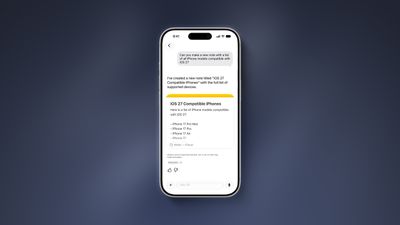
On the iPhone 15 Pro and newer, the more intelligent and personal version of Siri known as “Siri AI” can create notes with generated content. For example, you can ask Siri AI to create a note with a list of all iPhone models that are compatible with iOS 27, and it will do so after retrieving this information from the internet.
On iOS 26 and earlier, Siri can only create notes based on the words you actually say.
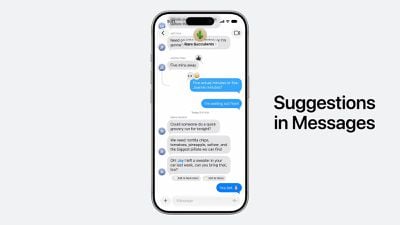
In addition, Siri AI will intelligently show an “Add to Notes” shortcut below certain messages in the Messages app based on the context of the conversation.
Copy and Paste in Markdown
iOS 27 introduces the ability to copy and paste text that is formatted in the Markdown language, created by well-known Apple commentator John Gruber.
Markdown lets you add formatting to text without using HTML:
Bold text:**bold**
Italic text:*italic*
Linked text:[Apple](https://apple.com)
List item:- Example
For example, if you paste “Apple’s next CEO is **John Ternus**” into the Notes app on iOS 27, “John Ternus” will appear in bold text.
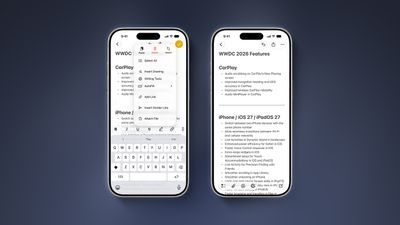
In reverse, if you select formatted text in the Notes app and tap on the right arrow in the Cut/Copy/Paste menu that pops open, there is a new “Copy as Markdown” option on iOS 27. If you tap on this option, any rich text formatting in your selection will automatically be converted to Markdown that can be pasted elsewhere.
iOS 27 lets you organize notes with divider lines. Simply place the text cursor where you want the line to be inserted, tap on the right arrow in the Cut/Copy/Paste menu that pops open, and tap on the new “Insert Divider Line” option.
Section Links
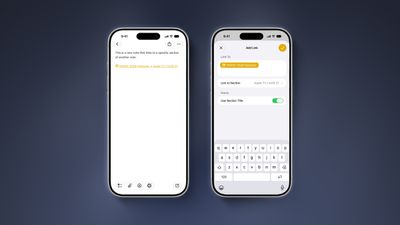
You can now add a link to a specific section of a note. When you tap on the link, the Notes app automatically jumps to that section of text.
For example, you could create a new note that links back to a section of a previous note.