Author

editor

Browsing
By Michelle Hawley
Stay up-to-date on the latest in search engine optimization. Learn about SEO strategies, best practices and the latest updates to Google’s ranking factors.

The Gist

  • SEO best practices still matter. To show up in search engine results pages (SERPs), following search engine optimization (SEO) best practices is necessary.
  • Still Google’s world. Google dominates the global search engine market with 84% market share, making it crucial to consider in an SEO strategy.  
  • High-quality content. On-page SEO involves optimizing visible elements such as content, which should be relevant and high-quality, with expertise, authoritativeness and trustworthiness (E-A-T) guidelines in mind.

When someone wants to search for a product, look at videos or read about a topic, they go directly to their preferred search engine. And if you want to show up in said search engine results pages (SERPs), you’ll need to follow search engine optimization (SEO) best practices.

As we delve into best practices as of February 2023, our primary focus will be on Google. Why? Because it has dominated the global search engine market since its inception in 1997.

As of December 2022, Google held 84% of the search engine market — with runner-up Bing claiming nearly 9%.


The necessity of considering Google in an SEO strategy, whether for a single blog post or entire website.


Google doesn’t share its search volume data. But experts around the web estimate the search engine sees anywhere from 40,000 to 99,000 search queries every second. For one day, that could amount to more than 8.5 billion searches.

SEO, which companies use to maximize content marketing efforts, ultimately breaks down into three categories:

  • On-page SEO
  • Off-page SEO
  • Technical SEO

Let’s take a look at some core components of these three categories and how SEO professionals can aim to follow best practices.

On-Page SEO

On-page SEO, also called on-site SEO, refers to the optimization of elements that you can see on-page, such as:

Content

Content is at the core of on-page SEO, and it’s what many people focus on when first optimizing their SEO strategy.

Relevance and quality are more important than any other Google ranking factor.

Google actively penalizes thin content that offers little to no value to searchers. While in the past it used to consider pages as a whole, it now looks at and ranks subsections within pages to match queries.

When you’re working on your content creation strategy or overall SEO strategy, consider these questions to determine if you’re headed in the right direction:

  • Do you have a target audience in mind that will find your content useful if they come directly to you?
  • Does your content demonstrate expertise that comes from firsthand experience?
  • After reading your content, will someone feel they’ve learned enough about the topic?

If you’ve answered yes to these three questions, you’re on the right track.

Some content worst practices to stay away from include:

  • Creating content specifically to attract people from search engines
  • Utilizing extensive automation to produce lots of content on a variety of topics
  • Summarizing what other content creators have said without adding additional value
  • Writing to meet a particular word count or because you’ve heard Google’s algorithm prefers a specific word count (it doesn’t)
  • Creating content that promises to answer a question that has no answer (for example, suggesting you know the release date of a movie that has no confirmed release date)

E-A-T Guidelines

E-A-T stands for Expertise, Authoritativeness and Trustworthiness. This concept became a core part of Google’s algorithm in August of 2019 and continues to play a significant role today in evaluating content.

In Google’s Search Quality Evaluator Guidelines, E-A-T specifically refers to:

  • The expertise of the creator of the main content
  • The authoritativeness of the creator of the main content, the main content itself and the website
  • The trustworthiness of the creator of the main content, the main content itself and the website

E-A-T plays a part in websites of all types, including gossip columns, satire websites, forums and Q&A pages. How a website meets E-A-T guidelines will depend on the type of website. Some topics or industries will require less formal expertise than others.

For example, a news website with high E-A-T articles will convey journalistic integrity, contain factually accurate information and utilize robust policies and review processes with included sources.

A site containing scientific topics, on the other hand, should be created by people or organizations with the appropriate scientific knowledge or expertise and represent established scientific consensus.

When it comes to establishing E-A-T for your content, think about the page’s topic and what expertise is needed to achieve the purpose of that page.

Search Queries

Search queries are the words and phrases people use when using search engines or smart assistants. These words and phrases shift based on the search intent — the “why” behind the action.

Types of search intent include:

  • Informational: The searcher is looking for information, wants to answer a question or learn how to do something. The best way to target an information query is to develop high-quality, SEO-focused content that provides helpful and relevant information to the user. Position yourself as a source of information people can trust.
  • Navigational: The searcher is looking for a particular website or page. For example, they might type “YouTube” or “LinkedIn.” You can’t typically target navigational queries unless you own the specific website or page the person is looking for. But you can make sure you claim the top results spot for your brand’s own navigational query.
  • Transactional: With this search intent, the user wants to make a purchase. The query might include a brand, product or service name or a generic item, such as “coffee maker.” You can target these search queries with optimized product or service pages. You can also use pay-per-click (PPC) campaigns to target these search terms.

By understanding search intent — which might include keyword research to best understand which words the target audience uses — companies can better craft content to meet needs and win more readers.

Links

You should include two types of links within your website or web page content: internal and external.

Internal links redirect to another page or piece of content on your website. For example, on an article about the latest chatbot trends, you might link to a related article about how chatbot technology works.

External links direct readers to a page that is not yours. These links should be highly relevant webpages or sites with high expertise, authoritativeness and trustworthiness (E-A-T).

Link building is also important — getting other websites to link back to your website or piece of content. These links signal to Google that your website is valuable enough to earn a citation, allowing content to rise in search rankings. We’ll talk more on these later, in off-page SEO strategies.

Visuals

Visuals (videos, gifs, pictures, infographics, etc.) are a large part of online content.

If you plan to use visuals on your site or pages, you’ll want to ensure that they’re:

  • Large and high quality (beware of large image file sizes, however, which can cause slow loading)
  • Relevant to the content
  • Shareable
  • Placed high on the page
  • Have a relevant file name
  • Have alt text, which aids visually impaired users

If you’re using video content, include a video transcript. Not only will a transcript make your content more accessible, but it will also make videos more “scrapable” by search engine bots.

Meta Title & Meta Description

Your meta title (the alternative title that shows up on Google) tells search engines and searchers what your content is about and what keywords to focus on. This title should be relevant to your content, include at least one word or phrase from your keyword research and be no longer than 60 characters.

Search engines don’t factor meta descriptions into your ranking — but that doesn’t mean you should ignore it.

The meta description is the ideal place to let Google and searchers know what your page is about. As a result, you’ll see higher click-through rates.

URL & Slug

Including your keyword within the slug of the URL — the last part of the URL that identifies the unique page — is a small bonus to SEO. However, if you can’t do so in a sensible way, it won’t be a big hit against you.

Ensure that your slug matches the title of your content. For example, if your blog post is about customer experience, your URL might be: www.yourwebsite.com/blog/all-about-customer-experience

Another thing to keep in mind is that shorter URLs receive high click-through rates than longer ones. A shorter URL comes across as more trustworthy and authoritative to users.

Other best practices for URLs include:

  • Avoid using dates in your slugs (for example: “2022-customer-experience-best-practices”
  • Use the hyphen between words in your slugs

Off-Page SEO

Off-page SEO refers to optimization strategies that don’t involve the content on your website. Some of the most vital off-page SEO tactics include:

Link Building

As mentioned above, earning backlinks from other authoritative sites can position your website or web page as trustworthy and increase your rankings on Google.

You don’t want to get backlinks from any site. In fact, getting backlinks from link farms — a group of websites that all link to one another to increase organic search rankings — can result in a penalty from Google. Google also penalizes any site that gets caught paying for links.

Some link-building tips to turn to instead include:

  • Create high-value content that others want to share
  • Promote your content via social media, which leads others to sharing it
  • Submit your website to business directories
  • Promote your content via paid campaigns, which may lead others to link to it
  • Look for relevant content on other sites that contains broken links, and send an email with the suggestion to use your content as a replacement
  • Ask people in real life to share your website or content on social media

Brand Building

Google rewards well-known brands. And branded searches (your company’s name, domain name searches and product searches) will lead right back to your website.

Google offers a great tool, Google Trends, that allows people to track interest in a topic, such as a brand, over time. SEO professionals can also use this tool to track searches for specific products or services.

Social Media

Social media plays a big role in how people learn about brands, websites and content. As of 2022, there were 4.59 billion social media users worldwide — a number expected to grow to 5.85 billion by 2027.


Social media usage and its role in the SEO world.


You should have a presence on the social media channels that matter most to your target audience.

Some of the most popular social media platforms, as of 2022, include:

  • Facebook: More than 2.9 billion monthly active users (MAU)
  • YouTube: More than 2.5 billion MAU
  • Instagram: More than 1.4 billion MAU

Not only should your profile include pertinent information about your brand (what it does, where it’s located, contact methods, the website, hours for in-store operation, etc.), but you should also post original and engaging content regularly.

For instance, if you offer a specific product, you could create educational content on how to use that product or answers to frequently asked questions. You can also encourage user-generated content from your community.

Encourage users that read and engage with your social media content to visit your website or web content to learn more.

Technical SEO

Technical SEO is exactly what it sounds like — it refers to the technical aspects that play into your website and web pages, like page load speed and responsiveness.

Google Search Console is an ideal tool for monitoring and maintaining SEO health. It can measure traffic, generate reports, including a technical SEO report, and fix issues.

Technical SEO includes:

Site Speed

Loading performance is part of Google’s Core Web Vitals, which measures different aspects of the user experience. A website or page should only take 2.5 seconds or less to load the page’s main content.

To ensure fast website load speeds, you should:

  • Choose a fast hosting option
  • Choose a fast domain name system (DNS) provider
  • Keep the use of scripts and plugins to a minimum
  • Use small image files (without creating pixelization)
  • Minify your site’s code
  • Compress your webpages

Mobile-Friendliness

As of the second half of 2022, mobile traffic accounted for more than half of global web traffic. Not only does a mobile-friendly design make for a better user experience, but it’s a significant ranking factor for Google.

If you’re unsure of your website’s mobile accessibility, you can use Google’s Mobile-Friendly Test.

Most brands accomplish mobile-friendliness by using a responsive web design, which adjusts itself automatically depending on the type of device a person is using.

Google also offers a guide on customizing website software for companies that use content management platforms (CMS) like WordPress, Joomla or Squarespace.

Beyond using a responsive design, companies should also pay attention to how content and assets behave on-page for mobile users. Layouts that shift when a person is trying to read content or interact with the page are a significant part of Google’s Core Web Vitals.

SEO professionals can monitor these movements with a metric called cumulative layout shift (CLS), which measures visual stability and quantifies how often these shifts occur. Core Web Vitals recommends that pages maintain a CLS of 0.1 or less.

XML Sitemaps

An XML sitemap helps search engines understand your web pages while crawling them. It tells them:

  • Exactly where each page is
  • When a page was last modified
  • Which pages hold the most priority
  • How frequently a page is updated

Some hosting platforms create an XML sitemap automatically. If your chosen platform does not, you’ll want to look into using an XML sitemap generator.

Site Indexing

Google Search Console allows you to submit your website’s XML sitemap for site indexing. (Bing also has a version of this tool called Bing Webmaster Tools.)

These tools also track the general SEO performance of your site, allowing you to:

  • Test your site’s mobile-friendliness
  • Access search analytics
  • View backlinks to your site

Search in 2023: SEO Strategy Remains Top Priority

People want content that is high-quality and relevant to them. If you want to appear in their search results, it’s essential to pay attention to changing SEO trends and tactics.

Google continually updates its algorithm, meaning how they rank your site or content will depend on your use of the latest SEO strategies. With the latest tips above, you can ensure your content meets essential Google ranking factors and shows up in search results for your target audience.

By Michelle Hawley

Michelle Hawley is an experienced journalist who specializes in reporting on the impact of technology on society. As a senior editor at Simpler Media Group and a reporter for CMSWire and Reworked, she provides in-depth coverage of a range of important topics including employee experience, leadership, customer experience, marketing and more. With an MFA in creative writing and background in inbound marketing, she offers unique insights on the topics of leadership, customer experience, marketing and employee experience. Michelle previously contributed to publications like The Press Enterprise and The Ladders. She currently resides in Pennsylvania with her two dogs.

Sourced from CMSWIRE

By Charlie Sorrel

And why the fediverse should be on alert

Meta’s new text-based social network might obliterate the remains of Twitter and also take aim at the fediverse.

The decentralized social media network, code-named P92, could be compatible with ActivityPub, which is what services like Mastodon are built on. Users will be able to log in using their existing Instagram credentials, which means that it will be trivially easy to join in with Mastodon instances around the world. It’s a boss move from Meta, but it could be as dangerous for decentralized social media as it is for Twitter.

“The one feature that Facebook lacks is the ability to give its users autonomy. Social media apps like Mastodon do not have a parent company operating them. It works on independent servers, and the users have the liberty to set their own code of conduct,” marketing expert Ryan Faber told Lifewire via email.

P92 Skirts the Fediverse

Twitter is on its way out. Since the Musk takeover, the trolls and bad actors who always strove to ruin Twitter for the rest of us have finally taken over. Lots of folks have moved to Mastodon, a decentralized collection of many federated servers, any of which you can join. In its simplest form, it’s kind of like email in that you pick your email provider, but you can email anyone else on any other email service.

This is fundamentally different from services like Twitter and Facebook. These are monolithic structures where everything happens inside a walled garden. The advantage of this approach is that you can easily sign up without having to vet and choose a server “instance.” The disadvantage is that anyone with enough money can buy the whole thing, or a single company can mine terrifying amounts of personal information from billions of users worldwide.

At the same time, Meta is under ever-increasing government scrutiny for its practices. By adopting the federated model, it might avoid the regulation it fears. If P92, or whatever it ends up being called, is just another ActivityPub-compatible service, or even just an Instagram-branded Mastodon server, the argument for breaking it up is weakened.

It sounds amazing, like a real win for open, decentralized social media and micro-publishing, comprised of a collection of servers and standards known together as the fediverse. And for Facebook and Instagram users, it removes the biggest barriers to entering that fediverse. Instead of trying to understand the whole federated thing, you just—presumably—join up from Instagram or whatever new app Meta comes up with. But this is also the biggest danger for the existing fediverse.

Meta’s Decentralized Social Media

In the 1990s, Microsoft used a strategy called “embrace, extend, and extinguish” (or “exterminate”). It was how it took over the fledgling browser market, for example. In the case of Meta and the fediverse, it would work like this.

Meta would embrace, say, Mastodon and instantly become the world’s biggest Mastodon server. It may then add features, and it would definitely make sure that anyone using its own instance would be just as heavily surveilled as they are using Meta’s other products.

Then, if all goes to plan, Meta could use this dominance to squeeze out the rest of the fediverse. It would become a de facto standard, and any independent Mastodon servers unable or not willing to implement Meta’s proprietary features would be shut out.

A group of teens using their smartphones in the park.
Maskot / Getty Images

“Facebook is not coming to Fedi because they want to administer a good, responsible instance that regards other well-run instances as peers and equals and has policies that aim to respect the autonomy and values of its users and other instance’s users right?” the Research Fairy, the creator and administrator of the scholar.social Mastodon instance, said on Mastodon.

The Best Defense

But it might not be so easy. While an easy sign-up will probably be enough to get the remaining Twitter users to jump to Mastodon via Facebook, the fediverse has some tricks up its sleeves. First, a Mastodon instance can block any other instance. This can be used to cut off servers that go bad or are full of trolls, but it could also be used to block Meta’s P92 network. And right now, I’d wager that many Mastodon users are anti-Meta (or anti-Facebook), and would prefer a server that blocks it.

Even an extensively-blocked Meta-owned Mastodon instance could be enough to finish off Twitter. And you never know, it might even end up introducing more people to Mastodon and all the other decentralized social media and federated goodies beyond.

Feature Image Credit: Urupong / Getty Images

By Charlie Sorrel

Fact checked by Jerri Ledford

Sourced from Lifewire

By Daily Mail City & Finance Reporter

Top brands will no longer advertise on Twitter because they fear a public backlash, claimed a leading UK media boss.

Nick Waters, who heads up Ebiquity, the Aim-listed firm that advises brands on how to spend advertising budgets, said most of its clients have abandoned the social media platform since Elon Musk bought it for £38billion in October.

‘I can hardly think of a client of ours who has supported Twitter through this,’ he said.

Nick Waters, who heads up Ebiquity, said most of its clients have abandoned the social media platform since Elon Musk (pictured) bought it for £38bn in October

Nick Waters, who heads up Ebiquity, said most of its clients have abandoned the social media platform since Elon Musk (pictured) bought it for £38bn in October

He said the main advice from ad agencies has been to cut all ties until there is more clarity about content moderation on the site amid fears over what lax rules could do to brand reputation.

Advertising giant Omnicom, which represents 5,000 firms including McDonald’s, Apple and Pepsi, has told customers to pause promotions on the site, citing ‘serious risk to brand safety’.

Reports suggest more than 500 major advertisers have paused their spending on the site since the Tesla tycoon bought the site, with Twitter daily revenues 40 per cent lower than they were a year ago.

In order to combat this decline, Twitter has been trying to lure advertisers back, offering a Super Bowl ‘fire sale’ deal earlier this month to cash in on what could have been one of the biggest audience days of the year.

But not all social media firms are losing out.

Despite fears of recession, Ebiquity, which works with some of the world’s biggest brands including L’Oreal, BT and Nestle, said social media has been much more buoyant than expected.

Revenue grew by 20 per cent according to Ebiquity’s latest trading update.

By Daily Mail City & Finance Reporter

Sourced from This is Money.co.uk

By Joseph Henry

Scanning the internet for more information now made easier.

Google is gearing up to bring “Search Companion” for Chrome which aims to speed up the collection of information on the web, TechRadar writes on its latest report.

The feature will support Google Lens that will allow users to explore other possible searches with image inputs. This way, more context will be included when you use the internet.

Google Chrome Search Companion

Google Chrome Search Companion Can Use Lens to Add More Context to Collected Information

(Photo : Solen Feyissa from Unsplash)
Google is currently working on Search Companion feature on its Chrome browser to add more context on the web.


According to a report by 9to5Google, Google might have already found a way to merge Lens and Chrome in one update.

The search engine giant brings “Search Companion” which aims to yield more searches that the user wants to see when he/she accesses the web.

Some reports say that the new feature can be accessed in Chrome’s sidebar. Currently, it’s the most popular browser on the planet with 66% desktop browsing sessions, Statcounter reveals.

If you look closely at what Search Companion can do, it’s an effective tool to assess the type of data on a website and even give the users an idea about its title and other related metadata.

Scanning for pictures is now made easier with Google Lens. This alone is enough for the user to absorb more context about a particular word on the web.

Is Search Companion the Same with Multisearch?

Somehow, the Search Companion might sound similar to “Multisearch” which became available in Google Lens just in 2022. This feature hastens your searching by using both the image and text to compress the potential results on the search bar.

With the arrival of the new Google Chrome feature, browsing on the internet is faster and more efficient than before. For instance, if you’re searching for a specific gadget online, you can lend a hand from Chrome to help you search thousands of results from several tech websites.

At the same time, it’s somehow tied up to AI which is currently the most trending word of 2023. With ChatGPT’s popularity, it’s safe to say that more browsers are jumping to the hype to keep up with what the people need.

Although Google has not yet announced some information about Search Companion, it’s certain that the company is dedicated to improving its browser to cater to the needs of many people who depend on it.

More Improvements For Google Search on Desktop

Meanwhile, Search Engine Journal reported that Google’s desktop search result now showcased new display features so that users can easily identify the web pages from the ads and other sources.

With that being said, differentiating ads from organic search results is now clearer. It’s even better with the added structured data that will increase the accuracy of web page’s name on the site.

Introducing these features will most likely improve the user experience of Chrome users especially for those who tend to get confused with online advertisements on the search results.

Feature Image Credit: Solen Feyissa from Unsplash

By Joseph Henry

Sourced from TechTimes

By

  • Small-business owners and marketing pros say user-generated content boosted their brands on social.
  • User-generated content is cost-effective and helps small businesses expand their reach.
  • It also builds up consumer loyalty and confidence in tandem with growing brand awareness.
  • This article is part of “Marketing for Small Business,” a series exploring the basics of marketing strategy for SBOs to earn new customers and grow their business.

There are a lot of reasons to love user-generated content, or UGC, as a small-business owner.

For starters, small-business owners told Insider, sourcing photos and videos from users can help businesses quickly generate content to use on their social channels, website, and more.

“We can scale content volume and frequency, even with a small internal team — and it’s less costly than scaling via traditional photo or video shoots,” said Angel Kho, cofounder of the baby-products brand Loulou Lollipop.

Angel Kho
Angel Kho, COO and cofounder of baby-products brand Loulou Lollipop.

Angel Kho


It also gets results, according to marketing pros. When users post content about a brand on their own channels, it gets the brand in front of new audiences. UGC also provides strong returns when posted on a brand’s own channel.

In one recent campaign, Kho said she saw over four times the reach and nine times the engagement on UGC versus professionally shot content. “UGC is the modern-day ‘word of mouth,'” Kho told Insider. “Having authentic voices speak about, test, and share our products is key for growing our awareness.”

Insider spoke with several small-business owners to learn how they source user-generated content and use it across channels to maximize their marketing efforts. They shared three key tips.

Encourage users to create content — and help them out

Getting users to be advocates for a company may seem challenging, but in practice, many brands find that sourcing UGC is as simple as asking.

Clare Jones
Clare Jones, marketing manager at Custom Neon.

Clare Jones


The neon -sign manufacturer Custom Neon includes a simple flyer with every product it ships that encourages customers to take photos or videos of their signs and post them to their social accounts along with Custom Neon’s hashtag.

“This is the perfect placement for such a request,” Clare Jones, the company’s marketing manager, said. “The sign is out of the box, switched on, and looking awesome. Whilst they are caught in that excitement, we want in on the action!”

Elizabeth McNevin, the founder of social-media-advertising consultancy Sociale, suggested that businesses try to ramp up UGC with small incentives, such as offering a discount on future orders for people who post their experience or running a giveaway where customers have to post and tag the brand in order to be entered.

Launching an ambassador program with incentives like free products, discount codes, or affiliate commissions can also be a way to turn dedicated customers into micro-influencers who create content for your brand.

Lilian Chen
Lilian Chen, cofounder and COO of Bar None Games.

Lilian Chen


Brands that communicate often with their customers can also help them create content to share. Lilian Chen, the cofounder, and COO of Bar None Games has her employees take screenshots of people participating in virtual quizzes and game shows to send to players after the fact. Since doing that, they’ve seen a huge uptick in customers sharing photos of their teams on LinkedIn and Instagram.

“It makes it so much easier for people who aren’t naturally content creators to post and distribute it to their network,” she told Insider.

Use it for more than just organic social media

Reposting UGC on social media is an obvious way to fill your brand’s social channels with engaging content.

Elizabeth McNevin
Elizabeth McNevin, founder of social-media-advertising consultancy Sociale.

Elizabeth McNevin


McNevin believes that brands must have UGC if they want to run successful ad campaigns. “One of my clients came to me only having used professional, commercialized videos in ads, and their purchase conversions were relatively low,” she told Insider.

Since implementing UGC Reels and TikTok videos for ads, her company has seen a fourfold increase in click-through rates, a 50% decrease in cost per click, and a return on ad spend ranging from four to 14 times more than its previous two to six campaigns.

“I’ve tested so many different creatives over the years, and user-generated content stops people in the feed and makes them curious,” she said.

Jones found that having a bigger bank of UGC helped her land more press for Custom Neon, providing her team with more beautiful images of the product that they could use to pitch to niche home publications.

McNevin also suggests that her clients add UGC to product landing pages to show off how it’s being used by real customers. “Once you have the content, there’s so many ways that you can use it,” she said, encouraging brands to get creative about how they repurpose UGC.

But it’s important to be aware of copyright and licensing best practices before republishing UGC anywhere. Like other creators in media (photographers, videographers, etc.), UGC creators have the same rights to their intellectual property. McNevin said the easiest way to get permission to use a customer’s image on your own brand feeds, press, or ads is to just DM them and ask — but always check with an attorney if you’re unsure.

Mimic UGC in your brand-created content

If you’re just launching a new brand, still working on encouraging users to share their experiences, or worried about usage rights, McNevin suggested bringing the feeling of UGC into your brand-created content by using more authentic storytelling formats.

Lauren Kutting
Lauren Kutting, founder of the bag-organizer brand ToteSavvy.

Lauren Kutting


For instance, Lauren Kutting, the founder of the bag-organizer brand ToteSavvy, shared that she and her team regularly create simple content showing how they actually use their products in their everyday lives, such as at a family outing.

“Our customers and community respond well to this content because it doesn’t look like we’re pushing a product. Instead, we’re showing them how these products make our lives easier,” Kutting said.

Over the past few months, the company has shifted to using more of this “mock UGC” in ads and has seen a 118% increase in return on ad spend compared to the first quarter of 2022.

“Small-business owners should capitalize on creating mock UGC in-house to fill the gaps between their professional content and true UGC,” Kutting said. “It’s an excellent, low-cost way to amp up your social media strategy while building customer trust in showing your products in a really authentic light.”

By

Sourced from Insider

By Calvin Wankhede

Google wins the market share race, but Bing doesn’t compromise on features.

When it comes to searching the internet, your mind probably jumps to Google. But what about Microsoft’s search engine — Bing? It isn’t as popular or commonplace, but it’s certainly a viable alternative to Google and offers a handful of exclusive features to sweeten the pot. The latter includes a new ChatGPT-like chatbot that can assist you with complex search queries. But what else separates Google vs Bing and which search engine comes out on top? Here’s everything you need to know.

Google vs Bing usage: Which search engine has the most market share?

bing market share
Bing captured a third of US searches at one point.

Neither Google nor Microsoft discloses the exact number of searches or active users they serve each day, but third-parties paint a clear picture of who is in the lead. Broadly speaking, nine in every ten searches take place on Google.

According to Statista, Google enjoys an 84% market share in the desktop search engine race and the lead extends to 95% in the mobile market. Bing puts up an admirable fight with a nearly 9% market share in the PC space, but it doesn’t even break past the one percent market share mark on mobile. While these numbers may seem bleak, it’s worth keeping in mind that Bing gets over 12 billion searches every single month.

Bing serves one in every ten computer searches worldwide, but it’s more popular in some countries.

To summarize, Google’s worldwide market share ranges between 85 and 95%. Bing, meanwhile, is a clear underdog, despite the fact that it has been around since 2009. Still, it has managed to corner nearly 10% of the desktop search engine market all by itself. What’s more — many smaller search engines like Yahoo and DuckDuckGo rely on Bing’s results as well, making it far more dominant than the numbers might suggest.

Moreover, Bing has the upper hand in certain regions like the United States where it claims to have served over 30% of total search results at one point. It’s also used by Amazon’s Alexa and Apple’s Siri digital assistants behind the scenes.

Despite the long road ahead, Microsoft remains committed to Bing and it’s not hard to see why. The company told analysts that it expects $2 billion in additional revenue each time Bing increases its market share by a single percentage point. And even with Bing’s currently minuscule presence, its ads division brings in roughly $18 billion in yearly revenue.

Google vs. Bing: Functionality and quality of results

It’s difficult to gauge the quality of results for the billions of possible search terms out there. Generally speaking, though, Google and Bing will both meet the needs of the average user. Both search engines allow you to search for text, videos, images, news, and even popular shopping websites.

In our use, we found that both search engines delivered reasonably accurate results. Both offer a list of links to relevant web pages as you’d expect from a search engine. In fact, the result pages don’t look that different from each other too. Bing and Google will sometimes pull snippets of text from trusted sources like Wikipedia. Finally, Bing will often also provide a visually rich infographic alongside the search results, as shown in the above screenshot.

Both Bing and Google deliver similar results, at least for simple search terms.

Moving on, Bing will often summarize text from multiple sources if you ask a yes or no question. Google will attempt to do the same thing, but its response only ever includes a single source. That doesn’t necessarily make Bing better, however, as we’ve seen both make mistakes even if they cite the correct sources.

bing vs google video search
(Left) Bing video search, (Right) Google video search

If you prefer using Google products like Maps, you might prefer using the search engine as well. Bing Maps, for example, doesn’t offer the same depth of traffic data and businesses as Google’s mapping service. On the other hand, Bing takes the win when it comes to searching for videos as it provides a visual interface and embeds the video player directly within the website. These are minor differences, but they have a noticeable impact on the usability of either search engine.

Does Bing or Google have the better AI chatbot?

google bard 2

In 2023, Microsoft announced Bing Chat — a conversational chatbot that makes searches seem more personalized and interactive. It’s based on the same technology as ChatGPT, which Microsoft has poured over ten billion dollars into so far.

AI chatbots like Bing Chat shine when you need answers to complex questions. Some examples include planning a holiday or picking out a gift for a close one. Here’s a sampling of Bing Chat in action on mobile:

The difference between ChatGPT and Bing Chat is that Microsoft allows its chatbot to search for live information on the internet. This makes it incredibly powerful in practice — you can use it to find matching pieces of furniture or compare various products from a certain standpoint. With traditional search, you’d need to perform multiple individual searches and do your own research.

Google does have a rival in the form of its Bard AI chatbot, but you cannot use it yet. Even though we saw the company demo this technology a couple of years ago, we’re still waiting for it to make its way to the broader public. Even when Google’s chatbot does arrive, it’s unclear how it will compete vs Bing Chat or ChatGPT. The latter’s underlying GPT-3 model benefitted from years of fine-tuning, both publicly and behind the scenes.

Can Bing manage to overtake Google?

microsoft bing in edge

It’s unlikely that Bing can steal Google’s thunder and become the top search engine globally. This is largely because Google pays billions of dollars to keep its position as the default search engine on many devices.

According to analysts’ estimates, Google pays Apple roughly $15 billion to maintain its default status on the iPhone, iPad, and MacBook. We also know that the company mandates the installation of Google Mobile Services (GMS), Chrome, and other apps on virtually all Android phones. Microsoft, meanwhile, uses Bing as the default search engine on Windows and the Edge web browser. For the past decade and a half of Bing’s existence, Microsoft hasn’t tried to make it the default search engine for rival operating systems and web browsers. That means it’s unlikely to change now either.

Users can change their default search engine, of course, but most people simply do not venture into the settings menu. That’s a key reason why the Microsoft Rewards program exists — it incentivizes users to download the Bing app and use it on all possible platforms.

Having said that, Microsoft does have an ace up its sleeve in the form of Bing Chat. According to Microsoft, Bing Chat helped the search engine surpass 100 million daily active users for the first time ever. But by the company’s own admission, Bing remains a “small, low, single-digit share player” vs Google. Will that change in the future? Only time will tell.

By Calvin Wankhede

Sourced from Android Authority

Sourced from wpbeginner

Are you wondering whether you should start a blog or YouTube channel?

Blogging and vlogging are good ways to engage with your audience and grow your brand’s credibility. We are often asked by readers which they should start first blog vs YouTube?

In this article, we’ll explain our pick on blog vs YouTube and which you should start first with detailed explanation of our take.

TLDR: we recommend you start with a blog and add a YouTube channel later if needed

This is a comprehensive guide, so we’ve included a table of contents for easier navigation:

What Is a Blog?

A blog is a type of website where articles, called ‘blog posts’, are presented in reverse chronological order with newer content appearing first. Blog posts are a great way to share your expert knowledge with your audience, build credibility, and attract visitors to your site.

If you want to start an online business, or communicate better with your existing customers or audience, then you should think about starting a blog.

Blogs typically present information in a conversational style and are run by individuals or a small group of people. However, there are now tons of corporate blogs that produce a great deal of useful informational and thought-leadership content.

Typical blog posts also have a comments section where users can respond to the article by making comments or asking questions.

Blogging has been around since 1993 and has become an essential marketing tool for many businesses. But is it still relevant in the age of YouTube and social media?

Why Starting a Blog Is so Important Today

There are currently 1.9 billion websites in the world, and over 600 million are blogs. That means that blogs make up a third of the web.

Blogging has become an important marketing strategy for businesses due to its benefits. You or your business can use a blog to promote ideas, brands, stories, products, and more.

Here are some of the more important benefits of blogging and why you should consider starting a blog.

1. A Blog Will Bring More Traffic to Your Website

A typical business website consists of a few important pages. For example, you may have a homepage, landing pages for your products and services, and a contact page.

Unfortunately, search engines may often decide that your website is less important than thousands of other websites in the same industry, especially if they have been around longer.

Adding a blog allows you to publish additional content which over time will help you bring more traffic to your website.

That’s a major reason to start with a blog rather than a YouTube channel because YouTube videos will attract traffic to the YouTube platform instead of your own website. You own and control your blog, while the YouTube platform is owned by Google and will benefit them.

2. A Blog Will Help Strengthen Brand Recognition and Build Authority

A blog helps you strengthen your brand identity. It gives you more opportunities to use your custom logo across your website, your social profiles, search results, and more.

This brand recognition when combined with customer trust and authority adds enormous value to your digital assets.

Adding a blog allows you to establish authority by regularly publishing content on topics related to your industry.

If you are consistently publishing new content, you’ll become the go-to place for your users and other businesses interested in those topics.

3. A Blog Will Help You Generate More Leads and Conversions

More than 70% of people visiting your website today, will never find it again. That’s because there is so much content and information on the internet.

Starting a blog will help you convert website traffic into potential leads, subscribers, and social media followers.

For example, you can use tools like OptinMonster to build an email list and grow a social media following. And with push notifications, you can send targeted messages to your blog visitors and bring them back to your website.

4. A Blog Will Help You Build an Engaging Audience

A static website doesn’t leave much room for a conversation. Why not add a blog to your site where users can engage by leaving a comment and sharing your posts on social media?

This helps you build a community around your business which is extremely useful.

It will help your visitors develop an affinity with your brand which pays off when they are looking to make a purchase or recommend your products and services to friends and family.

5. A Blog Will Let You Educate Customers and Share News

Blog posts allow you to educate customers about different ways they can use your products. This will allow you to compare your product with competitors, showcase product features, inform users about benefits, and more.

They’re also the best place to share your business news, announcements, and sales events.

For instance, if you are launching a Black Friday sale, you can promote it with a blog post. And then promote that blog post across your website with a floating header or footer banner.

6. A Blog Will Let You Build Additional Revenue Streams for Your Business

Blogs provide many opportunities to generate additional revenue and make money online. For instance, you can display ads in your blog posts using Google AdSense.

You can also promote affiliate products and make money with affiliate marketing or use your blog to sell premium content using MemberPress or Easy Digital Downloads.

7. A Blog Helps You Repurpose Content for Other Marketing Channels

Adding a blog to your website allows you to actively use blog content across your other marketing channels, such as making YouTube videos based on blog post content.

For example, we use our written WPBeginner tutorials as a helpful starting point for creating YouTube videos. This makes our video producers’ jobs easier and saves time. Then we embed the YouTube videos into the tutorial so our visitors can choose to read or watch the content.

Still not convinced? You can learn even more reasons to start a blog by taking a look at our article on the benefits of blogging.

Starting a Blog vs Starting a YouTube Channel

Now that you know about some of the benefits of blogging, you can see why we recommend that you start a blog first, and then add a YouTube channel in the future if you need.

Let’s summarize the most important points. When you build a blog, you are creating a platform that you own and control. The content you create will attract visitors to your website where they can learn more about your products and services.

On the other hand, the YouTube platform will always be owned by Google. The search traffic generated by your content will take people to the YouTube website, not your own.

Creating blog posts first also makes it easier to create other types of content, such as YouTube videos. Usually, the first step in creating a video is to write a script. Because you have already created written content on your blog, a lot of the work is already done.

Besides that, creating YouTube videos requires expensive equipment such as a camera and lighting, and you’ll also need to purchase video editing software and learn how to use it.

Finally, your blog is the perfect place for your visitors to watch your YouTube videos. You can easily embed YouTube videos in a blog post, giving your visitors the choice of watching or reading your content. That’s a great user experience.

What You Need to Start a Blog

We know that starting a blog can be a terrifying thought specially when you are not geeky. Guess what – you are not alone.

If you want to start a blog, then WordPress is the most popular blogging platform recommended by experts.

Although WordPress is free, there are some costs involved in creating a self-hosted blog. You will need to choose and register a domain name and decide on a web hosting provider.

You may also want to pay someone to design your website and purchase premium plugins to add features. The total cost will depend on your needs and goals.

The good news is that you can build a fully functional WordPress website for yourself and keep your costs under $100. Bluehost, an official WordPress-recommended hosting provider, has agreed to offer our users a free domain name and over 60% off on web hosting.

You can learn the details and options in our guide on how much it really costs to build a WordPress website.

Even better, when you signup with Bluehost using our link, they will automatically install WordPress for you, so you can start building your blog right away.

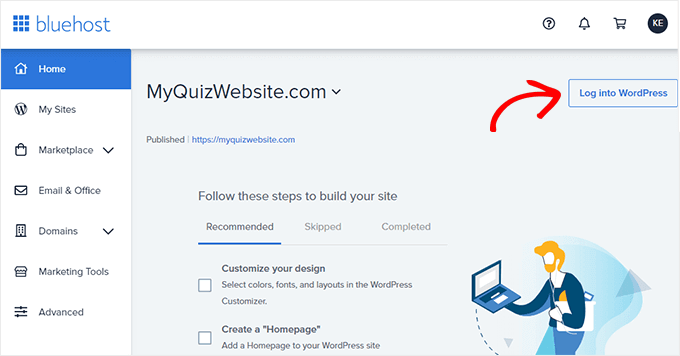
All you need to do is log in to your Bluehost account, and then click the ’Log in to WordPress’ button to get started.

Bluehost Dashboard - log in to WordPress

After that, you will need to set up your WordPress install, choose a theme and some plugins, then get started on your first blog post.

We take you through the entire process step by step in our beginner’s guide on how to start a WordPress blog. We’ll summarize the main steps below.

The end result will be an attractive and functional blog that you own.

Selecting a Theme to Customize Your Blog’s Appearance

Customizing the look and feel of your blog is by far one of the most exciting and rewarding parts of the journey of creating your WordPress blog.

WordPress comes with a powerful templating engine that allows you to change the appearance of your website by installing themes.

There are thousands of free and paid WordPress themes available. You can choose one that looks closer to what you have in mind for your website.

WordPress Theme Stats

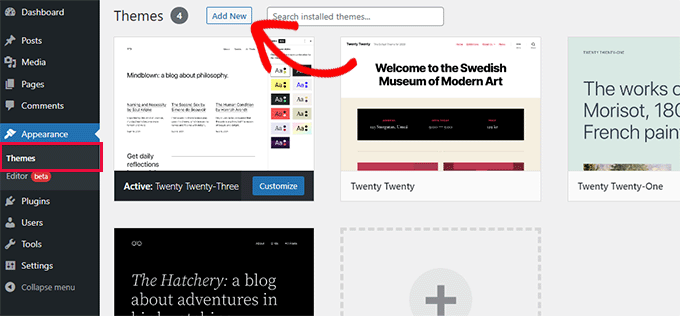
You can look for themes under the Appearance » Themes page. It will show you a bunch of default themes that come with your WordPress install.

For more themes, click on the ‘Add New’ button at the top to find more free themes.

Add new theme

For premium or paid WordPress themes, you can try trusted WordPress theme shops like SeedProdThrive ThemesAstraElegant Themes, and more.

However, there is such an abundance of WordPress themes that it may become difficult for beginners to decide which theme they want to use.

We recommend choosing a minimalist design with plenty of white space. This provides you plenty of room to customize the theme and make it your own.

For more details, see our guide on how to choose the perfect theme for your website as well as our list of the best free WordPress blog themes.

Creating Your First Blog Post

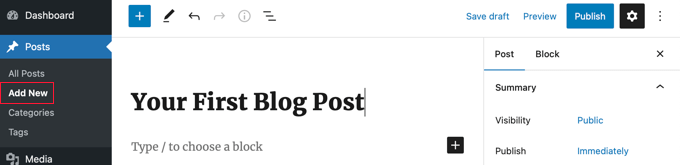
Once you have selected your WordPress theme, you are now ready to create your first blog post. You just need to click on the Posts » Add New menu in your WordPress dashboard.

You will see an editor area where you can write your first blog post.

Writing Your First Blog Post

WordPress uses a block-based editor that allows you to create beautiful content layouts for your blog posts.

To familiarize yourself with the editor, see our WordPress block editor tutorial.

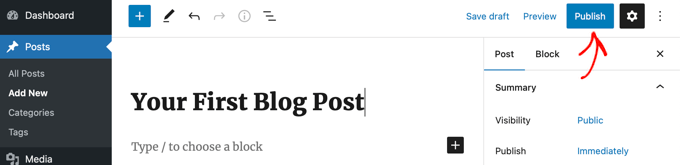
Once you’re done writing, go ahead and click on the Publish button on the top-right corner of the screen to make your blog post publicly available.

Publishing Your First Blog Post

On the posts screen, you will notice several other sections such as Categories and Tags. You can use these to organize your blog posts into sections. We have a great write-up on the difference between categories vs tags, which we highly recommend that you read.

To utilize all the features on the posts screen, you should read our article on how to add a new post in WordPress (video included).

We also offer some helpful resources to help you brainstorm new post ideas to write about:

A lot of pro bloggers choose their specific topics strategically by doing keyword research. This helps their content rank higher in Google searches and get more traffic.

We have a step-by-step guide on how to do keyword research for beginners using the exact same method that we use on WPBeginner.

Extending and Growing Your Blog With Plugins

Once you publish your first blog post, you’ll probably want to get started with adding other usual elements on your website such as a contact page, galleries, sliders, and an email list. To add all these additional features, you need to use plugins.

Plugins are like apps for your WordPress website. They allow you to add new features and extend the functionality of WordPress without writing any code.

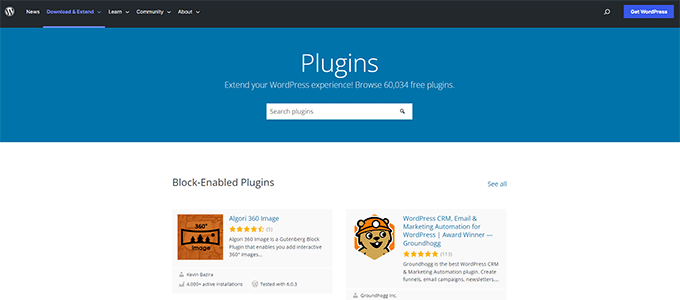
There are more than 60,000 free plugins available in the WordPress.org plugin directory alone. Plus, there are premium WordPress plugins sold by third-party developers with priority support and guaranteed updates.

WordPress plugins

However, you also need to consider which plugins you need to use to keep your WordPress website secure, private, and anonymous.

Here are our top picks of the best plugins to grow your blog.

  • All in One SEO is the best WordPress SEO plugin on the market and helps your anonymous website get more traffic from search engines.
  • SeedProd is a powerful WordPress page builder that allows you to use a drag-and-drop interface to create any type of page for your website.
  • MonsterInsights is the best WordPress Google Analytics plugin which helps you see where your visitors and coming from and what they see on your website.
  • OptinMonster is a conversion optimization software, which helps you convert website visitors into email subscribers and customers.
  • WPForms is the best WordPress contact form plugin and allows you to easily create forms for your website.

That’s just a start. You can learn how to add plenty of other features to your blog by checking out our list of useful tools to manage and grow your WordPress blog.

Monetizing Your WordPress Blog

WordPress is the largest publishing platform on the planet, and it powers over 43% of all websites. Many bloggers have successfully monetized their blogs, and you can too.

That’s why we put together a detailed list of proven ways you can make money online blogging with WordPress.

Unlike other articles on how to make money online, this is a comprehensive guide on how to make money at home legitimately, using blogging and WordPress.

Many of these methods require some investment of time and money to get started. As long as you’re willing to put in the effort, you’ll reap the reward.

Here are some of the main strategies we cover:

We hope this tutorial helped you learn why you should start with a blog instead of a YouTube channel. You may also want to learn how to create an email newsletter the right way, or check out our list of the best YouTube video gallery plugins for WordPress.

Sourced from wpbeginner

Subscribe to their YouTube Channel for WordPress video tutorials. You can also find us on Twitter and Facebook.

Sourced from TechMagPK

Do you know The Latest Top 3 Types Of SEO in 2023? Let’s look at three different forms of SEO services. SEO stands for Search Engine Optimization, and its main goal is to improve the number of visitors to your website by raising its ranking on Google SERPs for relevant keywords or phrases connected to your domain.

Businesses that provide SEO services are extremely important in today’s digital world. They provide an essential service in assisting businesses in remaining competitive and visible on the internet. SEO (Search Engine Optimization) is an important technique for businesses to use in order to reach their target audience and acquire new consumers. In this article, we’ll look at what SEO services are and the numerous sorts available. Everything you need to know will be covered in depth so that you have a thorough understanding of the services provided. What Exactly Are SEO Services?

SEO services assist businesses in increasing their online presence and driving more organic web traffic via search engines. SEO is an efficient approach for increasing website visibility in search engine results pages (SERPs). Google is the most popular search engine, thus it is essential to any SEO plan.

Types of SEO Services

Understanding the many forms of SEO services is critical for any organization that wants to grow in the internet realm. Ignoring this could result in missed chances. On-page optimization, off-page optimization, and technical SEO are the three types of SEO services. Each category provides a distinct set of approaches and ideas to aid in increasing your website’s visibility in search engine results pages (SERPs). Understanding the various sorts of SEO services allows you to know what questions to ask an SEO service provider to ensure they are delivering the greatest results for your company.

On-page SEO services

The Latest Top 3 Types Of SEO in 2023

On-page SEO refers to the changes that businesses can make to their websites to boost their search engine exposure. Some of the most significant on-page SEO variables are as follows:

Title tags

Title tags are HTML components that define a web page’s title. They are visible in search engine results pages (SERPs) and are an important aspect of on-page SEO. Companies should make certain that their title tags adequately represent the content of their web pages and include important keywords.

Meta descriptions

Meta descriptions are HTML elements that provide a concise summary of the content of a web page. They appear in the SERPs as well and can impact whether or not consumers click through to a website. Companies must make certain that their meta descriptions adequately explain their web pages and include important keywords.

Header tags

Header tags (H1, H2, H3, etc.) are HTML elements that define a web page’s headings and subheadings. They aid in the organization of a web page’s content and make it easier to read. Companies should make certain that their header tags appropriately represent the content of their web pages and include important keywords.

URL structure

The organization of URLs on a website is referred to as URL structure. Companies should make their URLs short, descriptive, and include relevant keywords.

Keyword optimization

Keyword optimization is the practice of identifying and incorporating relevant keywords into the content of a website. Companies should ensure that their content includes relevant keywords that represent their products or services appropriately. Services for off-page SEO

What is Off-Page SEO?

The Latest Top 3 Types Of SEO in 2023

Off-page SEO refers to all of the operations you perform away from your website in order to boost your search engine rankings and online presence. It entails improving your brand’s online reputation, constructing backlinks to your website, and advertising your content across multiple channels.

Off-page SEO is crucial for any website since search engines utilise it to determine the authority, reliability, and popularity of the site. The more websites that connect to your site, the more valuable your material is considered to be, and the higher your website will rank in search engine results pages (SERPs).

The Benefits of Off-Page SEO

Off-page SEO provides various benefits that might assist your website in growing and succeeding online, including:

1. Increased Website Visibility

Off-page SEO aids in the discovery of your website by more people seeking for the products or services you provide. When you create connections to your website, you make it easier for search engines to crawl and index your content, which can boost your search engine rankings and organic traffic.

2. Improved Brand Authority

Off-page SEO can help you develop your brand as an industry authority. When other websites connect to yours, search engines understand that your material is relevant, valuable, and trustworthy. This can assist you in improving your brand’s reputation and credibility, as well as attracting more clients to your website.

3. Increased Referral Traffic

Off-page SEO can bring referral traffic from other websites and social media platforms to your site. When you generate high-quality content and distribute it across several channels, you enhance the likelihood of people clicking on your links and visiting your website.

Off-Page SEO Strategies and Techniques

Here are some of the most efficient off-page SEO strategies and techniques for increasing your website’s internet visibility:

1. Link Building

The practise of obtaining backlinks to your website from other websites is known as link building. Backlinks are an important ranking factor for search engines since they indicate that other websites think your content is significant enough to link to. You can create backlinks by doing the following:

  • Guest post on other websites, with a link back to your website in your author bio or article.
  • Ask other websites whether they would be interested in connecting to your content.
  • Generate shareable, high-quality content that other websites will want to link to.

2. Social Media Marketing

Social media marketing entails advertising your brand and content on sites such as Facebook, Twitter, LinkedIn, and Instagram. Social networking can assist you in the following ways:

  • Raise brand awareness and reach a larger audience.
  • Interact with your audience and create a community around your brand.
  • Attract traffic to your website with social media posts and advertisements.

3. Influencer Marketing

Collaboration with influencers or industry leaders who have a huge following and authority in your sector is what influencer marketing entails. Influencers can assist you in the following ways:

  • Increase your brand’s exposure by reaching a larger audience.
  • Develop trust and credibility with your intended audience.
  • Increase the number of backlinks and social shares for your article.
  • Technical SEO services

What is Technical SEO?

The Latest Top 3 Types Of SEO in 2023

The process of optimising a website for search engines from a technical standpoint is referred to as technical SEO. This includes ensuring that search engine crawlers can quickly crawl and index your website, as well as optimizing it for speed, mobile friendliness, and user experience.

Technical SEO duties include optimizing website structure and navigation, assuring correct header tag use, adopting schema markup, increasing page speed, and optimizing for mobile devices.

The Importance of Technical SEO

Technical SEO is just as vital as on-page and off-page SEO in any SEO plan. Technical SEO, in fact, serves as the foundation for both on-page and off-page SEO.

If your website is not optimized for technical SEO, it might have a negative impact on its ranking in search engines. Websites that are easy to crawl and index, as well as those that give a great user experience, are favoured by search engines such as Google. Technical SEO ensures that your website fits these standards, which can result in higher ranks and more organic visitors.

Technical SEO Best Practices

When it comes to technical SEO, there are various best practices that organizations should follow. Some examples are:

  • Developing a logical and transparent website structure
  • Organizing material with header tags (H1, H2, H3)
  • Image and video optimization for faster page loading
  • Using schema markup to assist search engines
  • comprehend the information on your website
  • Ensure that your website is mobile and responsive.
  • Making certain that your website is safe (HTTPS)
  • Monitoring and correcting any broken links or inaccuracies on your website on a regular basis

Technical SEO Services

It can be overwhelming to try to optimize your website on your own if you are unfamiliar with technical SEO. This is where technical SEO services may help. These services are intended to assist businesses in optimizing their websites for technical SEO and increasing search engine rankings.

In conclusion

Finally, in today’s digital age, having a decent SEO plan is critical for the success of any organization. An SEO agency may assist you with a variety of services that will improve your online exposure and presence. Partnering with a professional SEO service will give you with several benefits that you can employ right away. They can assist you get the most out of all of their services, from optimizing your website to enhancing keyword rankings.

Sourced from TechMagPK

By Zachary McAuliffe

GrammarlyGo, the new tool, will arrive in April. Here’s what you should know before then.

Grammarly, the company behind the digital writing assistant of the same name, is expanding its artificial intelligence resources with a new generative AI tool called GrammarlyGo. The company said the new tool is intended to improve communication, and most Grammarly users will be able to use it starting in April.

“Poor communication erodes relationships, stifles business growth and results, and slows feedback loops that devour our time, just to name a few effects,” Rahul Roy-Chowdhury, Grammarly’s global head of product, wrote in a blog post. “In research we conducted with The Harris Poll last year, we established that poor communication costs US businesses up to $1.2 trillion annually — or $12,506 per employee.” You can read the full report here.

According to Grammarly, GrammarlyGo will use personal, organizational and situational context to help craft messages for email, social media and long-form communication. That means if you use GrammarlyGo to write an interoffice message to your work team, the tool could help make your message sound more professional.

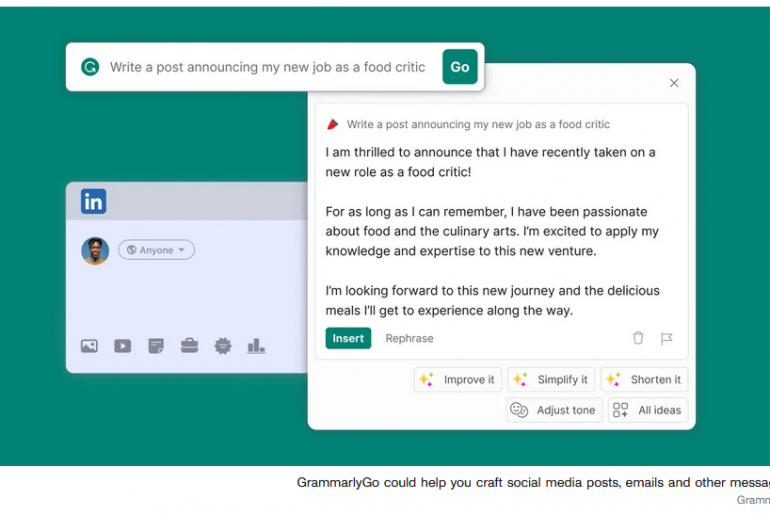
GrammarlyGo will give you prompts to improve, simplify or shorten a message, as well as a prompt to adjust the message’s tone for different scenarios. You’ll also be able to enter your own prompt to fit your needs.

GrammarlyGo can also be used to generate outlines or ideas, which can be added to messages or used as references. The tool will also have one-click prompts to help you get over writer’s block.

GrammarlyGo responds to an email
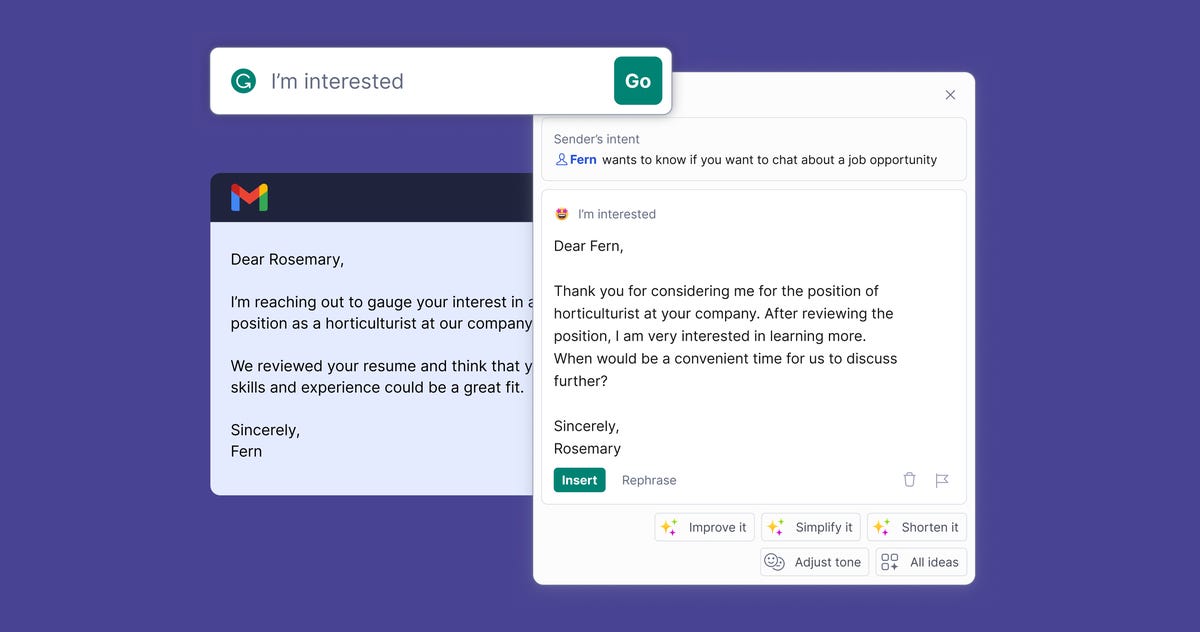
GrammarlyGo could step in to try to help you land that job you’re interested in.

Grammarly

“By embracing new technologies like generative AI, we can advance our vision of supporting the entire process — from conception to comprehension,” Roy-Chowdhury wrote.

Grammarly is the latest tech company to announce an AI tool in the wake of OpenAI’s ChatGPT bursting onto the scene at the end of 2022. Other companies, like Microsoft, Google and Snapchat, have announced AI chatbot tools that a person can seemingly carry on a conversation with and that are poised to remake internet search and other familiar online activities, from writing essays to planning a week’s vacation to a new destination. These tools can also generate messages and ideas but don’t appear to take context into account when generating content.

GrammarlyGo’s ability to understand context and tone to a limited degree implies this AI tool is not only a generative AI but a very basic contextual AI, as well.

According to Techopedia, generative AI is an umbrella term that can apply to any type of AI that can be used to create things like text, images, video, audio and code. The technology company Symbl.ai writes that contextual AI can analyse cultural, historical and situational aspects of data to make the best decision.

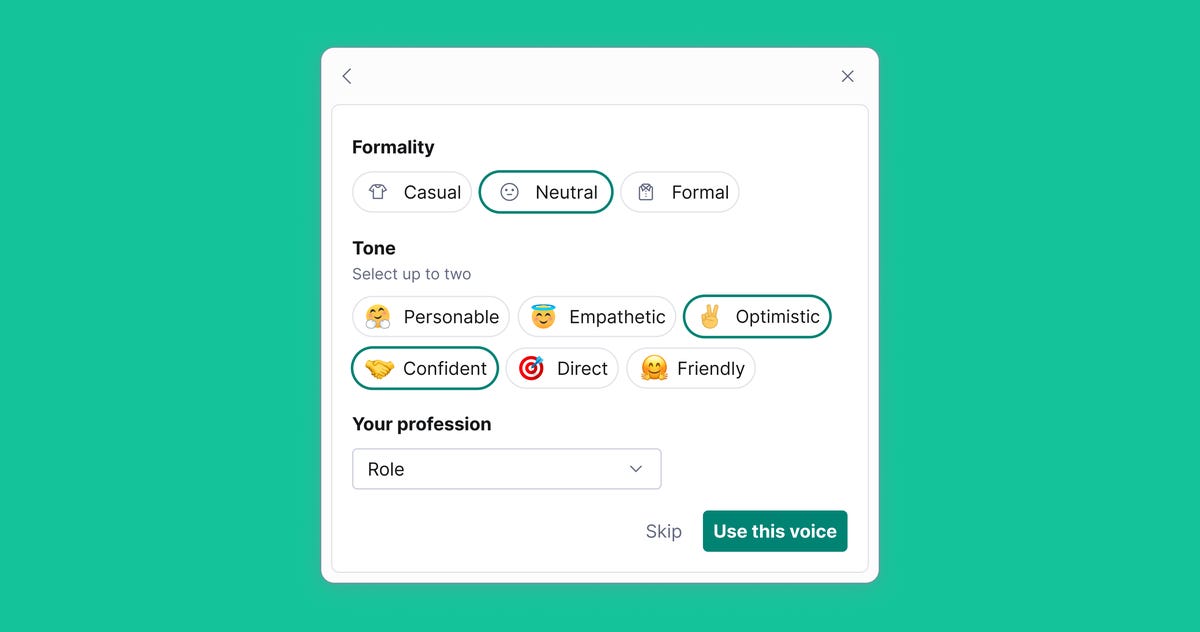
GrammarlyGo asking for the user's desired formality and tone and their profession to better generate a message
Users need to give GrammarlyGo information about what kind of text they want the tool to create.

Grammarly

According to Grammalry, GrammarlyGo can understand situational context enough to create tailored communication for different scenarios. You still need to input certain data, like the level of formality and tone, into GrammarlyGo in order for it to create the right message. Although the tool may not intuitively be able to respond appropriately, it can differentiate between crafting a casual and formal response if it’s given the data.

GrammarlyGo will be available across other Grammarly products, like Grammarly Premium, Business, Education and Grammarly for Developers. Some Grammarly Free users in select markets will also be able to access GrammarlyGo.

For more, check out what to know about Google’s AI chatbot Bard, Microsoft’s AI-powered Bing and Snapchat’s MyAI.

Editors’ note: CNET is using an AI engine to create some personal finance explainers that are edited and fact-checked by our editors. For more, see this post.

By Zachary McAuliffe

Sourced from CNET

By Nadeem Sarwar

Koo, a social media app developed in India that pushes itself as a Twitter replacement, is deploying ChatGPT smarts to prop its appeal. The company says Koo is the “first microblogging platform in the world” to integrate ChatGPT to boost the creative flow. Koo follows in the footsteps of Snapchat in deploying ChatGPT for some cutting-edge AI bragging rights.

At the moment, the ChatGPT integration is only available to creators with a sizeable following or those with a verified badge. However, it will soon be available for everyone without any follower count restriction. So far, the company hasn’t said anything about charging users for the feature, or whether it might be moved to a premium tier in the near future, considering the fact that OpenAI’s viral tool is embracing the API route for commercial usage.

chatGPT integration into Koo
Koo

Aside from text prompts, Koo users can also use the voice dictation feature to interact with the AI. The draft section of Koo app will let users accomplish tasks like “finding the top news of the day or asking for a quote from a well-known personality or even asking for the post or a blog to be written.” The latter is worrisome, which I’ve briefly discussed below. There’s also some precedent for that out there with apps like Paragraph AI doing everything from generating content in various styles to taking over even your messaging app conversations.

Koo is pushing itself as a Twitter alternative and says it has accumulated over 50 million downloads … but hasn’t disclosed the number of users. However, it looks like the Koo is trying to boost its appeal by recruiting the hottest new tool on the internet, one that will also be immensely convenient to churn out human-like thoughtful content in bulk — which is again the easy route to grabbing more eyeballs.

The diminishing human touch

Robots using smartphones
Dall-E / OpenAI

Social media is inherently a place for communication, but over the years, it has blossomed into a content juggernaut that is driving billions in revenue. And it’s not solely multimedia content like videos that are pulling in serious money, but it’s also text-based content (such as threads as well as newsletters) that is attracting some sizeable revenue.

With generative AI tools like ChatGPT coming into the picture, it is only a matter of time before text content generated using ChatGPT will flood social media platforms. The likes of Twitter, Instagram, and Facebook are already brimming with AI-generated artwork and videos. Worryingly, with tools like ChatGPT, even the barrier of copy-paste will vanish.

Social media platforms — despite all their perils like hate speech, harassment, and outright misinformation — are still a place where one can marvel at the results of human creativity. Be it jokes, puns, or just some good old-fashioned commentary, we at least get a few chuckles at the result of real human ingenuity.

With creators churning out content using ChatGPT — as Koo is advertising — it seems we are entering a new age of social media where it would be nigh impossible to discern if the joke you are laughing at is a human creation or AI-generated. For the latter scenario, it seems like a deception to me, especially if such content is shared without explicit disclosure.

By Nadeem Sarwar

Sourced from digitaltrends