As a marketer and tech enthusiast, in preparation for this article, I wanted to determine how well the popular ChatGPT program might be able to advise C-level executives and marketing teams on the importance of digital marketing.
First, I started with a simple order or request: “Write a 500-word article about the importance of digital marketing when scaling up your business.” In a matter of seconds, I got the article, went through it and started shaping out more specific attributes I considered valuable.
In round two, I added to the request: “The article should have at least three examples.”
Round three: “The audience is C-level decision makers.”
Round four: “Do not highlight x or y.”
After five rounds, I got something decent enough that I might share with readers.
The final article generated by the program was certainly fair and impressive in its insights, pointing out, for example, the rise of affordable marketing options through social media and email. The article also noted the valuable business insights derived from digital metrics such as web traffic and open email rates, among other KPIs teams could leverage. Finally, it summarized a couple of notable cases of companies whose success has been accredited to the strategic use of digital marketing.
I wanted to understand how this particular AI functionality might impact many digital levers in creating content. My key finding as I read these lines created by ChatGPT was that the content was accurate and interesting, but it still didn’t speak to the level of experience or authority of a true expert.
If I had written the article from scratch, I would have never published it the way it was written. So my main takeaway is that AI can be an excellent help for teams and brands to create content—but you need experts on the asking end. The quality of your product will always be strongly influenced by the quality of your creators and their expertise. And the second is that AI is not even close to transmitting the human essence of experience; it can generate good content, but not human content.
Here are three pieces of digital marketing advice my experiment with ChatGPT was not able to articulate.
1. Build a frictionless journey. Interconnect all touchpoints of your digital ecosystem. There is a big difference between multichannel and omnichannel. Do omnichannel strategies and be sure you understand the difference between them. Multichannel is about being present in many channels; omnichannel is putting them together and making sense.
2. Don’t think of digital as one world and physical as another; blend them as consumers do in their day to day.
3. Digital is much more than social and paid media. Ninety percent of my clients “believe” they are covered up because they have a team or set of agencies doing social and paid. Companies must evolve from this crazy idea into attribution and retention models where every source is aligned, measured and understood.
So, on the one hand, we may be able to “create” a 500+ word article in a matter of seconds—including the title—but with a lower level of quality for an in-depth topic based on my personal experience or any other human being.
My takeaway: AI will enable and impact content creation, making it very dynamic for brands and organizations, allowing us to pump in content. But when we talk about high-level knowledge and authoritative content, there is still much to learn from a human brain and experience. For now, at least, no AI seems poised to match a human rationale when it comes to expressing and sharing an opinion as a subject matter expert.
Marketing Model Creator. Expert in Strategic Brand Planning. MACH9 CEO Mexico. Speaker and board advisor. Read David Mahbub’s full executive profile here
Whether you’re running ads for a product you sell, or using affiliate links in your blog content, knowing exactly which links are getting the most clicks—and, more importantly, which links are actually converting—is key to maximizing your ROI. ClickMagick is a link-tracking tool that accurately tracks clicks and conversions so that you can optimize your marketing and scale your business. In this ClickMagick review, we’re taking a deep dive into what makes ClickMagick stand out from other similar tools in the market, including its pros and cons, so that you can decide whether or not it’s right for you.
In a rush? Don’t worry! Here’s a quick TL;DR.
If you’re looking to increase your conversions, ClickMagick is a must-have tool. It gives you accurate click data on your ads and marketing campaigns to see what’s working and isn’t.
It works with all advertising and social media platforms; best of all, it’s super easy to use. This tool is a no-brainer if you want to increase ad ROI.
Want to know more? Keep reading the full ClickMagick review for everything you need to know about this powerful tool.
ClickMagick Review
Ease of Use
Stability
Customer Service
Price
Summary
ClickMagick is one of the most user-friendly click-tracking tools around. It offers accurate data on all your tracked links, allowing you to optimize your ads and maximize your profits. ClickMagick offers a free 14-day trial, so you can test it out before making a decision.
Pros
Easy to use
Real-time mobile updates, notifications, and metrics
Tracks iOS users
Very reliable with little downtime
Integrates with Google ads
Cross-device tracking
Phone and offline sales tracking
Automatic bot filtering
Easy integration for Google Analytics and other SEO tools
Excellent customer support
Cons
There’s a learning curve at first
You’ll need to enter your card details for access to the free trial
ClickMagick Review: Key Features
ClickMagick enables you to easily monitor and optimize your campaigns’ performance by using accurate data to make the right decisions.
It basically helps you identify which ads are working well so you can double down on your efforts. More importantly, it also highlights any ads that aren’t working so that you can stop wasting time and money on them.
Here’s a closer look at the ClickMagick features on offer.
Link Tracking and attribution
Whatever line of business you’re in, if you’re looking to share links to make money, then having data surrounding them is essential.
It’s all well and good creating links you think people will want to click on, but everything becomes guesswork without the analytics to back this up.
ClickMagick offers a range of link management and link tracking features. This means that you can track your entire sales funnel and always be in control of exactly how your landing pages, blog posts, and sidebar adverts are performing.
ClickMagick can track:
Opt-ins
Sales
Items added to cart
Email clicks
Button clicks
And any other types of links you want to include in your content.
It can also track offline conversions. So even if your customer calls and makes a purchase over the phone, you know exactly which ad it was that converted them.
You can set up ClickMagick to track individual links or whole campaigns. This will give you access to a whole host of analytics and data that can help you tweak any advertising campaigns to ensure they’re working as well for you as possible.
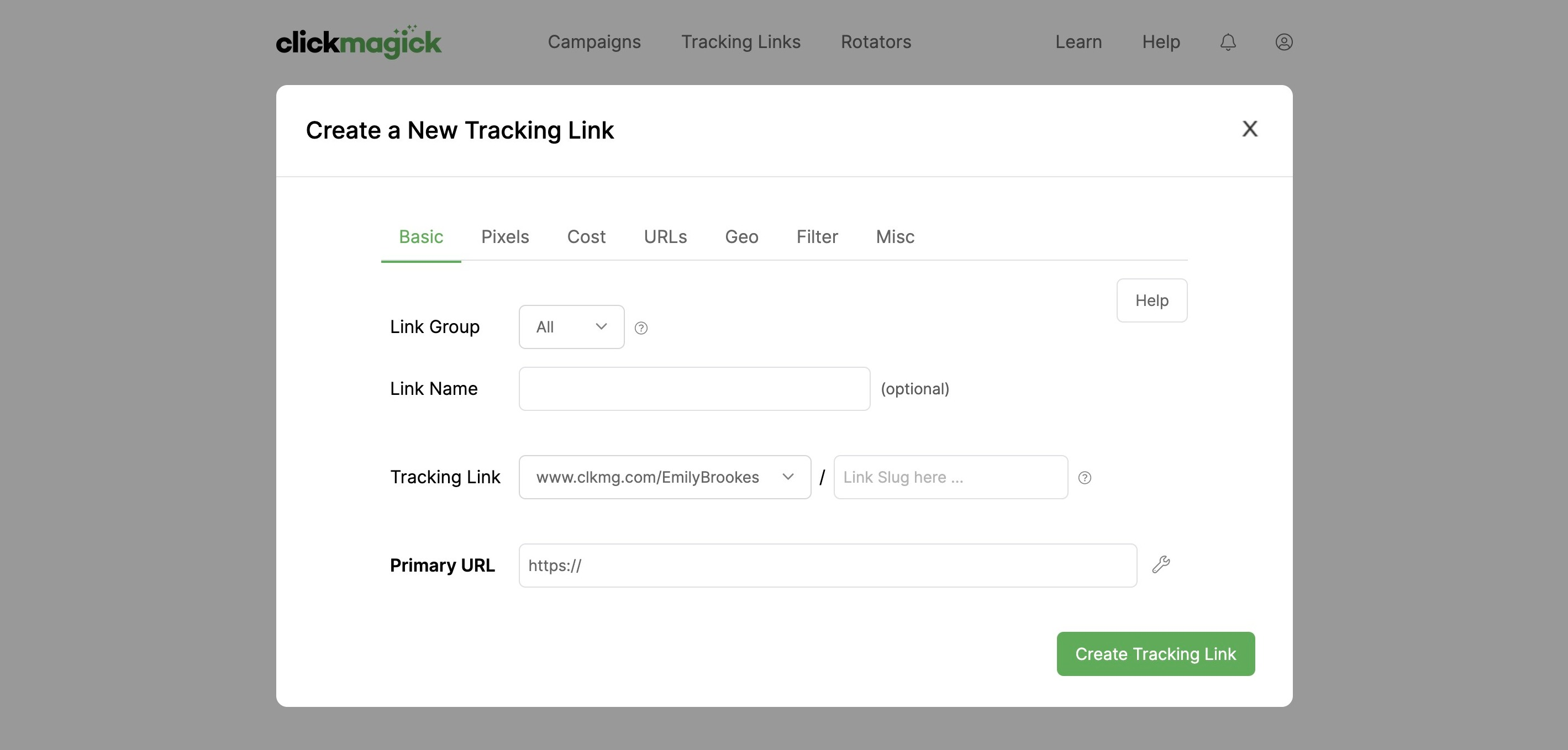
Setting up a tracking link is easy. Once you’ve created an account, simply click ‘Create new link’ and fill in the details as directed. Here you can add tracking pixels, traffic cost (to help you calculate your net profit) and adjust your geotargeting preferences.
Click fraud protection
If you’ve ever been the victim of click fraud or malicious bot traffic, you will know how frustrating it is.
The good news is that ClickMagick provides the tools you need to ensure that your campaigns work as efficiently as possible. This includes several features designed specifically to assist you with combating bot traffic and click fraud and monitoring traffic quality.
It uses self-learning AI to ignore and isolate 99.9% of bot traffic to ensure that it can’t generate fraudulent clicks. On top of this, Click Shield allows you to deal with any bots that slip through the net and anyone who may be clicking on your links for less than genuine reasons.
Ad optimization
ClickMagick’s ad optimization tools give you accurate real-time data for every ad you run.
You can view:
Clicks
Conversion rate
Profit
AOV
ROAS
And once you’ve got this data, you can use it to tweak your ads to optimize your conversion rates. You can also quickly turn off any ads that aren’t profitable and double down on the successful ones, maximizing your ROI from ads.
ClickMagick Review: Affiliate Marketing
ClickMagick has a range of affiliate tracking tools designed specifically to help affiliate marketers make more money from their links.
One of the best features is the Affiliate URL Builder, which enables you to create tracked affiliate links in seconds.
You must enter your affiliate link into the URL builder and the associated affiliate network. You can then use the tracking link it generates within your content and ads, safely knowing that every conversion will be accurately tracked.
This is a game-changer for affiliate marketers, as it allows you to double down on the type of content producing the highest conversions.
You can even use ClickMagick to create dynamic affiliate links, so if you dislike the landing page for the affiliate product you are promoting, you can create a new landing page of your own and send traffic to that instead.
Another great feature ClickMagick includes is Postbacks, which is server-to-server tracking. This is undoubtedly the most accurate way to track affiliate conversions and can give you a huge edge over your competitors.
Who is ClickMagick Best For?
ClickMagick’s click-tracking software is suitable for anyone looking to optimize their conversions online.
This includes:
E-commerce business owners
Service providers
Affiliate marketers
Lead generation experts
With the ability to track entire sales funnels through the ClickMagick dashboard, it really is suitable for online marketers at all stages of their journey.
Is ClickMagick Easy to Use?
Yes, overall, ClickMagick is refreshingly easy to use. Most users agree that it isn’t hard to get to grips with because a lot of what it offers is so intuitive.
However, if you are struggling, then ClickMagick has a comprehensive ‘Knowledgebase‘ on its website. Here, you will find a number of the common queries they have and detailed answers to them.
ClickMagick is also known for having a super helpful customer support team. So if you can’t find what you need in the knowledgebase, you can get in touch with a support team member who will guide you through what you need to do to solve your issue.
This is great news for anyone new to software of this nature because it means they can feel confident that they will be supported through the whole process.
That being said, just like any other software you use for the first time, there is a learning curve. However, it’s all about practice and getting to grips with what different features do.
ClickMagick Pros and Cons
Pros:
Easy to use
Real-time mobile updates, notifications, and metrics
Tracks iOS users
Very reliable with little downtime
Integrates with Google ads
Cross-device tracking
Phone and offline sales tracking
Automatic bot filtering
Easy integration for Google Analytics and other SEO tools
Excellent customer support
Free 14-day trial
Cons:
There’s a learning curve at first
You’ll need to enter your card details for access to the free trial
ClickMagick Pricing
ClickMagick’s plans are generally based on how many clicks you want to track each month. However, each plan has slightly different features too.
The great news is that every plan has a 14-day free trial that you can take advantage of, so trying ClickMagick and ensuring it is the right option for you is easy.
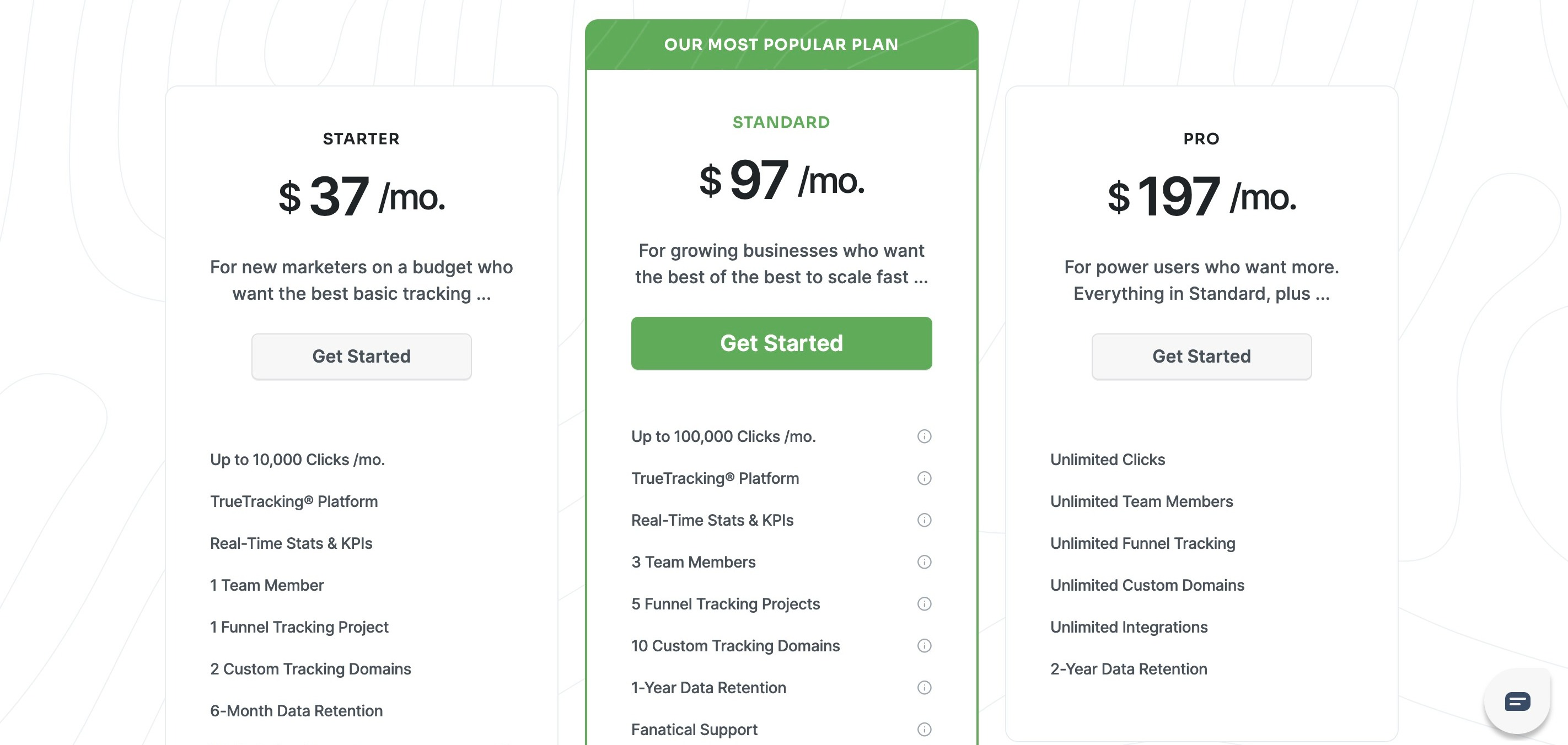
Starter – $37/month. Up to 10,000 clicks per month, 1 team member, and one funnel tracking project across two customer tracking domains. Data is retained for six months. This plan includes basic online support.
Standard – $97/month. Up to 1000,000 clicks per month, 3 team members, and five funnel tracking projects across ten custom tracking domains. Data is retained for 12 months.
Pro – $197/month. Unlimited clicks, as well as unlimited team members and unlimited custom tracking domains. Data is retained for 24 months.
You’ll need either the Standard or Pro plan if you want to access features such as:
Audience optimization
Mobile app
Cross-device tracking
Offline and phone sales tracking
Click Shield for PPC
Auto cost updates
Live chat and zoom/phone support
ClickMagick Review – The Verdict: Is it Worth The Money?
Overall, ClickMagick offers outstanding value for money. It’s easily one of the best (if not THE best) click-tracking tools around—primarily because of its accurate data, user-friendly interface, and super helpful support staff.
Although $97/month may seem like a lot for small businesses, if used properly, this software has the potential to skyrocket your conversions. So as long as your website is generating a good amount of traffic, to begin with, you should see a decent ROI pretty quickly.
Hopefully, this ClickMagick review has helped you decide whether or not ClickMagick is the tool for you. However, if you’re still undecided, you will be pleased to know that when it comes to link tracking software there are a couple of other good options to look at.
It’s always worth taking advantage of the free trials that most tools offer. That way, you can be confident that you have made the best choice for you and your business needs.
ClickMeter
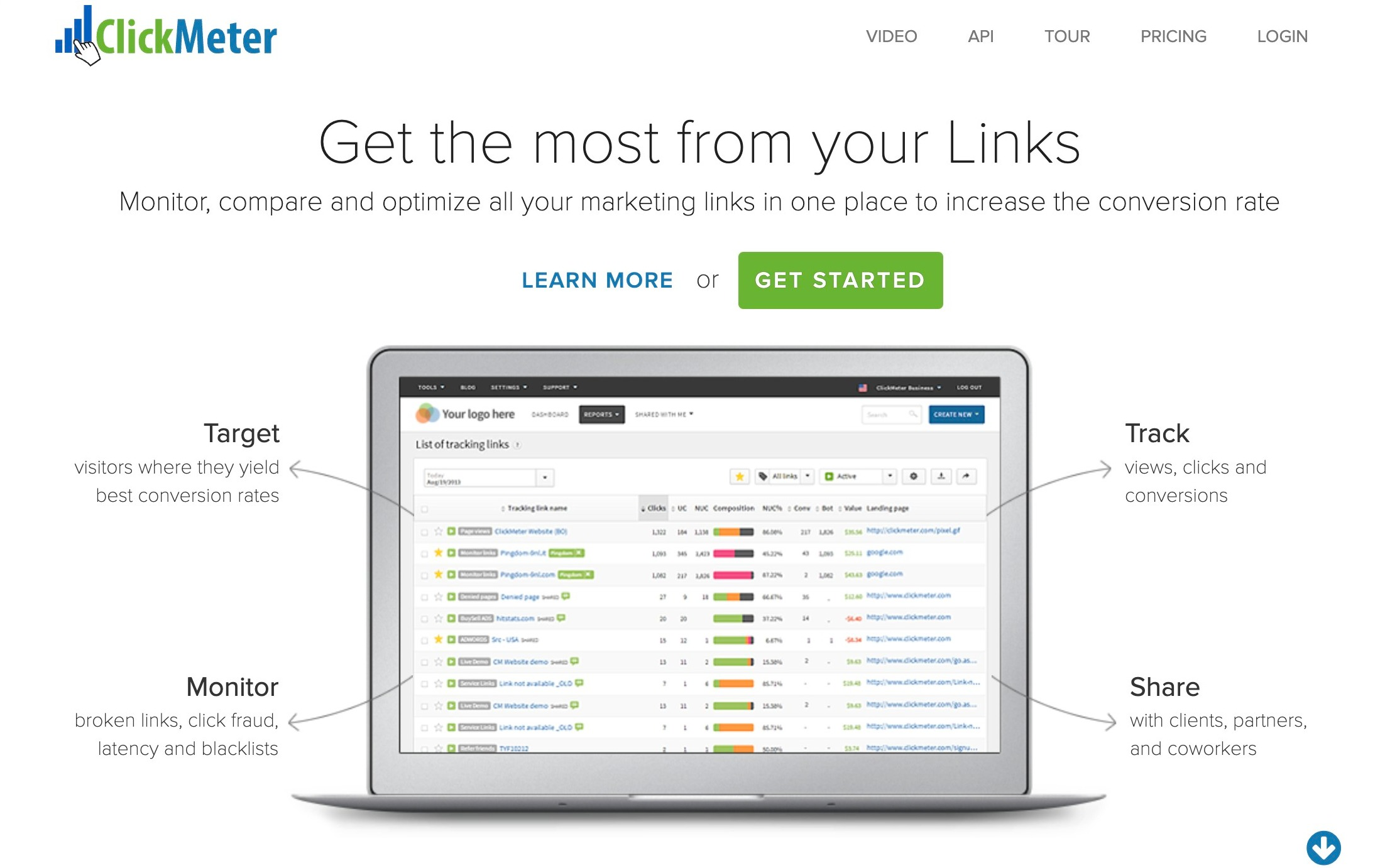
ClickMeter is a popular link tracking tool that allows you to monitor all your links in one place. Similarly to the ClickMagick tracking software, you can generate tracking links in seconds to use in your ads and content and monitor them in real-time from your dashboard. It also includes an A/B split testing rotator on all plans.
It doesn’t have as many features as ClickMagick, and it’s not as user-friendly. However, it does offer excellent value for money, so it’s a great option for anyone on a budget.
When it comes to tracking links, ClickMagick and Voluum are the two tools that are probably the most similar. Voluum is packed full of useful features, including a mobile app that is available on all plans. It has great team collaboration features and includes live support.
It is slightly more expensive than ClickMagick, but overall it’s a great choice for larger businesses.
Recently one of our readers asked us for our suggestion on the best Google Optimize alternative?
Google Optimize is a tool that lets you conduct experiments on your website. However, Google recently announced that the Optimize tool will be sunset in September 2023, and your experiments will stop after this date.
This has left many business owners and marketers scrambling to quickly find a Google Optimize alternative for their A/B testing needs.
In this article, we will share the best Google Optimize alternatives, so you can choose the solution that works for your needs. We will also share what we’re going to be switching to as well.
What is Google Optimize and Why Use an Alternative?
Google Optimize is a free tool by Google that allows you to split test pages on your WordPress website and improve user experience.
You can set up conversion experiments using the tool and see if making changes to a landing page increases conversions. For example, you can A/B split-test two versions of a sales page, use different headlines, or change the colour of the call to action (CTA) buttons to see which one works the best.
However, Google announced that they will sunset Google Optimize on September 30, 2023. After this date, the tool will no longer be available, and all your experiments and personalisations will end on that date. Besides that, you won’t be able to access data after the sunset date.
You can use a Google Optimize alternative to continue experimenting and testing your site. There are many tools in the market that let you conduct A/B tests with ease, require no coding to set up, and offer powerful features.
Let’s look at the best Google Optimize alternatives especially the ones that works seamlessly with WordPress websites, but several of these Google Optimize competitors will work on all website platforms.
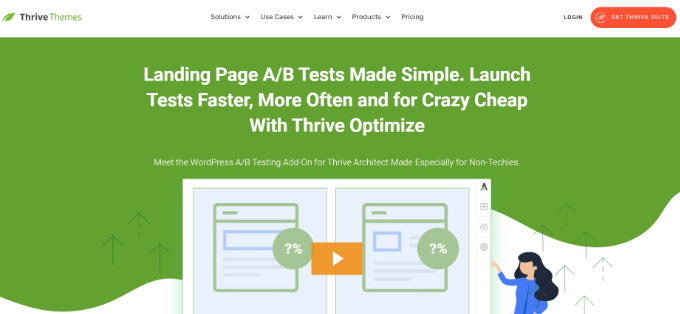
Thrive Optimize is the best Google Optimize alternative for WordPress that is super easy to use. It is part of the Thrive Theme suite, which includes an ecosystem of WordPress plugins focused on boosting conversions on your site.
With Thrive Optimize, you can conduct experiments and A/B test landing pages without editing code. Unlike Google Optimize, the plugin is beginner friendly, as there is no need to add code snippets to your site.

You can get started in no time. Simply create a landing page using the visual builder and then create a variant. After that, pick a conversion goal, which includes page visits, opt-in form submissions, and revenue. Once that’s done, go ahead and run the test.
The best part is that you don’t have to switch between tabs or windows to view the results of your experiments. If you’re using Google Optimize, then you’d have to jump back and forth between tabs to see the results.
Instead, Thrive Optimize shows a report inside your WordPress dashboard. You can quickly view which variant is converting the best. Besides that, you can create as many variations of a landing page for testing as you want. The plugin also picks a winner and shows the best variant.
Pricing: Thrive Optimize is part of the Thrive Themes suite which costs $299 per year and includes 9 other powerful conversion tools. You can also purchase Thrive Optimize bundle for $199 / year.
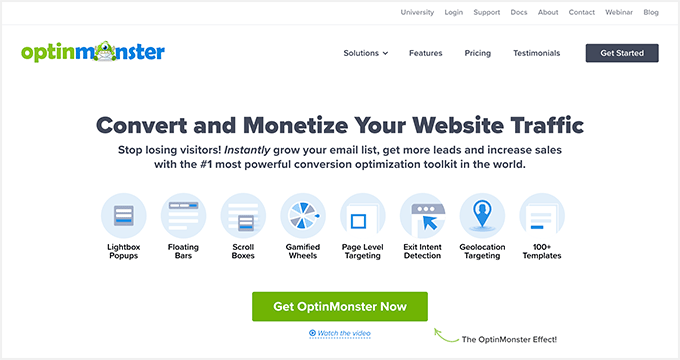
OptinMonster is the best WordPress popup plugin and lead generation software in the market. You can create campaigns like floating bars, welcome screen mats, and popups to grow your email list, increase conversions, and get more leads.
OptinMonster offers an A/B testing tool that lets you test different popup and modal campaigns. It makes a great Google Optimize alternative because it’s very easy to use. You can customize and create different variants using the drag-and-drop campaign builder.
Once you’ve created a split test, OptinMonster will randomly show the variations to your visitors and pick a clear winner. You can then see in-depth stats about conversions inside your WordPress dashboard and find out which campaign performs the best.
Pricing: You will need the OptinMonster Plus or higher plan to use the A/B testing feature, with prices starting from $19 per month.
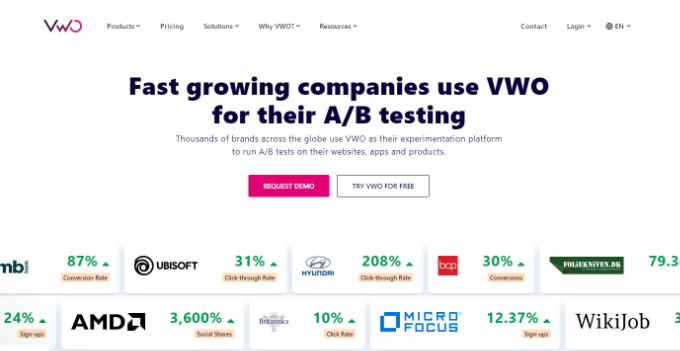
VWO Testing is a popular A/B testing tool and a great alternative to Google Optimize. You get more features than Google Optimize, as it allows you to run multiple experiments on your website, products, apps, and server side.
It comes with a visual builder to change different elements on your webpage, like text, images, shapes, backgrounds, and more. After making the changes, you can run split tests and see which variant performs the best.
VWO Testing offers an AI-power copywriting tool. This way, you can automatically select different headlines, CTA copies, and product descriptions to test.
It also lets you run tests based on user segments and behaviour. For instance, you can select a target audience based on time spent on a page, scroll depth, exit intent, and when someone clicks on elements.
Pricing: VWO offers a free plan that you can use for up to 50 thousand users per month. If you have more users, then you can upgrade to their premium plans.
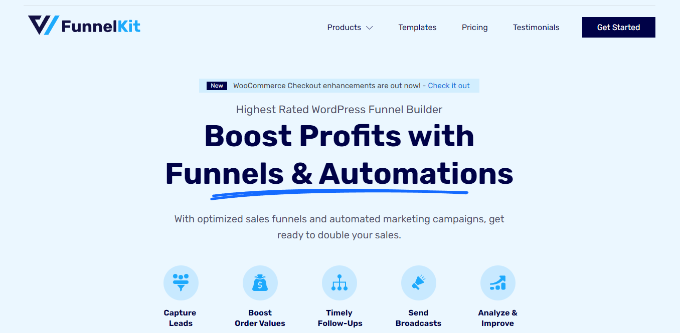
FunnelKit is another Google Optimize alternative that comes with an A/B testing feature specially for WooCommerce. You can split-test your product prices, page layouts, messages, designs, and funnels without editing code.
The plugin is beginner friendly and helps you set up experiments within minutes. You can test headings, images, prices, product descriptions, and every other component on a page. FunnelKit also helps declare a winner once there’s enough data to see which funnel converts the best.
Besides that, FunnelKit also offers other features. For example, it offers FunnelKit Automation which allows you to set up automated emails and SMS campaigns.
Pricing: FunnelKit offers multiple pricing plans. To use the A/B Testing feature, you’ll need the Plus plan. It will cost you $179.5 per year.
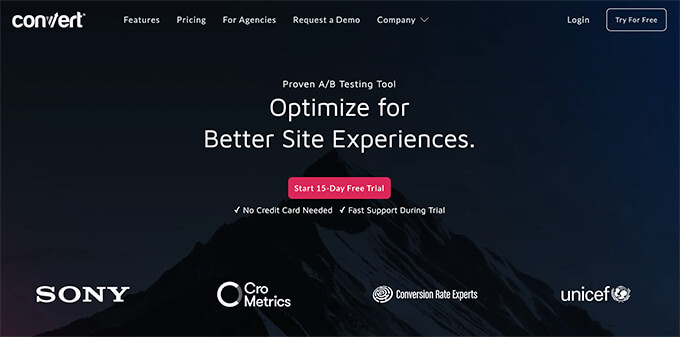
Convert.com is a proven A/B testing tool to help you boost conversions. It provides fast & flicker free A/B testing experience and is known for their speed.
They are a perfect Google Optimize alternative because it gives you access to all the features you’re accustomed to with Google Optimize and then some more.
Convert also let you seamlessly integrate your tests with Google Analytics as well as other tools like Hotjar, Heap, Segment, HubSpot, and more.
Their onboarding is a bit slow, but once you’re up and running, you can create unlimited tests and quickly deploy changes.
Pricing: Convert.com prices start from $99 per month, and you get a 14-day free trial.
Crazy Egg is a popular heatmap tool in the market. You can use heatmaps to see how users behave on your website, where they click, and how they move the mouse cursor and scroll through pages.
Crazy Egg offers an A/B testing tool that you can use to run experiments on your website and boost conversions. What makes it a great Google Optimize alternative is the features it offers along with A/B testing.
You get heatmaps, recordings of visitors using your website, error tracking, surveys, and traffic analytics. Plus, you can configure it without editing code, which isn’t possible if you’re Google Optimize.
Crazy Egg offers a multivariate engine where all you need to do is choose the elements you want to test and add your ideas. The engine then does the heavy lifting and conducts the test for you.
The best part is that it is easily integrated with website builders, including WordPress, Shopify, Squarespace, Wix, and more.
Pricing: Crazy Egg offers different pricing plans starting from $29 per month. You get unlimited A/B tests in each pricing plan, and there is also a 30-day free trial to get started.
Adobe Target is an enterprise-level solution to run split tests on their website and is part of Adobe Marketing Cloud. It is more powerful than Google Optimize and offers an omnichannel approach to the A/B test.
What this means is that instead of running isolated experiments, Adobe Target lets you run tests on every channel. This way, you get to see how users behave with different variants coming from other channels, like social media, organic traffic, paid search, and more.
The software is easy to use and set up. Plus, its AI-powered automation helps you test multiple experiences and then personalize them for each visitor.
On the downside, Adobe Analytics is only available for users that have Adobe Analytics. If you’re looking for a complete marketing solution with an A/B testing feature, then you can use Thrive Optimize instead.
Pricing: You will need to request a quote and get Adobe Target pricing according to your business needs.
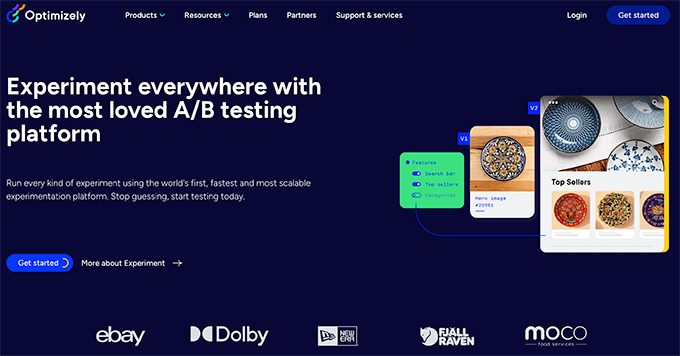
Optimizely is one of the most popular Google Optimize alternatives in the market. Their digital experience platform allows you to create every kind of A/B testing experiment for your website.
You can use their visual editor along with advanced targeting features to optimize your A/B testing campaigns. Optimizely works on all website platforms and is a platform of choice by many large brands.
We have used Optimizely in the past when they had a free plan, and it’s an extremely powerful tool for what it does, however the prices are no longer small business friendly.
Pricing: Optimizely does not reveal it’s prices anymore and require that you submit a form to request a quote.
Kameleoon is the next Google Optimize alternative on our list. It offers powerful solutions and lets you conduct different types of experiments.
For starters, you can run web experiments and A/B test your website and mobile apps. You can assign a business goal to your tests and see which variant is increasing conversions, retention, or engagement.
Kameleoon also offers A/B testing features to advanced users and developers. You can run server-side experiments to improve your product. It easily works in different development languages and frameworks, like PHP, Java, Ruby, Flutter, and more.
Besides that, it offers AI-power personalization. You can provide unique experiences to each visitor, target different segments for testing, and comply with privacy laws like GDPR and CCPA.
Pricing: You will need to request a demo and get a quote for Kameleoon pricing.
Which is the Best Google Optimize Alternative (Expert Pick)
If you’re looking for a WordPress A/B testing tool, then Thrive Optimize is our first pick. It gives you all the powerful features, and it’s very affordable. Since it’s part of the Thrive Suite, you also get other solutions like a quiz builder, popup form builder, WordPress page builder, and more.
If you’re looking for an all-around SaaS alternative for Google Optimize that works on all platforms, then we recommend using VWO Testing. They have a generous free plan that should work for most small business owners.
And if you are an eCommerce store owner looking for the best Google Optimize alternative for WooCommerce, then we recommend using FunnelKit. They have deep integration with WooCommerce and allow you to customize every step of the funnel including adding custom 1-click upsells, order bumps, and more to help boost your average order value.
We hope this article helped you find the best Google Optimize alternative. You may also want to see our ultimate WordPress SEO guide to improve your SEO ranking, and see our comparison of the best push notification software with A/B testing features to boost your traffic.
We’ve said this time and time again: a fast website is necessary for SEO. In a sea of similarly good (or not-so-good) results, Google will favour fast pages that can deliver a good user experience to searchers. If your goal is to attain higher rankings and drive organic traffic from Google, you need to speed up your WordPress website. In this post, we’ll discuss tips to help you improve your website performance to get that spot in the search results!
Fast websites tend to outperform slow ones on Google because of one good reason – good user experience, and this aligns with Google’s mission. Google wants to deliver the best results and the best experience for their users. Hence, they want to show users web pages that will answer their search queries and provide a good experience. That’s also why page experience is now a ranking factor in Google.
This makes perfect sense when you put it in context. We’ve all had moments where we click on a link only to hit the back button because it takes so long for the page to load. And when we leave a page (or bounce off a page) like that, we’re way less likely to visit the website again because we know there are better, faster pages to browse. So website performance not only affects user experience but also greatly shapes how visitors judge the quality of your business.
That’s why speeding up your WordPress website is beneficial in many ways. A fast site makes your users happy, they’ll engage and buy more on your site. Ultimately, that’ll make you happy. Apart from that, It also makes search engines happy because it’s easier for them to crawl and index your site, thus reducing the resources and electricity they need to spend on those processes.
Don’t I need to focus on Core Web Vitals for SEO?
Yes, we hear you! It’s true that Core Web Vitals is an important part of the page experience ranking factor, and passing Core Web Vitals is essential for higher rankings. Metrics in Core Web Vitals directly measure your page speed, so improving your Core Web Vital scores may result in higher rankings, provided that you have good content already.
While metrics in Core Web Vitals measure the performance of a page, they don’t tell the whole story about your website performance. And Core Web Vitals only measure performance on a page level. So on a site level, you may have pages that pass Core Web Vitals and slower ones in the mix.
By making various improvements to your website performance, you can ensure that your visitors will get the most out of your website regardless of the page they land on. Besides, adopting website optimization best practices also directly benefits your Core Web Vitals and helps to reduce the time spent optimizing pages for speed.
This post is about general guidelines and best practices that will help you speed up your WordPress website. But if you specifically care about getting better CWV scores, check out 5 tips to improve your Core Web Vitals. You will also find a few similar pieces of advice in this post.
How to speed up your WordPress website
Now, WordPress is a simple platform at a first glance, but it’s quite complex under the hood. There are lots of different moving parts, with lots of databases to pull data from when you need to show a page to a user. And when you add lots of pages, media content and install lots of plugins and widgets, your site performance might start to drop.
Fortunately, WordPress is very versatile so there are many things you can do to optimize your performance. Let’s go over some of the tips to help you speed up your site.
1. Choose a great hosting provider and a good hosting plan
Let’s start from the top, having a good hosting provider is crucial for ensuring your website performance. That’s because all your files and databases are stored on their server, which will be called upon when a user requests a page.
A good host will have fast and stable servers. Stable means they have good “uptime”, which essentially means their server is always up and running, ensuring that your website is always accessible. On the other hand, a “fast” server refers to the specification of the computers/machine on which your website lives.
Good hosting providers also offer scalability to handle traffic spikes. A good host will have the resources to accommodate the increased load and ensure that your website remains up and running.
Next to that, customer support quality is another important factor to consider when choosing a host. A good host should provide technical support, which can be invaluable when you encounter any issues with your website. A knowledgeable support team can also help you resolve problems quickly, so you can get back to business as usual.
Another thing to consider is the server location relative to your users. If the server is fast, but it’s located far away from your users, then they might still experience slow-loading pages.
If you’re looking for the best fit when it comes to hostings, we’ve vetted some top-notch hosting companies to help you out.
2. Update your PHP to a newer version
Updating your PHP to a new version is a simple thing to do that often gets overlooked. PHP, or Hypertext Preprocessor, is a popular open-source server-side scripting language widely used for creating dynamic and interactive websites. By using PHP, web developers can build robust, feature-rich websites that can dynamically change based on user interactions, database information, and more
Updating your PHP to the newest version will greatly increase your website performance. You will get:
Improved performance, resulting in faster processing time and reduced resource usage.
Better memory management, which can reduce the amount of memory needed to run your WordPress site, resulting in faster page load times.
Faster request processing, as new versions of PHP are able to process requests more quickly, leading to faster page load times.
Some newer versions of PHP also have improved caching capabilities, allowing for faster page load times and reduced server resource usage.
You can check out endoflife.date to see which PHP version is in development and which version isn’t supported anymore.
Since it’s a server-side scripting language, many hosting providers offer PHP support as part of their hosting packages. If you’re looking to update your PHP, check with your host to see if they can help you with that.
It is important to note that updating PHP can cause compatibility issues with your WordPress plugins and themes. A compatibility issue can cause the website to break, so it is important to make a backup before updating and to test the website after updating to make sure everything works as expected.
3. Update your WordPress version is an easy fix
Advice as old as time! But it does work so we can’t go without mentioning it. You can gain a nice speed boost just by updating your WordPress website to a newer version. You get the latest performance improvements and lots of other optimizations. What’s not to like about that!
WordPress 6.1, for instance, got a bunch of performance improvements under the hood, such as better database performance and better handling of media delivery. On the front end, this results in faster load time for both new and returning visitors.
Additionally, updating to a new WordPress version allows you to run a newer version of PHP, which also gives you all the more performance improvements.
To be cautious, one piece of advice we have is to test an update on a staging environment before you update your live website. See if the update causes issues, check if there are any plugin conflicts, and make sure everything works as intended. You can check the WordPress.org forum or Twitter to see if the update causes issues for others.
4. Implement a caching solution
Caching is an important part of the performance equation. It’s a simple solution that can speed up your WordPress website and make your pages load faster, especially for returning visitors.
Caching refers to the process of storing frequently accessed data in a temporary storage area. Rather than being fetched from the server each time the data is requested, it can be quickly retrieved from the cache when needed.
This helps to reduce the amount of data that needs to be transferred between the server and your visitor’s browser, resulting in faster page load times and improved overall website performance. So every time a visitor access a recently-viewed page, the page will be served from the cache instead of having to request all the elements like HTML and images from various databases.
You can rely on caching plugins to do the work for you. For the most part, they’re quite easy to use. Be careful when installing multiple caching or optimization plugins though. They can get in each other’s way, and slow down your site!
Some of our recommendations for caching plugins:
WP Rocket – Very powerful, and one of the best options to make your site faster. Designed to be simple. No free option.
W3 Total Cache – Extremely powerful, and extremely flexible. Designed to be comprehensive. Hundreds of checkboxes and options.
NitroPack – Full page caching with some really clever, cutting-edge performance optimization techniques. Tons of impressive bells and whistles, though the pricing model scales with pageviews.
WP-Optimize – A good middle ground, with basic full-page caching, and some sophisticated database + media optimization tools.
WP Super Cache – A basic solution that offers full page caching, but lacks other/advanced optimization techniques.
These plugin suggestions are derived from our top WordPress plugin recommendations post. There are a lot of good resources to help you build a better WordPress website on that page, so do check it out!
5. Use a lightweight theme
The theme you use greatly impacts how fast your pages load for users. Although WordPress offers a huge selection of themes to play around with, not all themes are created equally.
Some themes are better coded than others. Themes with inefficient or poorly optimized code can slow down page load times and cause you headaches along the way.
Some themes are much leaner than others. You might be drawn to themes with lots of bells and whistles, but be careful. Themes with many images, scripts, and other assets can increase the size of a page and make it slower to load. Sometimes, all you need is simplicity!
For the most part, our advice is to pick a fast and lean theme that’s well-reviewed by the community. They’re your best bet in a sea of choices. Always check the ratings and reviews to see if you’re making the right choice. Even though you can change theme later on, it’s better to just stick with one for a while. That’ll save you troubles that may arise from switching themes.
Apart from themes, many people like to use a page builder to design websites. It’s a great tool for beginners and experienced WordPress users alike. We have the same advice as with theme, that is to choose a popular and well-reviewed one. Some page builders are much lighter and more optimized for speed than others. Elementor, for instance, has done a bunch of work recently to speed up their builder.
6. Deactivate and remove unused plugins
WordPress is a wonderful platform thanks to its plugins and widgets, making it possible to extend a website in many ways. But it can be tempting to install a plugin for every little functionality that you want.
Although plugins can make your life easier, using too many of them is bad for your performance. Since there are more functionalities to load, they make your page load slower.
Really take a look at your plugin collection and assess which ones you need and which you don’t. And instead of using a plugin for every small functionality, use more versatile ones that can do multiple things you need.
For the ones that you don’t need, don’t forget to deactivate and delete them from your site. That’ll remove the additional codes they add to your website. This is an easy fix that may be ignored by some. Besides, unused plugins can cause conflicts with other plugins, themes, and core WordPress functionality. By removing them, you reduce the risk of compatibility issues, which can improve the stability and performance of your site.
7. Optimize your images: a quick fix to speed up your pages
We’ve said this many times, heavy images are detrimental to your page speed. Although eye-catching, high-definition images are a joy to look at, they make your pages much heavier. This means there are more things to process and load, resulting in a slower load time. For instance, having a large, unoptimized hero image above the fold will definitely lead to a low LCP score in Core Web Vitals.
You don’t actually need those high-resolution images. They only need to be sharp enough for everyone to easily make out what’s in them. There’s also a point of diminishing return where higher resolution doesn’t translate to better picture quality. The key is to find a sweet spot between resolution and quality.
Before uploading images to your website, make sure to compress them to reduce the file size. This is especially important if you’re displaying many images on your website or if you’re running an ecommerce website with lots of product images.
We recommend Compress JPEG & PNG images or Optimole to compress, optimize and manage your images. Squoosh.app is another great tool that we use to compress the social image of our posts, which is shown when our posts are shared on social media.
Want to go in-depth into image optimization? Check out our comprehensive image SEO guide!
8. Optimize your media delivery
The way you serve media content to end users can greatly impact your page speed, too. It’s crucial that you optimize and make tweaks to how your website delivers media content.
Lazy-loading is a popular technique that a lot of websites implement. It tells your user’s browser to load images only when they are needed, rather than loading them all at once when a page loads. Luckily WordPress does this natively so you can use that feature right out of the box. In addition, WordPress 6.1 also received a nice media delivery improvement, which is great for websites with lots of images. But even with all these features available, it’s still best to only add images when they are necessary.
As for videos, they can be useful in driving search traffic to your website. But we strongly advise you not to host videos directly on your server. They are heavy and can take up a lot of your server storage. Self-hosted videos will also make pages load slower, which is not what you want for SEO.
A better choice is to host videos on a video hosting platform like Youtube or Wistia and embed a link on your page. Next to that, make sure to use a process to show a preview image, and only load the video on interaction.
We also have a solution for optimizing videos for SEO – our Yoast Video SEO plugin! It adds the necessary structured data to videos on your website so Google can show them in rich snippets. The plugin will also supercharge your videos so they load more efficiently. If videos are an important part of your website and your SEO strategy, you need to use Yoast Video SEO!
9. Use a content delivery network
Content delivery networks (CDNs) won’t let you down when it comes to speeding up your WordPress website. It is incredibly important if you serve overseas users or those who live far away from your original web server.
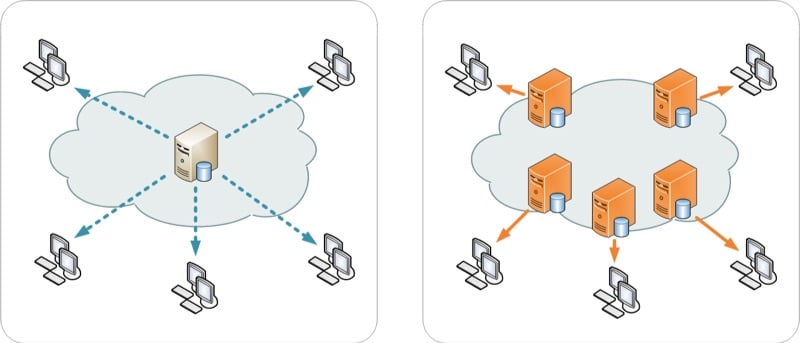
A CDN is an interconnected network of servers working together to deliver content to your end users. They make copies of your static content like images or HTML files and distribute them on all the servers within the network. So instead of serving images or HTML files directly from your original servers, those files will be sent from the server closets to your users.
On the left: traffic to your site lands on a single server. On the right, a CDN sends visitors to the server nearest to their location. Image: Wikipedia
As we explain in our guide to CDNs, the same ‘do your own research’ principles apply here, too. You’ll need to find the best mix of performance, features, and price.
We’re huge fans of Cloudflare at Yoast (which we use to power all sorts of our own ecosystems), but it may not be the perfect fit for you.
When you’re choosing a CDN for WordPress, it’s worth making sure that they have a good plugin integration, so that page and resource caches are automatically updated or purged as you write or update your content (like the Cloudflare WordPress plugin).
10. Use fewer external scripts and optimize your JavasScript
A note before we go further: this section is a bit more advanced compared to the other advice in this post. It’s best not to tamper with any JavaScript if you’re new to website building, or if you don’t have any development experience. Instead, play it safe and ask an experienced developer to help you out with JavaScript tweaks and optimizations.
With that said, JavaScript is a wonderful language and allows us to do a lot of things on websites. It makes websites more dynamic and enjoyable for end users to use.
When you see animations on a website, like when you click a button and something pops up, that’s most likely thanks to JavaScript. For website owners, it allows them to add analytics tools like Google Analytics or Hotjar and do cool things like A/B testing or personalization.
But using too much JavaScript and external scripts makes a page load much slower. Loading external scripts can slow down the performance of your website, as the browser has to make additional requests to retrieve the scripts. We often see this on web pages with many external ads, which can be frustrating at times. By minimizing the number of external scripts, you can reduce the amount of data that needs to be loaded and improve page load times.
Too much JavaScript can also affect your crawl budget. That’s because Google needs to render these files while indexing, which takes up resources. The more resources Google needs to spend on processing those files, the less they have to come back and crawl other pages on your site.
There are many ways to reduce the amount of JavaScript you use, which greatly depends on your website and the type of scripts. Start by finding out what’s loading. Then you can decide to not load it, or change how it loads to make it load more efficiently by implementing defer or async loading.
Avoid loading stuff from external domains, like Google Fonts or resources from CDNs, and load local copies instead. Also, ask yourself if you can get the same result by using a different method than using a script. For example, you can use CSS instead of a script for animation.
11. Reduce files size
We mentioned that you can compress your images to reduce their file size. You can do the same with your HTML, CSS, and JavaScript files, too.
Although the number of bytes and kilobytes you shaved off these files doesn’t sound like much, they can add up. One way to reduce file size is to reduce the redundant spacing or lines in your code. You can also combine multiple files into a single file, compress it and still serve that file without breaking your site.
Tampering with codes never sounds like a great idea, especially if you’re not a developer. But thankfully we have plugins to help us out. You can check out:
Autoptimize, which has some really clever JavaScript, CSS, and HTML optimization.
WP Minify, which also allows you to combine and compress JavaScript, CSS, and HTML files.
12. Reduce HTTP requests to your server
Every time a user clicks on a link to visit your website, their browser has to make multiple HTTP requests to your web server asking for various files and data. The server has to process these requests and send back all the necessary files so the browser can render them and show the page to the user.
Reducing the amount of HTTP requests here basically means reducing the number of files the server has to retrieve and send to your user’s browser. That will help with decreasing the amount of data transferred and decreasing the load on your server, as well as making it easier for the browser to render and construct a page.
If you’ve already implemented all the tips we mentioned above, then you’re already removing quite a bit of unnecessary HTTP requests. That involves using fewer plugins and scripts, including fewer media files, implementing a caching solution, and using a CDN to serve static content.
Wrapping up
Congratulations on making this far into the post! We hope this post will be useful in helping you speed up your WordPress website. We know there’s a lot of information here, so do take some time to process and digest it.
By implementing the techniques and best practices we suggest, you’ll be on your way to building a fast and snappy website! Don’t forget to document the changes you make and evaluate the impact on your website’s search presence, organic traffic, as well as overall website performance.
When every millisecond can make the difference between a visitor buying or leaving, there’s always more room for performance optimization. We regularly review the setup and configuration of our hosting, CDN, plugins, and theme – and so should you.
Got a great recommendation for speeding up WordPress or other site speed tools? Let us know in the comments!
More resources to help you speed up your WordPress website
These articles and documentation can provide more information on website speed optimization. Have a read!
1and1 IONOS is a good option for building business websites and online stores with a little more hands-on control
Pros
Low costs in first six months or year
Impressive and thoughtful online store features
Good range of basic and intermediate design tools
Well-designed, customisable templates
Cons
Limited range of templates
Lacks features for blogging and social media feeds
Sometimes tricky to find tools or settings
1and1 was one of the UK’s best known web hosts long before it merged into Germany’s IONOS, and it’s developed more of a profile as a website builder with its attention-grabbing ‘Aunt Helga’ TV campaigns. There, Aunt Helga promises to build a business website in a jiffy, which is pretty much what the IONOS Website Builder claims to do. But are you going to be happy with the options and the results, or left wishing that you’d signed up with another host?
1and1 IONOS Website Builder review: What do you get for the money?
IONOS Website Builder packages start at £9/mth (ex VAT) for the Starter package and go up to £25/mth for the high-end Pro package, with the £15/mth Plus package coming in-between. All three packages come with limited period deals to entice you in, with the Starter plan costing just £5/mth for the first six months, Pro costing £15 on the same terms, and Plus coming in at only £1/mth for the whole first year. That takes a lot of the risk away if you’re just trying it out, though you’re committed to a one year contract before you can leave.
The Starter package is aimed at beginners, with basic editing tools and ready-made templates, plus a maximum of 10GB of webspace and just ten pages, though IONOS throws in one year’s domain registration and an email address with a 2GB mailbox. The Plus package gives you more customisation options, more flexible editing features and 50GB/200 pages, along with site analytics and an online booking tool. The free email mailbox swells by another 10GB. Go Pro, and you can expect unlimited webspace and pages, a 50GB mailbox and more sophisticated analytics tools. You also get SEO features through the rankingCoach Essential tool.
1and1 IONOS Website Builder review: How easy is it to set up?
You won’t have any major problems or delays setting up your website. However, where other website builders get you up and running even before you have to set up an account or enter any credit card details, IONOS Website Builder makes you sign up and pay first, with no free trial or plan.
Beyond that, though, it’s relatively easy. You need to select whether you want or don’t want ecommerce features when you select your plan, but after that you just select a template, enter the basic details of your business and get to work.
IONOS doesn’t offer as many templates or categories as rival website builders, which might be a bad thing if you want choice or a good thing if you struggle to make up your mind. However, those you do get are well-designed and easily customised (on the Plus or Pro plans) with different colour themes, fonts and graphic elements. Just because there isn’t a template for, say, an artist’s portfolio or online video games store, that doesn’t mean you can’t build one with a little creativity and ingenuity.
1and1 IONOS Website Builder review: What’s it like to use?
At first, IONOS Website Builder can seem a bit inflexible. It’s not immediately obvious how you customise page elements or edit sections, and some elements seem to be fixed in terms of size and styling. For instance, the heading in the site header on the template I worked with had a fixed square container, which made it impossible to fit the heading I wanted in at a decent size. I settled for a smaller font size and a slightly ugly text shape, where simply being able to resize or reshape the container would have been a more elegant and satisfactory approach.
The more you use it, though, the more IONOS Website Builder gives you a good balance between modern-looking, responsive site design with consistency and control. You can change the style of most elements, add new sections and new pages. Likewise, adding image galleries, videos and interactive modules can be done with just a couple of clicks.
It’s also got some great features for handling backgrounds and nesting multiple images, plus some useful image-handling options to shift and scale your images so that you can see the right area if they’re going to be cropped. It’s not always the most flexible editor when it comes to setting fonts, highlighting words or moving elements around, but it does make it easy to create good-looking sites with surprisingly advanced effects. We also like the way it uses responsive design to avoid you having to design separate sites for desktop and mobile, as well as the ability to preview for desktop, smartphone and tablet screens with just one click.
One more thing that we would like, though, is a little extra speed. It’s hard to make apples to apples comparisons as connection speeds can vary so much, but IONOS Website Builder occasionally took its time to upload images or switch to a different tab or settings page. SquareSpace, Wix and GoDaddy Site Builder all felt a little faster and more responsive.
1and1 IONOS Website Builder review: Is it good for ecommerce?
IONOS pushes the business angle, so it’s not surprising that IONOS Website Builder has a strong set of ecommerce features. If you’re more interested in services than sales then you might want something with more video chat and subscription features along with the provided online booking support.
For physical and digital sales, though, you’re in safe hands. Adding products to your catalogue is easier, as is organising them into categories. IONOS Website Builder has some useful bulk editing features, so that you can add a whole bunch of products to a category or change their availability in one go. IONOS even makes short work of providing different options for a product, such as size, colour or finish, with different price points. You can set one base price for your product, then set a premium or discount for each of your options.
There are built-in guides for advertising through Facebook or Google, or for connecting your store to Facebook Shop and Instagram Shopping. Website Builder also includes Kliken Stats for a store dashboard and reporting, and can also tie into Google Analytics. What’s more, you can get updates and reports on the move through the IONOS Mobile app.
We also found that the editor gives you plenty of control over how your storefront looks, which is one area where IONOS Website Builder pulls ahead of dedicated ecommerce builders like Shopify. Not everything could be customised – we couldn’t find an obvious way to change the plain fonts used in the categories thumbnails – but you have a good level of control over how products are displayed and listed, and over which information or option is shown or hidden on each page.
IONOS offers Lightspeed Payments, Stripe, Square and PayPal as payment options, and you can also setup shipping through UPS, FedEx and DHL. If you’re happy to do things manually, you can set free shipping or flat rate shipping options by setting up the costs, your packing times and the service’s estimated delivery times; a useful feature.
1and1 IONOS Website Builder review: What other features does it have?
IONOS comes with some effective templates for showcasing video content on YouTube, and the gallery sections are nicely laid-out, with easily customised designs. Many of the modular sections also feature more flexible layout options where you can assign page elements to specific slots, though it sometimes seems impossible to find a slot that will fit certain elements, like the BookingPress Form, even when you’ve cleared other elements from the page. These tools could be a little more intuitive.
It’s also possible to embed HTML elements in your page through a dedicated module, so there’s some added flexibility there.
1and1 IONOS Website Builder review: Is there anything it could do better?
Other Website Builders have more features for integrating a range of media content or social media feeds, and IONOS’s toolkit doesn’t seem to include any blogging features. You can add articles manually to a page as sections, but we couldn’t find anything to add or manage posts in a standard layout.
Another minor grumble is that if you’re starting up an online store in the UK, it shouldn’t be too much to expect GBP as the default currency. You can change this fairly quickly, but it’s buried in a settings menu, and the step-by-step tutorial doesn’t take you there until after you’ve added products to your catalogue. When we switched from dollars to pounds all the prices went blank.
1and1 IONOS Website Builder review: Should you sign up?
1and1 IONOS Website Builder is a solid all-rounder for business and ecommerce sites. GoDaddy Website Builder is faster, but more limited in terms of creative control, and while SquareSpace is hard to beat on templates and design tools, IONOS is arguably easier to use – at least at first.
There are times when IONOS Website Builder also feels restrictive, or where the right tool or setting can be tricky to track down, but you can develop an impressive-looking website without putting in a lot of time or effort. Wix still beats it on features, flexibility and pricing, but IONOS is a great alternative if you want to build a business website fast.
In 2022, I set a goal to publish 1,000 articles on NichePursuits.com for the year.
Well, it’s now been a year later! How did I do with my goal? Did I see traffic growth?
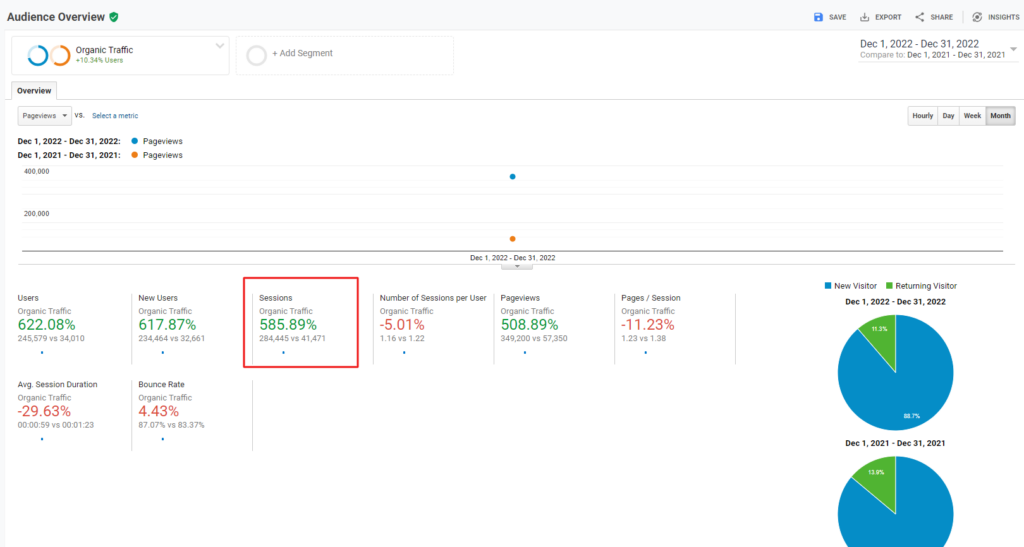
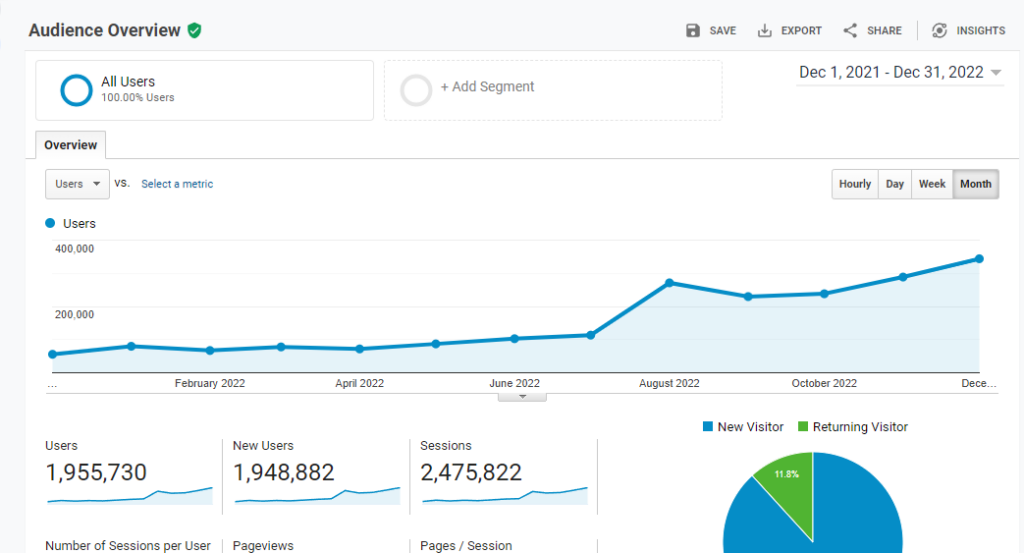
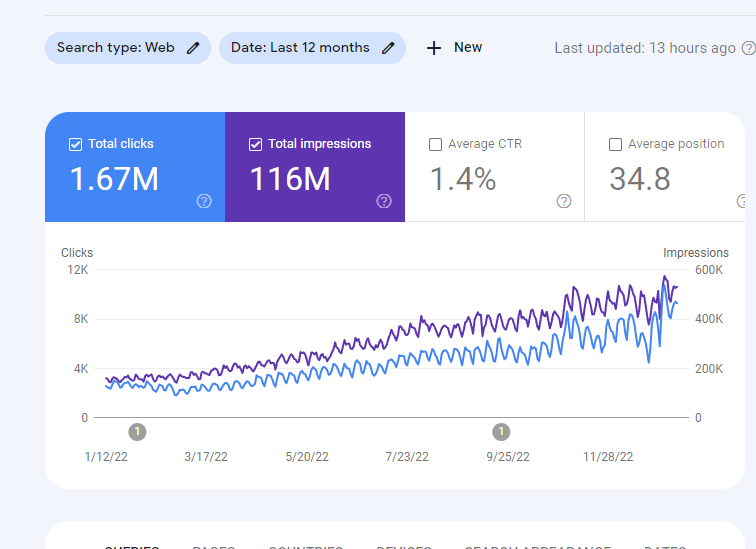
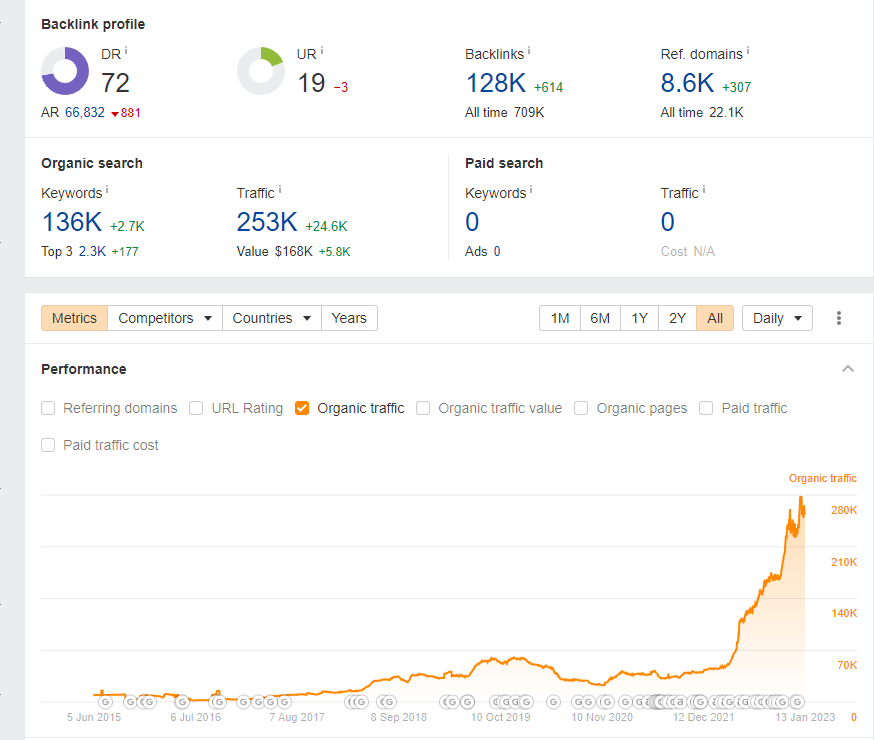
Overall, I went big with Niche Pursuits in the past 12 months and saw organic traffic from Google increase by 585%!
Today, I’m excited to share my full story via interview with Jared for the Niche Pursuits podcast! I highly recommend that you listen to or watch the full interview.
The Results
Did I hit my goal of publishing 1,000 articles for the year? Not quite.
But I was able to publish 878 new blog posts! In addition, we updated 119 articles in 2022.
And here’s some of the results!
Google Analytics over the last 12 months:
Google Search Console Over the Last 12 Months
(The dip is the Christmas season)
Ahrefs Organic Traffic Growth
Steps to Increasing Organic Traffic by 585%
Growing the traffic to NichePursuits.com involved SO much more than publishing a bunch of content.
I hired well over 20 writers, multiple editors, removed lots of old content, restructured internal links across the site, did a full site redesign, updated lots of content, and so much more.
Here’s a list of some of the steps and topics we covered during the podcast.
Removing myself as a bottleneck
Focus on evergreen content
Removing old content
Restructing categories and internal link structure of the site
Creating standard operating procedures
Updating 119 articles and the process
Setting big goals
Process of hiring writers and mistakes to avoid
Keyword research strategies
A strategy I call “following Google’s lead” to find new topics
Jared: Welcome back to The Niche Pursuits podcast. Today we are joined by Spencer Haws, the founder of this very podcast that, uh, you’re listening to Spencer, welcome on.
Spencer: Hey Jared. It is good to be back on my own podcast as as odd as that is, but, uh, you are now the host. You’re doing a great job. I’m excited to come back and just share an update on my story.
Jared: I think it’s great. You know, obviously you and I are in lockstep. We both got the memo and wearing green today. Yes. So green is a theme, , and aside from the V-neck versus the straight neck, you and I might be wearing the same shirt. So I think we’re uh, we’re gonna have a good one today, . That’s
Spencer: right. You also wearing pajama pants or is that just me?
That’s just you.
Jared: No. Okay. I had to retire those, uh, post holidays. I’m now back to, uh, to shorts. , that’s next level
Spencer: stuff, right? Yeah. .
Jared: Hey, so there’s so many things that we could catch up on because it’s been a, it’s been a full year since you and I. Hung out on the podcast and chatted. Uh, I, I guess s I guess in theory I’m interviewing you today,
Yeah. But there’s so many things we could talk about, but I think perhaps the most intriguing thing that we should focus on is looking back one year ago when we were last on the podcast together, and basically we walked through the process that you were gonna go through in 2022 of choosing where to spend your time, removing yourself from certain areas of the business, and then from basically to put time towards growing niche pursuits.com without burying the lead.
I mean, let’s, let’s talk about how that’s going and what happened in 2022 as a result of that.
Spencer: Right, so that’s exactly right. About a year ago I had decided, you know what, I’ve had so many projects, lots of different things that I had been working on, but I had never really put my main focus on niche pursuits.com and growing it.
What would happen if I put all my focus there, tried to remove myself as the bottleneck from the business? How much could it grow? And, uh, people can listen to that podcast that I recorded a year ago. So this is really an update on that podcast. What happened when I tried to remove myself, right? I had just sold off a couple of niche sites, niche site, project four.
I finally had the time, okay. My main focus is niche pursuits. So the, the end result is, I am blown away by the traffic growth, the traffic itself, I can get into the numbers. The overall traffic has grown like 350% and the organic traffic has grown by over 500%. Right? So the traffic from Google, and I guess maybe I’ll, I’ll try to share some exact numbers, uh, here.
So at the end of last year, right after, you know, we had kind of recorded the podcast back in December. You know, my site was getting something around, uh, call it around maybe 2,500 to 3000 sessions a day. Right now my site is regularly getting 15, 16,000 sessions a day. Right. So I guess if you look at those numbers, that’s, you know, that’s more than a five x growth.
And, uh, yesterday got over 21,000 sessions. Wow. And, uh, things appear to be on a very nice trajectory. I actually think today might be higher than yesterday, so it’s just continuing to grow. Mm-hmm. And the bulk of that is organic traffic traffic from Google. So that’s the high. , let’s jump into it. Whatever you want to ask Jared.
Jared: Okay. I have a lot of questions about the details. I have taken some notes coming here, and the beauty about it is that I’ve kind of gotten a moonlight along the way by whether, you know, seeing stuff you’ve tweeted about throughout the year, having conversations with you offline throughout the year. So I’m gonna kind of sprinkle in a lot of the things that I think you were testing, doing, et cetera, and, and kind of also see how that played into your strategy.
I mean, let me start with a big, broad question and I, I feel like maybe a lot of people might feel this way. . I don’t actually work for niche pursuits. I run my own marketing agency. I just host this podcast. That’s right. I get a lot of people who do think I work directly for you and email me about blog content and stuff.
But as a result, I get, I kind of have a third party view of niche pursuits.com and I’ve watched Niche pursuits grow over the years and I feel like my perception is that Niche pursuits was just rocking and rolling Prior to this year that you were already doing very well, that you were already getting a lot of traffic.
You’ve now five Xed it. Like what were you leaving off the table prior that you were now able to go after? And I, again, I’m asking from kind of a broad perspective kind of shape maybe the strategy you, you engaged to to, to get this growth.
Spencer: Yeah. So I’m gonna answer sort of the two to get this. Yeah, so I’m gonna answer sort of the two parts of your question is one, you thought niche pursuits was already doing well, and, and it was in terms of my email list is huge.
I, I’ve grown it a lot. I would call that almost a bigger asset than my website, for example. But a lot of the content that I’ve done previously is like a lot of my niche site projects, those things tend to not necessarily go viral, but do really well on social media, is very shareable, but does not attract a lot of organic traffic.
Yeah, that makes a lot of sense. Okay. And so it does very well in terms of, I built a, a great following, a great brand, right? This YouTube channel, the podcast, my email list is, is massive, right? But there’s not a lot of people that are continuing to search. For a lot of my old posts, they, they weren’t SEO friendly posts.
A lot of them. It was like, hey, so
Jared: NI niche site project two, call number four with Samara. Just wasn’t really ranking that well, five years later, .
Spencer: Exactly, exactly. A lot of the content wa was outdated and uh, and I, I realized that, so over the last, even the last two to three years, I knew that I needed to start writing more SEO targeted content to really turn niche pursuits into an organic traffic engine that I knew it could be because it’s got a lot of great authority, a lot of great links.
And so I started to write some of those SEO articles myself. I even hired a couple of writers, but it’s very slow when I’m doing it a lot myself. So that was a big part of it. Like I just gotta remove myself. I gotta go all in. I gotta believe in this site. I gotta believe that the authority, the process that I know of how to rank other websites that I’ve done is going to work on itch pursuits.
And so that’s what I changed is like, okay, no more producing all the content that is like, Can, can expire and is old, right? Uh, I’m focusing on evergreen content and I’m going big, right? Mm-hmm. . And so, uh, that’s the shift that I made is just producing a lot more content. I hired, gosh, over 20 writers to Wow.
To help produce all the content. And I guess since we’re talking about it, I’ll just share the numbers. I’m gonna look at it. I believe it’s, I just tweeted about this yesterday. 878 total articles were published in 2022 on niche pursuits.com. That’s a ton. And that is, I didn’t realize way more new content than, than I’ve ever published in any previous year.
That’s
Jared: substantial. That, so that makes a ton of sense. A lot of what probably a lot of people know niche pursuits for historically is these different types of things that work really well on social media, but don’t drive long-term evergreen traffic. Okay. Exactly. Okay, good. So that sets the stage you’re removing yourself and focusing on evergreen content.
You wrote 900 articles, in essence hired 20 rockers . Yep. How did you develop a process for that? And did you start by, maybe walk us through the beginning phases and the dichotomy that probably existed between going through a lot of this old content on your site that wasn’t Evergreen focused and then wanting to publish new SEO focused content and where you kind of split that up and then how you set out to, to, to
Spencer: do that.
Right. Yeah. So there, there was a ton of old content, I’ll just touch on that briefly, that I did do a lot of, uh, cleanup. There was a lot of updates. You know, nobody cared about niche site project one month three. Right. It wasn’t. Getting any organic traffic. And so, so basically I looked at two things to actually delete a lot of content is, uh, was it getting any traffic and did it have any good links?
Right? And, um, if it had good links, I might actually 3 0 1 redirect it to a relevant page. Yep. Or to the homepage. Or if it had neither of those, I’d just hit delete. Right. And so I did remove a lot of content. So there was a lot of cleanup of the site architecture wise, link wise, category wise, that went into sort of setting the stage for this, that I’m happy to dive into that in more detail as well.
But then the other part is setting up all these standard operating procedures for like, okay, it’s going beyond me. And one or two writers that I’ve kind of dabbled with in the past to like, yeah, let’s hire 20 people and, and see what we can do. Really, my goal at the beginning of the year was to publish a thou a thousand articles.
I felt just short of that, but still a significant number of articles. And so I knew that I needed these standard operating procedures, uh, so that I could hire someone not only to write the content, but to actually edit and be able to publish that content even if I wasn’t around. Yeah, right. When, when you’re looking at the number of like three, four articles every day potentially getting published, like that’s basically all I could do every day if I were to read every article and edit every article, even if I didn’t write it.
So I needed to have a team and system in place, uh, to be able to do all of that for me and. I wrote out very detailed instructions for like, here’s the voice of niche pursuits, here’s the audience you’re targeting. These are people that wanna learn specifics, be very upfront and honest, et cetera. Right. I explained everything that I try to do when I write in a nice, uh, document, and I, it’s in a Google spreadsheet that’s kind of like checklist format.
So when, mm-hmm. authors write an article, they can look at here’s like 30 points and here’s some loom videos, right? That explains things from voice to formatting, to how to add links, et cetera, all that, all of that. And so we can jump into that process, but I had to truly just, um, change my mind, shift of, okay, it’s no longer me doing this.
How can I make it as easy as possible for people to do this for me without a asking me questions every day? So I had to do, Tons of documentation.
Jared: I, okay. I wanna ask you about that. I wanna, I think let, let’s just camp really quickly cuz I think we can get through it quickly on this topic of deleting and purging old content.
And then we can move into all the new content because I think that that probably was an initial thing that was done. And then you didn’t really have to do it any longer. You cleaned up the site architecture, you got rid of a bunch of stuff. How could, can that be, did you outsource any of that? Can that be outsourced?
Cause I mean, a lot of people will have sites and have websites that are, you know, either they’ve bought and so there’s a lot of old content that maybe wasn’t tended for. Or maybe it’s just stuff that they’ve done over the years, kind of like you, and it’s no longer the focus of the site, but updating content and deciding to delete it and all that, it’s, it’s very nuanced and very difficult to outsource, I’ve found.
So I’m curious if you were able to outsource any of that or if you just decided to roll up your sleeves for that one time project.
Spencer: Yeah, I did all of that myself. I did not outsource it. Um, I suppose it’s, it’s maybe possible to outsource for a more standard website, but niche pursuits being my own blog, I had written almost a hundred percent of every article on the site.
I just had so much, I had such a good understanding of every article that was published and even some, like, I made decisions to not delete that. Like it just meant a lot to me. it is personal. Yeah. Like I wrote this, I know nobody reads it anymore. It doesn’t have any links. I don’t care. I’m leaving it. I just, I really enjoyed writing that, or it’s, it’s really great.
Right? And so there’s just too much nuance there that I, I felt I couldn’t outsource it. So I went through every article. I created a whole spreadsheet and I, what I, what I did is I actually export. All of the, uh, articles from Google Analytics, you, you can do that into a Google spreadsheet. They have a nice way to do that.
And so it showed all the traffic, right? And so I essentially went to all the articles that didn’t get a certain threshold and I don’t remember what that was. Maybe, maybe a hundred visitors a month or something. Okay. Mm-hmm. , right? Everything below that is what I kind of looked at. Everything that was getting more than a hundred visitors a month or a few visitors a day, I just kind of kept for the most part.
Um,
Jared: so you deleted a bunch of content. Yeah. And then obviously we’re gonna get into all the new content you created. What about. Was there any work? Did you put any effort towards, okay, this content stays, but maybe it could be better. Maybe I need to update it, maybe I need to target a new keyword. Did you do any content updating throughout 2022 and, and then we’ll get into all the new content, all the, yeah.
900 articles you published and all that, right?
Spencer: Yes, we did, uh, update a ton of content. Um, I also have that number, I, it, it’s like 119 or something like that. Um, so it was over a hundred articles were updated, refreshed. I don’t know if I have the exact number. Yeah, well that’s fine. But it was, it was over a hundred.
Yeah, it’s like 119 is what I wanna say. That’s, uh, articles. Yeah.
Jared: What was a content update process like? What did that look like for you? Were there certain things you were focusing on doing? Uh, were there certain things that those 119 articles, like why they stood out to you to update certain things you were looking
Spencer: at?
Yeah. Uh, so I have a, again, a whole spreadsheet for this. It. I actually, uh, looked at two different things, uh, for updating, for, for choosing the articles to update. One was, I, I just looked at my highest trafficked articles, right? I took like my 50 highest trafficked articles on the site. It’s like, these are winners.
Um, can we make them even bigger winners, right? If, if they weren’t number one for like every keyword, which I don’t know if any articles are ever number one for every, every keyword your agreed, your ranking, right? Um, and it’s older than a year. Uh, we, we would go back and update that. So that was at least half of them.
Um, then the other half was more review type or, uh, money type pages, right? Maybe they’re not getting a lot of traffic, but these are articles that have the potential or are making a lot of money already, and we’ll go back and update that. The process again, I had a spreadsheet. Um, I had a couple of my authors that I as assigned to do this, that I would allow them to choose which article they wanted to update.
So if something caught their eye, they’d just put their name next to it. They would go in and updated it, update it using, uh, surfer SEO or Market Muse. I’ve used both throughout the year they’re doing with H two s, that sort of thing. Right. So needs more
Jared: words or needs less words or something like
Spencer: that.
Exactly. Um, and then sort of the final step of that is we would look at, can the article be, be monetized better? Mm-hmm. , are we missing affiliate links? Do we need to add a button in the introduction that says, Hey, go try out this product, uh, or add something in the sidebar. We, we do some custom sidebar call to actions.
Right. So we’d look at that as well. I’ve gotta
Jared: imagine you track . You said you tracked pretty much everything so far. I’ve asked you about did you track any, um, of the performance that came with the articles you updated? Did the, did those get, or is that a result of some of the organic traffic lift, the numbers you were
Spencer: sharing?
Absolutely. That is definitely some of the lift. I did track some of it initially. I wish I could say I had those updated numbers. Um, I used to go in and, and sort of after I believe it was 90 days check, I was check, I was checking and seeing, and I may even still have a spreadsheet, but I, I don’t know that I have any handy numbers to share.
Well,
Jared: I know that a lot of your growth did come, I, I remember you posting a screenshot somewhere where you, and correct me if I’m wrong by the details, but you do track how much of your organic traffic was coming from your newer articles. And I saw that graph and I was always amazed. But I’m, you know, it’s so great when you’re working with a site that’s so authoritative.
You can probably publish an article and you know, you’re ranking. within a day, and you might be on page one within a week, and you might, so I’m sure that a lot of your traffic did come from new content, but I’m always curious for an older site that has so much history, um, how effective article updating can
Spencer: probably be.
Yeah. It, it’s, it’s very effective. I, and, and so I can just say, I can’t give you specific numbers, but I can tell you generally that absolutely updating content has driven, um, a lot of the, the traffic growth, uh, updating content has worked. Um, and I’ve seen a nice lift on that. Um mm-hmm. , and I do, I do also track, I have a custom report, and this is an old Google Analytics.
I don’t know how to do it in Google Analytics four just yet, but you can create, um, I, I have a custom report that every new article that gets published in like 2022 gets added to this report. And so I can see the trends of, okay, my content that was published this year, How much traffic has, is that bringing in?
And, uh, I should have done this right before the call, but I, I think I’m missing the last few weeks of articles on this report. So the, these numbers are higher, but I can tell you about 7,500 sessions a day are coming in from content that was published in 2022.
Jared: Well, that’s because you were saying outside of yesterday, basically you’re average about 15 to 16,000 sessions a day now.
That’s right. And that’s almost
Spencer: half, that’s almost half. That’s basically half, I mean, yeah. Yep. Wow. That’s what happens when you publish almost a thousand articles. Right? All, uh, doubled, doubled the, the content on the site. Right. So more, more than doubled the content on the site, actually. Yeah. But to your point,
Jared: if we take out, uh, just looking at my notes, if we take out the, the new articles, the seven and a half thousand page views a day that come from the new articles, you’re still sitting at seven and a half or 8,000 pages a day, which is still more than double the 3000 page views.
Yep. Or sessions a day you had a year ago. Yep, yep. That’s absolutely. So we just used back in the napkin math updating content. Definitely
Spencer: works. Definitely worked. Um, and I think there’s more to the story. Um, part of it, it, we touched on the restructure of the site, the categories. There was a lot of internal linking audits that, of course I used Li Whisper to do that, but that was part of my, uh, process when I removed content.
A lot of the content that I kept, um, that, uh, was performing well. And also when we do content updates, I go in and I audit the internal links and go, these are not relevant links. I’m gonna re remove a bunch of links that are pointing to this article, or I’m gonna add new links to that. Right. So I think that helps site.
Um, lift even stuff that we didn’t update. Right. Um, so some of the articles got lifted as well by restructuring a lot of that. And just to piggyback on that, I also, midway through the year, did a whole site redesign. Um, that’s right. I did a new brand. Um, it looks more professional. I feel like it’s more shareable and it’s a lot more mobile friendly.
So I think all of that, yeah. You know, the site restructured, new design, more mobile friendly and everything else we’ve talked about, all, all comes into play.
Jared: Yeah, it all plays in, right? Yeah. It’s hard to. Say it’s just one thing when you’re working on a ton of things on it. I will say, um, and, you know, this is, this is not a, a a, a plug for link whisper, uh, that we talked about ahead of time, but I shared this on Twitter, I think last month or a couple months ago about how I, um, obviously it’s a great tool for building internal links.
I had never used it for removing internal links, but we got a client that, um, had a ton of generic internal links, right? So every time. You know, a general word was used in an article. They would internal link it to a variety of different places. And so the internal linking was really poor and we were able to use Lin Whispers really quickly to remove a lot of those internal links.
And, um, it definitely had an impact because now Google could better understand what each page is about because it wasn’t just getting generic anchor text sent to it. So anyways, it’s really powerful for that . I can imagine. Speed it
Spencer: up. Absolutely. And, and just the reporting overall, you know, it, it helps when you’re, um, looking at your site.
Overall, what do I need to improve? One thing is I, I just go into my reports and you can see every link, you know the number of inbound internal links. Yep. There’s a report for that. You can just hit expand. And very quickly browse to see, is this really the anchor text? Right? You, you’ve got an article about A, B, C, and the anchor text is X, Y, Z and you’re like, you know, that’s really not what this article’s about.
Remove it. Right? And so it makes it easy to remove a bunch of those or just analyze to go, gosh, this has 50 inbound internal links. Do I really need to be putting all that link juice on this article? I actually don’t wanna rank that much. Um, and you know, side note that that happens a lot. I, I have an article on niche pursuits.
Um, it’s, people can try and find it if they want, but it was a guest post that somebody, you know, published on niche pursuits.com many years ago, eight, nine years ago, that was about building white hat internal links, right? Um, but for whatever reason, a lot of my writers thought that would be a good article to link to.
It would, it’s an article that has never ranked well, I. I’m not really trying to get it to rank well, you know, it’s just a guest post. So finally I did an audit and , so it’s got like, I don’t remember how many, you know, 30, 40 internal links. I’m like, yeah, I don’t wanna be sending link juice from these articles.
I am trying to rank on Google. Let’s remove that link. So they keep their pay rank. Mm-hmm. , you know, instead of passing it to this other article. And so Li Whisper made that easy, uh, to do and just remove that. And again, not a, not a plug for Li Whisper, but this was part of my process for that particular case.
Uh, there’s a setting you can go in and I finally just did this. You can put that. U r L is do not ever suggest internal links to that page. Oh, I didn’t know about that. Yeah, so I, and, and you can do categories. So I’ve actually got categories and, and that page that I. My authors will never see that as a suggested internal link again.
Right. And,
Jared: and like, well, and I, I brought it up again just to kind of fine tune the point, but I brought it up because I think there’s the classics you do when you update content, right? And we don’t need to dive into all those, but there’s a lot of times things that people do miss when they’re updating old content.
And one of those is those internal links that are pointing to it. And unless you’re, like, you don’t log into WordPress, open the page up and know what internal links are coming to us. So unless you’re actually including that as a part of your process, that could very easily get missed in your update, uh, updating of all content.
Spencer: So, yeah. Yeah. Absolutely. There’s, um, it, it’s just important to look at everything, right? Have a fresh set of eyes, look at Yeah. The content, the structures, new images maybe need to be added, you know, um, just looking at that content every year-ish. Um, especially your best performing content. Yeah. Um, , you know, and then of course the internal links is just so important.
Jared: Well, let’s get into the 878 new articles you published. Um, again, quick, back in the Apple math, you were 88% of the way to your, your goal of a thousand articles, which is a tremendously lofty goal. When you set out to do a thousand articles, was this like, did you sit down and kind of put together a keyword map, um, and say like, based on all of this, I think a thousand articles is the right number for us.
Was it more based on, um, like a, an internal metric, or was it just kind of a big pie in the sky goal that said, we wanna move the needle forward, I wanna start publishing optimized content and let’s just come up with a nice big.
Spencer: Yeah, it’s the latter. Um, just coming up with a big number. Um, I, I do, well when I commit to specific goals mm-hmm.
and I, I like to go big when I’m feeling confident, . Um, and sometimes setting a big goal actually makes me feel more confident. Um, I do this a lot with running, right? Setting a goal to run a marathon or run a marathon under a specific time. It’s sometimes not until I set that goal of like, , I want to qualify for the Boston Marathon and I want to do it in six months.
It’s kind of scary. I set this big goal and then all of a sudden I get really motivated to train really hard and work towards that goal. Right? Um, it’s the exact same thing with what happened here on niche pursuits is I need to set kind of a big scary goal. And a thousand articles is like five times beyond what I thought maybe should be normal.
Um, so let’s do that. Why not? And I, I’ve got some other friends that maybe encourage me to set big goals cuz they’re setting big crazy goals with their websites as well. Uh, one friend in particular that also was publishing about a thousand articles and he’s just crushing it, right? I’m like, gosh, I wanna see that trajectory of growth.
Growth. And he just says, in order to do that, you gotta publish a lot of content. There’s just no way around it. And so I bit the bullet, I set the goal. And I just, I set the number of, of a thousand because, you know, it’s just that nice round number. It’s this huge goal. Um, and so once I committed to it, I had to hire.
Yeah. There’s just no way around that. No. Crowded. Yeah. Did
Jared: you, um, this is a, a decision that, I mean, guy, probably every website owner, our listening right now has to face at some point, which is, do I start outsourcing to hit that next goal or do I keep doing it because I’m probably the best, I’m probably the most qualified.
I know the brand and all those sorts of things. And there’s a classic recommendations you could give on how to hire. And you already touched on some of the, the procedures you created, the processes you created. But I mean, were there any, any mistakes you made or things you might have learned along the way with outsourcing content on niche pursuits for really the first time ever, at least
Spencer: at scale?
Yeah. We went through a lot of growing pains. Um, One, gosh, lot of mistakes. . Um, one thing you wanna share? All of them ? Yeah. One thing that I guess we, we maybe did, did well, and then I’ll share the mistake that this didn’t fix all of that. But one thing that, that I like to do is just higher, uh, quickly. You can spend a ton of time, and I’ve made this mistake in the past of, um, you know, asking for all sorts of writing samples, maybe even, you know, exchanging tons of emails or maybe even getting on a call, right?
Um, w with authors, right? If I, but if I’m trying to hire 20, 25 authors, that is like a full-time job. And so what I did is I, I posted the job and do my best to filter and say, this looks like a decent writer. And then just give them an assignment, a a paid, paid article. That is just the best way to know if they’re actually a good writer.
And so, based on mistakes I’d made in the past, I pretty quickly just hired people and said, here, write this article. It’s going live on niche pursuits, right? Like, you’re, you’re an author, I’m paying you for it. And then firing quickly, right? If they, they produce the article and it’s not that great either, maybe don’t publish the article and, and just let ’em, you know, pay them anyways.
So I learned that through some of the mistakes. . Um, but even that, uh, once I turned over the reins to allow, um, my senior editor to start hiring, because there is a lot of turnover with writers. Yeah. We, we kept a nice core set, but there’s still always two or three on the fringes that we need to be replacing.
I turned over the reins of hiring to my senior editor and uh, he did a good job, but, uh, allowed some writers to stick around longer than they should have been allowed to stick around with. So that’s some of the growing pains that, that we made this year is not being more strict with some quality guidelines on certain authors.
We probably should let them go when we saw some initial mistakes in the first, you know, two or three articles, just let ’em go and try to find somebody different. Um, so that is definitely some of the mistakes that we’ve made because now we’re left with. Several articles that need updates, Uhhuh, that really weren’t written that well, that probably just need to be scrapped or rewritten.
And, and so that, um, has been one growing pain. Um, I’m trying to think of other things
Jared: that, well, let me ask you about that, cuz that dovetails nicely. Mm-hmm. I mean, hiring 20, well more than 20 writers, cuz if you have about 20 writers and, you know, you’ve had to let a few go along the way. You’ve obviously hired even more than that.
Like, what are some things at scale you’ve seen that Can that Mark A. Good writer? Have you seen any consistencies or anything stand out in the, in the, in the people you have that, like you said, make up your good core team of writers? Uh, you
Spencer: know, it’s one of those things, you just know a good writer when you see him.
It’s, it’s hard to explain, but I know when I. Start reading an article. I can tell, you know, within the first few paragraphs that this person just gets it right. They, they write in a conversational style or just a style that’s easy. Mm-hmm. . Um, it’s, it’s easy to read and understand. There’s no fluff. That’s a huge one.
Um, you might get authors that say all the right things and they’re smart, but, uh, there’s just a lot of fluff. You can, yeah. You can read, you know, half the article and I was like, well, that could have been said in a paragraph, you know, what did I really learn? And so a good article, uh, a good writer, you just know it when you see it.
I, and that’s so bad to say, uh, because I’m trying to train other people to do the same thing and I haven’t been able to successfully do that a hundred percent. Yeah. Um, so for me it’s kind of, I, I no fluff, um, easy to read, meaning that their, their sentences are structured well. Um, they’re short. Um, and then the third is content knowledge or, you know, sort of niche knowledge, expertise and, and expertise.
You know, niche pursuits is hard to hire for that. Somebody that just kind of gets the affiliate marketing world, SEO world. Um, I can very quickly when I read an article go, you know what, this person has probably never done keyword research or actually tried to rank an article and the writing about something that’s kind of, sort of related to that.
Right. And so just, um, yeah, expertise. Um, ki kind of shows through, uh, pretty quickly if you are an expert Yeah. In your
Jared: space. Yeah. Yeah. Yeah. No, that makes a lot of sense. That makes a lot of sense. I, yeah, I was curious if you had gone like, on this big kind of training program or if it was really more about.
Hire experts and let the ones that want to, uh, write a lot of articles, like if they’re doing a good job and they wanna write a lot, let them just continue to, to pour over the content.
Spencer: Yeah. That’s the more, uh, accurate statement there is. When I find. People that are experts, um, I really latch onto them, give them as much work as they want, um, and, uh, yeah, try to focus on on those good quality authors.
Jared: So you mentioned keyword research. Perfect transition. Who did all the keyword research? Was it you, uh, uh, doing all the keyword research? I gotta feel like that’s something you was probably one of the last things that you would wanna let go of , just knowing your background. Yeah,
Spencer: it is, it is. Um, I did pretty much all the keyword research.
Um, I went through and, uh, you know, developed a nice keyword plan. I, I would kind of do it in batches of a hundred to 200 keywords at a time, is really what I would do is go, okay, here’s the next a hundred keywords. I’d put it in a spreadsheet. Uh, the authors all had access to that spreadsheet so they could pick any of those at 100 or 200 keywords that were available.
And assign themselves. So I would not, it, it eliminates a step, right? Mm-hmm. , I shared access to a Google spreadsheet where authors could do a lot of stuff, um, was helpful. So I would do all the keyword research, uh, towards the latter half of the year. Um, I did have a senior editor help me do some keyword research, but I was still very much involved in, I would look at every single one of those keywords and approve, or decline them before the author saw those.
So,
Jared: I’ve gotta ask you because, and, and I’ll give you, I’ll give you a little context for it. I, um, preparing for this interview, I, I popped, I knew we were talking about growth. I knew you published a lot of articles, uh, this year, and I knew we were gonna be talking about that. So I popped niche pursuits into H Refs and was looking at the keywords.
Um, and I was kind of blown away. There’s all sorts of topics I didn’t even know about that, uh, that niche pursuit has published articles on, uh, ha now ranks really high. Some of these are number top, number one spots for high volume keywords. And it got me thinking about, man, there’s some, uh, it feels like there’s some real strategy, not just to finding good keywords, but when you’re writing upwards of a thousand articles, I mean, were you, like, maybe just talk about the bigger picture of the research process because it seems like you’ve almost gone on an entirely new topical silos.
It seems like you’ve really gone down, uh, into, into depth on. On, on really in-depth silos. I guess that’s probably the best way to keep coming back to that I didn’t even really see prior to this year. Niche pursuit’s talking about.
Spencer: Right? Yeah, that’s a great question. And that opens up a whole topic here that, uh, yeah, I haven’t really mentioned.
And, um, so historically, niche pursuits.com, you know, it has been all about building niche websites. Yes. Affiliate marketing, right? That is, that is the core and still, I feel is the core. Um, but that is an incredibly difficult market to rank for when you start and a fairly, fairly
Jared: thin or, uh, uh, uh, narrow one.
Spencer: It, it, it is, right? So the fact that I was getting, you know, call it 3000 visitors a day in that space, it still put me as, you know, one of the top blogs in, in that space, right? Um, when you start looking at SEO blogs, right, like Backlinko or WordPress blogs like WP Beginner or Moz, or right. All of a sudden you’re competing in this.
Insanely competitive market. Mm-hmm. . And so I, I had to take an honest look and it was like, okay, am I fine with getting 3000, 4,000, 5,000 visitors a day, but, but getting this great, targeted, super valuable traffic, or do I wanna build niche pursuits into something bigger that can get a lot more traffic and make money in perhaps other ways?
Right. Um, and I, I chose the latter and the only way to, to do that is to expand the topics that I would be covering. Right. Uh, and so I decided, you know, what, what’s tangentially related to affiliate marketing? Well, there’s digital marketing as a whole, and that can over uncover all kinds of topics.
YouTube, Twitter, social media, right? So if you look at a lot of content I’m ranking for, it’s, it’s stuff related to some of that. Uh, it al also opens up sort of the silo of side hustles, right? What are some side hustles that people can be doing online besides affiliate marketing and seo, right? And that opens up a ton of keywords.
Um, right? And so that did open up a lot. And so a lot of the traffic is coming from like, okay, what are, what is a side hustle that a team can do online? Right? Maybe that’s not what the niche pursuits podcast listener, you know, wants, wants to hear about. Ok. We haven’t had one of those on,
Jared: uh, we haven’t had one of those on yet.
Spencer: right? Um, you know, is is topics like, oh, a team could flip sneakers online, right? Um, but there is a lot of people that do wanna do that. And so I want niche pursuits to be kind of an authority on like, Hey, these are legitimate business opportunities online that you can pursue. And if you happen to be ever building a website, join my email list and, uh, I got lots of great digital marketing tips, right?
Um, yeah. So, so that was part of it. And then the other big strategy was what I guess I’ll call following Google’s lead on that, right? So say I published a few hundred articles, then it’s going back and looking at what worked really well with those few hundred articles, what type of article, um, you know, is, is doing well, right?
And so, and then follow that rabbit hole, right? Like, okay, if I publish some articles about YouTube, uh, or, um, you know, sort of low-cost business ideas, find more keywords related to that mm-hmm. and or that, you know, type of keyword, um, that keyword structure if you will. And so that became a lot of what I did as well.
It’s like, okay, Google’s telling me that I should write about, X, y, Z topic. I’m gonna do that and just publish a ton of content about that. We’ll, I’ll in on that.
Jared: Yeah. On what Google’s rewarding you with initially.
Spencer: Exactly. Yep. Exactly. Y
Jared: when you came up with these, uh, new related silos, were you looking just at the keyword opportunities?
You know, I mean, I, we don’t need to get into the rabbit hole on, you know, volumes and difficulties and all that stuff, but was it more about the keyword or were you also trying to align new and highly, highly profitable monetization methods with those keywords as you were kind of looking around at which silos to go after?
Spencer: Yeah. Um, so it was, uh, sort of three different strategies. One is, um, like I said, what’s already, uh, working well on, on niche pursuits and how can I produce more of that content, right? Uh, the other type of keyword is exactly like you said, what can I monetize? Well, what has a good. You know, affiliate program that is related to, to my niche, right?
Can I do a review of this software tool? Um, and, and that can be a well monetized article. And a lot of, you know, reviews, especially in the digital marketing space, don’t get a lot of traffic, right? They, they’re just low, typically low, um, volume keywords that are hard to rank for, unfortunately, especially in this space.
Um, but they, they can be valuable. Mm-hmm. , right? And so that’s, that’s the other type. And then, um, the third type I guess is really just what, what is my, um, core audience? Um, that, that gets a lot of oppor, that, that has a lot of opportunity. Uh, high search volume, right? Can just get me a lot of traffic, um, and, and sort of fits my, my core audience.
And again, it,
Jared: it probably goes without saying for you, but I’ll say it cuz a lot of people, you know, listening forget, potentially can forget how interconnected. Niche pursuits is right? Like it’s not just about ranking the article and getting the affiliate commission from that article, but you also have an email list that you drive people to the email list, and then from the email list, uh, podcast grows from the email list.
You can also move into other products and other types of things. So it’s really so interconnected that it’s not just about, say, ranking that best of article, getting the affiliate commission and moving along
Spencer: a hundred percent. And so, um, you know, people probably generally understand my business model, but just to say it explicitly, right, is yes, I want a ton of traffic and I actually just added, um, display ads on, I was gonna ask you about that.com.
I was gonna ask you about that, right? And so, um, informational articles are now making money. You know, every day I, I make affiliate commissions. Uh, from that I make affiliate commissions on my email list, right? I can send an email related, um, to a product. So, Even if, uh, traffic is coming to an informational article that is not monetized, I’m cool with that.
Right? If it’s related to digital marketing, they might get on my email list. They might, uh, then eventually buy a digital product. But the real kicker here is that those people might be interested in my products Link whisper, right? They, they might, if they’re initially searching for something about WordPress, you know, how do I fix this in WordPress?
And they land on an article on niche pursuits.com, that’s a great visitor. And if they end up on my email list, even if they don’t buy anything for a year, if they turn around and then buy Link Whisper, um, that’s, that’s a huge backend, um, product for me. Right? And so, so it’s all very connected. Um, and so, you know, even though I’ve got display ads that is, you know, sort of bottom of the.
End of the spectrum of like what I really care about. Um, but it is bringing a nice amount of money just because I have a ton of articles that, um, as I follow Google Leads, right? There are some articles that’s like, eh, I don’t know if that person is ever going to Yeah. Be interested in link whisper. Like it just, it’s kind of sort of related, but I’ll just make the display ad revenue on that visitor.
Well, it’s really
Jared: taking , you almost, I don’t wanna say when about it backwards cuz that would, that would absolutely not be the right way to say it, but, Niche pursuits was a brand well before you embarked on this growth strategy, but you’ve used, you’ve really like what you have in front of you, especially over the last year.
And then the interview we have here, recapping the last year is a lesson and how to create a brand online, not just how to grow a blog. You know, and your blog has grown tremendously, but the traffic pales in comparison when you compare that to what the impact has been on your traffic. Your email subscribers, podcast growth.
Lin Whisper growth probably, you know, and, and, uh, and revenue. Because, because, because you’ve built a brand that benefits multiple layers from each thing that you’re doing. And it’s just, again, it’s a great walkthrough, everybody listening. It’s, um, you know, if you’re brand new at starting a website, yeah, getting, um, a hundred dollars a day for media Vine is a huge accomplishment.
But think about all the other ways you can monetize and grow that traffic down the road. Because at some point, you know, it could just be the tip of the iceberg, like you’re saying, for, for, for your traffic.
Spencer: Right. And so if I were to give advice to anybody sort of starting out is I think the better route is to build a brand right to almost.
E even though it’s taken me so many years to really like tap into like huge Google traffic, like in the beginning, maybe don’t worry too much about SEO traffic. Build a brand, do something interesting. Get people to join your email list, to follow you on Twitter, to, to, to recognize you as the face of your brand because they become loyal to you as, as a person and as a brand.
And if you sort of share your personality, even if it’s. You know, sharing, um, income updates, right? Or things that are never gonna rank in Google like I did. I don’t, I wouldn’t call that a mistake, you know, of, of everything that I did that’s, that’s built a very healthy brand, um, a great following podcast listeners, people that look to me for advice and tips and strategies, right?
And now that I have that base, I can kind of build and, and grow traffic and, and do a whole lot more. But, uh, I really am funnelling all of that back into the, the, the email list and the bigger brand so that I’m not just reliant on Google, right? Because if I had, uh, this website that’s getting 20,000 visitors a day, and it’s all from Google and I don’t have an email list, I don’t have a brand that’s a very scary business, but me putting a thousand articles to try and grow the Google traffic, I can do that because I’ve got this nice base.
Right.
Jared: You almost answered the question, but I’ll ask it if you could. What do you think out of the different areas of, of the niche pursuits brand, the, the traffic to the website, um, the email list, uh, the YouTube channel, the podcast probably missing one or two, but what do you think is the most valuable out of all those to the brand?
Spencer: Yeah. Hands down it’s the email list.
Jared: Yeah. And that’s what you kind of were hinting at earlier.
Spencer: Yeah. Which, which is crazy, but uh, you know, so it’s like if I were to put my, my whole website and all the traffic on a table and my email list on another table, and I can only choose one table, like, I would probably give up the whole website and just say, , I’m keeping the email list.
As crazy as that sounds like, wow. That’s how valuable it is because, um, I can’t really reach everybody with my, you know, if I pub, like if I didn’t have my email list and I just published an article on my blog, a thousand, 2000 people might read that. Mm-hmm. . Right. But if I. Send one email, it reaches significantly more than one or 2000 people.
Jared: What, um, I don’t need exact numbers, anything like that, but what has, um, like we’ve talked so much about how you’ve grown the website traffic. What have the effects been in other areas like h what kind of email growth have you gotten? What kind of growth on YouTube or the podcast or maybe revenue, like what other numbers have changed as a by-product of your focus on growing organic traffic?
Spencer: Yeah, so the email list has grown. It’s, um, probably grown, you know, 20, 25%, something like that. Uh, which maybe doesn’t sound like a lot. And, uh, I wish it was higher. I wish I was getting more opt-ins every day. But the number of opt-ins every day are definitely going up. Mm-hmm. , thanks to the increased traffic, um, the YouTube channel has grown primarily Thanks to you Jared, and the podcast.
Uh, the podcast has seen growth. Again, because I’ve removed myself and now it’s finally consistent and it’s got a great structure and, you know, uh, people can, can turn to that and, um, get, get value from that. Um, and so the podcast is, and really the YouTube, the
Jared: YouTube channel really is like the podcast I think it is.
I don’t check it religiously, but , I don’t need to see myself. Yeah. But, uh, there’s, that’s most of what the YouTube channel really is, so you could probably kind of merge the podcast and YouTube channel together into one
Spencer: channel. Really. Yeah. And, um, so those have seen growth. Uh, I, I, I’ve seen growth on Twitter.
That’s not because of me publishing more content on niche pursuits, though, that’s just because I’ve been more active on Twitter. Um, but maybe I’m more active on Twitter because now I have time to be active on, uh, on Twitter finally. Um, and, uh, yeah, just the final thing I’ll, I’ll say is that, uh, you know, I said maybe my email list is the most valuable.
Probably the podcast is the second most valuable, um,
Jared: may after all that growth. And I, I just think it goes back after all the growth you’ve had on the website. I, it’s just, I. Maybe the bigger highlight is how you’ve done a really good job connecting that traffic to the other areas of your business.
Because if you hadn’t connected that traffic to the overall brand, then you probably wouldn’t be sitting here saying that. I’ve gotta imagine, you know, but the fact that it’s not just about getting the traffic, but how you’ve connected that to the other areas of the brand, that probably really makes the success story even
Spencer: better.
Yeah. Yep. Absolutely. So, um, it’s, yeah, the, the, the, the brand, the podcast, the email list, those are great. Those have driven a lot of, um, growth in, in Link whisper and, and other businesses that I’ve been involved with. And, um, this year is all, again, been all about, you know, growing, uh, the traffic finally and turning, you know, just the traffic into a.
Source of revenue, you know, a great source of revenue. Um, and uh, I’d love to continue that over the next year. You know, I’d love to double it again this year. If I can be getting a million visitors a month, um, on niche pursuits like that would just be amazing. Um, well,
Jared: 2023, are we, I mean, you like big goals.
Should we just, uh, throw it out there? 5,000 articles? Uh,
Spencer: there you go. Take my goal five x that. I like the way you think . Um, You know, I do have big goals. Um, it’s not quite a thousand articles, but it still will be a very healthy, um, you know, I’m probably gonna do close to 700 articles plus a lot of content, uh, updates.
So I’m gonna kind of keep that machine running at what I think is an efficient, um, process, uh, to, to do there. Um, and then I, yeah, I have some, some other big ideas as well outside of just publishing more content. Um, in terms of, you know, I’d like to maybe invest in some other ideas or try some other, um, sort of fun, um, side hustle ideas and maybe even do some more, um, dedicated YouTube videos, produce some more, uh, interesting content on YouTube and grow that, uh, channel because I do feel like video it’s, it’s already here.
Um, you know, I feel like video is the future. Um, I love blogs, I love reading. I love content. That’ll always be near and dear to my heart, but I have to be honest, when I look at the younger generation, I look at my kids, they go to YouTube as a search engine, you know, they type in something, they go there for entertainment.
And uh, so if I truly want to tap into that younger generation, um, the video search, I need to be on YouTube. And so I feel like I’m gonna put a lot of effort into growing that channel, uh, this year,
Jared: 2023 maybe the year of video for niche pursuits. That’s right. Yep. Very good. Um, any final thoughts on 2022 in recap and, uh, where you know where things are going, uh, in 2023?
Spencer: So, I will just say that people shouldn’t be afraid to set big goals, set a big goal, find some people to motivate you, maybe a little mastermind group. You know, I’ve had a couple bloggers that I’ve worked with, you know, buddies that, uh, we chat about this and, um, I went through the first half of this year.
Seeing very little growth. Hmm. I, I was publishing, you know, 80, 90 articles a month and seeing very little growth. Um, it, it was growth, but not like, oh my goodness, I’m spending this much money on 80 articles a month. Is this really worth it type growth? Yeah. Okay. And so I had a couple buddies that are like, you just need to stick with it.
Trust me, this SEO game takes a long time. And I know that you know that. But again, people can do the calculations in their head for how much money I was spending. Right. Um, unfortunately
Jared: I was just doing it and I’m like, woo, .
Spencer: And these are not small little articles, right. These are not, uh, and this industry, you can’t get away with publishing a thousand, 1500 word article.
It just. It doesn’t happen. Right? Yeah. And so these are, these are in-depth, you know, good writers and so it’s very scary. Um, and so having, so setting, real, setting goals that you can’t achieve, having people to like, encourage you not to do anything stupid, um, but to stick with your goals. Yeah. And then it was really in July, August, September that I finally started to see all of this growth.
And by then I was like, I am so glad I stuck with this. Yeah. Because had I not, this growth probably would not have happened. And so that’s sort of the final tidbit that, that I guess I’ll share is just that, um, set big goals, stick with it, have people around you to, to keep you motivated. And the the growth can come, uh, in time.
And I don’t remember if there was a second part to your question there, uh, or not.
Jared: No, I ju any final thoughts on 2023? You’ve shared about YouTube and you’ve shared basically the engine, you’re gonna keep going at 700 articles plus the updates. Yep. Um, I would dovetail that also, like, and maybe this will be my final question for you on it, is, It’s funny because we started the conversation today by recapping what we talked about a year ago and a year ago.
It was really all about removing yourself from a lot of processes. There’s a tendency when you see people at the top of an organization start to remove themselves, there’s actually a tendency because they have more time for more projects to get created, you know, and you seem to have done a good job about staying really focused on niche pursuits, link whisper, and just really letting the other things, not just, not that you’re not just a part of them, but you actually let them really just take care of themselves.
And you didn’t dive into any new projects, I, you might have, but from, from what it looks like, you really stayed focused on niche pursuits. And I think that’s also something that, um, like avoiding the shiny object syndrome to some degree and staying true to your goal. Yeah, you needed motivation along the way, but you actually had to stick with something for a full year and not, not see a new idea along the way and
Spencer: deviate.
Yes. That, that has been my mantra all year is don’t start any new projects. is, I’m looking at a, you know, potentially huge business. I’ve got a great brand, invest in this brand. Uh, and that, that’s what I decided, you know, before, um, 2022 started is I will not start any new projects and I did not. Um, and that’s really hard because I was presented with a lot of really great opportunities.
Um, I invested in a couple of ideas Yeah. But I was very clear that I am not going to operate or be involved in these businesses. Right. Here’s some money you do it. Um, and, uh, so I’m gonna, uh, probably continue to do that in 2023, where my. Biggest focus is on niche pursuits. It’s Onlin whisper, growing those.
But I’m going to allow myself, um, I shouldn’t say start something new because everything that I’m going to start will dovetail and be content for niche pursuits.com. Yeah. Right. So if I start a little site hustle, like for example, I’ve tweeted about this, I learned about the Amazon influencer program and create, you can create videos and make money directly on Amazon.
Maybe I’ll talk about this more in the future, but that’s a little side hustle that, uh, I think the niche pursuits audience would like to hear about. Mm-hmm. . And so I’m gonna try that on my own. I’m gonna create some videos. I’m gonna try and make a little bit of money with the Amazon influencer program.
Then I’m gonna share what I learned through YouTube and blog, right? So anything new that I do start, that’s my requirement, is it has to be good content for niche pursuits. Makes
Jared: sense. Well, congratulations on five Vaccine Ugan Traffic, . Maybe that’ll be the headline for the story for the, uh, the interview.
But I mean, like you said, like, uh, 20,000 sessions a day at the time of recording is, is absolutely amazing. And um, like with every good story, like, you know, halfway into this year, it sounds like it was not crickets, but just nowhere near the kind of growth that we’re talking about today. So, and I’m glad you shared all the details, like you really got into some of the details.
So I learned a lot. Thanks for coming on and hopefully. We’ll do this again before 2023, uh, is over .
Spencer: Yeah. No, this has been a lot of fun. Jared, thank you everybody for listening to the podcast. I really appreciate your support as listeners. Jared does a great job. Um, and, uh, yeah, here’s to great 2023 to everybody in their goals and hopefully what I’ve shared with NI pursuits can just be a little bit of inspiration for people as they set their goals, whether that’s big publishing goals or otherwise.
Um, I’m gonna just keep trucking along and hopefully see some more growth here. That’s
Jared: great. That’s great. And, and the fun thing about it is we all know how to follow along on what you’re doing, you know? Um, and so, uh, it’s, it’s really, it, it really is a build in public kind of, uh, kind of scenario here,
Spencer: Absolutely. Yep. Follow [email protected]. So thanks a lot. Thanks Venture. We’ll talk soon. Thank you. Hey everyone, it’s Spencer Haws here, founder of the Niche Pursuits Podcast. So I recently read a Twitter thread asking about the most underrated strategy in SEO. One of the most common answers given was internal link building.
The reason, well, sometimes people put so much emphasis on external links, they forget that not only do internal links provide relevancy in SEO benefits, but that Google actually encourages you to build internal links. Now I get it. Building internal links can often feel time consuming and boring, and that’s why I created Link Whisper.
Link Whisper is a powerful WordPress plugin that makes building internal links so much faster and easier. You can quickly get relevant internal link suggestions as you write. And with the simple check of a box, add one or multiple internal links to your articles. And perhaps my favourite time Saver is the ability to see how many internal links all my articles have and to quickly get new internal link suggestions to articles.
I want to boost in Google with comprehensive internal link reporting and the ability to add links with the simple check of a box. I can’t even imagine going back to building internal links manually. Link Whisper is by far the most powerful, effective, and easiest to use internal link building tool out there.
Give it a try and if you don’t agree, I’ll give you your money back, no questions asked. In fact, for podcast listeners only, I’m offering a $15 off discount. Just go to link whisper.com and use discount code podcast at checkout to save $15, so as the creator of Link Whisper, I might be a little biased, but I highly recommend that you head over to link whisper.com today to check it out.
Again, that’s link whisper.com and be sure to use Discount code podcast at. Thanks again.
Arguably, the last couple of years have taught us more about the digital world than ever before. Changes around data, privacy and consent have forced technology to evolve, encouraging a shift toward a mature and future-proofed approach.
As we move into a cookie-less future and adapt to the ever-changing social landscape, strategies must be agile to keep pace with change. Here are five opportunities to optimize your marketing in 2023.
1. Transition to GA4 and prioritize privacy solutions
Data has been at the forefront of our minds for several years, with new tracking modes slowly becoming the default. Google has now announced an official date (July 1, this year) for the disabling of Universal Analytics, when businesses will need to move to the data-driven model in GA4.
Using the available tools to fill the gaps in broken user journeys is more important than ever as businesses battle with the decline of cookies. One of the many innovative developments born from this shift is Google Signals. To implement effective modelling, the platform holds data on users logged into a Google account on their mobile or desktop devices if they have consented to ads personalization.
Making the shift to GA4 and getting comfortable with these new tools is crucial ahead of 2023’s 1st July cut-off. Implement as much data as possible, and sculpt the platform around your business needs, to get the most out of the innovation.
2. Evolve your strategy with technology and automation
Automation has become increasingly relevant for businesses to manage day-to-day tasks. Changes around consent and cookies have forced shifts in how we optimize and report on campaigns, as well as how we measure their success.
Several solutions are now widely available within Google Ads, such as Smart Bidding, Dynamic Search Campaigns and Performance Max. All of these are free for everyone to use.
The accessibility of these tools has levelled the playing field, highlighting the importance of supplementing them with your own insights and first-party data to get the most out of the technology.
3. Prepare for the multi-modal world of search
This year has seen a rise in CMS systems such as Shopify after Google implemented the multitask unified model (MUM) update in 2021, taking a more multi-modal direction. The update aims to provide thoughtful answers to searches, using AI to consider the nuances of requests and reduce the number of searches required.
As well as understanding information across text and images, and eventually video and audio, MUM is trained across 75 different languages and many varying tasks at once, allowing it to develop a more comprehensive understanding than previously possible.
Apps like Google Lens have also gained popularity, highlighting the importance of optimizing websites and content for a variety of media that users are searching for.
TikTok, meanwhile, continues to boom and will be more present than ever in 2023. The video platform’s popularity has started to reflect when topics have entered the public eye and conversations are happening globally.
4. Make the most of audiences’ response to personal and value-led content
Personalization has become more prominent than ever this year. Google’s Ads Creative studio has gained popularity across industries, encouraging a shift toward more hyper-personalized content and aligning with where customers are on their journey, and what they expect to see.
With value-led content, companies are pushing personal messaging around what matters to them, as opposed to strictly what they do. This move toward more personal and conscious content resonates with audiences looking to buy into brands as a personality rather than solely a service.
5. Adapt to the changing social landscape
2022 showed that everyone and everything needs to be adaptable to change. Marketing shifted dramatically during the Covid-19 pandemic and strategies were flipped on their heads.
The social landscape is arguably more changeable than ever, with the cost of living dominating the news. These sensitive topics affect how marketers communicate with their audiences. Journalists are also looking for more practical content around saving money and resources, which is important to consider in your PR and content strategies.
When I ask developers to name their biggest threat to developer experience, productivity, and software quality, the answers are often focused on a single challenge that only ever seems to increase in difficulty.
Software complexity.
It makes sense that software would be more complex today than, say, 20 years ago, when I first started my career as a developer. But when I try to pinpoint the specific areas of software development that deserve the most blame, one area in particular involves the number of dependencies in which developers are dealing with.
Twenty years ago, I would say that 85% of the code that I and my team were building was proprietary code. We were building the business logic. However, when you look at what many developers do today for a given application, it’s the opposite. Their proprietary code might only make up 15-20% of their code base, while they rely on 80-85% of code that comes from libraries, open source, and other external components. It’s not uncommon for developers to rely on hundreds, if not thousands, of libraries that they need to learn about, so that they can fully understand dependencies that scenario creates. The same goes for an ever-increasing number of APIs.
When a developer is mapping out how they’ll build a new application, and they start looking at leveraging say, Stripe and its API for payments, Algolia and its API for search—and there will be many others – they need to explore and really understand those APIs at a deep level. They then have to build on top of them. They have to test them, and test them again whenever they change; the dependencies and complexities quickly begin to compound.
And the complexity hardly stops there. Think about the number of devices that software needs to run on. Will it provide a great user experience on web and mobile? Which mobile? Android and iOS? Which versions?
Oh, and I almost forgot. Not only are developers today expected to solve the challenges above and a million others, they’re constantly being asked to do those things faster. How many times a month, week, or day are you currently deploying? Is there an expectation or a goal for that number to increase in order to get innovation into the market before your competition? If there is, remember to not let software quality slip!
This is the level of complexity that threatens developer experience and productivity, while increasing the likelihood of burnout and the erosion of software quality. It’s overwhelming.
How do developers deal with this? The good news is there are countless tools out there to help them automate time-consuming development and testing activities across their pipelines. It’s common for developers to leverage 15, 20, or more of those to aid them in those efforts, but the context switching alone between that many disparate tools introduces its own complexity.
Inspiration from the auto industry
The problem I’ve described above, thankfully, is not insurmountable, and we actually know what’s needed to solve it: greater visibility and greater intelligence.
When we think about greater visibility and intelligence, what do we mean? Think about the electronic stability program (ESP) of a car. (This is also sometimes referred to as “electronic stability control.) With ESP, it’s all about the speed of feedback, and it’s not hard to understand why this would be not just “valuable,” but critically important in an automobile. ESP takes continuous measurement of the rotating speed of each wheel, so that if your car starts to drift, it can adjust the speed of other wheels that need to rotate at a speed that keeps you on the road and not in a ditch.
ESP doesn’t replace the driver, their focus, and ability to process rapidly changing information, road conditions, changes in weather, and other external threats to themselves and to the cars around them. ESP is there to augment the driver, not to replace them.
This is very similar to the level of visibility—and the speed at which it can be provided to development teams – that is needed in the software industry as well. The entire premise around DevOps is to equip teams with an automated, continuous feedback loop that removes manual handoffs that prevent the safe acceleration of development and deployment.
When I think about the premise of “developer visibility,” I think about the way a car is equipped with technologies that don’t just make ESP possible, they empower the driver to maintain control and to safely accelerate when opportunities arise to do so. Ideally, we want to create more opportunities for acceleration within development teams—even as the complexity of their code continues to increase in complexity.
Developer visibility allows teams to not simply look at the current status of their application, which in many cases is actually the past status, depending on how long it took to run, share, and gain insights from that observation or report. “Real” visibility is the ability to look ahead in order to mitigate problems, or even better, see the likelihood or risk of a potential problem before it’s even formed and to eliminate its root cause before it even has a chance to form.
The Ultimate Driving Developer Experience
I hope BMW doesn’t mind me augmenting their tagline. Prioritizing developer experience isn’t a new concept, but one area that may have been missed is the “why” behind why developer experience is so important. It’s not only to make sure that developers love their jobs, though that’s certainly an important part of it! But the reason why it has become an area that forward-thinking companies are investing in so heavily is that when you have a top-notch developer experience in your organization, those developers are then able to better prioritize your customers’ user experience. Think about it. If a developer has earlier and greater visibility into threats and potential threats to your users, they’re able to prioritize what needs to be fixed, tested, and deployed right now and what perhaps doesn’t need that level of immediacy. What region are we seeing a particular error in? Which versions are experiencing problems, and which ones aren’t? Where is greater test coverage mandatory, and where is our current percentage perfectly fine?
What we need to enable developers to do is to be proactive and predictive at the same time. This is done by helping them connect the dots between pre-production and what’s happening in production, or again, what’s likely to happen in production – being that out in front of things.
Maybe don’t “automate all the things”
Automation deserves a lot of credit for improving the lives of developers. However, there’s been a push over the years to think that automating “everything” (it’s never actually everything) is the ultimate goal. If the ROI of automating 50% of our software tests gave us “X” in return, then the ROI of automating 100% of our tests must be at least twice that, right? Not necessarily. There are plenty of things that don’t actually provide a positive ROI when automated, and the effort to set up that automation can put you into the negative. Maybe you do end up with thousands upon thousands of automated tests when you’re done, but what if those tests are “brittle,” “flaky,” or if your application changes so frequently that those tests immediately fail the next time you run them on the new version? Even if they didn’t take long to initially set up, the time it takes to maintain them over time can quickly add up.
When we think about developer visibility, and how it relates to ESP, or the automated nature of a mature DevOps pipeline, it can feel like “full, 100% automation” is the goal, when it’s not. The goal is to have technologies in place that can help you identify the right tests to automate. Which tests are critically important, but currently take too long to execute? Let’s get developers the right diagram of a testing pyramid that divides things up into the most effective ways for their unique needs, as well as those of their customers. There’s never time to test “everything,” and thankfully nor is there always a need to test everything.
The best output comes from the best input
The visibility of what makes up that “right” formula of tests, meaning being able to identify the tests you can get rid of and not continue to run, is critically important for teams that aren’t just looking to accelerate the delivery of innovation, but to also increase quality along the way.
When I’ve asked other developers what their primary goal is at work, what it is they really want the opportunity to do, the answer, more times than not, has been “to deliver software that our customers want to use and get the most out of.” The way to do that, in every release, is for developers to gain visibility around what will and won’t improve their current processes. What context around development, testing, pre-production, and production environments will provide real intelligence, and what context is just noise? Did I test the right areas of our codebase and did I use the right tests in that effort?
These are all great questions to ask, and don’t get me wrong, developers have been asking these questions for a long time. But as software complexity continues to grow, so do the places where invaluable context and intelligence grow as well. Greater visibility, faster visibility, and ultimately, continuous visibility into those areas will give developers the answers they need to do the work they love to do.
Launching a website for your business can be a mountainous undertaking. There are so many factors to consider to build a website that will serve your business, from content to SEO and, of course, making sure it all works together.
After you’ve done all that work, the last thing you want is to have to go back and fix what didn’t get done right the first time. So I have compiled a list of things you should absolutely take care of before your website goes live to save yourself headaches in the future.
1. Choose the right content management system. Will your website be more content oriented or e-commerce oriented? Will you build it yourself or leverage an agency? What traffic and volume are you expecting in the first year? Your answers will determine which CMS is best suited for your website framework. Choosing the right CMS in the beginning will save you endless frustration and even a complete rebuild of your website later.
The difference between a content-oriented and an e-commerce-oriented CMS is as stark as buying a dump truck versus a race car: They’re just made to do different things. A content-oriented CMS makes it easy to add and manage content, while an e-commerce-oriented CMS makes it easy to add new products, make sales and track inventory. Decide the ultimate purpose of your website before you start building, and you’ll set yourself up for ease of use later.
2. Activate Google Analytics 4. Google Analytics 4 is the latest version of Google Analytics. It is taking the place of the current Universal Analytics, which will sunset in July 2023. Any data collected by Universal Analytics will not transfer into GA4, so if you’re launching a new website, go ahead and install GA4. This way, you start gathering user data as soon as your website goes live, and you won’t have to deal with making the switch later.
3. Optimize for search engines. SEO is what drives users to your website when they’re searching on the web. But that doesn’t happen by accident. Implementing a solid SEO strategy from the beginning will help Google understand what you offer and send users to your website when they search for a certain word or phrase.
If you’ve got the budget for it, hiring an SEO expert to optimize your website can save you an immense amount of time and deliver faster results. But if hiring an expert isn’t in your budget, you can learn to do SEO yourself with proper study. There are lots of online courses that can help.
4. Make sure everything is properly organized from the beginning. In the rush to get your website live, you may be tempted to get something up as fast as possible and tweak it later, but this is a strategy for future pain. So many things about websites are very difficult to fix later, and you’ll save time and stress by doing it right rather than doing it twice.
Some things you’ll want to pay special attention to because they are difficult to fix later include:
Naming your images correctly for SEO and ADA compliance. Correctly named images are key to both SEO and ADA compliance. It is a time-consuming headache to go back through your site and rename every image after your site has launched. Instead, name your image files correctly when you save them, and input the correct alt text as soon as you add them to your website.
Input meta descriptions and titles correctly the first time. These are not necessarily visible on the front end, so it’s easy to forget until you’re served with an ADA compliance lawsuit.
Create organized SKU numbers. Don’t wait until you have 1,000 products to realize you need SKUs that identify release date, colour, manufacturer and other identifying information you will need later for tracking, inventory and management. Create a naming convention that helps you identify and sort items from your very first product.
5. Make sure your website is ADA compliant. Did you know that your website is required to be ADA compliant just like a brick-and-mortar business? Making sure your website is ADA compliant from the start is a good way to avoid learning an expensive lesson when you’re served with an ADA compliance lawsuit.
The ADA’s web content accessibility guidelines require your website to contain features that allow people with visual, mobility and neurological impairments to use it at an optimal level. These features can include:
Keyboard navigation for those with mobility issues who may have trouble moving a mouse
Appropriate text contrast so visually impaired people can easily read your website content
Descriptive alt text on images so a screen reader can describe images to a visually impaired user
A Little Extra Work Now Will Save You Stress Later
It’s easy to think that you’ll have more time or money to work on your website later. The problem is, “later” never seems to come. When you set your website up right the first time, you can avoid a future of frustration and set yourself up for website success right out of the gate.
Founder and CEO of FAV Solution, Adrien Levinger is an eCommerce expert with more than a decade of experience scaling brands online. Read Adrien Levinger’s full executive profile here.
Learn how to implement Alex Hormozi’s Value Equation in your business
I know everyone says you should relax and enjoy the holidays but here’s one thing I’ve learned about myself; I don’t idle well.
It’s challenging for me to sit still and relax when I have so many ideas bouncing around my head that can help people (including myself) grow their business.
So, here’s the compromise I made with myself. Instead of working in my business over the holidays I worked on my business. This allowed me to maintain productivity while also being present for my family.
Specifically, I read a book that instantly improved one of my core service offerings, $100M Offers by Alex Hormozi. And in the most recent episode of the Launch Your Business podcast I shared how I transformed my offer and – more importantly – how you can make your own irresistible offer.
But, I’m aware of the fact “knowledge, univested in labour, is wasted” so I’m also sharing the sales sheet I developed (which describes my offer in depth) so you can save time by leveraging a similar approach and quickly create your offer.
Craft Your Irresistible Offer with the Value Equation
I’ve never worked in the finance industry but the movie Boiler Room is one of my favourites. I don’t want to ruin it for you but the plot revolves around stockbrokers selling shady stock, one of them finally has a conscience and Vin Diesel yells a lot.
Ben Afflect has a surprisingly small role in it but he delivered one of my favourite lines when discussing how to get a yes out of a prospective buyer.
“If you were drowning and I threw you a life jacket, would you take it?”
That’s an example of an offer so good people would feel stupid saying no. And like I said, that’s what we’re going to talk about today and it’s all based on Alex Hormozi’s book, $100M Offers.
Developing your irresistible offer is important for you because I’ve seen people exhaust themselves – and lose money – trying to sell offers that had small, fundamental flaws. With a good offer, you don’t have to try so hard to sell it and your marketing will be much more impactful.
Ok, so how can you make your irresistible offer? We’re going to walk through that now by breaking down Alex’s Value equation which consists of four parts.
You can see each part below and I’ll share my example to provide context.
Image source: $100m OffersGot all that? Great.
One of my offers is providing LinkedIn training to teams at professional service providers. For example, digital marketing agencies. We’ll continue using this as an example so you can better wrap your head around the entire process.
Step 1: Maximize Dream Outcome
So we’ll start with the dream outcome your audience is searching for. As per the book, “The dream outcome is the expression of the feelings and experiences the prospect has envisioned in their mind.”
Your goal is to accurately depict that dream back to them so they feel understood and explain how you will help them get there.
People and clients generally want the following dream outcomes:
To be perceived as beautiful
To be respected
To be perceived as powerful
To be loved
To increase their status
So, back to my LinkedIn training offer. I wrote down several potential dream outcomes.
Inbound leads
Increased revenue
Perceived as thought leader
Attract top talent
Increase team knowledge
Attract qualified candidates
More press and public appearances
Build strategic partnerships
Lower marketing costs
But, saying all that is a mouthful so I decided to focus on clear outcomes that I’m certain I can deliver on and reflect the overarching theme of their dream outcome.
I help teams create LinkedIn content that attracts leads and positions their organization as an industry thought leader.
Your turn.
Jot down the dream outcome for your target audience.
Step 2: Maximize Perceived Likelihood of Achievement
People pay for certainty. In other words “How likely do I believe it is that I will achieve the result I’m looking for if I make this purchase?”
You can increase this perceived likelihood of achievement in a number of ways including:
Your messaging
Guarantees
Testimonials
Your messaging can be as simple as how you describe the offer. For example “so easy even a seven year old can do it.”
Guarantees are helpful since they reduce risk and prove you’re willing to put your money where your mouth is. Testimonials are even better since it involves a past client sharing their experience and outcomes.
Now you might be thinking. “Well all that stuff sounds great but I’m just getting started and don’t have any testimonials yet.” If that’s the case, here’s another way you can increase your prospect’s perceived likelihood of achievement; create content on social media that highlights your expertise and personality. This will allow them to know, like and trust you even if you don’t have an established track record just yet.
So, here’s how I incorporated this part into my offer.
I described how anyone can create content, even if they don’t think they’re creative. And, I also included templates and prompts to help with the content creation process.
I shared testimonials from previous clients who have worked with me on more than one occasion.
And I added a guarantee. If you don’t feel your team is creating content that attracts prospects within 30 days, I’ll continue working with you until you get three qualified leads.
Your turn.
Based on the example and guidelines we just discussed, jot down how you’ll increase this perceived likelihood of achievement for your customers.
Step 3: Minimize Time to Success
The next driver in the value equation we’ll discuss is the time delay. How quickly can you help your clients achieve their goal?
Now in some cases it’s impossible to quickly reach a goal. For example, let’s say you’re setting up some new process at a company that will take months to complete. That’s just how it is, but you can still deliver a quick win. So maybe it’s an audit or a custom roadmap that shows exactly what needs to be addressed in order for the organization to reach their goals.
Here’s what I did for my LinkedIn training offer.
I pre-recorded all the training videos as well as the associated exercises. Any client who signs on with me gets instant access and they can start reviewing the content well ahead of our live training.
As a result they’ll already see signs of real progress before I even meet with them.
Your turn.
How can you reduce the time delay involved with your audience achieving their outcome? Or, what’s one quick win you can deliver?
Step 4: Minimize Effort & Sacrifice
Now let’s discuss the fourth part of the value equation, decreasing the perceived effort and sacrifice involved.
And, this reminds me of a favourite quote by Eric Thomas “Everybody wants to be a beast until it’s time to do what real beasts do.” That sign is hanging at my gym and it reminds us all that we have to put in work to see results.
Unfortunately, many of your clients or customers may not want to put in that work, so you need to develop and describe the process for how you make it easier. One option is a done for your service. And while that may be time consuming, you can also charge much more for it. Another option is to provide customizable templates and tools that make it easier for your customers to make progress on their own.
For my LinkedIn training I provide tools that make it easier for my clients to determine, develop and schedule their content.
There are several options available and they’ll all be unique to your business but do not skip this step.
Your turn.
How can reduce the effort and sacrifice involved with using your service?
Step 5: Tying it all together
So now that we have the core elements of your offer in place we just need to complete one more step, aligning your audience’s problems with your solutions.
Start by listing out all the problems your audience will have before, during and after implementing your services.
For example, here’s one problem companies may run into with my offer.
“Some people on my team aren’t creative. How are they going to create good content?”
I can address that problem and offer a solution as part of my offer.
Rapidly create engaging content that attracts leads and partnerships (even if you’re not creative)
We’ll do one more problem and solution.
“How do I know if this is even working?”
And here’s my solution.
Clearly measure the revenue impact of your content (without complicated tools)
You get the point here. Explain how your offer directly addresses any doubts or hesitations your prospects may have.
Your turn
Write down all the problems your audience may have and describe how your product or service solves these issues.
This should be four to five bullet points and you’ll display them prominently on your website and socials.
Next steps
Look, I’m not going to sugar-coat it. This process is challenging. It took me about six hours and I was doing this while all four of my kids were home for winter recess.
But, I enjoyed it, and it’s clearly paying off! I’ve already booked two deals with this new offer and they closed much faster than usual. The best part? I now charge more than before, my clients are happy and delivering the services requires less time and customization.
And, speaking of less time and customization. I’m going to help you by sharing the assets I’ve developed to describe my offer. You can access the sales sheet I made for my program here. And, you can view the offer on my website here. Of course you’ll want to adjust to fit your specific offer but it will remove a lot of the guesswork. And if you need more help, contact me today.
Entrepreneur Staff. Business Development Expert-in-Residence.
Terry Rice is the Business Development Expert-in-Residence at Entrepreneur and host of the podcast Launch Your Business, which provides emerging entrepreneurs with the critical guidance needed to start a business. As the founder of Terry Rice Consulting he helps entrepreneurs make more money, save time and avoid burnout. He writes a newsletter about how to build your revenue and personal brand in just 5 minutes per week.