Your writing voice should make your subjects clear and interesting.
Assuming you aren’t working on the next Waiting for Godot, you’ll work to make sure your meaning is easy to grasp.
And assuming you aren’t editing Wikipedia, you’ll work to make it lively and fresh.
But sometimes, well-meaning attempts to give your personal writing life end up producing content that’s silly, trivial, cluttered, or condescending.
Lively writing is wonderful. Paragraph after paragraph of glitter-filled, neon-rainbow unicorn vomit (without any knowledge of how to use a comma) is less wonderful.
Even if you like sparkle (I do), you just need a little. Too much glitter always looks cheap.
So let’s look at how to make your writing voice colourful and interesting … without making your audience sick to their stomachs.
The most important thing about your writing voice
Before we start, I want to be completely clear:
I don’t get to dictate what works for your audience.
I can show you some common pitfalls, but if your audience adores something I don’t like — their vote is the one that counts.
Now that we’ve got that out of the way, let’s look at some of the contributors to unicorn vomit.
A warm and personal tone is good
Nearly any content (including B2B) benefits from a warm, individual writing voice.
If you think about your professional life, you know that it’s possible to be absolutely professional and still be warm and likable.
That’s the tone you’re after. No matter what kind of content you create or how many unique blog post ideas you have, your audience is made of individual human beings.
I like to think about having a coffee (or a glass of wine) with a friend and offering my explanation of the topic I’m writing about.
I’ll include conversational asides as they make sense … but I’ll often go back and delete about half of them to write better content.
Kindergarten cheerfulness is not so good
Things get ugly when we cross the line into Dora the Explorer territory.
Forced, candy-coloured cheerfulness will make your content look repetitive, lightweight, and grating. Please remember that your audience is made of adults.
If you’re a member of Team Relentless Cheer, you might benefit from the following:
Stick to one exclamation point per article. Zero would also be fine.
A few conversational asides in your article are fine, but if you love them, follow my lead and cut at least half.
Positivity is great, but reality is even better. Write about problems, too.
Don’t tell me it’s “awesome,” “epic,” or “amazeballs.” Show me why.
Probably you and I should both pare down our attachment to emojis
Our gentleman content creators sometimes suffer from a variant of this: Gary Vee Syndrome.
If your content is an endless stream of ALL CAPS, exclamation points, bossy but earnest pronouncements, and you address your audience as My Friends, please remember that there is one Gary Vee. And it is not you.
Web clichés
BFF, BTW, TFW, TBH, AFAIK, WTF …
We’re all citizens of this world wide web. It’s part of our identity, particularly for content creators. And our tribe has a distinct language. A language made up by people too lazy to spell things.
One or two make your content feel conversational. Too many and my eyelids start to flutter from TL;DR.
(By the way, if you’re not sure what some of those mean … LMGTFY.)
Richness and colour are good for your writing voice
So much content looks like it’s actively trying to win a World’s Dullest Website competition.
There’s no shortage of sites for basic instructions, stripped-down numbers, and raw information. We’re all a few seconds away from knowing how long the gestation period of the American Crocodile is.
You can’t compete with Wikipedia and you shouldn’t try. Focus on where you can compete — with an original human writing voice, using the power of your point of view.
Don’t just tell us what the numbers are … tell us why they matter.
Don’t just analyse … make it vivid.
Use texture, storyselling, slang, analogy, metaphor, nuance, and connotation to sculpt a three-dimensional understanding of your topic.
Descriptive language helps create vivid impressions. Think about smells, tastes, and colors.
“Loaded” language carries firepower. Calling something pallid or bleached carries a different connotation than the generic light-coloured.
Make sure your nouns and verbs are working hard. Don’t say The deliciously scented, intricate purple flower. Say The lilac.
Trying to make your writing vivid by pouring on a thick layer of verbal goop will only make it indigestible. Excessive descriptions can turn off potential readers.
Make sure all of your adjectives and adverbs need to be there. You don’t have to declare war on them, but you should give each one a good stink-eye to make sure it’s pulling its weight.
Fancy Nancy word choice
Do you always have a penchant for doing things, instead of just liking them?
Do you think canapés taste better than snacks and prefer traveling in a vehicle to a car?
Your writing voice may be suffering from Fancy Nancyism.
Just like glitter — a little can add sparkle. I love unusual and interesting words, too. But too many and you start to look silly.
When writing in English, keep most of your word choices to the plain, straightforward Anglo-Saxon.
House is better than residence.
Smell is better than odour. When appropriate, stink is even better.
Eat is better than partake.
One advantage is that when you do choose a word that’s a bit … luminous, it will stand out.
Vulnerability is good …
Perfect people are boring. And annoying. Most of us are a little fed up with the glossy, the over-curated, and the Instagram-perfect.
If you want to learn how to overcome writer’s block and make a connection with an audience, go ahead and talk about problems. If you have insecurities, open up about them. (If you don’t have any insecurities, maybe you should.)
No one becomes an authority without stepping in some stinky stuff. Talk about that.
Get real about the whole path that led you to where you are, not just the prettiest views along the way.
Train wrecks are not so good for your writing voice
When do we cross the line from vulnerable leader to oversharing whack job?
I’d argue it’s when your writing voice ceases to convey you’re someone your audience can rely on.
Are you a freelancer who goes on and on about how you can’t meet your deadlines? Get a Freedom account, block your access to Facebook, and fix the problem. Clients don’t need another flaky freelancer.
Are you a therapist who flies off the handle over trivia and seems to lurch from one disaster to another? That’s work to save for your therapist. Your clients need to know you can help them with their problems.
It’s a bit like parenting. It’s good to let our kids know that we make mistakes, too … but if they start feeling like they need to parent us, we need to remember which one is the adult.
Your audience isn’t your support group. You’re there to help them, not the other way around.
Of course, seek out a real support group for the tough days. Everyone goes through tough times. Stick to sharing your troubles with the right people … and publishing your most useful writing.
From video campaigns to social media posts, there are plenty of ways to connect with consumers these days. While email marketing may be one of the oldest messaging channels, it still reigns as one of the most effective ways to get in touch with target audiences. According to HubSpot, emails produce a 4,200% ROI by generating $42 for every $1 spent, making email marketing the highest-ROI channel.
That said, email marketing campaigns have endless applications for businesses of all sizes. Let’s dive into how to create an effective email marketing campaign for your company and the various types of emails your brand should be sending.
How to Leverage Email Marketing Campaigns
Before we dive into the different types of email marketing campaigns you need to try this year, we should first define what exactly an email marketing strategy is. Your email marketing strategy should be an organized list of action items that support your brand’s desired marketing goals — such as increasing brand awareness, conversions or consumer touchpoints.
Having an email marketing strategy in place is essential for 3 core reasons:
It aligns email campaigns with overarching business goals.
It defines email marketing objectives, so you can be sure to provide value every step of the way.
It enables marketers to evaluate the effectiveness of their emails.
An important part of developing an email marketing strategy includes identifying the goal of each campaign. Every email you deploy should have a target objective in mind, such as:
Informing: Send updates on new product launches, provide company-related information or supply educational materials that your target audience will find interesting or helpful.
Engaging or re-engaging: Use email marketing to connect with prospects or re-engage subscribers who may not have interacted with your brand in a while.
Nurturing: Leverage emails to establish consistent touchpoints and turn a new customer into a lifetime supporter of your business.
Converting: Direct email recipients to perform a specific action, such as visiting your website, completing a contact form or making a purchase with a promo code.
Once you have a strategy in place and a goal defined, you can start creating your email marketing campaign.
9 Email Marketing Campaigns To Try This Year
Before you dive into creating your next big email campaign, brainstorm which types of emails you want to include. Here are 9 of our top picks to consider:
1. The Welcome Series
You’ve locked in a new email subscriber — congrats! Now’s the perfect time to say hello and launch the beginning of a long-term relationship. The welcome email is an opportunity for you to engage new subscribers, encourage them to interact with your brand or convince them to take action, like visiting your website. And when it comes to open rates, Invesp found that welcome emails generate 4 times more opens and 5 times more clicks compared to standard marketing emails.
When drafting your welcome email, there are a few key elements to include:
Don’t forget: Timing is everything when it comes to welcome emails. Taking too long to contact a new subscriber can cause them to forget about you. Consider utilizing email automation so that as soon as someone signs up, they promptly receive a welcome email in their inbox.
Here’s a great example of a Spotify welcome email:
Source: Neilpatel.com
2. Sales and Promotional Emails
The most common emails are sales campaigns. Whether you’re promoting a new product, highlighting a sale or trying to generate a conversion, these emails are important to incorporate into your email marketing strategy. However, inboxes can easily become cluttered, so you need a campaign that stands apart from the others. A few ways to ensure that is by:
Featuring a strong subject line and call to action.
Keeping your email body short, sweet and straight to the point.
Providing deadlines to add a sense of urgency.
Using email technology to personalize the content as much as possible.
Additionally, you can offer a promotional email code specifically for the recipient. Not only can this encourage readers to take action, but you can use the code to track how successful your emails were. Here’s an example of a promotional email with a code sent from the apparel store Express:
3. Seasonal Emails
Changing seasons may call for a wardrobe change, but they can also be the perfect opportunity for sending an email to your subscriber list. Seasonal campaigns coincide with a specific holiday or a new season, such as an apparel store promoting bathing suits at the start of summer. As for holidays, the National Retail Foundation reports that some of the highest consumer-spending holidays in the U.S. in 2021 included Father’s Day, Valentine’s Day, Graduation season and Halloween. So whether you’re hosting a spring cleaning event, a new year’s promotion or a summer blowout sale, let the changing seasons be a reason to connect with your customers via email.
4. Post-Purchase Campaigns
Not only is it vital to send emails to encourage a sale, but you also want to touch base with your clientele after they’ve made a purchase. Why? Post-purchase campaigns provide an opportunity to:
Confirm their order and issue a confirmation or tracking number.
Thank the customer for their business, encourage future sales and bolster brand loyalty.
Provide an opportunity for feedback on their experience with your brand.
Send similar products or promotional offers that can motivate them to do business with you again in the future.
Essentially, your post-purchase emails should be automated by triggers, so you know every customer receives one promptly after making a purchase.
5. Cart Abandonment Emails
Abandoned cart campaigns are exactly like they sound: They engage with customers who recently visited your website and placed items in a cart but never finished the sale. According to research by Moosend, consumers open 45% of cart abandonment emails. Of those opened emails, 50% of recipients end up completing the purchase. With those stats in mind, running cart abandonment campaigns is a must for online and e-commerce brands.
So what should your cart abandonment email include? Getting the copy right is critical for success. Incorporate clear messaging that alerts customers that there are still items in their cart and that they need to complete their order ASAP. For extra motivation, you may want to add an extra prompt — such as free shipping — to ensure the recipient completes the sale.
Here’s an example of a cart abandonment email from Bluemercury:
Source: moosend.com
6. Retargeted Emails
Also known as email remarketing, retargeted emails are sent to people who engaged with your brand — whether through the website, social media or another medium. These people are customers or email subscribers who might need a lil’ nudge to encourage a sale.
For instance, you may be able to track a user that visited a specific page of your website. You can then deploy a retargeted email listing the products they were looking at or highlight similar products that may appeal to their interests. By keeping your brand top-of-mind — as well as at the top of their inbox — you’ll be able to encourage more sales and increase conversions.
7. Trigger Email Campaigns
Triggered emails are sent automatically. Marketers can select pre-determined qualifiers based on user behaviours. Once a shopper performs these specific functions, the trigger email gets deployed.
Examples of common triggers for these types of email campaigns include:
Completing an order.
Subscribing to an email list.
Milestone emails — such as gaining a certain number of reward points or completing a specific number of purchases.
Birthdays or customer anniversaries.
Ultimately, a trigger email may contain similar messaging as a promotional or sales email. But the key difference is that these emails are automatic and delivered to specific individuals based on specific behaviours. Promotional emails are typically deployed to large groups of consumers at once and based on the marketer’s decisions, rather than an action.
8. Brand Story Emails
Emails don’t always have to centre around transactions. Brand story emails can increase subscriber engagement and bolster your relationship with your subscribers. Use a brand story email to tell the history of your company, highlight your company’s journey, share future goals or shed a spotlight on the people who work at the business. Whether you’re a startup firm or have been selling goods for over a century, a brand story email can help you convey your unique selling proposition, values and mission to your subscribers, thus building a stronger connection between your brand and its customers.
9. Update Emails
Whether you’re launching an entirely new product or adding features to your website, share the news with your email list. Update emails spread the word on the latest innovations your brand is implementing as well as solidify your commitment to enhancing the customer experience and making continuous improvements.
Check out this example of an update email sent from Groove HQ’s CEO about their latest product updates:
Launching a Successful Email Marketing Campaign
While defining a clear goal and picking out the right kind of email is essential for a campaign, there are a few other steps you need to take to execute a successful email marketing campaign:
Segment Your List
List segmentation allows you to send emails tailored for a specific group of subscribers. In doing so, customers receive more targeted, personalized messages that speak to their needs or interests. The result? Audiences are more likely to open and engage with the email. According to HubSpot, marketers who utilize segmentation for emails see as much as a 760% increase in revenue. And according to MarTech, personalized emails deliver 6 times higher transaction rates compared to generic, non-personalized ones.
Choose Your Deployment Time
When your email is ready to go, it’s time to pick when you send it. Marketing is all about reaching consumers at the righttime, and sending an email campaign is no different.
But how do you choose the most effective time to send a marketing email? It depends on your audience. If you’re sending your email through an ESP like Constant Contact or Mailchimp, the software should be able to provide an ideal email send time for you. If not, HubSpot reports that the highest click-to-open rates occur when emails are sent near 6 p.m., 10 a.m. and 1 p.m.
Analyse Your Results
Of course, you don’t want to simply send an email and just hope for the best. You can review various metrics and KPIs to determine exactly how effective your email campaigns were and if they’re performing the way you want. Some key results to evaluate include:
Clickthrough rate: The percentage of recipients who clicked on at least one link in your email.
Conversion rate: The percentage of users who completed the desired action, like clicking a call to action button in your email.
Bounce rate: The percent of emails not successfully delivered to recipients.
Unsubscribe rate: The number of people who unsubscribed from receiving future emails from your brand.
Email sharing rate: The percentage of email recipients who posted the email on social media or forwarded it to someone else.
In addition to these metrics, emails are a perfect time for A/B testing. For example, many marketers A/B test email subject lines: They create 2 or more subject lines and evaluate KPIs to determine which one was most successful. For example, you could create 2 similar subject lines, one containing an emoji and one without. And you don’t have to stop at subject lines; you can also A/B test your call to action, preheader text, images and more.
Email Marketing Tools: How To Choose The Right One For You
Email marketing software makes life easier — as long as you have one that can get the job done right. While there are many different tools to choose from, you’ll want to select one that’s easy to use and includes the right features for your campaigns. Examples include:
Personalization: Software can help you tailor your message to a specific recipient by including variable fields like the person’s name, city or birthday in the email.
Marketing automation: You’ll want to leverage an email marketing platform that allows you to set triggers so you can automatically send messages to your list.
Designer tools: With the right email tool, you can create an eye-catching template that makes your messages stand apart from others in your recipient’s inbox.
CRM integration: If your brand has a CRM, you’ll want to use marketing software that integrates with it. This way, you can use the data in your CRM to segment your emails and personalize the messaging for better results.
Of course, we’re only scratching the surface here when it comes to email marketing. If you’re interested in learning more, be sure to subscribe to our weekly newsletter. We’ll send you the latest tips, advice and insights on email marketing that can help you create your next killer campaign.
By Melinda Miley
Melinda (Mel) is a Content Writer at Brafton based out of Pennsylvania. In addition to writing professionally and for fun, Mel loves paddleboarding, hiking and telling her dogs how perfect they are.
Why do so many companies fail? One big reason has to do with an unsuccessful content marketing strategy. Without a good one, the likelihood of failure goes way up.
Twenty percent of businesses—including small businesses, restaurants, and storefronts—fail within their first two years. Sixty-five percent fail within their first ten years. Why do so many companies fail? One big reason has to do with an unsuccessful content marketing strategy. Without a good one, the likelihood of failure goes way up.
Fortunately, we can look to various companies, brands, and organizations that have used excellent content marketing to move forward toward success. By studying what they’ve done and implementing their strategies in your own way, your company can also benefit from the power of a great content marketing strategy.
NEIL PATEL’S BLOG
If you’ve ever searched Google for marketing advice, then you’ve likely seen Neil Patel’s blogs pop up in the search results. But why do his blogs stand out as some of the best?
Patel’s blogs about marketing go further than just words and usually include charts, graphs, statistics, and personal stories. Recently, Patel has begun incorporating videography—the latest marketing trend—into his blog posts. Combining numbers and personal anecdotes is a very effective way to get through to people, while incorporating more videos on his blog helps him reach a wider audience. Additionally, Patel habitually replies to comments from people who visit his site. The reputation he has built keeps his readers coming back.
So, what does this mean for your team? Staying engaged with your community is essential, especially when building a reputation for your brand.
DUOLINGO’S TIKTOK ACCOUNT
With more than a billion people on TikTok, leaving this social media app out of your digital marketing strategy means ignoring a seventh of the entire world! It seems silly to do, and Duolingo knows it.
Instead of continuously posting serious content about their language-learning products, Duolingo posts content that works for their target audience—it makes people laugh, it makes it personal, and it gets people interested. Although not all content may be about what Duolingo sells, once their audience is interested, they could become potential customers.
ZIPRECRUITER’S PODCAST
If your business has been thinking about starting a podcast, it’s a great time to do so. Podcasts represent one of the newest forms of digital marketing, and brands are really starting to gravitate toward them.
Compared to creating and editing a video post, podcasts can be put together relatively quickly. Of course, a podcast should be about more than just you and your business; guests and other speakers should be featured on the podcast to keep people engaged and interested.
ZipRecruiter’s excellent podcast provides motivation and inspiration, and regularly features discussions with prominent guests related to ZipRecruiter’s niche of hiring and job searching.
If you decide a podcast would benefit your business and brand, the first step is to follow ZipRecruiter’s lead and determine your niche.
STARBUCKS’ INSTAGRAM
Whatever type of digital marketing you plan to do, you simply cannot leave out Instagram’s 2 billion monthly users.
Brands like Starbucks have long been using the popular social media platform to generate leads—however, they aren’t just posting pics of coffee and bakery items. One of Starbucks’ most recent campaigns was #ExtraShotOfPride, featuring baristas and other employees going through their personal LGBTQ+ journeys. This inclusivity and unique content marketing technique quickly caught people’s attention—and increased attention means increased business.
Taking the time to come up with exciting ideas and campaigns is a great way to stand out on social media, especially if you are willing to dip into the realm of politics and social issues.
DOVE’S USER-GENERATED CONTENT
One of marketing’s biggest current trends is user-generated content submitted through Instagram. Mastered by Dove, user-generated content is photos and video stories individuals using your product or service submit via a specific hashtag for a chance to be featured on your company’s account.
Besides being completely free, user-generated content has one significant benefit: it’s genuine. The overly curated photos we see on websites, clothing brands, TV, and every other digital outlet have become too much. We know it isn’t portraying reality. As a company, showing real people who are genuinely pleased with your product or service sends a powerful message.
WAYFAIR’S #WAYFAIRATHOME CAMPAIGN
Much like Dove’s user-generated content, Wayfair’s campaign of #WayfairAtHome uses photos that users post of their homes featuring products they purchased on Wayfair. By participating in #WayfairAtHome, Wayfair customers promote Wayfair’s products to all their followers and potential customers—at no cost to Wayfair! As people see real-life examples of the products, they are more likely to buy them.
LINKEDIN’S VISUAL MARKETING
Imagine if everything you saw on a website was text. You’d likely navigate away from that page pretty quickly. That’s why visual marketing has recently shot to the forefront of content marketing.
LinkedIn is just one company using visual marketing to promote their site on social media platforms like Twitter. But instead of using just one type of visual, they incorporate multiple visuals to attract attention. From featured images on blogs to illustrations and infographics, LinkedIn uses visuals on almost every post. The fact that LinkedIn’s posts are so interesting to look at helps to explain why the company has a respectable 1.5 million Twitter followers and counting.
If you plan to use visuals in your content marketing techniques, mix it up a bit on each post!
Whether you focus on video marketing like LinkedIn, a podcast like ZipRecruiter, or an interactive hashtag like Wayfair, a quality and thought-provoking content media strategy is sure to pay off.
A go-to-market strategy is a plan for reaching the largest number of potential customers with the most effective marketing efforts. It is a plan to attract and grow your customer base by targeting the customers who are most likely to purchase your product or service. It allows businesses to focus their resources on the most important channels and target the right people with the best messaging. It is the way a business establishes, maintains and expands relationships with key customers.
This strategy should include how the business identifies, reaches out to and sells its products or services. There are a lot of articles and books written on how to go to market, but there is no one right way to do it. The goal is to find what works best for your business and then stick with it. Here are five steps that can help you get started.
1. Define your business and marketing objectives.
When starting a business, it’s important to have a clear vision and set of goals. Defining your business and marketing objectives will help you stay on track and achieve success. Defining these objectives can be difficult, but it is essential for businesses to have a clear idea of what they want and need in order to grow. A few key factors should be considered when creating marketing objectives, such as the target market, product or service offerings and pricing.
The following are some key questions to ask yourself when developing your objectives.
• What do I want my business to achieve?
• What am I willing to do and/or sacrifice to achieve that goal?
• How can marketing help me achieve my business goals?
Set measurable goals. It’s important to track your progress and make course corrections as needed. Are you looking to increase sales, gain new customers or improve customer loyalty?
2. Know your audience.
Market research is an important part of any business. Not only does it help you to better understand your target market, but it can also help you to create a product that appeals to that market. Identifying your target market can ensure your product will be successful.
• Start by understanding who in your market uses or could use your product.
• Next, research what interests and concerns these people.
• Based on the research, create your ideal customer profile and buyers’ personas.
3. Choose a distribution channel.
The process of choosing a distribution channel can be daunting for startups and small businesses. With limited resources and time, it is important to make the right decision that will reach the most customers in the most efficient way possible. When selecting a distribution channel, business owners face many choices. Email marketing, social media, events and advertisements are a few viable options. But which one is the best for your business depends on your goals and the demographics of your target market.
Email marketing is a great way to reach existing and potential customers. It’s affordable, and you can target specific demographics with your messages. However, not everyone uses email, so you might also want to consider using social media to reach those who don’t use email. Social media platforms are free to use and offer many ways to target your audience. Events are a great way to reach potential customers in person. They allow you to interact with customers and get feedback directly from them. However, they can be expensive to produce and attend to.
Ask yourself a few questions when making this decision.
• Where does your target market hang out?
• How do they prefer to receive information?
• What is your budget?
• Are you willing to invest in marketing and advertising?
• What is your timeline?
4. Define key performance indicators.
In order to effectively measure and track marketing progress, it is necessary to understand what marketing metrics are and how they can be used. The definition of marketing metrics can be summed up with one word: effectiveness. Effectiveness is the ability to measure how well a company’s marketing efforts are working in order to achieve its desired outcomes. Marketing metrics can help track and improve key performance indicators (known as KPIs) such as website traffic, leads generated and conversion rates.
Startup marketing, in particular, relies heavily on metrics to track progress and optimize campaigns. Many businesses use free or low-cost tools like Google Analytics to measure website traffic and engagement. For lead generation, you might use tools like Mixpanel or Kissmetrics to track how many people sign up for a trial or download a white paper. And for measuring conversions, startups might use Crazy Egg or Hotjar to see where people are clicking on their website.
5. Measure, learn and repeat.
If you want to improve your marketing campaign, you need to track your progress and analyse what works and what doesn’t. Make sure to also track qualitative data, such as customer feedback or satisfaction ratings. This will help you understand how well your marketing efforts are resonating with customers. You can constantly improve your marketing campaigns and get better results by tracking your progress and analysing your results.
In conclusion, developing a go-to-market strategy can be easy with the right steps. By defining your objectives and knowing your target market, what you offer and how to reach your consumers, you can create a successful plan that will help your business grow. Remember to tailor your strategy to your specific business and keep your customers in mind. Good luck and happy marketing!
88 percent of audiences value brand authenticity, but the majority of marketers are ignoring the one strategy that will meet this demand.
As marketers, it’s natural to focus our efforts on what we can immediately control rather than put energy into big-picture changes that may require a larger (and far longer) organizational shift to achieve. We look for opportunities presented as low-hanging fruit to deliver quick, controllable wins that move the needle and validate our assumptions. It can be misconstrued as a foundational marketing strategy rather than what it truly is: putting a Band-Aid on something that requires a different set of tools to make it better.
Less than half of marketers surveyed believe that their brand messaging, authenticity, positioning, and overarching strategy have made a significant impact on growth. This might be why it’s easier to focus energies elsewhere. But in a world where 88 percent of customers value brand authenticity, these factors should be key drivers of growth for the majority of marketers, rather than a minority. And these days, if your brand messaging and positioning are not driving significant growth for your organization, no number of bandages will stop the bleeding.
Despite this, marketers are ignoring this golden messaging opportunity.
Only about one in every three marketers consider reworking their brand messaging and positioning when planning their overall marketing strategy. Stranger still, it’s only this small group of marketers that invest in market research to gather a better understanding of how their brand is perceived by customers.
Today’s marketplace is rife with volatility. Between the pandemic, the economy, and politics we’ve seen rapid shifts in consumer behaviour and customer sentiment. Despite this, most marketers see brand positioning as a one-time investment. Their past brand work has driven results, so why re-evaluate, right? But today’s customers expect brands to consistently evolve their messaging to meet the moment. After all, can a brand be truly authentic if it doesn’t adjust with the times?
Brand awareness and engagement rely on a unique value proposition.
Almost half of all marketers surveyed noted that improving brand awareness and increasing brand engagement are high priorities in 2022 and beyond. But this can be hard to achieve without a deep understanding of their target customers. In fact, over 60 percent of marketers lack confidence in their team’s abilities to engage consumers with their current brand positioning.
Marketers who invest in real-time consumer research to better understand their customers have the upper hand. A clear picture of the market’s perception of their brand helps them differentiate from the rest. Think about it: By understanding what makes your brand valuable to your customers, you can respond far faster and adjust accordingly as the world changes. Your value proposition, after all, answers three key questions: what you do, why you do it, and who you do it for. If that value proposition hasn’t shifted in response to the events of the past few years, then it’s already outdated.
Brands must stay relevant as the market shifts. But simply changing your messaging to respond to new trends or major societal events without care for customer perception may be seen as disingenuous. Leading with authenticity requires first understanding how your brand delivers value to your audience and adjusting that value proposition to meet the moment.
Authentic brands are mission-driven, not mission adjacent.
With the understanding that 82 percent of customers prefer to buy from mission-driven brands, more and more companies are jumping on the trend. But only 40 percent of marketers are confident that their organizations are truly mission-driven. Instead, many organizations are choosing to support a cause in a public way but without consistency.
Brands today must show that they value something beyond just profits. Social consciousness should be the norm, rather than the exception. Following the recent repeal of Roe v. Wade, for example, dozens of businesses announced new health travel benefits that would help women travel to a state where they could seek care. The brands that continually respond to sweeping social change by showing their support for those in need have stood out for their authenticity. Companies that are simply jumping on the bandwagon to grow brand recognition, however, stick out like a sore thumb.
Challenge your brand position and messaging today, tomorrow, and always.
Marketers should regularly reconsider their brand position and messaging to ensure it meets the current moment. As the times change, so too will your brand perception in the marketplace. By taking the time to adjust your value proposition and messaging to align with today’s expectations, your organization will display a commitment to evolving with the needs of your audience consistently and authentically.
Protect your business from the looming recession with these business marketing strategies! Help ensure your business has long-term growth.
In 2022, the United States is fortunate enough not to be in a recession. However, the odds of a recession in 2023 are on the rise. Experts predict there’s currently a 30% chance of recession, and that number has doubled over three months.
As a large or small business, it’s essential to have a plan if a recession hits. Luckily, there are several recession-proof business marketing strategies that you can use. These marketing ideas will help your business continue to find success, even during a recession. Continue reading, and find out how you can fuel your business growth:
Strategy 1: Focus on customer experience
Today’s market values authenticity and excellent customer service. Around 65% of Millennials are willing to pay more for customer experience.
The best businesses know that happy customers give great reviews and spread the word quickly. It’s much easier to market your business when customers have already mentioned your company as one of their favourites. In fact, word-of-mouth marketing is a critical factor in 74% of purchase decisions. It drives six trillion dollars of spending every year.
By focusing on customer experience, you’re saying that you want to be the best in the market. There are a few ways you can improve the customer experience:
Provide quality products: In the event of a recession, customers will be even more careful about what they spend money on. Make sure your products and services are of high quality and that customers will be happy with them. This puts you in the good graces of your target market, because you’re providing a quality product or service.
For example, if you’re selling shoes, you need to make sure that the shoes are made of high-quality materials that will last for a long time.
If you’re providing a service, you need to ensure that your services are always completed promptly.
Provide high-quality customer service: Customer service is dying in America. Everyone talks about making customers happy; however, many companies fail to deliver the expected level of customer service.
You’ll never be able to make everyone happy. However, you need to make sure you’re delivering excellent customer service. Make sure that when customers walk in the door, you do everything within your power to show them you’re honest, reliable, quick, efficient and friendly.
Sometimes the best customer service you can provide is just listening. Take the time to really listen to your customers and build a partnership with them.
Always look for ways to improve: As a business, you should constantly find ways to improve while still providing high-quality services. What can you do to make your products or services better? Can you reduce the price? Can you reduce the wait time? Can you provide a guarantee on your products or services? This is the time to go above and beyond to impress your target market. Let them know that you’re different from your competitors.
Strategy 2: Improve your conversion rates with automatic emails
All businesses can improve their conversion rates. The most important thing is to ensure that you’re sending out automatic emails to your customers.
By promoting your content through email marketing, you can ensure that you’re reaching each one of your customers and getting them excited about your products.
Strategy 3: Analyse your competitors
Analysing your competitors is one of the smartest strategies you can use. By analysing your competitors’ content and their backend search engine optimization (SEO), you can capitalize on what they fail to do.
Strategy 4: Use social media to engage with customers
Social media is a fantastic way to get your business in front of the eyes of larger audiences. By having a robust social presence and a solid social media strategy, you can drive interested consumers to your online store.
By ensuring that you’re interacting with customers on social media and establishing yourself as the authority in the niche, you can guarantee that you’re getting the best possible sales and reviews that your business can get.
It’s also important to build a strong social media presence through exclusive content. It’s not enough to simply post your content online. You need to ensure that it’s only available to your customers on your social media sites. This will encourage a strong relationship between your customers and your brand, which will drive up your conversion rates by encouraging customers to share your content with their friends and family.
Strategy 5: Use content marketing to attract customers
Content marketing is a strategy that allows you to attract potential customers by providing them with informative and valuable content. With content marketing, you can reach a larger audience of interested consumers and drive sales and traffic to your online store. Here are some tips:
Create a blog and keep it updated: Creating a blog and keeping it updated is an excellent content marketing strategy you can use to attract interested consumers. A blog is a fantastic way to share knowledge and information with your customers, and by blogging and keeping your blog updated, you can guarantee that you’re always being current and up-to-date with the market. Blogs are also a fantastic way to build backlinks to your site, which helps influence your search engine ranking.
Publish content that inspires customer interaction: Publishing content that inspires customer interaction is one of the most effective ways to improve your conversion rates. You can build a next-generation marketing strategy by creating content that encourages customers to share their own experiences with your products.
Strategy 6: Don’t forget to track your progress
With this final strategy, you can see if your marketing strategies are working. By using a backend analytics tool, you can confirm that you’re actually seeing growth. This will allow you to tell if the marketing strategies that you’re using are really working.
There are many business marketing strategies out there. However, by using the right strategies, you can ensure that your marketing strategy is recession-proof.
Business Strategies, Entrepreneurial Advice & Inspiring Stories are all in one place. Explore the new Entrepreneur Bookstore
Artificial intelligence (AI) can use a person’s brainwaves to see around corners and create images of objects the human eye can not directly see.
Researchers at the University of Glasgow have shown that the computational imaging technique, known as “ghost imaging”, can be combined with human vision to reconstruct the image of objects hidden from view by analyzing how the brain processes barely visible reflections on a wall.
Ghost imaging has been used before to reveal objects hidden around corners and normally involves beaming laser light onto a surface, around a corner and back to a camera sensor, then using algorithms to decode the scattered returned light to identify the object. For the new study, researchers swapped out the camera for human eyes.
Although the researchers previously used human vision in a passive manner to perform ghost imaging, the new work uses the human visual system in an active role by having a person view the light patterns instead of a camera. The brain’s visual response is recorded and used as feedback for an algorithm that determines how to reshape the projected light patterns and reconstructs the final image.
Experimental set-up for non-line-of-sight ghost imaging with EEG neurofeedback | Daniele Faccio, University of Glasgow
The experiment was set up so that the hidden object was made up of light patterns from a projector cast onto a cardboard cut-out, reports New Atlas. From around the corner, the human participant could only see diffused light on a white wall, which alone wouldn’t be clear enough to make out the original object. This is where the AI component comes in.
The human subjects wore an EEG helmet, which was able to read signals in their visual cortex. These signals were fed into a laptop running AI algorithms which could then decode the scattered light and identify the object. The researchers showed that their technique could successfully reconstruct 16×16 pixel images of simple objects that could not be seen by the observer. They also demonstrated that the carving out process helped reduce the observation time needed for image reconstruction to about one minute.
“This is one of the first times that computational imaging has been performed by using the human visual system in a neurofeedback loop that adjusts the imaging process in real time,” says lead researcher, Daniele Faccio, in a press release for Optica’s Imaging and Applied Optics Congress where the new findings will be presented later this month.
“Although we could have used a standard detector in place of the human brain to detect the diffuse signals from the wall, we wanted to explore methods that might one day be used to augment human capabilities,” adds Faccio.
The new work represents a step toward combining human intelligence with AI. The researchers say that future work will investigate imaging objects in three dimensions, and combining data from multiple viewers at the same time.
Learn nine sustainable business terms, their meaning, and when companies can use them.
As more companies begin incorporating sustainability into their business strategy, they start using more environmental terms in their marketing. Let’s look at nine sustainable business terms and what they mean.
1. B corp
A B corp is a for-profit company whose business model is designed to create a positive social or environmental impact. B corps must publish public reports on their social and environmental impact.
A B corp creates greater trust with its customers and the public and can attract employees and investors aligned with its mission. To become certified, you must undergo a risk assessment and verify your status every three years. However, the process varies slightly depending on your company size.
2. Biodegradable
If something is biodegradable, it can be naturally broken down into smaller components, such as sugars and gases. However, this can get confusing because the term doesn’t reference any particular time frame.
For instance, some materials are easily biodegradable, while some could take hundreds of years to decompose. For a company to claim a product is biodegradable, it must “break down completely and return to nature” within one year.
3. Corporate social responsibility (CSR)
Corporate social responsibility (CSR) is a strategy companies use to ensure their operations benefit society. It’s a broad concept that is implemented in a number of different ways.
Businesses that engage in CSR initiatives usually focus on the following four categories:
Environmental responsibility.
Human rights responsibility.
Philanthropic responsibility.
Economic responsibility.
4. Eco-friendly
If a product is eco-friendly, it’s either friendly to the environment or, at the very least, isn’t harmful. The term usually refers to products that help conserve resources or prevent pollution.
Here are some examples of eco-friendly products:
It contains sustainably raised ingredients.
It was produced in a way that doesn’t harm the ecosystem.
It contains organic ingredients.
It was produced using recycled ingredients.
It is biodegradable.
For a company to claim a product is biodegradable, it must “break down completely and return to nature” within one year.
5. Green
A green product is durable, non-toxic, minimally packaged, and has less environmental impact than comparable products. However, there’s still a lot of controversy around what makes a product “green,” and the boundaries are poorly defined. This has led to an increase in deceptive marketing practices like greenwashing.
6. Greenwashing
Greenwashing is when a company provides misleading information about how environmentally friendly its products are. Businesses often make exaggerated claims about the environmental impact and fail to back up those assertions with data. Greenwashing is harmful because it tricks consumers and can hurt a brand’s reputation.
7. Non-toxic
Personal care and cleaning products are often labelled as “non-toxic,” but what does that mean? According to the Consumer Product Safety Commission (CPSC), something is toxic if it “can produce personal injury or illness to humans when it is inhaled, swallowed, or absorbed through the skin.”
A product is considered toxic if it causes death in more than 50% of its animal subjects within 14 days. Beyond that, the term “non-toxic” is pretty unregulated, and it’s up to consumers to inform themselves about the ingredients contained in products.
8. Organic
In the U.S., the USDA National Organic Program is responsible for regulating organic products. USDA-certified organic foods are grown and processed according to federal guidelines.
There are specific guidelines that must be followed concerning the soil quality, weed and pest control used, and use of additives. And labelling guidelines are set based on the percentage of organic content — products labelled “organic” must have at least 95% organically produced ingredients, aside from water and salt.
9. Sustainability
Sustainability refers to a system’s ability to be maintained at a certain level. For instance, a sustainable business can maintain its operations without having a negative impact on the environment or society. A sustainable business is profitable while still attempting to solve social and environmental problems.
CO— aims to bring you inspiration from leading respected experts. However, before making any business decision, you should consult a professional who can advise you based on your individual situation.
Do you want to increase blog traffic for more leads, sales, affiliate, or ad revenue?
Well, look no further.
Because in this post, I’m diving into 33 ways to get more traffic to your blog.
When you apply these tips, you’ll benefit from:
Consistent traffic that improves over time
Growing your audience
More leads and sales
And more
So, if you’re ready, let’s dive right in.
Whatever your niche, there are millions of potential customers out there wanting to do business with you.
And you know that getting more traffic to your blog is your best chance of success.
Here are 33 incredibly smart ways to increase blog traffic and grow your business.
1. Know your audience
You know a blog has huge potential for the growth and success of your business.
But, do you know your audience?
If you spend your precious time publishing valuable content on your blog, but it doesn’t gel with the reader, then it’s time wasted.
You need to define a specific problem your niche market struggles with and address it directly.
It’s too much for any business owner to help everyone on the planet, so focus on an individual person.
Because what is personal to an individual is usually most general.
Getting inside the heads of your audience will help you understand them.
Join communities, forums, and groups and start a conversation with people to understand what they truly need.
It will make all the difference when your traffic pours in.
2. Optimize for SEO
If you want consistent traffic growth for your blog, aim to increase organic traffic.
This is traffic you receive from organic search results in search engines.
If you’re going to publish blog posts anyway, you may as well optimize them for a better chance of ranking.
It only requires a few steps to optimize your articles for SEO.
Here’s how to do it.
Step 1: Do keyword research
Find keywords that people are already searching for and focus your articles on these terms.
Include the keyword in the title, subheading, and body of the content.
Step 2: Create epic content
Look at the top 10 results in Google for your chosen keyword and aim to improve your article by providing more value.
More on this later.
Step 3: Format your articles for readability
Keep people on the page longer and help search engines understand your content with proper formatting.
Use subheadings, bold text, images, quotes, and videos where possible. No one likes to read huge blocks of text.
Step 4: Interlink between your articles
Build relevancy by linking to other articles on your blog.
Each article should answer the readers’ query, but expand on it by linking to other related content you publish.
3. Run Ads on Social Media
Do you have a budget to run ads?
That’s great!
Because running ads can be the fastest way to increase blog traffic, grow your email list, and make more money.
Simply choose a social media site where you can buy ads, such as Facebook.
You’ll need a Facebook page for your blog and a business account to run ads.
Then you can create ads that drive traffic to your articles.
My article on the best Udemy courses mentions a course that might help with this.
It’s a Facebook ads course that teaches you everything you need to know to run Facebook ads effectively.
4. Optimize Your Site for Conversions
Increasing blog traffic has its benefits, but it’s the right traffic that’s makes the difference.
You could have thousands of visitors, but if you’re targeting the wrong people with your content, they will never convert.
That’s why it’s wise to optimize for conversions, not just traffic.
Here are a few pointers to get you started:
Use effective copywriting for blogs: Using sales copy in your blog posts provides structure to your articles. It also influences readers to do what you want them to do.
Offer a great UX (User Experience): From the design of your blog to the way you serve your audience, your user experience speaks a thousand words.
Always leave a CTA (Call to Action): Don’t leave your readers in the dark. If they don’t know what you offer, they won’t look. Use a clear CTA to improve conversions.
Track everything: Add Google Analytics or other tracking so that you know how well your blog is performing.
5. Retarget Visitors on Other Platforms
Stop losing out on visitors leaving your blog and never returning. Instead, set up retargeting ads to increase your rate of return visitors.
There are many benefits of retargeting your blog traffic.
It develops brand awareness
Reminds previous visitors to continue where they left off
Adds opportunity to capture leads
Maintains a steady flow of traffic that would otherwise be lost
To retarget your blog traffic on Facebook, go to your ad manager account and create a new custom audience.
You can then target people who visited specific pages, i.e. your blog posts.
Then, with your ad, bring people back to the specific blog posts they viewed or a landing page to capture their email address.
6. Grow a Twitter following
Twitter.com is the 9th most visited website globally and the world’s 7th favorite social networking site, according to Hootsuite.
It has also seen a surge of growth since 2020 and is expected to reach 335 million active users by 2024.
Growing a following on any social network has its benefits, but each offers different methods of interacting with its users.
What makes Twitter unique is the real-time communication and the users’ interest in learning.
Unlike some social media sites, Twitter’s user base is growth-oriented and connects well with accounts that educate and offer valuable information.
They have recently introduced a new feature, currently being tested with select accounts. It’s the ability to publish long form posts, called Notes.
This creates an entirely new dynamic of interacting with your audience, growing an account, and generating blog traffic.
7. Only Create High-Quality Content
Gone are the days where you could post 500-word articles about your personal life and grow organically.
Because of the sheer amount of high-quality blog posts being published every day, your content must be world-class to stand out.
In addition, the evolution of technology has changed the way people consume information, which adds distractibility and the need for instant gratification.
Therefore, the articles you publish need to be engaging, informative, and of high value. Subpar won’t cut it.
Just remember that perfection isn’t the goal. Done is better than perfect. The luxury with blog content is that you can always make improvements in the future.
8. Use IFTTT to Automate Social Media Sharing
I love automation, and technology has made it incredibly easy for us to reap its benefits.
For example, IFTTT is a free automation tool that lets you connect to almost any website or social network together.
It stands for If This Then That, which means you can make something happen on one website when another thing happens on a different website.
Specifically, when you publish a new blog post, you can broadcast it to your social media accounts automatically.
Here’s how.
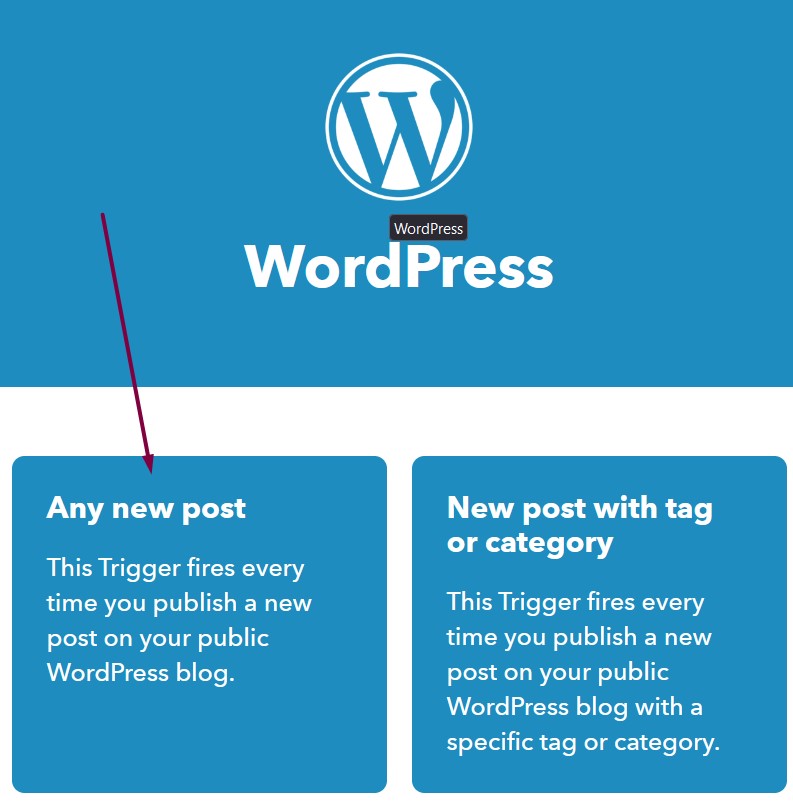
Create an IFTTT account and launch a new automation with the WordPress applet.
Select Any new post and connect your WordPress blog:
Click on Create Trigger and you’ll be directed to select “Then That” step:
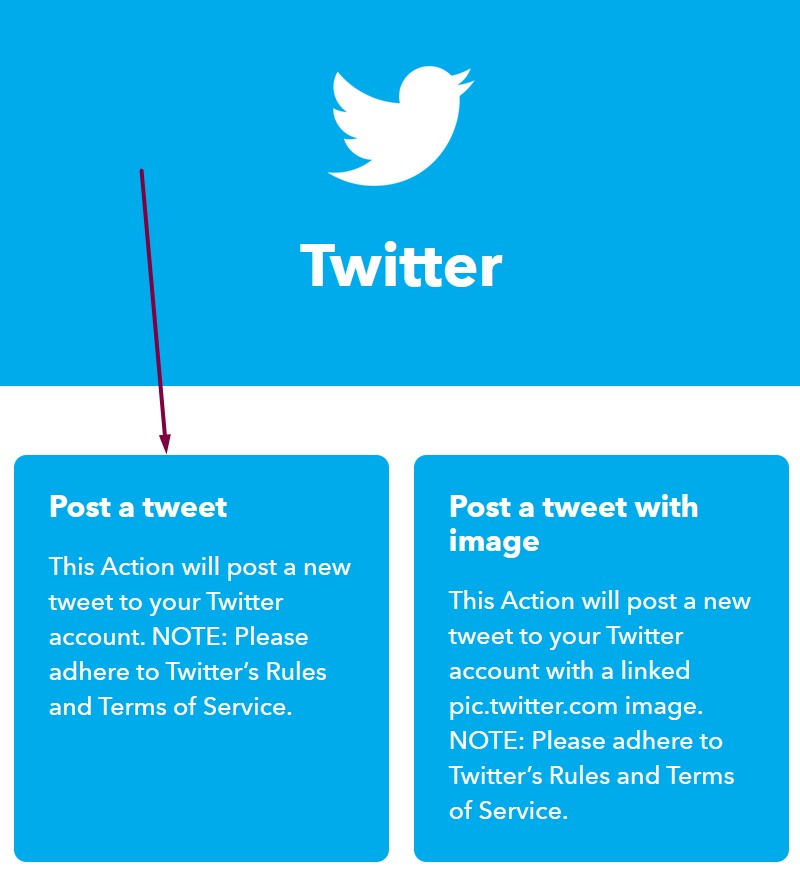
Then search for Twitter and choose “Post a tweet”:
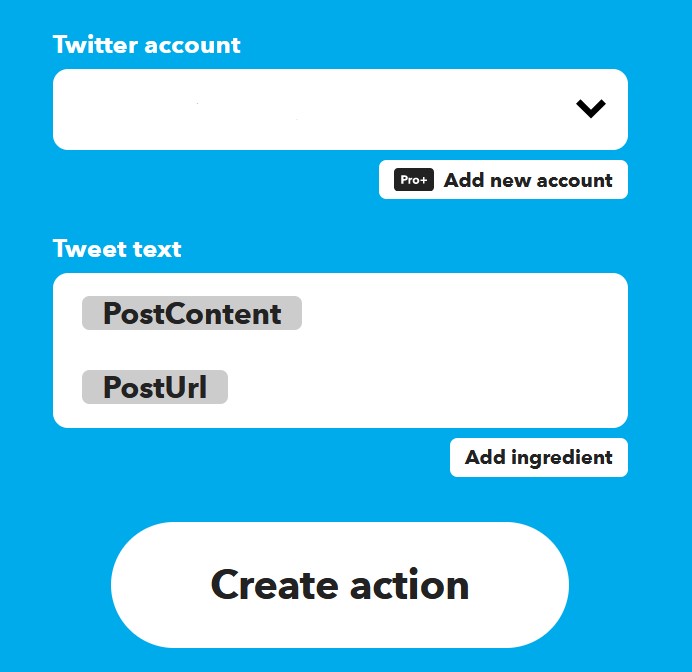
Connect your Twitter account and click create action:
Now, whenever you publish a new blog post, it’ll automatically post a tweet to your Twitter followers.
9. Write Scientifically Shareable Content
It turns out there are psychological and scientific reasons content goes viral.
And you can up your chances of viral traffic when you understand why.
First, neuroscience tells us that people share content that is entertaining, inspiring, and useful, not just for ourselves, but for other people.
Evidence shows that a specific region in the brain lights up, suggesting we’re on the lookout for information interesting enough to share.
Second, psychology suggests we share content that expresses who we are.
If an article portrays the version of ourselves we want to become, we are more likely to share it.
And another reason people share content is to nurture our relationships and feel connected.
This is apparent in a study undertaken by The New York Times Customer Insight Group. The results show that 78% of respondents said “it let them stay connected to people they may not otherwise stay in touch with.”
And a further 73% of them said they shared information because it allowed them to connect with others who shared their interests.
So try to add blog content proven to get shares and you’ll more likely increase blog traffic.
10. Develop a Pinterest Strategy
Pinterest has over 433 million active users and is considered the 4th most popular social networking site.
It’s also not just a social network, but a search engine.
That means it works in a similar way to Google and YouTube when displaying search results.
The Pinterest algorithm analyses accounts and their content based on four sets of criteria:
Domain quality
Pin quality
Pinner quality
Topic relevance
If you develop a strategy that adheres to the algorithm and post consistently, you can explode your traffic with Pinterest.
11. Add social sharing buttons
Want people to share your blog posts on their social media accounts?
Then add social share buttons.
When you give readers the opportunity to share your content, it can do a few things:
Build credibility by displaying the share count
Send positive signals for your brand
Grow your social media following
And give you a bump in blog traffic
It’s super easy to set up. Here’s how:
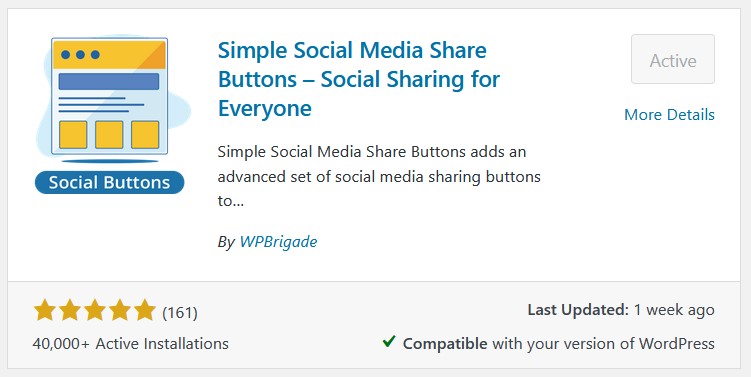
In WordPress, head over to your plugins library and search for “social buttons”.
You’ll see a ton of plugins to choose from. Choose one you like and install it.
I’m using Simple Social Media Share Buttons by WPBrigade.
Once you’ve experimented with the settings, you’ll see the buttons appear on your articles.
12. Track Keyword Rankings
Want to get the most from your SEO efforts?
To know your top-performing articles, you’ll need to know where they rank. Monitoring traffic isn’t enough.
That’s because you’ll only see traffic from search engines when your articles show up on page one.
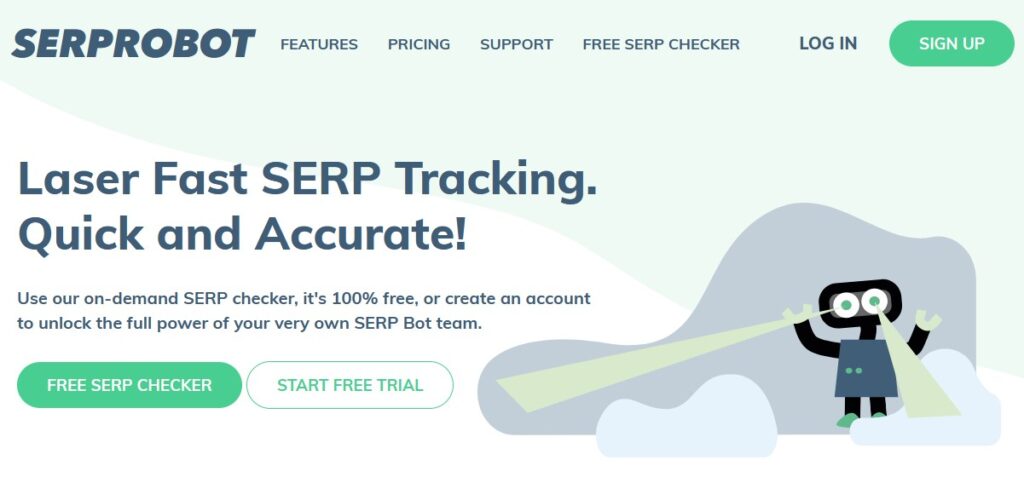
Using a rank tracking tool gives you insights into how well your on-page optimization is taking shape.
The screenshot above is the rank tracker SerpRobot, which offers some valuable insights.
It’s also a very affordable way to see a complete overview of all your search ranking positions.
Here’s how it works:
Create an account here. You get a free 14-day trial.
Sign into your account and add a project. Fill out the details of your website and add the keywords you are trying to rank for:
The SerpRobot bots will get to work, searching Google to see where your blog posts or pages show up.
Once it’s done, you can view your ranking positions in this table view:
The table shows the keyword, ranking position, keyword volume, and the URL.
When you know which articles are performing best on your blog, you can focus more of your attention on this type of content.
Medium is a publishing platform who calls themselves “the YouTube for writers,” and receives around 143 million monthly visits.
That’s a lot of traffic. And we can take a slice of this to increase blog traffic.
To be successful on Medium, you’ll need to commit to the long game.
Like other platforms, such as Twitter, Pinterest, YouTube, or Facebook, posting a few pieces of content and abandoning ship won’t be enough.
You must be consistent.
That being said, there are several actionable tips you can follow to improve your chances.
Here are just a few:
Publishing on a Saturday morning can increase your chances of standing out
Include images to make your stories more engaging
Add tags to your articles
400 words and up are usually the most popular
Don’t forget to link to the articles you publish on your own blog to get a steady steam of traffic.
14. Create a YouTube Channel
Want to take advantage of YouTube’s 14.3 billion visits per month?
Then why not create a YouTube channel?
All you need to do is turn your blog posts into videos and upload them to the platform.
You can get a decent amount of blog traffic and potentially grow an additional income stream.
That’s right. If you grow your channel to 1000+ subscribers and 4000 watch hours, you can monetize your channel with ads.
To make the most of your video creation skills, follow these simple guidelines to grow your channel fast:
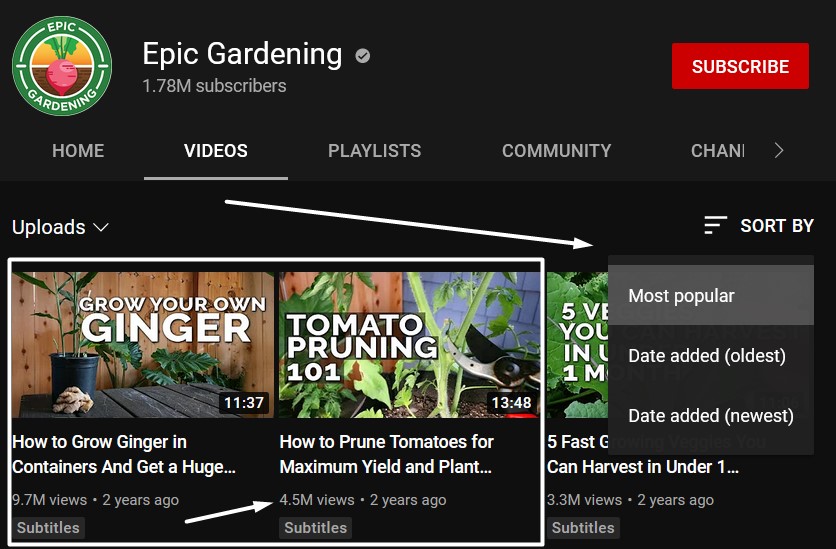
Replicate what already works
Find channels in the same niche as you and view their top videos:
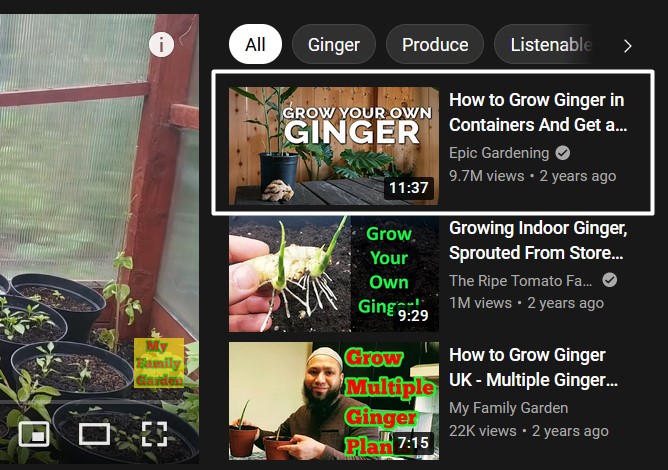
Recreate these videos in your own unique way and you’ll show up in the suggested videos section:
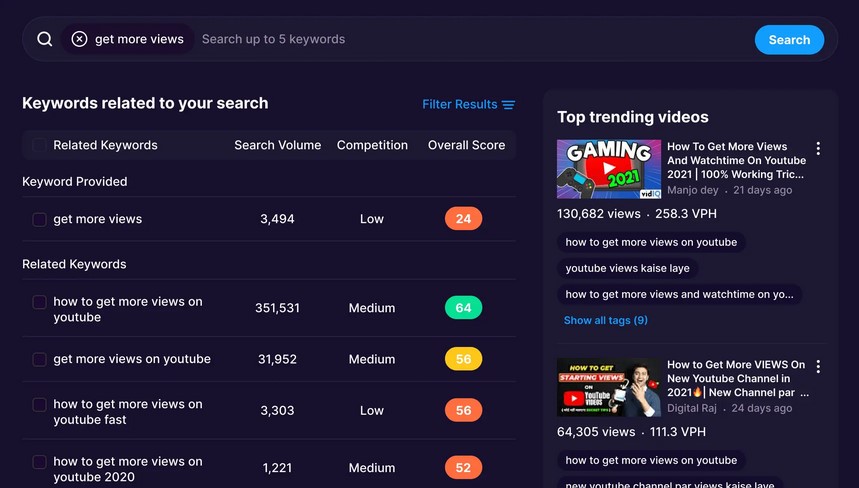
Use keywords that people search for
Use a tool like vidIQ to see which keywords people are searching for:
Then target these keywords in your video title, description, and tags.
Add links to your blog
When you publish new videos, you can add links in several places.
Mainly in the description and the comments. And you can pin the comment so it stays at the top.
And, don’t forget to add a link to your profile header:
Ask people to subscribe
Asking people to subscribe is like adding a call to action button on a landing page.
Sometime, if you don’t ask, you don’t get.
Mention other videos to keep people watching
When recording a video, mention previous videos you’ve already published and add a card for people to click on.
It will make people want to subscribe to your channel because of your valuable content.
15. Start a Podcast
The more places you publish content, the more opportunities you’ll have for driving blog traffic.
And a podcast is one of those opportunities.
Podcast experts tell us that starting a podcast is one of the easiest and most affordable ways to grow an online business.
All you need is a laptop or mobile device and a mic, which you might already have. And unlike writing and publishing articles, podcast episodes can be faster to produce.
You just have to find some topics to talk about by looking at the top-performing podcast episodes in your niche.
Then share your unique perspective on the topic.
Here’s an excellent video by Pat Flynn with a detailed tutorial:
16. Get Interviewed on Other Podcasts
Starting your own podcast might be a smart way to drive more traffic to your site, but being a guest on other podcasts takes it to another level.
When you’re invited for an interview on others’ podcasts, you are potentially being exposed to a wider audience.
That’s because many podcasters have already built up a following. And you’ll almost always gain a backlink from their website.
That not only gives you a traffic boost but also a domain authority boost, which will improve your SEO positions.
To get interviewed on podcasts, follow these simple steps:
Find relevant podcasts by browsing iTunes or doing a Google search with the keywords, “best [your niche] podcasts.”
Choose the podcasts to reach out to. Make sure they regularly have guests and a big audience. You can gauge this by their number of reviews.
Find the podcast owners’ contact details using Hunter.io and send them a pitch.
Make your pitch high-quality and respect the podcasters’ time.
The more they resonate with your story (make it brief), and think you’re right for their audience, you’ll get a higher response rate and more invites.
17. Repurpose Your Content
Creating content and only posting it in one place is a huge waste of potential.
Instead, repurpose your content on multiple channels in a variety of ways. This will give you the biggest return on the time and effort it takes to create content.
Here’s a bulletproof strategy to follow:
Write a Medium article that covers a broad range of topics you write about on your blog. Then link to multiple articles on your blog from the Medium post.
Then turn those articles you published on your blog into YouTube videos.
And you could even take the audio from the YouTube videos and publish them as a podcast.
Next, take some ideas you shared in the articles and add them to a Tweet Deck for automatic publishing to your Twitter account.
Last, take the YouTube videos and turn them into a free Udemy course.
More on getting traffic with a Udemy course later.
18. Automate Internal Links Between Your Articles
Internal linking might be the least-used marketing strategy available, yet yield significant results.
That’s because content marketing is so effective at building trust, improving conversions, and generating more traffic to your blog.
But when you have tons of published blog posts that don’t link to each other, you’re preventing search engines from recognizing their value.
What you need to do is insert 2-5 links from each of your articles to your other articles. But, it can take some time if you have a lot of articles.
To speed up this process, use a plugin such as Link Whisper to do the heavy lifting for you.
Once installed, it searches through your articles and makes internal linking suggestions.
Instead of sifting through articles to find a relevant keyword to interlink to the right blog post, it automates the whole process for you.
In summary, you create a GA4 account, add a Google analytics plugin, and you’re good to go.
When you implement a strategy, you’ll know whether to keep at it or try something different.
24. Start a Newsletter
It’s a well-known fact that more than 70% of your traffic will never return to your website.
But capture their email with a free lead magnet or irresistible newsletter and you’re onto a winner.
That’s because you can keep on engaging with your email list, a bit like you would on your social media channels.
The difference?
Email marketing almost always outperforms social media marketing by a longshot.
According to a Derek Halpern, after performing a test between Twitter, Google+ and his email list, the results were staggering.
In the space of one hour, he received 50 clicks from Twitter, 75 clicks from Google Plus, and 1200 clicks from his email list.
The bottom line is that email is a powerful and effective way of sending targeted traffic to your blog.
25. Answer Questions on Quora
Did you know Quora has over 300 million active users?
You know what that means?
Millions of people are actively using the platform:
To get their questions answered
To learn something new
Or for entertainment
And you could be one of those experts who answers their questions and provides them with what they’re looking for.
Here’s how it works.
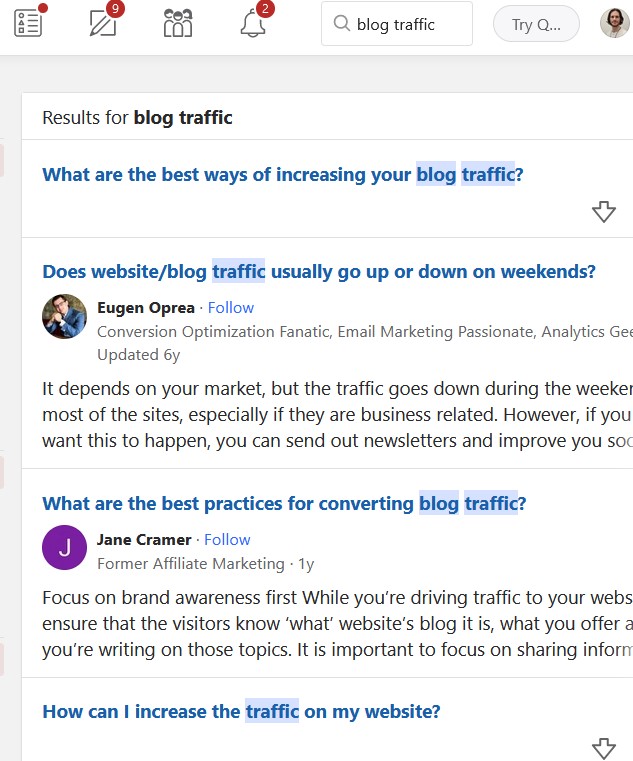
Search for a topic you specialize in and choose a question to answer:
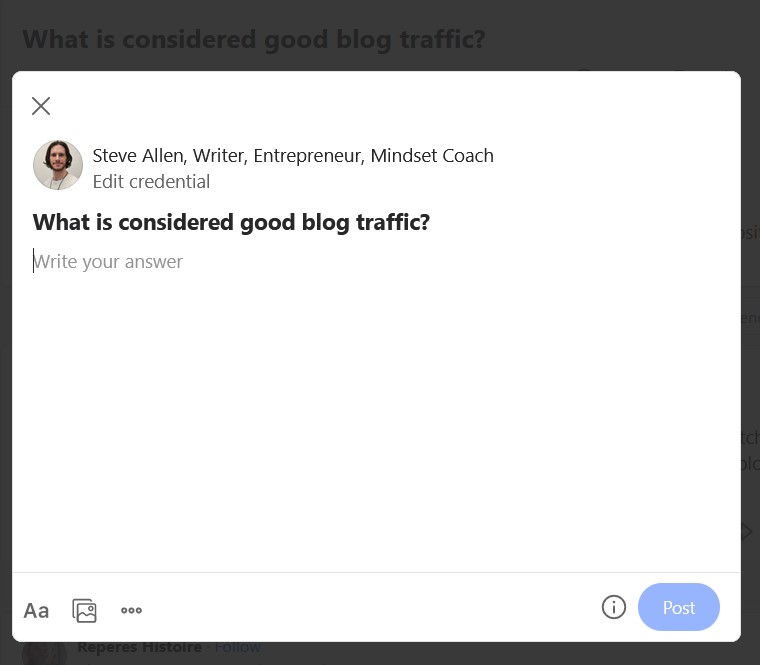
Click on the Answer button and start writing:
The key with Quora, like any form of marketing, is to provide value. And for best results, answer questions every day.
You also want to format your answers like you would with a blog post, using bullets points, images, bold text, and quotes.
And, don’t forget to add links to your blog. You’ll start gaining traction after a few weeks of consistent publishing.
26. Add Push Notifications to Your Site
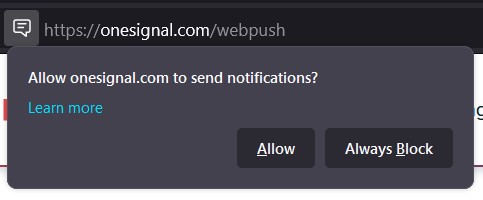
Push notifications are those popups you see on some websites, asking if you want to be notified of new posts.
If you already get a sizable number of visitors, this could be an opportunity to bring some of them back when you post new content.
All you need to do is add a WordPress plugin. The most popular one is called OneSignal.
Once it’s installed, you’ll need to create a free account. Then, it’ll connect your API key to the plugin and you can switch on the popup for your readers.
Now, when people show up on your blog, they will be able to opt-in to Push notifications in their browser every time you publish an article.
27. Share Old Content on Social Media
Make the most out of your old blog posts by sharing them with your social accounts.
The best about this tip is that the content is already written.
And you can even automate the process with a clever plugin.
Revive Old Posts is a free and premium WordPress plugin that does exactly what the name suggests; revives old post.
Doing so can give you a boost in blog traffic, without you lifting a finger.
And if you give your readers an incentive to go to your blog, this will certainly increase your traffic.
You can offer anything from another book to a discount on your products or services.
31. Use Paid Search
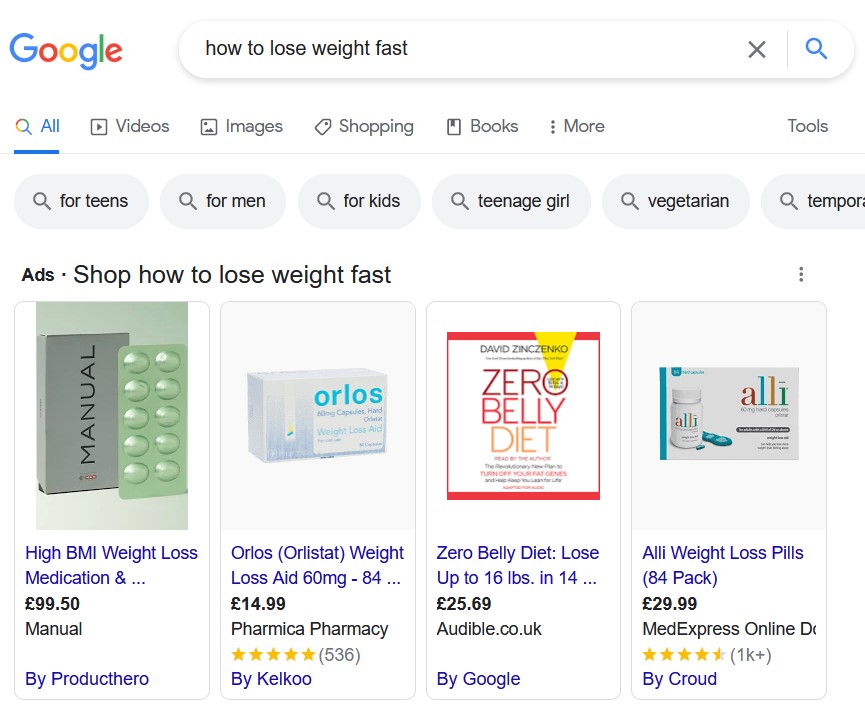
The most popular way to advertise with paid search traffic is through Google Ads.
As long as you understand how to run paid search ads, there’s no faster way of driving traffic.
The only downfall is that it costs money, but it doesn’t need to be hundreds or thousands.
The trick is to find low competition keywords that have a high amount of searches.
Set yourself a daily budget and see your traffic pouring in.
33. Launch a Free Course on Udemy
Udemy is one of the largest online course platforms on the internet.
The platform has over 40 million active users and 70,000 instructors (learnopoly.com) teaching anything from web development and marketing to personal development and yoga.
Apart from using Udemy as an additional revenue source, you can launch a free course to build brand awareness and drive traffic back to your website.
If you market your course well on other platforms and provide substantial value, it will also help you gain trust and credibility for your brand.
To get traffic to your blog from Udemy, you can create an instructor’s profile and add a to link to your website.
Following their guidelines, you may promote other links in your last course lecture, which need to include the word “bonus”.
This link can be anything you link. You blog, a landing page to capture leads, or to promote a paid course you offer.
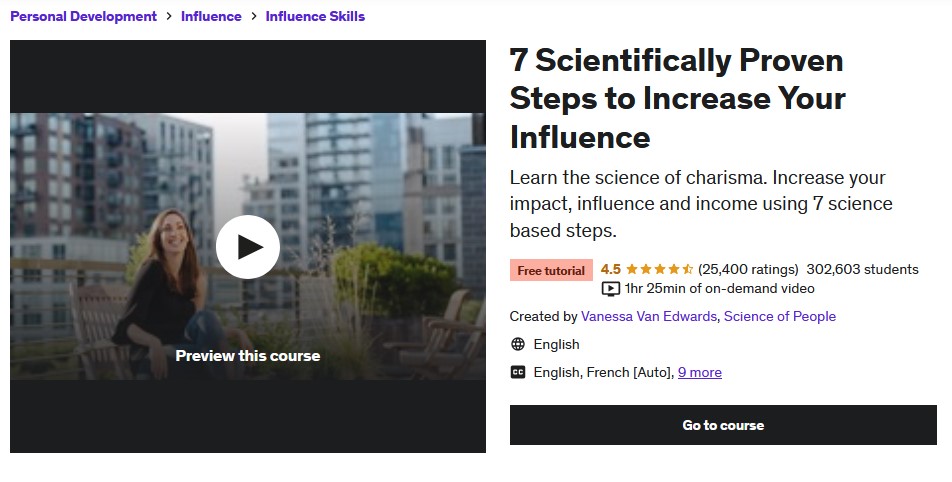
Here’s a great example by instructor Vanessa Van Edwards who offers this free course called, “7 Scientifically Proven Steps to Increase Your Influence”.
It has over 300,000 enrolled students and 25,000+ reviews. If only 1% of her students were to visit her blog or website, that would be more than 3,000 visitors.
Conclusion: How to
Phew! That’s a lot of ways to increase blog traffic. Of course, you may not need to try all of them, because 2-3 decent traffic sources could be enough.
Which ones will you try?
Don’t forget, traffic isn’t everything. Conversions are also important, as is your ability to play the long game by developing a strategy and sticking to it.
The bottom line; try one thing at a time, go all in for a few months and monitor your results. Then rinse and repeat until you find what works best for you.
Omnichannel marketing is the key to meeting customers where they’re at and ensuring cohesive experiences across channels and devices.
It’s midnight in Arizona, and Martin can’t sleep. He opens his iPad and begins scrolling through a collection of flat screen TVs on the Walmart website. Within ten minutes, one catches his eye, and he drops it in his cart and finalizes the purchase.
Across the country in Florida, it’s 3 a.m., and Emily is on her smartphone eyeing a set of golf clubs a local pro shop advertised in an email. With a flick and click, they’re hers.
Once relegated to after-work hours or weekends, shoppers now make purchases around the clock — while at work, lunch, during their commute, on vacation and when they can’t sleep at 3 a.m.
And they often switch between multiple devices throughout the day. There’s the work computer, a personal laptop, home desktop, smart phone and iPad. And that doesn’t account for brick-and-mortar shoppers that want an in-store experience.
Brands can meet these customers where they are by offering products and services across various online and offline channels — on a website, app or social media account, via email or text, at retail locations and public events. Companies can capture it all through omnichannel marketing.
What Is Omnichannel Marketing?
Customers desire a positive, seamless experience — no matter the path they take or device they use. Omnichannel marketing seeks to enable that desire by creating a cohesive, unified journey for each customer across all brand channels.
Cohesiveness across channels is a critical component. As opposed to multichannel marketing, which includes multiple channels that remain separate, omnichannel allows all online and offline channels to work in unison across touchpoints, devices and departments. With it, customers can bounce from smartphone to laptop to retail store and have a smooth experience.
Major Retailers Embrace It
Many large retailers have already incorporated omnichannel strategies, making the customer journey easier and more convenient.
Starbucks provides an app for use both online and in-store, incorporating a rewards program that allows customers to avoid lines and order ahead, gain free refills, use birthday bonuses and earn points for free products.
Amazon aligns its experience across a retail website, streaming service, mobile apps and connected Alexa devices and smartwatches.
Walgreens unifies its brand between in-store and online purchases through a customer loyalty program app that provides rewards, discounts and information about in-store events and sales.
Home Depot offers an app to help customers find products online and in-store, also including live chat and image search.
Disney app and loyalty cards allow visitors to check ride times and book tickets without standing in a long line.
Social Media Sells
With an active, integrated presence on social media accounts, brands have the opportunity to create a community.
A report from Statista predicted that by 2026, worldwide sales through social media platforms will reach $2.9 trillion — with the most influential content for buyers coming from posts made by acquaintances and connections.
McKinsey & Company reported that, with 60% to 70% of consumers researching and making purchases online and in-store, omnichannel is here to stay and will continue to grow. Their research also revealed that social media channels influence all age groups — particularly younger customers.
Outstanding Omnichannel
If the message a brand sends is unified and consistent across all channels, it better be a good one. Knowing what’s important to consumers today can help organizations create the best communications and serve to reflect their commitment to providing a positive customer experience.
Salesforce’s 2022 analysis of consumer and business buyer data revealed several factors worthy of consideration when creating an omnichannel platform, including:
Favourite Channels
Phone
In-person
Online chat
Channel Surfing
Customers turn to an average of nine different channels to communicate with companies.
57% of customers prefer to engage through digital channels, but 43% prefer non-digital channels — meaning satisfying customers generally requires great experiences both online and offline.
Loyalty
83% of customers say they’re more loyal to companies that provide consistency across departments.
71% of consumers switched brands at least once in the past year. The top three reasons were better deals, better product quality and better customer service.
Experience
88% of customers say the experience a company provides is as important as its products or services.
94% say a positive customer service experience makes them more likely to purchase again.
Emotion
62% of customers feel an emotional connection to the brands they buy from most.
A recent Forrester report indicated that while customer experience rankings decreased for 19% of brands in 2022, the highest rankings were achieved by brands that provided customers with “high emotional quality” across their experiences.
And happy customers are a forgiving bunch — with data revealing that 54% of customers who feel happy, valued and appreciated are more willing to forgive brand mistakes.
Omnichannel in Action
Karla Medrano, a registered nurse and founder and operator of SGM Medical Marketing, said omnichannel marketing isn’t just about using every available channel for marketing, although that’s important too. It’s also about breaking down an organization’s various customer-facing channel-based silos.
“Being omnichannel is about taking a consumer-centric view of marketing tactics,” Medrano said. “In other words, the consumer’s experience comes first and your organization needs to be seamless in its branding, messaging and online and offline presence.”
When tasked with assisting AmbitCare in developing a stronger digital presence, Medrano employed an omnichannel strategy.
AmbitCare, a provider of free resources to physicians, caregivers and patients affected by rare diseases, had an inadequate social media presence. Medrano’s agency began to define content pillars and cohesive messaging across all channels to help potential patients learn about services. They also created content for the Spanish-speaking population.
After 60 days, said Medrano, the total net audience increased 81.3%.
Recently, her team implemented an omnichannel marketing strategy for a health/wellness start-up app specializing in post-partum. It’s still in the testing phase, but so far, Medrano said the results have been promising.
The app creators came to the agency with the issue of poor adherence rates; they wanted to find a way to help participants finish the program. Medrano created video content, personalized email templates and a system to respond to questions and concerns in a timely manner.
As a result of this strategy, Medrano said adherence rates improved by 40%.
“My omnichannel approach via texts, emails, video content and therapeutic communication to help moms through the program made them feel heard and supported,” she explained.
Omnichannel Oversights
According to a McKinsey & Company report, while the right omnichannel approach can potentially increase brand value, a disjointed or disorganized strategy can destroy it.
Medrano said that a few common errors in the omnichannel strategy include automating everything and thinking that being on Instagram, Facebook, LinkedIn, etc., is enough.
“Sometimes people need to know that there is a human on the other side so they can feel supported,” Medrano said. “A brand can have 10 channels and have rotten customer service vs. a brand that can have three channels and have quality customer service that includes a chat box, timely email responses, personalized attention, courtesy calls, flexible pay options, SMS and more.”
She said another mistake is not asking for customer feedback and not providing staff with proper training to ensure a cohesive conversation, tone and branding.
“Leadership doesn’t interact directly with customers, so they don’t always know what works and what doesn’t,” Medrano explained. “Every single interaction customers have with your brand…should help them feel heard and supported. Otherwise, you can potentially lose customers, receive bad reviews and lose revenue.”
Branding Blunders
With over 15 years of experience guiding large consumer brands to develop customer experiences that deliver shared value, Freelance CX Strategist Jenny Neilsen offered her list of the recurring mistakes brands make in their omnichannel marketing strategy:
Brands trying to scale their high-level brand messaging across channels without considering the devices or experience. Each marketing asset should be helping to move the prospect through the funnel, not just shouting the same tag line at them.
Saying they do omnichannel, but there is little coordination between in-house teams and agencies executing or designing the assets. All that equates to is running a lot of advertising simultaneously with little cohesion.
Not using what they know about their audiences to execute a smart campaign.
“Brands need to understand and use online and offline data points to deploy personalized experiences across channels and physical locations,” Neilsen said. “Every brand has hurdles when it comes to the shape and location of their data, so they either need to roll up their sleeves and make the data work for them manually or invest in technology to help them do it faster.”
It’s Not for Everyone
As founder of Jennis Consulting Group and co-founder of Founders Compass, a mentoring consultancy for new start-ups, Steve Jennis places omnichannel marketing at the bottom of the priority list for start-ups.
He believes omnichannel marketing is good for customer retention because customers return to places where they have a good buying experience. But for a new business, he classifies it as a “back-end operational process that comes after marketing and sales have been successful.” A good product coupled with solid marketing and sales should come first.
“Without good marketing and sales, omnichannel is useless as customers don’t have a good reason to buy anyway,” Jennis said. “As such, it’s pretty low down as a priority for a start-up unless it gives you a real competitive advantage. But better products, marketing and sales will be more effective at that than channel choices.”