The feature lets users anonymously share emoji reactions at an exact moment in a video.
YouTube is experimenting with a new option to share emoji reactions at an exact moment in a video.
The video platform is piloting timed reactions with a “small number of channels to start,” YouTube community manager Meaghan wrote in a blog announcement.
Those watching as part of the trial can tap into a separate reaction panel via the comments section, where users can share their thoughts as colourful pictograms and see how others are (anonymously) reacting—similar to Facebook Live or Twitch. “We’re testing multiple sets of reactions and will add or remove reactions based on how the experiment goes,” the blog post explained.
YouTube last year began testing a function that lets users view comments timed to an exact moment in the video they’re watching. Folks can already timestamp video comments, adding a direct link to a specific point—making it easier to navigate a video or simply highlight a particular moment.
“We heard such positive feedback about the times comments beta feature,” the blog said, “that we wanted to test out similar features.” There’s no word yet on whether timed comments will be made more broadly available.
Emoji reactions are historically hit-or-miss: Twitter has twice tried the iconic retorts, last year asking people to choose between three different sets featuring classic options like a laughing face, thinking face, crying face, astonished face, and flame. Nearly a year later, the microblogging service has yet to roll out any reactions beyond the usual heart.
Many of us are aware that social media channels represent some of the most powerful tools to employ within the world of digital marketing. Not only are these portals capable of reaching a broad audience base, but they can often be used without dipping into your revenue streams. However, another caveat needs to be mentioned. It can be exceedingly difficult to manage multiple social media channels. Keeping track of the latest news, evaluating feedback, promoting offers, and interacting with visitors may detract from other in-house operations. This is when a bit of consolidation is in order. Here are five steps you can follow to help run each one of your accounts.
Employ an Editorial Calendar
One of the most common (and avoidable) mistakes when dealing with social media accounts is failing to understand when and how often to post. For example, you may wish to post Facebook updates three times each week while other platforms such as LinkedIn may require content only once or twice a month. This “digital juggling act” can lead to costly errors. You might even sacrifice conversions as a direct result. It is therefore a great idea to create an editorial calendar. These calendars will remind you when it is time to post on a specific site. Let’s also remember that many calendars can be shared between different marketing teams. This centralised form of oversight will help to ensure that you remain ahead of the curve.
Social Media Management Software Bundles
These packages are must-haves for any business that hopes to leverage its social media presence. Their main intention is to simplify the entire marketing process through automation. For example, a single post can be created and subsequently shared across multiple platforms. This saves a great deal of time and effort. Furthermore, you will be ensured that previous posts are not repeated. Here are some useful (and free) packages to consider:
Later
Hootsuite
TweetDeck
Canva
Buffer
The user-friendly nature of these tools is also beneficial for those who possess a limited amount of experience.
All About Documentation
Coordination and accountability are important when creating a far-reaching social media marketing campaign. The only possible issue is that it can be tough for multiple team members to remain on the “same page”. Metrics such as policies, the type of content to be posted and the desired style all need to be considered. This is when a bit of oversight can go a long way. It is important to develop a dedicated social media strategy. These guidelines should then be provided to all relevant personnel. If a question or issue arises, it can be dealt with in a timely fashion. When we remember that different social media pages are often associated with different goals, it becomes clear to understand why a centralised approach is crucial.
Actively Engage with Your Audience
Ironically, one of the most common social media marketing mistakes involves failing to communicate with followers. Real-time monitoring is critical if you hope to appreciate the unique needs of your client base. While this is a core component of any omnichannel marketing strategy, it is even more important when dealing with live interactions. We are not only referring to responding to feedback in this sense. Proactively following the results of a marketing campaign will need to address other factors. These include (but are not always limited to) mentions, hashtags, keywords, and which posts have attracted the most attention. This enables you to better appreciate if any approach might need to be slightly modified. Another massive benefit of active engagement will involve how the company itself is perceived. For example, customers are more likely to remain loyal if a question or complaint is quickly resolved. In terms of brand reputation, developing a working relationship with your audience is paramount to success.
Analyse, Assess and Adapt
We need to remember that not every social media marketing strategy is evergreen in nature. Some approaches may need to be modified while it might be better to entirely discard others from time to time. This is when the power of objective analysis comes into play. Here are some of the metrics which should be evaluated regularly:
Engagement rates
Reach (how many visitors have seen a post)
Impressions (the number of times an individual clicked on a post)
Likes, shares and follows
These will provide you with an accurate “barometer” of how a strategy is being perceived. Which accounts are being viewed the most? Are there any campaigns that have received the lion’s share of attention? What do customers have to say about a certain product or service? Answering these questions will allow you to manage multiple channels more effectively.
Remaining One Step Ahead of the Competition
As this article notes, there are currently more than 4.33 billion active social media users. As they are present across numerous channels, developing a centralised method of oversight has never been more important. Of course, not every business can leverage the talents of a dedicated in-house social media marketing team. Therefore, adopting clear and efficient strategies from the very beginning is critical. The fact of the matter is that social media is here to stay. If you wish to keep abreast of the competition, learning how to effectively monitor different accounts represents one of the keys to long-term success.
By Greg Tuohy
Greg Tuohy is the Managing Director of Docutec, a business printer and office automation software provider. Greg was appointed Managing Director in June 2011 and is the driving force behind the team at the Cantec Group. Immediately after completing a Science degree at UCC in 1995, Greg joined the family copier/printer business. Docutec also make printers for family homes too such as multifunction printers.
Many businesses turned to email to connect with their customers when pandemic measures sent so many people online. Now with increased privacy concerns for marketers and a need for joined up omnichannel marketing, email is about to be catapulted back into the limelight, finds a new report.
Email marketing in 2022 is more important, more integrated and more mature than ever, but email marketing teams still need to be faster, more efficient and better at personalization. Meanwhile the biggest concern marketers face – privacy – is also email’s biggest opportunity.
The report puts email’s growing role in the context of the recovery in business activity. It found almost a third (63%) of marketing leaders globally saying their budgets reflect pre-Covid levels. However, the pandemic has left its mark. Priorities are shifting, says the report, in that advertising and wide-net marketing efforts are too much of a gamble for organizations. Instead, businesses are investing in branding, CRM and email marketing. Content remains as high a priority as it was last year.
Email shines during lockdowns
Businesses certainly turned to email when pandemic measures sent so many people online.
“Email became a critical tool for organizations of all kinds to contact various stakeholder audiences with the combination of flexibility, speed, precision, and low cost not available through other modes of communication,” says George Schlossnagle, email evangelist and founder of SparkPost.
This crucial role continued into 2021. Three-quarters of marketing leaders (76%) say their email marketing program made a positive impact on the business in 2021, compared to 58% in 2020. And email’s increased importance is reflected in a greater maturity in the way it’s measured. Almost three-quarters (70%) of leaders said they changed the way they measure email marketing last year, compared to half (51%) who said the same thing in 2020.
Just as importantly, the pandemic also accelerated the integration of email with other marketing channels. Almost everyone who took part in the 2021 survey (95%) said their email marketing was aligned with other marketing disciplines, compared to half the respondents in 2020.
Intriguingly, this acceleration has happened despite the massive switch to remote working at the same time. Despite the fact that only 10% of the world’s companies are fully back in the office, almost everyone surveyed said collaboration is the same or better (98%) and that communication is the same or better (96%) than they were before remote working became a necessity.
Greater integration also ties in with the growing importance of an omnichannel approach to marketing. This means talking to customers on the channels they prefer and breaking down the silos between channels in order to deliver a coherent, consistent customer experience across every touchpoint. This is ‘absolutely the future of marketing’, the report says, particularly with the impending demise of the third-party cookie and the rise of first-party data.
The future is private
Indeed, privacy and data are the biggest concerns for email marketers in 2022.
“What we’re seeing now is only the beginnings of a paradigm shift that will continue to drive marketers to rethink data collection and usage practices,” adds Schlossnagle. “Changes in privacy regulations and a shift in consumer perception of personal data are big factors in marketing leaders’ commitment to investing in earned and owned marketing channels.”
The report found that the biggest concerns for respondents were the fear of existing digital marketing assets being unusable in the future; the threat of having to overhaul existing systems; and the need to re-do things from scratch.
More specifically, email marketers are most worried about Apple’s iOS 15 changes (a medium to high concern for 81% of respondents), Google’s third-party cookie tracking (77%), and government regulations and the deprecation of app tracking data (both 72%).
Email returns to centre-stage
Despite these concerns, the report predicts another impact of these changes will be to thrust email marketing even further back into the limelight. Companies leaning more heavily on first-party data and on the channels that are closest to their known customers – like email – creates an opportunity to build better profiles. In turn, these will drive longer term loyalty and engagement, leveraging audience behaviour on the company’s own website or app.
Email has the ability to be the glue between consumers and brands.
“The demise of third-party cookies puts a tailwind behind channels that leverage first-party data – email being the most pervasive,” says Schlossnagle. “We should all be gearing up for more investment in email and SMS because owned data is about to be more valuable than ever.”
Budget pressures demand greater efficiency
All this talk of a bright future for email marketing comes with a downside. The resources to support all this extra work haven’t necessarily arrived just yet. Two-thirds (69%) of leaders say their teams are busier than ever, but only 5% of respondents report having higher budgets in 2021 compared to 2020.
The result is even greater pressure for marketers to be more efficient – email marketers included. It’s one reason for the push for closer alignment of channel teams. Another effect is the increase in the proportion of companies bringing email marketing in-house. In 2020, just over half (55%) of leaders said they relied on agencies for their email marketing. Last year that fell to under a third (29%).
In addition, one of the key trends identified in the report is the increasing use of email design systems. These are pre-created and optimized selections of HTML templates. As the report explains, all the coding is done before marketers start creating an email – which means you can crank out high quality emails quickly. But it also notes that ‘there are clear opportunities for faster, more intuitive martech solutions, streamlined email marketing processes, and improved collaboration between stakeholders within the marketing team.’
One thing is clear. Email has long been seen as boring and unfashionable, but the current convergence of such trends as more time being spent online, increased privacy concerns and the need for joined up omnichannel marketing are just about to catapult it back into the limelight.
To explore this and more findings from SparkPost’s Email In 2022 – The Trends, Behaviors & Benchmarks Driving Email Forward report, click here.
Email marketing is one of the most personal forms of digital marketing. In the wise words of Henry Ebarb, CEO and co-founder of Eightfold, “Getting access to someone’s contact information is about as close of a touch point as you can get to your customer.”
When users opt in, your organization interacts with them on a deeper level. Email makes it easier to gain trust, build loyalty and, most importantly, keep a steady flow of patient appointments.
Learn What NOT to Do in Email Marketing
Because it’s so important, how can you ensure you don’t make mistakes that break trust between your brand and your audience? Here are some of the top email marketing mess-ups to avoid this year.
Mistake #1: You Don’t Have a Targeted, Defined Audience
One of the first steps to any new email marketing campaign is to have a product or service to promote, as well as a defined audience for that product or service. Automation tools allow you to segment your subscriber list based on specific attributes, like age, gender and interests. Fleshed-out content, personalization and workflow will come later.
Once you know what product or service you’d like to promote, you can segment your list and define an audience to target. For example, to promote the COVID-19 vaccine, UCLA Health sent emails on a rolling basis to specific patient populations. They worked with population health to prioritize and invite the highest risk eligible patients first. Messages were segmented based on language preference (English vs. Spanish) as well as patient portal activation (active vs. inactive).
The campaign was a massive success; the unique open rate for the vaccine invitations was consistently above 60%.
Mistake #2: You Don’t Use Personalization or Automation Tools
Does your email marketing strategy begin and end with e-newsletters you send to a broad audience?
No single newsletter could possibly meet the needs of all subscribers. What’s the most efficient method of delivering the right content to different audiences? How will you know if you were successful? When you commit to marketing automation, the answers are at your fingertips.
Marketing automation uses tools and data within your CRM to deliver custom content based on your audience’s interests. Automation makes it possible to:
Respond quickly after someone subscribes by sending a welcome email.
Schedule content delivery so that you don’t have to manually coordinate every newsletter release.
Personalize messages by including the user’s name in the greeting.
Mistake #3: Template Design Isn’t a Priority
Do you recreate your emails from scratch each time you send one? Or maybe you use a generic template that doesn’t match your brand style or stand out in any way?
One mistake that some email marketers make is not prioritizing custom template design. You can streamline your email marketing efforts by taking the time (and budget) to create well-designed, professional templates. Then, you can run A/B tests to see which design templates resonate best with audiences.
This year, ditch the WYSIWYG (what you see is what you get) template builders, which have limitations and restrictions. Custom template creation gives you unique content blocks that look crisp and clean, yet on-brand.
Mistake #4: Your Emails Blend in With Your Competition
When it comes to email marketing, how bold are you?
When trying to stand out, simplicity rules. You have few words and little time to demonstrate that your email is worth a click. A thoughtfully-crafted subject line and snippet along with a good mobile experience can slow your subscriber’s roll so that they absorb every juicy detail.
Here’s how:
Start with a short, compelling subject line: Your subject line should create a sense of urgency without feeling spammy. And you have only 25 to 50 characters to do it. A busy subscriber will likely scan past “[Organization Name] Spring Newsletter.” But, “How to Feel Your Best This Spring From [Organization Name]” will likely pique their interest.
Write an enticing snippet: This is the first line of text after the subject line. Leaving it blank could result in an error message. Instead, use this small window of opportunity to share an interesting fact, summarize your email or highlight a new offering. It’s just one line, so be concise.
Use mobile-friendly design: Users are often opening your email on their phone, so keep things tight and clean. Succinct content and smart use of headers make for easy reading. And don’t go overboard with images. When they don’t display correctly, images become big white gaps that detract from your content.
Mistake #5: You Don’t Have Enough Content to Distribute Through Email
Once you’ve enticed users with your exceptional topic and easy-to-read format, they’ll expect regular emails from you. It can be challenging to keep developing fresh content — especially if you’re managing newsletters on multiple topics. But you don’t need to reinvent the wheel.
How to feed the content beast:
Get personal: Introduce the people behind the products and services you offer. Staff interviews are easy to pull together and make for compelling content. This information may already exist in staff bios or clinician profiles, and all you need to do is summarize.
Repurpose existing blog and web content: UCLA Health has perfected this process. “We partner with our content editor to determine which pieces to repackage for email. We then write a headline, adjust copy, and add a call to action. The information goes into our template, and we resize images. Then we’re ready to send,” said Anne Machalinski, senior manager of marketing at UCLA Health.
Riff off newsletter articles that performed well: Compile a “Top 10” list at the end of the year highlighting popular articles. And write articles with follow-ups.
Some newsletters will be more successful than others. Analytics provide valuable insights into what’s resonating with audiences and where there’s room for improvement. This information is available in real time, so check early and often — and be responsive to what the data shows you.
Jennifer Coffman, email marketing manager at Cleveland Clinic, told me, “If you’re not managing the campaigns and understanding the behaviours and overall data, it can affect your relationship with your audience and your company’s reputation. Don’t set and forget.”
Pull It All Together
In 2022, it’s time to rethink your email marketing initiatives. It’s time to ditch the common mistakes above and take your email marketing to the next level. Make this the year email marketing has the biggest impact for your business.
Ahava is the president and owner of Aha Media Group, a content strategy and content marketing consultancy founded in October 2005. Ahava is passionate about content and prides herself on tackling the toughest content projects — from healthcare to higher education to hip-hop (seriously).
Time-based Energy Attribute Certificates provide a more granular approach to energy tracking
Google has been working to develop better tools to track energy consumption and production in order to achieve its 24/7 carbon-free energy goal by 2030.
As part of these efforts, the search giant announced a new tool called Time-based Energy Attribute Certificates (T-EACs) last year to advance a more granular approach to energy tracking.
Once T-EACs are fully developed and widely deployed, they will not only help Google achieve its 24/7 carbon-free energy goal but will also provide society with valuable new insights concerning the availability of carbon-free energy on electricity grids during every hour of every day. At the same time, this information will help energy consumers better understand their energy use while also creating price signals that stimulate new investments into green technologies and projects that deliver carbon-free energy when it’s most needed.
Google has spent the past year engaging partners around the world to advance the development and adoption of T-EACs. The company has also expanded the use of hourly certificates, accelerated the development of tools and systems to unlock energy data and hourly matching and created technical standards to drive the widespread adoption of T-EACs.
Tracking and reporting carbon-free energy
The registries that create, track and manage the energy attribute certifications (EACs) associated with clean energy generation are some of the most important stakeholders in advancing T-EACs according to a new blog post from Google Cloud.
In the past, these registries have not issued or tracked certificates on an hour-by-hour basis but this has changed as demand grows for 24/7 carbon-free energy. For its part, Google has been working with global registries to accelerate this shift while creating new products and services for tracking energy attributes on a more granular basis.
In the US, the company partnered with the non-profit M-RETS which tracks and validates energy attribute certificates in order to expand the hourly transaction capabilities of its platform and enable the tracking and retirement of hourly certificates by all of its users. Google has also worked with APX to support the retirement of hourly Renewable Energy Certificates (RECs) within the Southwest Power Pool (SPP) and as a result of this work, electricity generators across the Central and Midwest US will soon be able to retire certificates on an hourly basis whenever hourly data is available.
In Europe, Google has collaborated with the Danish Grid operator Energinet as it builds the technical foundation to support granular certification and develop innovative applications such as the Project Energy Origin Platform. Meanwhile, in Latin America, the search giant has launched a pilot led by The International REC Standard Foundation in close collaboration with Evident Services and its suppliers ACCIONA Energia and AES Andes.
Going forward, Google plans to continue to advance the adoption of hourly certificates as it works to ensure it is able to meet its goal of running its global operations on 24/7 carbon-free energy by 2030.
After getting his start at ITProPortal while living in South Korea, Anthony now writes about cybersecurity, web hosting, cloud services, VPNs and software for TechRadar Pro. In addition to writing the news, he also edits and uploads reviews and features and tests numerous VPNs from his home in Houston, Texas. Recently, Anthony has taken a closer look at standing desks, office chairs and all sorts of other work from home essentials. When not working, you can find him tinkering with PCs and game consoles, managing cables and upgrading his smart home.
At the dawn of the internet, in the mid-nineties, people were blown away by the new technology. Message boards, chat rooms, and file-sharing services dominated the space. Eventually, this was called web 1.0. Then, with the advent of social media in the mid-2000s, the internet reached a new level of interconnectivity. The was a shift to user-generated content like never before. For better or worse, anyone could create and share anything, at any time. This became known as web 2.0. Now, with the popularization of blockchain technology, we are approaching a new age; Internet 3.0. But what is web 3.0?
A whole new world of possibilities
One of the key appeals of blockchain technology is decentralization. This simply means no single entity can control or govern it. This impacts the internet in a few ways, Firstly, complete transparency in everything, at all times. No more hiding behind a “delete Tweet” button. Blockchain technology chronologically stores every interaction and transaction in a ledger that anyone can see.
Secondly, it takes a sledgehammer to the proverbial throne of companies like Meta and Google. It’ll put massive databases of information on users, in the hands of users. Theoretically, the two tech titans won’t have a chokehold on your data anymore.
What’s the catch?
You know how misinformation, hate speech, and cybercrime run wild on the internet like Hulk Hogan? Well, with decentralization, comes (even more) limited authority to prevent these things. Because data will essentially exist everywhere, it can be traced nowhere. It’ll be nearly impossible for countries to apply sanctions and laws on something that doesn’t exactly exist in that country.
For example, right now, if cybercrime occurs on a website hosted in the United States, the US government can intervene. But what if that website was hosted on servers across the entire globe?
What does this mean for us?
Web 3.0, internet 3.0, or whatever you want to call it, could usher in a new era of globalization like never before. Web 2.0 brought people together for better or for worse with the advent of social media and user-generated content. Now, optimistically, we could see those users come together and redistribute control of the internet through decentralization. Pessimistically, it could get really, really messy and chaotic. Web 3.0 could completely change the way the world interacts with each other all over again. But only time will tell.
Search engines cannot discover and index every page on the web – they need to make choices in that regard. And, though all search engines serve the same purpose, they use different criteria for which pages to index.
That being said, it’s generally good if a search engine can crawl and index as much valuable content as possible – it increases the odds that it will show users what they’re looking for.
I was curious about which search engine – Bing or Google – indexes more content in general.
This article describes the different aspects of my research, and though I’d need more data to draw definite conclusions, I still managed to gather many unique and valuable insights.
Here is what I discovered about how Bing and Google index web pages.
Analysing indexing data: methodology and results
Index coverage of a random sample of WordPress sites
The first step of my research was to collect a sample of pages to check their indexing statistics.
I decided that a good starting point would be to use a sample of websites using the Yoast SEO WordPress plugin. There was a practical reason behind choosing this plugin: it divides sitemaps by sections, which would let me analyse which sections are indexed the most.
I found a list of websites that use the Yoast SEO plugin on builtwith.com, a site reporting on websites using given technologies or tools. I chose a random sample of 200 websites from a list of sites using Yoast SEO.
Then, I checked the indexing statistics of those websites using ZipTie.dev, and the data that came out is very interesting.
Bing indexed more web pages than Google.
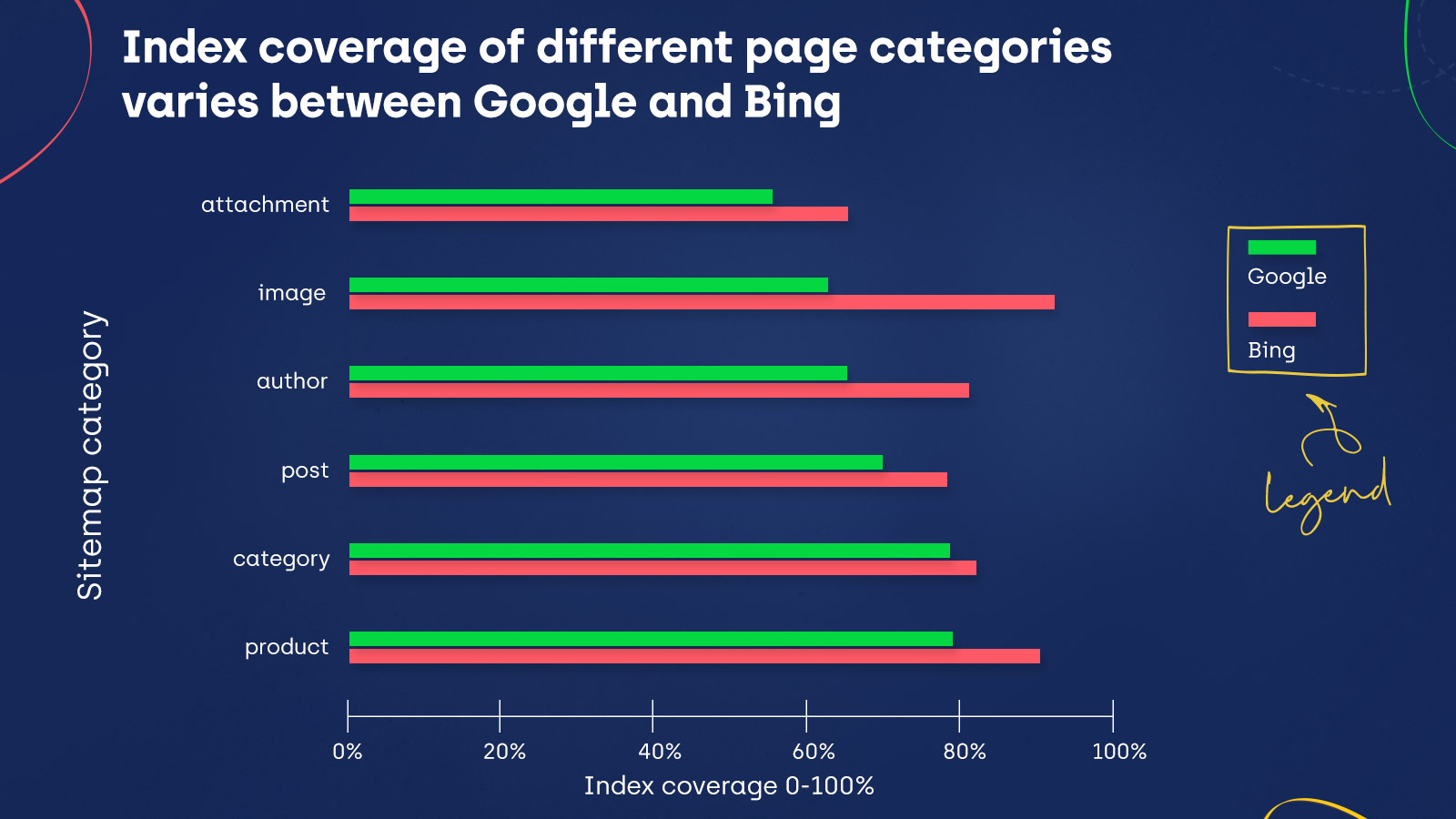
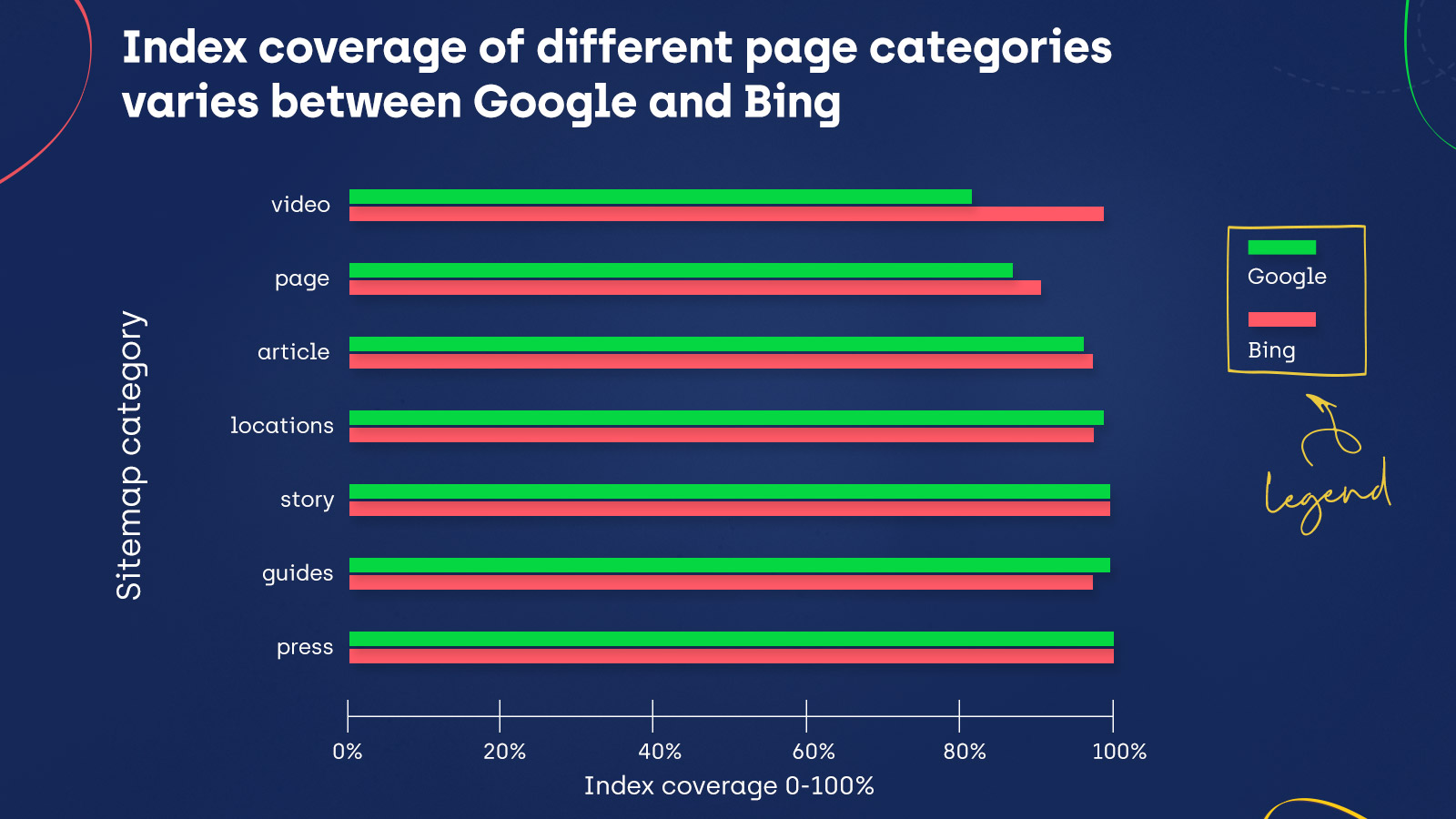
Take a look at the charts below that show the indexing statistics for given sitemap categories:
The index coverage is the same for Bing and Google for the story and press categories. Moreover, Google did index more content in guides and locations. However, in all the remaining sitemap categories, Bing’s indexing exceeds Google’s – including important categories, like posts, products, and images.
But does this mean Bing is also able to crawl more pages than Google? Or do they crawl similar amounts of content but have different preferences when it comes to indexing?
These tools show the pages that the respective search engine knows about for a given domain.
In Google Search Console, I looked at the All known pages appearing in the Index Coverage report and checked the number of URLs for all four statuses (Errors, Valid, Valid with Warnings, and Excluded).
In Bing Webmaster Tools, in the Site Explorer section, which contains indexing data for the pages on a given domain, I filtered the view to display All URLs.
This showed me all the discovered URLs for each domain I analysed.
After comparing the data I got in both of these tools, I noticed that Google discovered more pages than Bing.
On the other hand (assuming these findings are consistent across both tested website samples), we already know that the pages discovered by Google and Bing are more likely to get indexed by Bing.
Keep in mind that these results are only for a small sample of sites and may not represent the whole web.
Index coverage of a sample of popular sites
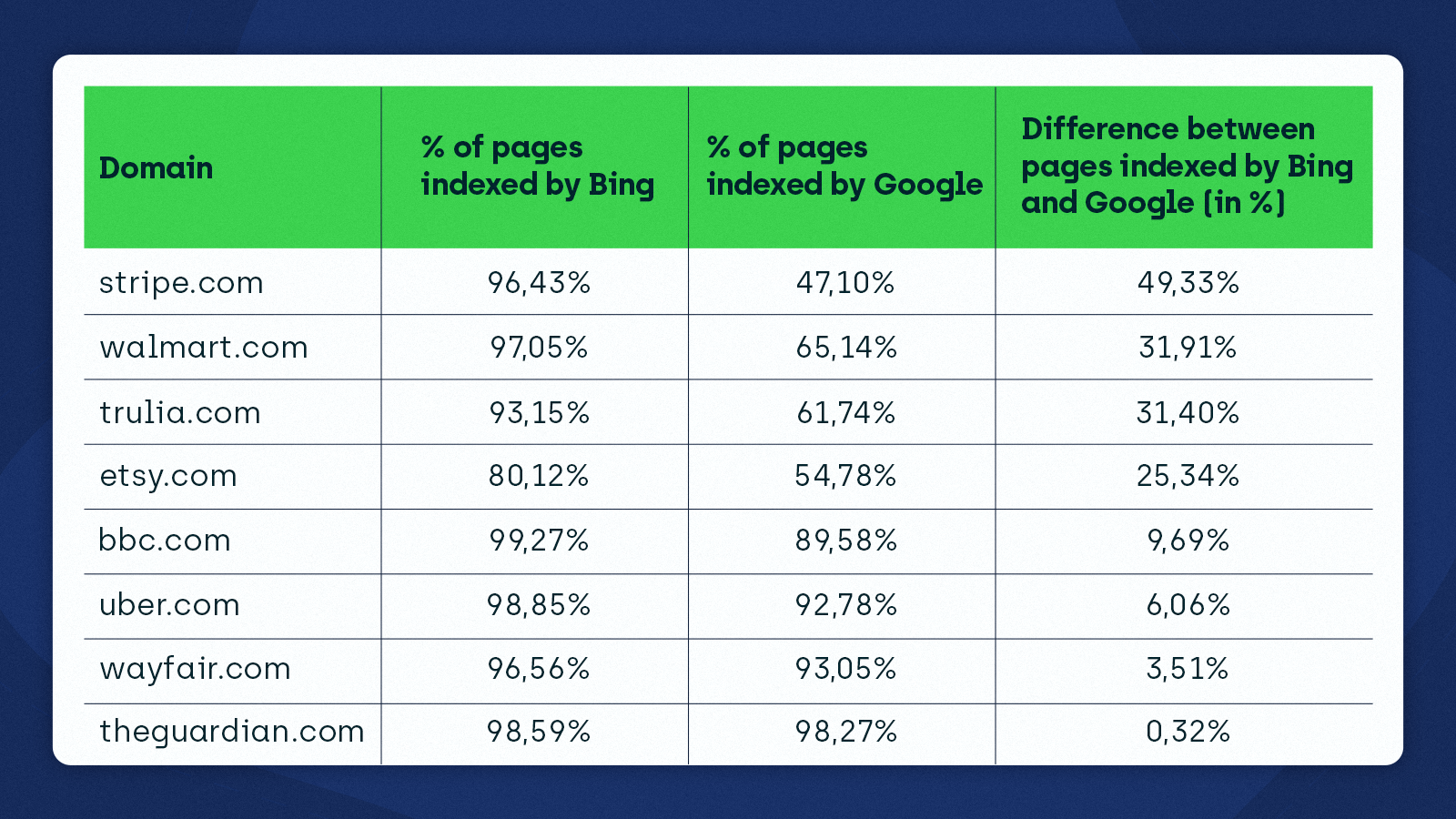
The third aspect of my research was to check the indexing status of a few popular websites using ZipTie to see how it varies between Bing and Google.
I learned that Bing is much more eager to index these sites than Google. This confirmed my earlier findings for the sample of WordPress websites using YoastSEO.
Take a look at the data I got:
Bing vs. Google indexing – initial observations
Can we tell that Bing is a better search engine based on the data?
Although Bing indexes more content, we cannot point out a single winner just by looking at the indexing statistics. We don’t know why Bing is indexing more than Google.
My hypothesis is that Google might be “pickier” than Bing. It’s no mystery that index selection is a thing.
We’ve been saying it for years – getting indexed by Google is becoming increasingly more difficult.
We also know that search engines crawl pages at different rates.
Here is what John Mueller said about how often Googlebot crawls pages:
I think the hard part here is that we don’t crawl URLs with the same frequency all the time. So some URLs we will crawl daily. Some URLs maybe weekly. Other URLs every couple of months, maybe even every once half year or so. So this is something that we try to find the right balance for, so that we don’t overload your server. […] So, in particular, if you do things like site queries, then there’s a chance that you’ll see those URLs that get crawled like once every half year. They’ll still be there after a couple of months. […] if you think that these URLs should really not be indexed at all, then maybe you can kind of back that up and say, well, here’s a sitemap file with the last modification date so that Google goes off and tries to double-check these a little bit faster than otherwise.
I also found some interesting ideas in Bing’s documentation:
To measure how smart our crawler is, we measure bingbot crawl efficiency. The crawl efficiency is how often we crawl and discover new and fresh content per page crawled. Our crawl efficiency north star is to crawl an URL only when the content has been added (URL not crawled before), updated (fresh on-page context or useful outbound links). The more we crawl duplicated, unchanged content, the lower our Crawl Efficiency metric is.
Bing may not want to go deep when crawling websites as doing so could provide little value and cause their KPIs to drop.
We know that Bing has been working on making crawling more efficient. For instance, Bing attempted to optimize the crawling of static content and identify patterns that would reduce the crawling frequency across many websites.
Also, consider the differences in how Google and Bing indexed the random WordPress websites – they were much smaller. In the case of very popular websites, they are much more significant.
This leads me to think that, in line with the fact that Bing openly admits they use user behaviour data in their algorithms, Bing heavily prioritizes indexing websites that are popular, while for Google, popularity is less of a factor.
Introducing IndexNow
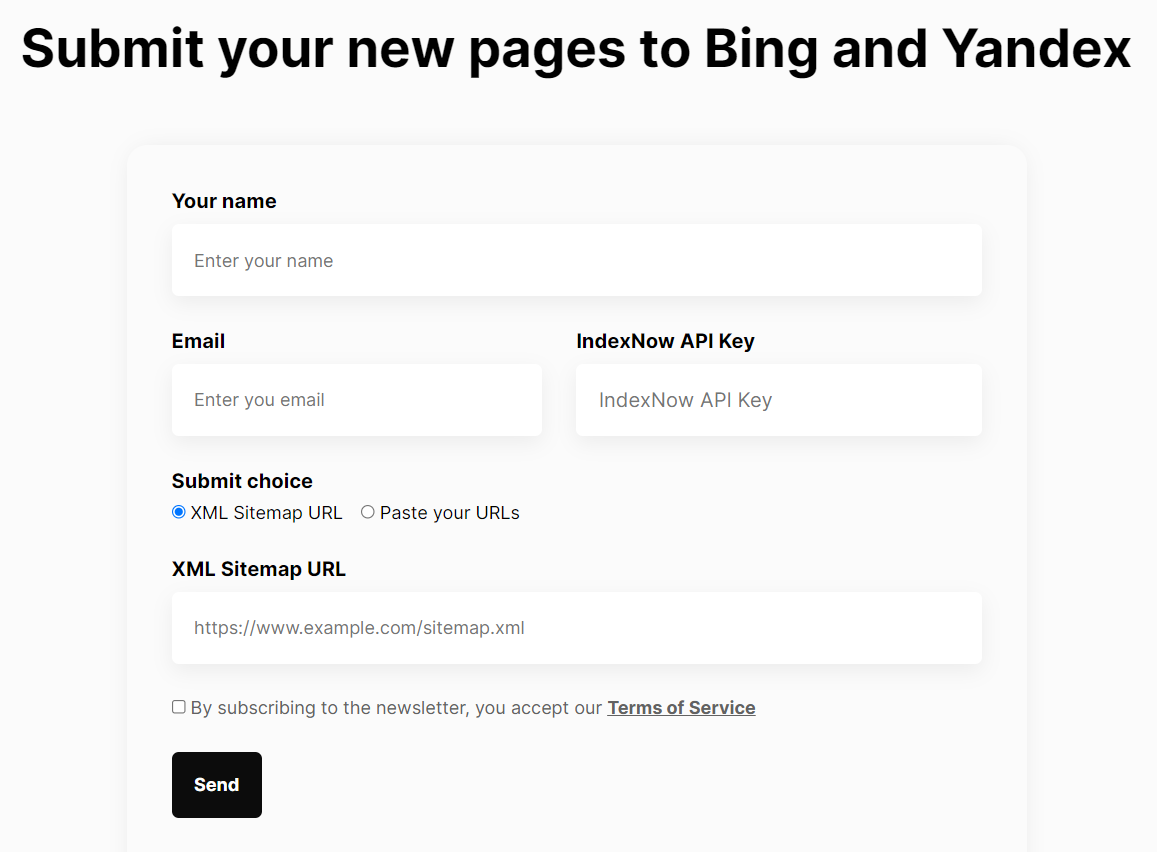
Recently, Bing took it a step further by adopting the IndexNow protocol. You can use IndexNow to inform Bing and Yandex about new or updated content.
Through our tests, we found out that Bing will typically start crawling a page between 5 seconds and 5 minutes from when it’s submitted using IndexNow.
IndexNow is an initiative for a more efficient Internet: By telling search engines whether an URL has been changed, website owners provide a clear signal helping search engines to prioritize crawl for these URLs, thereby limiting the need for exploratory crawl to test if the content has changed […].We will continue to learn and improve at [a] larger scale and adjust crawl rates for sites implementing IndexNow. Our goal is to give each adopter the maximum benefit in terms of indexation, crawl load management and freshness of the content to searchers.
IndexNow allows websites to get their content indexed faster and use fewer resources for crawling. As a result, businesses can create a better experience for their customers by giving them access to the most relevant information.
Crucially, IndexNow is an opportunity for smaller search engines like Bing and Yandex to add to their indexes from an extensive database of content. IndexNow addresses the issue that search engines, including Google, struggle with today – having to crawl and render growing amounts of content.
Time will tell if Google adopts the IndexNow protocol or creates an alternative solution that will allow site owners to submit pages for indexing.
Optimizing how pages are crawled and indexed
Another takeaway from my indexing analysis is how important it is to simplify crawling and indexing for search engines.
First, you need to create and maintain sitemaps that include your valuable URLs. Sitemaps are helpful for Bing and Google for discovering the content they should index.
Search engines will struggle to pick up which pages are relevant and should be indexed if you fail to submit an optimized sitemap. For more details on setting up a sitemap and what pages to include, read our Ultimate Guide to XML Sitemaps.
To define a clear pattern in Bing’s and Google’s indexing, I would have to inspect many more websites, but there are certain ideas we can get from my samples of data:
Bing indexes more content than Google.
Google discovers more content than Bing, suggesting that Google is pickier with indexing. The guiding principle for Bing is to crawl less and focus on the content that has been added or updated.
Bing prioritizes indexing of popular websites, while popularity is less of a factor for Google.
We can also see that content quality and optimizing your site’s crawling and indexing are vital aspects of SEO, and they can’t be underestimated or neglected. Moreover, these factors will likely continue to be crucial as the web grows and search engine algorithms become more sophisticated.
There are many benefits of using social media to grow a business and to craft an online persona that showcases a brand’s values and services. A defined social media strategy can help businesses be more profitable, establish credibility, and gain a strategic edge over the competition. Social media has become a powerful tool in marketing as it’s accessible anytime, anywhere, and is a fun, engaging way to share and collect information.
According to the most recent data from Statista, as of 2021, 82% of the U.S. population has a profile on social media, with the most popular platform being Facebook. In 2021, nearly 92% of U.S. marketers were expected to use social media for marketing purposes.
Planoly consulted research from social media influencers, brand managers, and marketing agencies to compile 10 of the best ways to start building your brand on social media.
There are various strategies for companies and brands to up their social media marketing game. It can be something as simple as taking more time getting to know your audience and creating content accordingly, or following and engaging with accounts that may be similar and relevant to your brand. It also helps to include relevant hashtags—though you don’t go overboard with them in posts. Be sure to include hashtags that will be of interest to your target audience.
A copy-and-paste approach may seem ideal when posting content across various social platforms, but sometimes it helps to take the time to curate and differentiate content for each respective platform. What draws attention on Facebook may fall into the ether on Twitter and vice versa. Giving your social accounts a more authentic feel may require a more unique posting method based on your target audience.
Continue reading for 10 strategies you can use to build your brand on social media.
Canva
Determine your specialty
Influencers on social media tend to specialize in a certain area—whether it’s the beauty, parenting, or financial coaching spaces, specificity is key. Finding a niche can sometimes be challenging for one with myriad interests, but it helps for an influencer to hone in on a specific audience and establish authority. Your niche is what you’re genuinely interested in and what suits your personality.After deciding what you want to focus on, begin creating your posts around that topic. It helps to tag other accounts closely related to your topic of interest.
Canva
Know your audience and demographic
What does your business know about its customers? What are their age groups? Where are they located? These are questions that companies need to ask in order to learn about their customers.In terms of selecting influencers to represent their brand, companies will want to partner with influencers followed by the same group of people who purchase its products and services. Influencers who are authentic, engaging, and who have an understanding of the brand will be key to the success of the company’s social media campaigns.
Canva
Target the right social media platforms for your brand
It’s important for a business to know the demographics of its target market when deciding which social media channels to use. Brands that are more visual may lean toward Instagram and TikTok, while brands focused on real-time events may find Twitter to be more suitable.It’s beneficial to define social media goals and to figure out the social media channels the company’s audience uses in order to develop a receptive audience. Take time to analyze the type of content the business is posting on its channels and how the content works for each social media platform.
As of 2021, for business-to-business companies, Facebook and LinkedIn tend to be the preferred social media platforms. For business-to-consumer companies, Facebook and Instagram were the most popular platforms.
Canva
Define your brand’s voice and tone
A brand’s target audience is the most crucial aspect of developing a voice and tone. Put yourself in the shoes of your audience and consider what would inspire them to take action to buy your company’s product or follow your brand.Often, companies take more of a general approach, directing social media posts to a broad audience, but catering to more niche users may work better. Brands need to think of what it is they wish to accomplish—when the dust settles, what is the primary purpose?—and how the answer to that question can resonate long-term with its audience.
Worawee Meepian // Shutterstock
Connect with influencers in your industry
Networking on social media has been a way for many companies to get their name out there and build brand recognition. It’s no different when influencers decide to join forces, even if just for one specific event. It can be highly beneficial to collaborate with fellow industry influencers, whether it’s launching a cross-promotional giveaway experience or appearing on another influencer’s podcast.Whether you’re looking to expose your business to a bigger audience, generate leads, or boost traffic to your blog, partnering with fellow influencers with a similar target audience can be impactful. Collaboration can diversify an influencer or company’s possibilities, build connections, and create more opportunities overall.
Jacob Lund // Shutterstock
Identify which products or services you want to promote
For the most part, influencers work independently and generate their own content while integrating a brand’s marketability. For relevant influencers, creating content takes time; therefore, a brand must recognize and value the work required in growing that influencer’s following and establishing their voice.When it comes to promoting products and services, in-demand influencers tend to lean toward companies that offer paid partnerships in addition to complimentary products. This is not to say that influencers will only work with a company that gives away free products, but the pull of a partnership arrangement is certainly a more attractive, mutually beneficial arrangement. Canva
Pay attention to trends in social media and video content
Companies should focus on trends to better hone their marketing efforts. Some trends include the rise of short video content shared on platforms, such as TikTok, or via Instagram Stories and Youtube Shorts, all of which have resonated with marketers and brands, notably throughout the pandemic.The e-commerce option for social media platforms has also taken off as brands can connect their online store with their brand’s social media account, removing the need for a third-party website. Paid advertising on social media also gives brands the opportunity to showcase content in front of a target audience.
Be consistent with your social media posts
It can be challenging to post consistently on social media, especially when managing several social platforms or multiple accounts across platforms. But consistency is key when it comes to audience recognition and follower growth and retention.Posting strategically and consistently maximizes your organic reach, which is the number of people you reach without paying for an ad or boosting a post. Scheduling your content ahead of time with news or upcoming events can make it feel more timely. Planning in advance also allows you to keep a steady stream of posts in front of your audience at times when you may not be online.
Kaspars Grinvalds // Shutterstock
Engage with your consumers and followers
Engagement develops customer relationships, builds trust, and helps businesses reach a larger audience. It’s also a quick way for companies and influencers to receive feedback on what’s resonating with their target audience. Some ways that companies and influencers engage on social media is through responding to comments, sharing content, responding to direct messages, and creating polls to generate responses on insights for particular topics.In most cases, engagement is often more important in terms of impact than the number of followers, as a business can have 20,000 followers on social media with zero engagement. This results in a low return on investment. But if there are, say, 5,000 followers with much higher engagement, a higher ROI makes the business appear more credible and not like there’s a bunch of ghost followers.
oatawa // Shutterstock
Define your metrics of success and use them to inspire future content
In recent years, social media has served as a major tool for businesses and influencers to have a better understanding of their audience. There are ways to analyse social media data through built-in insights and analytics that are provided by most social platforms. These findings show information such as demographics, impressions, and reach, all of which are essential metrics for building an audience.Analytics and metrics help to track progress, such as the speed at which you’re building an audience and which posts are performing better than others. The posts that do well can be an example of what may work for similar future posts.
Social media engagement can be a war of attrition, so weeding out content that is not engaging your target audience will result in a stronger overall profile and present an image of brand authority.
This story originally appeared on PLANOLY and was produced and distributed in partnership with Stacker Studio.
The majority of you likely fall somewhere in the middle
Running a business can be really challenging, and managing a team of employees is perhaps one of the more difficult aspects of the job. Not only do you have your team with widely different personalities, learning styles and strengths and weaknesses to contend with but you have your own management style and tendencies that can often complicate things even further. I have seen many well-meaning business owners lose years of growth and scaling due to their own bad habits, which is why it’s important to understand where you fall on the management spectrum. Once you have a good idea of where you fall, you can make the necessary changes to do better if necessary.
The dreaded micromanager.
I have lost count of how many times I have asked a business owner what kind of manager they are and they replied with: “oh, well I am not a micromanager….I know that!” Being a micromanager gets a bad rap, but it is well known for a reason. A lot of business owners out there have trouble letting go. They think that they are the only one that knows the ins and outs of their business and struggle to let go and delegate things to their team. And when they do, they feel the overwhelming urge to oversee every single detail to make sure that it is done correctly.
Not only does this drive your employees to seek employment elsewhere, but it stifles the creativity of those that do stick around. Your employees may have skills or experiences that could help grow your business even faster, but you are silencing them by micromanaging their every move.
The laid back abdicator.
On the other end of the spectrum is the laid back abdicator. Now this type of manager on the surface seems like a better alternative. Employees are free to use their creativity and come up with solutions to problems as they arise. But what often happens is that this type of management style ends up leaving the employees in the dark without key details about projects and higher level objectives. They may miss deadlines, and managers in this realm often miss key reporting details leaving their team in the dark. Which over time could lead to the same problems as micromanaging, losing key team members and slowing down growth.
Somewhere in the middle.
For the majority of you, you likely fall somewhere in between the two extremes. For some projects or employees, you tend to hover and micromanage. Maybe you feel like they lack the skills necessary to complete the task correctly or have been burned in the past with other employees. Others on your team may hear from you very infrequently and wonder if you have any idea what they are working on at all.
If you want to improve your management skills, the key is two fold. First, get to know your employees and find out how they like to be managed. Some employees like to check in often and get very detailed instructions for tasks and projects. Others like the challenge of having a broad overview, and then having the freedom to fill in the details as they go. Make notes of each team member, and how they prefer to receive their project handoffs. Second, get used to delegation. Practice handing off projects in the preferred method and take notes of what worked and what didn’t and adjust as needed. Over time you will become a better manager and leader for your team. Good luck!
Those in the marketing industry should be familiar with inbound marketing strategy. Many marketers use built-in customer relationship management (CRM) for marketing reporting. HubSpot is a leader in this digital marketing industry, with 135,000 global customers. This guide will explore how to use HubSpot.
HubSpot is known for marketing and business activities and as a sales hub that boosts and empowers business growth. For start-ups or entrepreneurs looking for the proper tools to start a new venture, this guide to HubSpot provides a deeper dive into the tool, as well as HubSpot tips to help you thoroughly utilize it.
What Is HubSpot?
HubSpot is a cloud-based CRM system that helps align sales and marketing teams. It is a powerful tool that fosters sales enablement and optimizes inbound marketing strategies to generate qualified leads, therefore increasing and boosting return on investment (ROI). In short, HubSpot is software that can be used to market and sell more successfully.
Why Do You Need HubSpot
You need HubSpot because it has the tools to build websites, manage social media, send a marketing email, automate lead-nurturing workflows, and publish content. It makes email marketing easier and it saves time. In addition, this tool allows the creation of sales pipelines that track business growth. HubSpot users find business transactions and objectives are easier met.
HubSpot Use Cases
Automate emails and workflows: Workflows can trigger emails, update data, and send internal notifications. They can also identify and categorize prospects to help pinpoint potential customers. Automated emails make it easier to communicate and market to your customers. In 2020, 31 percent of businesses had fully automated at least one process.
Nurture sales opportunities: HubSpot users can target emails and trigger actions based on the makeup of a deal. They can also utilize options in HubSpot, such as creation date, deal stage, and follow-ups for customers.
Create personalized templates and tokens: Time-saving email templates are available, allowing users to send personalized messages they can easily edit. Personalization tokens in emails can also be substituted by a recent piece of content to share with recipients.
Chat with real-time customers and prospects: When a client’s question is answered promptly, that is a mark of great customer service. HubSpot has a live chat option to allow a business to answer its prospective clients as soon as possible. Because of this, there’s no need for additional customer service software.
Produce an inbound marketing campaign: With HubSpot’s help, users can make inbound marketing campaigns to attract visitors by producing content that’s tailored to them. From there, users can turn those visitors into leads and nurture them to become customers.
Key Terms You Need to Know to Use HubSpot
HubSpot Marketing Hub
This is a set of tools to help the marketing department when it comes to inbound methodology. It offers an easy content creator for email, social media accounts, websites, and blogs. It also provides tracking and custom reports and offers tools such as social media organization and scheduling, calls to action, mobile optimization, and landing pages.
HubSpot CRM
This is a robust tool that boosts companies’ customer service. HubSpot CRM stores the company contacts and leads. The lead is then passed from marketing to the sales department so that both can work to convert the lead into a paying customer. Its outstanding product features are email scheduling, live chat for the website, and Outlook and Gmail integration.
HubSpot Sales Hub
This is designed to help the sales team by allowing them to focus on closing deals with more qualified clients. The HubSpot Sales Hub tool helps reach sales quotas and increase sales productivity. Popular features included in this hub are email notification and marketing, meeting scheduling, reporting dashboards, and multiple-deal sales pipelines.
Analytics
Analytics can be considered the eyes of inbound marketing since it’s defined as discovering and communicating meaningful patterns in data that help analyse customer and business trends, as well as boost business productivity. With an analytic tool, a company can develop actionable insights that lead to informed decisions.
A/B Testing
This is the process of comparing two campaigns or variations to see which performs best, a helpful tool in marketing efforts. It can be used in variations to a subject line in an email, in calls to action, with the structure or template of marketing emails, and more. This business strategy eventually helps growth and revenue.
Equipment You’ll Need for HubSpot
Laptop or desktop: You must have a desktop or laptop to run Hubstaff’s business activities and begin business growth. A computer also makes it easy to access product features like the HubSpot Marketing Hub and HubSpot Sales Hub.
Stable Internet connection: Because HubSpot is cloud-based software, a stable Internet connection is a must. Ensure that you’re always connected, especially when making changes or creating posts, content, or emails.
Email address: Creating an account in HubSpot requires an email address. There’s also an integration feature to link an email.
Google Drive: HubSpot also allows Google Drive integration, making it easier to access files when needed. Google Drive is available with a Gmail account.
Social media accounts: Regardless of which social media platform you intend to use, social media accounts are one way to use HubSpot seamlessly. If you are connecting Instagram, it should be a business account. Having social accounts to connect to will help increase business performance.
How to Set Up and Start Using HubSpot
Step 1: Integrate Email
The first step to using HubSpot is to connect the CRM to an email. This is important because all email activity will be seen and stored inside the CRM. This way, users can keep up to date, especially on the emails they send and receive. They’ll receive a notification if customers reply and the HubSpot CRM helps with business productivity and performance.
Step 2: Create Filters
Filters record in the present time. This means users can gather similar contacts based on the information in the HubSpot CRM. This way, users can organize data to learn which contacts to focus on. This helps ensure no one falls through the cracks.
Step 3: Import Contacts
In this step, users can add information to HubSpot’s CRM by importing contacts and information about sales and companies. Users can then fine-tune filters with more information to increase outreach. This is as simple as manually adding a single email address or using a spreadsheet to import several contacts at once.
Step 4: Identify Deal Stages
Deal stages represent the sales process steps in HubSpot CRM. This is essential because they help to manage multiple relationships simultaneously. Instead of spending time tracking the progress of individual prospects, users can lay out the sales process visually, and drag and drop individual deals from one stage to the next.
Step 5: Develop a Lead Ad
This is the last step, where users can create targeted ads across social media platforms. The ads should have a strong call to action (CTA) and use Facebook or Instagram data to auto-populate forms. As new leads come in, they’re automatically added to your CRM.
The Importance of HubSpot for Business
HubSpot improves marketing strategies, generates leads, and boosts inbound marketing. Users won’t need tools outside the platform such as an SEO tool, reporting tool, or an analytic tool, because those are already built in. HubSpot increases sales and business productivity, which leads to higher revenue, efficient business transactions, and greater performance.
Top HubSpot Tips: Use HubSpot Like a Pro
Test contacts: Not many people use their real email addresses, which can be a challenge when seeking leads. To combat that, HubSpot has an automation tool that allows users to send follow-up emails that can also be used to test whether accounts are real. Doing this can also boost email and business productivity.
Learn how a CRM database works: Users must learn the best CRM practices, especially how to gather, store, and manage data. Becoming familiar with the CRM tool will help to boost sales and nurture leads.
Direct to thank-you pages instead of thank-you popups: When someone downloads content or subscribes to a business, directing them to a thank-you page helps show that each client is not just a number, but an important customer or prospect regardless of whether they are qualified leads.
Make use of HubSpot Academy: HubSpot offers courses and certifications for professional development. Its courses include inbound marketing, Excel for marketers, and digital advertising. It also offers courses to increase sales and business productivity.
Test out different CTAs: With HubSpot, users can see the views and conversions of various CTAs. Then, they can experiment with what works the best to boost the company’s sales quotas, and eventually, the business revenue.
HubSpot for Different Professions
Profession
Applications
Social Media Manager
Create personalized templates and tokens, produce inbound marketing campaigns
Digital Marketing Analyst
Automate emails and workflows, nurture sales opportunities, create personalized templates and tokens, produce inbound marketing campaigns
Digital Marketer
Nurture sales opportunities, create personalized templates and tokens, produce inbound marketing campaigns
Search Engine Optimization (SEO) Specialist
Automate emails and workflows, create personalized templates and tokens, produce inbound marketing campaigns
Growth Marketing Associate
Automate emails and workflows, nurture sales opportunities, create personalized templates and tokens, produce inbound marketing campaigns
Marketing Assistant
Automate emails and workflows, nurture sales opportunities, create personalized templates and tokens, produce inbound marketing campaigns
Email Marketing Executive
Automate emails and workflows, nurture sales opportunities, create personalized templates and tokens
Marketing Manager
Automate emails and workflows, create personalized templates and tokens, produce inbound marketing campaigns
Performance Marketing Lead
Automate emails and workflows, nurture sales opportunities, produce inbound marketing campaigns
Copywriter
Automate emails and workflows, nurture sales opportunities, create personalized templates and tokens, produce inbound marketing campaigns
Should You Use HubSpot?
Yes, because it makes business productivity easier and more efficient. With the CRM that comes with it, you’ll reach more customers and have more quality leads. In addition, HubSpot has relevant popular features to grow your marketing and sales. It has HubSpot CRM, an SEO tool, reporting tools, the HubSpot Sales Hub, and the HubSpot Marketing Hub.
How to Use HubSpot FAQ
Is HubSpot easy to use?
Yes, HubSpot is easy to use because it has a simple layout. In addition, it has other-party benefits such as Gmail integration and those for social media profiles. First-time HubSpot users will have no trouble learning the ins and outs of the program.
How is HubSpot used in marketing?
HubSpot is used in marketing to attract visitors, get leads, and convert them into paying customers. This is done because HubSpot is a platform with popular features that combine the marketing and sales departments in one place.
Is HubSpot good for SEO?
Yes, it is good for SEO because it has a marketing hub that contains built-in SEO best practices and tools.
What makes HubSpot different?
HubSpot is different from other programs because it is an intuitive and scalable program that provides greater business productivity due to its popular features like the HubSpot Sales Hub.