Author

editor

Browsing

By Amir M. Bohlooli

Want to insert images into an Excel spreadsheet with the right formatting? Here’s how to do it.

Images aren’t Excel’s strongest suit, as Excel mostly deals with numbers and data. However, that doesn’t mean that you can’t insert images into your Excel spreadsheet. The facilities are there, and just like most other Microsoft Office programs, you can add and edit images in Excel.

You can insert an image into your spreadsheet, and have it move freely there, or you can lock the image to a cell. This way, the image acts as if it belongs to that cell, and whenever the cell is sized or moved, the image moves as well.

How to Insert Images Into an Excel Spreadsheet

There are three main sources you can insert images from in Excel. These sources are your device, the Microsoft stock images library, and Bing. Picture formatting settings in Excel are identical to those in Word and other Office apps. You can add borders, change the transparency, remove the background, and more.

1. How to Insert Images From Your Device in Excel

Adding an image from device in Excel
  1. Go to Insert.
  2. Click Picture and then select This Device.
  3. Browse and select the image you want to insert.
  4. Click Insert.

2. How to Insert Images From the Microsoft Stock Image Library in Excel

Adding a stock image in Excel.
  1. Go to the Insert tab from the Excel ribbon.
  2. Click Picture and then select Stock Images.
  3. Enter a keyword.
  4. Click the images you want to insert.
  5. Click Insert from the bottom right.

3. How to Insert Images From Bing in Excel

Inserting an image from Bing in Excel.
  1. Go to the Insert tab.
  2. Click Picture and then select Online Pictures.
  3. Enter a keyword. You can also uncheck Creative Commons only to get more results, though the images might be copyright protected. Make sure to confirm the copyright status of the images before using them.
  4. Click the images you want and then click Insert.

How to Insert Images Into a Cell in Excel

An image locked to a cell in Excel.

So far, the images that you’ve added are freely movable and resizable in the spreadsheet, and they’re not bound to any cells. If you want to insert an image to a cell, for instance, the logo of a company, you can insert the image and then lock it to the cell that you want.

  1. Insert the image you want.
  2. Resize it and then move it inside a cell. You can hold Alt on your keyboard to enable the grid magnet. The image will stick to the cell borders.
  3. Right-click the image.
  4. Select Format Picture. The format picture bar will appear.
  5. In Format Picture, go to the Size & Properties tab.
  6. In the Size section, select Move and size with cells.

Now, your image will move and size whenever the cell moves or its size changes.

Visualize Your Spreadsheet

Charts and graphs aren’t the only graphics you can add to your Excel spreadsheet. Though Excel’s emphasis on data and numbers rarely leaves room for images in a spreadsheet, that doesn’t mean that you can’t insert images into your spreadsheet.

Now you know how to insert images in a spreadsheet from different sources, and how to lock them to a specific cell. Charts are another element you can use to visualize your spreadsheet, and there’s no better time to learn more about them than now.

By Amir M. Bohlooli

Amir is a pharmacy student with a passion for tech and gaming. He likes playing music, driving cars, and writing words.

More From Amir M. Bohlooli

Sourced from MUO


By

It’s Thursday morning and you have a report due on Friday. You start working on it, then realize that you have a meeting with your team. After the meeting, your coworker invites you to grab lunch. Your unfinished report is in the back of your mind during the entire lunch, and you are feeling anxious to get back to your desk and finish it. This psychological phenomenon is called the Zeigarnik effect.

What is the Zeigarnik effect?

Simply put, the Zeigarnik effect is the tendency to remember uncompleted tasks more than finished ones.

“The effect relates to four important workplace factors: motivation, learning, memory and task completion. In part, the effect is thought to be of evolutionary benefit, as our brains flag items that need to be completed–thus ensuring our survival,” explains Dr. Joseph Michelli, a psychologist, organizational consultant and New York Times #1 Bestselling Author who has authored 10 McGraw-Hill business books related to consumer behavior and customer experience excellence.

According to Michelli, the Zeigarnik effect is powerful because our perceptions and memory tend to fill-in gaps. “If I were to start to draw a circle but not finish it, your brain would likely perceive it as a completed circle. In essence, your brain works for perceptual closure,” he says. “If we want people to remember important concepts, we can frame those concepts in the form of questions or challenges, which pushes their brains to close the loop and keep the concept top of mind.”

In other words, the Zeigarnik effect causes you to have lingering thoughts about deliverables you have yet to finish because your brain is looking for closure.

How to leverage the Zeigarnik effect for productivity

Now that you are aware of the fact that there are cognitive and behavioral forces that influence your productivity and to-do list, you can leverage the Zeigarnik effect to your advantage. “Many people experience the intrusive thoughts that come with an unfinished or interrupted task, but there are many personal benefits to be gained if individuals learn to effectively channel these thoughts and the internal desire to get the job done,” according to a GoodTherapy article.

So the first thing you want to do is avoid procrastination, as it will only cause you mental distress and affect your productivity negatively. “In a practical sense, the Zeigarnik effect explains why it’s best not to procrastinate on important tasks (because our brains ruminate about unfinished business),” says Michelli.

And, if you tend to multitask, awareness of the Zeigarnik effect can convince you to close all your browser tabs and focus on one task at a time. “A thorough understanding of the cognitive intrusions accompanying uncompleted tasks will help workers appreciate that each new task is essentially an interruption of what was previously being done,” shares GoodTherapy.

By choosing to focus on a single task, you are reducing cognitive overload and attacking one unfinished task at a time to clear mental space for the next one.

Additionally, you can trick your brain into constantly innovating thanks to the Zeigarnik effect. “My main tip is to continually ask, What else can I do? If we conclude that a project is done, that project fades from memory. If, however, we want to continue to iterate or innovate, we need to view the project as incomplete–so our brains push to solve the mystery, quandary or challenge,” explains Michelli.

There is one more important thing to keep in mind. The Zeigarnik effect can increase feelings of self-doubt and even exacerbate impostor syndrome, says Jeffrey M. Gabriel, co-founder of Saw, a domain brokerage service.

“In addition to the panic created by having unfinished tasks potentially exposed by managers, workers often feel that they’re not doing their best, which can impact feelings of self-doubt,” says Gabriel. “In fact, the Zeigarnik effect and impostor syndrome may be interlinked. We put an extra emphasis on work we don’t finish, which makes our ‘failures’ seem to stand out more. Surely, we think, a real employee (a non-imposter) wouldn’t remember so many incomplete tasks.”

This subtle factor is, therefore, crucial to be aware of because low self-esteem in the workplace leads to decreased performance. Now that you know that the Zeigarnik effect is a universal human tendency, you can remind your inner critic that everyone experiences feelings of overwhelm around incomplete tasks and that it’s not a reflection of your abilities.

By

Sourced from Hive

Can you schedule a text message on iPhone? You can if you know how!

Have you ever wanted to schedule a text message on your iPhone? Maybe you want to send weekly reminders of chores to your family or automatically let your spouse know when you’re heading home. Scheduling a text message makes sure your text will get to your desired person at the desired time. Let’s learn how to schedule a text on an iPhone.

How to Schedule a Text on iPhone

Learning to schedule a message on your iPhone is super handy if you want to send reminders on specific days, or even when you’re performing certain actions, like leaving the house, or going to sleep. In order to schedule a text message, you’ll have to set up a Shortcut to do it, which can be a little intimidating, but it turns out it’s pretty easy! To learn more about iPhone shortcuts, check out our Tip of the Day newsletter. Now, here’s how to schedule a text on your iPhone:

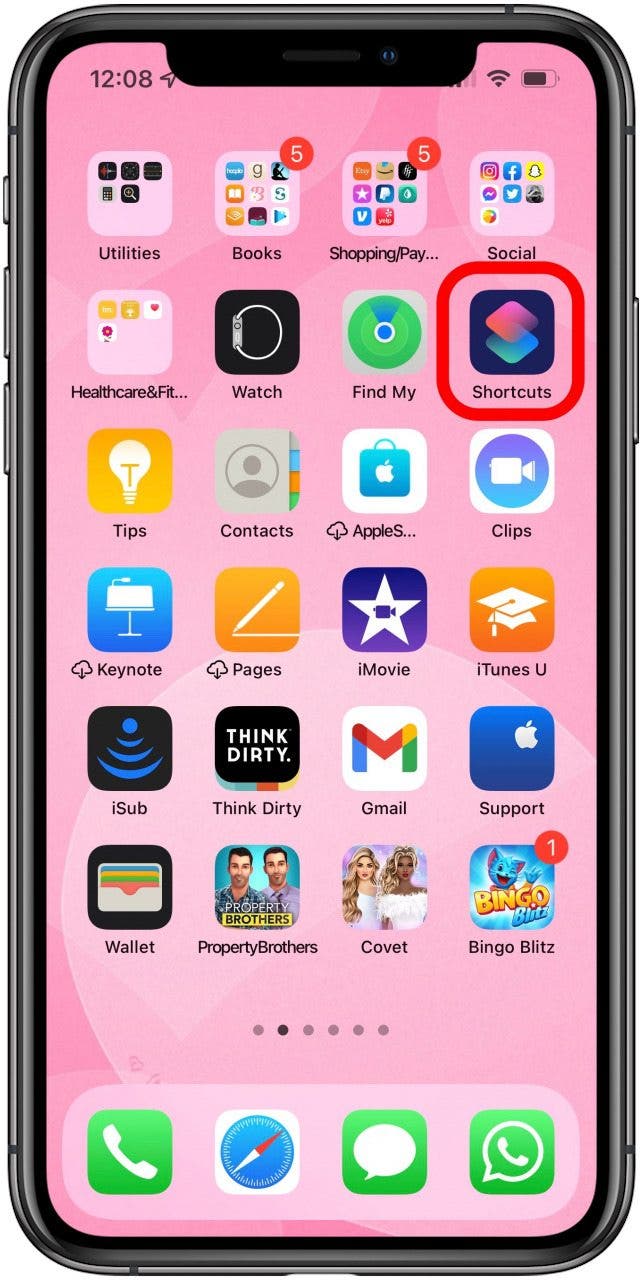
  1. Open your Shortcuts app.how to schedule a text message on iphone
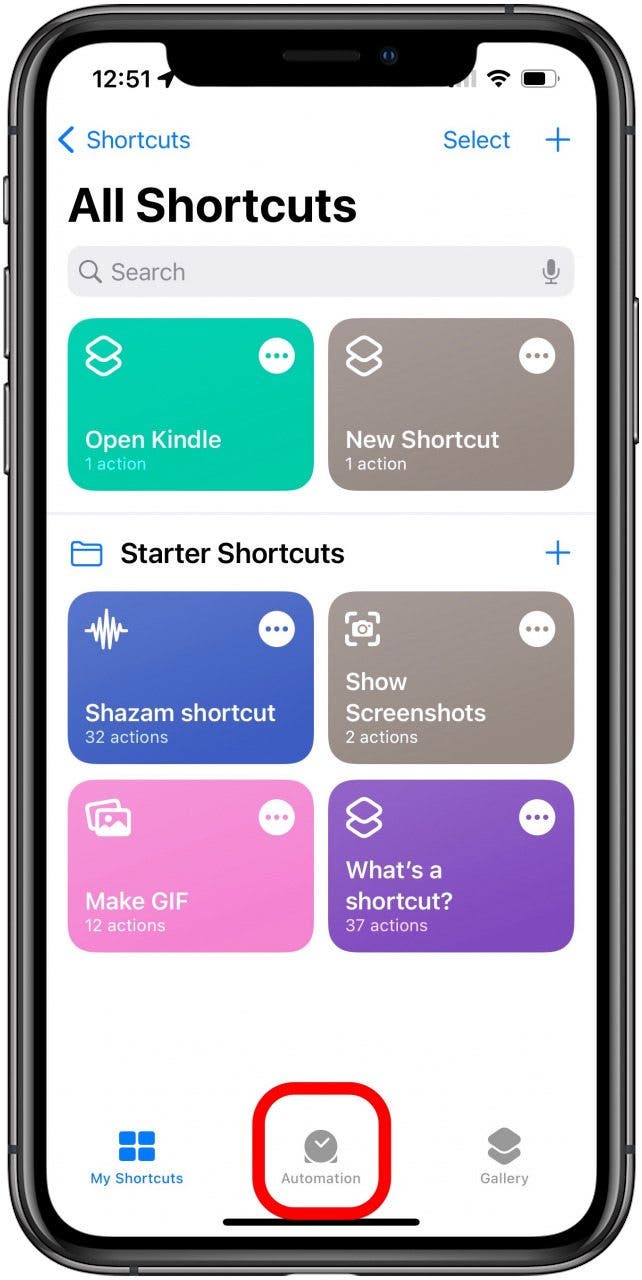
  2. At the bottom of the screen, tap Automation.schedule text message iphone
  3. Tap the Add icon. If you don’t see the Add icon or have any existing automations, skip to step 4.Tap Add icon
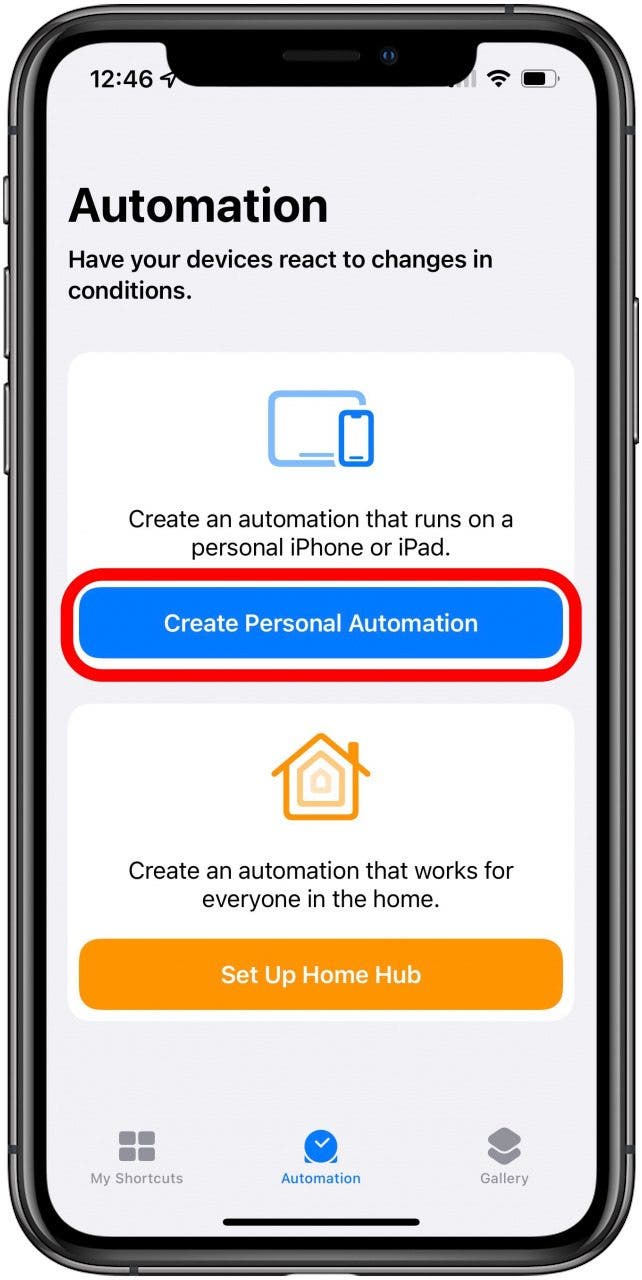
  4. Tap Create Personal Automation.schedule a text iphone
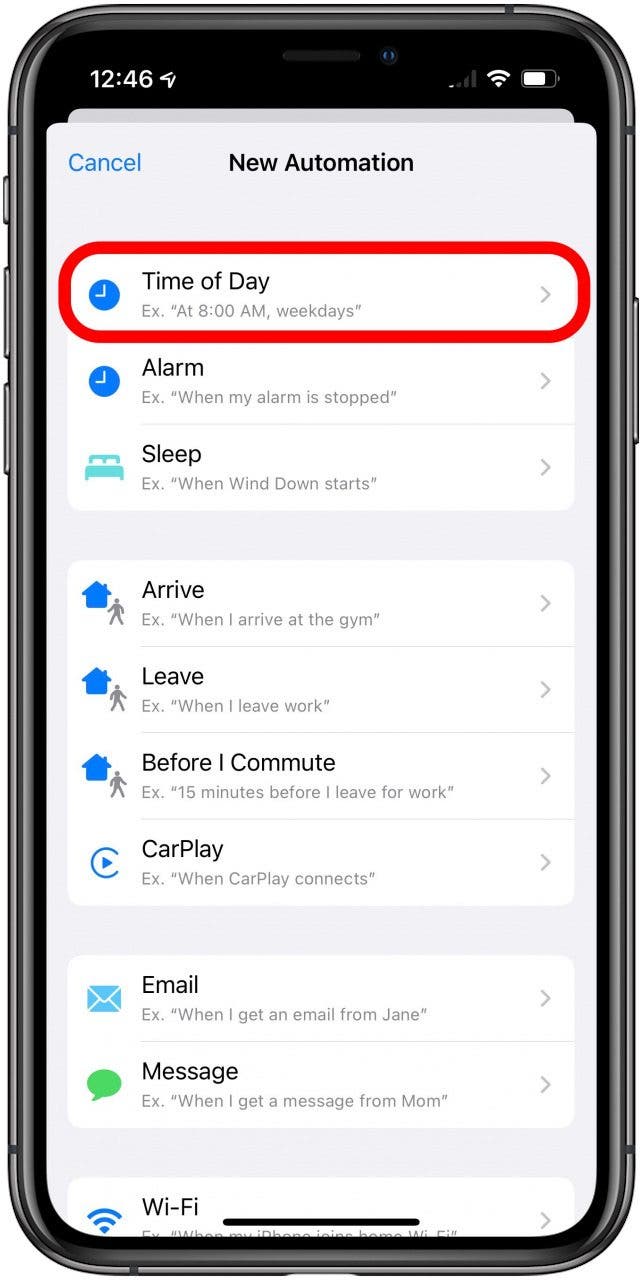
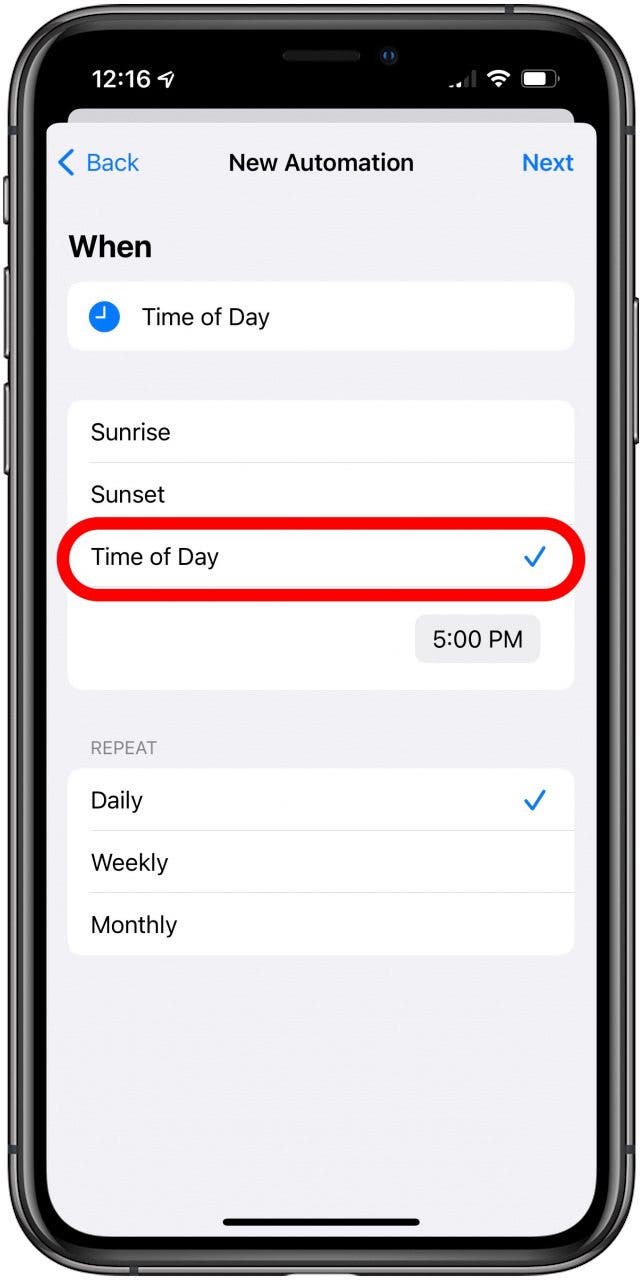
  5. In the New Automation menu, choose your text message’s prompt. In this example, I will use Time of Day, but there are lots of options to choose from.schedule message iphone
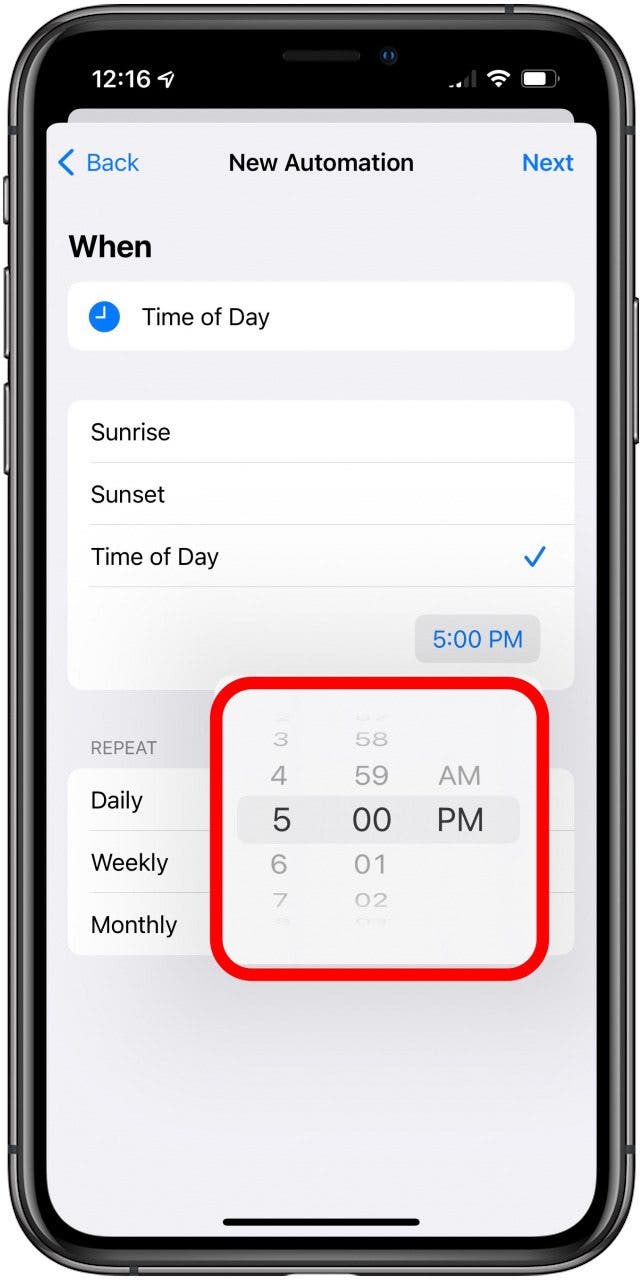
  6. If using Time of Day, choose from Sunrise, Sunset, or Time of Day to set a specific time to send the text message.can you schedule a text message on iphone
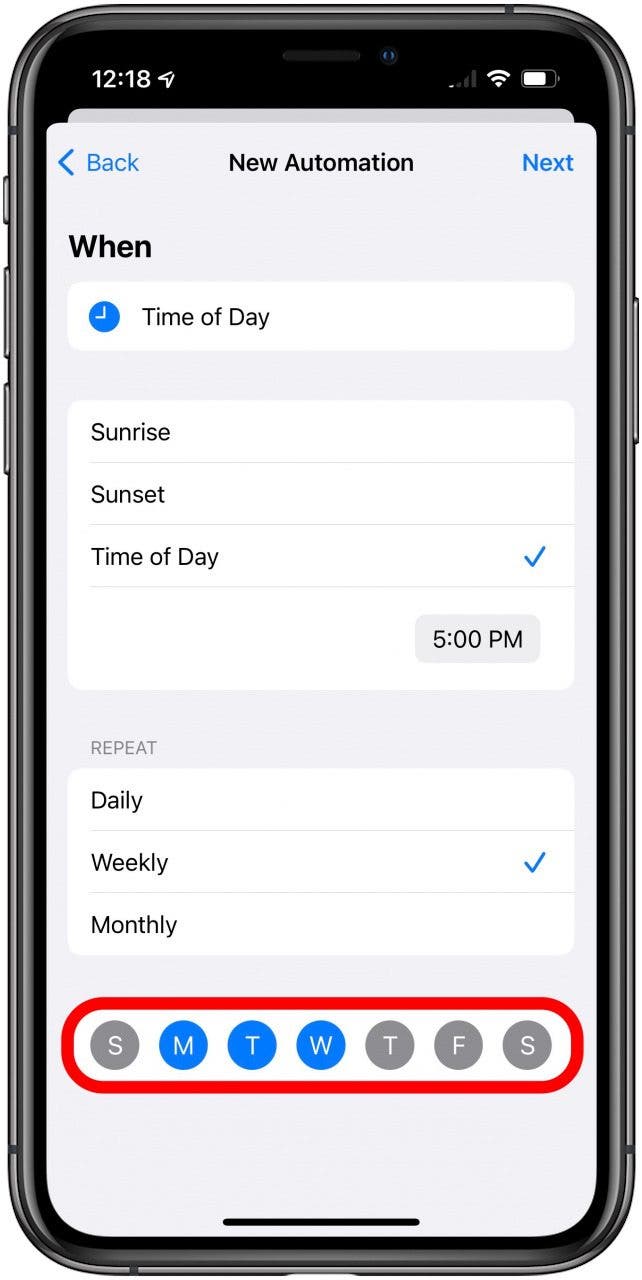
  7. Under Repeat, select Daily, Weekly, or Monthly.how to schedule a text on iphone
  8. If Weekly or Monthly, select the day(s) of the week or month. For Weekly, all the days of the week will be automatically selected, so tap any day to deselect.schedule text message iphone
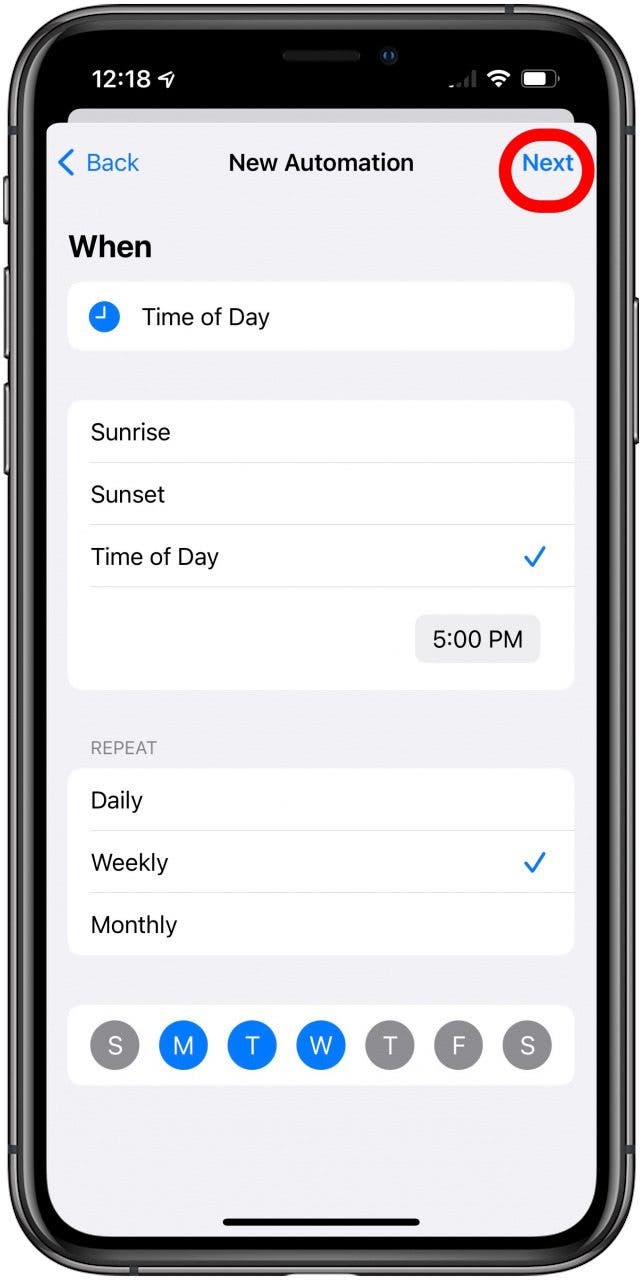
  9. Tap Next.schedule a text iphone
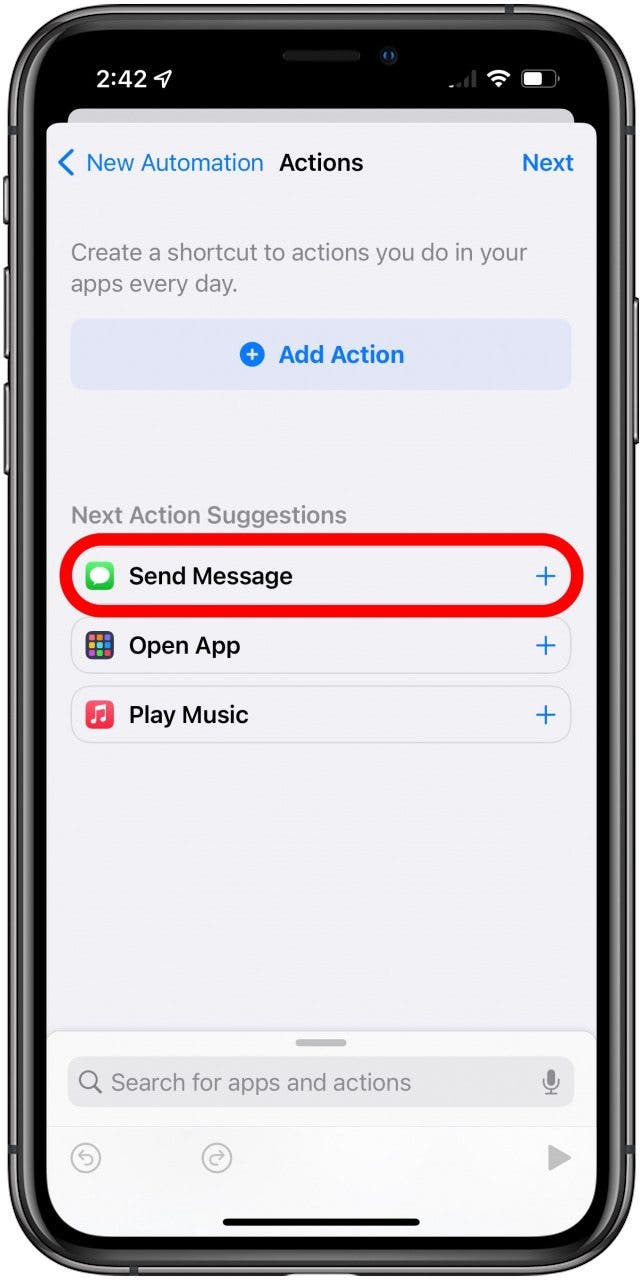
  10. Tap Send Message.schedule message iphone
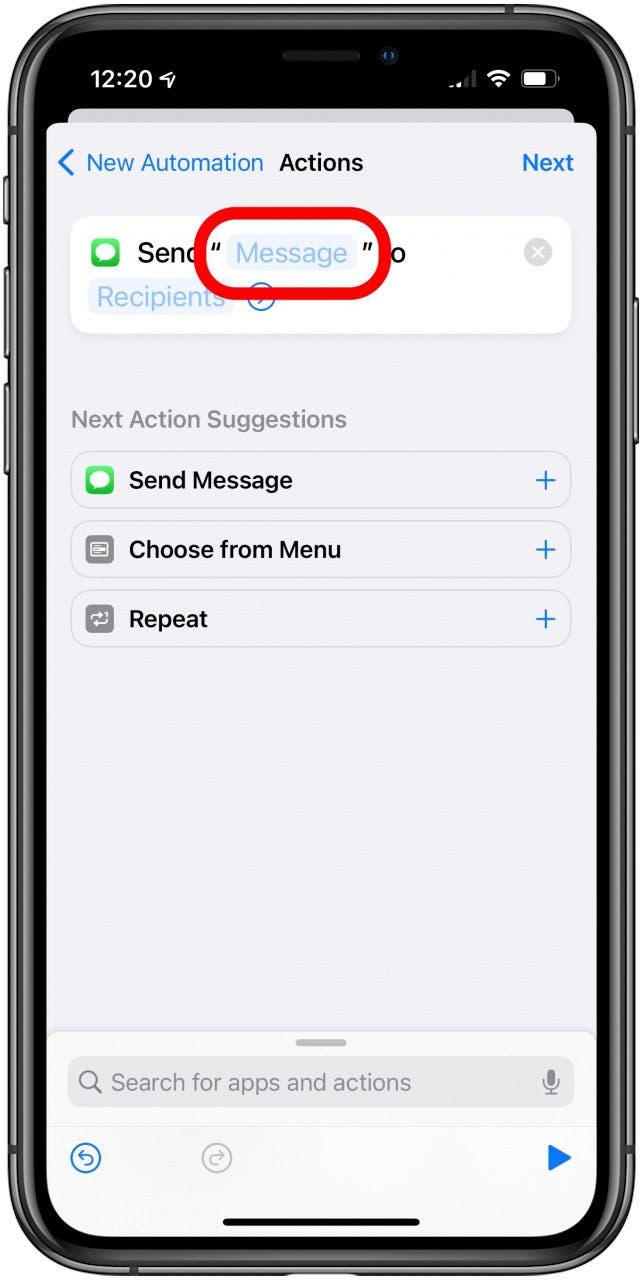
  11. In the box that says Send “Message” to Recipient, tap “Message” to compose the automated text.can you schedule a text message on iphone
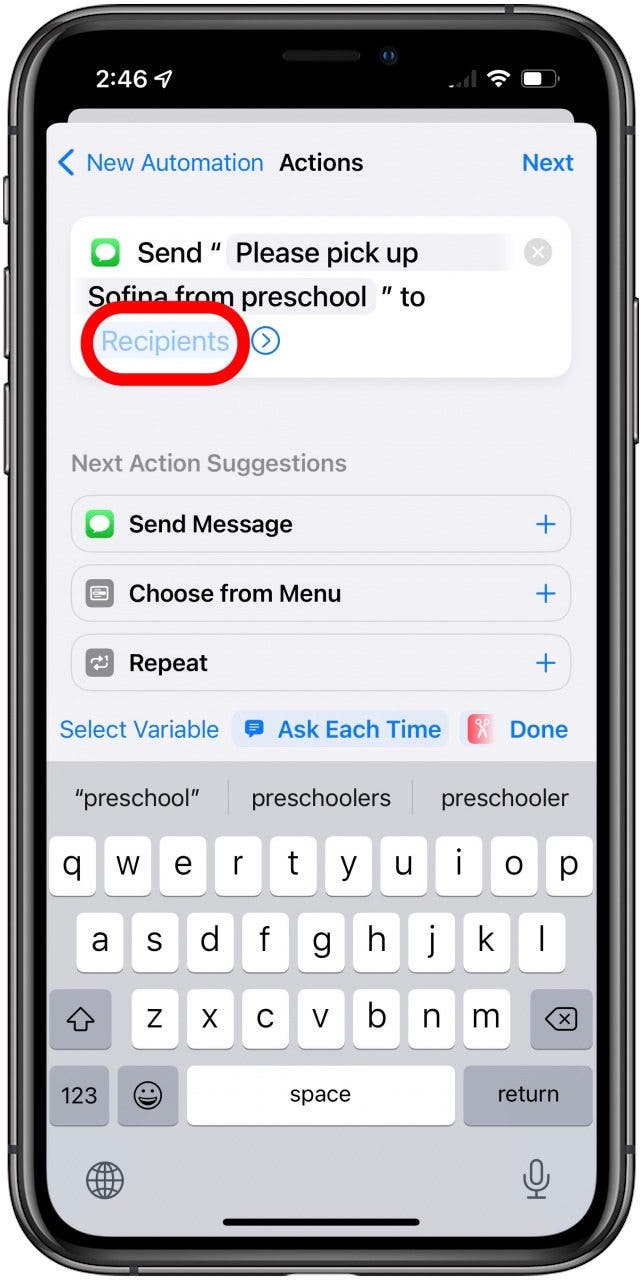
  12. Tap Recipients to choose your recipients.how to schedule a text on iphone
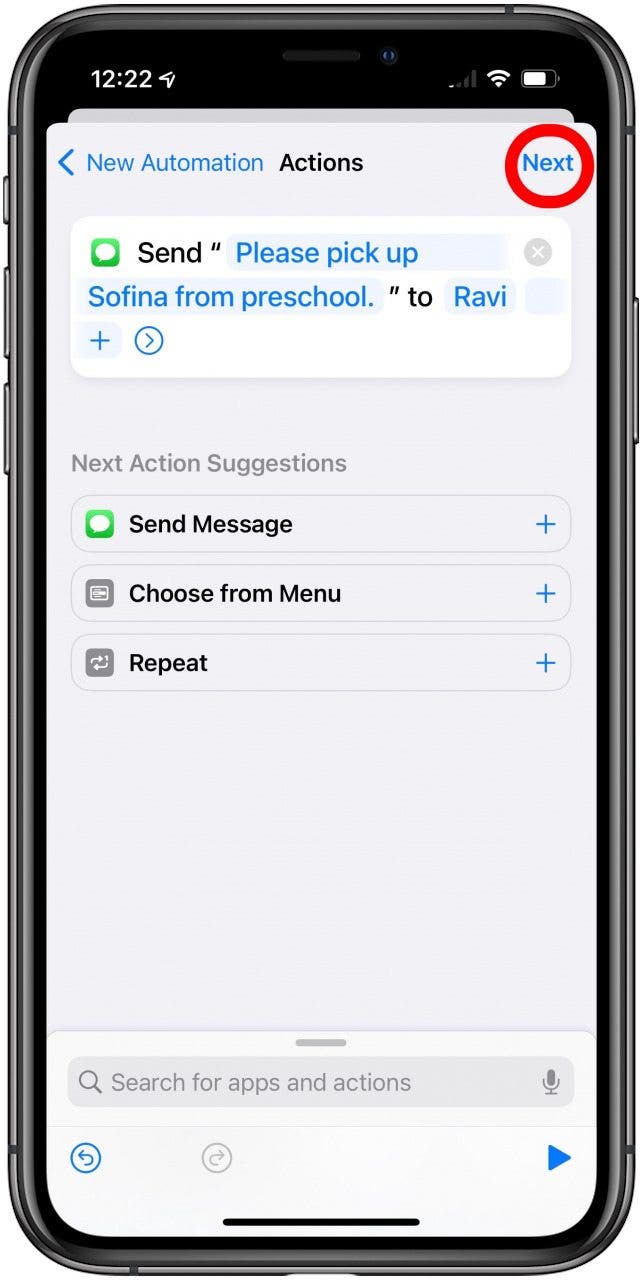
  13. Once you’ve chosen your recipients, tap Done.how to schedule a text message on iphone
  14. Tap Next.schedule text message iphone
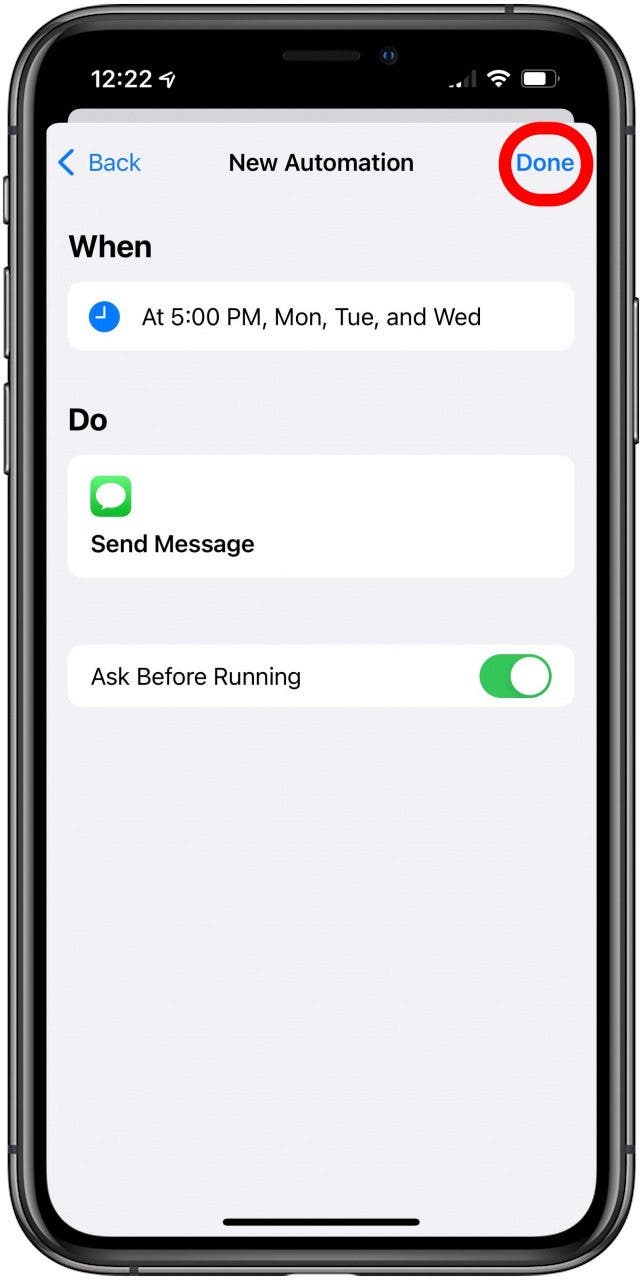
  15. Review your automation and toggle Ask Before Running on or off, depending on whether you want your iPhone to ask you before running the automation.schedule a text iphone
  16. Tap Done.schedule message iphone
  17. You can now find this in your Automations tab.can you schedule a text message on iphone
  18. To delete the automation, just swipe left and tap Delete.how to schedule a text on iphone

Now your text messages should send right on schedule (unless you deleted the automation)!

Sourced from iPhone Life

By Allison McDaniel

Meta, Facebook’s parent company, reported a 26% decrease in market cap last week, a total of $250 billion. One of the biggest claims Facebook is making to account for the loss of revenue is that Apple’s changes to the way ads work within iOS apps are making it harder for both advertisers and app-makers to track users’ internet behaviour.

A new report from Recode today dives deeper into this situation.

These challenges stem from an announcement made back in June of 2020 when Apple decided to make adjustments within its iOS 14 software update to give iPhone users the ability to opt-out of apps tracking their internet usage. This anti-tracking policy stems from Apple’s core value of privacy being a fundamental human right.

App-tracking is important to advertisers because it allows them to use your information and apply it to ads that are relevant to your interests. The more relevant the ad, the easier it is for advertisers to sell, hence, more money in their pockets. Due to Apple’s privacy changes, ad information has become less relevant for users, which has advertisers on Facebook questioning where their ad dollars are going. So, while Facebook and many of its advertisers are still expected to see an increase in revenue this year, things are going to be a bit harder when it comes to advertising to iOS users.

Facebook is looking to make up for this, however. Through an “aggregated event measurement” workaround, advertisers will have access to metrics for a much larger audience, even as they’re denied information on individual users. While Apple’s intentions are clearly motivated by an intention to remain privacy-focused, many are wondering what the effects of other possible changes in the future will be.

FTC: We use income earning auto affiliate links. More.

By Allison McDaniel

Catch her on Twitter at @aamcdani

Sourced from 9To5Mac

By Rudy Leong 

Content marketing is a great way to reach and connect with different audiences. However, it’s not always effective for converting prospects into customers. Reasons for this ineffectiveness var8y depending on many factors. The good news is that you can still change your fortunes and get more leads.

Some content marketing techniques for lead generation are pretty straightforward while others need more creativity. Using these techniques will help you start converting more prospects into customers. Check out these five ways to get more content marketing leads.

1. Use multiple distribution channels

First and foremost, you need to utilize multiple distribution channels to truly harness the power of content marketing. The Internet is constantly changing and new channels for content distribution are appearing every year (sometimes multiple times a year). That’s why you might be missing out on some powerful channels for lead generation simply because you are not up to date with the latest news and thus unaware of these channels.

For example, TikTok has been massive in the past few years. With the pandemic setting in, more and more people started joining the platform which made it a great social media platform to use for content marketing. Besides, short-form videos are faster and easier to make than YouTube videos which can significantly reduce content production time and costs. TikTok can help you go viral and easily promote your products by demonstrating how they work in short informational videos made for the platform.

2. Incentivize customers to collect

Did you know that people love to collect things? Businesses have been taking advantage of this tendency for decades now by incentivizing customers to collect. You can see this in the way collectibles are so popular among different demographics, especially if these collectibles belong to a particular brand. However, you don’t necessarily need to have a specific defining feature of the collection to make it work.

Certain types of content can help you incentivize customers to collect your products. Wishlist’s or checklists are the primary examples of this. You don’t need to have a specific line of products dedicated to a unifying theme – just making a more-or-less logical checklist can be enough to prompt customers to buy more products from you. You can present wish lists and checklists as separate pieces of content or you can integrate them into your store and let people create their own lists in customer accounts.

3. Truly listen to your audience

One thing many businesses seem to forget is the importance of their audience. Truly listening to your audience is crucial for understanding who your customers are and what they want. By understanding what your customers are looking for, you can create exactly the type of content they will enjoy that will make them convert into customers and start purchasing from you instead of only consuming your content.

It’s a good idea to use multiple techniques for analyzing and getting to know your audience. Of course, you need to turn to user-generated content and reviews posted online, but you should also conduct surveys among your current customers or even passive content consumers.

4. Get interactive with quizzes and surveys

Interactivity has been used by most if not all major brands and is already being adopted by many businesses both big and small. The reason why interactivity has taken front stage is that it allows businesses to truly connect with their audiences while also gamifying experiences and incentivizing customers to make purchases.

Two types of content commonly associated with interactivity are quizzes and surveys:

  • Quizzes: The best way to use quizzes is to either allow customers to test their knowledge about a subject or to let them find out who they are. In the first case, you can then recommend other content of yours to help your audience get more educated on the subject related to the quiz. In the second case, you can recommend certain products your customers can buy related to the quiz (e.g. “Which kitchen décor do you need based on your lifestyle preferences?”)
  • Surveys: As mentioned earlier, surveys can be used to collect feedback. However, you can also use them to create more content such as white papers, case studies, reports, and so on. This content can be especially powerful for persuading those members of your audience who rely on statistics and facts to be persuaded. In other words, you can use surveys to interact with your audience while also using their results to further market to your audience.

5. Start webinars (with other brands)

Last but not least, it’s a good idea to start offering webinars either on your own or in partnerships with other brands. Free webinars can help you educate your audience and connect with it before gradually leading it up to purchase from you.

If you know another business that has a similar audience to yours, offering a webinar from both of your companies in collaboration can expose you to the audience of that other business. Interestingly, if you sell webinars already, you can use free webinars to attract new customers by giving them somewhat of a trial or demo to persuade them to purchase one of the paid options.

Final takeaway

All in all, your content marketing can definitely be taken to a new level to generate more leads and start converting prospects into paying customers. Use the techniques in this article to help you get started and begin improving your content marketing strategy.

By Rudy Leong 

Ruby Leong has experience as a blogger and writer. Now, she works as a freelance writer. She provides essay writing services at the professional platform Best Essays Education. Basically, Ruby cares about topics that relate to business and education. She devotes her free time to music and singing.

Sourced from Jeff Bullas

By

Apple doesn’t make it easy, but with these tips and apps, recording a phone call on your iPhone is possible.

There are a bunch of reasons you might want to record a call on your iPhone. Maybe you’re interviewing someone and want to keep track of everything said. Or maybe your grandma is sharing her famous apple pie recipe, and you don’t want to miss her secret ingredient. It’s also important to know how to record a phone call on an iPhone for everything from keeping track of client negotiations to having a record of things your supervisor says that might be inappropriate.

You should know up front that it’s generally easier to record a phone conversation on an Android device (and many of the below tips will work on Android as well), because Apple makes it impossible for an iPhone to record calls. But there’s a good reason iPhones don’t let you record calls. Apple is very protective of your privacy and won’t allow third-party apps access to your microphone. So while recording a phone call on an iPhone can be done, it requires some creative workarounds.

Keep in mind: In some states (and countries), it can be illegal to record a phone conversation. Other states, including New York, only require one-party consent, so as long as one person taking part in the phone conversation consents to being recorded, it’s fine to record the conversation. In other words, a person living in New York can record a call without notifying the other person on the line. To be on the safe side, though, you might want to inform anyone on the call that you’re recording.

Once you’ve mastered this skill, learn even more iPhone hacks, such as how to tell if someone blocked your number, how to unblock someone on an iPhone, and how to look up your call history on an iPhone.

Record a phone call on speaker

If you prefer your life uncomplicated, this is the best option for you, though you’ll need two devices. On the first, you’ll have your conversation (on speakerphone); an iPhone or any other speaker-enabled phone will work. On the second device, you’ll record. For this, an iPhone, iPod touch, iPad, or Mac computer would work.

Essentially, you can make the call on any phone with a speaker and record it on your iPhone. Or, make the call on your iPhone and record it on a second Apple device—all use the same Voice Memos app. It all depends on the devices you have access to.

To catch your entire phone conversation, start recording before the call. The steps below explain how to use an iPhone to record a phone call on a speakerphone. Note that the steps may be slightly different depending on your model and iOS.

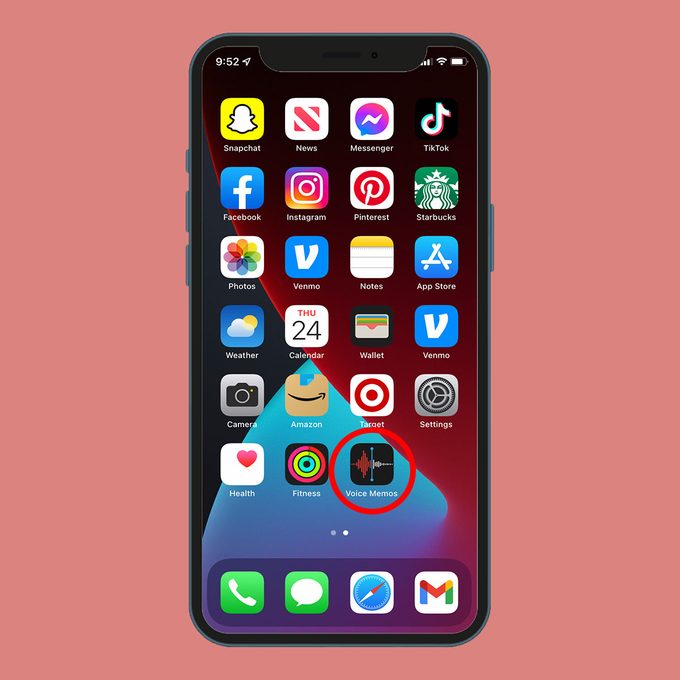
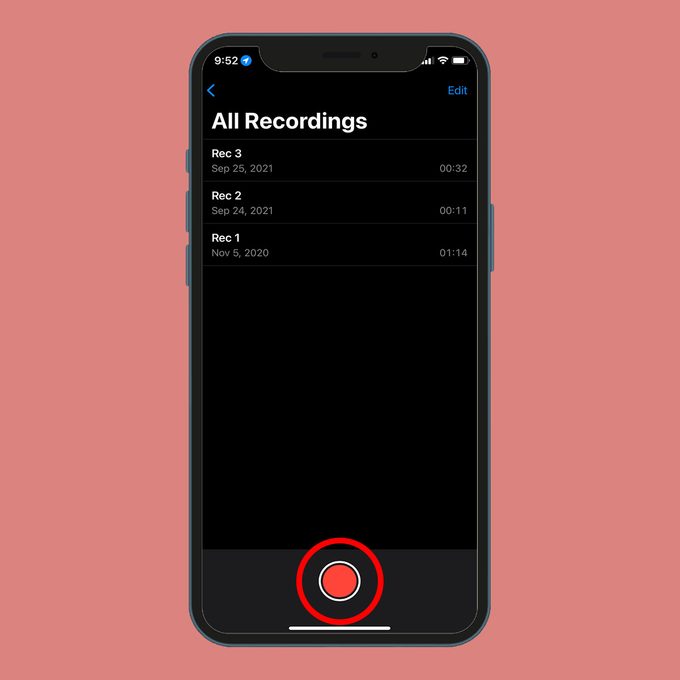
1. Open the Voice Memos app on your iPhone (or whichever Apple device you’re using to record).Recording A Phone Call On An Iphone Step 1rd.com, getty images2. To start recording, tap the red record button.Recording A Call On An Iphone Step 2rd.com, getty images

That’s it! You’re now recording.

Next, it’s time to make your phone call. You can do that from an iPhone (if you’re not recording with it) or any other phone with a speaker function. Simply dial the number and turn on the phone’s speakerphone so both sides of the conversation—not just your voice—can be heard and recorded.

If you want to do more while recording, or once you’re done, follow these tips:

Pause a recording

Here’s an iPhone trick that’ll come in handy during conversations with long pauses or when you’re put on hold: While recording, tap or swipe up on the recording field at the bottom of your screen to bring it into full-screen view. Here, you can pause your recording as needed.

End a recording

When you’re finished with your conversation, hit the stop button (or Done, if you’re in the full-screen view) to end the recording and save your file.

Delete a recording

To delete a recording, hit the stop button, then tap the trash can. Accidentally got rid of a recording? Just as you can recover deleted photos, you can recover recently deleted recordings. On the main Voice Memos screen, tap Recently Deleted to see a list of your trashed files. Select Recover to restore your recording, but bear in mind that you only have about 30 days to recover deleted files.

Rename a recording

To rename your recording, tap the default title (your current location, though you can turn off Location-based Naming in Settings by tapping the toggle). The text will become highlighted. Simply delete it, then type your new title.

If you’re feeling creative, you can edit, crop, and replace sections of your recording, as well as duplicate it and share it via text, email, AirDrop, and other apps. Play around—there are a ton of Voice Memos tricks to help you achieve your clearest recording.

Apps to record phone calls

The speakerphone method, while easy, isn’t for everyone. If you don’t have two devices, it’s probably not the best option for you. Knowing how to record a phone call on an iPhone—sans speaker—is as easy as downloading the right recording app. In no particular order, these are the apps we love for recording phone calls on an iPhone and getting the highest sound quality possible.

Google Voice

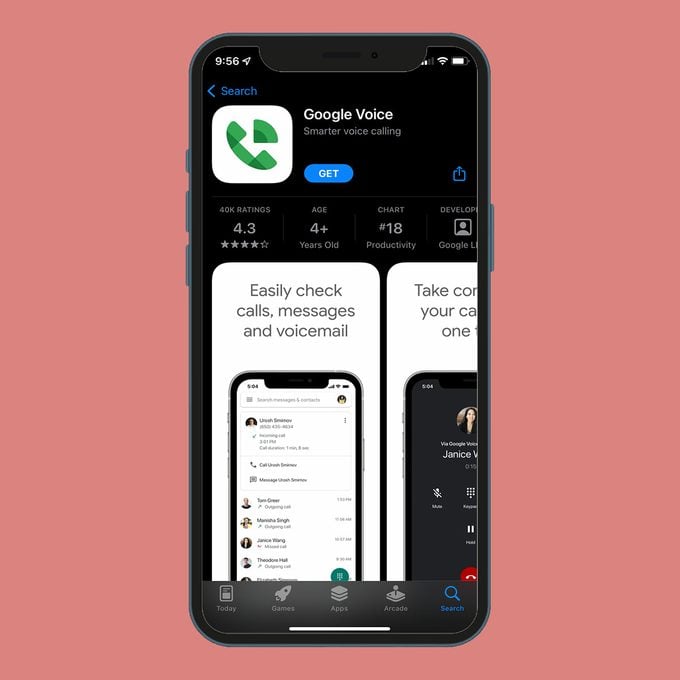
Google Voice Apprd.com, getty images

Next to using two devices and calling on speakerphone, Google Voice is one of the easiest call-recording methods there is. The app allows you to select the phone or device you want to make and receive calls on. Then head over the Settings menu and select Calls. Scroll down to the Incoming Call option, where you can toggle to record incoming calls. Once everyone is on the call, simply press the number four on the keypad to start recording. Press the number four again at the end of the call to stop recording. After you’re done, your phone recording will show up in the Recorded menu option.

This method comes with some added perks. If you haven’t already set up your Google Voice account, you can do that and claim a free phone number at the same time. It’s like a virtual burner phone. Meanwhile, recording an iPhone conversation this way is free and super easy. One downside: It can be trickier to figure out how to record outgoing calls, although the app supports it.

Rev Voice Recorder

Rev Voice Recorderrd.com, getty images

What makes this app so great? Well, for one thing, it’s free to use. Rev Voice Recorder is able to record while you’re using your phone or other apps. It’s also super easy to not only record but also share and trim your files. Want to transcribe your conversation when it’s over? Rev has a transcription service that’ll turn your voice recording into text. One downside of that: Transcription with Rev is slightly pricier than other options, but that’s because the company boasts human transcriptionists, not automated ones.

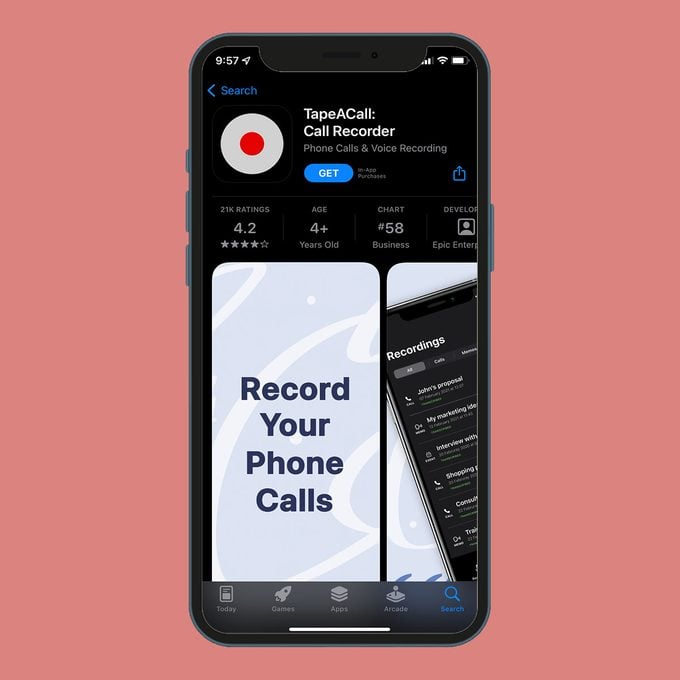
TapeACall

Tapeacall Apprd.com, getty images

This iPhone call recorder app is available in over 50 countries and boasts a huge user base (4 million at press time). We love the fact that you can record incoming and outgoing calls (that’s not always the case!) and store them on TapeACall’s server. It’s also easy to label a conversation before it’s converted to MP3 format. Before you pay for the service, use the free trial option to see if this is the right recording app for you. I paid for the full version of TapeACall and found it a bit confusing. You start each call by either calling into the TapeACall recording line or placing your phone call and merging it to ensure it’s recorded, a process I found myself forgetting. For some, that step may be a big enough turn-off to prompt them to permanently delete the app. For others, it may just be an early stumbling block.

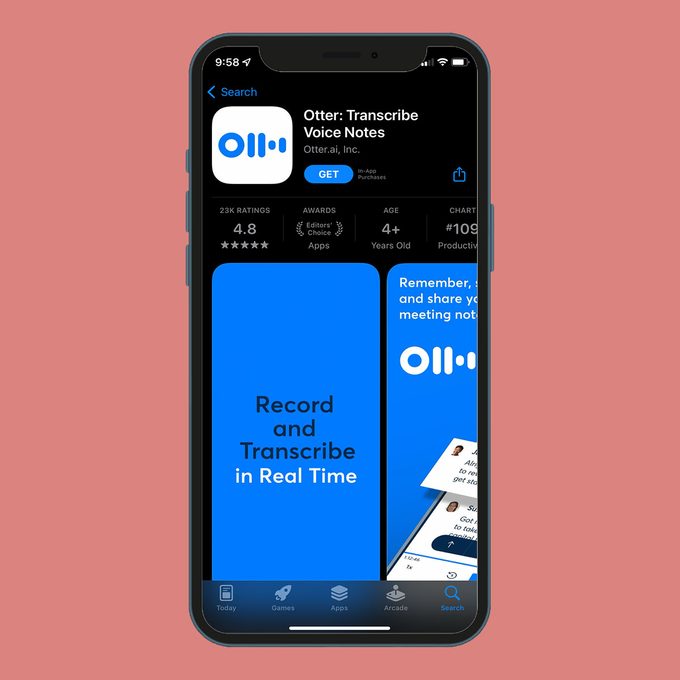
Otter

Otter Apprd.com, getty images

Best known for its transcription services, Otter offers an easy-to-configure hack for recording calls on an iPhone. The process is almost identical to recording a phone conversation on speakerphone. The difference is that with Otter you can also transcribe the call, which is invaluable if you plan to pull quotes or share notes later on. The app isn’t for those needing immediate gratification, however. It can take a bit of time for the file to be processed before it’s available for you to listen to. Pro tip: Read through your transcription while the conversation is fresh in your mind to correct any glaring errors.

There you have it: Five tools that make call recording a cinch. Now that you know how to record a phone call on an iPhone, learn how to stop spam calls and screen record on an iPhone.

Sources:


Feature Image Credit: MoMo Productions/Getty Images

By

Sourced from Reader’s Digest

Sourced from BOSS Magazine

Are you moving on from the olden days of traditional marketing and looking forward to this new age of digital marketing? Do you want to know more about digital marketing and how to choose the best strategy for your business?

Digital marketing is one of the most important aspects of any business. It allows companies to reach a large number of people with their message and can help boost sales and profits. However, many businesses still don’t take full advantage of digital marketing and experienced SEO agencies like Finsbury Media, which is a mistake.

In this blog post, we’ll discuss why digital marketing is so important, and provide tips on how businesses can get started by choosing an effective strategy. Stay tuned!

Know Your Goals

If you are new to digital marketing and this is your first time trying to navigate the digital marketing world and choosing a strategy, you may be confused as to what the best strategy to choose is or may even take your chances with choosing multiple different digital marketing strategies. While this may seem like a good idea, it often doesn’t work out very well and it is in your best interest to take it slowly.

One of the first things that you should take into consideration when it comes to choosing the best digital marketing strategy for your business is knowing exactly what your goals are. Are you trying to reach a specific target audience? Are you trying to grow your business? Are you trying to sell a specific product or service?

All of these questions and more will give you a good starting point when it comes to choosing the right digital marketing strategy, as they give you the chance to eliminate strategies that will not work for you.

Know Your Audience

The next step when it comes to choosing a digital marketing strategy is knowing who your target audience is and who it is that you want to reach. This is important because different types of digital marketing strategies reach different demographics of people, and you want to make sure that you are reaching the right audience.

Does your audience check the emails frequently? Are they spending a lot of time on various social media platforms? These questions, along with others, are a great way to figure out who your target audience is. However, as a business you should already have an idea of who your general target audience is, and research will best show how to reach them.

Know How to Read Metrics

Metrics plays a big role when it comes to digital marketing as this is essentially how you can gauge whether your strategy is working well, or if you need to change something up. These metrics can also show the growth of your business through your social media strategy.

With that said, it is important to learn how to read these metrics and how to understand them in order to implement this knowledge into further marketing that is done for your business. Not taking these into consideration could be foolish of you, as this information can be incredibly helpful.

Know Which Platforms Are Most Popular

If you choose to go the route of social media marketing, it is a good idea to know which social media platforms are the best and the most popular to do this on. Today, there are a handful of incredibly popular social media platforms that all reach hundreds of millions of people, if not billions of people every month. These platforms include Instagram, Twitter, TikTok, Facebook, and even YouTube.

Each social media platform reaches a different demographic and are popular among different demographics. With that said, you should take the time to understand the different platforms and learn which one would be most suitable to your business.

Know the Types of Strategies

Last but not least, if you want to start making use of digital marketing strategies, you need to know all about the different types of strategies and what they have to offer. Digital marketing as a whole refers to any kind of online marketing.

Different digital marketing strategies include social media marketing, email marketing, push notifications, marketing on different websites, and more. It is important to know all of the different strategies that are available to you in order to choose the one that is best for your business.

Sourced from BOSS Magazine

Growing your online business can be difficult, especially if you’re doing it alone.  You need the right marketing tool if you want your online marketing plan to succeed.

Growing your online business can be difficult, especially if you’re doing it alone.  You need the right marketing tool if you want your online marketing plan to succeed. Small business owners often try to do their own marketing, but this can be very time-consuming and ineffective.

There are many great tools available that can help you reach your target audience and achieve your marketing goals. In this blog post, we will talk about 6 marketing tools you must have to grow your online business.

So, let’s get started!

6 Marketing Tools You Must Have To Grow Your Online Business

If you aren’t sure which marketing tool is best for your business, go to the KickAss MasterMinds website which carefully reviews various marketing tools and determine which will work best for your business. Plus, they offer an amazing community and support system to help you succeed.

We’ve put together a list of 6 popular marketing tools that we believe are essential for any business looking to grow online. These tools include:

Buffer

Buffer is one of the most popular social media scheduling tools for the web and mobile, designed to manage accounts on social networks. In the beginning, Buffer was a simple tool for scheduling Twitter posts, but now it’s become a more powerful tool for managing social media.

This tool allows users to schedule posts to Twitter, Facebook, Instagram, Instagram Stories, Pinterest, and LinkedIn. You can also analyse your results and engage with your audience.

Even though it works for large companies, it is perfect for start-ups and small businesses who want to automate and optimize their social media strategies.

Ahrefs

Ahrefs is one of the most popular and best online marketing tools out there, so you are probably familiar with it. Ahrefs offers tools to build links and analyse competitors, track rank and audit your sites. When you are starting a business, it is a good idea to search for all your competitors in order to improve your marketing campaign.

Find out which backlinks they have and see if you can get the same ones for yourself. The majority of Ahrefs’s functionality is geared towards marketing professionals. Ahrefs is a popular website optimization tool for high Google rankings.

Hubspot

When it comes to marketing, sales, or CRM, Hubspot is a leading player. Hubspot tool helps you to create web forms, start an email marketing campaign, or analyse the behaviour of visitors. This tool is ideal for businesses of any size. You will find it quite useful for driving traffic, converting leads to customers, and keeping the teams organized and efficient.

MailChimp

MailChimp is one of the most popular email marketing tools that allow you to send out emails to your customers. This tool offers several key features such as Website traffic tracking, Email templates, Widespread software integrations, Drip campaign design, and It’s free for small companies.

You can automate your emails with MailChimp and design campaigns with ease. The tool is easy to use, even though some of its marketing automation features are limited. If you want something more powerful, you might want to check out a tool like Autopilot or HubSpot. However, MailChimp is a great choice if you’re just starting out.

SEMrush

A successful marketing campaign and content are essential in this competitive era. With SEMrush, you can find valuable keywords, earn backlinks, and keep a close eye on your site’s performance.

It is easy for beginners to analyse organic and paid search results with this tool. With these tools, digital marketing and PPC experts can monitor their competitors and improve ranking.

ClickFunnels

ClickFunnels is a popular marketing and sales funnel builder tool that helps you create high-converting websites and sales funnels. With ClickFunnels, you can create custom landing pages, email opt-ins, and order forms that will help you convert more leads into customers.

Plus, with the built-in split testing feature, you can test different versions of your funnel to see which one converts the most leads into customers.

Conclusion

If you want your online marketing plan to be successful, you need the right marketing tool. These tools will help you to reach new customers, connect with your audience, and increase sales. Therefore, if you’re looking to grow your business, be sure to use these marketing tools. Apart from these tools, there are many more that are not included in the list but are helpful for your digital marketing strategy.

Feature Image Credit: Photo by emerson23work on Pixabay

Sourced from Influencive

Sourced from BOSS Magazine

Online sales is a great way for you to drive traffic to your business while also increasing sales at the same time. You must keep in mind, however, that it is not always easy to know what the best way to go about this is. You will need to focus on a few key things such as developing a strong presence online as well as using effective digital marketing techniques to attract your audience. If you have a business and are wanting to drive online sales, this blog post will highlight 5 key ways that you can achieve this.

Use effective marketing techniques

You must use effective marketing techniques such as social media marketing, paid media advertising, email marketing, and direct selling to name a few. According to Socital, these effective marketing techniques will help you effectively generate leads and drive business which positively influences sales. Before investing in a certain marketing technique, research and identify your audience to determine if the marketing technique you want to use will be effective. For example, if your audience is elderly, you won’t be focusing primarily on social media marketing and will instead try direct selling.

Develop a strong online presence

The internet has become a massive part of modern culture and almost everyone in the world has access to it every single day. It then goes without question that the online space is an important place of interest for businesses in our current times because it allows you the opportunity to access a wide audience at your fingertips. One of the most effective ways to develop a strong online presence is with the help of social media platforms. Billions of people worldwide are active on various social media platforms every day which is a golden opportunity to source new customers and boost your sales. You will need to have a consistent presence on social media platforms and engage with your audience to establish a relationship with them. You will also need to use social media to market your product or service using organic marketing or paid ads and influencer marketing which is highly effective. The more that people are exposed to your business online, the more inclined they will be to support your business. This positively affects sales.

Optimize your website for search engines

A website is a great way to establish credibility with your business and is another form of digital marketing. You must ensure that your website is optimized so that you score a higher SEO ranking which will result in your website being one of the first to pop up on the google search. To optimize your website, make sure that it is user-friendly and easy to navigate, make sure the loading speed is not slow because this negatively impacts your SEO ranking, you should also ensure that the content on your website is authoritative and relevant and that your content is regularly updated. If you optimize your website, the search engine will reward you with a higher SEO ranking which will result in more people visiting your website and ultimately, supporting your business financially.

Create a compelling product description

A product description is an important form of marketing because it describes your product as well as explains the benefits that your product has. This is a way to provide your audience with all the information and details of your product on your website and this description is typically located underneath or next to product images and titles. To write a good product description you must first identify your target audience and focus on the benefits of your products. Also, keep your language and tone natural and throw in some powerful words to drive sales. Good product images are also essential because this is what people look at when researching a product before purchasing.

Offer excellent customer service

To provide excellent customer service you need to go above and beyond to meet the basic needs of your customer. You need to do everything to ensure your customers are more than satisfied and happy with your product or service. The best way to achieve this is to be easily accessible to your customers. You can do this by engaging and responding on social media and also promptly responding to all enquiries. Also always ask for feedback and be attentive, this will create loyalty.

Sourced from BOSS Magazine

B

Thinking of new ways to promote your business? Looking to find an efficient marketing strategy to increase sales or brand awareness?

If your business is banking on old forms of marketing – print, broadcast, word of mouth – you won’t maximize the potential of your business, no matter how good you claim your products and services are.

In reality, for every successful business, using different online marketing techniques is what sets them apart from the rest of the competition.

What are online marketing techniques?

Online marketing techniques are forms of marketing and advertising that utilize the power of the internet to promote your brand to audiences across different platforms.

Does your start-up have any chance when going toe-to-toe against more reputable brands?

Of course, it does!

The good news is, when it comes to online marketing, it’s never too late to get in on the action. Social media platforms and search engines are constantly updating their algorithms, making online marketing an ever-changing field that can either help give your business an edge or push you further down the hole.

With so many different online marketing techniques available, how will you know which will work best for your business?

To help you get started, here are four online marketing techniques you can use for your business to sustain success in the long run.

1. Social media marketing

Social media marketing is an avenue where your business can gain visibility beyond your local area and connect directly with customers anywhere. Your business doesn’t even have to venture into all the different social media channels to reap positive outcomes.

These days, everybody expects a business to be active on at least one social media platform. A GlobalWebIndex survey found that over 54% of customers use social media to research a brand before making a purchase or recommendation.

Now, before you dive in and create a business page, remember that social media marketing is more than just posting any old content.

We know how tempting this can be, considering that creating a business page won’t cost you a penny.

So, where do you start? Like in all business strategies, the probability of success would be greater if you have a plan. A plan gives you a guide on what you need to do, provides you a measuring stick to gauge the success of your social media goals, and layout alternatives ahead in time just in case plan A fails to live up to expectations.

When thinking of a social media plan, make sure to include the following:

  • Set goals that align with the S.M.A.R.T. goals framework
  • Perform competitive research
  • Create a social media calendar
  • Conduct a social media audit (only for those with existing social media accounts)
  • Don’t settle on mediocre visual content
  • Mix up your visual content

* If you’re having difficulty finding a social media platform to promote your business online, your best bet would be to go on Facebook. This won’t always guarantee success, but this social media giant has everything you’ll need starting with their free tools and over 2.89 billion active monthly users.

2. Content marketing

This form of marketing takes on different forms. As per the Content Marketing Institute, content marketing is a strategic marketing approach focused on creating valuable, relevant, and consistent content geared to attract and retain a clearly defined audience – ultimately to drive profitable customer actions.

When it comes to content marketing, always remember that it’s a long-term process. It gives you a chance to indirectly promote your brand by providing educational content to your potential customers, becoming an industry leader in your niche, and helping you rise in search results.

At first glance, you might think content marketing is all about writing informative blogs, but what we know is that people consume content differently.

To give you an idea, here are different ways (aside from blog writing) that you can use to help you get started on your content marketing strategies:

  • How-to videos and tutorials
  • Live broadcasts
  • Infographics
  • Podcasts
  • Host webinars
  • Photoblog

3. Email marketing

What better way to build trust with your customers than through email marketing? This method of online marketing is effective for both start-ups and reputable brands as you get to interact with your audience directly.

Think of it this way, how often do users change their personal emails or even virtual mailboxes for that matter? Presumably not that often, making a customer’s email a valuable piece of information to acquire.

The biggest disadvantage when it comes to email marketing is trying to find a way to increase your email list and the timing of when you send your emails. Some of the methods to increase your email list include using lead magnets, incentives, or cold-calling.

For the timing of your emails, the frequency varies depending on the niche and goals of a business, but in terms of recipient preference, the sweet spot for over 61% of users is receiving at least one promotional email in a month.

Once you grow your email list, make sure to create personalized and segmented emails.

Personalized emails can range from adding the customer’s name to pointing out some of their recent activity on your site. This will make your customers feel more connected and appreciated by your brand, resulting in an immediate increase in trust and customer retention.

Chances are, your customers don’t see eye-to-eye with you on every topic. If you email them irrelevant content, this will lead to lower conversion rates, or even worse, an unsubscribing customer.

This is where segmented emails come in handy. When you segment your email lists in groups, it makes it easier for you to tailor content that’s sure to keep them wanting more.

Take this, for example: say your business sells clothing for men and women. If sales are lower on one end, say the male side, sending coupons or limited offers of male apparel to your female audience wouldn’t generate much revenue and could be, at times, annoying for them to receive.

4. Search engine optimization (SEO)

SEO is an organic online marketing strategy businesses use to gain traffic to their site with the main goal of trying to consistently land on page one of a search result.

Similar to content marketing, SEO takes time before you can reap its benefits. With different businesses looking to outrank your landing pages for a particular keyword, fine-tuning your SEO efforts become an everyday task, even with the help of some of the best SEO tools. This, in turn, makes some businesses hesitant to invest any time and resources towards it.

But once you can land on page one, the amount of visibility and revenue your business makes is immeasurable. The following data can support its claims:

  • Web searchers are 8.5x more likely to click an organic listing than a paid ad.
  • 90% of respondents in an Oberlo survey said they were likely to click on the first page of a search result.
  • SEO drives  more than 1000% more traffic than organic social media

In general, SEO strategies can be subdivided into four parts:

  • Keyword research
  • On-page SEO
  • Off-page SEO
  • Technical SEO

“Success in management requires learning as fast as the world is changing.” – Warren Bennis

B

Derick Quinanola is a writer and digital marketer who is passionate about helping businesses maximize their virtual presence through engaging social media campaigns and dynamic content marketing to capture the attention of diverse audiences. He is based in the Philippines but has a global mindset and continues to find innovative methods to help businesses thrive in an increasingly digitized economy.

Sourced from Jeff Bullas