Author

editor

Browsing

By Gergely Orosz

Since leaving Uber a year ago, in October 2020, I’ve been making a living from writing – one with comparable income to when I was employed.

None of this would have happened if I did not start to write this blog several years ago. Writing which helped hone my writing skills, and build the credibility to start publishing books, and to start my weekly newsletter.

How do you find the inspiration and motivation to write? This is a question I frequently get – especially that regular blogging has led to making a living off writing. Here are the 12 approaches and steps that worked for me – some of which might be useful if you’d like to write more regularly.

1. Own Your Content

Start a blog or a place where you can start share your longform writing.

I am personally a fan for paying out of pocket for the writing platform I use. By doing so, I own my content. I took this advice from software engineer and blogger Scott Hanselman after reading his post Your words are wasted where he writes:

And still you tweet giving all your life’s precious remaining keystrokes to a company and a service that doesn’t love or care about you – to a service that can’t even find a tweet you wrote a month ago.

I pay a monthly fee of around $30 to use Ghost as a hosted service. Paying every month reminds me that I should write something to not waste all this money. It’s a small thing, but this guilt is what helped me get more articles out in the early days.

Getting started on free places where you keep your copyright like Hashnode or Dev.to can also be an option. The nice thing about them is you might get better reach, and more feedback or comments.

The downside with free-to-write platforms is that you don’t really own your content: those companies make a business directly or indirectly monetizing your writing and the traffic it generates. For example, see what happened with Medium: much of the content hosted there is paywalled.

2. Start Writing – Regularly

Few people know, but I have been blogging on another blog for years. Those posts were irregular braindumps on whatever was on my mind. It was a mix of personal updates, debugging stories and sharing when I released a new version of my app.

In 2015, I decided I want to write about software engineering – a field I had been working in for years. I took my inspiration from the once-very-successful Coding Horror blog by Stack Overflow cofounder Jeff Atwood. In the post How to achieve ultimate blog success in one easy step, Jeff wrote:

When people ask me for advice on blogging, I always respond with yet another form of the same advice: pick a schedule you can live with, and stick to it. Until you do that, none of the other advice I could give you will matter. I don’t care if you suck at writing. I don’t care if nobody reads your blog. I don’t care if you have nothing interesting to say. If you can demonstrate a willingness to write, and a desire to keep continually improving your writing, you will eventually be successful.

I read, re-read, and re-read this post. I then decided this is exactly what I need to do.

I picked a schedule and stuck with it for months. I decided to write an article every two weeks for the next couple of months. And this is what I did, shipping the first few articles on this blog:

If I started writing today, I’d join a community like Blogging For Devs, where you have a community that can feel it keeps you accountable, and a group that gives feedback on your early drafts. I’m a paying member here and drop in when I have the time.

Ship 30 for 30 is another great way to start. This is a program where you ship 30 writing assignments in 30 days as part of a cohort that keeps you accountable, which kicstarts this process and helps form this habit. The course is priced around $300: paying this amount and working in a cohort I’d expect will help you stick with writing through the 30 days.

3. Write For Yourself

When I (re)started my blog, I was wondering who would be reading my articles. In the end, I decided I don’t care: I’ll just write them for myself, as a reflection of the ideas and observations I have come across.

Approaching writing with this approach, it has been surprisingly therapeutic and a tool that helps me reflect. Writing my ideas down, in a form that makes sense requires a surprisingly large amount of thinking.

Writing is a forced way to think more clearly – and I’m not the only one to make this realization. Early Facebook employee Andrew “Boz” Bosworth shares a similar observation in the article Writing is thinking:

Even when I write for my own benefit, it is undoubtedly a bonus that at the end I have a document which I can easily share to invite critiques or enlist support. I know of no more scalable way to engage a large audience than the written word.

I’m glad I started out writing for myself: it helped my thinking, and it helped polish my writing as well. The early articles are noticeably shorter and, less pleasant to read, though they often took more time to write than later ones. They gave me early practice in forming and writing down my thoughts around various engineering topics though.

4. Copy Writing Styles You Like

Most of my favourite writers and bloggers have a distinct style. When I started writing, this made me think: what would be my style? What writing setup should I chose?

When starting out, I copied the writing style and approach of well-known bloggers. Most of my early posts were inspired by the quotation style that Jeff Atwood uses in many of his articles. He takes a 1-3 quotes from various articles on the same topic, then adds his own cents.

Take his article, Swiss army knife or generalizing specialist. The article consists of three quotes from three different sources, and his comments surrounding these.

As I browsed blogs, this approach struck me as one that can help me get started easier. Commenting on someone else’s writing is a lot easier than writing from scratch. So this is what I did with my first few articles. If you look closely, the resemblance in style for these articles should be clear – but only if you know where to look for the inspiration:

Many early Pragmatic Engineer articles were inspired by the writing style of Coding Horror. Can you see the similarities?

As you start to write more, your writing style will evolve and you won’t feel the need to “copy” another style. This is what happened in my case. Current articles don’t lean on any one style: they’re a mix of what I have found pleasant and useful, over the years.

If you like this style – you’re more than welcome to copy the approach. I do, however, recommend the quoting approach for an easy start: it’s much easier for words to flow when there’s already a few thoughts from someone else that you can reflect on.

5. Capture Ideas As They Appear

Once I started writing, the biggest barrier I faced was the lack of ideas. After finishing an article, I’d be unsure what to write about next.

Capturing ideas as they popped into my head has been very helpful for my writing I almost always did this with a note taking app on my phone or my laptop – as ideas would often come when debating with a colleague, or having a conversation over lunch. I now use Craft Docs to capture these – both because of the slick UI, as well because my brother is behind the company – but any system works.

Once I started to capture these ideas as they hit me, I no longer had a shortage of topics. After a while, I had the opposite: too much to choose from. Here’s a screenshot of my “blog ideas” note in Craft Docs, and a fraction of my idea backlog:

6. Freewrite

Once you have the idea, it’s easy to get stuck on an empty page. One of the tricks that helps me break this block is to do twenty minutes of free writing. Here’s how I do it:

  1. I set a timer for 20 minutes on my phone, and place it next to me.
  2. I proceed to do free writing, typing out everything that is in my head. I don’t stop to correct grammatical errors, or to go back and fix anything.
  3. I don’t stop to criticize my thoughts – this gets easier once you’ve done this a few times.
  4. If I cannot think of anything to write, I write “I cannot think anything to write… okay, now I thought of this new idea on…”

The interesting thing is how it works, every time. After a few minutes I’m pushing out ideas, and I’m usually frantically typing when the timer goes off.

7. Draft

Following free writing, I have a good chunk of ideas. I then proceed to write a draft piece.

My approach is this:

  • I write out key ideas I want to explore as bullets
  • I write out each of those bullet ideas: either by copying from my free writing, or by adding a few paragraphs to each
  • I personally like to bold out the key ideas I’m exploring. It helps me focus on what I’m trying to say.
  • I often do research during the draft stage, reading up on topics I’m writing about, then quoting or linking to relevant resources.

My draft is complete when I wrote about all the parts I wanted to.

8. Edit

Once a draft is ready is when a very different staging of writing comes: editing. This one is something I often leave for the next day. Even when I start doing it after the draft, I take a break to get into “editing mode”.

Editing is about making this piece digestible for the reader. I do a few things:

1. Add a closing section. What is the takeaway of the piece? What is the one, or two things I should leave the reader with? For example, in the article Data structures & algorithms I used working at tech companies, I added this summary section:

Data structures and algorithms are a tool that you should use with confidence when building software. Know these tools, and you’ll be familiar with navigating codebases that use them. You’ll also be far more confident in how to implement solutions to hard problems. You’ll know the theoretical limits, the optimizations you can make, and you’ll come up with solutions that are as good as they get – all tradeoffs considered.

2. Make the opening count. The first few paragraphs need to grab the attention of the reader, make it clear why the topic is relevant, and what they’ll get out of it. I often set the context in the beginning as well.

In the Data structures & algorithms article, I decided to open with a question to the reader, then follow with a summary on what to expect:

Do you actually use data structures and algorithms on your day to day job? I’ve noticed a growing trend of people assuming algorithms are pointless questions that are asked by tech companies purely as an arbitrary measure. I hear more people complain about how all of this is a purely academic exercise. (…)

This article is a set of real-world examples where data structures like trees, graphs, and various algorithms were used in production. I hope to illustrate that a generic data structures and algorithms knowledge is not “just for the interview” – but something that you’d likely find yourself reaching for when working at fast-growing, innovative tech companies.

3. Tighten up the text. Once the opening and the closing are clear, I go through the article to tighten up the text, make sentences shorter, and fix any grammatical issues.

In the past, I used Hemingway Editor to spot overly complex sentences. I would then proceed to make them shorter and easier to read. Over time, I learned to write more clear sentences myself:

Making text easier to read with Hemingway Editor: before and after

I also use Grammarly to catch spelling, and grammar issues, and sometimes take suggestions the tool gives – though I just as frequently reject them.

4. Hire an editor. This last one I wish I had done earlier. For years, I wrote without an editor. I hired my first one when writing my books Building Mobile at Scale and The Tech Resume Inside Out.

An editor not only makes your writing more clear, but it’s a fantastic way to learn on how you can improve it. I would not recommend an editor for every blog post: but hire one if you’re serious about wanting to write better. My editor is Dominic Grover and I could not be happier with how he helps me write better:

9. Publish

Pressing the button to make my writing live is one I like to delay. However, I’ve always found that done is better than perfect. Most of my blog posts go out after light edits, and I set it live.

10. Feedback

For most of my early posts, I got no feedback, and probably very few readers. However, as soon as I start to get feedback, I often go back and tweak my writing based on what people say.

The most frequent feedback I used to get was on typos. I sometimes do get corrections, and additional ideas, mostly as emails or messages – both are more common since more people read what I have written.

11. Audience

Writing and people reading your writing is a chicken-and-egg problem. When you start out, there’s no one to read. When there’s no one to read, there’s little point in writing.

As uncomfortable as it is, you do need to share your writing to where interested people could be. This can be social media like Twitter, LinkedIn or Facebook. It can be groups like subreddits, Hacker News and other tech forums. It can be chat groups on Discord or Slack.

Self-promotion is something you’ll need to be wary of on forums: if you only join these communities for the sake of sending a link to your article, you will – rightfully – not be welcome at these places.

This is where it’s helpful when you start to write for yourself: you have less of a pressure to want to get people you don’t know read your writing.

12. Again. And again. And again.

The hard thing about writing is not on publishing an article: anyone can do this. The hard part is doing the writing on a consistent basis.

I found that setting up dedicated time – an hour each week, on a weekday – helped me get into the habit of writing. This is how I wrote most of the posts on this blog.

Over time, some posts resonated with people, while others saw very little interest. Still, every piece helped one person: me. Every time I published, I had the satisfaction that I’ve understood or explained something for myself – and maybe, for others as well.

And this satisfaction is what gave me the motivation to do it again. And again. And again.

The result of repeating this for years is this blog, the weekly newsletter for engineering managers and senior engineers, and books on mobile engineering, engineering growth and resumes.

Featured Pragmatic Engineer Jobs

  1. Launch House: Founding Full-Stack Engineer & Founding Web3 Engineer (Remote, US)
  2. TicketSwap: Engineering Manager (Amsterdam)
  3. Wave Money: Engineering Manager & Senior Engineer (Remote, Global)
  4. Fonoa: Senior Backend Engineer (Remote, EU timezones)
  5. Orbit: Engineering Manager (Remote, Global)
  6. Noom: Technical Lead Manager (Remote, Global)

Browse more senior engineer and engineering leadership roles, or add your own on The Pragmatic Engineer Job board.

By Gergely Orosz

I write about software engineering and engineering management at high-growth startups and big tech. Previously at Uber, Microsoft, Skype, Skyscanner.

Sourced from https://blog.pragmaticengineer.com

 

By Jeanna Barrett

‘Hey, Siri, grow my business’: The founder of First Page wants you to hop on the voice search train and watch your business skyrocket

It’s no wonder, really. After months of lockdown and social distancing, we had to talk to someone. In 2020 and throughout 2021, Alexa and Siri became a little less robot and a little more gal pal. Siri supported our online shopping habit without judgment, and Alexa gave us step-by-step instructions on how to make the perfect quarantine sourdough.

In 2022, expect voice search to level up yet again. Smart speakers are predicted to pop up in 55 percent of U.S. homes, and already, 65 percent of 25-to-49-year-olds talk to a voice-enabled device daily.

Voice search will change the way your brand does SEO. And if you want to grow organic traffic in 2022, you’ll need to get on board. So we’ve put together some of the top tips to help you craft an SEO strategy that really speaks to your target audience…literally.

Improve Domain Authority

Want your results to be on the tip of the tongue for voice-enabled devices? Focus on increasing your site’s domain and link authority by implementing a link-building strategy and boosting your backlink profile. High domain sites are the most likely to rank well in voice search.

Developing an effective link-building strategy means looking at your brand’s strengths. What do you have to offer that people would find interesting enough to share on their websites, social-media accounts, or in news articles or editorials?

Data stories are always compelling…if you can tell a unique story with your customer data. For example, check out how OKCupid collects data and shares relevant insights in its monthly blog.

In addition to data stories, using expert insights from your customers or influencers can help create unique, insightful content that resonates with people and often prompts them to share. Use a service like Cision’s HARO (Help a Reporter Out) to source industry thought leaders or respond to queries as a thought leader in your industry.

You also can build a lot of links just by being aware that links are important — lots of companies are already doing things in the community or with partners, or they’re doing things that are newsworthy. Ask for a link when it makes sense.

Keep It Simple

Most voice search results come in at a 9th grade reading level. Keep your content casual and conversational, and don’t forget to include those long-tail keywords that answer questions like “who,” “what,” “when,” “where,” “why,” and “how.” Do a quick Google search for your primary keywords, and pay close attention to the “People also ask” section below the sponsored and top results. This is an SEO gold mine. Incorporate those questions into your content to increase your chances of ranking on voice search.

Snag Those Featured Snippets

More than 40 percent of all voice search results come from Google’s featured snippets. Featured snippets are typically in the top position on search engine results pages (SERPs), otherwise known as “position zero.” While landing a zero-position result is still shrouded in mystery, you can improve your chances by optimizing your content around long-tail keywords that answer specific questions.

The “People also ask” questions mentioned above will help you narrow down keywords that are relevant to your brand and write crisp, concise answers to them.

Other ways to increase your chances of getting your content in a featured snippet is to carefully consider formatting choices. Use bulleted or numbered lists, tables, and heading tags. Above all, structure your content to make it easy for Google to understand and pull answers to the questions people are searching.

Don’t Ignore Local

No matter how big your brand, it pays to have a local presence. Voice searches on mobile devices are three times more likely to be locally based than text searches. Be sure to include your location within your long-tail keywords when appropriate, whether it’s your brand headquarters, regional offices, or the communities where your employees or leadership are located and in which they’re involved. If your brand is local, you’ll need to own that market if you want to rank well in voice search. Make sure directions to brick-and-mortar locations are correct and simple to understand, and optimize for “near me” searches.

Make sure your Google My Business and local directory listings (like Yelp, Yellow Pages, and specific industry directories) are complete and up-to-date, including all locations and map listings. Engage in local partnerships and community initiatives where it makes sense for your brand. Doing this can help with link building as well as with your authority and credibility within specific regions.

Create Content With Context

SEO without killer content to back it up won’t get you too far. Make sure your content gives your SEO strategy a lift by building your content around your ideal personas, and answer key questions like:

  • Who are they?
  • What keeps them up at night?
  • Why do they need what my brand provides?

Then, reflect those answers in your content. Keep it concise, conversational, and relevant. Consider adding FAQs with more specific questions, and reinforce this with schema mark-up, whether it’s FAQ schema, reviews schema, or video schema. This helps give more structure to your content and ensures Google can easily understand it.

Make sure the content you’re creating fills a need or solves a pain point. Create valuable tools and downloads that provide something useful and fulfil search intent. Be sure you’re also using multimedia, like infographics and video, to make your content engaging and shareable.

Also, if there are specific issues, problems, or trends that are impacting your customers, cover them in your content. For example, if most of your customers are in California and feeling the effect of wildfires there, be sure to mention it. Bottom line: If they’re talking about it, you should be, too.

Find a Professional SEO Consultant

The way we search is changing. We want clear, concise answers, and we want them yesterday. Flowery, long-form content might be great for your existing desktop audience, but if you want to capture new visitors through voice search, you need to optimize and adapt your SEO strategy. A professional SEO consultant can help you implement all the tips above and a lot more, like technical and on-page SEO.

You want to grow in 2022, right? Who doesn’t? But if you haven’t jumped on the voice search bandwagon yet, you’re putting your brand at a disadvantage. If you want to be the brand everyone (or at least, Alexa and Siri) is talking about, make sure voice search optimization is part of your 2022 SEO strategy.

Feature Image Credit: Getty Images

By Jeanna Barrett

Sourced from Inc.

Sourced from Forbes

The digital marketing industry has seen an influx of growth over the past few years. More businesses than ever are adapting to the digital arena brought on by the global pandemic. This change of pace has spurred new digital marketing trends that have replaced previous outdated strategies.

Below, 10 members of Young Entrepreneur Council explain which recent digital marketing trends they’re most excited about and why. Here’s what they believe the future of marketing will look like, and how these trends have already impacted their own efforts.

1. AI Writing Assistants

I’ve been getting excited about AI writing assistants which are mainly tools that can produce ghostwritten content. There’s Narrative Science, Wordsmith and Automaton, for example. All these AI assistants work by combing databases and finding patterns in order to make educated guesses on what the content is about. Advantages: an illusion of higher quality and less personal bias in articles, they’ll likely churn out more articles than there would be human writers, will lower prices for clients, less stress on writers. Disadvantages: potential loss of author voice (depending on how much control is given to the software), possible breach of integrity when personal biases become part of the production. Regardless, AI writing assistants should be an interesting trend to watch in digital spaces. – Brett FarmiloeMarkitors

2. Video Marketing

Our firm has invested in video marketing, to revel in the potential. Watching a video for a product or a service not only improves brand recall for the consumer but also gives them a chance to immerse themselves in the experience. They receive a few minutes of either entertainment or information and are incentivized to share it within their networks. You can also use the elements of storytelling to weave an unforgettable narrative. For example, one UPS commercial, inspired by a YouTube channel that rescues dogs from the street, showed a driver taking in a stray dog. The transformation associates UPS with positivity and care. A small business doesn’t need as high a budget to reach the same emotional connection. You simply need a good script and actors. – Duran InciOptimum7

3. Giveaways

I love the idea of using contests and giveaways to drive traffic to your website and boost conversions. They’re fun and generate excitement with your target audience, encouraging them to take action and interact with your brand. The great thing about contests is you can set rules to boost engagement, such as requiring social shares or comments to get entries. – Stephanie WellsFormidable Forms

4. Audio Social Apps

I have never seen the ability to create momentum behind a product or service like you can with audio social apps such as Clubhouse, Greenroom or the new social app Fireside. Even market research can be done with the press of a button and you can hear from your potential clients in real-time about what they want or don’t want. Even finding out what problem to solve and add on to your current portfolio. Plus being able to speak directly to your customers builds a strong bond and rapport where no other social platform can. We have created services and even businesses based on the demand and what people want. – Daniel RobbinsIBH Media, Bintana Sa Paraiso, His skincare

5. Accessible QR Codes

I’ve been getting excited about QR codes as an access point to products. During Covid, the rise of restaurants using QR codes to display their menus on people’s phones means almost everyone knows how to open a cellphone camera and scan a QR code. This is a rising trend that is going to become more and more popular. Companies like Apple are adopting this with app clips. You can scan a QR code on something like a scooter and it will pop open a segment of an app so you can interact with that product without downloading the entire app. I think many more things will soon be able to be accessed with a QR code, and that will be a big shift in how people get their products into the hands of customers more easily. – Cody CandeeBounce

6. Social Media Shares

Social media content that spotlights our clients, stakeholders, partners and collaborators is an amazing way to get at least one share of your content. We have changed the way we measure success in a post from just reviewing likes and comments to how many shares we are getting. This approach is a game changer and really builds relationships. We focus on talking about their achievements, stories and congratulating them. It is simple and works. – Saana AzzamMENA Speakers

7. The Rise Of Audio Content

There has been a shift in media consumption. Written rules the world and the internet but something has changed for some time now. Writing isn’t the only major option for media consumption. We’ve moved to audio and video. And the trends can be seen in books being preferred in audio form and blogs becoming podcasts. You might get into trouble reading a book or watching a video on company time but an engaging podcast can get you through your shift. It has informed my decision to create content on audio and video platforms instead of writing articles alone. The dividends have started paying off already. My YouTube show “Coffee With Closers” has been a platform to interact with entrepreneurs whom I admire and am friends with while creating content that’s valuable to business prospects and people in general. – Samuel ThimothyOneIMS – Integrated Marketing Solutions

8. Leveraging SEO

SEO PR is very exciting and is allowing for proven ROI from building high-value PR links on major news outlets. This concept can drive more organic users and obtain highly sought-after publication backlinks. It’s certainly worth the time to learn more about it and implement it into your marketing strategy. You can work to learn this yourself or reach out to professionals to help implement it. – Tyler QuielGiggster

9. Social Media Stories

Stories on social media such as Instagram have taken over as a fast strategy for growth. Benefits of using stories include building the know, like and trust factor which helps with sales. Stories are a quick, low-pressure way to communicate without worrying about editing or design. When people show their face on stories they can upload daily and speak directly to their target audience. This trend is so powerful that it serves as a tool to conduct market research and sell directly to clients. The results are so effective that I ask my audience to use the hashtag #showyourface and tag my account @dietitianboss on Instagram for accountability. Every day my audience tags me and I re-feature them in my stories. The act of showing up gets both my clients and company recurring business. – Libby RothschildLibby Rothschild

10. Optimized Podcasting Platforms

A digital marketing trend that I’ve recently been getting truly excited about is the increase in podcasting platforms working to increase the integration of podcasts with content marketing channels like blogs, social media posts and email lists. Podcasts have transformed into one of the best ways for brands to target their ideal client avatars with pinpoint accuracy, enjoying tremendous boosts in credibility and brand exposure to key audiences. Even better, niche podcasts can be very affordable to market through. When combining podcast marketing with other methods of content marketing, the entire marketing campaign is more effective, with far better integration of promo codes and links for fine-detail tracking and better insight into cost per acquisition of each channel. – Richard FongProcessingCard.com Check out my website

YEC is an invitation-only, fee-based organization comprised of the world’s most successful entrepreneurs 45 and younger.

Sourced from Forbes

By

When photographers take that initial leap into photography as a profession (or a more serious side hustle), blogging should rank high on their list of to-do’s. Blogs have long proven to be one of the most effective tools photographers can use to build a presence online. Honestly, though, they can be a pain to maintain. A well-designed and consistently updated blog may help photographers gain credibility, use targeted SEO to grow a following, and make clients and vendors happy with easily shareable posts, but they also typically require a significant investment of time and effort, both for learning to use the software and posting regularly. For this reason, a good number of photographers don’t dedicate adequate time to blogging. That is where Storytailor from StompSoftware (the makers of BlogStomp) comes in.

Since 2009, StompSoftware has provided affordable, easy-to-use software for both Mac and Windows users. With their latest blogging app, Storytailor, the StompSoftware team has released what might arguably qualify as the ultimate blogging tool. This holds especially true for photographers. Storytailor’s intuitive design and powerful tools help lighten the load for running an effective photography blog with minimal time and effort, and it works well with Squarespace, WordPress, Wix, and others. In the following review, we’ll weigh in on Storytailor’s features and consider how they might help improve your blogging workflow.

Interface

Storytailor Review Starting Screen 01

When you open Storytailor, the first thing you’ll notice is the app’s simple, straightforward design. You can easily navigate the clutter-free interface and locate the features you need to craft your post at every stage of your workflow. Storytailor maintains this elegant design aesthetic throughout, whether you’re populating the blog with content or putting together a collage to share on Pinterest. It may sound cliche to say there’s truth in the idea that “less is more,” but this app supports such claims with concrete evidence.

Don’t mistake the minimalist approach to the app’s interface for a lack of power, however, as you’ll learn below.

Design Features

Part of what makes this app so easy to use is the amount of automation going on behind the scenes. The app’s auto-arrange blog post builder has been designed to do the majority of the work for you in terms of setting up and laying out the blog. All you have to do is load your photos, fine-tune the design (using margin sliders, image cropping, inserting logos/watermarks, etc.), add your copy, and publish.

Let’s take a closer look at the process to further explore each feature.

Adding and Organizing Photos & GIFs

Storytailor Review Layouts
A view of the Collage Module in Storytailor

Photographers will appreciate Storytailor’s emphasis on leading with imagery to build a blog post. Right from the start, after you select the “Blog” or “Collage” option, you’ll notice a conspicuous drag & drop area that makes it easy to import your photos and begin the blog-building process. Storytailor gives you three other ways to add photos to your post, but you really need look no further than the drag & drop option on the opening screen.

Storytailor Review Option for spacingAfter adding your images, the “auto arrange” function automatically begins organizing the images (pairing portrait-orient photos side-by-side, for example). Once your images have finished loading, you can rearrange them in the Image Browser or the main blog column. Simply drag and drop the photos to where you want them. In addition, you can right click on the images in the Image Browser to sort them by file name, capture date, or creation date. Finally, as I mentioned earlier, you can use the margin slider in the upper righthand corner to control the size of the margins between the photos. Sometimes, it’s the finer details like this that make all the difference.


Another cool feature that Storytailor recently added gives you the ability to include GIFs in your blog post. This provides a great opportunity to highlight a sequence of images that can add to the overall storytelling, such as a twirl on the dance floor, a bouquet toss, or perhaps a candid interaction between newlyweds.

Adding Copy

Storytailor Review Add text

Storytailor makes it easy to add custom web fonts and insert text copy to your blog post as well. To start, simply click on the text icons throughout the post to set up your intro at the top, insert blurbs between photos, and then link to venues and other vendors, if applicable (linking out to other sites is one of the ways to boost your SEO score). You can then use Storytailor’s selection of fonts or add any hosted font from services like Google or Adobe to finalize the look of your post.

The overall design automation and quick select options for organizing the images and other features helps provide a stress free experience.

SEO

Optimizing SEO for your blog is one of the most important things you can do to get your blog seen. Between keywords, file names, title and image tags, and so on, there’s a lot to keep track of. You can purchase separate plug-ins to help do this, but Storytailor packs plenty of SEO tools right into the app.

SEO Tools and Grading Structure

Using Storytailor’s SEO tools, you can easily add keywords and customize file names, title tags, and alt tags for images. You can also load preselected keywords that will automatically be added to all of the photos in your post. From there, you have the option to add additional keywords to individual images.

The Grading Structure allows you to check the effectiveness of your SEO efforts in real time with a graded score (think A through F) for things like the title, word count, and other items like those listed above. If you’ve ever used the Yoast plug-in, you’ll already be familiar with the concept. Squarespace or Wix users who don’t have access to the Yoast SEO WordPress plug-in will find that much more value in these tools. Even if you use WordPress, you won’t need to worry about getting the Yoast plug-in. The Grading Structure in Storytailor takes the guesswork out of knowing whether or not you’re hitting the major SEO metrics.

If you’re newer to SEO or you just want to ensure you’re doing everything you can to maximize SEO for your post, check out this helpful article, “Our SEO Philosophy,” on Storytailor’s website.

Publishing Features

Publishing your blog post with Storytailor takes no time at all and it really couldn’t be easier. To illustrate, here’s a quick overview of the steps involved:

  • Finalize the written content and photo layout
  • Click “Publish” in the lower right corner
  • Select your blog platform (Squarespace, WordPress, Wix, Other)
  • The app will publish the post on your site as a draft (you’ll need to provide log-in details for your platform) or provide an html code you can paste into the backend of your blog site.

Storytailor adopts CSS style from the blog, which allows font type and color matching to happen automatically for most users. After you publish the post, the next phase of Storytailor’s effectiveness kicks in when the SEO you’ve set up works to bring more traffic to your page.

Website/Blog Format vs. Publishing

Websites and blogs come in a wide variety of formats and hosting plans. As a result, there are occasions in which users might experience publishing issues due to obscure/conflicting code in their websites, or because of stringent hosting restrictions. A handful of users from Storytailor’s beta test group of 2500 reported experiencing some issues when publishing for these reasons. I have not experienced any such issues, but it’s worth mentioning.  I imagine that outside of any unconventional website setup you may be running, the features in Storytailor should work as expected.

Sharing Features

In addition to all the amazing features in the Blog tab, Storytailor has also included a Collage Builder and a Batch Exporter for jpeg exports, producing web-ready files for targeted sharing. You’ll recognize this feature if you’ve used BlogStomp in the past, and you’ll appreciate it more than you know if you’re new to this entire process.

Collage Builder and Batch Exporter

For photography-based bloggers, these features alone are more than worth the price of admission. Seriously. If you only ever used the Collage Builder and integrated it into your current blogging workflow (or to share images on Pinterest), you’d still be amazed at how much more efficient your blogging workflow would become.

Storytailor Review Blogging Tool Collage on LJP
Example of one section of a collage layout made with Storytailor’s Collage module for linandjirsa.com

The Collage Builder has greatly simplified the whole process of creating and adding custom layouts to our blog posts for Lin & Jirsa Photography. Since we discovered its effectiveness, we’ve used it constantly. The Collage Builder works similarly to how you arrange and customize the photo layouts with the automated Blog Builder, but here you can also export your collage as a web-ready file, which is great for Pinterest. Simply add a web url to images so that when they’re shared on Pinterest, potential clients can more easily find your contact info.

Security Software Limitations

Although I have not personally experienced this issue with the app, it’s worth noting that Storytailor has reported a few instances of users running into certain security software limitations in the Collage and Batch Exporter modules when creating new jpeg files on their computer. When this happens, you just need to “allow” or “whitelist” Storytailor in your security software. Once this task is complete, you will be able to export your jpeg files. Chances are, however, that Storytailor will work as intended without any such hassle.

Support

For both Mac and Windows users looking to get the most out of the app, Storytailor has put together a collection of helpful blog posts and videos that outline each of the app’s features in more detail. If you have questions about the app not answered in the FAQs or blog posts, contact their team via email. I can say from experience that they’re quick to respond.

Pricing

Storytailor offers a very simple pricing structure with two basic payment options. Find the rates below:

  • $7/mth (paid annually)
  • $10/mth (paid monthly)
  • Both options include unlimited blog posts

Additionally, you can get a free 14-day trial to test-drive the software before you commit to making a purchase.

Conclusion

I hope that you found this review of the Storytailor app helpful. After having used other means of building blogs, it’s easy to appreciate Storytailor’s user-friendly interface, automations, and tools. Together, they help simplify the blogging process and actually make it fun to do. For years, the StompSoftware team has continued to innovate and develop better tools for bloggers, and Storytailor reflects that continued commitment. Issues with the software are few and far between, and ongoing updates will only continue to make a great tool even greater. At the end of the day, worthwhile blogging tools should allow you to spend more time shooting and less time blogging. That’s what Storytailor does, and well.

By

Sourced from SLR Lounge

It builds on DeepMind’s work on protein folding

A new Alphabet company will use artificial intelligence methods for drug discovery, Google’s parent company announced Thursday. It’ll build off of the work done by DeepMind, another Alphabet subsidiary that has done ground-breaking work using AI to predict the structure of proteins.

The new company, called Isomorphic Laboratories, will leverage that success to build tools that can help identify new pharmaceuticals. DeepMind CEO Demis Hassabis will also serve as the CEO for Isomorphic, but the two companies will stay separate and collaborate occasionally, a spokesperson said.

For years, experts have pointed to AI as a way to make it faster and cheaper to find new medications to treat various conditions. AI could help scan through databases of potential molecules to find some that best fit a particular biological target, for example, or to fine-tune proposed compounds. Hundreds of millions of dollars have been invested in companies building AI tools over the past two years.

Isomorphic will try to build models that can predict how drugs will interact with the body, Hassabis told Stat News. It could leverage DeepMind’s work on protein structure to figure out how multiple proteins might interact with each other. The company may not develop its own drugs but instead sell its models. It will focus on developing partnerships with pharmaceutical companies, a spokesperson said in a statement to The Verge.

Developing and testing drugs, though, could be a steeper challenge than figuring out protein structure. For example, even if two proteins have structures that fit together physically, it’s hard to tell how well they’ll actually stick. A drug candidate that looks promising based on how it works at a chemical level also might not always work when it’s given to an animal or a person. Over 90 percent of drugs that make it to a clinical trial end up not working, as chemist and writer Derek Lowe pointed out in Science this summer. Most of the problems aren’t because there was something wrong at the molecular level.

The work done at DeepMind and the proposed work at Isomorphic could help bust through some research bottlenecks but aren’t a quick fix for the the countless challenges of drug development. “The laborious, resource-draining work of doing the biochemistry and biological evaluation of, for example, drug functions” will remain, as Helen Walden, a professor of structural biology at the University of Glasgow, previously told The Verge.

Feature Image Credit:  Micah Singleton / The Verge

Sourced from The VERGE

Sourced from BOSS Magazine

When it comes to start-ups, one of the most important things that you need is money. You will have to spend a lot on getting your product ready and then marketing it so that people know about it, who are willing to buy it. This is where funding can come in handy. Funding can help your start-up by financing its growth. There are different types of funding available for every business depending upon their financial requirements, so no two businesses or start-ups will have the same type of sources for making finance available to them.

Before we move forward though the article here’s a piece of useful information on pro rata marketing for every start-up owner.

Pro rata is a marketing strategy that allocates small bits of your marketing budget to new opportunities as they arise. This gives you the chance to experiment with various types of marketing and distribution channels without having to invest too much in any one area. It also allows you to adjust your messaging and marketing tactics on the fly, so you can quickly tweak your strategy when it isn’t working well.

There are primarily three types of sources that offer funds for start-ups – they are Debt Financing, Venture Capital Financing and Equity Financing. Here’s all you need to know about these sources:

Debt Financing

Debt Financing is a financial transaction in which an organization receives money from a lender now and promises to repay the funds along with interest by a specified time period. In debt financing, you need not give any ownership or claim of ownership to lenders as debt is an unsecured form of finance. A good example of debt financing is bank loans.

How does debt financing work

Suppose you need $2 million to grow your start-up. It is usually hard to get loans, especially for start-ups as banks don’t consider them risk-worthy. So, if you are able to secure a bank loan of $1 million, then the bank will give that money after verifying all your financial records and assessing your business plan. You will have to pay them back within a fixed period with interest.

Banks can be both cooperative and uncooperative in this case depending upon how well they understand your business model and what kind of management team you have in place. Banks like start-ups which could bring about employment opportunities for people because these businesses create jobs which help the economy grow further; the other hand there are also banks who don’t like to finance start-ups as they are considered higher risk and might not benefit the economy.

Advantage and Disadvantages of Debt Financing

Although debt financing can be a great way to help your start-up, there are some disadvantages as well. Here’s how it affects you:

An organization has more control over its finances and can make changes on their own. It can pay off loans at any time without waiting for the lender to agree. If the company gets into any crisis and requires money immediately, then it can take out loans from somewhere else or sell off assets or shareholdings to raise cash.

The interest rates that organizations will have to pay towards loan is high and might become difficult if repayment isn’t made on time. This could result in companies shutting down, especially those who rely solely on debt finance without having another source of income such as equity or venture capital funding.

Interest rates also increase depending on the business’s age, its cash flow and other factors.

Debt financing can be used for almost any type of business. If you are planning to start your own company, then it is highly recommended that you check out loan requirements by your bank before approaching venture capitalists or equity investors for finance.

Venture Capital Financing

Venture Capital Financing is a type of funding that provides capital for start-ups and small businesses. Venture capitalists invest their own money in different types of projects with the hope that they will make a lot more return on investment than what they have invested. For this reason, venture capitalists do thorough research before investing anything in any company. Equity financing entails the sale of equity stakes i.e., shares of your business to investors. This is the most preferred method for funding start-ups because it gives the investor the right to give suggestions for company growth, future expansion plans and so on. These are some of the different types of funding sources that can help your start-up grow.

How does Venture Capital Fund work?

Venture capital is a source of funding that comes from private investors. Venture capitalists do not give funds to any start-up randomly; they usually look at the management team and also the business plan vigorously before investing anything. As far as venture capital financing is concerned, if your company makes it through to pitch day and impresses all the potential investors, then you will be given money for further growth of your business.

Advantage and Disadvantages of  Venture Capital Fund

VCs invest in high-growth businesses and usually expect a return of more than three times their investment. The plus point is that if your company makes it big, then they will be able to get a substantial amount of cash from the sale. On the other hand, venture capital financing can be difficult to obtain because investors have very stringent requirements on businesses looking for funding. These include:

A sound business plan which must demonstrate how you are going to make a profit

Management team with experience related to the industry you are in

Experts recommend that before pitching VCs, entrepreneurs should have already raised some funds from friends and family so as not to overload VCs with too many requests for money at one time.

Advantages

  • Expansion of business opportunities
  • Faster rate of growth for companies

 Disadvantages

  • Difficulty in obtaining funds because investors have very stringent requirements.
  • Investors usually expect a return of more than 3x their investment.

Equity financing

Equity financing entails selling equity stakes in your company to investors. This is the most preferred method for funding startups because it gives the investor a right to give suggestions for company growth, future expansion plans and so on.

How does equity financing work?

Equity financing entails selling off shares of your business to several investors which gives them partial ownership over your company and its income/losses. Since the investor now has stakes in your business, he or she should be interested enough to help it grow by offering advice on future plans and growth opportunities. This way you can increase your overall revenue. Thus ,equity financing is the most preferred method of funding for start-ups because it gives them more power over their company’s future and growth.

Advantage and Disadvantages of equity financing

Advantages

  • Gives the investor a right to give suggestions for company growth, future expansion plans and so on.

Disadvantages

  • The major disadvantage of equity financing is that you have to give up a certain percentage of your company’s ownership.
  • You also lose a degree of control over your business because investors can play an important role in determining the focus and direction of your company.

Which Type Of Funding is Best For Your Start-up

In this way, it does not really matter whether you choose venture capital financing or equity financing because both have their own advantages and disadvantages. In order to decide which type of funding is best for your start-up, you need to consider a number of different factors such as how many investors are willing to invest in your company, what is the amount they want to invest, what percent of ownership will they be aiming for etc.

For example, if you are looking for large amounts of money then venture capital financing might be more suitable but on the other hand , if you only want a few investors who won’t play an active role in running your business then equity financing would work better.

The bottom line

Financing entails selling off shares of your business to several investors which gives them partial ownership over your company and its income/losses. Since the investor now has stakes in your business, he or she should be interested enough to help it grow by offering advice on future plans and growth opportunities. This way you can increase your overall revenue. Thus ,equity financing is the most preferred method of funding for start-ups because it gives them more power over their company’s future and growth.


Sourced from BOSS Magazine

By Hammad Akbar

There are billions of active social media users worldwide, and the number continues to grow by the day. A growth that has led to social media platforms becoming one of the most influential virtual spaces.

Traditional methods of marketing like TV commercials tend to be a one-way communication—brand to the customer. But social media marketing encourages engagement. It creates multi-way communication in that:

  • Businesses can communicate with customers
  • Customers can engage with the brand by offering feedback.
  • Customers can communicate with other customers by sharing posts.

As a brand owner or marketer, you get to reach a multitude of potential buyers in seconds, especially when using paid social media.

There is plenty you can gain from social media marketing. But if your efforts are not bearing any fruits, you could be guilty of some common errors most people make. Being aware of these social media marketing mistakes can help you correct and avoid them.

1. You Are Working Blindly

One of the biggest mistakes you could make in your social media marketing is shooting in the dark and expecting results. Instead, you need to take it with the seriousness you would take any other marketing campaign.

Create a plan—a clear social media marketing strategy. It’s the first ingredient of a successful social media account.

A social media marketing strategy will ensure that:

  • You are posting content that is relevant to your goals. It will prevent you from wasting your efforts and resources on a social media campaign that’s sure to fall flat.
  • You are scheduling and arranging posts early enough. Posting consistently helps you grow and maintain a strong organic online presence.

So, how do you create an effective strategy?

A simple guide is not going to cut it. You need a master plan that addresses:

  • What you want to gain from social media. A new source of leads? Brand awareness? If you don’t know what you want, you can’t get it.
  • Who you are targeting.
  • Your plan of action. What kind of posts will you make? How will you market the posts to reach your intended audience? Do you need to add more video content?
  • The team that will be responsible for maintaining your accounts.
  • The time and funds you will allocate to social media marketing.
  • Your key performance indicators.

Know what you want from social media and how you will get it. And you will be on the path to achieving your full social media potential.

2. You Are Targeting the Wrong People

You could have a super-plan in place. But if you are targeting the wrong audience, then again, you will have a case of wasted efforts and resources. You’ll end up with tons of followers who have little to contribute to your goals⁠—an audience that doesn’t represent your ideal customers.

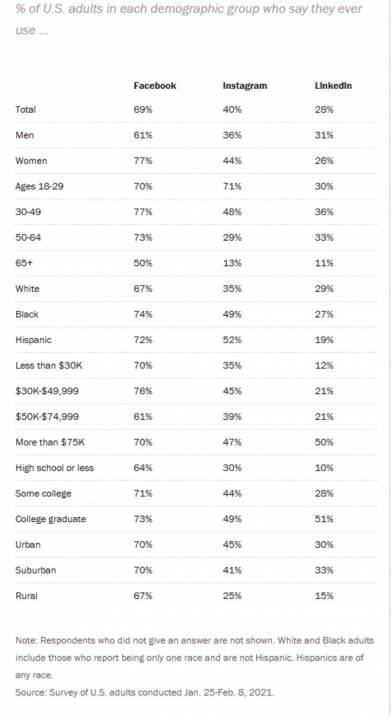
Overall, Facebook is the most used social network worldwide.

However, this does not mean you should focus your marketing efforts on Facebook.

First, define your target audience. This is the market segment that is most likely to have an interest in your product or service. You can base it on age, income level, education, location, or behaviour.

If you are active on multiple social media channels, pay special attention to the platform popular among your target audience.

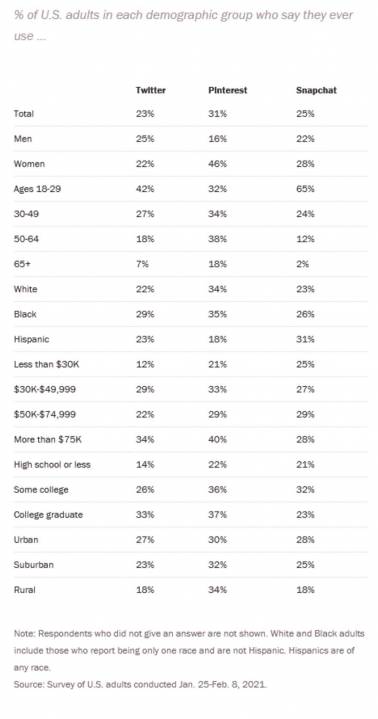
For instance, data shows that Instagram is most popular among 18 to 29-year-olds.

Pinterest is most popular among women, while Snapchat and Twitter are most popular among 18 to 29-year-olds.

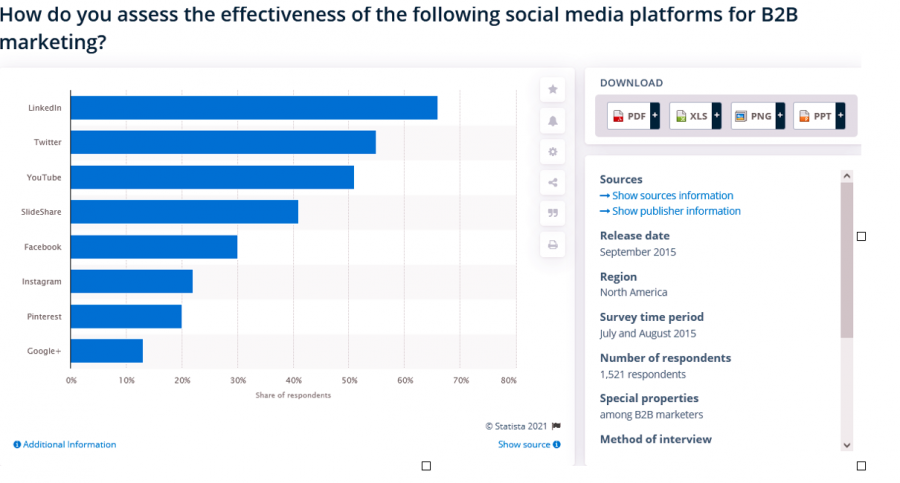
And if you are in the B2B space, LinkedIn might work better for you.

People are quick to ignore irrelevant content. For this reason, try not to make assumptions about your target audience.

Study them, then customize your content to fit their needs and expectations. Your content should bring value to your audience and give them a reason to engage with it.

Your tone should also fit the social media platform you are using. The kind of content your target audience expects differs among platforms.

Facebook users, for instance, expect an informal, playful, and engaging tone. On the other hand, LinkedIn works best with a reasonably formal tone, and Instagram is mostly about aesthetics.

Maximize your reach of the target audience by using features like subtitles and captions. They make it easier for your audience to:

  • Watch your videos in sound-sensitive environments, such as offices or noisy places.
  • Comprehend dialogue where the participants are speaking fast.
  • Stay attentive, helping you pass your message across.
  • Access your content despite having hearing problems.

3. SEO Best Practices Are Not Part of Your Social Media Marketing

A mistake most brands make is ignoring the power of SEO in making their social media campaigns successful.

Just like you’re keen on SEO when creating blog posts, landing pages, and other content for your website, you should do the same with social media.

Practicing SEO can help your profile rank higher in search results. This drives organic traffic to your profile and grows your followers.

The amount of likes, shares, and comments your posts receive affects your social media ranking and reach. So, to start with, you need to post frequently and post high-quality and engaging content. Then make it easy for your followers to share your posts by including compelling CTAs.

Make use of keywords. Find the best performing phrases and words once you do your keyword research for your articles and blog posts. Then, use them in your social media posts.

Visual content is one of the strongest SEO techniques you can use. Use relevant and quality images, videos, and GIFs that load fast.

Taking the step to add subtitles to video and captions to images and GIFs also works in your favor. Google and other search engines cannot watch a video. But the search bots can crawl the text on it and index the video, making your posts more discoverable.

Put SEO tactics into practice, and you’re sure to experience an increase in your reach.

4. Excessive Brand Promotions With No Real Content

For most people, social media is a place to network and communicate, share opinions, get updated about current events, and get inspired.

So if you are using it only to promote your brand and post automatic backlinks to your website, you’re getting it wrong.

You want to create content that arouses the audience’s interest and triggers conversations.

Join conversations on hot topics, but steer away from anything divisive, such as politics. Instead, observe what is happening in your niche and what your audience is already discussing. Then create content that responds to these issues.

Aim at making most of your content valuable and interesting to your audience. And the rest can involve promoting your products or services, but with a lot of engagement and social interaction.

As you post non-promotional content, ensure that the quality is consistent. Unfortunately, most brands make the mistake of assuming any post is better than no post at all. But unlike a personal social media account, a brand’s account is subject to ruthless scrutiny.

One offensive post could make your consumers and potential leads unfollow you. Or, if you are too official, they could see you as boring and begin ignoring your posts.

Stick to posts that reflect your brand and connect with your target audience. Be sociable. And when you do promote your brand, do it subtly.

5. You Are Not Using Hashtags

The famous #hashtag. Almost everyone knows what it is. But few know how to use it properly, when, or even why.

A hashtag begins with the “#” symbol followed by a keyword, with no spaces or punctuations. They provide a way to label your content and associate a post with a particular topic.

Every time a user wants to filter relevant conversations on a particular topic or carry out a hashtag search, they can find your content on the topic. Thus, it helps your target audience find you.

Here are a few pointers for using hashtags:

  • Get specific with your hashtags. Generic hashtags like #sports will not get you the increased impressions or reach you seek. But #sportsshoes is a better choice.
  • Use hashtags to talk about trending topics and get your brand in front of thousands of people.
  • Be careful what you hashtag. So naturally, you want to stay away from sensitive topics that could make people question your brand’s values.
  • Keep your hashtags short and easy to remember.
  • Don’t overuse hashtags.
  • If you plan on starting a new hashtag, ensure that it’s unique and catchy. Something that people will remember when referencing your brand.

Hashtags are a powerful method to gain exposure on social media. They can strengthen your social media presence and help you market your brand more effectively.

6. Your Profile Is Faceless With No Human Interaction

Social media is all about connecting with other people. But a mistake most brands make is relying too much on automation.

Excessive automation could make you lose your human touch.

It’s essential to be present. Participate in the conversation in the comment section. It will improve the value of your social presence and help you build valuable relationships with your audience.

The kind of responses you make also matter. A brand account that is too corporate has no place on social media. When you use stock responses, your audience will know. And they will stop engaging with your posts.

Add a human touch to every post and comment you respond to. For example, when responding to a question from your audience, personally address the individual instead of using pre-crafted marketing and corporate messages. Be authentic, delightful, and inspiring.

You’re going to face some negative responses, that’s for sure, but you need to maintain your cool. Respond to any concerns the person in question may have in a friendly and polite way. This will prevent the conversation from turning negative, which can be damaging to your reputation.

Take every positive and negative comment as a chance to talk directly with a potential customer.

Avoid limiting your social interactions to the marketing department. Instead, involve other departments, such as billing and production. This will ensure prompt and comprehensive responses to your followers’ questions.

When you take the time to respond to comments, and not in a robotic way, it establishes strong connections with your followers, and they’ll like you more.

It’s also best to make personalized and meaningful interactions with the content of other people. This can range from influential professionals in your niche to experts who share the same views as your brand. It will increase the exposure of your content and give you wider access to your target audience.

7. You Neither Track Performance nor Have a Clear Call to Action

You can have entertaining, meaningful, and SEO-friendly content. But if you are not going to tell your audience what to do next, your efforts are going to waste.

Your audience needs the motivation to take the next step to become a customer.

Include a call to action in your posts. It could be an invitation to:

  • Visit your website.
  • Like, share, or comment on the post with their thoughts.
  • Sign up.
  • Shoot you an email.

Once you have CTAs in place, measure the success of your marketing efforts using social media analytics. You can use the metrics provided by the social media platform or use analytics software.

Tracking analytics can give you an extensive view of your social media performance. In addition, they provide actionable insights that you can use to improve your social media marketing tactics and woo the right customers.

Here are some essential analytics to track:

Analytics What it entails
Awareness How big are your current and potential audience? 

What are the demographics?

Engagement How does your audience react to your posts? 

Is there any fluctuation in engagement, and what kind of posts cause the fluctuations?

Conversion How many of your followers heed your call to action. 

Is the traffic that comes from social media to your website likely or not to convert?

Consumer How does your audience feel about your brand?
Influence Who is driving conversations about your brand? 

Do they get others to participate in these specific conversations?

Share of voice What’s the volume of the conversation about your brand, and how does it compare to competitors?

Tracking analytics shows you the impact of your past actions. And you can use these insights to improve your social media marketing strategy continually.

Ready to Step up Your Social Media Marketing?

Have you been making any or all these social media marketing mistakes? Then, it’s time to remedy the situation.

  1. Start by writing down your social media marketing strategy and target audience.
  2. Next, create a social media calendar. Make a plan on how you will create meaningful, SEO-friendly, and share-worthy content that utilizes hashtags and CTAs. You don’t have to worry about your visuals. Instead, use Keevi, a powerful online content editor. Keevi will make your images, videos, and GIFs SEO-friendly, accessible, and high-quality.
  3. Finally, measure the results of your social media marketing efforts, and make improvements where needed.

Take these steps, and you are sure to have your brand presence felt on social networks.

Feature Image Credit: Olenka Serfienko; Pexels

By Hammad Akbar

Hammad Akbar is the Founder & CEO at Keevi, a video content repurposing tool. He has extensive experience in the world of Digital Marketing, SaaS Application development, and building technology companies. In his short career, he managed to bootstrap two technology companies with minimum funds to multimillion-dollar revenues. When he’s not working, he likes to travel to new countries and learn about their local cultures.

Sourced from readwrite

By Peter Roesler

Your brand voice can impact the customers you attract, if they convert, and your profits

Feature Image Credit: Getty Images

By Peter Roesler

Sourced from Inc.

By Bernard May

Every department (or agency) that specializes in a particular marketing channel understandably wants to claim success no matter the brand, audience or industry. Social media managers, Google Ads experts, SEO savants and others all have a stake in their particular strategy being labelled the silver bullet that is driving profitability for the organization or client.

The good part? Every department cares, has drive and wants to be the best. The bad part? From what I’ve seen, this ambition is often misdirected as individuals seek success for their own department rather than the overall success of a multichannel campaign.

Now, this is rarely the fault of individual marketing departments; rather, it’s due to the ways in which we have trained our teams to measure success as individuals rather than as a unit.

It’s time we all understand how to attribute marketing success as a collective, strategic front rather than assuming that the last touch solely defines the success of a campaign.

The Data Points To Omnichannel

Data shows that consumers visit more than two websites (on average) before settling on a purchase decision, and at the same time, nearly 90% of e-commerce shopping carts were left abandoned in March 2020.

This indicates that when it comes to e-commerce shopping, consumers are certainly doing their research and are willing to walk away from a purchase should they find a better option. It’s crucial for businesses, brands and marketers alike to see that consumer behaviour does not exist in a vacuum and that omnichannel strategies are a very real remedy.

Common Attribution Mistakes

Let’s take a look at some very common situations in which the reality of multiple touchpoints (along the customer journey) can lead to attributing success to the wrong places.

Situation 1: A customer sees your product in their social media feed and clicks on your ad but then decides to leave the platform and visit your site directly. After seeing your “On-Site Only” monthly promotion, the customer purchases a couple of products. You deserve a high-five. Attributed success: Organic SEO team. Actual success: Social media, SEO and web development teams.

Situation 2: A customer finds your business with a Google search, visits your site, looks at your latest products and leaves without a purchase. Later that day, a Facebook ad featuring these latest products from your site graces their news feed. The customer is intrigued by the 15% off social commerce offer and makes a purchase. Congratulations. You are a rock star. Attributed success: Social media team. Actual success: SEO, social media, social ads and graphics teams.

Situation 3: The customer sees an Instagram ad, visits your website, adds products to their cart, gets distracted and abandons their order. One week and three “You have items in your shopping cart!” emails later, the customer returns and completes their purchase. Whew — you had to work for that one. Attributed success: The marketing automation team. Actual success: SEO, social media, social ads, graphics and marketing automation teams.

In each of these common examples, there is an unconscious omnichannel mindset that customers have adopted and take part in regularly. Therefore, it should be a priority for your business to not only recognize but also leverage this to the customers’ (and your) advantage.

Leaving A Trail Of Bread Crumbs

Expanding your marketing (and attribution) strategy from single channels to omnichannel is akin to leaving a trail of “branded bread crumbs” to attract, nurture and ultimately convert customers. Here are just a few ways you can connect the dots and get your omnichannel machine moving:

• Facebook and Instagram: If you don’t have the Facebook pixel installed on your site (and you are running social media ads), you’re missing out on a huge opportunity. The pixel gives you the ammunition to retarget those non-converting website visitors with more personalized campaigns so you can bring them back. As these remarketing campaigns are only triggered by (shown to) those who have already been to your website, you not only know the multiple points of attribution, but you can also see what group of customers (and ad groups) is converting at a higher level.

• Google Ads: The remarketing/retargeting trend certainly did not originate with Facebook. As with Facebook, though, you can use this strategy to target your customers “beyond the click,” for example, via their Google news feed (Discovery ads), YouTube, display, dynamic remarketing ads or even just your website. Again, these segmented, remarketing-specific ad sets will be triggered by the placement of your Google Ads pixel — so you know where they found you first and what brought them back.

• Marketing automation and email marketing: This is an oldie but a goodie. Using supplemental nurturing emails as part of your various ad campaigns can bring that warmer traffic back — to either fuel their interest or even close the sale altogether — via automation. Seeing as you can provide specific messaging, templates and calls to action across your different campaigns, your marketing automation platform will show you which audiences, campaign types and emails are driving the highest returns.

Tracking And Attributing Success

The single biggest hurdle when it comes to applying (and benefiting from) omnichannel strategies is tracking success and attribution. This means that you need to track every campaign, ad variation, website, landing page and clickable link.

Set up goals in Google Analytics; create custom tracking links for emails; and ensure that primary, retargeting and nurturing campaigns (of all types) are separated and easily searchable should you need to dig up granular results.

If you can’t track it, you cannot accurately attribute success to it.

When channels start to multiply, make sure that your cross-channel marketing teams increase communication to keep everyone on the same page. SEO teams need to meet with Google Ads teams, who need to talk to the email marketing team, etc. Effective omnichannel strategies cannot function without communicating the big picture.

Going omnichannel won’t happen overnight and can include far more than the tactics I provided above, but the sooner you begin, the faster your business can reap the benefits.

Feature Image Credit: getty

By Bernard May

Bernard May is the CEO of National Positions, a 5-time Inc. 500 company, award-winning marketing agency and Google Premier Partner. Read Bernard May’s full executive profile here.

Sourced from Forbes

By Chad S. White

Email marketing is complicated. A number factors and subfactors govern deliverability. The potential for email rendering problems is mind-bogglingly large. And email technology and tactical issues continue to evolve.

However, not everything in email is complex.

Some aspects are quite simple — and yet companies still regularly struggle with them. In most cases, they’re probably just unaware of the problem or just how easy the fix is. In other cases, turnover on their email team means expertise in the channel’s nuances has been lost. Whatever the reason, here are 10 common email marketing mistakes that are relatively simple to fix:

1. Not Using a Recognizable Sender Name

Subject lines get too much credit for driving open rates. Your sender name actually has a bigger impact on whether your subscribers open your emails. That makes sense for two reasons:

First, email marketing is a permission-based channel, so who’s sending an email to a recipient is critical. If your subscriber doesn’t recognize your name, it can lead to your emails being ignored or, worse, reported as spam. And second, email marketing is a relationship-based channel, so your sender name represents the value that your subscriber has gotten from your emails and from your brand previously.

So, put your brand name front and center and don’t change it from email to email. If you want to safely mix things up with your sender name, try using from name extension strategies. For example, you can emphasize that an email is about a Black Friday sale by changing your sender name to “YourBrand Black Friday.”

2. Not Optimizing Your Preview Text

Preview text is the text from inside your email that’s displayed in the inbox either to the right of your subject line in inboxes like Gmail or underneath your subject line in inboxes like the iPhone Mail app. Often, inboxes display twice as many characters of preview text as they do subject line text, so it’s a valuable opportunity to communicate more to your subscribers about what your emails is about before they open it.

Make sure you take full advantage of what text appears as preview text by using either visible or invisible preheader text. But more than that, run some A/B tests on your preview text, just like brands routinely do for their subject lines. And if you want to take it up a notch further, use multivariate testing to try different subject line and preview text combinations to see which one drives the most clicks for your email.

3. Including Too Much Copy

A good rule for writing marketing copy is to write what you’d like to say, and then cut the number of words in half. A good rule of writing email marketing copy is to cut the word count in half again.

Many marketers seem to have lost their talent for brevity, says Fabricio Lopez, Expert Services Cloud Manager for Oracle Marketing Consulting. “I grew up in South America during the ‘80s when telegrams were still very prominent,” he says. “I used to watch my siblings write incredible messages as part of their jobs. I think we lost that ability when email entered the scene, although Twitter brought back some of that ability. In my opinion, marketers should practice getting the message reduced to the least number of words possible and then embellish it from that point, the result should be a concise and hard hitting CTA.”

If you can’t avoid sending an email with a lot of copy, make sure that you break the copy up and make use of subheads and bullets where you can. That will make the copy much more approachable.

4. Using Font Sizes That Are Too Small, Especially on Mobile Devices

Using responsive email design isn’t enough. Brands also need to use mobile-friendly design principles. Chief among those principles is using font sizes that are big enough for people young and old to easily read in a variety of environments, such as outside in the sun or in bed in the dark.

For standard text, we recommend text that’s 14pt to 18pt. Your headlines and subheads should be even bigger. If this recommendation alarms you because you worry it will make your emails longer or limit what you can put above the fold, keep in mind that while many subscribers will scroll below the fold, almost no one will pinch-and-zoom in order to read your text.

5. Using Low-Contrast Text

When the colour of your text is similar in value to the colour of your background, your text can be difficult for some subscribers to read, particularly if your text size is small. Using high-contrast text — such as black text on a white background — not only helps people who have poor vision, but is also better for someone who’s out in bright sunlight with their mobile device. It’s also just better for everyone in general.

Text should have a contrast ratio of at least 4.5:1, according to the World Wide Web Consortium’s Web Content Accessibility Guidelines. If the text is 18pt or larger or is bold and 14pt or larger, a contrast ratio of 3:1 is fine.

The trickier problem that I see routinely is brands running HTML text over background images that have colours with highly varied values. The result is that some of the text is legible while other portions are not. The solutions to this include picking a different image, darkening or lightening the image, cropping the image differently, and positioning the text differently.

6. Not Using Alt Text for Your Images, When Appropriate

Sometimes the images in your emails don’t load, usually either because the subscriber is blocking them or they are experiencing bandwidth issues because of spotty wifi or cellular coverage. When this happens, your images won’t be displayed to help convey your email’s message.

To serve your subscribers in these situations, as well as to serve your subscribers who are using screen readers, be sure to add alt text to your images, when appropriate. That “when appropriate” is important, because not every image needs alt text. Logos and product images? Absolutely. But generic images that are there to set a mood? Generally using an alt tag on those isn’t necessary and leads to unhelpful alt text like “picture of a sunset” (which is a real example of alt text I’ve seen).

7. Using Graphical Buttons

Creating call-to-action buttons that are completely graphical means that the text of your CTA won’t appear at all if images are disabled or don’t load. For that reason, marketers should always use bulletproof buttons, where hyperlinked HTML text is placed over a button made from a filled table cell or some other non-image-based construct.

Once you settle on a button design that you like, use it everywhere, just change the CTA text. That turns this shift into largely a one-time effort.

8. Clustering Hyperlinked Elements Too Closely Together

In a world full of touchscreens, both on mobile and larger devices, being touch-friendly is important. When linked images and text are too close to each other, it’s easy for people to miss their target and end up on a landing page they’re not interested in. Getting one click is hard enough, so expecting a second click because your email is poorly designed is unrealistic.

Using larger text, as already mentioned, can help. But having decent padding between hyperlinked elements is the biggest key. This is particularly important for CTA buttons. Having plenty of white space around them not only makes them easy to click, but also makes them stand out, which is exactly what you want your CTAs to do.

Also, avoid linking items that you don’t need to. Focus on linking the elements of your design that people are most likely to click on, such as product images, buttons and text links.

9. Making Your Unsubscribe Link Difficult to Find

Some brands are still under the impression that if they make their unsubscribe link difficult to find that fewer subscribers will opt-out. Unfortunately, when people can’t find the unsubscribe link because it’s small or buried in a big block of administrative text or legalese, they simply click the report spam button instead.

For subscribers, the effect is the same: no more emails from the brand. However, for the brand, their spam complaint rate has gone up, potentially hurting their deliverability. Plus, they probably irritated the subscriber, making them less likely to re-subscribe at any point in the future.

10. Having Your Emails Clipped in Gmail

If the coding of your email (excluding the file sizes for any images) is more than 102K, Gmail will clip your email and force your subscribers to click a “View entire message” link to see the rest of your message.

Google message clipped


Besides looking suspicious, clipping hides content from your subscribers … including your unsubscribe link. So, not only does having your email clipped reduce its effectiveness, it erodes trust and leads to elevated spam complaints from subscribers who can’t find your unsubscribe link.

All of these mistakes have relatively easy solutions. Some, like writing effective and meaningful preview text or alt text, take a little time for each email you send. Others, like font sizes and button designs, are one-time efforts that pay off for the long haul. All are very much worthwhile.

Feature Image Credit: recha oktaviani | unsplash

By Chad S. White

Chad S. White is the author of Email Marketing Rules and Head of Research for Oracle Marketing Consulting, a global full-service digital marketing agency inside of Oracle.

Sourced from CMS Wire