Instagram has launched more than 10 money-making tools for creators since 2020.
From subscriptions to NFTs, the Meta-owned platform is testing many ways for creators to make money.
Insider made a timeline to show all of Instagram’s monetization features — and which ones are gone.
Instagram has launched more than 10 money-making features aimed at creators in the last two years.
Executives across Meta’s family of apps — as high up as Mark Zuckerberg — have made it clear that they want Instagram to be seen as a place where creators can “make a living.”
But as Instagram rolls out new monetization products for creators, not everything sticks around.
“I’m always a little cautious because Instagram changes all the time,” Yesenia Hudson, a content creator with 40,000 Instagram followers, told Insider. “I don’t know how long something is going to last.”
One of Instagram’s earliest monetization features was IGTV ads, a move to compete with YouTube’s Partner Program (also known as AdSense) that pays creators a percentage of ad revenue on videos. IGTV ads launched in 2020 and was shut down in early 2022.
Chris Ducker once famously said, “Your personal brand is what people say about you when you are not in the room.” During life, you’ll undoubtedly come across different types of leaders.
The cliché of the angry boot camp drill sergeant certainly represents one form of leadership, but on the opposite end of the spectrum, we have business leaders who get results from their employees by displaying empathy and understanding.
Such interactions go a long way in establishing your personal brand with those you interact with on a daily basis. But for those looking to establish themselves as an authority in their niche, personal branding goes for even greater reach.
Why Building A Strong Personal Brand Matters
Your personal brand is what you project to the world. It’s how others see you, and how they will ultimately talk about you. For highly visible leaders, your personal brand will likely have a major influence on whether someone decides to do business with you.
Many like to think that they do business with people, rather than a faceless company. A leader with a strong personal brand can essentially become the face of the company to customers and prospects. Unlike a company, a person is someone we can become attached to and more easily identify with.
These results are readily apparent through social media. On average, brand messages shared by employees have a 561 percent greater reach than if those same messages are shared through branded channels. This content also receives eight times as much engagement.
If regular employees can have that type of impact just by sharing brand content, it’s well worth considering how much reach a leader can have when they share their original insights. That reach and engagement is what will allow you to grow your business and establish yourself as a genuine authority in your niche.
Be Consistent In Your Efforts To Build A Personal Brand
Northeastern University recommends, “Before you start crafting your personal brand, you also need to determine who you’re trying to reach. Is it other industry thought leaders? An individual at a particular company? Recruiters? The sooner you define the audience, the easier it will be to craft your story, because you’ll better understand the type of story you need to tell (and where you need to tell it).”
While it’s true that many business leaders have built their personal brand through blog content, this isn’t the be-all end-all of brand building. Public speaking, or simply sharing your insights on social media, can also help you establish credibility in your niche.
What matters more than your preferred platform is establishing consistency in how you present your knowledge and insights. For example, using a tool like Boosted lets you easily customize video templates with your own font, logo, music and more to help you create a consistent look each time you post content to social media.
A distinct visual style will clue viewers in that they are looking at your content, and not anyone else’s. When someone is scrolling through their feed, they’ll immediately recognize your content.
Consistency also means that you will regularly devote time to your personal branding efforts. A flurry of posts at the beginning of your branding initiative won’t do you much good if you quit writing and posting after three months. A strong personal brand requires ongoing effort and maintenance.
Share Content That Truly Builds Your Brand
The type of content you share as you build your personal brand goes a long way in defining how others perceive you. It’s one thing to have a quick wit — but if you’re all witticisms without any actual meaningful insight for your industry, it will be easy for others in your niche to ignore you.
On the other hand, sharing case studies, insights from your business and personal experiences, client success stories and other value-driven content will help you establish a brand that people actively want to engage with.
To find the right focus for strengthening your personal brand, executive coach and speaker May Busch recommends asking trusted people to tell you the words that they associate with you to identify the gap between your current reputation and what you want your personal brand to be.
She explains, “Once you’ve identified the gap between perception and reality, choose the aspect that will make the biggest difference in changing perceptions. What will give the biggest boost to your personal brand? What’s the one thing that will make the other parts of the gap easier to close? That’s what you want to work on first.”
Whether interacting with someone on social media or writing a new blog post, always consider how it will help you cultivate your desired persona and provide actual value to your intended audience. This will help you become more than just another personality — you’ll be an authority.
Building A Personal Brand That Delivers
The personal brand you cultivate will greatly influence how others perceive you (and your company) long before they do business with you. You must take ownership of your personal brand so that you can direct the conversation.
By staying true to yourself and being proactive in sharing your unique message, business prospects, industry leaders and others will come to know who you are and what you stand for. They’ll view you as a reliable, trustworthy source, as someone who provides meaningful insights.
With a strong personal brand, the results you’re looking for in your career are sure to follow.
John Hall is the co-founder and president of Calendar, a scheduling and time management app. He’s also the strategic adviser for Relevance, a company that helps brands differentiate themselves and lead their industry online. You can book him as a keynote speaker here and you can check out his best-selling book “Top of Mind.” Sign up for Calendar here.
Your corporate blog could one day lose its momentum.
Corporate blog content creation is a top priority of more than 50% of marketers. And with so many benefits — including the ability to reach, engage and convert prospects — you can expect this number to increase in the years to come.
The good news is that any company — regardless of size or industry — can benefit from a corporate blog. However, there’s no guarantee of success. Your blog could one day hit a wall.
Here are five reasons why your corporate blog has hit a wall and what you can do to get back on track.
1. No content calendar
A content calendar shouldn’t be optional. It’s best to make it a mandatory requirement within your organization. Without this, you’re inviting trouble such as an on-again-off-again posting schedule or publishing duplicate content.
A content calendar doesn’t have to be complex. It can be as simple as a Google Sheet with columns for title, keyword, author and proposed publication date.
2. Out of ideas
Through my years of consulting companies on how to drive revenue and traffic through corporate blogging, I’ve found this to be the biggest reason for failure. When you run out of ideas, one of two things happens: You stop blogging altogether or you stop sharing quality content.
Before this happens, make a list of places you can turn to generate ideas:
Brainstorm with other members of your team
Review competing blogs for inspiration
Use a keyword research tool
One of these ideas may be all it takes to clear your mind, break out of your funk and create a topic list you can rely on for months to come.
3. Not enough contributors
If you’re the only person contributing content to your company’s blog, it won’t be long before you hit a wall. This happens for many reasons, such as running out of ideas (see above) or simply burning out.
Here are some places you can turn to find contributors:
Colleagues (even if they aren’t in the marketing department)
Clients, partners, affiliates or suppliers
Outside writers who are willing to submit guest posts
As your list of contributors grows, the amount of content you personally create will (or can) decrease.
4. Too heavy of a focus on one type of content
Creating the same type of content — day after day — can result in burnout and/or writers’ block. Not to mention the fact that it can become tiresome for your audience to read.
Creating various types of content will maintain your interest in writing while keeping your audience coming back for more. These 10 ideas are a good place to start:
Listicles
How-to guides
Interviews
Infographics
Personal or brand stories
Industry news or current events
Checklists
Resources
Quizzes, surveys, or polls
Frequently asked questions (FAQs)
There are sure to be specific types of content that you prefer to create. And that’s okay. Just remember to mix things up now and again. It’s beneficial to you and your audience.
5. Lack of time
Even if it’s your full-time job to create content for your company’s blog, it doesn’t mean that time is always on your side. According to Orbit Media, it takes slightly more than four hours to write a typical blog post of roughly 1,400 words. And that doesn’t take into consideration other tasks, such as research and editing.
When time is tight, writers tend to cut corners. Maybe you lower your word count. Maybe you skip over proofreading. Perhaps you turn a blind eye to optimizing your content for search engines.
Fortunately, there are many ways to fight back against a lack of time, such as creating an ironclad content calendar and accepting guest posts.
Let these pointers direct you down the path toward corporate blogging success. If your blog has hit a wall, stop what you’re doing and recalibrate your strategy.
Chris Bibey is a writer, content marketer and business owner. He’s been featured in Forbes, Fast Company and hundreds of industry-specific blogs. He currently manages Chris Bibey Digital, a content-creation agency based in Pittsburgh, Pennsylvania.
Mind maps are a powerful productivity tool which you can use across a variety of areas. Let’s see how mind maps can help you create a visual blog
A blog post containing plain text blocks can hardly attract the present-day audience and retain their attention till the end. Instead, visual blogs or visual content is capable of offering improved reader engagement and better responses.
While creating a visual blog requires more effort than a plain blog post, a mind map can significantly reduce your labour.
Let’s learn about the stages of creating a visual blog where you can incorporate a mind map.
1. Use Mind Maps to Catalog Resources
To write a resourceful blog, you need to collect your material from diverse sources. In most cases, you also need to include citations at the end of your blog post. This process might be easy while you’re writing a 500-word blog post, but what about a blog post with 2000+ words?
You need to collect data for that blog from various primary and secondary resources. Keeping track of this information and its sources can be challenging. Fortunately, a mind map is a handy solution.
This method will help you sort ideas according to their sources, using either the complete URL or just the name of the website. With this, you can easily include references or in-text citations.
2. Assemble Suitable Quotations With Mind Maps
Quotations are a visual blog component that makes it look catchy. Depending on the style, some blogs might require you to add multiple quotations on the same or different topics.
Whatever be the case, using a mind map will help you visualize your primary quotes in one place and save you from switching between different sites. Thus, it becomes easier to choose the final ones for your blog.
Moreover, a mind map is also useful while writing quotation-based blogs where you need to add listicles of quotations.
3. Mind Maps Can Help You Design Infographics
An infographic is probably the most common component of a visual blog. You may describe your ideas elaborately in a blog, but a reader might not have the patience to read till the end.
In this case, including an infographic will help you convey the crucial data and information of your blog clearly, without spending as many words. Readers can quickly understand it due to the visual representation of the data and stats.
Since an infographic should only contain crucial data, a mind map will help you filter the necessary points. Create a mind map and include all the important info of a blog. Then, select only the most beneficial ones.
Moreover, you can use a mind map to create different sections of an infographic and to sort the data for each segment.
4. Create Flowchart-Type Mind Maps for Process Explanation
A flowchart refers to a diagram that helps you visualize the individual steps of a process. If you’re planning to write a blog that involves chronology or a sequence, a flowchart is a compulsory part of it.
Mind maps should not always have a shape like a spider. It’s possible to make a right-facing mind map—a perfect substitute to the traditional flowchart. For blogs about historical events or scientific processes, you should use a mind map to note down yearly events or steps sequentially.
The good thing is, you can also include these flowchart-type mind maps in your blog. Thus, readers will have a better idea about the process.
5. Organize Ideas With Mind Maps
When you decide to write a blog on a topic and start brainstorming, numerous ideas come to your mind. At this stage, you may not be sure about which ones to include and which ideas to discard.
Nevertheless, you must note down every idea to make sure you don’t miss anything. Use a mind map for this purpose when you create an outline for a blog.
Sophisticated mind mapping tools allow you to write down an idea immediately after it comes to your mind. Later, you can move the points to anywhere on that map. This feature will help you organize your thoughts as topics, sub-topics, and related ideas about the prime concept.
Use Mind Maps for Attractive Blogs
Only a visual blog can get you the desired readership and response. With a mind map, you can make all the different stages of blog creation seamless.
You probably hear the word “branding” thrown around a lot. Branding has become a common topic of discussion in entrepreneurship – and for a good reason. Branding isn’t just a memorable logo. It’s vital to your online presence and the success of your business.
What exactly is a brand?
Put simply, a brand is a promise of a specific experience that you create through the sum of different elements, including your logo and tagline, messaging, promise, a specific personality, and visual elements.
Building a brand helps you cultivate trust in your target market, build a community, and showcase yourself as an authority in your field.
Here are additional reasons why you should build your brand as an entrepreneur:
Instant recognition. As an entrepreneur, much of your business growth depends on your getting out there and marketing. With the number of entrepreneurs on the rise, it can be hard to distinguish yourself. Wouldn’t it feel nice for people to know your company without your ever having to introduce it?
A logo is one of the key components of your brand. As the “face” of your business, it’s what people will instantly recognize. A professional logo design should be simple enough to be memorable but powerful enough to give your business the desired impression.
Increased client attraction. Do you find yourself chasing clients? Perhaps they vanish into thin air after your initial meeting. Don’t let this happen to you.
A strong brand is like a magnet for your business. When you focus on building your brand as an entrepreneur, you become exposed to a larger audience. People can find you online and interact with you easily, attracting more business than you know what to do with.
More than regular clients, your brand attracts higher-quality ones. Successful people want to do business with other successful people.
Enhanced credibility. Many smart entrepreneurs struggle to get their big break simply because they have no idea how to position and present their know-how, skills and experience. They lack credibility among those outside their traditional circle of influence.
Credibility is extremely important for entrepreneurs. The more credibility your business has, the more likely people will buy your products or services. A brand is a strategic representation of everything you embody. It expands your circle of influence and boosts your credibility.
Ability to charge more. With increased credibility, you’ll be in a better position to charge more for your product or service.
As an established brand, you may have a limited amount of time in a day to do all the work your business demands. As demand for your skills, expertise, and time increases, you can start to charge more for your time.
Charging more allows you to decide how much you want to work, meaning more freedom.
A better network. You may have heard it said, ‘who you know is crucial if you want to make it in business.’ This couldn’t be further from the truth.
As you grow your brand, you will develop an ever-growing network of heavy hitters in your industry. This network can come in handy when it comes to growing your business. It’s a beautiful cycle.
Whether you want to release a new product in the market or try another route in your business, having a network of people at your disposal can prove to be very valuable.
Inspires employees. Your employees need something to work towards – something more than work and salary. When your employees understand your business’ mission, they’re more likely to feel that they’re part of something bigger and more likely to work to attain the goals you set.
Building a strong brand is like turning the company logo into a flag your employees can rally around.
What are the best branding practices?
Become familiar with the best strategies to avoid common pitfalls when you begin to build your brand. A single misstep can hurt your reputation and set your brand back.
Here’s how to avoid that:
Harness your personality. Your personality is the most unique thing about you, setting you apart from your competitors.
Believe in yourself as a brand. You become a brand the moment you start your own business.
Know and embrace your strengths and weaknesses. If you want your brand to come off as authentic, you have to own your strengths and weaknesses.
Build a website for your brand. Unlike social media profiles, your website is something you own. Use this personal platform to share blog posts, digital products, webinars, and any other content you deem appropriate for your audience.
Provide value at every chance. The people who follow your brand are interested in learning what you already know. For this reason, try to share content that provides value for the reader.
Foster relationships with other popular brands. Interacting with other well-known brands in your industry is another way to build your brand. Your competition is not always the enemy. You can find success when you partner with your competition on specific marketing campaigns.
Keep reinventing yourself. If you commit mistakes while building your brand, reinventing yourself will help to present a new persona to your online audience.
Branding is not something that occurs overnight, and it’s definitely not something that you should leave to chance. If you really want to stand out from the crowd, concentrate on building your brand.
To build a successful brand, start by understanding the branding best practices. Brands do not exist in a vacuum. Build relationships with movers and shakers in your niche to stay ahead of your competitors.
The world is more digital now than ever before and that’s sure to last in 2022.
Ninety percent of Americans say the internet has been essential to them during the pandemic. Indeed, basic everyday tasks such as buying groceries, connecting with family, and conducting business have been upended to rely on digital media. The pandemic ignited and expedited digital adoption, the aftermath of which will continue to percolate across all industries for years to come — and marketing is no exception.
The biggest brand victories and failures won’t be won or lost on traditional commercials. They’ll happen on TikTok, Instagram, eSports, and smart speakers. The recommendations consumers trust most won’t come from celebrities on infomercials. They’ll be from nano-influencer on Stories, Reels, and Shorts.
The savviest brands, employers, and users will navigate 2022 using a ‘digital first’ mentality with a focus on monitoring and activating these key trends:
Augmented Reality and Virtual Reality
Virtual and augmented reality were growing trends before the pandemic but quarantine, remote work, and the lasting purgatory between pre-and-post pandemic life accelerated adoption. Need further convincing? The parent company of the world’s largest social network, Facebook, recently changed its name to Meta. That’s short for the metaverse, a virtual world where people socialize, work, and play. Just this week, Meta launched Horizon Worlds, a free app for socializing in virtual reality, available to users ages 18 and up in the U.S. and Canada.
The metaverse isn’t a new concept, nor is it distinct to Facebook. Back in March, Microsoft announced Mesh, a new mixed-reality platform that allows people in different places to collaborate and share holographic experiences across devices.
Virtual and augmented reality trends extend beyond Big Tech. Consumer brands such as Sephora and Warby Parker adopted augmented reality years ago to make online shopping more experiential and efficient. But Facebook’s big bet on the metaverse gives it new weight and momentum. So, will 2022 be the year B2B marketers crack the meta nut?
Voice Search
Smart speakers saw record growth in 2020, with over 150 million units sold globally. Voice search is poised to continue to grow in the coming years. Why? The biggest reasons are intuitive: it’s easy and hands-free. 71 percent of consumers favour voice-searching to type-searching. Voice shopping is projected to reach $40 billion in 2022 and by 2024, there are projected to be 8.4 billion voice devices across the globe.
There are admittedly technological limitations with voice search, which relies on Natural Language Processing but even so, Google’s speech recognition has a 95% accuracy rate for English searches. Google Voice Search also offers massive global scale, supporting more than 100 languages.
Consumer brands, such as Domino’s, have been active in this space for some time. Back in 2016, Domino’s launched its skill on Amazon Echo, which enables users to order delivery via Echo.
The next phase of winning in voice search will transcend beyond basic speaker skills and into all digital content. In 2022, companies and brands who optimize their websites and content for voice search will drive more traffic to their site and increase their SEO ranking.
eSports
By the end of 2021, the global eSports audience is projected to reach 474 million users, with revenues of nearly $1.1 billion. eSports are on the rise but still in their nascent stage, which means a massive opportunity for those who get it right.
Verizon is well-known for being cutting edge in their digital marketing – and eSports is no exception. In 2020, Verizon became an official partner of League of Legends regional league and earlier this year, Verizon and video game developer Riot Games expanded this partnership with Verizon becoming a partner across League of Legend’s three annual global events.
With evolving pandemic-related regulations on in-person sporting events and large venues, 2022 could be the year eSports adoption and sponsorships go mainstream.
Digital Payment
The more time users spend on digital, the more money they spend on digital. Person-to-person payments had promising growth pre-pandemic and COVID-19 ignited and expedited this trajectory.
In 2020, PayPal volume payment growth was up a record 31% and that’s not slowing any time soon. PayPal projects a similar increase, of about 30%, in 2021. And it’s not just PayPal, payments and social media continue to converge through the rise of other platforms such as Venmo and Zelle. In Q3 2021, Zelle processed $127 billion on 466 million transactions.
Major corporations, small businesses, and everyday users are relying more on digital payments for everything from buying a car to reimbursing a friend for lunch.
Micro-Videos
The rise of TikTok during the pandemic was widely reported. In Q1 2020, TIkTok received 315 million downloads – that’s more quarterly downloads than any app in history but whether TikTok maintains dominance on the micro-video market remains to be seen. After all, Instagram usurped Snapchat in Stories – so will the platform eclipse TikTok in Reels? Time will tell but early metrics are promising. 87% of Gen-Z TikTok users agree that Reels is very similar to TikTok. Reels also receive 22% more engagement than regular video content.
Instagram Reels isn’t the only micro-video format poised for growth in 2022. Take YouTube Shorts, a short-form video experience launched by Google in 2020, for example. The biggest case for YouTube Shorts is their institutional userbase: every month, 2 billion viewers visit YouTube.
Brands who capitalize on this micro-video trend – and seemingly algorithmically favored format — will win in 2022.
Nano-Influencer Marketing
By the end of 2021, influencer marketing is projected to reach $13.8 billion but not all influencers influence equally. Studies show that nano-influencers, those with fewer than 5,000 followers drive the highest engagement rate, followed next by micro-influencers, users with 5,000-20,000 followers. In fact, users with over 1 million followers drive the lowest engagement rate. That’s why 77% of marketers would rather work with micro-influencers than celebrities.
Another perk of nano and micro-influencers is their smaller following typically makes them more affordable. Micro-influencers can activate more targeted, niche audiences and are often considered more authentic and trustworthy by their followers.
To-date, influencer marketing has been most effective for brands targeting Gen-Z but as Gen-Z ages and Millennials, Gen-X, and Boomers all spend more time online, there could be a white space for brands to sway more demographics via influencer marketing.
Privacy Regulation
So, what won’t grow in 2022? Third-party cookies usage.
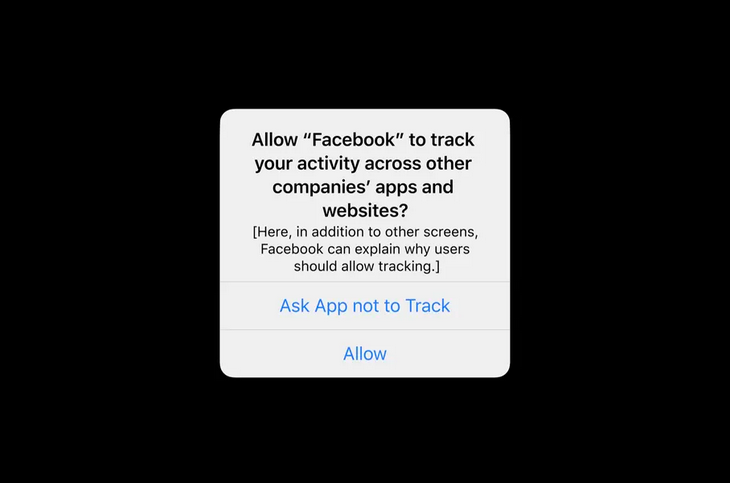
This year, Google announced Chrome will phase out support for third-party cookies by 2023. Apple launched a pop-up on iPhones that asks users for permission to be tracked by apps and Facebook announced its engineers are working on a workaround to serve relevant ads to users without leveraging personal data.
As Big Tech rolls out these new privacy restrictions, more platforms and regulation are expected to follow suit and the implications could pose serious limitations for advertisers.
**
As platforms, formats, regulations, and the pandemic continue to evolve, adaptability will remain the greatest asset for brands, employers, and users looking to build an effective and resilient digital strategy in 2022.
I am a digital and social media strategist with experience at a number of industry-leading brands, including Fox News, Bloomberg and Goldman Sachs. I am an expert at running both paid and organic social media campaigns and have advised some of the most preeminent media personalities and business executives on social media. Now, I run a digital media consultancy and am a speaker and writer on the evolving digital landscape. My articles have published on Fox News, Fox Business, Bloomberg.com, Bloomberg Businessweek and Thought Catalog. I’ve also been a guest on Bloomberg Radio. When I’m not analyzing what’s about to break the internet, I enjoy chasing around my two kids.
A report reminds us that companies can still see what we do in their apps
A report from the Financial Times acts as a reminder of what Apple’s App Tracking Transparency settings do and do not do to protect your privacy (via Ars Technica). While asking apps to not track you does keep them from collecting and selling data tied to your personal advertising identity, it doesn’t keep developers from collecting any information about you at all.
According to the Financial Times, though, developers have taken Apple’s rules to mean that they’re allowed to target ads at cohorts, or groups that people are put into without needing to have unique IDs assigned. The report says that developers like Snap, Inc. have continued collecting some data, including from those who have asked them not to track them, with the justification that anything that could be tied to an individual user would be anonymized and grouped.
It’s a similar concept to FLoC, Google’s plan for a post-third-party cookie internet, where individuals are assigned labels describing what kind of things they might buy instead of being tracked individually. Ads can still be targeted, without advertisers having to keep track of everything everyone does.
Some developers have admitted, though, that they also try to make predictions about what users do after seeing ads based on info they receive from ad companies. The Financial Times also says that some personalized data, like IP address, location, and screen size, still makes its way to advertisers, to help ensure that ads fit properly and show up in the right language.
According to the report, Facebook and many other companies are planning on selling ads using aggregated or anonymized data. While Facebook partially blamed Apple’s policies for it missing its earnings goals last quarter, it’s estimated that the ads affected by the rules only made up 5 percent of its annual ad revenue. In other words, Apple’s ad tracking permissions were never going to destroy Facebook’s ad business.
None of this is to say that there are no privacy benefits to hitting the “Ask app not to track” button — a previous Financial Times investigation found that Snap, Inc, Facebook, Twitter, and YouTube lost $10 billion combined after the feature was implemented, so there was obviously a market for ads driven by that data. But it’s good to remember that even Apple, a company that prides itself on “standing up” for its users, can’t stop companies from collecting your data with a single switch.
Purpose is the raison d’être of a company, the permanent basis of its strategy. Every company has a purpose, explicit or not; however, few – although this is changing – have a conscience. To be clear, the Mafia has a purpose, but consciousness is just another story.
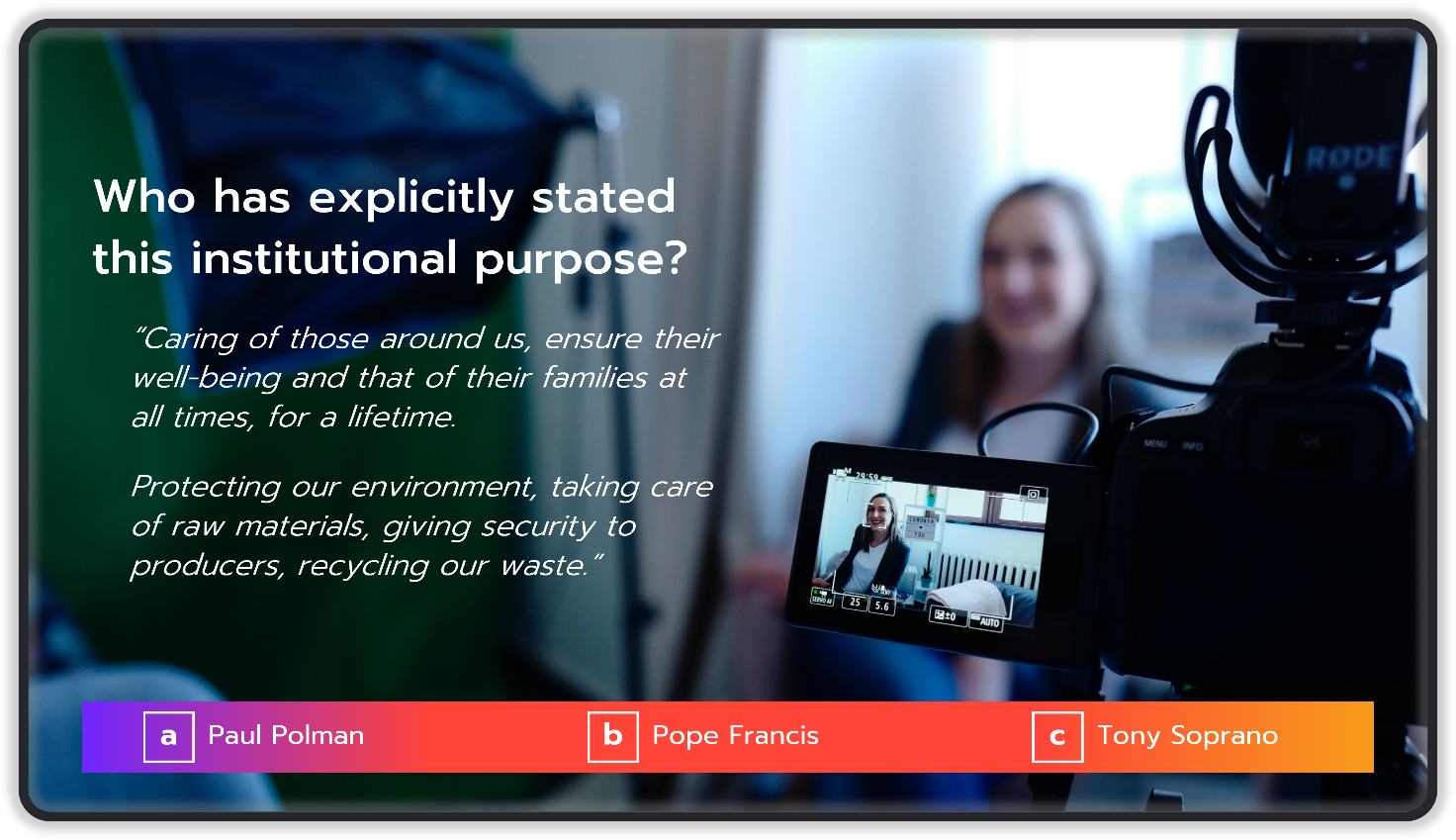
Let’s start with this Litmus test: “Who said this statement?”
To start off relaxed, I’d like to invite you to play and take part in this riddle with three possible answers, although only one of them is the right one.
The question is: Who has explicitly told this institutional purpose?
The purpose under scrutiny is:
“Caring for those around us, always ensuring their well-being and that of their families, for a lifetime.
Protecting our environment, taking care of raw materials, giving security to producers, recycling our waste.”
The potential answers are:
Paulus “Paul” Gerardus Josephus Maria Polman, Former CEO of Unilever;
Pope Francis, 266th Pope of the Catholic Church;
Anthony “Tony” John Soprano Sr., Capo di tutti Capi – From The Sopranos crime drama TV series.
Before giving the right answer, we must admit that all three could have said that quote, one talking about the Unilever raison d’être, Pope Francis in his second encyclical, Laudato si’, and we are left with Tony Soprano whom you probably know, I guess.
And the correct choice is the number “3”. Words more or words least, this was the way Tony Soprano described to his psychologist the business he was in and leading.
By this, what I mean is that everyone has a purpose, even the Mafia, yet few have a conscience and even fewer are specific in the way they define it.
Consciousness needs sincerity rather than authenticity
For a company, being true to itself means being concerned, admitting vulnerability, and making bold choices. For example, stopping collaborating with other firms that do not meet a company’s standards of conduct; assuming responsibility for mistakes that affect society; abandoning businesses that are no longer legitimate. In other words, being consistent between what the company thinks, does, and says.
Behaving truthfully and being unapologetically driven by values are two of the essential characteristics that today’s society is demanding from each institution.
The key difference between being authentic and sincere is that a business can be authentic and behave without a sense of morality or ethics, while it is impossible to think of a sincere company behaving in that way.
On the one hand, we all have examples of rude, unresponsive, and abusive companies that are authentic but are seldom true to themselves and conscious of others. On the other hand, sincerity is about recognizing that the company lives in a world that goes beyond its own borders. It is about deeply considering its impact on the planet, being self-conscious, purposeful, and going beyond the numbers to confirm and express its true nature. Being sincere means knowing that there is a pathway to live and work by its values, down to every detail. In this way, a company can become a genuine and inspiring brand.
Michael O’Leary, Ryan Air (Credit: Criptomonedas) & Yvon Chouinard, Patagonia (Credit: DUNA) | Authenticity and sincerity… Capisci?
Another important issue to consider is that authenticity is an innate behavior and sincerity is an acquired one.
Babies are authentic, kids learn to behave sincerely. The same can happen with companies.
Business authenticity is a broader definition that considers the entire spectrum of being true to itself, while sincerity is more focused, brings wisdom, care, and a greater perspective than its own.
People believe in honest brands
It is good business to be true to what the company is, allowing the public to recognize how it behaves with a conscience. Although, in addition, society demands a positive social and environmental impact from the company, this does not mean that profit motives (which are necessary) are hidden as a falsely sincere attitude.
It is valid to recognize the need to “make money” whilst being sympathetic to the audience in the way a company communicates. That’s sincerity!
Brands trying to navigate this new world of conscience and sincerity should act differently, deeply believing in the way they think, in the values they defend, doing the right thing, and being honest about their motivations.
“Behaving truthfully and being unapologetically driven by values are two of the essential characteristics that today’s society is demanding from each institution.”
If being honest and conscious brings on a deeper layer of seriousness and respect, being conscious of others helps take it to the next level, one that is increasingly demanded by all stakeholders including citizens.
“Is your company radically honest? ” I asked him.
“Of course, it is! We’ve always been honest,” he lied to me.
Conscientious purpose is an inherent part of business
From the beginning of time, purpose is born with any enterprise expressing its raison d’être – even Adam, Eve, Lilith, and the apple.
Thus, the purpose must be company-connected, and its fit is achieved because the strategic aims are born from and aligned with such business.
The challenge for the leadership team is to first understand the real and deepest meaning of purpose, translating it into an actionable mission and vision. It is a matter of alignment, coherence, and consistency.
These are the basis of a company’s better performance, not only in terms of achieving better economic and financial results but also in generating a positive impact.
A conscientious purpose must be integrated into all aspects of how companies do business.
As life, purpose is understood backwards; but it must be lived forwards. This means that, if purpose changes, the company must change – essentially, because it must be reimagined, redesigned, and restarted to live a new aspirational future. This is a key point that is often misunderstood.
Making a conscientious purpose explicit is a good first step
To be practical, a good first step is to make the purpose explicit and, if it is already there, to ensure that it really is the reason for the company’s existence and not a good narrative invented by the marketing or communication areas.
“Holy Graf Zeppelin, Batman!” Unfortunately, we tend to produce such conceptual monstrosities far too often. Deal with it! If the purpose of the business is only to make money, that’s what it is! As mentioned before, it can change but it will imply that a new business was born.
To reinforce, deepen, and, above all, be driven by a purpose, in addition to making it explicit, companies must continuously translate it into precise business objectives associated with it and, in turn, the latter must be translated into visible actions and behaviours. This ensures executive responsiveness to the company’s key audiences and becomes the trigger for exceptional transformation and growth.
The obvious steps (sorry, but I must insist on this) to make purpose a meaningful day-to-day experience are:
Think, act, and say – in that order;
Measure the impact of how the company acts on purpose;
Make the leadership team accountable;
Ensure that all stakeholders understand and share that company’s reason for existence;
Build the company’s symbols, rituals, and stories around it.
Brand and purpose, brands with a conscience
Branding aims at building a realistic meaning of the company in its interaction with people, independently but including the role they play as citizens.
In addition, when the purpose includes the impact on society and the environment, the brand as a business platform helps prove the consciousness of the company, not to mention internal issues of governance and responsible investments.
When stakeholders understand, live, and share what the company stands for and why that matters, the results come on their own, without out of the ordinary efforts. That’s why I said, at the very beginning of this article, that companies that act in line with their purpose create value, generate superior results, and could even have a positive impact.
If the company can’t deliver on purpose, its brand promise is basically empty nonsense.
Three questions arise:
Where are your company and your brand on this journey towards brands with a conscience?
Is the company’s purpose explicit and does it need to be transformed?
Is the company ready for a transformation that will lead to growth into both results and impact?
Since at least the 1920s, brands have steered our cultural zeitgeist. They’ve done this by seeding ideas into the minds of consumers until, ultimately, they become conventional wisdom. Think about it—a brand established mass agreement on what Santa Claus actually looked like (at least, in Western popular culture). A brand also convinced us that breakfast was the most important meal of the day. Another one told us that “diamonds are forever,” cementing the idea of the modern engagement ring.
Brands dictated what was culturally important and helped establish our social rituals.
And then, the internet came along and empowered consumers. They could search for their own world view, and didn’t need brands in the same way. Instead of dictating culture, brands started playing defense against it, pandering to its fleeting trends and scrambling for relevance in an increasingly mercurial world. We see this shift in at least three ways, through brands’:
Change in tone
Wendy’s, for example, has fully aligned its social media personality with the trending meme economy.
Iconic luxury lines like Yves Saint Laurent and Balenciaga have gravitated toward visual identities that look oddly similar to each other.
Self-identity
Impossible Foods specializes in creating meat substitutes, but according to its founders it thinks like a tech company that is evolving into a food platform.
Victoria’s Secret stubbornly championed a narrow, aspirational vision of femininity for decades, but has since backpedaled as the body positivity trend becomes more mainstream.
Why the shift in approach?
We live in a disposable cultureP
There’s a constant influx of “new” now, and it all comes and goes at breakneck speed. Brands that once told us what was relevant are now struggling to keep up with what relevance even is. With more options than ever before, the power dynamic has shifted, and it’s resulted in a cacophony of brand voices desperately calling out to consumers who do not care to hear them through the noise.
From social media trends to fast fashion to viral news, there’s always something newer, better, and more exciting that steals our attention. And the covid-19 pandemic has further amplified this, with global online consumption doubling in just one year. Digital culture, including digital commerce, is warping our sense of how fast things need to happen. And it’s changing a lot about human societies. Namely, we’ve become accustomed to constant novelty.
With all of us stuck in a never-ending cycle of producing, consuming, and reacting to content, our brains are overworked and overwhelmed. It’s becoming harder for people to focus, and as a result, harder for brands to be relevant. In one survey, 78% of consumers reported that they feel brands never emotionally connect with them. Companies are flailing in a disposable culture because it’s virtually impossible to find strong anchor points in the chaos.
Enough with the nostalgia marketing
In attempts to keep pace with disposable culture, brands are tapping into one of humanity’s most reliable emotional levers—nostalgia—to humanize brands and to create a visage of “everlasting” by intimately bridging the gap between consumers’ experience of the past and present. We see Pepsi tapping modern pop stars for a retro, Grease-inspired commercial. We see Apple turning to nostalgia in its product design by bringing back the colored iMacs of the 1990s. We see Burger King rebranding with a logo that resembles the one used from 1969 to 1994. It’s everywhere, from the Super Bowl to the socials.
These tactics are meant to inspire comfort and warmth. But consumers are becoming wise to the ways in which brands seek to emotionally manipulate us. Our memories, in particular, feel like something that brands should not touch. Once a blissful brand dance, nostalgia now seems overused and inauthentic.
If nostalgia can no longer be relied upon as a consistent tool for navigating disposable culture, then what can be?
As our choice of which brands and products to consume becomes ever wider and our collective interest fleets ever faster, how do brands create lasting significance?
Instead of defaulting to nostalgia, brands can emotionally connect with consumers in ways that avoid exploitation and even add value:
They can look to virtue, by taking actions that align with their customers’ core values.
They can spark surprise, by delighting us with out-of-the-ordinary products or experiences.
If you own a business or play a role in building or managing a brand, consider these questions to get you started:
What cause can your brand embody that reflects its authentic self and its aspirations for the future?
How can your brand add an element of mystery in order to captivate your audience’s imaginations?
How might your brand use a worldly perspective to challenge everyday assumptions?
When, where, and how can your brand surprise people when they least expect it?
Brands may never again be the cultural leaders they once were. But brands that adapt by connecting with consumers through something more than a tiring air of nostalgia have a good chance of staying afloat (and maybe even standing out) in our disposable culture.
The slate computer was once pegged as the ultimate laptop killer, but something changed
As lockdown started in 2020, there was a huge demand for tablets, as Covid-19 and lockdown forced people around the world to work, learn and entertain themselves at home. This actually bucked a declining trend in sales that started in 2016. But why is this? And what does it mean for digital marketing?
The marvellous, lovely, coveted tablet. The advent of the tablet even changed the usual meaning of the word ‘tablet’, from a medicinal aid (or even Scottish confectionery) to an electronic device we’d never dreamt of before they burst onto the market back in 2010.
The tablet truly laid much of the foundation for changing the way we embrace digital. However, now mobiles are larger and easier to use, I would argue the tablet is becoming less and less relevant. Sales are decreasing again after a ‘lockdown bounce’ and the form factor will start sliding into oblivion in 2022, to be fondly remembered for helping us change how we use digital devices, like the iPod did.
Sales trends
The initial success of Apple’s iPad encouraged other companies such as Samsung and Huawei to develop and release rival tablets. However, according to Statista, after sales peaked in 2014, the global demand for tablets then began to decrease. In 2022, worldwide tablet sales are forecast to reach 158 million units, a significant decrease from the 230 million units in 2014.
IDC data confirms this. The analyst house said in November 2021 that after five quarters of growth, driven by schools and governments blowing their budgets to provide devices for remote learning and consumers aggressively purchasing devices for learning during 2020, global tablet shipments recorded a 9.4% year-over-year decline, falling to 42.3 million units.
Tablet sales grew during lockdown year due to many reasons (their versatility, PC component shortages and a comparatively low price), but are again declining.
Evolution
So, what’s happening to a device so many of us thought we couldn’t do without? One reason is that many devices are evolving all of the time and it’s inevitable that these changes will enable them to move into territory previously occupied by other devices.
Laptops are getting even more powerful and with better graphics. But what is also happening is they’re getting smaller, thinner and lighter. And the edges around the screens are also disappearing, resulting in bigger screens. The result is something like a tablet, but potentially more powerful.
And whilst laptops are getting smaller, smartphones are getting increasingly good at performing tablet tasks, such as streaming. Smartphones screens are getting larger, whilst the devices themselves are also getting thinner and lighter.
In 2022, Statista forecasts that just 220 million phones with a screen size between 5” and 5.5” will be sold – that figure sat at 305 million in 2019. For phones with screens between 6” and 7” the 2022 forecast is for 660 million sales, against only 465 million in 2019.
The quality of mobile screens is also getting much better, with much improved resolution. In fact, this evolution has enabled the digital world to gift the English language yet another new word, the ‘phablet’.
As well as the above changes, the smartphone is always on or about you, it’s not so easy with a tablet (though some users might need bigger pockets!) and, according to the Interaction Design Foundation, they are now the preferred platform for users aged between 18 and 34, possibly because they are more likely to be ‘out and about’.
Gaming is huge, of course, and really needs a PC or console to be immersive. However, gaming on the move is more accessible for many on a smartphone; although tablets are still better, smartphones are, as previously said, much more accessible and easier to carry.
Digital marketing
Across a sample of our clients, we’ve seen a decline in the use of tablets to access websites of up to 31% from November 2020 to November 2021. This will give digital marketers much to think about. The user experience is different between tablets and smartphones, it’s not simply a matter of scaling down a site for a phone; with a smaller screen some functionality will need to be different, with less space on a screen.
There will be implications for campaign targeting when buying media. Who is using smartphones compared with laptops and tablets, for example? In which demographics is the decline of tablet usage taking place that needs addressing quickly? And what will be the implications for CRO assumptions made in the past? These will need to be looked at again due to changing user habits as they move from tablet to mobile.
And ‘more smartphone, less tablet’ increases the headache for marketers using Facebook. Updates to Apple iOS 14 change how marketers can receive tracking data from tools such as Facebook pixel. In an effort to move towards the App Tracking Transparency framework, Apple’s new policy blocks some data collection for brands and puts the emphasis on users to opt in to tracking on their device. Whilst responsible data collection and privacy is admirable, it does cause a ‘blocker’ for digital marketers that have relied on that data to optimise and target their ads and create personalised experiences. Overall, the move towards more mobile and less tablet means marketing to target audiences becomes more restrictive. However, there are some ways around this.
Old tablets never die…
Tablets won’t disappear altogether. They still have many applications that will be useful to marketers and many others; tablets are great for keeping toddlers happy, for example.
They are also great for professionals working in the field, where shop workers can show customers alternative designs and how items will look in certain situations more easily than with a smartphone. They are better for long sessions staring at a screen than concentrating on a smartphone’s relatively smaller screen. And for collaborative experiences, such as choosing new décor or a new car, tablets more likely to be used in the home.
Above all, it’s a trend that marketers must be aware of. If they are, they can take the opportunity now to help customers take advantage of slick smartphone advertising, websites and applications. No-one wants to aim their goods and services where fewer and fewer are looking.
Craig is the CEO of Ultimedia and has been driving digital innovation for enterprise organisations with digital strategy since 1997. He has been instrumental in the growth of many digital businesses, including multiple digital agencies, publishers such as Guardian Media Group and Trinity Mirror, plus high profile organisations in the sport, finance, retail and ecommerce sectors.