Author

editor

Browsing

By

The physical demise of high street clothing brand Topshop signalled the turn of the UK’s retail sector. As the flagship store closed in 2021, the physical became digital, and the brand was picked up by online retailer ASOS – a move demonstrating the appetite and continued willingness of UK consumers to shop virtually. As the rise of online shopping continues, how can marketers seize the digital opportunity? And is there a role for the physical store anymore?

In a panel discussion spearheading The Drum’s latest Deep Dive: The reinvention of retail and ecommerce, The Drum’s Olivia Atkins speaks with experts from VMLY&R COMMERCE and Heal’s on how to assess the changes in customer experiences; the technology pushing the sector forward; and how agencies and retailers can prepare for what lies ahead.

Brand purpose is here to stay

E-commerce in the UK grew by 46% last year as the pandemic forced stores to close, driving consumers online from the lockdown convenience of their homes.

“People who buy online now are used to buying online – they’ve adapted to the price and the convenience of it; and recognize the advantages of doing so,” said Debbie Ellison, global chief digital officer at VMLY&R COMMERCE, who believes these habits may be here to stay.

Online shopping saw many customers become more aware of their purchases and look into the purpose of the brands they’re buying from – a trend perpetuated by Gen Z.

Ellison recognizes the spending power of Gen Z and their influence in pushing retail trends forward. She suggests brands need to become more relevant to their audiences or risk seeming redundant.

She thinks, “retailers should respond to their shopper’s needs and communicate their brand purpose at shelf – whether that’s in a physical or digital space. In physical retail environments, marketers easily understand their local community and how to engage there. This same logic needs to be applied in the digital sphere.”

David Kohn, customer and e-commerce director at furniture retailer Heal’s, agrees: “Purpose is the single biggest social consumer trend that we’re seeing at the moment. In retail, that translates to being a brand that stands for something – whether that’s environmentalism, diversity or even quality design.”

Physical versus digital

Despite the surge in online shopping, retailers should work to embrace both virtual and physical spaces for their brand, as certain purchases may require prospective customers to shop in-person to get a sense of their desired products.

Ellison said: “Over the last year, there’s been a pent-up demand globally to get back in-store with consumers wanting to experience something special. Retailers will be listening to that and thinking how to differentiate their offerings across channels.”

The focus for retailers is to understand the role and purpose of every space they have. Ellison suggests that in-store offerings could feature more sensory experiences where the social aspect of shopping is considered along with how to improve the service and looking at how consumers interact. Technology also works to scale up connected experiences, by automating backend processes and improving the consumer’s experience.

Kohn adds: “Technology in-store can be useful for getting your consumers to imagine. At Heal’s, we try to bring them into our world and get them to visualize our products in their home.”

He’s excited about the prospect of incorporating new technology like virtual reality (VR) in stores, believing it will be a great device for reviving storytelling methods in retail.

Merging e-commerce with in-store

“We’ve all moved online; we’re all inspired and purchasing within milliseconds,” says Ellison. “But now that the gap between inspiration and purchase has converged, how is that going to translate into the physical retail space? How will creativity be brought through each touchpoint to deliver on both the emotional and functional aspects of buying?”

Despite this change in habitual consumer behaviour, Kohn suggests that retailers need to reassess how they use each space and set them up accordingly to ensure they cater to customer needs. He gives the example of Heals’ online in-store teams who work to connect customers online with relevant store team members.

“As a brand, you’ve got to think carefully about your customer’s purchase journey,” he says. “Try to understand where the customer fits in and what you can do to move them along that process. That’s where the fusion between in-store and online can come into being.”

It’s been a trying time for retailers but having a clear understanding of what consumers need and want from each space will only help brands to move more seamlessly between their online and physical offerings. Customers are already overwhelmed by the amount of choice available to them in the marketplace, so brands need to work hard to stand out.

“Selling products is not enough anymore,” said Kohn. “You’ve got to look at the wider needs of your customer and work towards fulfilling those.”

Ellison agrees and concludes: “Brands need to walk in their customers’ shoes and really look at how they will show up in a connected way across all their different channels.”

By

Sourced from The Drum

By Yoni Heisler

A somewhat quirky aspect of iOS 14 is that there are some hidden apps lurking beneath the surface. They are impossible to access, however, unless you know where to look. One representative example is an app called “Code Scanner.” You can access it by activating the Search menu (swipe down from the middle of the home screen) and typing in the name of the app. Upon doing so, you’ll see the “Code Scanner” icon and you can open the app. Then, as the name suggests, you can use it to scan QR codes.

Hidden app in iOS 14

It’s worth noting that Code Scanner isn’t a new app. Apple called it “QR Code Reader” in iOS 13. Also, you had to add it to the Control Centre in order to use it. And of course, you can add the new app to the Control Centre in iOS 14 as well.

So is there a reason to use this hidden iPhone app? Well, that answer depends. As most people have figured out by now, Code Scanner’s functionality is already built into the iOS Camera app.

So what’s the benefit of using the Code Scanner app? Well, there are two main aspects that differentiate Code Scanner from the Camera app’s built-in QR scanning functionality.

Scan a QR code with the iPhone camera and a notification asks to open the corresponding link or app. If you scan a QR code with this app, however, the link opens up immediately. Second, using the camera app will open up links within Safari. As a result, it can clutter up your tabs over time with things like restaurant menus. Using Code Scanner, meanwhile, opens links via an in-app browser that conveniently goes away when you’re finished.

All in all, it’s a much more streamlined QR code experience.

Looking for more semi-hidden iOS functionality. in addition to this cool app? We recently stumbled across an iPhone tip on TikTok that legit blew our minds. As we detailed here, there’s actually an incredibly easy way to record video without having background music from Spotify or Apple Music automatically turn off:

All you have to do is open up the Camera app and instead of navigating over to the Video setting, keep the Photo setting at the forefront. Now, with your background music still playing, simply press down on the white button and drag your finger to the right. The white selection button will quickly turn into a red “Recording” button as you drag your finger towards the edge of the display. Once there, you can release your finger and your phone will keep recording with the background music of your choice in full effect.

For as powerful as iOS is, it’s still somewhat peculiar that Apple doesn’t outwardly make some of its more power-user-oriented features more discoverable. Add the Code scanner app to your iPhone’s Control Centre so you can easily use it anytime.

By Yoni Heisler

A life long Mac user and Apple enthusiast, Yoni Heisler has been writing about Apple and the tech industry at large for over 6 years. His writing has appeared in Edible Apple, Network World, MacLife, Macworld UK, and most recently, TUAW. When not writing about and analysing the latest happenings with Apple, Yoni enjoys catching Improv shows in Chicago, playing soccer, and cultivating new TV show addictions, the most recent examples being The Walking Dead and Broad City.

Sourced from BGR

By Geoffrey James

These five simple rules can help you bring your content to the widest audience possible.

Feature Image Credit: Getty Images

By Geoffrey James

Sourced from Inc.

By Jessibelle Garcia

With millions of fonts to choose from, which do you use for your project? This guide will help narrow down your search.

Font selection may seem like a trivial part of the graphic design process, but in reality, it can make or break the visuals of a creative project.

There’s only so much you can clearly communicate through images. Text can provide context and other specific details. Here’s everything you should consider when picking out fonts.

1. Prioritize Legibility

The letter 'A' written multiple times on a black BG

There’s no point in having text that nobody can read. One of your top priorities (if not the top priority) when selecting a font should be legibility. This is especially true for lengthy blocks of text.

In addition to choosing a simple and easy-to-read font face, you better ensure that your text can be read by making minor adjustments. It may not seem like it, but fiddling with settings like font size, line spacing, and letter spacing can truly make all the difference.

2. Learn Basic Typographic Terms

Looking for the perfect font can take time, but there is a way to prevent your search from going on forever. We recommend taking a minute or two to familiarize yourself with common words associated with fonts, so that you can filter results when you’re searching for a certain style in particular.

Here are some terms that you’ll probably want to remember:

  • Font or typeface: the style in which the characters are written (font and typeface referred to different things back in the days of the printing press, but now they’re used interchangeably)
  • Serif: a line attached to or extending from the ends of letters (e.g. Times New Roman, Cambria, Garamond, etc.)
  • Sans-serif: the word “sans” means “without,” so this refers to non-serif letters (e.g. Arial, Verdana, Calibri, etc.)
  • Baseline: the imaginary line on which a font’s characters sit
  • Cap line: the imaginary line where a font’s tallest characters reach

3. Have Variance, But Keep It Under Control

Multiple fonts on one page

Don’t write everything in the same font—that’s boring! Spice things up by using a few different font styles that complement or have stylistic contrast to each other. Try not to go overboard, though. It can be confusing to look at a graphic that uses too many different fonts.

Strive to achieve visual uniformity and balance. If at any point, reading your text starts to feel like work (as your mind processes how to interpret the next font), then you need to cut down on how many fonts you’re using.

A good rule of thumb is to assign different font faces, sizes, and typographical emphasis (e.g. bold, italic, etc.) to different elements or purposes. Think about what information is the most important, and make it the most prominent out of all the typography.

4. Consider Special and Alternate Characters

Most fonts will have the 26 letters in the English alphabet, as well as the common base 10 numeral system, so you likely won’t have to worry about those as you search for fonts to use on your creative project.

However, if you use any special characters like symbols or accented letters, you’ll want to check what characters the font has before downloading it. Paid fonts are more likely to have complete sets, inclusive of everything you can type on most standard keyboards.

5. Match Your Fonts to Your Themes

When creating a graphic, it’s important to consider the style of every element, and how all the elements (fonts, colours, and designs) mesh together. It’d be a little awkward to use thick, blocky text on a dainty wedding invitation. Or child-like scrawl on a company statement.

In selecting your fonts, pick ones that go with your project’s overall theme or message. Think about your target audience, too, and what would most appeal to them.

You may even want to consider creating your own custom fonts to really contribute to your project’s own unique visual identity. This is especially true for brands, companies, and names trying to break into a particular market.

6. Have References

Same Energy Image Search

Take inspiration from other things that have typography similar to the kind you want to have for your own project. You could create a mood board with the Same Energy visual search engine, or make use of a site like Pinterest.

On the flip side, you can also search the web for creative projects that have typography that you definitely don’t want to have. The clearer your vision, the easier it is to avoid stress during the design process.

7. Read the Font License(s)

You’d be surprised at how many people gloss over this part of using fonts, even though it’s arguably the most important. Just because you can freely download a font, doesn’t mean that you can use it for anything you want. Like images, brushes, and other digital art resources, every font comes with a license that details how it may be used.

There are many fonts online that are available for commercial use (for projects that turn a profit), but even more that can only be used for personal use. Reading font licenses can be a little tedious, but it’s something you’ll want to do to avoid legal trouble sometime down the line.

Thankfully, most font websites allow you to filter search results by license type. If you’re a Windows user, Microsoft has an FAQ on the distribution of fonts that came pre-downloaded on your PC. Mac users, meanwhile, can look up a font’s information by viewing it in the Font Book.

Don’t Underestimate the Power of Fonts

Fonts add value to text—not only do they help readers perceive info, but they can also elicit emotions and express your project’s sentiments. People are attracted to things that are visually appealing, which is why artists and designers spend so much time studying aesthetics.

You could have the most amazing project in the world, and yet, if you can’t present it well, no one will pay attention. Don’t trust your own judgment? There’s a surprising number of online tools you can use to help you select fonts, such as FontPair, FontSpark, and Better Font Finder. Still, having a basic understanding of how to mix and match fonts is never a bad idea.

By Jessibelle Garcia

Sourced from MUO

By William Arruda

“Help Wanted” signs are everywhere, and they’re not going away anytime soon. A shortage of workers is gripping the nation: April saw a new record of 9.3 million open positions.

As employers struggle to fill critical roles, the time is ripe for you to pursue your dream career. Just remember that you still have competition. Anthony Klotz, an associate professor of management at Texas A&M University, says the business world is entering a “great resignation,” as more and more workers seek to switch jobs.

What does this mean for you? If you’re interested in starting post-pandemic life in a new position, don’t wait. The most coveted roles with the most in-demand benefits (yes, including remote work) are likely to attract hundreds of qualified applicants. You have to find a way to stand out from the crowd. Here’s how:

1. Highlight transferable job skills on your résumé.

According to Isaiah Hankel, founder and CEO of Cheeky Scientist, today’s employers are less worried about highly specific skills. “You might have been told to tailor your résumé for each role you apply for, but from what I’ve seen, that strategy won’t work in 2021,” Hankel says in his recent article for Harvard Business Review. “Many companies are nervous about hiring more specialized candidates because they’re unsure what the business landscape will look like after the pandemic. To show you are adaptable, generalize the skills on your résumé into three main areas: systems-oriented, people-oriented, and self-oriented.”

A study by global staffing firm Robert Half found that 84% of companies are willing to hire and then train candidates who might not meet specific job requirements. Considering 62% of employees reported landing a position they weren’t qualified for, it appears companies are largely being honest about their intentions.

2. Focus on personal branding by updating your online presence.

Anne Pryor, a Reach-certified personal branding strategist shares my passion for urging all applicants to spend time working on their digital personal brand. “Regardless of the current economic climate, it’s absolutely critical for all professionals in job search mode to understand their unique promise of value and be able to express it in the virtual world,” Pryor says.

Today, your personal brand is intrinsically tied to your online presence. In fact, your first impression will be delivered online. A study by CareerBuilder indicates that 58% of employers use social media to verify candidates’ qualifications—and 50% see a professional online presence as a reassuring sign of a candidate’s potential. Tailor your profile on broad networking platforms like LinkedIn and other mediums that fit your desired position or industry. An established GitHub profile, for example, can cement your status as a software engineer.

3. Go beyond the traditional résumé format.

Remember when a résumé had to fit on a single page with your entire work history neatly organized in chronological order? As proof that these formats have gone out the window, check out TikTok Résumés. The popular video-sharing platform is partnering with companies like Chipotle, Shopify and Target to invite job seekers to apply for in-demand positions.

Today, your imagination is the only thing limiting what form your résumé can take. A video résumé might be a great way to show off your visual work if you’re applying for a role as a videographer, graphic designer, or illustrator. If you’re looking for a job as an accountant, make a résumé in Excel that shows off your highly relevant knowledge of complex or obscure formulas. One student applying for a position at Spotify even made a playlist-themed résumé—and it’s fantastic.

4. Use stories to convey experience during the interview.

Storytelling isn’t just an interesting way to convey information. Research indicates stories can be 22 times more memorable than facts on their own. When hiring managers think back to interviews with dozens or even hundreds of different candidates, your ability to tell a story will make you and your experience stand out from the crowd.

Lily Zhang, a career counsellor at the MIT Media Lab, understands the power of a compelling story. “A good place to start when preparing your narrative for a particular interview is to figure out what main points—personal experiences, skills or qualities—you want to get across to show the interviewer you’re right for this job,” Zhang advises. “Then, look for opportunities to tie these points together in a cohesive way and find supporting stories from your work experience that back these points up. Connecting your career story to the job you’re applying for to create a bigger narrative is the goal.”

If you’ve been thinking about applying for a new job, now might be a good time. But the abundance of opportunities shouldn’t make you feel complacent. Instead of relying on a cookie-cutter approach, make yourself stand out by incorporating these four key ingredients. After all, effective personal branding is about authenticity and differentiation.

Feature Image Credit: Getty

By William Arruda

William Arruda is a keynote speaker, author, co-founder of CareerBlast.TV and creator of the LinkedIn Profile Type Indicator (LPTI) which measures your LinkedIn profile likability and credibility. Follow me on Twitter or LinkedIn. Check out my website

Sourced from Forbes

By Quina Baterna

If you’ve ever come across the term darkposting on social media, here’s what to know about what it means…

Gone are the days that all ads look like ads and influencers don’t have to disclose sponsored content. These days, social media is becoming less intrusive, but more transparent when it comes to advertising with darkposting.

Darkposting is the middle ground between obvious brand posts and influencer lifestyle content. But exactly is darkposting, and how does it work?

What is Darkposting?

Image Gallery (3 Images)

Pioneered by Facebook, darkposts are social media ads that don’t show up on the brand or page’s timeline like a regular boosted or sponsored post.

For most social media platforms like LinkedIn and Twitter, you can choose between boosting your organic content or creating a darkpost.

However, darkposts are enabled by default on platforms like Instagram and Snapchat.

Darkposting is commonly used to A/B test ad performance, such as testing different headlines, markets, and images.

It’s a great way for brands to keep a clean social media appearance on their main pages, while being able to experiment with their audience feed posts. In combination with whitelisting on Facebook, creators can give brands limited use of their handles or pages and post darkposts for them.

While under the name or handle of the creator, darkposts appear on timelines and feeds without affecting a creator’s main channels.

How Does Darkposting Work?

Darkposting creates the illusion that creators create and share the content themselves. However, if you’re thinking that your favorite influencer replied to your message on a darkpost, chances are it’s actually a brand representative talking to you.

Clicking or interacting with darkposts of any kind counts as interacting with a sponsored post. With this, interacting with a darkpost will affect what kind of ads you will be served within a social media ecosystem in the future.

Don’t Get Tricked by Advertising

When it comes to advertising, social media sites are becoming sneakier with how they present their ads.

While most people would agree that darkposts are a lot less annoying than regular ads, it’s always good to mindful of how they impact your social media experience.

That being said, ads aren’t always bad. They’re the trade-off that many social media sites use to provide us their services. Darkposting is just another way for them to blend into our feeds seamlessly.

By Quina Baterna

Sourced from MUO

By

You’re fed up with the trolls, the endless bile, the utter vacuity of social media. But as you tell your friends and family, “I would cancel my account, but I need it for work.” But do you, really?

It’s worth thinking about. Because the mental health benefits of leaving social media for good (not to mention the extra time you’ll save for, you know, actual work) are very attractive indeed.

And it’s not like posting on social media is the best way to find new clients anyway. With so much noise and so many people clamouring for attention out there, it can often be the worst.

Plus, if you quit social media – or at least dial down your usage, you won’t be alone. “I left Instagram around five months ago, I rarely use Twitter, and I never use Facebook,” says content writer and SEO specialist Dana Nicole. “And yet I’m fully booked. Deleting Insta hasn’t negatively impacted things at all. In fact, it’s allowed me to re-focus my energy on other areas of business.”

Fancy following in Dana’s footsteps? Then read on, as we offer ten practical tips to win freelance clients without using social media.

1. Send emails

It’s ironic, really. Freelancers are constantly looking for work, and companies are constantly looking for good freelancers. But the two often fail to meet in the middle! This is why it’s important to send a friendly email saying you’re available, both to people you’ve worked for in the past and those you’d like to work for in the future.

Often, that little nudge is all you need to get work. And even if it doesn’t bear fruit immediately, your email will probably get filed and remain searchable when they do need someone. In contrast, finding a Facebook post you read six months ago is a tall order indeed. (If you don’t believe us, just try it!)

2. Send mailouts

Find your emails are getting ignored? Then maybe consider physical mailouts instead. If they’re well crafted, people are sure to hang on to them, suggests graphic designer James Bristow.

“It’s unlikely an approach will be perfectly timed, so I recommend a creative piece of printed mail,” says James. “Make it good, and it’s got a fighting chance of being kept for when the time is right.”

3. Get featured on magazines and blogs

Another classic approach to winning clients is to go old-school PR and get your work featured in relevant magazines and blogs.

Most decent ones will have clear instructions on how to submit your work. (Ours are here. Follow them carefully.) This in itself won’t automatically mean you get featured because there isn’t space for everyone. But like anything, it’s a numbers game: the more blogs you contact, the greater your chances of coverage.

If you succeed, not only will you boost your profile, but any natural links back to your website will boost its ranking. For this reason, it’s also worth getting to know the editors and journalists of your discipline’s favourite titles. Put yourself forward for comment pieces, offer to write a feature, or just keep them updated with new work.

Referrals are the secret sauce to winning new business for many freelancers. But just because you’ve done great work for someone doesn’t mean they’ll naturally recommend you to others – some need to be gently nudged.

4. Start your own blog

A good alternative to getting featured on an existing blog is to start your own, writing about your field. Once you’ve built up an email subscriber list, keep firing out your posts and make yourself an expert in a specific area. That way, people will know whom to contact when they need someone who knows what they’re talking about.

Even if you don’t have a blog, illustrator and animator Connie Noble believes that “just having a banging website” is a great way to win new clients. “Not to toot my own horn, but being able to exhibit my best work at a quick glance has really worked wonders for me,” she says. “There’s no point having a private website or one with only one project, though: clients want to see it all.”

5. Focus on search

Social media isn’t the only way to drive people to your website: far from it. “Organic search brings in over 90% of our clients and customers,” says designer Mike Hindle. “Thankfully, that means I can now take a week off from the business social media pages every couple of months, without it having an impact on the work we get coming through.”

6. Get referrals

Referrals are the secret sauce to winning new business for many freelancers. But just because you’ve done great work for someone doesn’t mean they’ll naturally recommend you to others – some need to be gently nudged along the way.

Writer Luc Benyon advises you: “Ask everyone you know to hook you up with their friends, colleagues and contacts for an informal coffee chat.” While designer and art director Gil Cocker suggests you: “start reconnecting with people you’ve worked within the past; the power of recommendations are so valuable. Having an immediate level of trust has been invaluable to me when gaining new clients. After all, people buy from other people… especially when the risk is lower.”

7. Visit relevant groups

Here’s another fruitful place to seek out freelance clients, which not everyone thinks of. “Look for groups that relate to the field in which you want to work, on platforms like Slack,” suggests designer Mike Smith. “Being a helpful voice in those groups will get you noticed, and before long, people will seek you out for work.”

Motion designer Julian Brown adds: “I’m a big proponent of ‘volunetworking’. Real-life volunteering with others for a common cause creates strong bonds and connections. And if it can include showcasing your marketable skills, then all the better.”

8. Use LinkedIn

Whether or not you count LinkedIn as social media is a matter of debate. Either way, it’s light years away from the kind of mindless posing you find on Instagram or the desperate search for likes that typifies Twitter. And lots of freelance creatives really do find clients via this service.

“I find Linked In really good for finding work,” says fashion, beauty and lifestyle illustrator Niki Groom. “I recently wrote that I was open to clients outside fashion and beauty, and it led to a great corporate project.”

9. Meet people in person

So far, we’ve talked about online alternatives to social media promotion, but perhaps you’d rather get away from the computer altogether? Well, the good news is that the oldest trick in the networking book is still available to you: going out and meeting people in the real world.

Now that society is unlocking, it’s time to start arranging drinks and meetups again. Get out there and look at people in the eye; it’s unnerving at first, but you’ll soon be back in the swing of it. Give more than you get, genuinely support the creative community, and it’s amazing how much the universe will give you back.

But how do you decide who to meet? “One idea is to grab a large sheet of paper and a Sharpie to map out your network and ideal clients, in a bubble diagram or similar,” says life and business coach Helen Jane Campbell. “Then figure out how to approach each person on the list. A coffee? A postcard? Phonecall, or email? Whatever it is, the important thing is to make your ask, or offer, very clear.”

10. Show don’t tell

The idea that “If you build it, they will come” might sound a bit hackneyed. But cliches become cliches for a reason. So Helen’s final recommendation for our list is this. “DO THE THING you want to be known for. Don’t wait till you get your first client to begin. This could look like volunteering, publishing your own newsletter, holding an exhibition… But whatever it is, show, don’t tell.”

Feature Image Credit: Image licensed via Adobe Stock

By

Sourced from Creative Boom

By John Hall

There are few businesses these days that don’t have a website. Consumers expect them to. Prospective customers will just keep moving if they don’t find a website link in an internet search.

There are more than 1.8 billion websites online, although that number changes by the second. Fewer than 200 million are active, which is still a hefty number to compete with. If your business has one of them, how will people find you? Moreover, what will make them stay?

Website content triggers search engine rankings, which in turn increase traffic to your website. Getting visitors through your company’s online front door is just the first step, though. Content is the critical factor in achieving success on multiple fronts. Here are three ways website content done right can do right for your business.

Website Content Gets You Found

When someone types a query into a search engine, the engine’s algorithms reach out and find relevant content. The more relevant the content, and the more of it the engine finds, the higher a website will appear in search results. Simple, right?

When you launched your company’s website, you might have spent considerable time incorporating keywords, title tags and meta descriptions in an effort to get search engines to discover your shiny new online presence. The challenge lies in continuing that work long after the initial launch.

The more organic your content is to a query, the higher your website will rank. Perhaps you did everything right when you launched, but if you don’t keep your website content up-to-date, you will fall out of favour with search engines quickly.

In their quest to produce the most pertinent results for queriers, search engines constantly change their algorithms. In 2020, Google ran more than 600,000 algorithm experiments, which resulted in more than 4,500 changes to its search feature.

Website content produced for SEO isn’t just a one-and-done proposition. There are too many moving parts, from how people are querying a topic to the algorithms search engines are running at any given time. Your website content must be always fresh, responsive to current events and queries, and in step with the algorithms of the day.

Website Content Makes You Relevant to Customers

Once a visitor finds your website online, the next step is to get them through that online front door. You can do that by engaging potential customers with website content that makes your brand matter to them.

Your website visitors will have goals when they arrive. They may be exploring products or services to solve their problems. Or maybe they’ve been saving to buy something they don’t need but have been wanting for a long time. Your content needs to address whatever goals they have if you want to convert a prospect to a customer.

Notice that I said your brand needs to address the customer’s goals—not the goals of your business plan. Of course, it’s impossible to align your brand with everyone’s goals every time, so focus on the target audience to whom your content will be germane.

Leave the story of your brand on the “about us” page. The balance of your content—web pages, blog posts, videos, photos—should tell the story of people like them who arrived with goals and left with having them met or exceeded.

Most of the time, customers are not querying your brand. They’re querying their own objectives. If your website content is relevant to those goals, your brand will rank high in search results. And that will bring customers through the door.

Website Content Generates Sales

Attracting prospective customers to your website is a must to get a bigger slice of the market pie. However, neglecting to use website content to make existing customers loyal to your brand is a missed opportunity.

Studies have shown that acquiring a new customer costs five times more than retaining an existing one. It just makes sense to use website content to nurture current customers by remaining relevant to them long after they make that first purchase.

Website content can establish your brand’s credibility with customers who prefer to do business with someone they trust. You can instil trust using blog posts that confront customer concerns with solutions and how-to videos that make your website a resource, not just a checkout lane.

Content reinforces messaging customers are hearing from your company’s sales teams, social media and paid advertising. Consistent messaging builds credibility and trust, and those will keep existing customers coming back for more.

That same website content will form the foundation for brand credibility with prospective customers as well. Their initial purpose may be based on achieving a single goal. If they’re delighted with your brand, they’ll return to your website content to see what other problems your offerings can solve for them.

A carefully planned and well-executed website content strategy doesn’t just happen. It requires constant attention and nimble pivoting as queries and search algorithms change. Do it well, and you’ll watch your business rise to the top.

Feature Image Credit: Getty

By John Hall

John Hall is the co-founder and president of Calendar, a scheduling and time management app. He’s also the strategic adviser for Relevance, a company that helps brands differentiate themselves and lead their industry online.You can book him as a keynote speaker here and you can check out his best-selling book “Top of Mind.” Sign up for Calendar here.

Sourced from Forbes

By Tamal Das

If you manage multiple social media accounts, scheduling content ahead of time will save you a big headache. Here are some of the best tools for this.

If you’re active in multiple social media platforms, you must try post-scheduling calendar tools for publishing your content.

The world of social media is expanding, and hence it becomes difficult for individual users to post on all the platforms regularly at the right time. In order to manage when and what to publish on social media, you need to stay organized. To make the whole process seamless and hassle-free, check out these eight social media calendar tools for scheduling posts.

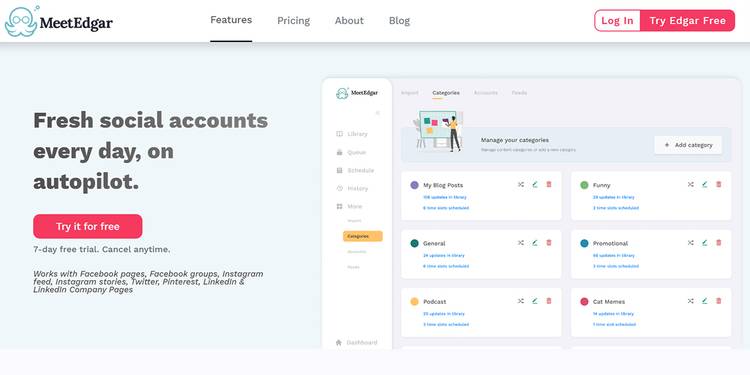
1. MeetEdgar

Image showing the interface of MeetEdgar
Image Credit: MeetEdgar

This comprehensive social media management tool not only schedules your content; it can also write posts on your behalf. Using artificial intelligence (AI) algorithms, it extracts the content that’s getting maximum engagement and suggests that to you.

You won’t have any trouble using this tool as it is easy to understand and use. It makes your task of managing multiple platforms easy by letting you handle all of them by logging through only one account. You can schedule posts on Pinterest, Instagram, Twitter, Facebook, and LinkedIn via this tool.

This social media calendar tool allows you to schedule posts category-wise. Therefore, you can quickly categorize your post into infographics, blogs, promotional posts, webinars, etc. It also lets you highlight the categories in separate colours so that you can easily track them.

Download: MeetEdgar for Android | iOS (Price starts from $19/month)

2. Buffer

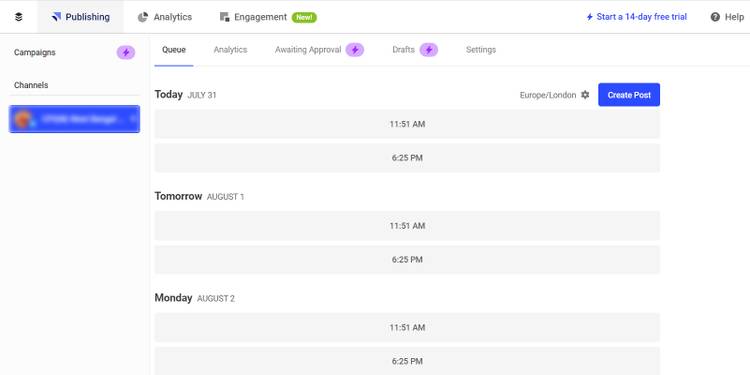
Visualization of the Buffer app interface

You may have heard the name of Buffer, as it is a pioneer of social media management tools. It offers you powerful planning and scheduling features. If you manage more than one social media account, this app will be useful for you.

You can create a separate publishing schedule for each account of yours on different social media platforms. The supported platforms of this tool are Facebook, Instagram, Twitter, LinkedIn, and Pinterest. You can draft your posts here and personalize them according to the style of each social network—all using a single dashboard and without any hassle.

The calendar feature of this Buffer is designed for you to visualize the scheduled posts and optimize them as per your requirements.

Download: Buffer for Android | iOS (Free, in-app purchases available)

3. Iconosquare

An image showing the interface of the Iconosquare app

Despite being a social analytics tool primarily, Iconosquare can also schedule your posts on Instagram, Facebook, and Twitter. Moreover, you can monitor your mentions on Facebook and Instagram to manage your online reputation.

Iconosquare’s social publishing tool comes with versatile functionalities. Thanks to its drag-and-drop feature, you can seamlessly order your content according to your choice. The tool allows you to schedule posts, carousels, and stories for Instagram, along with Facebook statuses, and tweets.

You can also check your Instagram feed preview to know how it looks before posting your content. It is also feasible to schedule your first comment along with the hashtags for better reach and engagement.

You can effortlessly upload images from Dropbox or OneDrive to the media library of Iconosquare. The tool lets you segregate your content for searching the photos. By tagging the used images, it makes sure that you don’t end up posting the same content twice.

Download: Iconosquare for Android | iOS (Price starts from $49/month)

4. Hopper HQ

Visualization of Hopper HQ app website and features
Image Credit: Hopper HQ

If you are looking for an Instagram-friendly post scheduling tool, Hopper HQ is the right choice. If you have more than one Instagram account, you can manage them all through a single Hooper HQ login. However, it also supports Facebook, LinkedIn, and Twitter.

This social media calendar planner comes with a neat interface, so you should not have difficulty navigating through this app. Its bulk uploading feature allows you to upload 50 posts at a time. You can also reschedule your posts on social media.

The tool also includes some exciting image editing features. You can make your images catchy and appealing by adding filters, borders, and text overlays. It also lets you preview your post. So, you know how it will look on the mobile screens of your audience and make changes, if necessary.

Download: Hopper HQ for iOS (Price starts from $19/month)

5. SocialPilot

An image showing the interface of SocialPilot web app

This comprehensive app for social platform scheduling and posting comes with robust features and an easy-to-use layout. It allows you to create visual posts with multiple images and GIFS, add carousel posts, post native videos, and many more. You can also leverage its Canva integration feature to make a new image.

The supported social platforms are Facebook, Twitter, LinkedIn, Instagram, Pinterest, and Google My Business. The tool lets you reschedule your posts on another date or at a different time on the same day for improved engagement. You can also reshare your evergreen content with this app that keeps bringing you more traffic and better user engagement.

Besides utilizing the direct publishing feature on Instagram, you can also link with your blog fees. Thus, your blog will get shared on your social media accounts automatically after getting published. After scheduling posts for an extended period, you can get a bird’s-eye view of how the plan looks.

Download: SocialPilot for Android | iOS (Price starts from $42.50/month)

6. Hootsuite

A visual display of the Hootsuite app for social media
Image Credit: Hootsuite

When it comes to managing your social media efforts on multiple platforms, Hootsuite is one of the most popular tools. Its interactive and media-rich planner offers a complete overview of your social media calendar.

The app displays a small visual preview of upcoming posts with the image caption and post timing. You can edit them right from the Hootsuite platform.

The supported platforms of this tool are Twitter, Facebook, Instagram, LinkedIn, and YouTube. After creating content, its Composer tool lets you preview according to the unique format of each social network. Apart from scheduling, it allows you to identify publishing gaps. Moreover, with its Chrome extension, you can include newly-discovered content to your calendar automatically.

Download: Hootsuite for Android | iOS (Price starts from $49/month)

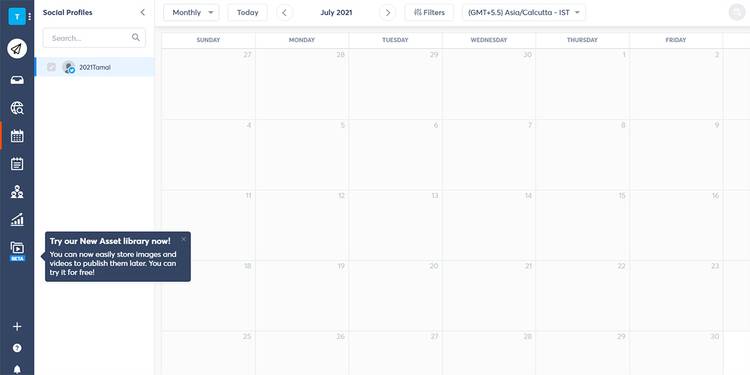
7. Agorapulse

An image showing Agorapulse app social media post schedules

Besides social publishing tools, Agorapulse comes with a content calendar to make social media account management effortless. It lets you schedule and reschedule your social media posts. You can use post queueing and bulk post uploading features for planning your posts on a monthly or quarterly basis.

Agorapulse supports the following social media platforms: Facebook, Twitter, Instagram, LinkedIn, and YouTube. Additionally, it comes with a social media inbox. It allows you to administer all the interactions of various platforms from a single place. This feature ensures better engagement with the audience.

Download: Agorapulse for Android | iOS (Free, in-app purchases available)

8. Falcon.io

Website visuals from Falcon social media post scheduling app
Image Credit: Falcon.io

If you are tired of juggling between multiple social media accounts, try Falcon. This social media scheduling tool helps you plan and publish all the upcoming social posts from a single calendar.

With this all-in-one app, you can edit, preview, schedule, and publish your social media posts without breaking a sweat.

The app offers support for Facebook, Instagram, Twitter, LinkedIn, WhatsApp, and YouTube. It displays all your scheduled content according to date on different social platforms.

Download: Hub by Falcon.io for Android | iOS (Price Starts from $129/month)

Social Media Calendar Apps Are Essential for Managing Your Accounts

Your social media followers grow depending on the regular activities, like the posts and shares, from your profile. Use any of the above tools to make social media content posting seamless and convenient.

When creating content on social media, you can also improve your workflow by using apps that help you create stunning visuals. You might also want to look at what’s trending, and see how you can capitalize on that—along with analysing your social media performance.

By Tamal Das

Sourced from MUO