Author

editor

Browsing

By

Research from Salesforce MuleSoft and third-party findings highlight some of the top 2021 trends facing CIOs, IT leaders, and organizations in their digital transformation journey.

IT’s role is more critical than ever in a world that’s increasingly dependent on digital. Organizations are under increasing pressure to stay competitive and create connected experiences. According to Salesforce MuleSoft Connectivity benchmark report, IT projects are projected to grow by 40%; and 82% of businesses are now holding their IT teams accountable for delivering connected customer experiences. Research from MuleSoft proprietary research and third-party findings highlight some of the top trends facing CIOs, IT leaders, and organizations in their digital transformation journey.

  1. The digital-ready culture. Organizations are under greater pressure to digitize services quickly at scale to meet rising customer demands and create new revenue channels.
  2. Democratization of innovation. Line of business users is trying to develop digital customer experiences faster. IT needs to drive cultural change by empowering the business to self-serve and deliver solutions quicker.
  3. Composable enterprise. Hyper-specialization has created a groundswell of applications, leading organizations to shift to a composable enterprise to become more agile — where digital capabilities can be composed of existing applications using APIs, rather than being built from scratch every time.
  4. Automation. Organizations are using automation to drive operational efficiency and improve business processes. APIs are key to driving automation and scaling productivity.
  5. API security. The average enterprise has 900 applications. The proliferation of new endpoints creates new avenues for intrusion, requiring robust API security.
  6. Microservices. Organizations are turning to microservices to rapidly build new customer experiences. Companies deploying microservices to production will require some form of service mesh capabilities to scale.
  7. The data divide. To keep pace with evolving customer expectations, organizations are looking for faster ways to unlock data and gain insights. 2021 will be the year that data separates organizations from their competitors and customers — the ability to unlock, analyze, and act on data will become foundational to growth.
  8. Data analytics. Organizations are investing in data analytics to transform customer experiences. The value of data analytics will be dependent on the data they are fed.

Trend 1: The digital-ready culture 

Consumers want consistent engagement with brands across their preferred channels. Seventy-three percent of shoppers use more than one channel during their shopping journey. Per Deloitte, seventy-five percent of consumers expect consistent interactions across all departments of a company. Eighty-six percent of consumers say they want the ability to move between channels when talking to a brand. Ninty-two percent of customers are satisfied using live chat services — making it the support channel that leads to the highest customer satisfaction. And 78% of consumers use mobile devices to connect with brands for customer service — the number jumps to 90% of Millennials. Organizations need to invest in new digital methods of customer service.

picture1.png
Organizations need to invest in new digital methods of customer service


There is increased pressure on IT leaders to deliver on digital initiatives — a 40% more increase in 2020. One of the biggest challenges to digital transformation efforts is integration. Eighty-nine percent of IT leaders report data silos are creating business challenges for their organizations’ digital transformation initiatives. And 85% of IT leaders report integration challenges are hindering their digital transformation efforts. Organizations need to enable innovation beyond the four walls of IT — this is a very important lesson for CIOs. There are no IT projects, there are only business projects. And the business will not wait for IT to deliver on its innovation roadmap and strategic initiatives. 2020 may be the start of the citizen developer revolution. The pandemic has accelerated all automation and digital transformation programs by several years. According to Gartner, by 2023, the number of active citizen developers at large enterprises will be at least four times the number of professional developers.

Trend 2: Democratization of innovation

Research shows that Lines of business (LoBs) are participating in digital transformation with 68% of LoB users believe IT and LoBs should jointly drive digital transformation. In addition, 51% of LoB users are frustrated at the speed their organizations’ IT department can deliver digital projects. Outside of IT, the top three business roles with integration needs include business analysts, data scientists, and customer support.

picture2.png
Integration needs are increasing across all business functions


Enterprises will look to low code development tools to improve productivity. Per Garner, 75% of large enterprises will be using at least four low-code development tools for both IT application development and citizen development initiatives, by 2024. And 65%+ of application development activity will be as a result of low-code application development, by 2024. These trends are incredibly important for IT and CIOs — enabling and increasing technology savviness across lines-of-business is a key priority.  Citizen integrator tools will reach mainstream adoption in the next 2 to 5 years.

hype-cycle-digital-workplace-gartner.png
GARTNER Hype cycle for the digital workplace, 2020

Gartner

Trend 3: Composable enterprise

Enterprises face application proliferation. There are around 8,000 apps in the marketing technology landscape alone. Fifty-two percent of organizations say that IT has generated the most business value by building reusable integration assets that save time and money on future projects.

martech-landscape.png
The marketing technology application landscape is around 14,000 apps in 2020.


In Gartner’s Hype Cycle for Emerging Technologies, composable enterprise is named a key technology for business resilience and operating at scale with speed. Per Gartner: “This modular business model enables organizations to move from rigid, traditional planning to active agility. Composable enterprise thinking creates more innovation, reduced costs, and better partnerships.”

hype-cycle-emerging-tech-gartner.png
GARTNER Hype Cycle for emerging technologies 2020

Trend 4: Automation

Automation is top of mind to enable innovation. Per Salesforce, 81% of IT organizations will automate more tasks to allow team members to focus on innovation over the next 12 months to 18 months. McKinsey notes 57% of organizations say they are at least piloting automation of processes in one or more business units or functions. MuleSoft research found 30% of IT decision-makers say that automation is a key business initiative tied to digital transformation.

McKinsey estimates that automation could raise productivity in the global economy by up to 1.4% annually. Salesforce finds that 70% of service agents believe automating routine tasks would allow them to focus on higher-value work. The PwC Finance Effectiveness Benchmarking report finds that up to 40% of the time in the finance function can be reduced with automation and behavior change.

automaton-potential.png
Potential value of automation


Companies across industries are experimenting with automation. Across all industries, 60% of line of business users agree that an inability to connect systems, applications and data hinders automation initiatives. One solution to reduce automation complexity is a better use of APIs. The research  notes: “APIs are key to driving automation APIs have emerged as the most elegant means of scaling controlled access to a defined scope of data or functionality, abstracting the complexities of the underlying systems.”

automation-by-industry.png
Process automation by industry

“In 2021, we’ll see more and more systems be intent-based, and see a new programming model take hold: a declarative one. In this model, we declare an intent — a desired goal or end state — and the software systems connected via APIs in an application network autonomously figure out how to simply make it so.” — Uri Sarid, CTO, MuleSoft

Trend 5: API security

Eighty-four percent of customers are more loyal to companies that have strong security controls. Security is also a top enterprise technology investment. According to Verizon, 43% of data breaches this past year were the result of a web application vulnerability. Per Gartner, 90% of web-enabled applications will be more exposed to attack by API weaknesses than via the user interface. According to Gartner, by 2022, API abuses will be the most-frequent attack vector for enterprise web applications data breaches. Akamai reports that 83% of web traffic is now API traffic. There are 900 applications in an average enterprise per MuleSoft.

top-tech-investments.png
Top technology investments for CIOs

Trend 6: Microservices

According to MuleSoft: “Microservices expose data and functionality as a collection of loosely coupled services. With microservices, organizations can quickly adapt to changing customer requests and demands, as well as offer services that create a competitive edge.” Ninety-one percent of organizations are using or plan to use microservices. Per Gartner, 65% of Financial services CIOs plan to increase spending on infrastructure technologies, such as microservices, APIs, and cloud in the coming year.

microservices-mulesoft.png
Microservices adoption is increasing across industries


Microservices adoption is increasing across industries. The research by MuleSoft highlights several companies in multiple industries with tangible ROI as a result of microservice implementations. According to Gartner*, companies deploying microservices to production will require some form of service mesh capabilities to scale. A service mesh is an architectural pattern for microservices deployments. Its primary goal is to make service-to-service communications secure, fast, and reliable. Service mesh is still a new technology, but 46% of organizations are piloting it or have plans to evaluate or implement it in the next 12 months.

Trend 7: The data divide

Businesses aren’t living up to customer expectations of seamless and personalized experiences. Of the almost 900 different applications used by the average enterprise, only 28% of those applications are integrated — preventing a single view of the customer. Per MuleSoft, 72% of global consumers would consider changing service providers in response to receiving a disconnected experience. Also, 90% of organizations believe their revenue will be negatively impacted if they fail to complete digital transformation initiatives in the next 12 months.

expec-vs-reality.png
Customer expectations versus reality

“Integrating and unifying data across these systems is critical to create a single view of the customer and achieve true digital transformation. It’s also the number one reason digital transformation initiatives fail. As the amount of systems and applications continue to grow exponentially, teams realize that key to their success — and their organization’s success — is unlocking the data, wherever it exists, in a way that helps them deliver value faster.” — Lindsey Irvine, CMO, MuleSoft

Trend 8: Data analytics

According to Forbes, 52% of executives report that having “a well developed and designed enterprise data analytics effort enables us to deliver a superior customer experience. Also, 48% of organizations believe their revenue will be negatively impacted if they fail to complete digital transformation initiatives in the next 12 months. Per Gartner, 48% of product managers at growth companies, or companies that have seen positive revenue growth, are using analytics to collect and analyze customer perception and sentiment data. Gartner believes companies lose $15 million on average annual losses that poor data quality is believed to be responsible for.

An important 2020 lesson is that every business must be a digital business. And in the next normal, every business must be able to create value at the speed of need. The future of business will be automated and autonomous. The future of the enterprise is an autonomous enterprise. There are numerous customer case studies in the Salesforce MuleSoft Connectivity benchmark report and the 2021 digital transformation trends report. To learn more, you can visit here.

By

Sourced from ZDNet

On TikTok, the most popular products are inexpensive, accessible, and…not exactly cute. So what does that mean for the future of the shelfie? We asked Gen Z’ers to explain.

When I opened TikTok for the first time, I never felt older. Many months of scrolling later, this unshakable feeling has grown as quickly as the app’s overwhelming influence. At 24, I technically straddle the line between millennial and Gen Z, but my connection to the former intensifies whenever I open TikTok and proceed to be visually pelted by frantic videos of gamer girls, dancing tweens, and slapstick comedy.

But among these clips of a kid doing a skateboard flip while wearing roller blades, countless teens filing their teeth for some reason, and Addison Rae doing whatever it is she does, I also started to notice videos that felt like they were speaking directly to me: The beauty products I saw TikTokers constantly gushing about were most definitely not the ones I was used to seeing in “shelfie” photos or in my own bathroom.

Growing up with print magazines and, later, YouTube and Instagram, I was trained that beauty products needed to be expensive, beautiful, and covetable enough to be proudly displayed on a shelf or social media. But TikTok tells a different story: The products that rack up the most views—usually in the millions—are affordable, unassuming, and—dare I say?—basic.

There’s a belief among brands that Gen Z is just as aesthetically minded as millennials, considering they too came of age in the Instagram era (take, for example, 16-year-old Millie Bobby Brown‘s pastel-packaged beauty line Florence by Mills), but scrolling through TikTok, it seems the ubiquitous “millennial” branding is almost nowhere to be found—much like actual millennials.

For example, the hashtag #telescopicmascara has more than 14.5 million views on videos singing the praises of L’Oréal Paris’s Telescopic mascara, and the brand’s Fresh Wear Foundation has a similar fanatic following. A video of a £1 depilatory cream has spread like wildfire, making teens and early-20-somethings ditch their laser appointments and razors—unless it’s the equally viral portable one—for a product that’s been around for 100 years. CeraVe cleanser has become so popular even CNN Business has written about its explosion in sales because of TikTok.

Compare this with Instagram, where, yes, these brands make an occasional appearance, but for the most part shelfies are dominated by picture-perfect mainstays like Glossier, Nécessaire, and Summer Fridays. These products work for many people, of course, but they also represent the millennial branding boom of the late 2010s—you know the vibe: sans-serif fonts, kitschy names, and pale colour palettes (usually pink)—as well as the post-2016-election skin-care-as-self-care explosion, along with a more-is-more mindset sparked by the stateside introduction to K-beauty’s 10-step routine.

One of the largest examples of this back-to-basics trend is the popularity of Hyram Yarbro, known on TikTok as Skincare By Hyram. Although he’s not a dermatologist or an esthetician, the 24-year-old “skinfluencer” educates his massive audience with quick, digestible videos on skin care. In addition to CeraVe, he also steadily features accessible brands like The Ordinary and La Roche-Posay, and focuses on a philosophy he describes as “skin-care minimalism.”

“I don’t believe you need an excess of products,” he tells Glamour. “I don’t believe you need to spend a lot of money on products, that you need products that have a fancy smell or a fancy texture or excessive packaging. In terms of achieving good skin, all you need is a simple, relatively affordable, basic routine.”

This less-is-more philosophy is clearly resonating with his audience, which skyrocketed from nearly nothing earlier this spring to his current fanbase of 6.6 million followers.

“I think particularly for a Gen Z audience—who is really trying to cut through all the marketing claims of an oversaturated industry—it’s beneficial for them to just hear the basics you really need in terms of functionality,” says Yarbro regarding why he thinks he’s had such success with younger consumers on TikTok.

This doesn’t mean young people are uninformed about skin care, though. In fact, Yarbro says it’s just the opposite. “I think brands underestimate the intelligence of Gen Z,” he says. “The thought process is: Oh, this is skin care specifically designed for teenagers, so we need to make it colorful, we need to make it fun, we need to make it smell really good. But really all these aesthetic-focused demands are opposed to what Gen Z is actually demanding, which is further knowledge, education, and simplicity.”

This education may be what makes TikTok so singular in its ability to influence. While Instagram and YouTube allow content creators to go more in depth by allotting them longer time frames to post, there’s no comparison when it comes to the exposure rate on TikTok. On other social platforms, a user needs to actively search for content relating to skin care, but on TikTok, the algorithm works like throwing spaghetti to the wall and seeing what sticks. Once a user actively likes a skin-care or beauty video, they’re served more of that kind of content until their feed is overrun by skinfluencers preaching the importance of barrier repair and the benefits of mandelic acid.

Juliette Cacciatore, a 22-year-old student—who, full disclosure, happens to be my sister—says that aside from topicals from her dermatologist, she never showed an interest in any sort of skin-care regimen, despite having dealt with acne since high school, until she discovered TikTok, and never followed beauty creators on any other platforms.

“It changed my entire routine,” she says. “I do feel like I know so much more. I’ve heard a lot of theories debunked, and a lot of ‘You should have never have used this.’ I didn’t know what a humectant was until someone told me on TikTok.” Among her favourite products are the CeraVe Healing Ointment, which she uses for “slugging,” Telescopic Mascara, and Good Skin Days C’s The Day Serum. Nothing costs more than £20.

Alessandra DeMarino, 23, agrees that a large part of the draw of TikTok—and the products she discovers there—is the emphasis on education: “It has definitely shifted my old Instagram buying habits, where I bought things more so based on aesthetics and claims.” DeMario says TikTok allowed her to see the results of items instead of just packaging, which in turn has influenced her to purchase.

The looming question: Why are younger people on TikTok seemingly rejecting what millennials are still obsessing over? According to Jenni Middleton, director of beauty at trend forecasting firm WGSN, a hallmark of Gen Z’s buying habits is scrutiny. “Gen Z want to be assured that what they are buying will work for their skin and hair, and that’s why we’re seeing this shift,” says Middleton. “Their scrutiny about ingredients stems from their comfort in the URL world, where they can do huge amounts of research.”

Charlotte Palermino, cofounder of Dieux Skin and a skinfluencer with 175,400 followers on TikTok —and, at 33, is a millennial—agrees. “We are absolutely in a post-truth society where consumers aren’t taking things at face value,” she says. “I feel like Gen Z can spot deep fakes and fake news better than boomers, so it’s not surprising seeing them question shaky skin-care claims. It’s a time when we have to question a lot, so seeing Gen Z ask for receipts makes sense. Increasingly, when I see an influencer or brand make a claim, I’ll see commenters ask, ‘Where does that claim come from?’”

In addition to having more knowledge than ever, there’s also the obvious fact that younger people tend to have less disposable income, so of course they’re going to gravitate toward less expensive products. “Almost all of my makeup is from the drugstore because I truly believe there are so many high-end makeup products that have very similar formulas to drugstore products,” says Rachel Rypma, a student who helped make the Telescopic mascara go viral. “The only difference is the name behind the product.”

“Cost definitely comes first,” agrees 24-year-old Lisa Antonelli about what she considers most important in a product. “I will splurge on some exceptions after either trying a sample or buying a small size first. Next come the ingredients, branding, and sustainability.”

This emphasis on cost is nothing new, as Palermino points out. “Skin care targeted to acne and younger demographics was never charging a high price point on the whole,” she says. Rather, the products have just become a little more sophisticated, she says, pointing to Curology and CeraVe.

However, with the popularity of the app, teens have gained a new power. Not only are they more visible than ever—they actually move product. A representative from L’Oréal Paris tells Glamour the brand has seen “explosive growth” on Telescopic thanks to TikTok, and while Cerave wouldn’t confirm exact sales stats, the brand confirms “TikTok has certainly helped expand awareness of the brand, particularly to Gen Z audiences.”

In turn, this new visibility is making more affordable products trickle up to older demographics, and could even dictate where beauty brands go from here.

“Gen Z’s attitudes will define beauty for the next decade,” says Middleton. “Gen Z is the most self-educated generation to date, with information and tutorials on any conceivable subject instantly available online at any time. Informed online communities continue to fuel demand for authenticity and transparency across the industry.”

Does this mean that luxury beauty and branding is done for good? Not a chance. Beauty will always be a sensorial experience, and everyone I spoke to said that even though they prioritise cost and ingredients, at the end of the day, they all viewed skin care as some form of self-care. They’re just a little more discerning.

“With Gen Z, there’s really a level of critique that I have never seen before, and it’s a response to the generations of marketing,” says Yarbro. “I think it’s exactly what the industry needed.”

Sourced from GLAMOUR

By Nicholas Quah

I’d like to begin by articulating an assumption I know I’m not alone in holding: for a good stretch of its existence, podcasting has often come across as a distinctly liberal-leaning media space.

There are a number of reasons for this. Some of it has to do with the prominent successes that public radio and various journalistic organizations — typically thought about as liberal institutions, unfairly and otherwise — have historically had crossing over into the medium. Part of this might also have to do with the head-turning emergence of successful left-leaning and leftist presences that have used open podcasting as a foundation for their media businesses, as in the case of Crooked Media and the cluster of pods loosely known as the Dirtbag Left. I’m sure there are other reasons of note, but point is, it’s an impression that has solidified into an informal identity, one that has persisted for a good while.

Now, you can attack this historical assumption from a few directions. Perhaps the biggest one lies in the fact that you could simply point to the presence of Joe Rogan and Dan Carlin — both of whom possess politics that can be fairly hard to describe, but typically run counter to the dominant strings of liberal politics — as being prominent figureheads of the medium dating far back to its earlier pre-Serial era. But for the most part, the interpretation of podcasting being distinctly liberal-leaning is more true than not, especially if you think about the majority of the successes that have broken through from within the medium over the past decade or so.

At any rate, while that reading may have held historically, we seem to be reaching a point where that interpretation may no longer necessarily stand.

This case begins with a tenuous but nevertheless significant data point. If you were to scan the Apple Podcast charts today, you’d find that a tremendous proportion of the shows occupying the Top 200 spots are explicitly right-wing podcasts. Here’s a non-comprehensive list, as of Monday evening: The Dan Bongino Show, The Ben Shapiro Show, The Mark Levin Podcast, The Charlie Kirk Show, The Candace Owens Show, The Glenn Beck Program, Louder With Crowder, The Daily Wire’s Enough, The Sean Hannity Show, The Rush Limbaugh Show, The Michael Knowles Show, The Rubin Report, and whatever that Bill O’Reilly podcast is called. That accounting doesn’t even include shows by sitting Republican politicians, like Verdict With Ted Cruz and Hold These Truths With Dan Crenshaw, which are technically counterparts in the politician pod trend I wrote about a few weeks ago.

(Additionally, you could theoretically sort the so-called “Intellectual Dark Web” libertarian types into this mix: the Joe Rogans and Jordan Petersons and so on. But I’m inclined to bracket them out as a separate species of show, since they collectively make up a significantly different kind of political phenomenon at this point in time.)

Anyway, this data point is tenuous because it’s always important to point out the deep imperfections of using the Apple Podcast charts as a representation of the podcast ecosystem. As we’ve banged the drum several times before, performance on the Apple Podcast charts shouldn’t be read as an indicator of a given show’s listenership relative to each other, but as a kind of “heat” indicator that prizes what some in the business call “subscriber velocity” — that is, the novel engagements that a podcast experiences on the platform. (There’s a way you can think about the charts as being somewhat similar to YouTube and social media platforms, in the sense that they reward fresh engagement as the leading metric. In any case, like many algorithmically-driven artifacts, how Apple determines placement on its podcast charts is largely a black box affair, subject to long and voluminous debate.) Put simply, a show can rank highly on the Apple Podcast charts across a considerable number of weeks but ultimately reaches fewer people compared to a show that’s larger and older but is currently sitting somewhere in the basement of the charts.

It’s also worth noting that the Apple Podcast chart is also vulnerable to scam campaigns, in that it’s possible for certain bad actors to engage in pay-for-placements schemes where automated scripts are used to simulate engagement with specific podcasts at high volumes. Such schemes are meant to help drive newer shows up the charts, where their high placement gets them exponentially greater visibility, which in turns leads them to potentially generate organic growth. (We ran an experiment to illustrate such a bot campaign a few years ago.)

All of this is really wonky discussion, I know, but I’m setting all this foundation down to push the point: while the Apple Podcast charts shouldn’t be taken at their word, I think the sheer volume and consistency of right-wing shows that currently populates the charts tells us something quite real. Furthermore, according to data made available by Chartable, a podcast analytics and attribution company that tracks Apple Podcast chart positions as part of its services, some of those shows have been charting effectively for the past two years or so. An even smaller number has been charting effectively since the start of the Trump presidency.

Even more curious, digging through the data a little further, is the fact that many of these shows  have noticeably improved their chart standings over the past few months, and significantly so in the weeks since Election Day. (The fine folks at Chartable also noted that there doesn’t seem to be any red flags suggesting that paid-for-placements scams were involved in the chart performance of these shows.)

Here are three examples to illustrate the finding. The Mark Levin Show has spent much of the past year charting between the 70-100 and 100-150 range, depending on the month. About a week after Election Day, the show’s positioning markedly improved, and it currently hovers fairly consistently around tenth spot. The Ben Shapiro Show, which started out as a podcast before being simultaneously repackaged as a radio broadcast in 2018, has always charted fairly well, rarely dropping below the tenth spot throughout 2020. Over the past few months, it’s averaged placements around the 4-7 spot. Meanwhile, The Dan Bongino Show, which features a host that’s become confoundingly prominent enough on digital spheres to warrant his own inquiring New York Times profile by Kevin Roose, largely fluttered back and forth within the 20-40 spots for much of the year. Since Election Day, however, the podcast broke into the top ten spots, and currently averages at the top two spots.

Again, performance on the Apple Podcast charts is a wildly imperfect metric, and it shouldn’t be taken as materially equivalent to, say, box office returns or the New York Times Best Seller List. (Though, my understanding is that the latter is also controversial in some circles.) Nevertheless, the Apple Podcast charts is one of the most visible and powerful real estates in all podcasting, and the consistency of their chart placements does represent the existence of a trend. Placement is power, and I believe that, very quietly and then seemingly all at once, right-wing podcasts have carved out a strong presence in the ecosystem.

So, I picked The Mark Levin Show, The Ben Shapiro Show, and The Dan Bongino Show as representative examples for another reason: all three podcasts are repped for sales and distribution by Westwood One, the Cumulus Media-owned radio group that’s been working to build out a podcast business over the past few years. (Further context for more specificity: The Ben Shapiro Show is officially listed as being distributed by The Daily Wire, but The Daily Wire is repped for sales by Westwood One.)

You can find network-wide download numbers for Westwood One’s portfolio on the Podtrac rankers, which, similarly, should be understood as imperfect representations of the podcast space themselves. (See here and here.) But they do give us a decent shot at some understanding of reach. The numbers for Westwood One’s portfolio are fairly hard to parse out: it’s officially listed at reaching 6,236,000 unique monthly US listeners through its whopping 132 show portfolio. Somewhere in that spread is The Dan Bongino Show and The Mark Levin Show. However, The Daily Wire is spun out as its own publisher in the ranker, and the official number there is objectively sizable: the network is said to reach 5,546,000 unique monthly listeners off only five shows, one of which is, of course, The Ben Shapiro Show. It’s safe to assume, then, that The Ben Shapiro Show reaches well above a million unique US monthly listeners a month at the very least.

Let’s now turn to the explanatory question: how did these right-wing shows break through the podcast ecosystem? Any meaningful answer requires serious appraisal of multiple overlapping factors, but my impression is that it can largely be pegged to two things. Firstly, these shows work with insane volume. They often publish new episodes every weekday, occasionally on the weekends, and they rarely miss beat. Secondly, I think a big, big part of this has to do with how right-wing podcasting nowadays seems purposefully integrated with the broader right-wing infrastructures, and are themselves individual assets of much larger multi-platform presences. This notion was pushed forward prominently in a conversation I had recently with a senior figure at Westwood One, who pointed to the way someone like Dan Bongino consistently shepherds attention between his multiple media outputs, from his broadcast radio show to his social media feeds to his podcasts to his various media appearances. It’s an aggressive flood the zone approach, where gains from each individual piece directly pipes into supporting another. This approach extends down the line: in 2018, Westwood One started repackaging The Ben Shapiro Show for broadcast radio distribution, while The Mark Levin Show podcast is a repackage of a broadcast radio program.

There is also the matter of how the content itself tends to simply be fuel for fiery responses, amplified and in service to a charged polarized environment, like a snake that eats its tail to only grow eternally fatter. During that conversation, I also took the opportunity to ask about the company’s stance on the speech of the shows it represents. After all, in the wake of the elections, The Dan Bongino Show was hyperactive in promoting several baseless allegations and debunked conspiracy theories claiming election fraud. The response was a minor dodge. “We have a very, very strong policy on content,” came the reply. “We feel strongly that we have the ability to uphold the truth.”

Ultimately, this feels like an expression of the inevitable endgame for all emergent technologies. Something new comes around, catches fire, attention, and then investment, eventually leading to a place where the old guard comes in and synthesizes the whole thing. In this case, it’s old right-wing talk radio making its way into new podcasting, finding new blood as a foothold, building a bridge between the two sides. We’ve seen it with news organizations like the New York Times and NPR, and so it’s unsurprising that we’re seeing it with ever-present conservative talk radio. One wonders what this foretells for the explicitly left-leaning types — what would such a synthesis look like for Crooked Media?

Quick thing… Apple Podcasts has rolled out a new web embed player feature, which has been a long time coming for the dominant podcast distribution platform.

iHeartMedia strikes multiyear creative partnership with Cloud10, the Los Angeles-based podcast network and production studio founded by Sim Sarna. Cloud10 is known for building out a portfolio of distinctly celebrity-driven shows like Work in Progress with Sophia Bush, Minor Adventures with Topher Grace, and Busy Phillips is Doing Her Best, and the studio itself comes out of Sarna’s success in being part of creating the popular Anna Faris is Unqualified podcast.

There can be a bit of variation when it comes to deals like this, so I thought it might be useful to unpack it a little further. This deal, which spans two years, primarily revolves around iHeartMedia funding and distributing new shows from Cloud10, often with minimum guarantees. (Not unlike how book contracts are structured, revenues would go to iHeartMedia until it recoups the guarantee and production budget before switching to an agreed upon rev split.) Cloud10 will maintain its existing sales team than handles direct response advertising, but this partnership will also see iHeartMedia supporting the network’s sales efforts around brand and programmatic marketplace-based advertising.

As part of the deal, existing Cloud10 shows will become part of the iHeartMedia portfolio, and can be subject to measurement by Podtrac. Those shows will also be privy to being promoted on iHeartMedia’s unsold inventory.

The two companies will also be closely collaborating on that future program development process, and while specific details on upcoming projects will only be announced early next year, I’m told that the deal will likely result in ten or more new shows through the end of 2021.

This Cloud10 partnership is the latest addition to iHeartMedia’s recent flurry of dealmaking activities in the podcast space. Last week, the broadcast radio incumbent announced a sales and production partnership with Pushkin Industries, a deal that comes not long after news that it’s launching a new podcast network with Charlamagne Tha God, called Black Effect. In late October, the corporation made official its intent to acquire the Voxnest platform, thought to be part of its push into programming podcast advertising.

These podcast activities also come as iHeartMedia continues its waves of layoffs chiefly targeting its broadcast radio markets, and as the FCC approves the company’s petition to increase its foreign ownership cap such that it’s able to take on more non-American capital as part of its efforts to navigate its state of post-bankruptcy.

Podfund changes hands. Podfund, the slightly-hard-to-explain company that invests in podcast creators with creator-friendly terms, is now managed by TechNexus, a significantly more straightforward tech investment firm.

According to a Medium post by Andrew Annacone, who now takes over as President of Podfund, the intent is to build on Podfund’s original model while expanding out to tackle investments that are deeper into the “intersection of content and technology.” We’ll see what that shakes out to be.

Podfund was founded last summer by Jake Shapiro, who was already serving as the CEO and co-founder of RadioPublic. Shapiro left both teams when he joined the Apple Podcasts team as the Head of Creative Partnerships in September. Nicola Korzenko, the general manager of Podfund, also left the company in September to rejoin Amazon, where she now works in content acquisition for Prime Video channels.

In tomorrow’s Servant of Pod Lauren Shippen is on the show this week.

Back in 2015, she created a fiction podcast called The Bright Sessions, which went on to carve out a strong following and community online, and several years later, she would become one of the busiest creators in the podcast business, in large part owing to the strength of that original production that she worked to pull together on her own dime.

In many ways, Lauren’s career so far is the kind of stuff that podcasting should be able to offer a wide number of people — coming out of nowhere, with no real credits to their name — if the ecosystem is working the way it should. It’s unclear to me whether we’ve drifted away from that kind of possibility now, and part of why I wanted to interview Lauren about her arc to this point is get a better sense of this question. We also talk about a bunch of other stuff as well, like Stephen Sondheim and her dream to make a queer cowboy rom-com, which would rule.

You can find Servant of Pod on Apple Podcasts, Spotify, or the great assortment of third-party podcast apps that are hooked up to the open publishing ecosystem. Desktop listening is also recommended. Share, leave a review, so on.

Who Are Audiograms For?

By Caroline Crampton

Last week, my eye was caught by a press release about a newly formed partnership between Bitcast, an iOS podcast clip sharing app Bitcast, and Podcast Notes, a website that summarizes podcasts. The story used phrases like “a new paradigm in social audio” and “podcast clips emerge as an incredibly powerful new medium” — market cliches that were pompous, and still yet largely unproven.

Now, I don’t think this development is especially significant in and of itself: such peripheral startup activity has become the norm in the audio world. What gave me pause, though, was the fact that the press release made me realise that I hadn’t ever seriously interrogated the idea of whether “audio clips” have a meaningful role to play in the way that podcasts are discovered and disseminated in the first place.

Over the years, I’ve seen podcasters sharing short sections of podcast episodes on social media, whether via a clip feature within a podcatcher or as a custom made subtitled video. I’ve participated in this practice myself, having even installed WNYC’s audiogram generator from 2016 on my PC when I worked as an in house producer at a magazine in a previous life.

That tool dated from an earlier era — post Serial, pre consolidation — when the so-called “podcast discovery problem” was high up the agenda for shows big and small. It was also the time of the wider media’s (ultimately disastrous) pivot to video, something that was expressed in the documentation for that WNYC tool, which promised to turn audio into video, the “first-class citizen of social media.” At that time, it felt to me like everyone was on the hunt for that silver bullet, one easy implementation that would send download numbers rocketing upwards. The idea of making a longer piece of audio easily visible and shareable seemed perfect for that moment.

Where do things stand today, then, now that the promised land of video has dematerialised and there are so many more big players spending money in podcasting? Some podcatchers, such as Overcast, Castro, and Listen Notes, have inbuilt podcast clip sharing features nowadays, meaning that listeners are able to pick a short moment and publicise it on their accounts. There are also other established services like Headliner and Wavve, explicitly aimed at podcasters wanting to create their own clip assets for marketing purposes. And then there are “social audio” apps like the aforementioned Bitcast that seek to build a brand around the exchange of clips specifically.

Of these three approaches to the audio clip space, it’s the second one that feels to me like it has the most mileage for podcasters. When researching this piece, I found it very difficult to find any independent data on whether the subtitled audio-as-video clips created by tools like Headliner or Wavve actually led to positive impacts on a podcast’s listenership — it’s just seems not to be information that anyone is collecting in a comprehensive way. There are some slight indicators out there, though, which seem to show at least that social networks’ algorithms react positively to the posting of clips.

Back in 2016, Delaney Simmons, then the director of social media at WNYC, revealed that the “audiogram” clip tool was showing some very positive results for their shows. “On Twitter, the average engagement for an audiogram is 8x higher than a non-audiogram tweet and on Facebook some of our shows are seeing audiogram reach outperform photos and links by 58% and 83% respectively,” she wrote in an August 2016 Medium post about the tool. Obviously, that’s just from one publisher’s perspective and impossible to verify externally, but it does seem to track with the way social networks handled posts including video at the time.

For a more contemporary view of this question, I spoke to Oliver Wellington, founder of Headliner, over email. His team does some A/B testing of different clip formats and styles and share their results on their blog. Perhaps unsurprisingly for in-house research, the results come back pretty positive. “In some of the tests, video has outperformed static images by five times,” Wellington said. “We also ran a survey asking users to report how much Headliner videos have increased their listenership. We got 415 responses, with over 70 per cent of respondents saying Headliner-made videos had helped increase listenership by between one and two times.”

Since WNYC’s tool launched in 2016, Twitter has rolled out the ability to share audio in a post to some iOS users — the “voice tweets” feature was launched in June 2020 and enabled for more users in September. As a podcast marketing option, though, it has yet to take off, and Facebook remains in much the same place regarding adding audio to posts. This is why video clips are necessary, Wellington argued. As a medium, podcasting is at a disadvantage on social media,” he said.  “With a video clip, podcasters are now able to level the playing field and meet listeners where they are, on any social network.”

Both when I was making podcasts for a big magazine and now that I do it by myself, I’ve personally always found that the time investment necessary to make decent-sounding audio clips never seemed to match up with the return. In other words, “make clips” is always on my production to do list, but it almost never gets crossed off.

This is a common problem, according to Wellington, who has apparently seen plenty of podcasters “trying video once or twice and giving up because the initial video or two didn’t perform well.” He added: “Social media is a constant stream of information and posts, you need to put a bunch of stuff out there to figure out what will work, and this can take time.” He recommends trying lots of different clip styles and formats to see what works for your audience.

Lisa Jozi, a producer who has been responsible for making audio clips at big publishers like the Guardian and Al Jazeera as well as for her own podcast, told me that she remains somewhat sceptical of the power of these assets to translate into actual downloads. “To be honest, I’ve never seen them push traffic from social to the actual piece of content in any meaningful way,” she said over email. “Even if the clips did well on social, the click through to the actual piece was tiny.  For brands that are conscious of numbers/reach, you could collect easy views on these shorter clips to make your overall audience look bigger.”

They’re better viewed as a brand awareness option, she felt, rather than something that directly translates into more listeners. Which “should make you think carefully about why you want them and how much time you’re willing to spend doing it.” Another producer who got in touch with me about this issue, Charles Commins of the Northampton Town FC podcast It’s All Cobblers To Me expressed a similar view, although he sees a value in the clips he makes beyond just as a means to push downloads.

“I’m a big fan of repurposing as a way of reaching as many people as possible. I use audiograms to create a kind of trailer for each individual episode,” he said. “While I can’t say that the audiograms definitely increase my download stats, they do get the podcast more visibility on social media. The idea is that if more people see it, more people will listen.”

While I was looking into this topic, it didn’t escape my notice that it’s often podcasters with smaller shows that are preoccupied with the efficacy of these clips. Or, to put it another way: there are some pretty big shows out there that, to my knowledge, have never posted one. Publishers with social media teams may like them as an additional social marketing tool, and if smaller operations enjoy having them, then it’s up to them to decide whether they’re worth the resources. I felt Lisa Jozi summed this up well:

If you want them as a part of a look and feel for your podcast brand online, fantastic. They can make you look more professional as a part of a cohesive social media strategy. If you’re labouring over them in the hope that people will click through to the episode and listen to the whole thing, give them a miss.

As with many of the marketing techniques pushed at podcasters with smaller audiences, social audio clips can suck up a not inconsiderable time that could have been spent on the show itself. After all, sometimes the best podcast marketing tool is making a really good episode in the first place.

Another Local-National Bundle to Watch

Here’s a technical experiment that caught my attention recently. For about a week and a half starting on Election Day, the Washington Post ran automated AI-powered audio updates reporting local and national election results at the top of episodes from three of its podcasts: Post Reports, Can He Do That?, and The Daily 202’s Big Idea.

Think of these updates as a kind of audio ticker tape that came bundled with episodes of those podcasts as they were downloaded during the immediate post-election period. As a listener, you essentially experience them as a variation on the pre-roll spot, in which a mechanical — though female — voice reads out the latest real-time results from both the presidential race as well as races that were local to your area. The spots were short and punchy, typically clocking in at around a minute or so.

This dynamically-inserted election update project was the latest effort from the Post’s Strategic Initiatives team, which focuses on using emerging technologies to explore experimental storytelling approaches in order to reach more people. Past projects have included efforts around virtual reality, augmented reality, and artificially intelligent automation.

Audio was always an area they were interested in, as Elite Truong, the recently-appointed director of strategic initiatives who oversaw the project, told me last week. “The main question for us was: how do we provide more of a service through audio — whether it’s through podcasts or audio embeds on web pages?” she said. “How do we make that more accessible?”

The project was primarily powered by an in-house product called Heliograf which Truong describes as a cluster of machine-learning algorithms built to process high volumes of data from various APIs and convert them into information-rich scripts that can be edited down into publishable journalism. When the tech was used to cover DC-area high school football games every week back in 2017, Jeremy Gilbert, Truong’s predecessor, said that the technology was “creating a new model for hyperlocal coverage.”

This isn’t the first presidential cycle in which Heliograf was used to automate the Post’s local race coverage. In 2016, the Post tested it out to track results for 500 races around the country, and in this cycle, that number of covered races was greatly expanded. The idea to try delivering those race results through the Post’s existing podcast products, Truong tells me, came out of an impulse to serve those results to audiences where they already are.

The actual deployment of those audio updates depended on a mix of new and old technology. The new being the combination of Heliograf-generated results with text-to-speech automation tools, and the old being the manipulation of dynamic ad insertion solutions to deliver those generated audio update reads to listeners based on their geographic location. There’s a touch of the familiar to this particular composition of tools and ideas: between the bundling of local content with fundamentally national products, the general thinking of meeting audiences where they are, and the use of ad tech as means to those ends, this Washington Post experiment sounds like NPR’s recent announcement that it will start shipping episodes of its daily afternoon podcasts, Consider This, with dynamically-inserted local news segments from select cities.

Two doesn’t necessarily make a trend, but it’s a start, and I really do hope to see more podcast teams dip their toes into this whole local-national bundle thing. There’s a ton of service (and entrepreneurial!) potential in this lane. I’d also be curious to see what other audio experiments that the Post will come up with once the dust settles around this election project.

But that might have to wait. The automated audio update only ended last Friday, and Truong’s team has yet to fully debrief on the findings. That said, she notes that, at this point, there seemed to be very few reports of failed local results deliveries, which is a very encouraging data point. It might be enough to greatly expand the program.

“I want to put this everywhere,” she said

Feature Image Credit: Ben Shapiro and Dan Bongino. Photo-Illustration: Vulture, Michael S. Schwartz/Getty Images and Susan Walsh/AP/Shutterstock

By Nicholas Quah

[email protected]
Sourced from Vulture

By Jodi Harris

Over the years, Google hasn’t always been forthcoming about tweaks to its algorithm. But when it is, it usually causes a ripple of panic across the marketing world.

Google detailed two changes this year:

  • A new set of ranking signals – Core Web Vitals – to more accurately measure how users perceive the experience of interacting with web pages as part of its page experience update
  • The block of third-party cookies on the Chrome browser as part of its Privacy Sandbox initiatives

Will these decisions be destabilizing forces that send your search traffic spiralling out of your brand’s control?

Paxton Gray, CEO of marketing agency 97th Floor and 2020 Content Marketing World speaker, says no. In his view, these shifts are just a call to take a fresh look at the power of data.

Content marketers may think they need to appease Google’s algorithm to achieve success. But Paxton contends that there’s a more powerful way to view the search equation: Make Google work for you.

“The more personally resonant and deeply satisfying your content experiences are, the more motivated Google will be to serve them up for users to find and engage with,” he says.

The more personally resonant your #content experiences are, the more motivated @Google will be to serve them up for users, says @PaxtonMGray via @CMIContent. Click To Tweet

In a recent conversation with CCO magazine, Paxton explains Google’s latest moves and outlines an approach to help you deliver the kinds of content experiences searchers want to click.

Google’s page experience update is a non-issue

Google will measure a set of three additional ranking signals (i.e., its Core Web Vitals) as part of its latest page experience update:

  • Largest Contentful Paint (LCP) – how long it takes the biggest element or piece of content on your page to load. Google sets the standard at 2.5 seconds or less. If your website doesn’t load quickly, you could see a decrease in rankings.
  • Input delay – how long a site takes to respond to a visitor’s tap or click on an element. It needs to be less than 100 milliseconds.
  • Cumulative layout shift – the distance that buttons and links move as the website loads. Ideally, you want no movement, so users don’t click on a button but mistakenly get taken to a different destination because the button moved as other page features finished loading.

“If you’re already managing these elements of the website experience (and you should be), these updates won’t affect you too much,” says Paxton.

But some marketers think they need to respond to every single detail of Google’s updates, when they should be focusing on how to use Google to understand their customers better, overall.

You don’t need to respond to every Google update. Use @Google to understand your customers better, says @PaxtonMGray via @CMIContent. Click To Tweet

“As marketers, all of our decisions should revolve around the experience our users have when engaging with our assets – from the first ad they see to the landing page, the call to action, the thank-you email, and to whatever else happens after they purchase and beyond. That should be the centre of our universe, not necessarily just optimizing content for leads and conversions, which is often where we end up focusing all of our attention,” he says.

“If you focus on the bigger picture of what your consumers want to experience when engaging with content found on search, the small things will usually take care of themselves.”

Focus, not tracking, is the problem

Audience research conducted through search won’t be affected much by the loss of cookies, Paxton says. But tracking your audience’s behaviours and personality characteristics at touchpoints of your content experience will get more challenging. Tools that use other methods to track those critical customer insights can be used to create correlations among those insights that deepen your understanding of who your customers really are.

Content marketers can realize a big competitive advantage in this area. But, Paxton says, a cognitive shift needs to happen:

Marketers commonly view consumers as markets – entities that match a particular persona or profile description – so that’s how they speak to them. But these are people with personal lives and life experiences that run far deeper than what their buying habits or consumption behaviours may reveal.

Your audience may be similar in ways that have nothing to do with their profession or the persona they most closely resemble. Paxton contends that if you use data to reveal what those similarities might be – like the kinds of bands they love or their favourite vacation destinations, for example – you can engage them in more personally resonant ways. “That’s how we cut through all of the noise and deliver the complete, desirable content experiences Google plans to favour,” he says.

3 ways to mine for more powerful insights

To reach this level of personal detail, Paxton recommends focusing on three research techniques: keyword research, social media monitoring, and semantic analysis. His approach focuses on the context of your audience’s inquiries – learning about how, not just what, they search.

Focus on three research techniques to mine insights: keyword research, social media monitoring, and semantic analysis, says @PaxtonMGray via @CMIContent. Click To Tweet

Keyword research should already be a core component of your content strategy. The real trick is to go beyond targeting the most popular keywords and examine the larger behaviour patterns happening behind those searches (more on that in a minute).

Monitoring and analysing social media conversations is another rich source of useful audience insights. Don’t look only for brand-related conversations but also for opportunities to deliver on your audiences’ needs and distinguish your content from that of your competitors, Paxton says.

Consider what fintech company Acorns has done. The company specializes in micro-investing, though it competes with companies like Betterment geared to bigger investments.

“If you break down the social media activities of their community members, you can find some key differences between the two groups,” says Paxton. “Betterment’s users are likely to follow Wall Street, big traders, and high-profile advisors like Jim Cramer … but the people on Acorns, they’re following Etsy. They follow WordPress, they follow YouTube creators – people with side hustles or those who are just starting their own small businesses and are looking for a different kind of financial advice.

“Acorns’ content isn’t going to be competitive against the high-finance topics Betterment can dominate, like estate tax laws or economic trend forecasts. But it can win with content geared toward side hustlers, small businesses, and micro-investors – such as how to hire your first employee or set up a shop on Etsy,” he says.

To get to this level of audience insight, look at your social and search data through a different lens – one that considers how they talk about those topics.

This leads us to the third technique: semantic analysis.

A big reason for Google’s page experience updates is to provide the most complete content possible so someone can search, click, and be done. Semantic analysis can bring you closer to this ideal by uncovering areas where your existing body of content may be incomplete – topics and considerations, related concepts, or core knowledge or areas of expertise.

Google’s algorithms know what subjects are associated with the keywords you already found. Paxton says you can take your keyword research to the next logical step by performing a TF-IDF analysis.

TF-IDF analysis is a process for identifying, analysing, and reverse-engineering the conditions that may cause Google to rank competing content higher than your content for your chosen keywords. It surfaces semantically related terms that your audience expects to see when researching a topic of interest. “Including those terms in the content you create around that subject will bring more weight and authority to your conversations – in the eyes of both Google and your audience,” Paxton says.

Semantically related terms in your #content bring more weight and authority in the eyes of @Google and your audience, says @PaxtonMGray via @CMIContent. #SEO Click To Tweet

Paxton shares a personal example of the impact of this technique: “I’m about to go backpacking, and I’m looking for a jacket that provides the durability I need for my trip. As I sort through the top articles listed on my keyword search for ‘jackets for backpacking,’ I see the first one talks about the warmth of the jacket, but not its durability. So, I have to go back and sort through multiple results until I find one that talks about durability.

“If the first article had covered everything about the jacket that I care about, such as its materials, the climates and terrains it’s best suited for, etc., I would immediately have been more satisfied with my search experience – and more interested in engaging with the brand that made that possible.”

Quick-start guide to semantic analysis

While software tools can be used to expedite the semantic analysis process, Paxton asserts that it can also be done manually – though you’ll still need to use a word counter (here’s one for free) and some spreadsheet software.

Here’s how to do it:

  1. Pull up the top 10 results on Google for a keyword you want to rank for.
  2. Copy/paste all the words in the first result into a text editor or Word document. Count how often each word appears (you can exclude words like “the,” “and,” “but,” etc.) and how many words appear in total on that page.
  3. Repeat the second step for the remaining pages.

See which terms are used in the highest concentrations – not just how often they’re used, but their percentage of the entire body of content. These are topics semantically related to your keyword term. Explore them for your content experience to be considered complete in the eyes of Google.

Now, run the same analysis on your brand’s body of content that would likely rank for that keyword and compare your results, looking for any terms that may be missing from your brand’s content conversations. Create content on those topics and your rankings should start to go up like clockwork.

Give Google no choice

Google wants to provide a good experience for users and needs great content to do that. Instead of planning your content around Google’s algorithmic expectations, use the power of search to find hidden opportunities to write for your audience in more personally resonant ways. Create content that’s so great Google has no choice but to rank it as a complete, unique, and highly desirable experience.

Feature Image Credit: Cover image by Joseph Kalinowski/Content Marketing Institute

By Jodi Harris

Jodi Harris is the director of editorial content and strategy at Content Marketing Institute and serves as editor-in-chief of its digital magazine, Chief Content Officer. Follow her on Twitter at @Joderama.

Sourced from Content Marketing Institute

Sourced from wpbeginner

Recently, one of our readers asked us how to submit their WordPress site to search engines like Google?

Search engines are the largest source of traffic for most websites. That’s why it is important to ensure that they can easily find and rank your website pages.

In this article, we’ll show you how to easily submit your website to search engines and start getting traffic to your site.

Since this is a comprehensive guide, please feel free to use the quick links below to jump straight to different sections in this article.

Do You Need to Submit Your Website to Search Engines?

No, you do not have to submit your website to search engines. Most search engine bots can automatically find your website if it has been mentioned on other sites.

However for WordPress websites, we recommend submitting it manually because it will help you get discovered faster.

Why you should submit your website to search engines?

If you are just starting a new business or a blog, then search engines are the most important source of free website traffic. This means you can grow your business online without a lot of money.

Unlike paid traffic from ads, organic search traffic is free, and you don’t need to pay search engines for that.

More importantly, the submission process is quite simple, free, and gives you access to several tools that will help you grow your business later on.

That being said, let’s take a look at how to submit your WordPress website to search engines.

Submitting Your Website to Google

Google is the largest and most popular search engine on the planet. For most websites, Google is often the biggest source of their traffic.

To submit your website to Google, you need to sign up for Google Search Console. It is a free tool offered by Google to help website owners see how their website is performing in search results.

Signing up is free and easy. Simply go to the Google Search Console website and click on the ‘Start now’ button.

You can use your existing Google account to sign in or create a new account.

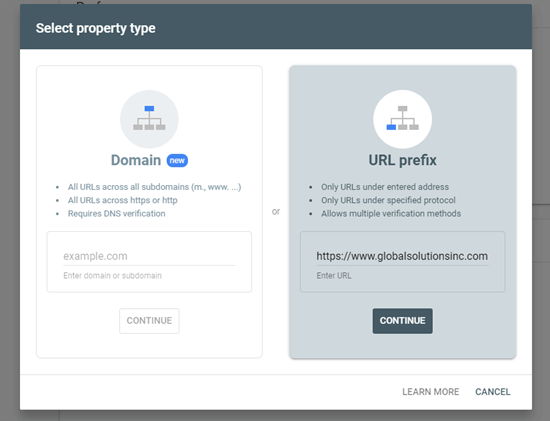
Next, Google will prompt you to enter your website domain name. We recommend using the URL prefix option here as it’s easier to verify.

Using the URL prefix method to add your site to Google Search Console

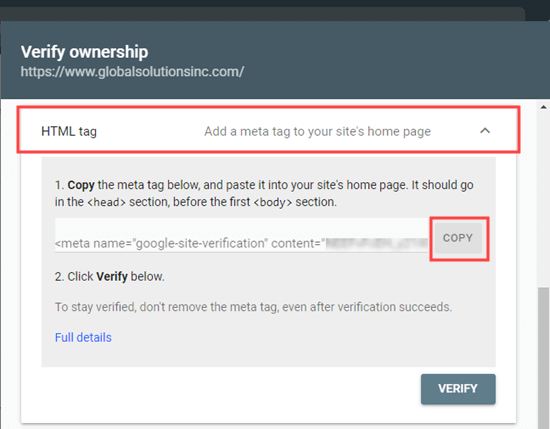
After choosing this option, use the HTML tag method to verify your website and submit it to Google. You simply need to click on the HTML tag option to expand it, and then copy the code by clicking the ‘Copy’ button.

Copying the HTML meta tag from Google Search Console

Now there are multiple ways to do add this code to your website. We will show you the two easiest methods, and you can choose one that best suits you.

1. Adding Verification Code in WordPress using All in One SEO

The easiest way to do this is using All in One SEO, which is the best WordPress SEO plugin on the market. It allows you to optimize your website for search engines without learning any SEO jargon.

First, you need to install and activate the All in One SEO plugin. For more details, see our step by step guide on how to install a WordPress plugin.

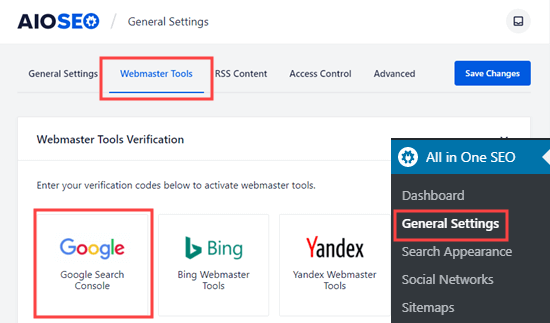
Next, you need to visit the All in One SEO » General Settings » Webmaster Tools page and click on the Google Search Console option.

The Webmaster Tools page in All in One SEO, to select Google Search Console

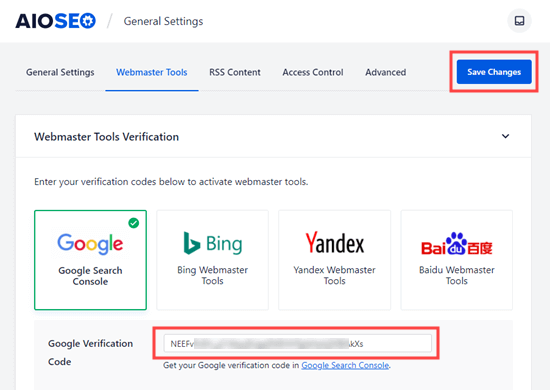
After that, you need to paste the content value from your HTML meta tag into the ‘Google Verification Code’ box. The part you want is the long string of numbers and letters.

Don’t forget to click the ‘Save Changes’ button at the top of the screen.

Entering your Google verification code (from the HTML meta tag) into All in One SEO

2. Adding Verification Code in WordPress using Insert Headers and Footers

If you are not using the All in One SEO plugin, then you can use this method to add Google Search Console verification code to your WordPress site.

First, you need to install and activate the Insert Header and Footers plugin. For more details, see our step by step guide on how to install a WordPress plugin.

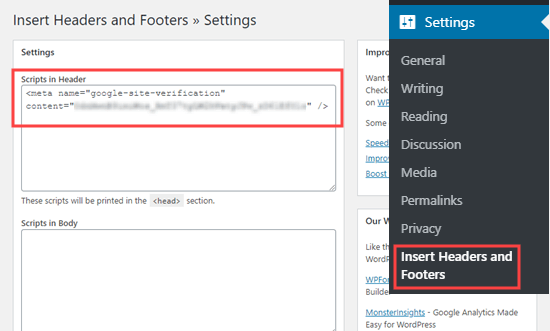
Upon activation, go to the Settings » Insert Headers and Footers page in your WordPress admin. Then, simply paste the whole HTML meta tag into the ‘Scripts in Header’ box.

Pasting the Google meta tag into the Insert Headers and Footers header box

Then, make sure you click the Save button at the bottom of the page.

After adding the meta tag to your site through either method, go back to Google Search Console and click the ‘Verify’ button for the HTML tag method.

You should now see a success message in Google Search Console to let you know that your site has been verified.

If you need more help, check out our step by step guide on adding your WordPress site to Google Search Console.

Creating an XML Sitemap with All in One SEO

An XML sitemap in WordPress is a list of all the content on your website, including all your posts and pages. It helps search engine bots discover your content faster and start showing it in search results.

In the WordPress 5.5 update, XML sitemaps were added as a built-in feature. However, these sitemaps are very basic and can’t be easily customized.

We recommend using All in One SEO to create your sitemap.

All in One SEO is the complete WordPress SEO toolkit and includes a comprehensive sitemaps generator.

It allows you to customize your XML sitemaps by excluding unnecessary or duplicate content. They also have powerful custom sitemap for WooCommerce, news sitemap, and video sitemaps. This gives you a bonus advantage in SEO as your business grows.

First, you need to install and activate the All in One SEO plugin. For more details, see our step by step guide on how to install a WordPress plugin.

Upon activation, All in One SEO will automatically create your sitemap.

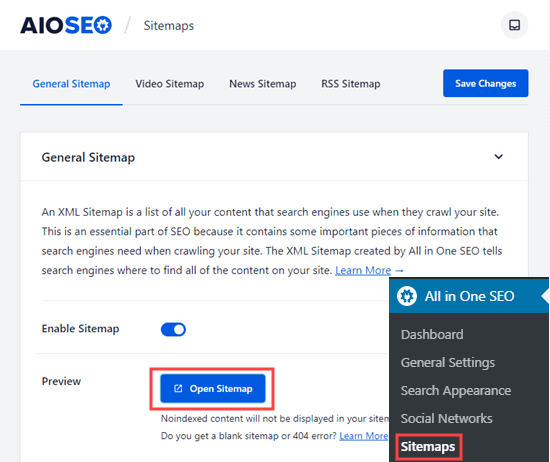
To view it, simply go to the All in One SEO » Sitemaps page in your WordPress admin. Then, click the ‘Open Sitemap’ button.

Click the button to open your sitemap, which has been automatically generated by All in One SEO

You will then see the sitemap index for your site. This links to all the sitemaps that All in One SEO has created.

The index of sitemaps in All in One SEO

Note: All in One SEO creates multiple sitemaps because it is best practice to split up large sitemaps. By using different sitemaps for different types of content, your sitemaps will load quickly and be a manageable size even as your website grows.

Please keep this page open or save the page URL as you will need it later in the tutorial.

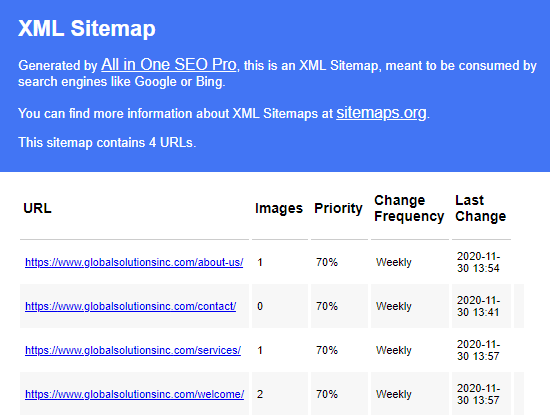
If you want, you can click on any of the links to see the content listed in each individual sitemap. Here is the sitemap for the pages on our demo website.

The list of pages in the All in One SEO pages sitemap

Add your XML Sitemap to Google Search Console

Now that you have generated your XML sitemap, the next step is to help Google discover it quickly.

The easiest way to do that is by using the Google Search Console.

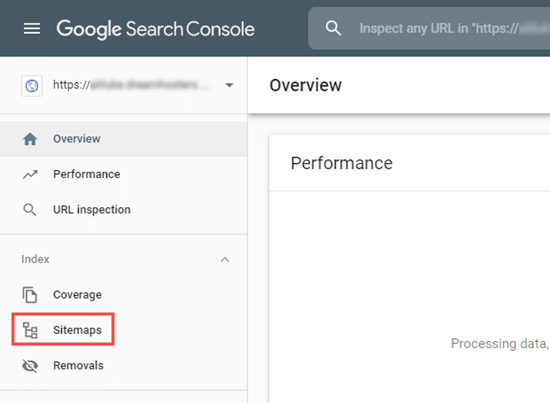
Simply login to your Google Search Console account, and then click on the Sitemaps link in the left-hand toolbar:

The Sitemaps tab in Google Search Console

Google Search Console has already put your website domain here. All you need to do is to type sitemap.xml into the box and click the Submit button.

Entering your sitemap URL into Google Search Console

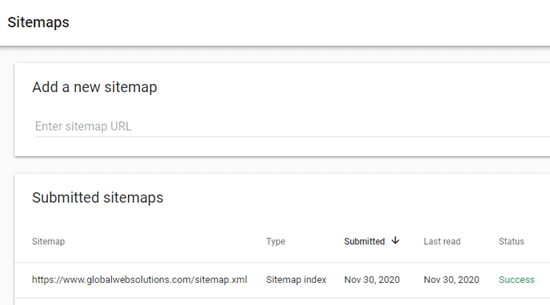
Search Console should show you a message to let you know the sitemap has been successfully submitted. You will also see your website sitemap in the ‘Submitted sitemaps’ list.

Your sitemap should appear in the table after you submit it to Google Search Console

How to Submit Your Website to Bing, Yahoo, and DuckDuckGo

Google totally dominates the search engine market with a whopping 92% market share. However, other search engines like Bing, Yahoo, and DuckDuckGo can still be a significant source of traffic for your website.

Submitting Your Website to Bing, Yahoo, and DuckDuckGo

To submit your website to Bing, you need to sign up for Bing Webmaster Tools.

Just click the Sign In button to get started. Then, sign in using your Microsoft, Google, or Facebook account.

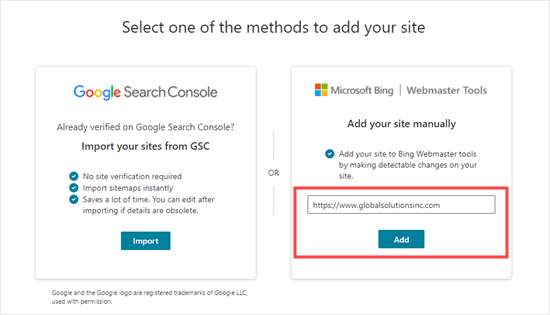
Next, Bing will prompt you to add your site. We recommend using the ‘Add your site manually’ option. It works reliably and doesn’t require you to have verified your site with Google Search Console.

After that, simply enter your website’s domain name (URL) then click the ‘Add’ button.

Adding your site manually to Bing Webmaster Tools

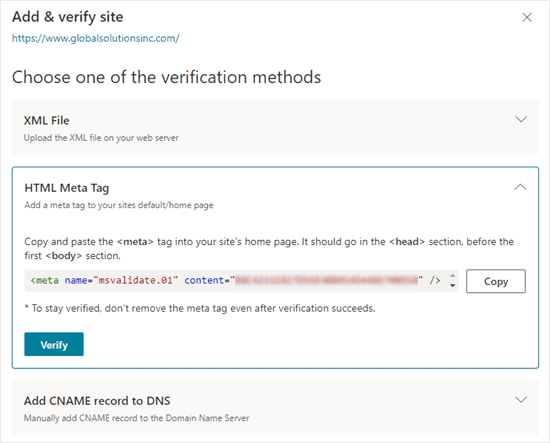
Next, you will see some verification method options. First, click on the HTML Meta Tag method. This will open up the details. Then, click the ‘Copy’ button to copy the meta tag.

Getting the HTML meta tag from Bing Search Console

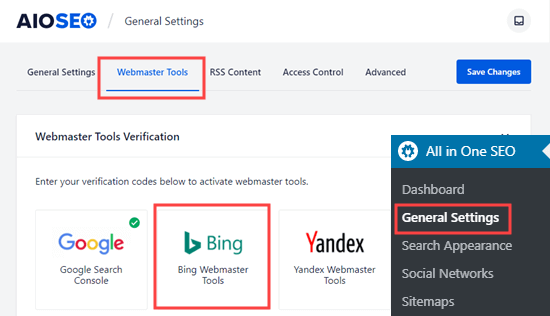
The easiest way to add the meta tag to your site is to use All in One SEO. In your WordPress dashboard, go to All in One SEO » General Settings » Webmaster Tools page.

Then, click on the Bing Webmaster Tools option.

Selecting the Bing Webmaster Tools option on the All in One SEO Webmaster Tools page

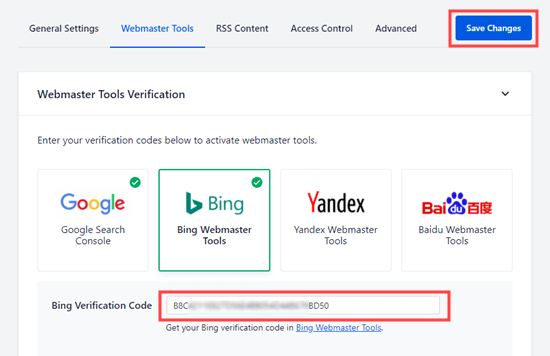
This will open up the box where you can enter the Bing verification code. This is the long string of numbers and letters that forms the content value in the Bing meta tag.

Entering the Bing verification code from your Bing HTML meta tag

Alternatively, you can install the free Insert Header and Footers plugin for WordPress.

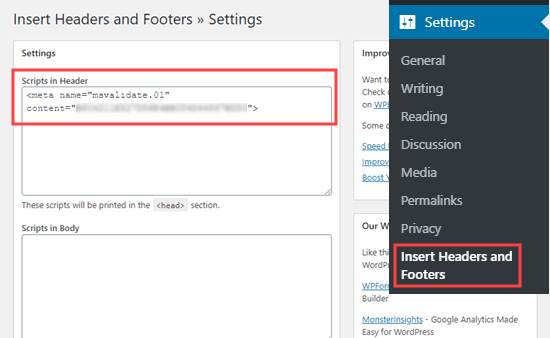
Upon activation, go to the Settings » Insert Headers and Footers page in your WordPress admin. Then, simply paste the whole HTML meta tag into the ‘Scripts in Header’ box.

Copying the Bing meta tag into the Header section of the Insert Headers and Footers plugin

Don’t forget to click the ‘Save’ button further down the page.

After that, you need to return to Bing Webmaster Tools and click the Verify button. You should see a success message to let you know your site has been added.

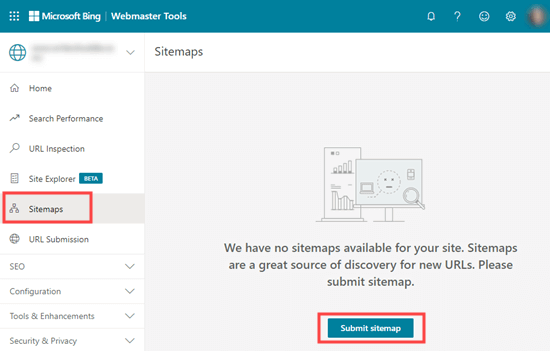
Next, click on the Sitemaps tab on the left-hand sidebar. Then, click the ‘Submit sitemap’ button.

Submitting your sitemap to Bing Search Console

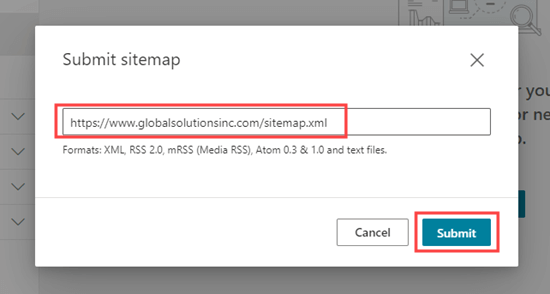
You need to paste in the URL of the sitemap index that All in One SEO created for you. This should be your domain name with sitemap.xml at the end.

After that, just click the ‘Submit’ button.

Entering your sitemap URL for Bing

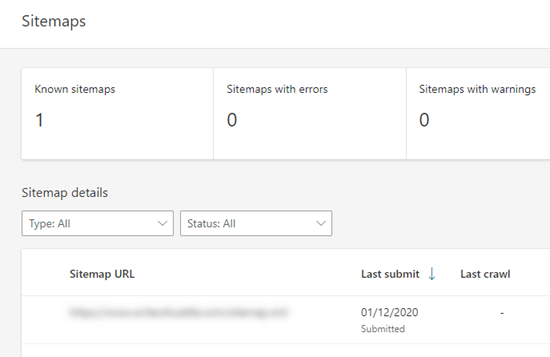
You will now see your sitemap in the sitemap table in Bing Webmaster Tools.

The table of sitemaps in Bing

Your Site Will Also Appear in Yahoo and DuckDuckGo’s Search Results

Now that you have submitted your website to Bing, it has also been automatically submitted to Yahoo.

DuckDuckGo also uses Bing’s search results. This means that by submitting your website to Bing, you will also get it indexed on DuckDuckGo as well.

How to Check if Your Website Has Been Indexed

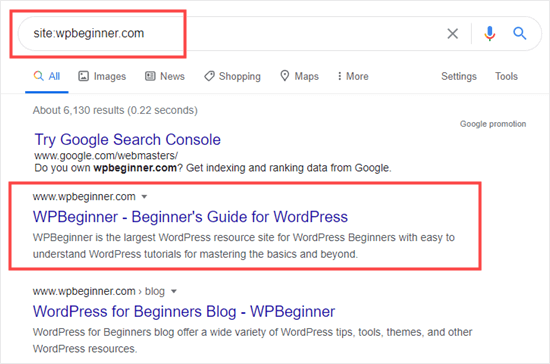
The easiest way to check whether your website has been indexed is to simply go to your chosen search engine’s homepage and type in site:yoursitename.com as the search term.

For WPBeginner website, we would type site:wpbeginner.com into the search engine.

If your site has been indexed, then you should see a list of your content. Your homepage will normally be at the top.

Google results showing that the WPBeginner site has been indexed

This works for all popular search engines, including Google, Yahoo, Bing, and DuckDuckGo.

Should You Use a Website Submission Service?

No, you should not use a website submission service to submit your WordPress blog or website to search engines.

There is no additional benefit to using a website submission or search engine submission services. They charge you a premium fee to do something that is free, and you can do it yourself.

More importantly, these submission services may submit your website to spammy sources which may harm your website’s SEO.

Troubleshooting and FAQs about Submitting Your Website to Search Engines

Since WPBeginner is the largest free WordPress resource site, we have heard just about every question related to this topic. Here are some common problems and FAQs we hear about submitting your site to search engines.

1. How long will it take for my site to appear in search engines?

It could take several days or several weeks for your website to appear in search engines.

It is up to search engines to index your site. You cannot force Google or any search engine to index your site faster.

However, you should follow our instructions above to help search engines find your site as easily as possible. Getting plenty of backlinks to your site can also help speed up the process.

2. I submitted my website but it isn’t showing up in search engines?

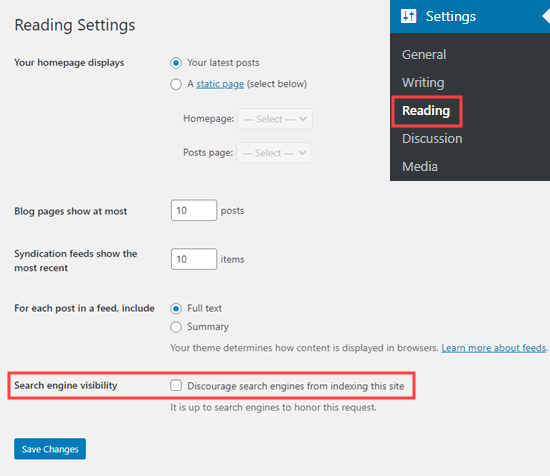
First, check that your site is visible to search engines. In your WordPress admin, go to the Settings » Reading page and make sure that the box ‘Discourage search engines from indexing this site’ is not checked.

Make sure the box to discourage search engines is not checked in the Reading settings

If the box is checked, then it is stopping search engines from crawling your WordPress site. Simply uncheck it then click the ‘Save Changes’ button.

If this setting is correct, then you simply need to be patient. It can take a day or so for Google Search Console to process your sitemap.

3. My site is listed on search engines but I am not getting any traffic?

If you are not getting traffic to your site, then that could be because it is ranking very low in search engine results. You should use All in One SEO to get detailed recommendations about your site’s SEO (search engine optimization).

In particular, it’s important to use keywords appropriately in your site’s content.

You can also use these keyword research tools to write more SEO optimized content, and implement our 27 proven tips to increase your website traffic.

4. How can I submit my website to search engines for free?

All the methods we have covered above are free. We recommend that you do not pay to have your site submitted to search engines.

It is free to create accounts with Google Search Console and Bing Webmaster Tools. Neither of these charges any money.

5. How do search engines find my site?

Search engines use automated software to constantly look through the web for new web pages. This software is often called: search bots, web crawler, or spider. The process of looking for new pages is called ‘crawling’.

The web crawler goes through links to find new pages. This is why an XML sitemap is so important. It has links to all the content on your site and information about them that the web crawler can understand.

6. Is there a submissions site list I can use?

You don’t need to worry about submitting to lots of search engines. The most important one is Google.

Once you have submitted your site to Google, it’s a good idea to also submit it to Bing. This helps Yahoo and DuckDuckGo find your site too.

The other search engines you should consider submitting to are local ones. For instance, you could submit your website to Yandex if you want to get more visitors from Russia.

7. How do I track website traffic coming from Search Engines?

The easiest way to track search engine traffic is by using MonsterInsights. It is the best Google Analytics plugin for WordPress and allows you to see where your users are coming from, what pages they are viewing, and what they do while on your website.

For detailed instructions, follow our step by step guide on how to install Google Analytics in WordPress.

We hope this article helped you learn how to submit your website to search engines. You may also want to see our guide on the best email marketing services to connect with your visitors after they leave your site, and our expert list of the best WordPress plugins for all websites.

Sourced from wpbeginner


Sourced from Vancouver Magazine

Starting a business can be daunting, and there’s a long list of things to do to get it off the ground. We asked an industry expert for the top tips on how to kick start your small business and make the most of your online presence.

Choose the Right Domain

For many people, registering their domain name is one of the last things on the list and it shouldn’t be, says Anne De Aragon, vice-president and country manager, GoDaddy Canada. “A domain name is an important annual investment as it is the hub of your business’ website,” she says. “Much like a physical sign, it marks the location of your business on the web. This makes registering a domain name one of the most critical business decisions you make.”

Some business owners prefer their full business name as the domain name while others prefer an abbreviation. Business owners also need to consider this important fact: According to the Canadian Internet Registration Authority, Canadians are 4x more likely to shop on a .ca website over .com as it taps into the patriotic desire people have to support local businesses. “Taking a minute to think about your business, your goals and how you want to present yourself will allow you to decide on the best domain name for your business,” De Aragon says.

Create a Website that Looks Amazing

A mobile-friendly website is essential for a business to ensure it is easy to access and use for today’s mobile-first environment. This means your website looks its best and performs stress-free for the user since the text is readable, images are optimized and fitted to screen sizes, and there is no need for horizontal scrolling.

For example, GoDaddy’s Websites + Marketing tool allows business owners to create a modern, mobile-friendly website for free and with no technical knowledge required. The tool has hundreds of already-designed templates, which allow business owners to control the look and layout of their website.

Leverage Digital Marketing

Digital marketing can deliver strong results at a fraction of the price of traditional marketing. Think of your website as a hub from which consumers access your various channels. De Aragon recommends being selective, always keeping your business goals in mind. “You should incorporate a variety of channels, but you don’t need to be on every platform,” she says. “It has to make sense for your business and your target audience.”

No matter what channels you choose, make sure you have high-quality visuals. Entrepreneurs can engage a design professional or take advantage of content design applications, such as Over by GoDaddy. These applications allow entrepreneurs and small business owners to easily create impactful visuals which can be leveraged on social platforms, websites, and email marketing campaigns.

Make Your Email Shine

Since email is often the first consumer touchpoint, it is important for your email address to be professional. “A professional-looking email address gives your business more credibility when you’re corresponding with existing and potential customers,” De Aragon says. “To set up a professionally branded email address, you need to have registered a unique domain. From here, setting up a professional email account can be done quickly and easily.”

Learn more at GoDaddy.ca.

Connect at Instagram | Facebook | Twitter

Sourced from Vancouver Magazine

By

If you want to rank higher in Google searches, it’s crucial to focus on overall website performance.

Technical SEO aspects such as site speed and facets and filters play a critical role in the performance of your site.

In this article, I discuss how websites can drive more traffic from SEO by understanding and optimizing these elements.

Technical SEO 101

Along with content marketing and link building, it is imperative that websites consider the technical aspects of SEO for higher ranking and increased traffic.

Here are 6 critical category page technical SEO elements that can generate higher sales and improve conversions.

  • Category Page Structure: As category pages have the potential to become high authority pages, a best practice is to create a hierarchical structure with no more than three levels. What this means is that structure is defined by category pages, followed by subcategories, and finally product pages at the bottom.
Critical-Technical-SEO-Tips-for-eCommerce-Stores-Category-Page-Structure-Transcosmos

Image Source: Transcosmos

  • Category URLs: Your category URLs should describe exactly what the webpage is about without any extra information. A standard format could be described as www.example.com/category-name. For example, if you are selling organic products with breakfast being one of the categories, the URL could be www.example.com/breakfast.
  • Category Titles: Category titles are a great opportunity to let web crawlers such as Google know about the page and its content. Good titles are a result of strong keyword research. Utilizing the top keywords used in search queries by your target audience will help you come up with optimized titles. Always start your titles with these keywords and if required add the brand name towards the end.
Critical-Technical-SEO-Tips-for-eCommerce-Stores-Portfolio-Category

Image Source: Theme

  • Category Meta-Description, H1 Tags, and Content: A category description is added in the meta-description field. The content added here has the potential to appear in search engine results along with the title tag and can help boost click-through-rates (CTRs). Write high quality, brief, unique descriptions that can summarize your product and offerings while incorporating high relevance keywords. H1 tags are similar to title tags appearing on your category page. Along with keywords they should also be optimized for readability and be descriptive of the category. Another aspect is content, while category pages should primarily focus on products, adding a few lines of optimized content with relevant internal links can provide a major boost to your SEO.
  • Image Tags: File names and alt-text for images alert Google and other search engine crawlers about the content of your images. Changing the file name from the default to a more descriptive keyword-rich name helps search engines understand your image and add value to your SEO. The Alt-tags field is another opportunity to rank by associating keywords with images. You can populate the alt-tag field with a short keyword-rich description of the image. For websites catering to the US market, filling the alt-tag is a requirement under the ADA act to improve accessibility for users with disabilities.
  • Canonical URL: For categories that extend to more than one page or provide the option of multi-level filtering, the canonical URL becomes a necessity. By setting a canonical tag, backlinks get attributed to the main category page thus avoiding content duplication. This also helps crawlers such as Google establish the relationship between each main category page and its subsequent pages.

Website speed

A massive increase in traffic or transactions can be challenging for your overall website performance. A Google sanctioned study found that the bounce rate increases exponentially for every extra second your website takes to load and just improving your load time by one second increases your sales by up to 7%.

Some of the steps you can take to increase your website speed are:

  • Use a CDN: Content Delivery Networks are useful if you have visitors from different geographical locations. CDNs are a network of servers located in multiple geographies and store your content in each server. When a user visits your website, the data from the closest CDN server loads, allowing for faster load times.
Critical-Technical-SEO-Tips-for-eCommerce-Stores-Content-Delivery-Networks

Image Source: BluePi

  • Use a reliable and fast hosting service: From expensive dedicated servers to VPS and shared hosting, identify the service that best fits your business needs without compromising on performance.
  • Limit page size: Review all content on your pages and remove unused scripts or plugins. Use JPEG images instead of PNG. Use code minification and code merging to help trim the excess or buggy code pieces, reduce the number of server requests, thus speeding up the page load time.
  • Reduce redirects and broken links: For pages that are temporarily down or have been permanently shifted, the visitor is shown a 301 or 302 error. What this does is adds another layer to your user journey, effectively increasing load time as well. Use redirects in such a scenario where a user is led to another category page.
  • Use lazy loading: Also known as on-demand loading, this is a very popular script used to load only the required section and delays the remaining until it is needed by the user. This is especially useful when used with images.
Critical-Technical-SEO-Tips-for-eCommerce-Stores-Use-Lazy-Loading-Imperva

Image Source: Imperva

  • Optimize 3rd Party Scripts: While 3rd party plugins like social media sharing and animations add a wide range of useful features they tend to slow down page load times considerably. You can optimize these by using HTML’s async or defer attributes which would activate the script only when the user requests it or if the entire page has finished loading.

Filters and Facets

If you have a host of products on your category page, adding filters and facets will help users narrow down their selection and find desired products in the shortest possible time.

Filters use basic pre-set attributes which can eliminate products on one single criterion while facets help to narrow search results by using multiple attributes.

For example, on Amazon.com the option to display desired products by a certain customer rating or price range falls under filters as here you can choose only one range of product prices and/or defined rating criteria.

The option to choose multiple brands or specifications within a product category is what is called a search facets.

Facets are dynamic and change with search behavior. It becomes important to regularly analyze the keywords your web pages are ranking for, identify best selling products and utilize the log file to understand what customers are searching for on your website to help determine the right facets for every category page.

Conclusion

In many ways, category pages are the backbone of eCommerce websites. Retailers must focus on how these destinations are structured and optimized for gaining the best SEO outcomes and offering a seamless experience to customers.

By

Guest author: Kiran Patil is the founder and CEO of Growisto, a rising e-commerce marketing and technology company. An alumnus of IIT Bombay, he has over 16 years of experience in e-commerce and digital marketing. His entrepreneurial spirit and unwavering attitude have helped online businesses grow to their full potential. When not absorbed in being a business transformation catalyst, he loves traveling, cycling and trekking in unexplored destinations.

Sourced from Jeff Bullas

You’ve probably heard that the podcast industry is growing at an alarming rate.

By Tim Stoddart

Tim Stoddart is a managing partner at Copyblogger. For the past 8 years, Tim has been CEO of Stodzy Internet Marketing. He currently lives in Nashville with his wife and their pitbull named Alice.

Sourced from copyblogger

Sourced from Mashable India

Facebook recently announced that it’s widening the access to Rights Manager to give more creators an ability to better control their content on Facebook and Instagram. As a part of the new expansion, page admins would now be able to submit images and videos for rights protection. Creators would also be able to issue takedown requests for videos and images that are owned by them but are reuploaded on these platforms.

In case you aren’t aware, ‘Rights Manager’ is a powerful, highly customizable tool, which is built for people who want to control when, how, and where their content is shared across Facebook and Instagram. As posted on its blog, the ‘Collect Ad Earnings tool’ and expanding availability has also been improved which means more creators will be able to collect ad earnings from matching videos that also include in-stream ads.

A new filter view for spotting monetizable matches has been added along with a guide on how creators can get more monetization opportunities and exportable revenue reports. Page admins can submit an application for the content created by them that they want to protect.

There’s also a new in-stream ads toggle in the Creator Studio app that will let users easily manage their content and ads directly from their mobile phones. “We’ve expanded In-stream ads to Egypt, Iraq, Morocco, and Turkey, adding to the 45 countries where the in-steam program is already available,” states the blog.

It was back in September 2020 when Facebook had announced an update to its ‘Rights Manager’ tool that allowed photographers to claim ownership over their most popular images and track when these images had been used without their permission. Rights Manager for Images used image matching technology to help creators and publishers protect and manage their image content at scale.

Sourced from Mashable India

Sourced from News18 India

Twitter is launching tweets that disappear in 24 hours called Fleets globally, echoing social media sites like Snapchat, Facebook and Instagram that already have disappearing posts.

The company says the ephemeral tweets, which it calls fleets because of their fleeting nature, are designed to allay the concerns of new users who might be turned off by the public and permanent nature of normal tweets.

Fleets cant be retweeted and they wont have likes. People can respond to them, but the replies show up as direct messages to the original tweeter, not as a public response, turning any back-and-forth into a private conversation instead of a public discussion.

Twitter tested the feature in Brazil, Italy, India, and South Korea, before rolling it out globally.

Fleets are a lower pressure way to communicate fleeting thoughts as opposed to permanent tweets, Twitter executives Joshua Harris, design director, and Sam Haveson, product manager, said in a blog post.

The news comes the same day Twitter CEO Jack Dorsey and Facebook CEO Mark Zuckerberg faced questions from a Senate Judiciary Committee about how they handled disinformation surrounding the presidential election. Both sites have stepped up action taken against disinformation. Zuckerberg and Dorsey promised lawmakers last month that they would aggressively guard their platforms from being manipulated by foreign governments or used to incite violence around the election results and they followed through with high-profile steps that angered Trump and his supporters.

The new Fleets feature is reminiscent of Instagram and Facebook stories and Snapchats snaps, which let users post short-lived photos and messages. Such features are increasingly popular with social media users looking for smaller groups and and more private chats.

Disclaimer: This post has been auto-published from an agency feed without any modifications to the text and has not been reviewed by an editor

Sourced from News18 India