Confusion over the twin functions of digital advertising could lead marketers into flawed decision making, especially when ads used to signpost customer journeys are treated as if they can generate demand.
This year Facebook is 15 and Google is 21, but as advertising channels for big brands, neither has emerged from the troublesome teenage phase into a fully effective adulthood.
It’s because marketers are often not using these and other online channels appropriately. Online ads perform two distinct tasks that need two different decision-making processes, but many marketing departments only use one.
The first task is the one that marketers are most comfortable with because it is the same task that’s done by offline ads. If seeing a compelling picture on Facebook is similar to seeing a poster on the street, and watching a video on YouTube is similar to watching one on TV, then it’s clear, an online ad is just like an offline one. It’s an investment into generating demand and producing future sales.
The second task is less familiar to marketers, albeit equally important for sales. It’s the role of online ads as signposts for ecommerce businesses. This task is the online equivalent of the name above the high street front door, the lights that stay on inside, the shelf-space and even the entry in the Yellow Pages. The task is to help people who are already on their way to a website arrive safely. It isn’t an investment into future sales, but a cost of current transactions.
The two tasks can lead to flawed decision making when ads that mainly perform the second task are treated as if they perform the first. It can lead businesses to treat signposts as if they were substitutes for true investments into future sales and, in some cases, waste money shepherding sales that were going to arrive anyway.
Making sense of the macro data
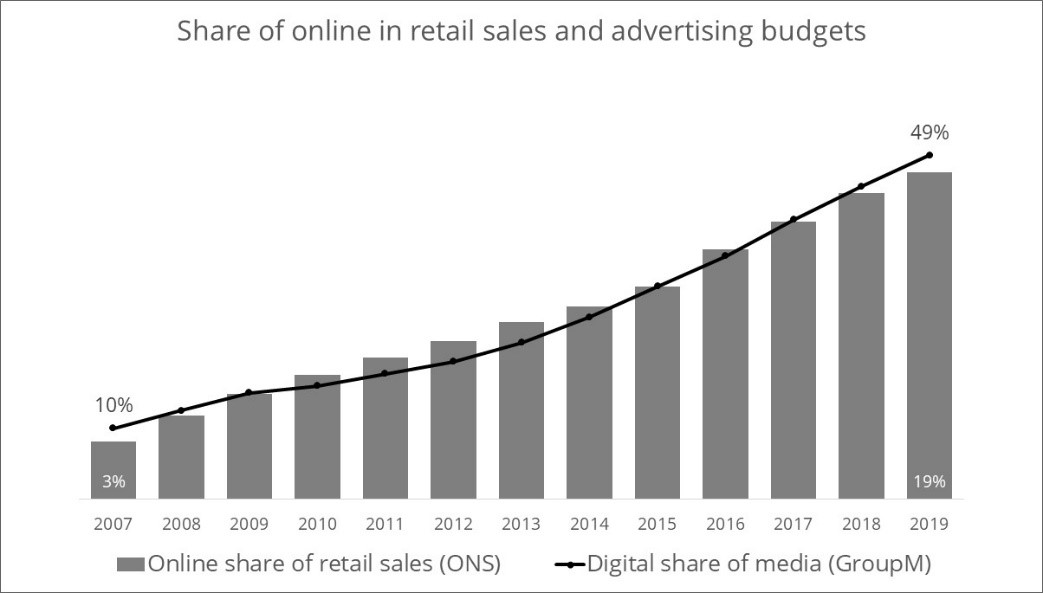
The existence of the second task explains the matching trajectories in the chart below. In it, online advertising’s share of budgets (black line) and the ecommerce share of retail (grey bars) have been growing in parallel for as far back as the data is available.
At least part of the explanation is that some online advertising is a cost of carrying out ecommerce. Businesses that want to sell on the internet need to be visible there.
Ah, but correlation is not causation, a sceptic might argue. The chart fits other explanations too. For example, both ecommerce and online advertising rely on the same technologies, so of course they grow together. Or perhaps ecommerce and online advertising are both superior to their offline versions and people have simply begun to use them both more over time.
These alternative arguments break down in the reaction to Covid-19. So far this year, both ecommerce percent and online advertising percent have increased in lockstep at a time when decision making has clearly been about keeping businesses going rather than making bets on new technologies.
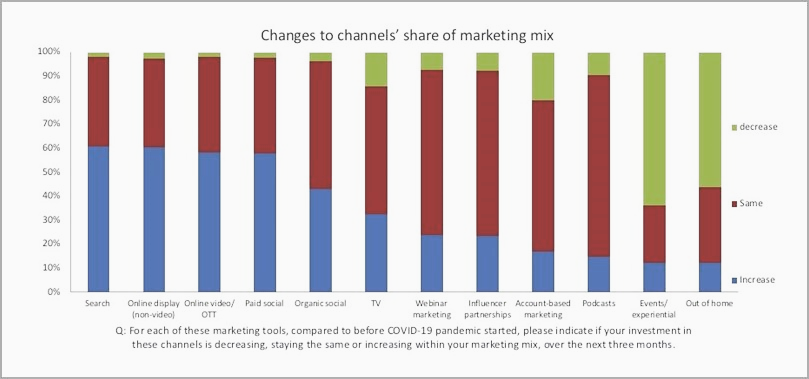
The reason is that during Covid-19, decisions about the two tasks of online advertising have been different. Offline budgets have fallen because, as is typical in a recession, businesses find it hard to invest into future sales when survival today is under threat. But, as the chart below shows, many types of online advertising are enjoying maintained or even increased budgets.
Some of this change in the media mix is driven by lockdowns and reduced available reach from channels like out-of-home and events, but some is also because more and more people are shopping online, and that makes the second task more important.
In a recession, businesses cut down on advertising, but they don’t close the shop. They keep the lights on offline and they remain visible online too.
Counting everyone that walks past the signpost
More important for marketers’ day-to-day decision making is the way that the two tasks manifest in decision making tools. My team and I use charts, like the one below, to help make things clearer for clients. It shows the case of search engine marketing carried out by a semi-fictional, but typical advertiser.
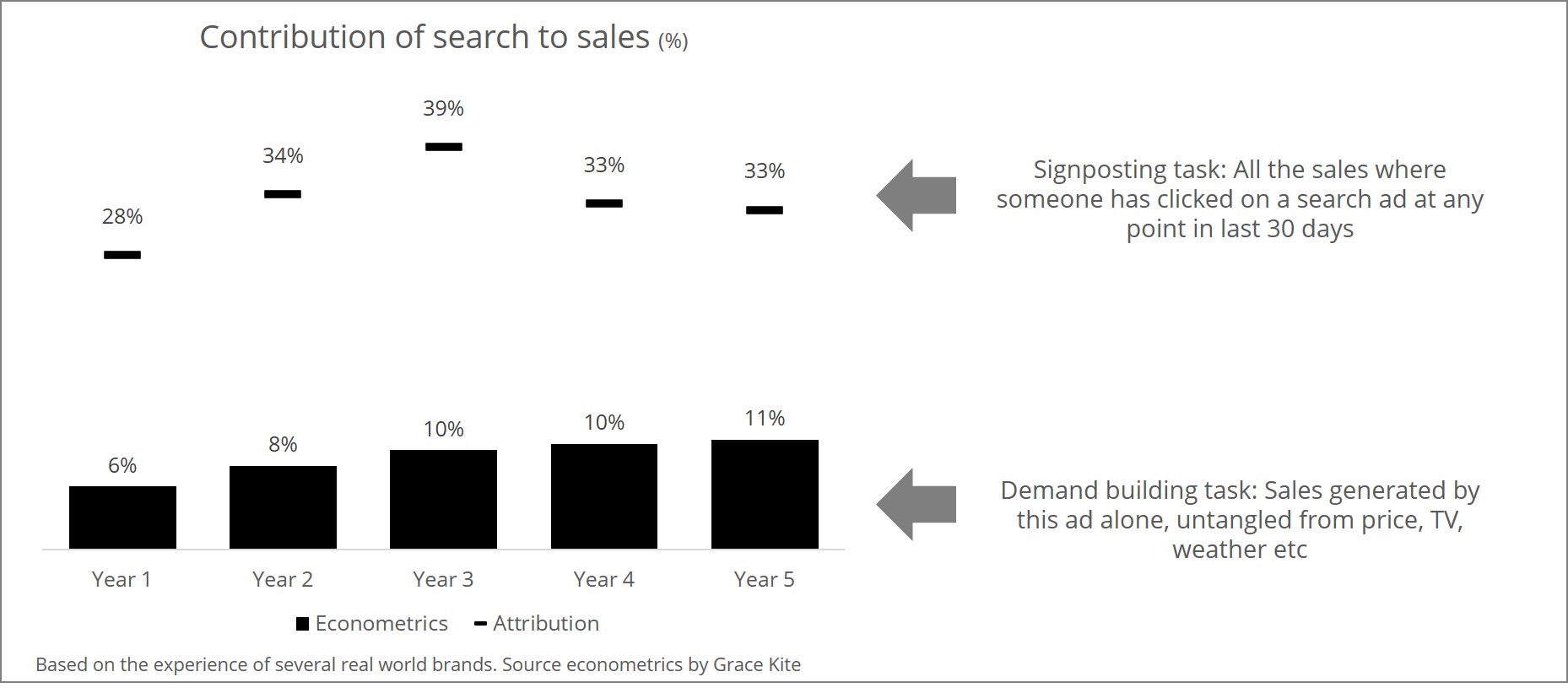
In the chart, the proportion of total sales driven by search ads is around three times bigger in Google’s attribution tool than it is in our econometric modelling. The reason is that in two thirds of customer journeys that involve a search click, the ad didn’t actually generate the sale, it acted as a signpost, helping someone who had already made their decision to complete their purchase.
Some more sophisticated advertisers are aware of this distinction, but others treat all of the signposted sales as if they were generated by the signpost rather than the price cut, TV ad, or good weather day that prompted the customer decision. They calculate return on investment figures that are too high, and costs per acquisition that are too cheap, and they believe, sometimes wrongly, that switching off signposting would be disastrous.
Using signposts properly
We advise clients to make the comparison above for all online channels and test limited switch-offs. The test and learn should be focused on ads that mainly perform the signposting task rather than the demand building task, so that they don’t damage incremental sales, but do reveal how important each signpost actually is.
There is still a lot to learn in this area, but the above chart is typical of our limited experience. The online ads that are most often an investment into future sales are those that target new rather than existing customers and reach rather than engagement. They typically have richer creative, particularly video, and they highlight newer or less well-known products.
At the other end of the scale we typically see text only ads for the advertiser’s own brand, social that targets clicks and generic search for well-known product lines.
Sometimes the test and learn reveals that the signposting task wasn’t necessary, as in the left panel of the chart below. This advertiser had strong SEO and competitors weren’t buying their own brand terms. Switching off core brand PPC didn’t affect sales at all.
In other cases, the signposting job is revealed to be critical. In the right panel, the switch-off revealed that without a presence in generic search for these keywords, even a customer who had already decided to buy could be diverted and fail to arrive safely.
In our past projects, this kind of guided test and learn has helped clients to use their online channels more effectively and avoid wastage in the performance budget. It’s also generated an additional return on investment benefit when advertisers re-invest the money saved into their best performing, demand generating channels.
It’s the best that current adtech and econometrics can do, but it’s still quite clumsy. Trial and error is rarely the best way to make plans.
The future is in collaboration between marketers, analysts and other departments in the advertiser’s organisation. Experts in sales channel management and merchandising have the skills to make decisions about spending on physical signposts, call centres and high street shops. Their expertise must be relevant here.
Time will tell, but my bet is that the fully mature, fully effective role for online advertising will be very different to the adolescent one we are familiar with today.
MasterClass has always been a powerhouse when it comes to online learning, setting itself apart from its competitors with a list of instructors including Frank Gehry, Spike Lee, Anna Wintour, Shonda Rhimes, Margaret Atwood, Annie Leibovitz, Martin Scorsese, David Lynch, Serena Williams, Neil deGrasse Tyson, and many, many others.
Launched in 2015, the company has now rolled out a new identity created by New York City-based branding studio Gretel.
“We came on board to help the brand and marketing mirror the elevated offering and motivate subscribers to see the potential and the value in a subscription,” Gretel Executive Creative Director Ryan Moore says. “The system we’ve created together is dynamic, accessible and built for further iteration.”
The identity sought to reflect MasterClass’ vibrant and bold instructors, while channeling the cinematic and the sophisticated. All told, it’s a marked departure from the company’s former brandmark:
As David Schriber, MasterClass’ CMO says, “It’s not about a new design, it’s about an evolution. MasterClass has moved into mainstream culture, and the brand’s transition from product to household name has never been more apparent than in the past year. We wanted to create a contemporary identity connected to culture that each member and instructor could own along with us.”
As for some specifics of the work:
One highlight of the new brand identity and, most notably, in the new logo, is the use of the underscore. This simple line is reinforced throughout the reimagined platform and conveys the white space that’s up to the member to complete—a blank space to be filled, a new skill to be learned, the potential and possibility of today.
MasterClass is a portfolio of individual classes taught by a diverse set of instructors. To illustrate this, each instructor now has their own unique visual identity, including logo, font and colourway, that will bring their personal style to the comprehensive MasterClass branding. This element of the redesign also reinforces the notion that members and instructors can be a part of a new way of learning through the MasterClass ecosystem, while still maintaining their individuality and interests.
See how Gretel brought more of the new identity to life below.
It’s been almost 26 years since the first display ad flashed across a screen. If the topic seems overdone to you, then you’re mistaken. Display advertising is an old kin of online marketing, but it’s not at all like it used to be.
In a post-cookie world, display advertising must be fast changing to keep up with innovations and creative resurgence. Ask marketers who know their game, and they will tell you that display advertising is here to stay and flourish.
Display Ads vs Native Ads
This has been an ongoing debate for a long time. Many marketers believe that native ads are an end to display advertising. Others believe that the old banner ad is a better way to garner attention.
Native ads — as the name suggests — are native to a publisher’s environment. Unlike, display advertising which stands out, the ad content for native ads tends to blend in with its surrounding content.
Native ads are non-intrusive and therefore effective when you want to educate your customers. But, when the objective is to build brand awareness or to retarget customers display ads win the game hands-down
Display Advertising: Then & Now
The first display ad appeared on the internet on October 24, 1994. This is what the ad looked like:
This ad was a promotion for AT&T internet. One look at this display ad and it’s clear that things have progressed for this channel of online marketing in the last 26 years.
Time and again, you’ve probably witnessed many people write off display ads as part of their marketing strategy. Especially since the online marketers best friend – third party cookies — bid us a goodbye. The AdTech world thought that was the final nail in the coffin for display and native advertising.
What is the future of this channel of advertising? Is it dead? Google’s Display Network is the largest in the world, with 90% reach across all internet users. In fact, if you target well, your ads could appear across 2 million+ websites and 650,000+ mobile apps. That’s a lot of exposure!
Of course, this comes with its own challenges or should we call them opportunities?
Ad Blockers: Are They the Real Enemies?
Not according to Hubspot! A report by Hubspot claims that most people block display ads because they are annoying or intrusive. So it’s actually not the ad blockers, but bad ads that are the real enemies.
Do Low Click Through Rates Mean an End to Display Advertising?
The question has changed in recent times. Once upon a time, display advertising boosted CTR as high as 44%. But in recent years, the objective of this mode has changed. Now, it’s considered a brand tool, which is why a better measure of effectiveness would be impressions and reach. So if generating brand awareness — communicating your brand messaging — is your objective then use the right metrics to measure it.
Why Should You Include Display Advertising In Your Marketing Mix?
Many would vouch for the effectiveness of display ads for creating brand awareness and, subsequently, getting clicks and conversions from people who might not be aware of your brand. The secret sauce is knowing the right users and targeting them at the right time and on the right website.
In the post-third party cookie world, many marketers are proving their metal by experimenting with contextual advertising and people-based targeting. Moreover, with the rise in consumption of mobile and video based content, display advertising helps make the most of newly evolving programmatic environments.
Learn How Display Advertising Works
If you want to know more about this powerful marketing tool works, how it is bought and sold (including in a programmatic environment), and how to set up a display advertising campaign using Google Ads, then check out our Digital Marketing Nanodegree program.
The program comes with an in-depth module on display ads and a hands-on project in which you will evaluate a display advertising campaign on the basis of the targeting strategy, creative used, and the results of the campaign. Plus, you’ll provide recommendations on how to improve the campaign.
Ritika is the Brand Communications Manager at Udacity and is passionate about bringing inspirational student stories to light. When not talking to the amazing Udacity students, she can be found reading an article or watching a video on the internet. Other posts by Ritika Pradhan
Small businesses that are rising to prominence in the digital surroundings are exposed to various business challenges. Their owners need to be active and present in various channels of online communication, but they mustn’t neglect their core business tasks.
In other words, being visible in the digital surroundings always needs to bring additional value to a business.
Since online business rules are constantly changing, SMB-owners should keep their eye on those innovations to ensure their constant growth.
Choose your digital pathway
When you’re starting your digital business endeavour, it’s important to know what you’re in for.
Do you want to generate a higher number of leads? If the answer is positive, you might think about focusing on Facebook. It’s the most widespread social network with people of all generations and backgrounds. After launching a Facebook business page, you should learn a thing or two about using Facebook for business purposes.
Is your goal to start selling products or services immediately? In that case, Instagram is a better option. Since you can sell products via this network, and it’s generally based on photos, stories, and videos, Instagram is a perfect choice for businesses that need a quick and efficient promotion while selling products along the way.
Business owners working in the B2B-niche might want to be more exposed to other businesses. In that case, LinkedIn is the best starting point. You’ll be able to follow companies that you want to work with, plus you’ll connect with various business individuals, as well.
This is only the tip of an iceberg in terms of different digital pathways available to SMB-owners.
Bring a mobile strategy
We don’t have to tell you that this is the age of mobiles. If you just look around when you’re in a café, on a train or in the park, you’ll see that everybody’s using their mobiles.
Therefore, taking mobile users into account when joining the business playground is a must.
As explained by design experts from a web design company in Houston, SMB-owners can adapt their websites to mobile users from day one. If you go with a responsive design, your website will adapt to the device it is begin accessed from. As the number of website visitors is growing, you’ll consider launching a mobile app, as well. This is usually recommended for e-commerce business owners.
When bringing a mobile policy, it’s vital to understand how content affects website visitors. If your website is “heavy” and bulky, it might take too much time to load. So, optimize your photos for your website and avoid keeping videos on the server. Instead of that, launch a YouTube channel and post your business videos there. Then you can add those links to your website.
Support user-generated content
Reviews, comments, testimonials, and case studies are all welcome when you’re building your brand in the online community.
People on the Internet are getting more careful in terms of recommendations and content. Therefore, genuine reviews, generated by their fellow humans are precious.
So, let your visitors leave their comments below your blog posts. Asking them to register beforehand would yield two benefits at the same time: you’ll be able to control the content of the comments, thus eliminating inadequate ones, plus, you’ll populate your email list that way.
Additionally, allow your buyers or previous customers to leave their reviews and testimonials. Each of these people should either leave their real name or the name of their company. That way, you’ll add to the credibility of these features.
Another beneficial element for SMBs in the digital environment is case studies. These stories will show your future clients what you’ve done for your previous clients. If you’re not adept at writing, think about hiring copywriters or other writing professionals and let them write compelling stories with your accurate inputs.
Promote yourself on Google
Social media promotion is one thing, but promotion on Google is something different.
Being able to present yourself on the largest global search engine is a privilege. However, it’s vital to use this privilege in the right way.
For starters, register to the Google My Business listing. When somebody enters your business name in Google, they’ll be able to see the key information about it on the right side of the screen. This includes your location on Google Maps, your physical address, phone number, website address, and any other information that you add to Google My Business. Also, your clients can leave their reviews and comments about your services, as well as photos.
On the one hand, you confirm to your potential clients that you’re an existing, credible business. On the other hand, they can see other clients’ experiences with your brand here, as well. After that, they can either proceed to your website or your social media accounts.
Knowing how to tell your audiences that you exist is very important. And informing them what you do and how they can benefit from it is even more relevant. That’s why we suggest that you set your goals first and then start targeting clients and business partners in line with those goals.
Also, encourage your existing clients, as well as those who stop using your services, to share their experiences with you. This feedback will help you improve your work and direct your business to more efficient operability.
Finally, use free options offered by Google, social media, and other digital channels to promote your business.
By Liam Collins.
Liam Collins is a tech pundit and Web enthusiast working at TuiSpace.com. He spends most of his time reading and writing about the current affairs in the world of information technology. When he isn’t working, he likes going for long bike rides and walks in nature.
Building a CBD business in 2020 and beyond is a challenge that more and more entrepreneurs are answering. CBD marketing is tricky because of the laws and restrictions put in place by both the government and marketing platforms such as Facebook and Google.
CBD branding is equally as delicate — it’s important to differentiate your company from others, but you must do so without creating brand assets that could violate guidelines, laws or regulations (both state and federal).
Those are just a few of the complications that come with putting a CBD business together. If you think you’re up for the challenge (or better yet, if you’ve already answered the call), this guide will help you navigate the basics of CBD branding and marketing.
I’m passionate about helping CBD brands succeed. In leading a marketing agency, I’m always ready to help CBD brands navigate the mess of restrictions when it comes to marketing and selling CBD products. Based on my experience here are the basics that CBD brands should consider.
What Is CBD?
Cannabidiol (CBD) is one of the main parts or components of the marijuana plant. However, unlike its psychoactive and hallucinogenic cousin THC, CBD does not cause any kind of “high.” There is a large amount of anecdotal evidence that suggests CBD could have a myriad of health benefits, which we seem to still be skimming the surface of as more scientific research is needed. Although it is early days in terms of CBD for medical use, many people find it beneficial for treating many different ailments.
Current Laws And Regulations
The legality of selling and marketing CBD products is difficult to nail down. The official word from the Food and Drug Administration is that legality depends on how the product is packaged, branded and marketed. For example, CBD cannot be packaged or branded in a way that could be construed as appealing to minors, and cannot be sold as part of food products.
When it comes to platform-specific regulations, most of the big players like Facebook and Google simply do not currently allow CBD advertisements.
The Difference Between CBD Marketing And CBD Branding
Marketing is the art and science of telling a company’s story to the right audience in the most effective way possible. Branding is the practice of building that story along with the company’s assets, such as logos, business cards, webpages and so on. When broken down into those simple terms, it seems fairly clear that this isn’t a chicken-and-egg situation. It’s important to have strong branding for your CBD company before you put a lot of effort into marketing.
Questions To Ask Before Getting Started
Before getting into either branding or marketing, it’s important to know the answers to a number of questions. These include:
• Who will be your main target audience (i.e., age, geographic location, etc.)?
• What main problems does your audience hope to resolve with CBD?
• Will you target existing CBD users or those who may be interested in CBD?
• Where will you sell your products, and what are the laws and regulations there?
Answering these questions is important to your success because without the answers you’d essentially be shooting in the dark. Once you have a clear picture of who your ideal customers are, why they’ll be interested in your products and any relevant regulations, you’ll be ready to start building your brand.
CBD Branding
Modern CBD brands would be wise to move away from the association with cannabis and “getting high.” For one thing, CBD has nothing to do with getting high; for another, that notion may turn off some people who would otherwise use CBD products. In my experience, CBD branding is done best when it appears soft, accepting and comfortable.
This makes a lot of sense; after all, many people have turned to CBD to soothe pain and anxiety. So, how can you use your branding to share your company’s unique message with the world?
CBD Marketing Basics
Once you have your brand assets figured out, it will be time to find ways to share them with your ideal customers. Your branding may need to include:
• Brand positioning (who you are and what you do and why)
• Brand promises (what you’ll deliver to your customers)
• Brand assets (e.g., colours and fonts, stationery and business cards, designs or images, and internal templates and standard operating procedures)
An easy and free way to start marketing your brand is by creating your social media accounts. Make sure they use the same name (or if that’s not possible, similar/linked names) and employ your brand assets to their fullest potential. You can market CBD organically on Twitter, Pinterest and Instagram, so picking two out of those three may be a good way to begin.
Focus On Branding First
While CBD marketing and branding are both important, building a strong brand will ensure that you get the most out of the money you put into marketing.
In today’s digital landscape, it’s critical to understand why design matters beyond the realm of the creative department. After all, marketing, branding, sales, business collaborations, and partnerships all hinge on the strength of a company’s branding and its consistency.
It’s no longer enough to have a couple of graphic designers to shoulder the burden of this responsibility. In the social media age, a truly successful brand needs seamless harmony across different platforms, whether it’s in traditional advertising, communications, or customer service. It’s not just about engaging aesthetics, but ensuring that anyone who needs to work with the brand image can do so quickly and effectively. Not only does it save time and money, but everyone can stay on the same page with a greater sense of productivity.
We spoke with Adobe’s Principal Solutions Consultant, Bart Van de Wiele, who helps companies navigate rapidly-changing digital media through Adobe’s formidable suite of creative solutions. With a long background in graphic design, years of experience in software training, and a deep knowledge of the Adobe ecosystem, Van de Wiele is well-equipped to explain why basic design tools are a must-have resource for everybody.
Design is for everyone
You’d be surprised at how often non-designers could use design to make their jobs more effective.
“Imagine you’re a business manager, and you have an idea of how you think you can improve a certain business process internally,” says Van de Wiele. “And imagine that you’re gathering a meeting and you need 15-20 minutes to quickly convey your point — and then all of a sudden, you think of a better way to visualize your idea. You have access to an infinite amount of images that can help you support an idea or a metaphor — anything that you might have in your head.”
In reality, a business manager or marketer might not have access to a brand’s most up-to-date logo or color palette, and a graphic designer won’t always be available to help. Even something like proper typography could make a difference in bringing confidence and polish to a new proposal.
Citing a survey by Forrester, Van de Wiele believes that creativity should be a critical part of any business philosophy. “More than 82% of the people, the decision-makers, the executives that they interviewed, believe that a company can gain larger business benefits, like revenue growth or market share, if the employees have a more creative mindset,” he tells TNW.
Creativity isn’t just about developing a business’s logo or graphics — but about finding better and more effective ways to help non-designers succeed.
Getting started
Creativity can be a daunting task, especially for those who lack experience. For Van de Wiele, Adobe offers a convenient way for non-designers to get their feet wet — newcomers can start with a free Adobe ID to access services like Adobe Spark for building social media graphics or start collaborating with existing designers.
“The actual designer can create a dedicated library for you,” he explains. “Imagine you’re in marketing. What I can do is create a library of product shoots, brand colors, brand styles, maybe the logos, the icons, or anything else you might need.” And no need to worry about non-designers tampering with precious files — you can set read-only access to an up-to-date database without risk of altering or removing the files.
“It’s a bit like following a Spotify playlist,” Van de Wiele explains. “If you like it, you have to subscribe to it. If the owner of the playlist adds a few extra songs, you’ll see that reflected on the updated playlist.”
You can also apply your new Adobe library to Office 365 — a handy feature for people working in PowerPoint and Word who want an exact match for paragraph styles, company colors, and text properties.
The next step up is Adobe Spark, a free solution with premium features. Van de Wiele describes it as an all-round tool to create anything you might need — webpages, video, social media graphics — with minimal fuss. Besides providing preset graphics dimensions for online platforms and built-in collaboration tools for marketers and entrepreneurs, Spark is, according to Van de Wiele, “easier than Powerpoint.” All you need to know is how to move text around, and place and crop images.
Not only does this streamline workflow by improving accessibility, but it also empowers all non-designers in the company to do simple design-related work on their own.
Smarter searching
Finding the right image is a critical part of good design, but finding it painlessly is another story. As visual imagery is such a powerful part of media today, Adobe Stock has developed more intuitive tools to improve its search functions.
“It doesn’t matter how big your stock imagery database is,” Van de Wiele points out. “If I type in a word — guitar, surfer, dog under an umbrella, whatever — if that returns me 5 million hits, how is that going to help me?”
Adobe Stock allows you to click on elements of a photo — like a dog or umbrella — and reposition them as you need. Being able to move the dog to the right of the frame and search for photos with a similar composition is a simple but revolutionary step towards better efficiency.
“You’re sketching up your idea, basically,” he says. “That is really going to shorten the production time that you have, or that you need in order to accomplish something like that. And that’s just available to everyone.”
All roads lead to Photoshop
Van de Wiele also encourages everyone to try Photoshop, but to start with the basics.
“First learn how to crop, resize an image, those basic things,” he suggests. He also recommends getting to know Camera Raw, “a filter in Photoshop which gives you access to basically any image optimization feature to give your pictures a professional look.”
With 18 years of experience under his belt, Van de Wiele observes that while technologies have changed our methods of design, “what has not changed is how a designer is briefed on an assignment, how work is sent for review, and how design assets are shared and stored.”
Adobe’s integrated ecosystem drags outdated briefing processes and resource management into the 21st century. “For design, specifically, 40% of the creative leads that we’ve spoken to in the past have told us that outdated workflows are slowing down their core processes,” he says. Providing greater accessibility and usability for non-designers creates immediate material benefits for employees.
Bringing non-designers in sync with design work streamlines our ability to tell better visual stories. “Basically, you have to look at graphic design as something that’s not a product on its own, but something that emphasizes your message,” Van de Wiele says. “It’s a means to help you communicate and get your message across. And that’s the thing, it basically all comes down to communication.”
Customers are needy—especially in times of need. The old rulebook for engaging with audiences has been torn to shreds, and companies the world over are brainstorming new ways to show customers how much they care.
In a time where everyone can use a little extra grace, the best way to win a customer’s trust and build beneficial long-lasting relationships is by showcasing a lot of empathy. Everyone’s lives have been upended in previously unimaginable ways (e.g., not being able to visit loved ones in the hospital), and putting yourself into their shoes is the first step toward understanding their pain.
Savvy marketers and disruptive entrepreneurs know all too well that attempts to be empathetic through content can be lost in translation (remember Pepsi’s ill-fated social justice ad featuring Kendall Jenner in 2017?). It’s much easier to task frontline salespeople and customer-care professionals with the chore of personalizing interactions and building brand loyalty at the ground level. Still, to really resonate in today’s emotionally charged environment, brands and marketers must incorporate empathy into the messaging if they want to stay relevant.
Establishing empathy in genuine ways
Creating compelling content that connects with consumers requires a thoughtful approach. Long gone are the days when brands could expect customers to look to them for all the answers and obediently nod their heads in agreement.
No, today’s customer is hyper-opinionated, super-educated, and more than happy to take their business elsewhere if the brand doesn’t check all the boxes—superior product, outstanding customer service, elevated stance on important issues, philanthropic, deeply empathetic, etc. It’s a long list, but commerce today is all about survival of the fittest. Those brands that put forth the effort are rewarded with customer loyalty. Those that don’t vanish into the dustbin of history.
So how can marketers establish empathy in genuine ways? Here are four key places to start:
1. Be creative.
To stand out from the competition—and to resonate with an audience whose collective attention span seemingly gets shorter by the day—brands need to crank the creativity up to 10. Chiquita Bananas did this by removing Miss Chiquita from its logo in an Instagram post that promoted social distancing (“I’m already home. Please do the same and protect yourself.”). If you haven’t checked out Chiquita’s social media accounts, do yourself a favour and make a quick visit to see just how creative bananas can be, then work to make something equally appealing.
“Don’t underestimate the power of creativity: Ideas matter only when they connect with people, so it is important to understand people and the cultural forces that influence how consumers think and behave,” says Tina Posey, CEO of advertising agency Javelin. “Listening and learning from customers to build empathy is the key to designing positive customer experiences, which create brand desire and build long-term relationships.Creativity is the ultimate effectiveness multiplier.”
2. Be patient.
People are stressed these days. The daily demands can be overwhelming, so expressing patience can have a calming effect. Nobody wants to be pressured into buying a product or service, especially now. Besides, building relationships (and letting a content marketing plan take root) is a process. The results from effective marketing don’t happen overnight; it takes a methodical approach.
Nestlé seems to understand the importance of patience. With families struggling to make ends meet amid the coronavirus, the food manufacturer set up a dedicated webpage to express empathy for its global customers and share details about how it was working to combat any snags in the supply chain. This statement has the added benefit of silently urging customers to be patient with Nestlé as the company works to keep operations humming during unstable times. With pressure coming at consumers from so many sides, the best approach for marketers is to remind the audience that you are here for them and patiently await their business.
3. Be gracious.
Two words that go a long way in 2020 are “thank” and “you.” In years past, it was easy for a brand to take its success for granted; expressing gratitude for a customer’s loyalty was often an afterthought. Now, with millions of small businesses chopped at the knees due to the pandemic, the importance of every customer interaction has been magnified. If you don’t appreciate your brand advocates now, you likely never will.
As such, brands need to express gratitude gratuitously. Don’t hesitate to show your love and appreciation for your customers, particularly now, when times are tough and budgets are thin. JetBlue, one of many airlines bracing for the worst as COVID-19 concerns gut the travel industry, is well-known for its attention to detail and over-the-top customer satisfaction. The company continues to send personalized notes via email and Instagram to its valued customers, which goes a long way toward strengthening brand loyalty. Be timely, be sincere, and watch the brand affinity swell.
4. Be informed.
Performing research and learning what issues matter to your customer base seems like a no-brainer, but many companies have been felled by assumptions and shortcuts. As mentioned earlier, customers today hold most of the power in the brand-buyer dynamic because they are more informed than ever.
Consider Millennials, who comprise the biggest demographic in the United States (recently overtaking Baby Boomers) and have explosive buying power. Does this group passively consume content? Hardly: YouTube research finds that 70% of Millennials who use the platform seek out videos to learn how to do something new. And 45% admit that a piece of YouTube content altered their perspectives on an issue, which shows that these younger buyers want content that helps them make personal changes. When you empathize with this desire to learn and grow, you’ve unlocked a key characteristic.
Consider the late, great Tom Petty when you wonder how most customers think about the majority of businesses: You don’t know how it feels to be me. So let’s get to the point and put empathy first. When you do that, you create a company that knows how to care and build valuable relationships that last.
I co-founded Wild Creations in 2007 and quickly built the start-up toy company into one of the fastest-growing companies in the US. I have been a finalist for EY’s Entrepreneur of the Year twice and recognized with over 40 awards for innovative products. Recently, I was named one of the world’s top 100 business bloggers, and I am a regular contributor on entrepreneurship, management, and leadership to top business publications. I’m now the Head Coach at Power Coaching and Consulting, a rapidly growing global executive coaching and training firm in Washington, D.C. My second bestselling book, The Entrepreneurship Book of Actions, was published by McGraw-Hill and is in bookstores now.
But according to our data findings, not for the reasons you think.
What do men want when it comes to grooming products? What everyone else wants — products that speak to them and their needs in an authentic, reputable way. “Most guys, really what I found is that they’re looking for a brand that speaks to them,” said Patrick Boateng II, founder of Ceylon, a skincare brand created for men of colour. “They’re looking for themselves in the brand.”
The secret is there is no secret: men and women are largely drawn to beauty products for the same reasons. A recent survey conducted by HYPEBEAST found that 58 percent of men count self-care as a motivation to purchase grooming products, with 56 percent of men surveyed counting improving their appearance. Similarly, 57 percent of women respondents marked self-care and 56 percent improving their appearance as motivations to purchase grooming products. And yet, taboos for men to participate in rituals of beauty or skincare remain pervasive.
“Most guys, really what I found is that they’re looking for a brand that speaks to them. They’re looking for themselves in the brand.”
The quarantine measures implemented as a result of the global coronavirus crisis haven’t upended those taboos, even while they may have irrevocably altered many other aspects of daily life. But what this new way of life has offered are more chances for brands to speak to their consumers — or potential consumers — than ever before. More consumers are online (where else are they going these days?) than ever, giving brands more chances to get their products under the eyes of the elusive male beauty consumer. They should be cautious in how they approach those chances though — the more online consumers are, the more savvy they are as well.
As such, brands that dive into marketing their grooming products to the male consumer without further interrogation of who that consumer is aren’t likely to find a willing audience. Men, as a group, are not a monolith after all. And treating them as such often leads to a bland product targeted to a default, heteronormative, white male consumer devoid of discerning taste.
Looking into the black mirror day in and day out hasn’t altered how men see themselves (not yet anyway). But it has opened up a rare opportunity for beauty brands to talk to them, provided they can do so authentically.
Let me be your motivation
As our survey found, self-care is the overwhelming motivator for all respondents to purchase product, with 53 percent of respondents indicating it as a motivating factor in purchasing grooming products — just slightly ekking out improving one’s appearance (51 percent), and far outweighing brand loyalty (11 percent) and influencer endorsements (6 percent).
Powered by Hypemind
But those first two motivations aren’t entirely separate. According to Umar ElBably and Fenton Jagdeo, they can work in tandem, particularly for male consumers first entering into the beauty sphere. The two launched the men’s beauty brand Faculty this month with a nail polish, inspired by ElBably’s own journey with using manicures to curb his nail-biting addiction. “It kind of started with self care, as I was saying, and turned into more of like, an element of expression for me and aesthetic,” he explained. Men who experiment with beauty might find that they not only like how it makes them feel but how it looks too, or even experiment with wider practices of self-care.
“It’s this entry point to wellness. I think this idea of like this practice, right?” Boateng said. “I think for skincare, once you’ve gotten it down, it becomes this thing where you’re like, ‘Okay this is just me, this is what I do.’”
But while men and women are largely motivated by similar factors, there is one point where they differ: brand loyalty. When broken down by gender, 17 percent of women respondents marked brand loyalty as a motivator to buy grooming products, compared to just 11 percent of men.
There is room then for beauty brands to bridge that gap to speak to men, but strategies on how to do so vary. EVENPRIME founder Koh Kim pivoted her own brand from speaking to men specifically to a gaming community more broadly after seeing that her consumers under 25 didn’t particularly respond to gendered products. “I noticed that there wasn’t a lot of gender association involved. Like they weren’t actually looking for products that were for men, just looking for good products,” she said. “Strategically, it was better to focus in on this group, because they’re talking about ingredients and how they’re evaluating products, just like any other sophisticated consumer in the skincare space was doing. But no one was recognizing that.”
Evenprime
By speaking to a gaming or otaku audience directly — the kind who appreciates a Fortnite or Cowboy Bebop reference with their skincare — EVENPRIME can talk about beauty in a way that finds commonalities with gaming culture. “There’s actually a culture of what I call multiple personalities. I mean synonymous identity, so people creating a gamer tag or an ID, they create a persona right?” she said. “A core gaming consumer, someone who’s really engaged, it’s not surprising that they’re willing to explore different ways to express themselves, because they’re already doing that online to begin with.”
EVENPRIME started with a two-part skincare set as a base and has since added on new products, the way a gaming title might offer in-game purchases as players level up in the game. “It’s kind of like a game too, like you have that base experience and then you leave it up to the player, and in our case our community member customer, to customize the experience that they want,” Koh explained. Merging gaming strategies with beauty speaks to the changing demographics of the contemporary gaming community, which as Koh notes is about evenly split between men and women and made up of players who are on average in their early thirties.
“It’s not surprising that they’re willing to explore different ways to express themselves, because they’re already doing that online to begin with.”
Faculty takes a different approach — their products can be used by anyone of any gender of course, but they want to address masculinity more directly in order to speak to that (likely straight, cisgendered) consumer who still needs permission to experiment. Doing so does not mean flattening the differences between men and their different modes of gender expression but in fact embracing and acknowledging them. “That’s where we actually enter a world where masculinity is authentic,” ElBably said.
“They take these very like conservative looks and brand identities, and if we think about it, there’s like a hypothesis that okay, maybe that’s going to help us get the most number of customers,” ElBably said of certain previous brand attempts to launch a men’s makeup line. “But the problem there, it’s actually the same issue that they run into if you were to launch like a gender agnostic line. It’s basically when you do that, you actually make the problem even worse because you’re providing guys this product, but it doesn’t really get them outside of their comfort zone.”
Ceylon built their brand on the intersection of two demographics often ignored in the beauty industry: men and people of colour. “I remember shopping being like, okay, I have to look out for the words, ‘whitening,’ you know, or ‘lightning,’ and make sure I don’t buy that,” Boateng said of his own shopping experience with many skincare brands. “There’s so many guys who could become customers — who literally have been like, ‘Oh, I didn’t use anything because I was convinced that everything was going to bleach my skin.’”
Whatever strategy a brand takes, they need to be specific in reaching their consumer base, lest they fall into the pitfall Faculty mentions. In doing so, one may as well create the male beauty equivalent of Bic pens for her — an unnecessary product filling a void no one was inhabiting to begin with.
How men are logging on
Since the onset of stay-at-home measures as a result of the coronavirus pandemic, one thing has been clear: people are on their screens, for better or for worse.
According to our survey, 45 percent of respondents are spending their video time on social media platforms like Instagram and TikTok, a far greater percentage than those spending time on virtual work meetings (27 percent) or virtual social hangouts (27 percent) or gaming platforms like Twitch (14 percent). Social media usage is largely similar for both men and women, but the gap widens for work meetings (with 31 percent of male respondents, compared to 24 percent of female respondents) and gaming (14 percent for men, and just 10 percent of women).
Powered by Hypemind
And those who are online are also potentially more engaged than ever. “In terms of engagement, what’s interesting is that there was a lot more content consumption. This is just for Pinterest specifically, but we’ve seen similar numbers across the board, the amount of content the EP consumer engaged with increased like 10X the week that the U.S. shutdown is in March,” Koh Kim said. “And then what was interesting is we haven’t really seen it levelled off or go back to pre-COVID. It’s just more people came online, right? There’s a whole new set of people who were online shopping that have never shopped online before,” Kim said.
“Quarantine and COVID actually was a boon for us in some weird way,” she said. “Because, we’re just so rooted in that kind of gaming culture itself, because we use that for a lot of our marketing, visual branding.”
But even while more consumers are potentially online, Boateng is hesitant to expand to platforms his brand isn’t on already. “There’s a desire for every company out there to go and try to be on every new social media, new place, new audience, new channel, that pops up,” he said. “We have to learn what is the way to for us to present ourselves authentically that gives people something meaningful to this platform,” he said.
“There’s a whole new set of people who were online shopping that have never shopped online before.”
Faculty also recognizes that now is a sensitive time to launch a brand and connect with a new consumer base. “Personally, I don’t want to be known as the company that basically capitalized on a pandemic. Like I want my first 10,000 customers to be the people who buy our products because they love Faculty,” ElBably said.
And brands’ online presence may be more scrutinized than ever, as a result of the recent resurgence of the Black Lives Matter movement. If they weren’t already ahead of the game on progressive issues, or are pretending to have been, customers will notice. “I think, especially with a lot of the social and political issues going on behind Black Lives Matters and Pride Month, because they have the time, they get to see if a brand who says that they’re inclusive, is actually showing the actions to begin with.”
Brands who weren’t engaging with customers online prior to the pandemic might be at a disadvantage in trying to reach new customers now — but that doesn’t mean they can’t attempt to engage, rather that they need to come armed with reliable information.
Talk is cheap
Spread across a wide array of demographics and platforms, the online beauty community is both highly profitable and highly contentious. But above all, it’s knowledgeable. Perhaps no platform better encapsulates the breadth and depth of the online beauty knowledge base better than r/SkincareAddiction, the subreddit forum dedicated to all things skincare.
“We were noticing a lot of men were going to Reddit for skincare advice, and I think the biggest thing is like, Reddit already kind of attached itself as a culture of no BS,” says Kim.
A quick perusal through the platform will reveal users discussing new launches like Fenty Skincare, in-depth discussions on ingredients like Vitamin C and retinol and personal chats on skincare as a source of personal transformation amid worldwide chaos. And those users are well ahead of the curve in terms of gender inclusivity in beauty, with threads dedicated to welcoming male users and acknowledging the diversity in gender across the platform.
“Expert-driven formulation or more reviews are definitely becoming I think much more higher converting than the usual, look at this cool influencer clout, right? I think people are definitely seeking more expert-driven advice,” Kim says.
Ceylon
Looking at products from a scientific perspective also reveals holes in the market. “The medical field, like the science of dermatology, is built on white men,” says Boateng. “People of colour are overdiagnosed with eczema, hyperpigmentation. They are more often represented in the sort of patients who have scarring.”
Boateng wanted formula to be at the forefront at his brand, and consequently developed Ceylon with Dr. Lynn McKinley-Grant, president of the Skin of Colour Society and professor of dermatology at Howard. “I think that there’s this idea that ingredients are the most important. And ingredients are super important, but if I tell you that something has this particular ingredient that doesn’t actually tell me whether or not it’s going to be effective, but we’ve somehow been convinced that it’s going to be,” he said. “It’s about formulation structure. It’s about molecule sizes. It’s about the way in which different ingredients are actually put together to help work with one another to achieve certain things.”
With such an emphasis on scientific expertise, it’s not surprising that influencer endorsements rank so low in terms of motivation to purchase product, with just 3 percent of male respondents selecting it as a potential motivation (women slightly preferred it, with 5 percent of female respondents, but the percentage goes up to 36 percent for non-binary and gendequeer respondents). “The best brands out there, they don’t need influencers,” Boateng said.
“The best brands out there, they don’t need influencers.”
Kim notes that the gaming-centric community her brand caters to approaches buying many products in the same way they buy their game — with ample research. “They’re already savvy online shoppers to begin with, because that’s how they grew up.”
Quarantine measures can offer a chance for men to experiment, but also, thanks to such a bevy of resources, educate themselves. As such, brands must be equally knowledgeable.
What’s left on the table
Increased time alone may have given many more chances to experiment with new hobbies or activities. But has it pushed men outside of their comfort zone? Not particularly. According to our survey, only 4 percent of men purchased cosmetic products like concealer or eyebrow pencil for the first time since quarantine measures began, and 53 percent said they haven’t experimented with products in the skincare, fragrance, nail polish or cosmetics categories for the first time in the past few months. That said, 37 percent did indicate they had experimented with skincare products for the first time.
Powered by Hypemind
And men aren’t applying makeup to appear on video, even if they may be spending more time on screen. Only 2 percent of male respondents said they applied makeup to improve their appearance for a video interaction, compared to 40 percent of women and 54 percent of non-binary or genderqueer respondents. And it’s not as though men don’t do anything to improve their appearance to appear on screen; 54 percent of men reported that they change their clothing, 37 percent style their hair and 30 percent adjust their background.
Powered by Hypemind
Koh, whose EVENPRIME brand relies on a community-driven beta testing program to develop new products, notes as well that her audience isn’t asking for other products associated with the coronavirus crisis. “Surprisingly, we haven’t seen as high of an interest I think in the personal hygiene categories, I would say, like hand sanitizer, or hand cream. Most of the focus has definitely been on just more advanced products.”
The Faculty co-founders did initially want to launch their brand with a concealer, which may have appealed to that narrow slice of male consumers who are dabbling in makeup for their Zoom chats. “Our first product was supposed to be a concealer, which would have made a lot of sense for like Zoom. What we keep continually hearing is guys are actually buying concealer now because they’re looking at their faces all day,” ElBably said.
But concealer is a capital-heavy product to develop they say, as it requires formulating a wide variety of shades to launch. The financial impact of the coronavirus crisis meant they had to switch gears and decided instead to debut their brand with a nail polish.
Faculty/Some Days
“We’re looking at the people who we believe pushed menswear online. Whether it’s Luka Sabbat, or Virgil Abloh, or even figures like Post Malone, A$AP Rocky, all these individuals are all wearing nail polish,” ElBably said. “And we were sitting there thinking, you know if anyone’s going to learn how to know how to use nail polish, now is probably a better time than ever, because you have so much time to sit at home.”
To appeal to their target audience the duo are following the streetwear playbook: the limited-edition, shorty supply drop model, starting with Drop: 01, Moss, which will be followed by further exclusive nail varnish colors released in small quantities in coming months. “Like, who has ever thought of dropping an exclusive nail polish?” ElBably asked. “It would just wouldn’t be as cool if we just had like a bunch of different colors, and you could get as many as you want.”
Their use of such a model isn’t totally unheard of in makeup, however. When Pat McGrath launched her brand in 2015, she did so with a single product: Gold 001, which sold out in mere minutes. MAC, which has long since released limited-edition, quick selling collections, is also wading into the drop model to a select loyalty group.
“If anyone’s going to learn how to know how to use nail polish, now is probably a better time than ever, because you have so much time to sit at home.”
Going with a nail polish first is something of a risk; only 4 percent of respondents to our survey reported they had experimented with nail polish for the first time in recent months.
But perhaps that’s what makes it the perfect category to experiment with. Whether men aren’t dipping their toenail into the word of nail polish because they just aren’t interested, or because there isn’t a product that speaks to them remains to be seen. Gold pigment wasn’t exactly the most needed product when Pat McGrath launched her line either, but it set the groundwork for a $1 billion USD brand.
Farrow & Ball’s sales have grown “exponentially” this year thanks to a home improvement boom. The Drum catches up with the 75-year-old posh paint purveyor’s chief exec to find out how it has been fine-tuning its digital capabilities and baking luxury into its online experiences as it looks to appeal to DIYers and professionals alike.
Paint and wallpaper company Farrow & Ball is famous for its muted colour charts, on which you‘ll find shades with names such as ‘Downpipe’, ‘Elephant’s Breath‘ and ‘Hague Blue’. Its intensely pigmented paints have earned it a reputation among interior designers and influencers alike, with the aspirational brand selling not only distinctive tins but a lifestyle that goes with them.
This year, the business has seen the best financial results in its 75-year history, powered by a lockdown decorating boom that has pushed digital sales through the roof as people seek to reinvent the spaces they are spending more time in. In the year to August, sales were up 4.1% for the British brand, reaching £87m. Online sales were up 14% over the same period, representing over 10% of group sales versus 9% in the prior year.
“We’ve seen a huge increase in our digital demand,” explains chief executive officer Anthony Davey, the ex-P&G marketer who also sat in the top spot at GHD. “At one stage, our demand had gone up 15-fold online,” he explains, saying that “almost overnight” the business went from selling 90% of its stock through third parties to a 50:50 split between retail and direct-to-consumer (DTC).
This shift was aided by the brand’s small-batch production methods, which see all of its manufacturing based out of Dorset. “It’s quasi-handcrafted, we go through the process twice to ensure that the quality and consistency of our paint is exceptionally strong. So we were able to ‘pick and pack’ for individual customers. Lots of [bigger] companies that are highly scaled with a mass manufacturing approach weren’t able to offer that individual ordering service.”
Its marketing strategy has shifted too. Farrow & Ball has upped its investment in PPC and Google Shopping to capture the demand from buyers. For people who are in the discovery and exploration stage, the company is investing in social media content for its 2 million followers across the “obvious” channels like Instagram and Pinterest.
Its commitment to quality has been evident not only in the assembly of its products, but also in the way it has shifted the services it offers to customers online.
Bringing the Farrow & Ball experience online
When showrooms shut at the start of March, the paint company brought a live-chat function to its website. It has also started allowing customers to book virtual appointments with its specialist colour consultants – seasoned interior specialists who help people pick out the perfect swatches and themes for their homes.
“In lockdown, we brought our designers into our social media channels to give customers a ‘daily dose of colour’, which in the past is something we haven’t done much of.
“We want to make sure we‘ve got sufficiently engaging and relevant content, and people want to see us as a source of inspiration and advice. That‘s very much a strategy of the whole business. If you were to go into our showrooms or on to any of our channels, you‘ll find people who‘ve got many years’ experience in interior design or fabrics or all different aspects of design. They‘re much more than just someone managing a store. They have passion for the industry and passion for the category.”
Having recently appointed BMB as its lead creative agency, the company isn’t just focusing on digital – in fact, it has just invested in its first series of TV ads, which gently poke fun at Farrow & Ball’s serious image.
Featuring a cast of neurotic decorators doing everything they can to keep their paint pristine and protect their freshly decorated walls and woodwork from the threats of muddy dogs, messy children and careless wine drinkers, the self-aware ‘Modern Emulsion’ campaign will be stacked against a variety of KPIs.
Davey points to two kinds of metrics – growth and brand awareness, but also engagement and attribution on the digital and VOD side.
He says his firm wasn’t inspired to make its TV debut owing to Covid-19. “It is more just about continuing the evolution of the brand.”
Feature Image Credit: Paint and paper company Farrow & Ball is perhaps best known for its muted colour charts
OK, perhaps that’s over-egging the pudding but it’s certainly true that increasing numbers of us are having to get used to the sight of our pixelated faces staring back at us from laptop and tablet screens as we communicate with peers, talk to our bosses and pitch to clients via video conferencing tools.
And the rise of the Zoom/Teams/Skype meeting has come as something of a culture shock. Once upon a time, you either connected face-to-face or on the phone. Ahead of face-to-face situations you probably took time to prepare, if only by dressing for the occasion. On the phone, dress didn’t matter so much, if at all. You could talk to the CEO of a multinational corporation and potential customer while dressed only in jeans, t-shirt, and your favourite baseball cap. Only you would know. This is why, of course, employees in call-centres aren’t always noted for their sartorial elegance.
And here’s the thing. When video conferencing began to pick up traction at the beginning of the pandemic, it was essentially replacing meetings that would otherwise have taken place in person. Now – in some cases at least – it’s becoming a default. For instance, until fairly recently when I arranged to interview an entrepreneur, it was usually done on the phone. Today, more than 50 percent of my interviews are done via Zoom or Teams. Consequently, I get to see my interlocutors. I see how they are dressed, what their offices look like, and whether they look relaxed and confident when answering questions. As such, maybe I’m getting a better sense of their personal brand – and, worryingly, they of mine.
Upsides and Downsides
If you happen to run an entrepreneurial business, there are upsides and downsides to this new visibility. If your staff come across well, a video conference – say, with a customer – can enhance the brand of the business. If on the other hand, members of your team look uncomfortable, haven’t dressed for the meeting and are shrouded in shadow due to poor lighting, an audio/visual encounter can have a negative impact.
The same is true on social media. If you use Facebook, Linkedin or Instagram to interact with stakeholders, then a lot depends on the perception that you and your team create. Get it right and social media pays dividends. Get it wrong and you, potentially at least, have problems.
So maybe it’s time for relatively small businesses to pay attention to personal brands. Certainly, that’s the view of Carlene Jackson, founder of Cloud9 Insight, a cloud CRM provider based in Brighton, England. Although the company is relatively small – around 35 staff – Jackson is encouraging everyone, regardless of role, to develop their own, visible, personal brands.
As Jackson explains it all started with an assessment of her own role as company CEO. “A lot of organizations are headed by guru brands – people like Richard Branson and Elon Musk. I realized that as a business owner, I needed a personal brand.”
Everyone Has a Brand
A lot of company owners probably feel the same way. As leaders, they are the faces of their businesses, attending networking events, talking to major customers, and perhaps also doing some public speaking.
But owners and founders are by no means the only people who represent their companies. Sales staff certainly interact with customers on a daily basis, but even in the so-called back-office departments, individuals have a profile. “My lightbulb moment was that everyone has their own personal brand,” says Jackson.
What does that mean in practice? As Jackson sees it, the brand of employees is manifest in their networks, their presentation and how well (or badly) they are thought of by those who interact with them. Often, however, an individual’s brand has quite a limited reach – maybe only colleagues are aware of it and, to be honest, they probably don’t think of it as a brand.
But this is the age of social media. There is scope to build the brand of the company by leveraging the personal profiles of employees. “I thought it would be amazing if everyone had a voice. If they could tell stories,” says Jackson.
So Cloud9 Insight brought in consultants to teach staff how to develop their personal brands. Teams have been coached in using social media, how to present themselves on video, and how to dress. Equally important, they are encouraged to share stories. For instance, employees make videos. These are passed onto the marketing team, who in turn create blogs around them.
Social media is an important element – not just the usual suspects of Twitter and LinkedIn but also Instagram and personal Facebook accounts.
The latter is potentially tricky. We all have work and play personas. How we present ourselves to colleagues and stakeholders in a work situation is often fundamentally different from how we talk to friends about hobbies and(ahem) wild nights out. So isn’t there a risk that that work version of a personal brand will be at odds with the image an individual presents in a non-professional situation?
Jackson says some staff members could create separate Facebook accounts for work and play – but more generally she argues that anything posted on social media should be informed by the knowledge that future employers may well look at it and make hiring decisions accordingly. Thus, she says, there should be no inconsistency between the work and play brands. That’s possibly true but it has to be said that it could make Facebook a very dull place.
Why Invest?
Personal branding coaches are familiar figures in big companies, but perhaps not so much in small organizations. Jackson says, there are good commercial reasons for investing in training.
“People buy from people,” she says. “On the delivery side of the business, people will always look up your employees, so it’s important that they have accurate profiles on LinkedIn. At the same time, there are opportunities to share thought leadership.” This creates opportunities to boost sales. Since June, the business – which serves more than 600 customers – has grown 70 percent, with referrals playing a major role in driving new business.
“It has also been fantastic in HR,” Jackson adds. “On the recruitment side of things, candidates are coming directly to HR.”
All of this begs a question. What is a good personal brand?. “It should be authentic and shouldn’t come across as too scripted. And the brand should be relatable” says Jackson. On the technical side photography (on social media) should be high quality as should the cameras and lighting used for video conferencing.
Jackson acknowledges that some employees were nervous at first and the training sessions (which have included a private Facebook group) have involved out of hours “homework.” With coaching, however, confidence has grown. And as Jackson sees it, marketing has become more crucial than ever during the lockdown. personal branding plays an important role.
Feature Image Credit: Carlene Jackson, 2019 ANDREW HASSON


 Ah, but correlation is not causation, a sceptic might argue. The chart fits other explanations too. For example, both ecommerce and online advertising rely on the same technologies, so of course they grow together. Or perhaps ecommerce and online advertising are both superior to their offline versions and people have simply begun to use them both more over time.
 Some of this change in the media mix is driven by lockdowns and reduced available reach from channels like out-of-home and events, but some is also because more and more people are shopping online, and that makes the second task more important.
 In the chart, the proportion of total sales driven by search ads is around three times bigger in Google’s attribution tool than it is in our econometric modelling. The reason is that in two thirds of customer journeys that involve a search click, the ad didn’t actually generate the sale, it acted as a signpost, helping someone who had already made their decision to complete their purchase.
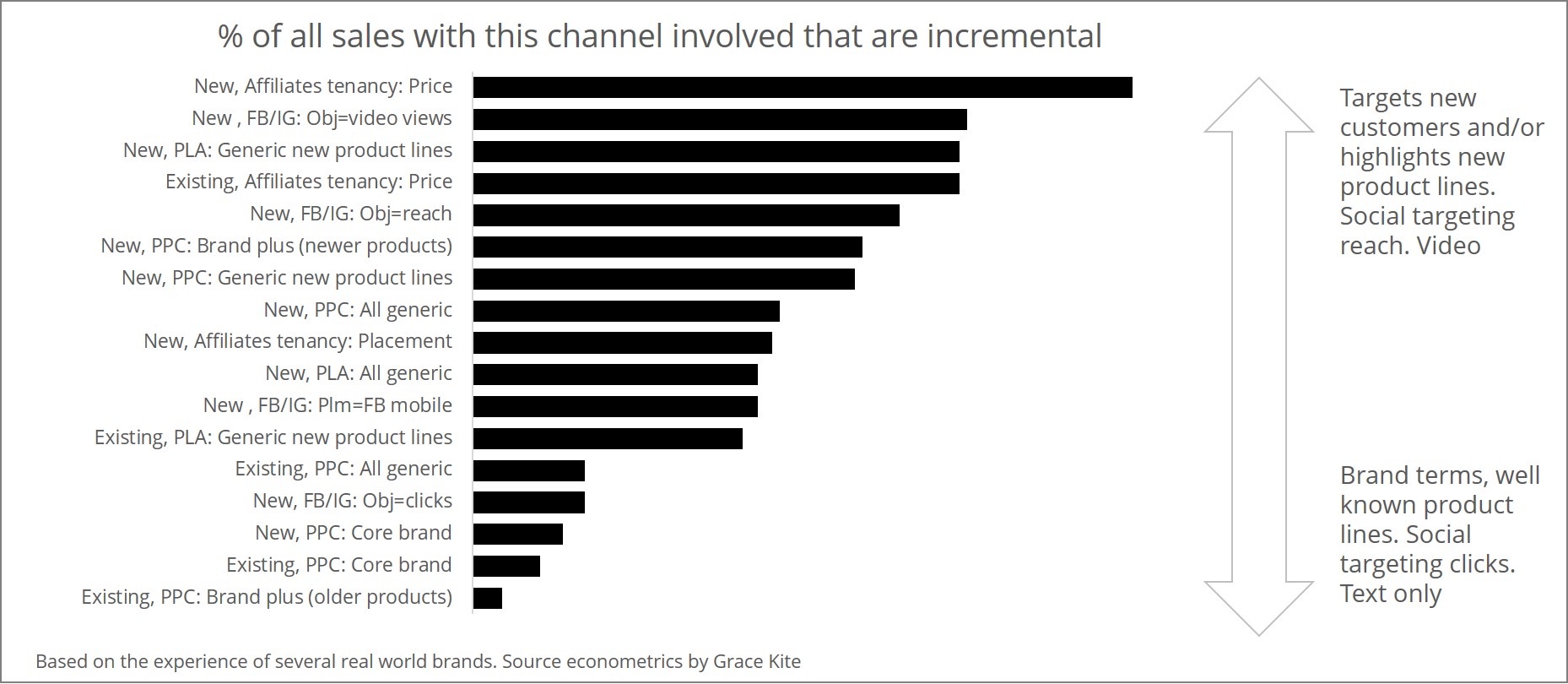 There is still a lot to learn in this area, but the above chart is typical of our limited experience. The online ads that are most often an investment into future sales are those that target new rather than existing customers and reach rather than engagement. They typically have richer creative, particularly video, and they highlight newer or less well-known products.
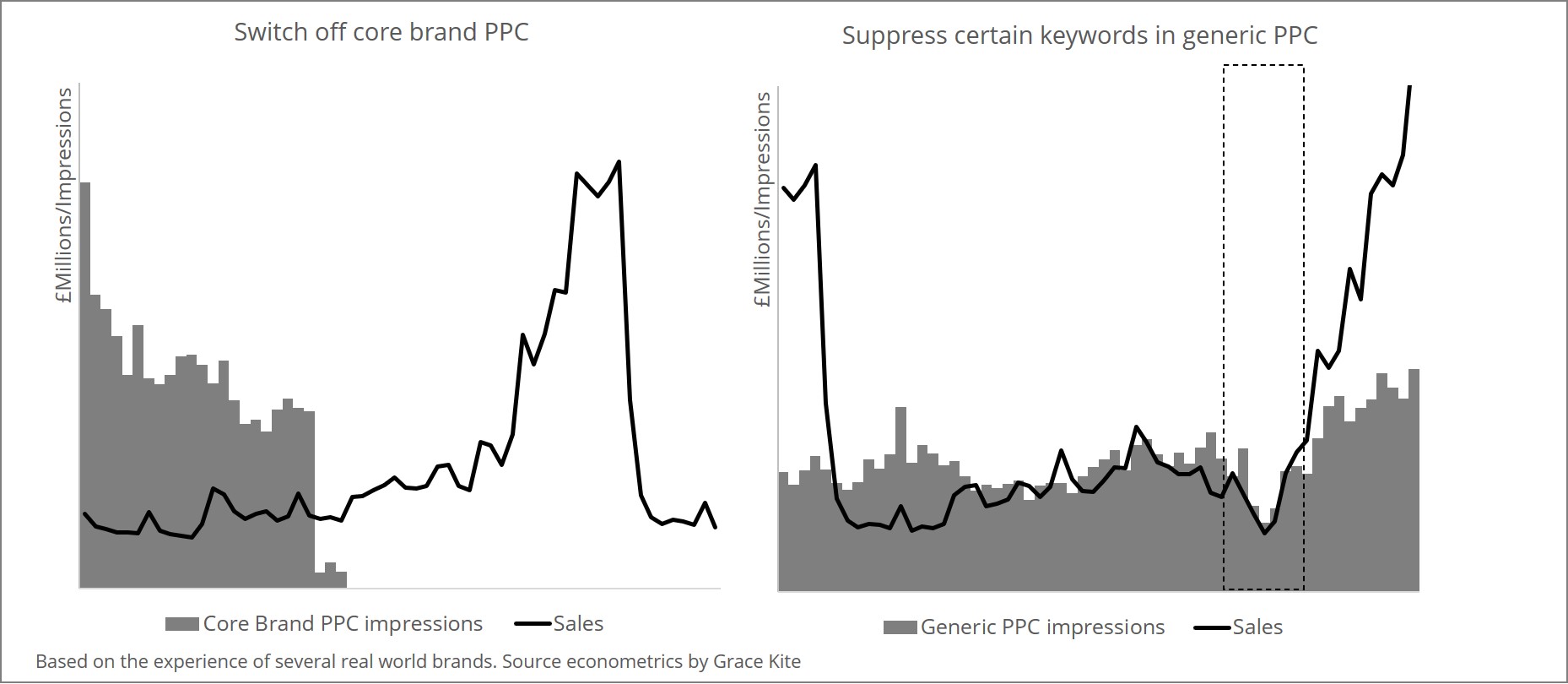 In other cases, the signposting job is revealed to be critical. In the right panel, the switch-off revealed that without a presence in generic search for these keywords, even a customer who had already decided to buy could be diverted and fail to arrive safely.