OpenAP, an advertising group owned by Fox, NBCUniversal and Viacom, is officially launching a marketplace letting advertisers buy across digital and linear TV programming.
This is a way of making inventory easier to buy, like it is from digital companies.
It’s also bringing automation to the area of TV buying.
OpenAP, an advertising company founded by a group of some of the biggest TV companies, announced on Tuesday a new platform to let advertisers buy ad campaigns on linear TV and digital video across publishers. As TV ad spend has been bruised by the rise of digital and other factors, this kind of move could grow ad dollars flowing to big TV networks by making it easier to buy and reach more specific audiences.
OpenAP came together in 2017 as a consortium including Fox, Viacom and Turner (now AT&T’s WarnerMedia) as a way to make it easier and more valuable to buy more specific, data-driven audiences than standard TV demos across multiple publishers. WarnerMedia pulled out in April 2019 after becoming part of AT&T, which has its own advanced advertising functions. NBCUniversal joined OpenAP last year.
The coming together of the networks may be a way of making TV more competitive against digital, as digital ad spending in the U.S. is poised to exceed traditional ad spending this year, according to eMarketer. The platform will let advertisers buy inventory from Fox, NBCUniversal, Viacom and Univision using automation, which “really hasn’t been something that has been the case” in the past, OpenAP CEO David Levy said.
Here’s how it works.
Let’s say an advertiser wants to reach a certain audience, such as people interested in buying a car. That advertiser can pull together one buy across TV networks and both linear and digital viewing environments. Advertisers only pay when that ad reaches that intended audience. Levy said it’s possible because in recent years, TV networks have been investing in data science platforms to help forecast which shows specific audiences are likely to watch. But until now, it was harder to execute on a one-off basis, he said.
This move should make it easier to target a big group of consumers across publishers in one fell swoop. The members together hold more than 20 cable networks and three broadcast networks. The digital video included in the inventory for now is on 30-minute or longer shows, Levy said.
This could bring more of the ease that advertisers have on digital giants Facebook and Google, which have self-service tools for advertisers. Those tools are attractive to small businesses that typically don’t have the budget to make large ad buys. It also gives Google and Facebook a massive base of advertisers compared with the more limited pool of advertisers for TV.
“Linear has always had, content-wise, a significant edge versus digital,” Levy said. “But it’s difficult to buy,” especially for smaller brands.
He said that’s because advertisers have to either have a direct relationship with the sales rep of a big network or a relationship with a big national agency, along with minimum spends, among other factors.
“Part of this approach is really to start to create an easier way for more DTC brands to buy directly and for other smaller brands to make it a lot easier and a lot more manageable, in a way they’re used to buying it,” Levy said.
Who says you have to spend money to get more traffic?
For today’s blog post, I thought it would be fun to break down all of the free SEO tools. Sure you may know of some, like Ubersuggest, but there are many more options than just my own tool.
Now before I dive into the tools, I’ve broken them down into the following categories:
Keyword Research
Content Marketing
Rank Tracking
Link Building
Technical SEO
So, are you ready to dive in? Let’s get started!
Keyword Research
All of the tools in this category will help you find more keywords. Many of them have different ways of coming up with keyword suggestions, so you may want to check them all out.
Ubersuggest
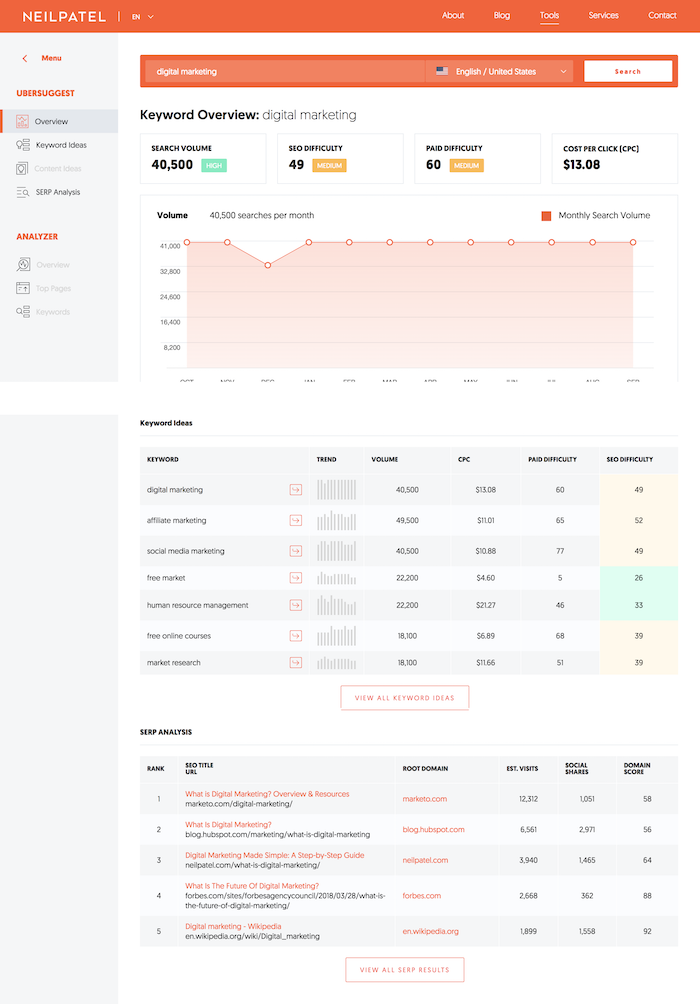
Ubersuggest has many different keyword research options. First of all, it shows you how many searches a keyword has had over the last 12 months so you can see if there is any seasonality.
In addition to that, it pulls keywords from a few different sources such as Google Suggest and its own database, it shows you all of the keywords your competition ranks for, and it provides keyword suggestions based on questions, comparisons, and prepositions.
My favorite feature of Ubersuggest’s keyword research capabilities is that it not only can you see how competitive a term is, but it also tells you how many links the average ranking website contains.
That way you know how many links you need to build to rank well.
What’s also unique about Ubersuggest is that it provides local keyword suggestions. This is great if you are trying to do local SEO.
Answer The Public
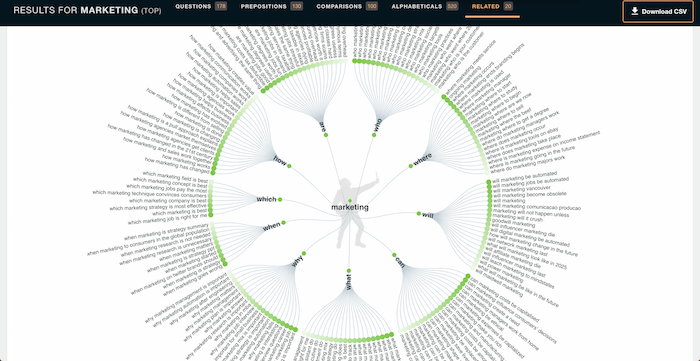
Answer The Public leverages Google Suggest to find all of the questions people may have related to any industry or keyword.
Just type in a keyword and it will give you a laundry list of questions people are searching for related to that keyword.
Similar to Ubersuggest it also shows you comparison and preposition related keywords.
What I like about the tool is compared to any competing tool, it represents the data in nice visuals.
KeywordTool.io
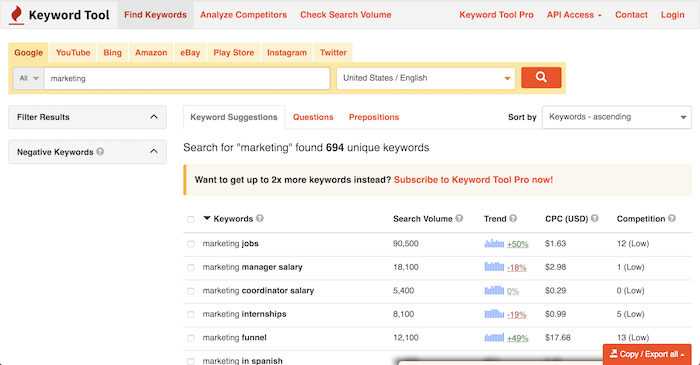
SEO doesn’t just exist on Google. You can also rank higher on Amazon, YouTube, Bing, and tons of other sites.
KeywordTool.io uses the same concept of Google Suggest, but for a handful of sites like Amazon, Play Store, and YouTube.
If you are performing SEO on sites other than Google, you should check out KeywordTool.io.
FAQfox
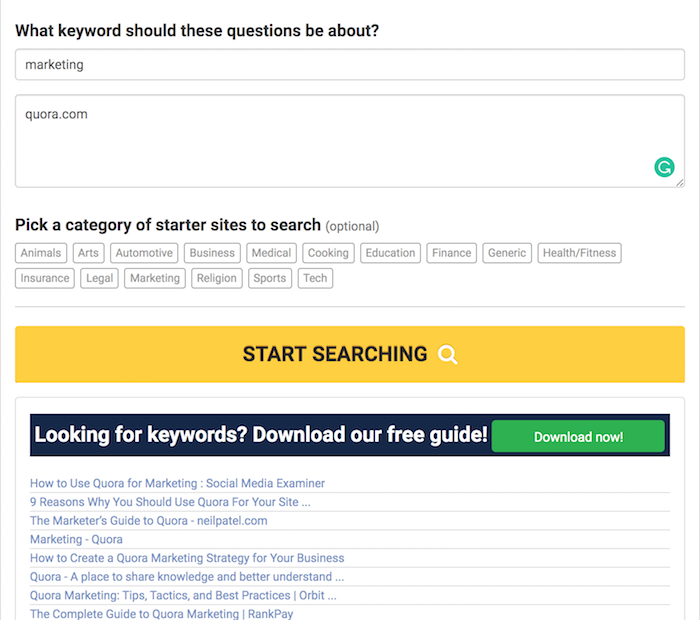
FAQfox is a neat little tool that finds you questions people want to be answered based on any specific site you want information from.
For example, you can type in the word “cat” and quora.com as the URL and it will show you category based questions people are asking on Quora.
You can do this for Reddit or any other site you want keyword ideas from.
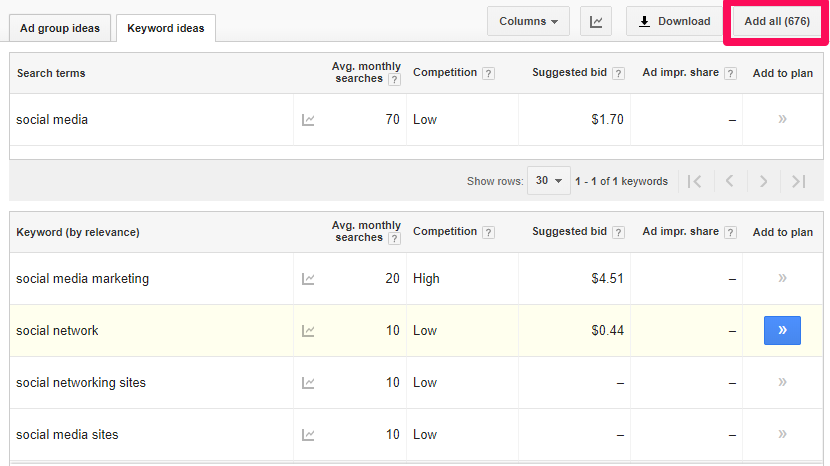
Google Keyword Planner
Of course, the search giant, Google, has its own keyword research tool.
You’ll also notice that a lot of other keyword tools have CPC data, but chances are they are pulling it from Google Keyword Planner.
When you are using Keyword Planner, look for terms with a high CPC as they tend to convert well when you rank for them organically.
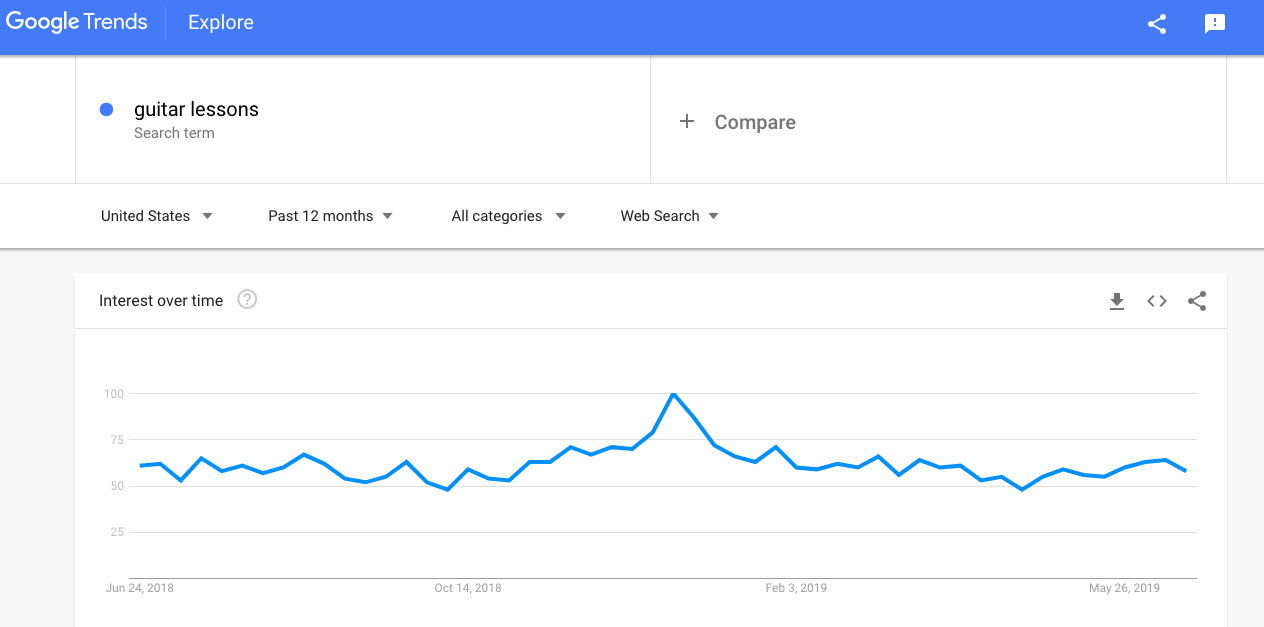
Google Trends
Out of all the tools on the list, I probably use Google Trends 3 to 4 times a week. That’s how much I love it.
What I love about Trends is that it shows you what is hot right now. In addition to that, it tells you if an industry is getting less search volume or more over time.
You can also filter your data based on a specific country or you can look at the data from a global perspective.
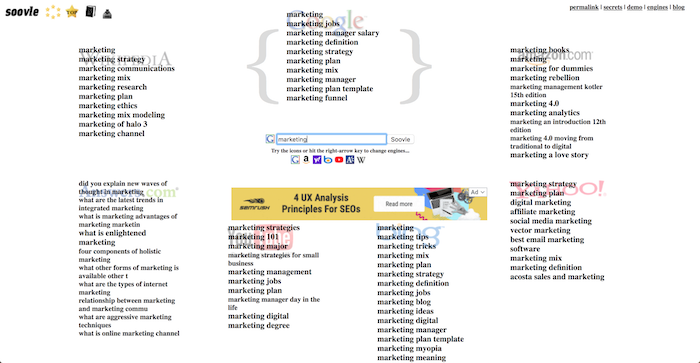
Soovle
Soovle takes the concept of Google Suggest (autocomplete) but for a lot of the popular sites around the web.
Soovle pulls all of the popular keywords on Google, YouTube, Amazon, Wikipedia, Bing, Yahoo, and Answers.com.
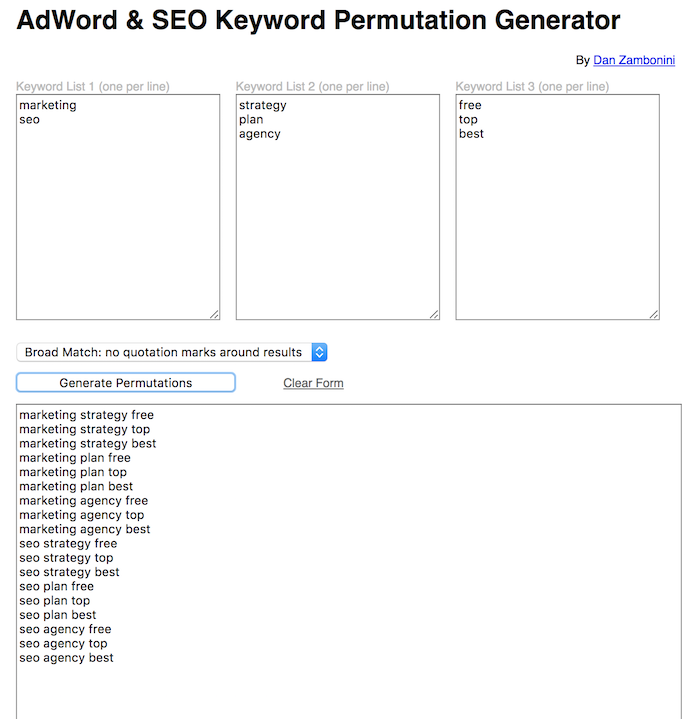
You enter in a handful of terms you want to target and it will combine them to make different variations for you.
Not all of the keywords will be popular when it comes to search volume, but it will give you a sense of how you can go after long-tail variations within your site.
Keyworddit
Reddit has a ton of categories (subreddits) and Keyworddit helps you find all of the keywords within that subreddit.
What’s neat is it even breaks down the volume for each of those keywords. That way you can quickly see if any are worth going after.
Generally speaking, you’ll want to use tools like this as it will give you a new perspective on keyword research.
Pulling results from Google is something that all SEOs already do. Because of that, you need to use other sources if you want to get a leg up on your competition.
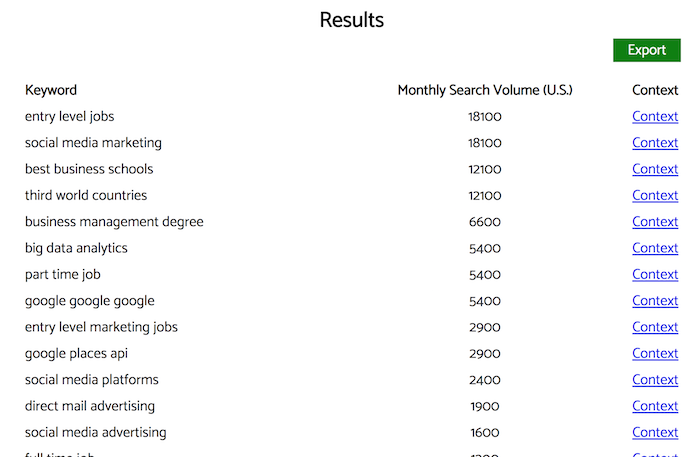
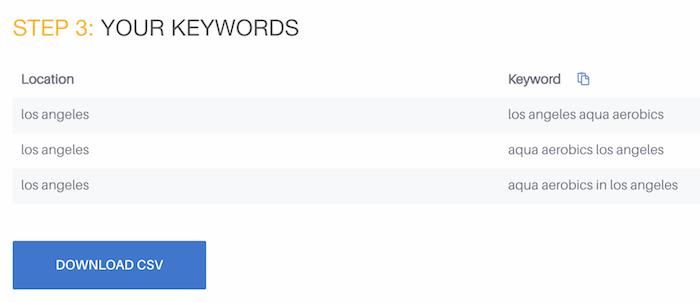
Bulk Keyword Generator
The Bulk Keyword Generator by Higher Visibility does keyword research a bit differently than most of the keyword tools out there.
First, you pick a business category. Then you select the type of business you have and enter in any locations you are targeting.
You’ll then be given a list of keywords that you can potentially target.
What I like about this tool is that it makes things super simple, especially if you are new to SEO.
WordTracker Scout
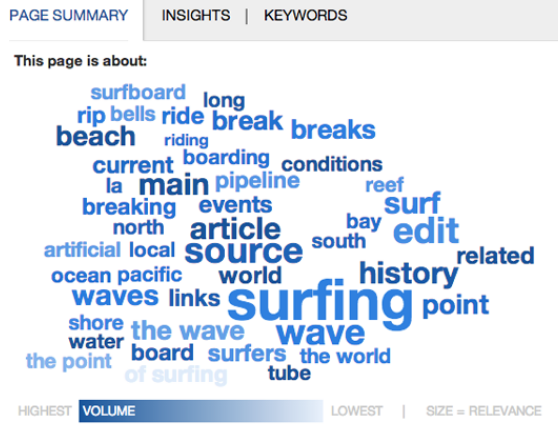
WordTracker Scout is a browser extension that gives you a list of keyword ideas from any web page.
Just browse any site or check out your competition, click a button and boom, you are given ideas on keywords that other people are using.
It breaks the keywords down by relevance and volume.
SearchVolume.io
When you are doing keyword research, how do you know a keyword is getting enough searches?
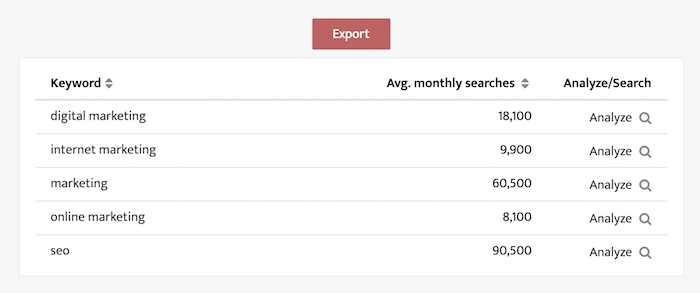
SearchVolume.io lets you bulk upload up to 800 keywords and it tells you how popular each keyword is.
The tool also works for a handful of other regions, such as Brazil, France, and Italy.
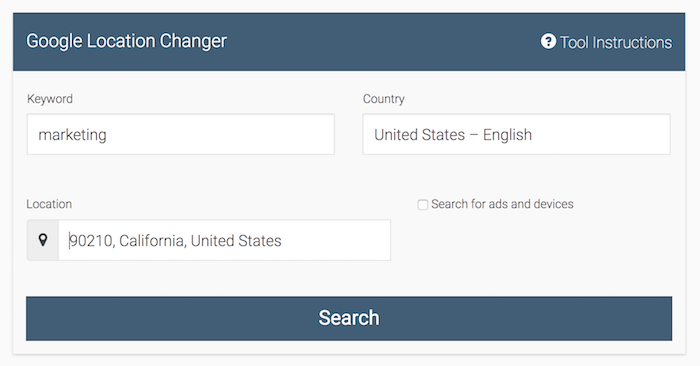
Google Location Changer
Serps has a neat tool that works well if you are doing international SEO.
Their Google Location Changer allows you to search Google in any country or city. Just type in a keyword and you’ll see who ranks.
Using this tool in combination with WordTracker Scout can give you unique keyword suggestions.
Content Marketing
Content is the one thing we all have to create if we want more search traffic.
Here are free content marketing tools that can help you get the most out of your search traffic.
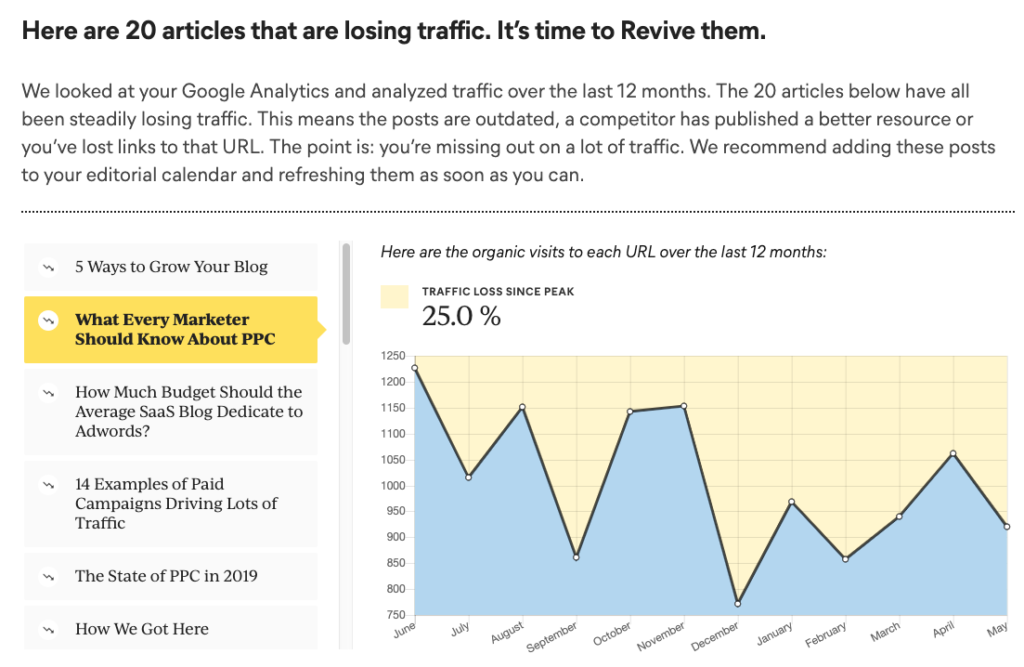
Animalz Revive
Have you noticed that your rankings decrease over time?
It’s not just because of Google algorithm updates. In most cases, your old content won’t perform as well because it’s old.
Animalz Revive shows you which content pieces are dying over time.
That way you know what to focus on. Just look at the ones that have declined the most and then spruce them up so you can get more rankings.
What’s cool about this tool is it will save you a lot of time. For example, my team updates 90 pieces of content a month. The last thing you want to do is waste a ton of time on content that never had much traffic.
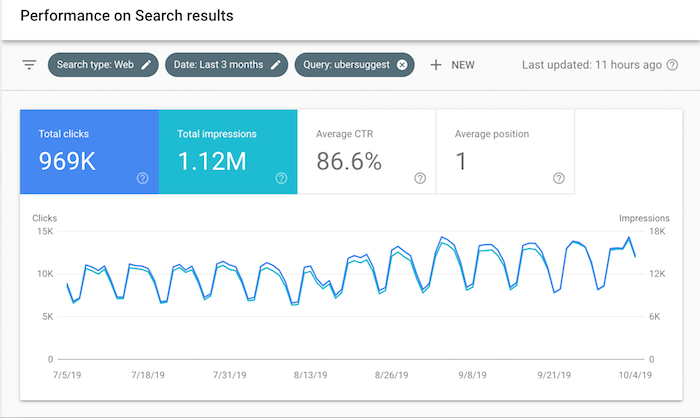
Google Search Console
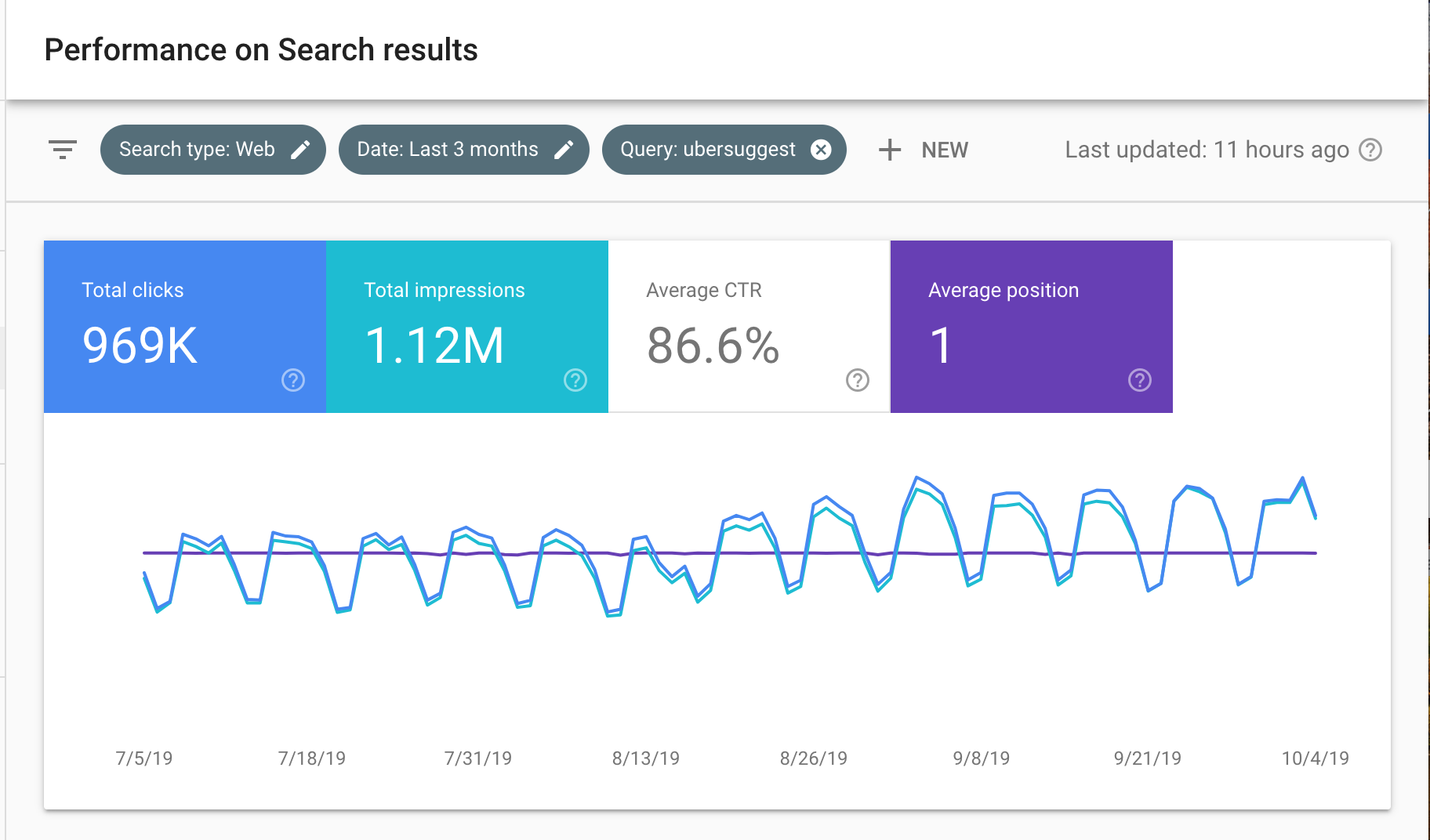
Most people use Google Search Console to see which keywords are driving them traffic.
My favorite way of using Search Console is to see which one of my blog posts are getting a lot of search impressions but have less than a 4% click-through rate.
I then go in and modify each of those pages to include the right keywords in my meta tags. Then I look to see which keywords I am ranking for but not really targeting yet, and then either create new content around those terms or modify existing content to also target them.
Content Ideas
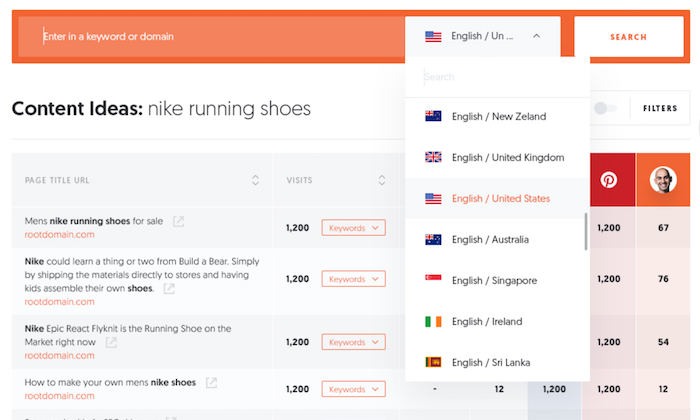
Ubersuggest has a feature similar to Buzzsumo but it is 100% free. It’s called Content Ideas.
All you have to do is enter in a keyword or phrase and it will show you all of the popular blog posts that contain that term.
The blog posts are then sorted by social shares, backlinks, and search traffic.
This helps you create content around topics people want to read, which means more traffic.
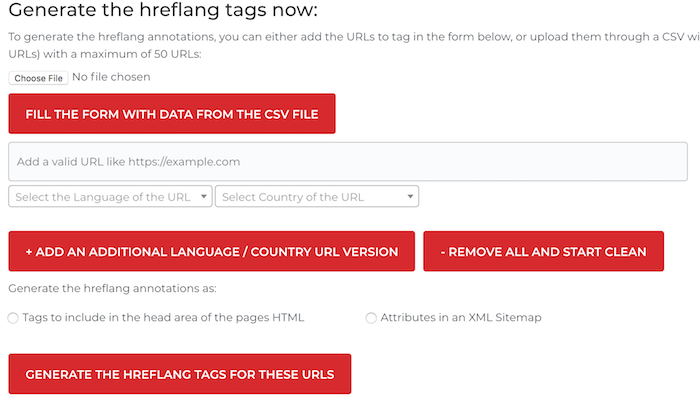
Hreflang Tag Generator
One of my biggest traffic gains has come from translating my content.
A lot of people ask me if they would be penalized from duplicating and translation their content.
This tool creates tags for you to place in your HTML code so Google knows you are targeting specific languages and countries with certain content pages.
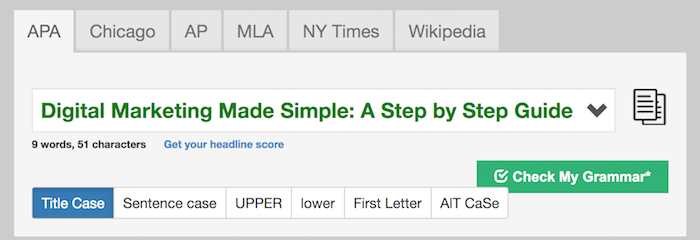
Portent Title Generator
For every 10 people that see your headline, only 2 on average will continue to read your content.
In other words, content marketing is all about the headline.
It may not sound important to you, but if your titles look off, people may not click through from SERP results to read your content, which can decrease your rankings over time.
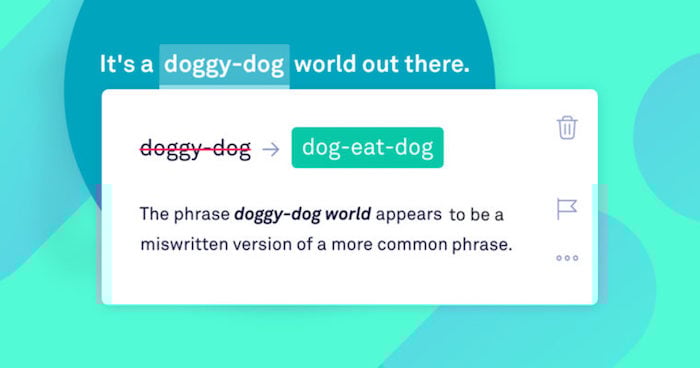
Which do you think Google prefers? Ranking a blog post that reads well or one that contains a lot of spelling and grammar errors?
Grammarly helps you avoid spelling mistakes. This is really important if you want to rank on Google.
Google SERP Tool
Have you noticed that some listings on Google get cut off because the title is too long?
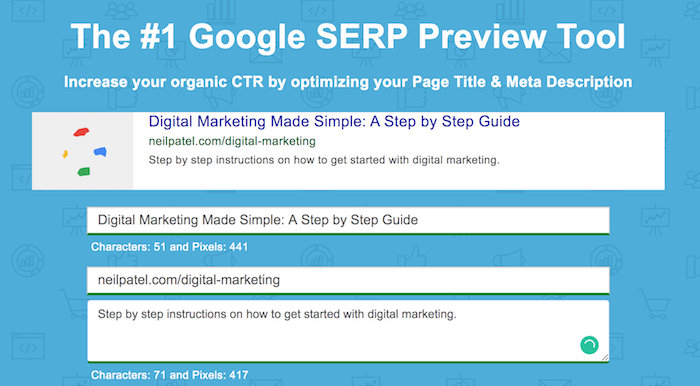
A big misconception is Google uses character counts for meta tags. In reality, they count pixels.
Google SERP Tool will tell you how many pixels your meta tags contain and if they will get cut off by Google.
It also shows you a preview of what your web pages will look like on Google.
Rank Tracking
Google Analytics is a great tool to show you your overall traffic, but it doesn’t tell you where you rank.
If you want to track your rankings, you’ll need to use some tools.
Google Search Console
I know I mentioned this tool above, but Google Search Console is the most unique rank tracking tool out there.
Because this tool is from Google, they can tell you your average ranking for any one of your pages per country.
And because the data comes from them, they average it out to give you accurate information.
You can also go back 16 months and see how your rankings have changed over time.
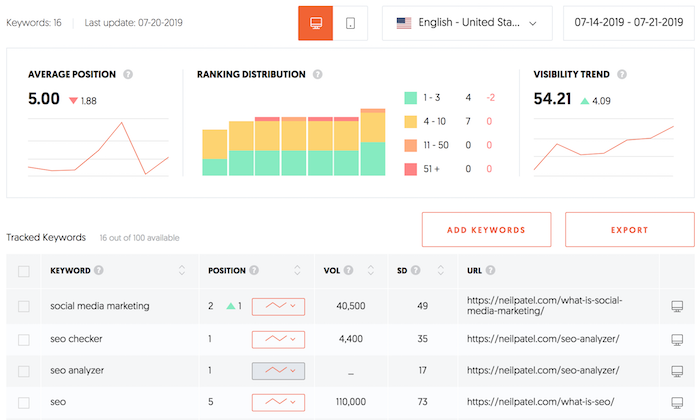
Ubersuggest
Again, I know I also mentioned Ubersuggest above, but it now has a free rank tracking feature.
It provides the same features as those paid rank trackers. You can track your rankings daily for any keyword or groups of keywords for any country, city, or county.
It also saves your data for you so you can go back as far as you want to see if your rankings have been increasing or decreasing.
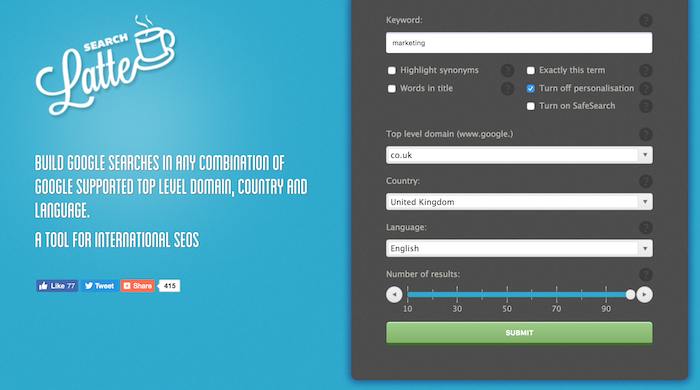
Search Latte
If you want to track your rankings manually, you can do so with Search Latte.
Just put in a keyword and select the language and country so you can see all of the sites that rank in the top 100.
You can then manually find your site and keep track to see if you are improving or declining.
You may want to use Search Latte in combination with Excel as you can create a daily log of your rankings.
Link Building
You used to have to pay for tools if you wanted link data, but that’s not the case anymore. Here are the free link tools you can use.
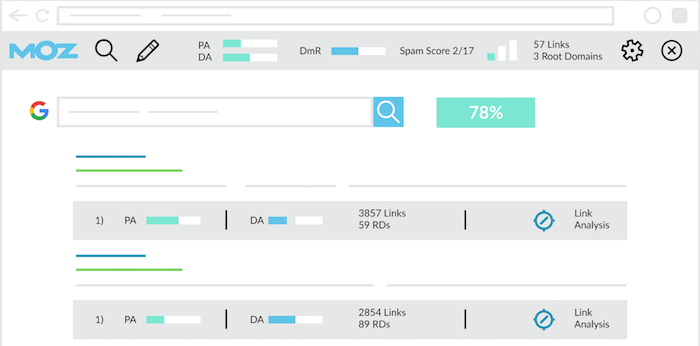
MozBar
This is probably my favorite link tool that I use.
Even though Google doesn’t use domain authority, in general, the higher the authority of a site that is linking to you, the better off you are.
MozBar shows you the domain authority and page authority of every page on the web.
If you are going to build links, focus on the sites with the highest authority.
SEOgadget for Excel
If you are like me, you probably love using Excel when you are building links.
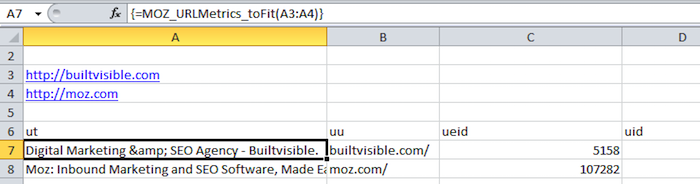
SEOgadget for Excel makes it really easy to pull in data from Majestic and Moz.
If you haven’t tried this yet, you should consider it. It will make it easier for you to find new insights and run your own calculations.
Backlinks
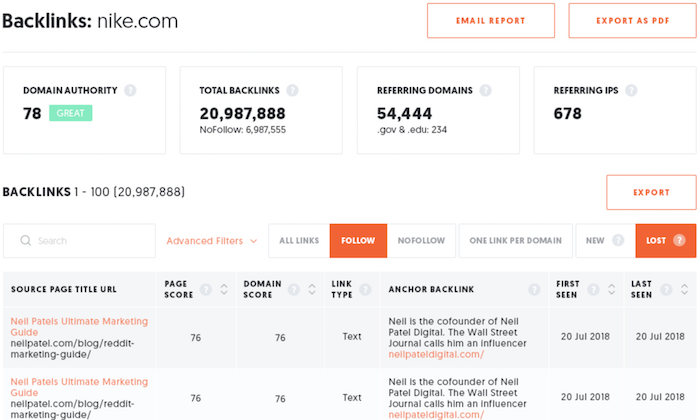
Backlinks is a free tool that shows you all of your backlinks. There are no limits in row count or anything like that… you can just see everyone who links to you.
You can see if any of your links are dofollow or nofollow as well as the anchor text.
You can filter the results to find backlink opportunities when researching competitors and you have the option to look up link data on a domain, subdomain, or a specific URL.
It will also show when a link was first found and last crawled and the authority of each link.
Bulk Metrics Checker
Tired of looking up the domain and page authority manually on each of your pages or sites?
Just upload a list of URLs and within seconds you’ll have a list of your page authority per URL. You can also do the same for domains and upload dozens of domains at once.
Technical SEO
SEO has changed. You no longer can do just a few things and expect your site to rank well. You have to do everything if you expect to beat your competition.
And when I mean everything, that includes technical SEO.
SEO Analyzer
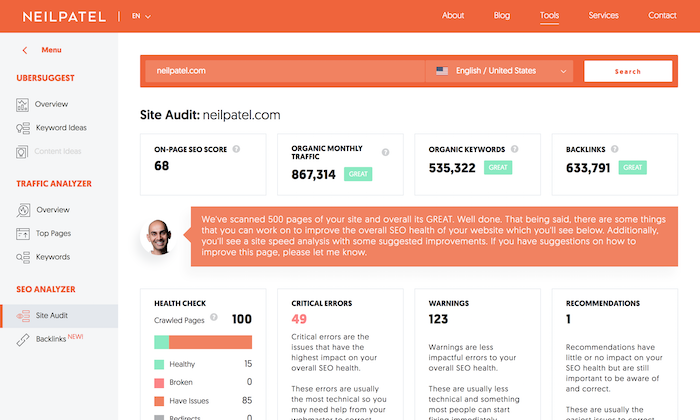
If you haven’t already, try running your URL through my SEO Analyzer.
It will tell you what’s wrong with each of your web pages.
From duplicate meta tags and redirect errors to sitemaps and much more… it pretty much looks at every major factor when it comes to SEO.
It will even tell you your overall site speed and what you need to fix in which order to get the maximum results.
And if you register for a free account, it automatically checks for errors each week on your behalf.
Google Analytics Referrer Spam Killer
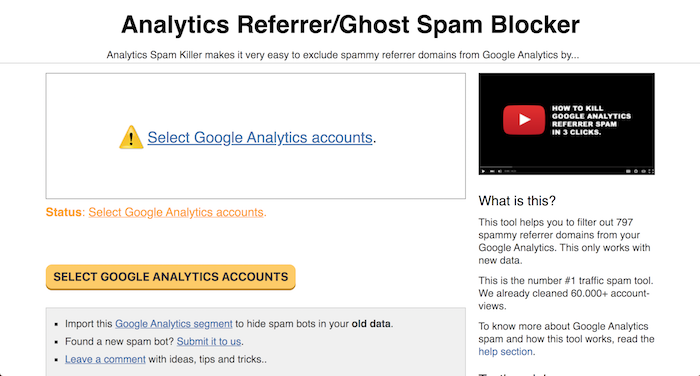
When you are doing SEO, there is a good chance that your Google Analytics gets messed up by referral spam.
Google Analytics Referrer Spam Killer solves that problem by connecting with your Google Analytics account and blocking off the most common referral spam.
Once you connect it, you’ll find that your data is much more accurate so you can make better SEO decisions.
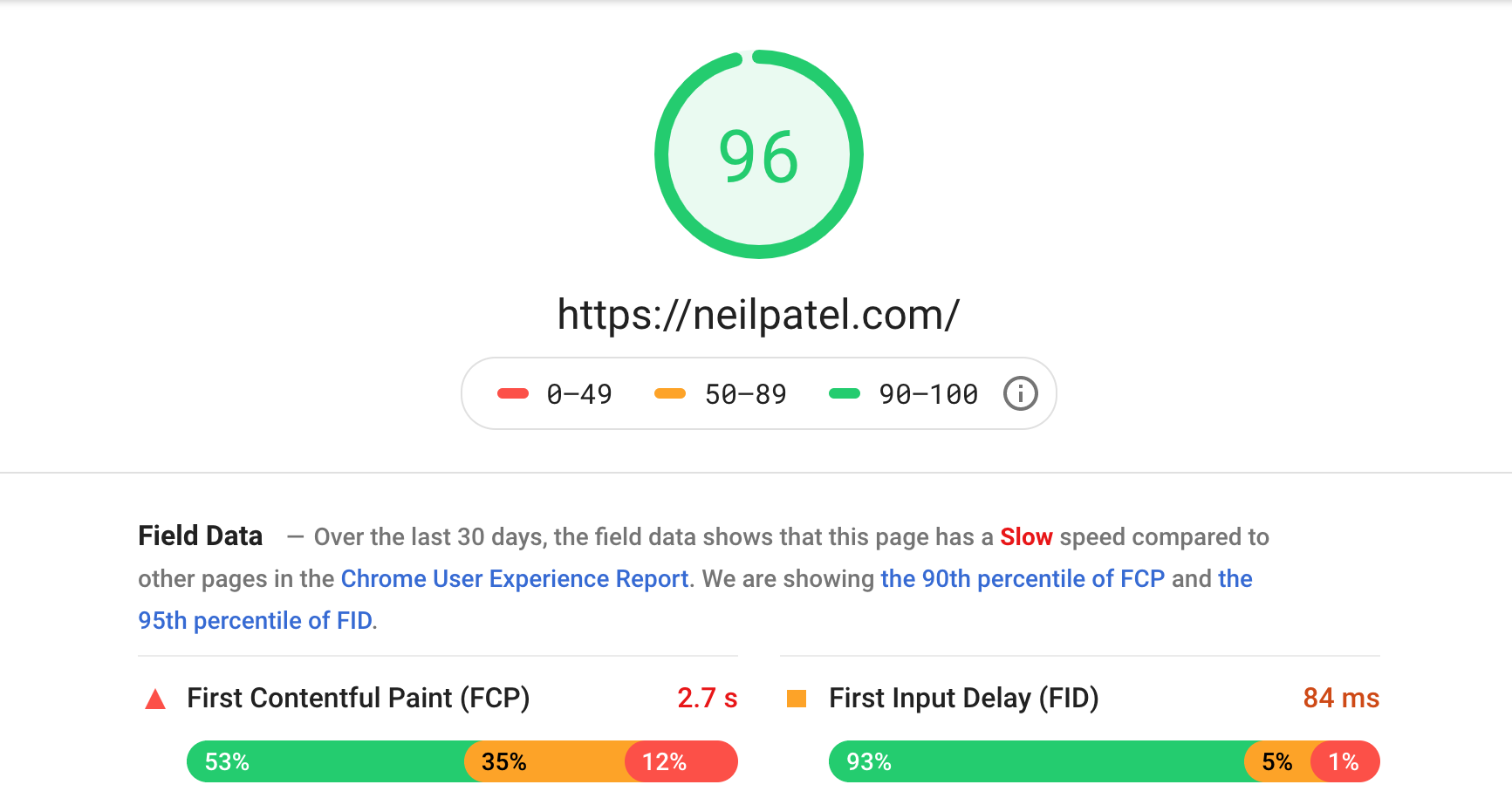
Pagespeed Insights
Speed is everything. The faster your site loads the better you will rank, especially when it comes to Google’s mobile index.
Pagespeed Insights tells you what you need to fix for your site to load fast on any device.
It doesn’t matter if you are optimizing for tablet devices, desktop, or mobile… it will tell you what to fix.
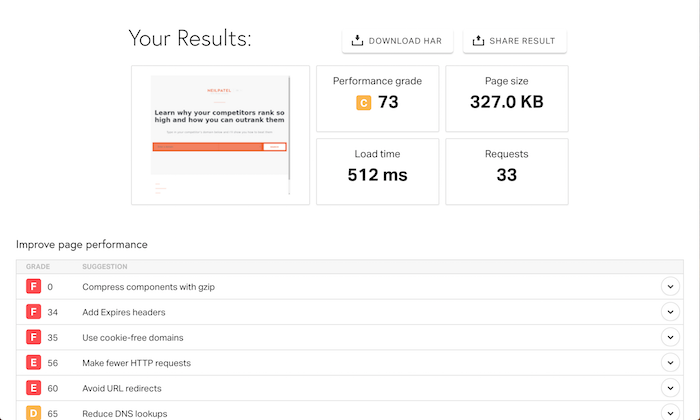
Pingdom
Fixing your code is one thing, but you’ll also want to make sure your site loads fast overall.
Your overall load time is affected by things like your server and CDN.
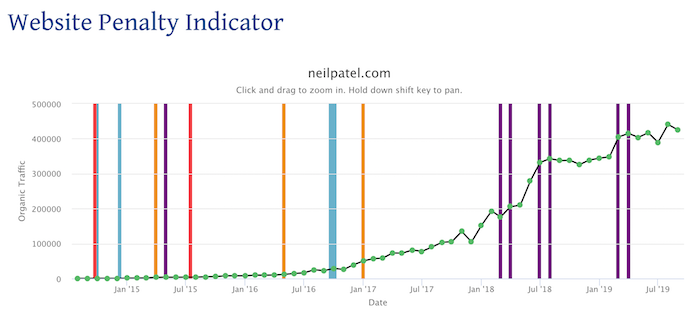
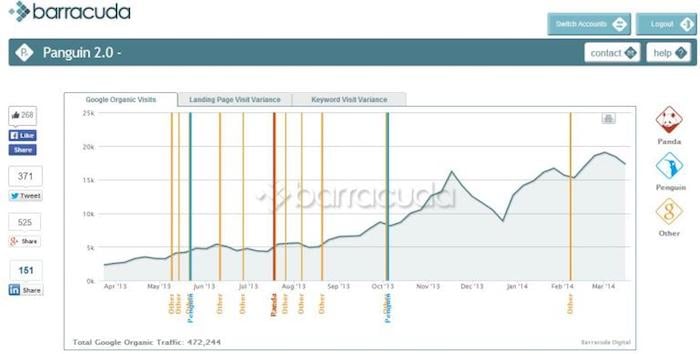
In a nice graph, it shows your traffic over time and tells you if a Google update has caused your traffic to go up or down.
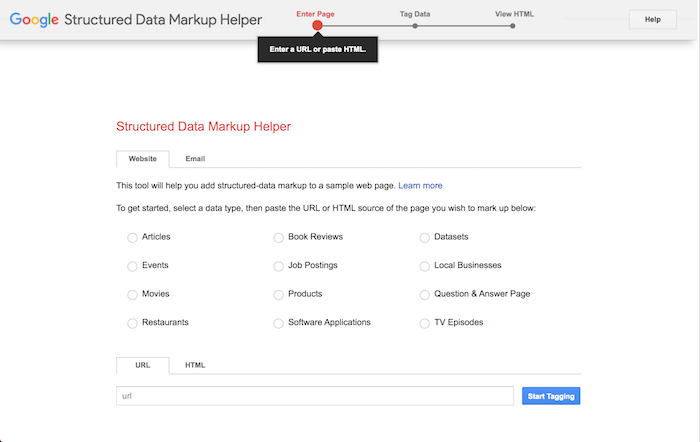
Structured Data Markup Helper
A simple way to increase your search traffic is to use schema markup.
But there is one big issue, schema markup is a bit complicated to implement. Because of that, Google created a Structured Data Markup Helper to guide you.
All you have to do is select what kind of markup you want to use, type in your URL, and go through the walkthrough wizard.
And at the end, you’ll be given code that you just paste within HTML.
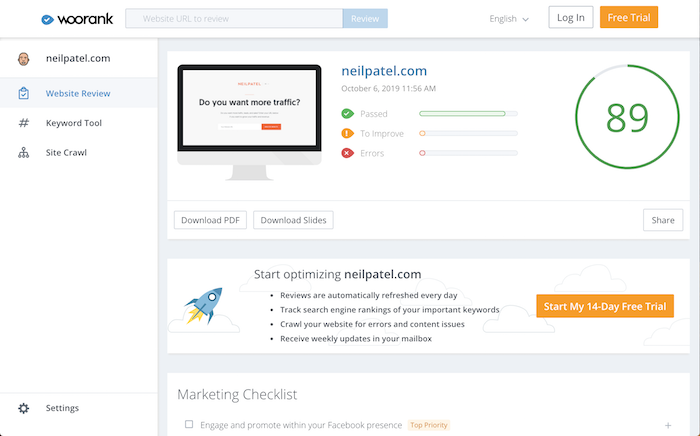
Woorank
Looking for a simple SEO analysis? Woorank shows you a simple report of what’s wrong with your web page.
All you have to do is type in your domain and within a minute you’ll see a thorough report of what you need to fix.
What I love about Woorank is that it is a great tool for beginners because of their easy-to-use interface.
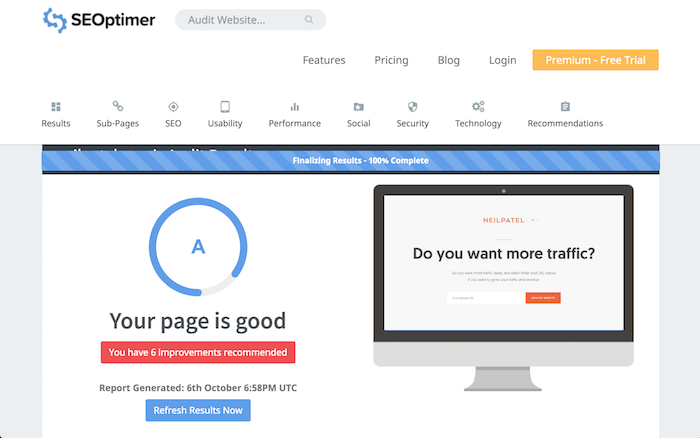
SEOptimer
Just like Woorank, SEOptimer is a simple tool that gives you a technical overview of your on-page SEO as well as your content.
It breaks down things like page speed as well in addition to showing you how your website loads for both desktop and mobile devices.
You can even see social sharing data.
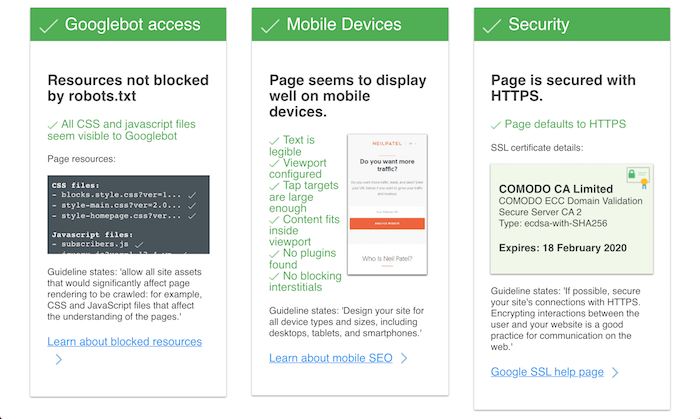
Varvy
Varvy provides a detailed technical checklist of all things related to your SEO.
From your Robots.txt file and your sitemap to security settings and even your links, it covers all the bases.
If you don’t have a technical background, Varvy might be a bit complex unless you take the time to read each of their articles that outline what each tip/recommendation means.
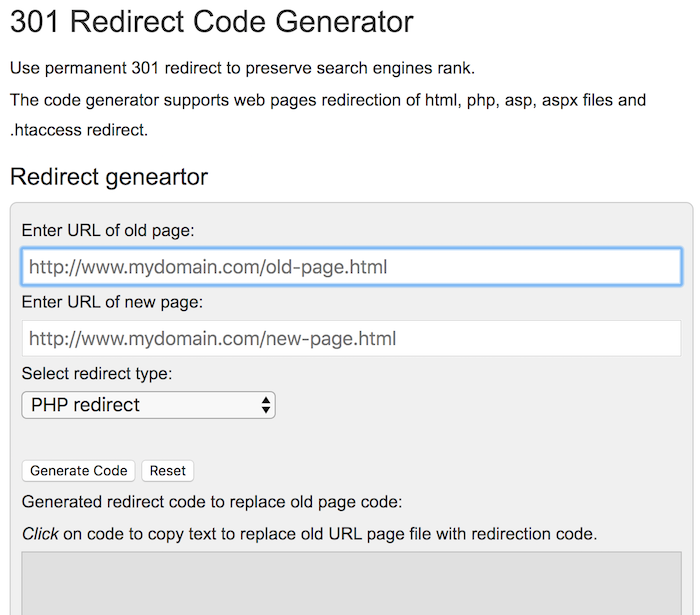
301 Redirect Code Generator
When you are doing SEO long enough, eventually you find yourself changing your older URLs.
But if you don’t add a 301 redirect, you’ll lose your rankings.
He is the co-founder of Neil Patel Digital. The Wall Street Journal calls him a top influencer on the web, Forbes says he is one of the top 10 marketers, and Entrepreneur Magazine says he created one of the 100 most brilliant companies. Neil is a New York Times bestselling author and was recognized as a top 100 entrepreneur under the age of 30 by President Obama and a top 100 entrepreneur under the age of 35 by the United Nations.
The new 2024 Olympics logo is supposed to evoke French history but has instead earned ridicule online for its apparent resemblance to a stereotypical Parisian woman.
Unveiled on Monday, the design incorporates the art deco style in vogue the last time Paris hosted the Games in 1924, depicting an Olympic flame within a gold medal.
It also incorporates the lips and outline of Marianne, the personification of liberty and the French Republic since the revolution of 1789 — an addition that some mocked for adding an unnecessarily seductive character to the motif.
“The French Olympic logo tumbles out of bed on a Parisian morning,” wrote Paris-based journalist Megan Clement on Twitter.
“She tousles her messy bob, dons breton stripes and ballet flats and whisks down the stairs from her fifth-floor apartment to grab a baguette before enigmatically texting two men who are pursuing her romantically.
“(She) has an expresso and a cigarette for lunch. She hops on a vintage bicycle and pedals past the Eiffel Tower on her way to a cafe where she will sit and read Baudelaire with her fluffy white dog at her feet.“
Others compared the flame motif to the logo of dating app Tinder and suggested the silhouette of Marianne brought to mind the retro hairstyle made popular by Jennifer Aniston in the American sitcom “Friends“.
“The artist’s muse, the poet’s dream, and the girl your mother warned you about. She’s fashionably late for everything. She’ll make out with your husband at a party and then wonder why you’re mad,” said one Twitter user.
“I want to follow the French Olympic logo on Instagram,” wrote another.
Parisians got their first glimpse of the new logo when it was unveiled at the French capital’s famous Grand Rex cinema on Monday.
Correctly implemented, attribution provides us with a window into how our marketing efforts have succeeded or failed. There are various tools to measure attribution along the customer journey, but the most common attribution tool may be the first line of attribution — Google Analytics.
While the promise of Google Analytics’ insights is great, attribution is only as accurate as your Google Analytics tagging. For Google properties, such as Google Ads, it’s not necessary to manually tag destination URLs because Google automatically tags them. For other platforms, however, tagging is necessary to pass important campaign information from the marketing platform into Google Analytics.
But if the data sent to Google Analytics isn’t accurate, then marketers run the risk of making flawed assumptions based on this data. My team relies on the data we glean from Google Analytics to demonstrate the value of various channels and initiatives. However, we’ve found that nearly every client, from startups to global enterprise companies, has errors with Google Analytics data input, thereby affecting their attribution. These are the four most common errors I encounter that can skew your Google Analytics attribution data.
1. Tag Capitalization Mistakes
Google Analytics tags are case sensitive, meaning that a UTM (Urchin Tracking Module) source of “Forbes” is different than “forbes.” While initially, this may not seem like a major issue, it can cause data segmentation and lead to incorrect assumptions about site traffic.
The fix? First, adopt a tagging nomenclature throughout your organization. Ensuring that everyone is using the same tags will reduce errors in reporting.
If you do find errors in your tagging, you can fix them going forward with search and replace filters. However, filters only work for data collected after they’re set.
2. Improper Tagging Within Your Website
Companies often inadvertently overwrite their valuable source and medium data by resetting the UTM source and medium tags when a visitor interacts with various elements on the website. For example, if a marketing team is measuring clicks on a banner graphic, they might reassign the UTM source and medium tags when a visitor clicks on the banner.
However, UTM source and medium tags weren’t designed for this use. A website is essentially a piece of content — it has no source or medium. The source and medium are the marketing channels that brought the visitor there. By reassigning source and medium tags once a visitor arrives at your website, you lose all the valuable information about how a visitor from a particular channel interacted with your website and possibly completed goals after that reassignment. Generally, I advise avoiding UTM tagging of URLs within the same domain.
3. Self-Referrals
Have you ever looked at your Google Analytics reports and seen your own domain as a referral to your site? In actuality, your domain really can’t be a referral source to itself, so how does this happen?
Google Analytics ends a session automatically after 30 minutes of inactivity. In the age of prolific browser tabs, this can be problematic because a user may leave a tab open to continue using the site later. For example, if I find an article via an organic Google search, the initial source/medium may be listed as “google/organic.” However, if I leave my browser tab open, stop interacting with the page for 30 minutes and then return later and continue to interact with the site, a new session begins, and my new source/medium might be assigned as a referral from the site itself. However, changing my source/medium isn’t an accurate representation of what occurred. An organic Google search is still the channel I used to find and interact with the site. Just because I took a break from browsing doesn’t change the fact that the organic Google search was the main contributor to my actions.
To fix this issue, add your domain to the referral exclusion list, found in the “Admin” area. Look for “Tracking Info” and then “Referral Exclusion List,” and then add your site’s domain as a referral exclusion. This will begin to attribute your traffic to the original source/medium instead of using your website as a referral source. Note that excluding your domain doesn’t reassign attribution for historical data.
4. Incorrect Channel Groupings
Channel groupings provide a quick way to aggregate all traffic with a certain source or medium together to see how visitors from that channel interacted with the website. For example, “Organic Search” is a default channel grouping. By selecting this channel grouping in a report, we can see how all organic search traffic interacted with the site, regardless of whether the traffic originated from Google, Bing, DuckDuckGo or other search engines.
However, default channel groupings have problems. In addition to typical channels you might expect, such as “Organic Search” or “Referral,” you may see a channel grouping named “(other).” While Google recognizes many sources and mediums and categorizes them appropriately under a channel grouping, it may not recognize all of your sources and mediums.
For example, Google understands that traffic from an organic Bing search is a source and medium of “bing\organic” and places that traffic data under the “Organic Search” channel grouping. But what about sources and mediums your organization uses that don’t fit these standards? Check the sources and mediums listed under the “(other)” channel grouping to determine which of these may need to be recategorized.
Google Analytics allows website owners to create new channel groupings, edit the existing channel groupings and add additional sources and mediums to a channel grouping. By editing the default channel groupings via the “Admin” page in Google Analytics, you can clean up your channel groupings and ensure that your data is correctly reported under its corresponding channel. However, like most settings in Google Analytics, changes to the default channel groupings are not retroactive.
Correct attribution is key to our marketing decision making, and Google Analytics is often the first attribution tool most marketers rely on. Ensure that your Google Analytics is reporting accurately so that you can have confidence in your data and decisions.
Fortunately, there are several ways to minimize these tasks or eliminate them from your company.
There are thousands of books on time management, and thousands more on work/life balance, but almost all of them either nibble around the edge of the problems or pretend they don’t exist. So, here’s the straight skinny: The reason most people are stressed for time is that they are wasting more than half of each working day on time-wasting tasks.
Here are the culprits and some simple solutions to get recapture the time that you’re otherwise destined to waste.
1. Unnecessary Commuting (13 percent)
As of 2018 (the last year measured), the average one-way commute to work is 27 minutes, nearly six minutes more than in 1980, according to the U.S. Census Bureau. And that’s just the average, which means that some of us are spending a lot more than that. (I’ve known people with three-hour commutes–one way.)
Let’s suppose that you have a commute that’s only of average length. By the time you retire, you’ll have spent approximately 5.6 years behind the wheel, which is roughly 13 percent of the time that you’ve committed to work.
While some jobs (like equipment maintenance) require an employee to be on site, almost all office jobs can be conducted from a home office. Therefore, in almost all cases, time spent commuting to an office job is wasted.
By the time the average worker retires, they’ll have spent at least 7 years in useless meetings, which comes out to about 16 percent of the time you’ll spend at work during your lifetime.
3. Unnecessary Emails (23 percent)
According to research cited in Forbes, the average office worker spends 2.5 hours a day reading and responding to an average of 200 emails, of which approximately 144 (mostly CCs and BCCs) aren’t relevant to their job.
Since the average office worker spends 2.5 hours a day doing email, that’s around 1.8 hours spent on those irrelevant emails, which comes out to a whopping 10 years spent on useless emails, which would be 23 percent of a 45-year career.
Add up those three huge time-wasters and it comes out to roughly 51 percent of your working life. Think about that for second. How much more could you accomplish if you were twice as productive? How much better your life would become if you always had plenty of time?
Fortunately, these three huge time-management challenges have some fairly straightforward solutions:
1. Implement company-wide work-from-home.
While some jobs (like equipment maintenance) must be performed on-site, most office jobs can be accomplished remotely. Indeed, several studies have shown that remote office workers are much more productive than on-site workers, without even counting the time they waste commuting.
Of course, implementing company-wide work-from home would mean that management would need to be nimbler. It also means top management must admit to themselves that their brand-new open plan office was a dumb idea. However, smart bosses don’t throw good money after bad, so it’s time to bite the proverbial bullet on this one.
2. Create an efficient-meeting culture.
Some of this gets solved simply by implementing work-from-home because remote workers have fewer meetings. Beyond this, there are specific policies that reduce or eliminate unproductive meetings:
No meeting without an agenda.
No “status updates” during which you “go around the room.”
No meeting longer than 30 minutes.
Leave a meeting the moment you realize you’re not adding value.
Replace PowerPoints with a group reading of a briefing document.
3. Throttle your email system.
Here’s are some approaches I’ve seen over the years:
Turn off email during peak working hours.
Limit the number of emails an employee can send each day.
Discourage CC, BCC, and Reply All emails.
Discourage Sisyphus-like behaviors like trying to achieve “zero Inbox.”
Here’s an idea: Customize the company-wide email client so that it’s impossible to close any internal email until you’ve rated its usefulness to you and your job.
Track those ratings and it will quickly become clear who’s wasting everyone else’s time with unnecessary email. Then adjust their compensation accordingly (all the way to $0 when appropriate).
Everyone tells you to pay attention to your intuition. But how do you do that exactly?
When it comes to analyzing our complex world, experts warn your gut is a risky guide, but when it comes to personal decisions like where to move, whom to marry, or which job to take, science proves nothing beats intuition. Literally.
When a Stanford psychologist conducted a head-to-head test between more rational decision-making strategies and going with your gut, there was no contest. Intuition led to the best choice 68 percent of the time, compared to a 26 percent success rate for more head-focused strategies.
That’s a blow out.
But while this research makes clear you should take your intuition seriously, it doesn’t address another important question: how do you do that? When you’re facing a difficult choice and your mind is churning with anxieties, feelings, and thoughts, how do you sift through this soup of sensations to figure out what your gut is trying to tell you?
Expansive or contractive?
I’ve heard various tricks and frameworks for honing your intuition before, but I recently came across the simplest and most convincing advice along these lines on the blog Cup of Jo. It comes from a therapist friend of post author Caroline Donofrio and it basically boils down to one simple question: Does it feel expansive or contractive?
Wait, you’re probably thinking, that’s not helpful at all. I don’t even know what that means. Which is reasonable, I didn’t get it instantly either, but Donofrio goes on to explain the difference between feeling “expansive” and “contractive” in terms that just about all of us will recognize.
Expansiveness feels light, powerful, exciting. To me, it’s like the sensation you get after a workout or when you’re “in the zone” doing something you love. When you can’t wait to get started on something, there’s a good chance you’re feeling expansive.
Contractive feelings exist at the other end of the spectrum — heavy, tight. Perhaps it carries with it a sense of dread or secrecy. You can also sense it physically — are you hunched over? Is your jaw clenched? Do you feel like you’re stuck in molasses? If so, your intuition may be telling you it’s a no.
In short, reading your gut isn’t about anything specific to your stomach region. It’s about reading your body as a whole. Sensations that feel tight, heavy, slow, or clenched indicate a big no to whatever you’re contemplating. Meanwhile, light, open, energized sensations suggest you should go ahead and pull the trigger on a choice, even if those feelings are also accompanied by fear.
How does your gut communicate anyway?
That’s simple enough, but the power in this framework is its physicality and specificity. Expansive vs. contractive gives you specific feelings to look out for in your body and a way to pull an answer out of a mental and physical state that’s more “whirlwind of feelings” than “orderly pro/con list.”
For those of us who struggle with more rational approaches to decision making (my hand is way up in the air) that’s gold. Donofrio insists she’s been road testing the approach and it has consistently worked for her.
“I’ve applied this advice to choices big and small,” she writes, “and have found it works every time. A week ago, I got an offer about a potential project that, on paper, sounded great. But as I considered it, my neck tensed up. I didn’t want to jump into it. In fact, I didn’t even want to respond to the email! Despite feeling pressure over what I ‘should’ do, it was clearly a no. Realizing this felt like such a relief.”
So next time you’re struggling with mixed emotions and contradictory considerations remember Dinofrio’s trick and see if it can help you figure out exactly what your inuition is trying to tell you.
It wasn’t easy going to the moon. But that’s why they did it.
Fifty years ago, NASA accomplished what many thought impossible: landing humans on the Moon and returning them safely to Earth. While most of us weren’t alive during that amazing time, the world is now revisiting the achievements of Apollo on its golden anniversary.
The Apollo program was the largest peacetime start-up and entrepreneurial endeavor in the history of our country. What NASA was able to accomplish through the efforts of over 400,000 people and 20,000 organizations was nothing short of miraculous. Below are several lessons from Apollo that apply directly to entrepreneurs preparing to launch their own “moonshots”:
1. Think “Inside” the Box
When President John F. Kennedy set the goal of landing a man on the Moon back in 1961, he committed the country to do something that nobody, including a three-year-old NASA, knew how to accomplish. American industry did not have the tools, equipment, spacesuits, computer technology, rockets, facilities, or experience to accomplish such a feat. And the challenge wasn’t just about what they knew they didn’t have, it was also about not knowing what they would ultimately need to be successful.
Despite the common metaphor of thinking outside the box when it comes to creativity, NASA realized the box itself was the key to success. Inside that box were the deeply rooted, time-proven values related to what the engineers already understood — the design and development of high-performance aircraft. NASA knew these fundamentals were the key to reaching the Moon, not by leaving the box and starting from scratch, but by expanding it through additional learning, intense creativity, and boundless innovation; all while holding true to their core engineering principles.
2. Success is Sticky
Creativity is the ability to visualize new connections between things yet to be connected. Breakthroughs are seldom based on discovering something new — more often they are the result of the “sticky thinking” that occurs when people stick things they already know together in new ways to achieve surprising outcomes.
The engineers, astronauts, administrators, and other “thinkers” at NASA relied heavily on sticky thinking during the Apollo program. By connecting things already found inside their box and adding in new ideas, they were able to extend the principles of existing aircraft engineering to the creation of spacecraft. As with any good business plan, the minds working on Apollo were also able to visualize possible “what if” scenarios and potential connections that may or may not occur during a mission, and through this, they developed contingency plans to overcome each should one occur.
Whether it’s Steve Jobs connecting fashion sense to the dull, colorless world of computer design or Elon Musk investing in the inevitability of tomorrow, imagination and the ability to visualize new connections has always been a key attribute to effective entrepreneurship.
3. Work HARD, not SMART
Business schools frequently teach the use of SMART goals (Specific, Measurable, Achievable, Realistic, Time-based) to achieve success. However, two of those elements — “realistic” and “achievable” — can limit entrepreneurial vision. Breakthrough achievements seldom result from SMART thinking and playing it safe. Landing humans on the Moon was extraordinary and required something different. It required HARD goals — goals that were Honest, Actionable, Radical, and Detailed.
After just one 15-minute spaceflight by Alan Shepard, for example, Kennedy announced the goal of landing on the Moon within eight and a half years. He was racing to beat a competitor (the Russians!) to market, and his goal was clear, compelling, and easy to grasp. It was also courageous and radical, especially in light of the social and economic issues the U.S. faced at the time.
Despite the program’s enormous scale, NASA allowed its people to take calculated risks, do unexpected things, show initiative, and utilize in-the-box creative thinking. After all, how else are you going to do something that’s designed to be radical? Despite the stress and pressure of creating something totally new and radical, NASA’s leadership and workforce remained focused and positive despite serious setbacks, one of them fatal. (Nobody said “radical” would be easy, and nobody expected it to be either.) They maintained a culture where anyone and everyone would be heard, and one where decisions were swiftly made and executed.
Landing a man on the Moon was a breathtaking feat, but the process of getting there was even greater. By allowing the young “entrepreneurs” at NASA and its partners to take giant leaps thereby forcing the innovation necessary to achieve Kennedy’s goal, NASA ushered in the digital age and the rapid growth of high-technology industries. Ultimately, thousands of new technologies and products were spun off from Apollo, establishing new markets and firms by a group of entrepreneurs who were inspired by America’s greatest entrepreneurial achievement.
Everything has gone digital – including you. The move to all things digital may have started with e-commerce thanks to Amazon, but since they established their now famous online bookstore in 1994, everything has moved online. The web is the place we go to do practically everything. It’s how we reserve our movie tickets, where we go to learn and grow, how we book our airplane seat, and how we determine which restaurant we want to book. And in case you haven’t figured it out, it’s where we go to learn about our colleagues, managers and peers. And vice versa: your personal brand has moved online too.
That’s great news. In many ways, digital branding has leveled the playing field and enabled more professionals to increase their visibility with people – people who could be instrumental in accelerating their career trajectory. Being online gives you a platform that’s not connected to your title or how many people work for you. Instead, it allows you to share your knowledge, expertise, and opinions so you can connect with key stakeholders and build meaningful relationships.
That means the flesh-and-bones you needs to be translated to the bits-and-bytes you. But the old rules of personal branding still apply. Follow these rules to make sure the online version of you is authentic, compelling, and generating value for your career.
1. Know your unique promise of value. You must be clear about who you are, what separates you from your peers, and what your message is. Visibility has no value without clarity. Do the work to get clear about your brand and turn that clarity into your bio. It will serve as the basis of how you talk about yourself online. The digital landscape is cluttered. Your unique message will stand out if it’s clear.
2. Know your brand community. Your brand community is the group of people who need to know you. It includes people like decision makers, influencers, peers inside and outside the company, people who might want to work for you one day, etc. The digital age makes it easy to find and nurture these crucial connections.
3. Build your LinkedIn profile. LinkedIn is the place people go when they want to learn about you in a professional capacity – so make sure your profile is the online version of you. Focus especially on your headline, headshot, and summary (about) – they’re the elements that help you deliver your first impression.
4. Know your social media preferences. You’ll be more likely to adopt a regular habit of interacting with your brand community online if you enjoy the process. If you like visuals, consider Instagram. If you like to share pithy, witty quips, Twitter is your tool. You can’t beat LinkedIn as a place for making your articles visible. And if you like to be in front of the camera, YouTube can be your best friend – and your most valuable tool for expressing your thought-leadership. Don’t feel you need to be visible on every social media platform that exists.
5. Commit to being visible. Strong brands don’t go into hiding. They’re visible, available, and valuable to their brand community. Make a schedule for communicating with your community. It doesn’t mean you need to post content every day. It just means that you’re an active participant. Commenting on others’ contributions and sharing it with your brand community is a great way to stay engaged with your people.
6. Measure the impact of your actions. The move online provides an opportunity to expand your sphere of influence and attract the attention of key decision makers. But not all actions have the same value. It’s important to determine what is having the biggest impact with your community and to regularly refine your online communications strategy to ensure it’s working for you. Consider metrics like:
Your number of followers, connections
Views of your LinkedIn profile
Social action – views, comments, and shares of the materials you post
When you follow these six rules, you ensure that the digital you is in line with the real you and driving significant value for your career.
When it comes down to building websites, you can either take it seriously or watch as your investment in your business wilts away. Considering that websites are the primary source of high quality leads for many businesses, it’s important for entrepreneurs to make the right decisions when it comes to creating websites that are optimized for finding new clients.
That said, you may find yourself directing a bulk of your marketing expenditures to establishing your business’ website. But it’s important to realize that a successful website doesn’t end with its launch.
If anything, your website’s success can be gauged by how you’re able to continuously optimize and update it in order to meet your business targets. You should check your website’s analytics to get a better view of how it performs right after implementation. This should lead you towards implementing the right corrective strategies.
When there’s a clear drop in visitors and conversions, you know you will have to take immediate action, so here’s a few things to help you remedy a low performing website.
Check your KPIs
Your KPIs, or key performance indicators, show you how your website is performing in terms of generating interest, acquiring leads, and converting new customers for your business. These come in the form of metrics such as the visitor count, conversion rate, bounce rate, and exit rate, among others.
Being able to set your benchmarks from the start should provide you with a clear view of the goals you should be aiming for. During the initial months, you will have to monitor your metrics and determine which KPIs your business should be focusing on. This should help you set up your goals and, throughout the lifespan of your website, provide you with the numbers for calibrating its specific components.
Basing your success on your KPIs helps you to double down on certain elements that could be improved, discarded, or added to boost your need to meet your initial business goals.
Do a content audit
If there’s one thing you really need to focus on when it comes to improving your website, it’s the content. The information you provide helps educate your audience about the products or services you’re selling, introduce your brand, encourage visitors to take action, help users navigate your webpages, and, of course, help your brand engage the right customers.
In fact, many businesses in both the B2C and B2B sectors see content as integral to the success of their online efforts. People are bound to stay in your website if you provide them with a lot of quality content that’s relevant and entertaining at the same time.
No doubt, if you’re seeing a consistently high bounce rate, you may have to consider improving your web content or overhauling your website altogether. Either way, you will need to know the types of content that will get your audiences hooked on whatever it is you’re selling.
One simple strategy you can utilize for this is a doing content audit. Simply visit the websites of your competitors and assess the type of content that they produce. The aim here is not to replicate what other businesses are doing but to make improvements that they weren’t able to apply. So, when doing a content audit, check for elements like the type of writing style being used for your competitors’ webpages or the color scheme for improving accessibility. Other than that, you might also want to know if they’re able to include videos or engaging graphics in their content.
Making improvements to your website would mean several hours of brainstorming for original ideas. At least through a content audit, you can cut the time it takes for your web development and design team to implement potent changes to your website.
Change your keyword strategy
Content is not the only factor for success. When it comes to maintaining a highly productive website that produces a consistent volume of organic visitors, you will need to check your keyword strategy and see if there’s anything you need to improve along those lines.
Keywords are what make your website visible to the people who are actively looking for the products and services you are selling. A drop in new visitors would mean that your website is not fully optimized for Google’s search engine or it simply didn’t catch up with the most recent changes to search engine algorithms.
Both cases would require you to change your keyword strategy. This would mean coming up with a new list of keywords that can produce the most number of clicks. Research is important, so make sure to work with your web development team to identify the right strategies for improving your online visibility.
Opting for long-tail keywords, improving the readability of your website content, and enhancing the overall design of your website are highly recommended, although you can also focus on more technical improvements such as increasing the loading speed of your webpages, making your website’s interface more navigable and intuitive, and building links through guest-posting. With these strategies in mind, you can improve your website’s searchability and get more organic visits.
Outsource your marketing to industry-specific partners
Improving the performance of your website is something that takes a lot of time and expertise to pull off. If you’re lacking both, you can always outsource your website-building activities to the right service providers.
It helps if you’re able to find an outsourcing partner who is well-versed in the type of industry. For instance, treatment and rehab centers aiming to increase admissions can benefit from agencies like Lead to Recovery, which specializes in SEO, PPC, and other online marketing campaigns that cater to the specific needs of this market.
At any rate, you will have to know if the agency you will be working with has the right people and the right tools to help you gain an advantage within your niche. You should only work with one that has a lot of experience working within your field and using content management systems like WordPress.
Maintaining a successful website is mind-boggling even to seasoned entrepreneurs. With the right strategies in mind, you can continuously improve your website and allow it to generate as much business as expected.
The London-based startup Auxuman plans to release a new AI-generated album a month, in a quest to see if robots can be creative geniuses.
What: AI musicians are a growing trend.
Who: Auxuman, an artificial intelligence startup up based in London
Why we care: Robots are coming for your playlist! AI personalities like Yona, Mony, Gemini, Haxe, and Zoya have the ability to put out a new full-length album via Auxuman every month. On average, most human musicians release one or two studio albums in a year, while rappers can put out up to three or four mixtapes in the same period, according to Digital Trends.
Auxuman dropped its debut album on September 27 and plans to continue releasing AI-generated albums every month on YouTube, SoundCloud, and elsewhere. The music is generated through engines that create the words, melodies, and a digital singing voice.
Does this mean that AI could be the death of human musicians? No. It’s not doomsday for the music industry just yet. The AI personalities sound like robots, which is certainly not everyone’s taste. There’s also the cult of personality. The average fan would probably prefer to imagine an actual human being behind the vocals and synths, no matter how autotuned they are. Nothing beats actually meeting idols in the flesh. However, AI could be another supplementary creative component used in music.
“There is always [a shortage of people] giving birth to a new genre,” Ash Koosha, Auxuman founder, told Digital Trends. “Due to the economic nature of the act of making music for humans, we are naturally submissive to forms that have been successful. We believe machines [can] blend and merge forms and styles [and in the process], find the next exciting sound.”
But then where does that leave the concept of creativity? The dictionary definition of creativity is the use of imagination or original ideas, especially with regard to artistic work. A computer can’t be imaginative; it’s interacting with algorithms and data. So the human mind wins this round, but who’s to say there isn’t a genius tune to be made by interweaving AI-generated sounds into notes arranged by human beings? So, musicians and producers, keep your instruments and Magix Music Maker locked and loaded.














By Starr Rhett Rocque