Visual design details like fonts and colors can have subtle but important effects on the overall user experience. Use research methods that are sensitive to these effects to test your visual design.


Visual design details like fonts and colors can have subtle but important effects on the overall user experience. Use research methods that are sensitive to these effects to test your visual design.

By Megan Dunsby
If you want to develop a successful content strategy for your small business then this webinar will show you the way.
Hosted by Peter Meinertzhagen, head of content at Nominet, the session will teach you what content marketing is, why it’s so important in web development, and how you can start to create a clear-cut content strategy.
You’ll learn:
Meinertzhagen also addresses some of the common misconceptions of content marketing such as the myth that it only relates to blogging and that content marketing can’t be measured (when indeed it can!).
You’ll also gain a full understanding of the benefits of content marketing.
An effective content marketing strategy can support greater brand awareness, improved audience engagement, increased website traffic, leads for your business, improved marketing ROI, and can even support customer retention and loyalty.
We bring you this webinar in partnership with The UK Domain by Nominet. We’ve got tons more expert advice like this in our Building a website channel.
And, if you’d like more information on how to grow your business online, you can get your hands on our free ebook here which has 50 great tips to build a website from some of the UK’s best and brightest entrepreneurs.
By
Building an Instagram following is time-consuming. And for a lot of creators, the biggest drain on their time is the process of building an audience. To help with this tough task, here are four great follower apps. These will save you a ton of time and leave you free to focus on creativity which leads to more engagement in the long run. Here are the best follower apps to build your Instagram business:
FollowAdder is an app that automates your Instagram marketing. This app automates the process of getting people to follow you on Instagram. Using this tool you can attract real followers automatically.
This app has a lot of functionality for building followers and likes. Yet, FollowAdder is easy to use. It has a search function that allows you to download user details, photos, and comments. You can then use this information to decide whom to follow or DM.
Another great feature to free up your time is the bulk upload feature. This allows you to add many photos to your account with minimal effort. You can also set a schedule for posting these pictures and this makes things look more natural.
You can get likes and followers from custom audiences by using different lists. This allows you to interact with a large number of users in a more personal way. Personalized interactions with users lead to better relationships. This means that users are more likely to respond to your commercial offers.
Lists feature is the more useful part of FollowAdder as it allows you to:
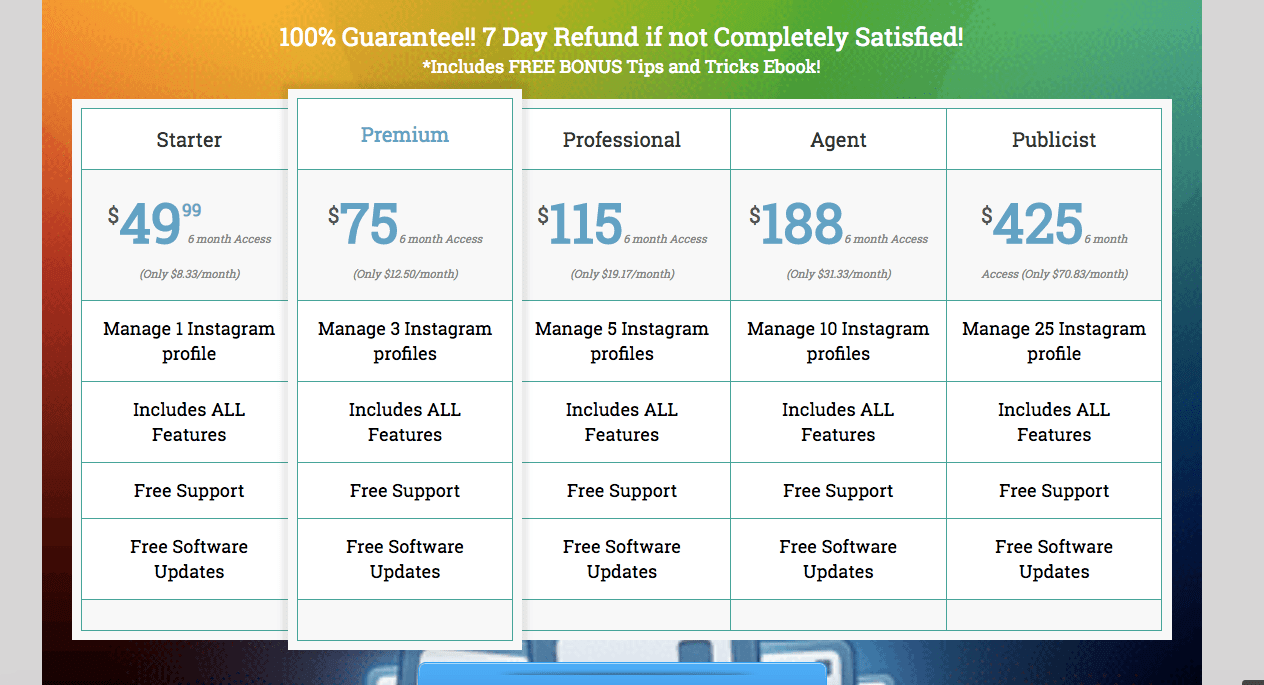
Starter packages start at 49.99 and go up from there.
 3. Gramista
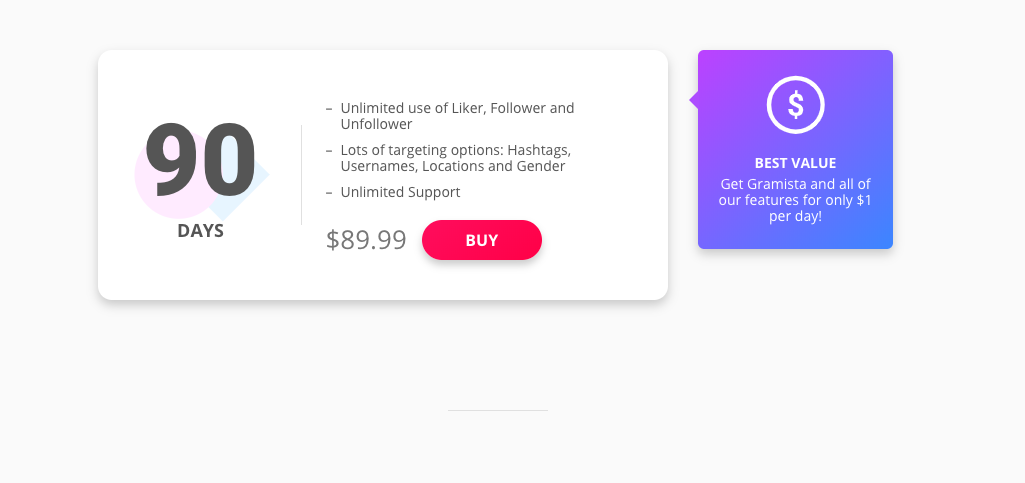
Another option for social media marketing is an app called Gramista. This app allows you to decide which promotional methods you would like to use. Giving you control over how to achieve your social media marketing goals. Having a lot of followers on your business account is important. It signals credibility. Gramista helps to increase the recognition of your brand. It does this by expanding the target audience you are able to reach. All with a few key tools:
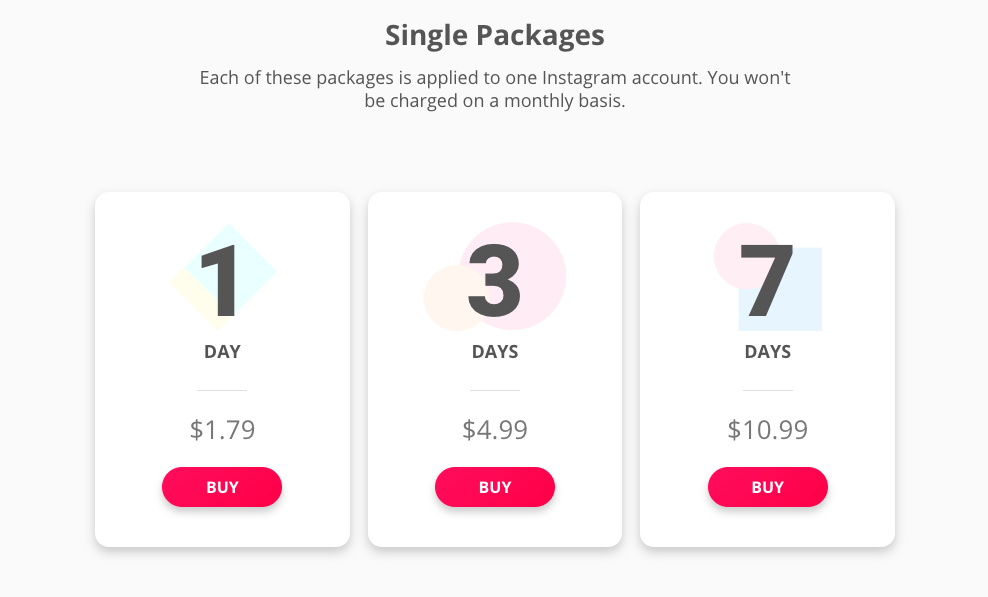
Pricing for Gramista is done a little differently and can get quite costly if you have several business Instagram accounts. There are smaller, single packages and ones for longer period of times as well. If you really want to manage your account ongoing, the monthly packages do add up over time.
 2. MegaFollow
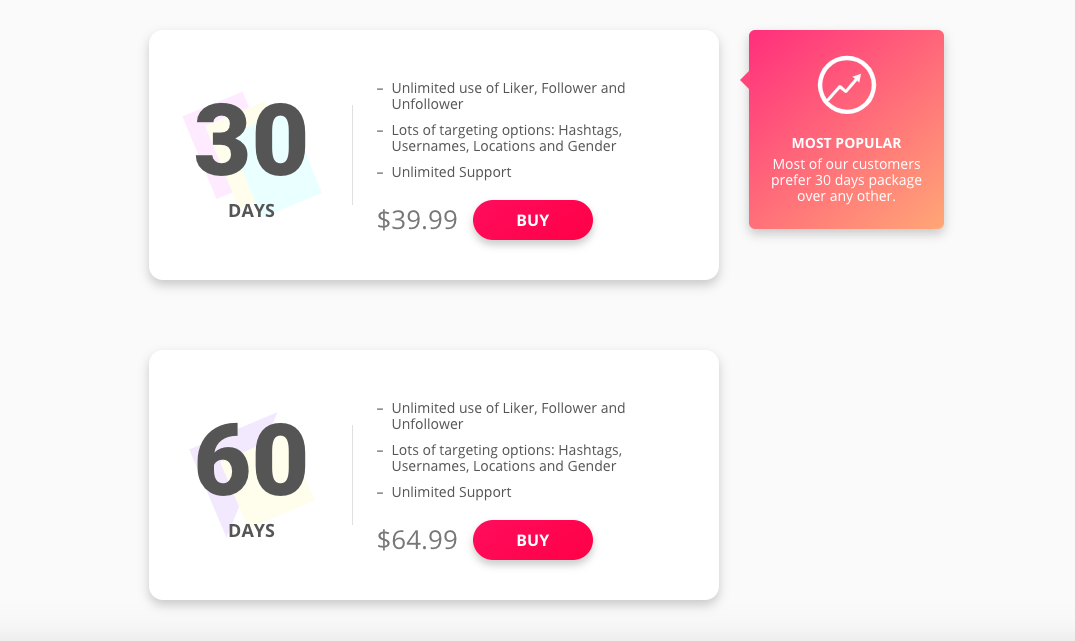
Megafollow is an Instagram growth app that helps free up your time. It does this by automating mundane marketing tasks. This is all done via a central dashboard that is user-friendly and easy to navigate. This app has features that will help you attract more followers. All without spending hours on end following, liking, and commenting.
It is a straightforward service to use. Here are a few key features that help it Megafollow to stand out.
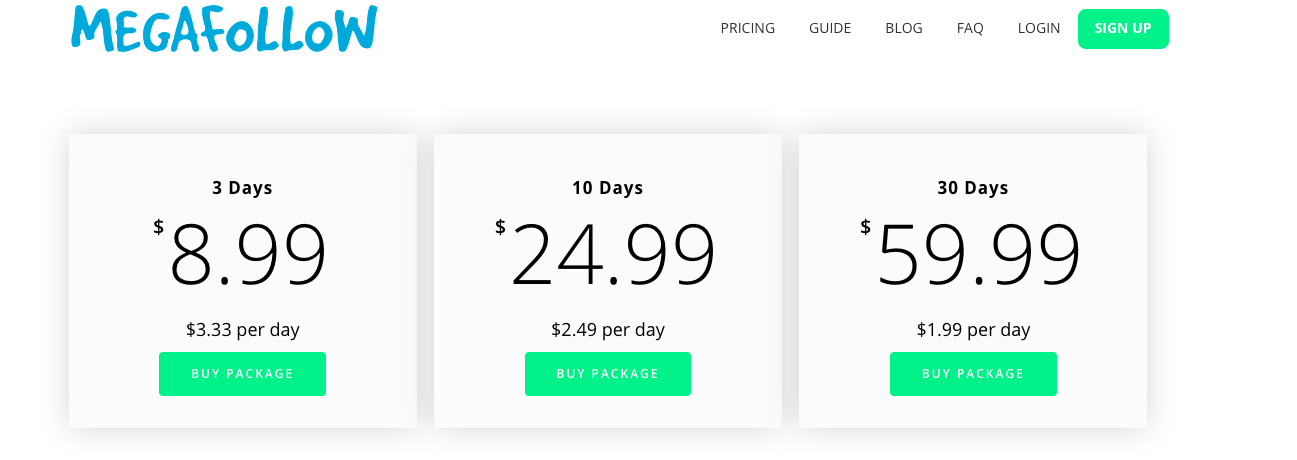
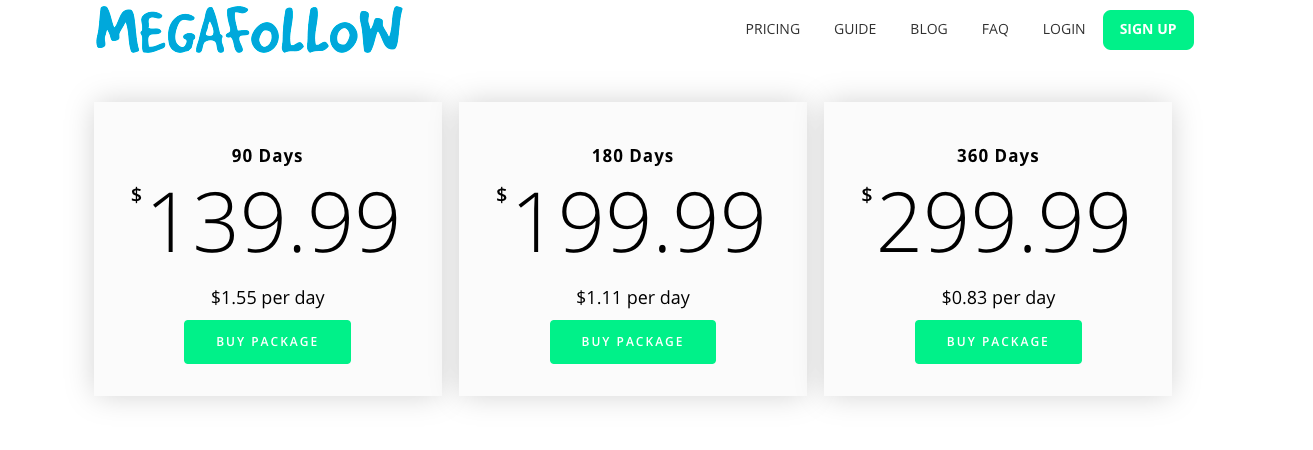
You can start with a three-day trial for 8.99, but prices go up from there if you like and want to continue to use this service. The full year package is 299.99, so that could be good value for you there.
 1. Crowdbabble
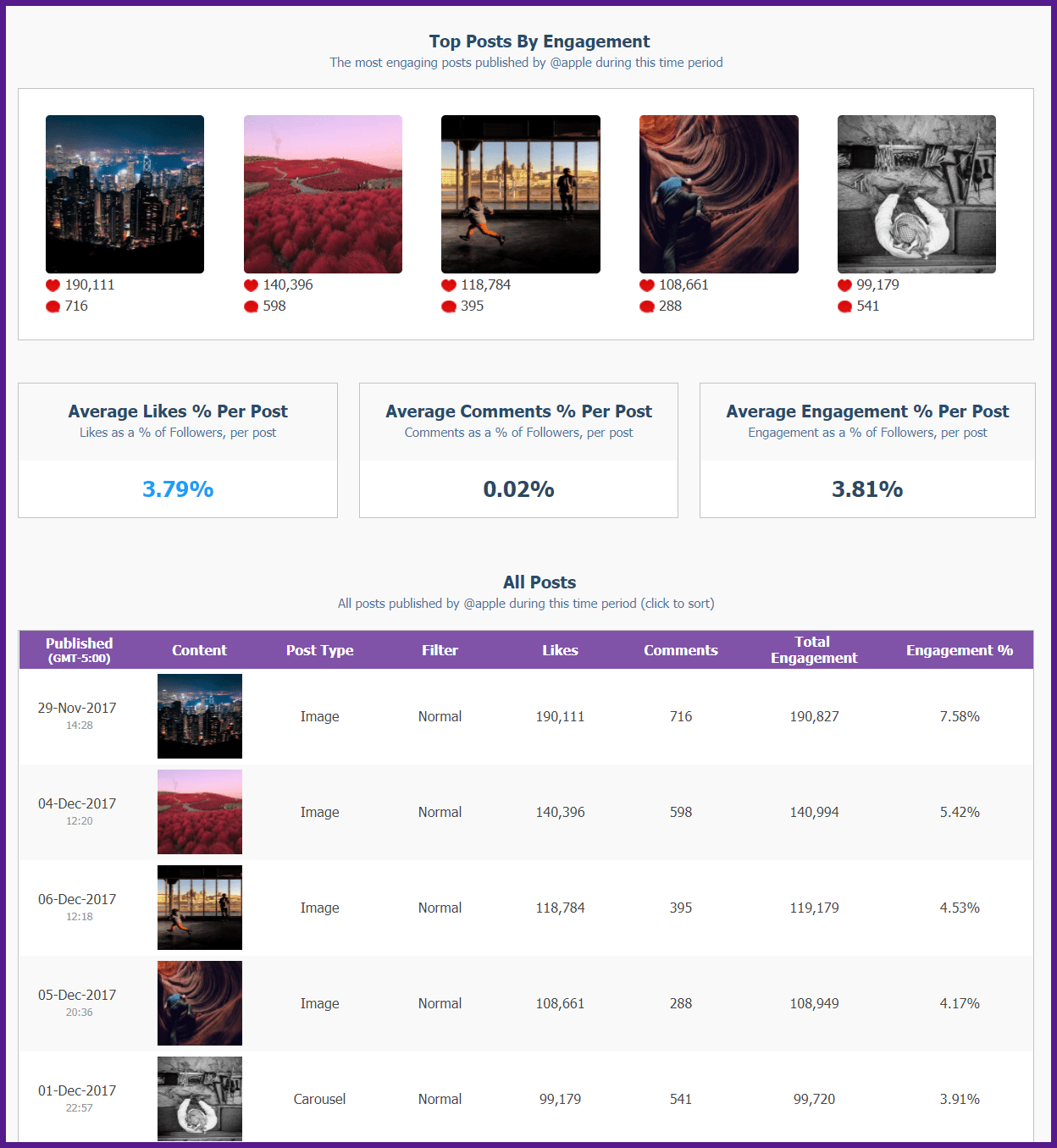
The Crowdbabble app helps increase audience engagement through deep analytics and insightful reporting. This gives you the leverage to measure your social performance.
You can then compare it to your competitors. You are trying to build your business on social media. To do this, you need a big-picture understanding so you can make better decisions. Crowdbabble helps with this while also allowing you to zoom in for a deeper, more detailed view. This gives you a fuller understanding of your activity on Instagram.
Some key benefits of Crowdbabble include:
Of course, Crowdbabble has a lot of other features. Yet, these three alone will help you manage your social media more effectively. This will produce better results for your business. Using these tools, you will be able to make engaging content that appeals to your audience. This, in turn, will increase the organic traffic you generate from social media.
Other useful features include:
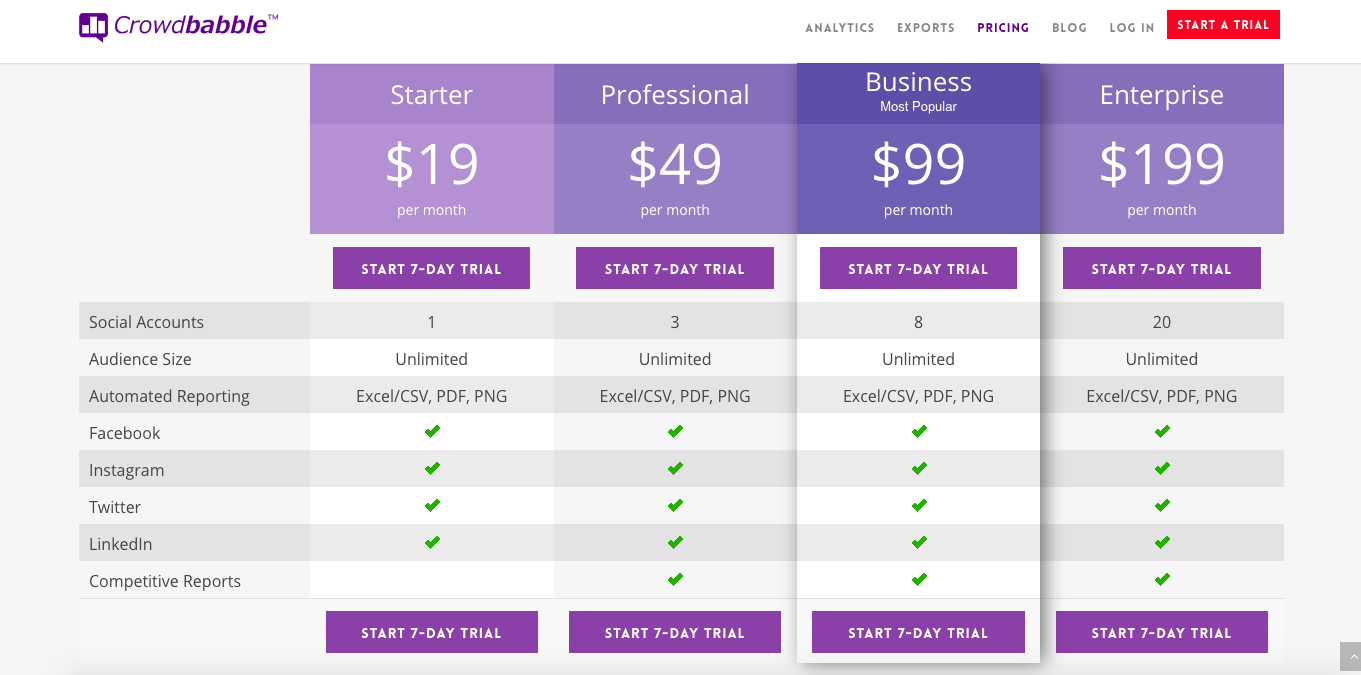
Pricing for Crowdbabble isn’t exclusive for one account only, so there is more value for your spending dollar right from the beginning. For example, you can manage up to 20 social accounts in our Enterprise packages — a real savings that adds up for businesses who want to grow their social media accounts.

Having an app with all the right tool is great. Yet, the foundation of every successful audience building strategy is the creation of great content. Followers flock to quality content. But, you have many competitors. All out there also trying to attract the attention of Instagram users.
In fact, some of these competitors may have done an even better job. And having cultivated a loyal and engaged following, they may seem beyond your reach. But, in fact, this represents an opportunity. Crowdbabble’s features allow you to learn from your competitors and surpass them

Big brands are wrestling with how to build direct relationships with consumers, and how to do so in spite of data ownership and data privacy challenges. It’s true there’s simply no better way to learn about consumers’ preferences and how to most efficiently serve them than by selling products or services directly.
Collecting first party data about sales is the distinct benefit of selling to consumers without a middleman, and that’s why big businesses see so much promise in the startups dedicated to the model.
So far this year, investors have spent $1.2bn on young, little-known direct-to-consumer businesses, that’s up from $810m in all of 2017, according to CB Insights. These startups are also ripe for acquisition. In recent years, Unilever bought Dollar Shave Club for $1bn, Walmart purchased Bonobos for $310m, and Kellogg bought RXBar for $600m.
My company, Hubble, sells contact lenses direct to consumers via subscription. Neither I nor my partner have a background in optical, sales or marketing. Rather, we’re numbers folks with backgrounds in finance, consulting, and programming. Within a year, we logged $20m in revenues.
I credit a lot of our success, and the success of other D2Cs, with knowing how to access data and build relationships using this data (plus knowing how to help the customers gain from the data, because otherwise they won’t share it – consumers are whip smart).
For D2C companies, marketing looks more like sales. D2C businesses don’t launch one message at every consumer, but rather vary their approach and their offers to each individual, using data analysis to optimize it, and technology to ramp it up to a mass scale. This individualized direct marketing interaction allows the business to hone its sales pitch to a razor’s edge.
To achieve this, it’s imperative to prioritize the right data – and that’s often not the traditional marketing metrics you might be thinking of. Focus on the data that allows you to sync up consumer behavior and your operations. For example, when it comes to measuring costs, forget the ones that pervade e-commerce, such as cost per click. What really matters is cost per acquisition.
Another important figure is your customer’s lifetime value, because that will tell you how much you can spend acquiring them. You also can’t run your business without understanding how much your customers are ordering, and what profits those orders deliver. That, in turn, means understanding your margins inside and out.
With these metrics available, D2Cs can learn the right message to send, at the right cost, to the right person—information that brands working through retailers can only approximate. This is the holy grail of marketing, and just moving brand spend to digital doesn’t get you there.
All this said, there is a competing reality. While a D2C-style sales strategy have obvious benefits, it can’t take away all the pain. On the manufacturing side, scale effects still hold and manufacturing more product leads to lower cost. And, nothing is more efficient (sorry, Amazon) than driving product in trucks to Big Box stores for sale to the consumer.
D2Cs, in consumer-packaged goods especially, don’t enjoy these advantages.
I like to imagine what business would be like if you could bring the strengths of these two worlds together: large scale manufacturing, big box stores, and digital direct marketing. It would be revolutionary, and even better it would benefit all parties: retailers, brands, and most of all consumers.
So far, however, the conversation has been framed as either/or, as David vs Goliath. The next step is finding the “and.”
The IAB’s Randall Rothenberg spoke to this when the bureau released a direct brands study earlier in the year. To brand marketers, he said: “You must watch [D2C brands]. You must know them. You must partner with them.”
It’s time we learn from each other and create solutions that we can all stand behind.
Jesse Horwitz is the co-chief executive and co-founder of Hubble Contacts.

Sourced from GLOSSY
Contemporary brands are getting lost in the fashion industry’s current shuffle, in which direct-to-consumer brands are entering department stores, luxury companies are becoming more inclusive and streetwear styles are consistently the most-wanted of the season.
For shoppers, the contemporary category’s longstanding value proposition of “quality clothing at accessible price points” is losing out to the speed, beliefs, backstories and cachet being offered by direct-to-consumer brands and those at farther ends of the price spectrum. In order to compete, contemporary brands are borrowing from other sectors by, for example, taking increased ownership of their sales and elevating their products to be better positioned in store, and in the eyes of customers.
“There’s kind of a squeezing of the middle,” said Brian Lee, associate director of luxury research at Gartner L2. “Consumers are turning away from contemporary brands toward the extremely cheap or higher-luxury brands.”
Moving closer to direct-to-consumer
A common strategy for contemporary players is moving closer to a direct-to-consumer model by pulling out of wholesale channels. Looking at 20 top brands in the contemporary space, Katie Smith, retail analysis and insights director at Edited, found retailers are stocking less product, with inventory down 12 percent year-over-year in October, and 10 percent in August and September. At the same time, their price points fell 2.4 percent.
“Do we get squeezed? Yes. Is that a bad thing? No,” said Janice Sullivan, CEO of 22-year-old contemporary brand Rebecca Taylor, explaining that everyone in the industry is feeling new pressure to better serve customers, and it’s pushing brands to evolve for the better. “It’s forcing us to be on our toes.”
For the past two years, Rebecca Taylor has been transitioning its retail strategy to align with initiatives by the wholesale partners it’s long relied on like Saks Fifth Avenue, Neiman Marcus and Nordstrom, as well as meet customers in emerging channels, including Rent the Runway, subscription services and its own website.
“You have to be small enough to be flexible and big enough to handle the technological challenges people are throwing at you,” she said. “We are — and, right now, that means improving our direct-to-consumer business.”
At the same time, Milly co-founder Michelle Smith the brand is building up the direct-to-consumer business. Milly.com is the brand’s fastest growing retail channel, with sales up 80 percent from last year.
Aside from competing with other fashion sectors, Michelle Smith said she’s also working to differentiate from brands in the crowded contemporary space, which has grown from eight to 10 brands when she launched in 2001 to hundreds. “I’m thinking about designing product that means something and speaks to my customer, who’s being bombarded with options” she said, before making like a direct-to-consumer brand and pointing to her brand’s story: Her collection is made in New York and infuses her trained eye in luxury.
Aligning with higher-end brands
Anine Bing, the L.A.-based advanced contemporary brand of a former blogger, launched in 2012, has taken the less-is-more approach in terms of wholesale partners in order to avoid brand dilution, a direction brands including Coach and Michael Kors have been vocal about taking in recent years to up their cachet. “We’re super picky,” she said. “We don’t ever want to be in every store on every corner; we’d rather be in too few stores than too many, and it’s very important what those stores are and what brands are sitting next to us.”
Today, that’s a smart strategy for maintaining customer interest. Lee pointed to Gartner L2 research, showing that, from 2016 to 2017, mid-market contemporary brands saw site traffic drop “significantly,” in the double-digit percentile. In the same time period, traffic to luxury brand sites increased 10 percent. Community growth and interactions on Instagram told a similar story, with contemporary brands earning a 31 percent hike in followers, versus 47 percent for prestige brands.
Sullivan said Rebecca Taylor is also taking a cue from luxury brands by slowly backing away from promotions. “Each new year, we commit to doing a specific, fewer number of days on promotion, and we stick to it.”
Jennifer Zuccarini, the founder of 6-year-old lingerie and ready-to-wear brand Fleur du Mal, said that, if she were selling exclusively on wholesale channels, she’d likely raise prices to ensure peak brand alignment in stores. (The brand — which now sells at retailers including Bergdorf Goodman — is working toward a goal of 80 percent of sales on e-commerce.) “Contemporary is definitely not a place where we see ourselves,” she said.
Catering to fans and followers
Katie Smith said the rise of heritage-driven marketing and also streetwear, which is hinged on exclusivity, are also having adverse effects on the contemporary segment.
The growth of luxury resale retailers, which have a strong sustainability message, are a factor, too. “Why would a consumer buy a new product when they could get a ‘better’ one for the same price, with better resale value down the line?” Lee said.
As a result, brands in the space are working overtime to speak to customers’ evolving tastes and win them over.
To give customers “what they want, where they’re shopping,” Bing has taken a see-now-buy-now approach to her collections; styles are immediately available for purchase as they’re released, across channels, including in wholesale stores.
She, like Michelle Smith, has also answered the demand of her customers wanting a children’s-size version of her line. Bing launched a children’s line in March. Michelle Smith’s children’s and tweens’ lines have been available since 2011; she said it’s helped with brand loyalty: Customers get to know the brand, and stick with it.
Amy Smilovic, founder of advanced contemporary brand Tibi, launched in 1997, said evolution, done right, is key: “We are always curious about what’s new and pushing ourselves to find creative stimulation in what we love,” she said. “So what you get one season may — should — be totally different than the last season, but there is always that same line of identity that runs through it no matter what. That’s what’s critical to success today.”

By Marcus Ho
Every great product or brand starts with an idea. But how does an idea grow into a big idea that stops your audience in their tracks?
It’s easy to fall into the trap of producing content without a clear idea behind your content strategy. If your organic traffic isn’t growing month over month, or if you find yourself continually spending advertising budget to acquire readers, this probably means that your content strategy lacks a big idea.
If your organic traffic isn’t growing month over month, or if you find yourself continually spending advertising budget to acquire readers, this probably means that your content strategy lacks a big idea. Click To Tweet
Advertising tycoon David Ogilvy famously said:
You will never win fame and fortune unless you invent big ideas. It takes a big idea to attract the attention of consumers and get them to buy your product. Unless your advertising contains a big idea, it will pass like a ship in the night.”
David Ogilvy was absolutely right.
 Take a look at these two financial self-help books, for instance. Both books teach the principles of saving and investing money. But, can you guess which title sold more copies?
Rich Dad Poor Dad is an international bestseller, yet 101 Ways to Find the Money to Save and Invest is mostly unknown. As we further explore the concept of the big idea, it will quickly become apparent that Rich Dad Poor Dad has a big idea behind it. This is because a title like Rich Dad Poor Dad stands out from all other books about saving and investing. The big idea behind this book has easily cut through the noise and captured any potential readers’ attention.
Let’s delve deeper and explore how you can develop a big idea that works and leads to exponential growth in organic traffic: the ultimate goal for many businesses.
At this stage, you may be wondering where creating your “big idea” fits in your inbound marketing strategy? The answer is it’s the crucial first step in your inbound and content marketing planning process.
If you’re already part way through your content marketing strategy but don’t yet have a big idea in place, don’t panic: this is the time to audit your approach.
1. First, you need to take a step back and consider your buyer persona. Think about the customer you’re trying to reach. Ask yourself:
2. Next, you need to attract your target customer’s interest. One way to do this is to apply the concept of creating unfamiliarity into what they’re already familiar with, or vice versa.
Here’s an example of introducing familiarity with what may seem unfamiliar to your audience: cryptocurrency. Most people have a sketchy understanding of what Bitcoin is. But if one were to explain Bitcoin as a form of “digital gold,” most people would be able to grasp that concept easily since ‘digital’ and ‘gold’ are things that people are already familiar with.

An example of creating unfamiliarity into what people are familiar with would be the wildly successful product, Tangle Teezer, the de-tangling hairbrush. Everyone is familiar with a hairbrush. But a hairbrush that specializes in de-tangling your hair? That’s a novel idea!
Tangle Teezer’s brand success started with a big idea, and inbound traffic grew organically. This product very effectively fulfills its promise to quickly and painlessly de-tangle hair, and customers promptly told their friends. Tangle Teezer became a self-promoting brand.
As you move further through the process of finding your big idea, a memorable and straightforward method is to follow the acronym of B-I-G.
Ask yourself: does your idea capture people’s attention?
Talk about your big idea to your friends and colleagues. Are they interested? Do they want to find out more? Ask your colleagues and carefully watch their reaction. Is this an idea that you want to talk about with your friends? Also, consider if there are any market trends that you can leverage to create a content strategy around.
As a company or brand, you must stand out from your competitors and create a product that solves a problem. There are three ways to do this:
1. Genuine Incomparability. Your products are truly unique. Most of us, unfortunately, don’t fall into this category as this requires inventing a product with an exclusive patent. For most products and brands, the next two strategies are more realistic.
2. Industrial Incomparability. You create your big idea around something that your industry competitors may already be doing, but they don’t talk about it in their content strategy.

Let’s take TOMS shoes as an example. For every pair of TOMS shoes sold, another pair is gifted to a person in need, and customers are made aware of their contribution. Customers feel good about their purchase, and TOMS stands out in a hugely competitive market.
3. Created Incomparability. This is the key to coming up with a big idea that works. You need to find something exciting and compelling about your product to help it stand apart from competitors.
Imagine you work for a company selling health supplements for children, and you need to market vitamin D supplements. If you only list the benefits of vitamin D, most of your audiences will quickly lose attention — especially kids! To grow your organic inbound traffic and increase product awareness, you need to think differently about your product.
Perhaps as you carry out some research on vitamin D, you discover that astronauts used it during space missions. Suddenly, vitamin D could potentially become the “Astronaut’s Vitamin”. Kids are fascinated by astronauts and intrigued by your product. And parents have the option to purchase an attractive health supplement that their children are excited to take.
You’re not selling anything different, but you’ve found a creative way to make your product seem unique.
And now we come to your Gargantuan Goal. Ask yourself one simple question: what is the biggest problem you’re trying to solve for your audience?
It’s time to revisit your buyer persona and think about what triggered their customer journey.
Let’s go back to the Tangle Teezer hairbrush. Its gargantuan goal is simply to provide a solution to the annoying problem of trying to de-tangle your hair. It solves its buyer persona’s biggest problem.
Finally, let’s look at a brand that successfully demonstrates the B-I-G acronym in action: the painting tape brand, FrogTape.
FrogTape’s content marketing focuses on its ability to achieve clean, sharp lines with no paint bleed. It creates the concept of PaintBlock Technology. PaintBlock Technology is buzzworthy — it immediately intrigues people. They want to find out more. FrogTape effectively inserts the unfamiliar into the familiar.

FrogTape shares painting tips, how-tos, and inspiration as part of their content marketing.
FrogTape also successfully harnesses “Created Incomparability”. It creates the idea of PaintBlock Technology to keep your paint lines straight and sharp.
FrogTape’s “Gargantuan Goal” is to convince its customers to use FrogTape to create clean lines and avoid the worst-case-scenario of having to repaint a room.
Every aspect of FrogTape’s content marketing strategy then links back to this big idea. Even the design trends on FrogTape’s website have subtle relevance to the big idea: their “Paint Block” technology.
Your big idea is the beating heart of your product or brand. Every piece of content you create about your product has to link back to your big idea. It can be subtle, but it has to be there.
Marcus Ho is the founder of the digital and content marketing agency, Brew Interactive. The agency specializes in working with financial and real estate brands to leverage content strategies that will drive their business goals. He is also the author of the highly-rated book, Social Payoff

By
In January 2005, on top of a Mayan pyramid in Oaxaca, Mexico, I had a life-changing experience. I met Lisa Stone, the founder of BlogHer, the first community for women who blog.
At the time, I was a political consultant in Washington, DC. I felt unheard, to say the least. BlogHer gave me a voice. Writing about politics as BlogHer’s first Political Director gave me a platform to share women’s points of view.
I didn’t know it then, but as one of the few female bloggers who covered politics, I had lucked into a powerful niche. As blogging gained popularity and authority, I often found myself fielding questions from curious political, marketing, and communications professionals: What was this blogging and citizen journalism thing all about, and could I explain it to them? Even better, I could blog from anywhere, and this allowed me more time to myself while still building professional influence. I knew I was on to something- and that was the root of my business, Women Online.
And that’s why, even though the internet is an ugly place, it can be magic when you’re working to find your voice and make your mark in the world. BlogHer co-founder and author of Roadmap for Revolutionaries Elisa Camahort Page calls herself a digital utopian, and I must agree.
Here are the profiles of three women who built businesses by satisfying their curiosity and finding their online voices.
Chedva
I met Chedva Kleinhandler in Tel Aviv when I was on a REALITY trip to Israel. I was drawn to this funny and bold woman entrepreneur. Chedva is a Haredi woman– from an ultra Orthodox Jewish community. She is a true trailblazer, and is now CEO of Emerj – an app that uses AI to connect employees with mentors on demand. When I learned Chedva got her start as a blogger I had to know more and asked her the story of how she started, because her blog changed her life.

Chedva KleinhandlerChedva Kleinhandler
In 2008 Chedva was translating subtitles for TV shows and books. She was a new mom managing her emergence as an adult. “I had a very personal blog, which I then after a few years deleted. I really sort of really spilled out everything about being a young mother. I was 21. It was a very emotional time in my life. I was just starting to work.”
Chedva built many blogs along the way: from book reviews to diet and fitness and lifestyle. She found her niche when she became a homeowner. Looking for inspiration, she found home and design blogs, an emerging category. Chedva says, “I remember the experience of finding a blog you love and not sleeping at night.”
She began commenting, following both the bloggers and the designers they featured on Twitter. Community developed: “We sort of became this group,” both fans of the blogs and aspiring bloggers themselves. It was a global group, including “one interior design publicist who was American but was an insomniac so she never slept.”
In 2009 Chedva started her design blog, which she initially called Belly’s Button and which evolved into Rooms and Words. “I started writing about both just to curate my inspiration. There was no Pinterest. My computer kept crashing from all the images I would save.”
She laughs: “I felt that suddenly I also had something to say about things that I liked and didn’t like, what makes this feel homey, why I would like to have this in my home. Not trying to position myself as an expert because I had never been an interior designer and decorator. Just as someone who is interested from a very human perspective.”
As her blog evolved, Chedva started consulting for big brands, “I found myself producing photo shoots; companies like Houzz and Etsy came to me for collaborations. In 2011, IKEA in Israel approached me. I actually gave my first workshop there for their designers on how to blog.”
As word got out, business owners from all disciplines approached Chedva for help in launching their online presence. As Chedva taught herself how to be a consultant, the idea for her company Emerj came to be: “I never thought I’d have a startup. It came literally from me feeling that mentoring was super meaningful to me.” Because she is a curious person and because she understands online community, Chedva launched a survey asking women all over the world what they needed to succeed. Women from 54 countries responded, and from the community’s answers she shaped her startup. For too many women she spoke with “Mentoring was missing,” and Chedva realized there was a gap in the market.
Chedva and I share a similar approach: we learn from women online! “You just need to adapt and learn who are the influencers, what’s interesting to them, what’s interesting to you, how you can actually bring humanity into it, right?”
Andrea
Andrea Sparrey’s counsel helps people get into elite business schools, and her track record is enviable. Her firm Sparrey Consulting has built a network of thousands of clients they’ve coached through the biggest life and career transitions, and who now hold powerful jobs in every industry. But when I met Andrea, she had just left management consulting and was a new mother. She wanted to break into MBA coaching, but the field was ruled by gatekeepers: from Deans of Admissions to consultants who’d worked hard to gain their industry knowledge and weren’t necessarily open to newcomers. So Sparrey used blogging to break in, and meet the people she needed to. Although she is now the past President of AIGAC, the Association of International Graduate Admissions Consultants, she began her career by editing the trade association’s blog when she was just starting out as an MBA admissions consultant. In so doing, she met everyone influential and powerful in the field of business school admissions— because she interviewed, engaged with, and edited them.
At the time, Andrea didn’t have much choice: she needed to conduct most of her networking online. Because of her husband’s job, she’d uprooted her life from New York City to San Diego, far from the locus of elite business schools and the consultants, bankers, and entrepreneurs who applied to them. “I was willing to write articles—and it gave me a platform to call up the most important people! I then helped organize the conferences, and then I had the chance to go out and meet people at all levels of the field,” Andrea says.
Lizzie
For author and editor Lizzie Skurnick, it turned out that the biggest superconnector in her career was her blog. Her inspiration to launch one of the first literary blogs, Old Hag, led to her career as an author, publisher, New York Times columnist, and much more–and, most important, let her make her living in the books world. Lizzie says, “My entire professional life and my dearest closest friends spring from a blog. If I hadn’t started it, and connected with the three people who also shared my passion, I wouldn’t have the life I have now.”
In 2003, Lizzie was sitting in her apartment, 40 pounds overweight, recently fired from her job, her only income a still-new relationship writing about books for a local indie paper. But from a major writer she profiled, she learned about blogs, and joined the fledgling world of literary bloggers. At the time, she says, “You could get fired for blogging, and we all either hated our jobs, or were about to get fired.” None of them had any idea the media was about to become obsessed with blogging, and she and her friends were swept up in it, some founding new Gawker blogs, some going to the Daily Show, some making a splash in print media.
For Lizzie, it led to writing reviews for the New York Times Book Review. It also, through a friend who read her blog, put her on the radar a local teen girls magazine that let her work part-time, but still gave her health care. Another blogging friend introduced her to the new editor-in-chief of Jezebel, and she launched a column on YA books that the major author (remember her?) recommended to her editor. That became a book, as did her New York Times Magazine column, which another blogger friend had recommended her for. That in turn led to her YA imprint, Lizzie Skurnick Books, which put her in the Times again, but as a subject.
“Everything, everything I have came from the blog,” she says, “but I was just noodling around. At the time, using a blog to be ambitious would have been crazy. So never underestimate the value of just fooling around with what you love.”
Morra is author of Hiding in the Bathroom: A Roadmap to Getting Out There (When You’d Rather Stay Home) and founder of social impact agency Women Online and The Mission List.

From 2014 to 2016 alone, global social media advertising spend doubled from $16 billion to $31 billion. There’s a good reason for this: it’s under-priced, and more importantly, it works. Yet, despite many entrepreneurs being aware of the significance social media can bring to their brand in terms of awareness on top of increased sales, knowing where to start and how to properly execute is the difficult part – causing many who try to become frustrated and give up.
On that note, here’s how to get started with social media advertising, along with best practices to ensure you’re getting the most out of the medium.
When I speak with entrepreneurs who are looking to begin leveraging social media advertising, they almost always discuss soley Facebook ads. While Facebook certainly has the sharpest targeting capabilities given the immense amount of consumer data they have access to, the cost to advertise on the platform is steadily increasing and will only continue that trajectory. Additionally, users are leaving the platform in droves and access to certain segments of data will become more difficult following the Cambridge Analytica scandal.
The good news is, you’ve got plenty of alternatives, and I recommend giving all of them a try. Here are a few other platforms to consider, along with the average cost per click (CPC) along with the cost per 1,000 impressions, i.e. views (CPM), according to WordStream.
For reference, Facebook’s average CPC $1.72 and CPM is $9.06.
One of the most important things to figure out when deciding which social media advertising platforms to invest heavily into is knowing where your target audience hangs out most online.
For instance, if your company is trying to sell a recipe book, online yoga course or home decor, then chances are high you’ll find a lot of success on Pinterest. If your company is trying to sell inspiring merchandise like motivational t-shirts, chances are high Instagram will be a worthwhile platform to invest big into. If your company is a blockchain startup, then Twitter ads will more than likely be your best bet.
Take the time to brainstorm and put yourself in the shoes of your target audience and figure out where they spend their time browsing online. Once you do, buy ads on this platform.
As basic as it sounds, one of the greatest indicators of which platform your social media ads will perform best is where your social media marketing is performing best. For example, if your business has a much larger and more loyal following on Instagram than they do anywhere else, then it’s safe to assume your budget would best be spent on Instagram advertising.
Additionally, you can also use the analytics gathered on your social media channels to refine your targeting for social media ads and vice versa. Who knows? You may have a dedicated following in Iceland or Dubai you would never have known about until diving deep into the analytics available on nearly all social media platforms.
No matter how calculated your decisions become by using the tips from this article and other material online, at the end of the day, every business is different and the social media landscape is always changing. Because of this, you’ll need to frequently test new platforms, strategies, targeting tactics and more to stay on top of your game.
Each month, set aside a portion of your budget as money for experimenting. Approach the situation as if you know you’ll lose the money entirely. Whether this experiment is a new social media platform or feature, giving influencer marketing a try or targeting a brand new audience, the point is to test to see what works best for you.
If you don’t have time to do this on your own, then hire an agency or talented freelancer to do it for you.
Lastly, according to a study by Zenith, time spent watching media online will officially surpass time spent watching TV for the first time ever in 2019. Because of this, social media usage is on the rise and your advertising budget should begin reflecting that shift if it isn’t already. However complex or overwhelming it may seem to know where to invest your dollars into, how to target, optimize ads and more, if you follow the tips laid out in this article, you’ll be in a terrific position to reap all the benefits social media ads have to offer you. Best of luck.
Feature Image Credit: Getty Images

By
Smart email marketers realize that following the best practices outlined in regulations such as GDPR will ultimately help—not hinder—their email marketing ROI.
In a recent poll, Litmus Software found that 60 percent of brands that are complying with GDPR saw their email lists shrink by less than 10 percent. “That’s probably just healthy purging,” says Chad White, research director of Litmus. “GDPR is not the cataclysm everyone was expecting.”
Complying with GDPR definitely isn’t easy, White notes. It takes a lot of internal coordination between the email marketing team and other departments to make it happen. But once brands get their operations up to standard, there can be unexpected benefits.
“We did an ROI analysis of the marketing impact, and folks operating in the EU with tighter laws had slightly higher email marketing ROI,” he says.
The CAN-SPAM Act, passed back in 2003, set an arbitrarily low bar for email standards, White feels, and that has not served marketers well. “If you’re a U.S. marketer and all you did was comply with CAN-SPAM, you’d have a horrible email marketing program. You’d get blacklisted, you’d get blocked all over the place. You’d be in so much trouble.”
But, he feels, the stricter environment created by GDPR will set up marketers to succeed. “In the US, it has been driven into our heads that regulation is bad. But GDPR—while not being an easy thing to comply with—is in line with consumer expectations about how businesses should behave and treat their behavior. In the end, its good medicine to do what consumers want you to do.”
Consumers today are much more knowledgeable about marketing practices than some businesses give them credit for, he adds. “Marketers have a nasty propensity to think that consumers are confused about how things work.”
For example, some email marketers get nervous when their messages end up in the Gmail promotions tab. But, says White, that’s not the worst thing in the world. The types of communications that wind up there at this point are pretty consistent, and recipients know to look there if they want to find something.
“We found in our research that a lot of consumers regularly check their spam folder,” he notes. “And consumers will not only check but rescue messages. If they don’t rescue it, they don’t want it.”
Smart brands will look at the data surrounding their email opens and clicks, and use it to optimize their campaigns. But that can be challenging in today’s world, where there are so many touchpoints beyond the inbox. And, the impact of email messages varies from industry to industry, says White, noting that a CPG firm has different goals from a financial services company or a retailer or a nonprofit.
For example, if you have the type of business that typically closes deals on the phone, an email campaign that drives call center traffic is good. But, if a message causes confusion that simply drives recipients to call customer service, that isn’t so great.
The softer impact of email can also be tricky to track, and sometimes, businesses only measure what can easily be tracked, particularly as a multitude of conversion points makes the process more scattered.
“We’re good at looking at who received email and who opened and who clicked and who converted and who visited the website,” says White. “But depending on the brand, that happens half the time. Then, there’s the other half [of recipients], who got your email, and maybe didn’t open the message, but seeing it got them to go to [a retail] store. Or, they opened your email, and they went to their web browser and typed in your URL. People are strange and they don’t follow the golden path we’ve laid out for them.”

By
There are three key factors that affect the amount of money you can make on Instagram:
An influencer needs the right mix of photos, audience, and engagement. These provide many opportunities to make money from Instagram followers:
Although you can use influencer marketing to sell your own and other people’s products. We are going to focus on the most common way to earn money on Instagram. That would be creating sponsored content for brands. Many brands will only offer you free products. But, some companies will pay $10 per 1,000 followers, while others pay over $800 per 1,000 followers. You can maximize the money you make when you publish sponsored photos. Learn how social media campaigns work from a business perspective.
Influencers don’t need millions of Instagram followers to get paid. There are three things that will determine whether you can make money on Instagram:
Engagement is more important than follower count for influencers. It is especially important because companies are looking for conversions. They want an influencer that convinces people to buy their products. It’s easy for someone to follow you. The value lies in that person doing the extra work required to like the content you post.
Social media marketing is difficult for a large business. As they reach a certain level of followers, the people responding to their marketing decreases. This is why they work on buying engagement from smaller social media accounts like yours.
 The Likes Cliff
The Likes Cliff means that brands with millions of followers must partner with accounts that may only have a few thousand people. But they are only willing to do this if you are influential with your audience.
Becoming an influencer doesn’t have to be a full-time job. You still need to find enough time to consistently post high-quality photos. You need to build your social media reputation by posting remarkable things online. This is how you become influential.
On your journey to becoming an influencer, it is important to keep your independence. Your most valuable asset is the trust your audience has in you and your content. To protect that trust, you need to make sure that you are not wholly dependent on your Instagram income. This will allow you to be more selective about the brands you choose to work with.
Brands love Instagram. The photos you post are shown to a much larger section of your audience. Especially when compared to Facebook. However, not every post will be seen by 100% of your audience. This is especially true if you do not include a good hashtag with your post. Brands are looking for audiences that are large enough to have an impact on sales. But small enough to guarantee strong engagement. That is why you should aim at least 10k followers before you can start earning good money on Instagram.

 Find brands that are looking for influencers.
As your audience grows, your content becomes more attractive to brands. You will eventually have your first business reach out to you. But, remember that staying true to your audience means being selective. You may find a better fit when you seek out business opportunities yourself. This can be a daunting task, but luckily there are many markets for influencers. These markets will help influencers find people that want to sponsor your account.
Fohr Card: This is a membership-based influencer network. Fohr Card connects influencers like you with brands looking to boost their marketing. It is specifically designed for Instagram. They can provide unique insights into the demographics of your audience.
They will also score your audience using their unique Follower Health Score. This helps prove you have a high-quality audience. You get a simple to understand score from -8 (mostly bots) to +8 (100% real, engaged audience). Proving your account doesn’t suffer from follower fraud will help you get paid better on Instagram.
Grapevine: This is a great network to use once you get over 5,000 followers. This barrier allows them to offer excellent sponsorship opportunities. The area where they really stand out is in customer service. They have a dedicated team for working with influencers. This team is proactive about making sure you are happy and earning what you deserve. This is a network that attracts a lot of early-stage startups. So you may have the opportunity to promote cutting-edge, exclusive products.
Shoutcart: This is a marketplace you can use to monetize your Instagram audience. Brands can buy a shoutout from you just as easily as buying an item from an eCommerce store. You simply publish a profile and let people know what you have to offer. It also gives you a great way to build your reputation. Potential sponsors judge you based on a transparent scoring system. This way, the hard work you put into building engagement is verified. This feature increases the fees you can charge. And allows you to earn more money with your Instagram followers.
If you are creative with your account and respectful of your followers, then you can earn money on Instagram. The easiest way to do this is by selling your services as an influencer. In the end, the amount of money you can earn depends on your niche. If you are posting photos about cooking on your account, you will earn less for sponsored posts than someone who is promoting a jet-setting luxury lifestyle. However, regardless of your niche, if you keep growing your audience while working hard to maintain great engagement, then you will always be an attractive partner for brands.
One way to see where the limits are for your niche would be to look at the content of other successful Instagrammers in your category. Look at the kind of companies that they promote. Ask yourself whether these are the type of brands you would want for your Instagram page. From there you need to focus on your photography, storytelling, and marketing. Grow your following as much as you can, create a culture of engagement with your audience. And when the time comes, don’t be afraid to negotiate for what all that hard work is worth.
All this definitely takes time, it’s not going to happen in a few weeks. That’s why it is so important that you choose a subject for your Instagram that truly inspires you. Some people choose a niche just because they think it’ll be profitable to sponsors down the line. Their profiles lack the passion and authenticity necessary to be a real success.
Crowdbabble can help you with our Instagram Analytics, which lets you see how your audience is engaging with your content, with proven metrics that help you grow your followers and make more money in the process.