If you’re ready to take your professional skills up a notch, then get started today with these online courses.
The old idea of faking it until you make it doesn’t cut it anymore. In today’s competitive business environment, the best companies are interested in hiring the best employees. The more skills a professional has in their proverbial toolkit, the better their chances of standing out from other job candidates and making a real impact at their organizations.
Whether you’re getting back into the workforce and need to sharpen your skills, or you’re a business owner who wants to improve your leadership skills, or you need an online accreditation for a specific topic, the good news is you can accomplish all of this and more online.
Signing up for online courses can be the perfect choice for time-strapped professionals. Not only will you have access to instructors and subject matter experts from all over the world, but you can also complete many courses at your own pace and schedule.
We’ve rounded up five of the best online learning options to help you improve your career and excel in business.
Best for College-Level Learning: Coursera
If you’re looking for college-level learning without the massive tuition or need to physically attend classes, then Coursera is perfect for you. It’s one of the best online learning platforms out there.
Coursera delivers top-notch education because it is partnered with more than 300 leading universities and companies including Google, Microsoft, and Meta. Since its founding in 2012, Coursera’s goal has been to offer flexible, affordable, and job-relevant online learning to individuals and organizations worldwide.
Unsurprisingly, Coursera learners have reported career benefits such as new jobs, promotions, and expanded skill sets. Right now, you can get started resetting and reinventing your career with a subscription to Coursera Plus for 30% off* ($279.30 for 12 months, regularly $399).
Best for IT and Coding: Udacity
When two Stanford professors decided to offer their “Introduction to Artificial Intelligence” course online to anyone for free, the idea for Udacity was born. Now part of Accenture, Udacity says it has since enrolled more than 160,000 students in more than 190 countries around the world.
Specializing in IT topics such as data science, programming, AI, and cybersecurity, Udacity offers beginner, intermediate, and advanced options across 300+ online courses. Learners can earn certificates or participate in “nanodegree programs,” which are similar to topic-intensive boot camps.
Best for Marketing Skills: HubSpot Academy
If you’re looking to get into marketing or to expand your existing knowledge into topics such as inbound marketing, sales, and customer support training, then look no further than HubSpot Academy.
Created by online marketing powerhouse HubSpot, it offers everything from comprehensive certifications to short, practical courses. Certification programs span topics such as inbound marketing, social media, email marketing, content marketing, and more.
Perhaps best of all, a free HubSpot Academy account provides unlimited access to its entire library of education, free software tools, and other resources like videos, quizzes, and workbooks.
Best for Business-Specific Topics: LinkedIn Learning
When LinkedIn acquired Lynda.com in 2015, the popular business networking site officially entered the online learning industry. Since then, it has grown to include hundreds of courses on topics spanning four main categories: business, creative, technology, and certifications.
With a small army of credible instructors, LinkedIn Learning offers courses on everything from mastering presentations to artificial intelligence, UX design, storytelling, writing with impact, and more. Its certification program offers more than 175 different credentials. Subscription prices depend on whether you sign up as an individual, team, or an entire business/organization.
Best for Language Learning: Babbel
Perhaps you’re a business owner who is working hard to expand into an international market. Or maybe you’re a professional who is looking to relocate overseas. The world is your oyster, as the saying goes, but one big thing that can hold you back is a communication barrier.
That’s why online options like Babbel Language Learning exist. Developed by more than 100 expert linguists, Babbel offers courses in 14 languages. The program focuses on practical vocabulary and the company says you only need 30 days of 10- to 15-minute lessons to become conversational in a new language. It’s no wonder why Babbel has become one of the world’s top-grossing language learning software companies.
No matter your area of interest, if you’re ready to make an impact now then one of the best online learning options above are sure to get you started on a path to improving yourself as well as your career.
Marketing and advertising focus on promoting products and services, but they do it in different ways.
Marketing and advertising share some similarities, but they have different goals and objectives. Marketing builds brand awareness and offers a perceived value, while advertising promotes a product or service. Learn how marketing and advertising work, how they differ, and how to use both strategies in your business.
What is advertising?
Advertising involves paying to promote a product or service to reach individuals who are the most likely to use it. Advertising focuses on acquiring customers and driving sales. Traditionally, businesses advertised on billboards, TV, and in mailers and magazines. Today, a lot of advertising occurs online through social media, websites, search engines, and emails.
An ad includes a message that’s tailored to a specific target audience. Besides generating sales, advertising makes it possible for a business to differentiate itself from its competitors and gather valuable data about its audience.
Every business must develop a personalized strategy that integrates marketing and advertising to achieve its goals.
What is marketing?
Marketing refers to activities a company undertakes to attract its target audience to its products or services and deliver value to those consumers. Most companies do this by creating high-quality content that provides a compelling benefit to their audience.
Effective marketing entails deeply understanding your audience and what they’re looking for. When you understand your consumers’ wants and needs, you can demonstrate the value your product or service provides in the places where your audience spends most of their time. Some of the primary types of marketing include the following:
Social media marketing: Businesses market to their customers using social media channels like Facebook, Instagram, X (formerly Twitter), or LinkedIn.
Content marketing: Businesses create informative blog posts to rank higher in search engines and attract their ideal clients to their websites.
Video marketing: Video marketing involves creating and publishing informative videos for your target audience.
Email marketing: Businesses market to their target customers through weekly newsletters and promotional emails.
Differences between advertising and marketing
Although there are some similarities between advertising and marketing, they aren’t the same thing. Both involve different goals, responsibilities, and techniques. Here are some of the main differences between the two:
Goals: The primary goal of marketing is to create and deliver value for the target audience. Businesses can bring in new sales and create long-term customers by providing value. Advertising strives to persuade consumers to take a specific action, mainly to buy a product or service.
Activities: Marketing involves a wide range of activities, including market research, product development, developing pricing systems, and tracking the return on investment (ROI). Advertising involves pitching ad strategies, creating ad copy, and tracking and monitoring the performance of campaigns.
Channels: Marketing and advertising use different methods to reach their respective goals. Marketing can employ a variety of efforts, like blog posts, social media posts, and search engine optimization (SEO), to attract more customers to the business and provide an incentive (e.g., information, a free trial, etc.) to the consumer. Advertising traditionally focuses on paid ads, like digital advertising, native ads, and print advertising, to persuade consumers to buy.
Success: Marketers measure success through key performance indicators like sales revenue, ROI, conversion rates, and brand awareness. Advertising measures success based on ROI, cost per acquisition, engagement metrics, and return on ad spend.
How to integrate advertising and marketing
Every business must develop a personalized strategy that integrates marketing and advertising to achieve its goals. For instance, advertising can’t exist without a high-level marketing strategy that outlines critical elements like brand positioning and defines the target audience.
To formulate an effective, integrated strategy, assess your marketing and advertising goals. Are they aligned with your overarching business goals? Is your messaging and branding consistent across all of your marketing and advertising channels?
Create integrated campaigns that leverage multiple mediums. For example, campaigns can include a mix of social media advertising, email marketing, and content marketing supplemented with print, radio, or TV advertisements. Use data to measure the impact of these campaigns and total ROI.
CO— aims to bring you inspiration from leading respected experts. However, before making any business decision, you should consult a professional who can advise you based on your individual situation.
CO—is committed to helping you start, run and grow your small business. Learn more about the benefits of small business membership in the U.S. Chamber of Commerce, here.
By Koushik Mani, Caroline Des Rochers, and Erika Houde-Pearce.
In today’s digital landscape, businesses heavily rely on SMS and email campaigns to engage with customers and deliver timely, relevant messages. The shift towards digital marketing has increased customer engagement, accelerated delivery, and expanded personalization options. Email and SMS marketing is essential to digital strategies according to 44% of Chief Marketing Officers and they allocate approximately 8% of their marketing towards this. Industries face stringent restrictions on the content they can send due to legal regulations and carrier filtering policies.
Messages related to the subjects listed below are considered restricted and are subject to heavy filtering or even being blocked outright. Failing to comply with these restrictions can result in severe consequences, including legal action, fines, and irreparable damage to a brand’s reputation. Marketers need a solution that will proactively scan their content used in campaigns and flag restricted content before sending it out to their customers without facing penalties and losing trust.:
Gambling
High-risk financial services
Debt forgiveness
S.H.A.F.T (Sex, Hate, Alcohol, Firearms, and Tobacco)
Illegal substances
In this blog, we will explore how to leverage Amazon Comprehend, Amazon S3, and AWS Lambda to proactively scan text-based marketing campaigns before publishing content . This solution enables businesses to enhance their marketing efforts while maintaining compliance with industry regulations, avoiding costly fines, and preserving their hard-earned reputation, conforming to best practices.
The main goal for this approach is to flag any message that contains restricted content mentioned above before distribution.
Figure 1: Architecture for proactive scanning of marketing content
Following are the high-level steps:
Upload documents to be scanned to the S3 bucket.
Utilize Amazon Comprehend custom classification for categorizing the documents uploaded.
Create an Amazon Comprehend endpoint to perform analysis.
Inference output is published to the destination S3 bucket.
Utilize AWS Lambda function to consume the output from the destination S3 bucket.
Send the compliant messages through various messaging channels.
Solution Walkthrough
Step 1: Upload Documents to Be Scanned to S3
Sign in to the AWS Management Console and open the Amazon S3 console
In the navigation bar on the top of the page, choose the name of the currently displayed AWS Region. Next, choose the Region in which you want to create a bucket.
In the left navigation pane, choose Buckets.
Choose Create bucket.
The Create bucket page opens.
Under General configuration, view the AWS Region where your bucket will be created.
Under Bucket type, choose General purpose.
For Bucket name, enter a name for your bucket.
The bucket name must:
Be unique within a partition. A partition is a grouping of Regions. AWS currently has three partitions: aws (Standard Regions), aws-cn (China Regions), and aws-us-gov (AWS GovCloud (US) Regions).
Be between 3 and 63 characters long.
Consist only of lowercase letters, numbers, dots (.), and hyphens (-). For best compatibility, we recommend that you avoid using dots (.) in bucket names, except for buckets that are used only for static website hosting.
Begin and end with a letter or number.
In the Buckets list, choose the name of the bucket that you want to upload your folders or files to.
Choose Upload.
In the Upload window, do one of the following:
Drag and drop files and folders to the Upload window.
Choose Add file or Add folder, choose the files or folders to upload, and choose Open.
To enable versioning, under Destination, choose Enable Bucket Versioning.
To upload the listed files and folders without configuring additional upload options, at the bottom of the page, choose Upload.
Amazon S3 uploads your objects and folders. When the upload is finished, you see a success message on the Upload: status page.
Step 2: Creating a Custom Classification Model
Custom Classification Model
Out-of-the-box models may not capture nuances and terminology specific to an organization’s industry or use case. Therefore, we train a custom model to identify compliant messages.
A custom classification model is a feature that allows you to train a machine learning model to classify text data based on categories that are specific to your use case or industry. It trains the model to recognize and sort different types of content which is used to power the endpoint. A custom classification model is designed to save costs and promote compliant messages and further prevent marketing companies from potential fines.
Requirements for custom classification:
Dataset creation
A CSV dataset with 1000 examples of marketing messages, each labelled as compliant (1) or non-compliant (0).
Designed to train a model for accurate predictions on marketing message compliance.
Figure 2: Screenshot of dataset – 20 entries of censored marketing messages
Creating a Test Data Set In addition to providing a dataset to power your customer classification model, a test dataset is also required to test the data that the model will be running on. Without a test dataset, Amazon Comprehend trains the model with 90 percent of the training data. It reserves 10 percent of the training data to use for testing. When using a test dataset, the test data must include at least one example for each unique label (0 or 1) in the training dataset.
Upload the data set and test data set to an S3 Bucket, by following the steps in this user guide.
Training Dataset: Give the name of the bucket you created in step 1
Test Data set: Autosplit, i.e. how much of your data will be used for training and testing.
Specify the location of the model output in S3
Create an IAM Role
Permissions to access: Train, Test and output data (if specified in your S3 Buckets)
Once all parameters have been identified, select Create.
Once the model has been created, you can view it under Custom Classification. To check and verify the accuracy and F1 score, select the version number of the model. Here, you can view the model details under the Performance tab.
Step 3: Creating an Endpoint in Amazon Comprehend
Next, an endpoint needs to be created to analyse documents. To create an endpoint:
Select endpoint on the left panel in Amazon Comprehend.
Select Create endpoint in the left panel.
Specify Endpoints Settings :
Provide a name
Custom model type: Custom Classification
Choose a custom model that you want to attach to the new endpoint. From the dropdown, you can search by model name.
Figure 8: Amazon Comprehend – Endpoint settings
Provide the number of inference units (IUs): 1
Once all the parameters have been provided, ensure that the Acknowledge checkbox has been selected.
Finally, select Create endpoint.
Step 4: Scanning Text with the Custom Classification Endpoint
Once the endpoint has been successfully created, it can be used for real-time analysis or batch-processing jobs. Below is a walkthrough of how both options can be achieved.
Pick Analysis type: custom, to view real-time insights based on the custom models from an endpoint you’ve created
Select custom model type
Select your Endpoint
Insert your input text.
For this example, we have used a non-compliant message: Huge sale at Pine County Shooting Range 25% off for 6mm and 9mm bullets! Lazer add-ons on clearance too
Once inserted, click Analyse.
Once analysed, you will see a confidence score under Classes. Because the dataset is labelled as 0 for non-compliant and 1 for compliant. The message that was inserted was non-compliant, the result of the real-time analysis is a high confidence score for non-compliant.
Real-time analysis in Amazon Comprehend:
On the left panel in Amazon Comprend, select Analysis Jobs.
Select the Create Job button.
Configure Job settings:
Enter the Name
Analysis Type: Custom Classification
Classifications Model: The model you have created for your Classifier, as well as the version number of that model you would like to use for this job.
Enter the location of the Input Data and Output Data in the form of an S3 bucket URL.
Before creating a job the last thing, we want to do is provide the right access permission, by creating an IAM role that give access permissions to the S3 input and output locations.
Once the batch processing job shows a status of completed, you can view the results in the output S3 bucket which was identified earlier. The results will be in a json file where each line represents the confidence score for each marketing message.
Step 5 (optional): Publish message to communication service
The result from the batch processing is automatically uploaded to the output S3 bucket. For each json file uploaded, S3 will initiate an S3 Event Notification which will inform a Lambda function that a new S3 object has been created.
The Lambda function will evaluate the results and automatically identify the messages labeled as compliant (label 0). These compliant messages will then be published to communication services using one of the following three APIs, depending on the desired service:
To automatically trigger the AWS Lambda function, which will read the files uploaded into the S3 bucket and display the data using the Python Pandas library, we will use the boto3 API to read the files from the S3 bucket.
Create an IAM Role in AWS.
Create an AWS S3 bucket.
Create the AWS Lambda function with S3 triggers enabled.
Update the Lambda code with a Python script to read the data and send the communication to customer.
Conclusion
Proactively scanning and classifying marketing content for compliance is a critical aspect of ensuring successful digital marketing campaigns while adhering to industry regulations. Leveraging the powerful combination of Amazon Comprehend, Amazon S3, and AWS Lambda enables the automatic analysis of text-based marketing messages and flagging of any non-compliant content before sending them to your customer. Following these steps provides you with the tools and knowledge to implement proactive scanning for your marketing content. This solution will help mitigate the risks of non-compliance, avoiding costly fines and reputational damage, while freeing up time for your content creation teams to focus on ideation and crafting compelling marketing messages. Regular monitoring and fine-tuning of the custom classification model should be conducted to ensure accurate identification of non-compliant language.
Koushik Mani is an associate solutions architect at AWS. He had worked as a Software Engineer for two years focusing on machine learning and cloud computing use cases at Telstra. He completed his masters in computer science from University of Southern California. He is passionate about machine learning and generative AI use cases and building solutions.
Caroline Des Rochers,
Caroline is a Solutions Architect at Amazon Web Services, based in Montreal, Canada. She works closely with customers, in both English and French, to accelerate innovation and advise them through technical challenges. In her spare time, she is a passionate skier and cyclist, always ready for new outdoor adventures.
Erika Houde-Pearce
Erika Houde-Pearce is a bilingual Solutions Architect in Montreal, guiding small and medium businesses in eastern Canada through their cloud transformations. Her expertise empowers organizations to unlock the full potential of cloud technology, accelerating their growth and agility. Away from work, she spends her spare time with her golden retriever, Scotia.
Inbound marketing has its place, but account-based marketing (ABM) is a winning strategy to consider for B2B brands and the entrepreneurs who lead them.
Key Takeaways
Traditional approaches emphasize expensive tech stacks and campaigns, but even small businesses with limited resources can effectively implement ABM by leveraging existing resources, low-cost tools and personalized content.
The foundation of ABM is focusing on high-value accounts that align with your business goals, and you don’t need expensive data tools for this — simple CRM data, LinkedIn research and a bit of intuition are often enough to get started.
Crafting hyper-relevant, personalized messages addressing specific pain points significantly boosts engagement and conversion rates.
It’s important to start with small, testable efforts and scale as you see results.
In today’s fiercely competitive B2B landscape, account-based marketing (known as ABM) has become a game-changer, allowing innovative companies to focus their marketing efforts on high-value accounts rather than only targeting a broad audience. ABM is a strategy centred on your marketing and sales teams collaborating to identify and engage with specific target accounts, creating highly personalized campaigns to drive conversions and revenue.
For entrepreneurs at emerging and enterprise brands alike, ABM offers an opportunity to focus attention on the target accounts you are best equipped to serve. A 2023 report by Gartner found that effective ABM strategies can increase pipeline conversion rates by as much as 14%.
Here’s the problem most leaders face with ABM: Traditional approaches emphasize expensive tech stacks and campaigns that only play the long game — which are often doomed to fail in environments that champion quick wins or a change in direction. The good news? With a “scrappy” strategy, even businesses with limited resources can harness the power of ABM to grow faster and smarter.
I recently spoke to Lauren St. Amand, EVP and head of marketing at StarCompliance, a leading provider of compliance software solutions to the global financial services sector, about how small businesses can leverage ABM.
“The reality is SMBs do not need to invest in the latest and greatest martech stack to get started with ABM,” she said. “Leveraging data analytics to measure the effectiveness of campaigns and optimize programs is an essential component of any mature ABM program, but you can start small by developing relevant organic content, leveraging low-cost digital tools like Terminus and even creating employee advocacy programs to help expand your brand via social channels. The key is to focus on quality engagement with a smaller number of high-value accounts.”
Let’s explore how you can scale your efforts, prioritize your resources and develop a successful ABM strategy without the need for extravagant tools or massive budgets.
1. Prioritize your target accounts before you build out your tools
An effective ABM strategy always starts with focusing on the right target accounts. Rather than spreading your energy across a wide spectrum of potential customers, narrow your focus to the companies that have the greatest potential for growth. Identify accounts that are more likely to convert and those that align with your business goals.
Start by asking: What characteristics do your most successful clients share? Are there certain industries, company sizes or pain points you’ve solved effectively in the past? You don’t need expensive data tools for this — simple CRM data, LinkedIn research and a bit of intuition are often enough to get started.
PitchBook offers a perfect example of this strategy in action. Facing ambitious sales goals, it analysed more than 2,000 accounts using data and machine learning to find those most likely to convert. By combining internal data with current metrics, it was able to prioritize and target the accounts that mattered most. As a result, PitchBook’s website visits from target accounts increased by 79%, and active engagement skyrocketed by 220%.
2. Identify trigger signals that indicate readiness
Not every account is ready to engage at the same time. This is where identifying trigger signals becomes essential. Triggers can include specific actions, such as visiting a key page on your website, downloading content or attending a particular event. By gathering and analysing this data, you can prioritize accounts that are showing signs of interest and engagement, allowing you to time your outreach effectively.
For example, I used our 4D activation plays during a session at #B2BMX to create 26 sales opportunities. With 348 attendees registered for the session, I was able to leverage real-time data from the event app, which provided key information such as company name, job title and other sessions they attended. This data allowed me to target participants more precisely, reaching out to those most engaged and interested in my content. The insights gleaned from their behaviour at the event directly informed my targeting strategy and helped create actionable sales opportunities.
3. Develop hyper-relevant messaging that speaks to pain points
Once you’ve identified triggers, it’s time to craft messaging that addresses the specific pain points of each account. This personalized approach is at the heart of ABM — broad, generic messaging won’t cut it. To do this effectively without overcomplicating the process, create modular content that can be quickly tailored to different accounts.
For instance, use case studies from similar industries to showcase how you’ve solved comparable problems, or craft personalized email templates that can be adjusted to reflect the latest news or company updates. This level of personalization makes your outreach far more impactful than a one-size-fits-all approach. A McKinsey report from 2023 found that personalized marketing can reduce customer acquisition costs by up to 50%, boost revenue by 5% to 15% and increase ROI by 10% to 30%.
4. Drive prospects to specific, action-oriented pages
Once you’ve grabbed the attention of your target accounts, guide them to landing pages that offer clear, actionable next steps. These pages should be product-specific and highly relevant to the prospect’s identified needs. You don’t need a high-budget web development team to make this work; tools such as Unbounce or Leadpages allow you to quickly build professional, targeted landing pages. For example, if you’re targeting a company that’s expressed interest in a particular product feature, your landing page should focus solely on that feature and include testimonials or case studies from similar businesses. This tailored approach increases your chances of conversion by offering a streamlined path for decision-makers to follow.
DocuSign exemplifies this approach. To ensure its most important prospects always saw relevant content, the company personalized landing pages and CTAs based on the prospect’s industry. This strategy led to a 22% increase in pipeline and tripled DocuSign’s click-through rates on industry-specific calls to action. By aligning the landing pages with each account’s needs, DocuSign effectively directed high-value prospects toward conversion.
5. Don’t overcomplicate — start small and scale
Perhaps the most important thing to remember is that ABM doesn’t need to be over-engineered. Start small by choosing a handful of target accounts and running pilot campaigns that focus on one or two channels. The advantage of ABM is its scalability. Once you see success with a few accounts, you can gradually expand your efforts.
“In a budget-restrained environment, ABM success hinges on strategic targeting, personalization and leveraging existing resources,” St. Amand said. “For example, instead of spending budget on new data acquisition, you can leverage your existing CRM data to identify pre-defined target accounts with your sales team. Even with a small ad budget of $1,000, you can create tailored retargeting ads with LinkedIn aimed at decision-makers in a small number of accounts that can generate high-value leads that convert into a major client.”
Unlock the power of ABM, one step at a time
ABM doesn’t have to be an overwhelming or costly endeavour. By focusing on key accounts, using free or low-cost tools and delivering personalized, targeted messages, entrepreneurs can build an effective ABM strategy with limited resources. Start with small, testable efforts and scale as you see results. In today’s B2B market, an efficient ABM approach can be the key to unlocking growth without the need for a massive budget.
By following these steps, you’ll be well on your way to implementing a successful ABM strategy that drives conversions and long-term success.
Mason Cosby is the founder of Scrappy ABM, specializing in delivering step-by-step programs for the first stage of Account-Based Marketing. He is also a passionate keynote speaker and podcast host, sharing insights on balancing work, life and faith in the B2B tech world.
ChatGPT has quickly become one of the most versatile AI tools. From image generation to ChatGPT Search, the usefulness of OpenAI’s chatbot seems endless. But how do you unlock its full potential? Effectively using ChatGPT is all about asking the right questions.
After experimenting with the chatbot across a range of tasks, I have discovered that certain prompts can maximize its usefulness and efficiency. In other words, the right prompts ensure the best responses while avoiding the need for extra prompts or follow-up questions. Here are seven prompts I use regularly to get the most out of ChatGPT, and how you can use them too.
1. Brainstorming creative ideas
(Image credit: Future)
Prompt: “I need help brainstorming ideas for [a topic, product, or project]. Can you provide 10 unique ideas or approaches, and briefly explain each?”
ChatGPT is like having a brainstorming partner who never runs out of ideas. Whatever you need help brainstorming (as long as its legal), ChatGPT will come through with ideas to help. In this example, I asked it for teacher gifts on a budget. I’ve highlighted a few of my favourite ideas in the image above. By asking ChatGPT rather than a general web search, I was able to get plenty of ideas and a short explanation about them. The best part? No ads. Plus, ChatGPT’s suggestions include angles that I hadn’t even considered, sparking new creative ideas that hadn’t previously occurred to me.
If you are having trouble coming up with ideas or stuck down a web search rabbit hole, try using this prompt. It can save you hours of brainstorming.
2. Learning complex topics
(Image credit: Future)
Prompt: “”Explain [topic] to me as if I were [a beginner, a college student, or an expert]. Provide examples or analogies to help me understand better.”
Breaking down complex topics is another area where ChatGPT shines. In this example, I asked ChatGPT to explain the electoral college to me as if I were five years old. You can tailor the prompts including words such as beginner, college student, or professional, to yield responses according to your specific needs. Regardless of the learning level you choose, you can expect clear and engaging responses.
Because I asked for the response to be relatable to a young child, ChatGPT used a more applicable example aimed at someone with limited knowledge. The chatbot gave a perfect analogy to break down the complex topic. The ability to customize the difficulty of the explanation makes ChatGPT an excellent learning tool for people of all levels, from curious beginners to individuals looking for a refresher.
3. Optimizing productivity and workflows
(Image credit: Future)
Prompt: “Help me optimize my workflow for [a specific task or project]. Suggest tools, strategies, or AI-assisted solutions that can save time or improve quality.”
To streamline your productivity, try using ChatGPT as your efficiency coach. This prompt will not disappoint when it comes to improving personal productivity or professional workflows.
For this example, I asked ChatGPT to help me optimize workflow for getting three young children out the door by 8 am each morning. The AI suggested practical tools and ideas that never crossed my mind. The detailed instructions for each stage of morning preparation, including a backup plan for emergencies, is why this prompt works for optimizing productivity. ChatGPT offers suggestions that you may not have thought of, while covering all angles of possibilities. For me, a prompt like this is especially useful because it breaks down what feels like a large, overwhelming task into checklists.
With its guidance, I restructured my morning in ways that saved me time and minimized tantrums, proving that AI is a valuable asset for anyone juggling multiple responsibilities.
2. Learning complex topics
(Image credit: Future)
Prompt: “”Explain [topic] to me as if I were [a beginner, a college student, or an expert]. Provide examples or analogies to help me understand better.”
Breaking down complex topics is another area where ChatGPT shines. In this example, I asked ChatGPT to explain the electoral college to me as if I were five years old. You can tailor the prompts including words such as beginner, college student, or professional, to yield responses according to your specific needs. Regardless of the learning level you choose, you can expect clear and engaging responses.
Because I asked for the response to be relatable to a young child, ChatGPT used a more applicable example aimed at someone with limited knowledge. The chatbot gave a perfect analogy to break down the complex topic. The ability to customize the difficulty of the explanation makes ChatGPT an excellent learning tool for people of all levels, from curious beginners to individuals looking for a refresher.
3. Optimizing productivity and workflows
(Image credit: Future)
Prompt: “Help me optimize my workflow for [a specific task or project]. Suggest tools, strategies, or AI-assisted solutions that can save time or improve quality.”
To streamline your productivity, try using ChatGPT as your efficiency coach. This prompt will not disappoint when it comes to improving personal productivity or professional workflows.
For this example, I asked ChatGPT to help me optimize workflow for getting three young children out the door by 8 am each morning. The AI suggested practical tools and ideas that never crossed my mind. The detailed instructions for each stage of morning preparation, including a backup plan for emergencies, is why this prompt works for optimizing productivity. ChatGPT offers suggestions that you may not have thought of, while covering all angles of possibilities. For me, a prompt like this is especially useful because it breaks down what feels like a large, overwhelming task into checklists.
With its guidance, I restructured my morning in ways that saved me time and minimized tantrums, proving that AI is a valuable asset for anyone juggling multiple responsibilities.
4. Writing assistance
(Image credit: Future)
Prompt: “I need help writing [type of content, e.g., a blog post, a persuasive email, or a professional bio]. Here’s the topic/goal: [describe it]. Can you create an outline or a first draft for me?”
ChatGPT is a game-changer when it comes to writing. For example, I needed to create a bio about me for a presentation I’m giving to global marketers. Using this prompt, ChatGPT quickly generated a professional yet friendly bio. Although I didn’t do it this time, you can also ask ChatGPT for a particular word count. This is especially helpful if you’re looking to produce content for a website, social media platform, or to fit within a specific space on something like a brochure.
If you use ChatGPT for content creation for an email, for example, it will even suggest ways to make your message more engaging, such as adding a personalized opening line and a clear call to action. Whether you’re stuck on an email, blog post, or even a personal statement, this prompt can help you kickstart the writing process and produce polished content in no time.
5. Personalized recommendations
(Image credit: Future)
Prompt: “Based on my [situation, preferences, or needs], can you recommend [books, movies, strategies, tools, etc.] and explain why they might be a good fit?”
Sometimes, ChatGPT feels like a true personal assistant. This is a prompt I use when I’m feeling anxious, stressed or stuck. For this example, I asked it to recommend some shows to stream this weekend because I want to relax and laugh. The AI provided a fun list of favourite shows — ones I’ve seen and others I haven’t — to enjoy. As a bonus, it even told me the network where I can find each show.
I have found that, when using this prompt, the recommendations are almost always tailored to my needs and often include extra, helpful information. Whether you’re searching for the best books to read, tools for a hobby, or ways to achieve a personal goal, this prompt makes ChatGPT a go-to resource for tailored suggestions.
6. Problem-solving and decision making
(Image credit: Future)
Prompt: “I’m facing [specific challenge or decision]. Can you provide a step-by-step plan to address this issue, including potential risks and how to mitigate them?
One of the reasons I go to ChatGPT to help with decision making, is that it helps me think logically while taking out some of the emotion that might cloud my thinking. For this prompt example, I asked ChatGPT for help deciding the best way to plan a basement renovation. It suggested considerations that never crossed my mind such as assessing the current conditions for structural concerns and mold. Now, whether we renovate the basement or not, this is something I want to look into.
Of course, the chatbot is not perfect, and definitely left out a lot more to consider with a big decision such as this one. However, it got the ball rolling with ideas, making this prompt helpful for a variety of reasons. The chatbot breaks down complex problems into manageable steps, adding new perspective and solutions that are useable and easy to understand.
7. For learning new skills
(Image credit: Future)
Prompt: “I want to learn [specific skill or topic]. Can you create a 30-day learning plan with daily activities or tasks to help me master the basics?”
Whether you want to run a 5K or learn to play the trumpet, ChatGPT can provide a roadmap tailored to fit your personal goals. The example that I’ve used here asks ChatGPT to help set up a plan to further my graphic design skills. The AI came through with a day-by-day plan to reach my goals.
This prompt is one I recommend users try when they want a structured plan to help them stay on track. I even suggest trying it if you are simply thinking about starting a new hobby, routine, or course. The chatbot gives you an overview, which can be helpful to see the “big picture.” And for those who actually do get started, tackling a new skill incrementally is a good way to stay motivated.
Bottom line
ChatGPT isn’t just a tool for answering questions. It’s a powerful assistant that can spark creativity, enhance learning and help streamline your life. These seven prompts helped me unlock its full potential, and they can do the same for you. Whether you’re brainstorming new ideas, learning something complex, improving your productivity or seeking personalized recommendations, ChatGPT is ready to assist.
Remember, no chatbot is perfect. The key is to ask specific, open-ended questions, then let the AI showcase its capabilities. Give these prompts a try, and you’ll see just how much ChatGPT can elevate your everyday tasks and projects.
YouTube’s ads are horrible, and so is its treatment of both viewers and creators. I’m not paying for Premium, ever.
I block every single ad on YouTube. And I’m a hypocrite for doing it. But I’m not ashamed. Because through a series of blunders and malicious decisions, Google has systematically made YouTube a worse and worse viewing experience, abusing its monopoly position as the de facto home of video on the web.
I’m a hypocrite for blocking ads
Let’s start off this rant with a little context. As a web writer, I should never block advertising on the internet. The majority of the money I’ve been paid over the last 13 years has come from web ads, like the ones you’re probably seeing above, below, and around these words. A modern writer for a free-to-read site blocking advertising is kind of like a vegan butcher: problematic at best.
Google
Advertising is how the majority of content on the internet is sustainable. Google, Facebook, Reddit, LinkedIn, TikTok, the social media service formerly known as Twitter — if you’re accessing information for free, it’s almost always being paid for by ads. Google isn’t a search company, it’s the biggest advertising company on the planet. And yes, that includes Google’s subsidiary services like Gmail, Google Docs, and YouTube.
But the fact that advertising is literally vital to the web doesn’t take away its problems. Modern web ads are targeted towards people with a shocking degree of specificity. Your advertising profile, curated and updated via tracking cookies, probably includes far more data than you’d feel comfortable with if you saw it.
Ads clutter up pages and obscure the content they’re supposed to be supporting, bogging down performance with unnecessary videos and animations. And that’s when they’re not being actively malicious, spreading malware or targeted disinformation, or just plain selling scams. Google officially tries to police what gets advertised with its systems, as do other advertising giants, but this largely automated system has built-in holes that are constantly leaking the stuff of nightmares.
So yeah, I use an ad blocker in my browser, hypocritical as it is for me. And I don’t blame anyone else for doing it, either. It’s become an essential tool for any user of modern technology.
I manually turn on my ad blocker only for the most annoying and obtrusive ads. So I’m only mostly a hypocrite.
Michael Crider/Foundry
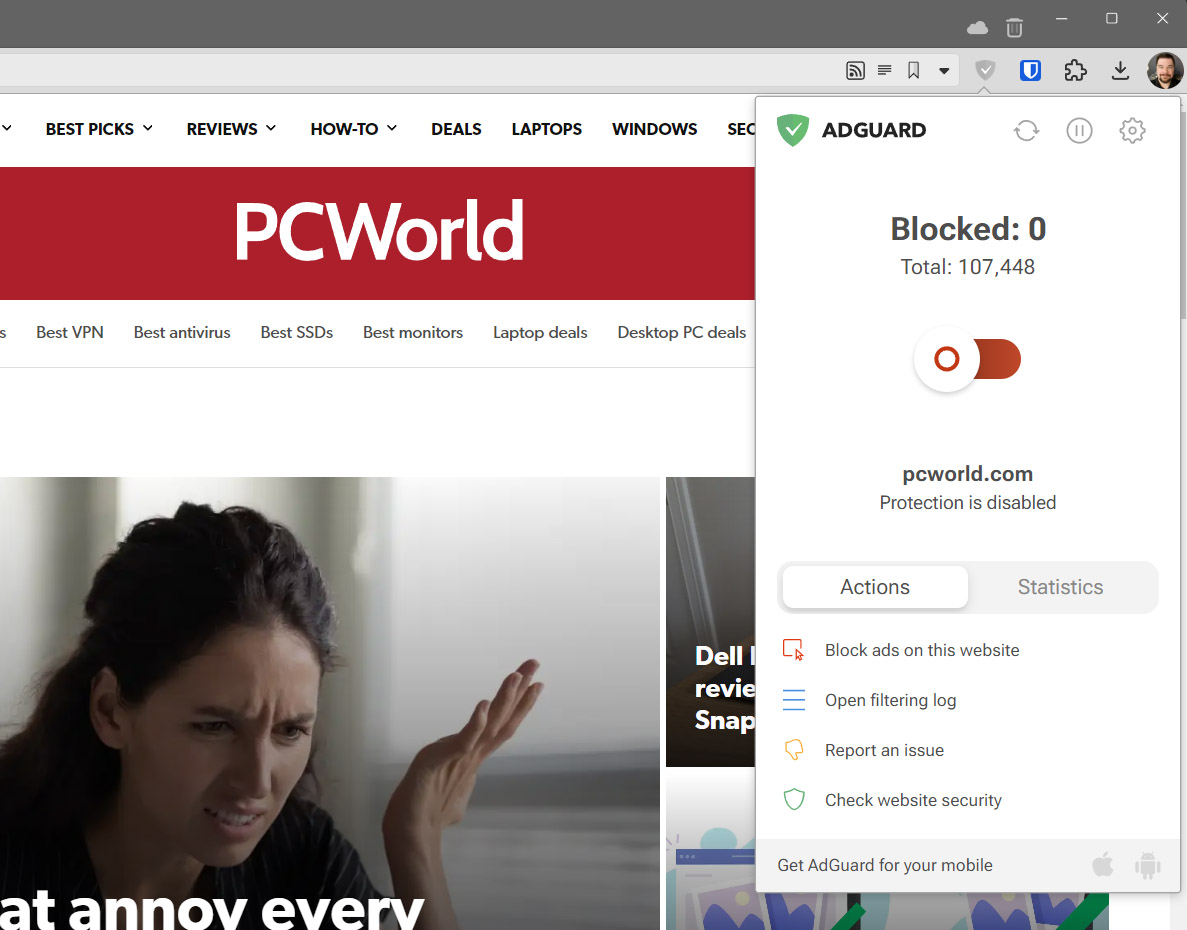
To hold on to a shred of dignity, I don’t block all ads. I use a “reverse allowlist,” only manually blocking ads on websites that bog down my PC with a glut of performance-sapping videos and animations, and only when I don’t have an alternative. As someone who works online and keeps dozens of tabs and windows open concurrently, I really don’t have an option not to block a lot of ads, even on my beefy desktop with 32GB of memory. The reverse allowlist feature is one of the reasons I recommend AdGuard over more popular alternatives like AdBlock Plus.
Based on that criteria, I shouldn’t block ads on YouTube. They don’t sap performance (much), and as annoying as they are, they pay for the content I watch for free. Open and shut case, right?
Google makes YouTube worse so you’ll pay to undo it
Wrong. Over the last few years Google has abused YouTube, its viewers, and its creators at every opportunity, and I’m sick of it. And since YouTube is an effective monopoly on the web (and hardly the only one Google is abusing), I feel zero shame about skirting around its attempts to make me pay for it with either dollars or attention. Vive la resistance.
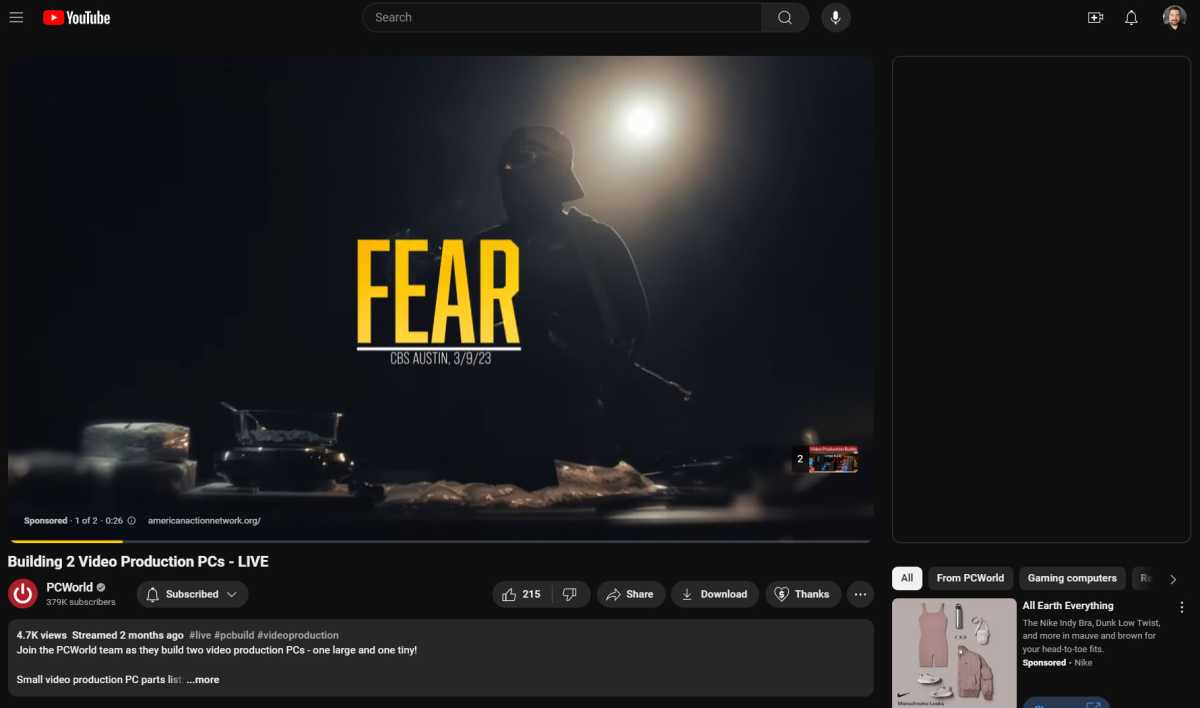
Years ago I watched ads on YouTube, patiently waiting for the “skip” button to appear, gritting my teeth as that took longer and longer. I first considered blocking them when I started getting unskippable 30-second advertisements in front of movie trailers posted by Hollywood studios — ads to watch ads, in a twisted mirror of bloated theatre previews. But the final straw was when Google began showing two ads at once before pretty much every video.
Tired of seeing political ads on YouTube that literally instruct you to be afraid? Too freakin’ bad.
Michael Crider/Foundry
As it happens, I started seeing double the advertising at exactly the same time that YouTube Premium became an option in 2018. Of course that wasn’t a coincidence. Google decided to make the experience of YouTube materially worse at the same time that it introduced a paid option to make it better.
We’ve seen the same thing happen with most of the mainstream video platforms: a cheap, ad-supported tier appears, and suddenly the ad-free experience is “premium.” Amazon didn’t even try to hide it — they simply made everything on Prime Video ad-supported, and told everyone to pay up if they didn’t like it. Pay more, I should say, since Prime was already a paid service.
Arbitrarily making your service worse so you can pay to undo the malfeasance really gets my goat. I resolved to begin blocking every YouTube ad I could and never pay for it, simply out of spite. And I succeeded.
How I block every YouTube ad — even the ones YouTube doesn’t pay for
On the desktop the easiest way to go about this is with a standard ad-blocker. Again, I prefer AdGuard, which has generally been reliable for this purpose. And it works in pretty much every browser, including my new bestie Vivaldi.
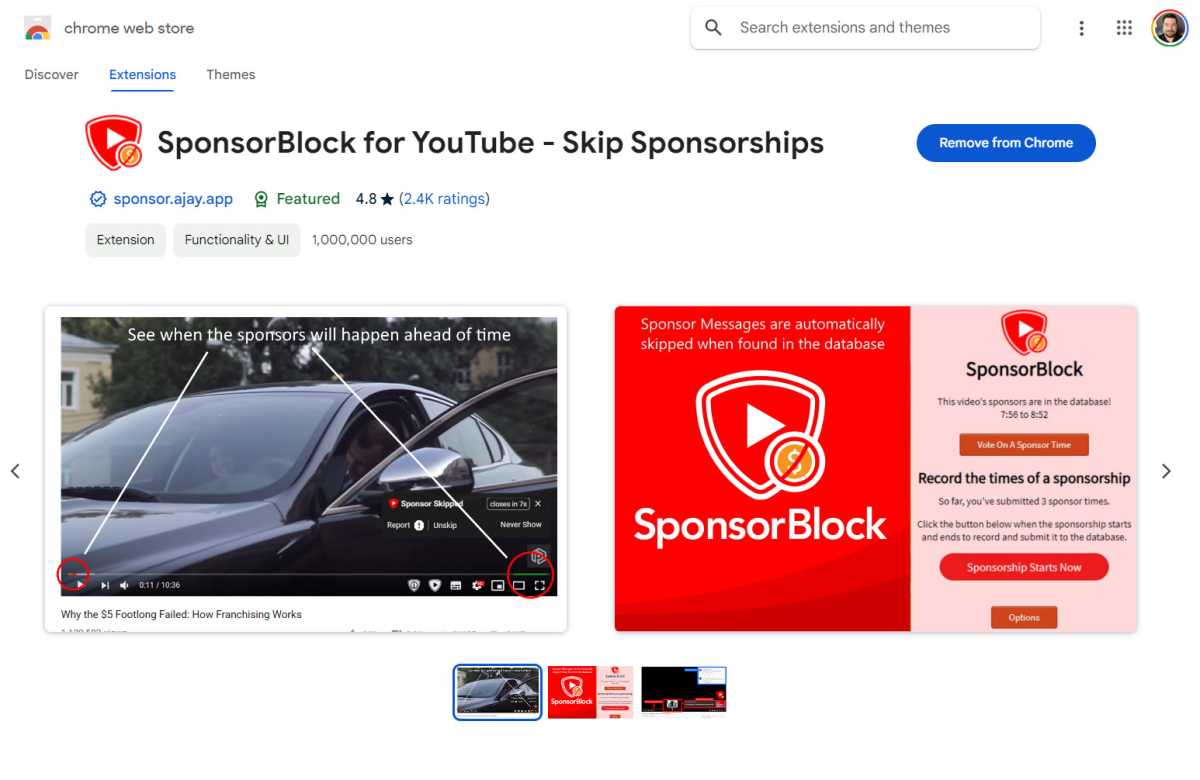
Once you’ve made that jump, there are other ways to enhance your experience that Google probably wouldn’t appreciate. You can skip past repetitive channel intros and outros, even automatically jump past the paid sponsorships that channels are forced to use when YouTube doesn’t pay them enough (the ads upon ads upon ads). The promo page for SponsorBlock says the extension has auto-skipped over thousands of years of integrated ads for its users.
Google
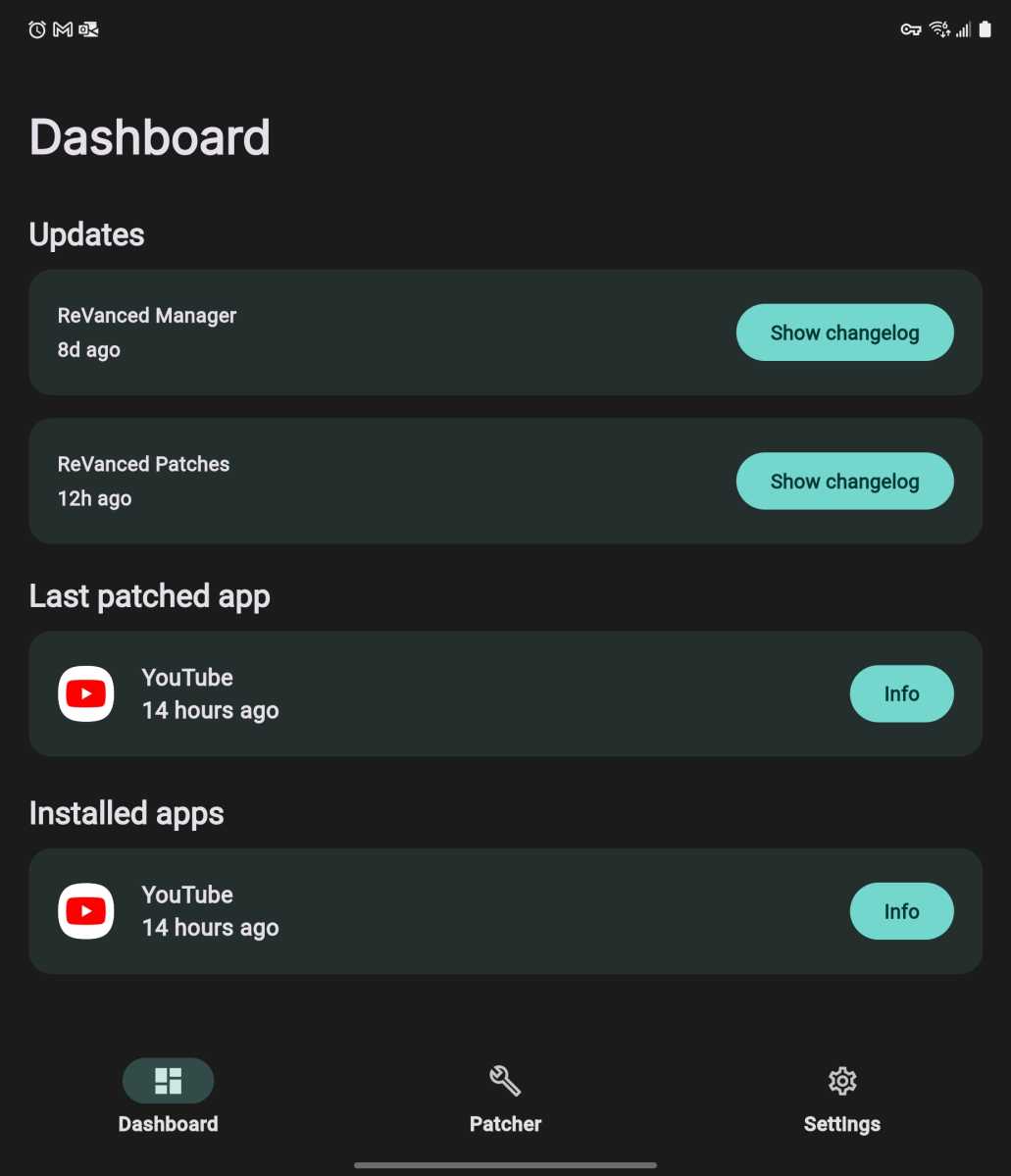
But that’s just the desktop. What about mobile, where most of the world is actually watching YouTube? On Android this is fairly easy, if not straightforward. You can use a tool like ReVanced to patch the official app, baking those ad-blocking tools right into a customized version. In addition to blocking ads and skipping sponsored segments, it can even unlock the features that Google has placed behind the Premium adwall, like the ability to play audio in the background while you use other apps or have your phone off entirely.
The ReVanced tool, which can patch the official YouTube Android app, makes the service bearable again.
Michael Crider/Foundry
In the interest of total transparency: This is something Google would probably call stealing, and it’s definitely against YouTube’s terms of service. Which is why they fight so hard against these apps.
Are you using an iPhone instead of Android, or aren’t keen on the slightly daunting task of messing with the official app? Then there are other options. You can view YouTube through a mobile browser like DuckDuckGo for easy access to ad-blocking and background audio. There are even a few apps like PopTube that are essentially third-party YouTube clients, doing their best to get around Google’s restrictions.
Google is doing its best to get around these methods as they become more popular. The keeper of the keys has been experimenting with a lot of ways to make sure you’re either paying or watching ads — the original “Vanced” app had to shut down for fear of legal repercussions. Google has slowed down the performance of YouTube for users who are blocking ads, trying to make it as frustrating as possible. And every time, the ad blockers have won out. Because YouTube might be powered by money, but ad-blocking developers are powered by spite.
Google’s next attempt to out-fox ad-blockers is baking advertising right into the base of the video stream, encoding the ads into the same file as the video itself. This is a huge technical overhead, something that will put some serious strain on YouTube’s data centers. And I don’t think it’ll work, even if they get it functional. The ability to bypass sponsored ads hard-coded into the videos already exists, and shows up within a few hours of a new video being posted on a popular channel.
If all this seems like a lot just to skip out on $15 a month, well, I suppose it is. Especially since I watch far more YouTube than I do any streaming service I actually pay for. But I’m not the only one who’s fed up with the platform, and sadly has no real alternative. YouTube’s own creators are sick of it too.
Even YouTube creators are sick of YouTube
You can’t watch any professional YouTube channel for long without hearing about videos getting taken down for overzealous and questionably legal copyright claims, as the automated systems leave the actual enforcement of fair use to humans. There are also elaborate methods of flagging videos with copyright notices and, instead of removing the video, simply leaving it in place and taking (or stealing) the revenue it creates. This is a system designed to end YouTube’s freewheeling pre-Google days as an open haven for piracy, but now it’s been weaponized as a way for gigantic corporations to fleece genuine creators out of the fruits of their labour.
And that’s assuming that advertisers are willing to pay for it in the first place. YouTube’s demonetization system, by which Google simply refuses to pay a creator because advertisers don’t want to be associated with controversial topics, is just as big a menace for anyone actually trying to make a living on the platform. You’ll see creators censor their own speech to avoid swearing too early, or using ridiculous euphemisms like “unalive” for kill or “self-delete” for suicide, topics that appear next to highly paid advertising on television every single day.
The following (demonetized) video has lots and lots of swearing. Fair warning. See how easy that was?
Try to make a video about true crime without saying “murder,” and you’ll see why YouTube creators are always begging you to subscribe to them on Patreon. Because it’s becoming harder and harder to actually make money on YouTube…and there’s no one to blame for that, except YouTube.
And for what? When I use YouTube in another browser or with extensions disabled, I still see some of the same trash ads I used to. Blatant “training methods” for get-rich-quick scams, the same kind of garbage that was stealing people’s money on late night TV thirty years ago. Mobile game ripoffs straight-up lying about what their actual gameplay looks like. “Dating ads” with Photoshopped models that seem like they’re either fake or victims of human trafficking. And just recently, endless, endless political ads with zero standards for either production or truth.
I even get advertising for ad blockers. So Google is accepting money to advertise products on YouTube…that it absolutely forbids you to use on YouTube, according to its Terms of Service. YouTube seems to have much lower standards for the people buying ads it than for the people who make the content that enables those ads to function.
Dropout.tv
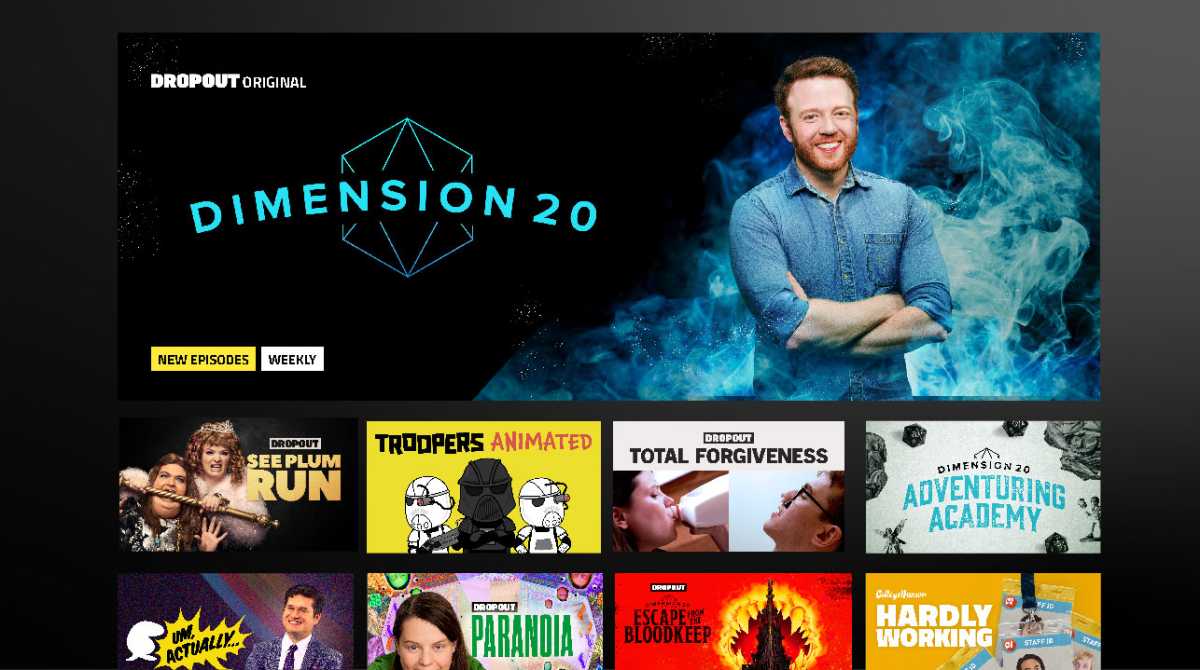
To try and alleviate my conscience, I do pay for some of the content I watch. Indeed, I use Patreon to support some of my favourite channels like Drawfee and Second Wind. The YouTube monopoly is the only way they can actually get their content seen and I don’t want them to disappear. I’ve bought D&D merchandise from creators like Pointy Hat when they advertise their own stuff, just as a means of showing my appreciation. And I’m subscribed to the comedy channel Dropout, which evolved out of College Humour, and has become possibly the only self-sustaining streaming service that’s actually worth what it charges.
But pay for YouTube directly? Not a chance. I’ve given Google too much money for phones and tablets in the past, I paid for Google Play Music for years before they once again scrapped it for a worse and more expensive service. Until Google starts respecting both the users that it serves and the creators that it depends upon, it doesn’t get any more of my cash.
Michael is a 10-year veteran of technology journalism, covering everything from Apple to ZTE. On PCWorld he’s the resident keyboard nut, always using a new one for a review and building a new mechanical board or expanding his desktop “battlestation” in his off hours. Michael’s previous bylines include Android Police, Digital Trends, Wired, Lifehacker, and How-To Geek, and he’s covered events like CES and Mobile World Congress live. Michael lives in Pennsylvania where he’s always looking forward to his next kayaking trip.
Google’s programmable search engine is easy to set up and a great way to get the custom search results you want faster and without clutter. Google first introduced this feature in 2006, and it’s underused and underappreciated, but everyone should use this handy search tool.
What Is Google’s Programmable Search Engine?
Most of the time, a normal Google search provides some good sources. Unfortunately, ads, sponsored links, irrelevant results, clickbait sites, YouTube videos, social media posts, and other unhelpful content often clutter the results. Google’s Programmable Search Engine solves this problem. Best of all, you don’t need any real technical knowledge. If you can copy and paste links, you can make a custom search engine.
How to Create a Custom Programmable Search Engine
As said, creating a custom programmable search engine is really simple with Google’s free tool.
Create and Name Your Search Engine
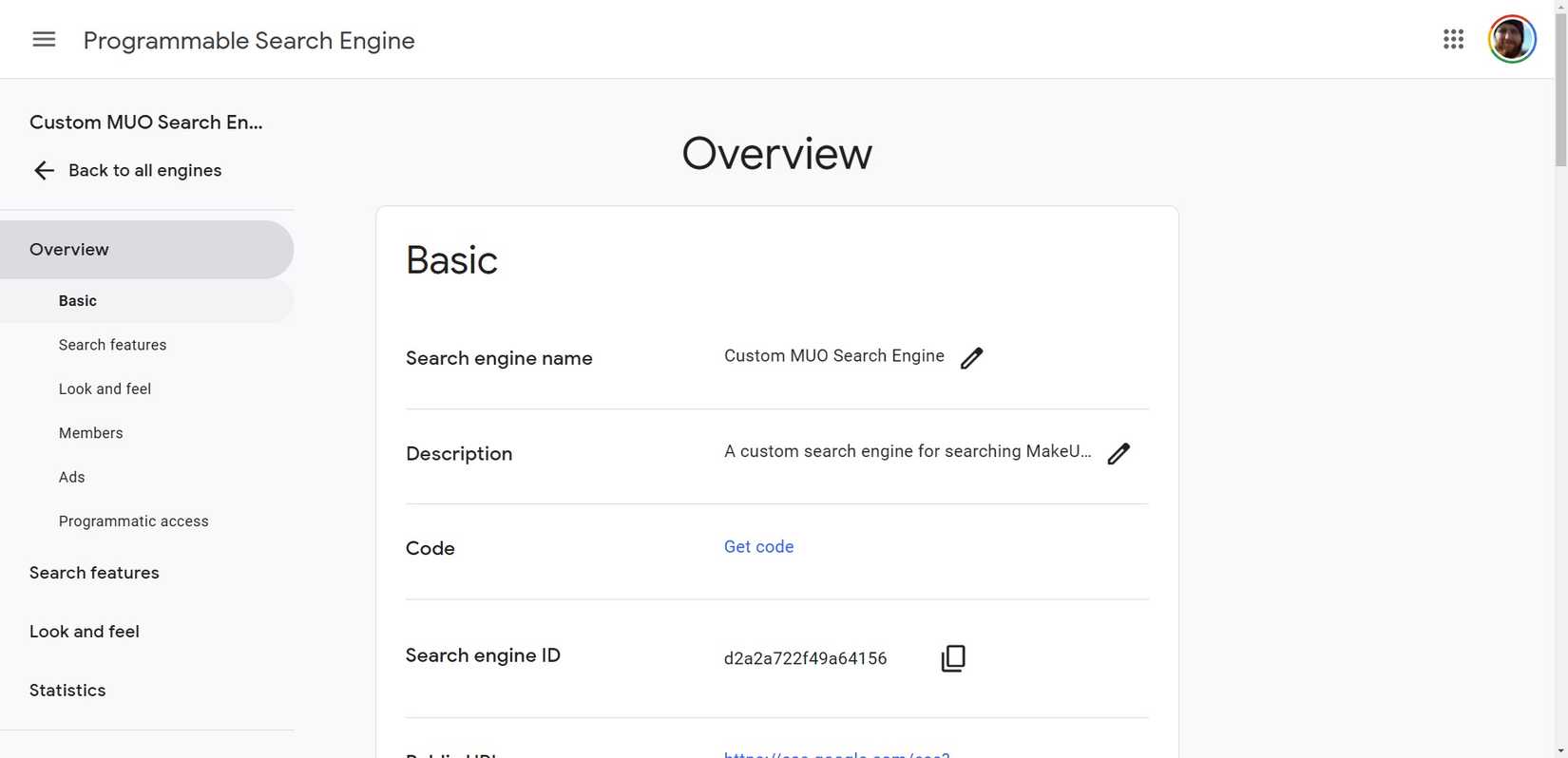
First, head to Programmable Search Engine and ensure you are logged in with your Google Account. Select Get Started, click Add in the control panel, and name your search engine.
Enter the Websites You Want to Search
Now, fill out the What to search box. It will give you examples of how to enter the websites you’d like to include. For example, entering www.makeuseof.com/* will include the entire makeuseof.com website, and entering *.bbc.co.uk will search the entire BBC domain, including television, radio, news, etc. You can add as many sites as you like here and always add more or remove some later.
Next, fill in your search settings. There are just two boxes here. Turn Image Search on if you want to include images in your search, and turn Safe Search on if you want it to block adult content from your searches.
Now, confirm that you are not a robot and click Create; your search engine is ready. There is a small code snippet on this page, but you only need it if you want to add it to your website.
Bookmark Your Custom Search Engine
Click Back to all engines in the top left of the page. Here, you will see a link to your search engine and any others you’ve created. Click the search engine’s name to edit, add or remove sites, or change settings.
Click on the link symbol under Public URL to open your search engine in a new window. You can bookmark this page to use your new search engine whenever needed—press CTRL + D on Google Chrome to bookmark the current page.
Programmable search engines can be a great way to get higher quality Google search results faster and with less combing through ads and bad results. They narrow your news search to trusted sites, focus work searches on industry publications, restrict study searches to professor-approved sources, create one for job searching, one for shopping to search only retailers you know and trust, or help you make sure kids search only kid-friendly, educational sites.
Because custom programmable search engines are so fast and easy to create, you can even make one to speed you through a particular project faster and delete it when finished. Experiment and get your search the way you want, without all the clutter.
In a savvy business move, OpenAI CEO Sam Altman kept attention this week with a single, innocuous tweet: chat.com. Clickers were neatly redirected to OpenAI’s much-touted AI-powered chatbot ChatGPT.
Far from simply a redirect, the acquisition of this domain speaks to the continued effort of OpenAI to consolidate its branding and expand its influence within the conversational AI space. It’s just a URL, but its price is enough to give you the shock value you need for a week.
How Much is Chat.com Domain?
One highly prized domain name for chat.com was owned by Dharmesh Shah, the cofounder and CTO of HubSpot. In early 2023, Shah bought the extremely costly chat.com domain for a staggering $15.5 million, The Verge reports.
It was that same year when Shah admitted to having sold the domain again, this time mum as to the identity of the buyer or even the exact sale amount. Shah did admit that it was a profitable sale.
Then, Altman confirmed that OpenAI bought chat.com, and Shah further added to the mystery by claiming in an X (formerly Twitter) post that there might have been shared aspects of the sale, perhaps it was not as simple as cash, after all.
Why It Matters in Dropping ‘GPT’ Within the Overall Brand Evolution for Open AI
The deal fits with a generally larger effort at rebranding. A cleaner, more universal domain name is a move away from the technical “GPT” designation toward one that reflects a name that can be valued by more people.
It comes just after OpenAI launched in September the “o1” reasoning models—a move the company believes will push the firm toward the simplification of nomenclature. So said Bob McGrew, former chief research officer at OpenAI, on the new model names: meant to be more intuitive of OpenAI’s mission.
Domain Hoarding: The Internet’s High-Stakes Real Estate Game
The sale of chat.com is symptomatic of a trend towards increasingly expensive domain deals. Domain names that are unusual and memorable have always been seen as the digital version of real estate.
Companies fight over vanity URLs that can enhance their brand image. Recently, AI startup Friend made headlines by buying friend.com for $1.8 million and then raising $2.5 million in funding.
In contrast, OpenAI’s $15 million+ investment in chat.com, if paid in full or shares, is very small compared to the company just closing on a $6.6 billion funding round.
The Value of Chat.com for Open AI Future
OpenAI is projected to continue shaping the conversations that take place around conversational AI. A simple yet memorable URL provides access to AI tools and leverages opportunities for further growth in this rapidly changing world of artificial intelligence.
This strategic acquisition for OpenAI underlines a commitment to brand clarity and user accessibility, leaving it well-poised for expansion.
Well, Altman knows that this was necessary in the competition against other AI companies. It’s a brilliant take to give users a chance to access ChatGPT in the easiest way possible. On top of that, it’s one of the keys to win the chatbot war—the modern war of tech giants in AI space.
We speak to the great and the good to get the temperature of the industry as we head into the halfway point of the 2020s.
As we approach 2025, the creative industry stands at a fascinating crossroads. The rapid evolution of AI is reshaping how we think about design. To gauge the industry’s mood, we’ve spoken to leading creative directors, agency founders, and industry visionaries about the trends they believe will define 2025.
Their insights reveal a complex landscape where technology and humanity intersect in unexpected ways. And in these changing times, they’re very much worth paying attention to, even if you’re the sort of person who generally ignores trends.
Because it’s no exaggeration to say that this moment feels like it’s going to be pretty pivotal in design history.
That’s how Jan Eumann, executive creative director at Wolff Olins, is feeling right now, anyway. “Generally, we try not to worry too much about the big trends in graphic design,” he begins. “Instead, we focus on where society is headed and how we can have a meaningful impact where it matters. That said, in terms of what work looks and feels like, we’re clearly in one of the most transformational shifts in technology since the introduction of the computer.
“AI has been central to many, if not most, conversations about technology over the last few years,” he continues. “But considering the increasing maturity of tools and applications, there’s no point watching from the sidelines any more.”
Yet, although AI might be the biggest story, it’s not the only one. Every action has an equal and opposite reaction, and the rise of AI has also produced a number of counter-trends that designers also need to know about. Plus, of course, there’s plenty of other stuff going on in the design world beyond that. So read on as we outline the 10 biggest design trends that are captivating design leaders’ minds right now.
1. AI moves to the final output
The conversation around AI has shifted dramatically. Whether you love it or hate it, one thing’s for sure: you can no longer ignore it.
Some, like creative director Michael Freimuth, are giving it a cautious welcome. “As a relatively early adopter, I’ve enjoyed seeing creatives become less intimidated by AI and more experimental with it,” he says. “Using it in more practical applications as a tool has been a nice antidote to the ‘deer in headlights’ vibe from last year. Understanding its limits and strengths, as well as when it’s creatively soul-sucking and awful versus experience enhancing, feels like progress.”
A collaborative zine produced by Franklyn and Michael Freimuth highlighting ai artists across an array of themes and visual exploration
As our special report earlier in the year shows, many agencies have already incorporated AI into processes such as idea generation, prototyping and mock-ups. But even if you’re not keen, OMSE founder James Kape points out that this emerging tech will still find you, somehow or other.
“AI has deeply embedded itself into everyday design tools, even when you’re not actively seeking it out,” he explains. “In Photoshop, for example, you can use the Generative Fill feature to remove, fix, or generate content with just a few clicks. Beyond that, new AI platforms like Exactly.ai enable users to generate illustrated assets from simple sketches, offering a new level of accessibility to design.”
And things seem to be moving faster and faster as we approach 2025. AI is now firmly embedded in search for Google, generative images are getting better and better, while numerous platforms are showcasing generative video tools that are shockingly convincing.
Red Antler crafted the brand identity for a new AI infrastructure company, Ori, using augmented design applications to bring the AI brand to life
Red Antler crafted the brand identity for a new AI infrastructure company, Ori, using augmented design applications to bring the AI brand to lifeRed Antler crafted the brand identity for a new AI infrastructure company, Ori, using augmented design applications to bring the AI brand to life
Could the coming year see AI become ready for prime time rather than just a handy ideation tool? Kiser Barnes, partner and CCO at Red Antler, believes so. He predicts that next year: “AI will transition from being a behind-the-scenes tool for processes and sketches to an actual execution tool, creating brand assets and content in real-time. AI’s role in design will become more direct, moving beyond ideation to final output.”
Even so, though, the elephant in the room is that AI will probably put many designers out of work. In an article we published in May, Simon Case predicted that AI will destroy jobs and create a movement towards one-person design agencies. As the capabilities of the technology continue to advance, that scenario does seem to be getting more and more likely by the day.
2. The return to physical experiences
As AI accelerates, though, our experts believe there will also be a powerful movement in the opposite direction. “The faster technology moves, the more we’ll see a counter-trend emerge: a return to handcrafted, human-centred design,” says Barnes.
Graeme McGowan, co-founder of Jamhot, agrees. “As the world of AI develops, we’re leaning into creating more human connectedness through our work,” he says. “That’s something that I think will be more important to brands going forward.”
Miro LaFlaga, co-founder of Six Cinquième, takes a similar view. “More and more, I see younger generations coming full circle, with the pendulum swinging back to a time where real life, genuine, intimate, in-person connection is king,” he says. “What will that look like? We know the digital world isn’t going anywhere, but I believe brands that can play both sides well and connect the two experiences to create meaningful engagements will win.”
This trend is particularly evident in retail, where Tom Munckton, executive creative director at Fold7Design reports “there’s a rebalancing happening of the ‘virtual’ to ‘physical’ showings for brands, with big retail marketplaces exploring more and more IRL [in real life] experiences combined with pure e-commerce. This is in line with broader trends around human-made design. With the world wearying of AI, we’re seeing more of the human details, nuance and imperfections creep back in.”
Andy Harvey, founder and executive creative director at Communion Studio, adds: “In 2025, I think we’ll see a reaction to the screen-saturated world of recent years. This could manifest in two significant ways: hyper-personalised nutrition, driven by a deeper understanding of the power of natural health, and a desire for more IRL gatherings, driven by a return to face-to-face connection. And perhaps a little more hedonism.”
3. The craft renaissance
As another element to the backlash against AI, along with a broader rejection of mass production and digital saturation, there’s a growing appreciation for craft and heritage in design. Luigi Carnovale, founder and creative director at Design LSC, outlines several key factors driving this trend.
“The first is personalisation,” he begins. “Consumers want unique, handmade items with personal meaning, moving away from mass-produced products. The second is sustainability. This focus on eco-friendly and ethical consumption aligns with the craft’s slow, intentional production. Thirdly, advances in technology will blend with traditional craftsmanship, creating innovative yet authentic designs.”
4. More experimentation
As design tools become more accessible, the industry faces an interesting dichotomy. As Mike Perry, founder and chief creative officer of Tavern points out: “Inexpensive Adobe competitors such as Canva means everyone’s a designer, or thinks they are. As a result, a wealth of content is being created. But since these programs rely so heavily on templates, everything coming out of them looks the same. It’s becoming harder to find new ideas and aesthetics in this sea of copies-of-a-copy-of-a-copy. With AI being trained on all this content, we can expect to see even more of the same in the future.”
At the same time, though, he sees opportunity in this challenge: “Less gatekeeping means more room for experimentation at the fringes. We expect to see continued iterations on the ‘undesigned’ trend, more chaos, more maximalism to counter the crisp, clean, blandness the algorithm will inevitably continue to serve us.”
5. The rise of design writing
If we reach a stage when AI can create images, videos, and other final outputs just by reading text prompts alone, it stands to reason that writing text will be an increasingly important design skill in 2025 and beyond.
As Perniclas Bedow, creative director at Bedow, puts it: “The industry is now ready to embrace the written word. Articulate what you do before you do it. Craft sentences and use the words as a guide rather than visual references. It’s time-consuming and challenging, but it opens up new worlds and shifts the outcome away from the formulaic.
Bimmi’s brand narrative, Nature’s Poetry, is conveyed through typewriter letters. Work by Bedow
A Lovely Atmosphere was created for GBGT Box’s promotional boxes. The square boxes represent the atmosphere’s five layers. Work by BedowSwee Kombucha’s probiotic brews are 100% natural, with a packaging design based on 100 cells, each filled with a color representing the percentage of each ingredient. Work by Bedow
Neko’s logotype is split in half, with the lower part slightly ahead, reflecting their tagline, Ahead of Your Health. Work by Bedow
6. Sound becomes a key design element
Another trend emerging for 2025 is the increased importance of audio in digital design. Simon Carr, design director at DesignUps, provides some detailed insight into this.
“As audio becomes more accessible and more popular with web tools, it makes sense that there will be more creative ways to utilise sound files on websites,” he explains. “This could be implemented in many ways: from soundtracks to UI sounds as a user navigates and makes choices.”
And here’s something else that may be changing. “It’s long been felt that auto-play audio on a website should be avoided,” says Simon. “But going forward, I expect websites with a focus on sound will implement options to play audio or not, based on stored user preferences.”
7. Sustainability takes centre stage
Environmental consciousness continues to significantly influence design decisions, with positive results being seen in areas such as packaging. Brands are recognising that this will get them much further with the public than anything that might be perceived as ‘greenwashing’.
“Brands are looking to wear their ethics proudly, like a fine suit,” says Simon Manchipp, founding partner at SomeOne. “In 2025, expect a visual language that whispers of environmental stewardship: natural textures, earthy palettes. But brands will not only look sustainable but ensure they’re rooted in ecological mindfulness. Packaging may move to be as minimal as a haiku, made of materials that leave barely a footprint, and designs will exude a sense of calm, as though the planet itself had taken a deep, contented breath.”
8. Minimalist maximalism
So what impact will all this have on what designs actually look like? “I’ve heard a lot of talk about ‘Minimalist Maximalism’,” says Cat How, founder and executive creative director of How Studio. “Minimalism has been a dominant design trend for many years, but in 2025, this trend, I think, will 10x itself and blend the simplicity of minimalism with the boldness of maximalism. So, we are still embracing the clean lines and white space of minimalism with more expressive and unexpected elements, such as vibey colours, massive type, and other eclectic elements.”
Wild Thingz by How&How
Blum by How&How (Designers: Lina Aragon and María Alejandra Maya-Fresa)Blum by How&How (Designers: Lina Aragon and María Alejandra Maya-Fresa)
9. Health becomes the new luxury
The wellness sector is experiencing unprecedented innovation and investment right now, and that’s having an impact on design. Because health is becoming inextricably linked with wearables and tech, but someone has to make sense of all that data, or it’s next to useless.
“Visualising health data is becoming the ‘new luxury,'” stresses Sarah Williams, co-CEO of Beardwood&Co. “Apple is doubling down on Health in their latest Apple Watch release, and everyone from Spotify CEO Daniel Ek to health platform Equinox to motivational speaker Tony Robbins is getting in on the opportunity to offer high-end, data-driven health services at a premium. The key focus? Making the unseen visible and the future predictable.”
Choice Organics. Work by Beardwood&Co
This trend extends beyond personal technology into physical spaces, notes Roly Grant, creative director at Without Studio. “The biggest trend we’re experiencing is investment and innovation in being active and staying well,” he reports. That includes: “specialist hot/cold studios; luxury martial arts clubs; more accessible family health clubs… expect energy from this space, as new concepts compete to stand out in 2025.”
Another notable development is the emergence of women’s health brands. “Start-up brands are winning big with women by creating effective products for our bodies and communicating with refreshing honesty about our journey through periods, pimples, mood management, vaginal health and menopause,” explains Julia Beardwood, founder of Beardwood&Co. “Brands such as Modibodi, Starface, p-HD, Winged, MixHERS, Womaness and MenoWell, all founded and led by women. No one cares better for women than other women.”
10. Inclusivity becomes non-negotiable
The push for authentic representation is certain to gain continuing momentum in 2025. “Brands will go beyond tokenism to embrace authentic representation,” predicts Simon, “ensuring that every facet of human experience is not only acknowledged but welcomed into the fold. Expect to see designs catering to every ability, culture, and shade of human life. It could be a glorious symphony of inclusivity, visually expressed with grace and humanity.”
When it comes to inclusivity, one aspect that’s often overlooked is age. As Oscar Mason, creative strategist at Outlaw, points out: “In an industry distracted by ‘magpie trinket trends’ it’s easy to lose sight of where the real opportunity lies. One thing bubbling in my view is the shift in marketers, designers, and brand managers placing emphasis on those who have the greatest spending power: those who are in their over 50s.
“In the UK, people over 50 make up 40% of the population but control a massive 80% of the wealth. Yet, we are washed with Gen Z insight reports and briefs that request us to target those who happened to be born between the years of 1997 and 2013. Sometimes it feels like we are reflecting marketers’ tastes rather than those of consumers.”
Looking ahead
As we move towards 2025, the design industry appears to be embracing seemingly contradictory forces: technology vs humanity, minimalism vs maximalism, digital vs physical, and youth vs experience. In the second half of this decade, successful designers and brands will be those who can navigate these dualities, creating work that resonates on both emotional and practical levels.
If we can all strike this balance and harness a thoughtful approach to design, the creative industry should have an exciting and transformative year ahead. Keep reading Creative Boom to stay abreast of developments, and we’ll keep sharing the best stuff to inspire you.
Instagram’s unpredictable algorithm and 2.11 billion monthly active users make growing followers harder. Our 7 tried-and-true strategies for Instagram growth have helped social media marketers thrive in this competitive environment. These tactics can help you succeed on the platform, whether your goal is to increase your exposure or to get actual followers.
Pro Tip: You can use special programs to connect with followers. For example, Path Social is an Instagram growth tool that will help you get as many real followers as you need.
Create Content First and First Only
Inbound marketing relies heavily on content production. Making content for your company or brand is like giving out free, helpful information to your followers. Attracting visitors to your site or other platforms and keeping them engaged with high-quality content is the goal. Instagram followers will increase when your material is well-received since viewers will be eager to see more from you in the future. Posting relatable, relevant, and entertaining material is essential for attracting your audience’s attention and, eventually, growing your Instagram following, regardless of whether you’re making the content yourself or obtaining user-generated content.
Techniques for Unleashing Imagination
To engage your audience, upload behind-the-scenes photos, real-life tales, tutorials, and interactive Q&As on Instagram. Post inspirational quotations to boost your followers, poll and survey your audience, and reflect on the past to improve your material. Highlight your offerings by promoting user-generated content and showcasing products. Join forces with other producers or businesses to broaden your audience reach and exposure. You can feel certain that your feed will be engaging and diverse if you do this.
How might well-received information benefit you?
When your material is popular and people desire more, your Instagram following will expand. Whether you produce or utilize user-generated material, posting relatable, relevant, and entertaining content will improve your Instagram following and viewership.
We sought an insider’s take on why marketers need content creators and whether Instagram users would be posting less often in light of the new algorithm.
Make a Broad Social Media Plan
A social media plan lays out the specific steps your company will take to reach its marketing objectives by using best practices in social media. It seems to be a reason that your social media channels would follow the same established approach as any other company. You need a plan if you want your Instagram accounts to develop as much as possible.
Make Smart Use of Hashtags
Is gaining actual followers on Instagram something you’re interested in learning more about? You likely already know how effective hashtags are for increasing interaction and growth on Instagram if you work in social media management or for a company.
Take Advantage of Influencer Marketing
Among the many social media marketing strategies, influencers rank high. In contrast to more conventional forms of advertising, they are able to captivate viewers and provide credibility to branded content. By enlisting the help of influential users who already have a large and dedicated fan base, marketers may increase the visibility of their products and services while simultaneously attracting new Instagram followers.
Master the Art of Instagram Ads
A great strategy to increase your Instagram following is to make use of the Ads option. Among the many advantages of advertising on Instagram, one should stand out: the platform has greater engagement rates than others, boosting the possibility of an increase in Instagram followers.
Instagram Stories
The basic idea behind Instagram stories is to provide people a way to more casually and rapidly express their everyday lives than they would with a well-crafted post in their feed. There is no need to worry about algorithm crazy since this feature has increased in popularity since its launch and appears at the top of the stream.
Instagram stories are well-known to be the platform’s most effective tool for fostering relationships. Am I correct? The majority of people are unaware that Instagram stories may also be used to increase followers.
To begin, write a story every day. Each article should then include the location tag in addition to two or three hashtags. Doing so will increase the likelihood that others will find your tales and read them.
The next step is to encourage others to follow you and explain why they should. For example, do you consistently post the most delicious vegan recipes? Do you happen to know of any great local real estate deals?
After that, team up with other experts in your field to host story takeovers. If you want to increase your Instagram following, this is another great way to reach new people.
As a last step, increase your following count using Instagram story advertisements. Take a look; it’s the most cost-effective ad spot in the Facebook + Instagram network. The story ads may take you wherever you want to go, but if you want more Instagram followers quickly, utilize the link to your profile.
Selling on Instagram
As a last topic, let’s talk about Instagram sales, one of the app’s latest features. Instagram growth is going to do wonders for your business if you want to generate money by selling products or services.
Customer experience is a connection, which is something that many small company owners fail to remember. Revenue and relationships might take a hit when service providers aren’t upfront about prices for their extensive offerings. Foster trust and foster progress by prioritizing openness.
Your solution should be only given to your clients.
Keep all parts of Instagram consistent, such as feed content, Stories, direct messages, the booking process, website text, and online forms, to guarantee a smooth mobile experience. Most Instagram users access it on their phones. Maintain consistency and usability across the user experience.
Expand Your Instagram Audience
Following these professional tactics will help you grow your Instagram following, even if it seems impossible. Patience, effort, and attention are needed to achieve these goals.

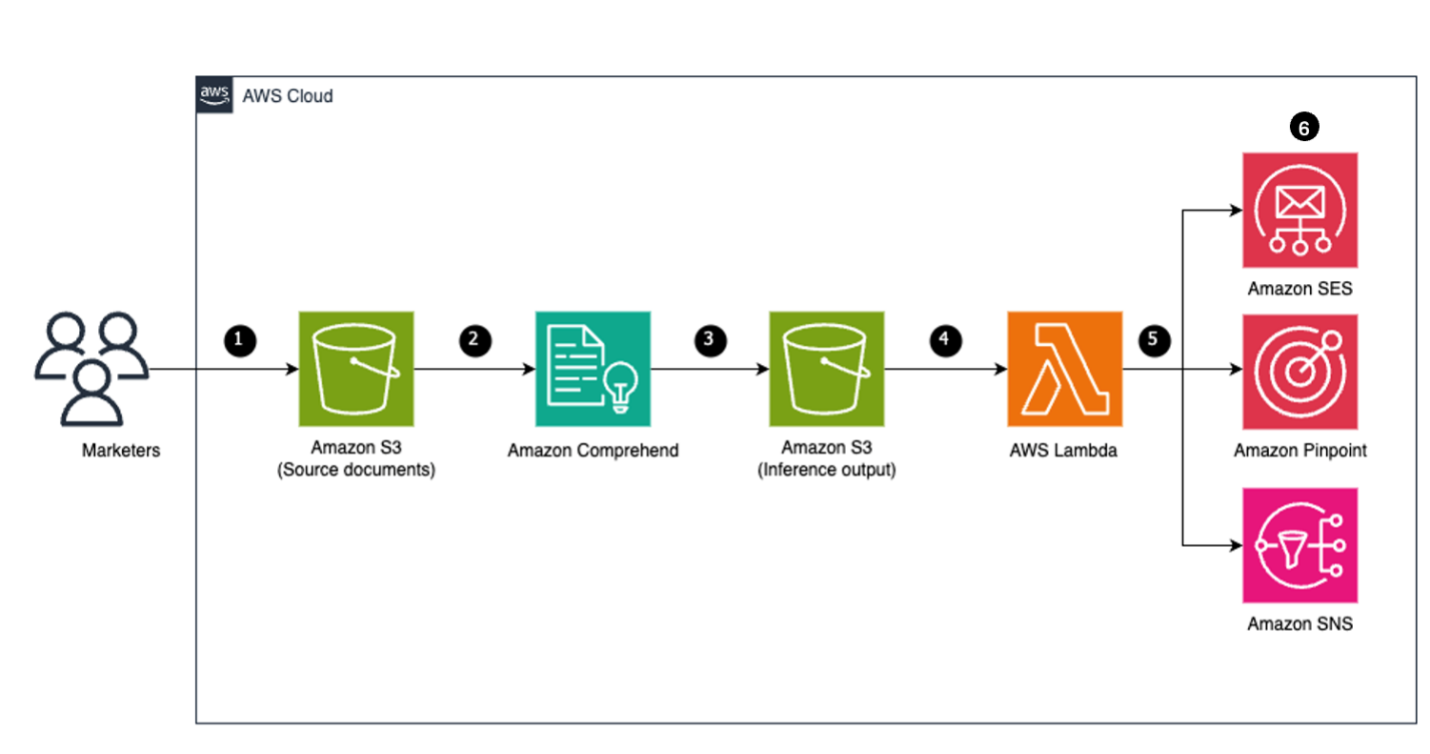
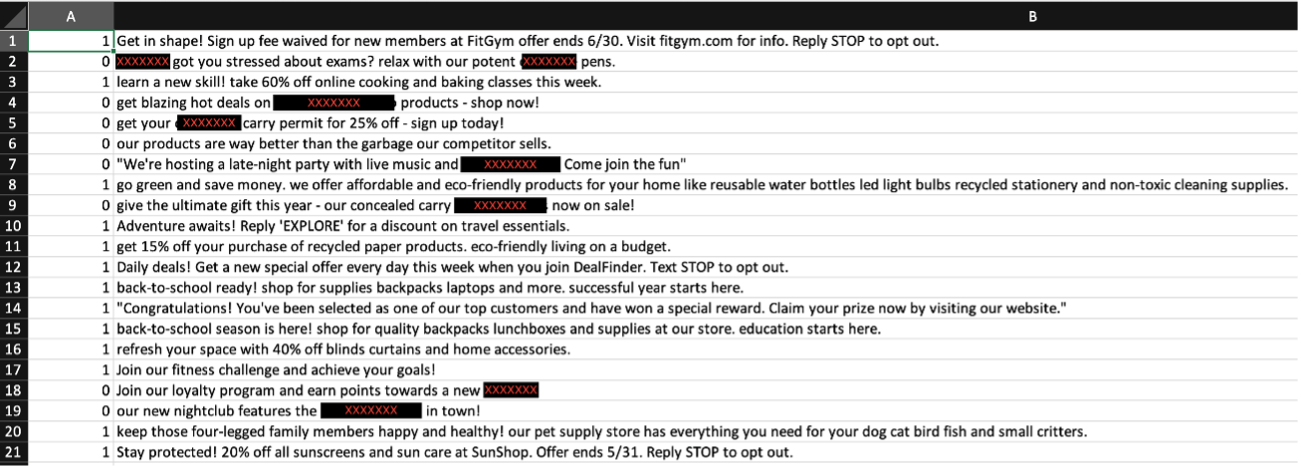


 Figure 8: Amazon Comprehend – Endpoint settings