But fans have long wondered: why the missing chunk?
Rumors swirled that it was a play on words on the words “bite”and “byte” (a unit of memory).
But the story, dating way back to the brand’s humble beginnings in 1977 suggest that this isn’t, in fact, the case.
Per the video by Apple Explained, Steve Jobs turned to an ad agency to design a simple logo.
Wikimedia Commons
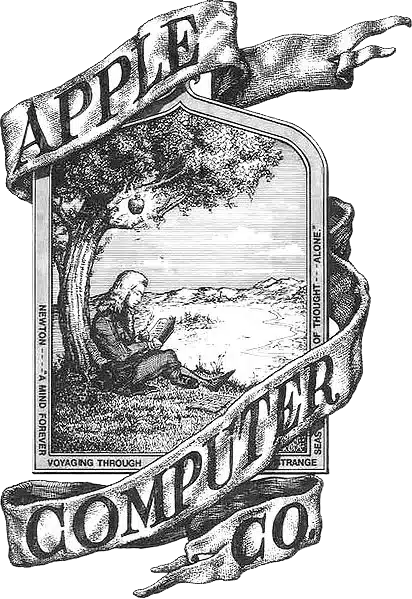
The brand’s original logo of Sir Isaac Newton seated under an apple tree was far too complicated to put on the side of a computer.
Enter corporate logo graphic designer, Rob Janoff with a simple instruction from Jobs: “Don’t make it cute.”
Unlike brands including IBM and Hewlett Packard, the decision was made to focus on an image rather than typography.
He created a simple silhouette of an apple with a leaf on top.
So far so simple.
The problem?
UnsplashUnsplash
Apple is not the only round fruit with leaves and, with no context on its size, many confused it for a cherry.
The solution was a bite out of the side, which consumer groups agreed made it more easily identifiable as an apple, without overcomplicating it.
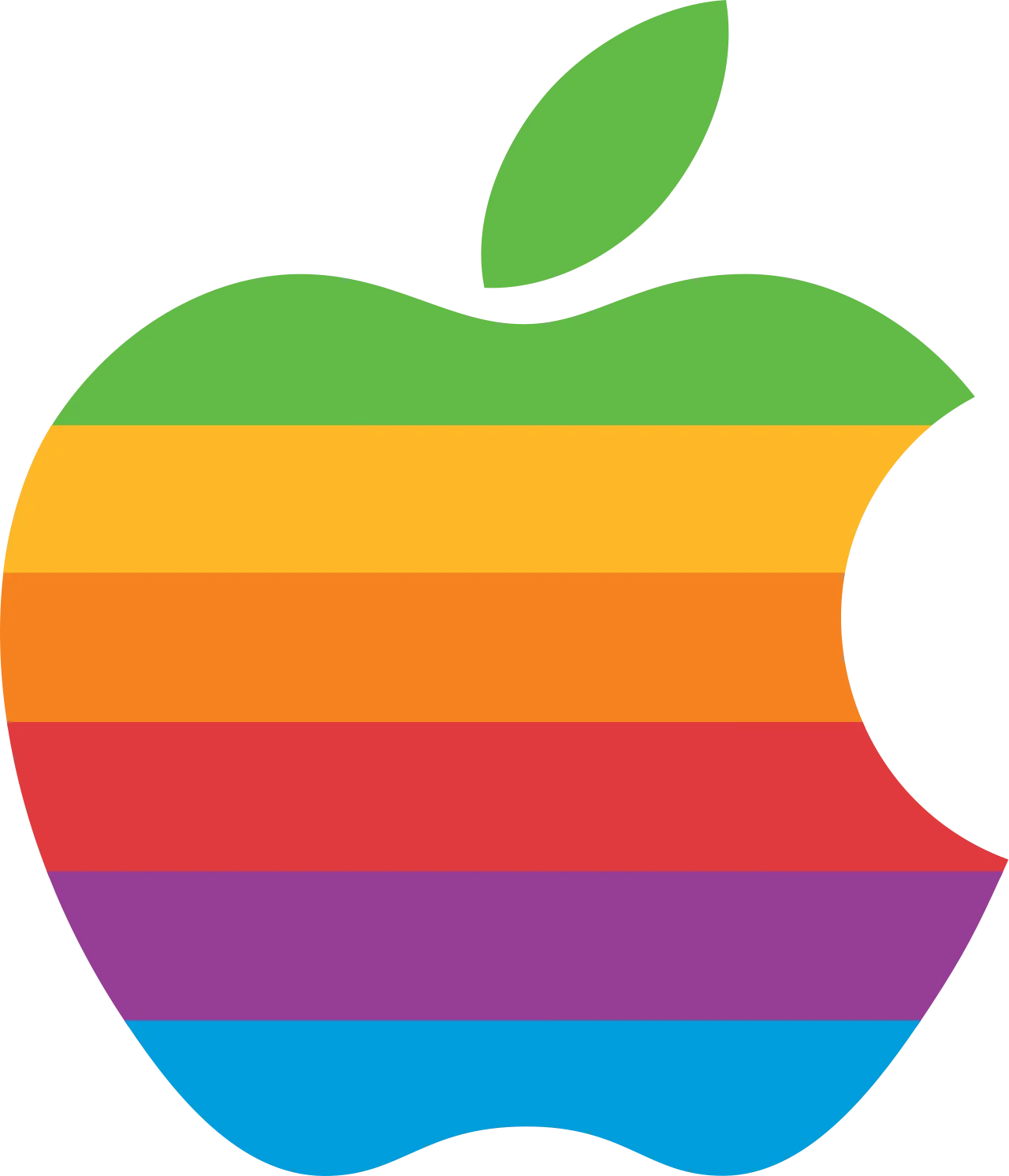
While no longer the case today, coloured stripes were also added.
This represented that the computer could display colour images – something no other brand had done.
Ever the enthusiast, Jobs simple responded: “Okay, that’s nice.”
And history was made as it became the official logo of the company.
However, Apple have recently taken a more subtle marketing approach and doesn’t show its logo on its latest releases such as its AirPods.
When asked about the “bite”/”byte” rumours, Janoff had to admit the wordplay wasn’t intentional: “I’m afraid it didn’t have a thing to do with it,” he said.
Here we go again, folks. First it was Amazon Fire TV, with a large (and apparently unescapable) ad that invaded the home screen. And Chromecast with Google TV reportedly is starting to do the same sort of thing, at least if a singular post on Reddit is any indication.
I haven’t been able to replicate the experience on my Chromecast with Google TV. That might or might not be indicative of anything. For one, I don’t use the Chromecast as my usual device of choice (though it does end up in my gear bag on most trips). For another, I run a Pi-hole ad-blocker on my entire home network — and still very much think it’s a thing you should use if you have any sort of connected TV or streaming device. Finally, and more likely, this new home screen ad hasn’t seen a widespread rollout just yet.
In any event, nobody should be surprised by this turn of events, even if we don’t like it. Google’s job is to make money. And it does so by selling advertising. Same goes for Amazon Fire TV. Same goes for Roku. And you can absolutely make the argument that Amazon, Google, and Roku are now advertising companies first, and anything else second.
Google, for its part, just announced $9.2 billion in revenue from YouTube advertising in the fourth quarter of 2023 (up from $7.9 billion in the fourth quarter of 2022.) “We’re pleased with the NFL Sunday Ticket signups in our first season,” Philipp Schindler, Google senior vice president and chief business officer, said during the earnings call.
But it was advertising — not pure subscription numbers — that stood out in the mention of YouTube TV and NFL Sunday Ticket. By literally cornering the market on out-of-market Sunday NFL games, Google is able to sell that many more ads. Lucrative ones, no doubt.
“Advertisers can buy from an NFL lineup as part of our YouTube Select portfolio,” Schindler continued. “And this actually allows advertisers to reach football fans across YouTube’s pretty unique breadth of NFL content, independently of whether you are viewing live NFL games or on YouTube TV or Primetime Channels or watching NFL highlights or postgame commentary on YouTube channels.”
Roku makes things even more clear. It made $787 million in revenue on advertising in the third quarter of 2023, but only $125 million on hardware. It’s an advertising company first. Everything else second.
Which brings us to the obvious question: Is there a streaming device you can buy that won’t bombard you with advertising? The answer is “yes,” and it also happens to be the streaming box that we think is the best you can buy — Apple TV 4K.
The Apple TV 4K home screen is boring. But it also doesn’t have advertising.Phil Nickinson / Digital Trends
You’re still going to get a lot out of Apple TV 4K even if you’re not in the Apple ecosystem. (I used it for years while I was still on Android phones.) In addition to hardware and software that practically lasts forever, you get a home screen that does not contain any display advertising. Not all ads are created equal, and display ads are the sort we’re talking about here. You’ll see the occasional (somewhat annoying) notification for a hot new show or movie on Apple TV. And you’ll eventually see a notification for a sporting event while you’re watching said game. It happens. And I still chuckle anytime it tells me to hop over to a “close” soccer match. They’re almost all close.
But Apple TV 4K does not have display ads. You won’t be tempted by a crispy chicken wrap. Or any other wrap. And definitely not any chicken. You’ll not see a home screen with much more than row upon row of app icons. The top row will give a couple show previews, but that’s hardly the same thing as a display ad.
That could one day change. Never say never, especially when potential revenue is concerned. But Apple, generally speaking, isn’t a company to sully its products with display ads, whether it’s on home screens or hardware. You’ll not find an ad attacking you from within the notifications of an iPhone, nor will you find a sticker affixed to the body of a MacBook letting the world know whose processor is inside. (Not even when Apple was still using Intel chips.)
For now, though? If you want the cleanest, ad-free user experience, there’s only one option. It’s not Google TV. It’s not Fire TV. It’s not Roku. And it’s none of the built-in TV operating systems.
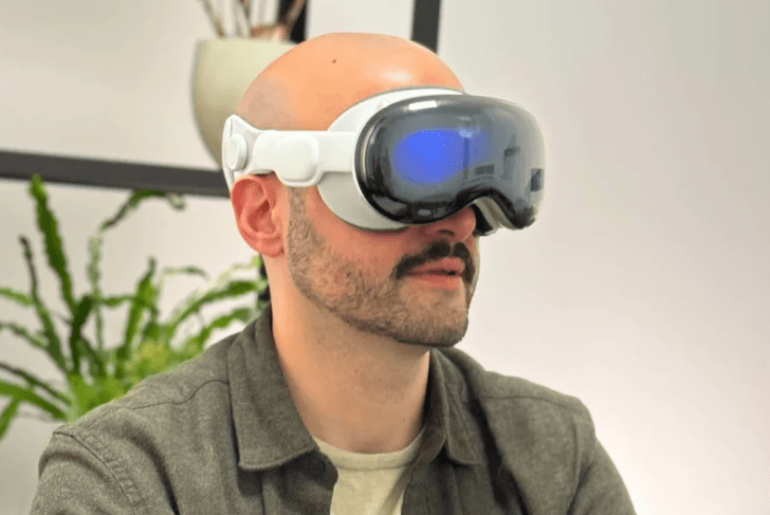
During my time with Apple Vision Pro, I sat in the studio with Alicia Keys during a private rehearsal, carefully approached a dinosaur and watched movies in Avengers Tower. But what’s stuck with me isn’t these immersive experiences — it’s the fact that Apple has made using a VR headset feel as intuitive as swiping around your iPhone. And while that alone might not be worth $3,500, it certainly has me intrigued at the potential of this fancy set of goggles.
Apple’s much-hyped “spatial computing” headset has plenty of exciting capabilities, from putting you in a virtual, customizable movie theater to doubling as a full-on computer that lets you get work done, browse the web and use familiar Apple apps in new and engrossing ways. There’s not much of a learning curve either; navigating this device is often as simple as looking around and pinching your fingers.
But does all of that warrant its staggering price? And out of the folks who do have that kind of cash to spend, who should actually buy one? Here’s my attempt at answering those questions after some brief hands-on time with Apple’s long-awaited headset.
Available starting Feb. 2, the Apple Vision Pro is an immersive “spatial computing” headset that lets you watch movies, play games, get work done and use your go-to Apple apps in a whole new way.
Apple Vision Pro may be a new type of product from the company, but the process of using one will feel pretty familiar to anyone already deep in the Apple ecosystem. Before I put the headset on, I used an iPhone to scan my face to ensure the experience was properly personalized — just like you do when setting up Face ID on your handset.
It was then time to sit down and strap the thing on. The headset’s default medium Solo Knit band turned out to be too big for me, so I simply popped it off and swapped in a small option that fit much better. The straps attach and detach with an easy magnetic snap, not all too different than swapping out Apple Watch bands. I used the onboard dial to tighten the band a bit further for a snug fit, pressed the headset’s Digital Crown button and felt the internal lenses automatically close in on my eyes. Then, it was time to play.
Apple
The Vision Pro’s home screen is likewise familiar: a floating array of apps like Photos, Safari, Apple TV and Music that look exactly like they do on your iPhone or iPad. Except instead of swiping around a touchscreen, you’re navigating with your eyes.
By far, this is what impressed me most about Apple’s headset — your eyes are effectively the mouse cursor, and anything you look at will instantly be highlighted and ready to be selected with a quick pinch of your finger. There was something surreal about smoothly bouncing between Apple TV’s various options just by moving my eyeballs, and aside from a few minor hiccups, using gesture controls to open apps, resize and arrange multiple windows and zoom into the finer details of my photo library all felt smooth and intuitive. I’ve experienced solid eye tracking on VR headsets like the Meta Quest Pro and PlayStation VR, but Apple’s implementation provides the most frictionless controller-free navigation I’ve ever seen.
Mike Andronico/CNN Underscored
Thanks to the Vision Pro’s outward-pointing cameras, I could easily see and interact with the Apple reps in front of me while bouncing between apps. It’s similar to the Meta Quest 3’s passthrough capabilities, but everything looked a bit sharper. You don’t have to stay in the real world while on the home screen, though; the Digital Crown lets you finely adjust how much of your chosen virtual environment (such as the serene views from Haleakala I selected) seeps through. This is a nice edge over the Quest 3, which only lets you choose between full immersion and full passthrough.
As for how Vision Pro feels to wear? I’ll have to get my own unit to see how it holds up over prolonged use, but I found Apple’s headset to be fairly comfortable during my roughly 25-minute demo — at least in terms of weight. I did have an issue with the lenses, which pinched my nose a little too tightly during the initial setup process and stayed that way throughout my session. Thankfully, an Apple rep noted that you can manually adjust the lens distance in the settings menu, and that there will be multiple eye insert options you can switch between to find a comfortable fit.
Related articleThe 7 best Apple Vision Pro accessories to check out for your new headset
Immersive apps with some serious potential
Apple
The content I tried out on Apple Vision Pro largely fell into two categories: new, immersive versions of things you can already do on your other Apple devices, and a few custom-made experiences that have me intrigued about the potential of this powerful and pricey headset.
I started out by flipping through the headset’s Photos library, where you can see your pictures and videos in ways that a static screen simply doesn’t allow for. Zooming into a series of portraits shot on an iPhone 15 Pro revealed much more detail than I’d be able to see on just my phone, as I could easily make out the very fine patterning of a woman’s dress. Looking through panoramic photos reminded me of being inside the mind-boggling venue of The Sphere in Las Vegas, as my entire peripheral vision was suddenly immersed in these beautiful wide-screen nature shots.
Then there’s Spatial Photo and Video, which Apple is pushing as one of Vision Pro’s key selling points. These 3D photos and videos can be captured on your iPhone 15 Pro or directly on your headset, then played back on your Vision Pro to let you relive a cool memory in virtual reality. It certainly was neat — a photo of kids eating cake had lots of depth to it, and when one of them blew bubbles in a video, it looked as if the bubbles were coming toward me. I watched one spatial video recorded at a family’s dinner table, and it almost made me feel like I was there with them. The overall quality of Spatial Photo and Video is impressive but not quite so good that I forgot I was watching a video rather than actually reliving a memory.
Apple Vision Pro is perhaps best suited as an immersive movie-watching device, at least if my short time in the headset is any indication. The Apple TV app provides a wealth of engrossing viewing options, many of which effectively let you block out the real world and enjoy your own personalized movie theatre or stream your favourite shows while in the virtual wilderness. I was especially impressed by the multiple “seating” options (such as “front row” or “balcony”) that I was able to switch between while watching Avatar: The Way of Water in 3D at a crisp-looking 4K resolution.
I also checked out a few three-dimensional Apple Immersive Videos shot specifically for Vision Pro. These were neat; I had front row seats to an Alicia Keys jam session, got a bit unnerved watching a tightrope walker at the top of a mountain and smiled as a bloat of baby hippos practically ran into me. However, these weren’t true 360-degree videos, and the large black borders I noticed whenever I moved my head around took me out of the experience a bit.
Apple
But the real magic happened when I opened up Disney+. My real-world surroundings washed away, and I was suddenly watching movies while overlooking the New York City skyline from Avengers Tower. Needless to say, I geeked out. This virtual environment — one of several available in Disney’s streaming app — was painstakingly detailed to please nerds like me, as I looked around in full 360 degrees to notice things like Doctor Strange’s cape hanging in a corner or some leftover takeout shawarma sitting on a table to my right. These backgrounds are also dynamic; when I transported myself to Tatooine and played a trailer for “A New Hope,” the scene around me automatically shifted from day to night to help me get better immersed in the movie. This felt like an experience truly built for Vision Pro rather than just an iOS app blown up on a big virtual screen, and I hope to see more like it as developers invent for the headset over time.
Another highlight was the Mindfulness app, in which a calming narrator encouraged me to slow down and relax as the real world slowly faded away into a serene darkness where I was surrounded by colourful dots. It was a short session but still very soothing, and much needed after a full day of hustling around the city.
The rest of my demos were a standard mix of Apple stuff and familiar augmented reality experiences. As a taste of the Vision Pro’s enterprise chops, the JigSpace app let me virtually explore, manipulate and take apart an Alfa Romeo vehicle, which I was able to make as small as a toy car or as big as the real thing using simple hand gestures. An app called Explore Dinosaurs thrust me into a mixed-reality wilderness where a virtual butterfly managed to spot and land on my real finger, and where a dinosaur tracked and reacted to my movements as I walked around the room. I got a little spooked when it got right up in my face, which means it worked.
Then there’s the basic Apple functionality. Multitasking between apps and scrolling through the CNN Underscored homepage on Safari felt smooth and intuitive, and I was able to type on a fairly reliable virtual keyboard that felt comparable to the one on the Meta Quest 3. But typing on a virtual keyboard is never ideal, which is why I was pleased to see that you can use voice dictation in Safari by simply looking at the microphone icon at the top of the browser. Oh, and Apple’s own hardware — such as its mice and keyboards — is also supported. This headset packs the same Apple M2 chip you’ll find in many of the best MacBooks, so it’s no surprise that juggling and rearranging multiple apps felt instant and stutter-free.
Some uncanny concerns
Mike Andronico/CNN Underscored
I had a good time inside of the Apple Vision Pro, but a few concerns came to mind after I watched another person use the headset. After my demo, I was taken to a room where someone was working with a Vision Pro on (complete with a Magic Keyboard and Magic Trackpad) in order to simulate how you might interact with someone wearing the goggles in an office. Due to the headset’s ability to create a virtual representation of your face, which Apple calls Persona, I was actually able to see this person’s eye movements and expressions through the front of the headset — or at least an uncanny digitized version of them. While I could indeed make out every blink and raised eye this person made, it was all just slightly off in a creepy, “Black Mirror” kind of way. For what it’s worth, you can use the Digital Crown to adjust how visible your “eyes” are through the headset — the idea being that you’ll make things fully opaque to indicate you’re going heads down and clear when you’re able to talk.
Apple also showed off what taking photos and videos looks like to the person on the other end; a quick white flash for the former and a prolonged pulse for the latter. You’ll also hear the standard iPhone shutter sound when someone takes a picture. Unlike the flash, this sound can be disabled (much like it can on an iPhone). I find this to be a slight privacy concern for folks who are unaware that they’re being photographed, but it is in line with devices that have similar functionality, such as the Ray-Ban Meta smart glasses.
The takeaway
Mike Andronico/CNN Underscored
I came away from my Apple Vision Pro demo impressed and intrigued, but I still have plenty of questions and concerns. Here’s what I do know: Apple has successfully made a mixed-reality headset that’s nearly as intuitive to use as an iPhone or a Mac, all without any cumbersome controllers or unreliable gesture tracking (like with Meta’s headsets) to get in your way. If nothing else, that lays the groundwork for how great the Vision Pro could be after a few iterations, and hopefully a lower price.
Its $3,500 cost alone will likely be prohibitive for many, though this is a device that can ostensibly function as your 4K TV and your computer — two types of products that can easily run you thousands of dollars on their own. The question is, are you willing to have your TV and your computer strapped to your face, with device-specific quirks and limited battery life? Unless you’re an avid Apple enthusiast with an unlimited budget, it’s hard to imagine who might fall into that camp.
I also have questions around fitness and gaming — two things I use my Meta Quest 3 for almost daily. Aside from Super Fruit Ninja, I haven’t seen many titles that look to take advantage of Vision Pro’s powerful ability to bring virtual games into your real-world living space. And as an avid Supernatural user, the Vision Pro doesn’t seem to have comparable apps that’ll get me excited to work out (no offense to the Apple Fitness+ trainers).
It’s for these reasons that I’m especially eager to truly live with the Vision Pro for a few weeks and see if it’ll truly become part of my daily routine or just a fun, expensive toy to use when I want to return to Avengers Tower. We’ll have a lot more to say on Apple’s new headset once we receive one, so stay tuned for more.
Feature Image Credit: Mike Andronico/CNN Underscored
In 2021 I landed my dream job. Working at Apple, the holy grail of minimalistic design, innovation, and creativity. A place where misfits have a seat on the table and where bold, crazy ideas are highly encouraged. As a Product Designer, working at Apple was a life-changing experience, and all I can say is that I’ll keep carrying some of its principles with me wherever I go. In the one year that I worked at Apple, here are the top 10 lessons I learned:
TL;DR
Apple is a unique company and I believe that the way they do product design can only be successful due to their business model, which allows for innovation, failure, risks, and a strong focus on design craft excellence, even if it takes a long time to get there.
Build a great product, not an MVP.
Storytelling is the best skill we need to develop as product designers.
A top-down culture is not as bad as we think.
Disclaimer: The opinions presented here are all based on my experience and don’t necessarily reflect how Apple operates.
Great design will take you far, great communication will take you even further: influence people and move things forward.
Projects get built when enough people believe in them. From small talks to elaborating decisions to VP presentations. The way we speak, project ourselves, and elaborate our thoughts is fundamental for getting consensus, influencing people, and moving things forward.
My biggest learning was to put passion into my speech. Not only when presenting work, but especially when talking in meetings. Be truly excited about your work and show this excitement to everyone working around you.
Jobs had an amazing ability to make his ideas understandable and memorable because he spoke with passion. People may not remember what you said, but they will remember how you made them feel: confident, interested, optimistic, bored, reluctant, etc.
At the end of the day, we’re not only selling products to customers externally, but also selling our ideas to teams and stakeholders internally, and the key to any successful sale is communication.
Storytelling is your superpower: are we deck designers after all?
One of the things that surprised me the most was to see that for any piece of work being shared, designers would put together a keynote deck for it. It could be the smallest thing, like a quick look at the latest work progression, or big presentations, of course. At Apple, designers use the power of storytelling to influence others, instead of just showing what they are doing.
A few tips I learned when presenting work on decks are:
Tell a story instead of explaining the process.
Only focus on one idea per slide. Don’t confuse what you’re saying by having busy slides. Use one bold sentence per slide. Instead of paragraphs of text.
Use presenter notes as a script for your speech. Let the image/mockups paint the picture of what you’re saying in the background.
Rehearse your presentations. Even if it’s just a small design critique for a few designers, take one hour or less before the meeting to go through your narrative and know exactly what you need to say to get straight to the point.
Have fun! It goes back to how you want people to feel and how helping people feel optimistic during your presentation will help you gain their trust and move things forward (even if the work needs some iteration).
Big ideas are more important than usability fixes: the art of balancing long-term vs. short-term goals.
One thing I noticed is that most of the product teams won’t spend their bandwidth working on small wins and fixes. Instead, teams are focused on long-term impact and building the next big thing. This might explain why every year we see at WWDC Apple releasing a new great feature that will blow our minds, but that small minor usability issue is still there.
It comes down to the company culture. Apple is known for being an innovative brand, so there’s a natural expectation that the company will be working towards releasing innovative products and experiences and this affects how the company prioritizes its efforts.
So I guess the learning is if you want to be innovative, focus on the big wins instead of the small ones. Even if it takes more time to get there.
Trust your instinct, you’re an expert: in making decisions without user testing.
In the ideal world, whenever we’re designing, we user test to spot any red flags on usability or accessibility.
At Apple, you can’t just go out there and use usertesting.com to test your new designs. Imagine if word gets on the street and everyone knows what exciting new feature Apple is working on. You need to find new ways to test your designs, without compromising their secrecy of it.
One of the ways to do that is by running internal user tests with selected employees. Another way is to rely on expert reviews. Expert reviews are design critiques with highly knowledgeable people, usually design directors, VP of products, and managers. The stakes are high and you have to elaborate on the intentionality behind every single design choice. You might think this is a biased way of making decisions, but I’ve found those sessions way more valuable than any user testing I’ve been in. The amount of detail that gets challenged is unbelievable and you can see that the brightest people are looking after the user experience so these products are easy and simple to use.
Being a highly-output generator over a strategic thinker.
People say that Apple is a dream company for any designer and I believe most of it is since as a designer at Apple, you focus most of your time on one thing: the craft. The execution. How the product will behave (interaction design), look (visual design), and make people feel and scale on the ecosystem (system design).
And to have time to focus on craft and execution — and master the details — there’s an amazing smart product team (PMs, PMMs, etc) that will focus on product thinking and strategy.
I do have to say that I missed being more involved in product decisions. I was in charge of interaction and system design decisions, but I often missed having a seat at the table to think through the product strategy.
“One more thing”: going beyond the problem you’re solving.
You probably remember the One More Thing practice initiated by Steve. Well, that applies to the work inside Apple as well. This is not a mandatory thing, but I saw it quite a lot, and to be honest, I loved it.
It’s the bonus culture. As I said, everything is a presentation and all presentations are on the keynote. Bonus is a deck section that will go last on your presentation and it shows how you went above and beyond to explore other opportunities related to your project, some stretch goal, or new ways of winning.
In summary, it’s a chance to push the team to think bigger and look at other opportunities that are not being considered (or can’t at the moment). What I love about this culture is it gives designers a safe space to share their creative ideas while getting visibility from stakeholders, without the pressure and judgment of “having” to build it. If it gets buy-in, great, if not, it’s always good to have food for thought!
Simplicity is hard. Very hard. But when you get it, it’s beautiful.
Build a great product, not an MVP: maintaining a reputation of excellence.
When you buy an Apple product you don’t expect it to be in a testing phase. You expect a product of its highest quality and performance. This hardware development culture is also reflected in the software and service development culture at Apple.
I’ll never forget this one time when I was at a meeting with a product team from Apple TV, and someone said that we could do a release on the web and mobile platform, but we didn’t have the experience ready for TV. So the PM said “If we can’t launch the best experience across all our platforms now, we’re not launching it at all. If we need to wait another year to deliver the best experience for our customers, we’ll wait.”
I even got the chills! Never in my entire career have I heard a PM saying that we would delay the release to launch the best experience that people deserve to get.
I guess this story says a lot about the culture of excellence at Apple. Lots of people complain about how Apple takes a long time to launch features or products that the competition already has, but I truly believe this is due to the culture of just launching a product when we think it will be an amazing experience for people. And I know that this software development culture is only possible at Apple since the company is in a unique position of having a business model that allows for that.
Learn to say “no”.
This is one of the best things I’ve learned in my career. Learning to say no it’s all about learning how to prioritize impact. There’s only so much our brain can take and we can get done in a week. It’s important to put your energy into projects, meetings, and activities that will bring the most impact. And because at big tech companies, there are always exciting projects and opportunities all around, it’s quite easy to get involved in everything at once. But the best way to leave your mark is to deliver in great quality, what you promised. So, don’t eat more than what you can take.
“People think focus means saying yes to the thing you’ve got to focus on. But that’s not what it means at all. It means saying no to the hundred other good ideas that there are. You have to pick carefully.” Steve Jobs
A top-down culture is not as bad as we think.
Last but not least, one of the most distinctive traits of Apple is the top-down company. This means there’s a culture of presenting work to Directors, Managers, etc and getting their approval to move forward.
Every time I had a director or design lead disagreeing with my point of view, they were damn right. And that’s because, at Apple, there’s not much ego involved. I found that people are truly looking for the best user experience possible. So if someone disagrees with your point of view, they probably have a pretty good reason for that. There’s a safe space for a healthy debate and again, all-around intentionality.
The reason why I loved the top-down culture at Apple is that important decisions are taken faster. Having an expert give you the green light or not keeps the momentum. How many times in a bottom-up culture, do we spend weeks and weeks, sometimes even months, trying to get alignment with +10 people, because every single person needs to agree with the point of view? It is exhausting.
So again, my experience is that having that one leader to look up to help guide decisions is time-saving, it helps us focus on the design craft, instead of project managing.
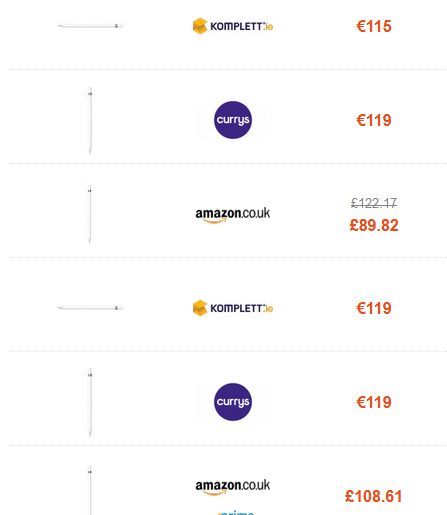
The Apple Pencil is a seriously useful piece of kit. If you own an iPad, the Apple Pencil has a lot of functionality that will totally transform the way you use your device. Whether or not you have one, you may not know every single thing it can do – and luckily, there’s a brilliant video to show you every trick in the book.
There are a whole host of tips in this video (see it below), but our favourites include tapping on the lockscreen with your pencil to bring up notes (for times when you just can’t wait), and being able to add drawings in an email – very handy for quick example sketches. Plus, there are some other sketching-specific tips (like holding the pencil on the screen to make an imperfect shape or line into a perfect one).
In short, this 10 minute video will have you using your Apple Pencil like a pro. (Not got one? See our Apple Pencil 1 vs Apple Pencil 2 guide).
The video, created by Better Creating (opens in new tab), is broken up into sections so you can hone in on the parts you are most interested in (though we recommend watching them all). Skip to basics like using double tap, onto a Scribble tutorial and then sketching-specific tips (and a more besides that).
(Pocket-lint) – No one likes to be interrupted by an annoying advert, but on our phones, it has become an all too common experience.
Most people know that they can block ads on their desktop or laptop computer, but our phones tend to be plagued with the things. Long gone are the days when you could install Ad Block Plus from the Play Store, Google doesn’t allow system-wide ad blockers anymore.
So, how do you go about blocking ads? Thankfully, it’s very easy, and we’ve got everything covered in this guide.
But first, a few things to mention. It’s important to remember that ads help keep sites going (including this one) and they’re important for content creators, too. So even though they can be irritating, in some cases, it’s worth allowing ads to help support the content that you love.
Also, we’ll be focusing on browser-based ad blocking, so keep in mind that these solutions won’t block ads in other apps, like games, for instance.
With that said, let’s get into the guide.
How to block pop-ups and intrusive ads in Chrome
Chrome is the default browser on the majority of Android phones, and as such, it’s the one the vast majority of people stick to.
You don’t need to swap to another browser to block ads, though. Thankfully, Chrome has some handy tools built-in to help with this.
The only caveat is that Chrome doesn’t block all ads, just pop-ups and ads that it deems intrusive or misleading. Here’s how you activate the features:
Open Chrome on your Android phone
Tap the three dots in the top right corner
Tap on Settings
Scroll down to Site settings and select it
Tap Pop-ups and redirects
Make sure the slider is toggled to the left
Go back to the previous page
Tap Ads and do the same thing
Now, Chrome will prevent the majority of pop-up ads from loading, and block ads entirely on sites that have misleading and intrusive ads. In some ways, it’s the best of both worlds as it allows you to support the content that you care about without suffering through egregious pop-ups.
But what if you want to take things a step further and block everything? Read on.
How to block ads with different browsers
If you’re willing to ditch Chrome, there are plenty of browsers that offer more robust ad-blocking options. Just keep in mind that you won’t be able to sync your history and bookmarks with Chrome on desktop, if you use that.
Our favourite option is Firefox, it allows for add-ons to be installed, and they work like Chrome extensions on desktop. uBlock Origin is a powerful, free and open-source ad blocker that can easily be added to the Firefox Android browser, and it’ll block just about everything.
Another great and full-featured option is the Opera browser, which has a solid ad blocker built-in and even a free VPN. There’s even a straight-up Adblock Browser, if all you care about is blocking ads.
How to block ads with an app
So, that’s browsers sorted, but what if you want to block ads in other apps? As we mentioned up top, Google has long since removed ad-blocking apps from its Play Store, but that doesn’t mean that you can’t block ads elsewhere.
You’ll have to side-load these apps, which can be a little daunting if you’ve never done it before, but it doesn’t mean the apps are untrustworthy – just that Google’s not so keen on you using them. Which is understandable, given its business model.
Best iPhone apps 2022: The ultimate guide By Maggie Tillman ·
These are the absolute best iPhone apps available right now, from productivity apps to apps for traveling, reading, listening to music, and more.
Apps like AdGuard and AdLock come from notable cyber-security brands and so should be perfectly safe to use. The downside is that they’re subscription based, so you’ll have to pay a monthly fee once your trial ends.
From 2003 to 2013, I was an engineer at Apple, where I led the teams that built FaceTime, iMessage and CarPlay.
Getting to work closely with Steve Jobs was an opportunity I’ll never forget. He was a visionary who taught me a lot about not just how to make products that people love, but also how to be successful at anything in life.
Here are the three simple yet profound lessons I learned from Jobs that have helped me succeed in my career as a tech entrepreneur today:
1. Mastery demands iteration.
Illustration: Ash Lamb for CNBC Make It
Getting something right requires patience and hard work. But it also means knowing when to stop making changes; you’ll know when you’ve arrived at the best product when you’re beyond excited to share it.
During my first week at Apple, Jobs was prepping for an iChat demo. “I’m going to make the crowd sh** their pants,” he said.
Jobs knew he had executed something great.
2. Use your failures as stepping stones to success.
Illustration: Ash Lamb for CNBC Make It
When Apple was ready to release the iPhone into the world, the foundation was already there, making it possible to keep taking new and different risks later on.
With every product, Jobs expected things to go wrong. But he also understood that messing up was often worth the reward. Perfection may not exist, but greatness could be achieved with a few software updates.
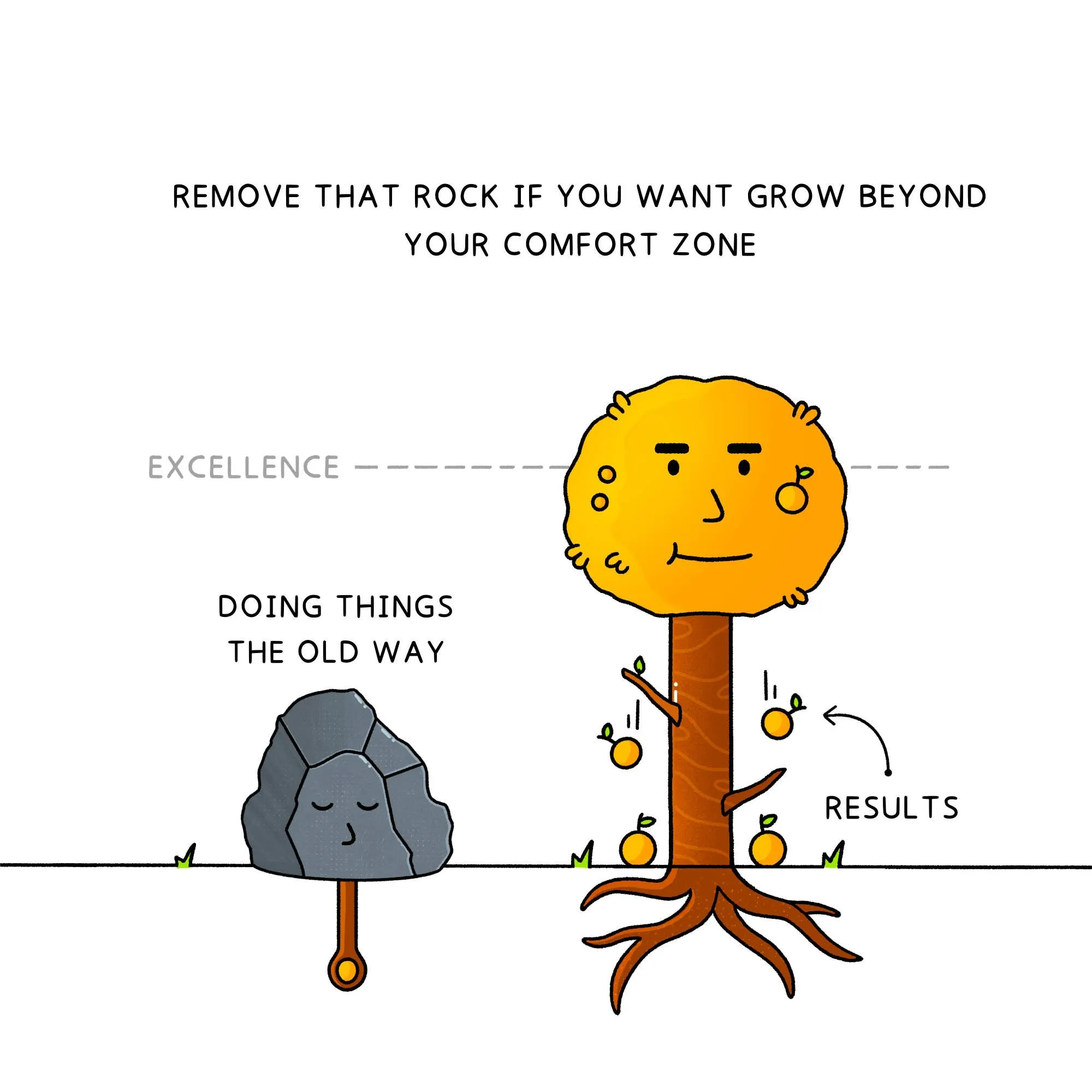
3. Remove the rock that’s blocking you from going beyond your comfort zone.
Illustration: Ash Lamb for CNBC Make It
The original iPhone changed the world forever in 2007, with its multitouch screen and digital keyboard as highlights.
The decision to remove the mechanical keyboard was a clever industrial design solution. It allowed the iPhone to have more screen space for other creative features.
Justin Santamaria is a former Apple engineer. Currently, he is the co-founder of the fitness app Future. Prior to Future, he led the guest experiences product team at Airbnb. Follow him on Twitter.
Ash Lamb is an illustrator and designer based in Barcelona, Spain. He spends his time deconstructing and illustrating ideas for creative entrepreneurs, and teaching people how to create impactful visuals at visualgrowth.com. Follow him on Twitter and Instagram.
Apple turned what should be minimal into something too complex
With the iPhone 14 Pro, we now finally have a feature that’s been on Android for years: an always-on display, or AOD. You can’t believe how excited I am for this small yet powerful feature. It’s one I miss constantly on my iPhone 13 Pro Max, and one I love when I look at the Pixel 6 Pro on my desk.
But as thrilled as I am that the iPhone 14 Pro rocks an AOD, I’m less enthused about the execution. To my eye, having seen barely more than what Apple showed off at the Apple event, the new AOD looks too complicated. It’s like Apple over-engineered the solution to a problem, something that isn’t all that uncommon.
I want to preface this by saying I’m a minimal person, though not a minimalist. I like things simple. I keep my technology as minimal as possible, with as few apps or programs as needed, minimal code, plain desktops, clean filesystems — you get the idea. So understand that before going forward.
iPhone 14 Pro always-on display: Welcome but too complicated
Like I said, I am excited for the always-on display when I get my hands on a purple iPhone 14 Pro. It’s a feature I talked about heavily last year before the iPhone 13 launch, and it’s one I’ve continued to mention leading up to this year’s announcement. I love having an AOD on the best Android phones, and I’m glad the iPhone finally has one.
(Image credit: Future)
But looking at what Apple revealed, plus bits and pieces from people on the ground at the event, I am left dissatisfied. What I’ve seen looks like too much of a good thing. Let me explain.
The iPhone 14 Pro’s always-on display is essentially a dimmed version of the lock screen, complete with all the widgets and clock typefaces. That’s cool, but an AOD is supposed to (in my humble opinion) provide basic information at a glance. Time, notifications, possibly the weather and calendar events, and battery percentage. Those are the basics I want to see when I glance at the Pixel 6 Pro on my desk, and that’s what the phone provides in a minimal, monochrome format.
Looking at what Apple revealed, I am dissatisfied. It looks like too much of a good thing. It looks over-complicated.
Other Android phones offer a bit more in the AOD area, such as OnePlus letting you change the clock typeface or what can appear on the OnePlus 10 Pro’s AOD. But the core premise remains the same: simplicity. Apple appears to have gone overboard, making for a cluttered AOD. at least from what I’ve seen.
I don’t mind the new iOS 16 lock screen features — I quite like them, in fact — but that doesn’t mean I want a dimmed version of the lock screen as my AOD. I have the same problem with my Apple Watch 7’s AOD. It’s a dimmed, colorized version of my watchface, not a basic clock. Instead, I have to set a basic clock watchface to get the AOD I want.
It appears I’ll need to do the same with the iPhone 14 Pro, since the phone will spend more time with the display off than on the lock screen.
iPhone 14 Pro always-on display: Outlook
When I look at the images of the iPhone 14 Pro’s AOD, I am ambivalent, torn if you will. It’s a feature I’ve wanted since making the switch to iPhone early last year, but it doesn’t look like I expected. Is that just the rantings of a curmudgeon resistant to change? You could make that argument.
I will wait to form my full opinion until after I spend some time with the iPhone 14 Pro. Things in theory often work differently in practice, so it’s possible that I will like Apple’s implementation of an always-on display. Or it’s possible that my opinion will further sour.
I plan to keep an open mind about it, but right now, I think Apple overcomplicated the issue.
Jordan is the Phones Editor for Tom’s Guide, covering all things phone-related. He’s written about phones for over five years and plans to continue for a long while to come. He loves nothing more than relaxing in his home with a book, game, or his latest personal writing project. Jordan likes finding new things to dive into, from books and games to new mechanical keyboard switches and fun keycap sets. Outside of work, you can find him poring over open-source software and his studies.
Apple’s quietly begun hiring for roles aimed at poaching the Facebook and Instagram advertisers that felt the biggest brunt from the company’s privacy updates
In terms of Silicon Valley feuds, you’d be hard pressed to find one that’s spicier than the years-long battle between Meta and Apple. Meta Platforms CEO Mark Zuckerberg started steering his company toward virtual-reality tech, and now Apple CEO Tim Cook has made it clear he’s gunning for the same. Meta’s Facebook recently started testing out encrypted chats, a domain that Apple has dominated for years.
Facebook is a company that historically hasn’t shied away from sharing user data with countless third parties. Meanwhile Apple AAPL, 0.16%, as its own glitzy ad campaigns constantly remind us, is the one tech company that doesn’t spray your data across the web.
And, of course, there’s Apple’s recent privacy changes to its operating system that wiped out an estimated $10 billion of revenue for Meta META, -0.83%. At the same time, the advertisers that relied on the long-established tools on Facebook and Instagram were left without the data they long relied on for their businesses.
In the year since Apple CEO Tim Cook denounced ad-based business models as a source of real-world violence, Apple has ramped up plans to pop more ads into people’s iPhones and beef up the tech used to target those ads. And now it looks like Apple’s looking to poach the small businesses that have relied almost entirely on Facebook’s ad platform for more than a decade.
MarketWatch found two recent job postings by Apple that suggest the company is looking to build out its burgeoning ad-tech team with folks who specialize in working with small businesses. Specifically, the company says it’s looking for two product managers who are “inspired to make a difference in how digital advertising will work in a privacy-centric world” and who want to “design and build consumer advertising experiences.” An ideal candidate, Apple said, won’t only be savvy in advertising and mobile tech, and advertising on mobile tech, but will also have experience with “performance marketing, local ads or enabling small businesses.”
The listings also state that Apple’s looking for a manager who can “drive multi-year strategy and execution,” which suggests that Apple isn’t just tailing local advertisers but will likely be tailing those advertisers for a while. And considering how some of those small brands are already looking to jump ship from Facebook following Apple’s privacy changes, luring them off the platform might be enough to hamper Meta’s entire business structure for good, ad-tech analysts said.
“If you talk to any small business, they’ll tell you, ‘Yeah, right now is a disaster,” said Eric Seufert, one analyst who’s been following the battle between Apple and Facebook evolve for years. “It’s just a meltdown. There’s been a complete, devastating change to the environment.”
Is Apple’s Tim Cook stealing a page from Facebook’s playbook? Getty Images
‘What goes around comes around’
Zuckerberg has said (over and over again) that Apple’s move to cut off the company’s precious user data would hamper “millions” of small businesses, and, indeed, in the iPhone update’s aftermath, some marketers said they were left “scrambling” to identify whom their ads were reaching — and typically paying sky-high prices for the privilege to do so.
From an iPhone owner’s point of view, it can be tough to understand exactly how a privacy feature could singlehandedly bring countless mom-and-pops to their knees. Especially when that feature, App Tracking Transparency (ATT) — which Apple rolled out in April of last year — does something as upstanding as mandating that app developers give users the freedom to choose whether they want to be tracked across their device.
Most users, by all accounts, would end up saying no. And once they did, those apps lost access to a crucial mechanism in mobile advertising: that person’s unique “identifier for advertisers,” or IDFA for short.
You can think of it as something like the iPhone’s answer to a web cookie. An advertiser can use your IDFA to track, say, whether you saw its ad on Instagram and then bought its product on Etsy ETSY, -0.66%, or followed its account on Pinterest PINS, 3.62%. IDFA was the key that let mobile advertisers know whether their ads actually worked.
So when Apple’s change hit, it wasn’t just Facebook’s advertisers that were flying blind — small shops that were running ads on Google’s GOOG, 0.63%GOOGL, 0.41% YouTube, Snap’s SNAP, 0.84% Snapchat, Pinterest or any other platform where ads are sold experiences some sort of hurt. And the more your platform’s business relied on user data, the bigger sting you felt.
“You can have an ideological take on all of this and say, ‘Well, these ad tools shouldn’t have gotten so efficient, since that was dependent on violating people’s privacy,’ ” Seufert said. “And that’s a fair argument.”
But, as he also pointed out, you can’t ignore economics. Apple certainly hasn’t.
“I guess what goes around comes around,” said Zach Goldner, a forecasting analyst at Insider Intelligence who specializes in digital ads. “I mean, it’s not like Facebook hasn’t copied other platforms before.”
Aside from its myriad privacy scandals, the other core concept that the Meta brand is synonymous with is copying competitors. As Goldner put it, it was only a matter of time before someone tried made a run at the company that’s spent more than a decade weaving its brand into small businesses.
“Using Facebook ads for small businesses is voluntary in the same way that using email for a job search is voluntary,” said Jeromy Sonne, a longtime digital marketer who has since abandoned the platform to start his own ad-serving network.
“No, you’re not ‘locked in,’ and they aren’t forcing you to spend money. There’s no contract here,” he went on. “But because of the lack of options and the number of businesses that built their entire revenue off the back of the platform, it’s virtually impossible to walk away.”
Mark Zuckerberg made Facebook indispensable for the nation’s small businesses. Will that stranglehold endure? Associated Press
How Facebook became ‘virtually impossible’ for small business to escape
Before rivals like Snapchat and TikTok would hit the social-media sphere, Facebook had been running ads for years.
Some of the last holdouts in the switch to digital were smaller businesses — and reports at the time showed that there wasn’t a lack of companies trying to swoop in on the opportunity to work with local mom-and-pops. Ultimately, a good chunk of them would end up migrating to Facebook; the platform’s ad service was easier and cheaper to run than its competitors, and it offered more data than they did, too.
“You could just run anything in it, and it was so cheap it didn’t matter,” said Sonne. Facebook was offering something that was “100% self-serve” and didn’t have the price floors that other platforms — like, say, DoubleClick — were demanding at the time. And it was far easier to navigate than those competitors to boot.
Then the early aughts happened. In an effort to make its platform more user-friendly in 2014, Facebook started throttling the cheap promotional page posts that brands had become accustomed to, forcing the bulk of them to pay up for ad space in people’s feeds or lose the audience they’d spent nearly a decade cultivating.
When small businesses cried foul, Jonathan Czaja, Facebook’s then–director of small business for North America, said bluntly that the platform was simply “evolving,” and advertisers had no choice but to evolve alongside it.
So they did. A month after Czaja’s statement, the company boasted in a blog post about a new record number of small businesses operating on the platform: 40 million. At the same time, Zuckerberg noted that the company, though it was pivoting to fewer ads in people’s feeds, would be going even harder on microtargeting — a strategy that even he admitted was “pretty controversial” inside the company. Around the same time, employees reportedly began raising red flags about a then-obscure ad firm named Cambridge Analytica, which improperly harvested data from countless Americans in the run-up to the 2016 election.
‘Using Facebook ads for small businesses is voluntary in the same way that using email for a job search is voluntary.’
— Jeromy Sonne, digital marketer
By 2017, the combination of Facebook’s ever-growing cache of user data and increasing scale had left advertisers more or less stuck. When Facebook admitted to marketers no less than a dozen times that it might have flubbed the figures it provided, advertisers shrugged off the miscalculations every time. “Even with the wrong math — it is really small compared to fraud rates on other platforms,” one ad executive told Business Insider at the time. “In digital advertising, you just learn to live with a certain amount of ambiguity.”
Another executive put it more bluntly: “I wouldn’t say they are foolproof, but they are fairly impervious to almost anything.”
Revelations that the company knowingly lied to advertisers for years about how far their campaigns were reaching didn’t send advertisers packing, and neither did the slowly rising prices that many advertisers were paying. It’s typical for ad prices on any platform to fluctuate from month to month, but Facebook’s spikes were unusually extreme. Between January 2017 and January 2018, for example, one analysis found that the prices advertisers were paying for their Facebook ads were spiking as much as 122%.
“Over time the [prices] go up, support gets stretched thin, scaling issues take hold,” he went on. But what was a struggling startup to do? Venture capital had been steadily flowing into a new generation of digital-first brands for more than a decade, which gave them new monthly goals they needed to hit.
“It became a situation where brands or agencies who had expectations of eternal growth could consistently get it from Facebook,” Sonne said, and that their funders now expected the same. But it also made them dependent on a platform that was either increasingly unreliable or downright unusable, depending on which advertiser was asked. Some small businesses reported having their ads improperly flagged by Facebook’s automated ad-review process, while other marketers expressed frustration at how buggy the back-end systems were.
Apple did not respond to a request for comment. A spokesperson for Meta, meanwhile, noted that “small-business owners around the world tell us our products helped them create and grow their businesses.”
“It’s why we are consistently committed to developing and providing new programs, tools, training and personalized advertiser support for them,” the spokesperson went on.
The company doesn’t disclose how many of the 10 million–plus advertisers pouring money into a given Meta property each year qualify as a “small business.” The last time Facebook shared that data itself was in a 2019 earnings call when then–Chief Operating Officer Sheryl Sandberg said the top 100 advertisers represented “less than 20%” of the company’s total ad revenue. An analysis from the marketing analytics firm Pathmatics found that percentage closer to 6%, at $4.2 billion in spending altogether. The company raked in nearly $70 billion in ad revenue that year alone.
Apple’s next move
Since upending the online advertising ecosystem, third-party analysts have seen a surge of advertiser activity — and ad dollars — head Apple’s way.
Last year, for example, one of these reports found that Apple’s Search Ads — which appear at the top of your iPhone screen when you’re looking for a new app to buy in the company’s App Store — were the source of roughly 58% of all iPhone app downloads. A year prior, these same ads were only responsible for 17%. And earlier this summer, one Evercore analyst projected that Apple’s App Store ads could net the company $7.1 billion in revenue by 2025.
“I think the revenue piece [of the ad market] is less important to Apple than just breaking up Facebook’s total ownership of distribution on mobile,” Seufert said. He pointed out that, for a long time, Facebook dominated the market in driving app installs. One report earlier this year found that about three-quarters of those marketing a mobile app rely on Meta’s ad-tech tools to do so.
“Ads are a revenue opportunity, but, more importantly, they’re a discovery mechanic,” Seufert went on. “And suddenly Facebook was determining which apps got downloaded, not Apple. My sense with all this is that they care about the revenue, but I don’t think that was the primary driver. I think it was about the power.”
As far as power plays go, there’s really no better move than homing in on small businesses that have become disgruntled with Meta’s platforms. And as Goldner pointed out, with the economic crush that came with the ongoing pandemic, more advertisers — big and small — are shirking display-based advertising like Meta’s for more search-based advertising like Apple’s.
“As we’re hitting a potential recession, people are moving more towards bottom-of-the-funnel ads to squeeze the margins,” Goldner said. “Whenever a potential economic downturn exists, companies want to focus on maximizing their sales. They care less about goodwill and more about just keeping their businesses afloat.”
Apple’s impending small-business push could also explain the rumblings that the company plans to add search ads to Apple Maps in the near future. After all, one of the best ways your local hardware store or diner can advertise their wares today is via search ads in Google Maps, which have been there since 2016. As Seufert put it, “How could [Apple] justify not doing it?”
Feature Image Credit: Getty Images
By Shoshana Wodinsky
Shoshana Wodinsky is an Enterprise Reporter for MarketWatch.
With ad units coming to some of Apple’s most-used apps next year, experts ponder what the ad buying platform will look like and whether its core audience will accept the interruption.
Apple brings in an estimated $4bn a year from advertising revenue, but its ambition is to scale that up to achieve greater revenue stability. As such, ads are set to show in its Maps app from early next year, in addition to select spots in the App Store’s ’Today’ tab and at the bottom of app listings.
Mike Woosley, chief operating officer at data management platform Lotame, says: “Apple is diversifying its revenue streams to smooth out economic shocks, and its services segment – where it hides its advertising business – has grown 12% this year.“ He likens its emphasis on advertising in the face of hardware saturation to Netflix’s ongoing pivot to an ad-supported version of its streaming service as paid subscriptions reached saturation.
“And if Apple wants growth in advertising, it’s not afraid to scorch the earth to get it,“ he says. “When it was ready to get serious about ad revenue, it locked down its device-related advertising ID, stripping developers of the ability to identify users across sessions and domains, leaving Apple as the sole king of identity on its phones.“
To date, Apple has been more selective than the majority of its competitors when it comes to advertising on its owned and operated platforms. Google has long included ad slots in some of its own tools, with Google Maps offering paid-for results at a local level. By contrast, Apple has focused on providing more streamlined products and making the ad-free nature of its services part and parcel of its appeal to users.
Paul Dimmock, head of demand EMEA at Alkimi Exchange, explains that even though it has long derided advertising, this is not Apple’s first attempt to make ads a core part of its appeal to brands: “iAds, which launched in 2014, was essentially a programmatic network of Apple inventory only. This lasted two years, being closed down in 2016 due to a lack of demand.
“Based on that failure, I would expect that a new Apple buying platform would activate across its owned and operated properties, as well as third parties, as this would – in theory – better justify the inevitable significant costs of building adtech from scratch.”
But while consumers are habituated to ads across those other platforms, it remains to be seen whether Apple’s core audience will accept the introduction of ads into services that have previously been ad-free. Dr Paul Hayton, the founder and chief technology officer of mobile DSP Dataseat, which is part of Verve Group, says that Apple tends to avoid intrusive ads that interrupt the user experience, “so we’re unlikely to see a promotion for something irrelevant like a mobile game in its maps app“.
He goes on: “I expect ads to be highly targeted and entirely based on the search a user makes and the location they’re in when using the app. For example, a search for directions in a seaside town like Poole might prompt an ad for a business that does fishing trips. This format won’t come as a surprise to consumers who’ve been accustomed to Google Maps since 2016. If Apple can present ads in a seamless and relevant way as it does for its search ads within the App Store, users will be unlikely to be put off by them and, in many cases, will probably not even notice that they’re ads.”
Reports suggest that Apple will include Google Search-like results in its Maps app, rather than banner ads, and that it is aiming to broaden its ad network to include its books and podcast apps, in which publishers could pay to appear higher in search results. As Dimmock argues, the likelihood is that Apple will emulate Amazon’s recent approaches to its DSP, offering buyers the ability to buy programmatically both on and off its platform. This allows it greater control over the ecosystem on its own services, while also making a play to increase market share elsewhere.
Ultimately, though, the transition from ad-free to ad-laden experiences is tough to navigate, even for a company with as large a market share for smartphones as Apple. Nailing the user experience will determine whether Apple’s ad ambitions will come to pass.


 Unsplash