Tag

Google

Browsing

By Peter Roesler

Local search is changing. Here’s what marketers need to know

Google is constantly changing, evolving, adapting, and updating. This is a fact I have seen first-hand after several decades in the marketing realm.

Unfortunately, all these changes and updates have caught many businesses unaware, leaving them facing the consequences of being uninformed.

One of the biggest changes that have occurred in the last few years is local search and SEO in Google. Keep reading to learn about some of the biggest changes and updates that have occurred so you will know what to do to ensure your website is still being found.

Improving Local Review Quality

Today, reviews are grouped together by topic. This update was mentioned on a timeline, and you can see there is a badge in place for the reviews.

Google is also starting to reorganize the way third-party reviews are presented.

Third-party reviews are still as important as the ones displayed in the knowledge panel. They are showing up in organic searches, which means you need to figure out where you stand.

Google is also starting to reorganize the way third-party reviews are presented.

Third-party reviews are still as important as the ones displayed in the knowledge panel. They are showing up in organic searches, which means you need to figure out where you stand.

It’s estimated that 45% of the updates were related to local SERPs. The changes show how important it is to have recent reviews, third-party reviews, and reviews featuring relevant comments.

The reviews’ relevancy, recency, sources, and topics all play a role in how the local SEO algorithm ranks them. As a marketer, you must understand where your clients stand for each of these factors and ensure quality reviews are created.

Edit Knowledge Panels Using Off- and On-Site Sources

Google has been working on revamping the local knowledge panel in big ways. It is starting to develop into a unique entity, including third-party data. This means that it shows more of the client’s information and may be filled with information sources you can’t access.

Even if these things seem uncontrollable, you may be able to influence what Google uses. Some areas to check in your panel to ensure no incorrect content is included are:

Google Business profile completion

  • Schema
  • Robot directives
  • Site content
  • Industry sites
  • Google reviews
  • Third-party reviews


Be sure to correct your data sources and test your knowledge panel appearances when you can. Even if the corrections you are making seem insignificant, Google will find the new info and change things based on them.

Improving Local SEO Efforts

You can only make sure that your website is adhering to the new local search requirements by knowing how things are changing. The information here provides you with a general overview of what to expect. Be sure to keep this in mind, and if needed, work with the professionals to help ensure you have someone ensuring that the local SEO efforts are meeting the latest upgrades and requirements that are in place. Being informed will help you with these marketing efforts.

Feature Image Credit: Getty Images

By Peter Roesler

Sourced from Inc.

By

  • Facebook and Google worked together to circumvent Apple’s privacy measures, 12 state attorneys general argued in an updated legal complaint from 2020.
  • Apple’s privacy tools have made it harder for other tech companies to pinpoint users for their ad auction model.
  • Regulators and other tech companies have targeted each other in a larger antitrust battle over user privacy, ad technology, and market dominance.

Google worked with Facebook to undermine Apple’s attempts to offer its users great privacy protections, 12 state attorneys general alleged in an update to an antitrust lawsuit against the search engine.

“The companies have been working together to improve Facebook’s ability to recognize users using browsers with blocked cookies, on Apple devices, and on Apple’s Safari Browser,” the amended complaint states. “Thereby circumventing one Big Tech company’s efforts to compete by offering users better privacy.”

The lawsuit was first filed by the attorneys general in December 2020, accusing Google of engaging in market collusion, and focused on claims that Facebook and Google had agreed to cooperate if their pact ever came under regulatory scrutiny.

The attorneys general also accused Facebook and Google of engaging in an illegal advertising deal, with the latter leveraging monopoly power over its adtech business by helping Facebook make better bids in ad auctions, which would make it easier for Facebook content to appear in more Google Ads.

“Facebook has long supported fair and transparent advertising auctions in which all bidders compete simultaneously, and the highest bidder wins,” a Facebook spokesperson said in an emailed statement. “Facebook’s non-exclusive bidding agreement with Google and the similar agreements we have with other bidding platforms, have helped to increase competition for ad placements.”

According to a discussion between Facebook employees in 2019, the complaint says, the company was having trouble matching users on Apple’s Safari browser. Google said Facebook’s user match rates were the same as other ad auction parties, but Facebook employees noted that the search company was willing to use Javascript to help Facebook better recognize those users.

The attorneys general claimed Facebook essentially baited Google into the deal, but Google denies the lawsuit’s claims.

A Google spokesperson told Insider: “Just because Attorney General Paxton asserts something doesn’t make it true. This lawsuit is riddled with inaccuracies. In reality, our advertising technologies help websites and apps fund their content, and enable small businesses to reach customers around the world. There is vigorous competition in online advertising, which has reduced ad tech fees, and expanded options for publishers and advertisers. We will strongly defend ourselves from his baseless claims in court.”

Apple in recent years has ramped up its user privacy efforts. In 2018, Apple installed privacy protection measures into its products, like Safari, which required websites to request tracking privileges from users and discard cookies if a site had not been visited in 30 days.

This summer, Apple rolled out its App Tracking Transparency tool, which prompts users to opt in or out of tracking on different applications — which largely impacted companies like Facebook. A Safari privacy report also detailed how websites track users.

The three companies have been at the center of several antitrust discussions, facing action from government regulators and each other. The Federal Trade Commission filed a lawsuit against Facebook claiming the company had monopolized power in the social networking market, but the suit was dismissed by a federal judge in June. Facebook was also reportedly preparing an antitrust lawsuit against Apple in regards to its App Store rules, saying Apple was stifling third-party app developers.

Congress also introduced five tech regulation bills in June, specifically directed at the “Big Four” — Facebook, Google, Apple, and Amazon. The bills would equip regulators with more methods to check tech firms from holding too much market power.

(This story has been updated to reflect in the third paragraph that it was Facebook and Google who reportedly agreed to cooperate, not Apple).

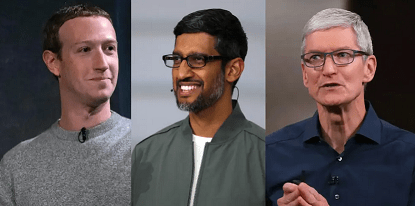
Feature Image Credit: Facebook CEO Mark Zuckerberg, Google CEO Sundar Pichai, and Apple CEO Tim Cook. Daniel Leal Olivas/WPA/AP, Justin Sullivan/Getty Images, & Karl Mondon/Digital First Media/The Mercury News/Getty Images

By

Sourced from Insider

By Jack Wallen

After a disastrous Pixel 6 pre-order experience, Jack Wallen shares his thoughts on what Google can learn from Apple.

The Pixel 6. The mere mention of the name gives me equal parts excitement and frustration. I haven’t been so excited for the release of a phone in a very long time, while simultaneously feeling as though I might forever shake my head at how a release went down. Google absolutely failed the release of its latest flagship phone, the Pixel 6, which should go down as a historic shame (at least within the realm of the tech sector), but will barely register as a blip on the radar of consumers around the world.

Let me explain.

The day of the Pixel 6 release was upon me. I watched the Google event because I had to report on the details of the new phone. During the event, I shifted between the Google speakers and the Play Store, hoping I could be one of the lucky ones to pre-order the exact Pixel 6 I wanted.

I don’t remember at which point it happened, but Google unlocked the metaphorical doors and allowed people to start pre-ordering the Pixel 6.

In theory.

What unfolded was an absolute disaster for Google.

I attempted to place the phone in my shopping cart, only to receive a 500 error. At first, I thought it was that Google hadn’t actually made the pre-orders officially available and I just needed to double down on my patience. But the error persisted.

And then morphed.

And then returned.

Eventually, the error vanished, only to reveal most of the devices had already sold out. I was able to finally place a 128Gb unlocked device (not the phone I was hoping for) in my shopping cart, only to receive yet another error.

I kept at it. No luck. I did some quick searching to discover the problem was global.

This was an embarrassment.

The company that is supposed to be the heart of everyone’s internet experience couldn’t deliver on a simple e-commerce solution on what should have been one of its biggest releases to date.

At some point, the wife and I had to run some errands. I asked her to drive, so I could continue trying to get Google to take my money (this time on my Pixel 5) yet the company persisted in failing to do so.

It wasn’t until I got home and tried again (some three hours after the event was over) that I was able to get the phone into the shopping cart and make the purchase.

Once this event was over, it gave me time to reflect on my experience and similar experiences with previous Pixel releases. A conclusion was drawn.

Apple absolutely kills Google on hardware releases. In fact, there’s absolutely no reason to compare the two.

Apple succeeds.

Google fails.

The “meh” approach

Apple spends the money necessary for proper marketing and is capable of getting consumers seriously hyped about a new product. It’s what Apple does best. And in this case, it’s astonishing how large the gap is.

During the lead-up to the Pixel 6 release, I think I saw maybe two commercials for the device, and those commercials were less than exciting (to say the least). Prior to the latest iPhone release, I couldn’t escape the advertising. It was everywhere. So prevalent was Apple’s iPhone hype, it had me wondering, “It’s been years since I had an iPhone. Is it time I try one again?”

On the contrary, Google’s Pixel 6 hype had me like, “Meh. Whatever. I’ll get one.”

That always seems to be Google’s approach to marketing hardware. “Meh, it’ll work.”

Thing is, the Pixel 6 looks to be one of the best phones on the market (once they start arriving in the hands of the users). So why the company approaches marketing with such a blasé attitude is beyond me.

Consider this: The Pixelbook Go is one of the finest Chromebooks on the market. Do you remember their marketing efforts? Neither do I. When the original Pixel Chromebook was released it was a work of technological art. It redefined mobile screens, keyboards and trackpads. Hype? Nada. Android 12 might well be the finest iteration of Google’s mobile platform ever released. PR? Scant.

If you’ve ever wondered why Android market share lags far behind iOS in the United States, it’s because of this very thing. You cannot turn your TV on without seeing iPhone ads or placement. They are everywhere. When was the last time you saw an Android phone in a television show?

I know it might seem silly, but product placement works … very well. People see celebrities using a product and they’ll feel inclined to want that product. You just don’t see celebs sporting Android. It’s all iOS all the time.

Apple knows this and uses it to its advantage. And when a new iPhone release is upon us, Apple inundates the media with incredibly effective advertisements that actually work to build hype around their product. Apple is the true master of marketing.

And until Google can bridge this gap, Android will continue to fall behind in the U.S. and Japanese markets (both markets where image is important). Google needs to markedly refine its lead-up to releases, shore up its e-commerce solution, and then hire a marketing team that understands precisely why Apple constantly succeeds (even when its product might be inferior to what Google has to offer).

If Google doesn’t fix this problem, it’ll have to accept that the Pixel market consists of previous Pixel owners and mobile device users who have grown tired of the iOS way of things. If that’s the company’s marketing plan, then all I have to say is, “Meh.”

Feature Image Credit: Google Pixel 6, Image: Google

By Jack Wallen

Sourced from TechRepublic

By Cillian Bracken Conway

If used correctly, Google AdWords can be an extremely profitable online advertising channel for your business. However, PPC advertising on the Google platform is quite technical; specialised knowledge and experience are required to generate consistent ROI.

You likely don’t have the time to learn nor run a Google advertising strategy. This is where a Google Ads agency comes into play.

Like any agency, a Google Ads agency will save you time and effort and potentially make you money. Outsourcing is crucial for any business; you can’t do everything yourself.

Finding the right agency for your organisation will require careful consideration. Below, we’ve listed six major red flags you must watch for when choosing a Google Ads agency.

  1. They “rent” the account to you because the bid strategies are their IP.

There are agencies out there that insist on ownership over bid strategies. When looking for a Google Ads agency, this is a scenario you’d want to avoid. Bid strategies shouldn’t be considered proprietary; look for an agency that’s transparent with your organisation.

2. They don’t provide you with full access or ownership of the account, or worse, they say that they “own” it.

You must have full access and ownership to your Google AdWords account. Agencies have an ethical obligation to give clients complete control. Some don’t, using it as a way to lock clients into their contracts.

Having full access to a Google AdWords account is essential for several reasons. Firstly, you’re able to see if the reported figures the agency gives you is accurate. Secondly, you can remove their access if you decide to terminate the contract.

It’s also important to mention that Google AdWords accounts with longer tenure are preferred. Your account history influences your performance and, ultimately, the ROI you generate from paid search. 

Because an existing account has more data than a new one, Google rewards better quality scores. All that data is also a guide for what hasn’t worked; you’ll be less likely to make the same mistakes.

It’s preferable to maintain control of a Google AdWords account because you don’t want to create new ones. You don’t have the time and effort to continually build a new account every time you change PPC agencies.

Be cautious when signing a contract with an agency; there could be terms and conditions regarding ownership. If you don’t have a Google AdWords account and the agency wants to make you one, ensure it’s done through their Google Ads manager account.

3. They won’t provide a detailed breakdown of how they optimised the account in a given time frame.

One of the most significant red flags to look out for regarding PPC agencies is if things are too stagnant. Successful, well-managed agencies will regularly implement changes and tweaks to optimise ad campaigns. 

This could be several things, for example.

  • Bid changes
  • New or refreshed ad copy
  • Bid adjustments

If an agency tends to run things on autopilot, they’re likely not utilising the ad spend effectively. More specifically, keyword bidding is probably done automatically, which leads to overbidding, resulting in wasted budget and inactive ads.   

4. They won’t provide a detailed breakdown of where your money was spent.

It’s concerning if an agency doesn’t provide a frequent report that tells you how your ad budget is being spent. Many businesses take a hands-off approach when it comes to their Google advertising strategy. They outsource the work to an agency and assume everything is good.

What these organisations don’t realise is that agencies often charge high management fees. It can be as high as 30-40% in some cases. This means less of the ad budget is being used for ads.

To avoid this, agencies should be able to present, at any moment, a budget breakdown to a client. It should become a frequent habit, one that’s expected every week, fortnight, or month. Transparency is the focus here.

5. They don’t focus on important metrics like, you know, conversions and return on investment.

You can only know if your Google Ads benefit your organisation by looking at the data. Metrics like conversions, clicks and return on investment give us insight into the effectiveness of campaigns on the Google Ads platform.

A Google ads agency should provide data-rich reports that detail whether or not ads are profitable. Unfortunately, some don’t; this is a major red flag. Consider bringing up the topic of metrics when you’re interviewing potential candidates.

A Google Analytics account that you can access should be linked to your Google AdWords account. Conversion tracking and event snippets are also a must.

6. They never asked for detailed information on your business, your USP and your industry.

An ad performing well and providing a positive Return on Ad Spend is dependent on more than just the amount that you bid. The context, relevance, and a solid quality score can determine how much you pay for that click. Even the performance of your post-click landing page affects your ad and the cost.

The agency that you hire must understand your business and its unique selling proposition. They must also have verifiable experience within your industry; Google ads is particular and contextual. What works for one field isn’t going to work for another.

When screening and interviewing potential candidates, question them on their industry knowledge. Ask if they have any tangible examples of success with prior clients similar to your organisation.

Conclusion

An effective Google ads strategy is one of the best ways to increase the revenue of your business. It is, unfortunately, something that requires time, effort, and expertise — things that you may not have right now. 

A Google ads agency is a fantastic solution to these concerns.

In this article, we outlined six different red flags that you must consider when choosing an agency. Hopefully, the information detailed provides some value to you and your organisation. 

Are you looking for an agency that can help you grow your business with Google AdWords? Please contact our PPC advertising team today to learn how Vine Digital can help you get more from your advertising spend. 

Glossary

Pay-Per-Click (PPC)

Pay-per-click (PPC) is an advertising model where advertisers pay a publisher every time their ad is clicked. A publisher could be a search engine, like Google, a website owner, or a network of websites. The publisher hosts the advertiser’s ad to an audience.

Unique Selling Proposition (USP)

A unique selling proposition (USP) is a marketing strategy that informs potential customers how a brand’s product or service is superior to competitors. USPs are used as a tactic to differentiate a brand from the rest of the marketplace. 

Conversion

A conversion is a desired action taken by an individual who has seen an ad or marketing material. It’s a nonspecific umbrella term for any intended goal that a business is hoping to achieve. Conversions can be measured and tracked with analytics and reporting features.

This could be signing up for an email list via a landing page or purchasing a product or service. Other examples include clicking on an ad, visiting a webpage, or watching a video.

Return on Investment (ROI)

Return on investment (ROI) is a financial metric that evaluates the efficiency of an asset, such as an advertising budget. It determines whether something is profitable for a business.

Bid

A bid is the amount of money you’ve committed to an auction for a specific ad space opportunity. In the context of Google ads, every keyword/search term provides an opportunity for you to advertise your business.

Bid Strategy

A bid strategy is a uniquely tailored campaign offered via the Google AdWords platform. Each of these campaigns has a specific goal in mind, such as clicks, impressions, conversions, or views. Businesses will choose the bid strategy that best aligns with their current ad goals.

Negative Keyword

A negative keyword is a keyword that stops your ad from being activated by a specific word or phrase. Negative keywords prevent your ads from being shown to users searching for that particular phrase.

Conversion Tags

Conversion Tags are snippets of code that help with conversion tracking on a website.

By Cillian Bracken Conway

Cillian Bracken Conway is Managing Director at Vine Digital with 15 years of experience working in SEO & PPC. https://www.vinedigital.ie/


Sourced from News18

One of the many reasons why some smartphone users prefer iOS over Android is the clutter-free experience that Apple offers. Android users have often complained about being bombarded with unwarranted ads while using the phone. These ads at times pop on the lock screen of the device even it’s not being used – most common in Android-based skin from manufacturers like Samsung, Xiaomi, Realme, Oppo, and the likes. While some smartphone manufacturers promote ads from their end, this problem is prevalent even in brands like Samsung where the company does not send out ads from their end. If you are an Android user and have faced similar issues with your device, this could probably be caused by the downloaded apps on your phone.

How to remove ads from the lock screen?

Uninstall app sending out lock screen ads- If you have recently started using lock screens on your phones, chances are that the unwarranted ads are being sent by an app on your device. You can easily check the recently downloaded apps on your device and uninstall them to remove the problem.

– Open the Google Play Store on your smartphone

– Tap on ‘Menu’ and then on ‘My apps & Games’

– Tap on ‘Installed’

– Sort the list on basis of the last used app

– Among the most recently used apps, select the app that has been sending unwarranted ads on your device, and uninstall it.

Additionally, you can the following things in mind to get rid of unwarranted ads

– Always download apps from reputable sources based on the ratings and reviews.

– Make sure that you never give administrator’s right to any app especially.

– Update your device regularly with Android security patches. Keeping tracking for new updates

– Do not download apps that you don’t trust or are published by unknown publishers

As per the Google Play policy, apps listed on Google Play Store must not send any fraudulent ads to the device. Further, ads can only be sent when that particular application is being used. Ads appearing on the apps are considered part of the app and hence they have to adhere to the Google play Policy.

In case you spot any app with inappropriate ads violating the policies, you can report it to the Google Play store

– Go to the Google Play Store on your device

– Go to the Install page of the app

– Tap on ‘More Option’ (three vertical dots) on the top right corner of the screen

– Tap on Flash as inappropriate to report any fraudulent ads sent out by the app

Sourced from News18

Sourced from TIMESNOWNEWS.COM

Brussels: Google’s plan to block a popular web tracking tool called “cookies” is anti-competitive, a group of advertisers, publishers and tech companies said in a complaint to EU antitrust regulators.

The grievance could boost the European Commission’s investigation opened in June into Alphabet unit Google’s Privacy Sandbox which the company said could allow businesses to target clusters of consumers without identifying individuals.

Google said a year ago that it would ban some cookies in its Chrome browser to increase user privacy and offer the Privacy Sandbox as an alternative.

The Movement for an Open Web (MOW) said the proposal would give Google the power to decide what data can be shared on the web and with whom.

“Google says they’re strengthening ‘privacy’ for end users but they’re not, what they’re really proposing is a creepy data mining party,” MOW lawyer Tim Cowen said in a statement.

The Commission confirmed receipt of the complaint, saying it would assess it under the standard procedures. In June, it kicked off an investigation into Google’s online display advertising technology services.

Google has offered to settle the case in a bid to avoid a possible fine and a disruptive prolonged probe, a person familiar with the matter told Reuters last week.

Google declined to comment on the MOW complaint and referred to its previous statement released when it offered concessions to the UK competition watchdog, which described the Privacy Sandbox as an open initiative to provide strong privacy for users while also supporting publishers.

The US Justice Department is also examining the issue, people familiar with the matter have told Reuters.

The group’s complaint to the UK regulator prompted its investigation which subsequently led Google to offer concessions.

Sourced from TIMESNOWNEWS.COM

By

Good SEO and content strategy can help ecommerce store owners be less reliant on paid traffic.

Search Engine Optimization (SEO) has become a buzz word over the last few years. Many areas of online business have been implementing solid SEO strategies for a while, but ecommerce is still slow to join the rest. Ecommerce stores have been trained to use paid methods, like Google Shopping Ads, Facebook Ads and other social media ads to get people to click through to their store. However, with the ever-increasing cost it takes to acquire new customers, ecommerce store owners should get on board with SEO and develop a solid content strategy for long-term growth and reduce their cost to acquire new potential customers.

The one-legged stool

As I mentioned earlier, the cost of bringing new customers to your ecommerce store is going to keep increasing. If your store is solely reliant on paid traffic, let’s say from Google Shopping, and Google decides you violated one of the many advertising policies, all your traffic dries up and you’re out of business. No traffic means no sales and no sales means you’re out of business by the end of the month.

Relying solely on paid traffic channels is like having a one-legged stool. It’s a lot more secure for the health and longevity of your business to have more legs under the stool, in case one leg gets taken away from you. SEO is one of those legs you need to apply. Not only is it free traffic, but as long as you provide valuable information for the readers, there’s no risk of being removed in the same way paid channels can shut you out.

The results of a well-executed SEO and content strategy take time. Often, an ecommerce store won’t see significant organic traffic for 6 to 12 months after publishing those first pieces of content. But if you keep implementing and producing solid, helpful content, the effects compound over time.

I got banned from Google and Facebook

I share all this from my own experience as an ecommerce store owner. I relied solely on Google and Facebook ads to get traffic and for some unknown reason back in early 2019 both platforms decided I had violated a policy. After that point, I couldn’t get back in their good books.

I went down the SEO rabbit hole out of desperation to get some traffic and started producing content that shoppers in the research phase would find helpful. I put out other content about the best products by category to help customers choose wisely, and when those pieces of content started ranking, I was getting more traffic than ever. To give you an idea of the timeline, I started publishing content in February 2019, and by June I was already getting traffic and sales. Over time, the traffic kept growing and I kept producing helpful content. In 2020, I generated over $2 million in sales from that organic strategy from only one ecommerce store.

If I hadn’t gotten started with SEO I’d be out of business today.

Get started before you need to

Don’t do what I did and wait for the wheels to fall off after one or more paid channels drop the ban hammer. Start by writing a couple of pieces of content to get started. You don’t need a five-year content strategy on day one.

For ideas on what to write, you can write a guide to your niche and what to look out for when choosing the right product. You can answer the most frequently asked questions you receive. When people type that question into the search engine and your post helps them out, you will be recognized over time as the go-to place for research and answers. Then people will grow to trust your store and will prefer to purchase from you.

There are literally thousands of blog topics that you can produce to get more traffic, but the important thing is to get started. Over time, you will learn some more advanced content strategies that you can apply to create a better ranking chance. If you can implement some semblance of a content plan into your ecommerce store and stick to it, you’ll look back in a year and wonder why you paid so much for visitors in the first place.

By

John Murphy is the founder of Survivalist, a seven-figure ecommerce business that’s growing fast.

Sourced from Entrepreneur Europe

You can use hidden search modifiers to find better results a lot faster.

You likely use Google multiple times a day, from searching for restaurants nearby, to looking up answers to everyday questions. And usually, Google is pretty good at giving you what you want, even if you didn’t type in the right phrase. But when it comes to using Google for research purposes, especially for work, there’s probably some room for improvement…and that’s where a few hidden tricks can help you out.

Use Quotation marks when you can

Looking for something specific, like an author’s name, a long phrase, lyrics, or an idiom? Sometimes Google will show you results that match with a couple of words, but not the entire phrase. Use quotation marks around the phrase to force Google to only show results matching that phrase.

For example: iPad Air “4th generation”

Use dashes to exclude misleading words

Sometimes a particular word messes up your search results. If you don’t want results for a particular word, you can literally subtract it out by using a dash.

The Most Common Email Keywords That Everyone Should Know to Avoid Phishing Scams

For example: canyon -grand

Use Google’s tabs for the best search tool

It’s easy to forget, but Google is a lot more than just text search. There’s Google Images, Maps, and Google Books. Use the tabs at the top to switch between these modes.

Use a tilde to include common synonyms

Looking to expand your search results? Use a tilde symbol before a word to find results related to the term.

For example: coding ~class (That way, you’ll also see results for coding colleges, classes, courses, and so on.)

Search for the particular file type you’re looking for

This is especially useful when you’re looking for documents online: Type in the search phrase, and then just add “filetype:pdf” at the end to look for PDFs. You can also find PowerPoint presentations, Word documents, and Excel sheets using this format.

For example: climate change report filetype:ppt

Find citations that link to a certain page

This is an obscure tip, but it can help you find pages that link to a specific page. If you’re looking for citations for a college essay, for example, just use the “link:(insert link here) format to find the links.

For example: link:lifehacker.com

Use an asterisk for words you can’t remember

Sometimes you’re looking for lyrics to a song and you can’t remember a couple of words. This is where an asterisk comes in. Google treats this as a wildcard or a blank, and it’ll give you search results considering the gaps in your knowledge.

For example: strawberry * forever

Find related websites to what you’re searching for

This is a search trick everyone should know about: Let’s say you found a website you liked and want to find more websites like it—you can just ask Google to do the hard work for you using the “related:(site address)” search term.

For example: related:boardgamegeek.com

Do site-specific searches directly from Google

Usually, the search feature in websites isn’t great. But because Google indexes web content anyway, you can use Google to search through websites reliably. Use the “site:(website link)” term the next time you want to search a site.

For example: site:lifehacker.com

Find results from two specific places

Looking to find results from two terms? For example, maybe you’re looking for TV shows from Netflix or Amazon Prime. You can do that using the pipe symbol (that vertical bar), with basically tells Google to choose between this “or” that.

For example: Netflix | Prime

Search within a number range

When you’re using Google for online research, narrowing down results in a particular timeframe can help. You can use two dots to search between a range of two numbers.

For example: academic studies 1920..1935

Feature Image Credit: Thaspol Sangsee (Shutterstock)

By Khamosh Pathak

Sourced from lifehacker

By Abner Li

Google’s latest Search improvement is a “new system of generating titles for web pages” that better describes what a result is about.

One of the primary ways people determine which search results might be relevant to their query is by reviewing the titles of listed web pages. That’s why Google Search works hard to provide the best titles for documents in our results…

Google wants the main part of a search result — in between the domain/URL and summary — to be “more readable and accessible.” Introduced last week, the company says testing has shown that this new system is “preferred by searchers.”

The previous approach saw page titles possibly change based on the search query entered by users. This new system produces “titles that work better for documents overall.” As such, different page names will “generally” no longer occur.

Another aspect of this updated page title system sees Google place emphasis on text that “humans can visually see when they arrive at a web page.” Other page text and “text within links that point at pages” might also be factored.

We consider the main visual title or headline shown on a page, content that site owners often place within <H1> tags, within other header tags, or which is made large and prominent through the use of style treatments.

When Search encounters an “extremely long title,” Google will just use the “most relevant portion” and truncate the “more useful parts.” The company might also show site names alongside page titles when helpful.

For website owners, Google will soon release updated guidance:

However, our main advice on that page to site owners remains the same. Focus on creating great HTML title tags. Of all the ways we generate titles, content from HTML title tags is still by far the most likely used, more than 80% of the time.

By Abner Li

Sourced from 9 TO 5 Google

By Hayden Field

But the technology has drawn criticism from the AI community

Google wants your search queries to look less like a Jeopardy! answer and more like a chat with your friend—filled with the kind of slang and shorthand only a human would understand.

To get there, the tech giant is enlisting a powerful AI tool you all might remember: a large language model, specifically one called MUM (multitask unified model).

  • Large language models, which are trained on datasets as large as one trillion words, help computers process and produce human-like language.

But, but, but: The tech has drawn criticism from parts of the AI community. In the past year, Google fired both co-leads of its AI ethics team after a dispute over their research on the dangers of large language models.

  • One of experts’ top concerns? Models trained via internet data will naturally learn biases—then can easily replicate those patterns and multiply the resulting harms.

Case study

Google hasn’t yet announced a timeline for when it’ll incorporate MUM into live search, but it’s already experimenting with one-off projects.

Then vs. now: In 2020, Google team members spent hundreds of hours compiling the different ways people could refer to Covid in order to accurately route pandemic queries. This year, they wanted to do the same thing for queries about the Covid vaccine—so they used MUM to “generate over 800 names for 17 different vaccines in 50 different languages” within seconds, Pandu Nayak, Google’s VP of search, told Popular Science.

Big picture: Google announced MUM at its developer conference in May alongside other language model initiatives, and now it seems to be doubling down on how important the tech is to its future business model. More sophisticated searches and answers will likely lead to more valuable targeted ads, which could mean big changes for the ad pricing model, reports the FT.—HF

Feature Image Credit: Francis Scialabba

By Hayden Field

Sourced from Morning Brew