Author

editor

Browsing

By Dirk Petzold

In social media, creating eye-catching and engaging content is essential for business success.

Enter Roverto Castillo, a design virtuoso who has crafted a set of business social media InDesign templates that redefine the art of digital communication. These templates, designed with precision and flair, are set to revolutionize your online presence. Let’s dive into the details of this visually stunning collection that promises to take your brand to new heights.

Please note that this template requires Adobe InDesign. You can get the latest version from the Adobe Creative Cloud website—take a look here.

Business Social Media InDesign Templates by Roverto Castillo

Meet the Creative Genius – Roverto Castillo:

Roverto Castillo, a name synonymous with innovation and aesthetic brilliance in the design world, has curated a set of InDesign templates that embody his signature style. With a keen eye for detail and an innate understanding of contemporary design trends, Castillo’s templates seamlessly blend vibrant colours and geometric simplicity to create a visual spectacle that captivates audiences.

Template Specifications:

The templates come in a convenient size of 1080×1080 pixels – an ideal dimension for various social media platforms, ensuring your content looks flawless on every feed. This attention to detail reflects Castillo’s commitment to providing a user-friendly experience for businesses looking to elevate their online presence.

Easy Customization for Maximum Impact:

One of the standout features of Castillo’s templates is their effortless customization. Replacing headlines, tweaking text, and adding your images couldn’t be simpler. With InDesign’s intuitive interface, even those with minimal design experience can effortlessly tailor these templates to match their brand identity. It’s a game-changer for businesses seeking professional, polished content without the hassle.

Vibrant Colours and Elegant Simplicity:

Castillo’s designs are a testament to the power of vibrant colours and the elegance of simplicity. Each template features a carefully curated colour palette that not only grabs attention but also conveys a sense of energy and dynamism. The use of simple rectangles as graphic elements adds a modern touch, creating a clean and sophisticated look that resonates with contemporary audiences.

Versatility for Every Business:

Whether you’re a startup, an established enterprise, or a creative individual, Castillo’s templates cater to a diverse range of business needs. From promoting products and services to sharing company updates, these templates provide a versatile canvas for expressing your brand’s unique personality.

Roverto Castillo’s Business Social Media InDesign Templates represent a paradigm shift in the way businesses approach online communication. With their stunning visuals, easy customization, and versatile applications, these templates empower brands to stand out in the crowded digital landscape. Elevate your online presence, captivate your audience, and leave a lasting impression with Roverto Castillo’s exceptional design prowess – because in the world of social media, exceptional is the new standard.

Don’t hesitate to find more trending graphic design templates on WE AND THE COLOR.

By Dirk Petzold

Sourced from WATC

By Alon Goren

At this point, most enterprises are dabbling in generative AI or planning to leverage the technology soon.

According to an October 2023 Gartner, Inc. survey, 45% of organizations are currently piloting generative AI, while 10% have deployed it in full production. Companies are eager to move from pilot to production and start seeing some real business results.

However, enterprises getting started with generative AI often run into a common stumbling block right out of the gate: They suffer analysis paralysis before they can even begin using the technology. There are tons of generative AI tools available today, both broad and highly specialized. Moreover, these tools can be leveraged for all sorts of professions and business purposes—sales, product development, finance, etc.

With so many choices and possibilities, enterprises often get stuck in the planning phase—debating where they should deploy generative AI first. Every business unit (and all of the business’s key stakeholders) wants to own a part of the company’s generative AI initiatives.

Things can get messy. To stay on track, businesses should follow these guidelines when experimenting with generative AI.

Focus On Specific Use Cases With Measurable Goals

Enterprises need to recognize that every part of the organization can benefit from generative AI—eventually. To get there, however, they need to get off the ground with a pilot project.

How do you decide where to get started? Keep it simple and identify a small, specific problem that exists today that can be improved with generative AI. Be practical. Choose an issue that’s been challenging the business for a while, has been difficult to fix in the past and will make a visibly positive impact once resolved. Next, enterprises need to agree upon metrics and goals. The problem can’t be too nebulous or vague; the impact of AI (success or failure) has to be easily measurable.

With that in mind, the pilot project should have a contained scope. The purpose is to demonstrate the real-world value of the technology, build support for it across the organization and then broaden adoption from there.

If organizations try to leverage AI in too many different ways and solve multiple problems, it’ll cause the scope to grow out of control and make it impossible to complete the pilot within a reasonable timeframe. Ambition has to be balanced with practicality. Launching a massive pilot project that requires extensive resources and long timelines is a recipe for failure.

What’s a good timeline for the pilot? It depends on the circumstances, of course. Generally speaking, however, it should only take a few weeks or a couple of months to execute, not multiple quarters or an entire year.

Start small, get something functional quickly and then iterate on it. This iterative approach allows for continuous learning and improvement, which is essential given the nascent state of generative AI technology.

Organizations must also be sure to keep humans in the loop from the very beginning of the experimentation phase. The rise of AI doesn’t render human expertise obsolete; it amplifies it. As productivity and business benefits increase with generative AI, human employees become even more valuable as supervisors and validators of AI output. This is essential for maintaining control and building trust in AI. In addition, the pool of early participants will also help champion the technology throughout the organization once the enterprise is ready to deploy it widely.

Finally, once the project has begun, organizations have to stick with it until it’s complete. Don’t waste time starting over or shifting to other use cases prematurely. Just get going and stay the course. After that’s been completed successfully, companies can expand their use of generative AI more broadly across the organization.

Choosing The Right Technology

The other major component of the experimentation phase is selecting the right vendor. With the generative AI market booming, it can seem impossible to tell the differences between one solution and another. Lots of noisy marketing only makes things more confusing.

The best way to cut through the noise is to identify the requirements that are most important to the organization (e.g., data security, governance, scalability, compatibility with existing infrastructure) and look for the vendor that best meets those needs.

It’s extremely important to understand where vendors stand on each of these things early on to avoid the headache of discovering that they don’t really check those boxes later. The only way to do that is by talking to the vendor (especially its sales engineering team) and seeing these capabilities demoed first-hand.

Get Ahead Of The Competition With A Strong Start

Within the next couple of years, I expect almost every enterprise will employ generative AI in production. Those wielding it effectively will get a leg up on their competition, while those struggling will be at risk of falling behind. Though the road may be uncharted, enterprises can succeed by focusing on contained, valuable projects, leveraging human expertise and selecting strategic technology partners.

Don’t wait. Embrace this unique opportunity to innovate and take that crucial first step now.

Feature Image Credit: GETTY

By Alon Goren

Follow me on LinkedIn. Check out my website.

CEO and Cofounder of AnswerRocket. Read Alon Goren’s full executive profile here.

Sourced from Forbes

By 

Do climate change deniers bend the facts to avoid having to modify their environmentally harmful behaviour? Researchers from the University of Bonn and the Institute of Labor Economics (IZA) ran an online experiment involving 4,000 US adults, and found no evidence to support this idea. The authors of the study were themselves surprised by the results. Whether they are good or bad news for the fight against global heating remains to be seen. The study is published in the journal Nature Climate Change.

A surprisingly large number of people still downplay the  or deny that it is primarily a product of human activity. But why? One hypothesis is that these misconceptions are rooted in a specific form of self-deception, namely that people simply find it easier to live with their own climate failings if they do not believe that things will actually get all that bad.

“We call this thought process ‘motivated reasoning,'” says Professor Florian Zimmermann, an economist at the University of Bonn and Research Director at IZA.

Motivated reasoning helps us to justify our behaviour. For instance, someone who flies off on holiday several times a year can give themselves the excuse that the plane would still be taking off without them, or that just one flight will not make any difference, or—more to the point—that nobody has proven the existence of human-made climate change anyway. All these patterns of argument are examples of motivated reasoning. Bending the facts until it allows us to maintain a positive image of ourselves while maintaining our harmful behaviour.

Self-deception to preserve a positive self-image

But what role does this form of self-deception play in how people think about climate change? Previously, there had been little scientific evidence produced to answer the question. The latest study has now closed this knowledge gap—and has thrown up some unexpected results. Zimmermann and his colleague Lasse Stötzer ran a series of online experiments, using a representative sample of 4,000 US adults.

At the center of the experiments was a donation worth $20. Participants were allocated at random to one of two groups. The members of the first group were able to split the $20 between two organizations, both of which were committed to combating climate change. By contrast, those in the second group could decide to keep the $20 for themselves instead of giving it away and would then actually receive the money at the end.

“Anyone keeping hold of the donation needs to justify it to themselves,” says Zimmermann, who is also a member of the ECONtribute Cluster of Excellence, the Collaborative Research Center Transregio 224 and the Transdisciplinary Research Area Individuals & Societies at the University of Bonn. “One way to do that is to deny the existence of climate change.”

As it happened, nearly half of those in the second group decided to hold on to the money. The researchers now wanted to know whether these individuals would justify their decision retrospectively by repudiating climate change. The two groups had been put together at random. Without “motivated reasoning,” therefore, they should essentially share a similar attitude to human-made global heating. If those who kept the money for themselves justified their actions through self-deception, however, then their group should exhibit greater doubt over climate change.

“Yet we didn’t see any sign of that effect,” Zimmermann reveals.

Climate change denial: A hallmark of one’s identity?

This finding was also borne out in two further experiments.

“In other words, our study didn’t give us any indications that the widespread misconceptions regarding climate change are due to this kind of self-deception,” says Zimmermann, summing up his work. On the face of it, this is good news for policymakers, because the results could mean that it is indeed possible to correct climate change misconceptions, simply by providing comprehensive information. If people are bending reality, by contrast, then this approach is very much a non-starter.

Zimmermann advises caution, however, stating, “Our data does reveal some indications of a variant of motivated reasoning, specifically that denying the existence of human-made global heating forms part of the political identity of certain groups of people.”

Put another way, some people may to an extent define themselves by the very fact that they do not believe in climate change. As far as they are concerned, this way of thinking is an important trait that sets them apart from other , and thus they are likely to simply not care what researchers have to say on the topic.

By 

Sourced from PHYS.ORG

By Florence Chikezie

The objective here is to help you master how to leverage your existing networks and other sources to find and onboard clients. This is an area I have leveraged successfully for my businesses.

Leveraging Your Existing Network

A challenge that businesses that are just starting out often face is getting paying customers. This weighs many founders down and often discourages them in their business pursuits.

The best place to start as a fledgling business is with family and friends. Tell your inner circle about your new business, and mandate them to also tell their own families and friends. You will see that your circle expands quickly as soon as they do that. Think about how many people you know and extrapolate from that to get a sense of just how big that circle can get.

Depending on the service you provide, you can get tons of referrals from this channel. Word of mouth works magic, especially if you are good at what you do.

Let me emphasize that you should not ask for referrals if your service is not stellar. Ensure you do amazing work so that even if you do not get a referral immediately, you can include such a project in your portfolio.

This simple step can unearth valuable business and work for you just from your circle.

Sources To Find Targeted Customers

Targeted here means the specific clients who want your products or services. A few useful places to find your target customers include:

1. LinkedIn

LinkedIn is a great place to connect with businesses and build your clientele. Search for people in related fields who are decision-makers and introduce yourself or your business as new in the space.

It may surprise you that they have been looking for the kind of service you offer. For LinkedIn, you may not have any direct connections with a person and therefore may have to pay to send them a message.

You can also explore finding a mutual connection with such a person and then asking to be introduced. You can then establish a connection and introduce your business.

2. Targeted Events And Conventions

This is particularly helpful if you have just moved to a new city and are about to start your business. I did a lot of this when I first moved to Lagos. But there is a caveat here.

Do not just attend every event and convention; be strategic with your choice of events to attend. For your time there to be meaningful, an event must have your target audience in attendance. Ensure you are well prepared before attending by doing some research on some of the attendees and organizing your marketing materials, business cards and brochures.

Follow up promptly with people you have exchanged business cards with by at least writing them via email as soon as possible.

It is also possible to attend such events and conventions as a vendor; in this instance, you may have to pay for a booth or a stand at the venue.

3. Local Businesses

Local businesses in your area always need help. They need to advertise their business, design their website, develop content, register their business and train their staff.

Usually, such businesses may not have huge budgets, so you can offer them good discounts on your product or service or you can offer them the freemium model of your product. This is great because it can spark word-of-mouth referrals in your locality. If you become the go-to place for your kind of business in your town, you can potentially serve a big market just by getting the local community to talk about you.

Companies, no matter their size, have wide networks you can benefit from by referrals, especially if you do very great work.

4. Advertising Online

By advertising online on Google, Facebook, Instagram, etc., you will be targeting specific people in your niche with your ads. You can target certain demographics, locations or people who have an interest in your kind of industry. You can get to the exact audience who need your product or service.

5. Content Marketing

In addition to advertising, another way I have grown my brand is content marketing. Content includes articles, videos, books, tutorials, courses, podcasts and more.

You can give content away for free to build search engine optimization (SEO). The greater the traffic to your site, the wider your reach and potential customers. Once they visit your website, deploy your opt-in form to get them to subscribe to your email list, and you can then email them about your services and products or new developments in your business.

Content marketing is a long-tail approach to getting customers as it involves more steps rather than simply walking into your store to buy your product, but it is quite effective in converting fans into customers and customers into fans. This can be powerful in the long term as brand loyalty and repeat business are easier to achieve when customers become real fans.

This approach is time-consuming, as a lot goes into content creation, but given that such content remains online indefinitely, the extent of its reach is invaluable. When I started ReDahlia Workspaces, I created a lot of content about the co-working industry, which I published on my website, Medium, LinkedIn and other sites. Most clients who have used our space found us through that published content.

6. Offline Distribution Of Marketing Materials

I extensively utilized this method during the launch of ReDahlia Workspaces. We researched and reached out to complementary businesses, especially hotels without meeting spaces, proposing mutual promotion through brochure exchanges. We highlighted the appeal of off-site meetings for clients seeking privacy. Using this approach, we struck various deals with multiple hotels.

Intentionally going through these steps and aiming to connect with three to 15 people in each of these categories can help seal business deals for you, so you must take the time to do them, starting today.

Feature Image Credit: GETTY

By Florence Chikezie

Follow me on Twitter or LinkedIn. Check out my website.

Founder at ReDahlia & Entrepreneurs.ng. I help new entrepreneurs start businesses in 30 days & guide companies to scale impact and revenue. Read Florence Chikezie’s full executive profile here.

Sourced from Forbes

By Akshat Kashyap

ChatGPT: Are you trying to find a way to make some additional money? Look no further than OpenAI’s ChatGPT, a language model powered by artificial intelligence. With the help of a large language model (LLM), this conversational AI platform can produce writing that appears human and can react naturally to requests. You can use ChatGPT to monetize your writing abilities while working from home. In this article, we will share a few ways in which you can use ChatGPT to make money.

How can ChatGPT make you rich?

Content writing

Excellent for writers who wish to make a solid living from what they write. Marketing offices are always in need of writers who can produce excellent material quickly. ChatGPT can help you write more quickly so you may take on more assignments.

Blog posts

Writing blog posts with ChatGPT is an additional method of earning money. ChatGPT is a useful tool for coming up with blog post ideas, writing blog posts, and even optimising them for search engines. Over time, this can be a really effective technique to get passive income.

ChatGPT for Social Media Management

Additionally, you may utilise ChatGPT to produce captivating and successful social media content to advertise your website. Influencers who are currently making money on social media can use ChatGPT to produce content more quickly and effectively.

Create Effective Marketing Campaigns

Even if you think you can produce content for websites or social media, you can always gain from a thorough marketing plan. With the assistance of other accomplished marketers and the data ChatGPT already has stored in its memory banks, ChatGPT can assist you in identifying your target market and creating a successful marketing strategy.

Creating a website

Developing a website to advertise your goods or services is another method to make money with ChatGPT. Landing pages, product descriptions, and blog articles may all be created with ChatGPT for your website. You may concentrate on other parts of your website, such as design and marketing, by using ChatGPT to save time and effort on writing.

By Akshat Kashyap

Sourced from DNP India

By Nadeem Sarwar

Last year, Amazon CEO Andy Jassy said that every business division at the company was experimenting with AI. Today, Amazon has announced its most ambitious AI product yet: a chatbot named Rufus to assist with your online shopping.

Imagine ChatGPT, but one that knows every detail about all the products in Amazon’s vast catalog. Plus, it is also connected to the web, which means it can pull information from the internet to answer your questions. For example, if you plan to buy a microSD card, Rufus can tell you which speed class is the best for your photography needs.

Amazon says you can type all your questions in the search box, and Rufus will handle the rest. The generative AI chatbot is trained on “product catalogue, customer reviews, community Q&As, and information from across the web.”

In a nutshell, Amazon wants to decouple the hassle of looking up articles on the web before you make up your mind and then arrive on Amazon to put an item in your cart. Another benefit of Rufus is that instead of reading through a product page for a certain tiny detail, you can ask the question directly and get the appropriate responses.

An AI nudge to informed shopping

Amazon app’s Rufus AI.
Amazon

Amazon says Rufus is capable of answering generic queries such as “What to look for before buying a pair of running shoes” or simply telling it, “I need to deck up my workstation,” and it will automatically recommend the relevant products. In a nutshell, it’s a web-crawling recommendation machine that will also answer your questions, product-specific or otherwise.

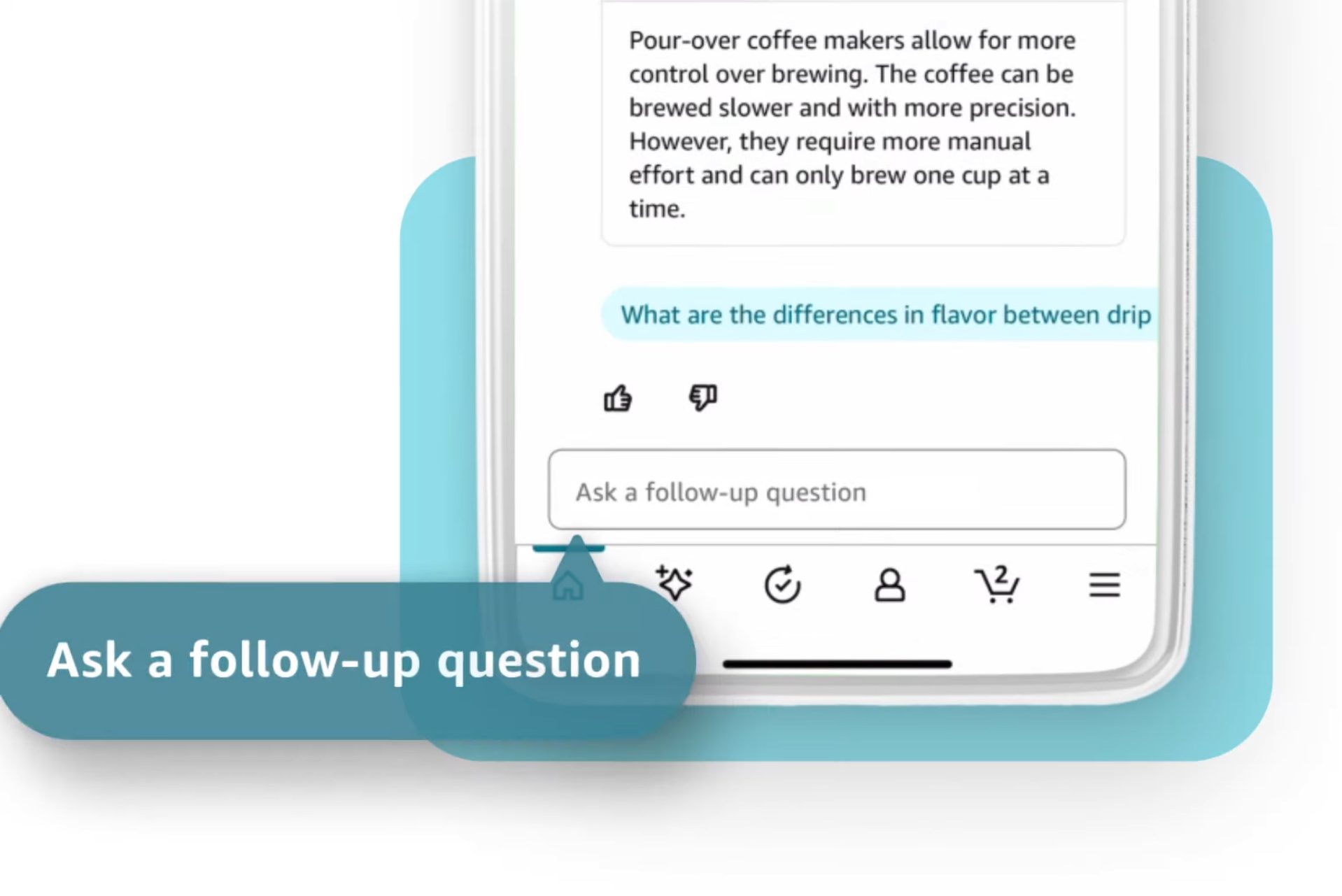
“Customers can expand the chat dialog box to see answers to their questions, tap on suggested questions, and ask follow-up questions in the chat dialog box,” says the company’s official blog post.

For queries such as “Is this phone case reliable,” the AI bot will summarize an answer based on product reviews, Q&As, and information on the product page. At the end of the day, it’s all about making informed purchasing decisions with some help from an AI chatbot.

Rufus AI answering Amazon product questions.
Amazon

Rufus is currently limited to a small selection of Amazon mobile app users in the U.S. as part of a beta test. However, this is an early version of the product, and Amazon also warns that Rufus “won’t always get it exactly right.” In the coming weeks, the AI chatbot will be made available to a broader set of users in its home market.

Rufus seems to be one of the more thoughtful and practical implementations of generative AI I’ve seen recently, and far away from the hype machinery built around the tech with hidden caveats. Plus, it seems to be free, without any Prime mandates.

Feature Image Credit: Amazon

By Nadeem Sarwar

Sourced from digitaltrends

By Nelson Aguilar

A few major services won’t have native apps for the Apple Vision Pro at launch.

Apple’s Vision Pro has arrived. The devices launches on Feb. 2 and whether you’ve already ponied up for the mixed-reality headset or plan to order one, you’re probably wondering which applications will be available when you finally get the Vision Pro in your hands. (If you want to be one of the first to take Apple’s headset for a demo run, here’s how.)

Interested companies are already lining up: On Jan. 16, Disney announced it will have Disney Plus for the Apple Vision Pro, which will bring 3D movies to Vision Pro users at launch, including Avatar: The Way of Water and Star Wars: The Force Awakens, as well as hyperrealistic Disney environments that allow you to watch movies and TV shows in places like Star Wars’ Tatooine and Marvel’s Avengers Tower.

However, not every app you might be hoping for will be accessible on the Vision Pro on Day 1.

In fact, several major companies are choosing to not build exclusive Vision Pro apps for their services, nor make their existing apps compatible, most notably Netflix, according to Bloomberg’s Mark Gurman. Instead, if you want to use Netflix on the Vision Pro, you’ll have to access it through your web browser, just as you would on your computer.

Not sure if your favourite application will work on the Vision Pro? Here’s a list of which services will and will not work at launch on Apple’s long-awaited headset.

What kind of applications are there on the Vision Pro?

On your iPhone, you can really only download one kind of application, and that’s any app in the App Store that’s designed to run specifically on iOS.

With the Vision Pro, it’s a little different. Two types of apps can run on the Apple headset:

  • Compatible apps: These are iOS/iPadOS apps that are not optimized for the headset but will still work on the Vision Pro when it launches. These apps will appear in a window on visionOS.
  • Native apps: These are optimized apps built specifically for visionOS. You’ll get a more immersive experience with these apps on the Vision Pro.

Apple announced that over 600 apps with native support for Vision Pro will be available when the headset launches in the US on Friday. And that’s in addition to the over 1 million compatible apps across both iOS and iPadOS.

However, some apps simply won’t appear on the Vision Pro, because there is no native app nor is the existing iOS/iPadOS app compatible.

Which applications won’t be available on the Vision Pro?

As mentioned above, Netflix is a notable absentee from the Vision Pro. Not only is Netflix not building an app for the Vision Pro but its iPhone/iPad app won’t support VisionOS either. A Netflix spokesperson told Bloomberg, “Our members will be able to enjoy Netflix on the web browser on the Vision Pro, similar to how our members can enjoy Netflix on Macs.”

YouTube is another major service that won’t be building a dedicated app for the Vision Pro. Again, if you want to watch YouTube videos on the Vision Pro, you’ll have to access it via Safari or another web browser. The iPhone/iPad app won’t support VisionOS as well.

Spotify reportedly isn’t planning on developing an app for the Vision Pro or making its iPhone/iPad app accessible either, and Meta may be skipping the headset as well, according to reports.

And which applications will be available on the Vision Pro?

Along with Apple apps such as Apple Arcade (hundreds of games), Apple Music, Apple TV and Safari, at launch, these are a few of the third-party apps that will be available as native or compatible apps on the Vision Pro:

  • Adobe Lightroom (native)
  • Amazon Prime Video
  • Box (native)
  • Crunchyroll (native)
  • Discovery Plus
  • Disney Plus (native)
  • ESPN
  • Fantastical (native)
  • Fubo
  • Imax (native)
  • J.Crew (native)
  • JigSpace (native)
  • Max (native)
  • Microsoft 365 (Word, Excel, PowerPoint, Outlook and more) (native)
  • MindNode (native)
  • MLB (native)
  • Mubi (native)
  • Navi (native)
  • NBA (native)
  • Night Sky (native)
  • Numerics (native)
  • Paramount Plus
  • Peacock
  • PGA Tour Vision (native)
  • Pluto TV
  • Red Bull TV (native)
  • Slack (native)
  • TikTok (native)
  • Tubi
  • Zoom (native)
  • Wayfair (native)
  • Webex (native)
  • Zillow Immerse (native)

This is obviously not a complete list, considering there are over a million apps that will work on the Vision Pro. And even if your app doesn’t work with the Vision Pro, like Netflix, you can still access it through Safari or another web browser.

For more on Apple Vision Pro, see what CNET’s Scott Stein learned about the Vision Pro when he tried it out.

 Feature Image Credit: Apple

By Nelson Aguilar

Sourced from CNET

By Deanna Ritchie

That tape over your webcam might not be enough — the hackers are watching; it might be the right time to install another privacy shutter.

In a report just published in Science Advances, researchers at the Massachusetts Institute of Technology (MIT) emphasized the risks to imaging privacy that ambient light sensors can offer. Users of devices worried about security may find solace in software permissions that limit webcam use and hardware solutions like shutters. Nonetheless, studies have demonstrated that one of the typical ambient light sensors used in a variety of devices can be used to collect visual data. These tiny sensors are normally permission-free on a device level and aren’t closed or deactivated by users.

MIT researchers utilized the Samsung Galaxy View 2 in their investigations. The ambient light sensor on this relatively dated and huge (17.3-inch) consumer tablet is located close to the front-facing (selfie) camera — which is still a pretty popular arrangement.

Manufacturers of devices classify ambient light sensors as low-risk since software (or malware) may frequently access them directly without requiring any authorization or privileges. However, prior research has demonstrated that in roughly 80% of cases — even a basic sensor can yield sufficient information to deduce keystrokes from a keyboard and steal a device’s authorizations and passwords. The latest study demonstrates the potential of an ambient light sensor in conjunction with the device’s screen, which serves as an active light source.

Some devices are more susceptible to these ambient light sensor espionage techniques.

Some devices will be more susceptible to this ambient light sensor espionage technique than others because every device has a different light sensor speed and measurement bit depth, screen brightness, and light sensor precision (see image above). As you can see from the source article numbers, some of the tablet device’s image captures took several minutes. However, ambient light sensor imaging spy technology is verifiably accurate and has room for improvement.

The MIT researchers pointed out that the light sensors are “quite useful,” and we need and want them. The MIT researchers said to adjust the following to stop your peeping-cyber-toms.

  • Rethink ambient light sensor device permissions.
  • Reduce sensor speed.
  • Reposition the sensor so it doesn’t face the user.

Hopefully, when manufacturers become better aware of the ambient light sensor issues, they will implement a few changes to prevent the “snooping tech” from finding more victims.

Featured Image Credit:  Jan from Pixabay

By Deanna Ritchie

Deanna is an editor at ReadWrite. Previously she worked as the Editor in Chief for Startup Grind, Editor in Chief for Calendar, editor at Entrepreneur media, and has over 20+ years of experience in content management and content development.

Sourced from readwrite

By 

During my time with Apple Vision Pro, I sat in the studio with Alicia Keys during a private rehearsal, carefully approached a dinosaur and watched movies in Avengers Tower. But what’s stuck with me isn’t these immersive experiences — it’s the fact that Apple has made using a VR headset feel as intuitive as swiping around your iPhone. And while that alone might not be worth $3,500, it certainly has me intrigued at the potential of this fancy set of goggles.

Apple’s much-hyped “spatial computing” headset has plenty of exciting capabilities, from putting you in a virtual, customizable movie theater to doubling as a full-on computer that lets you get work done, browse the web and use familiar Apple apps in new and engrossing ways. There’s not much of a learning curve either; navigating this device is often as simple as looking around and pinching your fingers.

But does all of that warrant its staggering price? And out of the folks who do have that kind of cash to spend, who should actually buy one? Here’s my attempt at answering those questions after some brief hands-on time with Apple’s long-awaited headset.

Apple Vision Pro design

Available starting Feb. 2, the Apple Vision Pro is an immersive “spatial computing” headset that lets you watch movies, play games, get work done and use your go-to Apple apps in a whole new way.

An iPhone on your face

apple-vision-pro-preview-cnnu-8

Apple Vision Pro may be a new type of product from the company, but the process of using one will feel pretty familiar to anyone already deep in the Apple ecosystem. Before I put the headset on, I used an iPhone to scan my face to ensure the experience was properly personalized — just like you do when setting up Face ID on your handset.

It was then time to sit down and strap the thing on. The headset’s default medium Solo Knit band turned out to be too big for me, so I simply popped it off and swapped in a small option that fit much better. The straps attach and detach with an easy magnetic snap, not all too different than swapping out Apple Watch bands. I used the onboard dial to tighten the band a bit further for a snug fit, pressed the headset’s Digital Crown button and felt the internal lenses automatically close in on my eyes. Then, it was time to play.

Apple-Vision-Pro-availability-visionOS-home.jpg

The Vision Pro’s home screen is likewise familiar: a floating array of apps like Photos, Safari, Apple TV and Music that look exactly like they do on your iPhone or iPad. Except instead of swiping around a touchscreen, you’re navigating with your eyes.

By far, this is what impressed me most about Apple’s headset — your eyes are effectively the mouse cursor, and anything you look at will instantly be highlighted and ready to be selected with a quick pinch of your finger. There was something surreal about smoothly bouncing between Apple TV’s various options just by moving my eyeballs, and aside from a few minor hiccups, using gesture controls to open apps, resize and arrange multiple windows and zoom into the finer details of my photo library all felt smooth and intuitive. I’ve experienced solid eye tracking on VR headsets like the Meta Quest Pro and PlayStation VR, but Apple’s implementation provides the most frictionless controller-free navigation I’ve ever seen.

apple-vision-pro-preview-cnnu-2

Thanks to the Vision Pro’s outward-pointing cameras, I could easily see and interact with the Apple reps in front of me while bouncing between apps. It’s similar to the Meta Quest 3’s passthrough capabilities, but everything looked a bit sharper. You don’t have to stay in the real world while on the home screen, though; the Digital Crown lets you finely adjust how much of your chosen virtual environment (such as the serene views from Haleakala I selected) seeps through. This is a nice edge over the Quest 3, which only lets you choose between full immersion and full passthrough.

As for how Vision Pro feels to wear? I’ll have to get my own unit to see how it holds up over prolonged use, but I found Apple’s headset to be fairly comfortable during my roughly 25-minute demo — at least in terms of weight. I did have an issue with the lenses, which pinched my nose a little too tightly during the initial setup process and stayed that way throughout my session. Thankfully, an Apple rep noted that you can manually adjust the lens distance in the settings menu, and that there will be multiple eye insert options you can switch between to find a comfortable fit.

Immersive apps with some serious potential

Apple Vision Pro software

The content I tried out on Apple Vision Pro largely fell into two categories: new, immersive versions of things you can already do on your other Apple devices, and a few custom-made experiences that have me intrigued about the potential of this powerful and pricey headset.

I started out by flipping through the headset’s Photos library, where you can see your pictures and videos in ways that a static screen simply doesn’t allow for. Zooming into a series of portraits shot on an iPhone 15 Pro revealed much more detail than I’d be able to see on just my phone, as I could easily make out the very fine patterning of a woman’s dress. Looking through panoramic photos reminded me of being inside the mind-boggling venue of The Sphere in Las Vegas, as my entire peripheral vision was suddenly immersed in these beautiful wide-screen nature shots.

Then there’s Spatial Photo and Video, which Apple is pushing as one of Vision Pro’s key selling points. These 3D photos and videos can be captured on your iPhone 15 Pro or directly on your headset, then played back on your Vision Pro to let you relive a cool memory in virtual reality. It certainly was neat — a photo of kids eating cake had lots of depth to it, and when one of them blew bubbles in a video, it looked as if the bubbles were coming toward me. I watched one spatial video recorded at a family’s dinner table, and it almost made me feel like I was there with them. The overall quality of Spatial Photo and Video is impressive but not quite so good that I forgot I was watching a video rather than actually reliving a memory.

Apple Vision Pro is perhaps best suited as an immersive movie-watching device, at least if my short time in the headset is any indication. The Apple TV app provides a wealth of engrossing viewing options, many of which effectively let you block out the real world and enjoy your own personalized movie theatre or stream your favourite shows while in the virtual wilderness. I was especially impressed by the multiple “seating” options (such as “front row” or “balcony”) that I was able to switch between while watching Avatar: The Way of Water in 3D at a crisp-looking 4K resolution.

I also checked out a few three-dimensional Apple Immersive Videos shot specifically for Vision Pro. These were neat; I had front row seats to an Alicia Keys jam session, got a bit unnerved watching a tightrope walker at the top of a mountain and smiled as a bloat of baby hippos practically ran into me. However, these weren’t true 360-degree videos, and the large black borders I noticed whenever I moved my head around took me out of the experience a bit.

Apple-Vision-Pro-entertainment-Disney-Plus_twitter.jpg

But the real magic happened when I opened up Disney+. My real-world surroundings washed away, and I was suddenly watching movies while overlooking the New York City skyline from Avengers Tower. Needless to say, I geeked out. This virtual environment — one of several available in Disney’s streaming app — was painstakingly detailed to please nerds like me, as I looked around in full 360 degrees to notice things like Doctor Strange’s cape hanging in a corner or some leftover takeout shawarma sitting on a table to my right. These backgrounds are also dynamic; when I transported myself to Tatooine and played a trailer for “A New Hope,” the scene around me automatically shifted from day to night to help me get better immersed in the movie. This felt like an experience truly built for Vision Pro rather than just an iOS app blown up on a big virtual screen, and I hope to see more like it as developers invent for the headset over time.

Another highlight was the Mindfulness app, in which a calming narrator encouraged me to slow down and relax as the real world slowly faded away into a serene darkness where I was surrounded by colourful dots. It was a short session but still very soothing, and much needed after a full day of hustling around the city.

The rest of my demos were a standard mix of Apple stuff and familiar augmented reality experiences. As a taste of the Vision Pro’s enterprise chops, the JigSpace app let me virtually explore, manipulate and take apart an Alfa Romeo vehicle, which I was able to make as small as a toy car or as big as the real thing using simple hand gestures. An app called Explore Dinosaurs thrust me into a mixed-reality wilderness where a virtual butterfly managed to spot and land on my real finger, and where a dinosaur tracked and reacted to my movements as I walked around the room. I got a little spooked when it got right up in my face, which means it worked.

Then there’s the basic Apple functionality. Multitasking between apps and scrolling through the CNN Underscored homepage on Safari felt smooth and intuitive, and I was able to type on a fairly reliable virtual keyboard that felt comparable to the one on the Meta Quest 3. But typing on a virtual keyboard is never ideal, which is why I was pleased to see that you can use voice dictation in Safari by simply looking at the microphone icon at the top of the browser. Oh, and Apple’s own hardware — such as its mice and keyboards — is also supported. This headset packs the same Apple M2 chip you’ll find in many of the best MacBooks, so it’s no surprise that juggling and rearranging multiple apps felt instant and stutter-free.

Some uncanny concerns

apple-vision-pro-preview-cnnu-6

I had a good time inside of the Apple Vision Pro, but a few concerns came to mind after I watched another person use the headset. After my demo, I was taken to a room where someone was working with a Vision Pro on (complete with a Magic Keyboard and Magic Trackpad) in order to simulate how you might interact with someone wearing the goggles in an office. Due to the headset’s ability to create a virtual representation of your face, which Apple calls Persona, I was actually able to see this person’s eye movements and expressions through the front of the headset — or at least an uncanny digitized version of them. While I could indeed make out every blink and raised eye this person made, it was all just slightly off in a creepy, “Black Mirror” kind of way. For what it’s worth, you can use the Digital Crown to adjust how visible your “eyes” are through the headset — the idea being that you’ll make things fully opaque to indicate you’re going heads down and clear when you’re able to talk.

Apple also showed off what taking photos and videos looks like to the person on the other end; a quick white flash for the former and a prolonged pulse for the latter. You’ll also hear the standard iPhone shutter sound when someone takes a picture. Unlike the flash, this sound can be disabled (much like it can on an iPhone). I find this to be a slight privacy concern for folks who are unaware that they’re being photographed, but it is in line with devices that have similar functionality, such as the Ray-Ban Meta smart glasses.

The takeaway

apple-vision-pro-preview-cnnu-3

I came away from my Apple Vision Pro demo impressed and intrigued, but I still have plenty of questions and concerns. Here’s what I do know: Apple has successfully made a mixed-reality headset that’s nearly as intuitive to use as an iPhone or a Mac, all without any cumbersome controllers or unreliable gesture tracking (like with Meta’s headsets) to get in your way. If nothing else, that lays the groundwork for how great the Vision Pro could be after a few iterations, and hopefully a lower price.

Its $3,500 cost alone will likely be prohibitive for many, though this is a device that can ostensibly function as your 4K TV and your computer — two types of products that can easily run you thousands of dollars on their own. The question is, are you willing to have your TV and your computer strapped to your face, with device-specific quirks and limited battery life? Unless you’re an avid Apple enthusiast with an unlimited budget, it’s hard to imagine who might fall into that camp.

I also have questions around fitness and gaming — two things I use my Meta Quest 3 for almost daily. Aside from Super Fruit Ninja, I haven’t seen many titles that look to take advantage of Vision Pro’s powerful ability to bring virtual games into your real-world living space. And as an avid Supernatural user, the Vision Pro doesn’t seem to have comparable apps that’ll get me excited to work out (no offense to the Apple Fitness+ trainers).

It’s for these reasons that I’m especially eager to truly live with the Vision Pro for a few weeks and see if it’ll truly become part of my daily routine or just a fun, expensive toy to use when I want to return to Avengers Tower. We’ll have a lot more to say on Apple’s new headset once we receive one, so stay tuned for more.

Feature Image Credit: Mike Andronico/CNN Underscored

By 

Sourced from CNN underscored

By Wes Davis,

A Consumer Reports study found that thousands of companies contribute to Facebook’s data stores on each person.

Facebook gets data on individual users from many thousands of companies, and a new study (PDF) from Consumer Reports tried to put more exact numbers on it.

Researchers found that, on average, Facebook received data from 2,230 different companies for each of the 709 volunteers. One extreme example showed that “nearly 48,000 different companies were found in the data of a single volunteer.” In total, Facebook data archives showed that 186,892 companies had provided data on all of the study’s participants.

Volunteers recruited with help from The Markup pulled their personal data from Facebook using its Download Your Information tool and shared it with the researchers.

An infographic showing information going from a person to their apps, to servers, then to Facebook, who uses it for targeting ads to you.
Image: Consumer Reports

Companies using Meta’s advertising platform upload customers’ personal information and buying habits, which Meta uses to serve targeted ads to those people or people with similar profiles. The researchers believed that the ease of “microtargeting” campaigns to specific user data accounted for the fact that 96,000 of the companies listed were only targeting one of the volunteers.

An infographic showing how businesses work with data brokers who aggregate your personal info from several sources before providing it with Facebook for ad targeting purposes.
Image: Consumer Reports

Ninety-six percent of the study participants’ archives contained information shared by a data broker called LiveRamp, but it wasn’t all data brokers. Large retailers like The Home Depot, Walmart, or Amazon showed up, too, while other smaller businesses were “surprisingly well represented,” such as a car dealership in a 24,665-person town in Texas that covered 10 percent of the study’s volunteers on its own.

Most couldn’t be identified, though, as they used nonsense combinations of characters like “Bm 5 100tkqc nlm” or generic names like “Viking.” But the name doesn’t really matter, does it? Acxiom, the number two data broker that appeared in the study’s data, says it can reach “over 2.5 billion of the world’s marketable consumers” and boasts about its “ability to build a complete view of the consumer for improved consumer recognition.”

We’ve all heard someone say our smartphones are listening to us, and that must be how they know which ads to show us. The truth is, companies aren’t just sitting around waiting for us to talk about jeans — they already know we want the jeans, what size we wear, which brands we like, and roughly what time of year we usually start buying them.

Correction January 20th, 12:30PM ET: This story previously said Acxiom owns LiveRamp. While Acxiom did purchase LiveRamp in 2014, it later adopted the LiveRamp name and sold Acxiom Marketing Solutions in 2018. We regret the error.

Feature Image Credit: Illustration by Nick Barclay / The Verge

By Wes Davis,