A new survey suggests that Apple iPhone brand loyalty increased as Android users became less loyal to their device makers and more willing to switch to another brand.
The survey, carried out by SellCell earlier in March 2021, involved more than 5,000 smartphone users who owned various models of the most popular handset brands. The results suggest that iPhone users are more loyal and less willing to switch to another brand than their Android-using counterparts.
Brand loyalty for Apple reached an all-time high of 92%, up from 90.5% in a SellCell survey the same time in 2019. During that same period, Samsung brand loyalty dipped from 85.7% to 74% in 2019. The SellCell results also indicate that iPhone users are about 18% “more loyal” to the Apple ecosystem than Samsung owners.
While only 8.1% of iPhone users said they planned to switch to another brand, about 26% of Samsung users indicated that they would jump ship with their next smartphone upgrade. Among those potential switchers, 53% said they’d buy an iPhone. Privacy is the primary reason for 31.5% of those switchers, the results indicate.
It isn’t just Samsung that lost loyalty in the survey results. Brand loyalty among Google Pixel, LG, and Motorola users all dipped. For the Google Pixel lineup, brand loyalty dropped 18.8% in two years.
A slim majority of respondents, 46.6%, also said that the iPhone 12 is the current best flagship smartphone range. That’s compared to 30.4% who said the Samsung Galaxy S21 was the best flagship series on the market.
When it came to survey participants explaining why they were sticking to the iPhone, 45% said they liked their current brand, 24% said they’re too tied into the ecosystem, and 16% said they didn’t have a reason to move.
Those who did say they would choose another brand cited better technology (38%) and a preference for the design of other manufacturers (26.4%) as the primary reasons for a switch.
When asked to choose their favorite model of current smartphones, 17% of respondents chose the iPhone 12 and 12.7% chose the iPhone 12 Pro Max. The Galaxy S21 came in third with 11.4%, while the iPhone 12 Pro ranked fourth with 10.6%. In fifth place was the Samsung Galaxy S21 Ultra with 10%.
SellCell conducted the study via online survey between March 3 and March 10, 2021. It involved more than 5,000 smartphone users aged 18 and up in the U.S., and included 2,000 iPhone users, 2,000 Samsung users, 400 Google Pixel users, and 600 Motorola or LG users.
Knowing how to do an in-depth SEO competitor analysis is crucial to your search engine optimization strategy.
Sadly, not many do it. And those doing it do it haphazardly.
But knowing your competitors is essential to helping you create a roadmap for SEO activities that will help you have the edge over your competition.
What is an SEO competitor analysis (And why is it important)?
SEO competitor analysis is the practice of looking into your competitor’s SEO strategy, especially those who are doing better than you. Conducting an SEO competitor analysis is important as it will help you discover a lot of insights you can use to boost your own strategy.
You’ll be surprised at how much you can learn by simply looking under the hood of your competitor’s SEO strategy.
Some of the things you can discover are:
SEO strategies that are working for your competitors
What they’re doing, that you aren’t
How difficult it is to rank for important keywords
The traffic potential in your niche
However, the most important reason for conducting an SEO competitor analysis is to gain insight into what you can do to create an effective SEO strategy.
Before we dive into the six steps that you should take to analyze your SEO competition properly, you need to gather the right SEO tools to help you mine your competitors’ data. You’ll also need to create a spreadsheet that you’ll use to gather the data you collect.
And because there’s so much work involved, you’re better off hiring a freelance SEO or a full-time one if your organization is large enough.
With that out of the way, let’s get started.
1. Start with keyword research
Keyword research is one of the pillars of SEO.
That’s why when you conduct your competitor analysis, you must start by identifying all your important keywords. More than that, you must understand the intent behind those keywords when your audience uses them in their search queries.
The keywords you want to focus on must be powered by informational, commercial, and transactional intent.
That’s because those are usually the money keywords that result in visitors eventually going down your sales funnel.
But more on that as we discuss competitor keyword analysis.
Knowing which keywords you’re creating content around and trying to rank will play a huge role in later aspects of competitor analysis. So, the most important thing you need right now is a list of your primary keywords. We won’t go into great detail on how you can get them, but if you’re interested, check out this article on how to discover relevant keywords.
2. Identify your real competitors
While it may seem obvious, one of the first steps to conducting a competitor analysis is identifying your real SEO competitors.
Sure, you may think you know who they are, but until you dig deep into the data, you’ll be working on assumptions.
So how do you identify your real SEO competitors?
First of all, be clear on who is not your competitor. Some websites may rank for keywords that are important to you but are not in your same vertical. An example is Wikipedia. They rank for millions of terms but have no intention of monetizing any of them.
Secondly, make a distinction between your primary and secondary competitors. Primary competitors sell the exact products and services you offer and target the same audience as you. Secondary competitors are those interested in ranking for the same keywords as you (thereby creating similar content) but don’t offer the same products or services.
To get a clear picture of who your competitors really are, there are a few strategies and tools you can use. Here are some of them:
Use the SERPs
Google is always your best friend when it comes to anything SEO. Simply type in your main keywords and note which of your primary and secondary competitors rank for those keywords.
Alternatively, you can search for your product and its alternatives. The search results will give you a good picture of who your real SEO competitors are.
Use Competitor Analysis Tools
Another way to discover your real SEO competitors is to use competitor analysis tools. These will help you better understand who your real competitors are and give you the data to back it up. Examples of such tools include Ahrefs Site Explorer and SEMrush’s Competitive Research Toolkit.
To find your competitors, simply enter your domain name into your SEO tool of choice and navigate to the competing domains. You can sort the results using the common keywords tab to get a clearer picture of your closest competitors.
Once you’ve identified your real SEO competitors, it’s time to move on to the next step of your SEO competitor analysis…
3. Benchmark competitor SEO performance
Once you’ve identified your real SEO competitors, you need to gather data and metrics about their SEO performance. The reason for that is so you can have top-level data to use to benchmark with.
Some data you should use to benchmark includes:
Domain Rating and Domain Authority
Two important metrics that you must consider two critical metrics in your competitor analysis: domain rating (DR) and domain authority (DA).
Domain Rating
DR is a metric developed by Ahrefs to show the strength of a website’s backlink profile. It uses a logarithmic scale that goes from 0 to 100. This metric is vital because backlinks play a major role in the way search engines rank websites.
When conducting your competitor analysis, compare your DR to your competitors’. If it’s lower, you will have to build more backlinks to improve your rankings. Note that you’ll probably have to work harder at building more backlinks for competitive pages.
As you look at DR, Ahrefs will show you the backlink profiles of each of your competitors. Make sure to note the websites that you can include in your link building campaigns.
Domain Authority
Domain authority is a Moz metric developed to predict the likelihood of a website ranking on search engines. The algorithm takes into consideration many factors that search engines use to rank websites and calculates the outcome on a scale of 0 to 100.
Again, you can use your competitors’ DA scores to benchmark your own. If yours is lower, you must design a robust SEO strategy to help you catch up and overtake them.
Both DR and DA are good indicators of your starting point in improving your SEO. We’ll touch on how to improve on them later in the post as we look at other aspects of competitor analysis. For the moment, you just need a list of:
Your real SEO competitors
Their DR and DA scores
Your keywords
Potential backlink targets
Armed with this information, you can now proceed to collect more data on your competitors.
Number of Indexed Pages
Another crucial piece of data you’ll need as you conduct an SEO competitor analysis is the number of indexed pages your competitors have. To rank pages, search engines first need to find and index them.
You can use Google to easily check how many indexed pages your competitors have by searching for “site:domain”.
For example, if the Jeff Bullas blog is one of your competitors, here are the results you’ll get:
From the above screenshot, your competitor has 3,500 indexed pages. Do this for all your competitors and put the data in a spreadsheet. You can then compare the number of your indexed pages to those your competitors have.
Again, if you have fewer indexed pages than your competitors, you’ll have to create and index more content to catch up. But of course, the aim is not to catch up but to overtake your competitors. This means you’ll have to create more SEO-optimized content than them to give you a better chance of taking the top spot.
Keyword Rankings
Your competitors’ keyword rankings are another aspect of competitor analysis you must consider. You want to consider whether they’re increasing in the number of organic keywords ranking in the top 10 positions.
Again, you can use SEO tools to get this data.
Competitors who have enjoyed consistent growth in this area over the past 6-12 months are the ones you should focus on. This growth is a sign that they’re consistently creating content and working on improving their rankings.
Traffic Trends
The primary function of SEO is to drive organic traffic to your website.
That’s why checking your competitors’ traffic trends is crucial to your SEO competitor analysis. Here’s an example of PandaDoc’s traffic comparison to their competitors:
As you can see, this electronic signature software company has a lot of work to do to catch up to the prominent players on the market. So what kind of traffic metrics should they focus on as they conduct their SEO competitor analysis?
Monthly Organic Traffic
Identify competitors that are getting the most organic traffic. You can take this to a more granular level by analyzing their traffic at the domain, subfolder, subdomain, and URL levels. This will help you identify the best traffic opportunities.
Organic Traffic Growth
Still on traffic trends, you also need to analyze your competitors’ organic traffic growth. Note whether your competitors’ traffic is:
Growing
Declining
Plateauing
You’ll want to pay attention to those competitors whose traffic has been consistently growing over the past 12 months.
Traffic Value
Your competitor’s traffic value shows how their SEO strategy helps them scale traffic across commercial intent keywords. While this metric is based on traffic brought in by paid ads, it’s a valuable indicator of the revenue your competitors are getting from their traffic.
Backlink Growth/Referring Domains
Trends in referring domains are crucial to helping you develop a backlinking strategy. Growth in this area shows that your competitors are actively building backlinks to their content.
Again, focus on competitors whose referring domain numbers are growing as it shows their link building strategy is working.
Social Media Performance
Social media plays a significant role in SEO.
For one, social signals are an indicator that content is relevant and helpful. Secondly, social media is a good vehicle for getting your content in front of the right audience. It helps drive the right traffic to your assets. Finally, a social media analysis will help you know which types of content gets the most engagement.
Analyze which social media platforms work best for your competitors and which audiences they target there. This will help you design your social media strategy around tactics that work.
Benchmarking your SEO competitors’ performance is one of the essential parts of your SEO competitor analysis. You must take your time and gather as much data as possible at this stage as it will help you create a roadmap for your SEO success.
4. Analyze your competitors’ technical SEO
Each website has its own unique digital makeup. Understanding how your competitors’ boost their SEO through their website’s technical makeup is another essential component of your SEO competitor analysis. That’s why you must make sure to use the right platform to build your website. You must also invest in good web hosting.
Let’s look at some of the crucial technical aspects you must consider in your analysis.
Site Structure
The way a website is structured is essential to SEO for two main reasons:
Determines whether a website is easy to crawl or not
Impacts user experience (UX)
A good site structure makes a website easy to crawl. Search engines reward this with better rankings. Things to note here include how subfolders and subdomains are structured.
UX also impacts rankings as search engines reward websites that offer a positive UX. Besides, good UX results in increased dwell time, one of the known ranking factors.
Analyzing your competitors’ website structure and navigation will help you see any structural changes you may need to make on your website to help improve its performance.
Navigation
Your navigation, especially the top-level navigation (TLN), is also an important part of your site structure. As such, it has a bearing on your SEO. A few things to consider when analyzing your competitors’ TLN include:
Do they link to their main pages from the TLN?
Do they use optimized anchors?
Can users get to important pages within the prescribed minimum of 1-3 clicks?
The insights you get from your competitors’ navigation can help you design optimized menus.
Content Silos
Content silos refer to a technical SEO strategy that involves grouping together topically-related pages. This is usually done by creating a strategic internal linking strategy.
Content silos are a great way of making it easy for search engines to crawl your website and understand your main topic. They’re also great for UX and keeping visitors on site. All these are contributing factors to how websites rank.
Analyze how your competitors’ structure their content and use the insights to optimize your site structure.
Site Speed
Site speed has been a major ranking factor for years. And will continue to be one of the elements of every technical SEO strategy. The reasons for this are that fast sites:
Are easier to crawl
Offer a better UX
Have better conversion rates and fewer bounce rates
Analyzing your competitors’ site speeds will help you gain insight into how they optimize for speed. You’ll have an idea of the changes you can make to your site to make it faster.
Mobile-friendliness
It may be a song that has been sung to death, but yes, mobile-friendliness is still an important design and SEO issue.
With Google’s mobile-first indexing policy, no serious business can ignore the need to have a mobile-friendly website.
Again, checking for mobile-friendliness is easy as you can use Google’s free Mobile-Friendly Test to check if your competitors’ websites are mobile-friendly.
But mobile-friendliness is not just for the sake of making search engines happy. Statistics show that mobile accounts for about 56% of all organic traffic in the US. This means even customers expect to have good mobile experiences websites.
With all this data on your competitors’ technical SEO, you’ll have a clear picture of their strengths and weaknesses. Most importantly, you’ll have an idea of opportunities to capitalize on to give yourself an edge.
5. On-page competitor SEO analysis
Another step you must take in your SEO competitor analysis is to check your competitors’ on-page SEO strategy and performance. This will include elements such as:
Competitor Keyword Research
Competitor keyword research is the practice of analyzing your competitors’ keywords. The point is to identify keywords that your competitors’ are ranking for, but you are not. Take particular note of keywords that are valuable and that you can rank for. You should also pay attention to keywords you’re ranking for, yet you’re still lagging behind your competitors.
Besides primary keywords, you must also look into your competitors’ secondary keywords. These are keywords that add more context to your primary keywords and are usually related to search intent. Search intent refers to one of the four reasons a user is using that particular keyword in their search query:
Navigational intent. This is when users want to go to a particular website or page. An example of navigational intent is “online course platform Teachable.”
Informational intent. When a user wants to know more about a certain product, service, or topic. For example, “online course platforms.”
Commercial intent. This is when a user intends to buy a product/service soon but are still researching their purchase. For example, “What is the best SEO Tool?” Here is a live example.
Transactional intent. People searching with transactional intent are ready to make a purchase. A good example would be “Thinkific online course platform subscription.”
To create web pages and content that meet your business needs, you must leverage keywords and search intent together. Check how your competitors’ are doing this and get some tips from their keyword strategy.
Top-performing Content
Content plays a crucial role in SEO.
That’s why you must analyze your competitors’ top-performing content. Top-performing content simply means content that drives traffic as well as converts well. When analyzing your competitors top-performing content, look for attributes like:
Content Type
Of your competitors’ top-performing content, check which content types work best. Is it:
Long-form vs. short-form articles
Listicles
Reviews
Informational content
How-to guides
eBooks
“Best of” or comparison articles
Product pages
Content Format
Apart from content type, you must also investigate the content formats that work best for your competitors. Common content formats include:
Written content
Video content
Audio content
Visual content (like infographics)
Content Length
Average content length also plays an important role in rankings. Search engines want to serve users content that’s as comprehensive as possible. When analyzing your competitors’ top-performing content, take note of the average length. To create content that ranks, apply Brian Dean’s skyscraper technique and create longer, in-depth, and higher quality content.
The purpose of this step of your SEO competitor analysis is not just to copy the content your competitors are creating. The objective is to know what kind of content you should be creating — then create better content than your competitors.
Internal Linking
Internal links are part of a successful on-page SEO strategy. Building internal links has three important SEO benefits:
Help users navigate a website
Define the information architecture and hierarchy of a website
Help distributes link equity throughout the site
Despite popular belief, you don’t build internal links randomly. There must be a well-defined strategy if you’re to reap the full SEO benefits of your internal links. That’s why it’s a good idea to analyze your competitors’ websites to see how they create their internal links.
With your on-page competitor analysis done, you can now move on to the next step of your SEO competitor analysis — off-page competitor analysis.
6. Off-page competitor SEO analysis
Off-page SEO refers to all activities away from your site that help improve a website’s search rankings. The most common are link building and other promotion strategies that help drive traffic to your website. However, link building is still one of the most significant off-page activities that websites rely on to boost rankings.
And that’s why you must conduct a thorough competitor backlink analysis as part of your SEO competitor analysis.
Let’s face it. Ranking without backlinks is almost impossible.
And obtaining relevant quality backlinks can be quite a daunting task if you don’t know where to get them.
And that’s where SEO competitor analysis comes to the rescue.
Looking into your competitors’ backlink profile will help you know:
Websites that could potentially link your content
The type of content and pages that work best as link “magnets”
Identify link building strategies that work
Gauge how many links you need to build and the timeframe you need to build them in to be competitive
One observation that will help boost your link acquisition is websites that link multiple times to your competitors. It’s a sign that they create content related to your niche and are always on the lookout for resources to link to.
Don’t be intimidated if you find some of your competitors get thousands of links from the same domains or networks. It simply shows they use risky link building tactics like PBNs. Don’t try the same tactics as search engines frown on such tactics.
Looking into your competitors’ backlink profile can’t be done manually, of course. But a good SEO tool can give you all the data you need in a matter of minutes. And once you have the data, you can use it to build your link building strategy.
SEO competitor analysis – Putting it all together
All the data you’ve gathered from your SEO competitor analysis is not the end of the journey. It’s simply a means to an end. Your results and data collected are simply the foundation for the next phase of your task – mapping out your SEO strategy.
Armed with data on your competitors’ strengths, weaknesses, and industry SEO best practices, you can now devise an SEO strategy that’s bound to help you beat your competitors.
But remember, an SEO competitor analysis is never a once-off project. You must conduct them regularly to help you stay ahead of your competition.
Hanson Cheng is the founder of Freedom to Ascend. He empowers online entrepreneurs and business owners to 10x their business and become financially independent. You can connect with him here.
Want to position yourself as an industry expert? Looking for a Clubhouse strategy to expand your influence?
In this article, you’ll find six ways to use Clubhouse to grow your authority.
#1: Optimize Your Clubhouse Bio for Business and Engagement
Optimizing your Clubhouse bio is mission-critical before you step into any room—big or small. It’s how people know who you are so they can decide if they want to follow you, invite you on stage, and allow you to be a club member.
Name
A funny little point about Clubhouse is that you can only change your name once. I ran into a guy in a room who had his full name “Robert” on his profile. After talking with the people in the room, he said he actually likes to be called Robbie, so they implored him to change it on his bio (which makes sense on an audio platform and otherwise).
Get your name right the first time and stick with it. Know that you only have one chance to change it, at this time, if needed. Hopefully, you won’t need to.
Clubhouse Profile Pic
You musthave a pic up on your Clubhouse profile. It should be your face, not a logo, abstract art, your latest book cover, or your kid’s pic from Facebook. YOU. Ideally, make it a picture that’s consistent with the rest of your avatars on Instagram, Twitter, and LinkedIn.
Pro Tip: Make your profile pic punchy. A lot of people remove the background and put their pic on a nice bright color (like hot pink, chartreuse, or cerulean) to make it stand out in a room on Clubhouse. I recommend picking something that flows with your current brand palette; especially on Instagram since your Clubhouse bio can (and should) connect there.
Clubhouse Bio
How long can your Clubhouse bio be? My current bio is about 1,200 characters including spaces (167 words). To test it, I checked to see how many characters my bio would allow and it tapped out at 2,438 characters (375 words) for me. Now, just because your bio canbe long doesn’t mean it should.
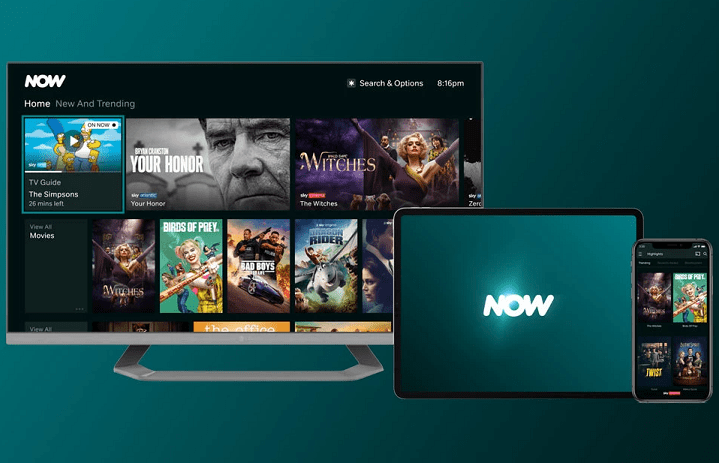
(Pocket-lint) – Now TV has ditched the TV. In its name, at least. The streaming service from Sky is just Now, now.
As well as a new colour scheme and curvy logo, the service itself gets a shiny new look across its TV and mobile apps.
The traditional passes have been rebranded too, with the “pass” name also ditched. Each paid plan is renamed a Now Membership, although the categories are the same: Entertainment, Cinema, Sports, Kids and Hayu.
Boost is still available for £3 per month, to upgrade images to 1080p and audio 5.1.
As well as the TV service, internet packages are now called Now Broadband – which is partly why the name has been changed, we suspect.
“Now has always been the home of quality entertainment and our new brand evolution ensures that, even in a hectic world, no one misses out on the entertainment they love,” said managing director at Now, Marina Storti.
“By moving from Now TV to Now, we marry our world-class quality with brilliant simplicity. This immediacy creates a true destination and community for those who love and live for the best entertainment.”
Traditional marketing and media are just not enough to attract and excite today’s generation of customers.
As a business consultant, I often have to remind small-business owners that their marketing needs to be more interactive, versus the traditional “push” model, where you broadcast your message to as many people as possible.
New generations of customers respond better to the “participative” approach, where they get to provide input via social media and the internet.
It started a few years ago with email satisfaction surveys after an online purchase, but now includes interactive internet ads, as well as custom requests for input on the design of future products and influencers on social media. It seems that everyone these days wants an experience and a relationship, and is willing to become your best advocate via word of mouth.
Some call it a move from always “hunting” for new customers in the wild to “gardening,” or nurturing loyalty and value from the ones you already have.
In any case, the new approach is important to all businesses, and embodies some new marketing rules that you need to focus on and learn:
1. Make your marketing exploratory and dynamic.
The days of big-bang long-term campaigns that never change are over. You should be constantly trying new approaches via social media and online, and asking for feedback and input from influencers and customers. Scale quickly on good feedback, and move on if you get little engagement.
A step in the right direction is to take advantage of the new tools available at very low cost, including sponsored podcasts, blogs, visibility in online communities, and Twitter influencer support. Sometimes it’s as simple as updating your website format and videos.
2. Use experiments versus designing the ideal ad.
Trends and customer interests change quickly, so use small experiments to find something that works today, and use innovation to push the envelope, before your competitors can copy and overrun you. The key is to be able to measure your return, adapt quickly, and learn from your efforts.
According to the Harvard Business Review, e-commerce companies that conducted ad experiments saw 2 to 3 percent better performance per experiment run. An advertiser that ran 15 experiments in a given year saw a 30 percent higher ad performance.
3. Motivate customers to participate and engage.
Reward customers for their advocacy and engagement with discounts and coupons, keep the interaction dynamic, and encourage their return. This requires a sense of urgency on the part of your team, and a culture of accountability and focus on the customer. Marketing must be everyone’s top priority.
For example, Dunkin’ Donuts did this through a photo contest, rewarding discounts to those who submitted a photo with the brand’s handle and hashtag. Other companies highlight live experience and happy videos, submitted by customers, on their website and promotions.
4. Partner with others to create blended offerings.
A very successful marketing effort created by a restaurant near me during the pandemic offered a carryout from multiple sources–to combine flowers with food and drinks, all from different establishments, packaged creatively together. Everybody wins, and it spread quickly on social media.
People remember and endorse you as the primary brand that created the blended offering, as well as the other “endorsed” brands. The hybrid approach is also effective as an experiment if you are exploring ways to expand your own brand into new segments.
5. Market solutions as an experience or an event.
Advertising more features, or even a lower price, is not as memorable to customers today as a great experience or a unique event. These may be live or immersive online experiences. Use social media to build anticipation and highlight successes, to get people talking and coming back for more.
The message here is that big blockbuster campaigns and big marketing budgets are no longer the key to results in the new customer environment, where participation and relationships are key.
Now is the time to ask your customers and partners for participative ideas, do some experiments, and scale up the ones that work. Be prepared to make frequent updates as trends change.
Marketing is no longer a one-way conversation, whether you are a startup or a legacy business. How long has it been since you changed your marketing strategy? Are your costs going up and the returns going down?
Try listening and learning, more than talking and pushing.
Tips and tricks to move to the top of Google’s results
An enormous amount of content is published to the internet every day, so if you want to attract readers to your blog, you’ll need more than the best website builder and a topic to talk about—you’ll also need to understand SEO, or search engine optimization.
SEO is the process of tailoring your blog post to make it more visible on search engines such as Google and Bing. These search engines analyse web pages for certain indicators of content and quality. If you learn how this works, you can implement a few simple tricks to move your posts higher up in the search results. In this feature, we show you how to write a blog post with SEO in mind, in order to bring in more readers.
Step 1: Have a clear purpose
Think about SEO when writing your blog posts (Image credit: Pixabay)
Before you write your post, think about what its purpose is. There should be one clear, specific topic that your article is about. Consider what kind of person you want to read your article, what they should get out of it, and what search terms they might use if they were looking for it. Answering these questions will help you write the article and implement the following steps.
Step 2: Structure your article for readability
Search engines can tell how readable an article is—that is, how easy it is for someone to read through and understand its points. A major aspect of this is giving your writing a clear structure. There should be an introduction, a main body of text, and a conclusion.
Step 3: Use a strong focus keyword
Many blogging sites let you set a focus keyword, which is the main search term that you want leading to the post. Choose one that’s specific to the post and not used by any other posts on your website; after all, you don’t want your pages to compete with each other.
A useful trick is to use a long-tail keyword, which is a longer term, and often a question. Make sure to include your focus keyword throughout your article. For example, the long-tail keyword of this article is, “how to write a blog post,” which we used in the title, the introduction, and this very sentence.
A question can work well as a focus keyword (Image credit: WordPress)
Step 4: Use topic tags
Besides your focus keywords, you can add tags to your blog posts. These are like category titles, which organize all the content on your website. Think of them like the index words in a book—readers interested in a topic can find all your articles about it using the tag.
If an article covers several topics, you can include multiple tags. However, don’t use tags too similar to each other, like “SEO” and “Search Engine Optimization.” Search engines and readers are both clever enough to interpret this as you trying to trick them by listing the same content multiple times. It’s useful to have a set list of tags for your site and restrict yourself to that list.
Step 5: Have an effective title
Emotive words like “catchy” can help draw in readers (Image credit: Google)
Choosing your title carefully is important, because not only do search engines use the title to determine the article’s content, but it’s also the first thing that viewers see in the search results – so it plays a major role in their decision to click through.
It’s useful to include your focus keyword in the title. Google cuts titles off after around 60 characters, though, so make sure your keyword comes before that point. It’s also a good idea to use emotive power words. Think about how words like “easy,” “spectacular,” and “thought-provoking” might grab a reader’s attention.
Step 6: Optimize the meta description
The meta description is a summary of your article’s content, and it appears below the title in search engine results. In an engaging and concise way, summarize why readers should click through. Ideally, your meta description should be limited to 155 characters and include the focus keyword.
Recently, Google has started displaying parts of the article relevant to the searched terms underneath titles, rather than the meta description, so some SEO experts say that the meta description isn’t as useful as it used to be. But it’s still worth the short amount of time that it takes to write it.
Step 7: Use images effectively
You can find suitable images on royalty-free photography sites (Image credit: Pexels)
Since the human mind often finds it easier to parse visually appealing content, adding images to illustrate and help explain your point makes your articles more engaging. Consequently, they’ll be placed higher in search results. You can also embed videos for extra engagement.
It’s important to add alt text to your images. This should be a concise, specific description of the image. It tells the search engine what the image shows, and helps it rank in image results pages. Also, the image can be described to users with slow internet connections or screen readers.
Step 8: Link to related content
In the introduction to this feature, we linked to another article on Tom’s Guide. There are two reasons to do this. First, it allows readers to discover other content on the site that may be relevant to them. The other reason is SEO-related.
Search engines can tell if an article is linked to and from other web pages. To the algorithm, this makes the article seem more valid and relevant, so it will be moved up in the search results. It’s useful to include internal links wherever possible in your blog posts—your pages will support each other’s SEO scores.
Summary
Search engine optimization involves a certain amount of technical understanding of keywords, meta descriptions, image alt text, and how search engine algorithms interpret all this data. However, most of it is about simple readability. The more engaging your content is to readers, the higher your search engine ranking will be.
If you follow all the tips and tricks that we’ve listed here, you should be able to significantly improve your blog post’s standing in the search results and attract large numbers of new readers in no time. For further advice, see our feature on common mistakes made by WordPress website owners.
The emergence of social media and other means of communication revolutionized how businesses communicate with their consumers. Most companies have historically focused on telephone contact and e-mail to get consumers involved. Yet over the last couple of years, things have changed so much.
Consumers don’t like newsletters today. You don’t want to be in touch like this anymore. They would like to communicate via social media, video chat, and other related platforms. This is why you have to adapt to organizations like yours. How do you do it best, however?
How best can you enhance communications with your clients? Well, you need a consumer engagement system/ platform. Such a platform will assist you to connect with your clients through a variety of channels. The consumer engagement system can also give you enough customer data to personalize your marketing campaigns. In a nutshell, a customer engagement platform has the ability to revolutionize your company’s customer experience and make it more dynamic.
Consumer engagement platform provides the ability to centralize multiple customer experiences. Any of the services that a website can have included social networking, webchat, personalized marketing, and CRM functions.
It is important for customer involvement platforms to empower you with what you need to interact effectively with your customers, to monitor customer actions, and to test marketing strategies. This kind of functionality can help you appreciate the pain points of your client and deal properly with them.
Consumer interaction is a business communications link through several correspondence networks between a customer and a company. This relationship may consist of online and offline response, contact, effect, or overall customer experience.
Best Consumer Engagement Platforms
Bold360
BoldChat is a market-leading live chat and customer commitment solution which allows companies to engage customers online, mobile, and socially quickly and effectively. Unleash the distinctive identity of the organization and adapt chat execution to individual deployment methods, team dynamics, and specific market requirements. We also reinforced BoldChat’s proactive chat engine effective features to target a visitor to a website with the appropriate message at the right moment to connect with a live chat conversation, which is six times more likely to purchase proactive chat.
Avaya
Avaya offers business collaboration and interaction systems globally to businesses of all types. Avaya provides centralized email, call centres, networking, and associated services. Incorporating speech, video, data and notifications, conferences, and technologies to enable real-time commitment, the organization explores messaging, conference contact, and technology solutions. When Avaya brings companies together in an environment of convergence, software, social, and cloud, it connects business people more smoothly and improves efficiency. Innovation is flourishing and customer loyalty is growing.
1Q
1Q is the best consumer engagement platform that has changed the way brands reach consumers, giving you instant access to key audiences to make quick and informed decisions. By 1Q you can reach people where they live, where they are now, where they have been and where they will be in the future. With 1Q, consumers are paid instantly, per response, in cash, cultivating an eager, honest, and incentivized member base. 1Q knows the value of consumer’s time. While other platforms not pay.
WalkMe
WalkMe is a cloud-based Communication and Interaction Platform for businesses. The context-smart platform directs and leads users to work within every online experience. The Framework anticipates user requirements and offers support when and when it is needed. WalkMe also drives consumers to behave by identifying new features and suggesting good quality products. WalkMe is a forum for improving games that simplifies the online user experience immediately. WalkMe supports marketers and product managers to maximize customer acceptance and revenues by offering a lively, effortless, and customized online interface.
Pega
The next step in evolving the consumer engagement platform is Pega Marketing. With advanced customer analysis and market rules integrated in real-time, Pega actively reviews and advises the most appropriate offers, information, channels, and actions for any customer encounter. With Pega, consumer relations with consumers can be improved and customer service management can be focussed across all platforms beyond segmentation projects. Pega delivers a consumer brain that is still online. Pega Marketing allows the users to satisfy their loyalty to their clients.
Zendesk – Cloud customer service
Zendesk is one of the best consumer engagement platforms. Build improved consumer experience with Zendesk, which is the leading software for user involvement in phones, chat, e-mail, social media, and other platforms. With the help of Zendesk, you will easily respond to your customers. Implementation, usage, and scale are simple. With this app, you can become a reliable operator and establish brand loyalty. It’s a really marvelous company support ticket scheme.
Customer engagement Features: Analytics, Checkout, Churn Management, Communication Management, Community Management, Content Syndication, Feedback Collection.
Chirpify
Chirpify is a conversation white-label platform. It offers users different features for tracking social media, such as holding tags on similar hashtags, images, check-in, and sites. Triggers can be tracked and an instant and complex response can be submitted to them when a customer sets a key. It helps users to start electoral campaigns, tournaments, gating materials, utility management, and more. The analytics functionality by Chirpify analyses consumer campaign views, posts, scope, and impacts. The functionality tests the transfer of ads and demonstrates whether clients link their social media pages to the programs of users.
Vivocha
Vivocha is a small and big company’s online customer interaction platform. In a few simple steps, the online customer service can be set up, beginning with collaboration and re-time collaboration, which allows the customer directly to reach an agent via chat. The next move is to include consumers on every website by constructive guidelines, for example, the “working time.” Pageviews and communications can then be displayed graphically by real-time analysis and reporting. The most interesting last move is definitely to design the logo using the widget designs.
Velaro
Velaro is a live chat software company that offers its customers the best living chat experience. Live chat lets consumers reach the brand’s distribution and support team directly so that Velaro offers all the major resources that the customer needs. It also gives an insight into what the guests do and from what they come to ensure that figures will still refresh the brand. Velaro focuses on Workflow and Routing, in addition to visitor monitoring, allowing the user to locate the correct person at the right time for their issues.
Eudata
Eudata is a hub for customer engagement and supports large corporations in providing value-added services for the customer base. Eudata WCS is the perfect companion for all moments of contact with digital consumers and organizations, from self-help programs to the initiative. Live or continuing contact between business executives and consumers (agents, specialists, or account managers). Organizations can use voice or video on the web or on smartphones to humanize the experience of their customer.
My work at OpenAI reminds me every day about the magnitude of the socioeconomic change that is coming sooner than most people believe. Software that can think and learn will do more and more of the work that people now do. Even more power will shift from labour to capital. If public policy doesn’t adapt accordingly, most people will end up worse off than they are today.
We need to design a system that embraces this technological future and taxes the assets that will make up most of the value in that world–companies and land–in order to fairly distribute some of the coming wealth. Doing so can make the society of the future much less divisive and enable everyone to participate in its gains.
In the next five years, computer programs that can think will read legal documents and give medical advice. In the next decade, they will do assembly-line work and maybe even become companions. And in the decades after that, they will do almost everything, including making new scientific discoveries that will expand our concept of “everything.”
This technological revolution is unstoppable. And a recursive loop of innovation, as these smart machines themselves help us make smarter machines, will accelerate the revolution’s pace. Three crucial consequences follow:
This revolution will create phenomenal wealth. The price of many kinds of labour (which drives the costs of goods and services) will fall toward zero once sufficiently powerful AI “joins the workforce.”
The world will change so rapidly and drastically that an equally drastic change in policy will be needed to distribute this wealth and enable more people to pursue the life they want.
If we get both of these right, we can improve the standard of living for people more than we ever have before.
Because we are at the beginning of this tectonic shift, we have a rare opportunity to pivot toward the future. That pivot can’t simply address current social and political problems; it must be designed for the radically different society of the near future. Policy plans that don’t account for this imminent transformation will fail for the same reason that the organizing principles of pre-agrarian or feudal societies would fail today.
What follows is a description of what’s coming and a plan for how to navigate this new landscape.
Part 1
The AI Revolution
On a zoomed-out time scale, technological progress follows an exponential curve. Compare how the world looked 15 years ago (no smartphones, really), 150 years ago (no combustion engine, no home electricity), 1,500 years ago (no industrial machines), and 15,000 years ago (no agriculture).
The coming change will centre around the most impressive of our capabilities: the phenomenal ability to think, create, understand, and reason. To the three great technological revolutions–the agricultural, the industrial, and the computational–we will add a fourth: the AI revolution. This revolution will generate enough wealth for everyone to have what they need, if we as a society manage it responsibly.
The technological progress we make in the next 100 years will be far larger than all we’ve made since we first controlled fire and invented the wheel. We have already built AI systems that can learn and do useful things. They are still primitive, but the trendlines are clear.
Part 2
Moore’s Law for Everything
Broadly speaking, there are two paths to affording a good life: an individual acquires more money (which makes that person wealthier), or prices fall (which makes everyone wealthier). Wealth is buying power: how much we can get with the resources we have.
The best way to increase societal wealth is to decrease the cost of goods, from food to video games. Technology will rapidly drive that decline in many categories. Consider the example of semiconductors and Moore’s Law: for decades, chips became twice as powerful for the same price about every two years.
In the last couple of decades, costs in the US for TVs, computers, and entertainment have dropped. But other costs have risen significantly, most notably those for housing, healthcare, and higher education. Redistribution of wealth alone won’t work if these costs continue to soar.
AI will lower the cost of goods and services, because labour is the driving cost at many levels of the supply chain. If robots can build a house on land you already own from natural resources mined and refined onsite, using solar power, the cost of building that house is close to the cost to rent the robots. And if those robots are made by other robots, the cost to rent them will be much less than it was when humans made them.
Similarly, we can imagine AI doctors that can diagnose health problems better than any human, and AI teachers that can diagnose and explain exactly what a student doesn’t understand.
“Moore’s Law for everything” should be the rallying cry of a generation whose members can’t afford what they want. It sounds utopian, but it’s something technology can deliver (and in some cases already has). Imagine a world where, for decades, everything–housing, education, food, clothing, etc.–became half as expensive every two years.
We will discover new jobs–we always do after a technological revolution–and because of the abundance on the other side, we will have incredible freedom to be creative about what they are.
Part 3
Capitalism for Everyone
A stable economic system requires two components: growth and inclusivity. Economic growth matters because most people want their lives to improve every year. In a zero-sum world, one with no or very little growth, democracy can become antagonistic as people seek to vote money away from each other. What follows from that antagonism is distrust and polarization. In a high-growth world the dogfights can be far fewer, because it’s much easier for everyone to win.
Economic inclusivity means everyone having a reasonable opportunity to get the resources they need to live the life they want. Economic inclusivity matters because it’s fair, produces a stable society, and can create the largest slices of pie for the most people. As a side benefit, it produces more growth.
Capitalism is a powerful engine of economic growth because it rewards people for investing in assets that generate value over time, which is an effective incentive system for creating and distributing technological gains. But the price of progress in capitalism is inequality.
Some inequality is ok–in fact, it’s critical, as shown by all systems that have tried to be perfectly equal–but a society that does not offer sufficient equality of opportunity for everyone to advance is not a society that will last.
The traditional way to address inequality has been by progressively taxing income. For a variety of reasons, that hasn’t worked very well. It will work much, much worse in the future. While people will still have jobs, many of those jobs won’t be ones that create a lot of economic value in the way we think of value today. As AI produces most of the world’s basic goods and services, people will be freed up to spend more time with people they care about, care for people, appreciate art and nature, or work toward social good.
We should therefore focus on taxing capital rather than labour, and we should use these taxes as an opportunity to directly distribute ownership and wealth to citizens. In other words, the best way to improve capitalism is to enable everyone to benefit from it directly as an equity owner. This is not a new idea, but it will be newly feasible as AI grows more powerful, because there will be dramatically more wealth to go around. The two dominant sources of wealth will be 1) companies, particularly ones that make use of AI, and 2) land, which has a fixed supply.
There are many ways to implement these two taxes, and many thoughts about what to do with them. Over a long period of time, perhaps most other taxes could be eliminated. What follows is an idea in the spirit of a conversation starter.
We could do something called the American Equity Fund. The American Equity Fund would be capitalized by taxing companies above a certain valuation 2.5% of their market value each year, payable in shares transferred to the fund, and by taxing 2.5% of the value of all privately-held land, payable in dollars.
All citizens over 18 would get an annual distribution, in dollars and company shares, into their accounts. People would be entrusted to use the money however they needed or wanted—for better education, healthcare, housing, starting a company, whatever. Rising costs in government-funded industries would face real pressure as more people chose their own services in a competitive marketplace.
As long as the country keeps doing better, every citizen would get more money from the Fund every year (on average; there will still be economic cycles). Every citizen would therefore increasingly partake of the freedoms, powers, autonomies, and opportunities that come with economic self-determination. Poverty would be greatly reduced and many more people would have a shot at the life they want.
A tax payable in company shares will align incentives between companies, investors, and citizens, whereas a tax on profits does not–incentives are superpowers, and this is a critical difference. Corporate profits can be disguised or deferred or offshored, and are often disconnected from share price. But everyone who owns a share in Amazon wants the share price to rise. As people’s individual assets rise in tandem with the country’s, they have a literal stake in seeing their country do well.
Henry George, an American political economist, proposed the idea of a land-value tax in the late 1800s. The concept is widely supported by economists. The value of land appreciates because of the work society does around it: the network effects of the companies operating around a piece of land, the public transportation that makes it accessible, and the nearby restaurants, coffeeshops, and access to nature that makes it desirable. Because the landowner didn’t do all that work, it’s fair for that value to be shared with the larger society that did.
If everyone owns a slice of American value creation, everyone will want America to do better: collective equity in innovation and in the success of the country will align our incentives. The new social contract will be a floor for everyone in exchange for a ceiling for no one, and a shared belief that technology can and must deliver a virtuous circle of societal wealth. (We will continue to need strong leadership from our government to make sure that the desire for stock prices to go up remains balanced with protecting the environment, human rights, etc.)
In a world where everyone benefits from capitalism as an owner, the collective focus will be on making the world “more good” instead of “less bad.” These approaches are more different than they seem, and society does much better when it focuses on the former. Simply put, more good means optimizing for making the pie as large as possible, and less bad means dividing the pie up as fairly as possible. Both can increase people’s standard of living once, but continuous growth only happens when the pie grows.
Part 4
Implementation and Troubleshooting
The amount of wealth available to capitalize the American Equity Fund would be significant. There is about $50 trillion worth of value, as measured by market capitalization, in US companies alone. Assume that, as it has on average over the past century, this will at least double over the next decade.
There is also about $30 trillion worth of privately-held land in the US (not counting improvements on top of the land). Assume that this value will roughly double, too, over the next decade–this is somewhat faster than the historical rate, but as the world really starts to understand the shifts AI will cause, the value of land, as one of the few truly finite assets, should increase at a faster rate.
Of course, if we increase the tax burden on holding land, its value will diminish relative to other investment assets, which is a good thing for society because it makes a fundamental resource more accessible and encourages investment instead of speculation. The value of companies will diminish in the short-term, too, though they will continue to perform quite well over time.
It’s a reasonable assumption that such a tax causes a drop in value of land and corporate assets of 15% (which only will take a few years to recover!).
Under the above set of assumptions (current values, future growth, and the reduction in value from the new tax), a decade from now each of the 250 million adults in America would get about $13,500 every year. That dividend could be much higher if AI accelerates growth, but even if it’s not, $13,500 will have much greater purchasing power than it does now because technology will have greatly reduced the cost of goods and services. And that effective purchasing power will go up dramatically every year.
It would be easiest for companies to pay the tax each year by issuing new shares representing 2.5% of their value. There would obviously be an incentive for companies to escape the American Equity Fund tax by off-shoring themselves, but a simple test involving a percentage of revenue derived from America could address this concern. A larger problem with this idea is the incentive for companies to return value to shareholders instead of reinvesting it in growth.
If we tax only public companies, there would also be an incentive for companies to stay private. For private companies that have annual revenue in excess of $1 billion, we could let their tax in equity accrue for a certain (limited) number of years until they go public. If they remain private for a long time, we could let them settle the tax in cash.
We’d need to design the system to prevent people from consistently voting themselves more money. A constitutional amendment delineating the allowable ranges of the tax would be a strong safeguard. It is important that the tax not be so large that it stifles growth–for example, the tax on companies must be much smaller than their average growth rate.
We’d also need a robust system for quantifying the actual value of land. One way would be with a corps of powerful federal assessors. Another would be to let local governments do the assessing, as they now do to determine property taxes. They would continue to receive local taxes using the same assessed value. However, if a certain percentage of sales in a jurisdiction in any given year falls too far above or below the local government’s estimate of the property’s values, then all the other properties in their jurisdiction would be reassessed up or down.
The theoretically optimal system would be to tax the value of the land only, and not the improvements built on top of it. In practice, this value may turn out to be too difficult to assess, so we may need to tax the value of the land and the improvements on it (at a lower rate, as the combined value would be higher).
Finally, we couldn’t let people borrow against, sell, or otherwise pledge their future Fund distributions, or we won’t really solve the problem of fairly distributing wealth over time. The government can simply make such transactions unenforceable.
Part 5
Shifting to the New System
A great future isn’t complicated: we need technology to create more wealth, and policy to fairly distribute it. Everything necessary will be cheap, and everyone will have enough money to be able to afford it. As this system will be enormously popular, policymakers who embrace it early will be rewarded: they will themselves become enormously popular.
In the Great Depression, Franklin Roosevelt was able to enact a huge social safety net that no one would have thought possible five years earlier. We are in a similar moment now. So a movement that is both pro-business and pro-people will unite a remarkably broad constituency.
A politically feasible way to launch the American Equity Fund, and one that would reduce the transitional shock, would be with legislation that transitions us gradually to the 2.5% rates. The full 2.5% rate would only take hold once GDP increases by 50% from the time the law is passed. Starting with small distributions soon will be both motivating and helpful in getting people comfortable with a new future. Achieving 50% GDP growth sounds like it would take a long time (it took 13 years for the economy to grow 50% to its 2019 level). But once AI starts to arrive, growth will be extremely rapid. Down the line, we will probably be able to reduce a lot of other taxes as we tax these two fundamental asset classes.
The changes coming are unstoppable. If we embrace them and plan for them, we can use them to create a much fairer, happier, and more prosperous society. The future can be almost unimaginably great.
Traditional command and control leadership styles are being replaced by Agile management techniques that encourage collaboration and foster accountability.
Agile software development itself only has a short history; it emerged in 2001, when a group of developers met in Utah to create the Manifesto for Agile Software Development, which is a set of values for developing software in an flexible, iterative manner.
As Agile development took hold in IT departments, so tech chiefs started thinking about how the approach could be used – not just to create software products – but to lead teams and projects more generally. As this happened, CIOs started talking about the importance of Agile leadership.
Over the past decade, the use of Agile as a technique for leading and completing projects has moved beyond the IT department and across all lines of business. The increased level of collaboration between tech organisations and other functions, particularly marketing and digital, has helped to feed the spread of Agile management.
Why has Agile leadership spread so quickly?
In many ways, it hasn’t. CIOs might have been talking about the importance of an Agile leadership approach for more than a decade, but it has been slow to grow. That might be about to change.
Johnson Matthey CIO Paul Coby agrees that CIOs have been talking about the importance of Agile methodologies for the best part of 15 years. But he says agility is now crucial to supporting the business’ almost-continual transformation: “They need agile IT, in the best sense of the word, to support that.”
The challenges of the coronavirus pandemic have led to the adoption of Agile leadership across IT departments and the wider business. The need for rapid digital transformation in all sectors means projects had to be completed by cross-functional teams quickly – and Agile leadership proved a good fit.
Why is Agile leadership so well-suited to digital transformation projects?
When the lockdown came, workers and their managers went home. However, organisations in all sectors still had a huge to-do list: they had to keep operations running and find innovative ways to deal with their business challenges.
Many CIOs report that Agile management has been a great fit for the new working normal – and they’ve adopted leadership approaches to support this shift. Here are some examples:
What are some of the key techniques of Agile leadership?
Although Agile leadership leans heavily on the principles and techniques of Agile software development, such as iteration, stand-ups and retrospectives, it’s probably fair to say that it’s a management style that involves a general stance rather than a hard-and-fast set of rules.
Mark Evans, managing director of marketing and digital at Direct Line, says the key to effective Agile management is what’s known as servant leadership, a leadership philosophy in which the main goal of the leader is to serve.
On the other hand, Elke Reichart, chief digital officer at TUI Group, has coined her own philosophy for effective Agile leadership known as management as a service, which is about being available to make decisions rapidly.
What is undoubtedly true is that Agile leaders are nothing like traditional managers. They’re open-minded, rather than closed, they encourage their teams to make their own decisions, rather than keeping a tight grip on control, and they enjoy the process of learning and reflection, which means embracing failures and celebrating teams successes.
Consultant McKinsey refers to three sets of capabilities for Agile leaders. First, they must transform themselves to evolve new mindsets and behaviours. Second, they need to transform their teams to work in new ways. Third, they need to build the capabilities to transform the organisation by making agility core to the design and culture of the enterprise.
How do business leaders apply Agile management techniques?
Rich Corbridge, CIO at high-street chemist Boots, reflects on how his firm has applied Agile leadership during the past 12 months and says it involves three big elements. First, it’s about how organisations make decisions quicker: “How do we do stuff in small batches and test and learn?”
Second, it’s about establishing growth, mindset and collaboration – that’s to do with getting people to step up, do new things and then create new leaders. “A set of skills across my team has really being exposed by working in this way that we didn’t know existed before,” he says.
Finally, Agile leadership is about closer interaction with the rest of the executive body – rather than formal three-hour meetings every week, C-suite execs at Boots chat every day at 8am and 5.30pm.
“We do two half-hour standups; one at the beginning and one at the end of the day. It’s been an amazing way of getting to know my colleagues and really value what everybody brings to the table every single day,” says Corbridge.
What are the benefits and downsides of Agile leadership?
Agile management produces benefits in two key ways: it gives workers the empowerment that research suggests they crave, and it frees up leaders to focus on higher-level tasks, such as refining strategy and developing new business models.
The obvious drawback of Agile leadership is the potential for a loss of control. As managers empower their teams, so they stop being involved in the minutiae of decision-making processes. Get Agile management wrong and there’s the possibility for chaos and anarchy.
Feedback and iteration, therefore, are crucial to a successful Agile leadership style, just as they are to Agile software development. Good Agile managers don’t use command-and-control to manage their staff, but they do focus on fostering accountability and creating a careful balance between total freedom and micro-management.
What’s the future of Agile leadership techniques?
Agile management is here to stay. First, the technique has proven its value during the COVID-19 crisis – self-empowered teams have produced great solutions to tough business challenges quickly. Second, agile management is a great fit for the future of work, which is likely to involve a blended mix of home- and office-working.
By now, we all know that key to cultivating a creative business — one driven by innovation — is to ask lots of questions. Warren Berger wrote a best-selling book about this back in 2014, called A More Beautiful Question: The Power of Inquiry to Spark Breakthrough Ideas, which laid out the path to innovation in three parts: Why? What Ii? And how?
A good example of the Why-What If-How paradigm is the origin story of the Polaroid camera. It started, as Berger explains, with a Why question from the daughter of Polaroid co-founder Edwin Land: Why did it take so long to see the photographs Land had just taken, using a traditional camera? That “why” led to a “what if”: Could he build a darkroom within the camera? And then, “how”: What combination of chemicals and paper would make that magic happen? In 1948 — five years after that first question was asked — the instant camera was born.
Market researchers help companies stay innovative by asking important questions of consumers all the time. But we also know, from experience, that it’s not just what questions are asked, but how they’re asked; in the media maelstrom facing consumers today, many people speed through traditional surveys, doing anything to get to the end.
Here are six things to consider, from context to timing to tone, when building your survey of “beautiful questions,” while ensuring that the experience is both fruitful and enjoyable.
1. Show that you understand the brand personality
Brands that are fun and edgy speak a different language. Take REVOLT TV, Sean “Diddy” Combs’ digital media company dedicated to urban contemporary music. They have a large and very engaged community (which, full disclosure, my company does research with) and use words I barely understand (like “that’s really wig,” which means something so good your wig flies off your head). If I sent one of these REVOLT surveys to some of my colleagues, it might go over their wigs, but the slang and tone makes sense for Revolt’s audience.
2. Mirror the way actual human conversation works
When I’m talking with a friend, there is a natural cadence. One person says something, and the other person responds. (“I really enjoy hiking in the mountains.” “Yeah, hiking is great. What do you like most about it?”) It’s all about listening, then acknowledging what was said. You don’t throw away the research script, but by “piping” part of a consumer’s response back into the next question, you’re keeping them engaged in organic conversation.
3. Make your survey snack-sized
Asking one question doesn’t give you enough to drive much insight, but asking somebody 30 or 40 questions guarantees you lose them forever. Consumers don’t want a survey experience that takes more than two or three minutes — max. While there may be a subset of people, like retirees, who will happily spend hours doing your long survey, just about every other demographic is looking for one that’s short and sweet.
4. Balance ‘things I want’ with ‘things you want’
A meeting host rarely dives into Agenda Item No. 1 without a warmup. A journalist won’t start an interview without an icebreaker. In any serious conversation, it’s never 100% about business. Think about when you have to give somebody criticism. You offer up a “praise sandwich,” with the negative feedback sandwiched between two positives. Same thing with surveys. Along with the necessary client questions — “the meat” — ask some questions that show you care about the consumer.
5. Be vulnerable and share back
If you expect consumers to give you video feedback, upload a video of yourself and tell consumers something you’ve learned along the research process, particularly how their efforts are helping your client’s business. “Your input is going to drive some huge decisions in our product team,” you might say. Or: “Because of your feedback, we are launching this ad campaign. We want to share it with you first, one day before it is released to the public.”
6. Say thank you
Showing gratitude is essential in any business transaction, and research is no different. Maybe you share a fun meme or emoji or a video from an internal team member. Perhaps you make a charity donation in the consumer’s name as a way of saying thanks. These things are not the reasons people participate — not the goal that is driving them forward — but it makes them feel appreciated just the same.
Bottom line: Every engagement you have with consumers is a branded one, including research. So make sure your approach reflects the brand, and make the experience actually engaging.