By Moss Clement.
Lead generation vs demand generation, what is the difference?
I’m sure you’ve heard these terms used regularly, but even though they sound alike, there are some important differences to be aware of.
Unfortunately, marketers often use these terms interchangeably, and it can confuse those looking to learn more about digital marketing and the online world.
To clear things up, let’s take a look at the key differences between lead generation and demand generation.
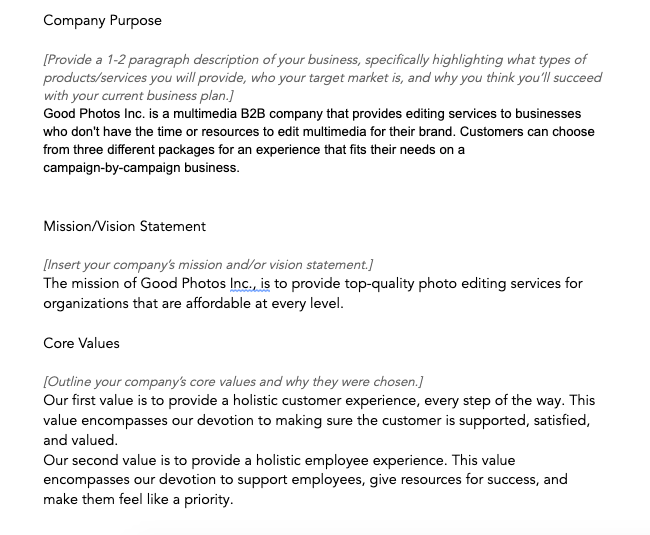
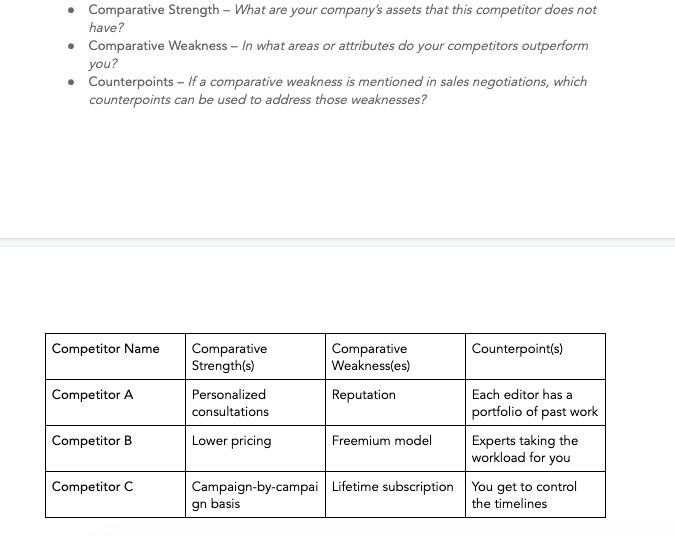
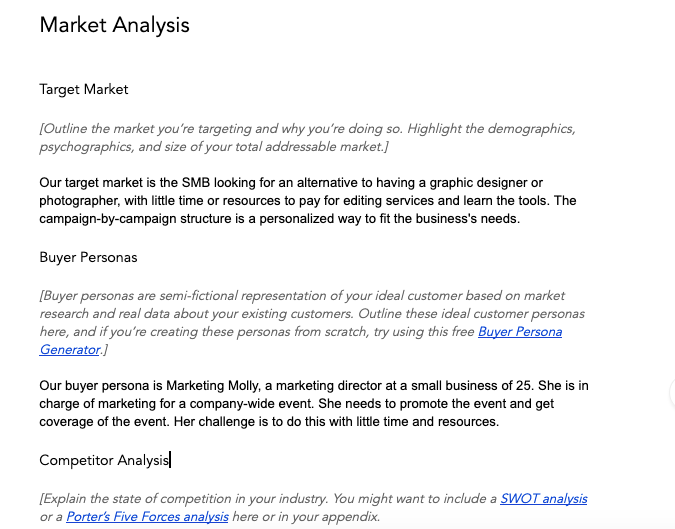
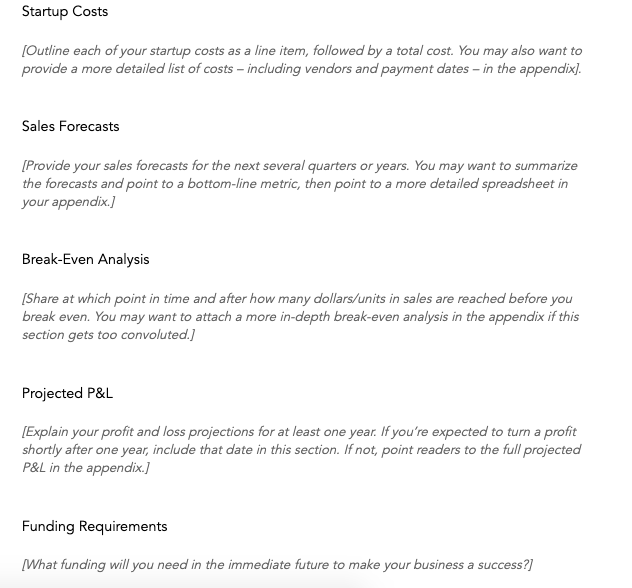
What is lead generation?
Lead generation is the method of using different content types and various marketing tactics to attract users and collect their contact details. The information you gather enables you to nurture users into qualified leads. These leads are people who have willingly shown interest in your offerings and are ready to buy from you.
Lead generation ideas include:
- Gated content
- Coupon codes
- Webinars
- Special offers
- Etc.
It means that the lead generator will create a fence or gate around your content, which will entice readers to give you their contact information before they can gain access to the material. After that, you can use the data you collect to reach out to your subscribers, nurture them with more useful articles, and finally, with your offers.
Why does your business need lead generation?
Lead generation is essential to your business because it delivers your sales team interested prospects (leads) that are ready and willing to discuss buying your products or services.
A lead is someone who shows interest in your brand’s products or services by voluntarily submitting their contact details, such as an email address or other vital information. The lead will, from that point onward, be receiving communication from the business in various forms, including email newsletters with marketing offers.
Without leads, a business cannot survive.
Lead generation tactics
Research reveals that over 60% of marketers say that their top marketing challenges are how to generate traffic and leads. That is, according to HubSpot’s State of Inbound Marketing Report.
Nonetheless, several marketing tactics can help you boost your lead generation efforts. Here are some of the most effective lead tactics you can use to generate more leads.
1. Create highly-quality content frequently
In every digital marketing toolbox, content is a crucial instrument for attracting visitors to your website or a product page. It is not just any content but in-depth materials that provide value to your target market. Thus, creating quality materials will help increase your reach and produce more leads.
2. Use gated content
When used correctly, gated content can significantly generate more leads and increase your conversion rates. According to Optinmonster, the Trading Strategy Guide used gated content to increase email signups by 11,000 in a month. It shows you the effectiveness of gated content.
3. Personalize your brand’s point of consumer contact
Personalization has become more prominent because it awakens human feelings and helps in drawing users’ attention to your brand, product, or services. For instance, in a survey by Salesforce, about the “State of the connected customer,” they found that more than 55% of buyers are willing to give personal information in return for personalized overtures.
Furthermore, 50% of respondents will give you their contact data for a personalized shopping experience.
4. Optimize your landing pages
It is common to see multiple marketing offers on a single landing page. That is a digital marketing mistake you should avoid at all costs. Why? Research indicates that landing pages with multiple offers produce 266% fewer leads than landing pages with a single offer.
Therefore, concentrate on single offer landing pages. Create more landing pages with a focus on a unique offering for each page. That is because the study also shows that sites with 30 landing pages generate 7x more leads than those with 10 landing pages.
As a result, optimize your landing pages with clear messages that will move visitors to give you their contact details.
Other lead gen strategies include:
Now that we have an idea of what lead generation is, and the why and how-to generate leads, let us define “demand generation” as well.
What is demand generation?
Demand generation is a business process that focuses on various marketing undertakings. These marketing efforts help to increase brand awareness and demand for the product or the services you offer. Demand gen is a thorough marketing application and sales proposal that takes place throughout the funnel when there is a demand for your products or services.
A viable demand generation approach comprises AIDA – an acronym for Awareness, Interest, Desire, and Action. Marketers are using this approach extensively to explain the subsequent stages from when a potential customer became aware of a brand, to when they make a purchase.
Why is demand generation important?
Demand generation is essential because its purpose is to arouse your target market and prospective customers’ interests in your business. This marketing process is responsible for all touchpoints in the customer’s journey. That is from being an unknown consumer to a qualified and happy client.
This method is about creating opportunities for demand and the overall growth of your business. You can create such opportunities by advertising your products or services on different marketing channels. Also, ramping up your brand with useful content materials.
Fundamentals of demand generation
Since demand gen programs are touchpoints throughout the conversion and sales cycles, you can segment the applications into five controllable sections.
This step is essential if you want to create a sustainable marketing strategy that will help you to generate demand for your brand and products or services.
Therefore, here they are the five fundamentals of demand gen:
1. Target-setting and planning
Generating more demand for your services or products and ultimately growing your income is the primary goal of initiating this program. Hence, to reach your objectives, you need to set targets and plan strategies that will help you accomplish your goals.
The planning stage is your roadmap to success. It should include marketing objectives and sales tactics that will harness every touchpoint through the conversion funnel. This approach will enable sales and marketing teams to work in a united front.
In consequence, you should define the outcome and KPIs of your campaign to understand whether your planning will meet your result.
2. Brand awareness
Increasing the awareness of your brand involves getting in front of your target market with your brand message. In this way, you educate your audience about your business, product, or services. Thus, it will enable you to increase your chances of being remembered at the purchasing phase.
For example, Jeff Bullas partnered with the Instagram tool “HashtagsforLikes,” a platform where you can find the best hashtags that’ll increase your Instagram reach and grow your followers fast.
So to increase awareness and generate demand for the tool, Jeff puts it in front of his target market via social media sites, including Twitter and other marketing channels.
You can use Jeff’s example as inspiration for your brand. Nonetheless, generating awareness for your business is primarily the first step in applying demand generation strategies. This activity will continue from the initial stage of the funnel to when a consumer makes a purchase.
Therefore, the best way to make it work for you is to know your targets:
- Who are they?
- What are their goals?
- What interests them the most?
- Where are they hanging out?
- Why are they interested in your business?
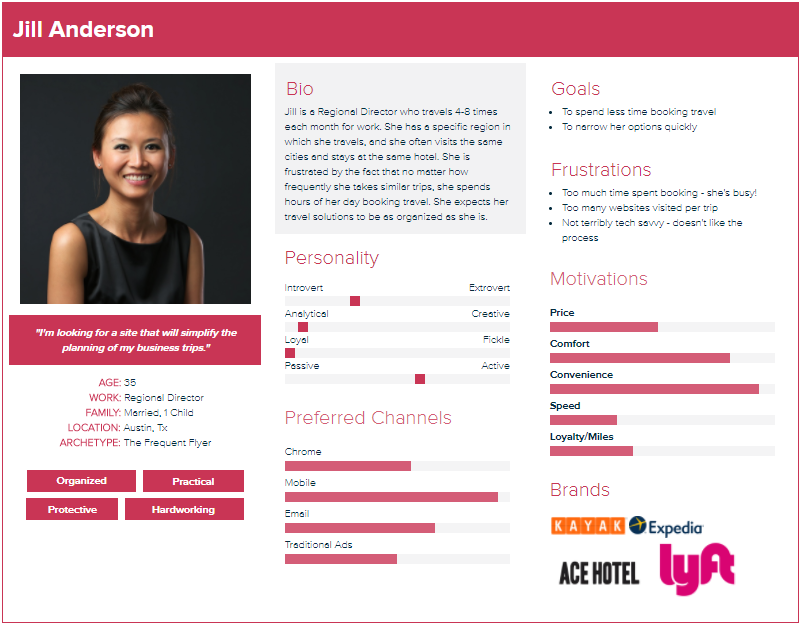
To find the answers, you should create buyer personas. Your buyer persona will help you to understand and serve your target market better.
3. Inbound marketing
In today’s digital marketing space, consumers are more informed than they used to be. As a result, users will research your brand, products, or services before making a buying decision.
That is where inbound marketing comes in. Inbound marketing is part of the overall demand generation strategy that handles the high-volume acquisition of targeted leads. It is a lead nurturing tactic that nurtures web visitors through every stage of the funnel into qualified customers.
With inbound marketing, you can establish bonds with eventual customers by frequently offering users helpful information that adds value. It will assist in making your products and services relevant to the reader.
To make the best of inbound marketing, use the following marketing platforms:
*Important* If you fail to nurture your website visitors, they will hang-out with your competitors. So help them define their problems and how to fix them with helpful content. In that way, you will build a loyal community around your business.
Other fundamentals of demand gen incude:
- Client Retention
- Testing and Analysis
- Sales Enablement
- Lead Scoring
Demand generation is not a one size fits all approach. It is a continuous process that is always evolving. Consequently, you should keep reviewing your tactics and make adjustments regularly.
Effective demand generation strategies
Demand generation strategies are helpful at every stage of the buyer journey. Demand generation enables you to create a positive impact and address all touchpoints before consumers enter the funnel to customer loyalty and retention.
Plus, the strategies involve multiple marketing and sales processes. These approaches will ensure that your marketing tactics are relevant to your target audience throughout the entire funnel.
Several marketing tactics will help you generate demand for your brand, products, or services. However, we will discuss only a few actionable steps.
1. Develop a free product
One of the best strategies for increasing demand for your brand is to develop free helpful products that applaud your brand. And the best product you can produce is one that solves your audience’s needs.
In consequence, do a bit of research to understand the struggle of potential buyers. After that, create a resource that addresses the issues and provide it for free. Jeff Bullas did that by creating a Free E-book containing over 100 tips and tricks to grow your organic web traffic for free.
The more value you provide to your audience for free, the more demand for your products or services you will generate. That is because your audience will become brand ambassadors. So when users signup for the tools, you can then nurture them through the funnel until they qualify as paying customers.
2. Create quality blog content regularly
Blogging is an excellent way to generate demand for your business. Although some content marketers choose to create and publish thin blogs that do not address the significant issues of their readers, blogging is still a fantastic tool for demand generation.
Blog post writing is not about creating lame content and expecting it to shine. You need to create persuasive blogs with strong conclusion paragraphs that will leave lasting impressions on the reader.
You can make the best of your blog by frequently publishing quality blog content. This type of blog will add value to the reader and drive more Google search traffic.
For instance, my blog post about the “Top 12 Most Profitable Freelance Writing Niches” has generated more demand for my freelance writing services, and also driven organic traffic to my site.
Top publications and websites have syndicated the post, giving it more exposure. Plus, yesterday, the new Marketing Director at Zest.is, Netanel Baruch, invited me through Twitter DM to contribute a guest post on the Zest blog. Why would he ask me when there are millions of other bloggers out there?
The answer is simple. Netanel read my article and was impressed with the quality of the content. That is the power of creating informative blog posts.
However, besides the tips mentioned above, there are other demand generation strategies you can apply to generate more demand for your brand. These include:
- Optimize your email marketing campaigns
- Utilize video content marketing
- Partner with influencers in your industry
- Make the most of social media marketing
- Analyze your marketing performance
- Use display remarketing
- Marketing automation
- Guest posting, and so forth.
Wrapping up the differences between lead generation vs demand generation
At this point, I’m assuming that you already know the difference between these two marketing programs. However, for emphasis, the distinction is that lead generation is a subset of demand generation – a process of collecting web visitors data which you can use to nurture prospects and qualify them into customers.
Lead gen strategies typically imply the use of gated content and other types of lead magnets on landing pages to attract leads. On the other hand, demand generation is an excellent method of creating demand for your brand, products, or services.
Demand generation involves the use of inbound and content marketing in various ways that is far broader than lead gen tactics to generate a need for your services.
Are we missing something? Please, tell us in the comments!