Color impacts everything from how a user feels when they interact with a design, to how they use the design, to whether they can fully see and understand it. Quite simply, color is a lot more than a decorative tool; color is central to user experience.
Let’s start with a common example: You’ve just finished a website design for someone. It looks and functions exactly like the wireframe. Everyone on the design team has praised the project. The client hates it, but they can’t explain why.
The culprit might be color. Different colors can evoke such strong emotions that people have sharp reactions to them. It’s part personal preference, part psychological, and even part social norms. Understanding these tendencies and user preferences can greatly impact user experience.
Here’s what you need to know.
User Expectations and Preferences
User experience starts with the type of user your website or app is designed for. Basic demographics such as gender or region where a user lives can impact their perception of your design based on color. (You can read more about color and cultural considerations here.)
One of the most interesting impacts from color on UX is linked to gender. Studies have shown that men and women tend to like and dislike certain types of color.
Men tend to interact more with websites that have darker design schemes and more saturated colors, such as the design for VLNC Studio, above.
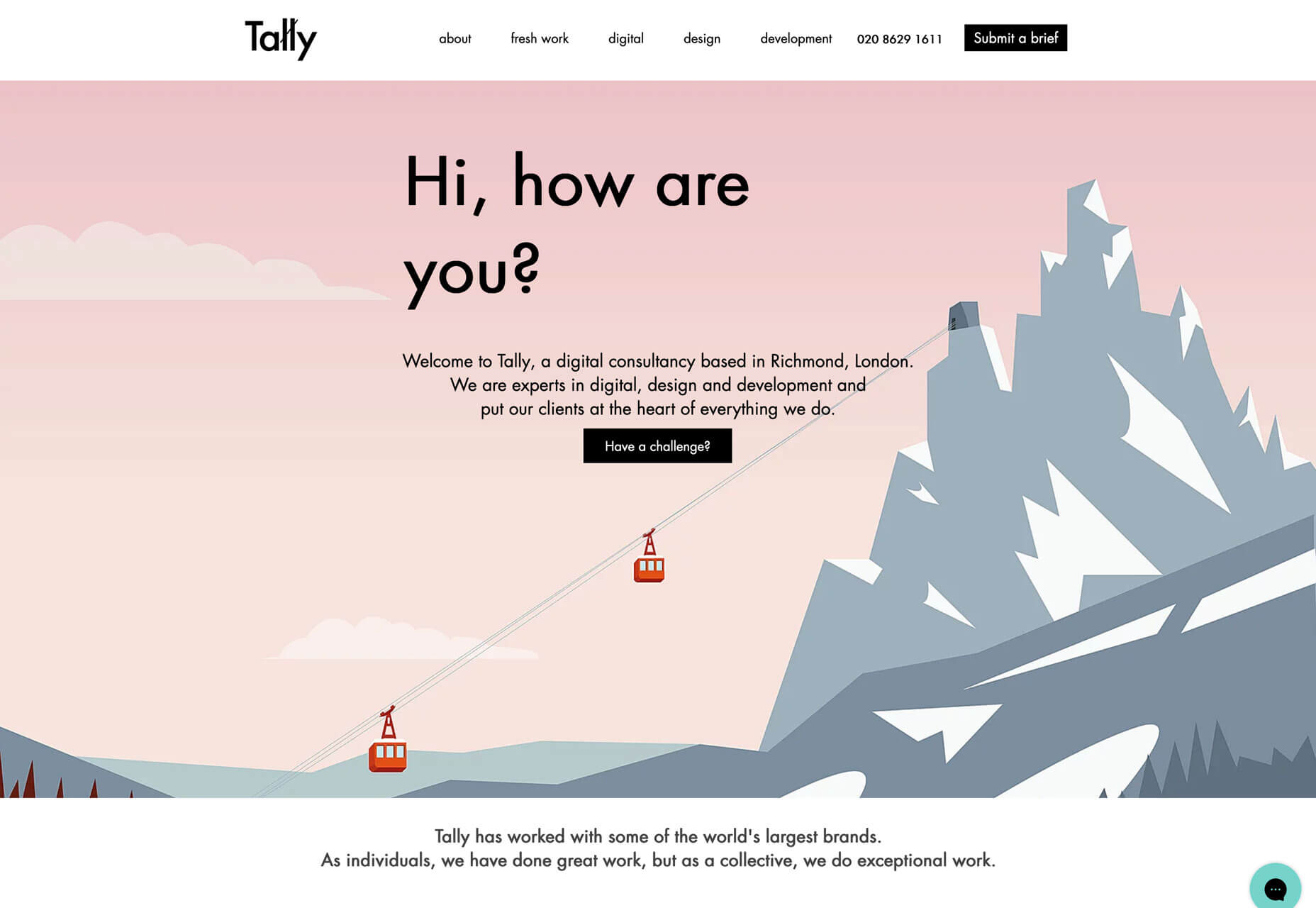
Women tend to prefer to interact with websites that have lighter design schemes and more muted color palettes, such as Tally, below.
Some men have a sharp reaction to websites using distinctly feminine colors such as pastel pinks, purples, and yellows.
More women tend to be put off by websites with harsh color schemes such as dark background with fully saturated red accents.
Mid-tone palettes are the most generally appealing to everyone.
Color Associations and Meanings
While it’s not an exact science, colors have fairly distinct emotional associations. Note that some colors can fall into categories of extremes. These associations tend to work with other design elements to create an overall vibe.
When a user sees a certain color or combination of colors, it creates an immediate response in the brain.
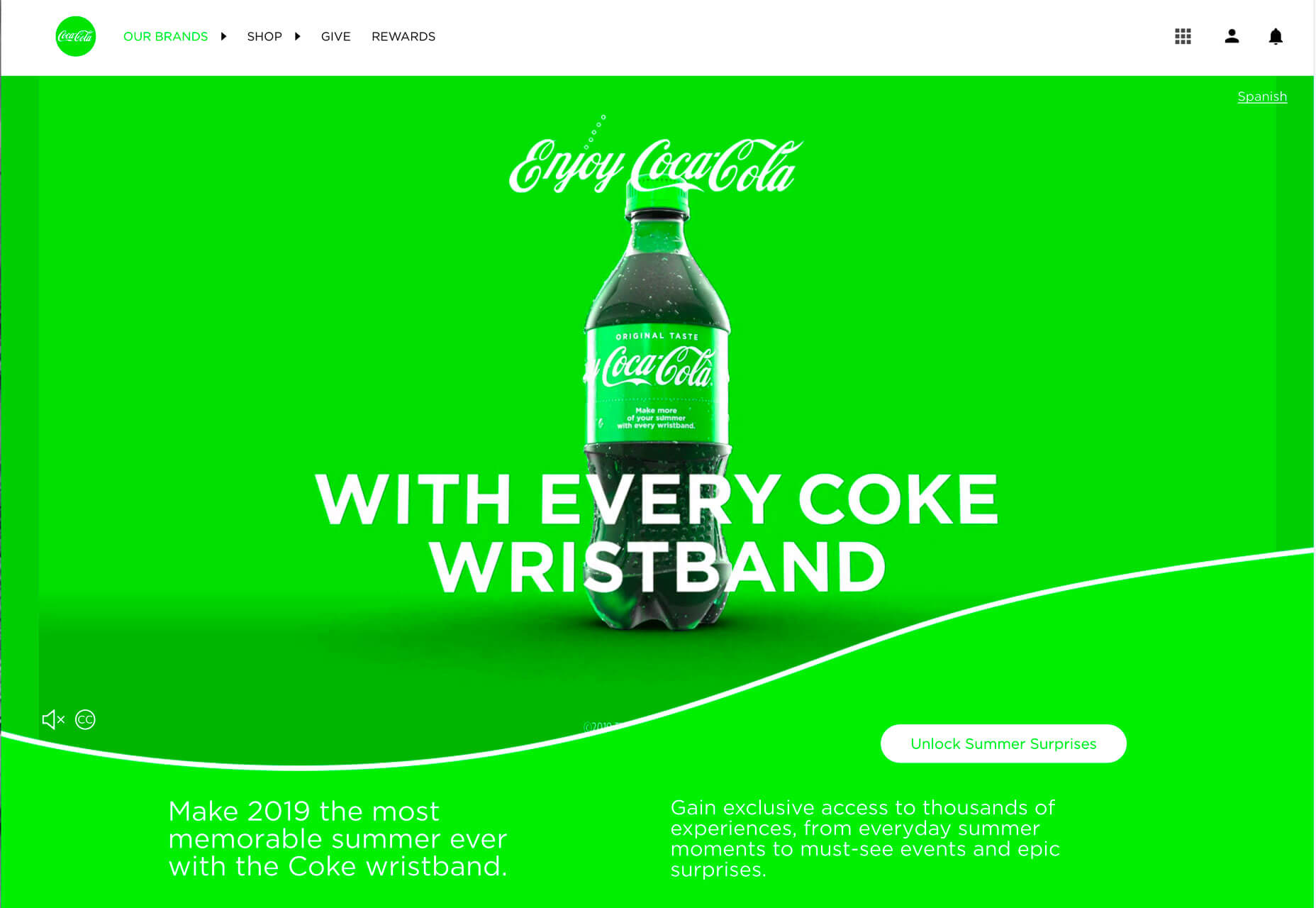
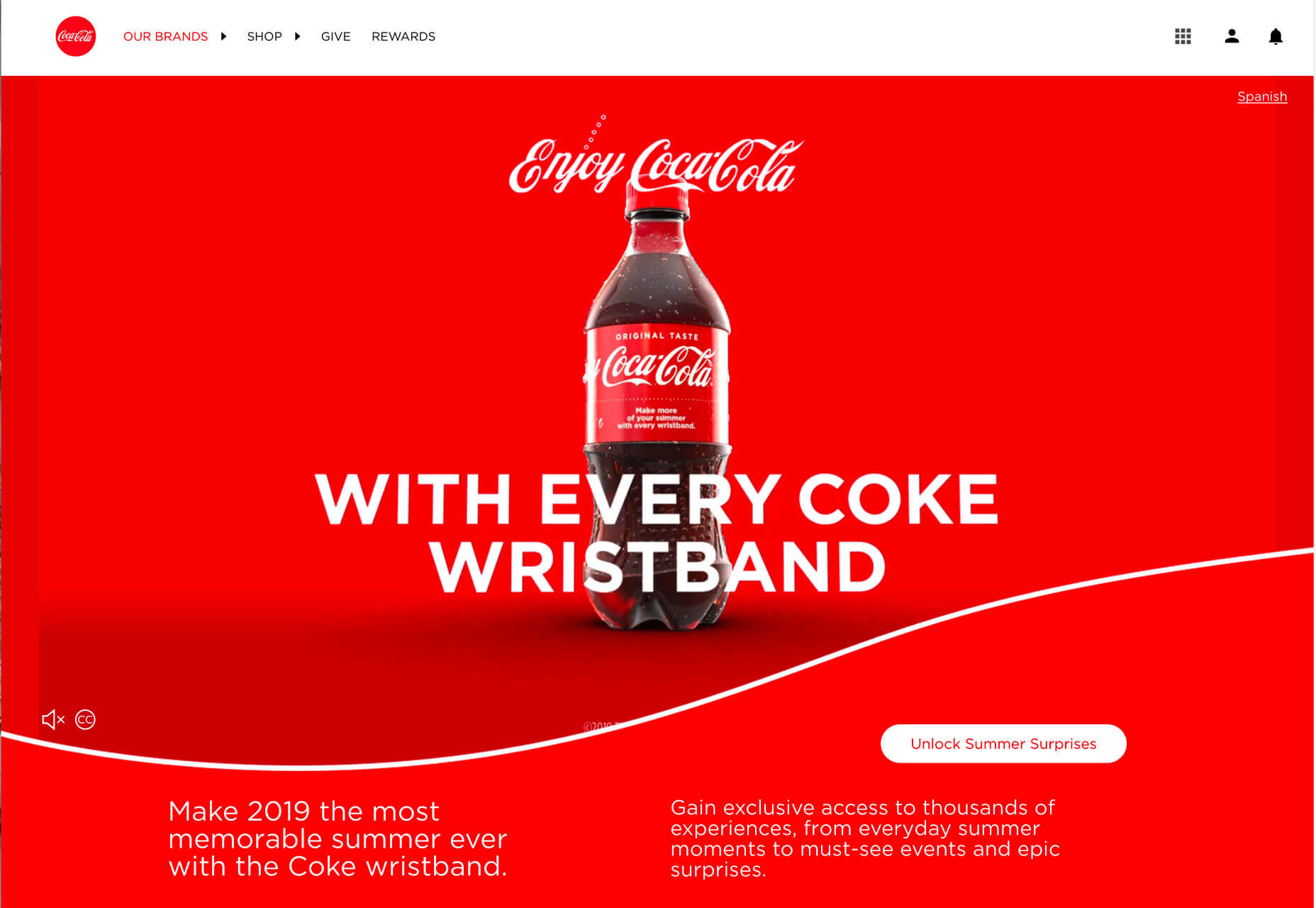
You expect design elements for Coca-Cola to be red. The color is so synonymous with the brand that it’s referred to as “Coke red.” Change the color and the brand is confusing. You don’t recognize it right away. The user is jarred and doesn’t quite react in the expected fashion. The drink might even seem to taste different.
All of those feelings come from changing the color. You might have felt yourself say “what?” when you saw the first image with green Coca-Cola branding.
It impacted the user experience you would have with the brand moving forward.
Color is an important element in branding because it creates that distinct connected between a user and a design. Color tells users what the brand is about. It tells users about the thing they are about to engage with.
Change that color, or use something off brand, and the user experience suffers because website visitors are suddenly confused or uncertain about the brand they thought they knew.
User Patterns Connect to Color
Have you noticed how many websites use red or orange buttons?
There’s a reason for that.
Bright colored buttons that contrast with the background of a website – red and orange often stand out from either light or dark backgrounds. Can help users find, understand, and want to engage with click- or tappable elements because they visually, and immediately, know what their expectation of that element is.
A key part of user experience is providing easy opportunities for users to interact that they enjoy and understand.
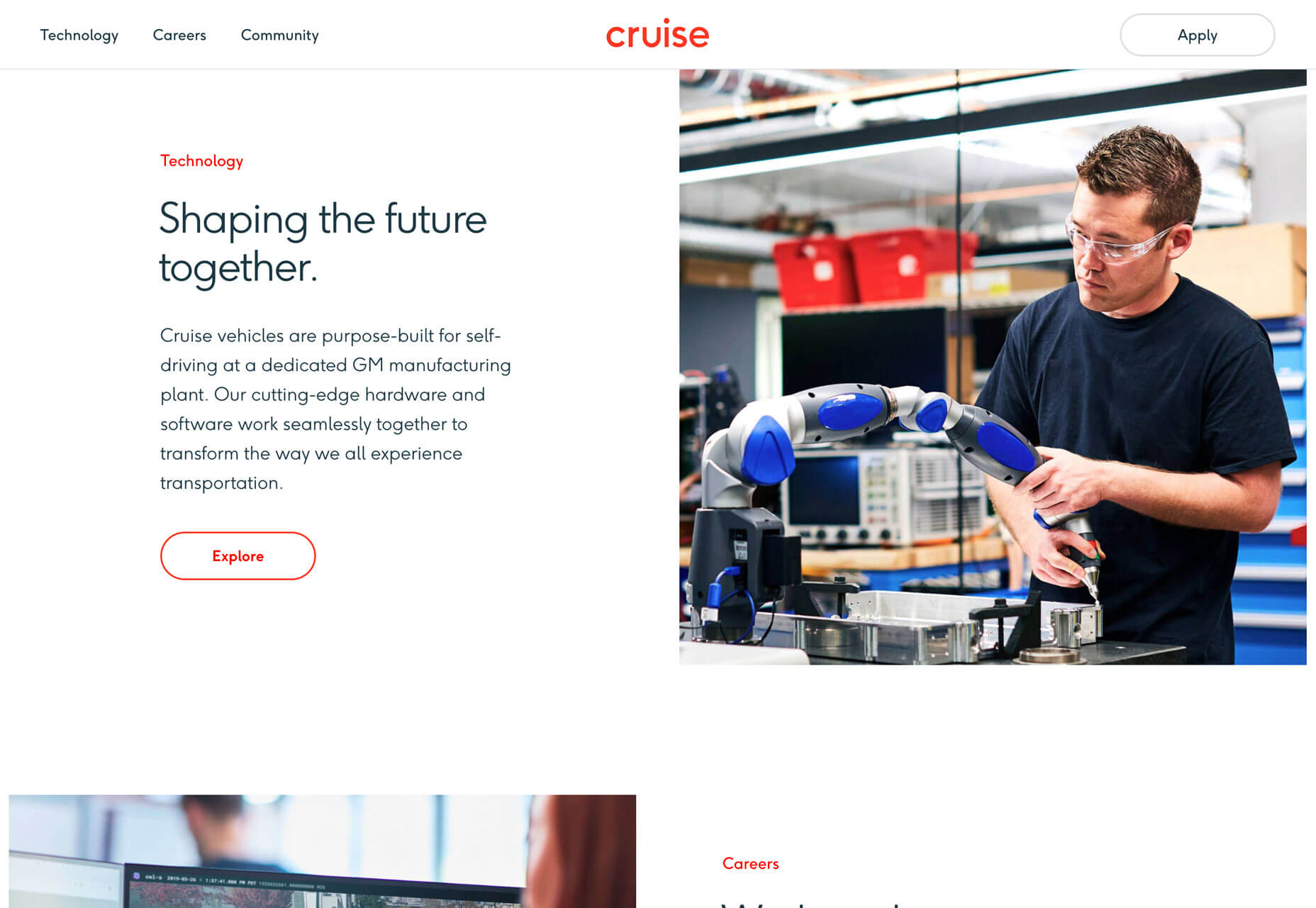
Cruise uses a ghost-style button with red text and a red hover state. It’s a different spin on traditional solid-color buttons, but there’s little question as to how to interact with it. Color draws users to the button.
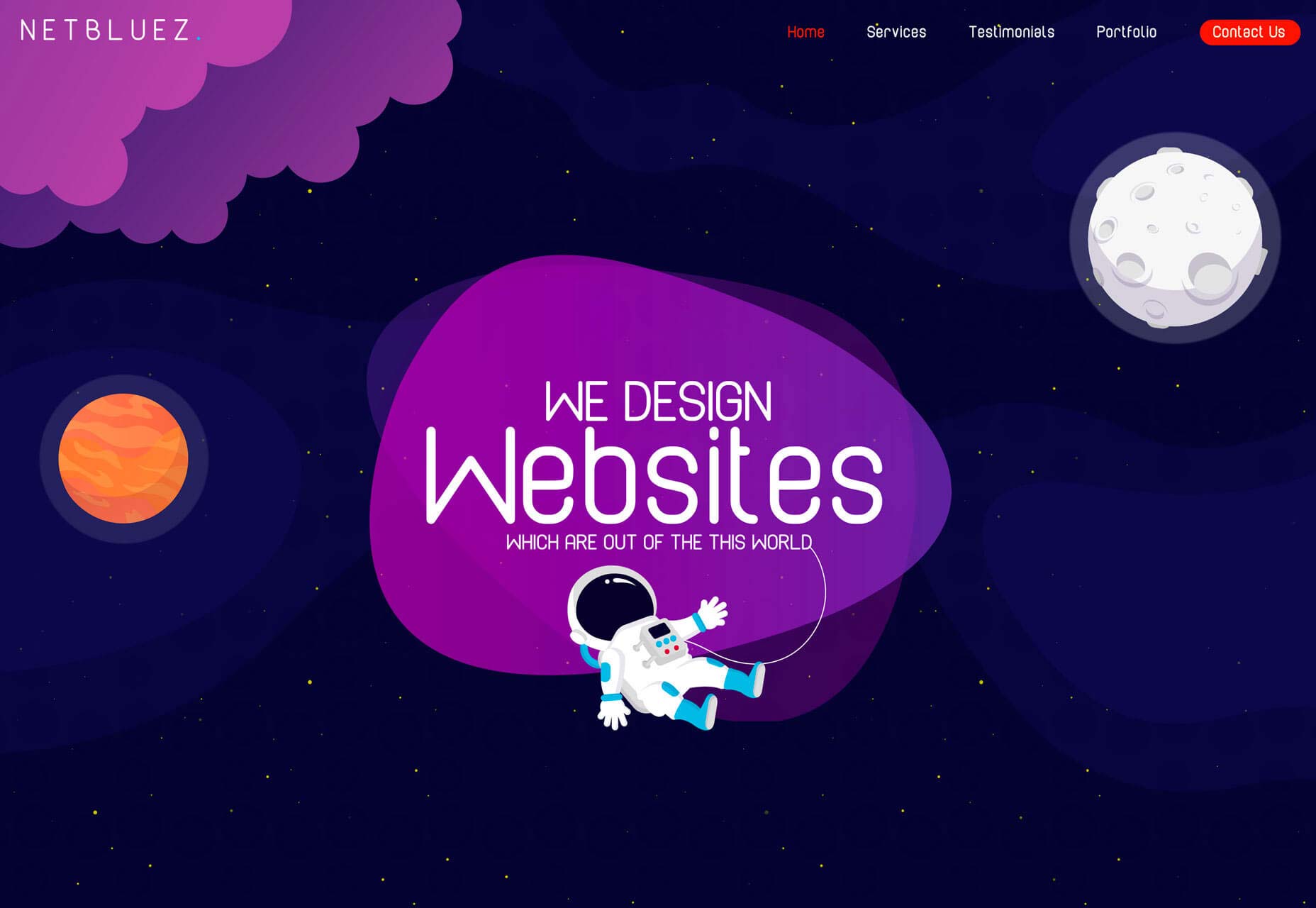
Net Bluez uses a bright orange button for the most important element in the navigation menu. Notice how that element tends to jump off the screen begging to be clicked.
Increasing Conversion Rates
Challenge yourself in the design process to A/B Test button color. You’ll likely find that one color has a distinctly higher conversion rate than the other. (And it might not be the color you expect.)
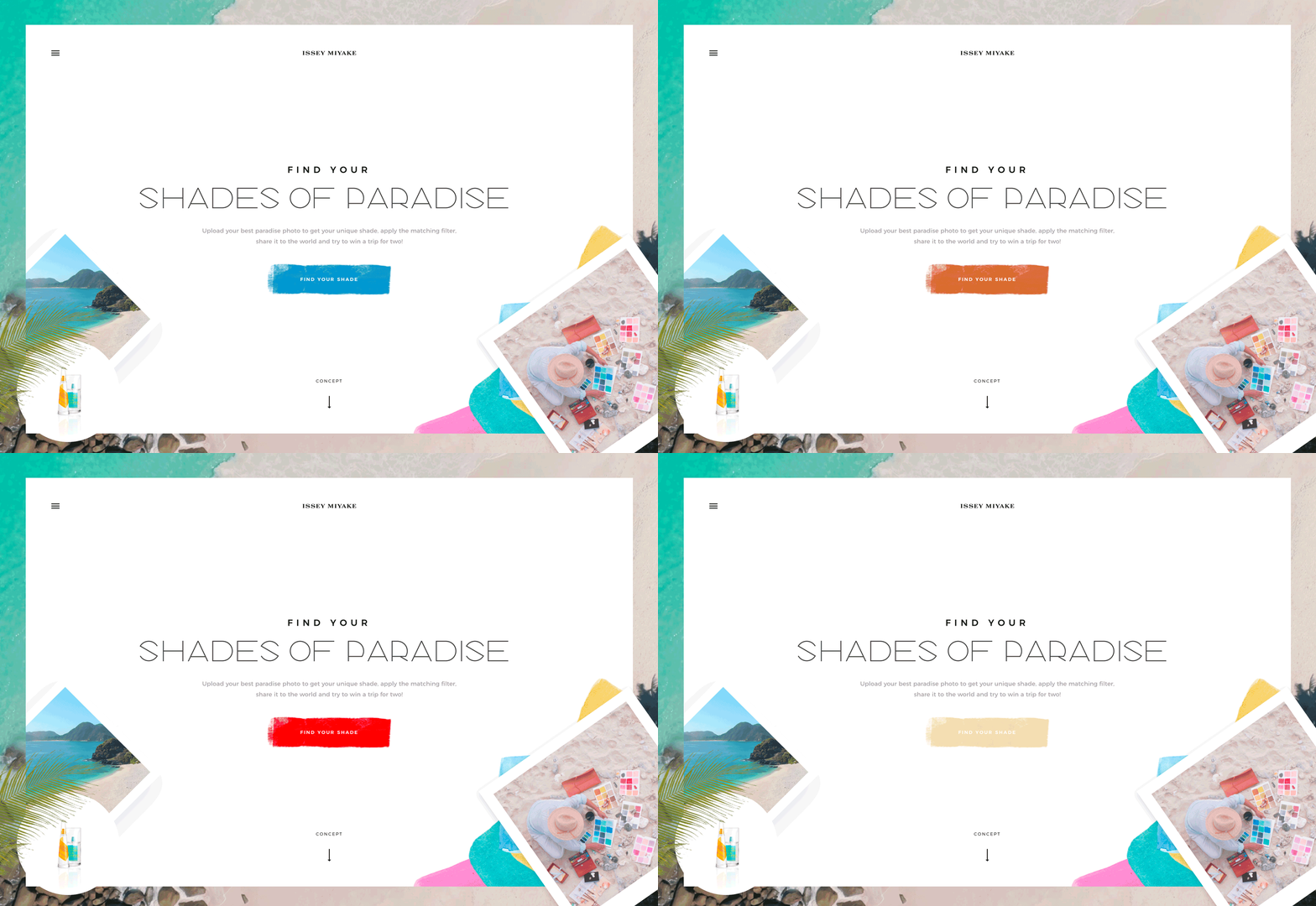
Conversion rates tend to increase when the color of buttons or links is in stark contrast to the rest of the design. So, while you want to use a brand palette, picking a contrast color is key to generating conversions that contribute to overall user experience.
Look at the website below for a minute. Which color button is most likely to make you click? (The original color is blue.)
Providing Accessibility to All Users
Finally, color impacts UX in a way that’s not emotional or rooted in psychology. It’s much more practical than that.
Color impacts user experience because it can make a design accessible or not.
In order for everyone to understand a design fully, and engage with content, they must be able to see and read it with ease. Using color palettes and contrast ratios that fall in line with Web Content Accessibility Guidelines (WCAG 2.1) can ensure that every user can understand your color choices.
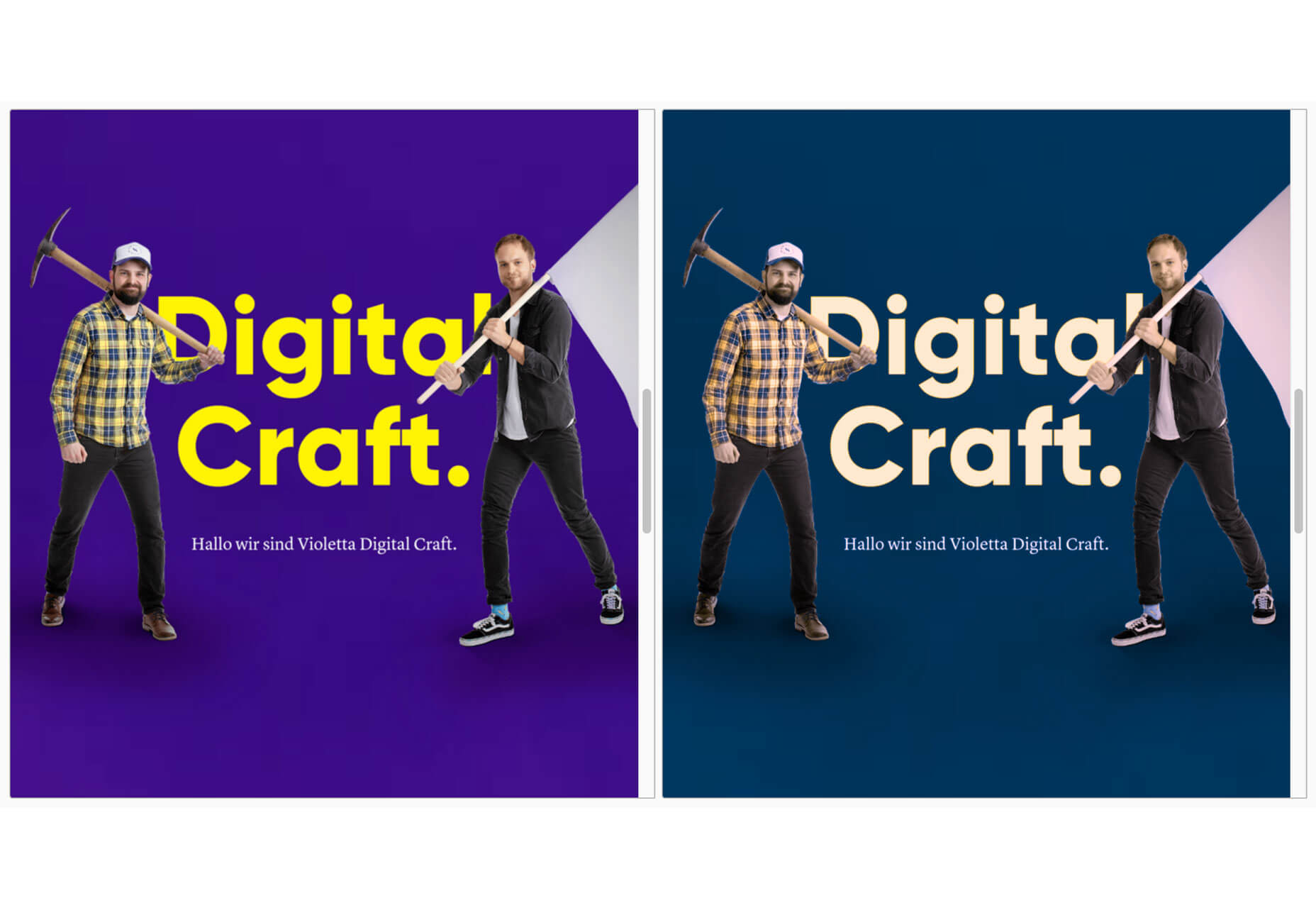
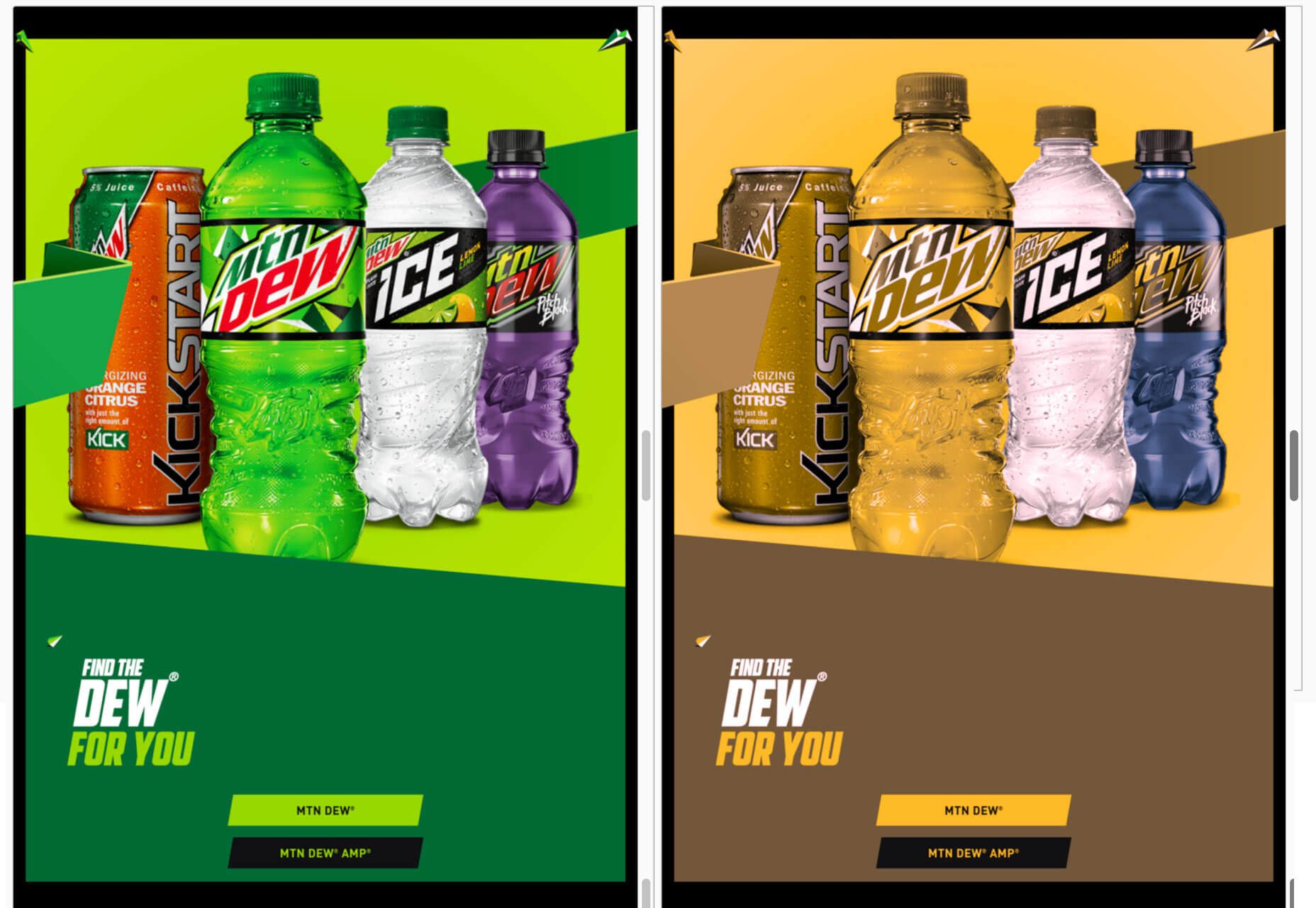
Use a color-blind filter, such as those in the comparisons below, to help simulate what other users might see when they look at your website. How could that impact usability?
Conclusion
Think of color as a tool to help users better interact and experience the content on your website. It impacts user experience on an emotional and usability level.
The key to figuring out if color is impacting UX in the right way is through user testing. A/B color tests can be a valuable tool.
Carrie Cousins is a freelance writer with more than 10 years of experience in the communications industry, including writing for print and online publications, and design and editing. You can connect with Carrie on Twitter @carriecousins. More articles by Carrie Cousins
We are looking for a Casino & PokerCommissioning Editor to work across our Gambling.com Group websites with a focus on commissioning, editing and publishing high quality Freelancer content across Casino, Poker, Slots and Gambling news and strategy online publications.
The person in the role should be responsible for the sourcing, management and retention of suitable freelancer writers for our website platforms including quality control, ideation and reporting to stakeholders on results.
This role sits within our content teams but consistently works cross-functionally with our product sales, design, social and marketing teams to create the perfect user experience and remain aligned with core company goals.
Your core responsibilities:
Sourcing / Management and Retention of freelancers & commission of high-quality original content for several online platforms.
Editing & Publishing commissioned articles in a timely fashion to maximise commercial goals and company strategies.
Create a strategy and schedule for use of Freelancer content across various websites to align with company KPIs and strategic goals.
Manage and account for Freelancer Budget and Resources
Report to stakeholders on Freelancer activity, commercial KPI’s and suggest process improvements where merited for implementation.
Work with stakeholders and product managers to deliver Freelancer content that aligns with sporting calendar, news requirements, product updates and website development.
Optimise copy and data within content created using knowledge of SEO and internal company SEO teams, persuasion or branding, depending on the occasion.
Work between product, SEO, marketing, Ops and Content Teams to ensure tone of voice and brand standards are met.
Continually suggest new and exciting ways to engage and form relationships through development of content.
Strategic planning and ideation with larger content and product teams.
On-page SEO and UX optimizations.
Requirements:
Experience writing and editing copy for a wide array of marketing and content needs.
Experience in Editing and Publishing management across a Casino and Gambling environment.
Fluent in English, and an excellent writer and communicator.
Experienced in working within digital content writing (Gambling industry a plus).
Flawless writer with a keen eye for detail and accuracy.
Demonstrated experience in managing online content.
Demonstrated experience in creating content and editorial products
Knowledge of HTML and SEO
Desirable Skills:
Knowledgeable of SEO techniques and best practices.
Knowledgeable of conversion-oriented copywriting tactics.
Experience with common SEO and digital marketing tools i.e. Google Analytics, Google Search Console, SEMrush, Ahrefs, Moz, etc
A passion for making an impact in real people’s lives with meaningful content and information
Knowledge of ranking factors and search engine algorithms
Experience of HTML
Enthusiastic about the Casino industry in general
The Perks
Comprehensive private Health Insurance with Laya
Flexible work environment
€400 Tax-free Gym Benefit
Monthly on-site massages
Fresh fruit deliveries
Excellent coffee and even better hot chocolate
Regular company events including annual summer races party
Company Paid Volunteer Day
PRSA through Irish Life
Regular employee spot awards
TaxSaver commuter scheme
Employee Bike to Work scheme
Skills
SEO Operations, Website Copywriting, Copywriter, Editing, Publishing, Freelance, Management, Casino Industry Experience
We are looking for an German Content Editor to work across our Gambling.com Group websites with a focus on commissioning, editing and publishing high-quality Freelancer content across Sports and Casino, news, commercial and strategy online publications.
The person in the role should be responsible for the sourcing, management and retention of suitable freelancer writers for our website platforms including quality control, ideation and reporting to stakeholders on results.
This role sits within our content teams but consistently works cross-functionally with our product sales, design, social and marketing teams to create the perfect user experience and remain aligned with core company goals.
Your Core Responsibilities
Updating Web Portals via our CMS
Sourcing / Management and Retention of freelancers & commission of high-quality German original content for several online platforms.
Editing & Publishing commissioned German articles in a timely fashion to maximise commercial goals and company strategies.
Create a strategy and schedule for use of German Freelancer content across various websites to align with company KPIs and strategic goals.
Manage and account for Freelancer Budget and Resources
Report to stakeholders on Freelancer activity, commercial KPI’s and suggest process improvements where merited for implementation.
Work with stakeholders and product managers to deliver Freelancer content that aligns with GEO Specific sporting calendar, news requirements, product updates and website development.
Optimise copy and data within content created using knowledge of SEO and internal company SEO teams, persuasion or branding, depending on the occasion.
Work between product, SEO, marketing, Ops and Content Teams to ensure tone of voice and brand standards are met.
Continually suggest new and exciting ways to engage and form relationships through development of content.
Strategic planning and ideation with larger content and product teams.
On-page SEO and UX optimizations.
Assist in email marketing and German Social Media marketing
Localize content from English to German
Requirements
Fluent Speaker and Writer of English and German
Experience of writing and editing copy for a wide array of marketing and content needs on a digital platform
Experience in Editing and Publishing management across a Casino / Sports Betting environment.
Experienced in working within digital content writing across iGaming, Casino and Sports Betting a distinct advantage
Flawless writer with a keen eye for detail and accuracy.
Demonstrated experience in managing online content.
Demonstrated experience in creating content and editorial products
Knowledge of HTML and SEO
Basic image editing skills
Knowledgeable of conversion-oriented copywriting tactics.
Experience with common SEO and digital marketing tools i.e. Google Analytics, Google Search Console, SEMrush, Ahrefs, Moz, etc
A passion for making an impact in real people’s lives with meaningful content and information
Knowledge of ranking factors and search engine algorithms
Enthusiastic about Sports or Casino industry
*Salary dependent on experience and includes a comprehensive corporate benefits package.
As high fat and sugar drinks fall out of favour, PepsiCo UK is banking on premium and health-conscious consumers to drive demand for healthier options on the market.
With investors increasingly reluctant to commit to soft drink and energy stocks, The Drum spoke with PepsiCo UK’s top marketer to learn why it is scaling its sugar-free options in order to diversify their portfolios (or protect their market share).
“The big growth that we’ve observed across our beverage brands has been around no sugar” explained Natalie Redford, marketing director of PepsiCo UK. “We’re really unlocking what that means.” This shift is being seen around the globe.
“I think it’s the new norm,” Redford said. “Guilt-free, but not compromising. It’s proven really successful for us in the UK.”
And while the Advertising Standards Authority (ASA) ups its focus on cutting down high fat, salt, and sugar (HFSS) advertising, Redford said PepsiCo UK has responded to Government consultation relating to further advertising restrictions for products high in fat, salt and sugar.
“The great thing about the beverages and brands that I look after in my portfolio, and the ones that we advertise are no-sugar beverages that fall outside of the HFSS category,” Redford said.
Of all carbonated brands included in her UK portfolio, Pepsi Max tops the sugar-free market for cola, and 7up Free leads the lemon and lime.
PepsiCo UK is channelling this healthier alternative approach through its advertising.
In a first of its kind event for the 7up Free brand, this weekend, PepsiCo UK has launched a pop-up shop to commemorate the return of its chilled-out 90s mascot, Fido Dido.
“We wanted to use the ‘free’ in 7up Free to mean more than just no sugar,” Redford said. “We wanted to use the free to make a more ’emotional connection’ with our customers.”
With this thought in mind, Fido Dido House is an ‘anti-pop-up.’ While people normally ‘do do do,’ PepsiCo UK created an experience that allowed people to opt-out of the frenzy of hectic life, to feel free to just ‘be.’
Premiumisation
It claimed consumers are demanding more premium products; PepsiCo UK is increasing investment in this space.
Serving as a canvas to showcase emerging artists’ work, the brand caters to the need for healthier alternatives to carbonated, sugary drinks, while supporting arts and culture. Now, Lifewtr has launched in the UK market as Arto Lifewtr.
Redford spoke how “premiumisation is definitely a trend that [PepsiCo] is going exercise more of in the next five years and it’s happening at every level.”
She puts it down to the breadth and depth as a company that means PepsiCo can play across those segments and foresees this will be a general direction for the brand as it steps out from the more mainstream drinks industry.
“We’re thinking how our brand can be served in a more premium way,” Redford detailed. “Whether that be a premium experience or a premium product.”
While moving towards healthier options is undoubtedly a strategic move for PepsiCo, it isn’t always an easy one. It’s main competitor Coca-Cola has to axe its Life brand, after-sales slumped in the UK, whereby the product accounted for less than 1% of its trademark sales.
So you have a team of salespeople hungry for more leads.
You already have a few channels that help you acquire leads, but such efforts aren’t scalable and the lead quality isn’t high.
What do you do?
If you want to start generating more leads and avoid any of the problems you currently face, then you’ve got to try LinkedIn ads.
In contrast with two of its most popular counterparts, Facebook Ads or Google Adwords, LinkedIn ads represent a unique opportunity for B2B marketers. eMarketer found that B2B marketers named LinkedIn advertising to be as effective as Facebook.
Last year LinkedIn generated over $2 billion in revenue from its advertising platform. While a small fraction of Facebook or Google’s revenues, increasing numbers of marketers are shifting budgets to LinkedIn, with 42% of media buyers planning to increase their spend in 2019.
Driven by this stellar growth LinkedIn updated it’s ad platform in mid-2019 focussing on what it calls objective based advertising. In this guide you’ll learn everything you need to know about the new experience, so you can understand how to advertise on LinkedIn today.
“The devil is in the detail” or so the saying goes, so before we get started with the nitty-gritty of creating a LinkedIn advertising campaign, let’s cover the basics.
In order to start a LinkedIn ads campaign, you need to have a company page.
You likely already have one opened.
If you don’t, then this handy guide that will show you the steps you need to take to open it.
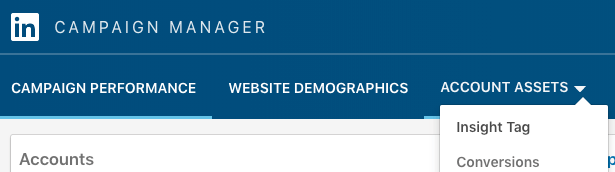
Another important basic is to install LinkedIn’s Insight Tag. This is a small Javascript tag that will help you set up conversion tracking (so you can measure how many people convert from your ads), website audiences, and uncover your visitor’s demographic data. You can find it under the Account Assets menu in your Campaign Manager.
What’s more, the Insight Tag will help you run retargeted advertising campaigns, which as you will see, are incredibly effective and powerful.
While you install the tag, you also want to set up conversion tracking, which will help you see the actual conversions of your campaigns.
With the basics covered, let’s start with the actual LinkedIn ad campaign creation process.
LinkedIn Ad Campaign Objectives
Step 1: How to pick a winning objective
The first step in any successful LinkedIn ads campaign starts with picking the right objective.
The objective will impact on your entire campaign—from the ad type to the budget to the ad format.
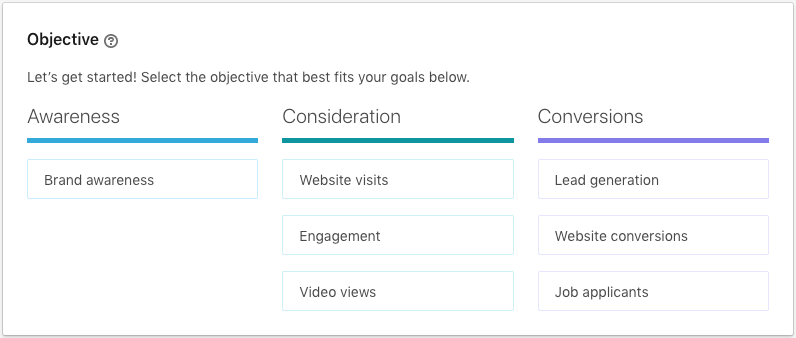
Each objective corresponds to a different part of the marketing funnel, as LinkedIn shows:
These three steps correspond to the typical marketing funnel, where each step focuses on a different objective:
Awareness focuses on reaching as many people as possible
Consideration focuses on engaging and persuading visitors to take action and find out more about your business
Conversion focuses on generating leads and converting people in your site
These new objective based advertising campaigns will focus on delivering your ad to the person most likely to take your desired action—let’s take a look at each of these three steps and which objective works best for your campaign goal.
Awareness Objectives
Awareness is all about showing your brand to everyone with whom you can connect. You don’t focus so much on clicks or conversions; what matters most is that people see your ads, that they get to know your brand through mere exposure, and to get them familiarized with it.
In this step, your key metric is the number of impressions you generate—the point at which an ad is displayed in front of a visitor, regardless of whether they actually see your ad or read its content.
Brand Awareness
LinkedIn offers only one objective for this stage of the funnel, one that’s appropriately called “brand awareness.”
One of the beautiful aspects of online advertising is that you can track the effectiveness of a campaign down to the click. Awareness, however, is all about getting people to see your ad, not act on it, so why would anyone choose this ad?
Simply put, because this objective can help you increase your reach (if that’s what you care about), get more followers to your page, and engage with a new audience.
For example, if you’re running an account-based marketing (ABM) campaign, and you have a specific audience you want to connect with, the awareness objective will help you reach them before you start a sales conversation.
Consideration Objectives
Here’s where the advertising gets scientific. At this stage of the funnel, you want people to click on your ads; you want visits, views, and actions (albeit in a non-commercial way).
There are three objectives you can use in this stage:
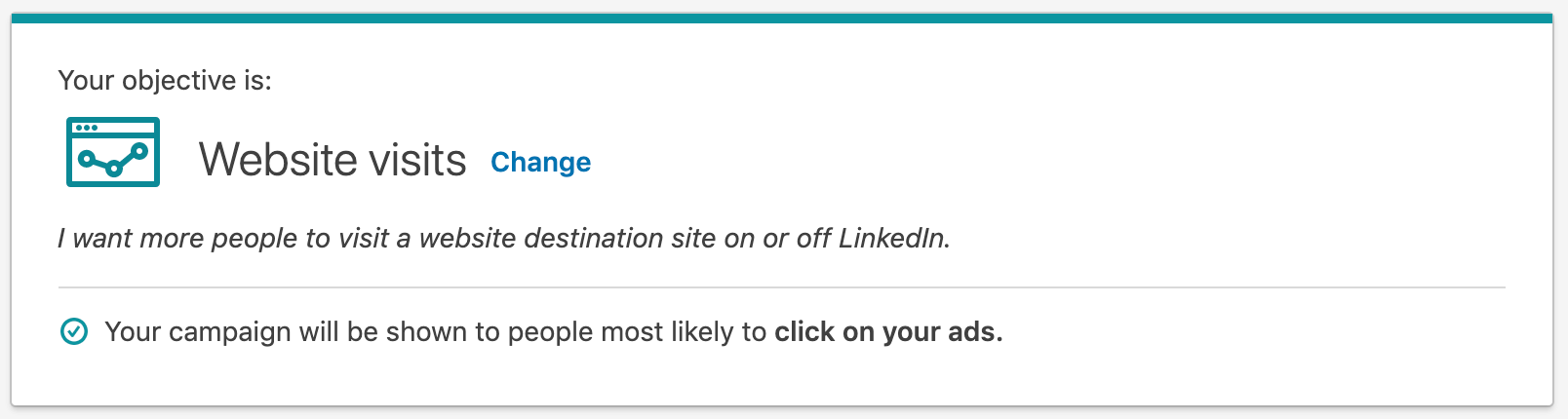
Website Visits
The name is self-explanatory: with this objective, you get people to visit your site.
Clear, simple, and awesome—who wouldn’t want more visitors to their company’s site?
What you do with people once they do so is a different game.
You can get people to check a new post of yours (which is great if you’re retargeting them from a previous article they read), to sign up for your latest webinar, or to sign up for a trial.
Because the volume of data needed to optimize your bidding is much lower than with the lead generation objective (as you will see later), this objective is a great start for any action you want people to take in your site.
Engagement
When you’re getting started with LinkedIn advertising, you may want to increase the quantity and quality of your following.
That is, you want people to follow you, and you want them to like you; you want to develop a relationship, and as you know, that takes time.
The engagement objective is the perfect fit if you want to get more people to follow your business page and to like or comment on your posts.
The more people that follow you and the more engaged they are, the cheaper it will be to promote your content to them. What’s more, your messaging will be more effective, a goal worthy to any advertiser.
If your business goal is tightly connected with developing thought leadership, brand awareness, and traffic acquisition, then using videos, and the video views objective in LinkedIn, will help you increase the distribution of your content.
Conversion Objectives
This is the stage where the rubber meets the road. This stage is all about getting people with whom you’ve engaged before to take a specific action.
More specifically, that action could be an information exchange for lead generation, a download, a signup, or a job application.
Similarly to Facebook advertising, these objectives tend to have a higher CPC and the focus needs to be on your cost per conversion, but they are highly effective once you get the whole system working.
In the case of LinkedIn, there are three objectives available, which you’ll see in greater depth below.
Lead Generation
The beautiful aspect of LinkedIn is that it’s a perfect match for those marketers are looking for strategies to generate leads. Just think that 80% of their users are decision makers, and because of that, as Hubspot found, their lead conversion rates are 3x higher than other major ad platforms.
You can acquire leads with a network like Facebook, but you’d need to do a lot of pre-qualification before you can attract professionals to your site. There’s a lot of people who simply aren’t interested in registering for a webinar when they’re relaxing in their homes.
With LinkedIn, you know who’s who—you want a director of marketing to sign up for a demo for your enterprise software? You got it; your entire campaign can be built only for that specific audience.
To make things even better, LinkedIn lets you generate leads right from their site without having prospects go to your site.
Enter lead gen forms, which pre-fills their information and gets them to sign up to your offer right away.
Website Conversions
If you want to target specific conversions on your site, then this objective is perfect for you.
Thanks to the Insight Tag, which by this point you should have installed, you can optimize for any type of conversion—from a product purchase to a demo request to software sign up.
Once you have set up the campaign with the conversions objective, LinkedIn will then optimize towards the people most likely to complete a conversion. That is, the more data LinkedIn gathers on the types of people that complete your on-site conversion, the better it will get at optimizing your ads to show to people with similar profiles.
If you’re a marketer who’s conversion-driven, then this objective is perfect for you.
Job Applicants
The last objective is perfect for those companies who are competing for the best talent and need an extra boost to their job application listing.
As with the previous objective, LinkedIn optimizes your ads for the users who they’ve found to be more likely to click on your job post. Not only do you get more applicants to your job listing; you bid for the right ones.
LinkedIn Ads Targeting
Step 2: How to target the right audience
When it comes to B2B sales and marketing, LinkedIn advertising has a unique advantage over competing ad platforms. Due to the detailed employment information that LinkedIn’s 630M members upload to their profiles, you can target people based on extremely accurate employee and company data.
If you want to target the VP of Engineering at tech companies with more than 500 employees, then guess what? You can do that with LinkedIn; it’s the perfect matchmaker for your brand.
The targeting options LinkedIn provides allow you to develop incredibly precise B2B marketing campaigns which you can use to attract the right accounts.
Alongside basic data such as Location and Language there are five targeting options you can choose from:
Company: Which include company connections, followers, industry, name, and size
Demographics: Which include age and gender of the specific people to whom you want to contact
Education: Which include degrees, fields of study, and member schools
Job Experience: Which include job function, seniority, job title, skills, and years of experience
Interests: Which include groups the user is part of and its interests
One of the most interesting ways you can create unique targeting options is to use the “exclude,” “include,” or “narrow by” options. With these options, you can potentially target someone who doesn’t traditionally fit within a certain audience (like chief executives with not more than 10 years of experience) or that’s highly targeted (like vice presidents who are under 40 years old).
What’s more, you can utilize LinkedIn’s own internal data to grow your reach, a feature that LinkedIn calls “audience expansion,” or your own data to retarget users and prospects who often already know you, a feature which LinkedIn calls “matched audience.”
Use Audience Expansion for Lower Costs and Increased Reach
Once you’ve found an audience that works for your advertising campaigns, you can create a new campaign that targets other similar audiences.
That’s where the “audience expansion” feature comes into play. Audience expansion uses LinkedIn’s algorithms to find and reach people that have similar attributes to your tested target audience.
For example, if you’re getting high conversion rates with a campaign that targets VPs of Marketing, then LinkedIn may find that a campaign with the same message that targets Directors of Marketing works equally well.
Use Matched Audiences for Retargeting
If you’re constantly targeting new people who don’t know your brand, you’re wasting a lot of opportunities.
There’s nothing wrong with generating new demand for your offers, but since your company already generates traffic in your website, that traffic is a potential goldmine for new business opportunities.
Matched audiences help you target people who have visited your site, signed up for a gated piece of content (think a webinar or white paper), or who have done any type of business with you (think a demo trial or a proposal).
Two of the most common uses of matched audiences is to retarget website visitors based on your pixel’s data, or target your email list.
You can even mix and match these matched audiences with audience expansion to expand your audience from your email list.
Use Matched Audiences for Account-Based Marketing
What’s more, you can upload account lists to your matched audiences. That means, you can upload a list of company names and site URLs, and then target anyone who works at those companies.
One of the easiest ways to get started with this is to upload a list of high-intent accounts and advertise to your key buyer persona job titles at these companies. If you’re into ABM, then this is a game-changer.
How do you find high-intent accounts? A great way to get started is to use a platform like Leadfeeder. This enables you to identify the companies visiting your website by connecting with your Google Analytics. You can then export lists of companies visiting your website, upload to LinkedIn as an account list in your matched audiences, and use this data to power your LinkedIn ABM ad campaign.
Take a no-obligation 14-day free trial of Leadfeeder today, identify the companies visiting your website and try running some LinkedIn ABM campaigns with this data.
Forecasted Results
Once you’ve selected your audience targeting, LinkedIn will show the forecasted reach and expected volume of traffic for your campaign. These numbers will be affected by your daily budgets and bids—which you’ll select shortly—and they provide a great way to benchmark the actual performance of your campaign versus LinkedIn’s predictions.
LinkedIn Ad Types
Step 3: How to choose the right ad for your business
LinkedIn offers a wide format of ads, which vary in cost and complexity of implementation.
Such a wide range of options will raise an immediate question: which ad type should you use?
As always happens with anything related to marketing, the answer will depend on your needs, budget, and expertise.
Without a deep look at your company, no one can tell you which LinkedIn ad type to choose from. The best way to make the right decision is to take a look at each ad type with more detail.
Fortunately, that’s exactly what we’ll do next.
Sponsored Content
If you’ve ever been browsing through LinkedIn and you saw an ad right in your news feed midway through your scrolling, then that was a sponsored content ad.
Or, guess what? If a post has a small piece of text that says “Sponsored Post,” then that’s sponsored content.
Simply put, a sponsored content ad promotes content. If this sounds too basic and obvious, it’s because it is.
You’ve got content—a blog post, a white paper, a webinar—and you just want more people to see it. What do you do? You get this ad working.
There are many ways you can feature your content in the news feed, and next I will show you how they look.
Single Image Ads
Single image ads are the standard type of sponsored content. They promote any post you publish to a broader audience, with a single landscape image to capture your audience’s attention.
Video Ads
Video ads are the same as single image ads with the exception that the ad creative is a video instead of a static image. Similarly to Facebook, the video will auto-play as a person scrolls over it in their feed. The sound will be set to mute by default—so it’s a good idea to include subtitle captions in your video.
Carousel Ads
There will be cases where you will have multiple images to show within a given post. Carousel ads allow you to showcase those images and maximize the impact of your ad.
Carousel ads are especially useful when you want to tell a story within your carousel images, so you can command your audience’s attention and connect through the power of storytelling.
Lead Generation Ads
As explained before, lead gen forms allow you to pre-fill your ads with your prospect’s information so you can acquire a lead right from the ad.
It goes without saying that the effectiveness of lead gen form ads lays in the ease to convert a LinkedIn user into a lead. If you have a piece of content, like an ebook, a report, or a specs sheet, then lead gen forms will be the best investment you can make.
Dynamic Ads
The dream of sending personalized ads on scale is starting to become a reality. Dynamic ads allow you to create an ad that targets a specific audience.
For example, if you want to show an ad to chief executives, dynamic ads deliver targeted messages that speak to that audience specifically.
Currently, you can only access dynamic ads if you spend at least $25,000 per quarter on LinkedIn advertising.
Text Ads
Text ads promote a message in the right column of the newsfeed. These ads are smaller and less intrusive than sponsored content, and tend to have a lower CTR.
You can show these ads within a user’s inbox or on the side of the LinkedIn homepage. The text snippet is accompanied by a thumbnail to call the attention of your audience.
These ads look more similar to the traditional Google Ads, where you have a headline, a small description, and a CTA (plus the image, which the former doesn’t show).
Sponsored InMail
If you’ve ever received a message from someone you don’t know and who’s trying to promote a piece of content or push some time of offer, that was a sponsored InMail.
LinkedIn allows users to message people who are within their network. If you’re promoting a piece of content and you have hundreds of relevant connections, you may get some good results. But if you want to message thousands of potential leads, you can’t do it unless you use InMail.
InMail is a premium feature that allows you to send a message to anyone you want, regardless of the fact you lack any connection with that person.
Sponsored InMail takes this feature even further, allowing you to promote a message so it shows up at the top of the recipient’s inbox. Such promotion can be useful when matched with a retargeting campaign.
LinkedIn Ads Costs, Bids and Budgets
Step 4: How to pick an ROI-friendly bid
In order to make your LinkedIn ads cost-effective, you must bid to the point where you get the most exposure—whether that’s measured in impressions, clicks, or actions—and the least amount of money spent.
Such balance is hard to get, especially when you’re first getting started and LinkedIn’s algorithms don’t have enough data to optimize your ads correctly.
There are two types of bids you can choose from that vary slightly dependent on your campaign objective:
Maximum cost bid: With this option, you select the maximum amount of money you’re willing to bid for, by providing a CPC, CPM or CPV.
Automated bid: With this option, LinkedIn uses historical campaign data and user information to automatically set and adjust your bid, optimizing towards your chosen campaign objective.
To define which bid strategy you want to take, think on what’s your ultimate goal behind your campaigns.
If you want the most amount of impressions, clicks, or conversions, then the automated bid is the best option for you. Since LinkedIn optimizes your bids with the intention of maximizing your objective, they will make sure you get the results, albeit by overspending.
If you want to control your costs, then the maximum cost bid is your best choice. The problem with this strategy is that you may underbid—that is, you’ll bid for less than the amount you need to get any exposure whatsoever. For that reason, it’s a smart idea to start with an automated bid—letting LinkedIn gather data for you—and pair this with a daily budget cap to ensure your spend is limited.
Once you know how much each bid really costs, you can then optimize your campaigns based on this data.
You can optimize your bids around different metrics, depending on your objective. LinkedIn offers a handy table with all the information available around this topic:
The ad you create will depend on your LinkedIn ad type and format. Since there are three ad types and eight ad formats, we’ve got 24 different variations from where to create an ad. That’s a lot of combinations.
But to simplify everything, here are the basics for creating the best sponsored ads, the best sponsored inmail, and the best text ads.
Creating a high-converting LinkedIn Sponsored Ad
Sponsored ads are native advertising—that is, the content fits naturally within the LinkedIn feed amongst non-sponsored content your target audience is browsing.
The key to creating sponsored ads then is to make them look natural.
You want people to feel as if they’re not seeing an ad, but reading a useful and relevant piece of content.
Your headline should be under 70 characters, and your main copy should be under 150 characters, both of which act as the leverage that stops people in their tracks and makes them read your ad. You can create ads with longer text, but the copy will likely be truncated.
The image is another important element, which often magnifies the idea of the piece. You can use a text-free image, which should illustrate the idea of the ad, or one with text to cement the message of the ad even further.
You can play with video as well, which is a type of media that has shown more engaging than images or text.
The IAB has found that video ads have much higher CTRs than native, banner, and interstitial (i.e., full-screen) ads.
While it’s time-consuming and more expensive to produce than written content, video ads are part of the new wave of media content that you need to try to differentiate your ads from the competition.
Creating a high-converting LinkedIn Sponsored InMail
No one likes to get unsolicited mail. Such is the fact of anyone who tries to get someone to act upon an offer when sent by mail or LinkedIn’s InMail, but it shouldn’t demotivate you.
LinkedIn has reported that the sponsored InMail campaigns have open rates between 35 to 50%, and they go as high as over 70%, comparing very favourably with email campaigns.
Such results make a sponsored InMail campaign pretty enticing.
Think of your sponsored InMail campaign as if you were writing the recipient an email. Therefore, the rules that apply to effective email outreach apply as well to a sponsored InMail campaign.
To start, your InMail should be clear and concise to get your target to pay attention to your message. Your offer should be clear right away so the recipient doesn’t have to guess what you’re trying to do.
Related to the clarity of your InMail comes relevancy. To increase the relevancy of your message, consider using a list of your website visitors or target accounts you’d like to work with as a potential target list for a sponsored InMail campaign.
Finally, given the upfront and cold nature of the contact, you want to align your offer with your recipient. Think on a high-value offer that doesn’t demand much time or effort for your recipient to act upon, especially if this recipient knows you.
As I’ve said before, text ads have more in common with the traditional Google Ads than with the other ads seen in this guide.
You have much less ad real estate to play with, so your job is to maximize the words you use to engage with your audience.
Text ads are made up of four elements:
Headline
Ad Copy
Ad Destination
Image
There’s not a lot of space for creativity with text ads. It’s all about positioning your ads the right way with the right words and expressions.
Given the constraints imposed with text ads, you want to follow the advice from Upworthy and write a number of variations of each headline and ad copy so you can pick the right combination based on performance.
In contrast with sponsored content, text ads look like ads. There’s no way you can convince people that what you have isn’t an offer. Your text ad thus won’t be competing with other feed content, but with other ads.
The text ads that get all the clicks are the ones that best speak to the end user.
If your audience is made up of directors of marketing, then your headline can say something like:
Your images, while small, can also help make your ad stand out. Something that’s a bit surprising or shocking can work wonders as long as it’s not offensive or misleading.
To find the right text ad combination, there’s a lot of testing you can do. As a marketer, you never know what people like or what will connect with them. Test every element until you find the best-converting ad.
LinkedIn Ads Optimization
Step 6: Analyze, improve, rinse and repeat
One of the wonders of online marketing is that you can track and measure everything you do. LinkedIn Ads are no exception.
Earlier in this guide you saw how the Insight tag allows you to track and measure your conversions, including your content downloads, sign-ups, purchases, and more.
This information is easily accessible in the LinkedIn Ads Dashboard, where you can see all the basic data expected from paid media — like impressions, clicks, CTR, conversions, among other metrics — as well as a performance chart which displays a graph of the results of your campaigns.
Beyond this standard analytics dashboard, LinkedIn offers a unique demographics chart which breaks down your campaign engagement by your audience’s job function, job title, industry and much more.
The data provided in the demographics chart is another fantastic feature which B2B sales and marketing professionals won’t get with another ad platform—it goes beyond basic numbers to show you much more detail about who is actually engaging with your campaigns.
Conclusion
If you have read this far, then you must be thinking “where do I get started?”
The answer is easy: pick one objective; the one that’s most pressing.
From there, define a target audience—if you have an email list or target account list, then upload this as a matched audience, and use it to engage and educate these targets.
Finally, choose your ad type—sponsored content is the safest bet to start with—and the ad creative.
Let LinkedIn optimize the bidding for you, and wait until you start to see results. Rinse and repeat.
Like any new marketing channel, LinkedIn ads will take some time for you to master. But if you keep refining your audience targeting, bidding strategies, and your ad creatives, you will start to see an increased return on your investment.
Want to get started with LinkedIn Account Based Marketing ad campaigns? Sign up to Leadfeeder to generate lists of high-intent accounts that have visited your website and use them to power your LinkedIn ad campaigns. Get started with a 14 day free trial today.
What content types work best? Is content important for SEO? This monster collection of content marketing statistics will answer all of your questions.
There’s been a long-standing debate as to whether content marketing is as effective as it used to be.
Sure, there’s more competition… But content marketing is not only still effective as a branding and acquisition tool, due to the maturation of new channels it might be more effective than ever before.
We put together this monster collection of statistics to prove it.
…or continue scrolling to read 29 crucial content marketing statistics you’ll need to guide your strategy in 2019.
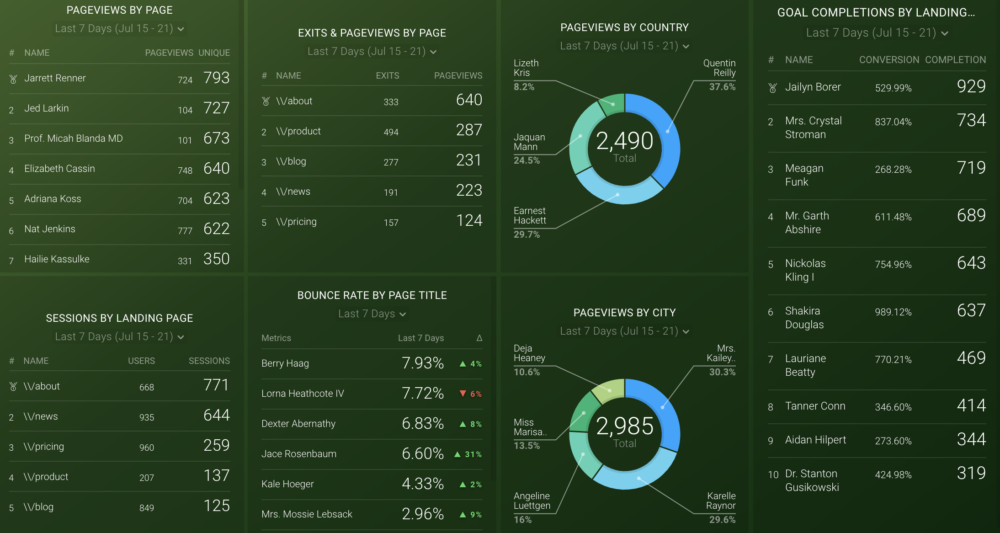
*Editor’s note: Check how well your content is performing with our Google Analytics Content Analysis dashboard. It gives a breakdown of sessions, along with how many goal completions each page is generating:
General Content Marketing Stats
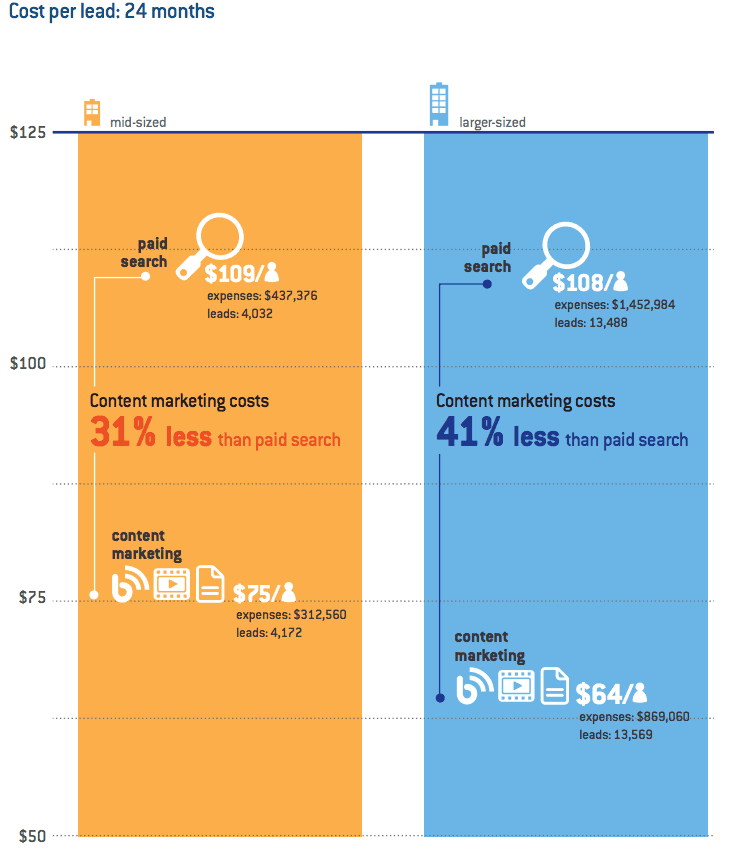
1) Content marketing costs up to 41% less per lead than paid search
First of all, let’s discuss why content marketing should be a huge part of your marketing plan.
Your marketing mix might include several channels–such as paid ads, social media marketing, and email. Why should content be a priority over those?
Here’s why: Research by Oracle found that content marketing costs up to 41% less than paid search for larger businesses, and 31% less for mid-sized companies:
2) 47% of buyers view at least 3–5 pieces of content before contacting a sales rep
So, why does content marketing get such a great ROI for the cost (compared to paid search)?
It’s because 47% of B2B buyers view at least 3-5 pieces of content before contacting a sales rep. That’s right: Before a sales demo, and long before an initial contact form submission, your target leads want to feast their eyes on content.
3) 53% of content marketers’ goal is to attract new visitors
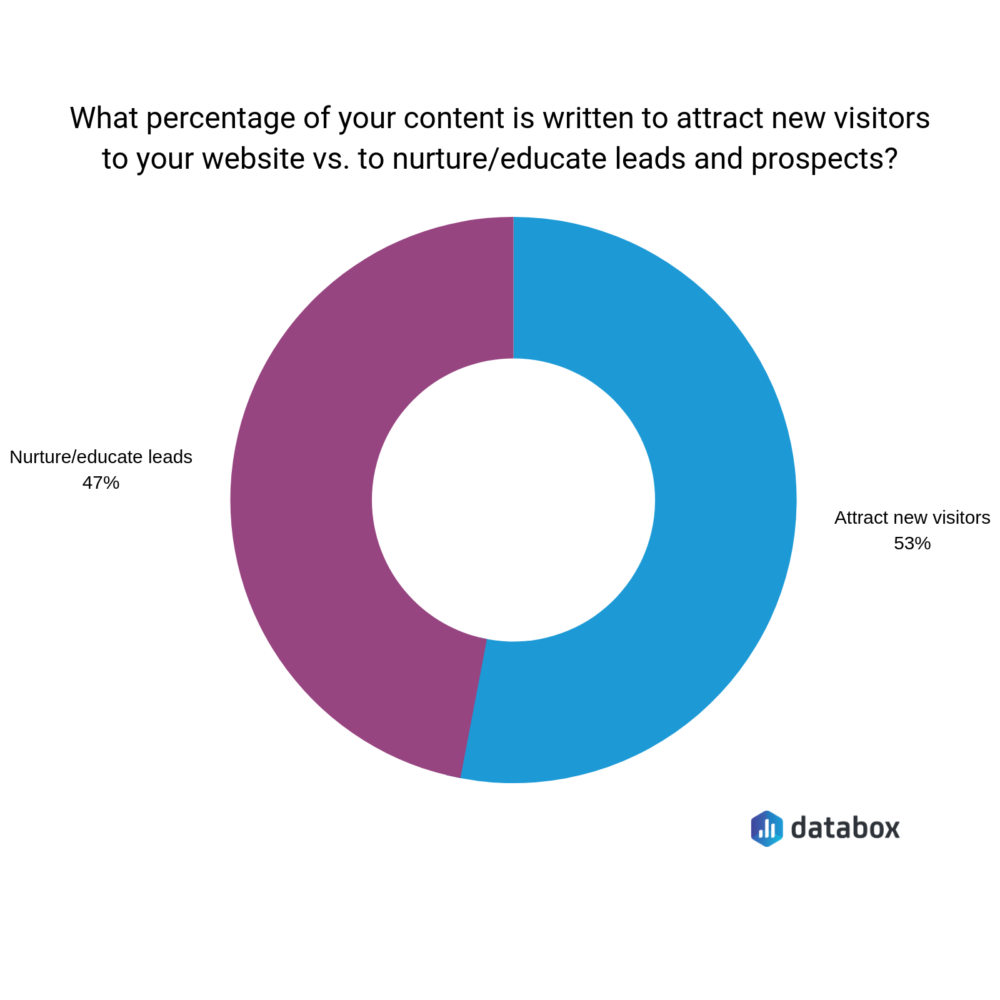
With the previous content marketing statistic in mind, it’ll come as no surprise to learn that over half of the marketers we surveyed said their content is written to attract new visitors:
Just less than half (47%) of our experts said their content is designed to nurture or educate existing leads.
Both are worthwhile strategies, because B2B buyers are looking for content at all stages of the sales funnel–not just the beginning. Your content is a great way to retain the users you’ve already got.
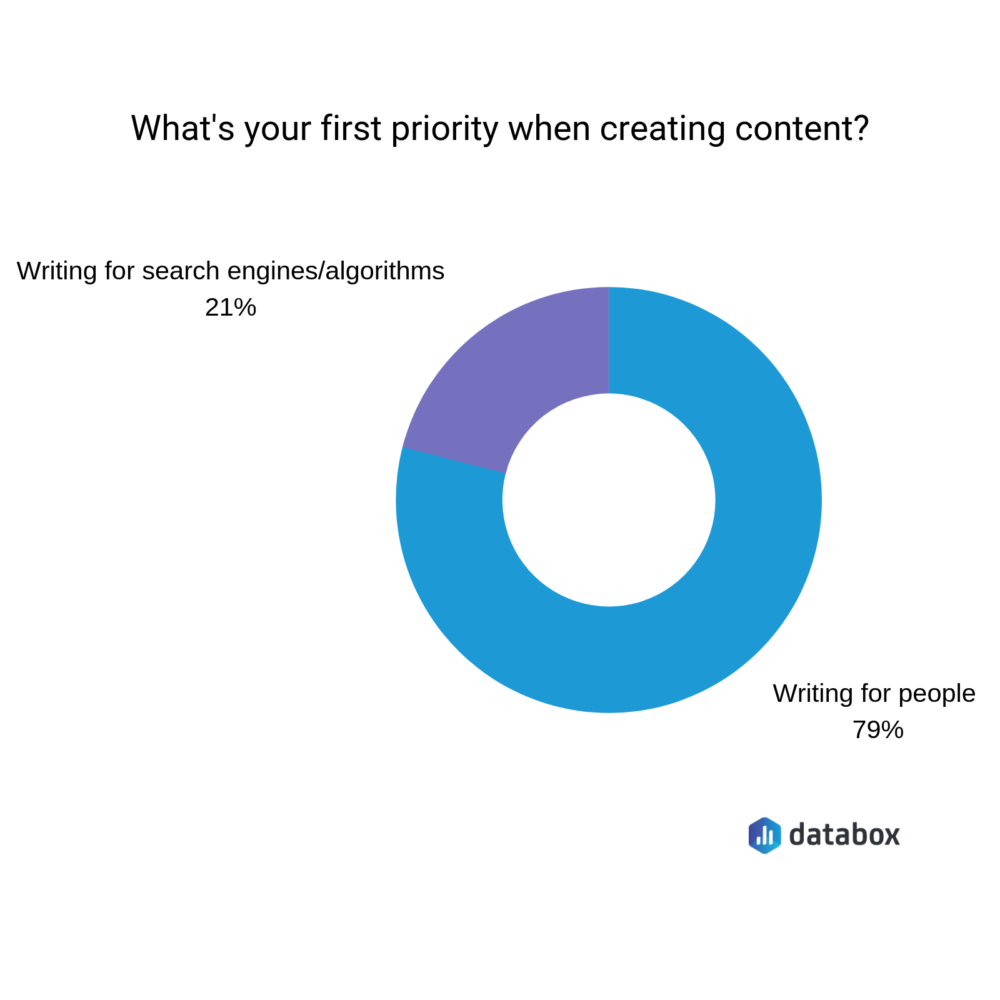
4) 79% of content marketers write their content for people (rather than search engines)
There’s no doubting that SEO is a huge part of content marketing.
We’ve previously likened it to the chicken and the egg: You can’t have great content without SEO, but your SEO won’t be successful without incredible content.
Despite Google being a huge priority for marketers, 79% of the people we surveyed said their first priority when creating new content was to write for people:
Blogging Statistics
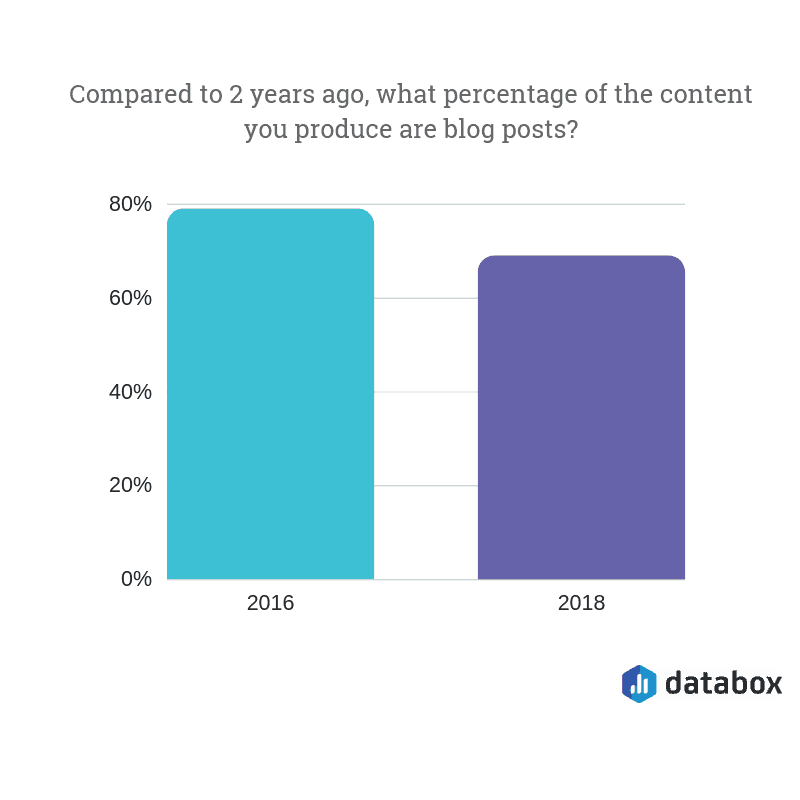
5) Blog posts account for 64% of all content being created
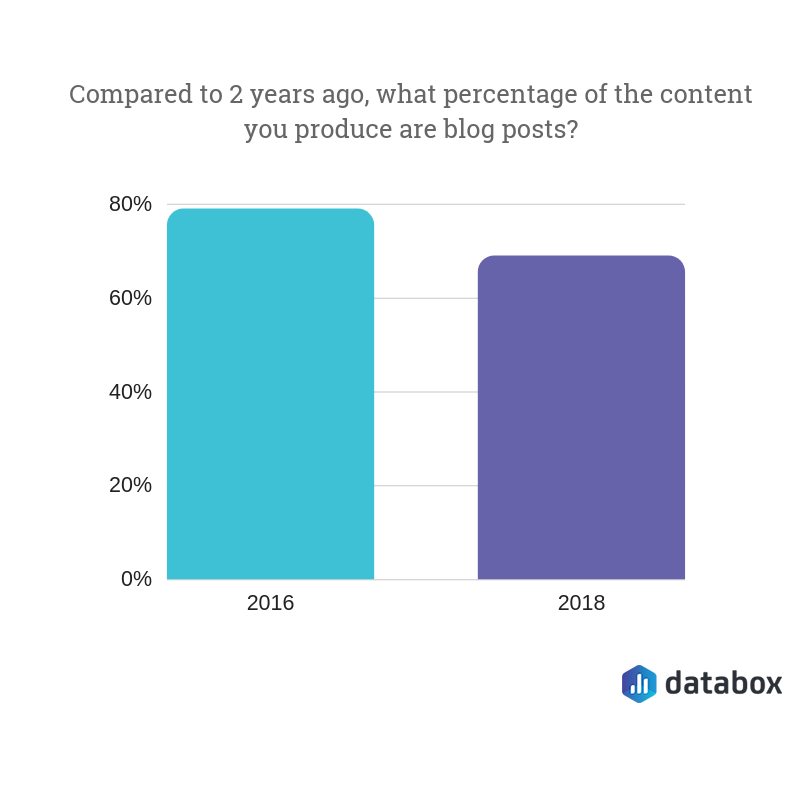
Our experts said blog posts account for 64% of all the content they’re creating, compared to almost 80% two years ago:
So, what other types of content are included in the other 36%? Here are some examples:
White papers
Videos
Podcasts
Case studies
Emails
Remember: Content doesn’t always have to be written text.
6) 61% of consumers made a purchase after reading recommendations on a blog
While written text doesn’t form 100% of the content a company creates, there’s a reason why blogging forms the majority.
It’s because 61% of consumers made a purchase after reading recommendations on a blog.
Whether you’re a SaaS, eCommerce or service-based business, your customers want to read content before they hand over their payment details–and they’ll finish their purchase, as a result.
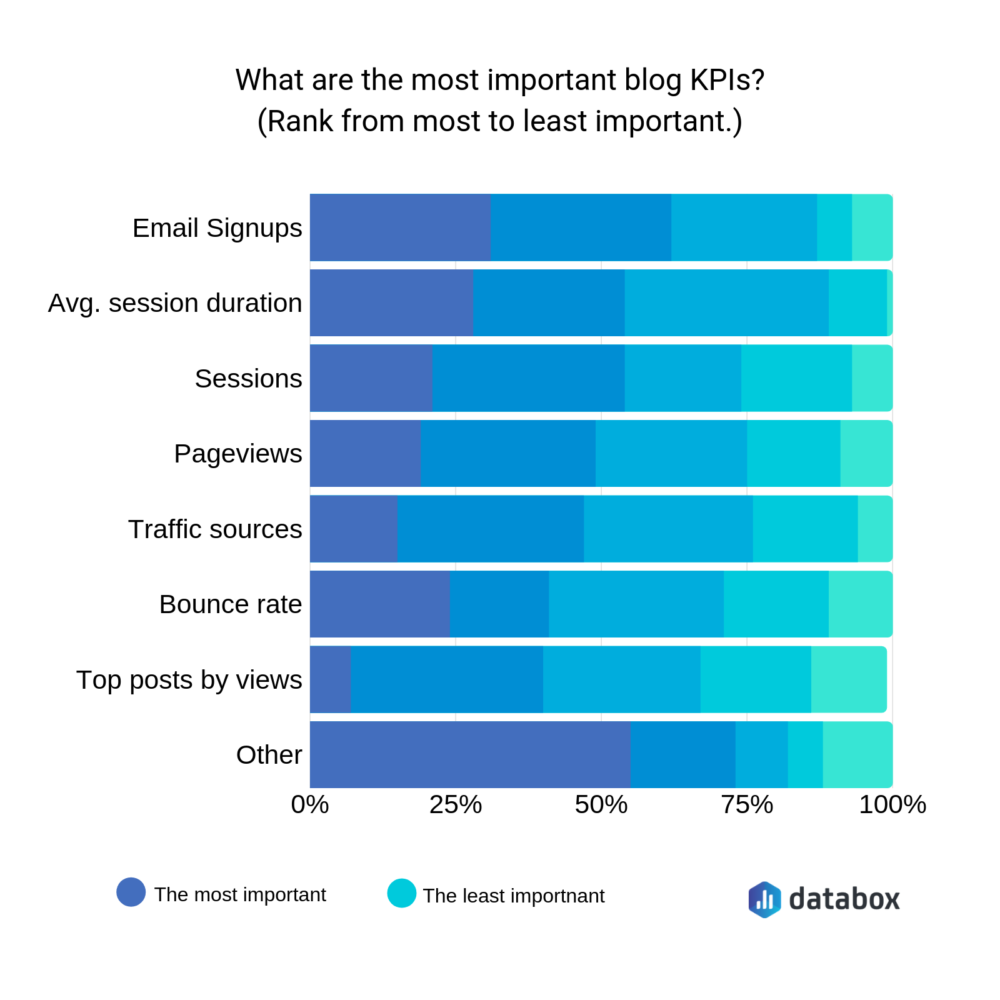
7) The most important blogging KPI is “email signups”
It’s a well-known fact that blogging takes a while to see results.
You can’t publish a blog post and expect to see hundreds of sales overnight; nor can you expect a lead to purchase after consuming a single piece of content.
Our survey indicates that businesses do see content marketing as a long-term strategy, with the majority voting “email signups” as their most important blogging KPI:
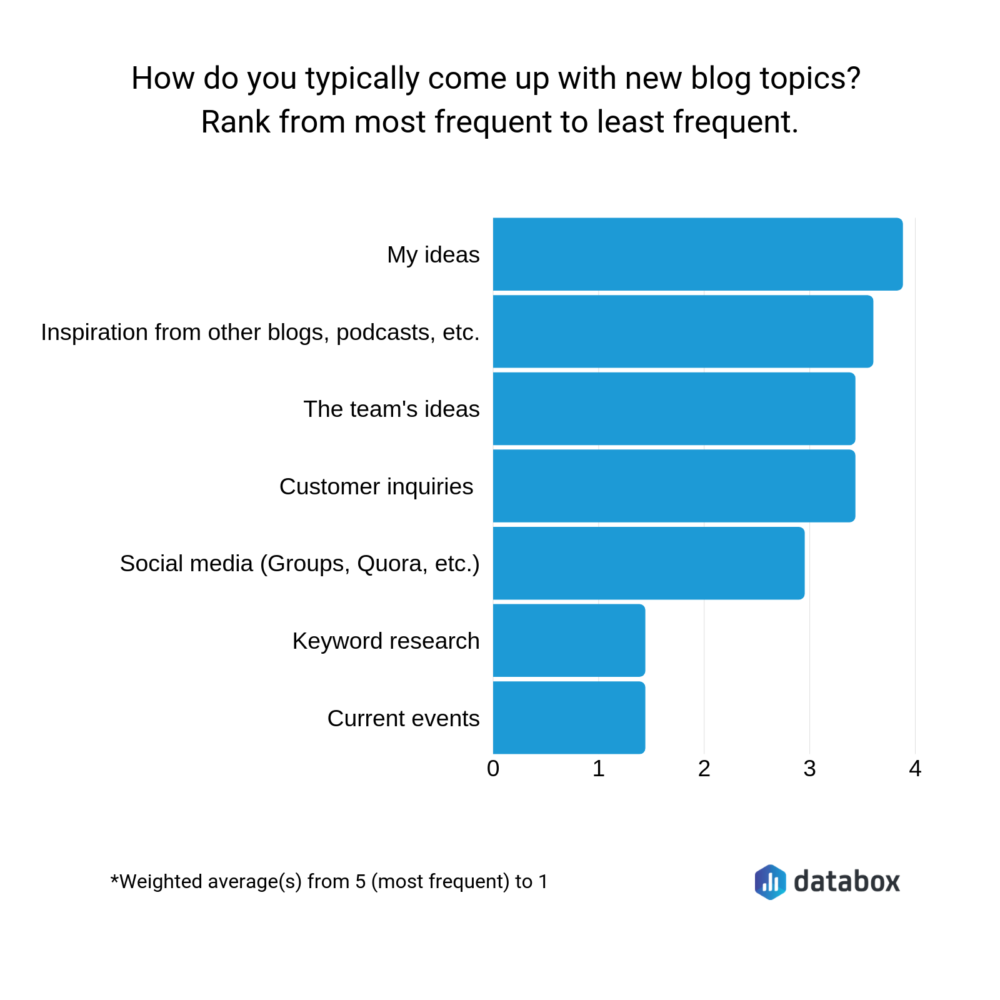
8) Content ideas from customer inquiries are the fourth most-used methods of finding content ideas
Finding new content ideas can be tough. So, we asked a handful of content marketers where they found them.
Personal ideas take the top spot; inspiration from other blogs take second; feedback from their team take third.
But arguably the most important–customer inquiries–are ranked fourth. (Despite those people being the audience you’re writing for.)
9) …but just 42% of companies are talking with customers to understand their needs
Companies are using customer inquiries as a source of content ideas.
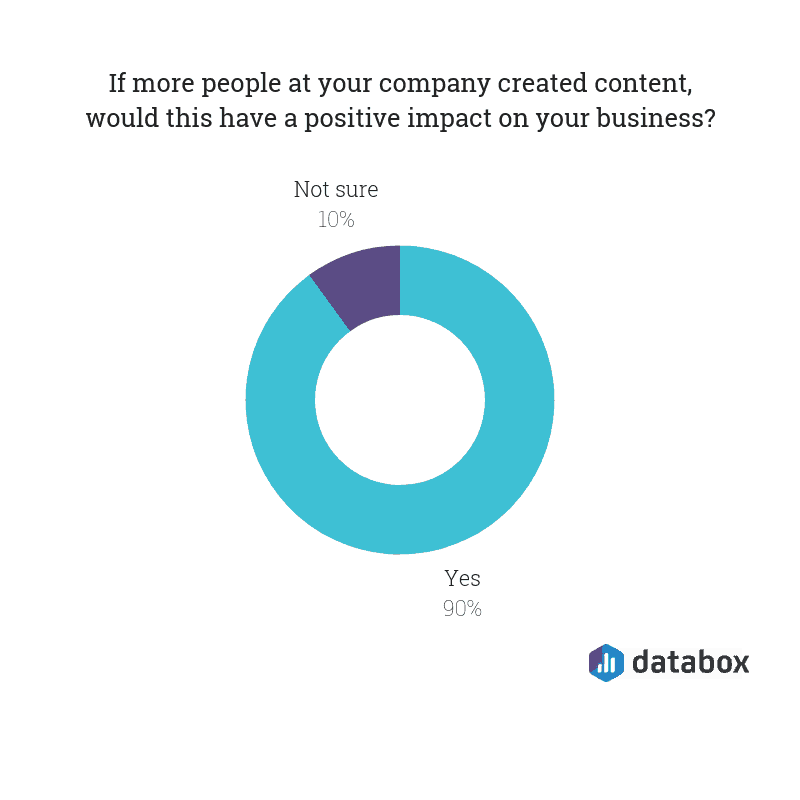
But even more worryingly, just 42% say they’re talking with their customers to understand their needs.
Without speaking to your customers, how do you know what type of content they want to consume, or the topics they’re most interested in?
(Schedule surveys into your post-purchase emails to get this type of feedback. Or, take a look at the questions your sales team are frequently asked. It’s a great source of content ideas.)
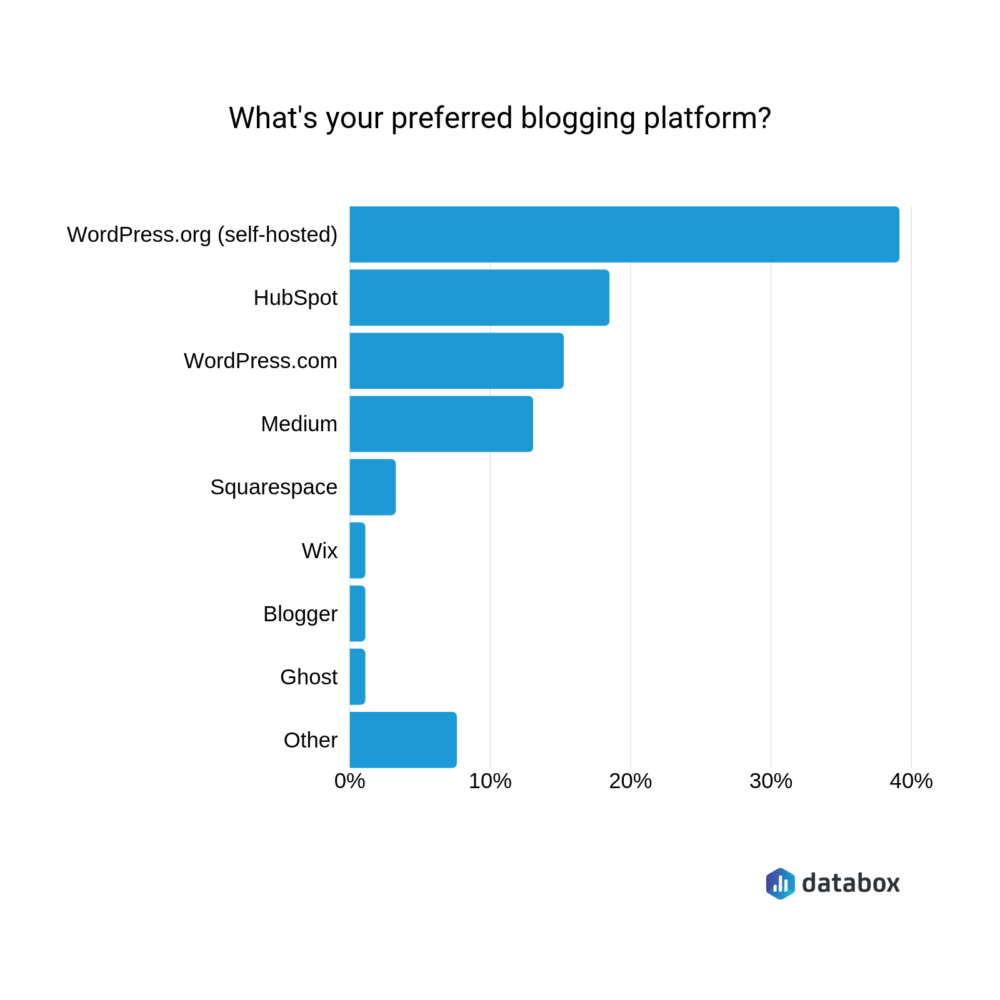
10) WordPress is the most popular blogging platform
So, are you convinced to start blogging (if you aren’t already)?
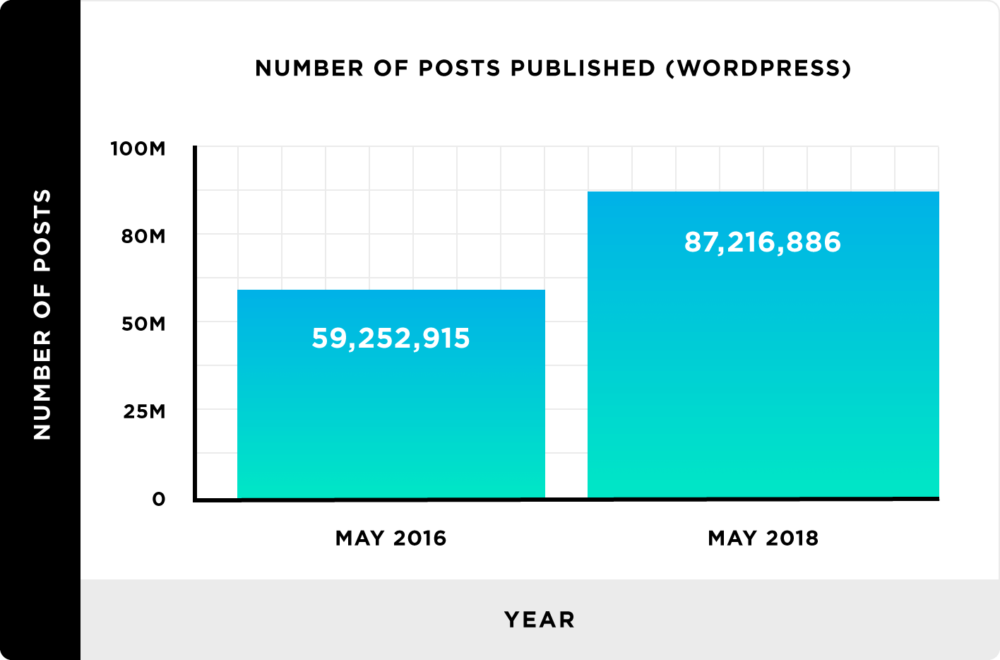
11) 87 million posts were published on WordPress in May 2018
If you’ve picked WordPress as your blogging platform of choice, you’ve got plenty of competition.
Research by Backlinko found there were over 87 million blog posts published on WordPress sites in May 2018–which is over 27 million more than two years prior:
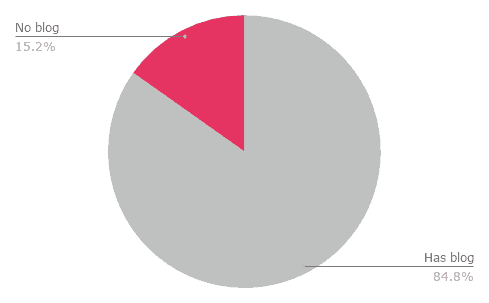
12) 15% of SaaS companies don’t have a blog
Sure, there are millions of companies you’ll be competing with when you start a blog. But not every business has a blog on their website–especially when it comes to SaaS.
You’ve invested time and effort into creating content, and you’re starting to see a handful of email signups as a result.
But you’re still not ranking in search.
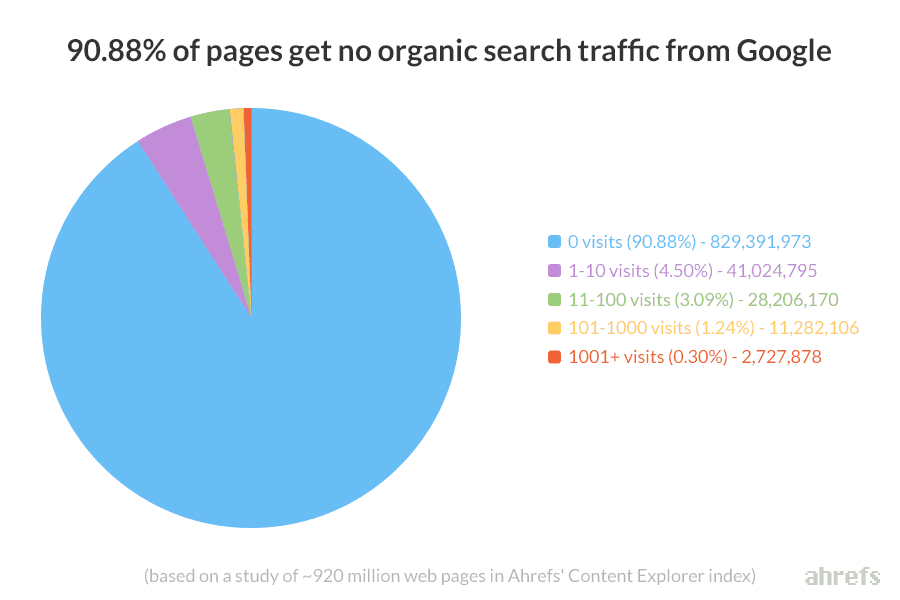
You’re not alone. In fact, Ahrefs discovered that the vast majority (90%) of content gets no organic traffic from Google:
Solve that problem by applying these SEO fundamentals to your website, and tracking your content’s SEO performance with our Google Analytics SEO dashboard.
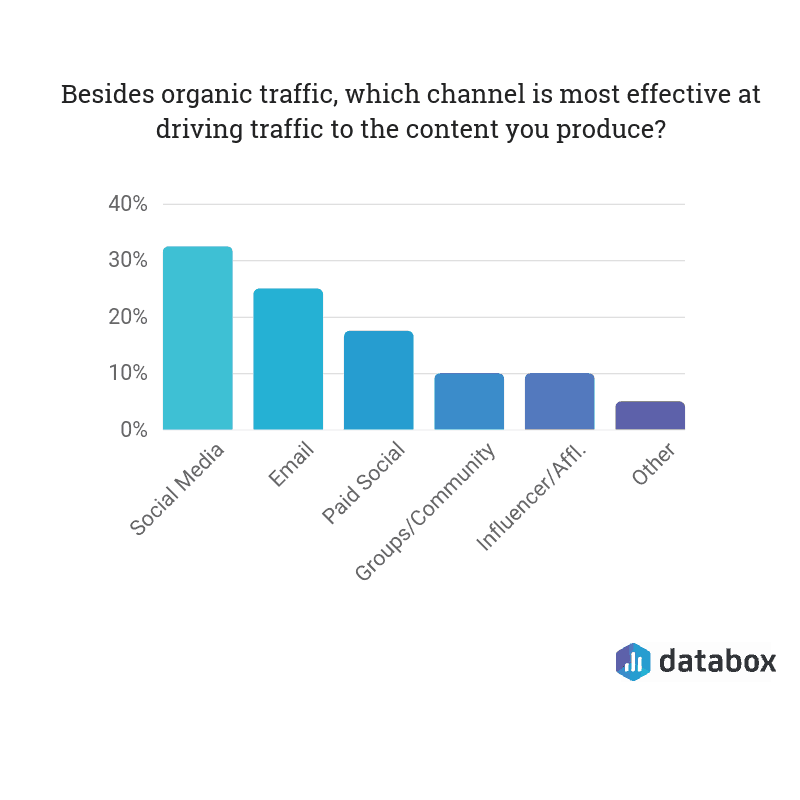
14) Over 30% of marketers think social media is the most effective way of driving traffic
If Google doesn’t drive traffic to websites, what does?
Our experts think social media is the answer, with more than 30% voting it as the most effective channel for driving traffic to the content they produce–shortly followed by email and paid social:
15) Posts with longer headlines get more social shares
If you’re sharing your content to social media, you can’t just post the link to your Facebook Page and expect people to flock to your website.
You’ll need to optimize your content for social media.
What does that optimization look like? According to this data, you’ll need to write longer headlines for your content. It’s proven to help garner more social shares:
Content Marketing ROI
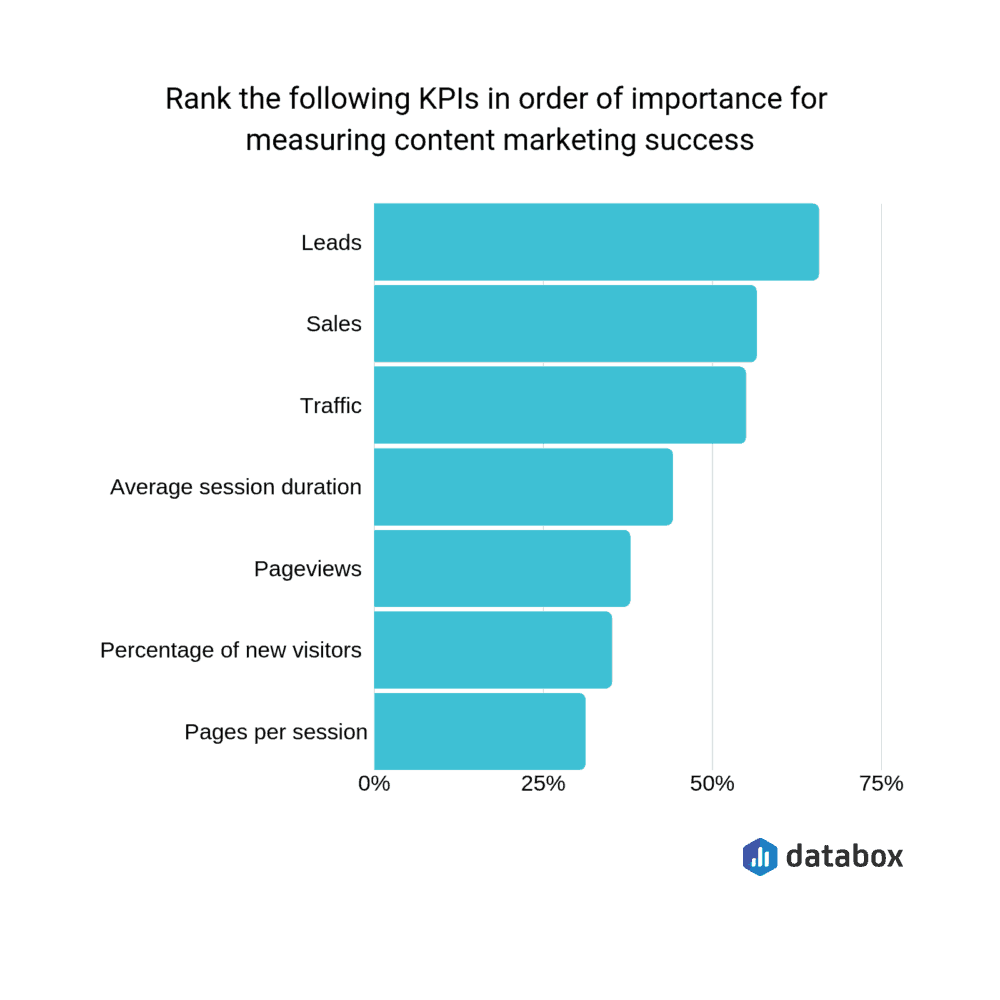
16) The most important KPI for content marketers is “leads”
Earlier, we mentioned that the main KPI for blogging is email signups.
That’s the same for content marketing, as a whole–with our experts voting “leads” as the most important metric to measure the success of their strategy:
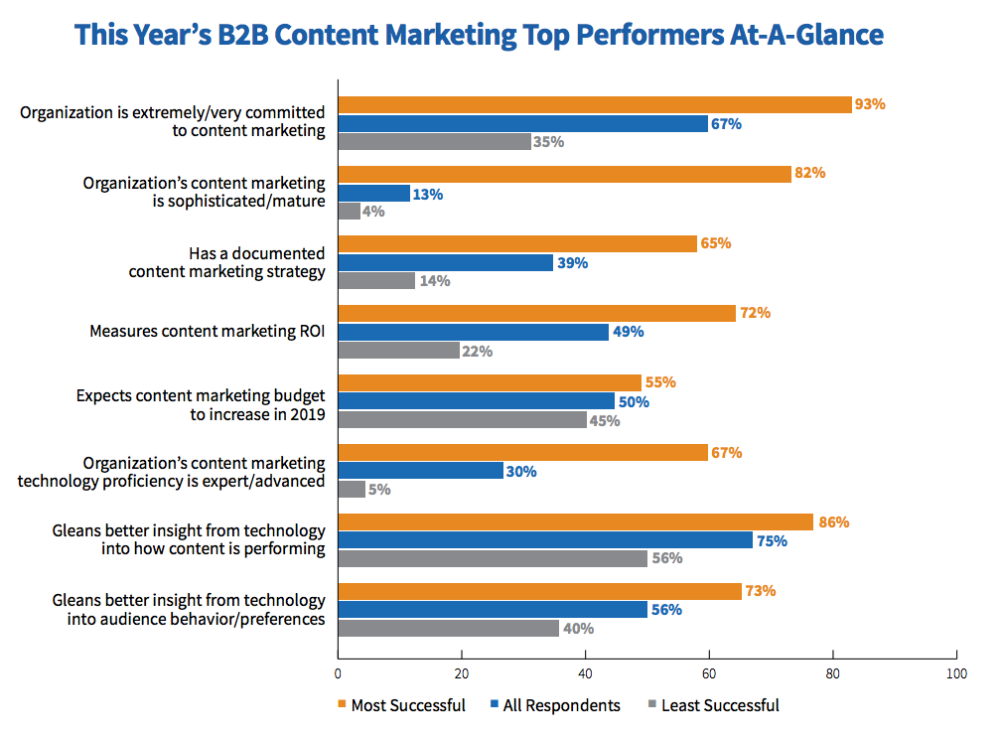
17) 72% of successful companies measure their content marketing ROI
It’s important to know whether the content you’re producing is achieving the results you’re hoping for.
Content Marketing Institute found that 72% of the most successful companies measure their content marketing ROI, compared to 22% of the least successful:
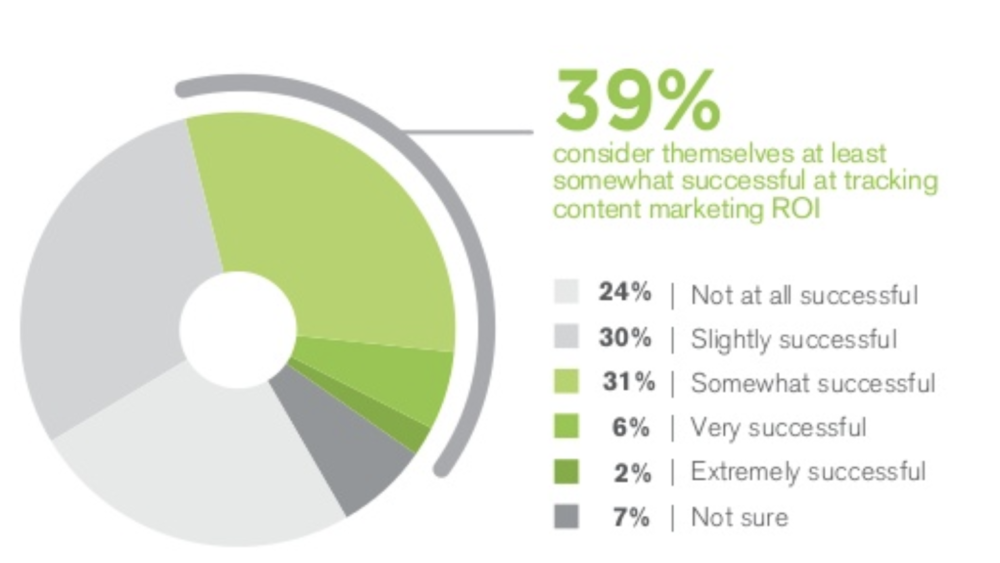
18) Only 8% of marketers consider themselves “successful” or “very successful” at measuring content ROI
Despite the most successful companies tracking their content marketing ROI, it seems like not many marketers know how to do it.
Research has found that 2% of companies consider themselves “extremely successful” at measuring content ROI, and just 6% think they’re “successful”:
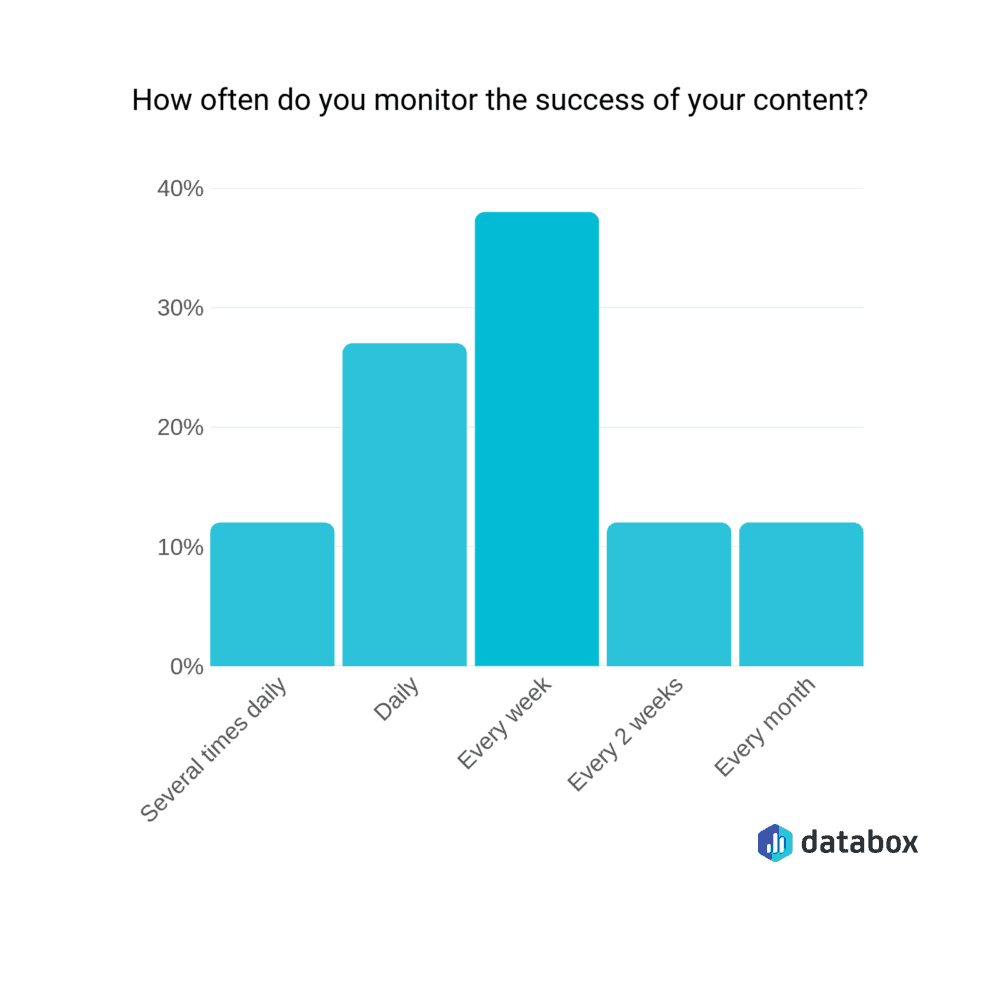
19) The majority of marketers measure their content success every week
Earlier, we touched on the fact that content marketing takes a long time to pay off. You can’t publish a piece of content and expect leads overnight.
Unfortunately, there is no “best practice” for how often you should measure your content marketing ROI. The more content you publish, the more frequently you could measure it–but you’ll need to give your content enough time to get the wheels turning.
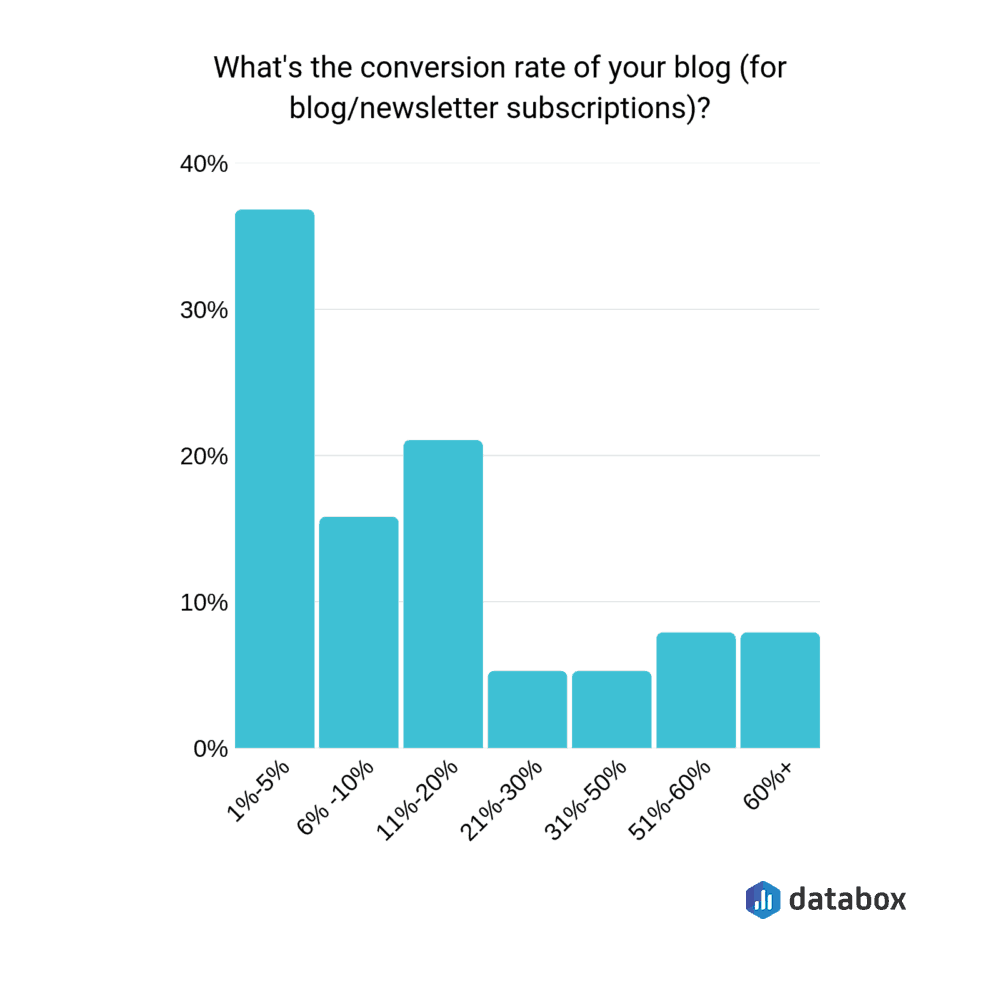
20) The average conversion rate for a blog is 19%
Email signups is the most popular content marketing KPI.
If you’ve chosen the same metric, you might be wondering what the typical blog conversion rate is so you can tell whether yours meets (or beats) it.
The majority of marketers we surveyed said 1-5% of visitors to their blog turn into a newsletter subscriber, with the average visitor-to-subscriber rate falling at 19%.
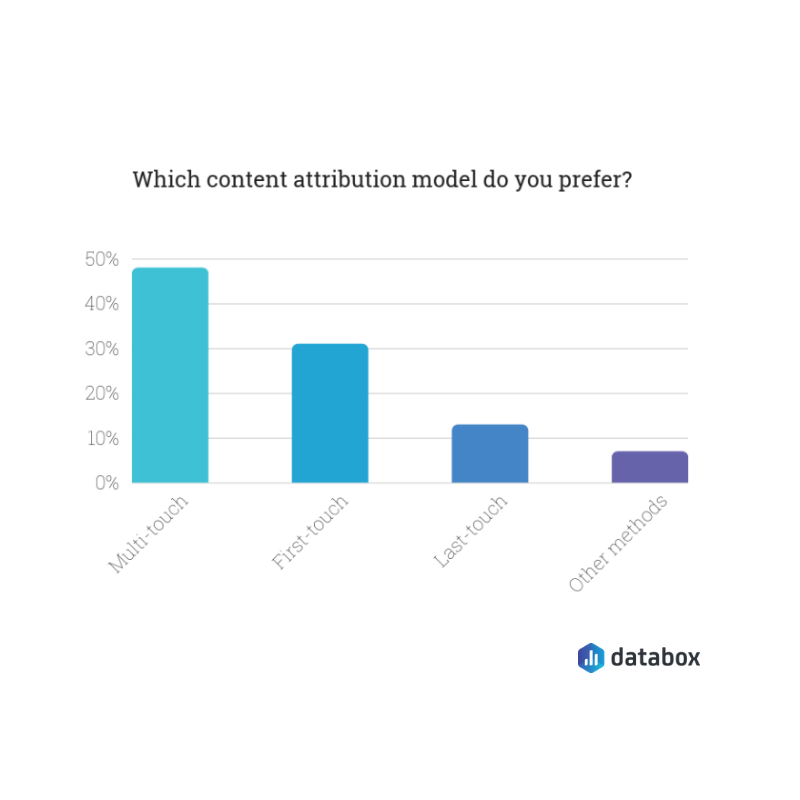
21) Almost half of marketers prefer multi-touch attribution models
When you’re measuring content marketing ROI, your figures can vary massively depending on the attribution model you’re using. It can be either:
First-touch: The first page they visited
Last-touch: The page they visited immediately before purchasing
Multi-touch: The several pages they visited throughout the process
Almost half of our marketers said they prefer a multi-touch attribution model, particularly because it allows you to track a customers’ full journey through your funnel:
Content Marketing Teams
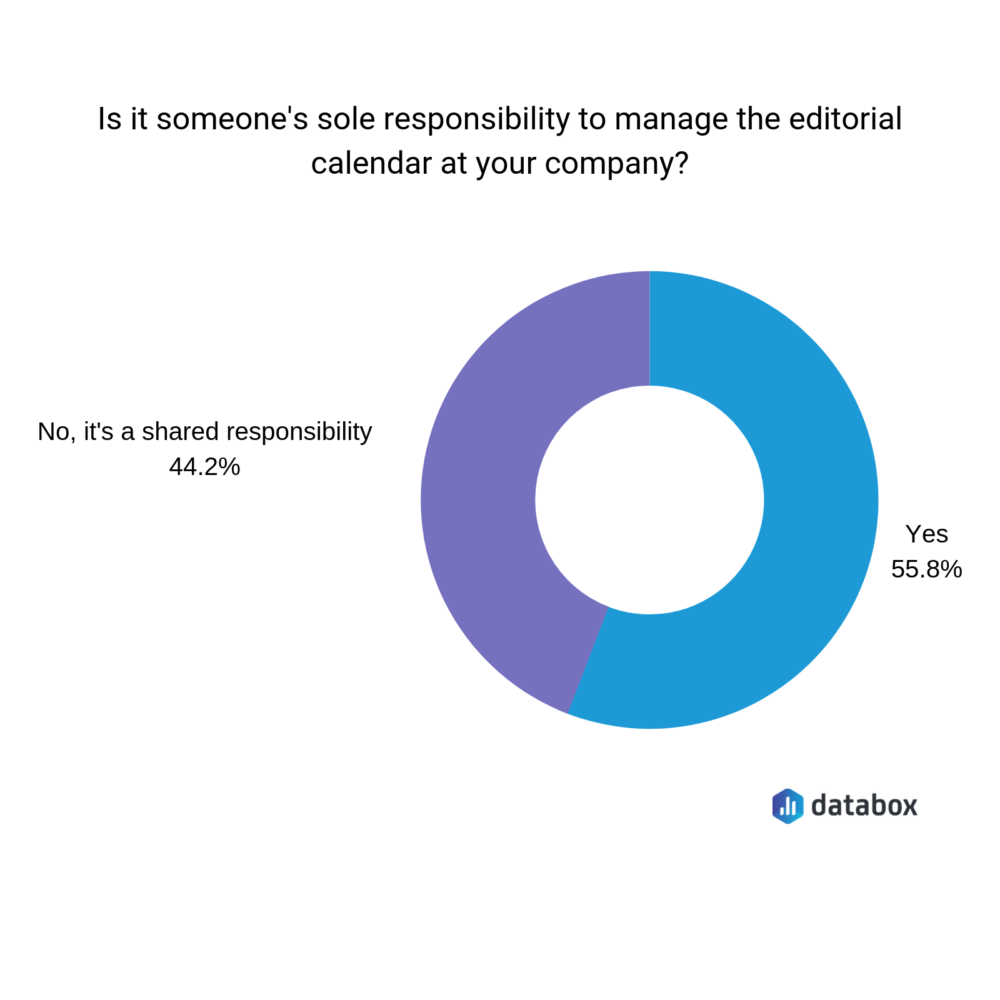
22) In 55% of organizations, one person manages the editorial calendar
Content marketing isn’t a one-man-band job. As you’ll see later, content departments are teams, with several people helping to drive those subscribers.
So, how can you encourage more people within your workforce to help with content creation?
Start by explaining the value that content gives, and how it’ll help improve the day-to-day life of the people you’re trying to involve. (For example: If you’re asking a sales rep to contribute content, tell them they’ll have a detailed link to pass onto customers who ask the same thing.)
Content Marketing Budgets
24) Marketers allocate of 26% of their total marketing budget to content marketing
Ah, the fun part of marketing: Budgets.
Even though you’re not directly investing cash into a platform (like Facebook Ads, for example), content marketing still needs an investment–which usually comes from a broader marketing budget.
Izea found that on average, B2B marketers allocate 26% of their overall budget to content marketing. That comes down to 22% for B2C companies.
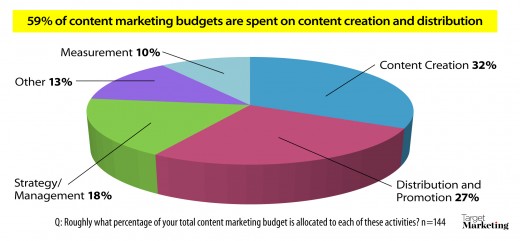
25) 32% of a content budget goes to development, and another 27% to distribution and promotion
Once you’ve got the percentage split you’ve got to assign to content-related tasks, you’ll need to decide where to spend it.
Data by Target Marketing found that on average, 32% of the budget does to content development, and 27% heads towards paid distribution and promotion.
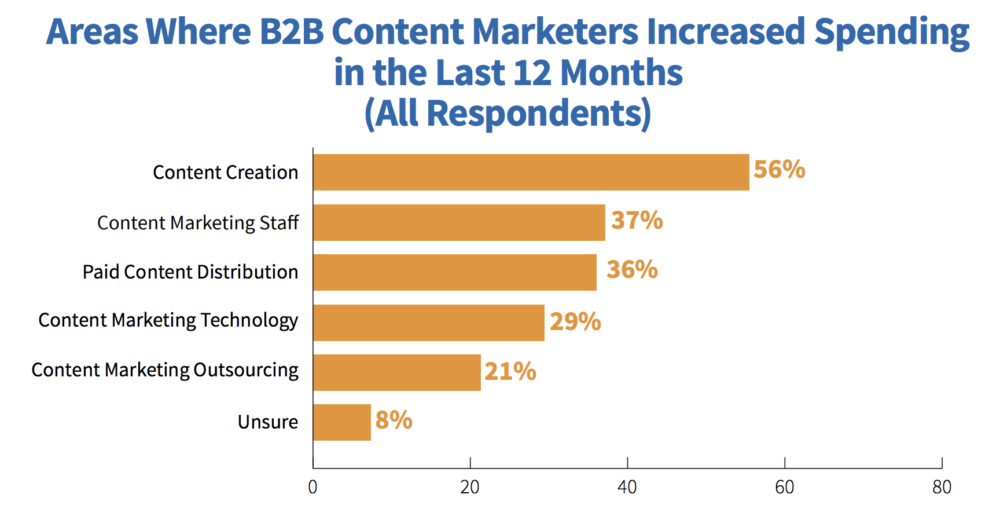
26) 56% of B2B marketers increased their spend on content creation
Just 32% of the average content marketing budget is spent on creation.
However, that seems to be on the rise. Content Marketing Institute found that 56% of B2B marketers increased their spending on content creation in the last 12 months:
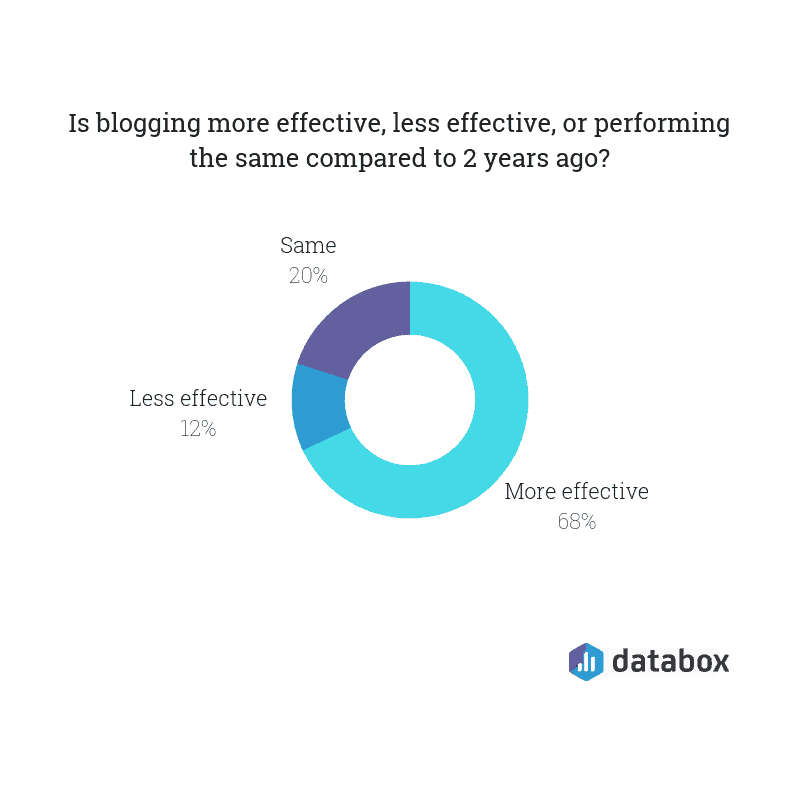
28) 68% of marketers think blogging is more effective than two years ago
With these content marketing statistics in mind, it’s interesting to think where we’ll be in a few years time. (Especially when things have changed so much within the previous two.)
We wanted to get a rough prediction on what content marketing might look like beyond 2019, so we asked whether marketers found blogging more (or less) effective than two years ago.
The majority think it’s more effective:
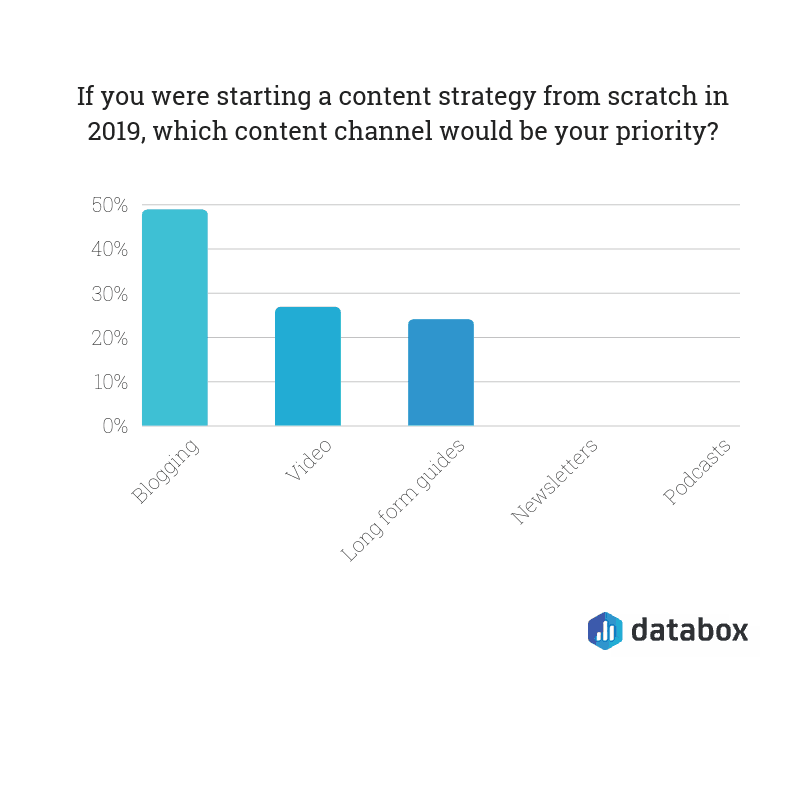
29) Almost 50% of marketers would focus on blogging if they started from scratch
Judging from that previous statistic, any form of content (particularly blogging) isn’t set to die down anytime soon.
Elise Dopson is a freelance B2B writer for SaaS and marketing companies. With a focus on data-driven ideas that truly provide value, she helps brands to get noticed online–and drive targeted website visitors that transform into raving fans.
A key to being successful in business is having a service or product that is unique and no other business can offer quite as well as yours can.
You need a unique selling proposition (USP). A USP is “the factor or consideration presented by a seller as the reason that one product or service is different from and better than that of the competition,” according to Entrepreneur. The term USP became a buzz term in the early 1940s, as a theory to explain a pattern of successful advertising campaigns.
Sometimes having a USP comes naturally. For example, when the iPhone was first released, Apple had a strong USP. People wanted to explore the apps and use their phone in new ways.
But if you’re a nail salon in New York City, it might be hard to walk more than one city block without finding a competitor. So, as a business owner, you need to realize what makes you unique compared to others and use that to market your business.
If you can’t discover your own USP, it will be hard for you to target customers and create a successful sales strategy. A unique selling proposition can also be important in making your brand memorable to customers and conveying why you’re the business they should keep returning to.
You should begin the process with some introspection. Then follow these steps to help you expand and write a strong USP.
Ask your staff for help: Loop in your staff. Sometimes when you’ve been so involved in your business, it’s hard to take a step back and see it from a different angle. Ask your staff what they feel sets your business apart from the competition.
Put yourself in your customers’ shoes: As the founder of the business, it’s easy to think your product or service is perfect. But why do your customers need or want your product? Is it convenient? Does your staff offer friendly service? What makes them come back to your business instead of turning to a competitor? You want to focus on what your customers care about.
Do a SWOT analysis: Another strong business practice is writing down your strengths, weaknesses, opportunities, and threats (SWOT). Then use this to help you see what your business does well or could further capitalize on to have a USP.
What problem are you solving? Think about what problems you’re solving for your customers and capitalize on that. Consider how your customers’ lives were less convenient before your product or service. This all part of knowing what motivates your customers’ buying decisions.
Now that you have your unique selling proposition, what’s next?
Target your ideal customer: Once you’ve done some research and decide who your ideal customer is, target them with vigor. This helps you spur brand loyalty and create an effective sales marketing plan.
Make a promise and keep it: At its core, your USP is essentially a promise you’re making customers about your product or service. So now you have to spend time, effort, and money delivering on it.
So, if you want to accelerate the growth of your blog, you need to be building an email list.
Here’s the problem:
Building your email list is hard work.
Now, you can add site-wide opt-in forms and get some good results but what if you could improve your email sign ups by 300-400%?
Sounds too good to be true, right? Well, it’s not – I did this for the marketing agency I used to work for.
Here’s what I did:
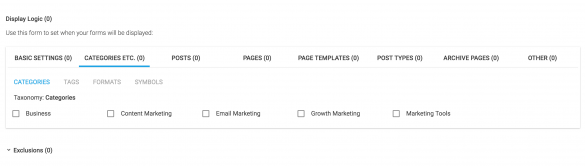
I streamlined the blog’s categories to make them more focused and I ensured every post was assigned to a category in WordPress.
Then, I created a freebie (or lead magnet) for each of those categories.
I used a WordPress plugin called Thrive Leads to create targeted opt-in forms for each of those categories.
For example, I’d have in-content forms, after post forms, sidebar opt-ins, and popovers – if a visitor was reading a post in the email marketing category, they’d see forms tailored that category, and it’s accompanying lead magnet.
Here’s why this works:
Relevance matters. And when someone is reading your blog, they’re far more likely to join your email list if your offer is relevant to what they’re reading at the time.
Just don’t forget the important part – the content you create will have a significant impact on your email sign up rates. The better your content and the stronger your offer, the more mileage you’ll get out of this tactic.
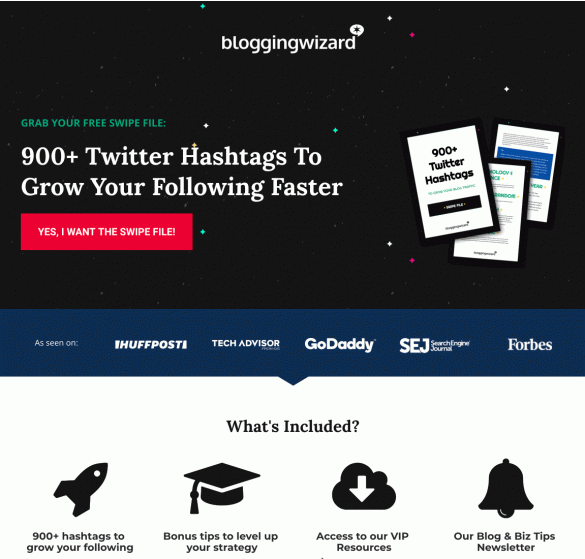
2. Use conversion-focused landing pages to promote your lead magnet
A landing page can have a few different meanings.
The type of landing page I’m talking about here has one goal – to convert.
In this case, the conversion goal will be to join your email list.
You’ll find no nav menus or any other distractions, and they’re typically focused around a specific audience persona.
Here’s an example of one I’m developing:
Why are landing pages such a big deal?
Well, the conversions of opt-in forms on most blogs are extremely low. For example, most sidebar opt-in forms tend to convert at less than 1%.
Compare that against landing pages which can convert at well over 20% (and that’s a low estimate).
For example, quick landing pages I’ve built in the past have converted at over 30% before running any split tests or putting much effort into optimization.
How can you build your own landing pages?
If you use WordPress, you can use a plugin like Thrive Architect. It’s particularly well suited because of it’s marketing focused landing page templates (organised into sets).
If you don’t use WordPress, you can use a quiz platform like Interact to get started.
4. Run a content audit on your blog and improve underperforming content
Chances are that you have some blog posts on your site that aren’t doing anything for you in terms of traffic.
Maybe they were published a long time ago and they’re starting to age. Traffic from Google may have dropped off and traffic is steadily declining.
Or, there may be some technical issues that are holding those articles back.
Either way, it’s important to audit your content every once in a while.
There are a few things you’ll need to do:
Check your analytics to see which posts are experiencing a decline in traffic
Run a site audit with a tool like SEMrush or Ahrefs to uncover technical issues
I particularly like SEMrush for running content audits because they have an SEO-focused site auditor and a separate content audit tool.
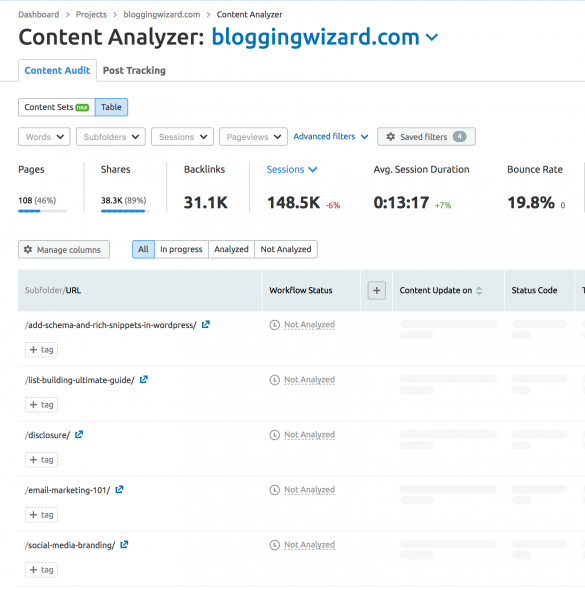
For example, within a few clicks, I’ve already got the tool pulling in all my posts & pages & collating data for me to go through:
Doing this sort of thing manually, dipping and diving into spreadsheets can be extremely time-consuming.
Now, it’s worth noting that there are a few different ways to handle underperforming content:
Update/expand and repromote – Some blog posts just need a bit of extra TLC. A quick update, maybe some extra tips, and you could reclaim some of the traffic you’ve lost from Google. Always repromote it.
Rewrite from scratch and repromote – If the content is extremely out of date then I’ll consider a complete rewrite. This will sometimes result in the biggest ranking improvements. Like before, always repromote it.
Remove and redirect to the next most relevant post – When a blog post gets no traffic, has no backlinks, and needs significant updates, you may want to consider removing it and redirecting it to another blog post (the most relevant one). There are some cases where I’ll keep a post like this, such as when it’s still useful for my audience, or I’m planning to work on traffic generation in the future.
5. Leverage the power of rich snippets to drive more search traffic to your blog
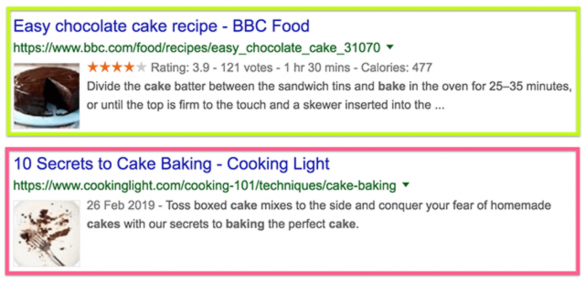
Rich snippets are additional data points that you often find in Google search results.
These data points will come in various forms. Some of the popular ones being review stars and recipe information.
The result of this extra information is that it helps your content stand out more than the content from other sites. This can result in more clicks.
Here’s an example (the first has rich snippets):
And you can use these rich snippets for a lot more than just reviews and recipes. Here are a few extra uses:
Articles
Courses
Events
Books
Products
Local businesses
Rich snippets can be added using Schema – a type of structured data.
Once you’ve added any Schema code to your website, be sure to use Google’s data testing tool to ensure it’s been added correctly.
6. Use guest blogging (strategically)
While guest blogging is nothing new, it’s worth mentioning because it can still be effective when done strategically.
While this tactic is great for brand awareness and exposure, driving traffic to your blog from guest posts can be incredibly difficult.
You can fix this by approaching larger sites, particularly those that have a highly engaged audience.
Then, you’ll need craft a rockstar-level piece of content.
Here are a few examples:
The inspirational post – Posts that inspire and tug on people’s heart strings can go a long way but they’re not easy. If you have an inspirational story to tell, this option is for you.
The group interview – When you involve more people in the content creation process, you’ll naturally get more shares & traffic. And group interviews are a great way to do this.
The crowd-sourced + repurposed infographic – When you take a group interview and repurpose it into an infographic that you host on a site with a much bigger audience, what do you get? A heck of a lot of shares & traffic! One time I tried this and my content reached an extra 30,000+ people.
The pillar post – It’s difficult to justify the time to create a seriously in-depth piece of content, but it can pay off if you promote your landing page in your author bio, and have a solid sales funnel in place.
Like many marketing tactics, and life in general – your mileage will depend on the time and effort you invest.
7. Grab extra Pinterest traffic with tailored imagery
Pinterest has the potential to be a traffic generation powerhouse.
The only problem is you need imagery that resonates with those who use Pinterest.
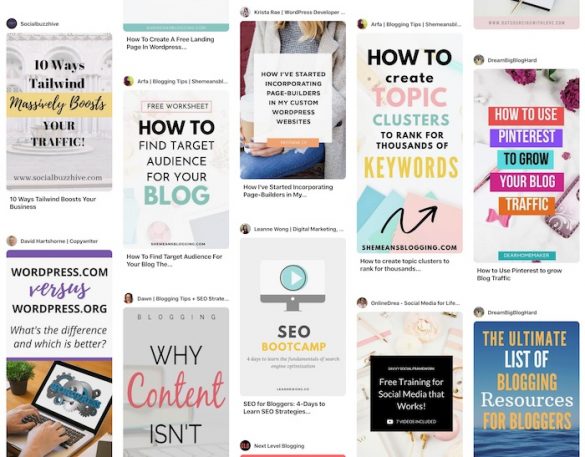
Typically, we’re talking about eye-catching vertical images that include a catchy title.
Here are a few examples from one of my group boards:
While these images can provide inspiration for your own images, it’s worth running a search for some of the topics you’d want to rank for in Pinterest (think of it like a search engine).
And take a look at the image styles everyone is using.
Best practice would be to follow the styles that others are using, but you’ll want to experiment with this because if everyone is creating similar images – none of them will stand out.
And there’s where you’ll likely find your biggest opportunity.
Once you’ve figured out a particular style of image that works, turn it into a template and use it for the rest of your images.
You can take this to the next level by using a WordPress social media plugin like Social Snap – this allows you to set a unique Pinterest image that people will be able to share when they use your pin button.
8. Use content repurposing to get more mileage out of everything you publish
Do you ever get the feeling that you’re on some sort of content creation hamster wheel that you can’t escape?
I know the feeling well – you’re not alone.
The reality is that you can get more mileage out of every single blog post you publish by repurposing it into different content types.
This can include:
Infographics
GIFographics
Video
Audio
PDF’s
Slideshare presentations
The great thing about repurposing your content is that it will help you reach an entirely new audience. For example, video opens you up to YouTube which has it’s own built-in audience.
And more often than not, these are easy tasks to outsource if you have some budget to play with.
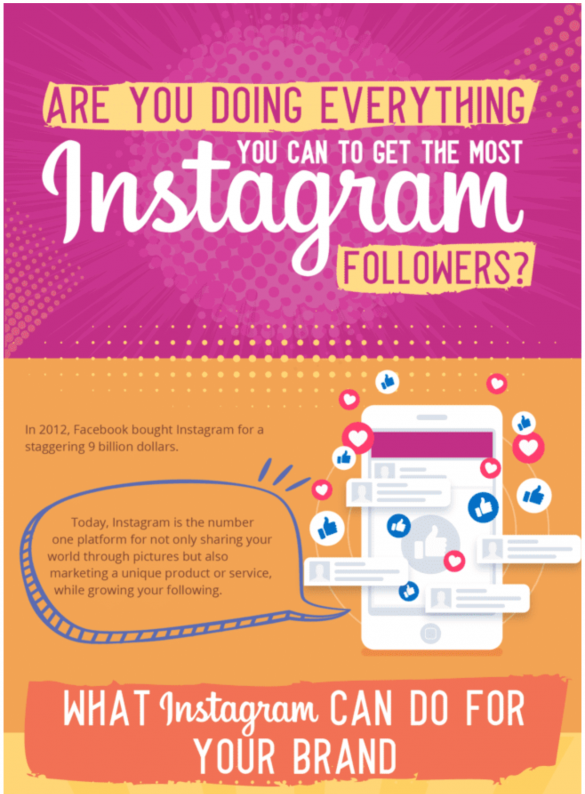
Recently, I hired a designer on PeoplePerHour to turn one of my blog posts into an infographic.
As part of the work, they collated the text for me and here’s a snippet of the end result:
You can save yourself a bit of cash by designing the infographic yourself and you don’t need to be a designer.
Image design tools like Venngage have loads of templates you can use to get started.
9. Invest in the promotion of your content
There’s a common misconception that free traffic generation tactics exist.
It’s a myth. There are no free ways to drive traffic to your blog because you will always pay with something. Usually with your time – and your time is precious.
One of the easiest ways to promote your content is to use paid platforms and considering how much effort it takes to get that so-called “free traffic” – it often works out cheaper.
Here are a few platforms you can use:
Quuu Promote – Get your articles shared by a lot of other bloggers in your niche.
Facebook Ads – You can boost your Facebook posts or run Facebook Ads, just be careful because ads typically default to a high lifetime cost, so be sure to set campaign limits.
Outbrain – Get your articles featured in the related articles sections of huge websites.
Taboola – Similar to Outbrain but it has access to a different pool of websites.
And as I’ve mentioned for a few other tactics in this post, if you’re going to be investing money in a tactic, try to have something in place to help you recoup your ad spend.
This could include a sales funnel that promotes a course, or information product or affiliate links, for example.
Wrapping it up
We’ve talked through a bunch of different tactics to help your blog grow faster.
Some will help you build your email list and others will help you get more traffic to your content.
Implement as many of these ideas as you can and you’ll increase your traffic. Just don’t forget about encouraging people to engage with your content, so you can make the most of everything you publish.
Adam Connell is a content strategist with a background in SEO and email marketing. He used to manage the content marketing efforts of international brands. Now he teaches bloggers how to get noticed at BloggingWizard.com.
Advertisers are saving huge sums by bringing programmatic advertising in-house, while publishers can potentially drive higher revenues through direct deals with brands.
Current technology trends in the advertising industry promise to provide more revenues for publishers, substantial cost savings to the big brands — the advertisers, and greater data transparency — but at a disruptive cost.
As much as 60% of advertising budgets are spent on various services and fees from the many third-parties involved in media buying. That’s a lot of money that publishers aren’t getting and for which the brands are potentially overpaying.
There’s a lot of money to be made by squeezing the middle — the agencies and the third-party services and ad networks that soak up the billions of dollars in the huge multibillion-dollar advertising industry. The incentives for publishers and brands to close this gap between them is enormous.
Access to data is a key issue. Programmatic media buying requires lots of data, but outside agencies that charge hefty fees usually run these systems. In-housing is a key trend that is saving brands millions of dollars by bringing programmatic media buying into the company.
Digiday reports that Bayer saved $10 million in the first six weeks of bringing programmatic media in-house. In-housing programmatic brings additional benefits — direct access to customer data. And companies can build direct relationships with customers without having to go through agencies or other third parties.
This trend is so strong that Sir Martin Sorrell, the former CEO of WPP, one of the largest marketing holding firms in the world, has founded S4 Capital to help brands with in-housing programmatic ad buying and other digital services. He says he is creating a new advertising agency that is digital-first and unencumbered with legacy culture, legacy fees.
Private equity firms are also eyeing the lucrative opportunities in squeezing out inefficiencies in the ad industry. Blackstone recently announced it had acquired Vungle — a mobile advertising company for a reported $750 million.
And several ad tech companies are producing the programmatic software desks that enable the in-housing of media buying. This potentially becomes the place where other data feeds can be integrated and help make operational business decisions beyond media buying.
On the publisher side, there is also a push to obtain more data from the ad networks and platforms. Ad-Juster, which works with 100 of the largest media companies, recently published a report on the 10 largest ad platforms on their data sharing — all of them badly scored.
“Since we published that report seven of the ten have met with us asking how they can improve their scores, so we are making progress, but there is a lot more to be done,” said Dan Lawton, chief marketing officer at Ad-Juster.
Programmatic advertising is a problem for publishers because it tracks the user and not the content of the publication. And this tracking technology is at the heart of the problems with advertising and privacy, and it has been used to target political messages, not just commercial.
Lawton believes that the ad industry will eventually move towards a contextual advertising model because contextual advertising doesn’t require invasive tracking technologies. This would also be good for publishers because it regains some of the value of generating good content.
“We have to solve some of the attribution problems,” says Lawton. “But advertisers will realize that there’s much more value in contextual advertising.”
Gradually, the publishers (on one side) and brands (on the other side) are moving into more direct contact. This means better data for the brands that gain a far better understanding of their customers from in-housing programmatic media buying.
Better data access means that he publishers can improve the content and improve their ad revenues — which is a rare positive trend in a media industry that has undergone a massive disruption in its economic base and continues to shrink.