Tag

Website

Browsing

By Hector Herradura

Graphics are an important field of your visual identity, but also can make your web to load slowly. In this post I will show you how using SVG graphics you can optimize and improve overall customer’s experience and your site load time.

If you know what is a vector graphic and it’s differences between a bitmap image you can skip the introduction and jump to How to improve your server speed with SVG icons section where I talk about how to increase the speed of your site.


Introduction: what is SVG hence a vector

SVG (Scalable Vector Graphics) is a format standardized by W3C on 1999 that aims to port the advantages of vector images to the web.

To understand what is a vector first we must know how images store their info. There are two ways to define an image: to store which primary colour of the additive model (Red Green and Blue) is inside a pixel grid, or to use maths to define a geometric form and store it’s info with numbers and text.

  • Bitmap photos and videos formats use the grid approach.
  • Vector graphics use maths to calculate the final render.

Let’s say we have two images of a box, one is bitmap and the other one a vector. Focus your attention at the bitmap box (we will rotate it slightly to see the effect) and we will make zoom on it. It’s dimensions are 100×100 pixels and 72 PPI ( how many pixels are contained in an inch, Pixel Per Inch).

Example of a bitmap image against a vector image.

As you can see our bitmap box is pixelated, while the vector image is not. This happens because bitmap images are defined in the space and limited by attributes such as resolution (how big is an image, heigh and width) or PPI. The grey pixels are a result from interpolation. So now you know one vector’s advantage, quality is mantained when you make zoom on them because they are being defined by maths and are scalating their dimensions.

Well, you maybe encounter yourself thinking if there could be a photograph represented by vectors, the answer is yes, but that’s not what vectors are for. For photos and videos, bitmap format is the right choice because it has another advantages such a better realistic look, a more affordable way of processing and modifying data and a very good relationship representing complex forms with subtle colour transitions such as clouds or skin tones.

Vectors on the other side were made to describe simple and complex geometric images where there is normally not many transition of colours and than can be scalable to big sizes.


So what is SVG?

SVG is a format / way of writing vector images using markdown language just like html is made for layering text. A box in SVG format will result in something like this:

<svg height=”100" width=”100">
<rect width=”100" height=”100" style=”fill:rgb(0,0,255);stroke-width:3;stroke:rgb(0,0,0)”></rect>
</svg>

which result in this :

Let’s get dirty, for example this time we will use my logo which has a clearly difficult path and we will convert it to SVG. You will see it doesn’t matter how difficult the shape it is, it can be always be defined by maths. My logo in SVG result in this:

Example of a complicated icon path converted to svg

How to use SVG on the web

Is very easy to use SVG on the web the only thing you have to know is the SVG code of your icon. All kind of vector drawable software like Adobe Illustrator or Inskcape have an option to export your work as an SVG. Then, you only have to paste it onto your html and you are done.

Of course you will need to add some code to your taste (exmaple; a SVG inside a div to position it on the right of the page). If you become competent with SVG you can make changes directly at the code, no need to use Illustrator to make little changes anymore.

When to use SVG

SVG is specially good for icons. You should try to use it every time you can. There is an png icon on your web? change it and convert it to SVG.


How to improve your server speed with SVG icons

Think, when you enter a webpage and your browser has to download images from the server, these occur via HTTP GET request. While making request, the server can be slowly due to some reasons or you computer can have a slow internet connection resulting in a slow load time. When you use SVG you are reducing the number of petitions to the server.

Imagine that you have 10 PNG icons on your page, that results in 10 request more to the server, an increment of 0,300ms. You can get rid of that 0,300ms and make your web load faster using SVG icons. Now because your icons are part of the code and are sent to you via the html file, you are downloading only one archive and making only one petition to the server.

Here you have an example: this site, which I created for this case, is using 10 .png icons, downloaded from mdi-icons page, and it’s hosted on GitHub. When we use the inspector tool ( Ctrl + Shift + C) from our browser and go to network tab, we get the site’s loading speed in ms. You can see that there are a total of 12 request which result in a load time of 655ms.

Site created for this case
Notice the 12 request made to the server and how they affected the site’s load speed.

Now if we visit the same site with svg icons notice what happened to all the request, they are gone and the load time is faster.

Notice the total request reduction from 12 to 2 resulting in a faster speed

Well, we have gotten a really good result, we have gone from 655 miliseconds to 343 miliseconds! but also pay atention to the other parameters, all except DOMContentLoaded are faster. SVG let’s you icrease your site speed while increasing your icons quality, it is a win-win situation.

In the next section I will explain some others advantages of SVG.


Others advantages of SVG:

Quality and size

  • Your will improve the quality of your site when the user makes zoom in the page icon the quality will be the same.
  • You will forget about colour profiles (ICC profiles) since the colour is read directly from the code and profile is defined by the browser.
  • SVG is made of text, text always means less consumption of resources and the lesser weight of all of kind data types. You will gain some free space on your server and remember text can be compressed to the maximum (if you server have some kind of compression) bitmap images can’t be compressed to maximum, just a tinny fraction.

SVG will Increase your workflow

  • As we have talked before you can make direct changes to the code, no need to open your favourite vector software to retouch it, save and upload the img to a server again.
  • You can share your vectors easily via e-mail with your teammates or you just can copy it directly from the source code of the page in case you don’t have access to the archive.

You can animate SVG with CSS

  • Yep, you can animate SVG with CSS, say goodbye to GIFs embrace the code. For example you can change the colour of some path from your SVG when hovering the mouse. This opens you to a world of new possibilities the limit it’s on the code side.

SVG animation

You can use text inside SVG

  • You can put text in it and modify it as you desire. It’s selectable and also you can make curved text.
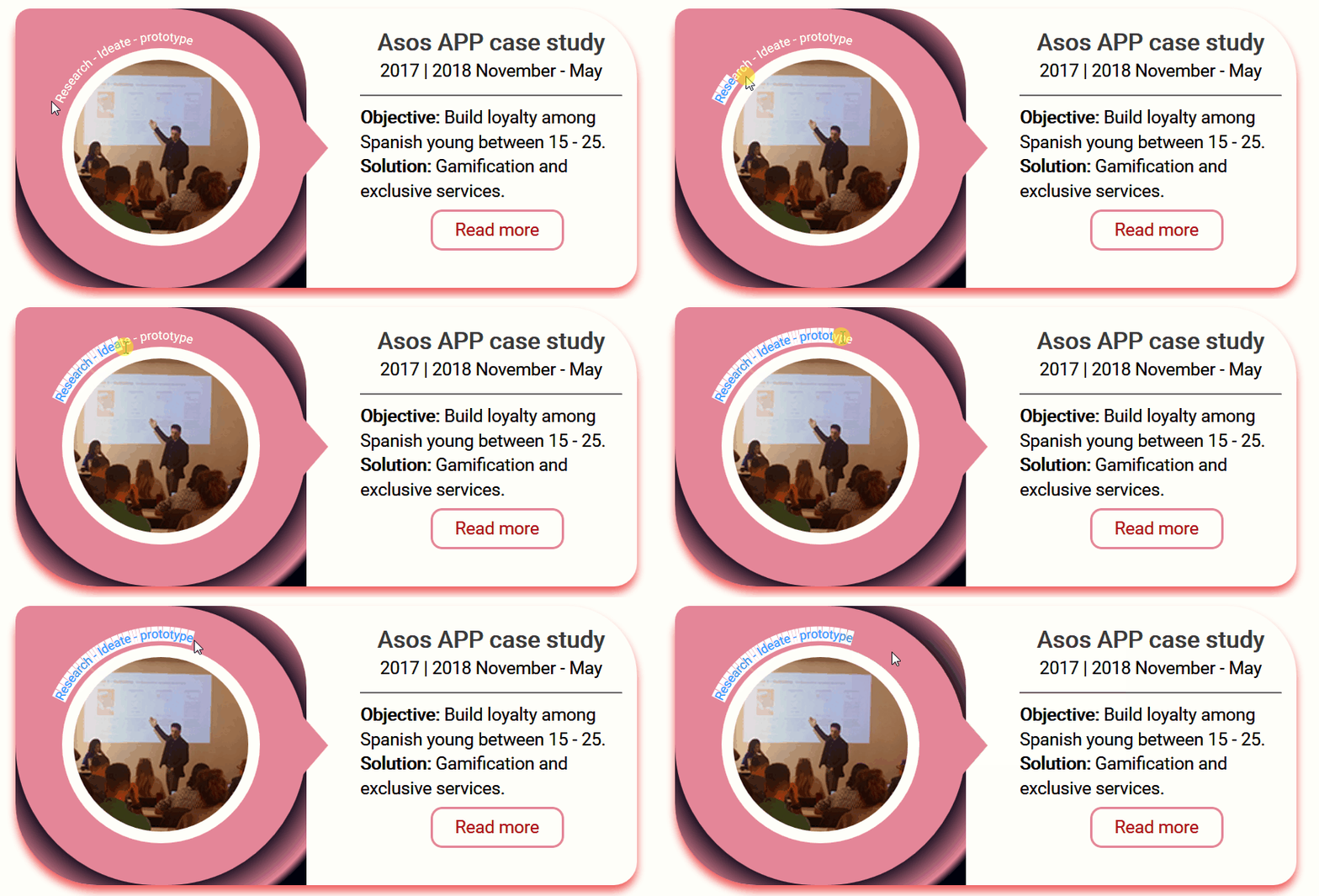
SVG curved text

You empower you brand against illicit use of your logo by commons folks

  • SVG are a double-edged sword, the common folks are not going to be able to download any image from your site, it will be almost impossible to them figure it out how to print and modify your logo; but people with techie knowledge can use it instantly instead of having to recreate it again from an image.

Conclusion

You should always try to use SVG in web development. They are fast, they have the most quality of all img formats and they are easy to implement, and you server will have less request to attend.


 

By Hector Herradura

Sourced from UX Collective

By Melissa Burns

Blogging is one of the most valuable tools you can use to engage with your customers online and ultimately improve your marketing and business results. If you don’t have a blog already, you should definitely start one now.

Over the years, blogging has emerged as one of the main elements in marketing strategies today. And 2019 promises to be the year of blogging.

Before we delve into how you can use blogging to connect with your audience, let’s examine the benefits of adding a blog to your website. Then, we’ll discuss how to get started with blogging.

The Benefits of Blogging

A blog is really a simple, concise and easy-to-use platform that allows you to connect with your target audience online and share with them relevant information about your business and other relevant information. Because it is your own platform, you can explain directly to your audience all about your products or services and how to use them. Also, you can easily track customer engagement on your blog and get their valuable feedback firsthand.

As SEO is a part of most content marketing strategies nowadays, more and more businesses are focusing on optimization to improve their search engine rankings. To have a better ranking on Google, the most popular search engine, the most effective way is to add a blog to your website. However, it’s not enough just to have a blog. It will have to be active and you’ll need to learn how to apply SEO recommendations to make your blog popular.

According to a Hubspot survey, 60% of businesses that have a blog on their website acquire more customers. Your blog is where your content strategy starts. From your blog, you can pull out content for your email and newsletter campaigns, social media channels, webinars, eBooks, guides, and so on. Having all your vital information in one place will not only be helpful for your customers, but also for yourself as well.

Keep in mind, though, that your target website or business audience is whom you’re writing to when blogging. That’s why it’s important to provide them with useful tips and tricks so they are benefiting from the blog and finding reason to keep coming back for more information.

Among the numerous benefits of adding a blog to your website, the most crucial one is that it gives you and your company a voice. There is no better way to personalize your company than by having a blog. For instance, you can show all the values that are important to your company and its employees by writing about company culture.

Your blog is also a place where you can write about upcoming products or services, and comment on industry trends. Use it to showcase your brand personality and industry expertise. Remember that customers are less likely to buy a product from a company they don’t like. However, they are more loyal and likely to become repeat customers for those brands they like.

5 Steps to Add a Blog and Start Blogging

Starting a blog is easier than it once was, but you have to be more determined and have clearly defined goals before you start working on your platform.

Here’re crucial steps to make your blogging an interesting and beneficial process.

Step 1: Prepare and plan ahead

Every good strategy requires preparation, and it’s the same with blogging. What are the goals of your blog? Do you wish to inform people about your products or service? Do you want to provide them with additional information on product usage? Do you want to position yourself as an opinion maker in your industry so you’ll comment on recent trends and provide guidelines?

Answering these questions will help you determine in which way to go. Don’t forget about writing a list of topics for your blog. To research and get some ideas, use Google Trends, a free tool provided by Google.

Step 2: Add a blog page on your existing website

As a company or serious professional, you probably already have an existing website. To add a blog to the website, create a new website page with a link to a blog you set up on a popular blogging platform like WordPress (WP).

Alternatively, you can move your website to WordPress. Use .htaccess codes to redirect old links on your existing website to new ones on WP. The power of a static blog homepage in WordPress can allow you to run your blog with your website name as the main domain.

You can then customize your blog to match your website and post content on the blog. Visitors will not have a problem identifying and reading your blog.

Step 3: Publish the blog page

If you want your blog to be accessible on your website so that other people can read it, you will have to publish the website page with a link pointing to your blog, or add the blog link to your website navigation. Check that everything is correct in the page and click the ‘Publish’ button.

After publishing and making your blog link live on your website, go to your WP Dashboard and choose ‘Settings’ on the left side. Click the button to create a new static page in WP and select ‘Blog’ under the drop-down menu for ‘Posts.’

It’s very important that you choose ‘Blog’ under the drop-down menu for ‘Posts’ and not the ‘Front’ page, because it will determine where your blog feed appears on your website.

When you’re done with that, you will now have to decide how many posts you want to appear when your readers visit your blog. The number is up to you.

Step 4: Add your first blog post

This is where you’re going to need that list of blogging topics you created in the first step of preparation. Decide on the title and subject or topic that is best to publish as your first blog post.

With blogging topics already decided and written down in the first step, you will have no problem creating content that is high converting. This is why it’s essential that you don’t skip the preparation phase.

Don’t be too strict on yourself, though, especially if this is your first blog post ever. The good thing about blogging is that you can edit all your posts after they’re published without any problem.

add_new_blog_post_wordpress_cms_content_management_system.jpg

Step 5: Create an editorial/blogging calendar

Blog posting should follow a pre-determined strategy for it to be effective. For this reason, create an editorial calendar for your upcoming articles, with topics, deadlines, the persons who will write them and any other information you find useful. Have this information clearly written down ahead of time.

When you blog without an editorial calendar, your blogging messages and schedules are likely to be all over the place, making your blog look disorganized and messy. Your customers may easily get confused. Blogging is pretty straightforward, but mistakes like these can harm your blog performance.

Conclusion

Adding a blog to your website is not something you can ignore today at a time when every business is focused on content marketing. When you decide to start a blog, remember these key points:

  • With a blog, you can easily communicate and engage your audience
  • Blogging will increase your search engine ranking results
  • A blog is a perfect platform for publishing converting content
  • Having a blog allows you to show your company culture
  • With quality preparation, you will simplify your blogging process
  • Having an editorial calendar is crucial for your content to succeed

With all of this in mind, blogging will be inspiring for you and your audience. It will simplify your communication with customers and make it easier for you to convert prospects into customers as well. So, get blogging today!

By Melissa Burns

Melissa Burns is an independent journalist and marketing consultant. Business innovations, technology, and marketing are central topics of her articles. She started writing with a single goal of sharing her expertise with other people. Melissa also provides workshops for start-ups and small businesses.

Sourced from The Web Writer Spotlight

By Richard James

There is no denying the power of Google. The search engine has become so popular that the term “Googling” has become synonymous with the very idea of looking something up. The only problem is that while people look to Google for answers, they do not look very hard.

Most people never look past the first page of results. This means that falling to the second page is almost as bad as being on the tenth page. Given that the vast majority of people begin online by using a search engine, this is not something any successful website can afford.

Search Engine Optimisation (or SEO) is the key to landing a prime position on the front page. However, competing with big businesses who have monopolised all the most popular words and phrases can be more than a little intimidating. That is not even mentioning all the other businesses and blogs out there who are fighting for the same position.

Not to worry though! There are several relatively simple tips and tricks that can give anyone the edge they need. The reason why everyone is not taking advantage of these techniques is that they are not the most intuitive since it involves working with the inherent disadvantages rather than trying to get rid of them.

The Disadvantages

In order to turn these so-called weaknesses into strengths, the first step is to understand what they are. To begin with, no-one is going to be able to compete with big industry names when it comes to popular phrases from the start.

Websites have a domain authority score rated out of 100. This score is heavily influenced by how many external links there are to that particular site. The big-name popular sites will have tens of thousands of links meaning that their domain score is often 70+.

So competing directly is very hard. Achieving that kind of domain score would require years of work and a huge monetary investment. Fortunately, there are other ways to make it on to Google’s front page. All that is required is a little creative thinking.

Long-Tail Keywords

Since no-one can fight the big names for popular phrases, the next best thing will have to be used instead. Long-tail keywords are longer and more precise phrases used to search for items.

Take this guide for example. The popular “head” keyword would be “ First Page of Google “. A long-tail search might look something like “ How do I get my Website on the First Page of Google Search “. The thing is, that the majority of Internet users search with phrases that are long-tail keywords. People want answers to their specific problems. So, if these searches can be predicted then there is no need to fight over head keywords. It is like casting ten smaller but more accurate nets instead of one larger one.

The great thing about this strategy is that when a relevant website appears when someone has searched for a long-tail keyword, people are more likely to stick around. This is because they asked for something specific and got a result so they believe the thing they are looking for must be somewhere within the site.

While it is true that head keywords are searched more often than any long-tailed keyword the difference does not matter that much. Long-tailed keywords have a much higher conversion rate which is the truly desirable result. It is better to have 20,000 users with an 80% conversion rate than it is to have 60,000 users with 20% conversions.

Write More Posts

The problem with utilising a strategy focused on long-tail keywords is that it requires a lot of content to back it up. A good blog post will feature a couple of keywords at the most. To capitalise on all the different keywords that will bring a website to the front page require a lot of different posts to catch a lot of different search terms.

So how many posts is enough? The industry standard is to write at least 16 posts per month, probably a little more. This means that the competition is averaging a new post slightly more often than every second day.

These are not low-quality, short-form posts either. Most posts that turn up on Google’s front page are over 2,000 words in length. Write guides with lots of useful details to help people fix their specific problems. Again, being specific is better since it allows for more long-tail keywords to be spread out across multiple posts. It is also harder to run out of things to talk about if the topic is not exhausted quickly.

Still, a brand new 2,000-word article every 2 days in 3 is a lot of content. At that point, it may be worth finding a dedicated content creator. Fortunately, content marketing is the cheapest form marketing available right now and it generates the most leads.

As well as being informative, the content needs to generate the highest CTR possible. This means optimising both the headline and the meta description. Then, as CTR increases the search engine ranking also increases.

One common trick is to figure out a headline that is the opposite of common wisdom. For example, if someone is searching “How to do X” and they see a headline saying “Learning How to do X is a Bad Idea!” they are going to stop and read a little more. Subverting expectations is a great way to stand out from the competition.

Become Featured Elsewhere

Generating all that content is a lot of work so it’s time to supplement it with something that requires far less effort. As mentioned before, all of the competition, including the big names, rely on content generation. This can be turned into an advantage.

A lot of these sites write content round-ups and features about other sites and blogs. All that is required is to be featured in their work. It is like advertising, except without the fees attached. Both sides win since one needs content to feature and the other needs to be featured. The result is essentially free advertising.

The thing about sites dedicated to ranking other sites and services is that people trust them. Customers believe that their work has been done for them and so they are free to choose the site from the ranking that suits them the best. For anyone who makes it on to these lists, it means competing with 4 to 9 other websites instead of hundreds.

This method requires very little time or effort. All that is needed is to reach out to the site ranking hosts with a pitch. It does not cost anything at all and there are huge returns for every successful attempt.

The key factors to ranking in Google are;

Quality and depth of your content

You need to cover your subject in an in-depth way and provide users with quality content and answers to their search queries.

Quality and number of inbound links

You need to get other quality website to link to your website, which can be done by content distribution to other high-quality website from within your niche. Always focus on quality and not quantity.

Fast Loading

Make sure your website load quickly for users, as nobody likes to wait for slow loading websites. You can test your website speed with Google. Click here

Mobile friendly

With the majority of users now using mobile devices it is imperative that your website is optimised for mobile use, and they can find the content they require quickly.

Domain Authority

You need to build the authority of your website using both content you publish on your website and by having external links to your website from high authority and related websites.

Security

You should ensure your website is free from any viruses or malware, and make sure it is hosted on a secure server and is accessible from https and make use of a SSL certificate.

Paid Advertisements

Paying for AdWords is probably not the first thing that comes to mind for anyone thinking about trying to reach Google’s front page. There is a strategy here and as always, it is about building an advantage from an unusual angle.

Results from AdWords are typically irrelevant to most searches. This is because the people who pay for it are not interested in being part of the organic search. Conversely, most people who want to be part of the organic search are not thinking about the ads that everyone has to scroll past to reach their search results.

Take a search for “best car insurance” for example. Someone entering this term is likely looking for a list comparing different insurance providers so that they can make an informed decision. There is no way any insurance provider is going to appear in these search results. Still, the insurance providers want a chance to capture some customers who are searching for this term and so they pay for AdWords.

A well-positioned advert that is actually relevant to the searcher’s intent is going to generate traffic. Also, because the adverts appear before the organic search results it is a little like skipping the line to be top of the list. So long as the advert is built to look like one of the results the user is actually looking for it is going to work. The more focused your ads is and the landing page you send them to the better results you will get. For example if you users was searching for “bmw 5 series car insurance, and your ads says “Best price BMW 5 Series car insurance” the users is much more likely to click on the ad and if the landing page is about BMW 5 series car insurance the user is much more likely to convert into a customer or enquiry.

Summary

No-one is going to make it on to Google’s first page of results immediately. A lot of the best keywords have long since been eaten up by the biggest names. These companies have long reputations that make competing directly extremely difficult.

There are ways to get around the limitations and still make it with enough time and hard work. First, use long-tail keywords. Finding the right ones takes some research but it is well worth the effort since they boast a much higher conversion rate than shorter phrases anyway.

Next is content. Content provides the platform for the keywords to come into play. Make sure to produce constantly and make sure that the posts are detailed with a narrow focus. Once enough has been produced it can be submitted to review sites. Making it onto a top 5 or a top 10 list is always going to generate a lot of attention.

Finally, it is always possible to utilise ads. AdWords results that look enough like organic search results will generate extra traffic. It is simply a matter of being creative and doing the proper research beforehand to make sure the advert has the correct look and feel.

These tips are not conclusive but they are a good place to start. The thing they have all have in common is creative thinking and with enough imagination, it is possible to go much further. Any site can sit right beside the biggest names with the right approach.

By Richard James

Has worked for many Internet marketing companies over the years, and has contributed to many online publications. If there is a story, he will find it.

Sourced from The Tribune World

Sourced from Inventiva

Nowadays, every business is online and everything depends on the website. In order to achieve more customers, you will need more visitors to your website. The more traffic you have, the more conversion rate you will see. Driving traffic to your websites is the main problem for many of the people. Only because they can’t get the traffic, most of the people fail in the online world. Just for you, here are the 4 basic and the handpicked ways to drive traffic to your website

Email marketing

The best way to drive more and more continuous traffic is by Email marketing. When you open any of the websites, you might have noticed that they always ask you for your email and continuously sends the mail every week. Implementing this on your website will not only increase the traffic but you will also get a customer base who knows you by the name.

Email marketing has a huge conversion ratio by which it will easier for anyone to convert the visitors into the customers. You can offer freebie sent to their email as soon as they enter their email address. This will give you more email subscribers. There are various email marketing services that you can make use of.

People have been using email marketing for many years and they have a huge convert ratio compared to all.

Search Engine PPC advertising

PPC stands for pay per click. When you search anything on Google or any other search engine, you will see some of the ads. These are search engines ads. They are a great way to drive traffic as people are exactly looking to buy a product when they search on Google. You can set up a Google ads campaign by which the ads will be visible to all the people who are searching on Google.

If you are looking for a targeted visitor, Search engine marketing is the best as well as the most cost-saving way to get the traffic. For instance, if your website is about dog food, and you have placed ads in Google. Now, if someone is searching for Dog food and your ad shows up, they are more likely to buy from you as they are already looking for that particular thing.

There are various options by which you can target a specific audience to display your ads. The best way to target here is to get a digital marketing expert who will set up the entire Google ads campaign for you. Using this, you will get the visitors that you can make your regular visitor using email marketing.

Social Media Marketing

People spend most of their precious time scrolling through social media. This involves all the famous social media including Facebook, Instagram, and also YouTube. You can display your ads on any of these platforms.

Depending on which niche you work with, you will choose the platform. For instance, if you have to deal with images, you can choose Instagram. In this way, choosing the right platform is necessary in order to get the targeted audience and drive more traffic.

There are various advertising formats that you can choose from and also the ads can be displayed anywhere depending on the social media platform such as in feeds ads, story ads, etc. The social media marketing is not limited to the ads, you can also opt for influencer marketing where you can ask the related social figure to promote your business website.

Lead magnets

Lead magnets are another best way to drive traffic. Basically, a lead magnet is nothing but offering something for free or creating a specific page that converts. It can be about a specific product or you can simply ask for registration for the webinar. Lead magnets will help you to achieve all the goals that you have set.

You can either get members of your websites or you can simply get new email subscribers. In this way, lead magnets are useful for everyone. There are various tools and software that you can use to create a landing page that will convert and either give you sales or new members for your website. You can, of course, implement the email marketing along with this.

For instance, if you are getting leads for the webinar and you can add an email address and then when you have the email address, you can continue with the email marketing strategies.

Final words

To drive the maximum amount of traffic to your website, you can try all of these or you can try all one by one. Once you try it, you will get to know which works best for your business. In this way, you will be able to choose any one of them from all the ways stated above. You can surely try all of them to get the maximum results.

Sourced from Inventiva


By Dakota Shane

Experiencing a decline in Web traffic and social-media reach? Here’s how to fix it.

It happens almost every year without fail: organic reach on social-media posts drop, and Google comes out with yet another algorithm change that causes a decline in Web traffic.

The reasons for these updates are pretty simple. For social-media platforms, it boosts revenue because it forces users to “pay-to-play” if they want to see any sort of business results from the platform.

For Google, the company wants to provide users with the best possible answer to any question they search for, so the old-school way of “gaming the system” in terms of search engine optimization “hacks” is becoming less and less viable – causing many innocent casualties along the way.

The good news is there are ways to easily combat this decline for every entrepreneur from small-business owners to startup founders. Here’s where to start.

Web Traffic

1. Create pillar content.

We’re now seeing the pendulum swing in the opposite direction when it comes to content consumption. Now that people are getting overwhelmed with too much online content, they’re looking for more thorough, in-depth content to avoid toggling between 10 different articles to find the answer they want.

This is why pillar content has grown so much in popularity in recent years. Defined, pillar content is a long-form, in-depth piece of content on one topic that could technically be disassembled into a handful of standalone pieces. If you haven’t begun creating pillar content yet, it could be the secret weapon you’ve been looking for against Web traffic decline

2. Optimize your site for mobile.

With 52 percent of all Web traffic now coming from smartphones, Google has made it clear websites should now be optimized for mobile. If you haven’t already, begin browsing around your website on your phone to see where you need to make key changes to enhance your user experience on mobile.

3. Always keep user experience at the forefront.

In everything you do, be sure to keep user experience at the top of your mind. With all of the competition online today, it isn’t enough anymore to only have great content. Your content also needs to look good and load fast. This is why having stunning graphic design and great photography in your blog content and on your site goes such a long way.

4. Have a specific focus for your website.

The days of keyword-stuffing and trolling for traffic are long gone. Today, Google wants its users to be directed to the very best websites in any niche the user is searching for. If you’re a bike repair shop, then be sure your entire website and blog is filled with bike-related content, as opposed to unrelated topics. Write about your hobbies on your own time – on your website, you’ve got to stick to your niche.

Social Media

1. Know that you’re going to have to spend money.

The first thing you have to realize is, nowadays, in order to succeed on social media, you’re going to have to invest money into it. The days of free social media have come and gone – and with the precedence Facebook is setting with their pay-to-play business model, it’s unlikely the trend of slashing organic reach will slow down.

2. Hop on new features early.

One of the savviest things you can do to combat lower organic reach is hopping on the new features social-media platforms release early. For reference, an example of a new feature would be Facebook rolling out Facebook Live or Instagram rolling out Instagram Stories.

On top of the benefits of having less competition for attention earlier on within these new forms of content, they’re also given priority in terms of organic reach because the companies want more users to become familiar with them. This happened when Facebook launched both native and live video, when LinkedIn rolled out video, when Instagram launched Stories, and more.

3. Social media is no longer a volume game.

Across the board, social-media platforms have adopted an engagement-based style of algorithm, which selects the content it will display based on engagement as opposed to strictly sticking to chronology. Because of this, sharing on social media is no longer just a volume game – it’s a quality game. The highest quality content rises to the top of news feeds.

To start, be mindful of the content you share. Put your all into every post you publish, measure which content is performing best, then double down on the style that is.

As an entrepreneur, it can be daunting to see a decline in Web traffic or organic reach on social media. But it certainly isn’t impossible to reverse. In the coming year, begin fighting against the algorithms by applying the tips laid out in this article. Best of luck.

Feature Image Credit: Getty Images

By Dakota Shane

Sourced from Inc.

By Susan Gilbert

Today I have some conversion resources to help you improve your business sales and reach. Here’s four links with tips and tricks to kick start your Monday.

In order to generate more sales your business needs to optimize your website and fine tune your marketing programs. Using the right tools that have proven results will help you be more successful. Would you like to improve your bottom line online? Take advantage of these website tools, and let me know how they work for you!

1) Advanced user actions – Decibel Insight

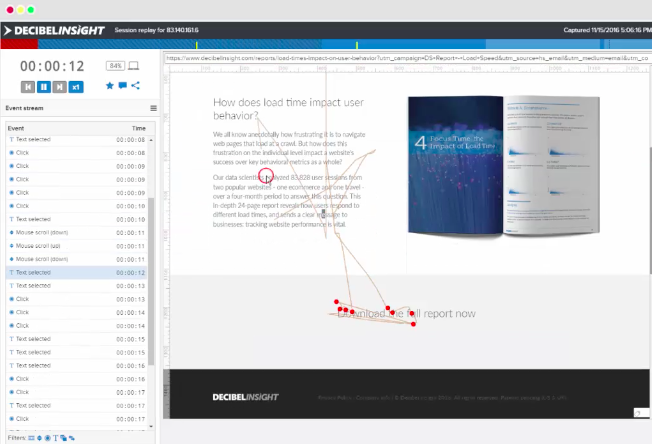
Find out exactly what your visitors are looking for on websites and apps. Decibel Insight is a powerful analytics tool that helps you gather information on the customer experience at each level of the buyer’s journey. Find out where frustrations are occurring due to website errors and where they are navigating the most through heat maps. This intuitive digital behavior resource is a must-have for any business who wants to improve their customer service and sales.

2) Improve your website forms – Formisimo

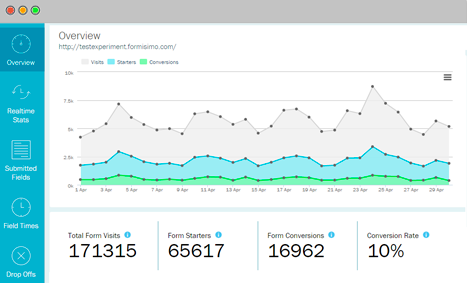
Find out exactly how your forms are performing on your website. Formisimo provides detailed A/B testing that allows you to better understand your current conversion rates. An explanatory report is then provided so that you don’t have to analyze the data yourself. Learn more about user behavior and whether the buying process is advantageous for them.

3) Re-engage with your customers – Really Good Emails

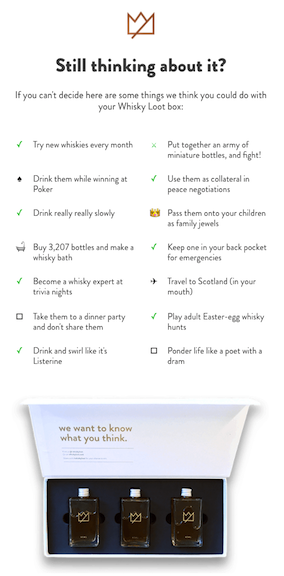
Stop missing those all important customer emails coming into your inbox each day. Really Good Emails is unique tool that monitors your communication and campaigns and provides smart templates that will capture the reader’s attention. Select from a large selection of categories such as Abandon Cart, Product Feedback, Recent Purchase, and more. Include videos and images that speak directly to your customer’s needs.

4) Give your website a 5 second test – Five Second Test

Would you like to find out what visitors are experiencing as soon as they arrive? There is a great tool to help you quickly test out your landing page. Five Second Test provides one platform to enter your URL or upload designs for precise analyzing. This is a great way to get instant UI feedback without having to spend a lot of money on expensive software.

Hopefully you will find these conversion tools useful to your business sales.

Sourced from Susan Gilbert

By Roopesh, Sourced from Passive Income for All.

Would you like to learn how to increase website ranking? I am talking not only when it comes to new posts /pages, but how to boost your old material as well?

Then you have come to the right place. The information that I am going to share with you will help you whether you are new to the online world or have been publishing content for a while.

As always, if you’ve got something on your mind, please shoot your questions in the comments section below. I promise that I will get back to you at the soonest.

Wealthy Affiliate Banner

Starting an Online Business is Rewarding, but can be a Challenge at First


Certain things that are online work fast, in order for you to get the result quickly.

Online banking is quick and fast

For instance, if you want to do online banking, purchase something from Amazon, or watch a YouTube Video, things happen with just a few clicks of the mouse.

You would think that the same would go for having an online business. That after a few shares on social media, you would generate quick returns.

This is a common misconception, and I too was guilty of thinking that way.This was until I discovered the truth.

Discovering The truth about Earning Online

Building an online business takes TIME and HARD WORK. The two are part and parcel, and, if you’re looking at building a solid online enterprise, then strap yourself in.

Be Prepared to put in the effort. I PROMISE you, if you stick it out, then the rewards will be greater than you can ever imagine.

This is one of the reasons why I am so grateful to Wealthy Affiliate.They have taught me how to build a proper online business from scratch, the right way, via simple and easy to follow steps. Fast Forward from about two years to the present day, I’ve built three websites, that I can say I am proud of.

If you are interested in learning more about Wealthy Affiliate, check out my review here.


Getting back to my point. Since building an online business takes Time, initially, you will NOT see any significant rankings or big changes happening on your site. That is normal and expected.When life gets challenging

There are times when things may seem like it’s all uphill and a battle, but don’t give up. Keep doing your best and see it through and you will be successful.

Here are a couple of factors as to why your site will NOT rank within the early stages.

FACTORS THAT INFLUENCE SITE RANKINGS


1. Domain Age

If you’re completing the process of buying your first domain name, then you are a freshman to the game. Welcome.

Welcome.

There are likely to be competitors within your niche that have been around for five years or longer. So, expect this kind of scenario.

2. Site Age

This is self-explanatory and goes hand in hand with point number one.

3. Trust Flow

Google and other Search Engines (like Yahoo, Bing, etc), need to trust your site, They want a good enough reason to rank your site into a favorable position. They want to see that you are working on your site.

Some of the things that they take a look at include stuff like,

  • Are you writing on a consistent basis?
  • Do you have internal linking on your site?
  • Are you creating discussions within your comments thread?
  • How is your content being shared on social media?

4. Frequency of Content

If you are working on your website on a regular basis and publishing content more than twice a week, then you would stand a better chance at good website rankings as opposed to someone who publishes just once a month.

5. Overall Volume of Content

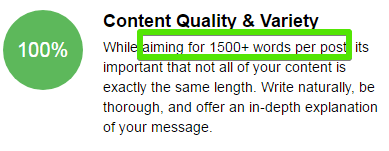
This is the amount of content that you have within a single article. Depending on the subject matter, I like to write around 1500  – 2000 words per article. I don’t always stick to this, but aim to get as close to it as possible.

I actually use the guide that Wealthy Affiliate has taught me.

Volume of content

The point is to offer quality information rather than to focus on quantity.

Remember if you write to help people, rather than to impress Google, then you will get some ‘ Google Love.’

6.Content Engagement

This is the search engine taking into account your interactiveness with your readers. When you start getting comments, reply promptly to your readers.Try to spur on a discussion and get folks to spend more time on your site.

Creating a good user experience(UX) will help you in the long run.

Before I reveal to you the 7 Tips that I use to get website rankings, I want to tell you one important thing. If there is anything that you take away from this article, it’s this-

REMEMBER, THE SITES that you are competing with, HAD TO ALSO START FROM SCRATCH. Everyone has to start somewhere.

So, HANG IN THERE, it will be worth it.

Wealthy Affiliate Banner

HOW TO INCREASE WEBSITE RANKINGS


So, you have chosen a good CMS (Content Management System), like WordPress and you at the point of writing out content for your site.

Your article is about to be published. Before you click on that blue button, make sure that you do these 7 things first.

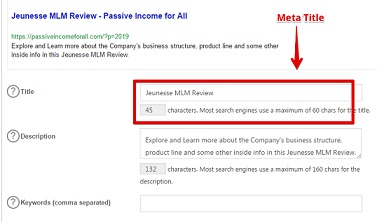
Step One – Insert a Meta-Title

Here is a snapshot showing part of an article that I am about to publish. If I had to scroll all the way down to the end of the article, there is a section called Main Settings. This is where I insert the Meta-Title.

Meta title in Word Press


Meta title is the keyword for the article that I used. It is what will show up in the SERPS (Search Engine Results Page).

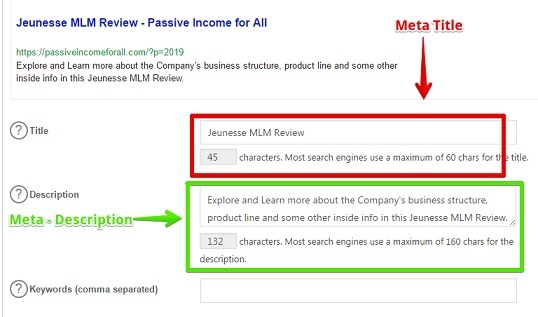
Step Two- Insert Meta Description

Just below the meta title, there is space for me to give a short description of my article. For SEO purposes, I like to include the keyword that I am using in the description as well.

Meta Description goes in WordPress


This description is what people will see. I believe that it can influence the reader’s decision to choose your site over the other choices.

Step Three -Keyword in Content

We know Google has various algorithms that are going on, that determine how to rank websites.There was a time when keyword density was once used to favor one site over another.

With time as Google became smarter, they cut down on this and may sometimes penalize a site for over stuffing content with keywords.

Using keywords is essential. I personally make sure that I use one keyword within my content.Then I just write naturally.Remember, your content will generate other keywords like LSI (LATENT SEMANTIC INDEXING), which will boost your site as well.Read More about LSI Keywords here.

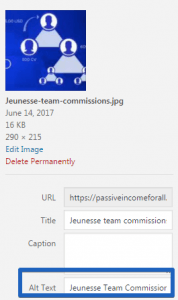
Step Four- Alt Tag within an Image

The ‘alt-tag’ is a description of an image.It helps for people who are visually impaired to identify your content.Alt text image for Word Press

This is also, to tell the Search Engines, what the image is all about,

Step Five- Internal Linking

This is a link from one page or post within your site, to another page or post on your site.

Naturally, when you first start out building your site, you will not have that much content to interlink to. However, as times goes on, this will change.

I would go for a minimum of one internal link per article. This would ultimately depend on how relevant your content is to the rest of your site.

Step Six- External Linking

This is a link going away from your site to a different source. Here again, try for just one per article.

Step Seven – Embed a Video

It may NOT always be possible, but if you can, try to embed a video into your content.

Get people to stay longer on your site. Google will see that you have value to offer as people are spending more time. They will reward you with better rankings.

Now, I know that I said 7 tips to help you out. But, because you proved yourself to be a super trooper and have stuck with me until this point, I’ve got a bonus 8th tip for you!

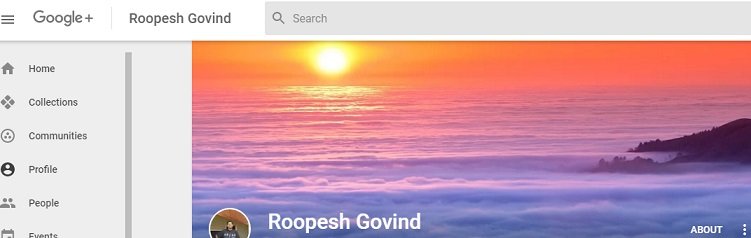
Step 8 – Interact With Google Plus

What is Google Plus?

It is a social media platform just like Facebook and Twitter.The difference is that like YouTube, Google Plus is owned by Google.The more your content gets shared on Google Plus, the better it is for you.

What is Google Plus

Speaking of Google, you may also want to consider, registering your site with Google Search Console (formally known as Google Webmaster Tools-GWT).

When your site is registered, then you are able to notify Google of any material that you’ve just published.

By notifying them, you speed up the process of getting your content ranked rather than waiting for the bots to swing by your site.

This process of notifying Google is called ‘Fetch as Google.’

Interested in learning more?  Here is some training taking you through the process. You may have to sign up. Don’t worry, it’s FREE.

That’s it, folks!

Those are the simple steps.There is nothing else to it. Simply apply this strategy to every article you do, and you will then be on your way.

Some commonly asked questions


Is there a need to purchase ranking software?

No! Automation tools do not help in the long run. Just stick to this. Make your life easy, not hard.

Will these tips help on old posts?

Yes

Will it help the rankings of older posts?

Yes

Should you use this strategy all the time?

Definitely yes,

Conclusion


Did you enjoy reading about my 7 (actually 8), simple steps on how to increase website ranking?

We all are at different places in the online race. Take your time, even if you feel like a tortoise. Remember, slow and steady wins the race.

Wish you tons of success in your online journey.

Kind Regards and Take Care

Roopesh

Sourced from Passive Income for All

By James Wilson

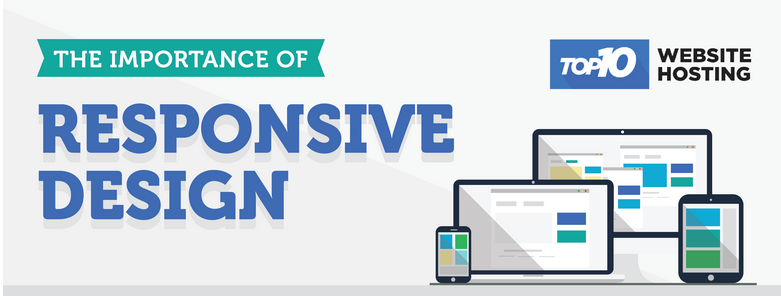
There are many reasons why having a “responsive website” is such a key element to any website. Having a site that is responsive means that your visitors can browse and find information regardless of the type of device that they are using.

This is both crucial for the overall user experience and conversions. This infographic highlights some of the key statistics that really show the importance of having a mobile friendly website. In the US 55% of internet traffic is coming from mobile devices and this continues to increase every year.

Having a responsive site is critical in 2017 and will doubt help with converting and retaining customers. You can create a “mobile friendly” site with many of our web hosting companies such as eHost and SiteGround to name but a few.

Download this infographic.

By James Wilson

Sourced from Top10 Website Hosting

By

If you can demonstrate your brand’s mission throughout your site, people will be flocking to it in no time.

It’s never easy to stand out from the crowd. After all, there are probably over a thousand sites in your industry, and while you know your product or service has the potential to be at the forefront, getting there probably seems like an exhausting, labor-intensive (and potentially very expensive) venture.

However, gaining traction for little-to-no money or effort could be much more feasible than you may think. In fact, you’re probably already taking some of these actions right now; and, with a little bit of tweaking to your strategy, you could be off to the races with more traffic than rush hour in L.A

1. Start a blog (and keep up with it).

Starting a blog is one of the most efficient ways to not only drive traffic to your site but give visitors a taste of how you think as well as what your brand is about. However, while a lot of folks want to hop right in and start writing, it’s important to have a plan in place so your content doesn’t become redundant or stagnant. Not to worry though, as there are plenty of guides on how to begin. I recommend Moz’s “Beginner’s Guide to Content” as a good place to start.

2. Become a thought leader.

Thought leadership follows in the same vein as blogging but differs in that the content you produce is based more on ideas and observations about your respective industry. As (Entrepreneur contributor) Jayson Demers relayed in “5 Steps to Becoming a Thought Leader In Your Industry,” the goal is to become the spark of innovation for your peers.

While thought leadership isn’t always an available option for every industry, it’s worth every second of effort to not only drive traffic but to further both personal and professional growth, as well.

3. Change up your email strategy.

As BlueHost noted in its 8 Outstanding Ways to Promote Your New Website, strategies like developing a contact list and changing your email signature are simple steps in the right direction. There are also tons of great products out there to help your direct email responses, such as Mailchimp (an easy to use email marketing platform), Boomerang (a Gmail add-on to help you choose when you send/receive emails) and Mailtrack (which lets you know if/when someone opens and reads your emails).

4. Form a partnership.

Partnering with another successful business can be an excellent way to show off the types of brands you align yourself with and to gain new followers almost instantaneously. However, while plenty of business owners have their bucket lists of people they want to work with, a partnership still needs to be a symbiotic relationship.

Entrepreneur writer Kate McKay summed this up perfectly in her piece, “How to Create Strategic Partnerships That Are a Win-Win”: “Be clear on the value you bring to the table,” she wrote. “Be honest about why you’re interested in creating a partnership and what you bring to the table. Write down the answers to the following: ‘Why does this relationship benefit my professional and personal growth?’ and ‘What do I expect to gain from this partnership?’

“This is not a time to hash out your business plan or a mission and vision statement,” McKay added. “If you don’t have clear answers to these questions, you’re not in a position to create effective connections.”

In short, a partnership is just like any other relationship:  a shared experience of value. So make sure you bring something to the table, too.

5. Become a social media master.

Tackling social media isn’t as hard as you might think. In fact, the key to success with it is right in its name: “social.” All it takes to begin gaining followers is the ability to start a conversation and keep it authentic.

The driving factor behind customer-acquisition success is that you make sure to keep your brand’s online presence genuine, instead of giving in to the temptation to serve canned content and activity. Don’t post articles just for keyword metrics; don’t pay for followers just to make your account look more appealing. Operate your brand’s online presence the same way you run your personal social media accounts.

While it’s important to be mindful of driving your social channels to your primary website, as long as you remember your brand’s mission throughout the site, people will be flocking to it in no time.

Image credit: MCCAIG | Getty Images

By

AJ Agrawal is the CEO and co-founder of Alumnify. an alumni-engagement platform.

Sourced from Entrepreneur

Here are some website redesign pointers for growing small and medium-sized businesses

By MediaStreet Staff Writers

Says Ufuoma Otu of Take Culture Media, “Whether you plan to redesign your website in-house or source it externally, play an active role in managing the process. This is the first tip we give to growing small and medium-sized businesses. The initiative you display on the front end and the attention you give to communicating the site’s vision early on will help drive momentum on your project and ultimately help make it successful.”


Other tips include:

Know what you want.

This helps saves a lot of time, effort, revisions, and increases the likelihood of you and your developers creating a finished product your team is happy with for a long time. Well, until it’s time to redesign your website – again!

Carve out time to peruse various websites you like, figure out various elements of them you can integrate into your site to enhance your users’ experience.

Commit to an effective review process.

The website redesign process is only as complicated as you and your team make it. Yes, the process may vary based on the size of the website, company or project it’s being built or redesigned for. Will you communicate changes primarily – by phone, email, in-person meetings? Who are the stakeholders who will green light progress and changes? For example, in smaller companies, the C-suite is more accessible and will play a more active role. In larger organisations, department heads may wield more influence on changes and updates to be made.

Usability is king.

It used to be content is king – it still is. So is usability. Welcome to the user experience kingdom. Always think of how your users will interact with your site. Envision this, test it, implement, and test again – on different devices and platforms. The general rule of thumb is: use fewer words, more photos or graphics (depending on your industry), and intuitive navigation. The point is to make the user experience as smooth as possible. Keep testing until you go live.

Be flexible.

Stick to your process – yes. But on the flip side of that, be flexible. Creating or redesigning a site is a dynamic process that happens in real-time and in tandem with changing needs, market changes, and other factors that are not always within your team’s control. Provide vision and guidance, but be open to your team’s interpretation of the vision expressed.

Honour the creative process.

It is a creative endeavour; recognise it as such and not simply as a to-do item on your list. Or you can, but you may end up with a site that lacks essence. Lead with praise before offering constructive criticism, and the next iteration of the site could very well knock your socks off.

Make it a visual canvas.

The most stunning websites walk the fine line between eye-catching colours and white space. This makes them visually appealing but makes the content easy on the eye. Nowadays we look at screens all day long, so adopt an elegant site design that is simple and users will be glad to use – and even simply admire.

Share it.

What good is the most well-designed website no one knows about? Once you finally have the website you are proud of, share it! Let everyone in your organisation know about it. Don’t forget your clients, social media community, and collateral materials. And remember to update your relevant keywords on search engines.